MS/TP Communications Bus Technical Bulletin
Code No. LIT-12011034 Software Release 7.0 Issued July 2, 2015 Refer to theQuickLIT websitefor the most up-to-date version of this document.
Document Introduction...3
Related Documentation...3
MS/TP Bus Overview...5
FC Bus...6
SA Bus...6
Remote Field Bus...7
BACnet Router Configuration...9
Supervisory Engine Configuration for Adding Remote Field Bus...13
BACnet Router Wiring...14
Remote Field Bus Restrictions...14
Remote Field Bus Status and Statistics Attributes...15
Remote Field Bus Status Commands...15
End-of-Line Termination on the MS/TP Bus...16
Baud Rates on the MS/TP Bus...17
Device Addresses on the MS/TP Bus...18
Setting a Device Address...19
Enabling Field Controllers for Wireless Operation...21
Local FC Bus Rules and Specifications...22
EOL Termination on the Local FC Bus...25
EOL Terminator Module...26
TEC26xx Series Thermostats and Third-Party MS/TP Devices...26
SA Bus Rules and Specifications...27
SA Bus Device Limits...28
EOL Termination on the SA Bus...29
SA Buses with Multiple Network Sensors...30
Remote Field Bus Rules and Specifications...31
EOL Termination on the Remote Field Bus...33
EOL Terminator Module for Remote Field Bus...34
MS/TP Bus Cable Recommendations...34
Screw Terminal Blocks for Connecting the Bus Cable...36
Grounding the Bus Cable Shield...37
RJ-Style Modular Jack and Cables for SA Bus...38
Commissioning Devices on the MS/TP Bus...39
Peer-to-Peer Communication...39
Appendix: FC Bus Auxiliary Devices...40
Repeaters...40
Configuring Repeaters...40
Fiber-Optic Modems...41
Routing and Connecting the Fiber Cables...41
Connecting Modems to MSTP Bus...41
Fiber Modem between Two Segments...42
Setting Termination on Fiber Modems...42
Surge Protectors...44
Maximizing Tips...48
MS/TP Bus Health Factors of the Diagnostics Tab...48
Bus Health Index...49
Bus Performance Index...50
Statistics Attributes...50
Analyze Field Bus Command...51
Parameters That Affect MSTP Communication...53
Duplicate Addresses...53
Common Problems...54
Correcting Physical Bus Problems...55
Correcting Bus Overload Problems...55
Reading the Baud Rate of Devices...56
Counting the COVs...57
Disabling a Device on the Bus...57
Changing the Baud Rate of an Entire Bus...58
Automatic Low Resources Monitoring...58
The Object Engine Input Queue...59
Available Free Memory...59
Protocol Engine Input Queue...59
Protocol Engine Output Pending Queue...60
Appendix: Optimizing SA Bus Traffic...61
Excessive Traffic...61
Inputs and COVs...61
Outputs and Commands...63
Document Introduction
The BACnet®protocol Master-Slave/Token-Passing (MS/TP) communications bus is a local network that connects supervisory controllers and field controllers to field point interfaces.
This document describes the specifications, device limits, and rules of the MS/TP communications bus, as well as how to wire and terminate devices, and troubleshoot device communication on the MS/TP bus. The remote MS/TP field bus is also described. With the addition of a BACnet IP to BACnet MS/TP Router, the Remote Field Bus allows connection to remote field controllers over IP.
This document is intended for the user who needs to know the rules, requirements, limits, specifications, and configuration of the MS/TP bus to design, wire, or troubleshoot an MS/TP application.
Related Documentation
Table 1lists the related documentation that describes controllers and systems related to the MS/TP communications bus.
Table 1: Related Documentation
See Document For Information On
Metasys®System Configuration Guide (LIT-12011832)
Metasys®System Limitations and Overview
NAE55/NIE55 Installation Instructions (Part No. 24-10051-43)
Installation and Specifications of the NAE55
NAE35/NAE45 Installation Instructions (Part No. 24-10050-6)
Installation and Specifications of the NAE45 or NAE35
NCE25 Installation Instructions (Part No. 24-10143-63)
Installation and Specifications of the NCE25
Metasys®System Field Equipment Controllers and Related Products Product Bulletin (LIT-12011042)
Specifications of the Metasys®System Field Controllers
FAC2611 Advanced Application Field Equipment Controller Installation Instructions (Part No. 24-10143-187)
Installation and Specifications of the FAC Series Controllers
FAC2612-1 Advanced Application Field Equipment Controller Installation Instructions (Part No. 24-10143-195)
FAC2612-2 Advanced Application Field Equipment Controller Installation Instructions (Part No. 24-10143-233)
FAC3611 Advanced Application Field Equipment Controller Installation Instructions (Part No. 24-10143-470)
FEC16 Field Equipment Controller Installation Instructions (Part No. 24-10143-136)
Installation and Specifications of the FEC16 or FEC26
FEC26 Field Equipment Controller Installation Instructions (Part No. 24-10143-144)
IOM2721 Input/Output Module Installation Instructions (Part No. 24-10144-149)
Installation and Specifications of the IOM Series Controllers
IOM3721 Input/Output Module Installation Instructions (Part No. 24-10144-130)
IOM3731-0A Input/Output Module Installation Instructions (Part No. 24-10144-165)
IOM17 and IOM27 Input/Output Module Installation Instructions (Part No. 24-10144-76)
Installation and Specifications of the IOM17, IOM27, IOM37, or IOM47
IOM37 Input/Output Modules Installation Instructions (Part No. 24-10144-84)
IOM47 Input/Output Module Installation Instructions (Part No. 24-10144-92)
Table 1: Related Documentation
See Document For Information On
VMA1610 and VMA1620 Variable Air Volume Controllers Installation Instructions (Part No. 24-10143-20)
Installation and Specifications of the VMA1610, VMA1620, VMA1615, VMA1630, VMA1617, and VMA1632
VMA1615 and VMA1630 VAV Controllers Installation Instructions (Part No. 24-10143-217)
VMA1832 VAV Controller Installation Instructions (Part No. 24-10143-373)
Wireless Commissioning Converter Installation Instructions (Part No. 24-10108-2)
Specifications of the Wireless Commissioning Converter and Setting up a Bluetooth®Wireless Technology
Adapter Metasys CCT Bluetooth Technology Communication
Commissioning Guide (LIT-12011038 )
BACnet®Controller Integration with NAE/NCE Technical Bulletin (LIT-1201531)
Integrating BACnet®MS/TP and BACnet IP Devices into the Metasys System Network
MS-BACEOL-0 RS485 End-of-Line Terminator Installation Instructions (Part No. 24-10264-4)
Installation of and Specifications for the MS-BACEOL-0 End-of-Line Terminator Module
LIP-ME201 User Manual. Refer tohttp://www.loytec.com
Wiring and Configuration for the Loytec BACnet Router
ZFR1800 Series Wireless Field Bus System Technical Bulletin (LIT-12011295)
Designing, Installing, Commissioning, Operating, and Troubleshooting a ZFR1800 Series System on a Metasys Network
ZFR1810 Wireless Field Bus Coordinator Installation Instructions (Part No. 24-10325-2)
Locating, Mounting, and Wiring ZFR1810 Coordinators and ZFR1811 Routers
ZFR1811 Wireless Field Bus Router Installation Instructions (Part No. 24-10325-10)
Locating, Mounting, and Wiring ZFR1811 Routers
WRZ-TTx Series Wireless Room Temperature Sensors Installation Instructions (Part No. 24-10332-2 )
Locating and Installing WRZ-TTx Series Sensors
ZFR1800 Series Wireless Field Bus System Product Bulletin (LIT-12011336)
Applications, Features, and Benefits of the ZFR1800 Series Wireless Field Bus System
Wireless Metasys System Location Guide (LIT-12011294)1
Estimating Quantity, Locating, and Testing ZFR1800, Coordinators, ZFR1811 Routers, and WRZ-TTx Series Sensors
Controller Tool Help (LIT-12011147)2
Controller Configuration Tool (CCT) Software
1 This document is only available on the Johnson Controls®Portal intranet site. 2 This LIT number represents a printer-friendly version of the Help.
MS/TP Bus Overview
The MS/TP bus is based on BACnet®standard protocol SSPC-135, Clause 9.
The BACnet MS/TP protocol is a peer-to-peer, multiple master protocol based on token passing. Only master devices can receive the token, and only the device holding the token is allowed to originate a message on the bus. The token is passed from master device to master device using a small message. The token is passed in consecutive order starting with the lowest address. Slave devices on the bus only communicate on the bus when responding to a data request from a master device.
Important: Do not connect MS/TP devices and N2 devices to the same bus.MS/TP communications buses follow different protocol and wiring rules from N2 communications buses, and MS/TP devices and N2 devices are not compatible on the same bus.
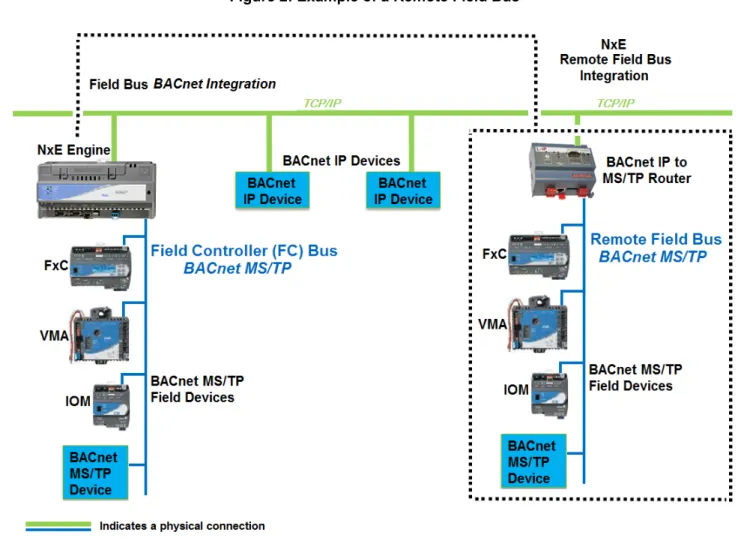
An MS/TP bus (Figure 1) is used for two types of buses: a Field Controller bus (FC) and a Sensor Actuator (SA) bus. The MS/TP bus can also be extended remotely over the IP network with the addition of a BACnet IP to MS/TP router (Figure 2).
The FC bus, SA bus, and Remote Field Bus are networks of daisy-chained devices. Each bus has only one bus supervisor, depending on which controllers are connected. On a local FC bus, the bus supervisor is the supervisory engine. On the local SA bus, the bus supervisor is a field controller. On the Remote Field Bus, the bus supervisor is the BACnet IP to BACnet MS/TP Router (hereafter called the BACnet Router), which works with the supervisory engine when a Remote Field Bus is installed.
Note: When you install a BACnet Router for adding a Remote Field Bus to the job site, you need a site-level, unique MS/TP network number and device object ID (if it contains a device object) for the BACnet Router. In addition, it is critical that you determine if a BACnet Broadcast Management Device (BBMD) is required for the BACnet Router. If you configure the BACnet Router as a BBMD, assign a static IP address to both the router and the NxM or ODS where you are configuring the MS/TP bus. For an existing installation, contact the BAS Manager, Building Manager, or IT department for information on available network numbers, device object IDs, and existing BBMDs for crossing IP subnets. Information on configuring a BBMD in a BACnet Router (if it supports them internally) is available from the router vendor.
The bus supervisor communicates with devices on the supervised bus and with devices on the next (higher level) bus on the network. The bus supervisor typically starts the communication on the FC bus, remote FC bus, or SA bus. If an SA bus, FC bus, or Remote Field Bus does not have a bus supervisor, the master device with the lowest device address value on the bus and a specific baud rate selected starts the communication.
The ZFR1800 Series Wireless Field Bus System enables wireless communication on an MS/TP bus, allowing you to create wireless connections between Advanced Application Field Equipment Controllers (FACs), Field Equipment Controllers (FECs), or VAV Modular Assemblies (VMAs), Input Output Modules (IOMs), and Network Automation Engines (NAEs) or Network Control Engines (NCEs).
SeeEnabling Field Controllers for Wireless OperationandRelated Documentationfor detailed information about the ZFR1800 Series Wireless Field Bus System.
FC Bus
An FC bus connects a Metasys®system NAE or NCE to FACs, FECs, VMA16s, IOMs, and TEC26xx Series thermostats. Third-party BACnet MS/TP devices can also be connected to the FC bus.
Figure 1: Example of an MS/TP Communications Bus
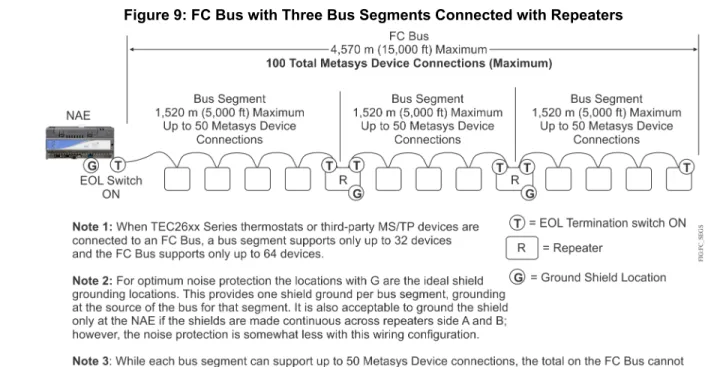
On an FC bus, the NAE or NCE is the bus supervisor. An FC bus supports up to three bus segments that are connected with network repeaters (Figure 9). SeeLocal FC Bus Rules and Specificationsfor more information.
SA Bus
The SA bus connects NCEs, FACs, FECs, and VMA16s (field controllers) to end point devices such as IOMs, network thermostats, network sensors, and Johnson Controls Variable Speed Drives (VSDs).
On an SA bus, an NCE, FAC, FEC, or VMA16 is the bus supervisor. The SA bus is a private MS/TP bus that only supports those devices that can be defined using the CCT programming tool. The bus does not support bus segments (Figure 11). SeeSA Bus Rules and Specificationsfor more information.
Remote Field Bus
The Remote Field Bus uses a BACnet Router to connect remote BACnet MS/TP devices such as FECs and VMA16s to the Metasys network. These devices include FACs, FECs, VMA16s, IOMs, TEC26xx Series thermostats, and other BACnet MS/TP field devices. Although several routers from different manufacturers are available, the recommended device is the LIP-ME201™BACnet Router from Loytec Electronics GmbH.Do notuse any USB-powered MS/TP to IP converter, including the Johnson Controls®BACnet to MS/TP Router (TL-BRTRP-0). Use a Remote Field Bus for applications where routing an RS-485 network directly to an NxE supervisory engine is not practical because of distance, cost, or poor accessibility. In many cases, an IP network connection is available at both the NxE supervisory engine and at some point near the BACnet MS/TP devices. By leveraging the Metasys Remote Field Bus capability with installing the BACnet Router near the BACnet MS/TP devices, you can reduce system cost. Also, when you choose MS/TP device integration with a router rather than BACnet Integration, access to proprietary attributes, message types, and objects from Metasys field controllers is available. This functionality provides you with more information and more capability than the standard BACnet attributes, services, and object types. For example, at the Site Management Portal you can view proprietary attributes such as communication statistics from mapped FEC Family devices. Also, remote MS/TP device integration supports the CCT Pass Through option for downloading devices directly connected to the Remote Field Bus (but not to devices connected to the sensor bus).
Figure 2shows an example of a Metasys network with a Remote Field Bus.
The Remote Field Bus is defined at a Metasys NxE supervisory engine or Open Data Server (ODS) Workstation (Figure 3) through field bus integration, similar to how a local MS/TP field bus is added. The Remote Field Bus appears on the All Items Navigation tree in the Site Management Portal UI. You can also provide a custom name to clearly identify the type of integration.
Note: To ensure acceptable system performance, make sure that you map all devices and objects that originate from a Remote Field Bus to a single supervisory engine, for example, if you have two NAEs (NAE-1 and NAE-2), each with a separate Remote Field Bus. Device 1 is defined under NAE-1, and Device 2 is defined under NAE-2. In this arrangement, make sure you do not map Device 1 to NAE-2 or map Device 2 to NAE-1. If you mix remote field device mapping between supervisory engines, the Metasys system may start very slowly, and devices may have difficulty staying online.
Figure 3: Example of a Remote Field Bus with ODS
Applications for the Remote Field Bus include:
• Any intra-building, inter-building, or remote location that has IP network connections readily available • Locations where it is cost prohibitive or difficult to run MS/TP wiring between devices and the NxEs, due to
• Remote buildings where an MS/TP bus is not already available, but an Ethernet BACnet/IP network is (for example, university or hospital campuses)
• Sites with a reliable network between buildings that do not need to have a separate NAE for the building (for example, school districts)
Note: The ZFR1800 Series Wireless Field Bus Systemis notsupported on the Remote Field Bus.
For details on how to add a Remote Field bus, refer to theMS/TP Field Bus Integration Object section in Metasys SMPHelp (LIT-1201793). For details on how to add a Remote Field Bus to a Metasys supervisory engine with an
ODS, refer to theODS Commissioning Guide (LIT-12011944).
Additional background on the Remote Field Bus is covered in the following sections: • BACnet Router Configuration
• Supervisory Engine Configuration for Adding Remote Field Bus
• BACnet Router Wiring
• Remote Field Bus Restrictions
• Remote Field Bus Status and Statistics Attributes
• Remote Field Bus Status Commands
BACnet Router Configuration
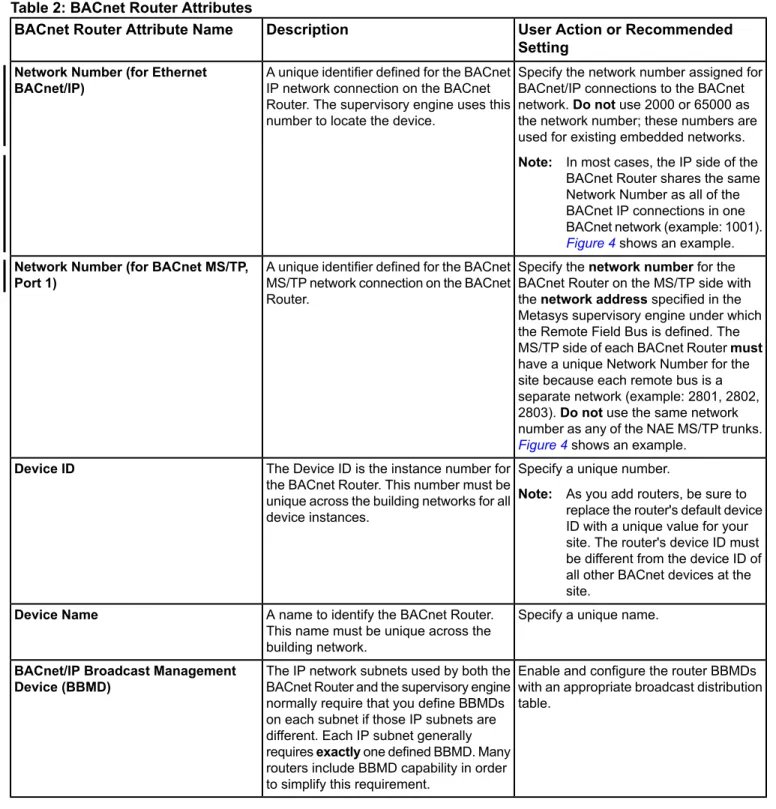
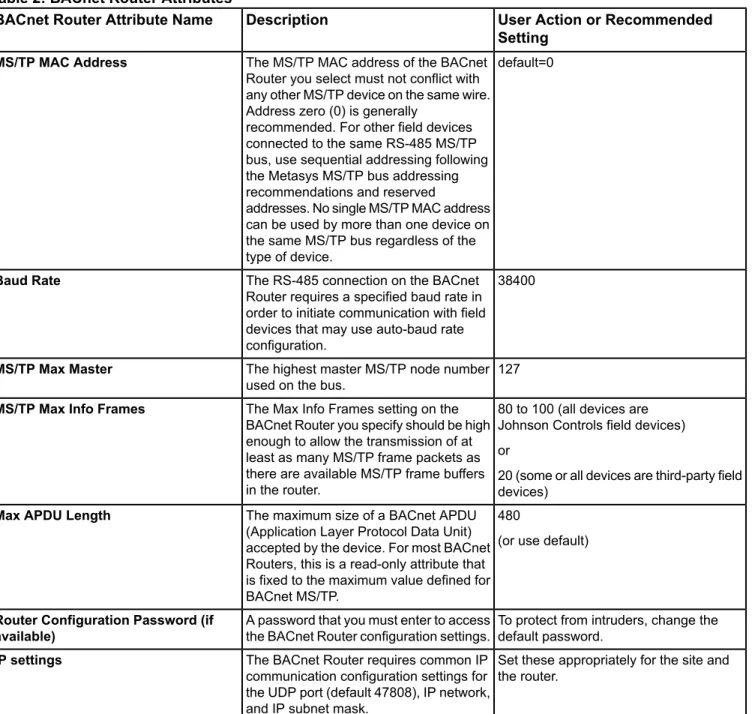
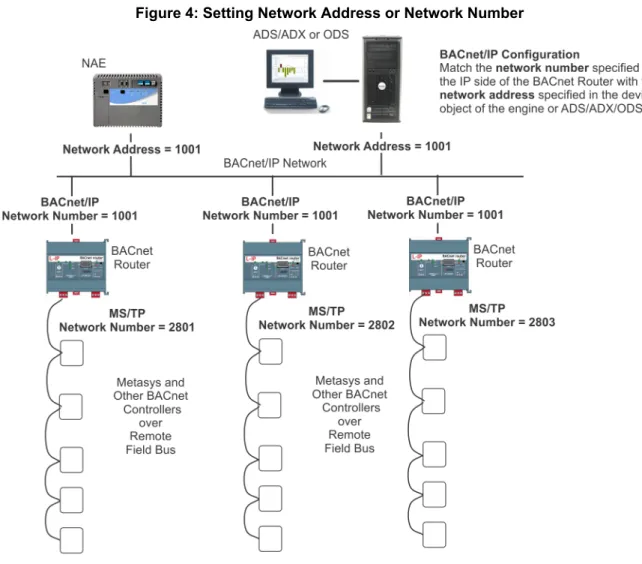
Configuration of the BACnet Router varies by vendor and model of the device, but several important configuration settings are required for all routers.Table 2lists those settings andFigure 4provides an example. For more details on BACnet Router parameters, refer to the documentation provided with your router.
Note: When you install a BACnet Router for adding a Remote Field Bus to the job site, you need a site-level, unique MS/TP network number and device object ID (if it contains a device object) for the BACnet Router. In addition, it is critical that you determine if a BACnet Broadcast Management Device (BBMD) is required for the BACnet Router. If you configure the BACnet Router as a BBMD, assign a static IP address to both the router and the NxE or ODS where you are configuring the MS/TP bus. For an existing installation, contact the BAS Manager, Building Manager, or IT department for information on available network numbers, device object IDs, and existing BBMDs for crossing IP subnets. Information on configuring a BBMD in a BACnet Router (if it supports them internally) is available from the router vendor.
Table 2: BACnet Router Attributes
User Action or Recommended Setting
Description BACnet Router Attribute Name
Specify the network number assigned for BACnet/IP connections to the BACnet network.Do notuse 2000 or 65000 as the network number; these numbers are used for existing embedded networks.
Note: In most cases, the IP side of the BACnet Router shares the same Network Number as all of the BACnet IP connections in one BACnet network (example: 1001).
Figure 4shows an example. A unique identifier defined for the BACnet
IP network connection on the BACnet Router. The supervisory engine uses this number to locate the device.
Network Number (for Ethernet BACnet/IP)
Specify thenetwork numberfor the BACnet Router on the MS/TP side with thenetwork addressspecified in the Metasys supervisory engine under which the Remote Field Bus is defined. The MS/TP side of each BACnet Routermust
have a unique Network Number for the site because each remote bus is a separate network (example: 2801, 2802, 2803).Do notuse the same network number as any of the NAE MS/TP trunks.
Figure 4shows an example. A unique identifier defined for the BACnet
MS/TP network connection on the BACnet Router.
Network Number (for BACnet MS/TP, Port 1)
Specify a unique number.
Note: As you add routers, be sure to replace the router's default device ID with a unique value for your site. The router's device ID must be different from the device ID of all other BACnet devices at the site.
The Device ID is the instance number for the BACnet Router. This number must be unique across the building networks for all device instances.
Device ID
Specify a unique name. A name to identify the BACnet Router.
This name must be unique across the building network.
Device Name
Enable and configure the router BBMDs with an appropriate broadcast distribution table.
The IP network subnets used by both the BACnet Router and the supervisory engine normally require that you define BBMDs on each subnet if those IP subnets are different. Each IP subnet generally requiresexactlyone defined BBMD. Many routers include BBMD capability in order to simplify this requirement.
BACnet/IP Broadcast Management Device (BBMD)
Table 2: BACnet Router Attributes
User Action or Recommended Setting
Description BACnet Router Attribute Name
default=0 The MS/TP MAC address of the BACnet
Router you select must not conflict with any other MS/TP device on the same wire. Address zero (0) is generally
recommended. For other field devices connected to the same RS-485 MS/TP bus, use sequential addressing following the Metasys MS/TP bus addressing recommendations and reserved
addresses. No single MS/TP MAC address can be used by more than one device on the same MS/TP bus regardless of the type of device.
MS/TP MAC Address
38400 The RS-485 connection on the BACnet
Router requires a specified baud rate in order to initiate communication with field devices that may use auto-baud rate configuration.
Baud Rate
127 The highest master MS/TP node number used on the bus.
MS/TP Max Master
80 to 100 (all devices are Johnson Controls field devices) or
20 (some or all devices are third-party field devices)
The Max Info Frames setting on the BACnet Router you specify should be high enough to allow the transmission of at least as many MS/TP frame packets as there are available MS/TP frame buffers in the router.
MS/TP Max Info Frames
480
(or use default) The maximum size of a BACnet APDU
(Application Layer Protocol Data Unit) accepted by the device. For most BACnet Routers, this is a read-only attribute that is fixed to the maximum value defined for BACnet MS/TP.
Max APDU Length
To protect from intruders, change the default password.
A password that you must enter to access the BACnet Router configuration settings.
Router Configuration Password (if available)
Set these appropriately for the site and the router.
The BACnet Router requires common IP communication configuration settings for the UDP port (default 47808), IP network, and IP subnet mask.
Supervisory Engine Configuration for Adding Remote Field Bus
You define the Remote Field Bus at a Metasys supervisory engine much like you define a local field bus. Important settings include Trunk Number and Network Address.
Trunk Number
On a supervisory engine, trunk numbers 1 and 2 are reserved for the local field bus integration. Trunk numbers 3 to 20 are reserved for Remote Field Bus integrations. The quantity of field buses supported on any particular device varies according to the specific device in use. Generally, the number of supported trunks isless thanthe maximum trunk number allowed (Table 3). For example, an ODS supports 16 field buses maximum, not 20 field buses as the trunk number range would suggest. If the specific device does not support a local field bus, such as an NxE85, start with trunk 3, as trunk numbers 1 and 2 are not supported.
Network Address
The network address you specify for a Remote Field Bus integration must match the BACnet Router MS/TP-side network number you specify. The network address must be unique at the site. Keep in mind that each MS/TP trunk on each NxE has a network number that needs to be considered when determining a unique ID. This address is used to locate and establish communication between the Remote Field Bus and the router. A defined Remote Field Bus can only work with one router. If you need to change the network address of a Remote Field Bus after it has been configured, you must restart the Metasys supervisory engine to complete the re-configuration.
Number Of Field Buses Allowed
The total number of local and remote field buses allowed depends on the type of controller as outlined inTable 3. For example, an NIE55 can have up to eight field buses, but an NCE25 or NIE29 can only support one local field bus and no remote field bus.
Table 3: Maximum Number of Field Buses per Controller
Maximum Number of Field Buses (local and remote) Controller
8
NAE55 / NIE59
4
NAE35 / NAE45 / NIE39 / NIE49
1 (local field bus only; Remote Field Bus not supported)
NCE25 / NIE29
16
NAE85 / NIE89
16
ODS
Note: The Remote Field Bus supports up to 32 field devices per BACnet Router on a bus with all Johnson Controls devices, or up to 16 field devices on a bus with a mix of Johnson Controls and third-party devices. Limitations are listed in theMetasys System Configuration Guide (LIT-12011832). Also, to take advantage of bus diagnostics, at least one Johnson Controls field device is required on the Remote Field Bus.
Configuration Attributes Only For Local Field Bus
If the same field bus configuration attribute is specified at both the BACnet Router and the Remote Field Bus, the attribute setting on the BACnet Router prevails. For example, if a Baud Rate of 38400 is specified at the BACnet Router but a Baud Rate of 76800 is specified on the Remote Field Bus, 38400 is used as the Baud Rate on the bus. To be consistent, we recommend that you match the Remote Field Bus attribute values with that of the router, or you can keep the default values at the Metasys supervisory engine. SeeBACnet Router Configurationfor a partial attribute list.
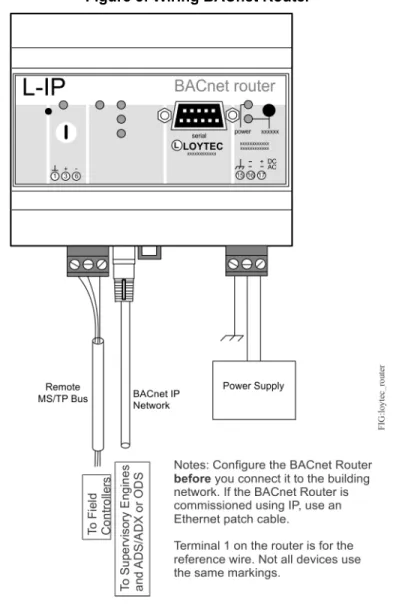
BACnet Router Wiring
Figure 5shows how to wire the BACnet Router to the Metasys system. This example features the Loytec Router, Model LIP-ME201™, the recommended device from Loytec Electronics GmbH.
Figure 5: Wiring BACnet Router
Remote Field Bus Restrictions
Compared to the local MS/TP field bus, the Remote Field Bus has several operational restrictions.
Number of Field Controllers on a Remote Field Bus
The number of controllers that can successfully operate on a Remote Field Bus is generally less than that of a local field bus, and is heavily dependent on the capabilities of the router used. Generally, a good quality router can support at least 10 BACnet MS/TP devices, and some can support more. (SeeTable 10.) If you notice that devices go offline randomly, or you notice a large number of BACnet message retries, you may have exceeded the maximum number of supported devices for the router. You may be able to use a larger number of devices if you mitigate the message traffic that originates from field devices located on the Remote Field Bus.
Field Controller Main Code Release
For Remote Field Bus compatibility, the Main Code for the field controllers you connect to remotely must be at Metasys system Release 5.3 or later. Remote field bus communication is not as robust with controllers that are running older releases of the Metasys system.
CCT Pass Through Loading
Generally, you can upload and download code and applications with CCT Pass Through for devices directly connected to a Remote Field Bus (subject to router message load levels). However, you cannot use CCT Pass Through to download code to an IOM connected to the SA bus of a field controller. In these situations, use a Wireless Commissioning Controller at the remote location.
Device and Point Mapping
When you define a Remote Field Bus, be sure to map all devices and points at the remote controllers through the same Remote Field Bus. For most networks, a detrimental increase in router traffic occurs if multiple integrations use the same router and network number. This is true regardless of where the multiple integrations are defined or if a BACnet Integration is used.
Remote Field Bus Status and Statistics Attributes
With the local field bus, the status and statistics values are obtained directly from the MS/TP communication software, which has direct access to the MS/TP communication frames. However, with the Remote Field Bus, the status and statistics values must be obtained from one of the remote FEC Family BACnet controllers communicating through the BACnet Router. When at least one Metasys MS/TP field controller is mapped to the Remote Field Bus as an FEC Family BACnet device, the system can retrieve and display the status and statistics values from the Remote Field Bus. Be aware that if this field controller goes offline and a different FEC Family field controller is selected to provide remote bus statistics, the values obtained may abruptly change because the values are from a different controller. This is normal operation.
The following Metasys attributes are located under the Diagnostics tab of a Remote Field Bus.
Logging Object Reference
This attribute indicates the remote Metasys MS/TP field controller configured for obtaining MS/TP trunk status and statistics values. The device name appears if available; otherwise, the MAC address on the MS/TP trunk appears. The value is empty for a local field bus, or if no Metasys field controller is available or known. The remote Metasys device is chosen by first looking for an online, mapped FEC Family BACnet device. If none is found, then the Analyze Field Bus command results (if any) are scanned for a possible FEC family device.
Bus Health IndexandBus Performance Index
Trunk health and performance moving average calculations are generally delayed one update time (usually one minute) on a Remote Field Bus due to the delays in reading raw statistics values remotely. As mentioned previously, the numbers reported experience a transient glitch if you change the Metasys BACnet device used to gather statistics.
Port Status
The value of this attribute isRemote Trunkfor a Remote Field Bus. For an online local field bus, the value of this attribute isActive.
Remote Field Bus Status Commands
The Site Management Portal UI offers a few commands that relate to Remote Field Bus operation.
Latch Statistics
The Latch Statistics command is redirected to the FEC Family BACnet Device used for collecting MS/TP trunk statistics.
The Clear Statistics command is redirected to the FEC Family BACnet Device used for collecting MS/TP trunk statistics. If the device used for collecting statistics changes after this command is issued, the new device is not cleared unless the command is issued again.
Sync Field Device Time(s)
The Sync Field Device Time(s) command sends a high-priority time synchronization command to all child BACnet Integration devices, based on each device mapper object's Manual Time Sync Type attribute.
If the Manual Time Sync Type is set to:
• UTC:UTC time synchronization message is sent. • Local:A local time synchronization message is sent. • None:No message is sent.
• Auto:The mapper object's Protocol Services Supported attribute is used to determine which type of time sync is supported, and if:
- utcTimeSynchronization is set, the code functions as if Time Sync Type is set to UTC. - utcTimeSynchronization is not set and timeSynchronization is set, local time is set. - neither utcTimeSynchronization nor timeSynchronization is set, an error is returned.
Analyze Field Bus
The Analyze Field Bus option has been modified on a Remote Field Bus to use BACnet services that can pass through routers. (The local field bus operation can use MS/TP test messages, which do not pass through routers.) In addition, the bus can only detect remote devices that answer the wild card device instance value of 4194303. Some commonly used MS/TP devices do not respond to the wild card device instance value and are not detected by this operation. Devices already mapped are always displayed.
Note: Running a bus analysis remotely requires significantly more time to complete than what a local field bus requires, and adds significant message loading to the router while running.
End-of-Line Termination on the MS/TP Bus
Daisy-chained RS485-protocol networks typically require some type of end-of-line (EOL) termination to reduce interference caused by signal reflection that occurs when data transmissions reach the end of a bus segment and bounce back on the segment. The high baud rates on MS/TP bus applications require robust EOL termination and strict adherence to the EOL termination rules.Figure 6shows an example of the EOL termination settings on an MS/TP bus application.
The EOL termination requirements for the FC bus are different from the SA bus requirements. SeeEOL Termination on the Local FC BusandEOL Termination on the SA Busfor more information.
Also, third-party MS/TP devices and TEC26xx Series thermostats have different EOL termination requirements from Metasys devices on the FC bus. SeeTEC26xx Series Thermostats and Third-Party MS/TP Devicesfor more information.
Figure 6: EOL Terminations on an MS/TP Bus
Baud Rates on the MS/TP Bus
An MS/TP bus can be configured to communicate at one of four different baud rates. All of the devices on an MS/TP bus must communicate at the same baud rate.
The baud rate setting determines the rate at which devices communicate data over the bus. The baud rate settings available on Metasys MS/TP devices are 9600 bps, 19.2 kbps, 38.4 kbps, 76.8 kbps, and Auto. The baud rate setting for Metasys devices is set in the Metasys software.
Note: The BACnet Standard only requires support for 9600 baud. Some 3rd party vendor devices might not support all the baud rates supported by the Metasys system. Reducing the baud rate to accommodate these devices affects overall performance.
We recommend setting all MS/TP bus supervisors (NAEs, NCEs, and BACnet Routers) to 38,400.
We recommend setting all field controllers on the FC bus or Remote Field Bus (FACs, FECs, VMA16s, and IOMs) to Auto. In the Auto setting, the Metasys devices listen for the bus supervisor to communicate first; the devices then automatically set their baud rate to the bus supervisor’s baud rate. FACs, FECs, VMA16s, and IOMs ship with a default baud rate setting of Auto.
If you anticipate critical peer-to-peer communication and therefore do not want field controllers to wait for the bus supervisor to establish the baud rate, you can specify the baud rate for each device immediately at startup. Choose the baud rate carefully if you use this method, since changing it requires changing each device separately.
TEC26xx Series thermostats automatically set their baud rate to the bus supervisor’s baud rate.
Typically, the baud rate setting on bus repeaters and third-party MS/TP devices is configured manually at the device, and the baud rate setting must match the bus supervisor’s baud rate. A third-party device that does not support auto-baud establishes the baud rate for the MS/TP network if the NxE is not connected. Refer to the manufacturer’s product documentation for information on setting the device’s baud rate.
The Metasys software contains the following two device attributes that relate to the baud rate:
• Baud Rate Selectionallows you to set the baud rate for the device using the System Configuration Tool (SCT) for NAEs, or the Controller Configuration Tool (CCT) for FACs, FECs, VMA16s, and IOMs.
• Active Baud Rateallows you to view the baud rate at which the device is communicating on the active bus when Auto baud is selected for the device.
For more information on Metasys system attributes, refer to the Metasys systemHelp (LIT-1201793).
The high baud rates capable on MS/TP buses limit the range of wire gauges used on the bus. The baud rate, wire gauge, wire length, and the number of devices are related. Higher baud rates support more devices but require small gauge wire (which provides lower capacitance). A lower baud rate may be required to use existing, larger gauge wire (which has higher capacitance) but may support fewer devices. We recommend 38,400 baud using 22 AWG stranded wire. This combination provides the best balance between performance and installation sensitivity. For information on determining wire gauges, wire lengths, and the number of devices supported, seeMS/TP Bus Cable Recommendations.
Device Addresses on the MS/TP Bus
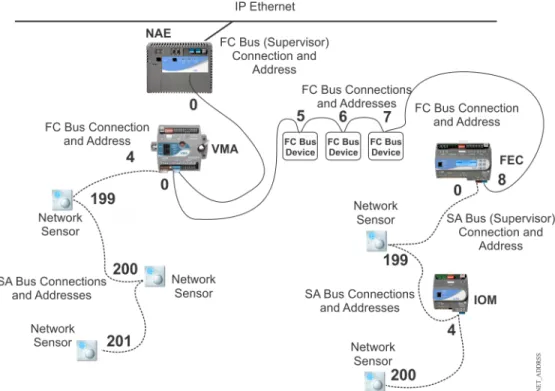
Each device connection on an MS/TP bus requires a device address to coordinate communication. Each bus has a set of device addresses that is separate and independent from the device addresses on all other buses. Devices connected to both an MS/TP bus and SA bus have two device addresses, one for each bus connection (Figure 7). In the MS/TP bus hierarchy, device connections on separate buses can have the same device address. For example, every bus supervisor connection on an MS/TP bus has a device address of 0 (zero), and the device address for the first network sensor on any SA bus is 199. This is possible because separate buses are identified with different network numbers.Figure 7shows a simple example of an MS/TP bus and the device addresses for connections on the FC bus and SA bus.
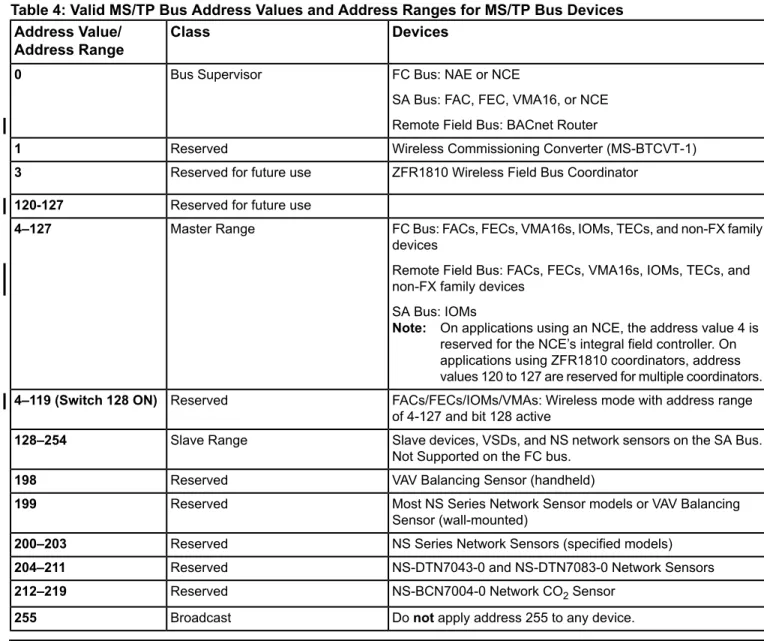
An NAE, NCE, or BACnet Router is the bus supervisor on an FC bus (or Remote Field Bus). The FAC, FEC, VMA16, or the field controller on an NCE is the bus supervisor on an SA bus. Bus supervisors have a fixed device address of 0 (zero) that cannot be changed (Figure 7). Depending on the model, a network sensor has a fixed address of 199 or an assigned (switch-selectable) address between 200 and 203.Table 4provides a list of the valid MS/TP device address values and address value ranges for MS/TP devices.
Each MS/TP master controller passes the token to the controller with the next known address. After 50 token passes, each controller searches for other controllers that might have joined the network by attempting to send the token to the controller with the next consecutive address, starting with one higher than its own, until one is found. While you do not need to address devices on the trunk consecutively, you can improve performance by minimizing address skipping. To help with address value selection, seeTable 4.
Setting a Device Address
For most devices on an MS/TP bus, the (non-supervisory) device address is set by positioning the DIP switches on the device’s ADDRESS DIP switch block. The DIP switch blocks are binary switch blocks, with each switch representing a binary numerical value when the switch is in the ON position.
The device address set on the ADDRESS DIP switch block applies to the device connection on the bus where the device is not the bus supervisor. For example, the DIP switches on FACs, FECs, or VMA16s (master devices) set the device address for the device connection to the FC bus (or Remote Field Bus). If the FAC, FEC, or VMA16 also supervise an SA bus, the FAC's, FEC's, or VMA16's address on an SA bus is 0 by default (Figure 7).
An IOM has only one device connection, which can connect to either an FC bus or an SA bus (but not both); therefore, the device address set on an IOM applies to the bus to which the IOM is connected. (An IOM is never a bus supervisor.)
Table 4: Valid MS/TP Bus Address Values and Address Ranges for MS/TP Bus Devices Devices
Class Address Value/
Address Range
FC Bus: NAE or NCE
SA Bus: FAC, FEC, VMA16, or NCE Remote Field Bus: BACnet Router Bus Supervisor
0
Wireless Commissioning Converter (MS-BTCVT-1) Reserved
1
ZFR1810 Wireless Field Bus Coordinator Reserved for future use
3
Reserved for future use
120-127
FC Bus: FACs, FECs, VMA16s, IOMs, TECs, and non-FX family devices
Remote Field Bus: FACs, FECs, VMA16s, IOMs, TECs, and non-FX family devices
SA Bus: IOMs
Note: On applications using an NCE, the address value 4 is reserved for the NCE’s integral field controller. On applications using ZFR1810 coordinators, address values 120 to 127 are reserved for multiple coordinators. Master Range
4–127
FACs/FECs/IOMs/VMAs: Wireless mode with address range of 4-127 and bit 128 active
Reserved
4–119 (Switch 128 ON)
Slave devices, VSDs, and NS network sensors on the SA Bus. Not Supported on the FC bus.
Slave Range
128–254
VAV Balancing Sensor (handheld) Reserved
198
Most NS Series Network Sensor models or VAV Balancing Sensor (wall-mounted)
Reserved
199
NS Series Network Sensors (specified models) Reserved
200–203
NS-DTN7043-0 and NS-DTN7083-0 Network Sensors Reserved
204–211
NS-BCN7004-0 Network CO2Sensor Reserved
212–219
Donotapply address 255 to any device. Broadcast
255
Important: On FAC, FEC, VMA16, and IOM Series controllers only, the 128 DIP switch on the controller’s device address DIP switch block is a mode switch used to enable the controller to operate in a wireless mode using the ZFR1800 Series Wireless Field Bus System.On any FAC, FEC, VMA16, or IOM Series controller that is hardwired to an MS/TP Bus, set the 128 DIP switch to the OFF position.Operating any FAC, FEC, VMA16, or IOM that is hardwired to an MS/TP Bus with the controller’s 128 DIP switch set to the ON position results in communication failure on the bus.
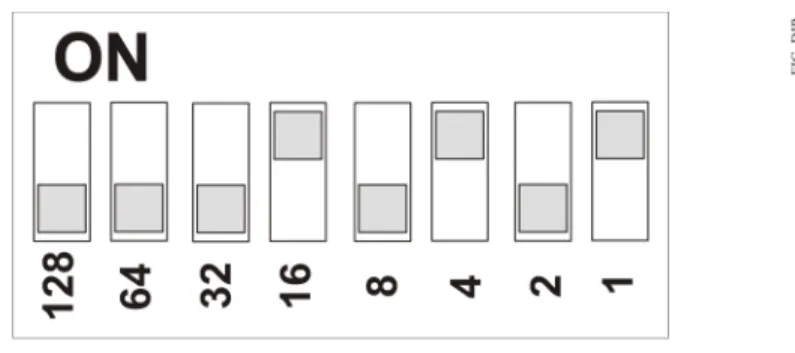
As you set the device address, the best practice is to set the highest switch value first, then the next highest switch value, and so on, until the total of the switch values equal the intended device address. For example, positioning switches 16, 4, and 1 to ON (as shown inFigure 8) sets the device address to 21 for a device on the FC bus.
Figure 8: Setting the Device Address and Wireless Operation Mode on the ADDRESS DIP Switch Block
Note: You must set switch 128 to OFF on all Metasys controllers that are hardwired to an FC bus. Set switch 128 to ON only on FACs, FECs, VMA16s, and IOMs that operate on a Metasys ZFR1800 Series Wireless Field Bus.
Note: Devices may go offline momentarily when a device address is changed on an active bus. A device reset is not required on field controllers or supervisory engines after changing the MS/TP address.
Some devices, such as the TEC26xx Series thermostats and third-party MS/TP devices, use their own configuration settings to establish the device address for their connection to the bus. Refer to the device manufacturer’s product documentation for instructions on setting the device address. The device address values for TEC26xx thermostats and all third-party devices must comply with the rules and ranges described previously.
Enabling Field Controllers for Wireless Operation
The ZFR1800 Series Wireless Field Bus System enables wireless communication, allowing you to create wireless connections between NAEs or NCEs and FACs, FECs, or VMA16s.
Note: The ZFR1800 Series Wireless Field Bus Systemis notsupported on the Remote Field Bus.
On FAC, FEC, and VMA16 controllers, you can enable the controller to operate with a ZFR1800 Series wireless system and connect an MS/TP Bus in a wireless mode by setting the 128 DIP switch on the device address DIP switch block to ON. SeeFigure 8for more information.
To operate with a ZFR1800 Series field bus, an FAC, FEC, or VMA16 must be connected to a ZFR1811 Wireless Field Bus Router, and the associated NAE or NCE must be connected to a ZFR1810 Wireless Field Bus Coordinator. SeeRelated Documentationfor references to more information about the ZFR1800 Series Wireless Field Bus System, FACs, FECs, VMA16s, NCEs, and NAEs.
Local FC Bus Rules and Specifications
Table 5,Table 6, andFigure 9provide rules and specifications for the local FC bus. (For the Remote Field Bus, see
Table 10.) Metasys MS/TP devices generate less data traffic than third-party MS/TP devices and TEC26xx thermostats. Connecting third-party devices or TEC26xx thermostats to the FC bus increases data traffic, reduces bus performance, and reduces the number of devices that can be connected to the FC bus.
Table 5: Local FC Bus Rules
Rules/Limits Category
NAE55Series models can support up to two local FC buses.
Note: When a second FC bus is added to the NAE, be sure the trunk number has not been used on the NAE and enter a Network Address that is unique for the entire site. This applies for any model of NAE.
NAE45Series models can support one local FC bus.
NAE35Series models can support one local FC bus (but an NAE35 FC bus supports only half the number of devices that are supported on an FC bus on an NAE45 or NAE55).
NCE25Series models can support one local FC bus. NCEs must be ordered specifically as N2 or MS/TP models.
Note: An FC port on an NAE/NCE can connect to only one bus segment on an FC bus. Only a daisy-chain topology is allowed (no T or Star topology configurations).
Note: Refer to theNetwork Automation Engine (NAE) Product Bulletin (LIT-1201160)and theNetwork Controller Engine Product Bulletin (LIT-12011283)for complete information on MS/TP bus support on NAE and NCE models.
General
NCE25models support 32 MS/TP devices (maximum) on an FC bus trunk and up to 3 bus segments.
NAE35models support half the number of devices that an NAE45 supports.
NAE45andNAE55models support the following device limits on an FC bus trunk:
When all of the devices connected on the FC bus are Metasys FACs, FECs, VMA16s, and/or IOMs, the device and bus segment limits are as follows:
• 100 devices total per FC bus (maximum) • 3 bus segments per FC bus (maximum)
• 50 devices per bus segment (maximum, not to exceed 100 devices per FC bus) When one or more non-FX family device is connected on the FC bus, the device and bus segment limits are as follows:
• 64 devices total per FC bus (maximum) • 3 bus segments per FC bus (maximum)
• 32 devices per bus segment (maximum, not to exceed 64 devices per FC bus)
Number of Devices and Bus Segments
Bus segments on an FC bus are connected with repeaters (only). Up to two cascaded repeaters may be applied to an FC bus (to connect three bus segments).
Whenallof the devices connected on the FC bus are Metasys FACs, FECs, VMA16s, or IOMs, the cable length limits (using 22 AWG 3-wire twisted, shielded cable) are as follows: • Each bus segment can be up to 1,520 m (5,000 ft) in length.
• Each FC bus can be up to 4,750 m (15,000 ft) in length.
When one or more non-FX family device is connected on the FC bus, the device and bus segment limits are as follows:
• Each bus segment can be up to 1,220 m (4,000 ft)1
in length.
Cable Length for FC Bus and Bus Segments
Table 5: Local FC Bus Rules
Rules/Limits Category
22 AWG Stranded, 3-Wire Twisted, Shielded Cable
Recommended Cable2
The EOL switch must be set toOn(or an EOL terminator installed) on the two devices located at either end of each bus segment on an FC bus. The EOL switches must be set toOff(or EOL termination disabled) for all other devices on the bus segment on an FC bus. SeeEOL Termination on the Local FC Busfor more information.
EOL Termination
1 If third-party devices are connected to the bus, the cable lengths should be reduced (if necessary) to match the third-party vendor recommendations.
2 The recommended cable type provides the best bus performance. SeeMS/TP Bus Cable Recommendationsfor information on alternative cable types and lengths that may be used in MS/TP applications.
Figure 9: FC Bus with Three Bus Segments Connected with Repeaters
The bus segments on an FC bus are connected using repeaters (only). A repeater has two device connections, which are independent of each other. Each device connection on the repeater is connected to a bus segment just like any other device connection on the segment, and a repeater device connection can be connected at the end of a bus segment or anywhere along the segment. When a repeater device connection is at the end of a bus segment, EOL termination must be enabled on that repeater device connection. SeeFigure 10for more examples of repeaters on FC buses.
Table 6: FC Bus Specifications
Specification Category
Message Headers checked using 8-bit Cyclic Redundancy Check (CRC) test. Message data check using 16-bit CRC test.
Error Checking
0–255 (SeeDevice Addresses on the MS/TP Busfor more information.)
Device Addressing
RS485
Data Transmission Standard
BACnet®MS/TP
Signaling Method
9600; 19,200; 38,400; or 76,800 baud as selected by bus supervisor. (SeeBaud Rates on the MS/TP Bus.)
Table 6: FC Bus Specifications
Specification Category
Meets EN61000-4-4 and EN6100-4-5 requirements for heavy industrial applications.
Protected against misapplication of 24 VAC.
Transient Immunity
Integral EOL Termination switch or add-on EOL Terminator module (SeeEOL Termination on the Local FC Bus.)Do notuse third-party EOL termination.
EOL Termination Method
Only one hard ground connection per bus segment when using shielded cable. (SeeGrounding the Bus Cable Shield.)
Shield Grounding
Daisy-chained
Physical Configuration
Repeaters
• Acromag 4683-TTM-1F (115 VAC) • Acromag 4683-TTM-2F (230 VAC) • Acromag 4683-TTM-3F (24 VAC)
Note: A repeater is required to support more than 50 devices per trunk segment or trunk cable segment longer than 1,524 m (5,000 ft). Only the listed Acromag 4683 series repeaters provide EOL termination switching that is compatible with Metasys MS/TP.
Transient Eliminator
Advanced Protection Technologies Transient Eliminator TE/JC04C12
Fiber Modem
• S.I. Tech 2110 Fiber-Optic Modem and S.I. Tech 2121 Power Supply • 9-pin Male Connector Kit (required by 2110 modem)
• Does not support 76,800 baud
EOL Termination on the Local FC Bus
The FC bus requires EOL termination at the end of each bus segment.Figure 10shows four examples of EOL termination on the FC bus.
Figure 10: FC Bus Segment EOL Termination Scenarios
Note: Set the EOL termination switch on a repeater’s device connection to ON only when the repeater connection terminates a bus segment. See Scenarios 3 and 4 inFigure 10.
Note: Third-party MS/TP devices and TEC26xx Series thermostats have different EOL termination requirements on the FC bus. SeeTEC26xx Series Thermostats and Third-Party MS/TP Devicesfor more information.
EOL Terminator Module
The MS-BACEOL-0 RS485 EOL Terminator provides EOL termination on FC bus segments when the device connected at the end of a bus segment does not have integral EOL termination capability.
The EOL terminator is a compact, lightweight, module wrapped in a protective cover that can be quickly installed in a variety of ways. The EOL connects directly to the terminating device on a bus segment with the attached wire leads. The EOL requires 24 VAC, Class 2 power supplied by the field device or other 24 VAC source.
An EOL terminator is required in all Metasys MS/TP applications wherever a terminating device on an FC bus segment does not have integral EOL termination (for example, TEC26xx Series thermostats).
The EOL terminator is designed for FC buses and provides better bus performance than the integral EOL termination on third-party devices. An EOL is recommended wherever a third-party device terminates an FC bus segment. If the EOL terminator is connected to a third-party device that has integral EOL termination, the integral EOL termination on the third-party device must be disabled.
TEC26xx Series Thermostats and Third-Party MS/TP Devices
TEC26xx Series thermostats and third-party MS/TP devices generate more data traffic than Metasys MS/TP devices. Increased data traffic reduces FC bus performance and reduces the number of devices that can be connected to the bus. When any of these devices are connected on an FC bus, different device and cable length limits apply to the bus and bus segments.
If one or more TEC26xx Series thermostat and third-party BACnet®MS/TP device are connected on an FC bus, the supported maximum device counts, bus segments, and bus length are as follows:
• 64 devices total per FC bus (maximum) • 3 bus segments per FC bus (maximum)
• 32 devices per bus segment (maximum, not to exceed 64 devices total on FC bus)
• 1,220 m (4,000 ft) maximum per bus segment (using 22 AWG stranded, 3-wire twisted, shielded cable) • 3,660 m (12,000 ft) maximum per FC bus (using 22 AWG stranded, 3-wire twisted, shielded cable)
TEC26xx Series thermostats and third-party MS/TP devices also have different EOL termination requirements. When a TEC26xx thermostat is at the end of a bus segment, an EOL Terminator must be wired to the FC bus terminals on the TEC26xx thermostat. Third-party devices should not be connected to the end of a bus segment unless the third-party device’s EOL termination capability is disabled and an EOL Terminator is wired to the bus terminations at the third-party device.
SA Bus Rules and Specifications
The SA bus connects IOMs, VSDs, and NS-Series network sensors to field controllers.Figure 11shows three SA bus examples.Table 7andTable 8provide SA bus rules and specifications.
Table 7: SA Bus Rules
Rules/Limits Category
Each bus supervisor supports one SA Bus (and each SA Bus is a single segment).
General
An SA Bus supports up to 10 devices. The SA bus supervisor provides power for all slave devices connected to the SA bus, including up to four NS network sensors. IOMs connected to the SA bus are not powered by the bus supervisor.
Note: Exceeding the SA bus power limit can result in devices going offline and poor bus performance. SeeSA Bus Device Limitsfor more information on SA bus power limits.
Number of Devices Supported on the Bus
SA Buses do not support repeaters. 365 m (1,200 ft) maximum bus length
Cable Length
152 m (500 ft) maximum distance between an NS network sensor and the bus supervisor (FAC, FEC, or VMA16 supplying power to the sensor) using bus cable connected to the SA Bus screw terminal blocks
30 m (100 ft) maximum length for network sensors using bus cables connected to the RJ-Style modular jack (6-Pin SA Bus Port)
366 m (1,200 ft) maximum bus length
Screw Terminal Connections:22 AWG Stranded 4-wire, 2-Twisted Pairs, Shielded Cable for screw terminals.
Modular Jack Connections:6-Pin RJ-Style Modular Connectors with 24 or 26 AWG Solid 6-Wire, 3 Twisted-Pairs
Recommended Cable Type1
Each SA bus supervisor has integral (fixed ON) EOL termination, which typically provides sufficient EOL termination on an SA bus. Long SA bus runs or persistent communication problems on an SA bus may require EOL termination at the last device on the SA bus (in addition to the integral EOL termination at the SA bus supervisor).
EOL Termination
Do not mix RJ-style modular (phone) jack devices and screw terminal devices on the SA bus.
Mixing Device Types
1 The recommended cable types provide the best bus performance. SeeMS/TP Bus Cable Recommendationsfor information on alternative cable types.
Table 8: SA Bus Specifications
Specification Category
Message Headers checked using 8-bit CRC test. Message data check using 16-bit CRC test.
Error Checking
0–255 (SeeDevice Addresses on the MS/TP Busfor more information.)
Device Addressing
RS485
Data Transmission Standard
BACnet®MS/TP
Signaling Method
9600; 19,200; 38,400 (default); or 76,800 baud as selected by the bus supervisor
Signaling Rate
Meets EN61000-4-4 and EN6100-4-5 requirements for heavy industrial applications. Protected against misapplication of 24 VAC.
Transient Immunity
One hard ground per bus segment when using shielded cable
Shield Grounding
Daisy-chained (screw terminal only).
SA Bus Device Limits
The SA Bus is limited to 10 devices total to ensure good communication on the bus and is limited to four NS sensors because only four unique addresses can be set on the sensors. Due to change of value (COV) limitations, it is best to limit the number of IOMs on the SA Bus to four. The SA bus is also limited by the total power consumption of the devices connected on the bus. Exceeding the total power consumption limit can cause poor bus communication and cause devices to go offline.
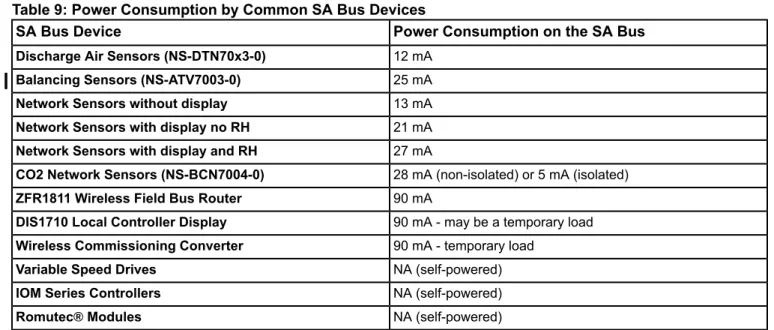
Table 9provides the power consumption of devices commonly connected to the SA bus.
Important: The total power consumption for the SA Bus is limited to 210 mA on the SA Bus modular jack and 240 mA on the SA Bus terminal block. Exceeding the total power consumption limit can cause poor bus communication and cause devices to go offline.
Table 9: Power Consumption by Common SA Bus Devices
Power Consumption on the SA Bus SA Bus Device
12 mA
Discharge Air Sensors (NS-DTN70x3-0)
25 mA
Balancing Sensors (NS-ATV7003-0)
13 mA
Network Sensors without display
21 mA
Network Sensors with display no RH
27 mA
Network Sensors with display and RH
28 mA (non-isolated) or 5 mA (isolated)
CO2 Network Sensors (NS-BCN7004-0)
90 mA
ZFR1811 Wireless Field Bus Router
90 mA - may be a temporary load
DIS1710 Local Controller Display
90 mA - temporary load
Wireless Commissioning Converter
NA (self-powered)
Variable Speed Drives
NA (self-powered)
IOM Series Controllers
NA (self-powered)
Romutec®Modules
SA bus applications are limited to a power load of 210 mA (SA Bus modular jack) or 240 mA (SA Bus terminal block). The best practice when configuring an SA bus is to limit the total available operating power consumption to 120 mA or less. This power level allows you totemporarilyconnect a Wireless Commissioning Converter or a DIS1710 Local Controller Display to the bus for commissioning, adjusting, and monitoring.
On SA bus applications where a DIS1710 display or ZFR1811 Wireless Field Bus Router is permanently connected to the bus, limit the additional available operating power consumption to 30 mA, to allow for the temporary use of a Wireless Commissioning Converter on the bus.
For example, if the ZFR1811 uses 90 mA and the Wireless Commissioning Converter uses 90 mA, you have 30 mA available for additional loads: 90 mA + 90 mA + 30 mA = 210 mA total.
EOL Termination on the SA Bus
On an SA bus, the minimum requirement is that EOL terminationmustbe enabled on at least one device. Since an SA bus supervisor always has EOL termination enabled, this requirement is always met; however, for enhanced bus performance, we recommend that you enable EOL termination on the devices at each end of the SA bus. See
Figure 11for SA bus EOL termination scenarios.
Figure 11: SA Bus EOL Termination Scenarios
Note: The MS-BACEOL-0 RS485 End-of-Line Terminator module is not designed for EOL termination on the SA bus.
SA Buses with Multiple Network Sensors
An SA bus supports up to four network sensors.Figure 12shows an example of two SA buses, each with four network sensors. To place multiple network sensors on the bus, three of the network sensors must be DIP switch addressable.
Note: Do not mix RJ-style modular (phone) jack and screw terminal devices on the SA bus. Due to the permanent internal SA bus EOL termination contained in FECs, FACs, IOMs, and VMAs, using both the phone jack and terminal block effectively puts the EOL termination in the middle of the SA trunk, creating a star network configuration. This configuration violates the RS-485 network wiring guidelines and can cause unpredictable communication problems.
Some NS Series Network Sensors and NS Series Discharge Air Sensors models are DIP switch addressable.
Remote Field Bus Rules and Specifications
Table 10provides rules for the Remote Field Bus (RFB). In addition to these rules:
• Configure the BACnet Routerbeforeyou connect it to the building network. If the BACnet Router is commissioned using IP, use an Ethernet patch cable.
• For each Remote Field Bus you add to an NAE, make sure the trunk number has not been used on the NAE. Enter a Network Address between 1 and 65534 that is unique for the site. Use trunk numbers 3 to 20 to configure Remote Field Buses to the NAE. (Trunk numbers 1 and 2 are reserved for the local field buses.)
• Connect the MS/TP port of the BACnet Router to only one bus segment on the Remote Field Bus. Only a daisy-chain topology is allowed on the Remote Field Bus (no T or Star topology configurations). SeeFigure 9
for an example of bus segments.
• If you create a new remote field bus with SCT by copying an existing remote field bus, you need to change the Remote Field Bus trunk number because the number in the copied bus always reverts to 1.
• BACnet Broadcast Management Devices (BBMDs) may be required to allow BACnet IP broadcast messages to reach the BACnet Router. BACnet IP broadcast messages are used to determine the BACnet Router's IP address. • Define only one Remote Field Bus for each BACnet Router. Performance may be severely reduced if more than
one Remote Field Bus or integration is assigned to the same BACnet Router.
• Do not split the mapping of remote MS/TP devices from a single BACnet Router into more than one Remote Field Bus or integration. Use only one integration to map all devices from the MS/TP side of the BACnet Router.
Table 10: Remote Field Bus Rules
Rules/Limits Category
Total number of field buses (RFB and FC bus):
NAE55:8 (6 RFB + 2 FC or 7 RFB + 1 FC)
NAE45:4 (3 RFB + 1 FC)
NAE35:4 (3 RFB + 1 FC)
NCE25:1 (1 FC;does notsupport Remote Field Bus)
NAE85:16 RFB only
NAE-Lite:2 (1 RFB + 1 FC)
ODS:16 RFB only
General
Total number of remote field devices per Router:
32:if all connected devices are Metasys products
16:if one or more connected devices are manufactured by a third-party vendor
Note: To take advantage of MS/TP diagnostics, you must add at least one Metasys field device (FEC, FAC, VMA16, or IOM) to the Remote Field Bus as an FEC Family device.
Number of Devices and Bus Segments
Bus segments on a Remote Field Bus are connected with repeaters (only). Up to two cascaded repeaters may be applied to a Remote Field Bus (to connect three bus segments).
Table 10: Remote Field Bus Rules
Rules/Limits Category
Whenallof the devices connected on the Remote Field Bus are Metasys FACs, FECs, VMA16s, or IOMs, the cable length limits (using 22 AWG 3-wire twisted, shielded cable) are as follows:
• Each bus segment can be up to 1,520 m (5,000 ft) in length. • Each RFB can be up to 4,750 m (15,000 ft) in length.
When one or more third-party family device is connected on the Remote Field Bus, the device and bus segment limits are as follows:
• Each bus segment can be up to 1,220 m (4,000 ft)1
in length. • Each RFB can be up to 3,660 m (12,000 ft)1
in length.
Note: Do not place slave devices on the Remote Field Bus. Slave devices on the Remote Field Bus are not supported.
Cable Length for FC Bus and Bus Segments
When using fiber-optic connections: 2,010 m (6,600 ft)1between two fiber modems. BACnet Network Number assigned to the IP side of the Router must match the BACnet IP network number used in the supervisory engines. The default IP network number is 1001.
Do notuse 2000 or 65000 as the network number; these numbers are used for existing embedded networks.
BACnet Network Number assigned to the MS/TP side of the BACnet Router must be unique on the site across the entire BACnet Site. This may include multiple buildings, cities, states, and even countries. It is very important to know the network to which you are adding one of these routers.
Device Instance Number assigned to the BACnet Router must be unique on the site.
Network Number and Instance Number for Router
Follow the manufacturers instructions to configure the BACnet Router’s IP address, BACnet Device ID, MS/TP Network Number, and BBMD. Note that some routers do not have a device object in which a device name and id is required.
Set Max Info Frames = 80 to 100 (all devices are Johnson Controls field devices) or 20 (some or all devices are third-party field devices)
BACnet Router Settings
22 AWG Stranded, 3-Wire Twisted, Shielded Cable
Recommended Cable2
The EOL switch must be set toOn(or an EOL terminator installed) on the two devices located at either end of each bus segment on a Remote Field Bus. Use an EOL terminator for the BACnet Router as it has no EOL switch. The EOL switches must be set toOff(or EOL termination disabled) for all other devices on the bus segment on a Remote Field Bus. See
EOL Termination on the Remote Field Busfor more information.
EOL Termination
1 If third-party devices are connected to the bus, the cable lengths should be reduced (if necessary) to match the third-party vendor recommendations.
2 The recommended cable type provides the best bus performance. SeeMS/TP Bus Cable Recommendationsfor information on alternative cable types and lengths that may be used in MS/TP applications.
EOL Termination on the Remote Field Bus
The Remote Field Bus requires EOL termination at the end of each bus segment.Figure 13shows four examples of EOL termination on the remote FC bus.
Figure 13: Remote Field Bus Segment EOL Termination Scenarios
Note: Set the EOL termination switch on a repeater’s device connection to ON only when the repeater connection terminates a bus segment. See Scenarios 3 and 4 inFigure 13.
Note: Third-party MS/TP devices and TEC26xx Series thermostats have different EOL termination requirements on the Remote Field Bus. SeeTEC26xx Series Thermostats and Third-Party MS/TP Devicesfor more information.
EOL Terminator Module for Remote Field Bus
An EOL terminator is required in all Metasys MS/TP applications wherever a terminating device on a Remote Field Bus segment does not have integral EOL termination (for example, TEC26xx Series thermostats and some BACnet IP Routers).
For Metasys devices without a built-in EOL switch, use the MS-BACEOL-0 RS485 EOL Terminator. The EOL terminator is a compact, lightweight module wrapped in a protective cover that can be quickly installed in a variety of ways. The EOL connects directly to the terminating device on a bus segment with the attached wire leads. The EOL requires 24 VAC, Class 2 power supplied by the field device or other 24 VAC source.
For the Loytec Router, use the L-Term LT-04 Bus Terminator. The terminator requires no external power supply. Refer to the Loytec website (http://www.loytec.com) for additional details.
MS/TP Bus Cable Recommendations
The MS/TP bus supports much higher baud rates than the N2 bus. Higher baud rates make the MS/TP bus less fault tolerant and less immune to interference from inductive noise sources that may be present in the application environment.
For the best performance on MS/TP bus applications, use 22 AWG stranded wire in a shielded cable with proper cable shield grounding. This recommendation applies to both local and Remote Field Bus installations. Other wire gauges and non-shielded cablemayprovide acceptable bus performance in many applications, especially applications that have short cable runs and low ambient inductive noise levels.
Table 11provides cable recommendations for MS/TP applications. The recommended FC bus and SA bus cables are available from Belden CDT Inc. and Anixter, Inc.
Alternative cables may be used in MS/TP applications.Table 12provides information regarding the relationship between baud rate, wire gauge, wire length, and supported device numbers. You can also use the information provided inTable 12to determine if existing cable runs may be used in a retrofit or upgrade MS/TP application.
Note: InTable 11, the shielded bus and cable types arerecommended; the non-shielded bus and cable types are