Mao Ni. Automatic extraction of author self contributed metadata for Electronic Theses and Dissertations. A Master’s Paper for the M.S. in I.S. degree. May, 2004. 38 pages. Advisor: Bradley M. Hemminger
This paper discusses the design and implement of an automatic way to extract the
metadata from PDF files in the process of the submission to the Electronic and Theses
Dissertations (ETDs). During the submission, each ETDs system requires some metadata
about the theses to facilitate the metadata search after it is archived. Those metadata, like
creator, title, data, abstract, subject and publisher, comply with the Dublin Core Metadata
Initiative. In most of all existing ETDs repositories, students are required to manually
type in these metadata, which discourages students’ submission, especially when
resubmissions are needed due to the errors found in the theses, because they have to type
all the metadata again each time they submit the theses.
By standardizing a method for capturing the metadata from the original documents, our
project aims to enable digital repository, which hosts the ETDs collection, to
automatically extract the metadata from the theses, making the submissions much easier
and more convenient for the students.
Headings:
Metadata -- Automatic Metadata Extraction
Metadata -- Author Self Contributed Metadata
by Mao Ni
A Master’s paper submitted to the faculty of the School of Information and Library Science of the University of North Carolina at Chapel Hill
in partial fulfillment of the requirements for the degree of Master of Science in
Information Science.
Chapel Hill, North Carolina
May 2004
Approved by
_______________________________________
Table of Content
Automatic extraction of author self contributed metadata for Electronic Theses and
Dissertations... 2
Table of Content ... 2
1 Introduction... 3
2 Literature Review... 5
2.1 Introduction to ETDs ... 5
2.2 Digital Repository for ETDs... 6
2.3 Archiving Format for ETDs... 7
2.4 Metadata Schema ... 8
2.5 Metadata Generation... 10
3 Methods and Approaches... 11
3.1 ETD Environment... 11
3.2 General Approach ... 11
3.3 Procedure for Future Master’s Paper ... 13
3.4 Procedure for existing Master’s Paper... 15
4 Implementation ... 16
4.1 Template Design ... 16
4.2 Plug-in for Adobe Acrobat... 17
4.3 Customization of Dspace ... 20
4.4 Extract metadata from existed Master’s Paper ... 23
5 Results and Conclusion... 26
6 Future Work ... 28
7 Bibliography ... 30
8 Appendix: Sample Code ... 32
8.1 Plug-in Sample Code ... 32
1 Introduction
Electronic Theses and Dissertations (ETDs) are electronic version of printed theses and
dissertations. They are getting more and more popular in the universities, as an ETD
system could save shelf space, more easily searched and retrieved online, and being able
to store multimedia data with the theses and dissertations.
Systems hosting the ETDs usually have a database system running as the back end for
storing and managing the files and data, a user friendly interface to allow students to
submit their theses and dissertations, a workflow interface that librarians use to review
submissions and decide whether to approve or reject them, an interface to be able to
borrow and search the items in the database, and some administrative tasks like account
management.
When submitting a thesis or dissertation to ETDs, every ETD system requires students to
input some metadata about their theses or dissertations like the author, title, degree, and
department. Those metadata could be used later for precise search or interoperability
among the universities. In almost all existing ETD systems, students, when submitting
their theses, have to type in all the metadata requested by the university manually. This I
is an unnecessary burden since students enter all the metadata in the document file. And it
is difficult to detect the errors like typo during the submission because there is no spell
the wrong text. Students are discouraged more if they failed the submission and need to
redo it.
This project aims to free the user from manual enters metadata during the submission in
order to make it a simple and easy procedure. This is accomplished through an automatic
way to extract the metadata like author, title, and abstract from the PDF files.
This automatic metadata project is based on the ETDs project in the School of
Information and Library Science (SILS) at University of North Carolina at Chapel Hill,
2 Literature
Review
2.1 Introduction to ETDs
There are two main types of Electronic Theses and Dissertations available [1]. The first
one is just the electronic file of thesis or dissertation scanned from hard copy of the thesis
or dissertation. This kind of ETD provides access in the electronic format and could be
easier to carry and more widely to spread than the hard copy. As a matter of fact, it is
almost the same concept as its ancestor.
Another kind of Electronic Theses and Dissertations is the one that content is in
electronic form from writing through archiving. This concept was first initiated during a
meeting in 1987 discussing the application of Standard Generalized Markup Language
(SGML) [2] for the dissertations, and was implemented at Virginia Tech in 1988 [3].
Under this model, students write their theses and dissertations in the electronic forms
using documentation software like Microsoft Word, Latex, or FrameMaker, and then
convert them to files with archived formats. Those files will be electronically submitted
onto the digital repositories through network along with some metadata, which is data
about data, like author, title, abstract, major and date. Once submitted, students, faculties,
and researchers could browse and search the papers through metadata on those ETDs
online residing on the digital repositories. A repository could also support full-text
among them could harvest the metadata from other ETDs and then enable users to search
all ETDs at one place.
Obviously, the second type of ETD is getting much more popular than the first one due to
its powerful functions and inter-connectivity.
2.2 Digital Repository for ETDs
Networked Digital Library of Theses and Dissertations (NDLTD) [4], which began a
pilot project at Virginia Tech in 1996, is the first community to build up ETDs in the
universities.
Many universities want to build up their own ETDs as separated systems. There are
several popular free software applications serving as digital repositories including
DSpace [5], Eprints [6], ETD-db [7], and Fedora [8]. Through implementing Open
Archive Initiative (OAI) [9] compatible interfaces, these ETDs can serve as federated
systems and can be harvested by metadata search engines like NeoRef [10]. NeoRef has
harvested the metadata from more than 20 OAI-compatible digital libraries and allows
users to do a single search that covers all the libraries.
DSpace, developed by HP and MIT, is a digital institutional repository that captures,
stores, indexes, preserves, and redistributes the intellectual output of a university’s
research faculty in digital formats. It provides a digital platform for people to share their
papers, works, and even ideas easier and faster. University-wide communications of
scholarly knowledge between students and faculties could also significantly improve the
quality and speed of the research projects. Through a web browser, users can easily
Open Archive Initiative, DSpace is able to export the metadata for all content, and
provide retrieval of all the ETDs.
The reason DSpace was chosen for ETDs at School of Information and Library Science is
that DSpace not only provides all the above convenient and rich features to use, but will
soon provide some interesting functions like full-text search and customized metadata for
each collection in the next release.
2.3 Archiving Format for ETDs
There are many electronic formats and technologies to choose from for archiving. These
include ASCII (for text), TIFF, Portable Document Format (PDF) [11], and Extensible
Markup Language (XML) [12] —not to mention word processing, spreadsheets, and
other formats.
Among them, XML and the open standard PDF, has become a widely used format for
distributing documents on the Internet. Both formats have their strengths and weaknesses
for electronic data archiving. But the PDF is especially promising for documents that
must be preserved for litigation and case law because it preserves the visual appearance
of the formatted document.
Now a modified version, called PDF-Archive (PDF/A) [13], is viewed as one of leading
data-format candidates for preserving future access to electronic records and documents.
PDF/A gives archivists more control over how a document is stored than is possible with
the regular PDF format. The PDF/A format derives from Adobe's PDF version 1.4
specification, to which Adobe has relinquished all proprietary rights in perpetuity. The
PDF-Archive Committee has avoided tackling the separate problem of long-term media
The format can include some features that are incompatible with current archival
requirements, such as encryption. PDF documents also are not required to be
self-contained; certain fonts may be drawn from outside the file, for example. The work of the
PDF/A committee is to define a basic subset of the current PDF standard that meets the
needs of producers and users while excluding features that will hinder archival viability.
Properly implemented, PDF-A could have important uses for record keeping. Agencies
might require that public electronic submissions conform to the format. Internal agency
workflows could also rely on it, possibly to include the conversion of other formats to
PDF/A.
Extensible Metadata Platform for PDF (XMP) [14], the Adobe XML Metadata
Framework, would provide for broad and flexible characterization of documents for
maintenance and disposition. From the perspective of archival institutions, XMP shows
much promise for purposes of description, provenance, preservation, and administration.
There are also some key technical advantages of XMP for digital preservation: metadata
is embedded in each file as plain text, which both lessens the possibility of loss and
simplifies access to the metadata.
PDF/A will likely become a widely accepted standard that the industry would use in
building software tools for archiving documents. Users could, for example, have a choice
between saving a file as a PDF or as a PDF/A document. If they selected PDF/A, the
software would then examine the file for elements that would need to be removed.
2.4 Metadata
Schema
Metadata, (Data about Data) is essential for ETDs, as it provides standard data items to
between ETD repositories. Without suitable metadata schema, there is no way for ETD
systems to understand and communicate between each other.
There are couples of metadata schemas available such as Resource Description
Framework (RDF) [15] by World Wide Web Consortium and Dublin Core Metadata
Initiative (DCMI)[16]. RDF is mainly used to refine web contents by improving search
engines and service directories.
Dublin Core is a metadata schema has facilitated the development and use of the Dublin
Core Metadata Element Set (1997), a schema comprised of 15 elements deemed essential
for resource discovery. An underlying principle is that this schema is simple enough for
nonprofessional use. Authors can create metadata working with simple templates or
editors, and experts can subsequently enhance this metadata following a more complex
schema or by performing authority control work.
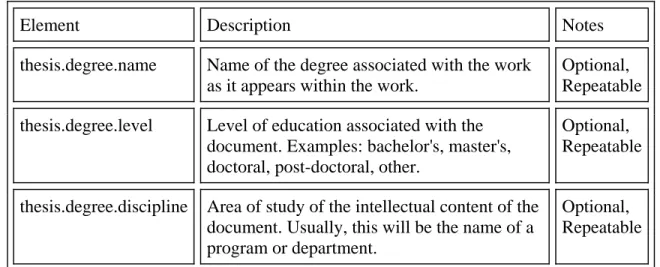
NDLTD has an ETD metadata schema [17], which is based on 15 Dublin Core elements.
Since those 15 basic elements do not contain any metadata that are specific to theses and
dissertations such as major and degree, NDLTD adds additional metadata to the basic
Dublin Core metadata, see Table 1.
Table 1 Additional metadata for ETDs by NDLTD
Element Description Notes
thesis.degree.name Name of the degree associated with the work as it appears within the work.
Optional, Repeatable
thesis.degree.level Level of education associated with the document. Examples: bachelor's, master's, doctoral, post-doctoral, other.
Optional, Repeatable
thesis.degree.discipline Area of study of the intellectual content of the document. Usually, this will be the name of a program or department.
thesis.degree.grantor Institution granting the degree associated with the work. Like other names and institutions, this field should be entered in free text form as it appears on the title page or equivalent, with a link to an authority record if available.
Optional, Repeatable
2.5 Metadata
Generation
Metadata generation from documents, which have no metadata embedded, could be done
manually by human such as librarians or cataloger, or it could be done automatically by
computer programs [18]. They could be a free-text file, with no standard defined to
specify the format of the content to be written in the file, or a structured file which the
texts in the file follow a specific format like XML file.
They both have strength and weakness. Human metadata generation currently has higher
precision than automatic methods, while in the meantime they need much more time and
human power involved. Automatic metadata extraction has great advantages during the
large amount of documents batch submissions.
For those free-text documents, metadata could be extracted automatically by applying
algorithms like machine learning methods and neural networks. Support Vector Machines
is one of the promising methods to provide robust and adaptable extraction results [19].
From structured documents, since all the contents are defined in a strict structure such as
XML in the file, it is much easier to get those metadata out precisely. But it requires users
3 Methods
and
Approaches
3.1 ETD
Environment
The ETD for the School of Information and Library Science (SILS) at University of
North Carolina at Chapel Hill is running on a two Intel X86 CPUs based Redhat Linux 9.
And the digital repository we applied is DSpace 1.1 with Apache Tomcat 5 and
PostgreSQL 7.3 open source database management system.
Although PDF/A has better features than PDF, but PDF/A standard has not released yet.
So in this project, we just apply PDF as the archive format. Since PDF/A is based on
PDF, it will be easy to migrate from PDF to PDF/A.
The word processing software that students using for their thesis and dissertation at SILS
is Microsoft Word 2002, and the tool they used to create PDF files are called PDFMaker,
which comes with Adobe Acrobat 6.
3.2 General
Approach
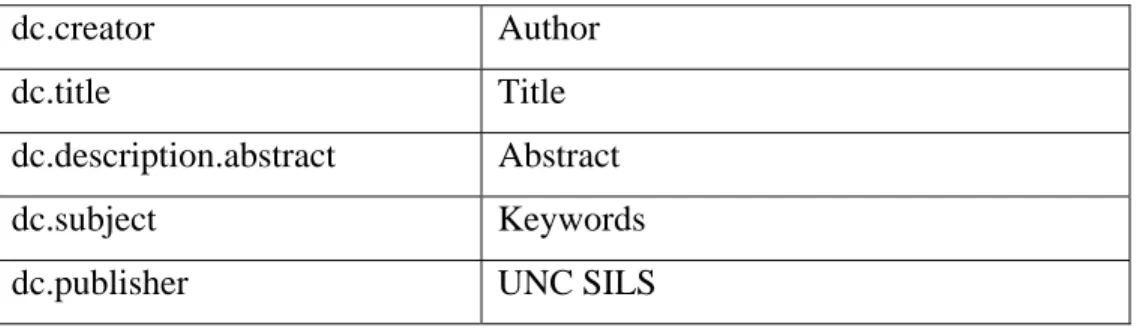
According to NDLTD, the metadata we are collecting for SILS ETDs are in the table 2.
Table 2 metadata for ETD at SILS
dc.creator Author
dc.title Title
dc.description.abstract Abstract
dc.subject Keywords
dc.contributor.advisor Advisor
dc.date.submitted Month, Year
dc.type Electronic Thesis or Dissertation
dc.format.mimetype application/pdf
dc.identifier.url http://handle.net/1901/
dc.language En
dc.coverage Relationships
dc.rights Copyright
thesis.degree.name Master of Science
thesis.degree.level Master
thesis.degree.discipline Major
thesis.degree.grantor University of North Carolina
In order to automatically generate above metadata during the submission, those metadata
must have been already embedded into the PDF files before submission and are able to be
retrieved by Dspace system after customization. As we stated early, PDF stores metadata
in the XMP stream and it is feasible to get them back from the PDF files.
So the question is how we put metadata into XMP stream from document written in
Microsoft Word. Adobe Acrobat provides a tool, PDFMaker, to convert the Word
documents into PDF document, and it could transfer some metadata like author and title
in the metadata of the Word document. Obviously, however, it is not enough for all the
above metadata.
As we know, in Microsoft Word, each paragraph can be associated with a style, which
defines the presentation of font size, color, font family and margins. Fortunately,
documents and convert them into the Tagged PDF, which is a kind of XML document,
each object has a tag attached to it.
By implementing a plug-in for Acrobat, we can collect the content of those tags we are
interested and write them to the XMP stream in the PDF files and they could be able to
retrieved by the Dspace.
By the time we implement the ETD at SILS, there are already hundreds of Master’s
Papers existing in PDF format, and obviously it is infeasible to embed the metadata into
them. We then have to apply a different procedure for them.
For those files, the only way to generate the metadata automatically is from these
free-text documents. Fortunately, the format of the Master’s Paper at SILS are very strict that
we could apply some simple formats to extract the content easily instead of using some
complicated algorithms and still get fairly good results.
3.3 Procedure
for
Future Master’s Paper
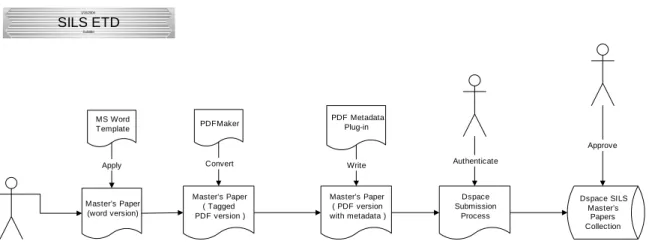
In order to embed the necessary metadata into the PDF XMP stream, what we will do is
to create a convenient process for the students to follow. See Figure 1.
Figure 1 Dspace SILS Master’s Papers Collection Subtitle 1/15/2004 SILS ETD MS Word Template Apply Master’s Paper (word version) Master’s Paper ( PDF version with metadata )
Dspace Submission
Process Master’s Paper
( Tagged PDF version )
This procedure is divided into three stages. The first step is writing thesis in Microsoft
Word with a template file created for them. The template file defines the margin size,
font size and styles for some contents, which will be applied for metadata extraction like
the title style for the title of the thesis. By providing the template file, we also simplify
the basic format for students to follow the instruction by SILS.
After finishing writing the document, students then apply PDFMaker in the Adobe
Acrobat package to transfer word document to PDF file. The metadata like title, author
from the MS-Word will be transmitted into tagged tree in PDF files according to the style
set in the MS-Word. The tag tree looks like the one in the left pane in Figure 2:
The next step is transferring the metadata in the tagged tree into the metadata stream in
the PDF files so that they are extractable by DSpace system. An Adobe Acrobat plug-in
has to be developed to do this transition.
The last step is to use web interface of DSpace to submit the thesis. And the metadata of
the thesis could be automatically extracted from the file after being uploaded. We also
need to customize the DSpace system in order to extract metadata because DSpace
system doesn’t support this functionality at this time.
For this pilot project could also support other documenting software like FrameMaker,
we limit to provide template only for Microsoft Word since most students use it to write
their thesis in the SILS. Template for other input format (Latex, FrameMaker) could
easily be added.
3.4 Procedure for existing Master’s Paper
Legacy support for inputting existing theses was implemented because they do not have a
process set up for them to follow, so they won’t have necessary metadata embedded
within the PDF files. In this case, we need to provide another approach for them. There
are many ways to extract metadata from free text documents including using statistics
technique; none of them could be 100% precise as the structured documents. Fortunately,
SILS has already defined a strict format for how thesis be written, that is, metadata
extraction could be highly precise even without using sophisticated techniques.
Practically, we will develop a PERL program to extract metadata from the text file, which
4 Implementation
4.1 Template
Design
The purpose of the Microsoft Word template file for ETDs at SILS is to provide the style
format of the special content we interested like the title of the paper. All the metadata we
need to collect in the word file are author, title, advisor, date, major, keywords and
abstract. See the following two figures.
The text, Abstracts are here, in the rectangle of the above figure has a style format
defined as “Abstract” shown in another rectangle.
Figure 4
All the paragraphs with light blue color need to be changed by the students with their
specific words. And these paragraphs will be needed later for metadata extraction.
We just define the first two pages for the students to leave the freedom of the format like
font size, font family and other style for their papers.
4.2 Plug-in for Adobe Acrobat
Adobe Acrobat provides a set of Software Development Kit (SDK) 5.0 for users to
including menus and toolbars or functions like making changes in the PDF documents
with Microsoft Visual C++ 6.0.
The implementation of the plug-in for Adobe Acrobat could be divided into two steps:
• Scan the tag tree and retrieve the content if the tag is one of tags what we want
• Write those contents into XMP stream of the PDF files
Tagged PDF has a root called Tags in a tagged tree. And its children are called “Sect”,
which corresponds to the appropriate section in the Microsoft Word document. Under
each “Sect” tag, there are the tag’s names defined in Word for paragraphs. For example,
if there are two paragraphs defined as style “abstract” in the first section of the Word file,
there will be two abstract tags under the first Sect tag. And each abstract tag contains the
text.
Traversing the tag tree in the PDF files iteratively until all sections are reached, we can
retrieve the text wrapped by the tags, which are among the tags we defined.
And then the plug-in prints out those metadata in the dialog for students to verify, see the
Figure 5
After getting all the metadata and processing like remove the punctuations, we can
writing them into the XMP stream by applying the functions provided by Acrobat SDK,
and the plug-in will show the success dialog to indicate the metadata has been written
Figure 6
4.3 Customization of Dspace
The version of DSpace we are running for SILS-ETD is 1.1. Although it is useful
software and has powerful functions as we stated early, it is not perfect for ETDs. There
are some shortcomings such as metadata cannot be customized for a specific collection,
advisors are also listed on the authors’ list which is not appropriate for ETDs, and
showing the small set of metadata which is insufficient when an administrator of the ETD
the java source code of DSpace and do customization on it. We replaced their codes and
made changes needed for ETD like our ETD metadata set.
For the submission procedure, DSpace doesn’t have any automatic way to extract
metadata from the files. The reason might be that there is no standard way how to embed
the metadata in all kind of different archive formats like PDF, XML, or WORD
document.
For our purpose, SILS-ETD, the file format is only PDF, we could customize it to fulfill
the automatic extraction. What we need to modify is the submit Servlet which controls
the behavior of the submission. The default progress for the Dspace looks like the
following figure:
As shown in the above figure, when users submit their works, there are eight steps to go
and have to go one by one in order by click button “Next”. So you need to fill in three
pages of metadata before you could upload their files into the Dspace. Our customization
is to make the Upload skip the first three steps when a user chooses to submit works to
collection: SILS Master’s Papers. And after the PDF file is uploaded, we add the java
code to extract the metadata from XMP stream with JPEDAL [20] software package. The
output of the JPEDAL is kind of XML string, so we applied JDOM [21] to parse the
XML tree and get all the value. Next, we write the value extracted to the database.
4.4 Extract metadata from existed Master’s Paper
For those already existing papers, which do not embed the metadata in their PDF files,
we provided another approach to it.
There is a header page required for the Master’s Paper at SILS and it has very strict
format, which looks like the following figure:
Figure 9
All the metadata needed for ETD are in the rectangles. All the other words on the header
page are the same. So From all these constant words and punctuations, we can generate
After the PDF file is uploaded, I apply PDFBOX [22], an open source project for PDF
conversion tool, to transfer the PDF file into text file. And then I apply PERL scripts to
parse the text file. The procedure goes like:
• Locate the header page first, because sometimes students put the header page on
the last page of the paper. PDFBOX transfers each line from the PDF file into a
new line in the text file, so I normally try to find a line which contains only the
characters “headings:”.
• After locating the header page, I try to locate the first paragraph, which contains
“Master’s Paper”, “degree”, and “pages” keywords.
• Extract the author first which ends up with a dot. In case there is a dot in the
initial name, check the following sentence. If it has only two to three words, it
means it could not be a title because title is usually more than just three words.
Otherwise, it means the first dot ends the author.
• Get the title next which ends with a dot and followed by a sentence “A Master…”
• Retrieve the major in the sentence: “A Master’s Paper in I/L S degree.”
• Submission Date of the paper is right after the major sentence.
• And the words after keyword “Advisor” are the name of the advisor and it ends
with that line.
• All the lines afterwards and before the line “headings” will be considered as
abstraction of the paper.
• All the sentences after “headings” will be treated as keywords
After retrieving all the necessary data, the PERL scripts return those data back to the
This approaches can’t guarantee that we will get 100% sure that the result will be exactly
what we want due to the limitation. But it is pretty precise and is very convenient to be
used to batch handle the submission of the existed old version Master’s Paper to the
5 Results
and
Conclusion
This automatic metadata extraction procedure works exactly as what we expected and
planned. DSpace digital repository extracts all the necessary metadata from the XMP
stream in the PDF files. And the PERL scripts do pretty good job although it is not as
precise as the other one, but is definitely acceptable.
After the ETD system has been developed, deployed, and tested within a small group for
a week, it is ready to use.
Currently, we have around 60 papers submitted in our ETD system. More than half of
them, 34 papers, used this procedure of automatic metadata extraction for their Master’s
Paper. Almost all the metadata extractions were successful, except that a few cases where
styles in MS-Word document were not set correctly. From the feedback of some of them,
this procedure is convenient and easy to use especially when resubmissions are required.
There are still many students who didn’t follow the procedure. Some of them started
writing the paper before the Microsoft Word template file was available and they failed to
integrate them together due to the style difference with the template. For example, after
they copy and paste their work into the template file, the presentation of the original
styles changed. Others found a problem caused by changing one place of the style in the
body affects other places in the header or title page as well. This is because style
management in the Microsoft Word are like inheritance, if the presentation of super style
the sub style is also be changed. Almost all of the problems are involved how to set up
the style correctly in the Microsoft Word and not our procedure.
From the observation, we found there are some learning curves about the style setting. As
long as students who are familiar with the style concept in the Word, they have fewer
problems handling it.
By embedding the structured data into theses and dissertations when students writing
them, we provide a better way to make the submission of ETD an easy job for students
instead of filling many blanks of metadata.
From the observation, we found many students failed during their first submission
because they found there are still some errors in the paper like wrong page numbers. So
this procedure benefits more when they submit more than once. It is frustrating when a
student submit his or her paper many times and each time there are many blanks need to
be filled.
Another great benefit of the automatic metadata generation project is that is possible to
make submission of ETD a batch job. Since there are no needs of input or interrupt by
6 Future
Work
The current procedure of automatic metadata extraction we have is still a little bit
complicated for students since we need three steps to embed the metadata in the ETD,
which could be retrievable later.
One step, which actually could be removed, is the second step. The purpose of that step is
transferring the metadata in the tagged tree into the XMP stream in the PDF files. It is
necessary now because PDFMaker, which converts word document into PDF file, doesn’t
embed the metadata into XMP stream. Also there is no software package available to
retrieve the tagged tree in the PDF file except the Adobe Acrobat SDK, which can only
be used to program plug-ins for Adobe Acrobat. So later on, if we have such software
package available to extract metadata from the tagged tree, we could remove the second
step. Or the simpler way should be that students should submit MS-Word file directly to
the Dspace system and the customized Dspace could automatically extract the metadata
from XMP stream and convert the word file into PDF file. But this is possible only when
PDFMaker could write the metadata into XMP stream.
Currently we only support Microsoft Word file format for automatic extraction, late on
we need to work on other formats like latex, FrameMaker. Right now, students still could
enjoy the automatically metadata generation when submission by entering the metadata
One advanced problem of automatic extraction is the automatic heading generation.
Students, usually without training on cataloging, may not make the best choices how
choosing the right keywords for their works. So this concept solves this problem by
indexing the student’s document and comparing with some popular classification schema
like, DEWEY, Library of Congress, MeSH and provide the heading candidate for
7 Bibliography
[1] ETD Guide, http://www.etdguide.com/etdguide.pdf
[2] WWW Consortium, http://www.w3.org/MarkUp/SGML/
[3] Matthew G. Kirschenbaum, Edward A. Fox, Electronic Theses and Dissertations in the Humanities,
http://www.cs.queensu.ca/achallc97/papers/p037.html
[4] Edward Fox, “NDLTD: Networked Digital Library of Theses and Dissertations”, 2000. http://www.ndltd.org
[5] DSpace Digital Library, http://www.dspace.org
[6] Eprints.org, http://www.eprints.org/
[7] ETD-db, http://scholar.lib.vt.edu/ETD-db/
[8] Fedora, http://www.fedora.info/
[9] Open Archive Initiative, http://www.openarchives.org/
[10] NeoRef, http://neoref.ils.unc.edu/
[11] Adobe Systems Inc.,
http://partners.adobe.com/asn/acrobat/docs/File_Format_Specifications/P DFReference.pdf
[12] WWW Consortium, http://www.w3.org/XML/
[13] The Association for Information and Image Management (AIIM),
http://www.aiim.org/standards.asp?ID=25013
[14] Extensible Metadata Platform, http://www.adobe.com/products/xmp/
[15] Resource Description Framework, http://www.w3.org/RDF/
[16] Dublin Core Metadata Initiative, http://dublincore.org/
[17] NDLTD metadata schema for ETDs,
[18] Greenberg, J. & W. Davenport Robertson (2002). Semantic Web Construction: An Inquiry of Authors' Views on Collaborative Metadata Generation. DC-2002: Metadata for e-Communities: Supporting Diversity and Convergence. Proceedings for the International Conference on Dublin Core and Metadata for e-Communities, 2002, Florence, Italy. October 13-17. Firenze University Press, pp. 45-52.
[19] Hui Han, C. Lee Giles, Eren Manavoglu, Hongyuan Zha, Zhenyue Zhang, Edward A.Fox, IEEE Joint Conference on Digital Libraries, 2003, page 37-48.
[20] Jpedal, http://www.jpedal.org
[21] JDOM, http://www.jdom.org/
8 Appendix: Sample Code
8.1 Plug-in Sample Code
The following segment of code represents the function to scan the tagged tree in the PDF file. AVDoc avDoc; PDDoc pdfDoc; PDSTreeRoot treeRoot; ASUns8 str[1024]; ASAtom tags; ADMItemRef item1;
// Get the displayed page for the active document. avDoc = AVAppGetActiveDoc();
pdfDoc = AVDocGetPDDoc (avDoc);
if( !PDDocGetStructTreeRoot (pdfDoc, &treeRoot)) return 0; // no structure tree
ASInt32 numKids;
if((numKids = PDSTreeRootGetNumKids(treeRoot)) == 0) return 0; // no kids
PDSElement listElement;
//PDSTreeRootGetKid(treeRoot, 1, &listElement); // get the first child
for(ASInt32 ii=0;ii<2;ii++) {
PDSTreeRootGetKid(treeRoot, ii, &listElement); // get the child
// get the number of kids
ASInt32 listLength = PDSElementGetNumKids(listElement); if( ! listLength)
return 0; //no kids
// extract information from each kids for (ASInt32 i = 0; i < listLength; i++) {
CosObj cosObjKid, cosObjKid1;
PDSMC mcKid;
ASAtom kidType = PDSElementGetKid(listElement,i,&cosObjKid,(void**)&mcKid,NULL); if (kidType != ASAtomFromString("StructElem"))
{
AVAlertNote("not a struct element"); continue; // Not a structure element }
ASInt32 jj= PDSElementGetNumKids((PDSElement)cosObjKid); if ( jj != 1 ) continue;
if( PDSElementGetNumClasses((PDSElement)cosObjKid) == 0 ) continue;
ASInt32 qq = PDSElementGetClass((PDSElement)cosObjKid,0,&tags); HANDLER
AVAlertNote(ASAtomGetString(tags)); continue;
END_HANDLER
char* temp = new char[1024];
strcpy(temp,ASAtomGetString(tags)); temp = strlwr(temp);
tags = ASAtomFromString(temp);
delete temp;
if( tags != ASAtomFromString("title") && tags != ASAtomFromString("abstract") &&
tags != ASAtomFromString("author") && tags != ASAtomFromString("keywords") && tags != ASAtomFromString("major") && tags != ASAtomFromString("advisor") && tags != ASAtomFromString("year") )
continue;
// Look at the first kid of structure element
kidType = PDSElementGetKid((PDSElement)cosObjKid,0,&cosObjKid1, (void**)&mcKid, NULL);
if(kidType != ASAtomFromString("MC")) {
AVAlertNote("not a Marked Content"); continue; //not an MC
}
// got the MC, get its content.
PDEContainer pdeContainer = (PDEContainer)mcKid;
PDEContent markedContent = PDEContainerGetContent(pdeContainer);
// process the marked content
ASInt32 numElms = PDEContentGetNumElems( markedContent );
ASInt32 lens = 0;
ASText txt = ASTextFromPDText(""); for( ASInt32 k=0; k< numElms; k++) {
PDEElement pdeElement = PDEContentGetElem( markedContent,k ); if( PDEObjectGetType ( PDEObject(pdeElement) ) == kPDEText) {
ASInt32 nTxt = PDETextGetNumRuns(PDEText(pdeElement));
for( ASInt32 p = 0; p< nTxt; p++) {
str[0] = '\0';
ASInt32 q = PDETextGetText((PDEText(pdeElement)),kPDETextRun,p,str); str[q] = '\0';
ASTextCat(txt,ASTextFromPDText((char*)str)); }
} }
if( tags == ASAtomFromString("title")) ASTextCat(titles,txt);
else if( tags == ASAtomFromString("author")) ASTextCat(authors,txt);
else if( tags == ASAtomFromString("abstract")) {
}
else if( tags == ASAtomFromString("keywords")) {
ASTextCat(keywordss,ASTextFromPDText("\r\n")); ASTextCat(keywordss,txt);
}
else if( tags == ASAtomFromString("major")) {
char ttt[100];
ttt[0] = '\0';
ASInt32 ll;
strcpy(ttt,ASTextGetPDTextCopy(txt,&ll)); if( ttt[ll-1] == '.') ttt[ll-1] = '\0';
else ttt[ll] = '\0';
ASTextCat(major,ASTextFromPDText(ttt)); }
else if( tags == ASAtomFromString("advisor")) {
char ttt[100];
ttt[0] = '\0';
ASInt32 ll;
strcpy(ttt,ASTextGetPDTextCopy(txt,&ll));
ttt[ll] = '\0';
if( ttt[0]=='A' && ttt[7] == ':') {
memmove(ttt+0,ttt+8,ll-8);
ttt[ll-8] = '\0';
ASTextCat(advisor,ASTextFromPDText(ttt)); }
else
ASTextCat(advisor,txt); }
else if( tags == ASAtomFromString("year")) ASTextCat(pDate,txt); }
}
8.2 Dspace Customization Sample Code
The following segment of code represents the function to extract the metadata from input stream and write them to database.
/* automatic metadata extraction */ setDefaultCollection(request,subInfo);
if( subInfo.defaultCollection == 1 ) //SILS Master's paper {
if( (bf.getMIMEType()).compareTo("application/pdf") == 0 ) { //only handle pdf files
try {
// Remove existing values
item.clearDC("degree", "grantor", Item.ANY); // Add to the database
item.addDC("degree","grantor","en","University of North Carolina at Chapel Hill");
// Remove existing values
item.clearDC("type", null, Item.ANY); // Add to the database
// Remove existing values
item.clearDC("format", null, Item.ANY); // Add to the database
item.addDC("format",null,"en","application/pdf");
// Remove existing values
item.clearDC("degree", "level", Item.ANY); // Add to the database
item.addDC("degree","level","en","Master");
// Remove existing values
item.clearDC("degree", "name", Item.ANY);
// Add to the database
item.addDC("degree","name","en","Master of Science");
// Remove existing values
item.clearDC("publisher", null, Item.ANY); // Add to the database
item.addDC("publisher",null,"en","School of Information and Library Science"); // Remove existing values
item.clearDC("language", "iso", Item.ANY); // Add to the database
item.addDC("language","iso","en","en_US");
InputStream iss = new BufferedInputStream( new FileInputStream(temp));
byte[] fileBytes=new byte[iss.available()]; iss.read(fileBytes);
PdfDecoder decode_pdf = new PdfDecoder( false );
try {
decode_pdf.openPdfArray( fileBytes ); }catch ( PdfException e){
log.warn(LogManager.getHeader(context, "maomao","input file is empty ")); }
/**get the Pdf file information object to extract info from*/
PdfFileInformation dic=decode_pdf.getFileInformationData();
/**get the document properties*/
String[] values=dic.getFieldValues();
String[] fields=dic.getFieldNames();
/**display*/
int count=fields.length;
for(int i=0;i<count;i++){
if( ! values[i].equals("")&& (values[i]!= null) ) {
if( fields[i].equalsIgnoreCase( "title" ))
{
String tmps = values[i].trim(); if(Pattern.matches("\\(.+\\)", tmps))
{
tmps = tmps.substring(1,tmps.length()-2); }
// Remove existing values
item.clearDC("title", null, Item.ANY);
// Add to the database
item.addDC("title", null,"en" ,tmps); }
else if ( fields[i].equalsIgnoreCase("author") ) {
if(Pattern.matches("^\\(.+\\)$", tmps)) {
tmps = tmps.substring(1,tmps.length()-2); }
// Remove existing values
item.clearDC("creator", null, Item.ANY);
// Add to the database
item.addDC("creator",null,"en",tmps); }
} }
/**get and show any metadata*/ String md = dic.getFileXMLMetaData(); int index_start = md.indexOf("<x:xmpmeta"); if( index_start < 0 ) index_start=0;
int index_end = md.indexOf("<?xpacket end="); if( index_end < 0 ) index_end= md.length()-1;
String sub_md = md.substring(index_start,index_end);
SAXBuilder builder = new SAXBuilder(); org.jdom.Document jdoc=null;
try {
jdoc = builder.build(new InputSource(new StringReader(sub_md))); }catch ( JDOMException e) {
log.warn(LogManager.getHeader(context, "maomao","metadata "+e)); }
Element roots = jdoc.getRootElement(); if( roots != null )
{
List els = roots.getChildren(); Iterator i = els.iterator();
Namespace ns1 = Namespace.getNamespace("pdf", "http://ns.adobe.com/pdf/1.3/"); Namespace ns2 = Namespace.getNamespace("pdfx", "http://ns.adobe.com/pdfx/1.3/"); while( i.hasNext() ) {
Element el = (Element) i.next(); List ell2 = el.getChildren(); Iterator j = ell2.iterator(); int cnt = 1;
while(j.hasNext() ) {
Element el2 = (Element) j.next();
if( cnt == 1)
{
Element el3 = el2.getChild("Keywords",ns1);
if( el3 != null) {
// Remove existing values
item.clearDC("subject",null, Item.ANY);
// Add to the database
item.addDC("subject",null,"en",el3.getText());
} }
else if( cnt == 2) {
Element el3 = el2.getChild("Abstract",ns2);
if(el3!=null && !el3.getText().equals(""))
{
// Remove existing values
item.clearDC("description", "abstract", Item.ANY);
item.addDC("description","abstract","en",el3.getText()); }
Attribute att=el2.getAttribute("Major",ns2);
String tmps = "";
if( att != null ) tmps = att.getValue(); if( tmps!=null && !tmps.equals("") ) {
tmps = tmps.trim();
if(Pattern.matches(".\\.", tmps));
{
tmps = tmps.substring(0,tmps.length()-1);
}
// Remove existing values
item.clearDC("degree", "discipline", Item.ANY);
// Add to the database
item.addDC("degree","discipline","en",tmps); }
tmps = "";
Attribute att2=el2.getAttribute("Advisor",ns2);
if( att2 != null ) tmps = att2.getValue();
if(tmps!=null && !tmps.equals("") )
{
// Remove existing values
item.clearDC("contributor", "advisor", Item.ANY);
// Add to the database
item.addDC("contributor","advisor","en",tmps); }
tmps = "";
Attribute att3=el2.getAttribute("Date",ns2);
if( att3 != null ) tmps = att3.getValue();
if(tmps!=null && !tmps.equals("") )
{
// Remove existing values
item.clearDC("date", "submitted", Item.ANY);
// Add to the database