Preface
This manual is reference for the DirXmetahub meta agents. It consists of the following sections:
· Chapter 1 introduces the set of DirXmetahub meta agents. · Chapter 2 describes the Lotus Notes meta agent.
· Chapter 3 describes the Windows NT meta agent. · Chapter 4 describes the Microsoft Exchange meta agent. · Chapter 5 describes the Microsoft Active Directory meta agent. · Chapter 6 describes the ODBC meta agent.
· Chapter 7 describes the Novell NDS meta agent. · Chapter 8 describes the SAP R3 meta agent. · Chapter 9 describes the Hicom DMS meta agent. · Chapter 10 describes the DS-Win meta agent.
· Appendix A provides information about the Microsoft Exchange directory schema. · Appendix B provides information about Windows NT attributes and their possible
values.
· Appendix C describes the Microsoft Exchange Server Administrator, which you can use in place of the Microsoft Exchange meta agent to import data into a Microsoft Exchange directory.
DirXmetahub Document Set
The DirXmetahub document set consists of the following manuals:
· DirXmetahub Administration Guide. Use this book to obtain a description of DirXmetahub architecture and components and to understand the basic tasks of DirXmetahub administration using DirXmetahub Manager.
· DirXmetahub Meta Controller Reference. Use this book to obtain reference information about DirXmetahub server programs, scripts, and files.
· DirXmetahub Meta Agent Reference (this manual). Use this book to obtain reference information about the DirXmetahub meta agent programs, scripts, and files.
· DirXmetahubTroubleshooting Guide. Use this book to track down and solve problems in your DirXmetahub installation.
· DirXmetahub Installation Guide. Use this book to install DirXmetahub.
· DirXmetahub Release Notes. Use this book to understand the features and limitations of the current release. This document is shipped with the DirXmetahub installation as the file Readme.txt.
Notation Conventions
Boldface typeIn command syntax, bold words and characters represent commands or keywords that must be entered exactly as shown.
In examples, bold words and characters represent user input.
Italic type
In command syntax, italic words and characters represent placeholders for information that you must supply.
[ ]
In command syntax, square braces enclose optional items. { }
In command syntax, braces enclose a list from which you must choose one item. In Tcl syntax, you must actually type in the braces, which will appear in boldface type. |
In command syntax, the vertical bar separates items in a list of choices. ...
In command syntax, ellipses indicate that the previous item can be repeated.
install_path
The exact name of the root of the directory where DirXmetahub programs and files are installed. The default installation directory is userID_home_directory/DirXmetahub on UNIX systems and C:\Program Files\Siemens\DirXmetahub on Windows
NT/Windows 2000 systems. During installation the installation directory can be specified. In this manual the installation-specific portion of pathnames is represented by the notation install_path.
Chapter
1
1 DirXmetahub Meta Agents
The meta agent component of DirXmetahub is the interface to a specific connected directory. Its function is to import data into that directory and export data from that
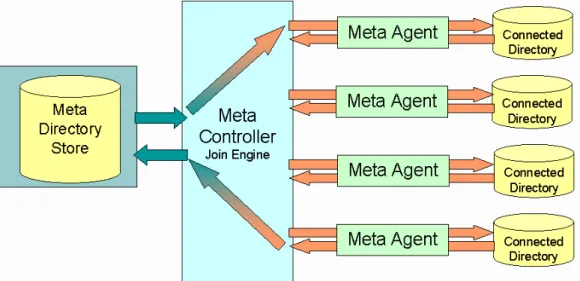
directory. The following figure illustrates the meta agent component and its relationship to the meta controller and meta directory components.
Figure 1: Meta Controller and Meta Agent Control Flow
Meta agents can be designed to handle a particular connected directory, such as NT or Lotus Notes, or they can be designed to handle a specific set of connected directories; for example, ADSI directories or ODBC databases.
The meta controller can also perform the meta agent function: it can export meta directory data into LDIF structured files, and it can import LDIF structured files into the meta
directory database. In this way, the meta controller can act as a generic LDAP agent for meta directory stores.
The next sections provide a description of meta agent architecture and the files used by meta agent components. The remainder of this document provides reference information about each DirXmetahub meta agent, including:
· Command line format
· Import and export configuration file format, and how the data in the configuration file affect the meta agent's import and export operation
· Import and export data file format · Import error file format
1.1 Meta Agent Architecture
DirXmetahub provides two types of meta agent: · Command line-based meta agents
· Synchronization profile-based meta agents
1.1.1
Command Line-Based Meta Agents
A command line-based meta agent is implemented as an executable program that is invoked from a command line. This type of meta agent can perform a unidirectional (one-way) synchronization, which is either:
· The export of data from its associated connected directory into an export data file for subsequent import into the meta directory store. Some meta agents can export incremental data (deltas or changes). If the connected directory does not support deltas (or does, but only partially), the meta agent keeps a copy of the connected directory data in a "delta base" file. The meta agent uses this file to generate delta information or to complete it.
· The import of data into its associated connected directory that has been previously exported from the meta directory store. Some meta agents can perform special administration tasks in the connected directory on import; for example, the creation of mailboxes or user accounts.
A command line-based meta agent can also handle entry and attribute filtering (this filtering is independent of the filtering performed by the meta controller).
A command line-based meta agent requires the operation of the meta controller to complete a synchronization task. The set of command line-based meta agents currently provided by DirXmetahub include:
· A Lotus Notes meta agent · A Windows NT meta agent · A Microsoft Exchange meta agent
· A Microsoft Active Directory (ADS) meta agent · An Open Database Connectivity (ODBC) meta agent · A Novell NDS meta agent
· A SAP R/3 meta agent
1.1.2
Synchronization Profile-Based Meta Agents
A synchronization profile-based meta agent is implemented as a synchronization profile that is invoked from the meta controller. Because its operation is combined with the meta controller operation, this type of meta agent can perform bi-directional synchronization of data between the meta directory store and a connected directory. For example, if the meta directory store is the entry owner, a synchronization profile-based agent can:
· Export entries from the meta directory store, and then synchronize those entries with a connected directory by importing them into the connected directory
· Export any new connected directory-specific data created during the import (for example, a unique identifier value for the entry), and then synchronize the new data into the meta directory by importing it back into the owned entries (for example, by adding the unique identifier as an entry attribute)
Synchronization profile-based meta agents provide a higher level of quality and reliability that their basic counterparts because all of the information about a synchronization task is available in a single run-time executable file (the synchronization profile).
The set of synchronization profile-based meta agents currently provided by DirXmetahub include:
· A Siemens Hicom Domain Management System (HDMS) meta agent · A Siemens DS-Win meta agent
1.2 DirXmetahub Meta Agent Files
DirXmetahub meta agents use the following files: · Import and export configuration files
· Import and export data files
1.2.1
Meta Agent Configuration Files
The meta agent export and import configuration files "configure" a meta agent's import and/or export process.
The directory synchronization parameters for command line-based meta agent
configuration are contained in "*.ini" configuration files, which are generally specified on the command line that invokes the meta agent import or export operation. The
configuration files consist of fields that control directory synchronization parameters such as:
· The category of entry to be exported from the connected directory; for example, NT accounts, NT local groups, or NT global groups
· The set of attributes to be exported from the connected directory; typically a subset of the total number of available attributes can be selected through the export
configuration file
· Whether a full or delta import or export of entries is performed
· The import integration process, such as whether or not existing entries are updated with imported information, whether or not existing entries are deleted if they match entries in the import file, whether imported attribute values replace existing attributes, and so on.
· The server and/or target directory for the import or export
The synchronization profile-based meta agents' directory synchronization parameters are generally specified as profile switches in the variable section of the meta agent's
synchronization profile. The synchronization profile-based meta agents also support import and export mapping rule files that configure the attribute mapping between the directories to be synchronized.
The directory synchronization parameters available in the export and import configuration files or the synchronization profile variable section depend upon the individual meta agent. See the description of each meta agent for an explanation of the format and content of its export and import configuration files and how they affect the meta agent's operation.
1.2.2
Import and Export Data Files
Meta agents use import and export data files to communicate with the meta controller, and both meta agents and the meta controller use these files as intermediate storage in the synchronization process. (Note that protocol access is possible for LDAP-enabled connected directories.)
Each meta agent supports a specific import data file format in which data to be imported into its connected directory must be formatted and supports a specific export data file format that it generates when exporting data from its connected directory. See the description of each meta agent for a description its import and export data file formats.
Chapter
2
2 Lotus Notes Meta Agent
NotesAgent is the DirXmetahub meta agent that handles the import and export of entries to and from a public Lotus Notes address book maintained on a Lotus Notes/Domino server. NotesAgent can handle entries of any Lotus Notes document type.
NotesAgent supports Lotus Notes V4.5 and V4.6 and V5.05; it runs on Windows NT 4.0 and Windows 2000 and requires a co-located Notes Client (4.6.3 or 5.05). NotesAgent uses the Notes API to bind to a Lotus Notes server.
NotesAgent can:
· Perform a full or delta export of Person or Group entries from a Lotus Notes address book, including multiple attribute values
· Perform a full or delta import of Person or Group entries into a Lotus Notes address book, including multiple attribute values
· Create a separate "modify/delete" file of modified and deleted entries as part of the export process
· Create mailboxes and registered users in the Lotus Notes address book as part of the import process
· Rename, re-certify and delete registered users in the Lotus Notes address book as part of the import process
· Generate an import error file that records all entries that it fails to import · Generate a log file (for tracing)
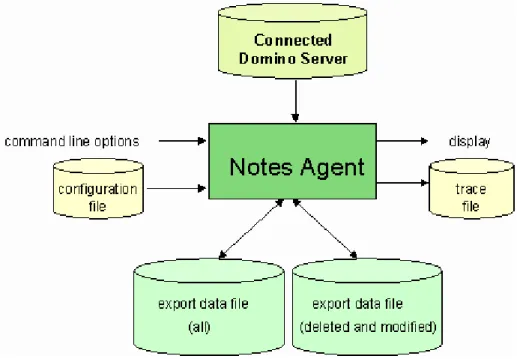
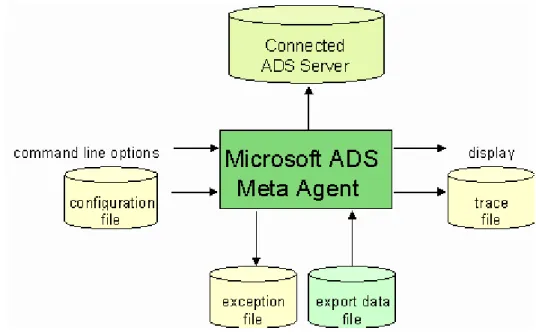
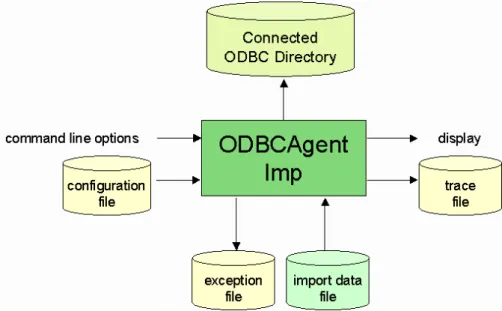
The following figures illustrate the components of NotesAgent export and import operations.
Figure 2: NotesAgent Export Components
This chapter describes:
· NotesAgent command line format for export and import operations · NotesAgent configuration files for export and import operations · The export data file format that NotesAgent generates
· The import data file format that NotesAgent recognizes · NotesAgent import error file format
Sample configuration files and scripts are provided in the \Samples\Notes directory of the DirXmetahub installation. See the file NotesReadme.txt for a description of these files and scripts.
2.1 Command Line Format
The command line format to invoke NotesAgent is as follows:
NotesAgent.exe sync_switch data_file configuration_file error_file>initial_error_file
Parameters
sync_switch
Specifies the type of directory synchronization that NotesAgent is to perform. Possible values are:
/e - Invokes the NotesAgent export function /i - Invokes the NotesAgent import function
data_file
For export: specifies the pathname of the target export data file that is to contain the entries that NotesAgent extracts from a Lotus Notes address book. For delta exports this file must already exist and is used as the delta base to generate delta information. For import: specifies the pathname of the source file that contains the data to be imported into the Lotus Notes address book.
configuration_file
Specifies the name of the file that contains the specifications for the import or export procedure.
error_file
Specifies the name of the file to which NotesAgent is to write error messages about errors that occur during the import or export process, in the format:
#error_code
#error_message
where error_code is the code for the error that occurred, error_message is a description of the error, and error_specific_information is additional information that can appear depending on the type of error. For example:
#ProcessAddress error:
#Find more as one document with the following ItemIdentityName(s):
LastName: Test00000 FirstName: Hugo
ShortName: hTest00000
In this example, the last three lines are specific for this error.
For an import operation, NotesAgent writes additional information about the entries that it cannot import into the Notes address book into the file specified in error_file. See "Import Error File Format" for more details about the contents of the error file on an import operation.
initial_error_file
Specifies the name of the file to which NotesAgent is to write error messages about errors that occur before it creates error_file. The error format is the same as that of
error_file.
2.2 Configuration File Formats
NotesAgent uses the following configuration files:
· Notes export configuration file — controls the export of data from a Lotus Notes address book
· Notes import configuration file — controls the import of data into a Lotus Notes address book
· Password configuration files — automate password authentication during NotesAgent login to a Lotus Notes server and enable the assignment of a default password for registered users
See "General Structure of a Configuration File" for a description of the basic organization. Templates of these configuration files are provided with the NotesAgent installation. The filenames are:
· NotesExport.ini · NotesImport.ini · NotesPathPWIni.ini · NotesPassword.ini
Notes import and export operations.
2.2.1 General
Structure
of a Configuration File
A NotesAgent configuration file consists of sections and fields defined within those sections. A configuration file has the following structure:
[SectionName] <;comment> sectionField=fieldValue . . . [SectionName] <;comment> sectionField=fieldValue . . .
SectionName is a keyword enclosed in square brackets ([ ]) that identifies the purpose of the section. sectionField is a keyword that identifies the field and fieldValue is the value assigned to the section field, preceded by the equal sign (=). For example:
UpdateExportFile=1
Comments can be inserted anywhere in the configuration file and are identified by a semicolon (;) at the beginning of a line.
2.2.2
Export Configuration File Format
The NotesAgent export configuration file consists of these sections: · The Version section (required)
· The Export section (required) · The Export Items section (optional) These sections are described below. The Version Section
The Version section consists of a single field that specifies the export configuration file version. The syntax is:
Version=version_number
where version_number is the version number assigned to the configuration file, in the format n.nn. The current version is:
Version=1.02
This is a mandatory field. This document describes the latest version of the NotesAgent export configuration file. The NotesAgent is able to process configuration files with version number 1.00, 1.01, 1.02 or "old" files that do not contain a Version section. The following table provides information about the differences between export configuration file versions and about the support of older export configuration file versions for compatibility reasons: "Old" 1.00 1.01 1.02
FileForDeleteAddr Supported Not supported Not supported Not supported FileForModifiedAddr Supported Not supported Not supported Supported The Export Section
The Export section consists of fields that define the parameters of an export operation for NotesAgent. The next sections describe these fields.
Server
The Server field specifies the name of the Notes server that contains the Notes address book from which entries are to be exported. The syntax is:
Server=[server_name]
where server_name is the name of a Lotus Notes server, in the format: "CN=server_name/O=organization_name[/…]"
For example:
Server="CN=westford/O=IRIS/O=LOTUS"
If server_name is not specified, the NotesAgent uses the local Notes address book (the address book that is present on the machine on which NotesAgent is running) as the export target.
This is a mandatory field. AdrBook
The AdrBook field specifies the name of the Notes address book from which entries are to be exported. The syntax is:
AdrBook=filename[.nsf]
where filename is the name of a Notes address book managed by the Notes server specified in the Server field and .nsf is the file extension, which is automatically supplied by NotesAgent if you do not specify it explicitly. (You cannot use a different extension). A single Notes server can support multiple Notes address books. NotesAgent can export from only one Notes address book at a time.
FormName
The FormName field specifies the Lotus Notes document type to be extracted from the Notes address book. The syntax is:
FormName=document_type
where document_type is a Lotus Notes document type. For example: FormName=Person
This is a mandatory field. SMTPHostDomain
The SMTPHostDomain field controls the generation of Internet addresses for Person entries exported from a Notes address book. The syntax is:
SMTPHostDomain=[domain_name | None]
Notes address books do not store Internet addresses. You can use the SMTPHostDomain field to control:
· whether or not Internet addresses are generated for Person entries that are exported from the Notes address book
· the domain supplied in the generated Internet address for each Person entry Specify the name of a host in domain_name to generate an Internet address for each exported entry that uses this domain. For each exported entry, the NotesAgent generates an Internet address in the SMTP format:
name@domain_name
where name is the value of the ShortName attribute of the Notes entry and domain_name
is the value supplied in domain_name. For example, if SMTPHostDomain is: SMTPHostDomain=wstfd.ibm.us
and the value of ShortName for the entry is: ShortName: Ray.Ozzie
the generated Internet address for the entry is: [email protected]
The Internet address is written to the export data file in this form: InternetAddress: [email protected]
Specify the keyword None to suppress Internet address generation for exported entries. If no value is specified in this field, NotesAgent generates SMTP-format Internet
addresses for the exported entries using the ShortName attribute for the name part of the address and the value of the SMTPFullHostDomain attribute of the Notes server entry
("document", in Notes terminology) in the hostname part of the address. It also updates the SMTPHostDomain field in the export configuration file with the retrieved Notes SMTPFullHostDomain attribute value.
This is a mandatory field. ModifiedAddresses
The ModifiedAddresses field controls whether NotesAgent performs a full or delta export of the document type specified in the FormName field from the Notes address book. The syntax is:
ModifiedAddresses=[switch]
where switch is one of the following values:
· 0—Export all entries of the selected document type (default)
· 1—Export only those entries that have been added, deleted, or modified after the date specified in the ModifiedDate field
If 0 is specified, NotesAgent creates one file that contains all of the entries of the selected document type that are present in the address book. This file is called the "export data file" (or "full export data file") and is the file specified as an import data file to metacp. If 1 is specified, NotesAgent creates two files:
· A file that contains all of the entries of the selected document type that are present in the address book (the full export data file); this is the file specified in data_file on the command line
· A "modify and delete" file, which contains the entries that have been added, modified or deleted since the date specified in ModifiedDate (delta export data file). New and modified entries are identified by a "modify" changetype attribute. Deleted entries are identified by a "delete" changetype attribute. See the section "Delta Export data file Format" for further details about "modify/delete" file format.
NotesAgent creates the "modify/delete" file using the pathname specified in the FileForModifiedAddr field.
This is an optional field. If it is not specified (or the field is not present in the configuration file), NotesAgent exports all entries of the selected document type that are present in the address book.
ModifiedDate
The ModifiedDate field specifies the date to be used to select entries for export. The syntax is:
ModifiedDate=date_and_time
ModifiedDate=22.06.98 14:20:25
specifies the date in European date and time format. In this example, all entries added, deleted, or modified after the specified date are to be exported. After NotesAgent
performs a delta export, it updates this field in the export configuration file with the current date and time to enable subsequent delta exports. The date and time format specified in this field must match the date and time format selected in the Windows NT Regional Settings Properties Date and Time tabs.
This is an optional field unless ModifiedAddresses is set to 1. UpdateExportFile
The UpdateExportFile field controls (for delta exports only) whether or not the full export data file created by the NotesAgent can be updated. The syntax is:
UpdateExportFile=[switch]
where switch is one of the following values: · 0—Do not update the full export data file · 1—Update the full export data file (default)
If 0 is specified, NotesAgent creates a new full export data file on subsequent export operations and preserves the original full export data file it creates on the initial export. If 1 is specified, NotesAgent overwrites the original full export data file on subsequent export operations.
This is an optional field. If it is not specified (or is not present in the configuration file), NotesAgent preserves the original full export data file on subsequent export operations. NotesAgent evaluates this field only when performing a delta export (ModifiedAddresses set to 1).
CopyDeletedAdrInModFile
The CopyDeletedAdrInModFile field controls whether or not NotesAgent retrieves the contents of entries of the document type selected with the FormName field that have been deleted since a full export data file was last generated. The syntax is:
CopyDeletedAdrInModFile=[switch] where switch is one of the following values:
· 0—Do not retrieve the contents of deleted entries · 1—Retrieve the contents of deleted entries (default)
The Notes address book retains the identifiers of deleted entries, although their contents are removed. Specifying 0 in this field directs NotesAgent to write the identifiers of the deleted entries to the "modified/deleted" file that it creates if the ModifiedAddresses field is set to 1. Specifying 1 in this field directs NotesAgent to retrieve the entry contents
associated with the deleted entry identifiers from the most recently generated full export data file, and write the contents and the identifiers into the "modify/delete" file.
This is an optional field. If it is not specified (or is not present in the configuration file), NotesAgent retrieves the contents of deleted entries. NotesAgent evaluates this field only when performing a delta export (ModifiedAddresses set to 1).
FileForModifiedAddr
The FileForModifiedAddr field specifies the pathname of the file to which NotesAgent is to write modified (and deleted) entries during a delta export operation. The syntax is:
FileForModifiedAddr=pathname
where pathname is the name for the "modify/delete" file. For example: FileForModifiedAddr=c:\lotus\ModDelFile
This field is optional unless ModifiedAddresses is set to 1. NTAgent does not evaluate this field if ModifiedAddresses is set to 0.
ExportAllItems
The ExportAllItems field controls whether all of the attributes ("items", in Notes terminology) of entries of the document type selected with the FormName field are exported, or whether a specified subset of attributes is exported. The syntax is:
ExportAllItems =switch
where switch is one of the following values:
· 0—Export only the entry attributes specified in the ExportItems section of the configuration file
· 1—Export all of the entry attributes (default)
This is an optional field. If it is not specified in the configuration file, NotesAgent exports all entry attributes for entries of the selected document type.
SearchDocuments
The SearchDocuments field controls whether or not NotesAgent searches for and exports specific entries ("documents", in Notes terminology) of the document type specified in the FormName field. The syntax is:
SearchDocuments =switch
where switch is one of the following values:
· 0—All entries are exported (no attribute selection criteria are established for entry export) (default)
· 1—Export only the entries described by the SearchItemName and SearchItemValue fields
If SearchDocuments is set to 1:
· The ModifiedAddresses field is ignored
· Values must be supplied for the SearchItemName and SearchItemValue fields This is an optional field. If it is not present in the configuration file, NotesAgent exports all entries of the selected document type.
SearchItemName
The SearchItemName field specifies an attribute within an entry to search for. The syntax is:
SearchItemName=attribute_name
where attribute_name is a Notes attribute name for an attribute ("item") that can be present in an entry of the document type specified in the FormName field. For example:
SearchItemName=Department
directs NotesAgent to search all entries of the selected document type for the Department attribute. The entry is exported if it has the value specified in the SearchItemValue field. This field is optional unless SearchDocuments is set to 1.
SearchItemValue
The SearchItemValue field specifies a value to search for (case exact match), given an attribute name to search for that is specified in the SearchItemName field. The syntax is:
SearchItemValue=attribute_value
For example:
SearchItemName=Department SearchItemValue=Iris
directs NotesAgent to search all entries in the Notes address book for the Department attribute, and export entries whose value for the Department attribute is Iris.
This field is optional unless SearchDocuments is set to 1. Separator
The Separator field specifies a value to be used to separate the individual attribute values of a multi-valued attribute. The syntax is:
Separator=[character]
This field is optional. If it is not specified (or not present in the configuration file), NotesAgent uses the comma (,) as the multi-valued attribute separator.
Trace
The Trace field controls whether NotesAgent performs program flow tracing on an export operation. The syntax is:
Trace=[switch]
where switch is one of the following values:
· 0—Do not perform program flow tracing on the export operation (default) · 1—Perform program flow tracing on the export operation
If 1 is specified, NotesAgent writes information about the export operation to the pathname specified in the TraceFileName field. The type of information stored in the trace file depends upon the settings of the TraceLevel_1, TraceLevel_2, and
TraceLevel_3 fields. If Trace is set to 1, one of the trace level fields must also be set to 1. TraceLevel_1
The TraceLevel_1 field controls whether NotesAgent writes level 1 tracing information about the export operation. Level 1 tracing information includes a dump of the
configuration file, number of documents, and other program flow variables. The syntax is:
TraceLevel_1=[switch]
where switch is one of the following values:
· 0—Do not write level 1 trace information (default) · 1—Write level 1 trace information
If 1 is specified, NotesAgent writes level 1 trace information about the export operation to the pathname specified in the TraceFileName field.
TraceLevel_2
The TraceLevel_2 field controls whether NotesAgent writes level 2 tracing information about the export operation. Level 2 tracing provides more detailed information about program flow than is provided in level 1 tracing.
The syntax is:
TraceLevel_2=[switch]
where switch is one of the following values:
· 1—Write level 2 trace information
If 1 is specified, NotesAgent writes level 2 trace information about the export operation to the pathname specified in the TraceFileName field.
TraceLevel_3
The TraceLevel_3 field controls whether NotesAgent writes level 3 tracing information about the export operation. Level 3 tracing provides more detailed information about program flow than is provided in level 2 tracing The syntax is:
TraceLevel_3=[switch]
where switch is one of the following values:
· 0—Do not write level 3 trace information (default) · 1—Write level 3 trace information
If 1 is specified, NotesAgent writes level 3 trace information about the export operation to the pathname specified in the TraceFileName field.
TraceFileName
The TraceFileName field specifies the pathname of the trace file to which NotesAgent is to write information about the export operation. The syntax is:
TraceFileName=pathname
where pathname is the name for the trace file. For example: TraceFileName=c:\lotus\ExportTraceFile
This field is optional unless Trace is set to 1. NotesAgent does not evaluate this field if Trace is set to 0.
The Export Items Section
The Export Items section is an optional section of the export configuration file that specifies a set of entry attributes to be exported from a Notes address book. The section is only present if the ExportAllItems field in the Export section is set to 1. The syntax is:
attribute_name=switch
where attribute_name is the name of an entry attribute and switch is one of the following values:
· 0—Do not export the attribute value for attribute_name
· 1—Export the attribute value for attribute_name
For example:
LastName=1 FirstName=1 Location=0
Use the switch parameter to select or exclude attributes in the list for export. See the installed NotesExport.ini file for a list of attribute names known to the NotesAgent.
2.2.3
Import Configuration File Format
The NotesAgent import configuration file consists of the following sections: · The Version section (required)
· The Import section (required)
· The Registered User (RegUser) section (optional) The next sections describe these sections.
The Version Section
The Version section consists of a single field that specifies the import configuration file version. The syntax is:
Version=version_number
where version_number is the version number assigned to the configuration file, in the format n.nn. The current version is:
Version=1.02
This is a mandatory field. This document describes the latest version of the NotesAgent import configuration file. There are no differences between import configuration file versions.
The Import Section
The Import section consists of fields that define the parameters of the import operation for NotesAgent. The next sections describe these fields.
Server
The Server field specifies the name of the Notes server that contains the Notes address book to which entries are to be imported. It has the same syntax and default as the Server field in the export configuration file and is a mandatory field.
AdrBook
The AdrBook field specifies the name of the Notes address book to which entries are to be imported. It has the same syntax and default as the AdrBook field in the export configuration file and is a mandatory field.
FormName
The FormName field specifies the Lotus Notes document type to be imported into the target Notes address book. It has the same syntax as the FormName field in the export configuration file and is a mandatory field.
ItemIdentityName[1,2,3]
The ItemIdentityName fields control how NotesAgent matches entries in the target Notes address book with entries to be imported into the address book. The syntax is:
ItemIdentityName1=attribute_name | ViewSearchName ItemIdentityName2=attribute_name
ItemIdentityName3=attribute_name
where attribute_name is the name of a Notes attribute in an import entry whose value NotesAgent is to use match against entries in the Notes address book. NotesAgent uses case-exact match unless the CaseSensitive field is set to 0. Specifying wildcards is not supported.
If the Update field is set to 1, at least one ItemIdentityName field must be specified. When multiple ItemIdentityName fields are specified, NotesAgent "ANDs" the fields; there is no "OR" function.
When the ItemIdentityName1 field contains the ViewSearchName value and ViewFolder specifies a Lotus Notes view, it indicates that the view specified in
ViewFolder has been sorted by a composite attribute and that the entries in the import data file have a ViewSearchName attribute that contains the composite attribute value. For example, suppose the view specified in ViewFolder has been sorted by the composite attribute:
LastName , FirstName
The ItemIdentityName1 field must specify: ItemIdentityName1=ViewSearchName
and each entry in the import data file contains a ViewSearchName attribute type. For example:
FirstName: Thomas LastName: Diaz
ViewSearchName: Diaz , Thomas
The composite attribute format used in the import data file must match exactly with the format used in the sorted view. NotesAgent uses the sorted view and the
ViewSearchName attribute values to match entries in the import data file against entries in the Notes address book. The ViewSearchName value is only relevant when the
Update
The Update field controls whether or not existing Notes entries are modified with imported information or whether a new entry with the imported information is created, even if a matching entry already exists in the address book. The syntax is:
Update=[switch]
where switch is one of the following values:
· 0-Always create a new Notes entry for an imported entry (create a new Notes ID), even if a Notes entry that matches it already exists in the address book
· 1-Modify matching Notes entries in the address book and create new Notes entries if there are no matches for them in the address book (default)
NotesAgent uses the values supplied in the ItemIdentityName fields to determine whether matching entries exist.
This is an optional field. If it is not specified (or not present in the configuration file) NotesAgent updates existing Notes entries and creates non-existent Notes entries. ReplaceItem
The ReplaceItem field controls whether or not existing attribute values of Notes entries in the address book are overwritten with imported values. The syntax is:
ReplaceItem=[switch]
where switch is one of the following values:
· 0-Add imported attribute values as multiple attribute values for the attribute (create a multi-valued attribute) (default)
· 1-Replace existing attribute values with imported attribute values
This is an optional field. If it is not specified (or is not present in the configuration file), NotesAgent adds the imported attribute values to the existing attribute or performs operations on attributes as specified in a "modify" changetype entry.
If the ReplaceItem field is set to 1, NotesAgent reads the full entry and sorts it according to the attribute modification operations present in the entry. If an attribute has more than one attribute modification specified for it, NotesAgent performs a "replace" attribute modification operation, regardless of the attribute modification operation specified in the import data file.
SaveOrgDB
The SaveOrgDB field controls whether or not NotesAgent backs up the target Notes address book before performing the import operation. The syntax is:
where switch is one of the following values:
· 0-Do not back up the target Notes address book before import · 1-Back up the target Notes address book before import
If SaveOrgDB is set to 1, NotesAgent writes the contents of the target Notes address book to the file specified by the SaveDBName field on the Notes server specified in the SaveServerName field.
This is an optional field. If it is not specified (or is not present in the configuration file), NotesAgent does not perform a backup.
SaveServerName
The SaveServerName field specifies the name of a Notes server that NotesAgent is to use as a storage target when backing up a Notes address book before an import operation. The syntax is:
SaveServerName=[server_name]
where server_name is the name of the Notes server to which the Notes address book is to be written, in the syntax:
"CN=server_name/O=organization_name[/...]" For example:
SaveServerName="CN=Cambridge1/O=Lotus/O=IBM"
If no value is specified for this field, NotesAgent writes the contents of the Notes address book to the Windows NT system on which it is running.
This is a mandatory field. SaveDBName
The SaveDBName field specifies the name of the file to which NotesAgent is to write the contents of a target Notes address book before an import operation. The syntax is:
SaveDBName=[filename[.nsf]]
When specifying a filename, you can omit the .nsf file extension; it is automatically supplied by NotesAgent if you do not specify it explicitly. (You cannot supply a different extension, or Notes will be unable to open the saved file). For example:
SaveDBName=namessave.nsf
This is a required field if SaveOrgDB is set to 1. DeleteEntries
The DeleteEntries field controls whether or not entries that exist in the Notes address book are to be deleted if matching entries exist in the import data file. The syntax is:
DeleteEntries=switch
where switch is one of the following values:
· 0-Do not delete entries in the Notes address book that match entries to be imported (default)
· 1-Delete entries in the Notes address book that match entries to be imported NotesAgent uses the ItemIdentityName field(s) to determine whether entries in the address book match entries to be imported. If you plan to set DeleteEntries to 1, it is strongly recommended that you use all three ItemIdentityName fields and that you back up the Notes address book before performing the import.
The DeleteEntries field takes precedence over the Update field. That is, if Update is set to 0, and DeleteEntries is set to 1, NotesAgent will delete entries from the Notes address book that match entries to be imported. This field has a higher precedence than any per-entry "changetype" operations specified in the import data file.
This is an optional field. If it is not specified (or is not present in the configuration file), NotesAgent does not delete any entries in the Notes address book when it performs the import.
CreateTestAddresses
The CreateTestAddresses field is used to implement a test function on the import process. The syntax is:
CreateTestAddress=number | 0
You can append a 5-digit "test" address to one or more attributes in a Notes import data file. Initially, the number is set to 0. For example:
LastName: Kawell00000
Specifying a number in number directs NotesAgent to process the import data file that number of times. On each processing cycle, NotesAgent increments the 5-digit test addresses you have inserted. You can use the test address function to distinguish the imported entries from the entries that exist in the Notes address book.
This is an optional field. If it is not specified (or is not present in the configuration file), NotesAgent does not increment test addresses.
Separator
The Separator field specifies a value to be used to separate the individual attribute values of a multi-valued attribute. It has the same syntax as the Separator field in the export configuration file.
RegisterUser
Lotus Notes users. The syntax is: RegisterUser=switch
where switch is one of the following values:
· 0-Do not register imported entries as Lotus Notes users (default)
· 1-Register imported entries as Lotus Notes users and create corresponding mail files immediately
· 2-Register imported entries as Lotus Notes users and create requests for the Lotus Administration Process to create corresponding mail files
If the RegisterUser field is set to 1 or 2 and the Update field is set to 0, NotesAgent always registers all imported entries as Lotus Notes users. If the RegisterUser field is set to 1 or 2 and the Update field is set to 1, NotesAgent only registers an entry as a Lotus Notes user if the entry has not already been registered.
Lotus Notes uses a distributed architecture and so several Lotus servers participate in the user registration operation. If RegisterUser is set to 1, the operation is synchronous and completes successfully only if all of the required Notes servers are available. NotesAgent receives a response about successful or unsuccessful completion.
If RegisterUser is set to 2, the user registration operation is asynchronous: NotesAgent registers the users and then submits request documents (to create the mail files) to the Lotus Notes Administration Process (adminp) request database. When the Administration Process starts (the administrator specifies a time interval for startup), it consults its database and attempts to perform the request. If one of the necessary Notes servers is not available, the Administration Process tries the operation again the next time it starts up. NotesAgent does not receive a response about successful or unsuccessful
completion.
You can use the Lotus Notes Client user interface to configure the Lotus Notes Administration Process. You will find the configuration parameters in the section "Administration Process" in the Server/Servers document of the address book. PathFileTargetCertId
The PathFileTargetCertId field specifies the pathname to the certificate ID file of a target organizational unit. The file contains the certificate that grants NotesAgent the right to create registered users for the organizational unit. The syntax is:
PathFileCertId=pathname
where pathname is the pathname to the certificate ID file. For example: PathFileCertId=a:\German.id
This is a required field if the import operation is to process the "MoveUserInHier"
these operations. Trace
The Trace field controls whether NotesAgent performs program flow tracing on an import operation. The syntax is:
Trace=[switch]
where switch is one of the following values:
· 0-Do not perform program flow tracing on the import operation (default) · 1-Perform program flow tracing on the import operation
If 1 is specified, NotesAgent writes information about the import operation to the pathname specified in the TraceFileName field. The type of information stored in the trace file depends upon the settings of the TraceLevel_1, TraceLevel_2, and TraceLevel_3 fields.
TraceLevel_1
The TraceLevel_1 field controls whether NotesAgent writes level 1 tracing information about the import operation. It has the same syntax as the TraceLevel_1 field in the export configuration file and is an optional field.
TraceLevel_2
The TraceLevel_2 field controls whether NotesAgent writes level 2 tracing information about the import operation. It has the same syntax as the TraceLevel_2 field in the export configuration file and is an optional field.
TraceLevel_3
The TraceLevel_3 field controls whether NotesAgent writes level 3 tracing information about the import operation. It has the same syntax as the TraceLevel_3 field in the export configuration file and is an optional field.
TraceFileName
The TraceFileName field specifies the pathname of the trace file to which NotesAgent is to write information about the import operation. It has the same syntax as the
TraceFileName field in the export configuration file and is an optional field unless the Trace field is specified.
AdminReqDB
The AdminReqDB field specifies the name of the Lotus Notes Administration Process (adminp) request database to which NotesAgent is to send request documents during "DeleteUser" changetype processing. The syntax is:
AdminReqDB=[filename[.nsf]]
When specifying a filename, you can omit the .nsf file extension; it is automatically supplied by NotesAgent if you do not specify it explicitly. (You cannot supply a different extension, or Notes will be unable to open the saved file). For example:
AdminReqDB=admin4.nsf
This is a required field if the import data file to be processed contains "DeleteUser" changetype entries.
AdminReqAuthor
The AdminReqAuthor field specifies the author name of the Lotus Notes Administration Process (adminp) request database to which NotesAgent is to send request documents during "DeleteUser" changetype processing. The syntax is:
AdminReqAuthor=name
where name is the author name in abbreviated format. For example: AdminReqAuthor=Thomas Diaz/USA/Iris
This is a required field if the import data file to be processed contains "DeleteUser" changetype entries.
SearchNoteID
The SearchNoteID field controls whether or not NotesAgent uses the Notes identifier to match entries to be updated in the target Notes address book with entries to be imported into the address book. The syntax is:
SearchNoteID=switch
where switch is one of the following values:
· 0-Do not use the Notes identifier to search for a matching entry (default) · 1-Use the Notes identifier to search for a matching entry
If SearchNoteID is set to 1, NotesAgent uses the Notes identifier of an entry in the import data file as a search key for finding a matching entry in the Notes address book. Using the Notes identifiers to match import data file entries with their counterparts in the Notes address book results in faster import operations.
This is an optional field. If it is not specified (or is not present in the configuration file), NotesAgent uses the ViewFolder field to match entries. If ViewFolder is not specified, NotesAgent uses the ItemIdentityName fields to match entries.
ViewFolder
The ViewFolder field controls whether or not NotesAgent uses a Notes view sorted by the Notes attribute specified in the ItemIdentityName1 field to match entries to be updated in
the target Notes address book with the entries to be imported into the address book. The syntax is:
ViewFolder=[view_name]
where view_name is a Lotus Notes view. For example: ViewFolder=People
The specified Notes view must contain the sorted column that has been sorted by the attribute specified in the ItemIdentityName1 field. For example, if ViewFolder specifies "People", and ItemIdentityName1 specifies "LastName", the "People" view must contain a column that has been sorted by the "LastName" attribute. The ItemIdentityName1 field can also specify the value ViewSearchName to indicate that the view has been sorted by a composite attribute, for example, FirstName , LastName. See the ItemIdentityName field description for further details.
NotesAgent uses the view specified in ViewFolder sorted by the Notes attribute specified in ItemIdentityName1 to match the entry when SearchNoteID is set to 0, or when SearchNoteID is set to 1 but a Notes identifier does not exist for the entry.
This is an optional field. If it is not specified (or is not present in the configuration file), and the SearchNoteID field is set to 0, NotesAgent uses the values specified in
ItemIdentityName1, ItemIdentityName2, or ItemIdentityName3 fields to match entries. CaseSensitive
The CaseSensitive field controls whether or not NotesAgent uses case-exact match when using a sorted Lotus Notes view to match entries in the target Notes address book with entries to be imported. The syntax is:
CaseSensitive=switch
where switch is one of the following values: · 0-Do not use case-exact match
· 1-Use case-exact match (default)
When CaseSensitive is set to 0, NotesAgent uses case-insensitive matching when matching the values in the sorted view against Notes address book entries. When CaseSensitive is set to 1, NotesAgent uses case-sensitive matching.
This is an optional field and is only relevant if the ViewFolder field is used. If it is not specified (or is not present in the configuration file), NotesAgent uses case-sensitive matching.
The Registered User (RegUser) Section
NotesAgent can register entries that it imports into a Notes address book as Lotus Notes users with their own mailboxes during the import process. The Registered User section provides the information that NotesAgent needs in order to perform this task and is only
required if the RegisterUser field in the Import section is set to 1 or 2. The next sections describe the fields of the Registered User section.
ItemMailboxName
The ItemMailboxName field specifies the attribute to use as the mailbox name. The syntax is:
ItemMailboxName=attribute_name
where attribute_name is the name of a Notes attribute whose value NotesAgent should use as a mailbox name when registering the entry as a Lotus Notes user and creating a mailbox for it. For example:
ItemMailboxName=ShortName
If the ItemMailboxName field is specified, the entries in the import data file must contain values in the attribute specified in attribute_name.
ItemUserId
The ItemUserId field specifies the attribute to use as the User ID. The syntax is: ItemUserId=attribute_name
where attribute_name is the name of a Notes attribute whose value NotesAgent should use as a user ID when registering the entry as a Lotus Notes user and creating a mailbox for it. For example:
ItemUserId=ShortName
If the ItemUserId field is specified, the entries in the import data file must contain values in the attribute specified in attribute_name.
PathFileCertId
The PathFileCertId field specifies the pathname to the certificate ID file cert.id, which is a binary file that is supplied with the Lotus Notes Server installation software. This file contains the certificate that grants NotesAgent the right to create registered users. The syntax is:
PathFileCertId=pathname
where pathname is the pathname to the certificate ID file. For example: PathFileCertId=a:\cert.id
This is a required field if the import operation is to process the "RenameUser" and "RecertifyUser" changetype operations or if the RegisterUser field is set to 1 or 2. This is a required field that must specify the pathname to the certificate ID file of the source organizational unit if the import operation is to process the "MoveUserInHier" changetype operation.
See the section "Import Data File Format" for further details about these operations. PathUserId
The PathUserId field specifies the directory in which NotesAgent is to store Lotus Notes user IDs created during the user registration process. The syntax is:
PathUserId=directory
where directory is a directory pathname. For example: PathUserId=e:\notes\data
Lotus Notes User IDs are binary user certificate files that NotesAgent creates during the registration process if CreateIdFile is set to 1. NotesAgent writes these user ID files to the directory specified in the PathUserId field if SaveIdInFile field is set to 1.
RegistrationServer
The RegistrationServer field specifies the name of the Notes registration server that is to register the users in the Notes server address book. The syntax is:
RegistrationServer=server_name
where server_name is a the name of a Notes server in the format: "CN=server_name/O=organization_name[/...]"
For example:
RegistrationServer="CN=Cambridge3/O=Lotus/O=IBM" MailServer
The MailServer field specifies the name of a Notes server on which NotesAgent is to create user mailboxes during the user registration process. The syntax is:
MailServer=server_name
where server_name is a the name of a Notes server in the format: "CN=server_name/O=organization_name[/...]"
For example:
MailServer="CN=Cambridge4/O=Lotus/O=IBM"
Entries in the import data file can also specify (as an attribute of the entry) the name of the Notes server on which to create user mailboxes. Mailboxes specified in import entries override the specification in the MailServer field.
MinPasswordLength
The MinPasswordLength field specifies the minimum number of characters that a user password must have. The syntax is:
MinPasswordLength=number
For example:
MinPasswordLength=5
NotesAgent sets the specified value as an attribute of the registered user entry. CreateAddressBookEntry
The CreateAddressBookEntry field controls whether or not NotesAgent creates Notes entries in the target Notes address book for Lotus Notes users that it registers during the import process. The syntax is:
CreateAddressBookEntry=switch
where switch is one of the following values:
· 0-Register Lotus Notes users, but do not create Notes entries for them · 1-Register Lotus Notes users and create Notes entries for them CreateMailDatabase
The CreateMailDatabase field controls whether or not NotesAgent creates user
mailboxes for Lotus Notes users that it registers during the import process. The syntax is: CreateMailDatabase=switch
where switch is one of the following values:
· 0-Register Lotus Notes users, but do not create mailboxes for them · 1-Register Lotus Notes users and create mailboxes for them CreateIdFile
The CreateIdFile field controls whether or not NotesAgent creates a user ID file for Lotus Notes users that it registers during the import process. The syntax is:
CreateIdFile=switch
where switch is one of the following values:
· 0-Register Lotus Notes users, but do not create a user ID file for them · 1-Register Lotus Notes users and create a user ID file for them
If CreateIDFile is set to 1, either the SaveIdInAddressBook field or the SaveIdInFile field (or both) must be set to 1 to specify where NotesAgent is to store the user ID files it creates.
SaveIdInAddressBook
files it creates as attachments of the Notes entries for the registered users. The syntax is: SaveIdInAddressBook=switch
where switch is one of the following values:
· 0-Do not save user ID files as attachments of the Notes entries for the registered users
· 1-Save user ID files as attachments of the Notes entries for the registered users in the Notes address book
If SaveIdInAddressBook is set to 1, NotesAgent creates the user ID file and stores it as an attachment of the corresponding Person entry for the registered user. If
SaveIdInAddressBook is set to 1, the default password for the registered users must be specified in the password configuration file.
SaveIdInFile
The SaveIdInFile field controls whether or not NotesAgent saves the user ID files it creates in individual files. The syntax is:
SaveIdInFile=switch
where switch is one of the following values: · 0-Do not save user ID files in individual files · 1-Save user ID files in individual files
If SaveIdInFile is set to 1, NotesAgent creates the user ID files and stores them in the directory specified in the PathUserId field.
CreateNorthAmericanId
The CreateNorthAmericanId field controls whether or not NotesAgent creates United States security encrypted User ID files. The syntax is:
CreateNorthAmericanId=switch
where switch is one of the following values: · 0-Do not create U.S.-encrypted user ID files · 1-Create U.S.-encrypted user ID files
If CreateNorthAmericanId is set to 1, the Notes registered user can only be used within the United States. This field is disabled for NotesAgent installations outside the United States.
ClientType
The ClientType field specifies the type of Lotus Notes client that NotesAgent is to associate with the registered users it creates during the import process. The syntax is:
ClientType=number
where number is one of the following values:
· 1-Create registered users of client type "desktop" · 2-Create registered users of client type "complete" · 3-Create registered users of client type "mail"
The client types correspond to the different kinds of licenses available for Lotus Notes clients.
2.2.4
Password Configuration File Formats
NotesAgent uses password configuration files to:· Supply the password that grants it the credentials to log in to a Notes server from an installed Notes client. NotesAgent must use password authentication to a Lotus Notes server in order to export data from an address book or import data into it. The
password can be supplied at login: · Manually, at the user prompt
· Automatically, through the use of password configuration files
· Supply the password that grants it the credentials to register users during an import operation
· Provide a default password for registered users created during an import. Templates of the password configuration files are provided with the NotesAgent installation. The filenames are:
· NotesPathPWIni.ini · NotesPassword.ini
The next sections describe the password configuration file formats. Lotus Notes Password Pathname Configuration File
The Lotus Notes password pathname file specifies the pathname to the password configuration file that contains:
· The password that NotesAgent is to use to automate the granting of credentials to log in into a Notes server
· The password(s) that NotesAgent is to use to obtain the credentials required to register users
· The default password that NotesAgent is to assign to any registered users that it creates during an import. NotesAgent must be able to assign a password to a registered user in order to create a user ID file for it in the Notes address book.
The Lotus Notes Password Pathname configuration file consists of one section-Password-which contains one field-PathFilePassword. The syntax for this field is:
PathFilePassword=pathname
where pathname is the pathname to the password configuration file NotesPassword.ini. For example:
PathFilePassword=a:\NotesSync\NotesPassword.ini
For security reasons, it is recommended that the password configuration file not be stored on disk, since it contains human-readable representations of Notes address book
administrator and registered user passwords. Password Configuration File
The Password configuration file stores passwords used by NotesAgent. It contains one section-Password. The next sections describe the fields within this section.
AutomaticPW
The AutomaticPW field specifies:
· The password that NotesAgent (in conjunction with a NotesAgent DLL) is to use to decode the admin.id certificate; this is the certificate that grants it the credentials to log in to the Notes server
· The password that NotesAgent is to use to decode the cert.id certificate; this is the certificate that grants it the credentials to register users
Note that the password to decode the cert.id certificate must be the same as the
password to decode the admin.id certificate in order to be able to use the AutomaticPW field for automating authenticated login. There are also steps that must be followed during the NotesAgent installation to enable automatic password authentication at login; see the
DirXmetahub Release Notes for details. The syntax is:
AutomaticPW=password
For example:
AutomaticPW=lotus CertifierPW
The CertifierPW field specifies the password that NotesAgent is to use to decode the cert.id certificate (the certificate that grants it the credentials to register users) during "RenameUser", "RecertifyUser", "DeleteUser" and "MoveUserInHier" operations and during user registration where the RegisterUser field is set to 2. The syntax is:
For example:
CertifierPW=notes
This is an optional field. If it is not specified (or is not present in the configuration file), the user is prompted for the password.
TargetCertifierPW
The TargetCertifierPW field specifies the password that NotesAgent is to use to decode the cert.id certificate (the certificate that grants it the credentials to register users) of the target organizational unit during "MoveUserInHier" operations. The syntax is:
TargetCertifierPW=password
For example:
TargetCertifierPW=notes
This is an optional field. If it is not specified (or is not present in the configuration file), the user is prompted for the password.
UserPassword
The UserPassword field specifies the default password that NotesAgent is to assign to any registered user it creates during the import process. The syntax is:
UserPassword=password
For example:
UserPassword=notes
NotesAgent uses the default password supplied in this field for entries in an import data file that do not contain a Password attribute value. If an entry in an import data file
contains a Password attribute value, NotesAgent assigns this value as the user password when it creates the registered user.
This is an optional field unless the NotesAgent is to create registered users (the RegisterUser field is set to 1 or 2).
Enabling Automatic Password Reading
To enable NotesAgent to read its passwords automatically from the password configuration file:
1. Add the following line to the [Notes] section in the notes.ini file to specify the extension manager:
[Notes] EXTMGR_ADDINS=nextpwd.dll
2. Copy the password configuration file NotesPassword.ini from install_path to the directory where your user ID is stored. Enter the NotesAgent passwords in the
AutomaticPW field (to decode admin.id), the CertifierPW field (to decode cert.id) and (optionally) the TargetCertifierPW (to decode the cert.id of the target organizational unit, if you are planning to move users to a different organizational unit with a different cert.id).
3. Edit the password pathname file NotesPathPWini.ini to specify the full pathname of NotesPassword.ini.
2.3 Export and Import Data File Format
The NotesAgent import and export data files use a tagged file format. The next sections describe the:
· General characteristics of export and import data file formats · Delta export data file format
· Import data file format
2.3.1
General Data File Format
The NTAgent import and export data files have the following characteristics: · Each entry attribute is contained on one line; line continuation is not permitted. · The representation of each attribute is:
attribute_name:attribute_value(s)
· Leading and trailing whitespace between attribute_name and attribute_value is ignored. For example, in the attribute:
FullName: David M. Cutler
The whitespace between the colon (:) and the start of the attribute value is ignored, but the whitespace within the attribute value is returned
· The form-feed character (0x0c) is used as a record (entry) separator · The form-feed character can optionally appear as the first line in the file · There is no special character processing (there is no "escaping" mechanism) Here is an example:
(0x0c is here as a record (entry) separator) UserName: hboss
Comment: Product Manager FullName: Hugo Boss UserId: 1002
HomeDirectoryPath: \\server\share HomeDirectoryDrive: G:
UserProfilePath: Workstations: AccountType: 0 PasswordCantChange: 0 PasswordNeverExpires: 1 PasswordExpired: 0 AccountLockedOut: 0 AccountDisabled: 0 AccountExpires: GlobalGroups: No LocalGroups: Guests;Users
(0x0c is here as the record (entry) separator) …
See "Windows NT Attributes" for a description of the Windows NT user account, global group, and local group attributes that NTAgent can import.
2.3.2
Delta Export Data File Format
The delta export data file ("modify/delete") generated when ModifiedAddresses is set to 1 uses LDIF per-entry "changetype" attributes to indicate the type of modification made to the entry since the last full export. The "modify" changetype attribute is applied to new or modified entries, and the "delete" changetype attribute is applied to entries that have been deleted. For example:
Changetype: delete NoteID: 5430 Form: Person Type: Person
Department: ENG,eng3 FullName: Jack Ozzie City: Westford ShortName: jozzie FirstName: Jack LastName: Ozzie Password: secret State: MA
CompanyName: Iris Associates
InternetAddress: [email protected]
(0x0c is here as the record (entry) separator) Changetype: modify
NoteID: 5478 Form: Person Type: Person
Department: ENG,eng2 FullName: Len Kawell City: Westford
ShortName: lkawell FirstName: Len LastName: Kawell