Model Synthesis
Paul C. Merrell
A dissertation submitted to the faculty of the University of North Carolina at Chapel Hill in partial fulfillment of the requirements for the degree of Doctor of Philosophy in the Department of Computer Science.
Chapel Hill 2009
Approved by:
Dinesh Manocha, Advisor
Jack Snoeyink, Reader
Benjamin Watson, Reader
Anselmo A. Lastra, Committee Member
Abstract
Paul C. Merrell: Model Synthesis. (Under the direction of Dinesh Manocha.)
Three-dimensional models are extensively used in nearly all types of computer graphics applications. The demand for 3D models is large and growing. However, despite extensive work in modeling for over four decades, model generation remains a labor-intensive and difficult process even with the best available tools.
We present a new procedural modeling technique called model synthesis that is designed to generate many classes of objects. Model synthesis is inspired by developments in texture synthesis. Model synthesis is designed to automatically generate a large model that resembles a small example model provided by the user. Every small part of the generated model is identical to a small part of the example model. By altering the example model, a wide variety of objects can be produced.
Acknowledgments
Writing this thesis has been a long, but satisfying journey full of facinating,
perplex-ing, and sometimes terribly frustrating problems. Through it all, I knew I could count
on the support of friends and colleagues to boost my spirits.
I’m indebted first and foremost to my advisor Dinesh Manocha. I’m grateful for his
steadfast support and for the many nights he helped me frantically finish papers before
the deadline. More than anything, I’m grateful for the confidence he placed in me. Early
on, there were so many reasons he could have doubted me and questioned the value of
my work, but he believed in me and offered me the freedom to explore a subject that
I’m most passionate about.
I’m thankful to Ming Lin, Ben Watson, Anselmo Lastra, and Jack Snoeyink for
serving on the committee. Thanks to Anselmo for his abundant kindness and words of
advice. Thanks to Ben for his procedural modeling expertise and for letting me renege
on a promise I made to become his student at NC State. Thanks to Jack for his deep
mathematical insights and for giving me lots of feedback.
Special thanks goes to Jess Martin who was the first person to show real enthusiasm
and encouragement for my work. Thanks to Peter Wonka, Jeremy Wendt, and Phillipos
Morodhai for reading some of my papers and suggesting revisions. Thanks to Vivek
Kwatra for interesting conversations about texture synthesis and for providing Figure
2.10(c). Thanks to my officemates David Gallup, Brian Clipp, and Christian Lauterbach
for being welcome distractions from the daily grind. Thanks to all the faculty, staff, and
students at UNC for making my time here pleasant and fulfilling.
I’m deeply grateful to Mom, Dad, Brian, Christine, Douglas, Shannon, and Amy
papers they read through them just to fix my grammatical and punctuational mistakes.
I’m especially grateful to Dad for always being willing to listen to my ideas even the
bizzare and incomprehensible ones. Thanks to Douglas for writing a powerful graphing
program that I used in Figure 3.8.
Thanks to many friends especially in the Durham Third Ward for making life in
Chapel Hill exciting and memorable.
This work was supported in part by W911NF-04-1-0088, NSF award 0636208, DARPA
/ RDECOM Contracts N61339-04-C-0043 and WR91CRB-08-C-0137, Intel, and
Table of Contents
List of Tables . . . x
List of Figures . . . xi
List of Abbreviations . . . xvi
List of Symbols . . . xvi
1 Introduction . . . 1
1.1 Thesis Statement . . . 4
1.2 Thesis Goals . . . 4
1.3 Chapter Overview . . . 10
2 Related Work and Background . . . 12
2.1 Procedural Modeling . . . 12
2.2 Texture Synthesis . . . 15
2.2.1 Markov Random Fields . . . 15
2.2.2 Texture Synthesis Algorithms . . . 16
2.3 Differences between Textures and Models . . . 20
3 Discrete Model Synthesis . . . 28
3.1 Problem Definition . . . 28
3.2 Bounds on the Number of Consistent Solutions . . . 31
3.3 The Discrete Model Synthesis Algorithm . . . 34
3.3.1 Overview . . . 34
3.3.3 Time and Space Complexity . . . 40
3.3.4 Failure Cases . . . 41
3.3.5 Computing C? is NP-hard . . . . 44
3.3.6 Modifying in Parts . . . 47
3.3.7 Infallible Cases where C =C? . . . . 55
3.3.8 Converting to an Infallible Model . . . 61
3.3.9 Summary . . . 63
3.4 Results . . . 64
3.5 Variants of Model Synthesis . . . 74
3.5.1 Modifying the Grid . . . 74
3.5.2 Symmetry . . . 74
3.5.3 Other Constraints . . . 75
3.5.4 Higher-Dimensional Models . . . 78
4 Continuous Model Synthesis . . . 80
4.1 Limitations of Discrete Model Synthesis . . . 80
4.2 The Continuous Model Synthesis Problem . . . 83
4.3 Point-Sized Model Pieces . . . 85
4.4 Discrete and Point-Sized Model Pieces Using Minkowski Sums . . . 87
4.4.1 Discrete Objects in Continuous Model Synthesis . . . 88
4.4.2 The Catalog of Possible Labels, CMt . . . 92
4.4.3 Two Discrete Objects . . . 99
4.4.4 Discrete Object Touching a Symmetric Object . . . 100
4.4.5 A Symmetric Object Touching a Discrete Object . . . 100
4.4.6 Difficulties with this approach . . . 101
4.5.1 The Set of Possible Labels in 2D . . . 104
4.5.2 The Set of Labels for Each Vertex and Edge in 2D . . . 108
4.5.3 Set of Possible Labels in 3D . . . 110
4.5.4 The Set of Labels for Each Vertex and Edge in 3D . . . 113
4.5.5 Evaluating Boolean Expressions along Edges . . . 113
4.5.6 Assigning Consistent Labels . . . 117
4.5.7 Time and Space Complexity . . . 118
4.5.8 Spacing the Planes . . . 120
4.6 Additional User-Defined Constraints . . . 123
4.6.1 Dimensional Constraints . . . 124
4.6.2 Connectivity Constraints . . . 125
4.6.3 Large-Scale Constraints . . . 126
4.6.4 Algebraic Constraints and Bounding Volumes . . . 126
4.7 Results . . . 128
4.8 Limitations . . . 133
4.8.1 Limitations from the Parallel Plane Assumption . . . 133
4.8.2 Limitations in Performance . . . 143
5 Comparison . . . 145
5.1 Model Synthesis and Texture Synthesis . . . 145
5.1.1 Comparison to Wang Tiles . . . 147
5.2 Model Synthesis and Grammars . . . 148
5.2.1 Comparison of Model Synthesis and Other Approaches . . . 148
5.2.2 Solving Equivalent Problems with Model Synthesis and Grammars 151 5.2.3 Generating Closed Paths with Grammars . . . 158
6 Conclusion . . . 163
6.1 Future Work . . . 164
List of Tables
3.1 The model sizes, number of labels k, and computation times for each generated model. . . 65
List of Figures
1.1 Self-Similarity Occurs in Natural and Man-Made Objects . . . 2
1.2 Texture Synthesis Example . . . 3
1.3 Model Synthesis Input and Output . . . 4
1.4 Model Pieces, Consistent and Inconsistent Models . . . 6
1.5 Example illustrating the model synthesis algorithm. . . 7
1.6 Continuous Model Synthesis Overview . . . 9
1.7 Examples of the Variety of Shapes Model Synthesis can Produce . . . 10
2.1 Procedurally Generated Buildings by M¨uller et al. [40] . . . 13
2.2 Illustration of Efros and Leung’s Algorithm . . . 16
2.3 Illustration of Patch-Based Texture Synthesis . . . 17
2.4 Results from several methods that extend texture synthesis into modeling 20 2.5 Model Pieces . . . 21
2.6 Typical Shapes used in Modeling . . . 22
2.7 Typical Textures used in Texture Synthesis . . . 23
2.8 Texture Synthesis Failure Case . . . 24
2.9 Texture Synthesis Results on Triangle and Rectangle . . . 25
2.10 Texture Synthesis Results on a Cross-Shaped Input . . . 26
2.11 Failure of Patch-Based Texture Synthesis . . . 26
3.1 Examples of two-dimensional models . . . 30
3.4 Example illustrating the model synthesis algorithm. . . 38
3.5 Model Synthesis Failure Case . . . 43
3.6 Model Synthesis Delayed Failure Case . . . 44
3.7 An Example of a Planar 3-SAT Problem Reduced to a Model Synthesis Problem . . . 46
3.8 The success rate for various model sizes and different example models. . . 48
3.9 Example illustrating how parts of the model are modified. . . 50
3.10 Example demonstrating that some consistent models cannot be produced with a small block size. . . 53
3.11 Example illustrating the problems that may occur at the boundaries of the model . . . 54
3.12 Line Example Model, E . . . 58
3.13 Every possible consistent region with three or fewer labels. . . 59
3.14 No matter what is added to aR9 region, none of the neighboring catalogs become empty. . . 59
3.15 An Infallible Model Similar to a Fallible Model . . . 62
3.16 An Infallible Model Similar to another Fallible Model . . . 63
3.17 Parliament Building Result . . . 66
3.18 Castle Result . . . 67
3.19 Escheresque Result . . . 68
3.20 City Result . . . 69
3.21 Canyon Result . . . 70
3.22 Tree Result . . . 71
3.23 Given a few rotating gears (a), model synthesis generates complex ma-chinery (b). . . 72
3.24 Building Exterior and Interior Result . . . 73
3.26 Constrained Models . . . 77
3.27 A Time-Varying Model . . . 79
4.1 Discrete Model Synthesis Assumes that Models are Aligned to a Grid . . 81
4.2 Discrete Model Synthesis Assumes the Objects are Spaced according to the Grid . . . 82
4.3 Using a Smaller Grid may Improve the Results . . . 83
4.4 The Continuous Adjacency Constraint . . . 84
4.5 Problems with using Only Point-Sized Model Pieces . . . 86
4.6 A 1D Consistent Model . . . 89
4.7 A 2D Continuous Example Model . . . 91
4.8 Example Model of Two Discrete Objects . . . 96
4.9 ComputingCMt . . . 97
4.10 Overview of the Continuous Model Synthesis Algorithm . . . 104
4.11 Overview of the Algorithm with a Different Input Shape . . . 105
4.12 Vertex Figures of Various Points on a Triangle . . . 107
4.13 Vertex figure of a concave vertex. . . 107
4.14 Boolean expressions with two different object types . . . 108
4.15 Possible labels of a horizontal edge . . . 109
4.16 Possible labels of a vertex . . . 110
4.17 Various Neighborhoods Described using Boolean Expressions . . . 111
4.18 A Complex Vertex Described using a Boolean Expression . . . 112
4.19 Parallel Planes Created in the 3D Case . . . 113
4.20 The possible labels of a 3D vertex found in the input model. . . 114
4.22 The evolution of the list of possible labels CMt over time. . . 119
4.23 A model can be created by modifying only part of it at once . . . 120
4.24 Examples of neighborhoods that involve more than four half-spaces . . . 121
4.25 Dimensional Constraint . . . 125
4.26 Large-Scale Constraints . . . 127
4.27 Bounding Volumes used to Simplify a Complex Shape . . . 128
4.28 Skyscaper Results . . . 130
4.29 Fractal Results . . . 131
4.30 Landscape Results . . . 132
4.31 Arches Results . . . 133
4.32 House Results . . . 134
4.33 From the input model (a), stairs are automatically generated (b). . . 135
4.34 Pentagon-Shaped Building Results . . . 136
4.35 Oil Platform Results . . . 137
4.36 Result with Non-Trihedral Vertices . . . 138
4.37 Spaceship Results . . . 139
4.38 Road Network Results . . . 140
4.39 Plumbing Results . . . 141
4.40 Roller Coaster Result . . . 142
5.1 Comparison of Texture Synthesis and Model Synthesis Results . . . 146
5.2 Comparison of Texture Synthesis and Model Synthesis Results . . . 146
5.3 Examples of Grammars used in Modeling . . . 150
5.4 Converting a 3D Model into a 1D string . . . 151
5.6 An Example of a Closed Path . . . 158
5.7 An Example of a Closed Path Generated by a Grammar. . . 160
List of Symbols
E Input Example Model
M Generated Output Model
nx×ny ×nz The length, width, and height of M
n0x×n0y ×n0z The length, width, and height of E K The set of Possible Labels
k The number of elements in K
ˆı,ˆ,kˆ Unit vectors in the x,y, and z directions
Tx, Ty, Tz The Transition Matrices
DE(nx, ny, nz) The number of solutions for a given size
C?
Mt The ideal catalog of possible labels
CMt The imperfect catalog of possible labels
∃ There exists
∀ For all
⇒ implies that
u List of positions to update
mx×my×mz The size of the block to modify
Ri The i-th possible region inM
⊕ Minkowski Sum
Vi The extent of object i
vf The vertex figure
m The number of distinct normals
n The number of planes for each normal
h1, h2, . . . hm The set of half-spaces or half-planes
s1, s2, . . . sm The plane spacings
n1,n2, . . .nm The face normals
hC
i The complement of hi
Chapter 1
Introduction
Three-dimensional geometric models are used to represent the shape and design of
objects in nearly every type of computer graphics application including virtual
envi-ronments, CAD/CAM, computer gaming, animated movies, and medical simulations.
These applications require complex 3D models to be realistic and compelling. The
de-mand for detailed 3D models is large and expanding. However, satisfying the dede-mand
for models is difficult. Realistic models often contain very complex and widely varying
shapes and styles. Modeling can be tremendously time-consuming. For example, the
urban models created for the movie Superman Returns took 15 man years to complete
[40].
Modeling is a creative and artistic process. The objects being modeled may not be
based upon real objects, but purely on an artist’s imagination. Modeling involves many
artistic and high-level design decisions. Decisions about the style and purpose of each
object must be made to produce compelling models. Even though creative decisions are
an integral part of modeling, in practice, users spend more effort on routine and tedious
tasks.
Despite extensive work in geometric modeling for over four decades, it remains a
labor-intensive and difficult process even with the best available tools. Current modeling
and even when the tools are mastered creating complex models is still difficult. With
state of the art 3D CAD and modeling tools such as Autodesk’s 3D Studio Max and
Maya, the user can create simple geometric primitives and modify them using various
transformations and geometric operations. Modeling complex environments such as
cities or a landscapes requires creating and manipulating a huge number of primitives
and can take many hours or days [40].
Fortunately, there are many reasons to believe that the modeling process can be
greatly simplified and automated. Modeling involves many routine and repetitive tasks.
Many of the objects in games, movies, and virtual environments contain repetitive and
self-similar structures. Self-similarity is common in man-made objects and natural
ob-jects [38] (Figure 1.1). Self-similarity is often used to simplify and automate the
mod-eling process. Automation is the goal of procedural modeling techniques. In procedural
modeling, automatic procedures are used to generate models.
(a) Photograph of a Fern (b) Photograph of Prague
Figure 1.1: Objects with repetitive or self-similar structures tend to be procedurally modeled more easily. Self-similarity is a common feature of both man-made and natural objects.
This thesis explores a new procedural modeling technique that is designed to apply
broadly to many classes of objects. It is inspired by recent developments in the texture
synthesis literature [15, 74]. Textures are loosely defined as images containing some
that resembles an example texture. For example, from the small example in Figure
1.2(a) a texture synthesis algorithm would generate the large texture in Figure 1.2(b).
Texture synthesis is based upon the user specifying what the algorithm should generate
by providing an example. Texture synthesis is one of many techniques which use this
example-based principle. Example-based techniques are also used for generating high
resolution images from low resolution images [18], for filtering images so they resemble a
particular painting or drawing [24], for skinning [56], and for generating curves [25]. By
using an example, the user can often specify what kind of results should be produced
more easily and more intuitively. Example-based techniques often apply more generally
to a wider variety of models than other methods [74]. For example, texture synthesis
methods which use examples can generate a wider variety of textures than other methods
such as Perlin noise [47]. Even though example-based techniques have been applied to
many areas of graphics, their use in modeling has been limited [19].
(a) Exam-ple Input Texture
(b) Output Texture
Figure 1.2: Texture synthesis algorithms take a small input example texture (a) and produce a new texture (b) that resembles it.
In an example-based modeling technique, the user would provide a small example
model (Figure 1.3(a)) and then the algorithm would generate a larger model that
because it is similar to texture synthesis. Designing this type of algorithm for 3D models
is the central goal of this thesis.
(a) Example Input Model (b) Synthesized Output Model
Figure 1.3: Model Synthesis Input and Output
1.1
Thesis Statement
We introduce an procedural modeling algorithm that allows a 3D modeler to generate
a variety of complex and rich environments relatively quickly and easily by using
exam-ple. Our model synthesis algorithm can efficiently generate large models containing flat
polyhedral shapes common in architecture.
1.2
Thesis Goals
The thesis has four main goals:
• To analyze the strengths and limitations of such algorithms including their time and memory requirements.
• To demonstrate of the generality of these algorithms by modeling many diverse complex objects and environments.
• To impose several additional user-defined constraints on the generated model.
This thesis focuses on one central problem of generating a new 3D model that
resem-bles a given input model. Models may resemble one another for a variety of reasons, so
the notion of resemblance needs to be defined more precisely. A similar issue is
encoun-tered in the texture synthesis literature: many texture synthesis algorithms are based
on the principle that two textures resemble one another if the patches of texture they
contain are similar. More precisely, two textures resemble one another if every small
patch in one texture is similar or identical to a small patch in the other. The same
principle could be applied to 3D models. Models resemble one another if every small
part of one model is identical to some part of the other.
We consider two different model synthesis approaches: discrete model synthesis and
continuous model synthesis. In discrete model synthesis, the user divides an input
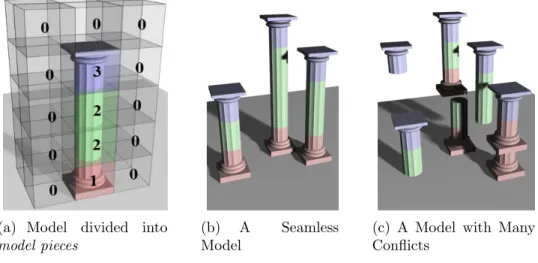
model into discrete building blocks called model pieces shown in Figure 1.4(a). The
model pieces are also called labels, since every point in a 3D array is labeled according
to which model piece occupies it. Discrete model synthesis is simpler than continuous
model synthesis and is discussed first.
The goal of model synthesis is to generate a new model in which each pair of adjacent
labels exactly matches a pair of adjacent labels in the input model. This is called the
adjacency constraint. The effect of the constraint is illustrated in Figure 1.4. Figure
1.4(b) satisfies the constraint, but Figure 1.4(c) violates it. The adjacency constraint
(a) Model divided into
model pieces
(b) A Seamless Model
(c) A Model with Many Conflicts
Figure 1.4: In discrete model synthesis, the user divides the model into model pieces (a). The goal is to generate a new model whose pieces fit seamlessly (b). If the pieces do not fit together, the model (c) does not resemble the input.
resembles the input. By always satisfying this constraint, model synthesis improves
upon texture synthesis. Current texture synthesis algorithms do not always satisfy
the constraint. They may generate textures containing parts that do not fit together
properly and conflict with each other. These conflicts occur because existing texture
synthesis algorithms check only the local neighborhood around a pixel when it is added.
The model synthesis algorithm searches for possible conflicts globally, so it can find and
avoid conflicts between the labels more effectively. This global search is particularly
valuable for model synthesis, but it is also useful for texture synthesis. The search is
performed using a catalog of possible labels that could be added. An example of this
catalog is shown in Figure 1.5. Each label corresponds to a model piece. Labels are
removed from the catalog, if they conflicts with the current model. Each removal may
cause other adjacent labels to be removed. The removals may propagate through the
array. So a possible conflict in one of the locations may cause labels to be removed in
a distant location. When labels are added into the model, they are selected from the
(a) Example Model,E (b) Incomplete ModelM (c) Catalog of labels to add, CM
Figure 1.5: For the example model E (a) and the incomplete modelM(b), a catalog of possible assignments is computed (c).
However, this global search may not be able to detect every conflict. In fact, detecting
all conflicts when generating a large model can be extremely difficult. To show this, we
present an NP-completeness proof in Theorem 3.3.5. An undetected conflict can cause
the catalog to become empty. This is a serious problem since then there would no
labels to choose from and the adjacency constraint would be violated. If the catalog
becomes empty, the algorithm in its initial form fails. To handle failures, we introduce a
second algorithm. The second algorithm is based upon the observation that the initial
algorithm succeeds much more frequently when generating small models. The second
algorithm creates large models in small parts. If a failure occurs when creating one of
the small parts, the algorithm backtracks slightly and continues.
In summary, model synthesis improves upon texture synthesis in two key ways. First,
it uses a global search to find and avoid conflicts and second, it creates the model in
parts. With these improvements, it can generate models where all of the model pieces
fit together seamlessly.
The discrete and the continuous model synthesis problems are both solved by using a
global search and by modifying in parts. The key difference between them is that discrete
model synthesis represents the models as an array of labels as shown in Figures 1.4(b)
that has been decomposed into discrete model pieces that fit on a grid. The algorithm
works well if it is given a good example model. But providing the example model can
be difficult since many models do not fit naturally onto a grid. If the model does not fit
well on a grid, then model synthesis cannot generate interesting new variations similar
to the input. The algorithm generates only exact copies of the input. This problem is
caused by using discrete model pieces. An algorithm that does not use discrete model
pieces could overcome this problem. Rather than trying to assign labels to every discrete
point on a grid, a better goal would be to assign labels to every point in 3D space i.e.
continuous model synthesis. The goal is still to assign labels that satisfy an adjacency
constraint, but the points are now in the continuous domain. Discrete and continuous
model synthesis share many of the same concepts. Both methods use a catalog of possible
labels, but the catalog is much more difficult to compute in the continuous case. The
continuous domain includes an infinite number of points, so the catalog may contain an
infinite number of possible assignments and the catalog is recorded geometrically rather
than in an array. We propose several different ways of computing this catalog, but some
of them are too difficult to implement. One way to greatly simplify the continuous
problem is to assume that the faces of the output lie on a set of planes parallel to the
input. This assumption imposes an additional constraint on the output which can limit
the range of possible results in some cases.
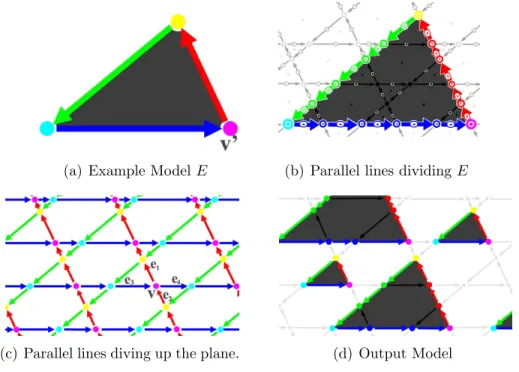
An overview of the continuous model synthesis algorithm is shown in Figure 4.10.
Starting with the input example shape shown in Figure 1.6(a), we create sets of lines
parallel to the edges of the input as shown in Figure 1.6(c). These lines divide the
plane into an arrangement of faces, edges, and vertices. Each face, edge, and vertex is
associated with a set of acceptable neighborhoods or labels that satisfy the adjacency
constraint. The set of possible labels could be computed by dividing the input model
along parallel lines as shown in Figure 1.6(b). The remaining steps of the algorithm
to search globally for potential conflicts and the model can be modified in parts. The
algorithm generates an output model satisfying the adjacency constraint such as Figure
1.6(d).
(a) Example ModelE (b) Parallel lines dividing E
(c) Parallel lines diving up the plane. (d) Output Model
Figure 1.6: Continuous Model Synthesis Overview. Lines parallel to the input shape (a), divide the plane into faces, edges, and vertices (c). The output shape (d) is formed within the parallel lines. The set of acceptable vertex and edges labels in the output (d) can be found by dividing the input along parallel lines (b).
Overall, model synthesis offers many benefits. Most other procedural modeling
tech-niques are targeted to a specific type of object, but model synthesis can generate a wide
variety of objects and environments including cities, landscapes, plants, fractal
struc-tures, castles, cathedrals, spaceships, roller coasters, oil platforms, building interiors and
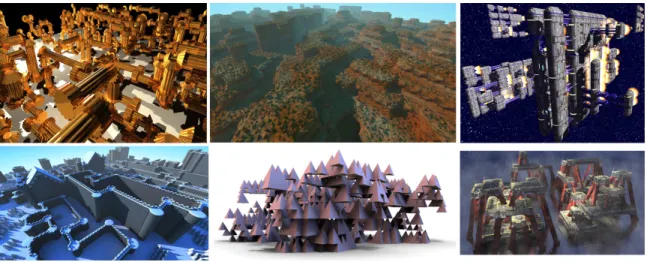
more. A few examples are shown in Figure 1.7. In each case, the only user input is a
simple example model.
The primary goal of both discrete and continuous model synthesis is to satisfy the
adjacency constraint, but many additional user-defined constraints should be used to
create more realistic models. The user might have a floor plan or a general idea of what
Figure 1.7: Examples of the wide variety of shapes that our model synthesis algorithm can generate including machinery, landscapes, spaceships, castles, fractals, and oil plat-forms.
that are symmetric. These constraints and many others can be imposed on the models
with our framework.
1.3
Chapter Overview
The rest of the thesis is organized as follows. Chapter 2 surveys related work in
proce-dural modeling and texture synthesis. Section 2.3 discusses differences between textures
and 3D models that explain why texture synthesis techniques generate 3D models less
effectively.
Chapter 3 discusses discrete model synthesis. The problem is formally described in
Section 3.1. It is shown that the number of possible solutions may grow exponentially
with the output size. An algorithm for finding solutions is described in Section 3.3 and its
time complexity is analyzed. Unfortunately, this algorithm fails to complete properly
in some cases. The catalog may become empty and the algorithm cannot continue.
Section 3.3.5 shows with an NP-completeness proof that in some cases these failures are
if they occur.
Chapter 4 discusses continuous model synthesis. Section 4.1 explains why
continu-ous model synthesis is needed by discussing the limitations of discrete model synthesis.
Several different approaches are introduced. Sections 4.3 and 4.4 describe two different
approaches that could be used, but these approaches have several serious
implementa-tion issues. For example, one approach has not been implemented because it requires
exact and robust 3D Boolean operations and 3D Minkowski sum computations. Section
4.5 describes a more practical approach that is much simpler to implement because it
assumes that the models are generated on sets of parallel planes. This parallel plane
as-sumption introduces some limitations which are also discussed. Also, other constraints
beyond the adjacency constraint are described for controlling the output more effectively.
Model synthesis is compared with texture synthesis in Section 5.1 and with other
procedural modeling techniques in Section 5.2. Model synthesis is also compared with
formal grammar and a close relationship between them is established.
Chapter 6 summarizes the main points of the thesis and discusses exciting
Chapter 2
Related Work and Background
This chapter discusses work related to model synthesis in the fields of procedural
mod-eling and texture synthesis. Section 2.3 discusses differences between texture synthesis
and model synthesis and how texture synthesis might be extended to 3D modeling and
why a new algorithm is needed for model synthesis.
2.1
Procedural Modeling
Many procedural modeling techniques have been developed over the last few decades.
These techniques as a group have a great amount of variety in the approach they take.
Most techniques are targeted at modeling a specific type of object or environment. Early
techniques based on fractal geometry achieved some success modeling natural landscapes
[17]. A connection between landscapes and fractal geometry was observed in the 70s
[38]. Mandelbrot observed that a record of Brownian motion over time resembles an
outline of jagged mountain peaks. Models of landscapes can be further improved by
considering how landscapes erode over time [42].
There also is a long history of modeling plants procedurally. Many plant modeling
techniques use a formal grammar call an L-system. L-systems were proposed by
Lin-denmayer as a general framework for describing plant growth and plant models [35, 52].
how plants interact with their environment as they grow [39]. Many techniques also
use information supplied by the user to influence the shape of the plant models such as
positional information [53], sketches of plants [6], or photographs [54, 61].
Many techniques are designed targeted specifically for modeling urban models
proce-durally [69, 65]. Like many plant modeling techniques, some urban modeling techniques
use L-systems. L-systems have been used to generate road networks from elevation and
population density data and to generate buildings on parcels of land between the roads
[44]. Other grammars have been introduced specifically for modeling architecture. The
architect, Stiny [1971] introduced shape grammars as a tool for analyzing and designing
architecture. Shape grammars remained largely a conceptual tool [59, 16] until Wonka
and others introduced a related group of grammars called split grammars [75]. Split
grammars operate by splitting shapes into smaller components and can generate highly
detailed models of architecture. Split grammars were further developed by M¨uller et al.
[40] who include shape operations for mass modeling and for aligning many parts of a
building’s design together. Their method can generate both the large-scale layout of a
city as well as many geometric details within each building to produce a highly complex
and realistic city. Tools have also been developed to edit these grammars visually using
a GUI [36] and for deriving grammars automatically from images of facades [41]. A
method developed by Aliaga et al. [1] constructs grammars from photographs with the
user guiding the creation and subdivision of an initial 3D model.
Another group of techniques focuses more heavily on the 2D layouts of cities than
on the 3D shapes of the buildings. Chen et al. [5] allow users to edit a city’s street
layout interactively using tensor fields. Aliaga et al. [2] generate street layouts using an
example-based method. This is particularly relevant as their method combines elements
of texture synthesis and procedural modeling. The streets are generated like other
pro-cedural modeling techniques and then an image of the city seen from above is generated
like a texture using texture synthesis. A related area of research is urban simulation.
Much of the research into urban simulation is conducted outside of computer graphics
where the purpose is not to model and render cities, but to understand how various
factors influence a cities development and growth over time [63, 67]. However, this area
of research is certainly relevant to computer graphics and several authors have
incorpo-rated aspects of urban simulation into their methods to produce more realistic models
of cities [70, 33]. Their methods simulate part of a city’s economy and generate street
layouts and zone the land area for different economic activities.
There are also other techniques designed to model much smaller structures than
cities. Legakis et al. [34] propose a method for automatically embellishing 3D surfaces
with various cellular textures including bricks, stones and tiles. Cutler et al. [11]
de-veloped a method for modeling layered, solid models with an internal structure. Their
method can modify models by simulating various physical processes such as erosion and
fractures. Another method has been developed to model truss structures by optimizing
the locations and strengths of beams and joints that support bridges, tower platforms,
and other objects [58]. Pottmann et al. [49, 50] have developed algorithms based on
discrete differential geometry that determine how to arrange beams and glass panels so
they form in the shape of a given freeform surface and satisfy various geometric and
physical constraints.
Another way to model objects is to combine together parts of existing models
to find a desired part, then cut the part out from the model, and stitch various parts
together to create a new object.
2.2
Texture Synthesis
Although model synthesis is designed for procedural modeling, the algorithm itself has
more in common with texture synthesis. The field of texture synthesis has seen many
exciting new developments over the past decade. This section surveys these
develop-ments and explain their relationship to model synthesis. A more detailed survey is given
in [74].
2.2.1
Markov Random Fields
Textures are often described as Markov Random Fields [15, Zhu et al., 48, 43, 74].
Markov Random Fields have a set of random variables Xi. In this case, each random
variable represents the color of a pixel. Each pixel i has a set of neighbors surrounding it called Ni. It is often assumed that only the neighbors of pixel i determines its value.
This assumption is called the Markov locality property. Stated more formally, the color
of pixel i is conditionally independent of the pixel colors outside Ni, given the pixel
colors insideNi. This means the probability of Xi having the color xi has the following
property ∀x1, x2, . . .
P[Xi =xi | ∀j 6=i, Xj =xj] =P[Xi =xi | ∀j ∈Ni, j 6=i, Xj =xj] (2.1)
2.2.2
Texture Synthesis Algorithms
Over the past decade, the field of texture synthesis has seen a proliferation of new
algorithms and new ideas. Many of these algorithms were influenced by a seminal paper
written by Efros and Leung [1999]. Their algorithm is remarkably simple and produces
good results. Their algorithm generates textures by adding pixels individually. To
determine which pixel should be added at a given point, a small neighborhood around
the point is compared against every neighborhood in the example texture. The purpose
of the comparisons is to find which neighborhood matches the neighborhood around
the insertion point the closest. The quality of each match is evaluated using a sum of
squared differences. Figure 2.2 shows a set of close matches for a given neighborhood.
A neighborhood is a close match if it matches to within a certain percentage of the
closest match. From among every close neighborhood, one is randomly selected and its
central pixel is added into the new texture. Every pixel of the texture is added this way.
Efros and Leung’s method [1999] is one of the simplest texture synthesis algorithms. It
generally produces good results, but it does have some failure cases. The algorithm is
slow because computing an exhaustive nearest neighborhood search is expensive.
(a) Input Example Texture (b) Synthesizing a Pixel
Figure 2.2: Illustration of Efros and Leung’s Algorithm [1999]. To determine which pixel to insert at a given point, the neighborhood around the point is compared against other neighborhoods in the example texture. The pixel to insert is randomly selected from among the closely matching neighborhoods.
the center and adding pixels going out in concentric rings. However, by adding pixels in
a different order, the speed of the algorithm can be improved as shown by Wei and Levoy
[2000]. They developed a similar algorithm that adds the pixels in scan line order. Using
this order, the method can be accelerated using tree-structured vector quantization.
There are several other ways to accelerate texture synthesis. Several acceleration
techniques are based on the observation that groups of neighboring pixels in the input
are likely to be grouped together in the output. This is known as coherence.
Coher-ence is used in several methods to improve the performance [62, 3]. CoherCoher-ence can be
used to compute approximate nearest-neighborhood matches very quickly to be used in
interactive editing tools [3]. Another acceleration strategy is instead of adding pixels
individually, they can be added in large groups or patches. Patches of texture rarely fit
together seamlessly, but an optimal cut can be made between the patches so they fit
together without any noticeable seams as shown in Figure 2.3. The cuts can be made
either by using dynamic programming [14] or by using graph cuts [29]. Another
ap-proach to texture synthesis is to optimize a global energy function using an expectation
maximization algorithm [30].
(a) Patches Overlap (b) Patches are Stitched Together
Figure 2.3: In patch-based texture synthesis, different patches are copied and overlapped slightly. An optimal cut is computed between the two patches.
Textures are primarily used for texture mapping 3D models. Ordinarily, textures
are synthesized onto a flat texture map which is then applied to a curved surface, but
onto the curved surfaces. This can be accomplished with an orientation field covering
the surface [64, 72]. The orientation field specifies the direction of the texture and plays
the same role as the rows and columns of an array of pixels.
Several methods have extended texture synthesis into three dimensions. Some
meth-ods use a third temporal dimension to textures so that they move and change over time
[71, 29]. This is especially useful for creating moving images of fire, smoke, and running
water. These dynamic textures could also be described using linear dynamical systems
[12].
Another reason to extend texture synthesis into three dimensions is to create solid
textures [45, 46]. Solid textures are an alternative to 2D texture maps. They describe
many natural materials such as wood and stone more accurately than 2D texture maps
and they avoid the task of parameterizing the object’s surface which can be difficult.
Until recently, solid textures were created only with user specified procedure, but now
texture synthesis can be used [23, 28]. Solid texture synthesis starts like ordinary texture
synthesis from an input of a 2D texture, but the goal is to produce a 3D solid texture
which certain properties. It should be possible to slice the solid texture open to reveal
a pattern on the slice that resembles the input texture. Such a solid texture could be
generated by optimizing a global energy function [28] like some 2D texture synthesis
algorithms [30].
Texture synthesis has also been used to generate what are called geometric textures
[4, Zhou et al.] which are a combination of texture mapping and modeling. They are
used like texture maps to apply patterns to objects, but these patterns actually change
the shape of the object itself. This is useful for creating objects with bumps or dimples
(Figure 2.4(a)) or objects that are made out of chain mail (Figure 2.4(b)). Texture
synthesis has also been used to generate hair in different styles [68] and to create 3D
models of terrain using real elevation data as the example [76]. Texture synthesis has also
of objects [26].
Lagae, Dumont, and Dutr´e [2005] developed a method called geometry synthesis
which resembles model synthesis in some ways. Their method also extends texture
syn-thesis into three dimensions for procedural modeling. Their algorithm takes an input
model and computes a 3D array of signed distance values. This array is used as the
example and a new array is generated using a standard texture synthesis technique.
However, texture synthesis methods have difficulty with many inputs common to
mod-eling including very basic shapes as discussed in Section 2.3. The geometry synthesis
method is applied to models that have regular patterns as shown in Figures 2.4(c) and
2.4(d).
Some texture synthesis techniques use tiles to accelerate the algorithm. Tiles are
particularly relevant to model synthesis since model pieces are essentially 3D tiles. Most
of these methods use Wang tiles. Wang tiles were studied initially by mathematicians
interested in aperiodic tiling [10], but they have also been applied to texture mapping
and texture synthesis [Stam, 8, 31]. The 3D counterpart of a Wang tile is a Wang
cube. Wang cubes have been used to model asteroid fields [57] and render volume data
[37]. However, we show that it is often difficult to apply Wang tiles and Wang cubes to
modeling later in Section 5.1.1.
A few other advancements in texture synthesis should be mentioned. A multiscale
algorithm has been used to generate extremely high resolution textures [21]. The texture
synthesis process can be inverted to find a small representative example texture from a
large texture [73]. Texture synthesis can also be used to complete a missing part of an
image [9, 13, 60, 22]. This is especially useful for removing objects from images without
leaving holes. A few of the image-completion techniques change choosing the order in
which the pixels are added to improve the results [9, 60].
A related technique called context-based surface completion [55] completes models
(a) Geometric Textures (b) Mesh Quilting
(c) Chain Mail (d) Grid
Figure 2.4: Result from Geometric Textures (a) [4], Mesh Quilting (b) [Zhou et al.] and Geometry Synthesis (c & d) [32]. Each method extends texture synthesis in some way to generate models. The models have patterns that resemble textures. Geometry synthesis generates models from examples. The examples are shown in the insets (c & d).
in any missing regions with surfaces that resemble the rest of the model. In this case,
the rest of the model effectively acts as the example.
2.3
Differences between Textures and Models
Texture synthesis and model synthesis have similar goals. However, textures and models
differ in several important ways that affect how they are generated. An obvious difference
is that textures have two spatial dimensions while models have three, but most texture
texture synthesis algorithms have frequently been used to create three-dimensional solid
textures [28] or textures with a temporal dimension [71, 12, 29].
Textures are typically represented as arrays of pixels which store red, green, and blue
color values. Models are typically represented using geometric shapes such as polygonal
meshes or NURBS. Texture synthesis methods could be directly used for modeling if
the models were represented in an array. The elements of the array would be small
building blocks calledmodel pieces. Each model piece would contain textured geometric
shapes within a cubic volume of space as shown in Figure 2.5. Model pieces are similar
to texture patches or to tiles that some texture synthesis methods use [7]. The model
pieces are created by the user. The user could break an existing model down into model
pieces or could start by creating the model pieces and then build the model up with
them. Most model pieces should be in the model multiple times. Otherwise, the model
is not self-similar and the algorithm may not create interesting new variations off the
original model. However, it can sometimes be difficult to create the model so that the
model pieces repeat. These difficulties are described in Section 4.1. To overcome them,
we introduce continuous model synthesis which does not use model pieces in Chapter 4.
Figure 2.5: Model constructed out of model pieces.
Each model piece corresponds to a label. Labels are assigned to every point in a 3D
Model synthesis differs from texture synthesis because model pieces differ from pixel
colors in several ways. First, colors can easily be blended together. Mixing red and
yellow, produces orange. But model pieces are not so easily blended. The top of a
pyramid cannot easily be blended with the bottom of a sphere. Averaging the labels
1 and 3 does not produce the label 2. Another difference is that colors can easily be
positioned in a color space where similar colors are grouped together in the space. But
model pieces are different. The label 1 is not necessarily closer to label 2 than to label 15.
Model synthesis is in some sense stricter than texture synthesis. In texture synthesis, if
a color is close to the right value that often is good enough, but in model synthesis, that
is not good enough. For example, suppose some model pieces contain flat squares. The
model pieces fit together perfectly, if both squares are at exactly the same height, but
if one square is slightly higher then there is a noticeable hole in between them. Minor
changes to the model pieces can produce large errors.
There are other important differences between textures and models that go beyond
differences in the number of dimensions they use or between pixels and model pieces.
We demonstrate these other differences by running texture synthesis algorithms on 2D
shapes commonly found in models. Let us consider as an input two of the simplest
shapes: a triangle and a rectangle (Figure 2.6).
Figure 2.6: Typical Shapes used in Modeling
These shapes are common in geometric models. They could represent the floor plan of
can be used as an input into a texture synthesis algorithm, but surprisingly, texture
synthesis algorithms have difficulty even with these simple shapes. Although the shapes
in Figure 2.6 are typically used in modeling, they differ from typical textures used in
texture mapping or texture synthesis. A few representative examples of textures used in
texture synthesis are shown in Figure 2.7 for comparison. Each texture was generated
using a texture synthesis method by Kwatra et al. [2005].
(a) (b) (c) (d)
Figure 2.7: A few representative textures typically used in texture synthesis.
One difference between a typical textures and a typical shape used in modeling is
they have different types of boundaries. 3D models typically represent objects with a
few sharp well-defined boundaries between their interior and exterior. (One possible
exception might be a puff of smoke.) On the other hand, a texture has soft or hard
boundaries where its image intensity changes. The change could be soft and gradual or
a hard edge. Textures typically have many edges rather than a few prominent ones. For
example, Figure 2.6 only has seven edges, while Figure 2.7(d) has many more.
In order to better understand why texture synthesis algorithms have trouble with the
shapes in Figure 2.6, let us examine the synthesis process of a typical texture synthesis
algorithm. Let us examine Efros and Leung’s method [1999]. Suppose that about
halfway through the algorithm, it has produced a half-finished result as shown in Figure
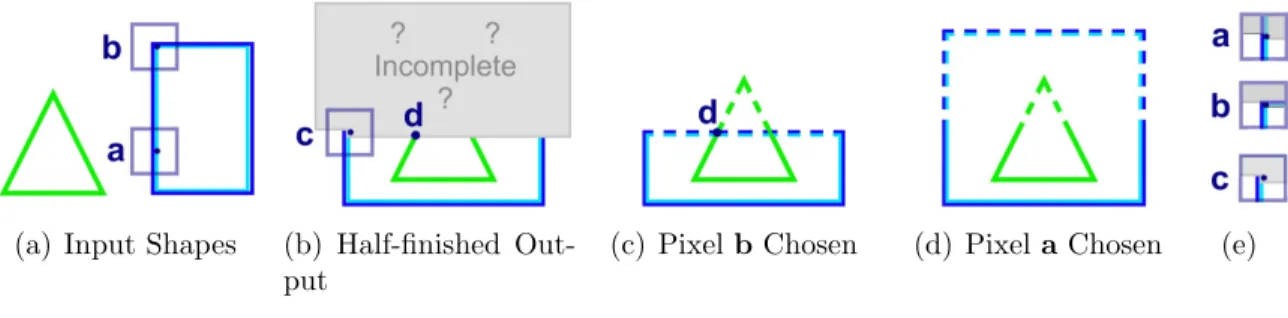
2.8(b). The bottom half is finished, but the upper half has not been determined. The
by finding pixels with neighborhoods similar to pixels in the input in Figure 2.8(a). Let
us examine two of the alternatives: pixel aor pixel b.
(a) Input Shapes (b) Half-finished Out-put
(c) PixelbChosen (d) Pixela Chosen (e)
Figure 2.8: Some texture synthesis methods have difficulty with input (a). After half of the texture has been created (b), a decision is being considered at pixel c. If pixel
b from the input is used, the texture can not be completely properly (c). If pixel a is used, it can be completed (d). The bottom halves of the neighborhoods around pixels
a, b, and care the same (e).
Each alternative looks equally suitable if we examine only the neighborhood
sur-rounding pixel c. In fact, the neighborhoods around pixels a, b, and c have identical bottom halves (Figure 2.8(e)). Since Figure 2.8(b) is unfinished, we have no information
about what is above or directly to the right of pixel c. Locally, both choices appear to be equally good, but in practice, they are not. If pixel b is chosen, the algorithm will eventually fail. Once pixel b is chosen, the texture cannot be completed by using neighborhoods from the input (Figure 2.8(a)). There is only one way to complete the
rectangle which is shown in Figure 2.8(c), but the rectangle is bound to intersect the
triangle’s edge at pixeld. Edges should not intersect, because the input in Figure 2.8(a) does not contain any intersecting edges. If pixel a is chosen, the texture can be com-pleted successfully as shown in Figure 2.8(d). But there is no way of knowing that ais a better choice than b by only looking at local neighborhoods.
The choice of inserting the value atb into pixelcis unacceptable because of the tri-angle’s edge at pixeld. The value at pixeld influences the value at pixelc, even though these pixels are far from one another. In fact, even if Figure 2.8(b) were scaled up a
distance. This example demonstrates a problem common to many texture synthesis
al-gorithms which only examine local neighborhoods when making their decisions. At first
glance, the fact that pixeld influences pixelc while it is outside the local neighborhood of cmight appear to violate the locality assumption in Equation 2.1. But Equation 2.1 assumes the entire neighborhood Nc surround pixel c is known, but in Figure 2.8(b),
the values of the pixels directly above pixelc are unknown. So the locality assumption is not violated.
Figure 2.8 illustrates a single error that a texture synthesis algorithm could make,
but there are many more chances to make errors when synthesizing a large texture or
model as shown in Figure 2.9. Results from a different input shape are shown in Figure
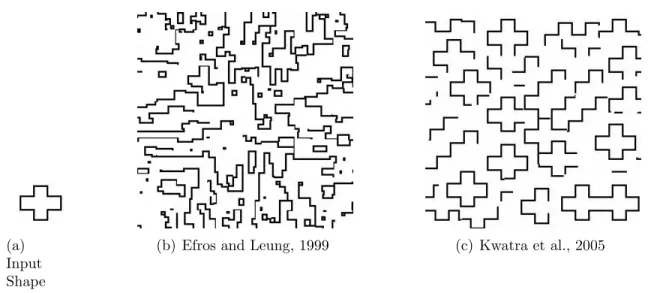
2.10 in which numerous shapes fail to close.
(a) Input Shape
(b) Efros and Leung, 1999
Figure 2.9: Texture synthesis methods have difficulty with the triangle and rectangle input (a). Results from a texture synthesis method is shown (b).
Other texture synthesis techniques operate on patches of texture instead of
indi-vidual pixels. Similar problems occur when using patch-based methods. Patch-based
methods copy patches of texture together with some overlap and then cut and stitch the
overlapping parts together. An optimal cut is computed using dynamic programming
(a) Input Shape
(b) Efros and Leung, 1999 (c) Kwatra et al., 2005
Figure 2.10: Texture synthesis methods have difficulty with a cross-shaped input (a). Results from two different texture synthesis methods are shown (b,c).
2.3, but work poorly for an input like Figure 2.6. Two patches are copied from Figure
2.6 and placed into Figure 2.11 which shows the two patches cannot be stitched together.
Most patches copied from Figure 2.6 would have the same problem.
(a) Patches are Stitched Together
(b) Overlapping Patches
Figure 2.11: In patch-based texture synthesis, different patches are copied and over-lapped slightly. A optimal cut is supposed to be made, but none of the cuts are good.
Patch-based methods work on typical textures, because the textures can be stitched
together without great difficulty. This means that a pixel’s value has little influence on
the values of pixel in distant locations, since there is always a way to stitch the patches
together so the distant pixel values fit together. So the same assumption lies beneath
methods assume that each pixel value only has a local influence. This assumption is
valid for many textures, but not valid for many shapes used into modeling as shown in
2.9(b), 2.10(b), and 2.11. So texture synthesis algorithms can not easily be extended
to work on 3D models, not because they are three-dimensional, but because models are
structured differently from textures.
Model synthesis is focused on a slightly different problem from texture synthesis.
Both methods attempt to generate an output that resembles an input, but the goal of
model synthesis is concentrated more on the local structure. At first, this may seem
counter-intuitive. While the goal of model synthesis is more local than texture synthesis,
the algorithm itself introduces a global search for conflicts. However, this seeming
contradiction is explained by Figure 2.8 which demonstrates that it is necessary to look
outside the local neighborhood even to satisfy a local constraint. Model synthesis is
focused on ensuring that each model piece fit together seamlessly with its immediate
Chapter 3
Discrete Model Synthesis
In this chapter, we first given a formal definition of the model synthesis problem in
Section 3.1. Then we analyze the problem and discuss how many solutions exist in
Section 3.2. In Section 3.3, we introduce an algorithm for solving the problem. In
Section 3.4, we show results from the algorithm and in Section 3.5, we discuss related
problems that can be solved with the algorithm.
3.1
Problem Definition
Model Definition Discrete models are represented as three-dimensional arrays of labels where each label corresponds to a model piece. The algorithm uses two discrete
models: the input example modelE and the output model M. Each model has a finite length, width, and height. Letnx×ny×nz be the size of the outputM and n0x×n
0 y×n
0 z
be the size of the input E. Every point within the bounds of the model maps to a particular label. Each label is represented by an integer. Let K be the set of possible labels in the input and output models and k be the number of labels in K, k = |K|. The set K typically consists of every integer from 0 to k −1. The input and output models are mappings between a point within their bounds to a label E, M : Z3 → K. The models are functions that return which set of objects are located at each point.
Consistency Definition The model M is consistent with E, if for all points x∈Z3
within M and for all axis-aligned unit vectors ˆd∈ {ˆı,ˆ,ˆk}, there exists a point x0 ∈Z3
within E such that
M(x) = E(x0)
M(x+ ˆd) = E(x0+ ˆd). (3.1)
The primary goal of model synthesis is to generate a model M is consistent withE. For a given input E, this set of equations 3.1 acts as a constraint on M and is called the adjacency constraint.
The adjacency constraint can be expressed in a slightly different form that is often
more convenient. This expression uses three binaryk×k matrices Tx, Ty,and Tz which
are called transition matrices. Let b and c be two labels, 0 ≤ b, c < k. The transition matrices Tx, Ty, and Tz are defined as
Tx[b, c] =
1, ∃x0|E(x0) =b and E(x0 + ˆı) =c
0, otherwise
Ty[b, c] =
1, ∃x0|E(x0) =b and E(x0+ ˆ) =c
0, otherwise
(3.2)
Tz[b, c] =
1, ∃x0|E(x0) =b and E(x0+ ˆk) =c
0, otherwise
The adjacency constraint is equivalent to the statement that for all points x ∈ Z3
Tx[M(x), M(x+ ˆı)] = 1
∧Ty[M(x), M(x+ ˆ)] = 1 (3.3)
∧Tz[M(x), M(x+ ˆk)] = 1.
These equations assume that the models are three-dimensional, but nearly the same
set of equations could be applied to two-dimensional models. With 2D models, the z
coordinate can be ignored and we can set nz = 1. A few examples of 2D models are
illustrations in Figure 3.1. 2D models are easier to illustrate and visualize on paper,
so 2D models are often used to illustrate properties of full 3D model synthesis.
For-tunately, many of the properties of model synthesis are identical for two, three, and
higher-dimensions. However, one-dimensional model synthesis is often the exceptional
case. One-dimensional model synthesis does not share many of the properties of
higher-dimensional version as discussed in Sections 3.3.5 and 5.2.
(a) Empty Space Model,E0
(b) Checkerboard Model,E1
(c) Line Model,E2 (d) Non-Self Similar
Model,E3
3.2
Bounds on the Number of Consistent Solutions
Definition For a given input modelE, letDE(nx, ny, nz) be the total number of models
M consistent withE of size nx×ny ×nz.
This section discusses how DE(nx, ny, nz) varies with nx, ny,andnz. Many examples
are given in 2D. In these cases, we assume that nz = 1.
The function DE(nx, ny, nz) could be zero. If the input model E3 in Figure 3.1(d) is
used, DE3(5,5,1) = 0. No consistent models larger than E3 exist because none of the labels inE3 repeat. The input modelE3 is not self-similar at all. This demonstrates why
self-similarity is so important to model synthesis. Without self-similar input models, no
consistent solution except the original model exists. The modelE3 is an unusual model
because it does not contain any empty space. Models typically contain large regions of
empty space. Empty space labels are adjacent to themselves in all directions. If the
label 0 represents empty space, then Tx(0,0) =Ty(0,0) =Tz(0,0) = 1. If E contains a
labels that is adjacent to itself in all directions, then DE(nx, ny, nz) >0 since a model
that contains only this label is consistent.
SometimesDE(nx, ny, nz) is a constant nonzero value that does not depend onnx, ny,
andnz. For example, the empty space modelE0 in Figure 3.1(a), is consistent with only
onenx×ny model which only contains empty space, soDE0(nx, ny,1) = 1 for allnx and
ny. The checkboard model E1 in Figure 3.1(b), is consistent only with two models, i.e.
DE1(nx, ny,1) = 2.
For many input models, DE(nx, ny, nz) increases exponentially with nx, ny, and nz.
Suppose that E contains some empty space that is labeled zero. A set of points H is
enclosed by empty space if every point adjacent to H, but not insideH is labeled zero. There are sets of points enclosed by empty space in Figures 3.1(c) and 3.2.
Figure 3.2: A set of pointsH is enclosed by empty space. Every point adjacent to H is labeled zero and the zero label is adjacent to itself in all directionsTx(0,0) =Ty(0,0) = 1.
Ω 2 nxny nz hxhy hz .
Proof. A completely empty model that contains only empty space is consistent. If the
model is empty except for a copy of the set H copied, it is also consistent. H could be copied into an otherwise empty model many times. As long as the copies do not
overlap or touch, the generated model is consistent. A pair of copies needs only one
row or one column of empty space separating them. An nx ×ny ×nz model M can
contain b nx
hx+1cb
ny
hy+1cb
nz
hz+1c copies of H. If some of these copies were excluded fromM
as shown in Figure 3.3, M would still be consistent. In fact, M is consistent whether or not each copy is included M. Therefore, simply by including or excluding partic-ular copies, 2bhxnx+1cb
ny hy+1cb
nz
hz+1c different models consistent with E can be constructed.
DE(nx, ny, nz) = Ω
2 nxny nz hxhy hz .
Remark: For the purposes of this proof, a set of points was copied and pasted in dif-ferent ways to create difdif-ferent consistent models. But it would be a mistake to conclude
that this is the only way that the output models can vary. The output models can
Figure 3.3: A model that satisfies the adjacency constraint can be created by copying and pasting a set of points H enclosed by empty space. Each copy can be included or excluded independently. This model is large enough to contain 8 copies, so at least 28 = 256 model consistent with Figure 3.2 exist.
3.2.1.
Theorem 3.2.2. DE(nx, ny, nz)≤knxnynz.
3.3
The Discrete Model Synthesis Algorithm
3.3.1
Overview
The goal of model synthesis is to generate a model M that is consistent with E. In our algorithm,M is generated by assigning a label to each point individually. Anassignment
is a pairing (x, b) of a point xand a labelb. The generated model M changes over time as these assignments are added. Let Mtbe the modelM at a given time stept. At each
time step, a single assignment is added to M. For example, if the label b was assigned to the point x0 at time t, then M would change from Mt(x0) = −1 to Mt+1(x0) =b.
Initially, every point in M is unlabeled. Ifxis an unlabeled point, thenM(x) = −1. So initially, M0(x) = −1 for every point x. Labels are assigned until every point is
labeled. When every point is labeled M is complete. A complete model is consistent with E, if it satisfies the adjacency constraint in Equation 3.3. An incomplete model is consistent, if it can be completed so that it satisfies the adjacency constraint. More
formally, an incomplete modelM is consistent if there exists a consistent and complete model M0 such that for every point x, M(x)6=−1⇒M(x) =M0(x).
Every time a label is assigned, there is a risk that the assignment may cause Mt to
become inconsistent. This risk could be eliminated if we could construct a catalog of
possible assignments to add toM. The catalogC?
M is a catalog that stores exactly which
labels can be assigned to M without causing M to become inconsistent. We defineC?
as
CM?t(x, b) =
0, Mt(x) is unassigned and ifMt+1(x) is set to b, Mt+1 is inconsistent
1, Mt(x) is unassigned and ifMt+1(x) is set to b, Mt+1 is consistent
0, Mt(x) is assigned and Mt+1(x)6=b or Mt is inconsistent
1, Mt(x) is assigned and Mt+1(x) =b and Mt is consistent
The assignment (x, b) is in the catalog ifC?
Mt(x, b) = 1. If we assign only labels that
are in the catalogC?
Mt, thenMt will remain consistent until it has been completed. Each
time a label is assigned the catalog may need to be updated. So the overall strategy of
our algorithm is to pick a point, assign the point a label from the catalog, then update
the catalog, and repeat until M is complete. The algorithm is described in more detail in Algorithm 3.1.
Algorithm 3.1 begins by counting the number of distinct labels k in the input E in the function FindK and by computing the transition matrices according to Equation 3.3
in the function FindTransitionMatrices. The catalog initially contains every possible
assignment (x, b), so lines 3-5 set every value in the catalog to 1. The main loop (lines 6-18) goes through every point in M, selects a label b from the catalog (line 9), assigns
b to the output M (line 13), and then updates the catalog (line 14).
Unfortunately, for some inputsEcomputingC?is NP-hard. This is shown in Section 3.3.5. Therefore, it is not always possible to compute C? in polynomial time unless
P =N P. So we introduce in Section 3.3.2 an alternative catalog calledC. The catalog
C can be computed more easily thanC? (Section 3.3.3), but the catalogC is imperfect.
It may or may not be equal to the ideal catalogC?. Several cases where they are equal are
discussed in Section 3.3.7 and several cases where they are not are discussed in Section
3.3.4. If C is not equal to the ideal catalog C?, there is a chance thatM
t may become
inconsistent. IfMt is inconsistent, eventuallyC will be become empty,CMt(x, b) = 0 for
all assignments (x, b), and the failure case will be returned (line 11). In order to handle the possible failure cases, we introduce several changes to the algorithm in Section 3.3.6.
3.3.2
The Catalog
C
Algorithm 3.1 Discrete Model Synthesis Algorithm
Input: An Example Model, E, and an output size nx×ny ×nz
Output: A synthesized model M satisfying the adjacency constraint
1: k ←FindK(E) // Count the number of labels
2: T ←FindTransitionMatrices(E) // Compute the Transition Matrices
3: for all points p and labels b do // Include all assignments in the catalog
4: C[p, b]←1
5: end for
6: for px = 1 tonx do // Loop through every point
7: for py = 1 tony do
8: for pz = 1 to nz do
9: if C[p, b] = 0 for all b then // Check if the catalog is empty
10: return failure
11: else
12: Select any value of b for which C[p, b] = 1 at random
13: M[p]←b
14: C ← UpdateC(C,p, b, T, k) // UpdateC is described in Algorithm 3.2
15: end if
16: end for
17: end for
18: end for
19: return M
problem. The model synthesis problem is similar to many well-known problems such as
Boolean satisfiability and Sudoku. These problems are often solved by assigning values
to some of the variables, quickly testing if is possible to complete the solution, and then
backtracking if necessary. Model synthesis is solved similarly by assigning values to
some points in M and then quickly testing if it is possible to complete M by checking if the catalogCM is empty. Some limited backtracking may be necessary as is discussed
in Section 3.3.6.
Each point has neighbors in the positive and negative x, y, and z directions, ±ˆı,±ˆ,
and ±kˆ which makes six neighbors in total. The adjacency constraint applies to all six neighbors. Given a set of possible labels at any point x, our goal is to determine which labels could be assigned to its neighbor x+d where d ∈ {±ˆı,±ˆ,±kˆ}. Suppose that
satisfy the adjacency constraint, one of the transition matrices is used. The constraint
is satisfied if T[b, c] = 1 where T is the appropriate transition matrix based on the direction d. If d = ˆı, then T = Tx. If d = −ˆı, then T = TxT since when the matrix is
transposed the roles of b and c are switched. If d is equal to ˆ,−,ˆk,ˆ or −ˆk, then T is equal to Ty, TyT, Tz, or TzT respectively.
The catalog C contains a list of acceptable labels at each point. The label c is only acceptable at x+d, if there exists a label b that is acceptable at point x meaning
CMt(x, b) = 1 and that can be adjacent to c meaning T[b, c] = 1.
CMt(x+d, c) = 1 ⇒ ∃b|CMt(x, b) = 1 and T[b, c] = 1 (3.5)
This equation is used to update C. Its contrapositive is given as:
@b|CMt(x, b) = 1 and T[b, c] = 1⇒CMt(x+d, c) = 0. (3.6)
Additionally, we know that only one label may occupy a given point:
Mt(x) =b and c6=b ⇒CMt(x, c) = 0. (3.7)
Statement 3.6 is a direct consequence of the adjacency constraint and Statement 3.7
ex-presses an occupancy constraint. The catalogCMt(x, b) is defined as the binary function
that maximizes P
x
P
bCMt(x, b) while satisfying Statements 3.6 and 3.7. Statements
3.6 and 3.7 are also true for the ideal catalog C?.
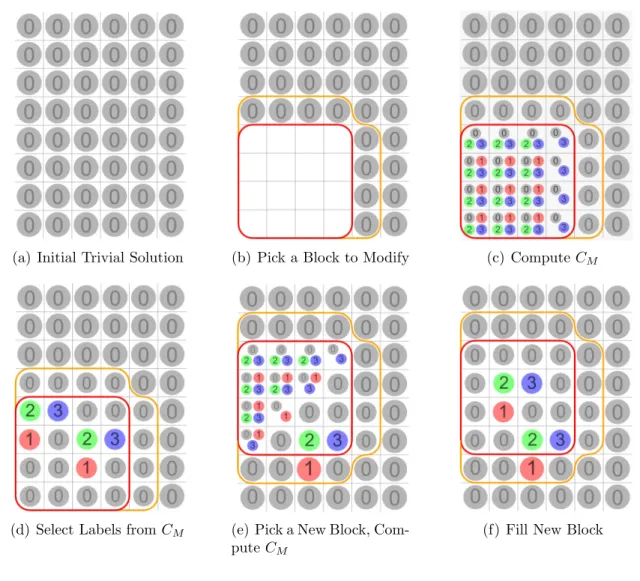
Algorithm 3.2 describes in detail how C is computed. Figure 3.4 shows an example of this computation. Figure 3.4(a) shows the example model. Suppose the size of M
is nx ×ny = 4×4. Initially, M0 is empty and CM0 contains all four possible labels in each of the 4×4 positions. Suppose that a 1’ label is assigned to a point in M as shown in Figure 3.4(b). That point is now reserved exclusively for the 1’ label. No
![Figure 2.1: Procedurally Generated Buildings created using M¨ uller et al. [40]](https://thumb-us.123doks.com/thumbv2/123dok_us/8258406.2187983/30.918.150.795.830.1018/figure-procedurally-generated-buildings-created-using-m-uller.webp)