Page 1
Property Management
Procedures Manual
Updated November 2013
Texas A&M University Health Science Center
Office of Finance and Administration
Page 2
Page 3
Table of Contents
Introduction………...5
Property Resources & Training………...6
Chapter 1 – Delegation of Responsibility………...7
Head of State Agency Responsibilities……….8
Property Manager Responsibilities………...8
Accountable Property Officers (APO)/Dept Head……….8
Alternate Accountable Property Officers (Alt APO)……….10
Employee Responsibilities………11
Liability for Property Loss……….12
Chapter 2 – Property Reporting Requirements…...14
Property Reporting Requirements………...15
Annual Inventory Certification…...15
Spot Checks………..19
Chapter 3 – Inventory Items & Coding…...20
What to Inventory & Inventory Thresholds………...21
How Inventory Gets Into FAMIS FFX……….23
Object Codes & Class Codes……….24
Property Control Codes……….26
Preliminary Fixed Assets – FRS Screen 362………30
Chapter 4 – Property Labeling……….37
FAMIS Assigned Inventory Numbers……….38
Manual Requests for Inventory Numbers………...39
Tagging the Equipment – “Ten-Day Rule”……….………....39
Chapter 5 – Property Acquisitions………..42
Acquisitions (New Purchases)………..43
Additions & Replacements………43
Constructed (Fabricated) Property………...46
Page 4
Joint Purchases between A&M System Members………..51
Chapter 6 – Property Dispositions………...53
Dismantled Equipment………..55
Damaged or Destroyed Property………..55
Obsolete Property………...56
Missing or Stolen Property………56
Recovered Property………58
Returned Items………59
Special Sales……….59
Trade-Ins………..60
Chapter 7 – Property Transfers………62
Transfers between HSC Departments (does not include HSC Surplus)………….64
Transfer of Computer Equipment………64
Transfers to the HSC Surplus Office………65
Transfers from HSC Surplus to HSC Departments………...66
Transfers between Texas A&M System Members……….66
Transfers between Texas State Agencies Outside of the Texas A&M System…...67
Chapter 8 – Misc Property Information……….68
Broken, Obsolete, Idle Equipment………...69
Found Items that should be Inventoried……….69
Loan of Property……….69
Relocated Property……….71
Software………....71
Trust Property……….72
How to Update FAMIS FFX/Canopy………..73
Chapter 9 – Property Forms………..78
Property Information………..80
Report of Missing or Stolen Property………..81
Certification of Annual Inventory………82
Loan of Health Science Center Property……….83
Property Transfers………..84
Data Disposal Certification………85
Property Additions & Deletions………...86
Page 5
Introduction
The purpose of this manual is to set forth the overall departmental procedures for property management within The Texas A&M University Health Science Center (HSC). It is targeted for individuals in departments whose job it is to perform
property/inventory management functions. It must be used in conjunction with the following manuals:
The Texas A&M University System Asset Management Manual
http://www.tamus.edu/offices/budget-acct/acct/assets
State Property Accounting Process User’s Guide
https://fmx.cpa.state.tx.us/fmx/spa/index.php
In the event that this manual or The Texas A&M University System Asset Management Manual are in conflict with the State Comptroller manuals or rules, the State
Comptroller guidelines shall prevail.
HSC Property Management
Phone: 979-436-9230 Fax: 979-436-0075
http://www.tamhsc.edu/departments/finance-admin/inventory-mgmt.html
Mail stop 1361
HSC Surplus Office (TSRPL)
Phone: 979-436-9231 Fax: 979-436-0075
Mail stop 1361
Note: There can be exceptions, depending on circumstances, to some information in this manual. This includes completion of property forms.
Page 6
Property Resources
Use the following additional resources for property related matters: Expense Object Codes for the HSC http://apps.system.tamus.edu/objcodes FAMIS Departmental Fixed Assets User’s Manual http://www.tamus.edu/offices/famis/usermanuals
Property Training
To aid departments in their property management efforts, HSC Property Management offers the following training courses:
Contact HSC Property Management to schedule. HSC Property Procedures
This training is required for HSC Alternate Accountable Property Officers (Alt APOs). It is also recommended for others in the department who assist the Alt APO with property responsibilities. This training explains the property officer’s responsibilities in performing the annual inventory certification, completing property forms, surplus process, etc. It also includes training for the Fixed Assets module of FAMIS and Canopy for asset inquiries and updates. Preliminary Fixed Asset Entry
For anyone who inputs preliminary asset information on the purchasing document into FAMIS, you can request individual training or use the instructions provided in this manual. They explain how to enter inventory information into FAMIS at the departmental level before an invoice gets paid using FRS screens 360-362.
Page 7
Chapter 1
Delegation of Responsibility
There is a chain of command for keeping up with property that is delegated to the departmental
level:
Employee
Alternate Accountable Property Officer
Department Head (APO)
HSC Property Manager
HSC President
Page 8
Delegation of Responsibility
Head of a State Agency Responsibilities
According to the Texas A&M University System Asset Management Manual, the HSC President is ultimately responsible for the custody and care of all
equipment at the HSC. The President shall ensure that the HSC maintains adequate inventory controls on personal property and trust property. The President designates a Property Manager to handle these activities and informs the State Comptroller's Office of the appointment.
Property Manager Responsibilities
According to the Texas A&M University System Asset Management Manual, HSC’s Property Manager “is responsible for the overall equipment management for the Member, including maintenance and control of the central inventory records.” In other words, the HSC Property Manager is responsible for all business processes related to the agency’s equipment management.
At HSC, the Office of Finance and Administration employs the Property Manager.
The goal of HSC Property Management is to foster and enable compliance
among HSC departments on all Federal, State, System, and HSC regulations and policies related to all business processes of property management.
Accountable Property Officers (APO)/Department Head Responsibilities At HSC, each Department Head is normally the Accountable Property Officer (APO) for his/her department. According to the Texas A&M University System Asset Management Manual, “APOs are responsible for the physical possession and control of all equipment entrusted to their activities.” Thus, the Department Head is ultimately responsible for all property in his/her department. The Department Head is responsible for the following:
Physical possession and control of all equipment entrusted to the activities within his/her department.
Page 9
Appointment of a responsible Alternate Accountable Property Officer (Alt APO), and timely notification to the HSC Property Manager of any Alt APO changes.
Verifying that all Alt APOs have attendedHSC Property Procedures training and FAMIS training.
Ensuring that all dept employees are trained such that each has an awareness of their respective responsibilities for property processing and/or
custodianship.
Establishment and maintenance of property records for his/her department. Establishment of inventory management procedures within his/her
department in compliance with all applicable state regulations, System policies, HSC procedures.
Timely transfer of equipment that is no longer needed within the department to HSC Surplus.
Timely notification and report of missing or stolen property to the HSC Property Manager.
Physical verification and certification of current inventory on an annual basis. Management of equipment that is assigned or on loan at a location outside
the department.
Physical verification of assets assigned to terminating employees to ensure proper reassignment, transfer, or disposal of all pertinent inventory.
Distribution of Agency Procedures
The Department Head is responsible for ensuring that employees are aware of their responsibilities for property.
According to the Texas A&M University System Asset Management Manual,
“Accountable Property Officers are also responsible for ensuring employees are aware of their responsibilities for property.” They should develop procedures in their department to ensure that all employees are aware of their responsibilities. The Department Head must also make certain that each Alt APO has attended
HSC Property Procedures Training offered by HSC Property Management. Change in Department Head (APO)
Follow these procedures whenever there is a change in Department Head: 1. The department is required to submit the following form to The HSC
Office of Finance and Administration (scan into Laserfiche 9.0 Property Management Inbox):
Page 10
2. HSC Property Management recommends the following optional procedure:
Have a physical inventory performed to ensure continual care of property and assign specific accountability for personal property. Alternate Accountable Property Officer (Alt APO)
The Department Head may designate an Alt APO to perform daily property activities, but this does not relieve the Department Head of any responsibility. The Alt APOs will only be responsible for exercising “reasonable care” and will not be held ultimately responsible for the department’s equipment. The Alt APO is the Department Head’s right-hand person for handling property management issues. Others may assist the Alt APO in property management efforts, but HSC Property Management will use the Alt APO as the department’s primary property contact.
The Alt APO may sign the following property forms: Certification of Annual Inventory, Loan of HSC Property, Property Transfer, and the Property Additions and Deletions. The Alt APO may NOT sign the Missing or Stolen Property form. Only the dept head can sign this form.
The Alt APO is responsible for the following:
Assisting the Department Head in the execution of daily/ongoing property management functions for their department.
Coordinating the training of all employees within the department to ensure awareness of their respective responsibilities for property processing and/or custodianship.
Ongoing maintenance of property records for the department.
Ongoing application of inventory management procedures within the department in compliance with all applicable state regulations, System policies, and HSC procedures.
Ensuring timely documentation preparation and transfer of equipment that is no longer needed within the department.
Coordination with the Department Head and end user to ensure the timely notification and report of missing or stolen property to the HSC Property Manager.
Coordination of the physical verification and certification of current inventory on an annual basis (each fiscal year).
Coordinate tracking and management of equipment that is assigned or on loan at a location outside the department.
Page 11
Ensure physical verification of assets assigned to terminating end users to ensure property reassignment, transfer, or disposal of all pertinent inventory.
Change in Alt APO
Follow these procedures if there is a change in an Alt APO:
1. The department is required to submit the following form to the Office of Finance and Administration (scan into Laserfiche 9.0 Property
Management Inbox):
FD-860 Department Information, Designations, and Authority
2. All Alt APOs are required to attend HSC Property Procedures Training. The departments should maintain certificates in their files to verify that they have met their training requirement.
o HSC Property Procedures Training explains the Alt APOs
responsibilities. Alt APOs should contact Property Management to sign up for this training based on the FD-860 submitted.
o The Alt APO should request FAMIS access by completing the
FAMIS Access Request form. Employee Responsibilities
The Alt APO is responsible for making sure employees within their department are aware of their responsibilities when using State of Texas property.
According to the Texas A&M University System Asset Management Manual, each state employee is responsible for using state equipment only for state purposes and to exercise “reasonable care” for its safekeeping. At no time should state property be used for personal gain.
Liability for Property Loss
All HSC employees are liable for the State of Texas property that they use. According to the Texas A&M University System Asset Management Manual,
Department Heads/Accountable Property Officers “are under financial liability for the loss or damage to items under their control if the loss or damage results
Page 12
from their negligence, intentional act, or failure to exercise reasonable care to safeguard, maintain, and service the items.”
According to the State Property Accounting Process User’s Guide,
“Reasonable care” means that steps have been taken to ensure: acceptable upkeep and maintenance of the asset,
security of the asset,
the asset can be located at all times, and
documentation is retained specifying the person responsible for the asset.
An example of negligence and not exercising reasonable care is as follows: An employee, checks out a laptop computer from his department to do
additional work at home. He puts the computer in the passenger seat of his car and leaves work. He stops at a convenience store to buy a soda. He locks his car, but someone steals the computer. Who is liable?
The employee would be liable. He did not exercise reasonable care. He left the computer in plain view. If he had locked the computer in his trunk (out of sight), he would not be liable.
Communication
The HSC Property Manager and Alt APO should form good working relations and procedures with each of the following individuals:
Purchaser. Individuals purchasing equipment should always inform the Alt APO of any inventory purchase so that proper procedures are
followed concerning tagging of equipment, object coding, etc.
Departmental Creator. It is critical that individuals who create purchase documents in FAMIS are aware of items considered controlled and capital. The document creator begins the process of ensuring that the appropriate items get placed on inventory by simply identifying them with the correct object code at the time of FAMIS entry.
Preliminary Asset Enterer (may be the same person as the Creator and/or Alt APO)
Page 13
It is important that the individual who enters preliminary asset data into FAMIS communicates with the Alt APO to ensure that all inventory information gets entered at the department level. This includes description, serial number, location, etc.
Faculty. Faculty members, like all other employees, utilize state
equipment to do their jobs. Be sure to give them instructions on the rules and regulations for handling State of Texas property. Meet with every faculty member at the beginning and ending of employment to discuss the importance of inventory management, what they are bringing in, taking out, equipment procedures, maintenance agreements, etc. Computer Personnel (Office of Information Technology)
Since computer equipment moves from person to person so frequently, the Alt APO should establish close relationships and procedures with computer personnel. The Alt APO should also educate them on surplus procedures and the importance of keeping the location information updated in FAMIS at all times
Receivers. The individuals who receive equipment should always notify the Alt APO the day it arrives so that it may be permanently marked within 10 calendar days upon receipt.
End Users. End users should know who the Alt APO is in a department. They should know the dos and don’ts for handling State of Texas
property, along with any inventory procedures set by the department. Alt APOs should consider meeting with every individual who resides in the department. This provides an opportunity to do transfer forms, if necessary, or find equipment the person has moved.
Page 14
Chapter 2
Page 15
Property Reporting Requirements
At HSC, the information departments and HSC Property Management enter into FAMIS is used to create the financial reports for many requestors. It is crucial that all information in FAMIS concerning property is correct at all times. HSC must maintain a detailed property listing in FAMIS for audit purposes, federal regulations and other regulatory requirements.
As an institution of higher education, the HSC is no longer required to report inventory in detail, only summary reports of the agency’s inventory using reports generated from FAMIS, the accounting system used at the HSC (and most Members of The Texas A&M University System). Class codes used on equipment, for example, tell the types of assets owned by the HSC. The
condition codes tell the current condition of the assets (e.g. excellent or poor). It is important that the departments keep all property information current in FAMIS so the reports are accurate.
HSC Annual Inventory Certification
Certification Date
Each department must conduct a physical inventory annually and submit a report to HSC Property Management. Meeting the inventory deadline is crucial so the HSC can comply with the State Comptroller deadline.
HSC conducts annual physical inventory throughout the fiscal year using a barcode system. Depts are allowed to choose the time of the year which works best for inventory certification.
Conducting the Physical Inventory
The State Property Accounting Office recommends that a team of two or more responsible individuals who have no normal responsibilities for the reporting of personal property conduct the physical inventory. Make arrangements to permit
Department Property Management Goal
Each department should have property management controls in place to ensure that all assets can be accounted for and accurate location data is in FAMIS at all times. All assets must be reviewed at least annually.
Page 16
orderly and thorough physical inventories with minimal disruption of normal activities. Also, make arrangements for sensitive equipment requiring special handling or in secure locations to have the custodian present during the physical inventory.
The team should physically locate every piece of equipment. Items that have been loaned to a school district or hospital, etc need to be physically seen every year also. If this is not possible, for example if the equipment is in the ocean, then the custodian of the equipment should sign a statement verifying the equipment information. If an employee is using a computer at home, then it is recommended that the individual write down the serial number and HSC asset number to bring to the departmental inventory team.
Inventory includes all inventory items for a department, not simply those included on the inventory lists provided by HSC Property Management.
It is important to note that inventory includes all inventory items for a
department, not simply those included on the inventory listing provided by HSC Property Management. Therefore, when performing the physical inventory, if the team finds property that should be on the inventory but is not, then they should follow procedures for adding the items on the inventory.
Inventory Method
Departments must verify the inventory by using the TBAR004 inventory listing in conjunction with the barcode scanner. The report is loaded into the barcode scanner. Follow these procedures to verify the inventory:
1. Scan the barcode label using the scanner and compare the asset’s actual information with the scanner’s information. As the team conducts the certification, they should always verify the information listed below. The accuracy of this information is crucial for HSC’s reporting of inventory.
Asset Number – Ensure that all equipment is tagged properly and that the tag number on the equipment fits the description on the inventory list.
Asset Description - The first word in the descriptions should be the asset type (i.e., computer, printer, microscope, etc).
Serial Number – Verify the accuracy of all serial numbers. The serial number is an extremely important piece of information because it is a unique identifier.
Page 17
Model Number - Verify that the model number on the list matches the number on the equipment.
Location (includes building, room, and other location) – Verify the location and make any necessary changes.
Condition – Evaluate the condition of the property.
2. If all information is correct, choose ‘correct’ on the scanner and continue to the next asset.
3. If changes need to be made to the information, choose ‘change’ on the scanner. Delete the incorrect information and type in the correction information. Be sure to ‘save’ the changes. Once saved, go to the next asset.
4. HSC Property Mgmt will load the ‘correct’ assets and all ‘changes’ from the barcode scanner into FAMIS FFX for the departments. No updates to FAMIS FFX or Canopy are needed by the department.
5. Return the Certification of Annual Inventory, barcode scanner and scanner accessories to HSC Property Mgmt upon completion. Be sure to keep a copy of the certification for your records.
6. List all items not found on the Certification of Annual Inventory and any additional paperwork necessary to remove items not found from inventory or provide explanations for the reason the asset was not located.
Documenting the Physical Inventory
Upon completion of the physical inventory, the department is required to submit a certification to HSC Property Management using the Certification of Annual Inventory (see Appendix A for sample forms and the URL for forms.).
During the physical inventory, there may be items that either do or do not appear on the inventory listing that should/should not appear. All
discrepancies like this must be noted on the Certification of Annual Inventory: Transfers - For items that are not located due to a transfer that has not been
recorded, list the asset and attach a copy of the Property Transfers form signed by both departments.
New additions - List any assets that were acquired after the TBAR004 report was sent to the department.
Missing/Stolen assets - List each missing/stolen item. Complete and attach the
Report of Missing or Stolen Property form, unless this form was submitted in a previous fiscal year, then just list it as still missing.
Recovered assets - These include assets previously recorded as missing or stolen, even if they have been deleted from inventory, that have now been
Page 18
located. If assets are recovered, list each item. Complete the bottom of the original Report of Missing or Stolen Property formand submit it with the
Certification of Annual Inventory.
Non-inventoried property that should be inventoried - If property is located that is not on the inventory listing but should be, list the items. Submit the Property Additions and Deletions form and Property Information Sheet.
Removals - If an asset that should have been removed from the inventory is showing on the inventory listing, then complete the proper paperwork to dispose the asset. Complete the paperwork that matches the type of
transaction that occurred. A common situation is when inventory items are returned to the vendor, but not taken off of the department’s inventory. The proper procedure here would be to submit the Property Additions and
Deletions form to HSC Property Management. What to Turn In to HSC Property Management
Upon completion of the physical inventory, the department should turn in the following to HSC Property Management:
1. Certification of Annual Inventory signed by the Department Head or Alt APO. 2. The barcode scanner and all scanner accessories.
3. If any items should not be on the inventory listing, then complete the proper paperwork to remove the item from inventory.
4. If any items are found that should be inventoried and are not on the inventory listing, then complete the proper paperwork to add them to the inventory.
Past Due Certification Procedures
Meeting the departmental deadline is critical so that HSC can meet the deadline set by the State Comptroller's Office.
Extensions are not typically granted after August 31st since HSC Property
Management must submit the entire agency's inventory report to the State Comptroller’s Office no later than 20 days after the last day of the fiscal year. If HSC Property Management does not receive the department’s inventory certification by the original due date, then they will contact the department’s property officer to inquire as to the status of the inventory. HSC Property Management may grant an extension. If HSC Property Management does not receive the certification by the extended due date, then the department head will be contacted.
Page 19
If HSC Property Management does not receive the certification within one week of the date contacting the dept head, then HSC Property Management will notify the HSC Vice President for Finance and Administration.
Spot Checks
HSC Property Management will perform spot check audits of HSC departments. During the spot check, some of the things they will verify include serial numbers and room numbers. They will also ensure that each asset is permanently marked with the correct asset number.
After the audit is completed, either HSC Property Management or the Alt APO will make corrections into FAMIS. The HSC Property Manager will send a conclusive report to the Department Head and/or Alt APO.
Securing of Assets and Departmental Audits
According to the State Property Accounting Process User’s Guide (June 2004), “Each agency is responsible for ensuring that property is tracked and secured in the manner that is most likely to prevent the theft, loss, damage or misuse. The agency must take all necessary precautions to ensure that property is secured. Agencies must know at all times where all property under their control is located, should have a method for locating any inventory item whether on-site or off-site and should be able to locate a given item upon request.”
Page 20
Chapter 3
Page 21
What to Inventory
Inventory is an itemized list of equipment for which a department is held accountable. All items that meet the capital or controlled requirements (regardless of the source of funds) must be reported as inventory. Therefore, these rules apply not just to State funded equipment but all equipment purchased by or donated to HSC.
Capital equipment has a single unit value of $5,000 or more and a useful life of more than one year. Capital equipment is inventoried. It is also depreciated over its estimated useful life. Capital items include all personal property that meet the above criteria. Real property has capitalization thresholds assigned by category.
Certain property that does not meet the capitalization threshold of $5,000 must also be inventoried. This group of assets is called controlled equipment. These items must be inventoried and tracked due to their high-risk nature. The
specified “controlled” items cost between $500.00 and $4,999.99. Computers, tablets, smartphones, projectors, portable cameras, TVs, DVD players, VCR’s, camcorders and sound systems are the controlled categories. This group of items is inventoried but not depreciated. Printers are NO longer considered controlled inventory by the State Comptroller’s Office as of Sept. 1, 2013. Non-inventory property is all equipment that does not meet the capital or controlled requirements. This property is not assigned asset #’s and is not certified by the departments.
An asset’s value should include all costs required to place the asset into service, such as freight, installation, and other related expenditures incurred. Warranties and maintenance agreements should be excluded from this value if they are separately itemized on the invoice.
Additions to existing personal property that become a part of the asset and meet the capital or controlled threshold within a fiscal year should be recorded as an addition of value to the existing asset.
Replacement part purchases must meet the capital threshold within the fiscal year to be added to the value to an existing asset. If a replacement does not meet the capitalization threshold of $5,000, it is considered non-inventory and the value will not be added to the existing asset.
Page 22
The following thresholds apply to HSC property:
Asset Category Threshold
Land/land improvements Capitalize All
Buildings/building improvements $100,000
Facilities & other improvements $100,000
Infrastructure $500,000
Capital Personal property (equipment) $5,000
Controlled Personal property (equipment) $500
Library books/materials (collections) $5,000
Works of art/historical treasures Capitalize All
Software developed for internal use/purchased software $1,000,000/$100,000
Leasehold improvements $100,000
Always inventory the following:
Capital and controlled personal property
o Capital items – Equipment that cost $5,000 or more.
o Controlled items – Specific equipment that costs between $500 and $4,999.99.
Additions, may be cumulative within a fiscal year, that meet the class code threshold within a fiscal year.
Costs required to putting the inventory item into service (e.g. freight, installation, labor, etc.).
Constructed equipment that either meets the capitalization threshold or will be considered a controlled item.
Do not inventory the following:
Expenditures that are not required to place the item into service. Replacement parts unless they meet the capital threshold.
Extended warranties should not be included in the asset cost. They are considered an optional purchase and are not necessary to put the asset into service. Maintenance and repair object codes should be used for them.
Maintenance agreements. These are expenses, so maintenance and repair object codes should be used for them.
Page 23
How Inventory Gets Into FAMIS FFX
FAMIS (Financial Accounting Management Information System) is the official accounting system at the HSC. The Fixed Asset System (FFX) of FAMIS houses all official property information and is used to generate state property reports. The Financial Record System (FRS) of FAMIS houses all financial accounting information. Some situations require that HSC Property Management create an asset in FAMIS, including gifts, while others require the department to do so, including purchases entered into FAMIS by the department. Either way, once the asset is approved, the department should maintain it in FAMIS by using the FAMIS FFX System or the online version of FAMIS, known as Canopy. FFX access is the same in FAMIS and online in Canopy. The Alt APO should request FAMIS/Canopy access by completing the FAMIS Access Request form.
Figure 3-1 illustrates how inventory information gets into FAMIS if the purchase is processed on-line by the department.
Figure 3-1: Inputting Inventory Information into FAMIS for On-Line Purchases
In Figure 3-1, three individuals input inventory information into FAMIS after the departmental creator creates the purchase document in Step 1. They are the following:
A. The department’s preliminary asset enterer, usually the same person as the departmental creator (Step 2)
B. HSC Property Management (Step 3) C. The department’s Alt APO (Step 4)
At HSC, when purchasing an inventory item, the departmental creator creates a purchasing document in FAMIS. The departmental creator is the individual in the department responsible for inputting purchasing document information into FAMIS. For inventory purchases, the preliminary asset enterer, who is the individual in the department responsible for inputting preliminary asset data, inputs the data. Preliminary asset data is all of the pertinent information related to the property management of the item. This includes serial number, room number, name of user, acquisition date, etc. For all capital and controlled items,
STEP 1:
Departmental creator creates purchase document in FAMIS FRS when order is placed.
STEP 2:
Preliminary asset enterer inputs
preliminary asset data in FRS when the asset is received.
STEP 3: HSC Property
Management approves the asset in FFX after the vendor is paid.
STEP 4:
Alt APO maintains asset in FFX.
Page 24
preliminary asset data is required to pay the invoice. In many departments, the preliminary asset enterer and departmental creator are the same person. Once FAMIS pays the invoice, the preliminary asset data electronically feeds from FAMIS FRS to FAMIS FFX and the asset status changes from preliminary to pending. HSC Property Management will verify the pending asset and approve it, which makes it an official property record.
Once HSC Property Management approves the asset, the Alt APO must maintain asset data, such as location information, by using FAMIS FFX Screen 535 or Canopy using the asset search and edit feature.
Throughout the process, the asset incurs a different status at each stage. They are defined below:
Preliminary Asset Status – When using the on-line purchasing module, the preliminary asset enterer creates preliminary assets in FAMIS FRS when the asset is received. Preliminary assets do not have any official status, as they have not been paid.
P = Pending Asset Status – Pending assets are created when FAMIS generates a voucher for payment of the asset. Preliminary asset information automatically feeds from FRS into FFX. HSC Property Management may also create pending assets by directly entering them into FFX.
A = Approved Asset Status – Approved assets are ones officially recognized by HSC. An asset becomes approved after HSC Property Management audits and approves it in FAMIS.
D = Disposed Asset Status – When an asset is no longer of use to a department, they may dispose of it. HSC Property Mgmt must be contacted to dispose HSC property. Once all procedures are followed, HSC Property Management will officially dispose of the asset in FAMIS FFX.
Coding Assets Object Codes
Object Codes are four-digit expenditure codes that are used to identify specific items on a purchase document. They are sometimes referred to as subcodes. These codes compile information about specific purchases, which are used in various administrative and state reports.
Page 25
HSC keeps track of inventory in FAMIS by using object codes. When inputting purchase information into FAMIS, the proper coding of assets is extremely important. For example, if the departmental creator uses a non-inventory code for an inventory item, then this could keep the asset from being placed on inventory. The inventory object codes fall into these ranges, controlled assets: 5775-5799 and capitalized assets: 8000-8999. Figure 3-2 illustrates a few capital inventory object codes. Using Figure 3-2, if someone purchased a computer over $5,000, then the object code to use on the purchase document would be 8435 – Computer Equipment.
Figure 3-2: Sample of Capital Inventory Object Codes
Get a complete listing of object codes using FAMIS FRS Screen 806.
In Figure 3-1, Step 1, when the departmental creator creates the purchase document, he/she must use the correct inventory object code. This will force the department to input preliminary asset data, ensuring that the item does get added to the department’s inventory. If the departmental creator fails to use an inventory object code, then there will be no way for the department to input preliminary asset data into FAMIS. This could cause numerous problems. Therefore, it is crucial that the Alt APO, departmental creators and
preliminary asset enterers understand which purchase items to inventory and what to code them.
Class Codes
An asset class is a group of similar assets, as designated for accounting and property control purposes. To further break down the object code for inventory items, HSC uses class codes. Class codes tell the State of Texas exactly what kind of equipment HSC is utilizing. Also, class codes are used for calculating depreciation for capitalized assets. In Figure 3-1, Step 2, when the preliminary asset enterer inputs inventory data into FAMIS FRS Screen 362, he/she must input the correct class code.
The class codes are six-digit numbers (e.g. 843502). The first four digits of a class code identify the object code used on the purchase document by the
departmental creator. The last two digits are a further breakdown of the object 8421 Office Furnishings and Equipment, $5,000+
8422 Medical, Scientific, and Lab Equipment, $5,000+ 8435 Computer Equipment, $5,000+
8445 Telecommunications Equipment, $5,000+ +
Page 26
code with additional detail. Figure 3-3 illustrates class codes for capitalized computers.
Figure 3-3: Class Codes for Capitalized Computers
Get a complete listing of class codes using FAMIS FFX Screen 581.
Using Figures 3-2 and 3-3, if someone purchased a non-Apple desktop computer (such as a Dell) over $5,000, then the object code to use on the purchase
document would be 8435: Computer Equipment and the class code on the preliminary asset would be 843502: Computer-Desktop Not Apple.
The preliminary asset enterer inputs all inventory information for the asset on FAMIS FRS Screen 362. This screen is where the department gets the opportunity to tell HSC Property Management about specifics of the asset purchased. Figure 3-4 shows pages one and two of FRS Screen 362. In order to complete this screen, the enterer will need to know information such as the serial number, model number, manufacturer (not always the same as vendor), room number and building where the asset will reside, and name of user. This detailed information is obtained from multiple sources, including the purchaser, the Alt APO, the invoice, and the equipment.
Property Control Codes
Other codes used for state reporting and control purposes include the following:
Get a listing of these codes by using the help features (F2 key) in FAMIS.
Building Codes – This defines in which building the property is located. Most buildings at HSC are numbered. By keeping the building codes updated on equipment, it will be easier for the Alt APO to locate assets during the annual physical inventory certification.
Purpose Codes – Identifies the function of the asset, for example,
research, admin use, instruction, etc. See code options in the table below. 843501 Servers/Minicomputers, $5,000+
843502 Computer-Desktop - Not Apple, $5,000+
843503 Computer-Desktop - Apple, $5,000+
843504 Computer-Portable/Laptop/Handheld - Not Apple, $5,000+ 843505 Computer-Portable/Laptop/Handheld - Apple, $5,000+
Page 27
Purpose Codes
Code Description
AD Administrative
AG Agricultural Services Building AX Auxiliary Enterprises
FR Residence, Family – Apartments GN General
IN Instruction LB Library MT Maintenance
NI Non-Institutional Agency Building PP Physical Plant
PS Public Service RE Research
RP Rental Property – For Profit SR Residence, Single - Dorms
Availability Codes - This indicates whether the asset is in use, available for use, or not usable. For example, laptop availability codes can be changed if it is available for use at the office or if it is being loaned to someone. See code options in the table below.
Availability Codes
Code Description Comments
AV Available, but not idle Available for use
BLANK Undetermined Try to avoid using this code EX Excess Property Transfer to Surplus
LN On Loan to Another Department Document the loan in writing MS Missing – Unable to Locate Notify HSC Property Mgmt RE Restricted – Single Purpose
SH Shareable – Upon Request Available for loan
ST Stolen Notify HSC Property Mgmt and send police report US In Use Full Time Routine code for new purchases
Condition Codes – This defines the condition of the assets, for example, excellent, good, poor, etc. The Alt APO can look in FAMIS and know the condition of an asset at any time. See code options in table below.
Page 28
Condition Codes
Code Description Definition Comments
MH Missing – Hold for
Deletion Assigned by HSC Property Manager MN Missing – Negligence
N1 New - Excellent NOTE: Codes N1-N4 are not used. Per State Auditor’s office, “once
an item is placed in service - it is considered used. Therefore, code O1
should be used for new purchases.”
N2 New - Good
N3 New - Fair
N4 New - Poor
01 Used – Usable Without Repair – Excellent
Property that has been slightly or moderately used, no repairs required, and still in excellent condition.
Routine code for new purchases
02 Used – Usable Without Repair – Good
Used property, more worn than O1, but still in good condition with considerable use left before any important repairs would be required.
03 Used – Usable Without Repair – Fair
Used property which is still in fair condition and usable without repairs; however, somewhat deteriorated, with some pairs (or portion) worn and should be replaced. 04 Used – Usable
Without Repair - Poor
Used property which is still usable without repairs but is in poor condition and
undependable or uneconomical to use. Parts are badly worn and deteriorated.
R1 Used – Repair
Required – Excellent Used property, still in excellent condition, but minor repairs required (estimated repairs would cost no more than 10% of acquisition cost.
R2 Used – Repair Required – Good
Used property in good condition but considerable repairs required. Estimated repair cost of repairs would be 11% to 25% of acquisition cost.
R3 Used – Repair Required - Fair
Used property, in fair condition, but
extensive repairs required. Estimated repair costs would be from 26% to 40% of
acquisition cost. R4 Used – Repair
Required - Poor Used property, in poor condition, and requiring major repairs. Badly worn, and would still be in doubtful condition of dependability and uneconomical to use if repaired. Estimated repair costs from 41% to 65% of acquisition cost.
ST Stolen – Request now UC Under Construction
Page 29
Restriction Codes – This identifies any restrictions placed on the
use/ownership of the asset. For example, some gifts of property to HSC have restrictions placed on them for tax purposes. See code options in the table below.
Restriction Codes
Code Description
A Equipment through Texas Surplus – Acquisition date+18 months
B Right to reclaim/transfer-fund agency C Title stays with fund agency (federal/private)
D Research sales receipts to be deposited to NSF equipment sale E Sale receipts to return to federal government
F Exempt property-use on federal fund project
G Retain & reimburse federal govt by % funded by federal govt based on market value I No restrictions - Routine code for new purchases
J Retain equipment 10 years under federal grant K Equipment to be used for water research programs L Equipment to be used for health reasons
O Other
R Research only (per funding agency) T Teaching only (per funding agency)
Page 30
Figure 3-4: FAMIS FRS Screen 362 consists of two pages. Below is what Page One looks like.
+---+ 362 Preliminary Fixed Asset Data
Screen:_______ Doc:_________________ Doc Seq: ___ Delete Asset?: _
Page: 1 <More>>>> Tag Number: __________ Add to Existing Asset: _ Cmp: _
Asset Description: ___________________________________ Line 2: ___________________________________ Total cost: _______________
Manufacturer Name: ______________________________
Model Number: ____________________ Serial Number: ____________________
Class: ______
Acquisition Dt: __________ In-Service Dt: __________ Condition: __ Availability: __ How Tagged: __
Related Asset: __________ Software Version: ____________________ Historical Indicator: __ Depreciation Indicator: __
Special License: __ Exposure Code: __ Enter-PF1---PF2---PF3---PF4---PF5---PF6---PF7---PF8---PF9---PF10--PF11--PF12---
Hmenu Help EHelp Accts Left Right
+---+ On Screen 362 page 1, pay special attention to the following fields:
Tag Number: FAMIS will assign a ten-digit number to the asset. Write this number on an asset tag label (blank ones provided by HSC Property Management). Place the label on the equipment. A barcode label will be sent to the dept after FAMIS month-end close. Remember, assets must get tagged within 10 calendar days of receipt with the following information:
10-digit tag number
Property of TAMUS HSC – 709
Asset Description: You need to change the description that defaults in. The description needs to be changed to follow this standard: asset type comma space manufacturer space model number (ex. Laptop, Apple PowerBook G4). The description needs to be concise, thus making it easier for all users to identify items on inventory reports.
Page 31 Line 2: Use the 2nd line of the asset description if you need to input additional
information. Make sure to remove system-generated descriptions that do not add value.
Total Cost: This needs to be the full price paid for the asset, including invoice price, freight charges, handling and storage charges, installation charges, testing and preparation for uses charges, etc. Do not include extended warranties or maintenance agreements, if separately itemized on the invoice.
Manufacturer: Complete with the name of the manufacturer. Remember that this is not always the same as the vendor.
Model number: Important field to accurately complete.
Serial Number: This is extremely important information because it is a unique identifier. Please verify the serial number by inspecting the actual equipment instead of just the invoice, whenever possible.
Class: An asset class is a group of similar assets. Assets that belong to the same class code typically share certain characteristics, such as the number of years over which depreciation is calculated. Class codes are six-digit numbers (e.g. 843502). The first four digits of a class code are the object code used on the purchase document. The last two digits are a further breakdown of the object code. A “?” or “F2” key on the class field on Screen 362 will bring up a list of all class codes, select the one you want with an “x” and press <enter>.
Acquisition Date: This is the date the equipment was received.
In-Service Date: This is the date the asset began (or will begin) being used. It can be a best estimate. It is an important field because the asset’s depreciation will be calculated based on this date.
Page 32
Figure 3-4: FAMIS FRS Screen 362 consists of two pages, continued Below is what Page Two looks like.
+---+ 362 Preliminary Fixed Asset Data
Screen: ___ Doc: _______ Seq Nbr: ___
Page: 2 <<More>> Dept: ____ Sub Dept: _____
Building: ____ Building Campus: __ Room: ______ Group Code: _____ Other Location: ____________________ Ownership/Title: ____ Restriction: I
Cd Pct Purpose: __ ___ __ ___
__ ___
Maintenance Company: ______________________________ Contract Nbr: ____________________ Renewal Date: __________ Contract Amt: _______________ Warranty Exp: __________ Frequency: __ Last Maint Date: __________
Insured By: SELF Insured Value: ______________ Replacement Cost: ______________ Inflation Code: NO
Enter-PF1---PF2---PF3---PF4---PF5---PF6---PF7---PF8---PF9---PF10--PF11--PF12--- Hmenu Help EHelp Accts Left Right
+---+ On Screen 362 page 2, pay special attention to the following fields:
Dept: The department code field will default based on the account used to pay the purchase document. The default department code may not be accurate. If it is not, type over it with the department code of the department using the equipment and hit <enter>. Each HSC department has been assigned a unique department code; use “?” or “F2” key to bring up the list of department codes.
Building: Input the building number where the equipment is located. Most buildings have been assigned a unique five-digit number; use “?” or “F2” key to bring up the list of building numbers. This field will default to the building number generally associated with the department code you input above. The default may not be accurate. If it is not, type over it with correct building number for where the equipment is located and press <enter>. Use bldg # 00001 for off-campus bldgs that do not have a bldg # already assigned.
Page 33 Building Campus: This is usually 23 or 02 as most building occupied by HSC either
belong to HSC or TAMU. This field will default from the building number.
Room: Input the room number where the equipment is housed. Accurate location information is imperative for inventory management.
Other Location: Use this field to input the name of the user or more information about the location. Be sure to use this field if you use bldg # 00001 to help identify the true location of the asset. Examples are the user’s name or a secondary location (lab # 123).
Purpose Code: Input the purpose/use code of the equipment; use “?” or “F2” key to bring up the list of purpose codes.
Purpose Percent: Once you have selected a purpose code, input the percentage of time the equipment will be used for that purpose. Percentages need to total 100% but can be split up into as many as four different purpose codes (i.e., 25% instruction, 25% research, 50% administration).
Page 34
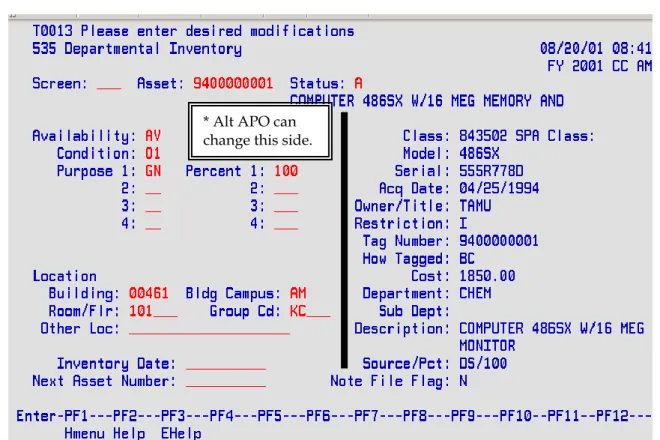
The preliminary asset data set up on FRS Screen 362 will electronically feed into FAMIS FFX once the invoice is paid. Then HSC Property Management will review and approve the asset. After HSC Property Management approves the asset in Step 3 of Figure 3-1, the Alt APO should maintain the property control codes on FAMIS FFX Screen 535 (Figure 3-1, Step 4). Figure 3-5 shows FFX Screen 535. The Alt APO may change everything on the left-hand side of the screen. The Alt APO should request FAMIS access.
Figure 3-5: FAMIS FFX Screen 535
Room Numbers
Always keep room numbers on equipment updated.
This section applies to preliminary asset creators (Figure 3-1, Step 2) and the Alt APO or whoever will update FAMIS FFX Screen 535 (Figure 3-1, Step 4).
It is very important to keep room numbers on equipment current in FAMIS. When inputting room numbers into either FAMIS FRS Screen 362 (preliminary asset creator) or FFX Screen 535 or Canopy (Alt APO), the room number entered must be an official room number recorded on the bldg/room table in FAMIS. If you try to enter a room number that is not on the table, you will receive an error message. Be sure to contact HSC Property Mgmt to update the table. For a list
* Alt APO can change this side.
Page 35
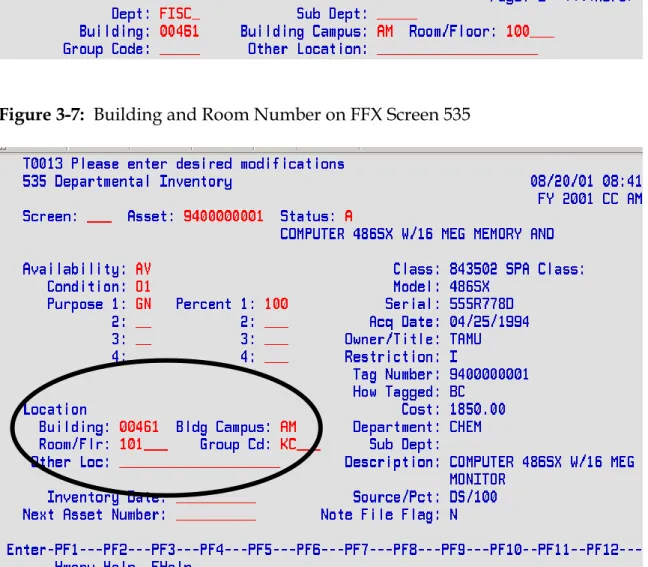
of rooms associated with a building, see FAMIS FFX screen 543. For example, if property is located in room 17B at the Reynolds Medical Building, but FAMIS has the room number listed as 017B, then it is crucial to input 017B into FAMIS. Figure 3-6 illustrates the field on Screen 362 where the preliminary asset creator would input the building and room number. Figure 3-7 illustrates FFX Screen 535 where the Alt APO would keep the room number updated after the asset is approved.
Figure 3-6: Building and Room Number on Screen 362
Page 36
Communication with Departmental Creators Remember:
Teamwork is an important part of inventory management. The Alt APO must be made aware of all inventory purchases.
Alt APOs must communicate with and educate departmental creators and preliminary asset creators.
If possible, it is recommended that the Alt APO input the preliminary asset data.
It is recommended that the Alt APO input preliminary asset data. If this is not possible, then procedures should be established with the departmental creator to inform the Alt APO of all inventory purchases. The Alt APO should educate the creator on what should be inventoried and which object codes to use. Also, the Alt APO should communicate with the departmental preliminary asset creator to ensure that correct property control information is entered onto the preliminary asset screens.
Page 37
Chapter 4
Page 38
Assigning Asset Numbers
FAMIS Assigned Asset Numbers
It is crucial that the departmental creator knows which items should be
inventoried and which object codes to use. If they fail to use an inventory object code, then FAMIS will not recognize the purchase as something to be
inventoried.
An asset number is a 10-character number used to uniquely identify an asset within FAMIS. A tag number is the 10-character asset number used to
physically mark the asset. In almost all cases, the tag number and asset number are identical and the terms are used interchangeably.
Figure 4-1 illustrates the process for assigning asset numbers for on-line
purchases. In Step 1, the departmental creator creates the purchase document in FAMIS and uses an inventory object code. If the creator fails to use an inventory object code, then FAMIS will not recognize the purchase as something to be inventoried. In Step 2, the preliminary asset creator would input all property control data using FRS Screens 360-362, as long as an inventory code was used in Step 1. In Step 3, FAMIS will assign tag numbers immediately after the
preliminary asset enterer inputs all required data. In Step 4, after FAMIS assigns the tag number, departmental personnel with access to Screen 361 may view it. Figure 4-1: Assigning Asset Numbers for On-Line Purchases
Step 1: Departmental creator creates purchase document in FAMIS FRS when order is placed.
Step 2: Preliminary asset enterer inputs preliminary asset data in FRS when the asset is received.
Step 3: FAMIS assigns asset/tag number.
Step 4: Tag number may be viewed using FRS Screen 361.
Page 39
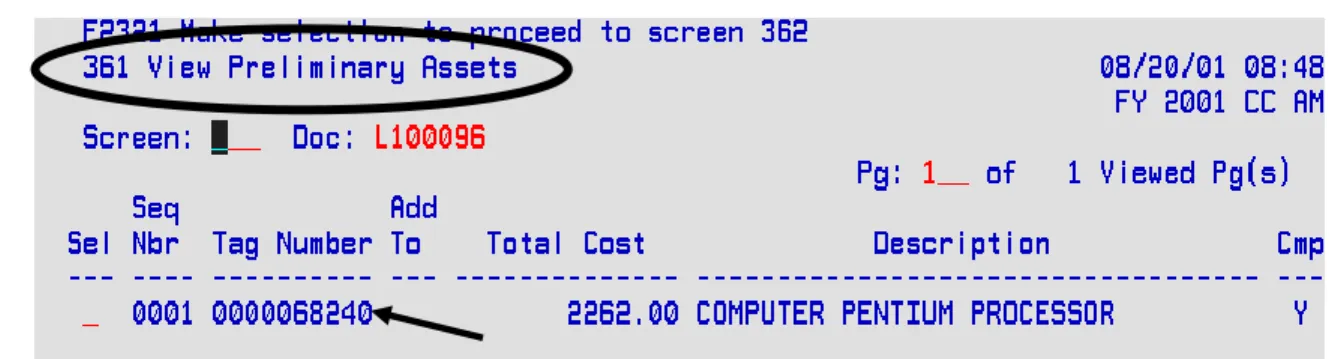
Figure 4-2 is a screen shot of FRS Screen 361 showing the tag number. The purchase document number (i.e. L100096 below) must be known.
Figure 4-2: Screen 361 Tag Number
Manual Requests for Inventory Numbers
Sometimes, certain situations do not allow for the department to enter inventory information into FAMIS to retrieve an asset number. Situations such as these may include receipt of a gift or donation, among others. In these cases, the department must send paperwork to HSC Property Management, who will assign an asset number for the department.
Tagging the Equipment
The “Ten-Day Rule,” according to the Texas A&M System Asset Management Manual (September 2004), says,
“The inventory number must be permanently affixed to an item promptly upon receipt and acceptance but not later than 10 calendar days after receipt, unless prevented by unusual circumstances. Examples of acceptable reasons for not
accomplishing such within the ten calendar days would be that the item had to be assembled, calibrated, or connected to a system before it could be inspected properly and placed in use.”
Tagging of equipment is critical for inventory management. First, State and System policy require it. Second, if equipment is not tagged, it will be very difficult for the Alt APO to locate or identify these items during the annual inventory process. Departments should develop procedures to mark equipment immediately. In addition, it is recommended that the Alt APO is notified before equipment is delivered to the end user to ensure that it is properly marked.
Page 40
It is much easier for the Alt APO to find equipment if it is tagged before it is given to the user. Since departments can easily retrieve a tag/asset number from FAMIS FRS Screen 361, they should have no problem marking the asset
within 10 days upon receipt.
FAMIS will assign a ten-digit tag number on Screen 362 for each preliminary asset created on Screen 360. This number needs to be clearly written on an asset label (created by department) and the label placed on the piece of equipment as soon as possible. Assets must get tagged within 10 calendar days of receipt with the following information:
10-digit tag number
Property of TAMHSC – 709
Maintain inventory tags that are neat and orderly. If numbers become
unreadable, they must be remarked. At each month end close, the Alt APO will receive barcode labels for newly acquired inventory. The handwritten/typed labels should be removed and replaced with the barcode label immediately upon receipt.
Follow these guidelines for marking equipment, according to the Texas A&M System Equipment Management Manual (September 2004):
Mark equipment within 10 calendar days upon receipt.
Mark equipment before it is given to the user and placed into use. Mark each asset with its own unique tag/asset number. Never re-use a
previously assigned number from a different asset.
Mark every piece of equipment as “Property of TAMHSC-709 ” Assure that the label can only be removed through considerable or
intentional means.
Place the label in a highly visible area making it easily accessible during the physical inventory.
For consistency and convenience in conducting physical inventories and audits, the number should be placed in accessible view of the person conducting the inventory. Do not place the numbers inside drawers, on the bottom of
equipment, or on the side of heavy equipment that would be difficult to move in order to view the number.
“Hard to Tag” Property
For equipment that is too difficult to tag, HSC Property Management suggests these procedures:
Page 41
If the item will be used with more than one specific instrument, it must be assigned its own inventory number. Keep each piece of equipment in a special container with the following information affixed to the container:
o Inventory number o Item description
o Complete serial number (if available)
o Location where container will be kept just in case the container gets
moved
Keep the property in the container when not in use.
Affix the inventory number and item description to the shelf where the equipment will be kept, if applicable.
When it is necessary to move the equipment to another location, establish checkout procedures.
Labels can also be kept in a folder with equipment information by the dept’s property officer. This suggestion is often used for animal cages that are cleaned in high temperature washes that the label cannot withstand.
The tagging of non-inventory property is not required but can be valuable at annual inventory time, during audits, and can help prevent pilferage. Suggested methods to mark equipment when an asset label is not a valid option include the following:
Heavy duty engraver
A black, silver or white permanent marker Tagging Non-Inventory Property
According to the State Comptroller’s Office, the only items that must be tagged are inventory items. Tagging of non-inventory property is not required. However, marking certain non-inventory items helps the individual who performs the annual physical inventory to identify items with sight recognition. They can identify items that do not (and should not) appear on the inventory listing, even though it might look like they should. In these cases, HSC Property
Management recommends labeling the equipment with the following information:
Property of TAMHSC-709 Non-Inventory Asset FAMIS Document #
Page 42
Chapter 5
Page 43
Acquisitions
This chapter discusses how to handle the numerous transactions for acquiring property. Acquisitions discussed in this chapter include the following:
Additions and Replacements Constructed/Fabricated Property Gifts and Donations
Joint Purchases between Texas A&M System Members Leased Personal Property
All of the property that is either purchased with HSC funds or donated to HSC is State of Texas property. This includes grants and gifts, etc.
Additions and Replacements
An addition must meet a class code threshold (capital or controlled) for the asset within the fiscal year to become a component part of the asset
A replacement means “the replacement of an internal or external part of
personal property that allows the property to complete its normal useful life.” Generally, replacement parts should not be inventoried. A replacement part simply replaces a worn-out part with another and allows the item to complete its normal useful life. A replacement will be added to the asset if the replacement meets the capital class code threshold for the asset within the fiscal year. The key to adding to an existing asset via FAMIS is to ensure that the
departmental creator is aware of the total additions that will be made to the asset within the fiscal year. If the total will meet the class code threshold, then all additions will be coded with the appropriate object code for the addition and entered as an “Add to Existing Asset” on the Preliminary Fixed Assets screens. A replacement is added only when it is $5,000.00 or more.
Below are examples of additions. In each example, the addition should be added to the value of the existing item. Instructions for doing so are included.
A. Example, Capital Asset/Capital Addition: A $17,000.00 microscope
purchased in a previous year is being upgraded. The $6,000.00 part will be on different purchase order because it’s purchased in the current fiscal year. The part will be coded capital and added to the original asset as a
Page 44 This example meets the following criteria:
1. It will become a component part of the existing item. 2. It meets the threshold within the fiscal year.
Add the parts to inventory in the following manner:
1. The departmental creator will create a purchase document to pay for the part. The departmental creator should use the capital object code because the part being added meets the capital threshold. This will force
preliminary asset entry.
2. The preliminary asset creator will use Screen 360, Option 1 to add to an existing asset. When the parts are replacement parts, indicate so on the second line of the description. This allows the addition of replacement parts to be added to the original component and depreciate correctly with the original asset value.
If, for some reason, this was not accomplished using FAMIS, then submit the
Property Additions and Deletions form to HSC Property Management.
B. Example, Capital Asset/Controlled Addition: A camera costing $2,500 is added to, and can only be used with, a $10,000 piece of lab equipment that is currently on inventory from a previous fiscal year. The $2,500 meets the controlled threshold within a fiscal year. Therefore, the value of the camera should be added as a new component of the lab equipment.
This example meets the following criteria:
1. It will become a component part of the existing asset. 2. It will meet the object code threshold within the fiscal year.
Add the camera to the lab equipment's value in the following manner: 1. The departmental creator will create a purchase document in FAMIS to
pay for the camera and should use the object code of 5781, although the object code for the original system is 8422. The controlled code is used because the amount added for this fiscal year meets the
controlled threshold. Using this object code will force preliminary asset entry.
2. The preliminary asset enterer will use FRS Screen 360, Option 1 to create an asset and add the camera to the lab equipment’s tag number. The enterer would then complete Screen 362.
If, for some reason, this was not accomplished using FAMIS, then submit the
Property Information Sheet to HSC Property Management. Request an "add-to," cite the asset number and complete all other required information.