Defining an implementation project for a cloud based enterprise
POS system
Tuukka Johansson Opinnäytetyö Tietojenkäsittelyn Koulutusohjelma 2013Tiivistelmä 6.5.2013 Tietojenkäsittelyn Koulutusohjelma Tekijä Tuukka Johansson Aloitusvuosi 2009 Raportin nimi
Pilvipalveluna tuotetun kassajärjestelmän käyttöönottoprojektin määrittäminen ketjuasiakkaalle. Sivu- ja liitesivumäärä 35 + 19 Ohjaaja Irene Vilpponen
Tämän työn tarkoitus on tuottaa projektisuunnitelma ravintolaketjun kassajärjestelmän käyttöönottoprojektia varten. Kassajärjestelmä on nimeltään Simphony ja se on pilvipalveluna tuotettu.
Työssä esitellään pilvipalveluiden teoriaa, keskittyen sen yleisimpään muotoon ”Software as a Service:n” (SaaS). SaaS mallista esitellään SWOT analyysi niin toimittajan kuin asiakkaankin näkökulmasta. Lisäksi työssä esitellään hyvän käyttöönottoprojektin teoriaa. Osuudessa käydään läpi asiat kuten vaiheistus, raportointi, rajaaminen, riskien hallinta jne. Simphonysta esitellään sen tärkeimmät ominaisuudet sekä arkkitehtuuria.
Työn toisessa osassa laaditaan projekti suunnitelma käyttöönottoprojektia varten. Projekti alkaa käynnistys ja suunnittelu vaiheilla, joissa projektin rajaukset, aikataulutus ja resursointi suoritetaan. Suoritus vaiheessa rakennetaan testijärjestelmä ja asiakas suorittaa hyväksymistestauksen. Vaiheeseen kuuluu myös koulutuksia. Pilotointi ja levitys vaiheissa käydään läpi Simphonyn asennus ja sen vaiheistus. Projektin
päättämisvaiheessa tehdään viimeiset tarkistukset ennen kuin sovellus siirtyy ylläpidon ja asiakastuen piiriin. Lisäksi projektiin sisältyy liitteet joista löytyy projektin
tehtävälistaus sekä gantt kaavio.
Käyttöönottoprojekti ei ole koskaan yksinkertainen, on sitten kyseessä pilvipalvelu tai ei. Pilvipalvelu tuo mukanaan monia mahdollisuuksia esimerkiksi keskitetyn ylläpidon ja vähentyneiden laitetarpeiden muodossa. Projektin onnistumiselle on kuitenkin keskeistä hyvin tehty suunnitteluvaihe, sekä toimittajan ja asiakkaan välinen hyvä kommunikaatio ja sitoutuminen yhteisiin tavoitteisiin.
Asiasanat
Abstract
6th May 2013
Degree Programme in Information Technology
Author
Tuukka Johansson
Year of entry
2009
The title of thesis
Defining an implementation project for a cloud based enterprise POS system Number of pag-es and appen-dices 35 + 19 Supervisor Irene Vilpponen
The purpose of this study was to create a template project plan to help defining an im-plementation project for a cloud- based enterprise POS (point of sale) system called Simphony.
The study presents the theory of cloud computing and especially its most common part SaaS (Software as a Service). A SWOT analysis of SaaS solutions is presented from the point of view of the service provider as well as the customer. In addition, the study includes theory behind a successful implementation project, covering topics such as project phasing, reporting, scoping, risks etc. Finally the Simphony solution is present-ed including its key features and architecture.
The second part of the study is a template project plan. The project plan starts with the project initiation and planning where the project scope and business case along with budget and schedules are compiled. The execution phase describes the tasks during the system build and testing including training sessions. The piloting and rollout phase give an overview of the efficiency of the installation. Finally the project closing phase co-vers the topics that need to be addressed before the project can be closed and the solu-tion handed over to support. The appendices include a project task breakdown and a gantt chart illustrating the scheduling and dependencies of the tasks.
Implementing a large enterprise solution, cloud based or not, is always a complicated task. When the solution is cloud- based, it does give great advantages in the centralized management it offers. Also the lack of on-premise servers makes the installation much faster and efficient. The project definition is a crucial part of succeeding in the imple-mentation and thus should be carefully planned. Good communication between the customer and the service provider is also a key to making a solid plan and committing to mutual goals.
Key words:
Table of contents
1 Introduction ... 1
2 Cloud computing ... 3
2.1 Software as a Service (SaaS) ... 4
2.2 SaaS for the Customer ... 5
2.3 SaaS for the provider ... 8
2.4 Three types of SaaS ... 10
3 Implementation project ... 12
3.1 Defining a project... 12
3.2 Executing an implementation project ... 15
4 Micros Systems, Inc. ... 23
4.1 Research and Development ... 24
4.2 Micros Nordic BU... 25
4.3 Micros Fidelio Finland Oy ... 25
5 Simphony ... 26
5.1 Background ... 26
5.2 Service Oriented Architecture ... 27
5.3 Simphony implementation project ... 30
6 Conclusions ... 33
1
1
Introduction
I am working for Micros Fidelio Finland Oy. The company (Micros Inc.) is the world leading software provider for the hospitality industry. In my current position I am working as Service Delivery Manager for two named accounts and also as an applica-tion specialist with the restaurant software. Micros is starting the sales of new POS (Point of Sale) product called “Simphony” in the Finnish subsidiary. The current “flag-ship” product (RES 3700) has entered a maintenance mode, which means no new fea-tures will be developed but the product will be supported for several years to come. As the current solution RES 3700 is a traditional “on-premise” installation but Simphony is a true Software as a Service (SaaS) solution, the processes for implementing such solutions vary. Now is the time to start preparing the organization and the key pro-cesses, to be ready for future implementations of Simphony.
When starting to sell and implement a new product, there are several things to take into account. For example one must decide on the sales strategy, pricing, marketing, staff needs to be trained, ordering and other support processes need to be defined. The list is virtually endless. This study will look at the challenges for the organization in terms of technical and operational implementation of the solution. This means defin-ing the project to get the solution set up accorddefin-ing to customer needs, includdefin-ing thdefin-ings such as setting up test lab, defining interfaces, piloting, user training and finally imple-menting and rolling out the solution to end users.
The goal of this study is to create a “template” project plan, to help in planning for a Simphony implementation to a large enterprise customer. The template can serve as guide in future projects and also help in distinguishing differences between implement-ing an on-premise solution as opposed to a cloud based solution. The template could potentially help micros to achieve a more standardized way of delivering such projects in the future. Often the implementation projects are more complex and include several other modules besides Simphony, but in this study I am concentrating solely on the implementation of Simphony.
2
The first part will guide the reader through basic principles of could computing and especially SaaS (Software as a Service). The part will contain a SWOT analysis on SaaS, from the perspective of the service provider as well as the customer. Then the study will look at the theory behind a successful implementation project, including project scoping, phases and scheduling of the project, risk and change management and com-munication plans.
Next part contains an introduction of Micros Inc. and Micros Fidelio Finland, the or-ganization, products and services. I will also give the reader an overview on the Sim-phony solution and an introduction to SOA (Service Oriented Architecture) which Simphony utilizes.
Finally the study will include a “template” project, in which all necessary steps for exe-cuting a successful implementation project of Simphony will be listed along with time-lines and tasks. The project will include two appendixes: a gantt chart and a breakdown of tasks required in the different phases of the project.
Terminology
SaaS Software as a Service
POS Point of Sale
SLA Service level agreement
SOA Service oriented architecture
XML Extensible Markup Language
3
2
Cloud computing
There has been a big buzz in the media about cloud computing for several years now. But what in fact is considered cloud computing? Cloud computing offers IT recourses to customers via internet without customer having to know where the recourses are and not having to worry for the maintenance or reliability of the system. These re-courses can be i.e. storage space, computing rere-courses, applications or services. There are a lot of different definitions of cloud computing around, but there is not one gen-erally accepted, e.g. consultant company Accenture defines it as providing IT-recourses, such as software, hardware or services, dynamically to customers via internet (Salo 2010).
Berkeley university divides Cloud computing to two parts in their publication “Above the Clouds: A Berkeley View of Cloud Computing”. They state that cloud computing refers to “both the applications delivered as services over the Internet and the hard-ware and systems softhard-ware in the datacenters that provide those services” (Am-brust&Co, 2009). In addition to the general definitions, the National Institute of Standards and Technology lists five main characteristics of Cloud computing:
- Uses self service model.
- Can be accessed via several different clients. - Utilizes joint use of recourses.
- Has fast flexibility.
- Provides accurate measurement of usage. (Salo 2010.)
In general, cloud computing is not only a technological change but also a change in the business thinking. In the best scenario the cloud computing can offer the customer cost savings, change of the cost structure, improved flexibility and the possibility to plan the business processes to improve efficiency and productivity. This is because it can free a company of all IT-investments and transform the costs structure to be more based on the actual usage of the various systems. (Salo 2010.)
4
The competition among the cloud service providers is getting more and more intense. Almost all of the big players such as Google, Amazon, Microsoft, Apple etc. have their own products in this area and also smaller companies are moving to the market. The industry is growing fast and the future will tell how far it can grow. (Salo 2010.)
Cloud computing is commonly divided into three different types:
- Software as a Service (SaaS). - Platform as a Service (PaaS). - Infrastructure as a Service (IaaS). (Salo 2010.)
SaaS is the most common of these three. International Data Corporation (IDC) pre-dicts that in 2013 the cloud computing market will be worth 44,2 billion $ and it’ll be divided between the models as follows: (Salo 2010.)
Figure 1. Cloud computing market shares (Salo 2010)
2.1 Software as a Service (SaaS)
SaaS means that the service provider is in charge of owning, installing, maintaining and updating the software and offers it to the customers based on the customer’s needs. In other words the customer only pays e.g. a starting fee or for the usage of the service as opposed to the traditional license fee. The fee might be based on the usage time, num-ber of users or numnum-ber of clients. This model enables the customer to free its
recours-5
es to more productive tasks not having to worry for the maintenance and updates of the software. The model also reduces the amount of capita the company has tied up in the hardware. (Salo 2010.)
For the service provider, SaaS also offers several benefits. For instance the support for the software is more simple when the all the customers are running the same version of the software and the provider can concentrate more on further developing the soft-ware. Also, when the software is used by a lot of customers, the service provider has the benefits of multitenancy. Multitenancy means several users using the same recours-es simultaneously and in this scenario, it is easier for the service provider to ensure ef-ficient use of recourses. (Salo 2010.)
As with all new software, especially when used by companies, they are required to be reliable, have good performance and an intuitive user interface. Service cannot have downtime and it should be able to adapt to the various needs of the business and scale to meet the suddenly changing needs.
2.2 SaaS for the Customer
Software as a service offers a lot of benefits for the customer but there are also limita-tions. In this chapter, I’m looking at what are the biggest Strengths, Weaknesses, Op-portunities and Threats of SaaS in the perspective of the customer.
6
Figure 2. SaaS SWOT analysis for the customer (Järvi, Karttunen, Mäkilä & Ipatti 2011)
For the customer, there are several strengths in using a SaaS solution. Usually it re-duces the need for inhouse IT, as the service provider will take care of hosting the so-lution, as well as upgrades, security etc. SaaS is also a high availability solution and it is usually accessed via internet and as such, it can be accessed virtually anywhere. The risk in purchasing is always fairly small as traditionally SaaS is charged based on usage. When the customer wants to try out a solution, the costs in the beginning are usually small, and the lack of on-premise servers, makes the implementation quicker. Addi-tionally, as the service provider needs to provide the security of the solution, it can be much better than when it is done by the customer. (Järvi & Co. 2011, 12.)
There are also weaknesses for the customer. These can be often seen as lessened con-trol over the solution, as well as the difficulties in tailoring the application. The reason for these is that with SaaS the provider wants to offer the same solution to all custom-ers and thus maintain the benefits it offcustom-ers. These benefits will be covered in detail in
7
the following chapter. One weakness in SaaS for the customer is the high dependency on the service provider. If the provider suddenly decides to go out of business and do something else, there is little the customer can do. If the service is sold with minimal human interaction, there are usually no possibilities for customer specific contracts. Also in some cases the solution can be dependent on the internet connection and might not offer any offline functionalities. (Järvi & Co. 2011, 12.)
The SaaS model offer several opportunities for the customers. The SaaS model usual-ly reduces the costs for the service because the provider can share the resources be-tween several customers. This in turn lowers the price of the services and fills the mar-ket with wider range of options. The SaaS model also gives the customer a better op-portunity to focus on their core business. This is because the service provider takes care of the IT needed to operate the solution, thus freeing the customers’ resources for core business activities. Testing of different solutions is very easy for the customer. Usually SaaS applications can be tried out for free. Even if there is no free try out peri-od, the low starting cost makes testing risk free. As time is virtually the only thing the customer can lose. (Järvi & Co. 2011, 13.)
There are threats in using SaaS solutions also. Integrations to customers existing sys-tems can be difficult of even impossible. SaaS providers rarely provide integration ser-vices, and the knowhow needs to be in-house or bought from a third party. The relia-bility of the provider is crucial when selecting a service provider. All data, services and security will be trusted in the hands of the provider. Legal restrictions might also create threats. Sometimes e.g. because of physical data storage location, the service cannot be used due legal restrictions. Changes in the service or availability must also been taken into account. Provider might develop the service to be less suited for an individual tomer, or in worst case scenario end the service all together. In these cases, the cus-tomer is forced to look for alternative options. The lack of local support might also be an issue if the self-service model gets too profitable for the provider. (Järvi & Co. 2011, 13.)
8
2.3 SaaS for the provider
SaaS model is not purely win-win proposition. There are weaknesses, strengths, oppor-tunities and threats for the provider compared to an on-premise application. Some of the strengths the customer experiences are weaknesses in the perspective of the pro-vider. (Järvi & Co. 2011.)
Figure 3. SaaS SWOT for the service provider (Järvi & Co. 2011)
The Strengths of SaaS for the provider are evident. When advantages, such as reduced costs, ease of use and lesser need for IT knowledge, are introduced to customers, the range of potential customers widens. When all the customers are in fact using the same instance of the application, the costs for an individual customer are reduced greatly. New customers can implement the solution automatically. The SaaS basad solution also enables direct contact to customers. There are typically no “middle mans” be-tween the provider and the customer. This enables fast cycles of feedback and devel-opment and gives a possibility to build CRM tools directly in the software. For the provider, SaaS also offers benefirts in version management as well as development.
9
When dealing with an on-premise software, the multiple versions and customer specif-ic customizations cause a signifspecif-icant increase in support and maintenance. In SaaS this is not the case as there is only one instance of the application running, and usually very little if any customizations. Again, as there is only one instance of the application, this makes the development process very streamlined: e.g. there is no need to worry about incompatibility and quick fixes can be rapidly implemented. Finally SaaS offers the possibility for quicker sales. Or even if the sales and marketing processes were slow, the actual purchasing and implementation can be automatized and quick. (Järvi & Co. 2011, 14.)
The service provider needs to think carefully when the SaaS model should be applied, as there are weaknesses as well. The scalable pricing can cause problems for the pro-vider. The profits do not start from day one, but are realized usually much later. And this is true only if the customer can be maintained. The easy selling of SaaS mean that the providers are facing global competition. When the applications are sold mostly on the web, there really no advantage of being geographically close to the customer. The competition is severe and it keeps the standard of quality high and prices low. The completion, especially with freemium, keeps prices low. This means that if the provider has costs with employees doing sales, the provider often can make ends meet only months after the sale took place. When the pricing is based on the usage, the CAC is high and customer relationships tend to be short, the provider faces serious problems. The easier it is for the customer to change the provider, the more likely it is for the provider to lose the customers. (Järvi & Co. 2011, 14.)
The SaaS model offers also many opportunities. The business model is very scalable and thus can be expanded very rapidly. Sales is the biggest bottleneck, but the multi-user application which is easy to use and adapt, can be easily spread out virally. SaaS offers a quick entry to global markets. Once an application is available in the web, it is basically global, just as long as marketing is sufficient. Growth can be in best cases real-ly explosive.Excluding salaries, starting up a SaaS-business has very little costs. Onreal-ly after the customers start coming in and the marketing is initiated, the costs start rising. Therefore SaaS is a good option for many startup companies. There are significant cost
10
savings in development and maintenance. When development in focused on one mul-titenant application instance, as opposed to several individual ones, the application de-velopment and maintenance is very cost efficient. Possibility for fast updates combined with the direct customer contacts, enables quick feedback on new features and thus creates an opportunity for agile development. There is an opportunity in the active user communities too. Presence in the web creates a natural way of integrating the user community directly with the service. (Järvi & Co. 2011, 15.)
The threats are in many instances also present. One of the most significant ones, is the customers fear regarding data security. Will the customers have enough faith with the provider to let them handle the business critical data? The threat of SaaS-business also is heavily competitive and global. Often the newly created service can be copied quick-ly and set up with less costs than original. The customer value might also diminish. This is problematic especially when a provider is trying to transform a current product into a SaaS-model. SaaS-model calls for a new way of thinking. Providers used to working with on-premise products might have difficulties creating new processes to suit the world of SaaS. Reaching large numbers of customers with low prices is very different from landing big deals with large customers. The different development pro-cesses can present challenges too. Even though the technical differences between on-premise and SaaS are not huge, they still exist. For instance, optimizing the cloud-infrastructure can be a new area even for an experienced team of on-premise software developers. (Järvi & Co. 2011, 15.)
2.4 Three types of SaaS
Järvi & Co. in their book “SaaS käsikirja 2011”, divide the SaaS market into three dif-ferent types. The types are so called arch types, and in reality most SaaS providers ar mixing the different models, and applying the best suited parts of each into their own business. The three types are called “Self service-SaaS”, “Sales-SaaS” and “Enterprice-SaaS”.
11
The first model “Self service-SaaS”, is typically a high volume and low price business. Usually this model arises, when the service creates fairly low value to the customer and the market is easy to access by different operators. This causes low prices and heavy competition. For the self service model to work, the application needs to very easy to buy, start using and risk free. Also the value for the customer needs to be evident. The product is always fully standardized and the sales- and support processes are usually fully automated. Dropbox is a good example of such a service. (Järvi & Co. 2011, 21.)
Self service cannot be used for several reasons, and usually the reasons all occur simul-taneously. The reasons include that the product is more complicated and might call for some user training, customer value might vary between different customers and might not be easily understood. For the customer this means that the purchase and the im-plementation need to be planned and executed properly. Higher price of the product increases the risks related to the purchase and it cannot be done via a self service web site. Customer usually wants to have a personal relationship with the provider. In Sales-Saas, there is usually also need for contractual agreements, Service Level Agreeament (SLA), invoicing procedures, support needs etc. This makes the purchasing more com-plex and adds need for active sales. On the other hand, the higher price also justifies the extra costs generated by the sales. Product is usually non-trivial, and its use requires trust in the provider and continuation of the product. Support and implementation services are often provided. (Järvi & Co. 2011, 21.)
Enterprise SaaS is no longer the essence of SaaS. It usually leads to a situation, where the usual benefits of SaaS are no longer achieved, such as slow increase of costs during growth of customer base and fast selling and implementation. However, the flexibility and efficiency of providing the service and the ease maintenance and development re-main. Product is usually business critical to the customer and it is used in an environ-ment dedicated only to one particular customer. Several integrations to third party sys-tems are common. Sales process is closer to the traditional application sales and it’s commonly targeted to specific customers and supported by marketing. SaaS provider almost always provides services such as support, training, consultation, integrations etc. either by themselves or via a third party partner. (Järvi & Co. 2011, 21.)
12
3
Implementation project
Implementation of new system is always based on the decisions a company has made to change a part of its operations and the system related to it. Implementation includes all phases that need to be done before an application is moved to production. Some-times implementation also includes support for some period after going live with the system. (Stadia 2004, 10.)
One of the biggest advantages of SaaS is the quick implementation. At best, the im-plementation can be done within hours if the application is directly suited to a specific need of a person or a business unit. At the other end of the spectrum, an implementa-tion of an enterprise applicaimplementa-tion for an internaimplementa-tional organizaimplementa-tion might take over a year. Whether the implementation is fast or slow, there is always a need for an imple-mentation project. The project itself will include similar parts as an on-premise applica-tion implementaapplica-tion, such as data migraapplica-tion, configuraapplica-tion, integraapplica-tions, training and consultation. (Järvi & Co. 2011, 102.)
Implementation project needs to be always defined carefully and it needs to include a start and an end. The implementation itself can be done simultaneously throughout the organization or it can be used simultaneously with the old system. Usually the project is divided in phases where one unit pilots the system, before the rollout of the system. (Stadia 2004, 9.)
3.1 Defining a project
Any implementation will start with defining a project. Three aspects are crucial to all projects: schedule, recourses and output. Project must be defined including all of these aspects: when will the project start and end, what recourses are available and what will be the desired output? When planning for the resources, one needs to think about oth-er recourses besides money and human recourses as well, such as tools, premises and equipment. (Salonen 2000, 15.)
13
Steering group and project manager
Every project needs a steering group. Steering groups’ duty is to make the vital deci-sions regarding the project, define the goals and appoint a project manager. Steering group does not participate in the actual project work, but will help with planning and technical issues if needed. Usually the steering group includes 3-6 persons, who are representing the interests of different stakeholders in the project. (Stadia 2004, 21.)
Selecting and appointing a project manager is an important part of the project. The project manager needs to be able to understand the different parts of the project, also technically and be able to communicate with all stakeholders. Project manager is always a part of the steering group. It is the duty of the project managers, to create the agenda for the meetings and bring in the items that the group needs to decide upon. (Stadia 2004, 21.)
Milestones
Milestones are a crucial part of managing a projects lifecycle. In order for the project to be successful, the milestones and the goals attached to them must be carefully defined by the steering group and the project manager. Milestones ensure that a new phase in the project will not be started until the previous one is completed. Milestones are de-signed to help the project proceed in a flexible way and to achieve the goals of project faster, more efficiently and with fewer costs. (Forsberg, Mooz, Cotterman 2003, 148.)
The number of milestones does not need to be predefined too strictly, because if the project stays creative, it will bring benefits to the outcome. Also against common be-lieves, strict control in a project does not make the project less creative, although it will create an increased need of recourses. Too few milestones will make the project hard to manage, where as too many milestones will make it too expensive. A good rule is that once 20 percent of projects recourses are used, the outcome should be reviewed. if at this point, the goal seems unattainable, the project should be cancelled and the re-courses used in other projects. (Forsberg & Co. 2003, 148.)
14
Risk management
Risk management and preparing for risks is an essential part of all projects. It is by no means a negative thing, but rather a way to prepare better for the obstacles ahead. De-fining the risks isn’t actually very difficult as usually the projects are alike and history has a habit of repeating itself. Looking back on past projects and previously made mis-takes, is a good way to think about the challenges and risks of a project. One way of categorizing possible risks is to divide them into
- technical risks - scheduling risks - commercial risks
- organization, human recourses, information delivery - outsourcing, vendors
- customer related risks - environmental risks - contractual risks
- product responsibility risks
- risks related to destination country when implementing in a foreign country. (Pelin 1996, 258.)
Risk management is not done because of lack of trust in project team. Some risks are bound to materialize during the project and as such, proactive risk management is way for project management to keep the core business uninterrupted during the project. Risk managements essential goal is to provide support for the project team during the project. When risk management in implemented successfully, it ensures that the project can continue even if risks are materialized. (Stadia 2004, 32.)
When a company is purchasing a new IT-solution, often it is a big investment. It is essential to think about the changes the new solution will bring to the whole company. For example, sometimes the solution might bring significant benefits to one part of the company, while at same time creating huge amounts of work and needs for extra
re-15
courses at another part. Also, the financial benefits of the system can be difficult to define exactly. This is because when weighing the benefits, one has to account for many “irrationally” changing details. E.g. it is very difficult to estimate the number of hours personnel will have to use to get familiar with the new system in a way that using it becomes a routine. (Stadia 2004, 32.)
3.2 Executing an implementation project
When working in project, good planning is one of the most important things. In the beginning of the project, the project manager writes a project plan, which needs to be accepted by the steering group. The idea of the plan is to describe the execution of the project. In an implementation project it is essential to understand what modules and features the system must have, for it to fulfill the needs of the customer. (Stadia 2004, 33.)
Because implementation of a new system is often a long process, the plan needs to be realistic, but not too specific. In a long project the whole lifecycle of the project is un-known in the beginning and there are usually changes along the way. As such, it is very important that the project plan gets updated during the project when needed. (Stadia 2004, 33.)
Project plan
Project plan is the most important document of the project and it should always con-tain as a bare minimum the goal of the project, organization, phasing, resources and schedule. Section defining the resources of the project should contain the budget of the project as well as the human and equipment resources that are available. Schedule outlines the frame of the project and the time available for individual phases. Schedule should also account for the time needed for project follow-up i.e. milestones. This is where the steering group of the project verifies whether the sub goals have been met or not and if there is a need to make adjustments in the project plan. (Stadia 2004, 33.)
16
In addition to the above, the project plan should also contain sections defining the change management process and risks. Project plan can be drafted in many different formats and there are various different tools available designed to make the task easier. (Stadia 2004, 33.)
The body of the project plan can be e.g. as follows: 1. Defining the project.
- background - goals - scope 2. phasing 3. schedule - milestones 4. resources - human resources - budget 5. organization 6. change management 7. risk management (Stadia 2004, 34.) Project Scope
Scope is an essential part of the project plan. It defines what the project is supposed to achieve and what not. It usually includes also the sub goals and possible future goals.
When the project is first started, often the organization does not have a clear under-standing on what the solution should cover, to fully meet the requirements and serve the organizations needs. During the scoping phase, the goal is to understand these needs and to define what functionalities the solution should have. It is essential to real-ly create a mutual understanding on this as it has a huge effect on the resources and
17
time needed. Poor project scoping is one of the most common reasons of failure. (Ris-sanen 2002, 123.)
Project phasing
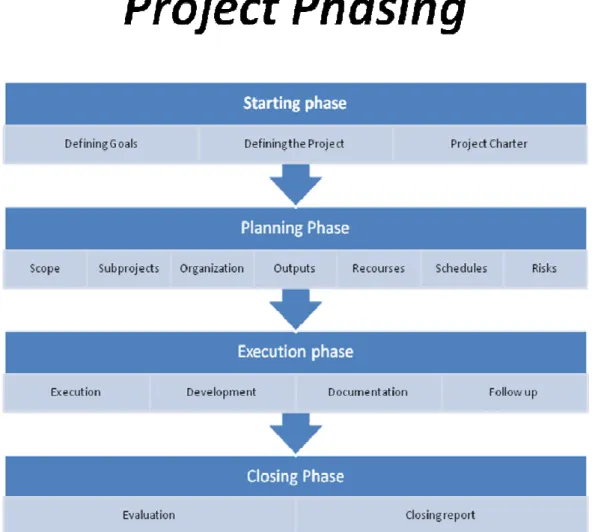
In order to achieve the goals of the project, it is important to focus on the important parts of the project. Focusing will be easier, when the phases of the project are well defined. In the picture below, is an example of the phasing. (Stadia 2004, 35.)
Figure 4. Project phasing (Stadia 2004)
Implementation project consists of several different phases, and each phase should have intermediate goals. When planning for the phases, the main goal of the project needs to be set first. Then the project will be dealt into smaller parts (phases). In order
18
to break down the project to really small parts, the details must be well known. The intermediate goals (milestones) will help the quality assurance and make it easier to keep the project within the set schedules and recourses. (Stadia 2004, 35.)
There are several different models of phasing. Typically, an implementation project can be dealt into seven different parts.
Feasibility study is a phase where a business case is created. The goal is to determine whether the solution will fit the purpose and whether the purchase is financially sensi-ble. This part will also create a frame for the schedule, recourses and the cost for the project.
Feature requirements phaseis where the functional, technical and other require-ments are defined and verified.
Planning phase is where the plan for the building and implementing the system is made.
Execution phase includes the actual work, including development, building the data-base, setting up demo and pilot systems etc.
Testing phase is during which the testing plan is made, system is fully tested and re-ported.
Go-live phase is where the system is installed to live environment and end users are trained.
Support phase is where the live system is supported and possible defects and bugs are fixed.
19
Output
The implementation and the output of the project need to be planned carefully before the project is started. This needs to be done together with the service provider and the customer in a way where the responsibilities and expectations for each party are clearly stated and understood. All the different phases with milestones need to defined, pref-erably in a contract, in order to avoid misunderstandings. The outputs of the project need to be described also in the project plan, including the milestones. (Stadia 2004, 40.)
Schedule
Planning for an efficient schedule does not ensure that the project will be completed in due time. It does however create a good chance for it to do so. One of the key ele-ments in good schedule planning is that it is easy to use and maintain. The schedule needs to be also realistic and reliable. When the schedule is created, the whole project team should be involved. This will ensure the groups commitment to the project and the schedule. (Pelin 1996, 133-135.)
It is recommended to use some standard tool in scheduling of the project. This enables everyone to follow up on the progress, as well as helps new members to join the group in the middle of the project. Additionally it will help in recognizing possible delays and other exceptions in the plan. The tool should also be easily used in creating material for the documentation of the project. (Niemi 1993, 80.)
When the project is started, milestones should be defined for the project. Milestones represent the completion of subprojects or bigger tasks in the project. Even though the project needs constant follow up, upon reaching the milestones the project steering group will gather for a meeting to verify that the project is proceeding as planned. In these meetings changes to the scheduling, recourses or the goals of the project can be made if necessary. The planning for the following phase should be completed at latest
20
at this time. The milestones should not be scheduled more than two months apart. (Niemi 1993, 58-59.)
A Gantt chart is often created to represent the scheduling of the project in a visual way. Gantt chart is very easy to read and understand and it provides a high level view of the schedule of the project. Gantt chart does not however display the dependencies between different phases of the project, and as such it is not the best tool for detailed planning of the project. It does have the benefit of giving a good overview of the tasks and overall schedule of the project. (Niemi 1993, 56.)
Resources
When planning for an implementation project, it is important to take into account all needed and available resources. Even though a supplier is used, the customer needs to invest in resources as well. Thus the total costs of the project cannot be counted just by adding up the price of the application and hardware. (Stadia 2004, 45.)
Some of the resources can be replaced with other resources. E.g. if a small amount of time is available for a project, it can be speeded up by investing more money and per-sonnel. These types of resources are money, time, personnel, premises, hardware and systems. (Pelin 1993, 177-180.)
Projects also contain resources that cannot be replaced with others. These resources are the immaterial resources, such as communication skills and know-how. Many com-panies have developed models where such skills are taught within the organization. This knowledge management has been popular especially in the United States. (Stadia 2004, 45.)
One of the most important resources in a project is the communication between the key persons in the project, such as the project manager, project group, customer and the service provider. Project manager is responsible for ensuring that both internal and external communication is working as it should. The typical ways of communication
21
are email, meetings and different tools for document sharing and discussion. (Rissanen 2002, 135.)
The planning for needed resources should be done when starting the project, including the tasks, estimation of work needed, and estimate of resources needed, scheduling and succession of tasks and possible dependencies. Project manager is responsible for cre-ating the plan and it needs to be approved by the steering group. (Pelin 1996 177-190.)
Project reporting
In the course of the project, several different reports are created. When writing such reports, it is important to keep in mind the recipients of the report, so that the infor-mation in the report will be delivered in a correct way and in respect of the reader. It is also important to remember that the significant parts of the information are always included. Typically, a report during a project includes the following details:
- Overview of the project status.
- Updated schedule and completed milestones.
- Overview of the schedule and the quality of the project. - Realized and possible risks and suggested actions.
Reporting is always from down to up. Usually the challenge for the steering group is not that the information is not available, but that the essential and critical information is difficult to identify from the large amounts of material. (Stadia 2004, 47.)
Change management
Once a project is started, some reasons might occur for which the original plan needs to be changed. These reasons might result from things such as changes in the market, new innovations, competitors, customers changed demands, changes in the environ-ment (e.g. legislation) or from other projects. (Pelin. 1996, 313-315.)
22
Common risks in any projects include e.g. the tasks are found more difficult than ex-pected or the schedule is too tight. Sometimes the Resources and workload are not balanced or the project might be managed poorly. Project tools might not be function-ing as expected or the customer expectations are not managed correct. All of the above might lead to possible changes in the project plan and need to be handled according to a preset change management process. (Karlsson & Marttala 2001, 126-127.)
To ensure that the outcome of the project is competitive, changes to the project plan must be able to be made during the project. However, all changes need to be done in a controlled way. When making a major change, the change management process needs to be followed, as the proposed change by one party might be conflicting with the benefits of the other parties. Change management includes the following phases:
- Making a change request.
- Estimating the effects of the change. - Consulting specialists.
- Reviewing the request (accept/decline/needs more research). - Implementing the change.
- Documentation. - Informing.
(Pelin 1996, 313-315.)
It is recommended that a standard document is used for creating change requests. This will ensure that all needed details are included in the requests. Requests will be handled differently depending on the size and effects of the request. If a request is small and has minimal effect on the costs and schedules of the project, the request can be ac-cepted or declined by the project manager. If a change is bigger, it needs to be ap-proved by the steering group. Once a change is completed, the project documentation needs to be adjusted accordingly, as well as the change log updated. Informing all par-ties of the change, must not be neglected either. (Pelin 1996, 313-315.)
23
4
Micros Systems, Inc.
Micros Systems, Inc. is an American company listed in NASDAQ (MCRS). The com-pany headquarters are in Columbia, Maryland. Micros Inc. is the world’s leading devel-oper of enterprise applications for the hospitality and retail industries. Customers con-sist of table and quick service restaurants, hotels, cruise ships, amusement parks, spe-cialty retail stores etc. Micros provides solutions including software, hardware, enter-prise systems integration, consulting and support. (Micros Systems, Inc. Company pro-file.)
Micros consists of over 6400 employees in 45 subsidiaries and 90 distributors in 50 countries. It is the global market leader with more than 370 000 restaurant and 30 000 hotel installations worldwide. Micros provides restaurant information systems includ-ing hardware and software for point-of-sale (POS) and operational applications, as well as a variety of back office applications that include inventory, labor and financial man-agement, Customer Relationship Management (CRM) and other centrally hosted en-terprise applications. (Micros Systems, Inc. Company profile.)
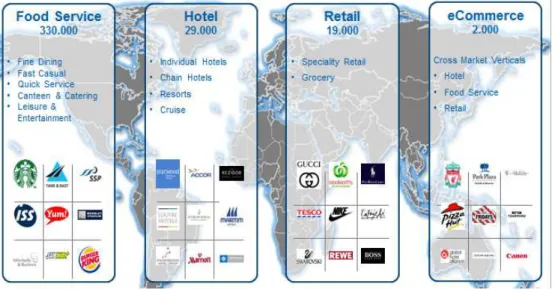
Micros operates in over 180 countries, and the market is divided into four different segments: Food Service, Hotel, Retail and eCommerce.
24 Globally Micros is divided into four regions:
- EAME (Europe, Africa and Middle East) - Americas (North America)
- LatAM (Latin America) - AP (Asia Pacific)
Figure 6. Micros global regions
4.1 Research and Development
Majority of the development for the company’s core products, such as restaurant soft-ware and hardsoft-ware as well as internet based restaurant solutions, takes place in the company headquarters in Columbia, Maryland. But in order to be agile in meeting the customers’ local requirements, there is also regional development within the subsidiar-ies. (Micros Systems, Inc. Company profile.)
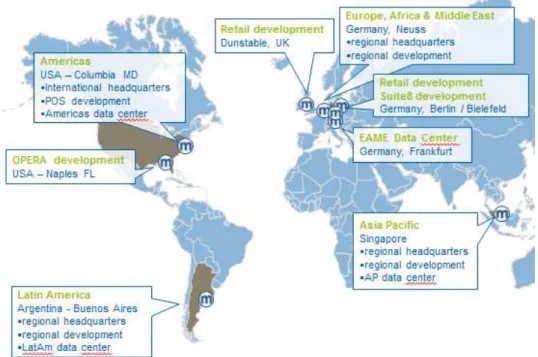
Below is a picture showing the locations of the main micros offices, data centers and development centers.
25
Figure 7. Micros head offices, data centers and development
4.2 Micros Nordic BU
Micros Nordic region consists of Finland, Sweden, Norway and Denmark. Traditional-ly all subsidiaries have worked more or less individualTraditional-ly but as the business has grown, and many of the customers are working cross borders, the need for rearranging the operations became evident. During the last years, Micros has built up Nordic Business Units for Hotel and Restaurant operations. The teams consist of Service Delivery Managers, Product specialists, Support specialist, development and Sales. The teams are responsible for delivering services to the strategic accounts operating in the Nordic region. The teams can also support the local organizations by providing project ser-vices, training and development recourses across the region. The model has proved to be very successful and it will be a key part of the operations in the years to come.
4.3 Micros Fidelio Finland Oy
Micros Fidelio Finland Oy is a part of the Nordic Region, which in turn is part of the EAME region. MF Finland has currently 54 employees located in two different offices. The head office in Turku houses the management and the administrative staff, support (Nordic and local), development and hotel system operations. Helsinki office houses the restaurant and retail operations.
26
5
Simphony
The next generation in Micros POS system is called Simphony. It is a true enterprise POS system which can be sold using a SaaS model. It has been developed completely by micros to meet the demands of the restaurant market. It utilizes the standard tech-nologies of the IT industry, which include web services, XML and XAML. Simphony can be deployed in three different modules
- SaaS.
- Self Hosted. - On property.
Simphony is a true “POS in the Cloud”, which means that there is no server required at the location, and the workstations are connected to a central database via internet. Despite the absence of the store server, Simphony offers multiple levels of resiliency. Simphony is built by using Service Oriented Architecture which means that the Ser-vices used by the system can reside at the store level, providing the system with full offline resiliency. Simphony is also built as a highly scalable system that can run POS clients from 1 to over 10 000 in a single installation. Servers and Services can be load-balanced.
The centralized configuration of Simphony will ensure that the distribution of changes can take place at the right time, for the right market and the right channel. All upgrades can be also done centrally with minimal effect on the restaurant operations. This ena-bles streamlined upgrades and simplifies new store installs.
5.1 Background
Since the release of RES 3700 in 1997, it has been the “flagship” of micros restaurant POS products. It is a POS system, developed especially for the needs of the restaurant industry and it’s been a global success with tens of thousands of implementations across the globe. It is traditional on-premise software and its latest version, 5.1, was
27
released in 2013. It is a feature rich application that is used throughout the different verticals in the restaurant market.
Now RES 3700 has moved into a maintenance mode, where new features will not be developed, but maintenance releases with bug fixes will continue to be released. How-ever as 3700 is currently widely used and is still being sold, Micros will continue sup-porting it for several years to come.
Through the years, when Micros has been providing POS solutions to the restaurant market, several challenges the customers face, have been recognized. They vary from operational challenges to support and maintenance. The customers face challenges such as
- property based servers are difficult to support & maintain - upgrades are a difficult and time consuming
- disaster recovery is difficult - integration can be cumbersome
- security is expensive and a moving target - the threat of viruses is always increasing - training is a constant problem.
The restaurant industry is also facing constant changes and challenges. The competi-tion is fierce and the market is constantly changing. Many restaurant chains are very large operators and they require their POS system to provide them with a complete enterprise solution. Many are also extending their business opportunities across new channels which are enabled by the digital lifestyle, such as web and mobile.
5.2 Service Oriented Architecture
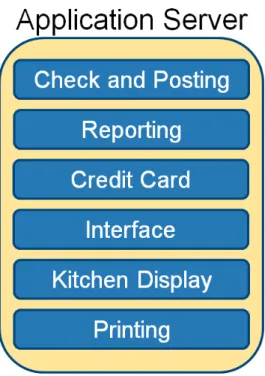
Service oriented architecture (SOA) is in the core of Simphony. It means that the sys-tem uses services which can be deployed in several ways depending on the setup of the property or the system itself. The picture below shows the services the system uses:
28
Figure 8. Simphony Services (Simphony v2.x System Architecture)
These can be spread out from the application server to the property workstations:
29
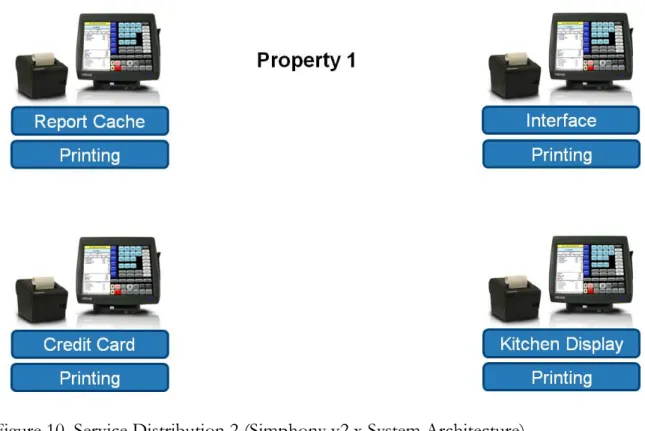
The services can be spread out even further within the property workstations:
Figure 10. Service Distribution 2 (Simphony v2.x System Architecture)
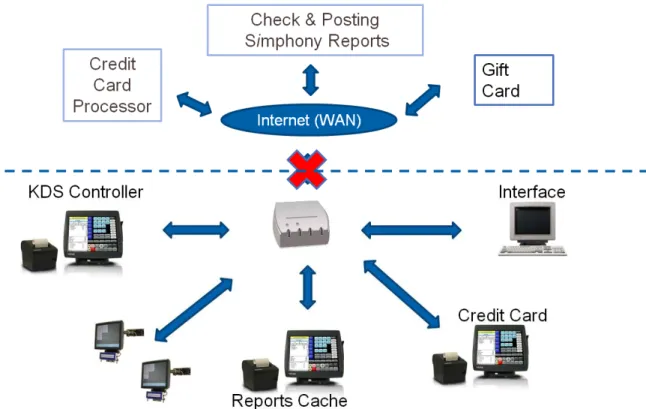
The distribution of services ensures that even if the connection from the property to the central server is temporarily down, the property can still function with the com-plete feature set, providing that the local area network is still functioning. During the network outage, the data will be stored on each workstation and can be accessed from all devices in the same local area network. Once the connection to the central server is restored, all data will be sent to the enterprise. (Simphony v2.x System Architecture.)
30
Figure 11. Simphony offline communication (Simphony v2.x System Architecture)
5.3 Simphony implementation project
The implementation of Simphony in an enterprise environment is always a challenging task. The project needs to be carefully defined and a proper implementation plan cre-ated. In the appendix “Template project plan”, I have created a high level plan outlin-ing the different phases of the project as well as the tasks involved.
In the template project I have split the project into six distinct phases. First and Sec-ond phases are the initiation and the planning phase. One of the key elements is to do a thorough business- and gap-analysis and based on those findings, carefully scope out the needs for custom developments as well as implementation plans. The important part here is to really gain a good understanding of the customers’ business model. The customer needs to find benefits from the solution to be able to build a positive busi-ness case and to move on to implementation. Once all the necessary information has been gathered and the steering committee has agreed to move further, the project plan will be created. The project plan needs to include all items outlined in the chapter 3
31
“Implementation project”. These items include things such as communication plan, timelines, milestones, resources etc.
The third phase is called execution. In this phase the actual system build begins. This is where the data structure is created and the POS operations are defined. In this phase it is recommended to build a test lab where the configuration can be applied and tested. In this phase the business benefits will need to be realized, and thus the acceptance that the solution will fit the customers’ business model needs to be achieved. All cus-tom developments should also be completed during the execution phase. This is be-cause an end to end testing of all features should be completed before the phase can be closed. Usually the training materials need to be created during this phase as well, espe-cially if the customer will execute the end user training using internal resources.
Fourth phase is the piloting. Piloting phase is very important to make sure the mentation can be carried out successfully. Based on the experience from past imple-mentation projects with various solutions, usually during the configuration, there are some mistakes made and these can easily go unnoticed during the testing too. When a pilot is run for some weeks, preferably in several sites, the errors cam be found and fixed before the solution is put into a wider use. It is important that during the pilot phase there is a frozen period, during which no changes to the setup is made to avoid the prolonging of the period. Once the piloting phase is completed successfully, both service provider and the customer can be confident going live with the solution.
Fifth phase of the project is the rollout. This phase is the one that has the most differ-ences compared to the implementation of the RES 3700, which is a traditional on-premise software. As Simphony is a cloud based POS system, the installation at the sites is far simpler and faster. The installation can be made either by first completing a pre-installation centrally, which will reduce the time of the onsite installation even more, or by doing the whole installation on site. Whichever approach is chosen, the installation is very fast and rollout can be carried out very efficiently, providing it has been properly planned and resources are available. The simple installation and configu-ration of the system would even give a possibility of using a third party company doing
32
the actual installing. This was usually not the case with RES 3700 because of the com-plexity of the installation process. Controlling the rollout phase is important, and the good planning and communication with the customer as well as active follow-up, are the keys to success.
Phase six is the closing, which is the completion of the project. In this phase the issue log is reviewed and a plan for closing the outstanding issues made. Sometimes during the project, new requirements have arisen which have not been made a part of the pro-ject. In this phase these the requirements can be used to scope out future projects. Ad-ditionally it’s important that a proper handover to support is made.
33
6
Conclusions
Simphony is at this stage still targeted towards the larger customers. The installations will be customers that operate large enterprise solutions and often operate internation-ally. As such, Simphony is not yet the pure essence of SaaS as it will require a quite complex implementation project while losing the benefits of quick and easy self-service model. However Simphony will offer great benefits with easy upgrades and fast devel-opment processed. Supporting the solution will also be more efficient with the less-ened need of servers.
When comparing implementations of Simphony and RES 3700 (on premise model), there are many similarities. Both solutions require an implementation project with simi-lar phases where the quality of the initiation and planning is the key to success. Setting the expectations on delivery correctly for the customer and gaining an understanding on the customers’ needs and business model are important. Once this is achieved, both parties can work toward a common goal with mutual benefits in mind.
The biggest differences in the project itself are seen in clearly in the rollout phase. The rollout phase can be executed much faster because to lessened need of on-premise servers as well as the ease of setting up the system. With the possibility of running fast deployments utilizing the pre-installation phase, even large enterprise solutions with tens or hundreds of locations can be rolled out much faster than before.
Regarding the template project, there was a lot of theory available, which made it easier to define and create the plan. The structure of the “template project” was done based on the theory of the implementation project and followed the phasing with slight ad-justments. The main tasks in the project were compiled and defined mostly by using the experience from past projects and combining it with the theory of cloud compu-ting. Once the template is used in real implementation projects, it will need to be mod-ified according to the custom development needed as well as the other modules it might include.
34
The standardized template will be taken into use as a starting point and as time goes on, it can be defined and enhanced further. Once few projects are completed and some lessons learned, the work will become easier and more standardized. After some time, Simphony could evolve to be a SaaS product that could be sold and distributed in self-service model. In those cases the customers cannot be large enterprises but rather small individual restaurants that could download the solution from the cloud, activate licenses and start using the solution right away. This scenario is not here today but maybe in a few years it could be achievable.
As a learning process the study has been very good. I have gathered a much better un-derstanding of project work of which I will definitely see benefits in my work in the future. When looking back on the study made, I realized that it could have been nar-rowed down even further. If I would start over now, I would probably concentrate only on the initiation and planning phases of the project. Then I could really get into the details and make even more detailed guidelines.
35
Bibliography
Armbrust M., Fox A., Griffith R., Joseph A., Katz R., Konwinski A., Lee G., Patterson D., Rabkin A., Stoica I., Zaharia M. 2009. Above the Clouds: A Berkeley View of Cloud Computing. http://www.eecs.berkeley.edu/Pubs/TechRpts/2009/EECS-2009-28.html Retreived 10th August 2011.
Forsberg, Mooz, Cotterman. 2003. Projektin hallinta – Malli kaupalliseen ja tekniseen menestykseen. Edita. Helsinki.
Haikala I., Marijärvi J. 1998. Ohjelmistotuotanto. Suomen ATK-kustannus Oy.
Helsingin ammattikorkeakoulu Stadia. 2004. Projektin ohjaus tietojärjestelmän käyttöönotossa. Yliopistopaino. Helsinki.
Järvi A., Karttunen J., Mäkilä T. & Ipatti J. 2011. SaaS käsikirja. Turun yliopisto. Turku. http://dl.dropbox.com/u/3753443/SaaS%20kirja%202011%20iPad.pdf retreived 19th
January 2013.
Karlsson Å., Marttala A. 2001. Projekti kirja. Kauppakaari. Helsinki.
Lindberg, Harri 2003. Extreme programming. Pro gradu –tutkielma.
http://www.cs.uta.fi/research/theses/masters/Lindberg_Harri.pdf retreived 7th Feb-ruary 2013.
Micros Systems, Inc. Company profile.
http://www.micros.com/AboutUs/CompanyProfile/Default.htm retreived 29th March 2013.
Niemi H. 1993. Tietojärjestelmäprojekti. Painatuskeskus. Helsinki.
36
Rissanen T. 2002. Projektilla tulokseen – projektin suunnittelu, toteutus, motivointi ja seuranta. Kustannusosakeyhtiö Pohjantähti. Jyväskylä.
Salo I. 2010. Cloud computing, Palvelut verkossa. WSOYpro. Porvoo.
Salonen J. 2000. Tietojenkäsittelyjärjestelmän hankinta – Tutkimus järjestelmän oikeaa mitoitusta ja toimivuutta koskevasta sopimusvastuusta. Finn Lectura. Helsinki.
37
Appendices
Appendix 1. P1_COMPANY_Project_Gantt_Chart.pdf Appendix 2. P2_COMPANY_Simphony_Project_Tasks.pdf Appendix 3. P3_COMPANY_Template_Project_Plan.doc
38
44 Appendix 2. P2_COMPANY_Simphony_Project_Tasks.pdf Number of Outlets ? Number of Workstations ? Modules Required Simphony
Number of Bespoke Interfaces Required TBD Number of Bespoke Reports Required TBD Rollout Options
Hardware Installation Micros Training of End users/Managers Micros
Go-Live Support Micros
COMPANY Resource (Days) Micros Resource (Days) Comments Phase 1: Initiation
Review COMPANY Operations Site survey completed Project Startup Meeting/Workshops Business- and Gap analysis completed Phase 2: Planning
Project Scoping
Workshop/ Scope Interface Requirements Complete Project Plan
Review project plan Project plan agreed Phase 3: Execution Lab Setup
MICROS Applications Installed MICROS Applications Configured POS Build
Database Build Menu Item Data Entry Custom Developments
Develop custom features as scoped in the planning phase System Testing
Test Customized features End to End Testing System Signed Off for Pilot Training
Bespoke Training Materials Completed Bespoke Training Materials Reviewed Bespoke Training Materials Signed Off Administrator Training Project management
Project management Phase 4: Pilot Training
Restaurant Managers and end users trained Installation
Hardware/Software Installation Go-Live
System Go-Live Go-Live Review Period Project management
Project management Phase 5: Rollout
Rollout of Hardware/Software
Installation on site (including preinstallation) Shipping of HW to restaurants Travelling expenses Storaging of HW during the rollout
Training
Manager training End user training
Go-Live Support Rollout project management Phase 6: Closing
Review Open Issues Log
Handover to Support and Account Management Scope Follow up Project Phases and Deliverables
Total no. Of days 0
Project Cost based on the Phasing daily € days Total Initiation Planning Execution Pilot Rollout Closing TOTAL
45
Appendix 3
Template Project for an Enterprise Simphony implementation
Tuukka Johansson
Opinnäytetyö liite
Tietojenkäsittely koulutusohjelma 2013
1
Contents
1 Purpose ... 2
2 Project objective ... 2
3 Critical Success Factors of the Project ... 2
4 Scope ... 3
5 Out of Project Scope ... 4
6 Project Approach ... 4
6.1 Phase One – Initiation ... 4
6.2 Phase Two – Planning ... 5
6.3 Phase Three – Execution ... 5
6.4 Phase Four – Pilot ... 7
6.5 Phase Five –Rollout ... 7
6.6 Phase Six – Closing ... 8
6.7 Maintenance mode ... 8
7 Outsourcing ... 8
8 Rollout Plan ... 9
9 Roles & Responsibilities ... 9
10Project phasing, work estimate and costs ... 11
Project Milestone Dates ... 11
11Project reporting and information sharing ... 12
11.1 Supplier internal communication ... 12
11.2 Supplier – Client communication ... 12 12Appendixes ... Error! Bookmark not defined.
2
7
Purpose
This document template details the management and organizational structure of the implementation of MICROS Simphony Solution within COMPANY. It defines the objective and the scope of the project. It details how the project should be managed showing individual roles and responsibilities
8
Project objective
Equip the COMPANY business for the future by delivering a solution that can provide of speed of service, ease of use, control and management information according to COMPANY’S requirements. MICROS Simphony Solution will provide COMPANY with tools to increase sales and margin whilst delivering reliability and value for money.
9
Critical Success Factors of the Project
Critical Success Factor Acceptance Criteria
Proof that the Micros solution is a suitable fit for the business requirements of the COMPANY.
Pilot solution achieves relevant level of critical business requirements.
Highly scalable architecture that delivers lower cost, resilience and true multiuser capabilities.
Highsystems availability and high data cap-ture rates achieved.
POS system developed that will deliver the needs of the different businesses whilst also being easily maintainable and flexible.
Acceptance and sign-off by Operational management.
Process developed that will enable rapid deployment of the solution when rollout commences.
Rollout is able to commence using the re-sources planned for the rollout project.
Project deliverables and goals are well de-fined and progress is constantly followed
A quality project plan is created with roles and responsibilities well defined. Progress
3
up. is constantly followed up and milestones
are met.
10
Scope
The following table describes the elements that are included within the scope of this project.
SCOPE
Architecture Hardware;
Cabling and network specifications from enterprise to individual workstation Front of House workstations
Simphony Server and Hosting
House Software
Workstation application Local reporting
Offline functionality (EMV interface)
(possible custom developments here)
Central Software
Central product and price maintenance Back office configuration tools
Mymicros BI central reporting
Service delivery components
Hardware and software installation services Training for Key-users and managers (end users?) Development and consulting services
Implementation Support
4
11
Out of Project Scope
• Any new requirements presented during the project will be handled according to the change management process.
• 3rd party applications needed to support the supplied solution.
• Network communications and related hardware.
12
Project Approach
The project will be delivered in six distinct Phases, each having specific objectives and success factors. The success of these phases will ultimately deliver the overall project objective and success factors detailed above. The Phases are:
12.1 Phase One – Initiation
INITATION PHASE–OBJECTIVES
Gain initial understanding of Operational Procedures Gain initial understanding of Store Work Flow
Gain initial understanding of COMPANY’s requirements. Confirm suitability of existing architecture.
Prove that the Simphony solution is a suitable fit for the COMPANY business. Logistics and Schedule Details Finalized.
SUCCESS FACTORS
All information received in timely fashion.
Key members work together to ensure all relevant data is captured
Clear understanding of outstanding systems and business process development cost and delivery timescales.
All required stake holders are included in the planning and defining work. Business- and Gap analysis completed.
5 Go – No Go? (MILESTONE)
12.2 Phase Two – Planning
PLANNING PHASE–OBJECTIVES Project Start Up
Project Startup Meeting Project Structure finalized Project Methodology agreed
Project Communication plan agreed Project Definition
Project plan agreed Application workshops
Scoping of interface requirements
Scoping of custom development requirements SUCCESS FACTORS
Project organization chart issued Project sponsor identified
Micros Champions identified
Process for logging issues agreed. Issue log v1 released
Process for logging change requests agreed. Change log v1 released Process for managing risks agreed. Risk log v1 released
Workshops completed
Micros understands solutions and how it would be configured Specifications provided and signed off for all interface requirements Project plan v1 issued (MILESTONE)
12.3 Phase Three – Execution
The execution phase will provide the test lab installation, data structure of POS and all custom developments and training materials will be completed. Its objectives and suc-cess factors are as follows:
6 EXECUTION PHASE – OBJECTIVES Lab test/System Build
Review operations Setup Micros lab
Input all data (Locations, Menu Items, Groupings, Loyalty Items...) Build POS configuration
Complete custom development tasks
Develop processes to support a successful pilot Phase. Prove end-to-end capability.
Identify new and changed business processes. Testing
Prove compliance with specifications, and confirm that all custom requirements perform as specified
Verify that backup and restore operations function as required
Verify that redundant server takeover operations function as required
Prove that the Simphony solution is a suitable fit for the COMPANY business. Prove to the end user that the Simphony solution is a suitable fit for the COMPANY business.
Trainings
Administrator training completed
End-user and Manager trainings planned User Guides and training material completed
Training successfully integrated and accepted by operational management. End-user and Manager Training plans signed off by individual team members SUCCESS FACTORS
Meets the core business demands of Speed of Service, Ease of Use, Ease of Deployment and Control.
Clear understanding of outstanding systems and business process development cost and delivery timescales.
Processes developed that will enable rapid deployment of the solution when rollout commences.