Office 365
Four Keys to Smooth,
Secure Migration
Over the past four years, the
Microsoft Office 365
web-based suite has been adopted
by more than 30 million users
and organizations seeking
greater productivity, network
accessibility, easy email and
collaboration anywhere, on any
device.
While the promise of simpler operation, data security and disaster recovery is a big draw, the transition from on-premises Exchange and Office to a cloud-based platform poses a unique set of pre-migration, migration and post-migration challenges – especially for organizations in finance, government, healthcare, the European Union and other heavily regulated environments. Enterprises represent Office 365’s fastest-growing market. According to Microsoft and industry research, the number of commercial seats doubles every quarter. This strong momentum, which includes Microsoft’s Azure enterprise cloud platform, is part of the larger shift by organizations to hosted applications and productivity suites. Market researcher Forrester estimates the public cloud market will increase to $191 billion in 2020.
Free iPad and iPhone versions of Office 365 released late in 2014 further boosted the skyrocketing popularity of the most successful hosted offering in Microsoft history.
This white paper, written by Information Security Media Group and sponsored by Barracuda Networks, draws on the experience and knowledge gained from thousands of Office 365 migrations. Its goal is to help you better understand the key steps, challenges and processes to:
• Streamline the migration of legacy email, including PST files
• Ensure email access and availability, especially for mobile users
• Build a layered email security structure
• Expand retention, legal hold, and compliance policies and practices
This short guide is designed to complement and advance Microsoft’s capabilities with field-proven best practices that can smooth migration and accelerate time to value.
Office 365:
Key Challenges and a Roadmap for Success
Many of the biggest adoption challenges (Figure 1) stem from a deceptively simple fact: Office 365 is not a software product, but a service. That means that organizations move to it not by upgrade, but by migration. For many, this represents a very new business practice, one that requires a new mindset, process, technical skills, tools and experience not always readily available. “The majority of Office 365 users are coming from customers who are shutting down old on-premises deployments (like Exchange 2003),” Windows IT Pro recently observed. “That’s a lot of mailboxes moving to the cloud.”Beyond learning the ins and outs of implementing a new, cloud-based model, many enterprises also struggle to understand the complex service offering itself. “If you’re confused by Office 365, you’re not alone,” says Gartner analyst Craig Roth. “Many organizations are now exploring it and have questions about features, infrastructure (such as how secure it is or service levels), and architecting hybrid solutions.”
Such deep understanding is key. Compared to on-premises services, cloud-based messaging, file sharing and storage require extra levels of security. Microsoft has done a creditable job here, implementing policies, controls and built-in security features it says are on par or better than on-premises data centers of even the most sophisticated organizations.
Even so, increasing numbers of enterprises - driven by increased security and uptime concerns - are looking to add extra levels of protection and operational efficiency. “The good news,” adds Windows IT Pro, “is that although migration to the cloud remains a slow and sometimes tortuous process, it is one that is well-known.”
Biggest Challenges of Office 365 Migration
• Time, cost and control of migrating
legacy email
• Maintaining availability and QoS
• Protect against broader security threats
• Limited access by mobile users
• Limited control of retention, preservation
and eDiscovery
“Moving to an online, hosted environment like Office 365 is new for most companies,” notes Brian Babineau, vice president of product marketing for Barracuda. “So you need to take steps to ensure your business remains productive, and that you don’t get stalled in the pitfalls many companies encounter when they migrate. Once in the cloud, enterprises need to ensure that productivity isn’t reduced by access issues, and that security isn’t compromised.”
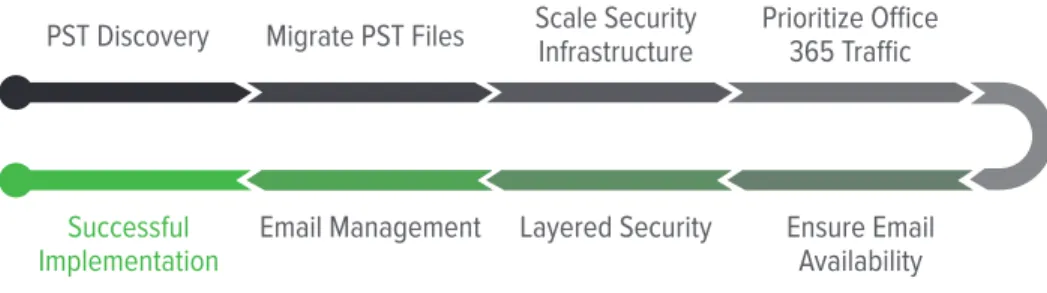
Figure 2 outlines a roadmap for successful migration and implementation of Office 365.
The steps are simple (conceptually, if not always operationally), proven, and identify the most important elements.
Figure 3 shows key stakeholders and their roles in successful Office 365 migration
implementation. The key takeaway here: Successful efforts depend on tight coordination among IT, Security, and Compliance & Legal.
IT
Streamline data migration to Office 365
Ensure quality of service & availability for Office 365 applications Visibility into Office 365 usage
Security
Layered email security architecture Protect sensitive data from being leaked Protect against broader, multi-vector threats
Compliance & Legal
On-premises archiving for data privacy Easy search-and-retrieval for eDiscovery Granular legal hold capabilities
“If you’re confused by
Office 365, you’re not
alone,” says Gartner
analyst Craig Roth.
“Many organizations
are now exploring it
and have questions
about features,
infrastructure (such
as how secure it is or
service levels), and
architecting hybrid
solutions.”
PST Discovery
Migrate PST Files
Scale Security
Infrastructure
Prioritize Office
365 Traffic
Successful
Now let’s take look at the key challenges and what you need to do to handle them.
Key 1:
Streamline Migration of Legacy
Email, Including PST files
One of the first — and biggest — pain points around Office 365 migration involves managing the time, cost and control of legacy email. More specifically, managing Personal Storage Table or PST files - the open proprietary format used to store copies of messages, calendar events and other items within Microsoft Outlook, Exchange Client, and Windows Messaging. Organizations tend to accumulate vast volumes of historical email data, both in the Exchange server and PST files. The problem is this: PST files are neither accessible nor recognized in Office 365. That means you must first locate then migrate the data they contain directly to an Office 365 archive mailbox or a third-party archive.
The average user has between 3 and 5 PST files, increasing the volume of email significantly. A bigger challenge is identifying the owners of PST files and handling orphaned PST files. IT organizations must determine the best course of action in dealing with these PST files from previous employees. Do the files contain information that requires preservation by Legal or Compliance teams? Is there information beyond corporate records retention policy? Or is the information redundant, obsolete, or transient (ROT)? Should it be deleted?
“With nearly 34,000
people across dozens
of offices, we couldn’t
even count the number
of PST files our users
had created over
the years,” said the
Messaging Manager
of a Fortune 500
healthcare company.
Challenges
»
PST files are not considered viable email containers in Office 365
»
Finding the large volume of PST files spread across laptops, file servers, etc.
»
Identifying PST owners and appropriate data to migrate
Solutions
»
Find PST files, regardless of location, and identify the owners
»
Move email directly to Office 365 to minimize throttling
»
Migrate business-relevant data directly to Online Archives or to Message
Archiver and eliminate ROT
As a result, IT departments spend many hours trying to locate and find PST files scattered throughout the enterprise. For many, it is a daunting task. “With nearly 34,000 people across dozens of offices, we couldn’t even count the number of PST files our users had created over the years,” according to the Messaging Manager of a Fortune 500 healthcare company.
Further, it can be a logistical challenge to migrate legacy email within a reasonable timeframe without adversely affecting day-to-day operations. Moving legacy email into an archive prior to migration and deleting what you don’t need can significantly reduce the scale of the migration task, mitigate risk, and make the transition more manageable.
Plus, having emails in a centralized archive allows end users to retain full access to their legacy email, even after their primary mailboxes have been migrated to Office 365.
Many organizations report the only practical way to accomplish this necessary foundational task is through the use of highly automated PST management software. Barracuda PST
Enterprise, for example, discovers PST files on network servers and end user systems. After PST Enterprise discovers PST files with both known and unknown owners, it gives the organization the opportunity to decide what to do with the information, then moves the data to a secure location such as Exchange Online (part of Office 365), or Barracuda Message Archiver.
Key 2:
Ensure Email Access,
Availability and Quality of
Service
Many enterprises overlook the impact of Office 365 on their entire network infrastructure. That’s a big mistake. Office 365 is a hosted productivity application, which means large files are regularly moved between desktops and the cloud. Consider: A medium-duty Exchange 2007 user typically consumes 2600 KB/day. The same Office 365 user will consume 12,500 KB - a 5x increase.
But that’s just the tip of the iceberg. On-premises Exchange routes or “back hauls” all corporate email traffic through a central server or resource. In contrast, Office 365 works better when individual branch locations have their own local Internet breakouts. As a result, organizations now must also handle the additional challenges of managing a multi-firewall deployment, including rules and lifecycle management, to name just two.
The amount of additional Internet traffic generated by Office 365 also increases the importance of management policies that facilitate accessibility to critical applications. Further, administrators must have greater insight into application usage to optimize their network policies.
The IT Director of a large transportation company recently confided:
“The overall increase in traffic as a result of implementing Office 365 for
just half of our users overwhelmed our network gateway. We ultimately
had to run on-premises Exchange because the Internet access just
Not doing so can quickly lead to big problems. “The overall increase in traffic as a result of implementing Office 365 for just half of our users overwhelmed our network gateway,” the IT Director of a large transportation company recently confided. “We ultimately had to run on-premises Exchange because the Internet access just became too slow.”
Next-generation, application-aware products like Barracuda Firewalls offer numerous advantages in helping enterprises manage bandwidth. They are designed to help organizations optimize the experience of Office 365 and other cloud applications by providing local internet breakouts at each individual branch location. Barracuda Firewalls enable operational efficiency in distributed environments though “single-pane-of-glass” management.
Bottom line: Ensuring a high quality of service for email and other productivity apps requires next-generation, application-aware firewalls that optimize availability by prioritizing and link-balancing business-critical traffic.
A medium-duty
Exchange 2007 user
typically consumes
2600 KB/day. The
same Office 365 user
will consume 12,500
KB - a 5x increase
Challenges
»
Office 365 traffic becomes Internet web traffic
»
Additional load on firewall and web security structures
»
Organizations must re-architect to provide Internet access at
branch offices
»
Email impacted by non-critical applications
Solutions
»
Implement scalable, centralized management of multiple firewalls
»
Intelligently prioritize network traffic
»
Implement link failover and redundancy to ensure availability
»
Gain visibility into Office 365 Web
Key 3:
Build a Layered Security
Architecture
Simplicity and ease of use come often at a price. Here again, Office 365’s security will prove perfectly adequate for many organizations. Antivirus, anti-spam filtering and role-restricted access are backed by multiple authentication schemes at company-run data centers. That said, many enterprises will want to take a step back and consider the larger picture. Some concerns:
Because Office 365 email and other productivity applications are now accessed through the web, users are more vulnerable to malware downloads, typo-squatting sites and other malicious attacks propagated through web protocols. Office 365 can also increase vulnerability from evasive email attacks that utilize link shorteners, fraud and spear-phishing attacks.
The bottom line here is that Web traffic must be secured and protected because it now facilitates Office 365 traffic. Many organizations choose a layered approach to protect against email and web protocol threats using tools such as Barracuda Email Security and Web Security solutions.
Business online usage
through mobile
devices first exceeded
desktop usage
in January 2014
(ComScore)
Challenges
»
Lack of multiple security layers in Office 365 to protect critical applications
»
Protection from Advanced Persistent Threats
»
Protect sensitive data traveling over email
Solutions
»
Real-time protection against zero-hour advanced threats
»
Cloud Protection for additional email continuity
»
Encryption and data leakage prevention to protect sensitive data
over email
Key 4:
Expand Retention, Legal Hold, and
Compliance Policies and Practices
A large Massachusetts city decided to migrate to Office 365 in 2014, opting for native archiving, compliance and e-discovery functionality. Within two months, however, the city discovered that the native archiving functionality, while easy to manage, did not meet their needs. Freedom of Information Act searches, in particular, became cumbersome and time consuming. So they returned to a third-party Message Archiver. The message here: Simple is not always better.
Regulatory compliance and e-discovery capabilities in Office 365 are baseline. Neither is designed for detailed search, granular control of data, and chain-of-custody issues. The legal hold feature is all or nothing on a per-mailbox basis, which may preserve data beyond a records retention policy. This also causes challenges when employees leave the company. If a mailbox has any legal holds, the company must continue paying for the license or risk losing legally preserved data.
SharePoint Discovery Center may be needed to search documents - an additional investment. Even then, it cannot securely separate compliance data from operational data. Office 365 also cannot capture and preserve email in a separate secure data repository outside the operational environment to prevent tampering or amendment.
62.9% of surveyed
users checked email
via mobile versus
desktops.
Challenges
»
Capturing and preserving emails for compliance
»
Mailboxes can cause over-retention of company information
»
Legal holds on entire mailbox may violate data-retention policies
Solutions
»
Archive first to eliminate migrating legacy email
»
Granular retention, deletion and legal hold policies
»
Web and mobile access to archived email
»
Comprehensive eDiscovery and compliance search
»
File, social media and PST archiving options
Figure 4 illustrates the problem: Even the highest (read costliest) Office 365 plans do not
provide capabilities strong enough for many business environments. Plus, some companies report that Office 365 preservation features can be confusing to set-up. Error can easily cause costly compliance failures.
Proven products such as Barracuda Message Archiver or Archive One provide much needed technological reinforcement or replacement of Office 365’s rudimentary capabilities. Effective deployment can:
• Provide direct search and retrieval for preserved data
• Eliminate the risk of keeping sensitive data in the public cloud
• Provide simple search and discovery without deploying SharePoint add-ons • Save costs by performing in-house collections and searching across all their
relevant data Business = 300 users
Enterprise = Unlimited Business Business Business Premium Enterprise E1 Enterprise ProPlus Enterprise E3
Price/Mo. $5.00/User $8.25/User $12.50/User $8.00/User $12.00/User $20.00/User Email/AD/MS Office, etc.
✔
✔
✔
✔
✔
✔
Installed Apps
✔
✔
✔
✔
Retention Policies✔
✔
Legal Hold✔
eDiscovery Search✔
PST Management Granular Hold JournalingSummary
Microsoft’s Office 365 has become a favorite among enterprises seeking an easy-to-manage, scalable cloud-based suite and platform for increasing worker and IT productivity. Some organizations will do perfectly well migrating existing Outlook and Exchange implementations using Microsoft’s native tools. However, most enterprises seeking greater control and management of pre- and post-migration and operation of Office 365 will want to look closely at complementary third-party tools and services to help ensure simpler, more certain and more secure outcomes.
How Barracuda Can Help
Barracuda is IT Simplified for Office 365 Organizations. The company offers a set of best-of-breed email security and management solutions for organizations that take advantage of Office 365 and other cloud-based mail services. With advanced functionality to provide granular email management, real-time threat protection, and extended email availability, Barracuda’s security and storage offerings give organizations peace of mind in having complete control of their cloud-based email infrastructure. Finally, flexible deployment options in the cloud enable IT departments to tailor these solutions to their preferences. To learn how Barracuda’s cloud-connected solutions are a perfect complement for customers migrating to Office 365,
About ISMG
Headquartered in Princeton, New Jersey, Information Security Media Group, Corp. (ISMG) is a media company focusing on Information Technology Risk Management for vertical industries. The company provides news, training, education and other related content for risk management professionals in their respective industries.
This information is used by ISMG’s subscribers in a variety of ways —researching for a specific information security compliance issue, learning from their peers in the industry, gaining insights into compliance related regulatory guidance and simply keeping up with the Information Technology Risk Management landscape.