Recycling database records
Lars-Håkan Herbertsson Marie Widigson
Rolf Johansson Lari Kovanen
Chalmers University of Technology; Chalmers Library
Abstract
"Our users are used to searching and don't care for A-Z lists. We don't want to maintain a separate database of databases. Let's catalog the database record once, recycle it and use the discovery API to build a database search feature." That was our thoughts when introducing our new web site.
When filtering on databases Summon API was called and a relevancy ranked list was presented. But immediately voices were raised from researchers and post-graduates that they had difficulties using the tool.
So, we decided to build a more traditional database list yet keeping the main principles: •To search databases from the general library search box.
•To maintain in one place only.
•To retrieve the records through several search services.
To build a tool that facilitates discovery and provides additional features we had to use a source with more stringent metadata. Thus we dropped the Summon API and instead used the API from the original source, the national catalog of Sweden, Libris.
A team of librarians and IT-developers developed a database search feature and list that better met the needs of both students, faculty and librarians. We, the librarians, got an understanding about APIs. We also learned by painful experiences that to make MARC records at least a bit machine readable we need to catalog with thorough control. The IT-developers learned about the MARC reality we still live in.
Background
With a central search box for all of the library's information resources, and with the discovery system Summon as the underlying engine, Chalmers library new website was a radical break with the past at launch in February 2013. Usability and responsive design was the catchwords during development. To get a clear target it was decided at an early stage that it would be a web for undergraduate students
rather than for faculty. Based on user interviews, there were three imaginary users, personas, who wished for simple and clear search systems and to find "everything" in one place.
Our definition of “a database” is broad, including large encyclopedias, platforms, search services etc. On the old web, they were presented through a separate search tool with A-Z list and broad subject areas. A stand alone, static database of databases. Easy to maintain for the librarians and practical for those of the users who knew where to look, but hardly good for anyone else, particularly not the personas. The databases were not found in the national catalog Libris, in the OPAC or in Summon. In the new, discovery centered environment, we had to find another solution.
To meet the request for simplicity on the new web, the OPAC was hidden and no A-Z lists for journals or databases were set up. A large search box received a dominant place on all web pages. When entering a term in the search box the user was taken to Summon and could continue there. Nevertheless, we recognized a need to be able to search on journals and on databases separately. This paper will describe the process of developing the database search.
Main principles for the database search
These were the ideas that governed the development:
Findable through the library search box
The databases should be found from the general search tool, both when searching
“everything” (in Summon) and when filtering on databases (in Chalmers library web interface).
Maintenance in one place only, Libris
In Sweden libraries are encouraged to enter holdings of all resource types in the national catalog (Libris). Recently libraries have begun to catalog databases there. Cataloging of bibliographics record are done directly in Libris. It is a collaborative process; everyone can make corrections and changes. Thereafter, records are downloaded to local catalogs.
Catalog once – use anywhere
The same records should be recycled and transferred to other applications; to avoid double workload, differing information and broken links.
Use of discovery API for several search features.
The idea was to benefit from the enriched discovery index and to build specialized library services on this API; journal search, database search and possibly others. The focus should be on search & discover more than on browsing hierarchical lists.
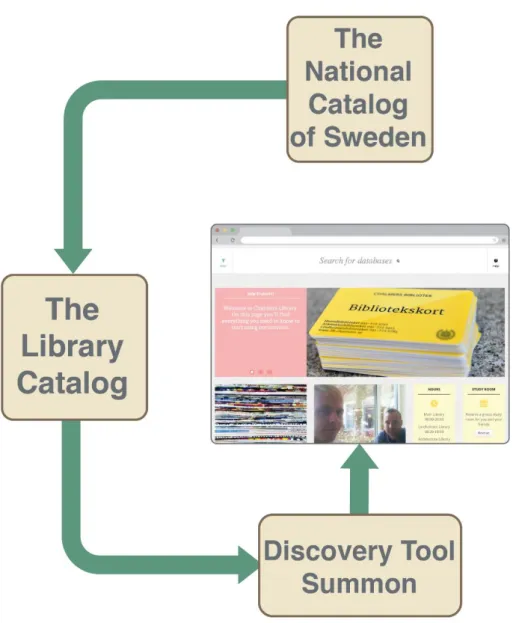
Figure 1: Data flow from Libris to database search via Summon
First attempt – Focus on Search
We cataloged around 200 databases in Libris and put our own proxy links in the locally controlled holdings record. Everything else was in the bibliographic record. The records were transferred to our local catalog, the same way as all MARC records are. They were then ingested into the Summon discovery tool with content type Database.
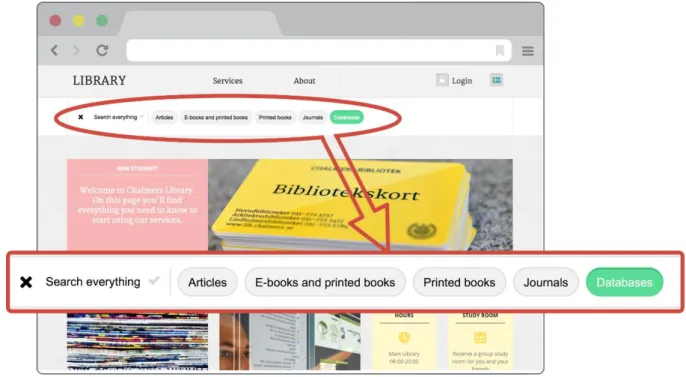
Without filtering you were in theory able to find the database record in Summon, but as databases are not highly ranked they are hard to find in the giant index. A click on the filter icon in the library search box instead took you to a part of the library web using Summon API and only databases were
Figure 2: The library search box with filter on databases
With a filtered search for a database name, a subject or a word in the description, a relevance ranked list was presented. Summon API works just like Summon itself, i.e. the search results can be sorted by relevance or date but not alphabetically. We chose to sort by relevance.
User reactions
Of course, when big changes are made it takes time for users to adapt and you cannot expect only to get praise. But we were taken by surprise by the strong negative feedback from several researchers and experienced users regarding the lack of A-Z-lists. Their everyday work tool was gone and they could not understand the benefits of using a general search box, trying to find their database in a seemingly random result list.
Reactions from students regarding the new web were generally positive, but we understood that they also had difficulties using the search tool. They did not know where to start and got no overview of what we offered.
The search worked quite well if the user knew the exact title, or was lucky enough to enter a search term that matched a subject term or the description. But not when the user only had a vague idea of the database name, did not find a good search term or wanted to be sure that all relevant databases were retrieved.
Both English and Swedish subject terms and descriptions were indexed, which enriched the searchability but often produced confusing results.
We also found that relevance ranking, for this small amount of results, was not useful. Summon algorithms does not know which database is most important for a certain subject. Alphabetical sorting may seem more logical for a small number of results.
Putting out the fire
Ad hoc, we quickly compiled a manual A-Z list of the most important databases. This was soon replaced by an A-Z list made from the Libris API, which allowed alphabetical sorting.
Now the database search queried Summon API while the A-Z list queried Libris API. The same metadata was used, but from different sources, thus resulting in slight differences in content and update frequency. Not an ideal situation, but it worked while figuring out how to proceed.
User studies
Chalmers Library website was made with undergraduates in focus, but databases are mainly used by graduates and researchers. So, in subsequent user tests we decided to focus on the latter. We tested our current search, ideas for development as well as database search features at a few other library sites.
Results of user studies:
Finding databases: On the whole, users had problems finding databases. Nobody found the Search Box filter. Without filter, the user ended up in Summon where databases are not highly ranked and thus not found. The built in Summon feature “Database recommender” was not seen, and when pointed to, not understood.
Guidance: All users expressed the need for an overview, somewhere to start. For inexperienced users this was essential as the concept of “database” itself is vague. They wanted to be able to easily find the most relevant information source for their own need. Many asked for some kind of ranking or top list.
Descriptions: It is difficult to take in information about databases you do not already know. However, browsing gives an opportunity to explore more if the items are attractively presented with short unbiased descriptions. Long sales-like texts were not appreciated.
Subject terms: This proved to be a catch 22. Broad terms – too many results. Narrow terms – too few. When finding a relevant narrow subject entry, whether in a hierarchy or just as a clickable term in the description, the user was happy but tended to miss that large general databases were omitted. Database types: When pointed there, users really enjoyed browsing for specific material types such as images, patents etc., while more abstract types such as “bibliographic” were just cluttering the interface.
Limitations with the Summon API
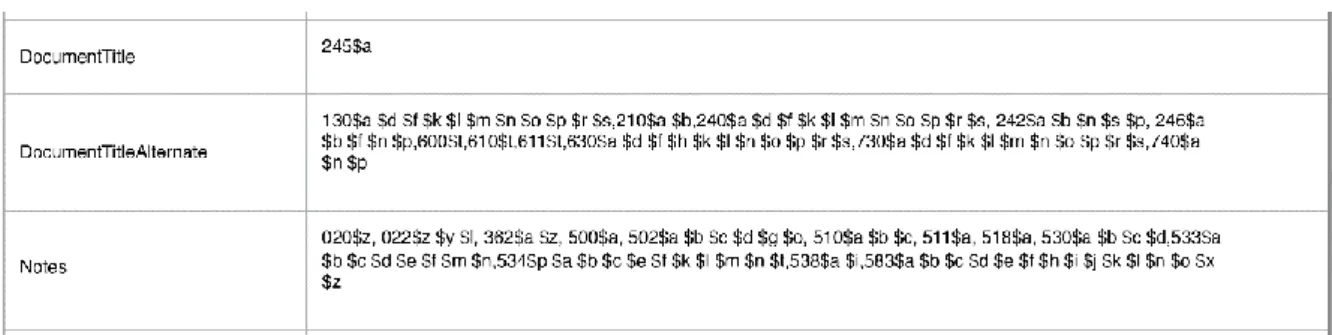
When records are transferred to Summon, related MARC fields are merged into larger field groups, which are used by the Summon API. This makes it difficult to distinguish between different kinds of titles, subject terms or to make use of specific note fields.
Figure 3: MARC fields merged into Summon field groups
Delay in data update due to use of a non-primary source was also an issue. From Libris to our local catalog it is one day delay. The data is uploaded to Summon the next day but the indexing takes 2-10 days. We wanted changes made much sooner.
Second attempt – Focus on Search AND Browse
A cross-functional team was assembled with metadata librarians and IT-developers. User stories were written and prioritized together with colleagues at the information literacy department.
Redirected flow of data
Abandoning the principle of using Summon API, we decided to use the API from the primary source, Libris. As the records were now coming directly from Libris, changes were visible the next day and we had access to granular metadata.
Local control of collaborative records
To make use of the new possibilities that came with access to original MARC fields, we needed to rethink and re-catalog the databases completely. The only way to gain control of the selection and metadata was to work with our holdings records, which are not changeable by anyone else.
We strived to enable browsing in various ways and to distinguish English descriptions from Swedish. Another intention was to enter data that could be used to display information not normally found in catalog records (login information etc.)
Entry page
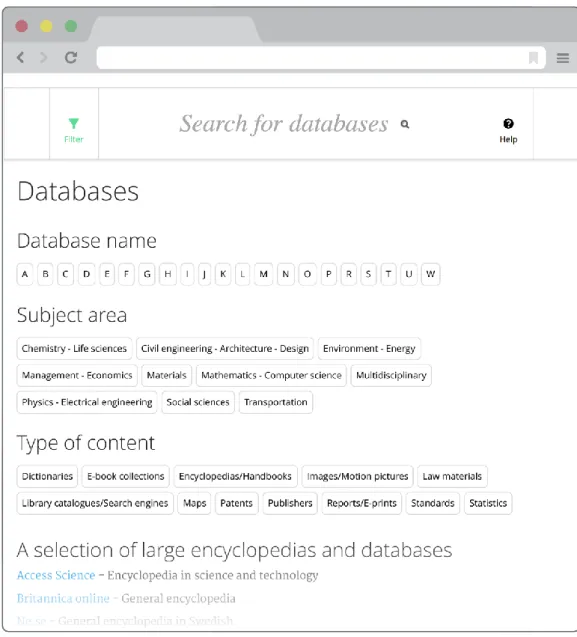
An entry page was created with A-Z, subject areas and types of content. We highlighted a few recommended starting points: general encyclopedias and large multidisciplinary databases. As a courtesy to alumni and other non-affiliated users, we also included a pre-made search for free databases. When at the entry page, the filter on databases was automatically applied, to enable further searching.
Useful information about the database
A great deal of work was demanded to write short and concise descriptions of each database in both languages, not being influenced by vendor phrases. Swedish descriptions were displayed but omitted from the search index as mixing of languages returns peculiar results.
A note field was committed for linking to the ERMs Terms of Use page. This link is displayed under a Terms of Use tab in the result list. Nothing fancy, just taking the interested user to 360 Resource Manager license terms page.
We also dedicated a note field for useful information, to be displayed under the Hints tab. This could contain information about special software needed, login information, or, as in the case below, limits in the open access. When no information is entered, the tab is not displayed.
Figure 6: A record with Hints-tab displayed
The work with subject terms and database types
Subject terms are difficult in many ways. The user studies confirmed the risk of building a hierarchy of subject terms, as users go for the narrowest term and tend to miss general resources.
Subject terms are unequally ambitiously entered in Libris and Swedish terms are not as common as English. It is an overwhelming task to enter narrow terms on all databases, as many of them are covering very large areas. Also, there is no language distinction built into MARC fields, only an indication of the source of the term. As Swedish terms made retrieval unreliable, we needed to omit them even though it meant that some good English terms were omitted in the process.
A strict list of broad subject categories was deployed and used for populating the holdings records. This way we hope to achieve browsing on broad terms while using the narrower terms mainly for descriptions. We will continue to work with enhancing the bibliographic records while also benefitting from the work by other libraries.
For general databases we use the category “multidisciplinary”. As user testing confirmed our expectations that nobody bother to click on this category, we gave these databases several other categories as well. We still need to figure out a way to show general resources in a better way. “Database type” is used both as a pedagogical description and as browse feature. However, some descriptive types such as “bibliographic” or “articles” are meaningless to browse on and were removed from the entry page but kept at each record description.
Machine Readable Cataloging records are not machine readable
Reflecting the old card catalog, cataloging rules state standardized punctuation. The punctuation depends on the subsequent subfield. For example, the title in the subfield 245#a is ended by a colon if there is a subtitle in 245#b, but with a slash if the subfield #a is directly followed by 245#c with creator. A nightmare for programmers. A whole bunch of if-clauses had to be programmed to avoid punctuation to turn up unexpectedly.
As we use some MARC fields in ways they are not intended for and as a programmed application is very unforgiving, every wrongly entered or left out indicator, subfield code or misspelled text could wreck the retrieval and display. In addition to carefully complying with the normal catalog standards, metadata librarians put together a detailed cataloging manual for databases, which is followed meticulously.
Avoiding broken links in LibGuides and other web pages
The best way of avoiding double maintenance is not to link to other pages but to the database list itself, with a pre made search if needed. But in reality there will always be need for promoting specific titles and make a custom description for a defined user group. Therefore, we created a template for persistent URLs and encouraged colleagues to use those instead.
Improving discoverability in the discovery tool
The Summon feature Database recommender is based on search results. It is a good intention but often gives rather peculiar results and we therefore decided to turn it off. Instead we use another Summon feature called Best Bets. Here you may enter links to web pages that you want to promote, with a short text and searchable tags. An entry has been made for each database in Best Bets, with alternative titles and possible misspellings. The persistent URLs are used for them as well.
What we learned
We love recycling
To catalog once and use the same records in many places works really well. But, to be frank, there is still some double maintenance since we want to promote resources at web pages, LibGuides or in the discovery tool.
Use a good data source that suits the purpose
We need controlled and granular data to build a good application. Also, keeping as close as possible to the primary source to avoid delays in update and distortion of metadata may be self-evident, but was a lesson learned by us.
Do not underestimate the need to browse
Our assumptions that, at least, students live in a search centered world may be true. But we strongly experience that the need for browsing is there anyway, especially when trying to make new
Collaborative cataloging – and the need for local control
To benefit from collaborate cataloging is great, but when using selected records to build additional search features, we need to have more local control. We solved this by using holding records for essential fields and to follow a detailed manual when cataloging.
Pragmatic cataloging – following strict rules
There is a need to be pragmatic, to find fields suitable for the information we want to share while at the same time not breaking cataloging rules. For efficient programming there has to be exact criteria as to when and how to display a specific text. It is an interesting balance between those worlds. Another aspect is the future. The somewhat old fashioned MARC standard is still in use, despite of the not very machine readable format. Tomorrow, there will be another context with BIBFRAME and linked data. We cannot wait to develop applications but we also try to avoid messing up for the future.
Be agile: Think – test – rethink
A search feature may be used differently by different user groups. It is a challenge to develop something that suits everyone. When finding that we had misjudged user needs, we had to be truly agile and rethink completely.
In this project, as well as in several others, we have found that cross-functional teams with librarians and IT-developers mutually benefit of shared experiences and gain a deeper understanding of
limitations and possibilities. Agile Scrum teams are now the base for the new organization at Chalmers library.
Technical specifications
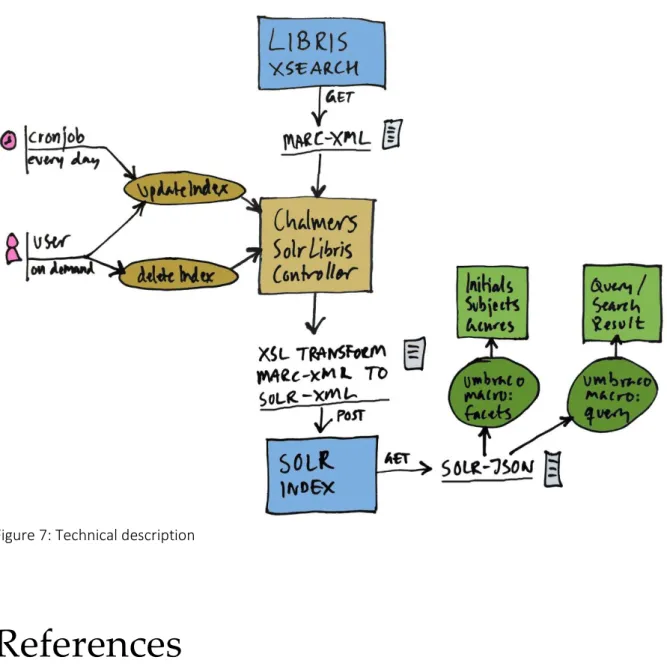
The solution consists of an Umbraco controller that downloads MARC-XML data from Libris XSearch (the Swedish national catalog) and transforms it into SOLR XML. The controller can be triggered to do an update, to delete all or to delete a single record. Via a scheduler, a daily update is triggered and a librarian can trigger delete or update on demand. The created index contains every database record with details about subject, genre, title, URL, description and much more.
Using an Umbraco macro we create faceted lists for initials, subjects and genres on an overview page. The lists then trigger searches that use another macro for displaying the database results in a list. The user can also freely search the SOLR index via this macro.
The controller is built in Microsoft.NET and runs in Umbraco, which is an open source CMS from Denmark. SOLR is an open source search platform from Apache Lucene™ project.
Figure 7: Technical description
References
Chalmers Library Database Search
http://www.lib.chalmers.se/en/search/databases/database-list/?filter=2166&query= Chalmers Library discovery tool Summon limited to databases
http://chalmers.summon.serialssolutions.com/#!/search?ho=t&fvf=ContentType,Database,f&q=&l=en
Examples on search strings on Chalmers Library web site
http://www.lib.chalmers.se/en/search/
Click on Encyclopedias/Handbooks, Patents or Standards The agile method Scrum