Software Engineering for the Web:
The State of the Practice
Alex Nederlof
Delft University of TechnologyThe Netherlands
[email protected]
Ali Mesbah
University of British Columbia Vancouver, BC, Canada
[email protected]
Arie van Deursen
Delft University of TechnologyThe Netherlands
[email protected]
ABSTRACT
Today’s web applications increasingly rely on client-side code execution. HTML is not just created on the server, but ma-nipulated extensively within the browser through JavaScript code. In this paper, we seek to understand the software en-gineering implications of this. We look at deviations from many known best practices in such areas of performance, accessibility, and correct structuring of HTML documents. Furthermore, we assess to what extent such deviations man-ifest themselves through client-side code manipulation only. To answer these questions, we conducted a large scale exper-iment, involving automated client-enabled crawling of over 4000 web applications, resulting in over 100,000,000 pages analyzed, and close to 1,000,000 unique client-side user in-terface states. Our findings show that the majority of sites contain a substantial number of problems, making sites un-necessarily slow, inaccessible for the visually impaired, and with layout that is unpredictable due to errors in the dy-namically modified DOM trees.
Categories and Subject Descriptors
D.2.5 [Software Engineering]: Testing and Debugging
General Terms
Measurement, Performance, Experimentation
Keywords
Web development best practices, Crawling, JavaScript, Au-tomatic error detection
1.
INTRODUCTION
The web provides a versatile medium for developing soft-ware applications that are universally reachable and exe-cutable through web browsers. Despite their enormous suc-cess and popularity, web-based systems are generally infa-mous for being poorly developed. The reasons are twofold.
Permission to make digital or hard copies of all or part of this work for personal or classroom use is granted without fee provided that copies are not made or distributed for profit or commercial advantage and that copies bear this notice and the full citation on the first page. To copy otherwise, to republish, to post on servers or to redistribute to lists, requires prior specific permission and/or a fee.
ICSE’14, May 31 – June 7, 2014, Hyderabad, India Copyright 2014 ACM 978-1-4503-2768-8/14/05 ...$15.00.
First, the web was originally designed for document shar-ing between researchers [4]. Web technologies had to evolve to support the full fledged web applications that we witness replace desktop applications today. In an effort to remain backward compatible, this evolution took place on existing technologies and languages. As a result, web developers need to cope with scripting languages such as JavaScript, which is known to be error-prone [17, 18]. In addition, to provide responsive interfaces, JavaScript interacts with the Document Object Model (DOM), allowing developers to not only change the layout of a page using the HTML elements, but also load extra style sheets and script files at runtime. Understanding these complex dynamic inter-relations is a challenging task for many developers [1].
Second, the web’s openness and flexibility facilitate writ-ing and deploywrit-ing code, which has led to a rich and diverse set of sites around the globe. At the same time, the per-missive nature of web browsers allows people to ignore best practices (pertaining to, e.g., performance) and write code that violates web standards from the W3C (on, e.g., the DOM structure and web accessibility). As a result, many web applications are believed to contain errors and malprac-tices even in production environments.
In this paper, we set out to quantify and characterize such errors and malpractices. Our goal is to gain an understand-ing of the current state of the practice in the wild. To that end, we conduct a large-scale empirical study on 4,211 ran-domly selected online sites, in order to answer the following research questions:
RQ1 How dynamic is the current client-side web? Do con-ventional static analysis tools suffice to inspect and monitor the web?
RQ2 How prevalent and severe are W3C standards viola-tions and errors in practice?
RQ3 What are the most common network performance is-sues that occur in practice?
RQ4 How accessible is the web in practice? Do developers follow the accessibility guidelines?
Other empirical studies have measured JavaScript bugs [17] and runtime exceptions [18], the use of eval to dy-namically generate JavaScript code [19], insecure JavaScript practices [27], and imports from external sources [16]. To the best of our knowledge, our work provides the largest dataset (4,211 sites) presenting a new empirical perspective on the current state of the practice on the web.
Our results show that 90% of the applications perform DOM manipulations after they are loaded, 51.1% of the applications contain ambiguous IDs, most web applications leave much to be desired in the performance area and 60% of the applications are not built to be accessible to visually impaired users.
2.
METHODOLOGY
2.1
Data Collection
To examine the state of practice in current web applica-tions, we randomly select 4,211 web sites from the Internet using an online URL generator.1 For each of these sites, we obtain all client-side states by employing a crawler capable of executing client-side (JavaScript) code.
Event-based Crawling. Traditional crawlers search the web for hypertext links [5, 10]. However, when a web ap-plication uses JavaScript to manipulate the DOM and add event-listeners dynamically, merely analyzing hypertext links and static HTML code does not suffice anymore. Mod-ern event-based crawlers circumvent this issue by using a browser to interact with the JavaScript runtime environ-ment. As such, they can interact with any element in the DOM, thereby gaining access to the internal dynamic DOM structure and its mutation transitions after each event.
In this study, we use an event-based crawler,Crawljax [14], capable of exploring dynamic DOM states. This allows us to examine how dynamic the web is currently (RQ1).
Crawling Setup. We instantiate multiple crawlers run-ning on 8 different machines and direct their outputs to one receiving server, which stores the data in a SQL database. The crawler is configured to give an extensive insight into a web application yet take a representative sample if the site is too large. More specifically, it is configured:
• to use a string-based comparison of the DOM trees of potential new states. This is a sensitive state compar-ison offering a high coverage of the application, i.e., every structural change is seen as a new state;
• to click every interaction element only once, to speed up the process. This means that if the resulting execu-tion path of a certain interacexecu-tion elementin the exact
same DOM state behaves differently based on a
cer-tain state (e.g., Time, JavaScript memory variable) it will only check one of those execution paths.
• to click on only HTML tags of type A, BUTTON, and
INPUT; input fields are filled with random values.
• to limit the maximum runtime for each crawl to two hours. This is a basic safeguard against crawl traps or huge web applications such as Wikipedia or Facebook.
Using the crawler we collect the required data for this study, more specifically, we:
• save the resultingstate-flow graph [14] for each given web site. The nodes of this graph represent DOM states and the edges represent event-based transitions between the states;
• collect allheaderssent and received between the browser and server of the web site using a proxy server;
1
http://www.randomwebsite.com
• capture a snapshot of each visited DOM state and con-vert it to static HTML code;
• count the number of unique URL changes in each site. Full details of the data collection procedure as well as the resulting dataset are provided in [15].
2.2
Analysis
Measuring Dynamism (RQ1).We measure the dynamism of a web site in three different ways:
1. We compare the number of URLs against the number
ofstatesobserved in each site. This ratio provides an
estimation of how many states there are under each particular static URL;
2. By searching the resulting state-flow graph from each site, we analyze state transitions to check whether the edges (i.e., clicks) are hypertext links (anchor tags have a validHREFvalue). If the edge is not a hypertext link, then the resulting state is a dynamic DOM state; 3. We compare the initial HTML sent by the server with
the DOM/HTML structure in the browser after wait-ing for five seconds once the page is loaded. This gives any potential JavaScript code on the client-side enough time to dynamically mutate the page.
We measure the difference between the HTML received from the server and the DOM in the browser by perform-ing an HTTP GET request on the URL. We simultaneously direct a Firefox browser to that same URL. After both the request and Firefox have opened the URL, our technique compares the received HTML and the DOM captured in Firefox. Our technique is available as a tool on GitHub.2
W3C Standard Violations (RQ2). To validate the ob-tained HTML code, we use the official W3C HTML Valida-tor3 with the HTML-5 extensions4enabled.
Network Performance (RQ3).We intercept all the HTTP requests and responses during each crawl session, by using an enhanced version of an open source proxy server, called
BrowserMob.5
To evaluate the adoption of best practices for optimizing client/server network performance, we base our analysis on best practices advocated by Yahoo! [26], Google [9] and others [11, 21]. Industrial tools such as YSlow6 and Google
Page Speed7 offer insight into, e.g., the number of resources downloaded, the time needed to download them, and the time required to render them in the browser. They also offer suggestions to improve performance using best practices.
However, such tools only work on one page load. For this study, we apply the performance analysis toeverypage load throughout the application. Hence, we are able to create a performance overview of the entire application, for all the experimental objects.
Accessibility Analysis (RQ4). To assess the accessibility of the application we scan the obtained HTML code for best practices from W3C’sWeb Accessibility Initiative [25].
2http://github.io/alexnederlof/rendered-web/ 3
http://validator.w3.org
4http://about.validator.nuVersion 2.0 5
https://github.com/alexnederlof/browsermob-proxy
6http://yslow.org 7
2.3
Overview of the Resulting Dataset
Our empirical study resulted in a dataset with 4,211 web applications, which has over 114,962,696 HTTP headers and 2,974,641 DOM states. The database includes well-known applications such asGoogle.com, Facebook.com and
Twitter.com. The applications span 101 different top-level domains, range from 1 to 26921 unique states, and include up to 2,253,278 W3C validation errors.
The dataset also contains all the errors and warnings per state reported by the W3C HTML validator. Finally, the dataset contains a state flow graph of every web application pertaining to the crawled states and the transitions between them.
The total processing time to collect this data took about 51 days, starting in August 2013.
The server received approximately 61 new web applica-tions per day to analyze. That is about 20 headers per second and one DOM every two seconds. The resulting database is 216 Gigabyte large.
3.
MEASURING CLIENT-SIDE DOM
MANIPULATION
Our first research question relates to the amount of DOM manipulation that happens on the client-side dynamically. Our hypothesis is that many of today’s web applications use client-side DOM manipulations, instead of loading doc-uments that are completely created at the server side. Con-sequently using static analysis to test and analyze a web application does not suffice. To measure how much static analysis tools miss, we collect the three metrics that look at dynamism on the client-side as discussed in the previous section. Below, we discuss the results for each metric.
3.1
States per URL
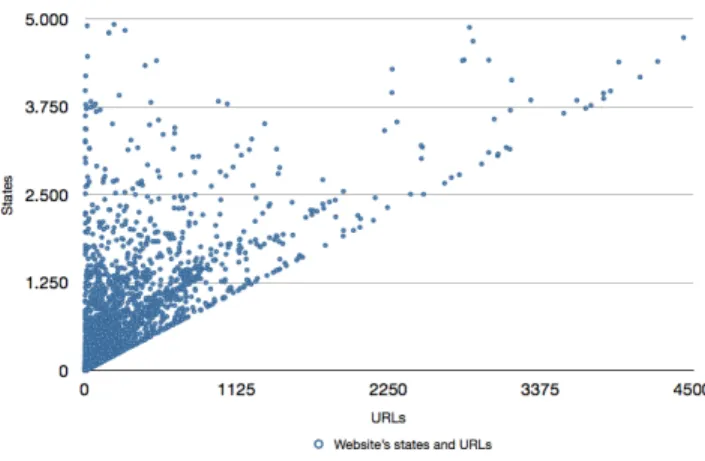
The first metric measures the number of states seen under each unique URL. Traditionally, each URL of a web site pointed to a single HTML document on the server, giving us a one-on-one mapping between the two. Figure 1 depicts the relation in current web applications. There are no web applications underneath the diagonal since each URL points at least to one HTML/DOM state.
The figure shows that most applications today diverge from the traditional one-on-one ratio between URLs and states. Our results shows that per URL there are 16.0 states on average, with the first quantile at 1.0, the median at 2.0 and the third quantile at 5.0. This means that if a static analysis tool would request a certain URL once, without any context, it would miss 51.8% of the states.
The number of URLs for this metric includes duplicate URLs with a differentfragment identifier “#”. This means that when the metric is used without a browser (e.g., static analysis), the analysis would cover even less states than 51.8% .
3.2
States without a URL
The second metric measures the number of states that are only reachable by interacting with the browser. This can ei-ther be because the web application requires input (for which we insert random text), or because the state transition was not caused by an anchor tag with ahrefattribute. We an-alyzed the edges of the inferred state-flow graph, through a breadth-first search, looking for states triggered by an
an-Figure 1: States per URL.
Table 1: Number of DOM Manipulations after a page load.
Average q14 Median q34 max
Content 23 0 2 12 3924
Elements 298 60 164 354 5745
Note: Results are rounded to the nearest integer.
chor tag with ahrefcontaining an URL (excluding the frag-ment identifier#). We marked those states as reachable. All other states are marked as unreachable. By comparing the number of reachable versus unreachable states, we find the number of stateshidden from a traditional hyperlink-based crawler.
We found that on average 85% of the graph is reachable through hyperlinks. The first quantile is at 80% , the median is at 96% , and the third quantile is at 100% . Only 32% of the applications contained no unreachable states.
We should note that there are two cases we did not ac-count for in our study:
• If an anchor tag is inserted through JavaScript on the client-side, a traditional crawler would not be able to find it, since such a crawler does not execute JavaScript.
• We have only analyzed states resulting from clicking on
anchor and input elements. Thus, our study ignores
other HTML element types, such asdiv orspan with click-handlers that can potentially change the DOM state. A recent study [2] has shown that when such elements are included in the analysis, on average, 62% of states detected are unreachable.
Thus, the results we present here are theunder bound of the actual numbers of unreachable states, due to the two cases described above. This means that hypertext-based crawlers will miss states onat least two out of three appli-cations.
3.3
Post-load DOM Comparison
The last metric we used is a measurement of the differ-ence between the HTML code retrieved from the server and the HTML code observed in the browser after a five sec-ond wait period. We looked at the textual content in the HTML elements and the number of elements changed. This means adding/removing elements and attributes are counted
Table 2: Errors and warnings as reported by the W3C validatorper web application.
Average q14 Median q34 Max
Unique errors 58.3 12.0 30.0 69.0 12388.0
Total errors 23,984.1 263.0 3,991.5 18,625.8 2,253,278.0
Unique warnings 3.7 0.0 1.0 3.0 475.0
Total warnings 8,070.8 0.0 30.0 825.5 1,065,212.0 Total errors per URL 805.5 10.5 32.1 144.4 506,404.0 Total errors per State 34.6 6.2 14.4 33.0 2,482.1 Total warnings per URL 182.9 0.0 0.5 7.8 63,127.5 Total warnings per State 12.5 0.0 0.2 2.9 1,882.9 aNote: The unique errors are grouped by type. This means that if a developer
makes the same mistake twice, the error is counted once.
as changes. If text is removed/added it counts as one change. If text is modified it is seen as an add and a remove opera-tion and therefore counts as two. Table 1 shows the number of DOM manipulations on the index page of all web appli-cations.
Another interesting observation is that 64% of the appli-cations crawled modify the DOM after it has been loaded if we look at thetextual content of the DOM. If we look at the number of elements changed, it is even more: using a threshold of 25 elements to make the analysis less sensitive we find that 89% of the applications are manipulating ele-ments in the DOM. Setting the threshold to 100 eleele-ments shows us that 65% of the applications manipulate the DOM after the browser loads.
These manipulations mainly come from two sources: First, web browsers (Firefox in this case) normalize the HTML code received from the server. They attempt a best effort to repair any broken HTML code by inserting missing tags and adding missing elements. However, the browser never changes thetextual content of the HTML. The second main source of DOM changes is JavaScript mutating the DOM at runtime inside the browser.
Our results show that around 90% of the web applications we investigated perform some degree of client-side DOM ma-nipulation after they have been loaded inside the browser. This primarily shows us how much static analysis tools would miss if they just ran on the static HTML code as received from the server.
4.
STRUCTURAL ERRORS
In this section, we present our results on the number of errors and warnings reported by applying the W3C validator to the structure of every DOM/HTML state in our dataset. Further, we discuss the three most severe violations, namely, non-unique IDs, missing Doctype declarations, and broken HTML layouts. We have chosen the W3C standard over the WHATWG8 standard because the W3C HTML-5 standard is static and therefore verifiable in the future, whereas the WHATWG is a continuously evolving standard.
4.1
W3C Errors and Warnings
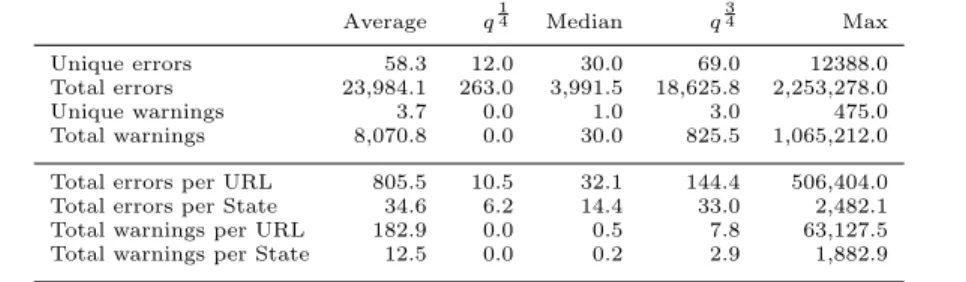
Table 2 shows an overview of the number of detected W3C errors and warnings. The table presents the average and quantiles of the distribution of errors and warnings, per web application. Since larger web applications tend to have a higher number of errors, we also show the total number of errors and warnings normalized on the number of URLs and
8
http://www.whatwg.org
Figure 2: Distribution of non-unique ID occur-rences.
states. Looking at the median of total errors per state we see it is at 14.4. The number of unique errors per site has its median at 30, while the total is at 3,991.5.
4.2
Non-Unique IDs
The ID attribute assigns an identifier to an HTML el-ement. According to the W3C HTML standard [23] this identifier must be unique in the HTML document.
It is important to have unique element identifiers since IDs are extensively used by JavaScript to retrieve elements from the DOM, e.g., doc.getElementByID(‘id-89’). If more than one element has the same ID, most browsers return the first element on the DOM. This can easily result in er-roneous states in practice.
In our study, we found that 51.1% of the sites contain states with non-unique IDs. We zoomed into those sites and looked at how many states contained the same ID more than once. Our analysis showed that it happens on 35.7% of the states. The distribution of the percentage of states with non-unique ID can be seen in Figure 2. We see 70% of the applications make the mistake on more than 5% of their states, indicating the mistake is being repeated. The data also shows that although 630 applications make the mistake in only up to 5% of their states (the leftmost bar), there are many more applications that make the mistake more often. There are over 276 sites in which almost every (more than 95%) state includes ambiguous IDs (the rightmost bar in Figure 2) .
A reason this error occurs so often might be that when the developer chooses an ID for an element, she needs to know
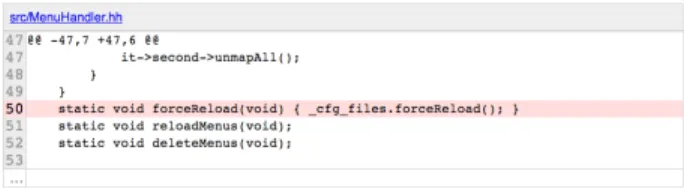
Figure 3: Screenshot of Pek WM version compari-son. <t r c l a s s=" c o m m i t _ d i f f _ l i n e " i d=" s r c / p e k w m . h h 5 0 "> <td c l a s s=" c o m m i t _ l i n e _ n u m b e r ">50</td> <td c l a s s=" c o m m i t _ d i f f _ l i n e "> s t a t i c v o i d f o r c e R e l o a d ( v o i d ) { c f g f i l e s . f o r c e R e l o a d ( ) ; } </td> </t r>
Figure 4: Sample of the website of Pek WM’s DOM
which IDs are already taken to be able to make up a new unique ID. However, she cannot see all the IDs of elements that might be added at runtime using DOM manipulations. That is because in the web development environment, de-velopers only have static analysis tools at hand, that cannot check these DOM manipulations. If a developer would have a list of all the used IDs at hand, these errors would be easy to solve by assigning a new unique id.
To get a better understanding of these non-unique ID errors, we closely examined two concrete instances in our dataset.
PeK WM.Pek WM9is the website of an OpenSource linux window manager. This site contained the most non-unique IDs in our dataset. The site provides a history of all the code contributed to the product. One view shows the dif-ference between two versions with optional annotations on a line that differs. A screenshot of this view can be seen in Figure 3. The markup is done using a table and a line of code is presented as shown in Figure 4, where the line is given the ID ‘src/pekwm.hh80’. Apparently, the ID is based on the line in the original file this annotation refers to. This piece of HTML is most likely generated by either JavaScript or server-side code. The problem here is that when there are multiple annotations on one line, the same ID is used more than once.
This web site does not use the ID reference in JavaScript code, but only as an URL fragment identifier. When the user browses to https://www.pekwm.org/projects/pekwm/ commits/5964#src/pekwm.hh80the browser shows the cor-rect line. This means that the site does not comply with the meaning of an ID, namely that it is unique. In the present case, even though this site is the one with most non-unique IDs in our data set, these double ID do not cause render-ing problems, since the non-unique IDs always occur on the same line. The better design would have been to separate annotation occurrences from line-ID creation.
Evernote.On the website of Evernote,10a note-taking util-ity, we encountered a subtree of the DOM that is hidden in
9www.pekwm.org 10
http://evernote.com/premium
the browser. This part of the DOM is only visible when using certain mobile devices, creating a mobile-friendly version of their web application. However, in the mobile version, the same IDs are used in as in the desktop version. Because the mobile version is not a separate page but part of the page with the desktop version some layout ID’s occur twice. For this particular application, this is a problem since we encountered this line of code in their JavaScript:
v a r c o n t a i n e r W i d t h = \$ (" \ # s k i t c h \ _ c o n t e n t ") . i n n e r W i d t h ( ) ;}
This piece of JavaScript code sets the width of the con-tainer to the width of the concon-tainer with ID “skitch_content”. However, since that ID occurs twice in the DOM, one for the mobile version, and one for the desktop version, the width will be set to the first of the two elements. This might not be what the developer intended. Finding this bug is hard since no warning is shown when an ID query returns more than one result.
4.3
No Doctype Declaration
According to the W3C standard, every HTML document should always start with a DOCTYPEdeclaration [23] telling the browser which version of HTML it is working with. When noDOCTYPEis specified, the developer cannot be sure which CSS rules will be applied because the browser will run inQuirks mode.11 In Quirks mode, browsers ignore the
HTML and CSS standards in order to present “broken” pages that were built for old browsers of lated 90’s.
In our study, in 17.0% of the sites we visited theDOCTYPE
was either missing from or was invalid on theirindex page. Looking at all the visited states of a given site, we found that 61.6% of the sites have at least one state that does not define a Doctype.
This error is particularly important because it can poten-tially corrupt the style of a page depending on the browser version. This is typically challenging to test for web de-velopers and therefore it is easy for the error to sneak into production sites. We can see the result of such a difference in rendering in Figures 5 and 6. The pages are rendered with exactly the same HTML and CSS except that Figure 5 does not specify aDOCTYPE.
4.4
Broken Layout
To be able to display a web page correctly, it is best if the browser receives valid HTML. However, in our study, we encountered a substantial amount of incorrect HTML code, which we discuss in this section.
Developers can generate incorrect HTML both at the ser-ver-side and at the client-side. Through JavaScript, it is possible to add/remove elements or attributes to/from the DOM in places where it would make the structure invalid according to the specifications of HTML version declared (if any). In fact, there is currently little support for developers to check and maintain the validity of the document after programatic DOM mutations.
In 13.0% of the sites, we found invalid HTML caused by the absence of a mandatory closing tag or a closing “>” for the specified HTML version. In all other cases, the browser wouldtry to make the best of it. For example, when aDIV
element is not closed, the browser has to assume that
what-11
Figure 5: Chrome in quirks mode.
Figure 6: Chrome in standard mode.
ever follows is a child of that sameDIV. This can have serious consequences for layout rendering.
In 19.8% of the sites, we found elements missing or mis-placed. For example, we found 189,332 states in 659 ap-plications that used elements, which are unknown to the specified HTML version. This can either be a non-standard element or an element that was introduced in a later version of HTML. In the former case they will be ignored by the browser, and in the latter case most browsers will render the element in any case.
Finally, 9.3% of the sites have issues in their attributes such as a double attribute or an element missing a required attribute. For example, we found 5,099 states in 72 appli-cations where theimgelement was missing its requiredsrc
attribute; without this attribute, the browser has no way of knowing where to load the image from.
Similar to a missing DOCTYPE, this error occurs without any warnings from the browser. Without proper tooling, a developer might remain completely oblivious to the fact that they are shipping these errors into their production en-vironment. If the developer would know where these errors occur, they are easy enough to fix by correcting the HTML syntax.
5.
NETWORK PERFORMANCE
Using a proxy combined with a JavaScript-enabled crawler also gave us insights into the state of the practice regarding certain performance aspects of current web applications.
5.1
Caching Strategies
Caching aims at reducing the number of HTTP requests. We investigated three methods available in practice for caching: caching declarations in the header, the use ofETags, and the use of HTML-5’s cache manifest.
Header Declarations. When a resource declares a
Cache-Control or Expires header, this instructs the browser how long or until when a certain resource can be
cached. When no strategy is defined, a developer cannot be certain whether the resource will be cached or not [8].
We found that only 57.1% of the headers we intercepted define an explicit cache strategy. Ideally, all headers should have a strategy defined.
Entity Tags (ETags). Besides the ability to cache re-sources, the HTTP protocol also offers a check-before-load process [8]. This is supported through so calledETags. An ETag is a unique string for a resource, much like a hash. It is sent along with the resource to the client so the client can send the ETag when it requires the resource again. If the resource has not changed, the server returns status code
304: Not modifiedwithout any content.
Only 27.4% of the headers in our dataset made use of the ETag feature. ETags can reduce network load but are not always necessary. When either the calculation of the ETag is expensive or when a developer is certain the resource is only valid for a given time, sending a client a cache strategy is a better choice than using ETags.
Cache manifest. There is an explicit cache control avail-able in HTML-5 called the application cache [24]. This technique uses a special file called the cache manifest that lists all the resources that can be cached permanently in the browser. When a user opens the web application, the browser only has to check if the cache manifest file has been changed. Even though nearly half of the applications in our dataset have the HTML-5 Doctype (see [15] for an analysis of the use of HTML-5 in our data set)not a single site in our dataset used this technology.
5.2
Compress Components
Compressing a resource before sending it to the browser can lead to a size reduction of up to 70%. Even for today’s smartphones, the advantages outweigh the overhead of de-compressing at the client side. The exception to this rule of thumb are resources that are smaller than 150 bytes and binary files. That is because images and binary files are of-ten already zipped and cannot be compressed much further. However, compressing textual content, which is abundant on the web, can improve performance significantly.
Looking at our data, we see that only 20.0% of the headers used compression. Unfortunately our dataset does not tell us what type of file was transferred but we find it unlikely that the 79,98% of uncompressed resources were all binary files of smaller than 150 bytes.
5.3
Stylesheets in the Head
When the browser loads a page, it first receives the HTML, then parses the DOM, reads the stylesheets from the head
element and then starts rendering the content of the body element. While rendering, it uses a CSS engine that com-piles the rules defined in the stylesheets. If a stylesheet is added after the head element, the browser is forced to re-compile the rules and re-render the page. This is an ex-pensive process and should be avoided. Therefore, the style sheets should always be placed inside theheadelement and not in thebody.
However, we found that 56.5% of the applications violate this best practice at some point in their pages. Of these ap-plications, the distribution of the percentage of states that violate this practice can be seen in Figure 7. 64.1% of the applications violate this best practice on more than 10% of
Figure 7: Percentage of states where CSS is loaded outside thehead element.
Figure 8: JavaScript execution usingasync, deferor regular loading.12
their states. We conjecture that the developers of these sys-tems simply do not know that late loading of style sheets leads to performance penalties. The other 35.9% might be aware of this issue, but are likely unaware that their appli-cation actually has this problem.
5.4
Non-Blocking Scripts
The way JavaScript is imported, can also lead to a per-formance penalty. JavaScript can be imported into HTML code in two ways: (1) embedding the JavaScript code in a
scripttag, or (2) keeping an empty script tag that points to a JavaScript file.
When JavaScript is declared in the headelement, as the W3C standard prescribes, the browser will be blocked until the resource is fully downloaded, parsed, and its execution has started. To circumvent possible delays caused by this blocking behaviour, developers add the JavaScript code in the body element, right before its end tag</body>. That way, the DOM is rendered before the script loads and the user can see the page, albeit without the JavaScript inter-actions.
To provide developers with a proper solution, HTML-5 specifies a way to load resources without blocking the browser from theheadelement. This is done by declaring the
deferorasyncproperty, which can load the resource with-out blocking. The difference between the two is that when two resources are loaded with theasyncattribute they can start as soon as the script is loaded. However, when they are loaded with thedeferattribute, they are run when the browser is finished parsing. This is useful for scripts that do not write to the DOM. This process is illustrated in Figure 8. In our study, we found that 56.18% of the web applica-tions already use the async attribute and that 5.43% use thedeferredattribute. We also looked at the distribution between the import of JavaScript in a blocking way versus a
12http://peter.
sh/experiments/asynchronous-and-deferred-javascript-execution-explained/
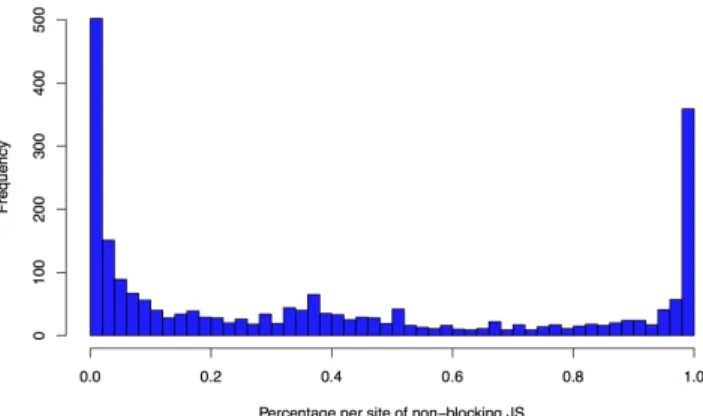
Figure 9: Distribution of sites, according to the per-centage of blocking JavaScript
per state.
non-blocking way. Figure 9 depicts the distribution of sites, according to the percentage of non-blocking JavaScript. The average lies at 39.81%. We also observe that a large propor-tion of the sites only have blocking JavaScript.
In summary, we see that the majority of developers has embraced HTML-5’s new facilities for asynchronous JavaScript loading, but that a substantial number of web sites still load JavaScript code in a blocking manner.
6.
ACCESSIBILITY
To allow people with a disability to use a web application, a developer has to comply to certain rules [25]. In our data set, we have looked at some of these rules and whether they are adopted in practice. The rules we considered concern people who arevisuallyimpaired. These people use so-called
screen readersthat parse the HTML code to either read the
page aloud, or print it to Braille .
Because the information on a page is not ordered accord-ing to its relevance from top to bottom, a screen reader can-not just read the HTML content. Furthermore, the visual layout of a web application helps people without a disabil-ity to understandcontext of the information. When reading top-to-bottom, this context is much harder to convey.
6.1
Navigational Assistance
By allowing a screen reader to point out the role of a certain DOM element, visually impaired users are enabled to speed up their browsing experience by letting the screen reader only read out the sections they are interested in.
Before HTML-5, developers could communicate the in-tent of certain elements using the role attribute, e.g.,
<div role=’navigation’>. HTML-5 introduces seman-tic container elements to make this more clear. So in-stead of writing <div role=’navigation’>, the element is called <nav>. Other new semantic elements include
header, footer, figureandsummary.
In our dataset, 29.63% of the sites make use of these se-mantic tags. Unfortunately, 60% of the web applications do not provide the screen reader with any information about the structure of the page. 25% of the sites use both seman-tic tags and roles and 16% of the sites use either one of the two methods.
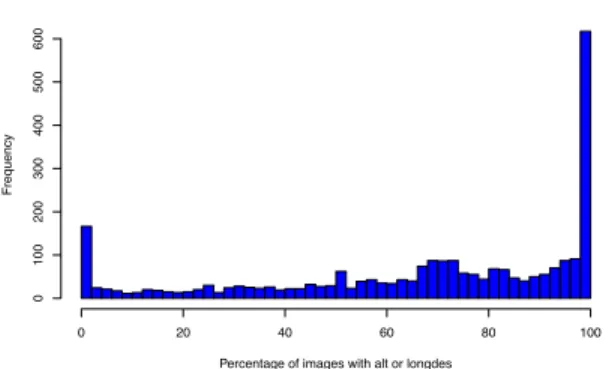
Percentage per of image meta info
Percentage of images with alt or longdes
Frequency 0 20 40 60 80 100 0 100 200 300 400 500 600
Figure 10: Distribution of sites and percentage of images annotated with the requiredalt orlongdesc
attribute.
6.2
Images and Figures
To help screen readers convey the meaning of an image developers, can specify analt or longdesc attribute that explains what the image is about. Figure 10 presents the distribution of sites and the percentage of images that are annotated with the required attribute. We see that there is a tendency to either equip all images with these attributes (the rightmost bar), which is desired, or to do it with no images at all, making the images unaccessible for the visually impaired (the leftmost bar).
6.3
Tables
Tables offer users a visually structured presentation of in-formation. HTML offers meta tags that give visually im-paired people a summary of the table and insight to the structure of the table. In our dataset, we found that of the 3156 web applications with a table in any of their states, 91.4% have tables without heading rows or columns. 98.4% of the sites have a table without asummary orcaption. A mere 5.6% of the sites adhere to the specification.
Almost a decade ago, it was a common practice to use tables as a layout mechanism in a website. This is considered a bad practice today. Those applications will not have a caption, summary or headers because that is not what the table was designed for. However, it is still just as bad for screen readers, since they do not expect the layout to be put into a table. Because this used to be common practice, it might explain why a subset of the sites score so low on their table accessibility in our study.
6.4
Labels for Input Elements
Even if an input element uses a placeholder, it might not always be clear to the user what the program expects him to put in. For that reason, a developer should put the infor-mation about an input in alabelelement. That label has a
for-attribute, which points to theIDof the input element.
Although this is relatively easy to implement, 36.2% of the sites with input elements do not declare an appropriate label for an input ID. The sites that do use this technique only apply it to 19.67% of their input elements, on average. Just 5 out of the 3292 sites that have input elements applied the technique toall input elements.
7.
DISCUSSION
7.1
Revisiting our Research Questions
Based on our extensive analysis of 4,211 sites, we provide the following answers to our research questions.
RQ1. How dynamic is the current client-side web? Do
con-ventional static analysis tools suffice to inspect and monitor
the web? To analyze a web application to its full extent, the
analysis tool needs to cover as many aspects of the applica-tion as possible. To determine the necessity of a JavaScript-enabled crawler, we measured the dynamism of the web in Section 3, using three metrics.
• Looking at the states per URL, we observe that on av-erage one URL corresponds to 16.0 states. This means that when a static analysis tool would work by retriev-ing pages on a URL basis, it would only cover 51.8% of the available states.
• Looking at the number of states that are unreachable by a traditional crawler, we see that on average 85% of the states are reachable through following hyperlinks, i.e., 25% are reachable through JavaScript event-based state transitions. This is the lower bound of unreach-able states since we have not looked at all interaction elements.
• Comparing the HTML received from the server to the DOM observer in the browser after 5 seconds, we see that 90% of the sites perform DOM manipulations af-ter they are loaded. 64% change textual content inside the DOM after they are loaded.
Today’s web applications’s client-side are highly dynamic. Consequently, tools based on static analysis, or dynamic analysis using a traditional crawler, will fail to analyze a large fraction of a modern web application.
RQ2. How prevalent and severe are W3C standards
vio-lations and errors in practice? In Section 4, we studied
the most severe errors according to the W3C-validator. We found that 51.1% of the websites contain ambiguous IDs, potentially leading to misplaced DOM manipulations. We also found that 17.0% of the applications do not define or have an invalid DOCTYPE, causing the browser to enter an unpredictable render mode. Finally we observed that of the sites we analyzed 13.0% contain broken HTML, 9.3% exhibit errors concerning their attributes, and 19.8% have misplaced elements.
A substantial number of web applications contains a di-versity of structural errors that can potentially break the application.
RQ3. What are the most common network performance
is-sues that occur in practice? We analyzed resource usage in
the applications under study through a proxy. From this, we observe that caching (and in particular HTML-5’s new facilities) is underused, that only one in five resources are compressed, and that style sheets are loaded late in the page forcing unnecessary rerendering for more than half of the ap-plications. Developers do embrace HTML-5’s new features for asyncronous JavaScript loading, but for 40% of the sites still use blocking JavaScript loading as well.
Many of the performance-related guidelines for creating re-sponsive web applications are underused.
RQ4. How accessible is the web in practice? Do
devel-opers follow the accessibility guidelines? We inspected to
what extent the web applications in our dataset adhere to accessibility standards for people with visual impairment. Unfortunately, 60% of the applications fail to offer any in-formation to a screen reader about the structure of the web applications, using neither roles nor semantic tags. Further-more, less than 1% of the sites correctly provide labels for all input fields, and tables are unusable in over 90% of the sites due to missing meta information.
A substantial number of applications still has much to im-prove when it comes to accessibility. The lack of required meta information makes these applications virtually inac-cessible to disabled users.
7.2
Threats to Validity
During this study some assertions were made based on our dataset, and the tools we have used. In this section, we discuss some of the threats to the validity of these assertions.
7.2.1
Internal validity
State detection. While discussing the DOM metrics in Section 3, the performance in section 5, and accessibility in 6 we drew a number of conclusions based on the number of states we found. However, it is hard to determine whether a changed DOM detected automatically is actually a concep-tually different state. This may cause in our analysis some sites to have a higher number of states per URL.
Crawl completeness. During our crawling sessions, we configured the tool to interact only withanchor,buttonand
input elements. We also stopped every crawl session after
two hours of running. This means that we only crawled a subset of all possible states. All conclusions based on the completeness of a site are therefore in fact the under bound of the whole spectrum, since there can potentially be many more states.
Placement of non-blocking scripts. In 5.4 we assumed that when a script tag is not in theheadelement, it is placed right before the</body>tag. We see this happening most in practice. However, when it is somewhere else in the DOM, the same blocking consequences apply as when it is placed in theheadelement.
Page load time.In Section 5, we discussed best practices that can lead to a faster page load. We did not measure ac-tual load times. An interesting extension of our work would be to automatically modify some of the sites under analysis in order to measure the performance gains that can be made in practice by adhering to the best practices.
Crawling Correctness. This research relies on the Java-Script-enabled crawler, Crawljax, to detect dynamic states. Our related assumptions were made on the premise that Crawljax behaves correctly.
Framework Popularity. Some of the problems we iden-tify may be caused by frameworks or platforms used (such as Wordpress) instead of individual developers making mis-takes. As such, our figures cannot be directly translated to the presence of expertise with developers.
7.2.2
External validity
Randomly Selected Sites. To select sites to analyze, we use an online random URL generator. We have no knowl-edge of the algorithm nor its correctness behind the random URL generator we have used. We only crawl each site given to us by the URL generator once.
7.2.3
Reliability
Dynamism of the web. In this study, we assumed that web applications do not change while they are being an-layzed, do not contain crawl traps, and do not have an in-finite number of states. In practice, any of these scenarios could occur.
As a consequence, redoing the analysis, even on the ex-act same set of URLs, is likely to give (slightly) different results. Because of the large numbers involved (we analyzed over 100,000,000 HTTP headers leading to 3,000,000 unique DOM states coming from over 4000 different applications), however, we believe that deviations due to dynamism in the sites under analysis will not affect the overall findings.
Tool and Dataset Availability. The tools used and data collected are all open and available for use by the research community.13 Note that the crawled sites themselves cannot be made available publicly by us, as their content is owned by the web application owners.
8.
RELATED WORK
Traditional crawlers have been used to test web applica-tions [3, 22]. For example, the W3C consortium offers a “val-idation suite”14 that makes use of a traditional hyperlink-based crawler to validate the HTML, CSS and internation-alization of the discovered pages.
Event-based crawlers have been recently employed for in-stance to detect cross browser incompatibilities [20, 13, 6] or unused CSS code [12].
Many researchers have started analyzing web applications in the wild, particularly the JavaScript language. They have empirically studied hidden states induced by JavaScript [2], JavaScript bugs [17] and runtime exceptions [18], the use of
evalto dynamically generate code [19], insecure JavaScript practices [27], imports from external sources [16], and Java-Script code smells [7].
To the best of our knowledge, our work provides a large dataset (4,211 sites) presenting a new empirical perspective on the current state of the practice on the web.
9.
CONCLUDING REMARKS
In this paper, we set out to assess the state of the practice in software engineering for the web. Our key findings are twofold.
• First of all, the majority of sites under study suffer from deviations from known best practices, in the ar-eas of performance, accessibility, and correct HTML structure.
• Second, these violations manifest themselves not just in HTML directly coming from the server: Due to the high level of dynamism of today’s web applications
13Seehttp://crawls.crawljax.com/bigcrawl 14
they require code in the browser to execute before they become visible.
Furthermore, our findings are anunderestimation: We looked at the simplest possible faults only, and for reasons of scal-ability used a crawler configuration that left large parts of the web applications unexplored.
The implications of our findings are threefold.
• First, as universities, we need to educate our future software engineers better in the specialized field of web application development.
• Second, our findings show that static analysis on the code base does not suffice. Hence, to inform develop-ers about faults in their system, a crawl-based anal-ysis tool should be integrated in today’s continuous integration servers.
• Third, our crawl-based analysis approach offers a way for static analysis researchers to circumvent some of the inherent problems of static analysis for web appli-cations. Using, e.g., sophisticated JavaScript analysis tools on crawled sites is likely to reveal more useful results than static analysis restricted to code as edited in the developer’s IDE.
Finally, we propose to conduct this type of analysis con-tinually, reporting the state of software engineering in web applications on a yearly basis. By crawling new random applications every year, we would gain insight into the im-provement of the state of practice.
10.
REFERENCES
[1] S. Alimadadi, S. Sequeira, A. Mesbah, and K. Pattabiraman. Understanding JavaScript
event-based interactions. InProc. Int. Conf. on Softw. Eng. (ICSE). ACM, 2014.
[2] Z. Behfarshad and A. Mesbah. Hidden-web induced by client-side scripting: An empirical study. InProc. Int. Conf. on Web Eng. (ICWE), pages 52–67, 2013. [3] M. Benedikt, J. Freire, and P. Godefroid. VeriWeb:
Automatically testing dynamic web sites. InProc. Int. WWW Conf., pages 654–668, 2002.
[4] T. Berners-Lee. Information management: A proposal.
http://www.w3.org/History/1989/proposal.html, 1989.
[5] S. Brin and L. Page. The anatomy of a large-scale hypertextual web search engine.Computer networks and ISDN systems, 30(1):107–117, 1998.
[6] V. Dallmeier, M. Burger, T. Orth, and A. Zeller. Webmate: a tool for testing web 2.0 applications. In Proceedings of the Workshop on JavaScript Tools, pages 11–15. ACM, 2012.
[7] A. M. Fard and A. Mesbah. JSNOSE: Detecting JavaScript code smells. InProc. Conf. on Source Code Analysis and Manipulation (SCAM), pages 116–125, 2013.
[8] R. Fielding, J. Gettys, J. Mogul, H. Frystyk,
L. Masinter, P. Leach, and T. Berners-Lee. Hypertext transfer protocol–http/1.1, 1999.RFC2616, 2006. [9] Google inc. Google performance research.
https://developers.google.com/speed.
[10] A. Heydon and M. Najork. Mercator: A scalable, extensible web crawler.World Wide Web, 2(4):219–229, 1999.
[11] P. Meenan. How fast is your web site? Queue, 11(2):60:60–60:70, Mar. 2013.
[12] A. Mesbah and S. Mirshokraie. Automated analysis of CSS rules to support style maintenance. InProc. Int. Conf. Softw. Eng. (ICSE), pages 408–418. IEEE, 2012. [13] A. Mesbah and M. Prasad. Automated cross-browser
compatibility testing. InProc. Int. Conf. on Softw. Eng. (ICSE), pages 561–570. ACM, 2011.
[14] A. Mesbah, A. van Deursen, and S. Lenselink. Crawling AJAX-based web applications through dynamic analysis of user interface state changes.ACM Trans. Web, 6(1):3:1–3:30, 2012.
[15] A. Nederlof. Analyzing web applications: An empirical study. Master’s thesis, Delft University of Technology, 2013.
[16] N. Nikiforakis, L. Invernizzi, A. Kapravelos,
S. Van Acker, W. Joosen, C. Kruegel, F. Piessens, and G. Vigna. You are what you include: Large-scale evaluation of remote JavaScript inclusions. InProc. Conf. on Comp. and Comm. Security, pages 736–747. ACM, 2012.
[17] F. Ocariza, K. Bajaj, K. Pattabiraman, and A. Mesbah. An empirical study of client-side JavaScript bugs. InProc. Int. Symp. on Emp. Softw. Eng. and Measurement (ESEM), pages 55–64. IEEE Computer Society, 2013.
[18] F. Ocariza, K. Pattabiraman, and B. Zorn. JavaScript errors in the wild: An empirical study. InProc. Intl. Symp. on Softw. Rel. Eng. (ISSRE), pages 100–109. IEEE Computer Society, 2011.
[19] G. Richards, C. Hammer, B. Burg, and J. Vitek. The eval that men do. InECOOP 2011–Object-Oriented Programming, pages 52–78. Springer, 2011.
[20] S. Roy Choudhary, M. R. Prasad, and A. Orso. X-pert: accurate identification of cross-browser issues in web applications. InProceedings of the
International Conference on Software Engineering (ICSE), pages 702–711. IEEE Press, 2013. [21] S. Souders. High-performance web sites.
Communications of the ACM, 51(12):36–41, 2008. [22] P. Tonella and F. Ricca. Statistical testing of web
applications.J. of W. Maint. and Evol.: Research and Practice, 16(1-2):103–127, 2004.
[23] W3C. The global structure of an HTML document.
http:
//www.w3.org/TR/REC-html40/struct/global.html. [24] W3C. HTML5 specification, draft, september 10,
2011.http://www.w3.org/TR/html5. [25] W3C. Web accessibility initiative (WAI).
http://www.w3.org/WAI/.
[26] Yahoo inc. Yahoo performance research.
http://yuiblog. com/blog/2006/11/28/performance-research-part-1/.
[27] C. Yue and H. Wang. Characterizing insecure JavaScript practices on the web. InProceedings of the 18th International Conference on World Wide Web, pages 961–970. ACM, 2009.