Crawling Ajax-based Web Applications
through Dynamic Analysis of
User Interface State Changes
Ali Mesbah, Arie van Deursen, and Stefan Lenselink
Report TUD-SERG-2011-033
The Netherlands ISSN 1872-5392
Software Engineering Research Group Technical Reports: http://www.se.ewi.tudelft.nl/techreports/
For more information about the Software Engineering Research Group: http://www.se.ewi.tudelft.nl/
Note:This paper is a pre-print of:
Ali Mesbah, Arie van Deursen, and Stefan Lenselink, Crawling Ajax-based Web Applications through Dynamic Analysis of User Interface State Changes.ACM Transactions on the Web, 2012.
c
copyright 2011, by the authors of this report. Software Engineering Research Group, Department of Software Technology, Faculty of Electrical Engineering, Mathematics and Computer Science, Delft Uni-versity of Technology. All rights reserved. No part of this series may be reproduced in any form or by any means without prior written permission of the authors.
Crawling A
JAX-based Web Applications through
Dynamic Analysis of User Interface State Changes
ALI MESBAH, University of British Columbia
ARIE VAN DEURSEN, Delft University of Technology
STEFAN LENSELINK, Delft University of Technology
Using JavaScriptand dynamic DOM manipulation on the client-side of web applications is becoming a widespread approach for achieving rich interactivity and responsiveness in modern web applications. At the same time, such techniques, collectively known as Ajax, shatter the metaphor of web ‘pages’ with unique URLs, on which traditional web crawlers are based. This paper describes a novel technique for crawling Ajax-based applications through automatic dynamic analysis of user interface state changes in web browsers. Our algorithm scans the DOM-tree, spots candidate elements that are capable of changing the state, fires events on those candidate elements, and incrementally infers a state machine modelling the various navigational paths and states within anAjax application. This inferred model can be used, for instance, in program comprehension, analysis and testing of dynamic web states, or for generating a static version of the application. In this paper, we discuss our sequential and concurrentAjaxcrawling algorithms. We present our open source tool calledCrawljax, which implements the concepts and algorithms discussed in this paper. Additionally, we report a number of empirical studies in which we apply our approach to a number of open-source and industrial web applications and elaborate on the obtained results.
Categories and Subject Descriptors: H.5.4 [Information Interfaces and Presentation]: Hypertext/Hy-permedia—Navigation; H.3.3 [Information Search and Retrieval]: Search process; D.2.2 [Software En-gineering]: Design Tools and Techniques
General Terms: Design, Algorithms, Experimentation.
Additional Key Words and Phrases: Crawling, ajax, web 2.0, hidden web, dynamic analysis, dom crawling
ACM Reference Format:
Mesbah, A., van Deursen, A., and Lenselink, S. 2011. Crawling AJAX-based Web Applications through
Dynamic Analysis of User Interface State Changes ACM Trans. Web 0, 0, Article 0 ( 2011), 30 pages. DOI=10.1145/0000000.0000000 http://doi.acm.org/10.1145/0000000.0000000
1. INTRODUCTION
The web as we know it is undergoing a significant change. A technology that has gained a prominent position lately, under the umbrella of Web 2.0, is AJAX (Asynchronous
JAVASCRIPTand XML) [Garrett 2005], in which the combination of JAVASCRIPTand
Document Object Model (DOM) manipulation, along with asynchronous server
com-This is a substantially revised and expanded version of our paper ‘Crawling AJAX by Inferring User Inter-face State Changes’, which appeared in theProceedings of the 8th International Conference on Web Engi-neering (ICWE), IEEE Computer Society, 2008 [Mesbah et al. 2008].
Authors’ address: A. Mesbah is with the department of Electrical and Computer Engineering, University of British Columbia, 2332 Main Mall, V6T1Z4 Vancouver, BC, Canada. E-mail:[email protected]
A. van Deursen and S. Lenselink are with the Faculty of Electrical Engineering, Mathematics and Com-puter Science, Delft University of Technology, Mekelweg 4, 2628CD Delft, The Netherlands. E-mail:
[email protected]@student.tudelft.nl
Permission to make digital or hard copies of part or all of this work for personal or classroom use is granted without fee provided that copies are not made or distributed for profit or commercial advantage and that copies show this notice on the first page or initial screen of a display along with the full citation. Copyrights for components of this work owned by others than ACM must be honored. Abstracting with credit is per-mitted. To copy otherwise, to republish, to post on servers, to redistribute to lists, or to use any component of this work in other works requires prior specific permission and/or a fee. Permissions may be requested from Publications Dept., ACM, Inc., 2 Penn Plaza, Suite 701, New York, NY 10121-0701 USA, fax+1 (212) 869-0481, or [email protected].
c
2011 ACM 1559-1131/2011/-ART0 $10.00
munication is used to achieve a high level of user interactivity. Highly visible examples include Gmail and Google Docs.
With this new change in developing web applications comes a whole set of new chal-lenges, mainly due to the fact that AJAX shatters the metaphor of a web ‘page’ upon
which many web technologies are based. Among these challenges are the following:
Searchability. ensuring that AJAX sites are crawled and indexed by the general
search engines, instead of (as is currently often the case) being ignored by them because of the use of client-side scripting and dynamic state changes in the DOM;
Testability. systematically exercising dynamic user interface (UI) elements and an-alyzing AJAXstates to find abnormalities and errors;
One way to address these challenges is through the use of a crawler that can au-tomatically walk through different states of a highly dynamic AJAXsite and create a
model of the navigational paths and states.
General web search engines, such as Google and Bing, cover only a portion of the web called thepublicly indexable webthat consists of the set of web pages reachable purely by following hypertext links, ignoring forms [Barbosa and Freire 2007] and client-side scripting. The web content behind forms and client-client-side scripting is referred to as thehidden-web, which is estimated to comprise several millions of pages [Barbosa and Freire 2007]. With the wide adoption of AJAXtechniques that we are witnessing
today this figure will only increase. Although there has been extensive research on crawling and exposing the data behind forms [Barbosa and Freire 2007; de Carvalho and Silva 2004; Lage et al. 2004; Ntoulas et al. 2005; Raghavan and Garcia-Molina 2001], crawling the hidden-web induced as a result of client-side scripting has gained very little attention so far.
Crawling AJAX-based applications is fundamentally more difficult than crawling
classical multi-page web applications. In traditional web applications, states are ex-plicit, and correspond to pages that have a unique URL assigned to them. In AJAX
applications, however, the state of the user interface is determined dynamically, through changes in the DOM that are only visible after executing the corresponding JAVASCRIPTcode.
In this paper, we propose an approach to analyze these user interface states auto-matically. Our approach is based on a crawler that can exercise client-side code and identify clickable elements (which may change with every click) that change the state within the browser’s dynamically built DOM. From these state changes, we infer a
state-flow graph, which captures the states of the user interface and the possible tran-sitions between them. The underlying ideas have been implemented in an open source tool called CRAWLJAX.1 To the best of our knowledge, CRAWLJAXis the first and
cur-rently the only available tool that can detect dynamic contents of AJAX-based web
applications automatically without requiring specific URLs for each web state.
The inferred model can be used, for instance, to expose AJAXsites to general search
engines or to examine the accessibility [Atterer and Schmidt 2005] of different dy-namic states. The ability to automatically exercise all the executable elements of an AJAXsite gives us a powerful test mechanism. CRAWLJAXhas successfully been used
for conducting automated model-based and invariant-based testing [Mesbah and van Deursen 2009], security testing [Bezemer et al. 2009], regression testing [Roest et al. 2010], and cross-browser compatibility testing [Mesbah and Prasad 2011] of AJAXweb
applications.
We have performed a number of empirical studies to analyze the overall performance of our approach. We evaluate the effectiveness in retrieving relevant clickables and
sess the quality and correctness of the detected states and edges. We also examine the performance of our crawling tool as well as the scalability in crawling AJAX
ap-plications with a large number of dynamic states and clickables. The experimental benchmarks span from open source to industrial web applications.
This paper is a revised and extended version of our original paper in 2008 [Mesbah et al. 2008]. The extensions in this paper are based on three years of tool usage and refinements. In addition, we report on our new multi-threaded, multi-browser crawling approach as well as a new (industrial) empirical study, evaluating its influence on the runtime performance. The results of our study show that by using 5 browsers instead of 1, we can achieve a decrease of up to65%in crawling runtime.
The paper is further structured as follows. We start out, in Section 2 by exploring the difficulties of crawling AJAX. In Section 3 we present a detailed discussion of our AJAX
crawling algorithm and technique. In Section 4, we extend our sequential crawling ap-proach to a concurrent multiple-browser crawling algorithm. Section 5 discusses the implementation of our tool CRAWLJAX. In Section 6, the results of applying our
tech-niques to a number of AJAX applications are shown, after which Section 7 discusses the findings and open issues. We conclude with a survey of related work, a summary of our key contributions and suggestions for future work.
2. CHALLENGES OF CRAWLING AJAX
AJAX-based web applications have a number of properties that make them very
chal-lenging to crawl automatically.
2.1. Client-side Execution
The common ground for all AJAXapplications is a JAVASCRIPTengine, which operates between the browser and the web server [Mesbah and van Deursen 2008]. This en-gine typically deals with server communication and user interface modifications. Any search engine willing to approach such an application must have support for the exe-cution of the scripting language. Equipping a crawler with the necessary environment complicates its design and implementation considerably. The major search engines such as Google and Bing currently have little or no support for executing scripts and thus ignore content produced by JAVASCRIPT,2due to scalability and security issues.
2.2. State Changes and Navigation
Traditional web applications are based on the multi-page interface paradigm consist-ing of multiple pages each havconsist-ing a unique URL. In AJAXapplications, not every state
change necessarily has an associated REST-based [Fielding and Taylor 2002] URI.
Ul-timately, an AJAXapplication could consist of a single-page with a single URL
[Mes-bah and van Deursen 2007]. This characteristic makes it difficult for a search engine to index and point to a specific state in an AJAXapplication. Crawling traditional web
pages constitutes extracting and following the hypertext links (thesrcattribute of
an-chor tags) on each page. In AJAX, hypertext links can be replaced by events which are
handled by JAVASCRIPT; i.e., it is not possible any longer to navigate the application by simply extracting and retrieving the internal hypertext links.
2.3. Dynamic Document Object Model (DOM)
Crawling and indexing traditional web applications consists of following links, retriev-ing and savretriev-ing the HTML source code of each page. The state changes in AJAX
applica-tions are dynamically represented through the run-time changes on the DOM-tree in the browser. This means that the initial HTML source code retrieved from the server
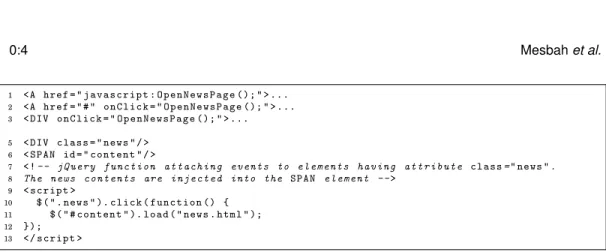
1 <A href = " j a v a s c r i p t : O p e n N e w s P a g e (); " > ...
2 <A href = " # " onClick = " O p e n N e w s P a g e (); " > ...
3 < DIV onClick = " O p e n N e w s P a g e (); " > ...
5 < DIV class = " news " / >
6 < SPAN id = " content " / >
7 <!-- j Q u e r y f u n c t i o n a t t a c h i n g e v e n t s to e l e m e n t s h a v i n g a t t r i b u t e class=" news ".
8 The news c o n t e n t s are i n j e c t e d into the SPAN e l e m e n t -->
9 < script >
10 $ ( " . news " ). click ( f u n c t i o n () {
11 $ ( " # content " ). load ( " news . html " );
12 });
13 </ script >
Fig. 1: Different ways of attaching events to elements.
does not represent the state changes. An AJAXcrawler will need to have access to this
run-time dynamic document object model of the application.
2.4. Delta-communication
AJAX applications rely on a delta-communication [Mesbah and van Deursen 2008]
style of interaction in which merely the state changes are exchanged asynchronously between the client and the server, as opposed to the full-page retrieval approach in traditional web applications. Retrieving and indexing the data served by the server, for instance, through a proxy between the client and the server, could have the side-effect of losing the context and actual meaning of the changes because most of such updates become meaningful after they have been processed by the JAVASCRIPTengine on the
client and injected into the runtime DOM-tree.
2.5. Clickable Elements Changing the Internal State
To illustrate the difficulties involved in crawling AJAX, consider Figure 1. It is a highly
simplified example, showing different ways in which a news page can be opened. The example code shows how in AJAX, it is not just the hypertext link element that forms
the doorway to the next state. Note the way events (e.g.,onClick, onMouseOver) can
be attached to DOM elements at run-time. As can be seen, aDIVelement (line 3) can
have anonclickevent attached to it so that it becomes aclickableelement capable of
changing the internal DOM state of the application when clicked.
Event handlers can also be dynamically registered using JAVASCRIPT. The jQuery3
code (lines 5–13) attaches a function to theonClickevent listener of the element with classattributenews. When this element is clicked, the news content is retrieved from
the server and injected into theSPANelement with IDcontent.
There are different ways to attach event listeners to DOM elements. For instance, if we have the following handler:
var handler = f u n c t i o n () { alert ( ’ Element clicked ! ’) };
we can attach it to anonClicklistener of a DOM elementein the following ways:
(1) e . onclick = handler ; (2) if ( e . a d d E v e n t L i s t e n e r ) {
e . a d d E v e n t L i s t e n e r ( ‘ click ’ , handler , false ) } else if ( e . a t t a c h E v e n t ) { // IE
e . a t t a c h E v e n t ( ‘ onclick ’ , handler ) }
The first case presents the traditional way of attaching handlers to DOM elements. In this case, we can examine the DOM element at runtime and find out that it has the handler attached to itsonClickattribute. The second case show how handlers could
be attached to DOM elements through the DOM Level 2 API. In this case, however, by examining the DOM element it is not possible to find information about the handler, since the event model (DOM Level 2 Events [Pixley 2000]) maintaining the handler registration information is separated from the DOM core model itself. Hence, auto-matically finding these clickable elements at runtime is another non-trivial task for an AJAXcrawler.
3. A METHOD FOR CRAWLING AJAX
The challenges discussed in the previous section should make it clear that crawling AJAXis more demanding than crawling the classical web. In this section, we propose a
dynamic analysisapproach, in which we open the AJAXapplication in a browser, scan
the DOM-tree for candidate elements that are capable of changing the state, fire events on those elements, and analyze the effects on the DOM-tree. Based on our analysis, we infer astate-flow graphrepresenting the user interface states and possible transitions between them.
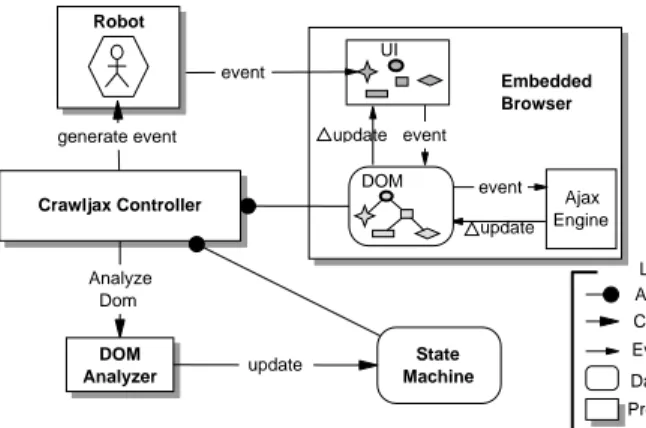
In this section, we first present the terminology used in this paper followed by a discussion of the most important components of our crawling technique, as depicted in Figure 3.
3.1. Terminology
3.1.1. User Interface State and State Changes.In traditional multi-page web applications, each state is represented by a URL and the corresponding web page. In AJAXhowever,
it is the internal structure of the DOM-tree of the (single-page) user interface that represents a state. Therefore, to adopt a generic approach for all AJAXsites, we define
a state change as a change on the DOM tree caused by (1) either client-side events
handled by the AJAXengine;(2)or server-side state changes propagated to the client. 3.1.2. State Transition and Clickable.On the browser, the end-user can interact with the web application through the user interface: click on an element, bring the mouse-pointer over an element, and so on. These actions can cause events that, as described above, can potentially change the state of the application. We call all DOM elements that have event-listeners attached to them and can cause a state transition,clickable
elements. For the sake of simplicity, we use the click event type to present our ap-proach, note, however, that other event types can be used just as well to analyze the effects on the DOM in the same manner.
3.1.3. The State-flow Graph.To be able to navigate an AJAX-based web application, the
application can be modelled by recording the click trails to the various user interface state changes. To record the states and transitions between them, we define a state-flow graphas follows:
DEFINITION 1. A state-flow graph G for an AJAX site A is a labeled, directed graph, denoted by a 4 tuple<r,V,E,L>where:
(1) ris the root node (called Index) representing the initial state afterAhas been fully loaded into the browser.
(2) V is a set of vertices representing the states. Eachv∈V represents a runtime DOM state inA.
(3) Eis a set of (directed) edges between vertices. Each(v1,v2)∈Erepresents a click-ablecconnecting two states if and only if statev2is reached by executingcin state v1.
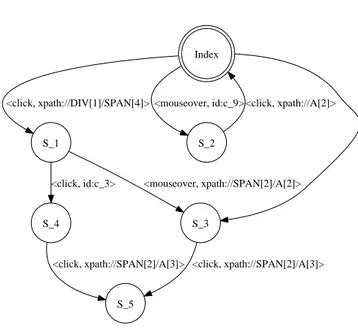
Index S_1 <click, xpath://DIV[1]/SPAN[4]> S_2 <mouseover, id:c_9> S_3 <click, xpath://DIV[3]/IMG[1]> <mouseover, xpath://SPAN[2]/A[2]> S_4 <click, id:c_3> <click, xpath://A[2]> S_5 <click, xpath://SPAN[2]/A[3]> <click, xpath://SPAN[2]/A[3]>
Fig. 2: The state-flow graph visualization.
(4) L is a labelling function that assigns a label, from a set of event types and DOM
element properties, to each edge.
(5) Gcan have multi-edges and be cyclic.
As an example of a flow graph, Figure 2 depicts the visualization of the state-flow graph of a simple AJAXsite. The edges between states are labeled with an
identi-fication (either via its ID-attribute or via an XPath expression) of the clickable. Thus, clicking on the //DIV[1]/SPAN[4] element in the Index state leads to the S 1 state,
from which two states are directly reachable namelyS 3andS 4.
The state-flow graph is created incrementally. Initially, it only contains the root state and new states are created and added as the application is crawled and state changes are analyzed.
The following components, also shown in Figure 3, participate in the construction of the state-flow graph:
— Embedded Browser: The embedded browser provides a common interface for access-ing the underlyaccess-ing engines and runtime objects, such as the DOM and JAVASCRIPT. — Robot: A robot is used to simulate user actions (e.g.,click, mouseOver, text input)
on the embedded browser.
— Controller: The controller has access to the embedded browser’s DOM. It also con-trols the Robot’s actions and is responsible for updating the state machine when relevant changes occur on the DOM.
— DOM Analyzer: The analyzer is used to check whether the DOM-tree is changed after an event has been fired by the robot. In addition, it is used to compare DOM-trees when searching for duplicate-states in the state machine.
— Finite State Machine: The finite state machine is a data component maintaining the state-flow graph, as well as a pointer to the state being currently crawled.
Crawljax Controller Ajax Engine update DOM update UI event Embedded Browser event Analyze Dom State Machine event Legend Control flow Data component Processing component Access Event invocation DOM Analyzer update Robot generate event
Fig. 3: Processing view of the crawling architecture.
3.2. Inferring the State Machine
The algorithm used by these components to actually infer the state machine is shown in Algorithm 1. The main procedure (lines 1-5) takes care of initializing the various components and processes involved. The actual, recursive, crawl procedure starts at line 6. The main steps of the crawl procedure are explained below.
ALGORITHM 1:Crawling AJAX
input : URL, tags, browserType 1 ProcedureMAIN()
2 begin
3 global browser←INITEMBEDDEDBROWSER(U RL, browserT ype) 4 global robot←INITROBOT()
5 global sm←INITSTATEMACHINE() 6 CRAWL(null)
7 ProcedureCRAWL(State ps)
8 begin
9 cs←sm.GETCURRENTSTATE()
10 ∆update←DIFF(ps, cs)
11 f←ANALYSEFORMS(∆update)
12 Set C←GETCANDIDATECLICKABLES(∆update, tags, f) 13 forc∈Cdo
14 robot.ENTERFORMVALUES(c) 15 robot.FIREEVENT(c)
16 dom←browser.GETDOM()
17 ifSTATECHANGED(cs.GETDOM(), dom) then
18 xe←GETXPATHEXPR(c) 19 ns←sm.ADDSTATE(dom)
20 sm.ADDEDGE(cs, ns, EVENT(c, xe))
21 sm.CHANGETOSTATE(ns)
22 ifSTATEALLOWEDTOBECRAWLED(ns)then
23 CRAWL(cs)
24 sm.CHANGETOSTATE(cs)
3.3. Detecting Clickables
There is no feasible way of automatically obtaining a list of all clickable elements on a DOM-tree, due to the reasons explained in Section 2. Therefore, our algorithm makes use of a set of candidate elements, which are all exposed to an event type (e.g., click, mouseOver). Each element on the DOM-tree that meets the labelling requirements is selected as a candidate element.
In automated mode, the candidate clickables are labeled as such based on their HTML tag element name. In our implementation, all elements with a tag <A>, <BUTTON>, or <INPUT type=‘submit’> are considered as candidate clickables, by
de-fault. The selection of candidate clickables can be relaxed or constrained by the user as well, by defining element properties such as the XPATH position on the DOM-tree, attributes and their values, and text values. For instance, the user could be merely in-terested in examiningDIVelements with attributeclass=‘article’. It is also possible
to exclude certain elements from the crawling process.
Based on the given definition of the candidate clickables, our algorithm scans the DOM-tree and extracts all the DOM elements that meet the requirements of the def-inition (line 12). For each extracted candidate element, the crawler then instructs the robot to fill in the detected data entry points (line 14) and fire an event (line 15) on the element in the browser. The robot is currently capable of using either self-generated random values, or custom values provided by the user to fill in the forms (for more details on the form filling capabilities see [Mesbah and van Deursen 2009]).
DEFINITION 2. LetD1 be the DOM-tree of the state before firing an event e on a candidate clickableccandD2the DOM-tree aftereis fired, thenccis a clickable if and
only ifD1differs fromD2.
3.4. State Comparison
After firing an event on a candidate clickable, the algorithm compares the resulting DOM-tree with the DOM-tree as it was just before the event fired, in order to deter-mine whether the event results in a state change (line 17).
To detect a state change, the DOM-trees need to be compared. One way of comparing them is by calculating theedit distance between two DOM-trees is calculated, using the Levenshtein [1996] method. A similarity thresholdτis used under which two DOM
trees are considered clones. This threshold (0.0−1.0) can be given as input. A threshold
of0means two DOM states are seen as clones if they areexactlythe same in terms of
structure and content. Any change is, therefore, seen as a state change.
Another way of comparing the states we have proposed recently [Roest et al. 2010], is the use of a series ofcomparators, each capable of focusing on and comparing spe-cific aspects of two DOM-trees. In this technique, each comparator filters out spespe-cific parts of the DOM-tree and passes the output to the next comparator. For instance, a
Datetimecomparator looks for any date/time patterns and filters those. This way, two
states containing different timestamps can be marked similar automatically.
If a state change is detected, according to our comparison heuristics, we create a new state and add it to the state-flow graph of the state machine (line 19).
The ADDSTATEcall works as follows: In order to recognize an already met state, we
compare every new state to the list of already visited states on the state-flow graph. If we recognize an identical or similar state in the state machine (based on the same similarity notion used for detecting a new state after an event) that state is used for adding a new edge, otherwise a new state is created and added to the graph.
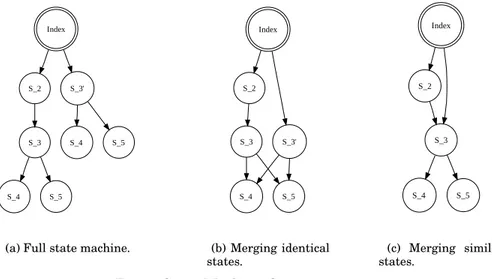
As an example, Figure 4a shows the full state space of a simple application, before any similarity comparison heuristics. In Figure 4c, the states that are identical (S 4)
Index
S_2 S_3'
S_3
S_4 S_5
S_4 S_5
(a) Full state machine.
Index S_2 S_3' S_3 S_4 S_5 (b) Merging identical states. Index S_2 S_3 S_4 S_5 (c) Merging similar states.
Fig. 4: State Machine Optimization.
are merged and Figure 4c presents the state space after similar states (S 3andS 30)
have been merged.
For every detected state, a new edge is created on the graph between the state before the event and the current state (line 20). Using properties such as the XPATH expres-sion, the clickable causing the state transition is also added as part of the new edge (line 18).
Moreover, the current state pointer of the state machine is updated to this newly added state at that moment (line 21).
3.5. Processing Document Tree Deltas
After a clickable has been identified, and its corresponding state transition created, the CRAWLprocedure is recursively called (line 23) to find possible states reachable
from the newly detected state.
Upon every new (recursive) entry into the CRAWLprocedure, the first action taken
(line 10) is computing the differences between the previous document tree and the cur-rent one, by means of an enhancedDiff algorithm [Chawathe et al. 1996; Mesbah and van Deursen 2007]. The resulting differences are used to find new candidate clickables, which are then further processed by the crawler. Such “delta updates” may be due, for example, to a server request call that injects new elements into the DOM.
It is worth mentioning that in order to avoid a loop, a list of visited elements is maintained to exclude already checked elements in the recursive algorithm. We use the tag name, the list of attribute names and values, and the XPath expression of each element to conduct the comparison. Additionally, a depth-level number can be defined to constrain the depth level of the recursive function.
3.6. Backtracking to the Previous State
Upon completion of the recursive call, the browser should be put back into the state it was in before the call, at least if there are still unexamined clickable elements left on that state.
Unfortunately, navigating (back and forth) through an AJAX site is not as easy as
reg-ALGORITHM 2:Backtracking
input :
1 ProcedureBACKTRACK(State s) 2 begin
3 cs←s
4 whilecs.HASPREVIOUSSTATE()do
5 ps←cs.GETPREVIOUSSTATE()
6 ifps.HASUNEXAMINEDCANDIDATECLICKABLES() then
7 ifbrowser.history.CANGOBACK() then
8 browser.history.GOBACK() 9 else 10 browser.RELOAD() 11 List E←sm.GETPATHTO(ps) 12 fore∈Edo 13 re←RESOLVEELEMENT(e)
14 robot.ENTERFORMVALUES(re)
15 robot.FIREEVENT(re)
16 return
17 else
18 cs←ps
ister itself with the browser history engine automatically, so triggering the ‘Back’ func-tion of the browser usually does not bring us to the previous state. Saving the whole browser state is also not feasible due to many technical difficulties. This complicates traversing the application when crawling AJAX. Algorithm 2 shows our backtracking
procedure.
The backtracking procedure is called once the crawler is done with a certain state (line 25 in Algorithm 1). Algorithm 2 first tries to find the relevant previous state that still has unexamined candidate clickables (lines 4-18 in Algorithm 2).
If a relevant previous state is found to backtrack to (line 6 in Algorithm 2), then we distinguish between two situations:
Browser History Support It is possible to programmatically register each state
change with the browser history through frameworks such as the jQuery history/re-mote plugin4, the Really Simple History library,5 or the recently proposed HTML5
history manipulation API (e.g., history.pushState()and history.replaceState().6
If an AJAXapplication has support for the browser history (line 7), then for changing
the state in the browser, we can simply use the built-in history back functionality to move backwards (line 8 in Algorithm 2).
Clicking Through From Initial StateIn case the browser history is not supported,
which is the case with many AJAXapplications currently, the approach we propose to get to a previous state is by saving information about the clickable elements, the event type (e.g.,click), and the order in which the events fired on the elements results in
reaching to a particular state. Once we possess such information, we can reload the application (line 10 in Algorithm 2) and fire events on the clickable elements from the initial state to the desired state, using the exact path taken to reach that state (line 11 in Algorithm 2). However, as an optimization step, it is also possible to use Dijkstra’s shortest path algorithm [Dijkstra 1959] to find the shortest element/event
4http://stilbuero.de/jquery/history/
5http://code.google.com/p/reallysimplehistory/ 6www.w3.org/TR/html5/history.html
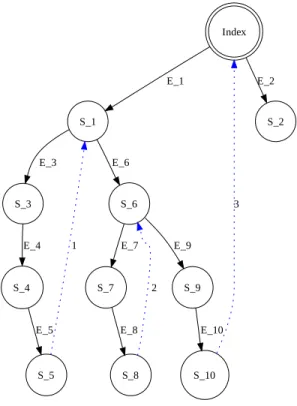
Index S_1 E_1 S_2 E_2 S_3 E_3 S_6 E_6 S_4 E_4 S_5 E_5 1 S_7 E_7 S_9 E_9 S_8 E_8 2 S_10 E_10 3
Fig. 5: Backtracking to the previous relevant state.
path on the graph to a certain state. For every element along the path, we first check whether the element can be found on the current DOM-tree and try to resolve it using heuristics to find the best match possible (line 13 in Algorithm 2). Then, after filling in the related input fields (line 14 in Algorithm 2), we fire an event on the element (line 15 in Algorithm 2).
We adopt XPath along with its attributes to provide a better, more reliable, and per-sistent element identification mechanism. For each clickable, we reverse engineer the XPath expression of that element, which gives us its exact location on the DOM (line 18 in Algorithm 1). We save this expression in the state machine (line 20 in Algorithm 1) and use it to find the element after a reload, persistently (line 13 in Algorithm 2).
Figure 5 shows an example of how our backtracking mechanism operates. Lets as-sume that we have taken the(E 1, E 3, E 4, E 5)path and have landed on stateS 5.
FromS 5, our algorithm knows that there are no candidate clickables left in statesS 4
and S 3 by keeping the track of examined elements.S 1, however, does contain an
un-examined clickable element. The dotted blue line annotated with1shows our desired
path for backtracking to this relevant previous state. To go fromS 5to S 1, the
algo-rithm reloads the browser so that it lands on the indexstate, and from there it fires
Crawling node State Machine DOM Analyzer update Robot DOM Analyzer Ajax Engine update DOM update UI event Embedded Browser event event Robot Crawling node Ajax Engine update DOM update UI event Embedded Browser event event Crawljax
Controller generate event
Analyze Dom State Machine State-flow graph update update update
Fig. 6: Processing view of the concurrent crawling architecture.
4. CONCURRENT AJAX CRAWLING
The algorithm and its implementation for crawling AJAXas just described is
sequen-tial, depth-first, and single-threaded. Since we crawl the web application dynamically, the crawling runtime is determined by:
(1) the speed at which the web server responds to HTTP requests; (2) network latency;
(3) the crawler’s internal processes (e.g., analyzing the DOM, firing events, updating the state machine);
(4) the speed of the browser in handling the events and request/response pairs, modi-fying the DOM, and rendering the user interface,
We have no influence on the first two factors and we already have many optimiza-tion heuristics for the third step (See Secoptimiza-tion 3). Therefore, in this secoptimiza-tion we focus on the last factor, the browser. Since the algorithm has to wait some considerable amount of time for the browser to finish its tasks after each event, our hypothesis is that we can decrease the total runtime by adopting concurrent crawling through multiple browsers.
4.1. Multi-threaded, Multi-Browser Crawling
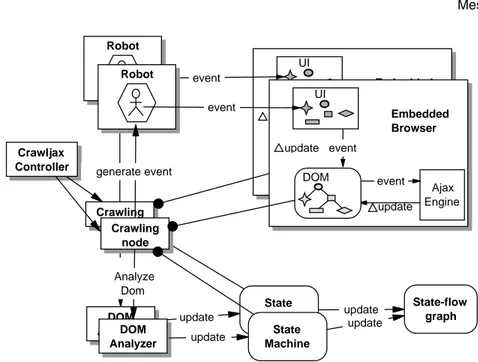
Figure 6 shows the processing view of our concurrent crawling. The idea is to main-tain a single state machine and split the originalcontrollerinto a new controller and multiplecrawling nodes. The controller is the single main thread monitoring the total crawl procedure. In this new setting, each crawling node is responsible for deriving its corresponding robot and browser instances to crawl a specific path.
Compared with Figure 3, the new architecture is capable of having multiple crawler instances, running from a single controller. All the crawlers share the same state ma-chine. The state machine makes sure every crawler can read and update the state machine in a synchronized way. This way, the operation of discovering new states can be executed in parallel.
Fig. 7: Partitioning the state space for multi-threaded crawling.
4.2. Partition Function
To divide the work over the crawlers in a multi-threaded manner, a partition function must be designed. The performance of a concurrent approach is determined by the quality of its partition function [Garavel et al. 2001]. A partition function can be either static or dynamic. With a static partition function the division of work is known in advance, before executing the code. When a dynamic partition function is used, the de-cision of which thread will execute a given node is made at runtime. Our algorithm in-fers the state-flow graph of an AJAXapplication dynamically and incrementally. Thus,
due to this dynamic nature we adopt for a dynamic partition function.
The task of our dynamic partition function is to distribute the work equally over all the participating crawling nodes. While crawling an AJAXapplication, we definework
as: Bringing the browser back into a given state and exploring the first unexplored candidate state from that state. Our proposed partition function operates as follows: After the discovery of a new state, if there are still unexplored candidate clickables left in the previous state, that state is assigned to another thread for further exploration. The processor chosen will be the one with the least amount of work left.
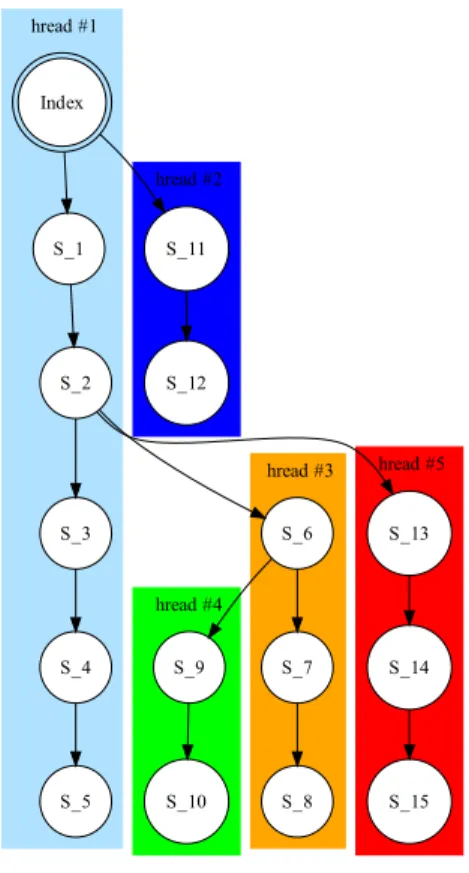
Figure 7 visualizes our partition function for concurrent crawling of a simple web application. In the Index state, two candidate clickables are detected that can lead to: S 1 and S 11. The initial thread continues with the exploration of the states S 1,
S 2,S 3,S 4and finishes inS 5in a depth-first manner. Simultaneously, a new thread
is branched off to explore state S 11. This new thread (thread #2) first reloads the
browser toIndexand after that goes intoS 11. In stateS 2andS 6this same branching
mechanism happens, which results in a total of 5 threads.
Now that the partition function has been introduced, the original sequential crawl-ing algorithm (Algorithm 1) can be changed into a concurrent version.
4.3. The Concurrent Crawling Algorithm
The concurrent crawling approach is shown in Algorithm 3. Here we briefly explain the main differences with respect to the original sequential crawling algorithm, as presented in Algorithm 1 and discussed in Section 3.
Global State-flow GraphThe first change is the separation of the state-flow graph
from the state machine. The graph is defined in a global scope (line 3), so that it can be centralized and used by all concurrent nodes. Upon the start of the crawling process, an initial crawling node is created (line 5) and its RUNprocedure is called (line 6).
Browser PoolThe robot and state machine are created for each crawling node. Thus,
they are placed in the local scope of the RUNprocedure (lines 10-11).
Generally, each node needs to acquire a browser instance and after the process is fin-ished, the browser is killed. Creating new browser instances is a process-intensive and time-consuming operation. To optimize, a new structure is introduced: theBrowserPool
(line 4), which creates and maintains browsers in a pool of browsers to be re-used by the crawling nodes. This reduces start-up and shut-down costs. TheBrowserPoolcan
be queried for a browser instance (line 9), and when a node is finished working, the browser used is released back to the pool.
In addition, the algorithm now takes the desired number of browsers as input. In-creasing the number of browsers used can decrease the crawling runtime, but it also comes with some limitations and trade-offs that we will discuss in Section 6.5.
Forward-trackingIn the sequential algorithm, after finishing a crawl path, we need
to bring the crawler to the previous (relevant) state. In the concurrent algorithm, how-ever, we create a new crawling node for each path to be examined (see Figure 7). Thus, instead of bringing the crawler back to the desired state (backtracking) we must take the new node forward to the desired state, hence, forward-tracking.
This is done after the browser is pointed to the URL (line 12). The first time the
RUNprocedure is executed, there is no forward-tracking taking place, since the
event-path (i.e., the list of clickable items resulting to the desired state) is empty, so the initial crawler starts from theIndexstate. However, if the event-path is not empty, the
clickables are used to take the browser forward to the desired state (lines 13-16). At that point, the CRAWLprocedure is called (line 17).
Crawling ProcedureThe first part of the CRAWLprocedure is unchanged (lines
21-24). To enable concurrent nodes accessing the candidate clickables in a thread-safe manner, the body of theforloop is synchronized around the candidate element to be
examined (line 26). To avoid examining a candidate element multiple times by multiple nodes, each node first checks the examined state of the candidate element (line 28). If the element has not been examined previously, the robot executes an event on the element in the browser and sets its state asexamined(line 31). If the state is changed,
before going into the recursive CRAWL call, the PARTITION procedure is called (line
38).
Partition Procedure The partition procedure, called on a particular state cs(line
ALGORITHM 3:Concurrent AJAXCrawling
input : URL, tags, browserType, nrOfBrowsers 1 ProcedureMAIN()
2 begin
3 global sf g←INITSTATEFLOWGRAPH()
4 global browserP ool←INITBROWSERPOOL(nrOf Browsers, browserT ype) 5 crawlingN ode←CRAWLINGNODE()
6 crawlingN ode.RUN(null, null) 7 ProcedureRUN(State s, EventPath ep) 8 begin
9 browser←browserP ool.GETEMBEDDEDBROWSER() 10 robot←INITROBOT()
11 sm←INITSTATEMACHINE(sf g)
12 browser.GOTO(U RL) 13 fore∈epdo
14 re←RESOLVEELEMENT(e)
15 robot.ENTERFORMVALUES(re) 16 robot.FIREEVENT(re)
17 CRAWL(s, browser, robot, sm) 18
19 ProcedureCRAWL(State ps, EmbeddedBrowser browser, Robot robot, StateMachine sm) 20 begin
21 cs←sm.GETCURRENTSTATE()
22 ∆update←DIFF(ps, cs)
23 f←ANALYSEFORMS(∆update)
24 SetC←GETCANDIDATECLICKABLES(∆update, tags, f)
25 forc∈Cdo
26 SYNCH(c)
27 begin
28 ifcs.NOTEXAMINED(c)then
29 robot.ENTERFORMVALUES(c) 30 robot.FIREEVENT(c)
31 cs.EXAMINED(c)
32 dom←browser.GETDOM()
33 ifSTATECHANGED(cs.GETDOM(), dom) then
34 xe←GETXPATHEXPR(c) 35 ns←sm.ADDSTATE(dom)
36 sm.ADDEDGE(cs, ns, EVENT(c, xe))
37 sm.CHANGETOSTATE(ns)
38 PARTITION(cs)
39 ifSTATEALLOWEDTOBECRAWLED(ns)then
40 CRAWL(cs)
41 sm.CHANGETOSTATE(cs)
42
43 ProcedurePARTITION(State cs)
44 begin
45 whileSIZEOF(cs.NOTEXAMINEDCLICKABLES())>0do 46 crawlingN ode←CRAWLINGNODE(cs, GETEXACTPATH())
47 DISTRIBUTEPARTITION(crawlingN ode)
46). The new crawlers are initialized with two parameters, namely, (1) the current state cs (2) the execution path from the initialIndex state to this state. Every new
node is distributed to the work queue participating in the concurrent crawling (line 47). When a crawling node is chosen from the work queue, its corresponding RUN
procedure is called in order to spawn a new crawling thread.
5. TOOL IMPLEMENTATION
We have implemented the crawling concepts in a tool called CRAWLJAX. The
develop-ment of CRAWLJAX originally started in 2007. There have been many extension and
improvement iterations since the first release in 2008. CRAWLJAX has been used by
various users and applied to a range of industrial case studies. It is released under the Apache open source license and is available for download. In 2010 alone, the tool was downloaded more than 1000 times. More information about the tool can be found on
http://crawljax.com.
CRAWLJAX is implemented in Java. We have engineered a variety of software
li-braries and web tools to build and run CRAWLJAX. Here we briefly mention the main
modules and libraries.
The embedded browser interface supports three browsers currently (IE, Chrome, Firefox) and has been implemented on top of the Selenium 2.0 (WebDriver) APIs.7The
state-flow graphis based on the JGrapht8library.
CRAWLJAXhas aPlugin-based architecture. There are various extension points for
different phases of the crawling process. The main interface is Plugin, which is
ex-tended by the various types of plugin available. Each plugin interface serves as an extension point that is called in a different phase of the crawling execution, e.g.,
preCrawlingPlugin runs before the crawling starts, OnNewStatePlugin runs when a
new state is found during crawling, PostCrawlingPlugin runs after the crawling is
finished. More details of the plugin extension points can be found on the project home-page.9There is a growing list of plugins available for CRAWLJAX,10examples of which
include a static mirror generator, a test suite generator, a crawl overview generator for visualization of the crawled states, a proxy to intercept communication between client/server while crawling, and a cross-browser compatibility tester.
Through an API (CrawljaxConfiguration), the user is able to configure many
crawl-ing options such as the elements that should be examined (e.g., clicked on) durcrawl-ing crawling, elements that should be ignored (e.g., logout), crawling depth and time, the maximum number of states to examine, the state comparison method, the plugins to be used, and the number of desired browsers that should be used during crawling.
6. EVALUATION
Since 2008, we and others have used CRAWLJAXfor a series of crawling tasks on differ-ent types of systems. In this section, we provide an empirical assessmdiffer-ent of some of the key properties of our crawling technique. In particular, we address the accuracy(are the results correct?), scalability (can we deal with realistic sites?), andperformance, focusing in particular on the performance gains resulting from concurrent crawling.
We first present our findings concerning accuracy and scalability, for which we study six systems, described next (Section 6.1). For analyzing the performance gains from concurrent crawling, we apply CRAWLJAXto Google’s ADSENSEapplication
(Sec-tion 6.5).
7http://code.google.com/p/selenium/wiki/GettingStarted 8http://jgrapht.sourceforge.net
9http://crawljax.com/documentation/writing-plugins/ 10http://crawljax.com/plugins/
Table I: Experimental benchmarks and examples of their clickable elements.
Case AJAXsite Sample Clickable Elements
C1 spci.st.ewi.tudelft. nl/demo/aowe/
<span id="testspan2" class="testing">testing span 2</span> <a onclick="nav(’l2’); return false;" href="#">2nd link</a>
<a title="Topics" href="#Topics" class="remoteleft left"> Topics of Interest</a>
C2 PETSTORE <a class="accordionLink" href="#" id="feline01" onmouseout="this.className=’accordionLink’;" onmouseover="this.className=’accordionLinkHover’;"> Hairy Cat</a>
C3 www.4launch.nl <div onclick="setPrefCookies(’Gaming’, ’DESTROY’, ’DESTROY’);
loadHoofdCatsTree(’Gaming’, 1, ’’)"><a id="uberCatLink1" class="ubercat" href="javascript:void(0)">Gaming</a></div> <td onclick="open url(’..producteninfo.php?productid= 037631’,..)">Harddisk Skin</td> C4 www. blindtextgenerator. com
<input type="radio" value="7" name="radioTextname"
class="js-textname iradio" id="idRadioTextname-EN-li-europan"/> <a id="idSelectAllText" title="Select all" href="#">
C5 site.snc.tudelft.nl <div class="itemtitlelevel1 itemtitle" id="menuitem 189 e">organisatie</div> <a href="#" onclick="ajaxNews(’524’)">...</a> C6 www.gucci.com <a onclick="Shop.selectSort(this); return false"
class="booties" href="#">booties</a>
<div id="thumbnail 7" class="thumbnail highlight"><img src="...001 thumb.jpg" /><div
<div class="darkening">...</div> 6.1. Subject Systems
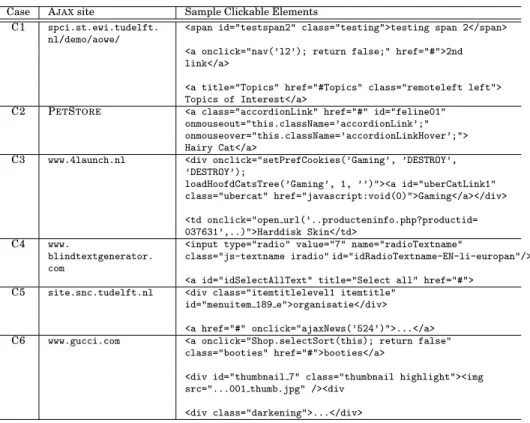
In order to assess the accuracy (Section 6.3) and scalability (Section 6.4), we study the six systems C1–C6 listed in Table I. For each case, we show the site under study, as well as a selection of typical clickable elements. We selected these sites because they adopt AJAXto change the state of the application, using JAVASCRIPT, assigning
events to HTML elements, asynchronously retrieving delta updates from the server, and performing partial updates on the DOM-tree.
The first site C1 in our case study is an AJAXtest site developed internally by our
group using the jQuery AJAXlibrary. Although the site is small, it is a case where we
are in full control of the AJAXfeatures used, allowing us to introduce different types
of dynamically set clickables as shown in Figure 1 and Table I.
Our second case, C2, is Sun’s Ajaxified PETSTORE 2.011 which is built on Java
ServerFaces and the Dojo AJAXtoolkit. This open-source web application is designed
to illustrate how the Java EE Platform can be used to develop an AJAX-enabled Web
2.0 application and adopts many advanced rich AJAXcomponents.
The other four cases are all real-world external public AJAXapplications. Thus, we have no access to their source-code. C4 is an AJAX-based application that can function
as a tool for comparing the visual impression of different typefaces. C3 (online shop), C5 (sport center), and C6 (Gucci) are all single-page commercial applications with numerous clickables and dynamic states.
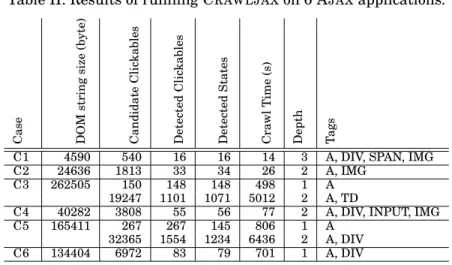
Table II: Results of running CRAWLJAXon 6 AJAXapplications. Case DOM string size (byte) Candidate Clic kables Detected Clic kables Detected States Cra wl Time (s) Depth Tags
C1 4590 540 16 16 14 3 A, DIV, SPAN, IMG C2 24636 1813 33 34 26 2 A, IMG
C3 262505 150 148 148 498 1 A 19247 1101 1071 5012 2 A, TD
C4 40282 3808 55 56 77 2 A, DIV, INPUT, IMG C5 165411 267 267 145 806 1 A
32365 1554 1234 6436 2 A, DIV C6 134404 6972 83 79 701 1 A, DIV
6.2. Applying CRAWLJAX
The results of applying CRAWLJAXto C1–C6 are displayed in Table II. The table lists
key characteristics of the sites under study, such as the average DOM size and the total number of candidate clickables. Furthermore, it lists the key configuration parameters set, most notably the tags used to identify candidate clickables, and the maximum crawling depth.
The performance measurements were obtained on a a laptop with Intel Pentium M 765 processor 1.73GHz, with 1GB RAM and Windows XP.
6.3. Accuracy
6.3.1. Experimental Setup. Assessing the correctness of the crawling process is chal-lenging for two reasons. First, there is no strict notion of “correctness” with respect to state equivalence. The state comparison operator part of our algorithm (see Sec-tion 3.4) can be implemented in different ways: the more states it considers equal, the smaller and the more abstract the resulting state-flow graph is. The desirable level of abstraction depends on the intended use of the crawler (regression testing, program comprehension, security testing, to name a few) and the characteristics of the system that is being crawled.
Second, no other crawlers for AJAXare available, making it impossible to compare our results to a “gold standard”. Consequently, an assessment in terms of precision
(percentage of correct states) andrecall(percentage of states recovered) is impossible to give.
To address these concerns, we proceed as follows. For the cases where we have full control, C1 and C2, we inject specific clickable elements:
— For C1, 16 elements were injected, out of which 10 were on the top-level index page. Furthermore, to evaluate the state comparison procedure, we intentionally intro-duced a number of identical (clone) states.
— For C2, we focused on two product categories, CATS and DOGS, from the five available categories. We annotated 36 elements (product items) by modifying the JAVASCRIPTmethod which turns the items retrieved from the server into clickables
on the interface.
Subsequently, we manually create a reference model, to which we compare the derived state-flow graph.
To assess the four external sites C3–C6, we inspect a selection of the states. For each site, we randomly select 10 clickables in advance, by noting their tag names, attributes, and XPath expressions. After crawling of each site, we check the presence of these 10 elements among the list of detected clickables.
In order to do the manual inspection of the results, we run CRAWLJAX with the
Mirrorplugin enabled. This post-crawling plugin creates a static mirror based on the derived state-flow graph, by writing all DOM states to file, and replacing edges with appropriate hyperlinks.
6.3.2. Findings.Our results are as follows:
— For C1, all 16 expected clickables were correctly identified, leading to a precision and recall of 100% for this case. Furthermore, the clone states introduced were correctly identified as such.
— For C2, 33 elements were detected correctly from the annotated 36. The three el-ement that were not detected turn out to be invisible elel-ements requiring multiple clicks on a scroll bar to appear. Since our default implementation avoids clicking the same element multiple times (see Section 3.5), these invisible elements cannot become visible. Hence they cannot be clicked in order to produce the required state change when the default settings are used. Note that multiple events on the same element is an option supported in the latest version of CRAWLJAX.
— For C3–C6,38out of the4∗10 = 40, corresponding to 95% of the states were correctly
identified. The reasons for not creating the missing two states is similar to the C2-case: the automatically derived navigational flow did not permit reaching the two elements that had to be clicked in order to generate the required states.
Based on these findings, we conclude that (1) states detected by CRAWLJAXare
cor-rect; (2) duplicate states are correctly identified as such; but that (3) not all states are necessarily reached.
6.4. Scalability
6.4.1. Experimental Setup. In order to obtain an understanding of the scalability of our approach, we measure the time needed to crawl, as well as a number of site char-acteristics that will affect the time needed. We expect the crawling performance to be directly proportional to the input size, which is composed of (1) the average DOM string size, (2) number of candidate elements, and (3) number of detected clickables and states, which are the characteristics that we measure for the six cases.
To test the capability of our method in crawling real sites and coping with unknown environments, we run CRAWLJAX on four external cases C3–C6. We run CRAWLJAX
with depth level 2 on C3 and C5 each having a huge state space to examine the scala-bility of our approach in analyzing tens of thousands of candidate clickables and find-ing clickables.
6.4.2. Findings.Concerning the time needed to crawl the internal sites, we see that it takes CRAWLJAX 14 and 26 seconds to crawl C1 and C2 respectively. The average
DOM size in C2 is 5 times and the number of candidate elements is 3 times higher. In addition to this increase in DOM size and in the number of candidate elements, the C2 site does not support the browser’s built-in Back method. Thus, as discussed in Section 3.6, for every state change on the browser CRAWLJAX has to reload the
application and click through to the previous state to go further. This reloading and clicking through naturally has a negative effect on the performance.
Note that the performance is also dependent on the CPU and memory of the machine CRAWLJAX is running on, as well as the speed of the server and network properties
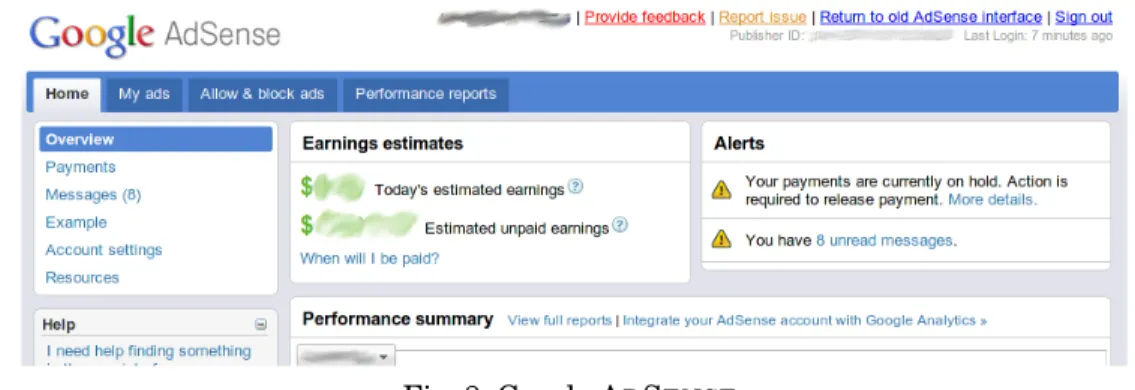
Fig. 8: Google ADSENSE.
of the case site. C6, for instance, is slow in reloading and retrieving updates from its server, which increases the performance measurement numbers in our experiment.
CRAWLJAX was able to run smoothly on the external sites. Except a few minor
ad-justments (see Section 7) we did not witness any difficulties. C3 with depth level 2 was crawled successfully in 83 minutes resulting in 19247 examined candidate elements, 1101 detected clickables, and 1071 detected states. For C5, CRAWLJAXwas able to
fin-ish the crawl process in 107 minutes on 32365 candidate elements, resulting in 1554 detected clickables and 1234 states. As expected, in both cases, increasing the depth level from 1 to 2 expands the state space greatly.
Section 6.5 presents our case study conducted on Google ADSENSE, which shows the
scalability of the approach on a real-world industrial web application.
6.5. Concurrent Crawling
In our final experiment, the main goal is to assess the influence of the concurrent crawling algorithm on the crawling runtime.
6.5.1. Experimental Object.Our experimental object for this study isGoogleADSENSE
,12 an AJAX application developed by Google, which empowers online publishers to
earn revenue by displaying relevant ads on their web content. The ADSENSEinterface
is built using GWT (Google Web Toolkit) components and is written in Java.
Figure 8 shows the index page of ADSENSE. On the top, there are four main tabs
(Home,My ads, Allow & block ads, Performance reports). On the top-left side, there
is a box holding the anchors for the current selected tab. Underneath the left-menu box, there is a box holding links to help related pages. On the right of the left-menu we can see the main contents, which are loaded by AJAXcalls.
6.5.2. Experimental Design. Our research questions can be presented as follows:
RQ1. Does our concurrent crawling approach positively influence the perfor-mance?
RQ2. Is there a limit on the number of browsers that can be used to reduce the runtime?
Based on these two research questions we formulate our two null hypotheses as follows:
H10. The availability of more browsers does not impact the time needed to crawl a
given AJAXapplication.
H20. There is no limit on the number of browsers that can be added to reduce the
runtime.
The alternative hypotheses that we use in the experiment are the following:
H1. The availability of more browsers reduces the time needed to crawl a given AJAXapplication.
H2. There is a limit on the number of browsers that can be added to reduce the runtime.
Infrastructure To derive our experimental data we use the Google infrastructure,
which offers the possibility to run our experiments either on a local workstation or on a distributed testing cluster.
On the distributed testing cluster, the number of cores varies between clusters. Newer clusters are supplied with 6 or 8 core CPU’s, while older clusters include 2 or 4 cores. The job-distributor ensures a minimum of 2 Gb of memory per job at min-imum. The cluster is shared between all development teams, so our experiment data were gathered while other teams were also using the cluster. To prevent starvation on the distributed testing cluster, a maximum runtime of one hour is specified, i.e., any test running longer than an hour is killed automatically.
To achieve a repeatable experiment, we initiate a newAdsensefront-end with a clean database server for every experimental test. The test-data is loaded into the database during the initialization phase of theAdsensefront-end.
Tool ConfigurationTo crawl ADSENSE, we configured CRAWLJAX2.0 to click on all
anchor-tags and fill in form inputs with custom data.
To inform the user that the interface is being updated, ADSENSEdisplays a
loading-icon. While crawling, to determine whether the interface was finished with loading the content after each fired event, CRAWLJAXanalyzed the DOM-tree to check for this
icon.
Due to the infrastructure we were restricted to use Linux as our operating system and we chose Firefox 3.5 as our embedded browser.
Variables and Analysis The independent variable in our experiment is the
num-ber of browsers used for crawling. We use the same crawl configuration for all the experiments. The only property that changes is the number of browsers used during crawling: 1-10.
Thedependent variablethat we measure is the time needed to crawl the given crawl specification, calculated from the start of the crawling until the (last) browser finishes. To compare, we also measure the actual number of examined clickables, crawled states, edges, and paths.
We run every experiment multiple times and take the average of the runtime. On the distributed cluster all resources are shared. Hence, to get reliable data we executed every experiment 300 times.
Since we have 10 independent samples of data with 2953 (see Table III) data points, we use the One-Way ANOVA statistical method to test the first hypothesis (H10).
Levene’s test is used for checking the homogeneity of variances. Welch and Brown-Forsythe are used as tests of equality of means [Maxwell and Delaney 2004].
If H1 turns out to be true, we proceed with our second hypothesis. To test H20, we
need to compare the categories to find out which are responsible for runtime differ-ences. Thus, we use the Post Hoc Tukey test if the population variances are equal, or
● ● ● ● ● ● ● ● ● ● ● ● ● ● ● ● ● ● ● ● ● ● ● ● ● ● ● ● ● ● ● ● ● ● ● ● ● ● ● ● ● ● ● ● ● ● ● ● ● ● ● ● ● ● ● ● ● ● ● ● ● ● ● ● ● ● ● ● ● ● ● ● ● ● ● ● ● ● ● ● ● ● ● ● ● ● ● ● ● ● ● ● ● ● ● ● ● ● ● ● ● ● ● ● ● ● ● ● ● ● ● ● ● ● ● ● ● ● ● ● ● ● ● ● ● ● ● ● ● ● ● ● ● ● ● ● ●● ● ● ● ● ● ● ● ● ● ● ● ● ● ● ● ● ● ● ● ● ● ● ● ● ● ● ● ● ● ● ● ● ● ● ● ● ● ● ● ● ● ● ● ● ● ● ● ● ● ● ● ● ● ● ● ● ● ● ● ● ● ● ● ● ● ● ● ● ● ● ● ● ● ● ● ● ● ● ● ● ● ● ● ● ● ● ● ● ● ● ● ● ● ● ● ● ● ● 1 2 3 4 5 6 7 8 9 10 20 30 40 50 60 # of Browsers States
Fig. 9: Boxplots of detected states versus the number of browsers. Distributed setting (300 measurements for each category of browsers).
the Games-Howell test if that does not turn out to be the case. We use SPSS13for the
statistical analysis and R14for plotting the graphs.
6.5.3. Results and Evaluation. We present our data and analysis on the data from the distributed infrastructure. We obtained similar results with different configurations. Our experimental data can be found on the following link.15
Figures 9-11 depict boxplots of the detected states, detected edges, and runtime (minutes) respectively versus the number of browsers used during crawling, on the distributed infrastructure. The number of detected states and edges is constant, which means our multi-browser crawling and state exploration is stable.
13http://www.spss.com 14http://www.r-project.org 15http://tinyurl.com/3d5km3b
● ● ● ● ● ● ● ● ● ● ● ● ● ● ● ● ● ● ● ● ● ● ● ● ● ● ● ● ● ● ● ● ● ● ● ● ● ● ● ● ● ● ● ● ● ● ● ● ● ● ● ● ● ● ● ● ● ● ● ● ● ● ● ● ● ● ● ● ● ● ● ● ● ● ● ● ● ● ● ● ● ● ● ● ● ● ● ● ● ● ● ● ● ● ● ● ● ● ● ● ● ● ● ● ● ● ● ● ● ● ● ● ● ● ● ● ● ● ● ● ● ● ● ● ● ● ● ● ● ● ● ● ● ● ● ● ● ● ● ● ● ● ● ● ● ● ● ● ● ● ● ● ● ● ● ● ● ● ● ● ● ● ● ● ● ● ● ● ● ● ● ● ● ● ● ● ● ● ● ● ● ● ● ● ● ● ● ● ● ● ● ● ● ● ● ● ● ● ● ● ● ● ● ● ● ● ● ● ● ● ● ● ● ● ● ● ● ● ● ● ● ● ● ● ● ● ● ● ● ● ● ● ● ● ● ● ● ● ● ● ● ● ● ● ● ● ● ● ● ● ● ● ● ● ● ● ● ● ● ● ● ● ● ● ● ● ● ● ● ● ● ● ● ● ● ● ● ● ● ● ● ● ● ● ● ● ● ● ● ● ● ● ● ● ● ● ● ● ● ● ● ● ● ● ● ● ● ● ● ● ● ● ● ● ● ● ● ● ● ● ● ● ● ● ● ● ● ● ● ● ● ● ● ● ● 1 2 3 4 5 6 7 8 9 10 40 60 80 100 # of Browsers Edges
Fig. 10: Boxplots of detected edges versus the number of browsers. Distributed setting (300 measurements for each category of browsers).
Table III: Descriptive statistics of the runtime (in minutes) for the 10 categories of browsers. * 95% Confidence Interval for Mean.
N Mean Std. Dev. Std. Err. Lower Bound* Upper Bound* Min Max
1 2953 7.4871 3.70372 .06816 7.3535 7.6207 2.33 22.15 2 299 5.4721 1.14160 .06602 5.3422 5.6020 2.33 10.55 3 295 5.5521 1.26716 .07378 5.4069 5.6973 3.38 11.83 4 297 5.6404 1.11101 .06447 5.5135 5.7673 3.78 11.12 5 291 5.6744 1.15004 .06742 5.5417 5.8070 3.69 10.75 6 290 5.6920 .99718 .05856 5.5767 5.8072 4.20 11.01 7 294 5.9806 1.05696 .06164 5.8593 6.1020 4.13 10.72 8 297 6.2338 1.03936 .06031 6.1151 6.3525 4.74 10.32 9 292 7.4651 1.04823 .06134 7.3444 7.5858 5.35 10.56 10 299 9.9243 1.28598 .07437 9.7779 10.0707 7.05 13.37 Total 299 17.0613 2.31540 .13390 16.7978 17.3249 10.17 22.15
Figure 11 shows that there is a decrease in the runtime when the number of browsers is increased. Table III presents the descriptive statistics of the runtime for the 10 categories of browsers.
● ● ● ● ● ● ● ● ● ● ● ● ● ● ● ● ● ● ● ● ● ● ● ● ● ● ● ● ● ● ● ● ● ● ● ● ● ● ● ● ● ● ● ● ● ● ● ● ● ● ● ● ● ● ● ● ● ● ● ● ● ● ● ● 1 2 3 4 5 6 7 8 9 10 5 10 15 20 # of Browsers Runtime (m)
Fig. 11: Boxplots of runtime versus the number of browsers. Distributed setting (300 measurements for each category of browsers).
Table IV shows the main ANOVA result. The significance value comparing the groups is < .05. The significance value for homogeneity of variances, as shown in
Table V, is < .05, which means the variances are significantly different. The Welch
and Brown-Forsythe are both0, so we can reject the first null hypothesis. Thus, we can
conclude that our concurrent crawling approach positively influences the performance. To test for the second hypothesis, we need to compare the groups to find out if the differences between them is significant. Table VI shows our post hoc test results. a∗
means that the difference in runtime is significant. It is evident that there is a limit on the number of browsers that can significantly decrease the runtime. The optimal number for our ADSENSEstudy is 5 browsers. By increasing the number of browsers
from 1 to 5, we can achieve a decrease of up to65%in runtime. Increasing the num-ber of browsers beyond 5 has no significant influence on the runtime in our current impementation.
Table IV: One-way ANOVA.
Sum of Squares df Mean Square F Sig.
Between Groups 35540.225 9 3948.914 2345.919 000 Within Groups 4953.987 2943 1.683
Total 40494.212 2952
Table V: Tests for Homogeneity of Variances and Equality of Means.
Method Statistic df1 df2 Sig.
Levene 55.884 9 2943 0.000 Welch 1060.017 9 1198.048 0.000 Brown-Forsythe 2355.528 9 1914.845 0.000
Table VI: Post Hoc Games-Howell multiple comparisons. * indicates the mean differ-ence is significant at the 0.05 level.
1 2 3 4 5 6 7 8 9 10 1 - * * * * * * * * * 2 * - * * * * * * * * 3 * * - * * * * * * * 4 * * * - * * * * * 5 * * * - * * * * * 6 * * * * * -7 * * * * * -8 * * * * * -9 * * * * * -10 * * * * * -6.6. Threats to Validity
As far as the repeatability of the studies is concerned, CRAWLJAXis open source and
publicly available for download. The experimental applications in Section 6.1 are com-posed of open source and public domain websites. In the concurrent crawling experi-ment (Section 6.5), the study was done at Google using Google’s ADSENSE, which is
also publicly accessible. More case studies are required to generalize the findings on correctness and scalability. One concern with using public domain web applications as benchmarks is that they can change and evolve over time, making the results of the study irreproducible in the future.
7. DISCUSSION
7.1. Detecting DOM Changes
An interesting observation in C2 in the beginning of the experiment was that every examined candidate element was detected as a clickable. Further investigation re-vealed that this phenomenon was caused by a piece of JAVASCRIPT code (banner),
which constantly changed the DOM-tree with textual notifications. Hence, every time a DOM comparison was done, a change was detected. We had to use a higher similarity threshold so that the textual changes caused by the banner were not seen as a rele-vant state change for detecting clickables. In CRAWLJAX, it is also possible to ignore
certain parts of the DOM-tree through, for instance, regular expressions that capture the recurring patterns. How the notion of a dynamicstate changeis defined can