Computers and Young Children
Using Technology in Reggio-Inspired Long-Term Projects
Mary L. Trepanier-Street,
1,2Seong B. Hong,
1and Jennifer C. Bauer
1INTRODUCTION parents. The teacher can examine the documentation to determine the children’s interests, understandings, and The philosophy and approach to early childhood
misunderstandings about the project topic. From the education found in Reggio Emilia, Italy, which
incorpo-documentation the teacher can determine possible mate-rates the use of long-term projects and the
documenta-rials, activities, and teaching strategies that may be in-tion of children’s learning in these projects, has inspired
troduced to further the project. By creating documenta-many early childhood programs in the United States
tion panels that contain photographs of children’s (Gandini, 1994; Hendrick, 1997; Trepanier-Street,
Greg-actions, children’s drawings, child and teacher language, ory, & Donegan, 1998). Using various forms of
technol-and teacher commentary on project activities, the pro-ogy (e.g., computer, computer software, digital camera,
cess of children’s learning can become apparent to the video camera and recorder, video printer, and scanner)
teacher. A study of the documentation can reveal the to implement and document classroom long-term
proj-types and the quality of child–child and child–teacher ects can positively influence the learning–teaching
pro-interactions that are occurring in the classroom and what cess for the children, teachers, and parents. Long-term
teaching strategies could further these classroom interac-projects enhanced by technology can promote
signifi-tions. The teacher in the documentation can obtain as-cant growth in children’s thinking and social
develop-sessment information about individual children as well ment. Using technology to document these projects can
as about whole group progress. be a valuable tool for teacher reflection on children’s
Children have the opportunity to use documenta-development and the teaching process and can result in
tion of projects to examine their own thinking and the significant teacher professional growth. An additional
thinking of others on the project topic. Such examination advantage of incorporating technology into long-term
permits the children to clarify, deepen, and reevaluate projects is that it can be both cost and time effective for
and change their thinking about the topic (Katz & the teacher and the early childhood program. In this
arti-Chard, 1996). Using documentation to revisit prior ac-cle we describe and provide examples of how we have
tivities, the children and teacher plan together what as-utilized technology in the implementation and
docu-pect of the project they wish to pursue next. Careful and mentation of long-term projects conducted in a
multi-attractive documentation can convey to the children that aged (41
2to 6 years) preschool/kindergarten classroom. their work is valuable, worthwhile, and is taken
seri-In long-term projects children explore in-depth a ously by adults (Katz & Chard, 1996). Documentation topic of interest from many perspectives for an extended panels, serving as the children’s memory of their project period of time (Katz & Chard, 1989; Trepanier-Street, work, can be used for revisiting activities with large 1993). Projects begin and continue with the teacher care- groups of children. These documentation panels can be fully documenting the children’s interactions with mate- organized chronologically on the computer so that the rials, with their peers, and with the teacher, as well as children and the teacher can see their progress over time the language used by the children during these interac- and reflect upon their personal growth and classroom tions. The continual documentation of the long-term experiences.
project serves many purposes for teachers, children, and Through documentation posted in the classroom, parents can become aware of what the children are doing and learning in the classroom. Classroom projects can 1
University of Michigan–Dearborn, Dearborn, Michigan.
be a concrete focus for parental involvement and for par-2
Correspondence should be directed to Mary L. Trepanier-Street,
Uni-ent–child conversations about the child’s interests and versity of Michigan–Dearborn, School of Education, 4901 Evergreen,
Dearborn, Michigan 48128; e-mail: [email protected] school day. By reviewing previous documentation
pan-181
Trepanier-Street, Hong, and Bauer 182
els parents can observe their child’s development photographs can reflect various stages of exploration in the project.
throughout the year. Also from the teacher’s
commen-tary about the children’s learning on documentation pan- Digital camera photographs can be used to docu-ment the project process in multiple ways. Photographs els, parents can become more aware of how young
chil-dren learn and the developmental process. For all can be immediately printed and the children and the
teacher can discuss with each other their actions and concerned, the children, the teacher, and the parents,
project work and the documentation of children’s learn- their thinking. This potential for immediate use is not possible with a 35-millimeter camera that requires film ing in projects is a source of accomplishment and pride.
In our initial documentation of long-term projects, processing. The storage of old and new photographs can permit children to revisit previous and present activities, we documented children’s actions in photographs using
either a 35-millimeter camera or Polaroid camera and to compare and contrast their ideas, review the progress of the project, and come to new understanding about the recorded children’s language using teacher-written notes
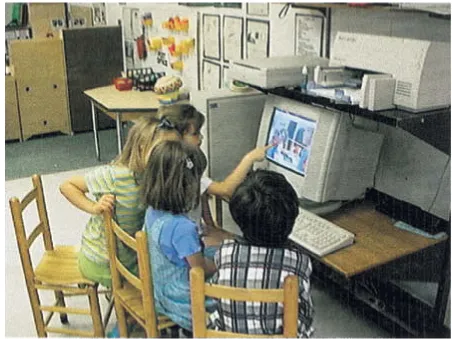
or audiotape recordings. Using this type of camera for topic. Revisiting of photographs can be conducted either directly at the computer as seen in Figure 2 or by using photographing children’s actions was often time
con-suming and costly due to the cost of film, the cost and a documentation panel as seen in Figure 3. Another par-ticularly useful method of documenting project activities time required for developing the film, and the waste of
an ineffective photograph not discovered until pro- is to use transparencies made from the stored digital photographs. Transparencies of stored photographs can cessed. The teacher’s written notes, while valuable,
de-pended on her original accuracy. There was no opportu- be printed using a color computer printer. This process is very easy and less costly than making a transparency nity to reexamine the children’s language or actions for
accuracy or for a different perspective. While audiotapes from either a slide or photograph from a standard cam-era. The transparencies, in conjunction with an overhead permitted the replay of a language sequence for
accu-racy, they did not capture the nonverbal language of the projector, can be used for revisiting previous activities and are easily seen by a large group of children. children or teacher. Also often it was difficult to hear a
particular conversation when taped in a busy classroom A final form of documenting the project using digi-tal photographs is to create a classroom book. Using a environment.
computer software package, children can add written language to describe the photograph or to write a story about a sequence of photographs. Their language can
IMMEDIATE DOCUMENTATION WITH THE
appear on the same page as the photograph to create a
DIGITAL CAMERA
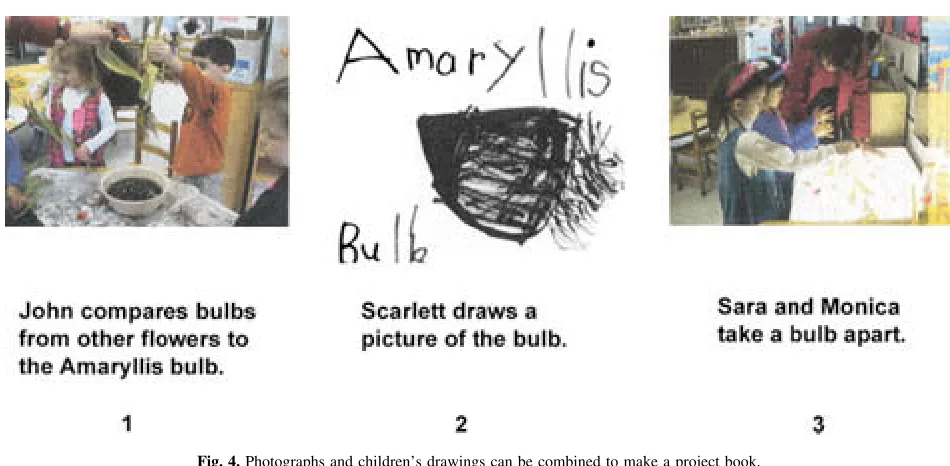
wonderful book about the project. An example of se-lected pages of a classroom book containing digital cam-Although we still use photographs, teacher-written
transcripts, and tape recordings of classroom activities era photographs and computer software generated writ-ten language can be seen in Figure 4.
and conversations, we have included some other meth-ods of technology to document classroom long-term projects. Currently, instead of using a 35-millimeter or
REVISITING WITH VIDEOTAPES AND
Polaroid camera, we now use a digital camera.
Photo-VIDEO PRINTS
graphs taken with this camera can be easily downloaded
into a computer file. The teacher can take a picture of In addition to the use of photographs and the writ-ten transcript recorded by the teacher, children’s activi-the children’s actions, see activi-the picture in activi-the viewfinder
on the camera, and determine whether the picture truly ties and language can be documented on videotape. While it is time consuming to view and transcribe the captures the action of the children. If it does not capture
the desired action, the picture can be retaken. The de- videotapes, a definite disadvantage, videotaping can pro-vide many benefits and valuable documentation of the sired picture is then entered into a computer file and can
be either printed out immediately or stored for later use. project. It is often hard for the teacher to capture in writ-ing all of the children’s actions and oral and nonverbal The quality of the photograph, that is, the clarity and
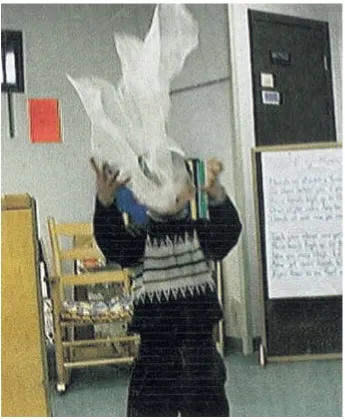
color, can be excellent. In fact, as seen in Figure 1, it language at the same time she is facilitating the chil-dren’s activity. However, with videotaping it is possible may even capture small details and motion. If the
teacher wants to highlight a particular aspect of the pho- to capture all of the details of the interaction (i.e., the entire language sample), the context of the interaction, tograph, the teacher can crop or enlarge the desired
Fig. 1.The child is dancing with a scarf. The digital camera photograph captures the movement of the scarf.
videotape it is possible to gain new insight into the ac- revisiting can help children connect their previous learn-ing with their current project exploration. Videotapes tivity. The teacher may obtain this new perspective
di-rectly by reviewing the videotape or by collaboratively can also be shared with parents and families. The shar-ing of videotapes permits them to observe project activi-reviewing and discussing the videotape with a colleague.
The process of reviewing videotapes collaboratively can ties and to see their child participating in these activities. A recent improvement in video technology has lead to an understanding of children’s present
develop-ment and potential opportunities to expand their devel- been the development of the digital video camera. The digital video camera allows immediate and convenient opment. This level of reflection is not possible at the
time of the activity. documentation and revisiting. The digital video camera
records images and sounds on a diskette in digital format Videotapes serve a purpose not only for the teacher
but also for the children and parents. Children can revisit which can be stored and manipulated in a computer file. Once entered into the computer file, small sequences of with the teacher the section of the videotape that
Trepanier-Street, Hong, and Bauer 184
Fig. 2.Children use the computer to revisit a prior activity during a group discussion.
teacher and included on the documentation panels. An- tion (microsequences) in photographs. Such micro-sequences and level of detail are not possible to capture other advantage of the digital video camera is that
in-stant revisiting can occur by using the camera’s LCD using the digital camera. Also, the action may not even be noticed by the teacher during the classroom activity, display. Selected sections of recorded activities can be
replayed and seen immediately on the camera’s LCD but rather is observed only after viewing the videotape. An analysis of these microsequences by the teacher can display. For example, when a teacher videotapes a
child’s learning encounter, the teacher may notice a reveal the specific cause and effect of children’s actions and the continuity in their learning. From this analysis, teachable moment and instantly play back to the child
the learning encounter through the LCD display. This the teacher can develop activities and questions to pro-voke new learning in children. These same video prints instant revisiting can promote and deepen the children’s
learning while their interest is sustained. can be used to create documentation panels. Overall, the
video printer used with videotaping can add valuable in-Another valuable technological addition to
video-taping is the video printer. When reviewing the video- formation to the documentation and revisiting process. tape, there is often a particular action sequence that
needs to be documented visually. The video printer
per-DOCUMENTING GRAPHICS WITH
mits that to happen. Photographs of children’s actions
THE SCANNER
can be printed from the videotape using the video
printer. Because the videotape records continuous action In connection with the computer, the scanner has been an invaluable tool for implementing and document-and the video printer can capture 30 frames per minute,
Fig. 3.Children revisit a documentation panel board.
[image:5.612.63.538.476.709.2]Trepanier-Street, Hong, and Bauer 186
during the course of the project children regularly repre- computer software to write stories, descriptions of their pictures or photographs, or signs or directions to accom-sent their thinking about the topic in their drawings.
These drawings can be included into the project com- pany their dramatic play. While letter recognition and some fine motor control is required for computer writ-puter file using a scanner connected to the comwrit-puter.
Scanning the drawings has some definite advantages. ing, their writing is not constrained by the tedious fine motor skills required to form written letters on paper. Children’s original artwork scanned into the computer
keeps the original drawing intact and still in the posses- Again, the novelty, the possible accommodation to their special need, and a feeling of success may result in chil-sion of the child (avoiding the potential conflict over
taking a child’s prized work). Also scanning the picture dren being more attracted to and more competent in writing on the computer.
can preserve the original color and detail of the drawing and is a better option for copying than using a copier machine. Often color copiers are not readily available
USING THE INTERNET TO RESEARCH
and the cost of a color copy is high.
AND COMMUNICATE
Like the digital photographs, scanned drawings can
be used in multiple ways. Children can compare their Information obtained from Internet connections on the computer can enhance long-term projects. The drawings on the computer and discuss their differences.
New pictures can be added as new ideas emerge. Writ- teacher may research the project topic on the Internet and use this information in classroom activities. While ten language descriptions or written stories can be added
to the drawings. Pictures can also be combined with oth- much Internet information and web sites may not be de-velopmentally appropriate for young children, the ers and become a project book to be added to the
class-room library. Drawings can also be made into transpar- teacher can guide the children to appropriate web sites. Some suggested educational web sites that may be re-encies for large group discussion purposes.
The scanner may also be used to scan all sorts of sources for project topics are Exploratorium (http:// www.exploratorium.edu) and Encarata (http://www. other pictures or written materials. For example, when
implementing a project about wild flowers, the teacher encarata.msn.com). Also interesting conversations with an expert on the project topic, who is not normally ac-scanned in a photograph from a book of wild flowers,
and the children compared their flower drawings with cessible to the children, can be available through the Internet. For example, when the children were doing a the photograph of a real flower.
project on iguanas, the teacher investigated various web sites on iguanas. The children then found out many in-teresting facts and details about iguanas from the
USING COMPUTER SOFTWARE AS A TOOL
teacher-selected web sites. The children prepared
ques-FOR REPRESENTING IDEAS
tions to ask the iguana pet owners (what do iguanas eat, where do you keep your iguana, how big is your iguana) In addition to storing children’s free hand
draw-ings, the computer and computer software can be a me- and then e-mailed the owners these questions. Iguana pet owners replied to the children by e-mail and sent dium for children to produce drawings and represent
their thinking. We have found that for some children pictures of their iguanas. The children gained much ad-ditional information on this project topic by using the their drawings may be more detailed and at a higher
level of representation when constructed at the computer Internet.
Creating a classroom web page on the Internet can because the computer and software may better
accom-modate their learning style or their special needs. The be a valuable tool for implementing and documenting the project. On the classroom web page, project activi-computer may require less refined or different fine
mo-tor skills than drawing free hand. For some children ties can be displayed and described. Parents can access this web page on their home computer and learn about drawing on the computer may maintain their interest
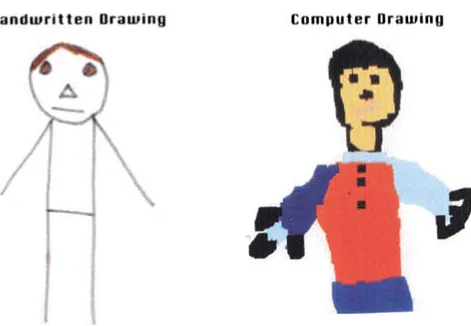
and, therefore, they include more details in their com- classroom activities. Given the busy schedule of parents and the rush that often occurs at pick-up and drop-off puter drawings. Figure 5 contains an example of one
child’s free hand self-portrait and the self-portrait he time, parents may have little time to review the docu-mentation panels posted on the classroom walls. They created using computer software. Many more details and
self-characteristics were included on the computer pic- may however, have some time at home or at work to access the classroom web page and learn more about the ture than on the free-hand drawing.
Fig. 5.A comparison of self-portraits drawn by hand and by using computer software.
and participate in the classroom, for example, doing teacher, and parents in this classroom. These long-term projects and their technology-enhanced documentation project-related activities at home, contributing materials
or offering their expertise, or helping with classroom have resulted in increased cognitive and social develop-ment in the children, increased teacher reflection, im-field trips. A classroom web page may be a wonderful
vehicle for communicating to parents and including proved quality of teaching, and increased parental
involvement and participation in the classroom. them as partners in their child’s learning in the
class-room. Technology is constantly improving and offering
new possibilities for enhancing the educational experi-ence of young children. We will continue to explore new
CONCLUSION
forms of technology to promote children’s learning in Reggio-inspired long-term projects. We anticipate that Because we have used the described forms of
tech-nology for only 2 years, we continue to learn about the future technological advances will make the process of documenting children’s learning easier, more conve-full capabilities of this equipment for enhancing the
im-plementation and documentation of long-term classroom nient, and time and cost effective. New technological advances may offer additional opportunities for the projects. Although there was cost involved in the
origi-nal purchase of this equipment, we believe that the bene- teacher to reflect on children’s development and the teaching–learning process. These advances may also fa-fits accrued from using the technology far outweigh the
cost. (A list of the equipment acquired can be found in cilitate further communication between the school and the home and encourage parental involvement in class-the Appendix.) The use of this technology has greatly
Trepanier-Street, Hong, and Bauer 188
APPENDIX REFERENCES
Equipment Used in Classroom
Gandini, L. (1994). What can we learn from Reggio Emilia: An Italian-American collaboration. Child Care Information
Ex-Computer: Power Macintosh 6500
change,96, 50.
Digital Camera: Quick Take 200, works with AA bat- Hendrick, J. (Ed.). (1997). First steps towards teaching the Reggio
teries way. Englewood Cliffs, NJ: Prentice-Hall.
Katz, L., & Chard, S. (1989).Engaging children’s minds: The project
Printer: DeskJet HP 870 CXI
approach. Norwood, NJ: Ablex.
Scanner: Flatbed Color One 600/27 Katz, L., & Chard, S. (1996). The contribution of documentation to Software Programs: Kid Fix, HyperStudio 3.0 (1996) the quality of early childhood education. (ERIC Document
Re-production Service No.ED 393608) Transparencies and Overhead Projector
Saltz, R. (1997). The Reggio Emilia influence at the University of
Video Printer: Sony Michigan-Dearborn Child Development Center: Challenges and
change. In J. Hendrick, (Ed.),First steps toward teaching the Reggio way(pp. 167–172). Englewood Cliffs, NJ: Prentice-Hall. Trepanier-Street, M. (1993). What’s so new about the project
ap-ACKNOWLEDGMENT
proach?Childhood Education,70, 25–28.
Trepanier-Street, M., Gregory, L., & Donegan, M. (1998). Collabora-The authors thank the children and families of the
tion among early childhood teachers and faculty through a Reggio University of Michigan-Dearborn Child Development Cen- inspired long-term project.Journal of Early Childhood Teacher