· .
Introduction to PDOS.
Seminar Syllabus
"I •• "'#
----...-~ -~-..-:-~
.'
~Introduction to PDOS Training Seminar Syllabus
Copyright 1985, Eyring Research Institute, Inc. 1455 West, 820 North, Provo, Utah 84601 U.S.A. All Rights Reserved.
For use with PDOS 2.6e/f
OVERVIEW OF SYLLABUS
INTRODUCTION TO PDOS TRAINING SEMINAR SYLLABUS
This syllabus is arranged into four sections. follows:
1. Overview and Class Agenda 2. Session "Notes
3. Exer cises
4. Sample Answers to Selected Exercises
Introduction to PDOS
They are as
•
OVERVIEW OF SEMINAR
This seminar is designed to meet your needs as a POOS user whether you are a beginner at POOS or an advanced user. It will be informal and your questions and comments throughout the seminar will be appreciated. Th,e approach for most of the material will begin by discussing the subject and then follow the discussion by doing a 'hands on' exercise.
The first day, we'll concentrate on the development tools of POOS and how to develop using the system. This day will be of most benefit to you if you have never used a POOS system.
The second day, the POOS internals, and high level language tools. The internals will introduce you to the format of the ta sk con tr 01 blocks, system var iable s, and the format of disks used by the file manager. This day will build upon the first day by providing greater detail to the functions of the POOS system. If you are more experienced, you should gain helpful knowledge on how to best use POOS. The high level languages will cover the unique features of the implemented languages on POOS and some of the useful extensions to aid in programming under POGS.
Finally, we'll concentrate on the advanced features of POOS and how to build down to an application with run modules. Also, we will discuss how to customize a PDOS system along with implementing additional I/O devices. You will gain the most out of this day if you have had hardware and 68000 assembly exper-ience.
At the conclusion of each day, questions and answers will be en ter tained. At the conclusion of the seminar, tour s of Eyr ing will be available.
In conclusion, the seminar is a general introduction to the POOS operating system and will not give you a comprehensive in-depth study of POOS. We are planning future courses to address var ious aspects of POOS and supported languages in greater detail.
e'
•
SEMINAR GOAL
1. Beginners should be able to develop on a PDOS system.
2.
All should gain an understanding of development toolsavailable.
3. Advanced user s should understand where to begin on inter-facing toPDOS.
AGENDA
8:00
9:00
10:30
10:45
12:00
1:00
2:00
3:00
3:15
4:00
5:00
DAY 1
Continental Breakfast
Session 1 ~- PDOS Overview Session 2 -- Getting Started
-The PDOS Monitor
Break
Session 3 -- A Development Session -Edit
Lunch
Session 3 (con't) -Assemble
-Link
Sessiori 4 -- Advanced -Procedure Files
Break
Session 5 Debug
Monitor
Session 6 Character I/O
Open for Questions & Answers
Commands
8:00
10:30
10:45
12:00
1:00
1:30
2:00
3:00
3:15
4:30
5:00
DAY 2
Session 7 -- POOS Tasking
Break
Session 8 -- Advanced POOS File Manager
Lunch
Session. 9 --Languages - BASIC
- C
- FORTRAN - Pascal
Session 10 -~ POOS Internals'
Session 11 -- Hardware Interface - Task Device Service Routines - SIOS Oevice Service Routines - File Dr iver s
Break
Session 12 POOS Run Modules
Session 13 PDOS System Generation and Installation
Open for Questions & Answers
Session 14 Session 15
ADDITIONAL SESSIONS
POOS Customer Services Tour of Eyr ing
SESSION 1 --
PDOS
OVERVIEWGOALS:
1. You will underst.and the design objectives of PDOS and the purpose of the operating system.
2. You will be introduced to t~e PDOS development package.
NOTES:
THE PDOS OESIGN OBJECTIVE
1. Develop on the target hardware.
*
No need for expensive development hardware.*
No time lost in transferring from host to target.*
You donlt have to work with emulators.*
You work with actual hardware.2. Allow easy control and interface to hardware.
*
POOS allows easy installation of hardware.*
Hardware may either be controlled at task level or system level.3. Use little EPROM space.
*
POOS is small~*
POOS can be built down to use only the parts you need for your application.*
POOS is written in 68000 assembly.4. Be fast to provide realtime response.
*
Critical execution paths have been carefully optimized.*
Low overhead in task switching.*
Can be event driven with priorities.THE POOS DEVELOPMENT PACKAGE
1. Media
*
5 1/411 disks standard*
8" disks*
EPROMs2. Documentation
*
PDOS Reference Manual.*
User guides (futur e) .*
Installation guide.*
Application notes.3. Ready-to-Boot system
*
'Bootable disk.4. Licensed by CPU.
*
Runtime module licenses available separately.C'
SESSION 2 -- GETTING STARTED
GOALS:
1. You should learn how to boot PDOS on a system. 2. You should learn some basic monitor commands.
No'rES:
BOOTING POOS
Most systems are auto boot; some require firmware boot
commands~
2. Most will boot off floppy first, then try other boot locations.
3. Full installation may require EPROMS or setting jumpers. These are descr ibed in the installation guide for your hardware. Full installation will be discussed in a future
session.
DO EXERCISE 2-1 -- BOOTING POOS
THE POOS MONITOR
1. Monitor syntax.
J.I.
7
0
@
*
>
auto-cr eate file. Pr eceeds filename str ing.
multiple command separator.
accept the enclosed argument as single-argument.
filename wildcard; match 0 or more characters.
filename wildcard; match 1 character.
the monitor prompt. 2,3>CC <ARG1>, ..•
2. Helpful Commands
HE -- help command
>HE «subname>}
IO -- POOS Ip/set date and time.
*
MTIME P/S program.OT -- date/time.
00 EXERCISE 2-2 -- HELP/IO
PO OS Revision Level
Kernel Assembly Date
~
PDOS/68000
R2.6f 02/25/85
BIOS Machine type/ and Features
ERII, Copyright 1983
FORCE CPU-1 BIOS (PI/T Clock) 02125/85
Da te=051 17/85
Time :.14:56:25
3. PDOS File Handling Commands.
AF append one file to the end of another >AF <source>, <dest>
CF copy from one file to another file. >CF <source>,<dest>
OF define a file.
>DF <name{,<size>}
OL delete a single file. >OL <name>
Introduction to PDOS
/-BIOS Date
•
DM -- delete multiple files (see wildcards). >DM <name> Prompts with Y/N/A
MF --: make' file by allowing text input fr om the keyboar d [ESC] Exits.
>MF <name>
RN -- rename a file.
>~~ <oldname>,<newname> or >RN <name>, <level>
SA -- set the PDOS attributes for a file.
>SA <name>(,<attribute>} ie: TX, SY, OB,
AC, BN.
SF -- show on a terminal the contents of a file. >SF <name>
LS -- list directory of files. (see wildcards)
>LS <name> -- LS i@ Lists all file levels on disk.
Lev Name: ext Type Size Sect Date created. Last update
1 NAME: 1 5/5 020D 14:12 01/05/84 14:13 01/05/84
4. The PDOS filename format:
A. B. C.
D .
E.
ACCCCCCC:CCCiLLL/DDD
Start with an alphabetic chara:cter. Add up to seven additional char acter s .
Extension is denoted by coloni if colon present, must have one to three additional characters.
Levels are denoted by semicolon and number of level CAUTION: level is a sort key only and not part of filename.
Disk unit number denoted by slash followed by disk number.
F. If DISK and/or LEVEL is omitted, then default is assumed.
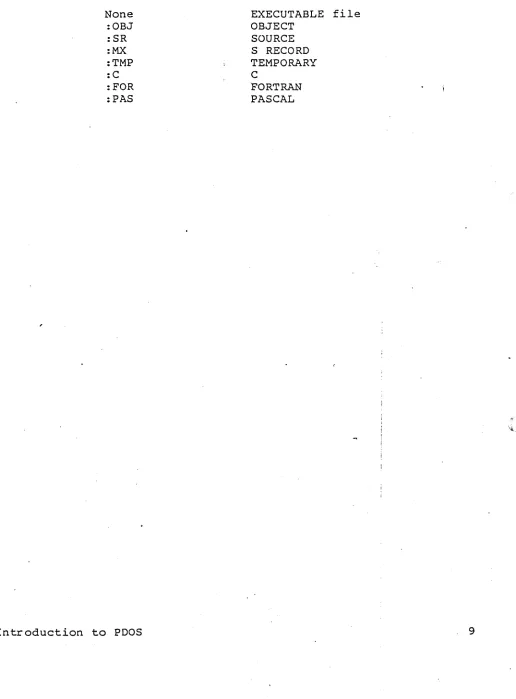
Table of Recommended File Names
None :OBJ :SR
:MX
:TMP :C :FOR :PAS
Introduction to PDOS
EXECUTABLE file OBJECT
SOURCE S RECORD TEMPORARY
C
FORTRAN PASCAL
[image:13.612.48.564.81.780.2]•
THE PDOS FILE MANAGER
Physical Disk Logical Disks
File
• A physical disk may be broken down -into many logical disks
• A
single logical disk contains a directoryof files.
• Filenames are 1 to 8 characters with
a:
3 character optional extension and level.• Level is used for a work area on the disk (subdirectory).
• Filenames are NOT unique if only a different level number is used.
Ilev Name:ext
1 DAN:SR 2 DAN:SR
Introduction to PDOS
Directory
Not possible In standard POOS.
5. PDOS Disk Commands.
LV -- 0 .. 255 levels. LS for levels LV >LV «level>}
SY -- 0 •. 255 disks Sets working .disk number up to 4
SY >SY {<disk>{,<disk> .. }}
SP -- amount of space available on disk. SP >SP {<disk>}
FREE=total free, largest contiguous sector USED=actual use/total allocated
6. In future exercises 'NAME' is to be your first name for exercise filenames.
DO EXERCISE 2-3 VALID FILENAMES
DO EXERCISE 2-4 FILE COMMANDS
DO EXERCISE 2-5 DISK COMMAlIDS
7. PDOS Memory Commands.
A..1'1 --amount of memory free to task.
fu~ >fu~ <filel>,<file2>
FM -- free memory from your task. FM >FM <kbytes>
GM -- return free memory to your task. GM >GM {<kbytes>}
ZM -- zero out your task memory. ZM >ZM
DO EXERCISE 2-6 -- MEMORY COMMANDS
c
AM -" List memory a~jacent to TASK GM - Get available memory
FM -
Free memory FM-n
.remove memory from P"DOS allocation mapZM -
Zero task's memory:Memorymanaged in 2K byte pages
8. Command Line Editing.
*
A line recall feature and editing features are also provided by PDOS.[ESC] ignore current line.
AC abort current line.
AA recall last line.
Ap move right one character.
AH move left one character
AD delete character to the right.
[RUB] -- delete character to the left.
AI -- insert mode.
DO EXERCISE 2-7 -- COMMAND LINE EDITING
SESSION 3 -- A DEVELOPMENT SESSION
GOALS:
l. You should learn how to use the PDOS Editor -- MJEDY
2. You should learn how to code, assemble, and link a program.
NOTES:
A. OVERVIEW OF DEVELOPMENT
1. Concept or need.
2. Algorithm or flowchart design.
3. Selection of language.
*
BASIC*
C*
Pascal*
FORTRAN*
Assembly4. write the program.
5. Assemble the program.
6. Link the program if other modules are involved.
7. Execution and debugging.
SOFTWARE
----.I)
Devefopment Path- - - - I .. ~ System Resources
HARDWARE"
START
Introduction toPDOS
ADD 00,00
XEXT
Clock
•
*
Basic Editing commands Use of [ESC] key Control Keys Help Key [ESC]A F Cue sor movementAK
I
AH _______ AL
I
AJ
Top / End of text AT / AZ Auto-insert feature
Rubouts [DEL] [ADEL]
PDOS Reference Manual chapter Il-pages 4-12
DO EXERCISE 3-2 MJEDY HELP KEY
DO EXERCISE 3-3 BASIC EDITING
3. File Interaction.
*
AWrite command -- "'Wfilename[ESC]V*
"'Get Command -- AGfilename[ESC]V*
On AW and AG pressing the AW or "'G key twice recalls the last filename used.*
"'Quit Command -- "'QV*
ANew buffer Command -- "'NV*
GO from PDOS monitorDO EXERCISE 3-4 -- FILE INTERACTION
4. Searches and Macros
*
Search for a str ing from the cur sor forward -- "'S<STRING>[ESC]*
Search for a str ing backward from the cur sor -- "'B<STRING>[ESC]*
[TAB], [CR] can be entered in by typing key.*
Other control character:s may enter by typing "'V then the control character to find. (The control chars are displayed by adding $20 to the char value).*
All search strings are terminated by a [ESC].*
The cur sor is placed at the end of the str ing on a forward search, and at the start of the string on a backward search.*
To continue search after a string is found, but before any editing is done, type [ESC] again.*
~Define a macro -- ~D*
All commands and key strokes are remembered until .... D is typed again*
~Execute a defined macro -- .... E*
[ESC]~ZN[ESC] execute macro N times (-1 = infinite or un t i l a sear ch fails)....c
will also in terr upt a repetitive macro.DO EXERCISE 3-5 -- GLOBAL SEARCH AND REPLACE
5. Restoring and saving of macros as disk files.
*
Output macro to file -- [ESC]"'OFILENN1E[ESC]V*
Input macro from file -- [ESC]""YFILENAME[ESC]V* The creation and verification prompt is same as "'G and
"'w.
DO EXERCISE 3-6 ~- INPUT / OUTPUT OF MACROS
6. Advanced text editing with deletion and pointer commands.
*
~]-
Delete from cur sor to EOL*
-
Delete from cursor to and including the EOL*
"'p - Place pointer into text*
"'Y - Insert text in a file at the cursorTHE FOLLOWING COMM&~DS WORK WITH A POINTER:
*
"'0-
Output to a file from cur sor to pointer*
"'u-
Insert into 'up' (cut) buffer from cur sor*
....\
-
Delete text from cursor to pointerto
*
"'A - Insert text at cursor that is in the up buffer*
.... F - Move cursor to the pointerpointer
NOTE: ALWAYS DELETE THE POINTER BEFORE YOU SAVE YOUR TEXT (THE POINTER IS DELETED AS ANY OTHER CHARACTER).
DO EXERCISE 3-7 -- BLOCK CUT AND PASTE
C
B. MASM
1. The MASM command line:
*
PDOS Reference Manual 13-5MASM <SOURCE>, {<OBJECT>, <LIST>, <ERROR>, <XREF>}
SOURCE
=
OBJECT=
LIST =
ERROR
=
XREF
=
The input text
The tag object output that may be executed . if fully resolved, or output for QLINK.
Full listing of the program
List of errors. (Defaults to console i f no file specified.)
List of symbols and lines where used
NOTES:
A. If only MASM is typed, then you will be prompted for the filenames.
B. PDOS will not create files that do not exist unless you prefix the filenames with a '~'.
DO EXERCISE 3-8 -- RUNNING HASM
2. Program listing format.
*
Use SF command to type your listing on the screen and follow along.*
Pages 11-16 cover format:PAGE: 1 13:42 12/11/84
1 1O/1010101O10001O:AI08CgI014
2 0/g0g0g004:A08g 3 0/00000g06:Ag56 4 0/0ggg0008:C2FC0g64 5 0/g0g0gggC:Ag8Cg01F 6 0/g00100010:A050 7 0/000001012:A08A 8 0/000gg014:6IOEA 9
110 g/0ggggg16:gAgD454E544552ig
11 594F55522g4ES54D
12 4245522g3D2ggg
13 g/00ggg02D:2g782g313g3g203D
14 20100
15 10/310101001037:010
16 0/100010101038: 10/0010100101010
Introduction to PDOS
START
* MESgl
MES02
68K PDOS Assembler 110/17/84 FILE: DAN:SR,CLASSWORK
XPMC MESgl ;ASK FOR XGLU
XCDB
MULU.w *10g,D1
XPMC MESg2 ;X 11010 XCBD
XPLC
BRA.S START
DC.B $gA, $gD, I ENTER
DC.B I
x 1010 = I
,10
EVEN
END START
PAGE: 2 13:42 12/11/84
68K PDOS Assembler 11.3/17/84 FILE: DAN:SR,STANDARDS
DEFINED SYMBOLS:
MESI.31 1.3/1.301.31.301316 MESI.32 13/1.31.31.301.31.32D START 0/1.301.31.31.301.31.3
EXTERNAL DEFINITIONS: NONE
EXTE~~AL REFERENCES: NONE
UNDEFINED SYMBOLS: NONE
UNREFERENCED SYMBOLS: NONE
3. External Linkage
*
XREF -- Symbol is not in this file; look elsewhere at link time for it.* XDEF -- Allow this symbol to be used in other files.
DO EXERCISE 3-9 -- EXTERNAL LINKAGE
C. QLINK
*
PDOS Reference Manual Chapter II, page 27 t 52-691. OLINK Command summary
*
HELP - display all QLINK commands*
INPUT - input a single object file*
ZERO - zero out the memory buffer* LIBRARY - load in only those object files that are needed from a library file
*
MAP - display the location and status of memory*
OUTPUT - select for output the memory buffer to a file*
SRECORD - specify srecord format in the ouEput file*
SYFILE - specify binary image format inthe output file*
END - output the memory buffer to the file*
QUIT - return to the PDOS monitorDO EXERCISE 3-10 -- USING QLINK
SESSION 4 -- ADVANCED MONITOR COMMANDS
JALS:
You should learn how to use additional monitor commands. You should learn how to create procedure files.
;)TES:
Pr ocedur e Files
*
UsefuL for repetitive command sequences.*
May be "programmed" to allow modification at execution of _ procedure file.*
Input is directed from a file instead of keyboard.*
Input will be directed to programs using XGCC or XGCR or line edit commands.*
Argument substitution.&0 -- set by program control; usually a status number.
&1 .. &9 -- corresponds to argument 1 then 9 of the command line.
&& -- treat character as a single ampersand.
*
IF processor.=
IF arguments are equal, do command to right of ' . I# -- IF arguments are not equal, do command right of '
.-: GT -- Goto a label string in the file allowing you to skip commands (often used with IF).
*
IF-THEN-ELSEIF &l=<string>.monitor then commands.GT ENDIF monitor else commands
GT ENDIF ENDIF
*
Nested command files.3 Deep.
*
RC vs RCRS
RS.
reset the current procedure file. reset all files open to this task.
SESSION 5 -- DEBUG
GOAL:
You should understand some basic debug commands.
NOTES:
*
Resident debugger.*
Allows for break points, traces, disassembly, dumping of memory and registers.*
Re-entrant for tasks.*
Enter by PB commandDO EXERCISE 5-1 DEBUG
*
The debug application noteDO EXERCISE 5-2 -- DEBUG Application Note
C
,'~'SESSION 6 -- CHARACTER I/O
GOALS:
l. You should under stand char acter output r edir ection under PDOS.
2. You will understand how to baud a port.
3. You will learn how to print and create log files.
NOTES:
*
PDOS Reference Manual Chapter 31 . The Character Input Path.
*
Only one task per input port.*
PRT -- location in TCB where input number is saved.INPUT PATH
PDOS Interrupt
I
A
I _ _ _ _ _ _ -'71'')Processing
It Procedur 64 Byte
File Buffer
<:l_P~T
I
dttehmines XGCP W buffer to IC port1
look at XGCCXGCR XGLU
User Program
2. The Character Output Path.
* More than one task may share output ports.
* What is a unit?
A unit (in the context of character I/O) is a path on which a character is sent on output. It may be logically linked to a character port, your terminal screen or both. It may also go to a file .or nowhere.
- U1P, U2P
* What is a port / type?
A port is the physical port on your hardware to which you link other hardware devices. The type is an indicator to PDOS to which output code to use.
* What is a spool?
It redirects output from a port to a file.
* List task monitor command (LT) 'list out por t assignments.
Task Prt Tm Event Map Size
*0/0 64 1 0 404
PRT U1P U2P 1/1 1/1 3/2
* The ba ud por t monitor command (BP ) sets up the phys ical port as well as U2P. Also allows to see port setup.
Port Type
~l 1
f piSdbs 00000000
Base FFFFC071
Rate Task 19200 0
DO EXERCISE 6-1 -- LT AND BP COMMANDS
I'
OUTPUT
XPCC User program XPLC
~--r-~~---XPMC
o
UNIT~
'§
UNITbit bucket
.
UN 2
Spool filter If spool filter: unit number Spool file I+----~ send to spool file
[ U1P
I
I
U2PI
,II
,
to output device to output device
3. I/O Redirection and Log Files
*
UN command Allows for selection of output path*
SU command Directs path to file instead of port*
SF with -Filename -- Used to type files to terminal*
The output flow*
TTA, TTO, TTS driver files00 EXERCISE 6-2 - - PRINT A FILE
SESSION 7 -- POOS TASKING
GOALS:
1. You should understand multi-user and multi-tasking.
2. You should become acquainted with the task control block.
3. You should understand task synchronizati~n.
NOTES:
*
PDOS Reference Manual Chapter 31. The KERNEL
*
Multi-tasking, mUlti-user scheduling*
System clock*
Memory allocation*
Task synchronization* Task suspension
*
Event processing*
Character I/O processing2. Tasks
*
Creationrask Prt Tm 1<0/0 64 1
1/0 64 1
Moni tor command
CT TASK,SIZE,TIME+PRIORITY,PORT
@
Background tasking Father-son relationship LT Command
Eve"nt Map Size
o
36896 0 32
PC SR TB BM EM
00233A 2004 008000 00CC46 067000 002174 2000 068000 068500 070000
DO EXERCISE 7-1 -- BACKGROUND OEVELOP~~ TASK
Pr imitive .XCTB
Stur tup table
Introduction to PDOS
PRT UIP U2P 1/1 1/1 3/2 0/0 1/1 0/0
t
*
TerminationMoni tor command KT
Pr imitive XKTB
Auto termination
Caution for Procedure files--MUST USE RC OR RS
DO EXERCISE 7-2 -- PROCEDURE FILES AS TASKS USING RC
*
The task cyclePDOS TASK CYCLE
Undefined I Ready Suspended
Running
1. Highest priority READY taslc a4waya executes 2. Round robln with taaka of Mrne priority
*
The task control block--PDOS Reference Manual Pages
3-6
DO EXERCISE 7-3 -- THE TASK CONTROL BLOCK
3. Inter-task Communication.
*
Synchronization*
Events (page 3-12 and 3-13 of PDOS Reference Manual).GLOBAL 0 .. 127
LOCAL 128
*
Event primitives XSEFXSEV XTEF XSUI
EV MONITOR CO~1AND
DO EXERCISE 7-4 -- MULTI-TASK EVENT SYNCHRONIZATION
4. Task Priorities
*
Highest ready priority always runs. highest.1 is lowesti 255 is
*
The TP command.*
Task lock / unlock.DO EXERCISE 7-5 -- TASK PRIORITIES
5. Message Buffers
*
SM & KM Commands SM -1 to father task*
XGTM on each prompt display.DO EXERCISE 7-6 -- MULTI-TASK MESSAGES
6. Time Delay Feature
*
EVENTS 112, 113, 114, lIS, 128*
XDEVDO EXERCISE 7-7 -- TIMER TASK
:INTERTASK
SYNCHRONIZATION AND COMMUNICATION
R E
A
L T
I
M E
T
A
5
K
Events
o
I
XSUI 0
XLKF XULF
o
I
•
•
Mailbox
Locks
Introduction to PDOS
XLKT XULT
N
o
N R E
A
L
T
I M
E T
A
5
K
SESSION 8 -- ADVANCED PDOS FILE MANAGER
GOALS:
1. You should understand file structure of PDOS Disks.
2. You should become acquainted with disk utilities.
NOTES:
1. The NERD Standard
* disk 0 .. 99, 100 .. 255
* track 0 sides 1 and 2 info
*
96 TPINERD NUMBERING
0 ... 255 available
o
primary floppy 1 secondary floppy8 RAM disk
100 primary floppy .with ability to R/W track 0
Typical h~Hd disk logical units:
2
3
4
5 6
7
1/2 of winch +1
1/2 of winch +1
floppy image on winch
+
11/2 of winch
+2
1/2
of
winch+2
floppy image on winch
+2
I
t.
*
Sector 0SECTOR 0 +--Header Sector
...,
Bit map
Director.y
8" per Sector (Starts on sector boundary)
r .
~--:----I: ~ F II
e
Data Blocks (Starts
on
sector boundary) " BootS ector N .. "---_---' Area
iector /Disk=$0000 (0)/0
fG0-00F 50 44 4F 53 20 32 2E 36 65 20 23 31 f10-01F 09 40 00 50 88 00 08 00 00 A0 09 40 120-02F FF FF FE FF FF FF FF FF FF FF FF FF
. . .
.
. . .
.
. .
. .
. . .
. . .
.
.
.
.
.
. . .
.
. .
SECTOR 0
HEADER
00 00 00 00 PDOS 2.6e#1. ... AS SA FF FF [email protected] . . . @%Z .. FF FF FF FF
...
text name of disk
o
boot disk--t sector number
FFFFFF
0
V
1 2 3. 4 5 6
+-
I
.J
")
789 ABC
I ..
~
1
+I
I,
l
maxImum .,. of files for direc.tory curre
In d.i
nt .,. of files
address to· load rectory
boot sectors Into memory number of
0 EF
I .L
.,. of sectorsthis disk init'd to
' "A55A • hex ant for ..c.onst
valid disk check
boot. sectors O. single sided
I
Start of bit map for s~ctor s in use • Each bit repre!eRts
a &.actor In lUe.
1:: used 0. free. Fira.t b.it corre&;londs
to a.ect-Qr O.
Introduction to PDOS
disk
FF.double sided disk
0: single density FF: double density
c
*Directory Sectors
FILE DIRECTORY FORMAT
o
~~--~~--~--'-~---r~
1~~~-L+-~~~~~~
__
~~
+ Bytes in
EOF sector
A ttribute word
Physical start sector number
Number sectors
allocated -1 Time created Date u;xjated
EOF File relative. :s&ctor number
Time Hours
*
256 +-minutesDate created
Date (2 digit year
*
16+ month). 32 +dayAttribute
word-{) 12245678·9 ABC DE· F
[~I~!~I~I~l~l~l~1
I l I I le]-l:\
I
r
1
r
T
l' \..
Res;rved JT
i
~rite
protect . . 081ete protectDriver . Contigwous Text
Basic teXt
Bask token
Binary executable image .obj.ect Ule
Binary file (no meaning)
Proc~r ... file
Sector/Disk=$0002 (2)/0'
0'60-00F 41 53 4D 0'0' 0'0 0'6 0'0' 0'0' 0'0 0'0 0'0 0'0' 86 0'0' 0'0 0'10-01F 06 0'0' 0'0' 0'0 0'6 06 0'0 2E 0E 20 A8 97 0E 20 A8 0'20-02F 42 58 52 45 46 00' 0'0' 00' 0'0' 00 00' 04 04 0'4 01 030-03F 00 00 06 2A 0'0 2A 00' 35 0F 35 A8 F2 14 0C A9
. . .
.
. . .
.
. . .
.
.
.
.
.
. .
. . .
.
.
gA0-0AP 43 4C 56 54 58 00' 60' 106 00' 60' 0'0 00 02 64 06
0B0-0'BF 00 0'0' 00' 21 0'0' 21 66 88 0E 2B A8 97 0'E 2C A8
Introduction to POOS
16 ASM . . . 97
...
(..
(.
50 BXREF • . . . P 17 •.• *.*.5.5(r •• ).
17 HLPTX • . • . . . • • . 97 ••• 1.1 ••• +( •• , ( .
*File Sector s
DATA SECTOR
o
1 2 3 ....'0 /'
I
-+:-~
Back link to/~--'-_...L-.-....JL--....J 'pre vi 0 U S
JC
sectorF-Drward
,link to next sector
~ctor /Oisk=$0016 (22)/0
J0-00F 00 00 00 00'40 41 53 40 20 26 31 3A 53 52 2C 23 · . . . MAS M & 1 : S R, #: .0-01F 4F 42 4A 2F 38 00 49 46 20, 26 30 2E 52 43 00 40 OBJ!8.IF &0.RC.M
~0-02F 53·59 46 4C 20 4F 42 4A 2F 38 2C 23 26 31 00 52 SYFL OBJ/8,#:&1.R
:0-03F 43 00 00 00 00 00 00 00 00 00 00 00 00 00 00 00
c ...
,0-04F 00 00 00 00 00 00 00 00 00 00 00 00 00 00 00 00·
...
:ctor /Oisk=$0017 (23)/0 ~-..
0-00F 00 18 00 00 48 45 4C 50 00 20 46 6F 72 20 66 7·£ · . ',' HELP. For fu 0-01F 72 74 68 65 72 20 68 65 6C 70 2C 20 65 6E 74 65 rther help, ente 0-02F 72 20 27 48 45 20 27 20 66 6F 6C 6C 6F 77 65 64 r IHE I followed
ctor /Oisk=$0018 (24)/0
0-00F 00 19 00 17 53 43 41 4C 09 09 50 41 53 43 41 4C .... SCAL .. PASCAL
ctor /Oisk=$0019 (25)/0
0-00F 00 1A 00 18 20 20 52 65 6E 61 60 65 20 66 69 6C .... - Rename fil
ctor /Ois.k=$0037 (55)/0
0-00F 00 38 00 36 69 6C 65 73 3A 00 00 20 20 20 50 40 .8.6iles: .. PM
ctor /Oisk=$0038 (56)/0
0-00F 00 00 00 37 4F 3A 50 41 53 20 61 6E 64 20 50 48 ... 70:PAS and PH
~
3. File Utilities
*
MDDUMP- Used to view and edit disks.
*
MDDMAPUsed to verify disk links for files - Sample execution:
68K PDOS Disk Diagnostic Mapper Utility 09/14/84 Disk #= = 0
Output File Name
=
Disk Diagnostic MapDisk Name
=
PDOS 2.6e #1 SECTOR 0 DISK INFORMATION Files=
80/160Boot sector
=
2368Boot size/addr
=
136/$000800 PDOS Sectors=
2368Disk Density
=
Do
ASM AC 1/1 14:32 04/23/84 14:32 04/23/84 22-22 <== Sector numbers4 BXREF EX· C 43/43 336-378
15:53 07/18/84 20:12 08/23/84
DO EXERCISE 8-1 -- MDDMAP / MDDUMP
*
MCHATLE-
Change Attr ibutes and levels of selected files.*
MLEVEL-
Display files by level.DO EXERCISE 8-2 -- MLEVEL
*
MDLOOK- Look for possible files on disk.
*
MDSAVE- Recover all possible files on disk.
DO EXERCISE 9-3 - - MOLOOK / MDSAVE
4. Disk Initialization Procedure.
* xFRMT
Hard Format -- Function of Hardware device.
xFRMT program. This is more fuLly described in Chapter 2 of the PDOS Reference Manual.
* MINIT
Soft format -- Gets disk ready for PDOS.
MINIT pr ogr am. This specifies the number of files and sectors for the disk.
5. Disk Backup Procedure.
*
MBACK * MTRAJ..\fS * MDNAME6. RAM Disk
Sector for sector image File by file transfer
Gives disk a text name for listings
* Dynamic any memory location
* System Default is unit 8 (monitor changeable)
*
FM -Naddr =$hhhhhhhh
RD
-u
tN, $hhhhhhhh where U is the desired unit number for the disk and N is 4*the amount freedDO EXERCISE 8-4 -- RAM DISK AND MTRANS
7. File Access Modes
* Read Only
* Shared Random Access
* Random Access .~
* Sequential Access * Contiguous File * Delete Protect * Write Protect * File Lock
* The RS Command (ARG for disk) * The FS Command ·(3-l9)
* What is a File Slot? * 8 Active Buffers
* Most Recently Accessed Queue
•
FILE MANAGER
Disk 3
File slot ·(channel)
: 1.---,\
one of 32 (default)OPEN CLOSE READ WRITE POSITION
Introduction to PDOS
File buffer
one of 8 (default)
o
Sector Buffer256 bytes
File manager User· program
l>FS
Slot Name ST SM PT SI EOF TN BF FLGS
32 A;l/l e100 0057 0000A2DF 0000 0007/0E 0000 0000A25A 00000000
XLFN to get slot address
FILE SLOT
Physical Disk Sector in buffer Level Number
1 .11. Sta,"'
F/
~--~~~~~~X-~~~r-~AT~-r
Physical Memory address to current byte (next byte to R/W)
(256 then offset because file buffer
I. unalligned
Lock Flag
Sl+aud CoulTt
Fll"e relative ... ctor numo..r
TA~K
LOCK / OPEN FLAGS
Introduction to PDOS
Physical memory address . of 256 byte file buffer
o • blJffer is un.ILlsigned
o
t'
Task number which locked file
1 2 3
I'
Task number which opened file
LOCK FLAG/SHARED COUNT
o
10 - Unlocked FF- Locked
Number of tasks accessing file
FILE STATUS
Driver In
channel fUe buffer File altered Sector altered
Introduction to PDOS
Access modes
$A Read only
'6
Shared random $2 Random$.:1 Sequential
File flags
$4 Contiguous
$2 Delete protect
$1 Write protect
*
Direct Disk Access XRSE XWSEBUFFER ADDRESS DISK NUMBER SECTOR NUMBER
DO EXERCISE 8-5 -- DIRECT DISK ACCESS
SESSION 9 -- LANGUAGES
GOALS:
1. You should become acquainted with the various languages available on PDOS and qow those languages can use the PDOS system.
2. This is designed only as an overview and not as a detailed discussion of the languages.
NOTES:
1. BASIC
BASIC FEATURES
*
Meaningful, Unlimited length variable names*
Multiple line, Recursive functions*
Local function variables*
Extensive line editing commands*
Fast 64 bit floating point*
Context oriented strings*
Full disk file interface*
Stand alone run support*
No 64k byte boundary restrictions*
Intertask communications arrays*
Assembly language support*
Formatted print commandsBASIC ENVIRONMENT
*
Semi-compilied*
Line editorBASIC FUNCTIONS AND PROCEDURES
ABS ADR ADV ALOAD AND ATN BAUD BIT BYE
ABSOLUTE VALUE
ADDRESS OF EXPRESSION
VARIABLE DEFINITION ADDRESS (ARRAY VECTOR) LOAD OBJECT FILE
TRUE IF OPERANDS NON-ZERO ARC TANGENT
SET BAUD RATE OF PORT TEST/SET BITS IN VARIABLE RETURN TO MONITOR
ASSEMBLY LANGUAGE INTERFACE ZERO BASIC VARIABLE SPACE CLOSE FILE
CALL CLEAR CLOSE COM COS
-- SHARED MEMORY AREA ACROSS 'RUN' AND 'CHAIN' COSINE
DATA DATE DEFINE DEFN DELAY DELETE DH1 DIS?LAY
CONSTANT DEFINITION READ/SET SYSTEM DATE DEFINE FILE
DEFINE BASIC FUNCTION
SET TIMER TO EXPIRE IN 'N' TICS DELETE FILE
DIMENSION ARRAY VARIABLE COpy FILE TO SCREEN
EXECUTE THIS LINE IF PREVIOUS 'IF' WAS FALSE ELSE
EQUATE ERROR ESCAPE EVENT
-- ASSIGN SIMPLE VARIABLE NAME TO ARRAY ELEMENTS
DEFINE ERROR TRAP
EVF EXP
EXTERNAL--FILE
ENABLE ESCAPE TO STOP EXECUTION SET/CLEAR EVENT FLAG
TEST EVENT FLAG EXPONENTIATION
DEFINE 'CALL' ENTRY POINTS FILE I/O FUNCTIONS (SELECT, POSITION, LOCK, UNLOCK) DISPLAY FILE DIRECTORY
READ, WRITE,
DELIMIT MULTI-LINE USER FUNCTION ITERATIVE LOOP STATEMENT
FILES FNEND FOR FNPOP FRA FREE
-- CLEAN-UP AFTER ABORTING FROM USER FUNCTION FRACTIONAL PART OF EXPRESSION
RECOVER SYSTEM MEMORY
GET TASK MESSAGE GETM
GLOBAL GOPEN GOSUB GOTO
CREATE SHARED MEMORY AREA BET''lEEN TASKS READ-ONLY OPEN
BASIC SUBROUTINE CALL
CONTROL TR&~SFER TO LINE NUMBER IF
IMASK
IM~UT
CONDITIONAL EXECUTION ·SET SYSTEM INTERRUPT MASK
~iR;2~A~¥2§~~d~~~g;~0~F
KEY SAMPLE PORT FOR CHARACTER
LABEL DEFINE LINE NUMBER LABEL LAND LOGICAL 'AND' TWO OPERANDS LEN LENGTH OF STRING
LET VARIABLE ASSIGNMENT
LIST DISPLAY PROGR&~ IN MEMORY
EXPRESSION
LISTRP -- DISPLAY PROGRAM TOKENS IN REVERSE POLISH ORDER LNOT LOGICAL COMPLEMENT OF EXPRESSION
LOAD BRING BASIC PROGRfu~ INTO MEMORY
LOCAL DECLARE VARIAB.LES LOCAL TO USER FUNCTION LOG NATURAL LOGARITHM
LOR LOGICAL 'OR' OF TWO OPERANDS
LXOR MAIL MCH MEM MEMW MEML MEMP NCH NEI'l NEXT NOESC NOT ON OPEN OR PDOS POP PRINT PURGE RCP READ . REM
RENAME RESET RESTORE RETURN RND ROPEN RUN SAVE SAVEB SENDM SGN SIN SIZE SKIP SOPEN SPOOL SQR SRH STACK STOP SWAP SYS
-- LOGICAL 'EXCLUSIVE OR' OF TWO OPERANDS
-- GLOBAL ARRAY FOR INTER-TASK COMMUNICATIONS STRING MATCH FUNCTION
READ/WRITE BYTE IN MEMORY (8 BITS)
-- READ/WRITE WORD IN MEMORY (16 BITS)
-- READ/WRITE LONG WORD IN MEMORY (32 BITS)
-- READ/WRITE BASIC VARIABLE ACROSS MEMORY PAGES
NUMERIC VALUE OF CHARACTER
CLEAR PROGRAM AND VARIABLES FROM MEMORY END OF 'FOR' LOOP
DISABLE ESCAPE FROM STOPPING PROGRAM TRUE WHEN ZERO
CASE STATEMENT FOR GOTO, GOSUB, LET OPEN ~ILE FOR SEQUENTIAL ACCESS TRUE IF EITHER OPERAND NON-ZERO
GET COMMAND LINE
CLEAN-UP AFTER ABORTING FROM SUBROUTINE PUT DATA TO CONSOLE
SELECTIVE DELETE OF PROGRAM SEGMENTS
READ CURSOR POSITION
READ VALUES FROM 'DATA' STATEMENTS REMARK (COMMENT)
CHANGE NAME OF FILE CLOSE ALL FILES
DETERMINE WHAT 'DATA' STATEMENT IS READ BY 'READ' EXIT FROM SUBROUTINE
RANDOM VALUE BETWEEN 0.~1
OPEN FILE FOR RANDOM ACCESS EXECUTE PROGRAM
WRITE PROGRAM TO DISK (ASCII FORM) WRITE PROGRAM TO DISK (TOKENIZED FORM) SEND TASK MESSAGE
RETURN SIGN OF EXPRESSION SINE OF EXPRESSION
SHOW SIZE OF PROGRAM, TABLES, ru~D FREE SPACE. JUMP OVER 'N' LINES IN PROGRAM
OPEN FILE FOR SHARED ACCESS REDIRECT OUTPUT TO FILE SQUARE ROOT
SEARCH FOR ONE STRING IN ANOTHER DISPLAY 'GOSUB' STACK ENTRIES HALT PROGRAM
DELAY THIS TASK WHILE ANOTHER EXECUTES ACCESS TO SYSTEM VARIABLES
-- TANGENT OF EXPRESSION TAN THEN TIC TIME TRACE TSK
-- EXECUTE THIS LINE IF PREVIOUS 'IF' WAS TRUE
UNIT
WAIT
2. C
CURRENT VALUE OF THE SYSTEM TIMER SET/READ SYSTEM TIME
ENABLE/DISABLE DEBUGGING TRACE RETURN STATUS OF TASK 'N'
REDIRECT OUTPUT TO DIFFERENT PORT
SUSPEND ON EVENT
C FEATURES
*
Full C Language*
Provides direct access to over 100 PDOS system calls*
Supports a subset of UNIX library for portability*
Optimal code generationC ENVIRONMENT
*
Full native code*
Uses PDOS MASM and QLINKC STANDARD LIBRARY ROUTINES
ALLOC, MALLOC, CALLOC, REALLOC -- DYNAMIC MEMORY ALLOCATION ATOI, ATOL, ITOA -- ASCII CONVERSION ROUTINES
CLOSE CLOSE A FILE SLOT
CREAT -- CREATE A FILE AND OPEN IT
CTYPE -- CHARACTER TYPE MACROS AND 'FUNCTIONS
EXIT, EXIT -- CLOSE STREAMS fu~D EXIT TO MONITOR W/STATUS FCLOSE--- CLOSE A STREAM
FGETS -- GET A STRING FROM A STREAM FOPEN -- OPEN A STREAM
FPRINTF, PRINTF, SPRINTF -- FORMATTED OUTPUT ROUTINES
FPUTS -- PUT A STRING TO A STREAM
FREE, MFREE -- DYNAMIC MEMORY DEALLOCATION
FSCANF, SCANF, SSCANF -- FORMATTED INPUT ROUTINES FSEEK -- POSITION A STREAM
FTELL ~-.RETURN CURRENT POSITION IN STREh~
GETC GET A CHARACTER FROM A STREAM
GETCHAR -- GET A CHARACTER FROM STANDARD INPUT (MACRO)
GETS GET A STRING FROM STANDARD INPUT
INDEX RETURN POSITION OF CHARACTER IN STRING LSEEK POSITION FILE SLOT
OPEN OPEN A FILE SLOT
PUTC PUT A CHARACTER TO A STREfu~
PUTCHAR -- PUT A CHARACTER TO STANDARD OUTPUT (MACRO)
PUTS PUT A LINE TO STfu~DARD OUTPUT
·1
READ -- READ DATA FROM FILE SLOT
RINDEX -- RETURN POSITION OF CHARACTER IN STRING (f/RIGHT) RTIME -- RETURN SYSTEM TIME, DATE
SBffi< -- ADD 'N' BYTES TO TASK BREAK (MEMORY ALLOCATION)
STRINGS: STRCAT, STRNCAT, STRCHR, STRRCHR, STRCMP, STRNCMP, STRCPY, STRNCPY, STREND, STRLEN,
STRPBRK, STRSPN, STRTOK ~- STRING HANDLING FUNCTIONS
SYSTEM -- SPAWN A TASK AND PASS IT A COMMAND STRING TTYOPEN -- OPEN A TERMINAL PORT AS A STREAM
UNGETC -- PUSH A BYTE BACK ONTO AN INPUT STREAM UNLINK -- DELETE A FILE
\vRITE -- WRITE DATA TO APORT/FILE SLOT
C INTERFACE TO' PDOS PRIMITIVES
XAPF XBCP XBFL
APPEND FILE
BAUD CONSOLE PORT BUILD FILE LISTING XBUG ENTER DEBUGGER
XCBC CHECK FOR BREAK CHAR
XCBD CONVERT BINARY TO DECIMAL STRING XCBH CONVERT BINARY TO HEXADECIMAL STRING XCBP CHECK FOR BREAK CHAR/PAUSE
XCBX CONVERT BINARY TO DECIMAL IN BUFFER XCDB CONVERT DECIMAL STRING TO BINARY XCHF CHAIN FILE
XCHX -- CONVERT BINARY TO HEXADECIMAL STRING IN BUFFER XCFA CLOSE FILE WITH ATTRIBUTES'
XCLF CLOSE FILE XCLS CLEAR SCREEN XCPY COPY FILE
XCTB CREATE TASK BLOCK XDEV DELAY/SET EVENT XDFL DEFINE FILE XDLF DELETE FILE
XDTV DEFINE USER'S VECTOR TABLE XERR ERROR EXIT
XEXT XFBF XFFN XFTD XFUM XGCC XGCP XGCR XGLB XGLU XGML XGNP XGT~
EXIT TO MONITOR
FLUSH BUFFER TO DISK FIX FILE NAME
FIX TIME/DATE FREE USER MEMORY
GET CHARACTER CONDITIONALLY GET CHARACTER FROM PORT GET CHARACTER
GET LINE IN BUFFER
GET LINE IN USER BUFFER GET MEMORY LIMITS
GET NEXT PARAJ.'1ETER GET TASK MESSAGE
XGUM GET USER MEMORY XKTB KILL TASK
XKTM KILL TASK MESSAGE XLDF XLER XLKF XLKT XNOP XPBC XPCC XPCL XPDC XPLC XPSC XPSF XPSP XRBF XRCN XRCP XRDE XRDM XRDT . XRFA XRLF XRNF XROO XROP XRPS XRSE XRST XRSZ XRTM XRTS XRWF XSEF XSEV XSOP XSPF XSTM XSTP XSUI XSWP XSZF XTAB XTEF XUDT XUTM XWBF XWDT XWFA XWLF XWSE
LOAD FILE
LOAD ERROR REGISTER
AND XULF -- LOCK/UNLOCK FILE AND XULT -- LOCK/UNLOCK TASK
NON-EXCLUSIVE Rfu~DOM OPEN FILE PUT USER BUFFER TO CONSOLE PUT CONSOLE CHARACTER
PUT CARRIAGE RETURN/LINE FEED TO CONSOLE PUT DATA TO CONSOLE
PUT LINE TO CONSOLE POSITION CURSOR POSITION FILE
PUT SPACE TO CONSOLE READ BYTES FROM FILE RESET CONSOLE INPUTS
READ PORT CURSOR POSITION READ NEXT DIRECTORY ENTRY DUMP REGISTERS TO CONSOLE GET DATE/TIME
READ FILE ATTRIBUTES READ LINE FROM FILE RENAME FILE
OPEN FILE READ-ONLY RANDOM ACCESS OPEN FILE RANDOM ACCESS
READ PORT STATUS
-- READ SECTOR FROM DISK
RESET FILE
READ SECTOR ZERO READ TIME
READ TASK STATUS REWIND FILE
SET/CLEAR EVENT FLAG WITH S~qAP
SET EVENT FLAG
OPEN FILE SEQUENTIALLY SET PORT FLAG
SEND TASK MESSAGE SET TASK PRIORITY
SUSPEND UNTIL INTERRUPT OR EVENT SWAP TO NEXT TASK
GET DISK PARAMETERS TAB TO COLUMN ON SCREEN TEST EVENT FLAG
UNPACK DATE INTO STRING UNPACK TIME INTO STRING WRITE BYTES TO FILE
WRITE DATE/TIME TO SYSTEM CLOCK WRITE FILE ATTRIBUTES
WRITE LINE TO FILE
~vRITE SECTOR
•
XWTM XZFL
WRITE TIME TO POOS ZERO FILE
ARITHMETIC FUNCTIONS -- UNARY OPERATORS CEIL, FLOOR, FABS, FPNEG :
CEILING, FLOOR, ABSOLUTE VALUE, NEGATION
ARITHMETIC FUNCTIONS -- BINARY OPERATORS
FPADD, FPCMP, FPDIV, FPMOD, FPMUL, FPSUB FLOATING POINT ADD, COMPARE, DIVIDE, MODULO, MULTIPLY, SUBTRACT
CONVERSION FUNCTIONS ATOF, ETOA, FTOA
ASCII TO FLOATING POINT,
FLOATING POINT TO ASCII ('E' AND 'F' FORMAT) FPLTOF, FPFTOL :
FLOATING POINT LONG TO FLOAT, FLOAT TO LONG
LOGARITHMIC/EXPONENTIAL FUNCTIONS EXP, POW, LOG, LOG10, SQRT :
EXPONENTIAL, POWER, NATURAL LOG, COMMON LOG, SQUARE ROOT
FREXP, LDEXP, MODF -- MISCELLANEOUS EXPONENTIAL
TRIGONOMETRIC FUNCTIONS
ATAN, ATAN2 : ARCTANGENT
COS, SIN, TAN : COSINE, SINE, TANGENT
COSH, SINH, TANH: HYPERBOLIC COSINE, SINE, TANGENT
3. FORTRAN 77
FORTRAN 77 FEATURES
*
ANSI FORTRAN 77 by AbsoftCorp.*
FULL FORTRAN-77 LANGUAGE FEATURES AVAILABLE*
EXTENSIONS TO FORTRAN-77 FROM ABSOFT: - INCLUDE statement- dynamic linking
- parameters in the program statement - various allowable comment formats - multiple statements per line
- the SELECT/CASE/CASE DEFAULT/END SELECT construct - DO/CYCLE/EXIT/REPEAT construct
- VIRTUAL arrays
- TYPE, ACCEPT statements
FORTRAN PROGRfu~MING ENVIRONMENT
*
SYMBOLIC DEBUGGER*
EXECUTION PROFILER*
LINKER, LIBRARIANINTRINSIC FUNCTIONS
INT [INT,IFIX,IDINT] -- CONVERSION TO INTEGER REAL [REAL,FLOAT,SNGL] -- CONVERSION TO REAL DBLE -- CONVERSION TO DOUBLE
CMPL~ -- CONVERSION TO COMPLEX
ICHAR -- CONVERSION OF CHARACTER TO INTEGER (PASCAL 'ORD') CHAR -- CONVERSION OF INTEGER TO CHARACTER (PASCAL 'CHR') AINT [AINT,DINT] -- TRUNCATION
ANINT [fu~INT,DNINT] -- NEAREST WHOLE NUMBER NINT [NINT,IDNINT] -- NEAREST INTEGER
ABS [IABS,ABS,DABS,CABS] -- ABSOLUTE VALUE MOD [MOD,&~OD,DMOD] -- REMAINDERING
SIGN [ISIGN,SIGN,DSIGN] -- TRANSFER OF SIGN DIM [IDIM,DIM,DDIM] -- POSITIVE DIFFERENCE DPROD -- DOUBLE PRECISION PRODUCT
MAX [MAX0,AMAXl,DMAXl,AMAX0,MAXl] LARGEST VALUE MIN [MIN0,AMIN1,DMINl,AMIN0,MINl] -- SMALLEST VALUE LEN -- LENGTH OF CHARACTER ENTITY
IND&~ -- INDEX OF A SUBSTRING TRIM -- TRIM TRAILING BLANKS REPEAT -- STRING REPLICATION
AIMAG -- IMAGINARY PART OF COMPLEX ARGUMENT CONJG -- CONJUGATE OF A COMPLEX ARGUMENT SQRT [SQRT,DSQRT,CSQRT] -- SQUARE ROOT EXP [EXP,DEXP,CEXP] -- EXPONENTIAL
LOG [ALOG,DLOG,CLOG] -- NATURAL LOGARITHM LOG10 [ALOG10,DLOG10] -- COMMON LOGARITHM SIN [SIN,DSIN,CSIN] SINE
COS [COS,DCOS,CCOS] -- COSINE
TAN [TAN,DTAN] -- TAUGENT ASIN [ASIN,DASIN] ARCSINE ACOS [ACOS,DACOS] ARCCOSINE ATAN [ATAN,DATAN] ARCTANGENT
ATAN2 [ATAN2,DATAN2] -- ARCTANGENT (X/Y) SINH [SINH,DSINH] HYPERBOLIC SINE COSH [COSH,DCOSH] -- HYPERBOLIC COSINE
TlU~H [TANH,DTANH] -- HYPERBOLIC TANGENT STRING COMPARISONS [LGE,LGT,LLE,LLT]
BYTE [BYTE, WORD, LONG] -- INSPECT MEMORY AT AN ADDRESS
SHIFT -- LOGICAL SHIFT LEFT OR RIGHT
4. PASCAL
• PASCAL FEATURES
•
*
Compatible on significant ISO standard*
UCSD string extensions*
Type overr ide*
Origin variables*
32 bit and 64 bit floating point*
EPROMable and shareable code*
PDOS interface libraryPASCAL ENVIRONMENT
*
Compiled -- NOT P-Code*
Uses PDOS MASM and QLINKPASCAL FUNCTIONS AND PROCEDURES
ARCTAN COS EXP LN SIN SQR SQRT TRUNC ROUND ABS ODD ORD CHR SUCC PRED FLOAT
~1~POSE
ARC TANGEN COSINE
EXPONENTIATION NATURAL LOGARITHM SINE
SQUARE
SQUARE ROOT
TRUNCATE TO INTEGER ROUND TO INTEGER ABSOLUTE VALUE TRUE IF ODD
ORDINAL POSITION OF ELEMENT IN ENUMERATION INTEGER TO CHARACTER TYPE CONVERSION
SUCCESS8R TO ELEMENT IN ENUMERATION PREDECESSOR TO ELEMENT IN ENUMERATION INTEGER TO FLOATING POINT CONVERSION
B1U~!8 ~~~!~~t~ ~~k£E~cl~~ON
PASCAL I/O PROCEDURES AND FUNCTIONS
READ READLN WRITE WRITELN RESET REWRITE CLOSE PAGE PUT/GET SEEK EOF EOLN
READ DATA FROM FILE READ LINE FROM FILE WRITE DATA TO FILE WRITE LINE TO FILE OPEN FILE FOR READING OPEN FILE FOR IvRITING CLOSE FILE
OUTPUT FORM FEED OR CLEAR SCREEN READ/WRITE BINARY TO FILE
POSITION WITHIN FILE TRUE IF AT END OF FILE TRUE IF AT END OF LINE
(PASCAL OFFERS A SIMILAR INTERFACE TO PDOS PRINITIVES AS C) 'c./
,",
.
' ....•
SESSION 10 -- PDOS INTERNALS
\ GOAL:
1. You should become acquainted with some of the basic system var iables.
NOTES:
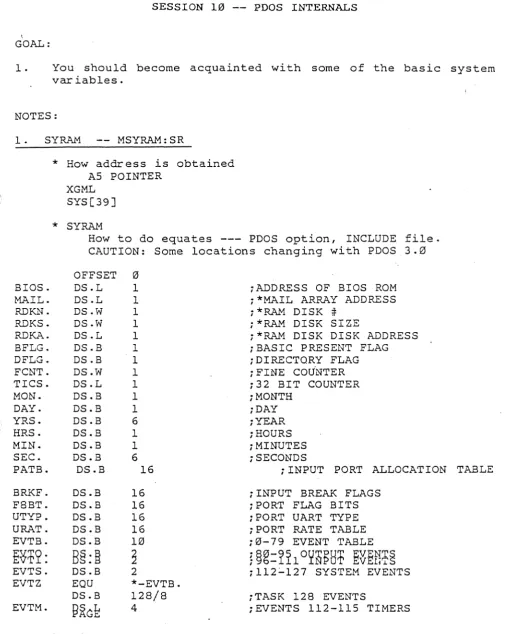
1. SYRAM -- MSYRAM:SR
* How address is obtained AS POINTER
XGML SYS[39]
*
SYRAMHow to do equates --- PDOS option, INCLUDE file. CAUTION: Some locations changing with PDOS.3.0
OFFSET 0
BIOS. DS.L 1 ;ADDRESS OF BIOS ROM
HAIL. DS.L 1 i*HAIL ARRAY ADDRESS
RDKN. DS.W 1 i*RAM DISK #=
RDKS. DS.W 1 i *RA.l.'1 DISK SIZE
RDKA. DS.L 1 i*RAM DISK DISK ADDRESS
BFLG. DS.B 1 iBASIC PRESENT FLAG
DFLG. DS.B 1 iDlRECTORY FLAG
FCNT. DS.W 1 i FINE COU'NTER
TICS. DS.L 1 i32 BIT COUNTER
MON. DS.B 1 iMONTH
DAY. DS.B 1 iDAY
YRS. DS.B 6 iYEAR
HRS. DS.B 1 iHOURS
MIN. DS.B 1 iMINUTES
SEC. DS.B 6 iSECONDS
PATB. DS.B 16 iINPUT PORT ALLOCATION
BRKF. DS.B 16 iINPUT BREAK FLAGS
F8BT. DS.B 16 iPORT FLAG BITS
UTYP. DS.B 16 iPORT UART TYPE
URAT. DS.B 16 iPORT RATE TABLE
EVTB. DS.B 10 i0-79 EVENT TABLE
t~12:
B§:~
~
~~~:1~102flPH1
~~ETI~~
EVTS. DS.B 2 i112:"127 SYSTEM EVENTS EVTZ EQU *-EVTB.
DS.B 128/8 iTASK 128 EVENTS
EVTM.
~~C~
4 iEVENTS 112-115 TIMERSIntroduction to PDOS
TABLE
[image:54.615.51.562.82.717.2]************************************************* * SYRAM (continued)
*
BCLK. OS.L 1 ;CLOCK AOJUST CONSTANT TLTP. OS.L 1 jTASK LIST POINTER
UTCB. OS.L 1 ;USER TASK CONTROL BLOCK POINTER SUIM. OS.W 1 ;SUPERVISOR INTERRUPT MASK
USIM.
SPTN.
B§:it
1
~~~X~I~A~~R~bAB~S~**'MUST
BE EVEN **) UTIM. OS.B 1 jUSER TASK TIMETPRY. OS.B 1 ;TASK PRIORITY (** MUST BE EVEN **) TSKN. OS.B 1 ;CURRENT TASK NUMBER
L2LK. OS.B 1 iLEVEL 2 LOCK (FILE PRIMITIVES, EVENT L3LK. OS.B 1 ;LEVEL 3 LOCK (OISK PRIMITIVES, EVENT TLCK. OS.B 1 iTASK LOCK FLAG
OS.B 1
E122. OS.B 1 ;BATCH TASK if
E123. OS.B 1 ;SPOOLER TASK if
E124. OS.B 1 E125. OS.B 1
CKSM. OS.L 1 ;SYSTEM CHECKSUM PNOO. OS.W 1 iPNET NOOE if
OS.B S4-4*NBC jSPARES
BCLT. OS.L NBC ;BASIC CALL TABLE
*
R~'lCL . OS. ~'l 16 ;PORT ROW/COLUMN OPIP. EQU *-4
OS.L 16-1 ;OUTPUT PORT POINTERS UART. EQU *-4
OS.L 16-1 i UART BASE AOORESS.ES
*
*************************************************
* THE FOLLOWING CHANGE WITH OIFFERENT CONFIGURATIONS
*
MAPS. MAPE. . PORT. TQUE. TLST. TMTF. TMBF. OEVT. BSCT. XCHI. XCHB. XFSL. SYSK. SYRAMZOS·. B
EQU OS.B OS.W OS.B OS.L OS.B OS.B OS.W OS.W OS.B OS.B OS.B EQU EQU PAGE ~PZ (NPS-1)*NCP NTB+1 NTB*TBZ NTM TMZ*NTM 2+NEV*8 32 NCB NCB*BPS NFS*FSS 72*3 *1$07FF+1 SYSK.
Introduction to POOS
iSYSTEM MEMORY BIT MAP
;CHARACTER INPUT BUFFERS iTASK QUEUE
iTASK LIST
iTO/FROM/INOEX.W
iTASK MESSAGE BUFFERS
jOELAYEO EVENTS
iBASIC SCREEN COMMANO TABLE ;CHANNEL BUFFERS QUEUE
iCHANNEL BUFFERS iFILE SLOTS
iSYSTEM STACK
iENO OF SYSTEM RAM
120) 121)
ta'
•
•••'.
2. Processor ID Letter s
MSYRAM--1
1->
BIOS.--->
0 .. 12 •. 3
I D LETTERS MOVEA.L (A5),A0
MOVE.W 4(A0),D0
iPOINT TO BIOS
;GET SYSTEM ID CHARS
CURRENT LETTER DEFS
F0
=
FORCE CPU 1 M0=
MIZAR 9100 F2=
FORCE CPU 2 D0=
DATA SUD U0=
MOSTEK MATRIX 68 D4=
DY-4T0
=
VME-10 J0=
T. I. 5100§~
=
§~~tD~/~20/440/440
V0=
VME 110=
G0
=
GMSDO EXERCISE 10-1 -- FIND YOUR PROCESSOR ID
3. Using TICS. for Timing
*
Finding out the tics per second*
SYS[38]*
MSYRAM parameterDO EXERCISE 10-2 -- TIMING A LOOP
SESSION 11 -- HARDWARE INTERFACE
GOAL:
You should become acquainted with where to start on interfacing a new character or block device to PDOS. !
POOS SYSTEM INITIALIZATION
~
;. /
I
CONFIG
r
CPU Ind Mapper
I
Stu Memory
I
~Iram.t.r S~tup RJW Module
I
I
I
PDOS Kernel
I
I
SYRAMInmaln SYRAW
~~. Exoe¢lon
I
Task #1..
~I
InltlailD Diab
I
Task #2IntH.lilD UARTI Ir--"'"
a.n.nt. Tlale Ust ~
Begin lIuJti.taaldng FREE
PI1«Ity
-4 ~Ice
j.
RAW SID... Map
- Progl"lm Entry
Port
Pricrity
Task #1 -4
i
Slice RAW SI:za Task #2 ... MapN Program Entry
Port
ROM
RAM
NOTES:
1. Task devices.
*
Support device directly in task space.*
No operating system intergration needed2. Dr i ver Files Chapter 7
*
Disk resident*
Limited to 252 bytes of code (1 PDOS sector)*
See PDOS Reference Manual Chapter 73. Basic I/O system -- BIOS
4. Character devices (UARTS) -- Chapter 8
*
BIOSU File PDOS Reference Manual Section 8.2 .*
Device entries*
Get char acter*
Put char acter*
Baud port*
Reset port*
Read status*
4 Unquie types supported5. Block devices (DISK, R/N Sector) -- Chapter 8
*
BIOSW File PDOS Reference Manual Section 8.3*
Interface*
Wr ite Sector*
Read Sector*
Init Disks*
Disk Off*
Error message listsSESSION 12 -- PDOS RUN MODULES
GOAL:
You should be able to build down an application into EPROM for use in a target system.
NOTES:
1. Run module licensing
*
Royalty per CPU*
Pay only on parts of PDOS used*
Paid up and source availble2. Development Cycle Review
SOFTWARE
____ >
Development Path---.J~.. System Resources
HARDWARE
Introduction to PDOS
Deve/opmentJtarget Hardware
Component Target Hardware
I'
3. Build Down Approach
*
POOS is complete system for a single CPU*
In order to extract only the part you need a license to build run m6dules."BULD-DOWN" SOFTWARE DEVELOPMENT
Introduction to poos
TARGETI DEVELOPMENT
HARDWARE
S" ,.,
GoBasic
User Applications
Fortran
. Floating
Point
Debug-ger
File
Manager
Introduction to PDOS
BIOS
4. Demonstration of building a run module system
*
Go over Run Module prelimary document*
Build a Run module system with exercises work on in class.DEVELOPMENT
CONFIGURED
TARGET
Application Modules
•
" Ta.k 13RAM DI.k Ta.k #2 Task -11
FREE Taalc Startup Table
Taalc #3 RAM ROM Tuk #3 Pl'O'Jram
Runtime Modules Taalc #2 RAM File w..~er Tuk #2 Pl'O'Jram UARTS
Taak #1 RAM Kernel Task #1 Program Conflg SYRAM
Debugger Fk*lng Point
.:
BASIC Support Target RAM BASIC lnt .... c:tlv.:12K Byt., Monitor RAM OIslc
AlWDI.k
File MaNl~r Taslc #3 RAM
RAM UARTS Taslc #2 RAM
Kernel Taalc #1 RAM
Cenflg SYRAM
Vectors V .. ;tors
*
Build a Run module system with exercises work on in class. Instructor demonstration.•
•
•
SESSION 13 -- PDOS SYSTEM GENERATION AND INSTALLATION
GOALS:
1. You should learn how to configure PDOS for var ious number s of TASK Files and other parameters.
2. You will have the opportunity to install PDOS on a target system.
NOTES:
1 . Chapter 2 instructions.
* Jumpers
* EPROMs
2. The MSYRAM file.
* User configurable parameters
:NTB EQU 32 iNUMBER OF TASKS (128 MAXIMUM) :NTM EQU 32 iNUMBER OF TASK MESSAGES
:TMZ EQU 64 iTASK MESSAGE SIZE IFUDF
IFUDF IFUDF IFUDF IFUDF IFUDF IFUDF IFUDF lFUDF IFUDF
NTB NTM TMZ NCB NFS NEV NP'S NBC P2P MMZ
:NCB EQU 8 iNUMBER OF ACTIVE CHANNEL BUFFERS :NFS EQU 32 ;NUMBER OF FILE SLOTS
:NEV EQU 10 iNUMBER OF DELAYED EVENTS :NPS EQU 16 iNUMBER OF I/O PORTS
:NBC EQU 4 iNUMBER OF BASIC CALL ENTRIES :P2P EQU 6 iINPUT BUFFER SIZE (2Ap2P)
:MMZ EQU 1«20*8 iMAXIMUM MEMORY SIZE (16M M&X.)
* How to change value with MASM switch - MASM FBIOS:SR/NCB=10,MBIOS
3. Re-assembling and Re-linking the New System.
*
xDOSGENIF &l=Q.GT LINK
MASM MSYRk~:SR,*MSYRAM
MASM xBIOS:SR,#MBIOS MASM xBIOSU:SR,#:MBIOSU MASM xBIOSH:SR,#:MBIOSW IF &0.RC
GT LINK LINK QLINK
Z
DEFINE SYRAM,9000 SECTION 0,800 IN MBIOS
IN MBIOSU IN MBIOSH IN MPDOS IN MSYRAM MAP UFS
MAP UFS,; xtvrAP SY
OUTPUT ;xDOS END
QUIT RC
4. Booting the System.
*
To try new version: LO xDOSxBOOT
*
To build new boot disks use: r.1MKBTDO EXERCISE 13-1 -- INSTALLING PDOS
SESSION 14 - - PDOS CUSTOMER SERVICES
GOALS:
1. You should understand how Eyring can help you in the fut~e.
2. You will be asked to complete an evaluation survey.
3. Possible fut~e classes will be discussed.
NOTES:
*
PDOS Hotline support.*
Manuals available.*
Fut~e classes.*
Application notes.*
Consulting.DO EXERCISE 14-1 -- PDOS TRAINING SEMINAR EVALUATION