item and our policy information available from the repository home page for further information.
Author(s):Phelan, Shane
Title:Evaluating the 3D rendering of architecture models in a web browser Year of publication:2010
EVALUATING THE 3D RENDERING OF ARCHITECTURE
MODELS IN A WEB BROWSER
Shane Phelan.
School of Computing, IT and Engineering, University of East London. Slider Studio [email protected]
Abstract: Due to hardware, software and time constraints it can be a laborious chore to view Computer Aided Design (CAD) data. Thanks to the emergence of 3D web rendering, it is now a more streamlined process, and an ever increasingly popular way of displaying CAD data, due in part to the fact that it is accessible to anyone with an internet connection. This paper reviews and evaluates 3 rendering engines and how they help the flow of getting architectural data into a virtual environment.
1. Introduction.
Traditionally, when rendering 3D objects, it is common place to use the computers graphics hardware to compute all the necessary calculations needed to render 3D objects.
A lot of the time, programs have to be installed to run and display these 3D objects. However, there are a number of situations where the user is not in a position to install programs to run 3D rendering software; they might not own the computer and thus have no clearance to install programs. The computer might not have the required space to install or perhaps does not have the necessary specification to run the software. The user might not be computer savvy and not want the hassle of installing a program. This is where the emergence of 3D rendering potential in web browsers is a significant development in the world of 3D and virtual environments. It allows 3D objects to be rendered in real time using a software renderer rather than the usual hardware based rendering and pre – rendered video/cinematics.
Every computer, laptop or net book has access to a web browser. In effect, this streamlines the process of a user viewing 3D content, as all that is required is navigating
to the web page where the 3D object/scene is published. As a result, architects can publish their designs on the internet and allow any interested parties such as councils, the general public or other architects, to view, comment on and even interact with their designs.
One limitation of the software renderer however, is the amount of detail it is able to render. All 3D objects can be broken down into smaller primitive types, for example a table can be thought of as 5 cubes; 4 to represent the legs and one to represent the top that goes across the legs. Again these cubes can be broken down into a more primitive state; a cube has 6 faces, each represented by a collection of lines between four vertices. If you then divide these faces diagonally in two, you end up with two triangles.
polygons to draw the more the performance deteriorates.
2. Rendering Engines
There are a number of web based rendering engines on the market. These range from simple open source headers enough to render primitive objects, to licensed, powerful and expensive full engines which the programmer can script off with ease. These engines usually require a small web media player plug-in to display the content. Some common players are Flash player, Microsoft Silverlight and Shockwave player. Some engines however, utilise their own player, an example of this is the Unity3D engine which uses its own Unity player plug-in.
The purpose of the rendering engine is to generate an image from data stored in a 3D model, and display it on a screen. The type of data the model stores includes geometry, lighting, textures and shading (Arkenine-Moller et al, 2008).
2.1 Important Rendering Features
In order to render 3D models and achieve an acceptable performance from the software renderer, it is often necessary to implement certain features to help increase the performance.
One such feature is culling techniques. Back face culling can be thought of as when looking at a sphere in a 3D scene, generally only half of the sphere is visible. With this in mind one draws the conclusion that what is invisible need not be processed as it doesn‘t contribute to the image. Therefore, the back side of the sphere should not be rendered with the exception being when the sphere is transparent.
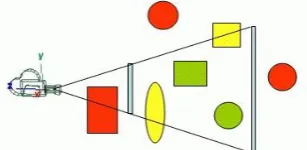
[image:3.595.327.510.399.477.2] [image:3.595.345.499.503.578.2]Front facing polygons – polygons where the normal of the three vertices making up the polygon is facing towards the camera, are generally always rendered by the renderer. Back facing polygons generally are not. View frustum culling is a technique where a pyramid shaped volume is projected in front of the camera and checks to see which objects are inside it. Any object inside or partially inside the object will be drawn, where as any object not inside the frustum won‘t. The idea behind this is the volume represents the users field of view, what can‘t be seen by the user must not be drawn. In large scenes this type of feature is essential in order to assist the renderer in what should be drawn (Arkenine-Moller et al, 2008). Clipping planes in the frustum also further reduce the viewing field. Any polygons not positioned between the near and far clipping planes will be culled.
Figure 1: Visual description of the view frustum
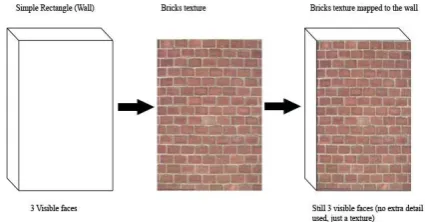
the architect would have to draw out all the individual bricks etc. This can be avoided by using texture mapping. The architect can construct a flat surface and attach an image of a brick wall over it
Figure 2: Texture mapping process
Another method used to increase the level of detail further is the texturing technique bump mapping. Bump mapping is the process of combining textures and adjusting each u and v pixel texture co-ordinate with an elevation displacement map to render an image with an illusion of depth. An extra texture, containing the vector data of the surface is used so the pixel can react to light (Walsh, P. 2003).
More often than not in 3D applications, the renderer will have to determine which pixels of the 3d objects are visible to the viewer, which ones are in front of the other. Before graphics hardware was readily available, the way to solve this problem was to use the painters algorithm (Foley et al, 1990) this refers to the techniques painters employ when painting distant parts of a scene. The algorithm sorts all the polygons in a scene by their depth and then renders them in this order, furthest to closest. The algorithm does have a tendency to fail in some cases such as cyclic overlap or piercing polygons.
A more common way around this problem is the use of the z-buffering. The z-buffer is used to hold a single number that represents the distance at every pixel. Each pixel in the z-buffer holds a value of the closest pixel drawn up to that point. When the renderer goes to draw the object, it checks the depth of the object against the depth value currently in the buffer, and draws the object if its depth is less than the current depth of the buffer (Walsh 2003).
2.2 Internet browsers
When Sir Timothy John Berners-Lee first proposed the idea of a web browser in 1989, it was to enable the communication via hypertext of information among researchers (Berners-Lee, 1999). Little did he know that a mere 20 years later his invention would facilitate the retrieving, presenting and traversing of images, audio, video, live video streaming and 3D applications. As browsers became more sophisticated and by using HTML scripting technologies such as JavaScript, ASP and PHP, developers started creating browser based games that used the web browser as a client. However, with the development of web based graphics technologies such as Flash and Java, 3rd party plug-in based browser games are becoming more common place. Some of the more popular plug-ins include Flash, Java, Shockwave, Unity and silverLight.
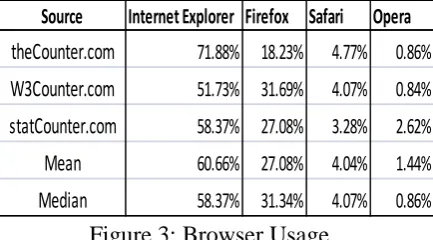
Source Internet Explorer Firefox Safari Opera
theCounter.com 71.88% 18.23% 4.77% 0.86% W3Counter.com 51.73% 31.69% 4.07% 0.84% statCounter.com 58.37% 27.08% 3.28% 2.62%
Mean 60.66% 27.08% 4.04% 1.44%
Median 58.37% 31.34% 4.07% 0.86%
Main Players Browser Hardware Open Source Free Cost Trial Flash C++ Java Scripting ActionScript
Away3D P O P P £0 P P O O O P
Java3D P O P P £0 P O O P O O
JMonkeyEngine O P P P £0 P O O P O O
Xith3D O P P P £0 P O O P O O
jPCT P P P P £0 P O O P O O
Unity3D P P O O $199 P O O O P O
Ogre3D O P P P £0 P O P O O O
realXtend P O P P £0 P O O O P O
Torque3D P P O O $250 P O O O P O
Quest3D P P O O £0 P O O O P O
Topaz3D P O O P £0 P O O O P O
DXStudio P P O O £0 P O O O P O
Sophie3D P O O O 239 € P P O O O P
Hpercosim P O O O $1,000 P O O O P O
Sandy P O P P £0 P P O O O P
Papervision P O P P £0 P P O O O P
[image:5.595.75.292.108.228.2]alternativa3d P O O O 1,000 € P P O O O P
Figure 3: Browser Usage
of content it is always important for the technology to at least run on the more common browsers such as Microsoft‘s Internet Explorer which enjoys a 71.88% share of the browser market. Mozilla‘s Firefox is the next most popular browser with 18.22% (See figure 3).
2.3 Engines to Evaluate
For the purpose of this paper I will be paying particular attention to three 3D
engines: Away3D (Away3D, 2009),
Sandy3D (Sandy3D, 2009) and
Papervision3d (Papervision, 2009). These three libraries run on the Flash environment and provide their own 3D primitives and manipulation classes.
The idea for Sandy3d came in 2005, when the creator, frustrated at the lack of 3D possibilities in Flash, decided to address this issue. Sandy3d features advanced 3d shading effects, viewing volume clipping, a large set of parsers to import various 3D formats (3DS, MD2, Collada) (Sandy3D). Papervision is an open source project created by Carlos Ulloa. This project came from humble beginnings as a simple way to transform Flash MovieClips to achieve the illusion of 3D, to being able to fully render 3D objects (Carlos Ulloa, 2009). It features shaders and materials, animations, CAD importing (including .ASE, Collada, .DAE,
Max3ds and Google Sketchup) and
rendering, culling algorithms such as frustum culling, back face culling, multiple viewports (Papervision, 2009).
of above, advanced normal mapping tools, simple shadows and simple fog filtering (Away3d, 2009).
3. Methodology:
In order to evaluate the rendering effectiveness of the three chosen engines, experiments must be setup to gauge this effectiveness. The basic principle of the test should be; create a scene and camera. Parse and render CAD data. Script the camera to move round the scene (tweening), recording the Fps (Frames per Second) and memory consumption at regular intervals, add some user functionality to manipulate the scene and finally stress the engine to test for robustness.
A record should be kept for any visible graphical artefacts. What we are looking for is the ease of flow from creating CAD data to displaying it in a virtual environment.
3.1 Important areas to evaluate.
One of the key factors to look at in how effective a rendering engine is, is to measure the rate at which the renderer updates and renders the scene. Usually this is called the frames per second or ‗Fps‘ of the scene. A real-time frame is the time it takes the renderer to complete one full round of tasks and processing; although, humans generally cannot see more than 24 frames per second. This can include drawing the scene to screen, updating the scene (translating objects etc) and processing any interactivity from a user. Generally speaking the higher the number of frames per second the more Figure 4: Competitor Matrix
effective the renderer.
Another important area of effectiveness is the ease of use and robustness of the engine. It should not take a considerable amount of time to get a small example up and running,
and the engine should be able to cope with any unexpected input/data.
3.2 CAD data
The engine must be tested on how effective it is in dealing with CAD data. How many different CAD data types can it import, how fast can it parse the data, how much time it takes to display the first draw call.
The engine must also be tested for quality of drawing; it is sometimes common in rendering engines for graphical artefacts to appear in parts of the geometry. This can happen when the renderer fails to correctly z – sort the geometry. A system of recording any graphical artefacts must be in place. CAD data will typically include geometry with a texture mapped to it. The engine will have to be tested for quality of the texture mapping.
3.3 The Architectural CAD Model
The CAD model to be tested is provided by Slider Studio Ltd – an architectural practice based In East London. The model is of sufficient detail to fully evaluate the engines but also of adequate detail to satisfy the visualisation needs of the practice. Modelled in Google Sketch-up (Google Sketchup, 2009), it will contain the necessary geometry and textures to visually represent a housing project they are working on. It will be exported in the globally recognised Collada Digital Asset Exchange (DAE) CAD file format.
3.4 Stress Testing
intersections and no textures, to more complicated cylinders with higher levels of polygons, intersections and textures.
3.5 System Specification
The benchmarking will be performed on a system consisting of Intel Core 2 Duo – 3.0Ghz processor, four gigabytes of system memory, 500 gigabyte (7200 RPM) hard drive and Gainward 8800GT (512Mb) graphics card. The operating system to be used is Windows XP 32-bit edition.
4.0 Results and Analysis
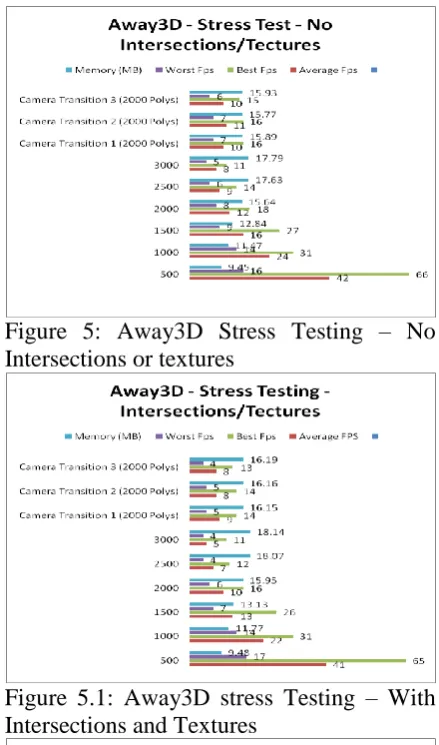
The first rendering engine to be tested was Away3D. The results were good but a bit expected. The frame rates recorded showed impressive performance up to 1500
polygons. At 2000 polygons the
performance started to deteriorate. The architecture model contained 4542 polygons and this showed in the performance. When using the basic rendering mode, Away3D suffered with unnecessary face culling, where the renderer was culling faces which shouldn‘t have been. When using the Correct Z – order algorithm, however, this problem was overcome but at the expense of performance – with the frame rate dropping to unusable levels.
Away3D also suffered with texture mapping problems. The textures were not mapped correctly to their respective UV‘s, resulting in a texture stretching issue. A work around involving looping through all the materials in the CAD data and reapplying the texture at runtime was implemented to fix this issue. This issue was only present for CAD models exported from Google Sketchup.
Figure 5: Away3D Stress Testing – No Intersections or textures
Figure 5.1: Away3D stress Testing – With Intersections and Textures
Figure 5.2: Away3D – Rendering Results of the architecture model
The Papervision tests showed good performance for a software renderer but alas were not quite as fast as Away3D. In all the
areas recorded, Away3D held the
[image:7.595.305.525.105.478.2]culling problem which blighted Away3D‘s performance, however, there was no texture issue for Papervision when exporting from Google Sketchup.
Figure 5.3: Papervision Stress Testing – No intersections or textures
Figure 5.4: Papervision Stress Testing – With intersections and textures
Figure 5.5: Papervision – Rendering results of the architecture model
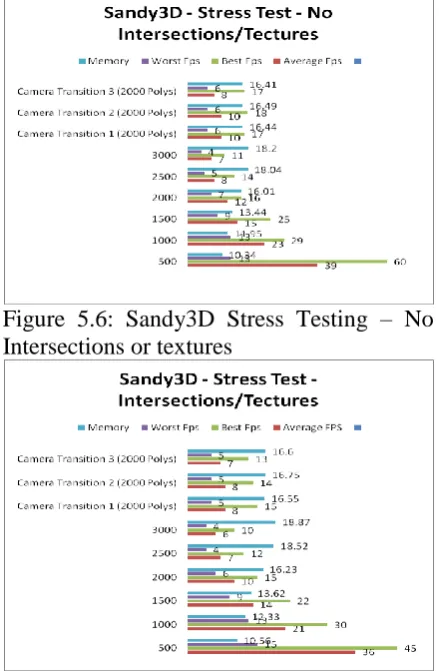
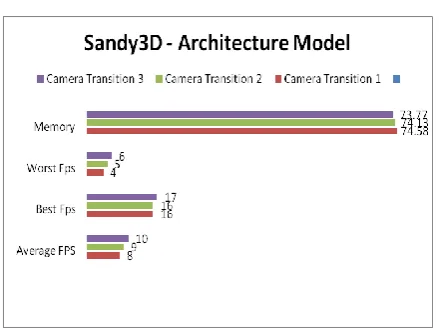
Sandy3D‘s performance was not as good as Away3D or Papervision. Notably, the renderer consumed alot more memory than the other two engines. Sandy3D, like Papervision, didn‘t suffer from the texture clamping issue Away3D experienced when using a model exported from Sketchup, but it did suffer from the z – sorting issue Away3D and Papervision suffered from. Like Away3D, Sandy3D‘s performance dropped considerably when rendering more than 2000 polygons.
Figure 5.6: Sandy3D Stress Testing – No Intersections or textures
[image:8.595.306.526.277.613.2]Figure 5.8: Sandy3D – Rendering results of architecture model
5. Conclusion
In view of the similarities of the results it would be acceptable to assume that, Away3D, as the best performing engine over all the tests, offers the smoothest transformation of CAD data into a virtual environment. It consistently outperformed Papervision and Sandy3D albeit only fractionally in places. However, Away3D does suffer from an unusual problem when rendering models exported from Google Sketchup. This problem can be rectified with a few lines of code, but if we are looking for a smooth transition this problem can‘t be ignored. All three engines suffered with z–sorting problems where the renderer would cull viewable faces. One technique to fix this issue lies in Google Sketchup. There is an option when exporting models to export two sided faces. With this option turned off, we noticed a remarkable improvement in the z–sorting, however, there were parts of the models where the viewer could see right through due to the fact single sided faces were being used.
6. References:
Arkenine-Moller, T. Haines, E. & Hoffman, N. 2008 ―Real Time Rendering‖, 3rd
ed. USA: A K Peters.
Tim Berners-Lee. 1999. ―Weaving the Web: The past, Present and future of the World Wide Web by its Inventor.― UK: Orion Business.
Foley, J. van Dam, A. Feiner, SK. & Hughes, JF. 1990. ―Interactive Computer Graphics: Principles and Practice.― USA: Addison-Wesley.
Walsh, P. 2003. ―Advanced 3D Game Programming Using DirectX 9.0.― USA: Wordware Publishing Inc.
History of Papervision3D. 2006. [Online]
Available at:
http://blog.papervision3d.org/about
[Accessed 18 October 2009]
Away3d Flash Engine. 2007 [Online] Available at: http://away3d.com [Accessed 18 October 2009]
Sandy 3D Engine (AS3 & AS2) fo Adobe
Flash [Online] Available at:
http://www.flashsandy.org [Accessed 18
October 2009]
3DS Max 3D Modelling And Rendering
Software [Online] Available at:
http://usa.autodesk.com/adsk/servlet/pc/inde x?siteID=123112&id=13567410 [Accessed 19 October 2009]
Maya 3D animation and Visual Effects
Software [Online] Available at: