About the Authors
Jonathan Gennickis a writer and editor. His writing career began in 1997 when he coauthored Teach Yourself PL/SQL in 21 Days. Since then, he has written several O’Reilly books, including Oracle SQL*Plus: The Definitive Guide, Oracle SQL*Plus Pocket Reference, andOracle Net8 Configuration and Troubleshooting. He has also edited a number of books for O’Reilly and other publishers, and he recently joined O’Reilly as an associate editor, specializing in Oracle books. Jonathan was formerly a manager in KPMG’s Public Services Systems Integration practice, where he was also the lead database administrator for the utilities group working out of KPMG’s Detroit office. He has more than a decade of experience with relational databases. Jonathan is a member of MENSA, and he holds a Bachelor of Arts degree in Infor-mation and Computer Science from Andrews University in Berrien Springs, Michigan. He currently resides in Munising, Michigan, with his wife Donna and their two children: twelve-year-old Jenny, who often wishes her father wouldn’t spend quite so much time writing, and five-year-old Jeff, who has never seen it any other way. You can reach Jonathan by email at [email protected]. You can also visit Jonathan’s web site athttp://gennick.com.
Sanjay Mishra is a certified Oracle database administrator with more than nine years of IT experience. For the past six years, he has been involved in the design, architecture, and implementation of many mission-critical and decision support databases. He has worked extensively in the areas of database architecture, data-base management, backup/recovery, disaster planning, performance tuning, Oracle Parallel Server, and parallel execution. He has a Bachelor of Science degree in Electrical Engineering and a Master of Engineering degree in Systems Science and Automation. He is the coauthor ofOracle Parallel Processing(O’Reilly & Asso-ciates) and can be reached at[email protected].
Colophon
beetle and the closely related elephant and rhinoceros beetles. The males of these species have prominent horns.
Many scarabs are scavengers, living on decaying vegetation and animal dung. They are consider efficient recyclers and valuable for reducing disease-breeding waste. Some of the scavengers of the scarab family use their front legs to gather dung and roll it into a ball. They carry the ball underground and use it as food and a place to lay their eggs. The Mediterranean black scarab’s apparently magical ability to repro-duce from mud and decaying organic materials led the ancient Egyptians to associate the scarab with resurrection and immortality. The beetles were consid-ered sacred, and representations in stone and metal were buried with mummies. A member of the North American scarab family plays a key role in Edgar Allen Poe’s story “The Gold-Bug.” In his search of Sullivan’s Island, South Carolina, a scarab beetle is William Legrand’s mysterious guide to the buried treasure of Captian Kidd.
Colleen Gorman was the production editor and the copyeditor for Oracle SQL*Loader: The Definitive Guide. Sarah Jane Shangraw and Linley Dolby provided quality control, and Leanne Soylemez was the proofreader. John Bickelhaupt wrote the index.
Ellie Volckhausen designed the cover of this book, based on a series design by Edie Freedman. The cover image is from Cuvier’s Animals. Emma Colby produced the cover layout with QuarkXPress 4.1 using Adobe’s ITC Garamond font.
Melanie Wang designed the interior layout based on a series design by Nancy Priest. Anne-Marie Vaduva converted the files from Microsoft Word to FrameMaker 5.5.6 using tools created by Mike Sierra. The text and heading fonts are ITC Gara-mond Light and GaraGara-mond Book; the code font is Constant Willison. The illustrations that appear in the book were produced by Robert Romano and Jessamyn Read using Macromedia FreeHand 9 and Adobe Photoshop 6. This colo-phon was written by Colleen Gorman.
Table of Contents
Preface
...xi
1. Introduction to SQL*Loader
...1
The SQL*Loader Environment ... 2
A Short SQL*Loader Example ... 4
SQL*Loader’s Capabilities ... 11
Issues when Loading Data ... 11
Invoking SQL*Loader ... 14
2. The Mysterious Control File
...22
Syntax Rules ... 22
The LOAD Statement ... 28
Command-Line Parameters in the Control File ... 43
Placing Data in the Control File ... 45
3. Fields and Datatypes
...47
Field Specifications ... 47
Datatypes ... 59
4. Loading from Fixed-Width Files
...78
Common Datatypes Encountered ... 79
Specifying Field Positions ... 79
Handling Anomalous Data ... 83
Concatenating Records ... 96
5. Loading Delimited Data
...107
Common Datatypes Encountered ... 107
Example Data ... 108
Using Delimiters to Identify Fields ... 108
Common Issues with Delimited Data ... 118
Concatenating Records ... 124
Handling Nested Fields ... 127
6. Recovering from Failure
...130
Deleting and Starting Over ... 131
Restarting a Conventional Path Load ... 132
Restarting a Direct Path Load ... 136
7. Validating and Selectively Loading Data
...141
Handling Rejected Records ... 141
Selectively Loading Data ... 146
8. Transforming Data During a Load
...152
Using Oracle’s Built-in SQL Functions ... 152
Writing Your Own Functions ... 156
Passing Data Through Work Tables ... 158
Using Triggers ... 159
Performing Character Set Conversion ... 161
9. Transaction Size and Performance Issues
...167
Transaction Processing in SQL*Loader ... 167
Commit Frequency and Load Performance ... 168
Commit Frequency and Rollback Segments ... 175
Performance Improvement Guidelines ... 179
10. Direct Path Loads
...182
What is the Direct Path? ... 182
Performing Direct Path Loads ... 184
Data Saves ... 196
Loading Data Fields Greater than 64K ... 197
UNRECOVERABLE Loads ... 198
Parallel Data Loading ... 199
11. Loading Large Objects
...205
Loading Inline LOBs ... 210
Loading LOBs from External Data Files ... 212
Loading BFILEs ... 217
12. Loading Objects and Collections
...221
Loading Object Tables and Columns ... 221
Loading Collections ... 225
Using NULLIF and DEFAULTIF with an Object or a Collection ... 240
Index
Symbols
( ) (parentheses), 47 * (asterisk), 49, 50 \ (backslash), 20 : (colon), 227
in SQL expressions, 153 = (equals sign), 124
SILENT parameter, 18
<> (not-equal-to operators), 102, 124 . (period), 33
" (quotes), 87 doubled, 110 and SQL, 153 ⁄ (forward-slash), 15
A
absolute positions, 50
ALTER ROLLBACK SEGMENT, 175 APPEND, 7, 30, 134
concurrent conventional path loads, 200 concurrent direct path loads, 201 parallel direct path loads, 203
for recovery, failed direct path loads, 139 table loading method, 36
assumed decimal points, 70 in columnar numeric data, 72
B
backup after unrecoverable loads, 198 BAD, 15
.bad filename extension, 15 bad files, 3, 4, 141
creation, 142 data written to, 141
edited data, loading from, 144 naming, 33, 142
BADFILE, 142
badfile_name element, INFILE clause, 32 BCD (binary-coded decimal data), 73 BFILE clauses, syntax, 218
BFILEs, 206
field specifications, 219 objects, 217
binary data, loading, 74 binary file datatypes, 69 bind arrays, 12, 168
BINDSIZE and ROWS parameters, 17 command-line parameters, 168 and commit frequency, 172 determining size, 177 maximum size, setting, 170 memory allocation, 170
for VARRAYs, 225 and rollback segments, 175 row numbers, setting, 171
bind variables, 154 BINDSIZE, 18, 170, 174 blank fields, 82
DATE fields, 64
BLOB (binary large object), 206 BOUND FILLER, Oracle9i, 56, 154 buffer size, setting, 169
BYTEINT field types, 70 BYTEORDER, 30
C
case-sensitivity, 20 catalog.sql, 184 catldr.sql, 184 CHAR datatypes, 7
datatype destination columns, 60 fields, datatypes, 60
fields, maximum length, 211 character set conversions, 161
affected datatypes, 164 control files, 163
conventional path loads, 163 direct path loads, 163 failures, 165
hexadecimal notation, used in, 164 load performance, 180
Oracle 8.1.6, 163 character sets, 161
specifying, 166 supported, 165 CHARACTERSET, 30
clauses, 162 syntax, 165 CHECK constraints, 192
CLOB (character large object), 205 COBOL environment, porting from, 70, 79 collection fields, 48
collections, 225
inline specification, syntax, 227 loading, 225–239
main data file, loading from, 226 representation, 227
secondary data files, loading from, 233 variable numbers of elements, defining
with delimiters, 227 COLUMN OBJECT, 223, 224 column object fields, 48 column_name element, 49
command-line parameters, 14–19 bind arrays, 168
passing, 19 precedence, 20 command-line syntax, 19
and input files, 21
command-line-based utility, xi COMMIT, 132
commit point, 132 logfile, saving, 135 messages, 9 commits, 168
frequency, 175
and performance, 168 vs. data saves, 197 CONCATENATE, 96
impact on load performance, 180 concatenate_rules, LOAD statement, 30 concatenating records, 96
continuation indicators, 98 delimited data, 124
concurrent conventional path loads, 200 concurrent direct path loads, 201
loads into multiple table partitions, requirements, 201
loads to the same segment, 202 condition elements, scalar fields, 49 CONSTANT, 57, 233
constraint violations, logging, 194 constraints, direct path loads, 191–195
checking validation status after load, 194 reenabling, 193
and validation, performance concerns, 195
state after load, 193 status checking, 193
continuation indicators, 98, 100 CONTINUEIF, 98–102, 124–127
concatenation, variable length physical records, 98
impact on load performance, 180 operators, continuation characters, 124 CONTINUEIF LAST, 124
CONTINUEIF NEXT, 101 CONTINUEIF THIS, 100 CONTINUE_LOAD, 16, 29
control files, 1, 2, 22–46 CONTINUE_LOAD clause, 16 datatypes, 7
input file name, passing as command-line parameter, 8 modifying for recovery, 139 for sample data, 6
session character sets, 163 SKIP, 12
syntax, 22–28
syntax vs. command-line syntax, 21 WHEN clause, 13
conventional path loads
optimizing performance, 167–181 restarting after failure, 132–136 COUNT, 233
CREATE DIRECTORY, 218
CSV (comma-separated values), 109 .ctl filename extension, 15
D
.dat filename extension, 16 DATA, 16
data, 4–6 sample files, 4
transformation during load, 13, 152–166 validation, 13, 141–151
data loads, 4–10
clearing tables prior to loads, 187 collections, from inline data, 226 collections, secondary data files, 233 continuing after interruption, 16 delimited data, 107–129 error records, 141
excluding columns from loads, 121 pre-Oracle8i releases, 122 fixed-width data, 78–106 global level options, 30
index, choosing for presort of input, 191 index updates, small loads into large
tables, 187, 190 inline, delimited data, 229 input files, specifying, 31–37 large object scenarios, 206 and logical record numbers, 134 maximum discards for abort, 149 multiple input files, 33
multiple table loads using WHEN
into object columns, 222 into object tables, 222 performance, 11
improving, 179
and other concerns, 181 planning, 12
presorting of data, 190 recoverability, 198
recovering from failure, 12, 130–140 single input file, 33
specifying records to load, 145 SQL expressions, processing
through, 152 target tables, specifying, 37 triggers, 159
work tables, processing with, 158 DATA parameter, 29
data path, 9 data saves, 196
vs. commits, 197
database archiving and load performance, 180 database character sets, 162 database column defaults, 95 database control files, 1
database creation, proper methods, 184 database_ filename element, INTO TABLE
clause, 38
database triggers, direct path loads, 195 datatype elements, scalar fields, 49 datatypes, 59–77
binary data LOB loads, 215 binary files, from, 69 BYTEINT field types, 70 CHAR field types, 60
character set conversions, 164 COBOL date, for conversion of, 79 control file, used in, 7
date fields, 62 blanks, 64
DECIMAL field types, 73 delimited data, used with, 107 DOUBLE field types, 70
fixed-width data files, found in, 79 FLOAT field types, 70
GRAPHIC EXTERNAL field types, 67 GRAPHIC field types, 66
datatypes(cont)
INTEGER field types, 70 LONG VARRAW field types, 76 nonportable datatypes, 59, 69–77 numeric external datatypes, 64 packed-decimal data, 75
loading, 73
portable datatypes, 59–69 SMALLINT field types, 70 VARCHAR field types, 74 VARGRAPHIC field types, 74 VARRAW field types, 76 ZONED field types, 70
for external numeric data, 72 date fields, 62
blanks, 64
DECIMAL EXTERNAL datatype, 7 DECIMAL field types, 73
DEFAULTIF, 87, 92–93
applied to fields within collections, 241 field descriptions, LOB columns, 209 and filler fields, 53
and load performance, 180 and SQL expressions, 155 interpreting blanks as zeros, 94 when loading collection data, 240 DELETE, 161
high-water mark (HWM) not reset, 187 risks in concurrent loads, 200
delimited data, 107
concatenating records, 124 datatypes, 107
loading, 107–129
null values, handling, 118
delimiter_description element, INTO TABLE clause, 39
delimiters, 108–113 choosing, 109 for collections, 227
delimiter characters, representing in values, 108
field-specific, 111
for inline large objects, 211 LOB values, separating in a single
file, 215
and missing values, 120 multi-character, 112 whitespace, 115
leading and trailing spaces, 116
destination table, identification, 7 DIRECT, 18, 184
direct path loads, 182–204
data dictionary views, supporting, 184 data saves, 196
database triggers disabled, 196 disabled constraint types, 192 enabled constraint types, 192 extents and performance, 186 finding skip value after failure, 139 high-water mark (HWM), free space, 187 index accessibility, factors, 188
index maintenance, 187 disk storage demands, 187 integrity constraints, 191 invoking, 184
key constraint violations, 192 and load performance, 181 Oracle9i, 185
parallel data loads, 201 performance, 182
performance enhancement through presorting, 190
record size, circumventing maximum, 197 required privileges, 191 restarting after failure, 136–140 restrictions, 185
and SQL expressions, 156 unrecoverable loads, 198
direct path parallel load, specification, 19 direct path views, creating, 184
directory aliases, 217 directory objects, 217 .dis filename extension, 16 DISCARD, 16
discard files, 4, 141 creating, 148
with DISCARDMAX, 149 format, 148
name specification, 33
records that fail WHEN conditions, 147 discard records, maximum before
abort, 149 DISCARDFILE, 148
discardfile_name element, INFILE clause, 32
DISCARDMAX, 16, 148, 149
DISCARDS, 16 dot notation, 241 DOUBLE field types, 70
E
empty LOB, 210 ENCLOSED BY, 113
LOB value enclosure characters, specifying, 217
enclosing characters, 109, 110 CSV files, 114
for LOB, 217 and nulls, 119 specifying, 113–117 and whitespace, 119 without delimiters, 116 end elements, scalar fields, 49 error records, 141
fixing, 144
and multiple table data loads, 151 ERRORS, 17, 145
escape characters, Unix, 20 EXCEPTIONS, 195
[image:11.612.117.473.113.696.2]exception_table_name element, INTO TABLE clause, 38
external files, 207
F
failed loads, recovery, 130–140 conventional path loads, 132–136 direct path loads, 136–140 fields, 47–58
field conditions, 146
field delimiters, whitespace, 88 field positions, 50–53
asterisk (*), 50
relative specification, 81 specifying, 51
for fixed-width data, 79–83 starting point, specifying, 50 field specification, 47
field types, 47 (see also datatypes)
field_conditions element, INTO TABLE clause, 38
field_list element, INTO TABLE clause, 39 FILE, 19
filename element, INFILE clause, 32
FILLER, 7, 53, 122
supporting Oracle releases, 83 filler fields, 7, 53–56
COBOL, 53
relative positional specification, 82 and SQL expressions, 154
syntax, 53
using to load LOB files, 214 fixed-width data, 78–106
anomalous data, handling, 83–96 column value defaults, 95 common datatypes, 79
field position specification, 79–83 by field type and length, 81 by position and length, 81 by start and end, 81 filler fields, relative positional
specification, 82 nulls, 87
overlapping fields, 84 subfields, extracting, 103 truncated fields, 95
unwanted fields, excluding from loads, 82
whitespace, trimming, 86 or preserving, 85
fixed-width fields, nesting of delimited fields, 103
FLOAT field types, 70
FOREIGN KEY constraints, 192
G
generated fields, 56–58 syntax, 56
GNIS (Geographic Name Information System), 4
GRAPHIC EXTERNAL field types, 67 GRAPHIC field types, 66
H
hardware-specific datatypes, 69 hexadecimal digits, for specifying a
termination character, 110 hexadecimal notation and character set
conversions, 164
high-water mark (HWM), direct path loads, 186
I
IBM DB2 compatible keywords, 31 indexes, 187–191
accessibility during direct path loads, 188 dropping, impact on load
performance, 179
maintenance requirements after direct path loads, 187
matching data load to, 190 presort column, choosing, 191 status column, 188
updates, small loads into large tables, 187, 190
index_list element, INTO TABLE clause, 38 INFILE, 30, 31
and DATA parameter, 16 “str” file option, 211 syntax elements, 32 INITIAL extent, 186
INITIAL storage parameters, 177 initial table extents and direct path
loads, 186
inline collection specification, syntax, 227 input files, specification, 31–37
INSERT, 30
ROWS parameter, default, 17 table loading method, 36 INSERT triggers, 159 INSTEAD OF triggers, 162 INTEGER EXTERNAL, 7 INTEGER field types, 70
integrity constraints, direct path load, management, 191
INTO TABLE, 7 field specification, 47 load methods, 38
SINGLEROW keyword, 189 syntax, 37–39
TRUNCATE keyword, 187 into_table, LOAD statement, 31
L
large object data loads, 205–220 external data files, 212 in main data file, 208
memory advantages, external files, 209 multiple objects, external file, 207 one object, external file, 207
LOAD, 28–37
for bad file data, 145 BYTEORDER, 30 CHARACTERSET, 30 global level options, 30 INFILE clause, 30, 31 MAXRECORDSIZE bytes, 30 parameters, 17
READBUFFERS integer, 30 RECOVERABLE option, 29 syntax, 29–31
UNRECOVERABLE option, 29 LOAD DATA (see LOAD) load process, 1
loading data (see data loads) LOB (large object), 48, 205
empty LOB, 210
enclosure characters, specifying, 217 field size requirements, inline data, 209 inline delimiters, 211
platform specific issues, 212 loading inline, 210
locators, 210
multiple fields, loading from one file, 215
(see also large object data loads) LOBFILE, 207, 213
LOG, 15
.log filename extension, 15 log files, 3, 9
commit point log, saving, 135 constraint violations, 194 data written to, 143 and discards, 148 error records, 141
failed loads, direct path, finding skip value, 139
logical records, 96
memory requirements, 209 numbering, 134, 135
LONG datatype destination columns, 60 LONG VARRAW field types, 76
LTRIM function, 106
M
max_doublebytes values, 74
N
national character sets, 162
NCHAR datatype destination columns, 60 NCLOB, 205
nested delimited fields, 127 with fixed width data, 128 nesting, object columns, 223 NEXT extent, 186
storage parameters, 177
NLS_LANG environment variable, 163 “No more slots for read buffer queue” error
message, 197
nonportable datatypes (see datatypes) null collections, 240
null fields, whitespace, 116 null values, 78
and SQL expressions, 155 within delimited data, 118 NULLIF, 87, 90–92
applied to fields within collections, 241 blank date fields, handling with, 64 field descriptions, LOB columns, 209 and filler fields, 53
and load performance, 180 and SQL expressions, 155 when loading collection data, 240 numeric external datatypes, 64 NVARCHAR2 datatype destination
columns, 60 NVL function, 94
O
object columns, 222 creating, 223 nesting, 223 object tables, 222
loading, 222 object types, 221
object-relational databases, 221 objects, loading, 221–224 occurrence counts, 227 offset elements, scalar fields, 49 OID (fieldname) clauses, 38 OPTIONS
bind arrays, setting size, 169 DIRECT option, 184 ORA-02374 error, 197 Oracle 8.1.6, 163
Oracle8i, xii
advantages over earlier releases, xiii character sets, 165
deprecated features, 204 FILLER, 7, 55, 122
objects and collections, 48, 221 skipping columns, 121 skipping fields, 123 SQL expressions, 156 Oracle9i, xii
BINDSIZE parameter, default size, 170 BOUND FILLER, 56, 154
BYTEORDER, 30 direct path loads, 185
CHECK constraints, 193 objects and collections, 221 SQL expressions, 94, 156 LTRIM function, 106 OID (fieldname), 38 physical record length, 197 os_specific_options element, INFILE
clause, 32 overlapping fields, 84
P
packed-decimal data, 75 loading, 73
PARALLEL, 19, 201 parallel data loads, 199
initiating, 200 preparation, 199
parallel direct path loads, 202, 203 reenabling of constraints, 203 parameter file, 18
PARFILE, 18
PARFILE parameters vs. command-line parameters, 21
PARTITION, 201
and direct path loads, 186
partition_name element, INTO TABLE clause, 37
password security, Unix systems, 15 performance, 167–181
performance optimization, 167 conventional path loads, 167–181 physical records, 96
length, 197
portable datatypes (see datatypes) POSITION, 50–53
and concatenation of records, 96 specifying fields, 51
precedence, command-line and control files, 169
PRESERVE BLANKS, 31, 85, 88 and representation of nulls, 89
NUMERIC EXTERNAL fields, DEFAULTIF, and NULLIF, 86
PRIMARY KEY constraints, violation during direct path load, 192
primary keys and data reloads, 144
R
RAW datatype, for binary data loads, 215 READBUFFERS, 30, 197
READSIZE, 19, 169, 174
RECNUM element, generated fields, 56 records, 96
conditional loads, 145 maximum size, 197
rejection during load, causes, 141 RECOVERABLE, 29, 199
recovery, failed data loads, 130–140 redo log files, size and performance, 179 REENABLE, 195
REENABLE DISABLED_CONSTRAINTS, 38, 193
relative positions, 50 reload after failure, 130
starting point, conventional path load, 132
[image:14.612.105.496.94.738.2]REPLACE, 30
table loading method, 36 rollback segments, 175–179
errors, 175
requirements, estimating, 176, 177 selection, 178
tablespace, insufficient free space, 175 ROWS, 17, 171, 174, 197
in direct path loads, 196 rows, determining size, 176 RTRIM function, 87
S
sample files, data, 4
scalar fields, 48–53 attributes, 48 syntax, 48
secondary data files, 233
collection fields, variable elements for, 234
specification and syntax, 235
SEQUENCE numbers, generated fields, 57 COUNT option, 57
risks, 58
increment option, 58 integer option, 57 MAX option, 57
risks, 58
session character sets, 162 control file, 163
SET TRANSACTION USE ROLLBACK SEGMENT, 178
short records, 95, 120 SID (fieldname) clauses, 38 SILENT, 18
SINGLEROW index option, 189 disadvantages, 190
SKIP, 12, 16, 134
failed direct path loads, 139 skip_count element, INTO TABLE
clause, 39
SKIP_INDEX_MAINTENANCE, 16 SKIP_UNUSABLE_INDEXES, 17 SMALLINT field types, 70 SORTED INDEXES, 190
requirements for input data, 191 special characters in command-line, 20 SQL expressions, 152–158
in direct path loads, supporting Oracle versions, 156
and FILLER fields, 153 modifying loaded data, 152 null values in, 155
syntax, 153 SQL functions, 156
restrictions, 158
sql_expression elements, scalar fields, 50 sqlldr, 14
command-line parameters, 14–19 sqlldr command, 8
collection loads, 221, 225–239 control files, 2
environment, 2
field types, supported, 47 invocation, 14
object loads, 221–224 performance, 167–181
recovering from failure, 12, 130–140 referential integrity, preservation, 13 transforming data, 152–166
treatment of missing values, 120 validating data, 141–151 versions, xii
start elements, scalar field syntax, 49 string | “string” constants, generated
fields, 57 SUBPARTITION, 201
SYSDATE element, generated fields, 57
[image:15.612.114.471.94.723.2]T
table loading methods, 35–37 default, 35
REPLACE vs. TRUNCATE, 36 table_name element, INTO TABLE
clause, 37
target tables, specifying, 37 TERMINATED BY, 109
LOB delimiters, defining, 217 TERMINATED BY EOF, 215 TERMINATED BY WHITESPACE, 88 termination characters, 109
(see also delimiters) TRAILING[NULLCOLS], 39 transactions, 167–181 transaction size, 12
transformation of data, 13, 152–166 triggers, 159
INSERT, 159 INSTEAD OF, 162 TRUNCATE, 30
data load performance advantages, 179 risks in concurrent loads, 200
table loading method, 36 TRUNCATE TABLE, 187
U
“Unable to open file” error message and READSIZE parameter, 169
UNIQUE KEY constraints, violation, direct path load, 192
“unrecognized processing option” and READSIZE parameter, 169 UNRECOVERABLE, 29, 199 unrecoverable loads, 198
USAGE IS DISPLAY (see ZONED field types)
user_constraints data dictionary view, 193 USERID, 15
V
validation of data, 13, 141–151 VARCHAR field types, 74 VARCHAR2 datatype destination
columns, 60
VARGRAPHIC field types, 74 variable-length records,loading, 106 VARRAW field types, 76
VARRAWC datatype, 216 VARRAY (varying array), 225
memory requirements, 225
W
WHEN, 13, 146
and the discard file, 147 loading multiple tables, 149 WHITESPACE, 115, 116 whitespace, 88
in control files, 22 work tables, 158
clearing, 161
Z
zoned decimal data, 70 ZONED field types, 70
Oracle SQL*Loader
The Definitive Guide
Preface
SQL*Loader is an Oracle utility that’s been around almost as long as the Oracle database software itself. The utility’s purpose originally was—and still is—to pro-vide an efficient and flexible tool that you can use to load large amounts of data into an Oracle database. To put it as succinctly as possible, SQL*Loader reads data from flat files and inserts that data into one or more database tables.
When SQL*Loader was first written, relational databases were not the norm for storing business data, as they are today. At that time, COBOL was in wide use, and much of the data that people wanted to load came from COBOL-generated data files. You can see that early COBOL influence as you study the nuances of the var-ious datatypes that SQL*Loader supports.
Another reflection on its heritage is the fact that SQL*Loader is a command-line-based utility. You invoke SQL*Loader from the command prompt, and then you use command-like clauses to describe the data that you are loading. No GUI-dependent users need apply! If you want to use SQL*Loader, you’ll need to get comfortable with the command line.
In spite of its age, and the fact that it’s not as easy to use as many might wish, SQL*Loader remains a very capable utility. Oracle has maintained SQL*Loader over the years, and has made improvements where they really count. When it comes to reading data from a file, SQL*Loader can deal with just about any type of record for-mat. Given a file of data to load, chances are that SQL*Loader can do the job for you. You’re not limited to COBOL datatypes and record formats. Oracle has contin-ually enhanced SQL*Loader over the years, and it now includes support for variable-length fields, comma-delimited data, and even large objects (LOBs).
perfor-especially parallel direct path loads, is perhaps Oracle’s crowning achievement in this arena. If you need to load data fast, SQL*Loader can do the job.
Why We Wrote This Book
In our experience, SQL*Loader has proven to be an extremely flexible and high-performing tool. Yet it’s also a difficult tool for many people to learn. We are both database administrators, and remember well the many times we sat staring at the Oracle Utilities manual, trying to puzzle out some aspect of SQL*Loader’s behav-ior. The syntax of the various clauses in the LOAD statement, which controls almost all aspects of SQL*Loader behavior, is complex and at times difficult to understand. It’s also difficult to explain. Even the authors of Oracle’s own manu-als seem to have difficulty explaining some aspects of SQL*Loader behavior.
When we learn a utility, we try to leverage it for all it’s worth. SQL*Loader is capa-ble of many things that save hours of work, but we had to work hard to acquire that knowledge. In this book, we’ve tried to save you a lot of time and effort by clearly explaining how SQL*Loader works and how you can apply its many fea-tures to your specific data-loading situations. We hope you’ll learn new things about SQL*Loader in this book and come away with a new appreciation of the power and flexibility of this classic utility.
Audience for This Book
The audience for this book is anyone who uses SQL*Loader to load data into an Oracle database. In our experience, that primarily equates to Oracle database administrators. Oracle is a complex product and one that’s difficult to understand. DBAs are expected to know everything about it. So when someone has data to load, his or her first step is usually to visit the DBA. If you’re an Oracle DBA, and you want to be prepared for that visit, this book should help.
The use of SQL*Loader is not restricted to Oracle DBAs, however. If you are a developer or an end user who occasionally needs to load data into Oracle, we hope that this book will open your eyes to what you can accomplish with SQL*Loader, and all without writing any code yourself.
Platform and Version
book. We didn’t want to spend a lot of time researching older releases of SQL*Loader, because the number of users running those older releases is on a steady decline.
Even though this book is based primarily on the Oracle8i releases of SQL*Loader, much of what you read applies to earlier releases as well. As you go back to older releases, however, you’ll find that some datatypes aren’t supported. You’ll also find that you need at least an Oracle8i release of SQL*Loader in order to load data into object tables, nested tables, and VARRAYs (varying arrays). Generally, you’ll find that new features have been added to SQL*Loader over the years to keep it current with the database software. For example, when partitioning features were added to the Oracle database, support for loading partitions was added to SQL*Loader.
Structure of This Book
This book is divided into 12 chapters:
• Chapter 1,Introduction to SQL*Loader, introduces SQL*Loader and the sample
data used for most of the examples in this book. You’ll also find an example, based on a simple scenario, of how SQL*Loader is used to load data into a database table. Finally, you’ll learn about the different SQL*Loader command-line options.
• Chapter 2,The Mysterious Control File, introduces you to the SQL*Loader con-trol file. The SQL*Loader concon-trol file, which differs from the database concon-trol file, describes the input data, and controls almost every aspect of SQL*Loader’s behavior.
• Chapter 3, Fields and Datatypes, describes the different datatypes that
SQL*Loader supports. Here you’ll learn the difference between portable and non-portable datatypes, and appreciate some of SQL*Loader’s COBOL heritage.
• Chapter 4,Loading from Fixed-Width Files, shows you how to use SQL*Loader
to load columnar data. You’ll also learn about some of the issues encountered when loading this type of data.
• Chapter 5, Loading Delimited Data, talks about some of the issues associated with the loading of delimited data and shows you how to leverage SQL*Loader to load such data.
• Chapter 7, Validating and Selectively Loading Data, explains the use of the bad file and the discard file, and shows you how SQL*Loader can be used to selectively load data from your input files.
• Chapter 8,Transforming Data During a Load, is one of our favorite chapters. You don’t have to take your data as it comes. You can put SQL*Loader to work for you to validate and transform data as it is loaded. This chapter shows you how.
• Chapter 9, Transaction Size and Performance Issues, shows you a number of
settings that you can adjust in order to get the maximum performance from SQL*Loader.
• Chapter 10,Direct Path Loads, explains the direct path load, which is possibly the single most important performance-enhancing SQL*Loader feature that you need to know about.
• Chapter 11, Loading Large Objects, shows several different ways to load large object (LOB) columns using SQL*Loader.
• Chapter 12, Loading Objects and Collections, discusses the issues involved
when you use SQL*Loader in an environment that takes advantage of Oracle’s new object-oriented features.
Conventions Used in This Book
The following typographical conventions are used in this book:
Italic
Used for file names, directory names, table names, field names, and URLs. It is also used for emphasis and for the first use of a technical term.
Constant width
Used for examples and to show the contents of files and the output of commands.
Constant width italic
Used in syntax descriptions to indicate user-defined items.
Constant width bold
Indicates user input in examples showing an interaction.
UPPERCASE
In syntax descriptions, usually indicates keywords.
lowercase
In syntax descriptions, usually indicates user-defined items such as variables.
[ ]
{ }
In syntax descriptions, curly brackets enclose a set of items from which you must choose only one.
|
In syntax descriptions, a vertical bar separates the items enclosed in curly or square brackets, as in {TRUE | FALSE}.
...
In syntax descriptions, ellipses indicate repeating elements.
Indicates a tip, suggestion, or general note. For example, we’ll tell you if a certain setting is version-specific.
Indicates a warning or caution. For example, we’ll tell you if a cer-tain setting has some kind of negative impact on the system.
Comments and Questions
We have tested and verified the information in this book to the best of our ability, but you may find that features have changed or that we have made mistakes. If so, please notify us by writing to:
O’Reilly & Associates 101 Morris Street Sebastopol, CA 95472
(800) 998-9938 (in the United States or Canada) (707) 829-0515 (international or local)
(707) 829-0104 (fax)
There is a web page for this book, which lists errata, examples, or any additional information. You can access this page at:
http://www.oreilly.com/catalog/orsqlloader
To comment or ask technical questions about this book, send email to:
For more information about books, conferences, software, Resource Centers, and the O’Reilly Network, see the O’Reilly web site at:
http://www.oreilly.com
Acknowledgments
An extraordinarily large number of people had a hand in helping us develop and write this book—more so than in any other book that we’ve ever written. We extend our heartfelt thanks to the following people:
Deborah Russell
For editing this book with her usual deft hand.
Stephen Andert, Ellen Batbouta, Jay Davison, Chris Gait, John Kalogeropoulos, Cindy Lim, Kurt Look, Daryn Lund, Ray Pfau, Rich Phillips, Paul Reilly, Mike Sakayeda, Jim Stenoish, and Joseph Testa
For taking the time to read a draft copy of our book in order to perform a technical review of our work. Their suggestions and comments have made this a much better book.
David Dreyer
For generously expending the time and effort to write a C program to convert the text feature name data used throughout this book into various platform-specific datatypes. This allowed us to verify various aspects of SQL*Loader’s behavior. Some of David’s work appears as downloadable examples on this book’s web site.
Daniel Jacot
For his help in explaining the characters used to represent positive and nega-tive values in COBOL’s numeric display and packed-decimal datatypes. Daniel also reviewed all the COBOL-related sidebars for accuracy.
Michael Mattias
For pointing us to his excellent, and rather fun, graphic and text tutorial on COBOL datatype representations.
Steve Comstock
For reminding us that in COBOL you use dashes, and not underscores, to sep-arate words in variable names.
Ken Jacobs
From Jonathan
In addition to the many people who help directly with a book, there are always those who help in indirect ways. To my wife Donna, I express my heartfelt thanks for her continued support of my writing endeavors. I owe her big time, because our household would fall apart if she weren’t running things while I write.
To my son Jeff, my daughter Jenny, and their friends Heather and John Grubbs, I say thanks for all the distractions. If you guys didn’t traipse down to my office every once in a while and pull me away to go skiing, ice climbing, snowshoeing, waterfalling, or whatever, I’d turn into a workaholic for sure. Thanks for provid-ing some balance in my life.
From Sanjay
Many thanks to Jonathan Gennick for providing me with the opportunity to be his coauthor. Thanks to my coworkers at i2 Technologies for always encouraging me to write my next book. Thanks to readers of my first book, Oracle Parallel Processing, who provided valuable feedback, and in turn encouraged me to write this second book. Thanks to my friends and family members for always being there for me.
Chapter 1
In this chapter: • The SQL*Loader
Environment • A Short SQL*Loader
Example • SQL*Loader’s
Capabilities
• Issues when Loading Data
• Invoking SQL*Loader
1
Introduction to
SQL*Loader
SQL*Loader is an Oracle-supplied utility that allows you to load data from a flat file into one or more database tables. That’s it. That’s the sole reason for SQL*Loader’s existence.
The basis for almost everything you do with SQL*Loader is a file known as the control file. The SQL*Loader control file is a text file into which you place a description of the data to be loaded. You also use the control file to tell SQL*Loader which database tables and columns should receive the data that you are loading.
Do not confuse SQL*Loader control files with database control files. In a way, it’s unfortunate that the same term is used in both cases. Database control files are binary files containing information about the physical structure of your database. They have nothing to do with SQL*Loader. SQL*Loader control files, on the other hand, are text files containing commands that control SQL*Loader’s operation.
Once you have a data file to load and a control file describing the data contained in that data file, you are ready to begin the load process. You do this by invoking the SQL*Loader executable and pointing it to the control file that you have writ-ten. SQL*Loader reads the control file to get a description of the data to be loaded. Then it reads the input file and loads the input data into the database.
The SQL*Loader Environment
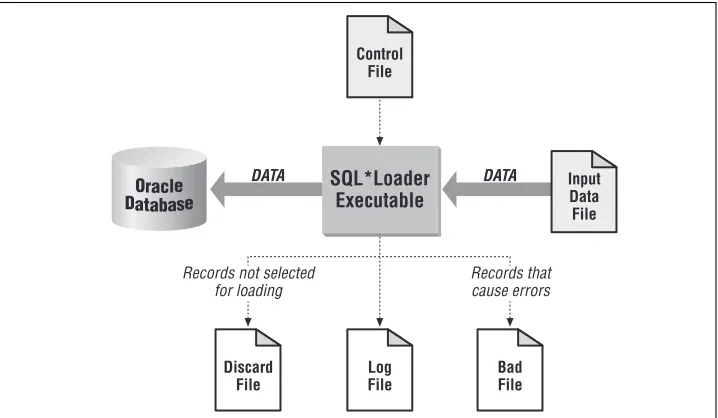
When we speak of the SQL*Loader environment, we are referring to the database, the SQL*Loader executable, and all the different files that you need to be con-cerned with when using SQL*Loader. These are shown in Figure 1-1.
The functions of the SQL*Loader executable, the database, and the input data file are rather obvious. The SQL*Loader executable does the work of reading the input file and loading the data. The input file contains the data to be loaded, and the database receives the data.
Although Figure 1-1 doesn’t show it, SQL*Loader is capable of loading from multi-ple files in one session. You’ll read more about this in Chapter 2, The Mysterious Control File. When multiple input files are used, SQL*Loader will generate multi-ple bad files and discard files—one set for each input file.
The SQL*Loader Control File
The SQL*Loader control file is the key to any load process. The control file pro-vides the following information to SQL*Loader:
• The name and location of the input data file
• The format of the records in the input data file
[image:29.612.128.487.199.408.2]• The name of the table or tables to be loaded Figure 1-1. The SQL*Loader environment
Oracle Database
Control File
Log File
Input Data File SQL*Loader
Executable
Bad File Discard
File
DATA DATA
Records not selected for loading
• The correspondence between the fields in the input record and the columns in the database tables being loaded
• Selection criteria defining which records from the input file contain data to be inserted into the destination database tables.
• The names and locations of the bad file and the discard file
Some of the items shown in this list may also be passed to SQL*Loader as command-line parameters. The name and location of the input file, for example, may be passed on the command line instead of in the control file. The same goes for the names and locations of the bad files and the discard files.
It’s also possible for the control file to contain the actual data to be loaded. This is sometimes done when small amounts of data need to be distributed to many sites, because it reduces (to just one file) the number of files that need to be passed around. If the data to be loaded is contained in the control file, then there is no need for a separate data file.
The Log File
Thelog file is a record of SQL*Loader’s activities during a load session. It contains information such as the following:
• The names of the control file, log file, bad file, discard file, and data file
• The values of several command-line parameters
• A detailed breakdown of the fields and datatypes in the data file that was loaded
• Error messages for records that cause errors
• Messages indicating when records have been discarded
• A summary of the load that includes the number of logical records read from the data file, the number of rows rejected because of errors, the number of rows discarded because of selection criteria, and the elapsed time of the load
Always review the log file after a load to be sure that no errors occurred, or at least that no unexpected errors occurred. This type of information is written to the log file, but is not displayed on the terminal screen.
The Bad File and the Discard File
free space in a tablespace, can also cause insert operations to fail. Whenever SQL*Loader encounters a database error while trying to load a record, it writes that record to a file known as thebad file.
Discard files, on the other hand, are used to hold records that do not meet selec-tion criteria specified in the SQL*Loader control file. By default, SQL*Loader will attempt to load all the records contained in the input file. You have the option, though, in your control file, of specifying selection criteria that a record must meet before it is loaded. Records that do not meet the specified criteria are not loaded, and are instead written to a file known as thediscard file.
Discard files are optional. You will only get a discard file if you’ve specified a dis-card file name, and if at least one record is actually disdis-carded during the load. Bad files are not optional. The only way to avoid having a bad file generated is to run a load that results in no errors. If even one error occurs, SQL*Loader will create a bad file and write the offending input record (or records) to that file.
The format of your bad files and discard files will exactly match the format of your input files. That’s because SQL*Loader writes the exact records that cause errors, or that are discarded, to those files. If you are running a load with multiple input files, you will get a distinct set of bad files and discard files for each input file.
You’ll read more about bad files and discard files, and how to use them, in Chapter 7,Validating and Selectively Loading Data.
A Short SQL*Loader Example
This section contains a short example showing how SQL*Loader is used. For this example, we’ll be loading a file of geographic place names taken from the United States Geological Survey’s (USGS) Geographic Name Information System (GNIS).
Learn more about GNIS data or download it for yourself by visiting
http://mapping.usgs.gov/www/gnis/. The specific data file used for this example is also available from http://www.oreilly.com/catalog/ orsqlloader andhttp://gennick.com/sqlldr.
The Data
state. The following example shows three records from that file. The lines wrap on the printed page in this book, but in the file each name is on its own line:
"MI","Agate Falls","falls","Ontonagon","26","131","462851N","0890527W", "46.48083","-89.09083","","","","","","","Trout Creek"
"MI","Agate Harbor","bay","Keweenaw","26","083","472815N","0880329W", "47.47083","-88.05806","","","","","","","Delaware"
"MI","Agate Point","cape","Keweenaw","26","083","472820N","0880241W", "47.47222","-88.04472","","","","","","","Delaware"
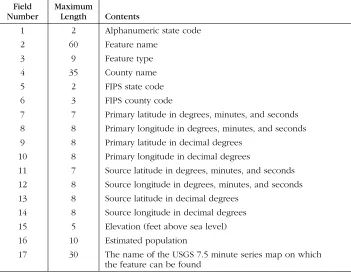
As you can see, the data in the file is comma-delimited, and each field is enclosed within double quotes. Table 1-1 shows the contents and maximum length of each field.
We used the following SQL statement to create the table into which all this data will be loaded:
CREATE TABLE gfn_gnis_feature_names ( gfn_state_abbr CHAR(2),
[image:32.612.129.480.311.585.2]gfn_feature_name VARCHAR2(60), gfn_feature_type VARCHAR2(9), Table 1-1. Fields in the GNIS Feature Names File
Field Number
Maximum
Length Contents
1 2 Alphanumeric state code
2 60 Feature name
3 9 Feature type
4 35 County name
5 2 FIPS state code
6 3 FIPS county code
7 7 Primary latitude in degrees, minutes, and seconds
8 8 Primary longitude in degrees, minutes, and seconds
9 8 Primary latitude in decimal degrees
10 8 Primary longitude in decimal degrees
11 7 Source latitude in degrees, minutes, and seconds
12 8 Source longitude in degrees, minutes, and seconds
13 8 Source latitude in decimal degrees
14 8 Source longitude in decimal degrees
15 5 Elevation (feet above sea level)
16 10 Estimated population
17 30 The name of the USGS 7.5 minute series map on which
gfn_county_name VARCHAR2(35), gfn_primary_latitude_dms CHAR(7), gfn_primary_longitude_dms CHAR(8), gfn_elevation NUMBER(7,2), gfn_population NUMBER(10), gfn_cell_name VARCHAR2(30) ) TABLESPACE gnis_data;
As you can see, not all fields in the data file are to be loaded into the table. The source latitude and longitude fields will not be loaded, nor will the decimal ver-sions of the primary latitude and longitude. The FIPS coding will also be omitted.
The Control File
The following control file will be used to load the feature name data for the State of Michigan:
LOAD DATA
APPEND INTO TABLE gfn_gnis_feature_names (
gfn_state_abbr CHAR TERMINATED BY "," ENCLOSED BY '"', gfn_feature_name CHAR TERMINATED BY "," ENCLOSED BY '"', gfn_feature_type CHAR TERMINATED BY "," ENCLOSED BY '"', gfn_county_name CHAR TERMINATED BY "," ENCLOSED BY '"', gfn_fips_state_code FILLER INTEGER EXTERNAL
TERMINATED BY "," ENCLOSED BY '"', gfn_fips_county_code FILLER INTEGER EXTERNAL TERMINATED BY "," ENCLOSED BY '"',
gfn_primary_latitude_dms CHAR TERMINATED BY "," ENCLOSED BY '"', gfn_primary_longitude_dms CHAR TERMINATED BY "," ENCLOSED BY '"', gfn_primary_latitude_dec FILLER DECIMAL EXTERNAL
TERMINATED BY "," ENCLOSED BY '"',
gfn_primary_longitude_dec FILLER DECIMAL EXTERNAL TERMINATED BY "," ENCLOSED BY '"',
gfn_source_latitude_dms FILLER CHAR TERMINATED BY "," ENCLOSED BY '"', gfn_source_longitude_dms FILLER CHAR TERMINATED BY "," ENCLOSED BY '"',
gfn_source_latitude_dec FILLER DECIMAL EXTERNAL TERMINATED BY "," ENCLOSED BY '"',
gfn_source_longitude_dec FILLER DECIMAL EXTERNAL TERMINATED BY "," ENCLOSED BY '"',
gfn_elevation DECIMAL EXTERNAL TERMINATED BY "," ENCLOSED BY '"', gfn_population INTEGER EXTERNAL TERMINATED BY "," ENCLOSED BY '"',
gfn_cell_name CHAR TERMINATED BY "," ENCLOSED BY '"' )
Everything else that you see in this particular control file represents a clause of the LOAD DATA command.
The destination table is identified by the following INTO TABLE clause:
APPEND INTO TABLE gfn_gnis_feature_names
The APPEND keyword tells SQL*Loader to preserve any preexisting data in the table. Other options allow you to delete preexisting data, or to fail with an error if the table is not empty to begin with.
The field definitions are all contained within parentheses, and are separated from each other by commas. The fields in the data file are delimited by commas, and are also enclosed by double quotes. The following clause is used at the end of each field definition to pass this delimiter and enclosure information to SQL*Loader:
TERMINATED BY "," ENCLOSED BY '"'
The following three datatypes are used in this control file. They have no bearing on, or relationship to, the database datatypes of the columns being loaded. The purpose of the datatypes in the control file is to describe the data being loaded from the input data file:
CHAR
Tells SQL*Loader that a field is a text field.
INTEGER EXTERNAL
Tells SQL*Loader that a field is an integer represented using the text digits “0” through “9”.
DECIMAL EXTERNAL
Tells SQL*Loader that a field is a decimal value represented using the text dig-its “0” through “9” and an optional decimal point (“.”).
Each field is given a name that is meaningful to SQL*Loader. For the nine fields being loaded into the table, the SQL*Loader name must match the corresponding column name in the table. The keyword FILLER identifies the eight fields that are not being loaded into the database. Their names do not matter, but the same nam-ing convention has been followed as for all the rest of the fields.
The Command Line
The command used to initiate this load needs to invoke SQL*Loader and point it to the control file describing the data. In this case, since the input file name is not provided in the control file, that name needs to be passed in on the command line as well. The followingsqlldr command will do the job:
sqlldr gnis/gnis@donna control=gnis log=gnis_michigan data=mi_deci. There are four parameters for this command:
gnis/gnis@donna
The first parameter consists of a username, password, and net service name. SQL*Loader uses this information to open a connection to the database. The “gnis” user owns the table to be loaded.
control = gnis
The second parameter tells SQL*Loader that the control file name is gnis.ctl. The default control file extension is .ctl, so the parameter needs to specify only the file name in this case.
log = gnis_michigan
The third parameter specifies a log file name of gnis_michigan.log. The default log file extension is .log, so it’s not specified explicitly in the parame-ter setting.
data = mi_deci.
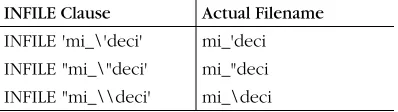
The fourth parameter specifies an input file name ofmi_deci. This name ends with an explicit period, because the file name has no extension. Without the period on the end, SQL*Loader would assume the default extension of.dat.
By not including the input file name in the control file, but instead passing it as a command-line parameter, we’ve made it easy to use the same control file to load feature name data for all 50 states. All we need to do is change the value of the DATA and LOG parameters on the command line. Here’s what it looks like to issue thissqlldr command and load the data:
$sqlldr gnis/gnis@donna control=gnis log=gnis_michigan data=mi_deci.
SQL*Loader: Release 8.1.5.0.0 - Production on Wed Apr 5 13:35:53 2000 (c) Copyright 1999 Oracle Corporation. All rights reserved.
Commit point reached - logical record count 28 Commit point reached - logical record count 56 Commit point reached - logical record count 84 ...
Pretty much all you see on the screen when you run SQL*Loader are these “Com-mit point” messages. If nothing else, they provide some reassurance that the load is progressing, and that your session is not hung. All other information regarding the load is written to the log file.
The Log File
The log file resulting from the load of Michigan’s feature name data begins with the SQL*Loader banner. It goes on to list the names of the files involved in the load, and also the values of some important command-line parameters. For example:
SQL*Loader: Release 8.1.5.0.0 - Production on Wed Apr 5 13:35:53 2000 (c) Copyright 1999 Oracle Corporation. All rights reserved.
Control File: gnis.ctl Data File: mi_deci. Bad File: mi_deci.bad Discard File: none specified (Allow all discards)
Number to load: ALL Number to skip: 0 Errors allowed: 50
Bind array: 64 rows, maximum of 65536 bytes Continuation: none specified
Path used: Conventional
You can see that the names of the control file, bad file, and data file are recorded in the log. This information is invaluable if you ever have problems with a load, or if you ever need to backtrack in order to understand what you really did. The log also displays the number of records to be loaded, the number to be skipped, the number of errors to allow before aborting the load, the size of the bind array, and the data path. The data path is an important piece of information. The load in this example is aconventional path load, which means that SQL*Loader loads the data into the database using INSERT statements. There is another type of load called a direct path load, which has the potential for far better performance than a conven-tional path load. Direct path loads are discussed in Chapter 10,Direct Path Loads.
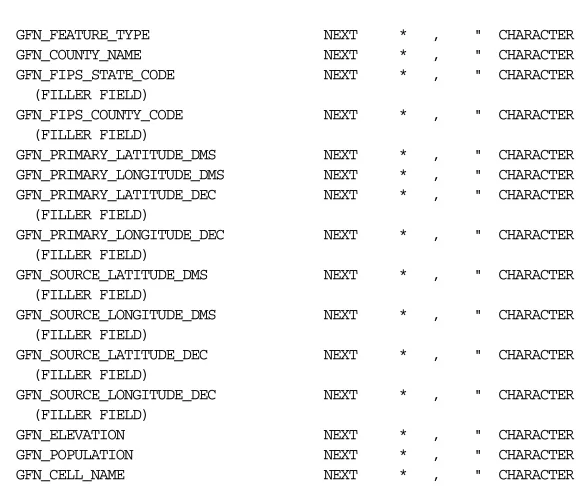
[image:36.612.144.435.632.676.2]The next part of the log file identifies the table being loaded, indicates whether or not preexisting data was preserved, and lists the field definitions from the control file:
Table GFN_GNIS_FEATURE_NAMES, loaded from every logical record. Insert option in effect for this table: APPEND
GFN_FEATURE_TYPE NEXT * , " CHARACTER GFN_COUNTY_NAME NEXT * , " CHARACTER GFN_FIPS_STATE_CODE NEXT * , " CHARACTER (FILLER FIELD)
GFN_FIPS_COUNTY_CODE NEXT * , " CHARACTER (FILLER FIELD)
GFN_PRIMARY_LATITUDE_DMS NEXT * , " CHARACTER GFN_PRIMARY_LONGITUDE_DMS NEXT * , " CHARACTER GFN_PRIMARY_LATITUDE_DEC NEXT * , " CHARACTER (FILLER FIELD)
GFN_PRIMARY_LONGITUDE_DEC NEXT * , " CHARACTER (FILLER FIELD)
GFN_SOURCE_LATITUDE_DMS NEXT * , " CHARACTER (FILLER FIELD)
GFN_SOURCE_LONGITUDE_DMS NEXT * , " CHARACTER (FILLER FIELD)
GFN_SOURCE_LATITUDE_DEC NEXT * , " CHARACTER (FILLER FIELD)
GFN_SOURCE_LONGITUDE_DEC NEXT * , " CHARACTER (FILLER FIELD)
GFN_ELEVATION NEXT * , " CHARACTER GFN_POPULATION NEXT * , " CHARACTER GFN_CELL_NAME NEXT * , " CHARACTER
[image:37.612.136.425.114.357.2]The last part of the log file contains summary information about the load. If there were any errors, or any discarded records, you would see messages for those before the summary. The summary tells you how many rows were loaded, how many had errors, how many were discarded, and so forth. It looks like this:
Table GFN_GNIS_FEATURE_NAMES: 32056 Rows successfully loaded. 0 Rows not loaded due to data errors.
0 Rows not loaded because all WHEN clauses were failed. 0 Rows not loaded because all fields were null.
Space allocated for bind array: 65016 bytes(28 rows) Space allocated for memory besides bind array: 0 bytes Total logical records skipped: 0
Total logical records read: 32056 Total logical records rejected: 0 Total logical records discarded: 0 Run began on Wed Apr 05 13:35:53 2000 Run ended on Wed Apr 05 13:36:34 2000 Elapsed time was: 00:00:41.22 CPU time was: 00:00:03.81
SQL*Loader’s Capabilities
SQL*Loader is very flexible, and the example in the previous section shows only a small amount of what can be done using the utility. Here are the major SQL*Loader capabilities that you should be aware of:
• SQL*Loader can read from multiple input files in a single load session.
• SQL*Loader can handle files with fixed-length records, variable-length records, and stream-oriented data.
• SQL*Loader supports a number of different datatypes, including text, numeric, zoned decimal, packed decimal, and various machine-specific binary types.
• Not only can SQL*Loader read from multiple input files, but it can load that data into several different database tables, all in the same load session.
• SQL*Loader allows you to use Oracle’s built-in SQL functions to manipulate the data being read from the input file.
• SQL*Loader includes functionality for dealing with whitespace, delimiters, and null data.
• In addition to standard relational tables, SQL*Loader can load data into object tables, varying arrays (VARRAYs), and nested tables.
• SQL*Loader can load data into large object (LOB) columns.
• SQL*Loader can handle character set translation between the input data file and the database.
The capabilities in this list describe the types of data that SQL*Loader can handle, and what SQL*Loader can do to with that data. SQL*Loader also implements some strong, performance-related features. SQL*Loader can do direct path loads, which bypass normal SQL statement processing, and which may yield handsome perfor-mance benefits. SQL*Loader can also do parallel loads and even direct-path paral-lel loads; direct path paralparal-lel loads allow you to maximize throughput on multiple CPU systems. You’ll read more about these performance-related features in Chapter 9,Transaction Size and Performance Issues, and in Chapter 10.
Issues when Loading Data
data validation (including referential integrity), and data transformation. Transac-tion size is partly a performance issue, but it also has an impact on how much data you need to reload in the event that a load fails. Data validation and referential integrity both relate to the need for clean, reliable data.
Recovery from Failure
There are really only two fundamental ways that you can recover from a failed load. One approach is to delete all the data that was loaded before the failure occurred, and simply start over again. Of course, you need to fix whatever caused the failure to occur before you restart the load. The other approach is to deter-mine how many records were loaded successfully, and to restart the load from that point forward. Regardless of which method you choose, you need to think things throughbefore you start a load.
Deleting data and restarting a load from scratch really doesn’t require any special functionality on the part of SQL*Loader. The important thing is that you have a reliable way to identify the data that needs to be deleted. SQL*Loader does, how-ever, provide support for continuing an interrupted load from the point where a failure occurred. Using the SKIP command-line parameter, or the SKIP clause in the control file, you can tell SQL*Loader to skip over records that were already processed in order to have the load pick up from where it left off previously. Chapter 6,Recovering from Failure, describes the process for continuing a load in detail, and some of the issues you’ll encounter. It’s a chapter worth reading, because there are some caveats and gotchas, and you’ll want to learn about those before you have a failure, not afterwards.
Transaction Size
Transaction size is an issue related somewhat to performance, and somewhat to recovery from failure. In a conventional load, SQL*Loader allows you to specify the number of rows that will be loaded between commits. The number of rows that you specify has a direct impact on the size of the bind array that SQL*Loader uses, and consequently on the amount of memory required for the load. Thebind arrayis an area in memory where SQL*Loader stores data for rows to be inserted into the database. When the bind array fills, SQL*Loader inserts the data into the table being loaded, and then executes a COMMIT.
fewer commits, resulting in the use of more rollback segment space. Chapter 9 describes these issues in detail.
Data Validation
Data validation is always a concern when loading data. SQL*Loader doesn’t pro-vide a lot of support in this area, but there are some features at your disposal that can help you ensure that only good data is loaded into your database.
The one thing that SQL*Loader does do for you is ensure that the data being loaded into a column is valid given the column’s datatype. Text data will not be loaded into NUMBER fields, and numbers will not be loaded into DATE fields. This much, at least, you can count on. Records containing data that doesn’t con-vert to the destination datatype are rejected and written to the bad file.
SQL*Loader allows you to selectively load data. Using the WHEN clause in your SQL*Loader control file, you can specify conditions under which a record will be accepted. Records not meeting those conditions are not loaded, and are instead written to the discard file.
Finally, you can take advantage of the referential integrity features built into your database. SQL*Loader won’t be able to load data that violates any type of primary key, unique key, foreign key, or check constraint. Chapter 7,Validating and Selec-tively Loading Data, discusses using SQL*Loader and Oracle features to ensure that only good data gets loaded.
You don’t always have to rely on SQL*Loader’s features for data vali-dation. It’s entirely feasible to load data into a staging table, run one or more external programs to weed out any rows that are invalid, and then transfer that data to a production table.
Data Transformation
Wouldn’t it be great if the data we loaded was always in a convenient format? Unfortunately, it frequently is not. In the real world, you may deal with data from a variety of sources and systems, and the format of that data may not match the format that you are using in your database. Dates, for example, are represented using a wide variety of formats. The date 1/2/2000 means one thing in the United States and quite another in Europe.
be loaded into a database DATE or NUMBER column. In fact, for date fields, you can embed the date format into your control file as part of the field definition.
SQL*Loader allows you access to Oracle’s entire library of built-in SQL functions. You aren’t limited to just TO_DATE, TO_NUMBER, and TO_CHAR. Not only can you access all the built-in SQL functions, you can also write PL/SQL code to manipulate the data being loaded. This opens up a world of possibilities, which are discussed in Chapter 8,Transforming Data During a Load.
Invoking SQL*Loader
On Unix systems, the command used to invoke SQL*Loader is sqlldr. On Win-dows systems running Oracle8i, release 8.1 or higher, the command is also sqlldr. Prior to release 8.1, the SQL*Loader command on Windows systems included the first two digits of the Oracle release number. Thus you had sqlldr80 (Oracle8, release 8.0),sqlldr73 (Oracle7, release 7.3), and so forth.
SQL*Loader can be invoked in one of three ways:
sqlldr
sqlldr keyword=value [keyword=value ...] sqlldr value [value ...]
Issuing thesqlldr command by itself results in a list of valid command-line param-eters being displayed. Command-line paramparam-eters are usually keyword/value pairs, and may be any combination of the following:
USERID={username[/password][@net_service_name]|/} CONTROL=control_file_name
LOG=path_file_name BAD=path_file_name DATA=path_file_name DISCARD=path_file_name
DISCARDMAX=logical_record_count SKIP=logical_record_count
SKIP_INDEX_MAINTENANCE={TRUE | FALSE} SKIP_UNUSABLE_INDEXES={TRUE | FALSE} LOAD=logical_record_count
ERRORS=insert_error_count ROWS=rows_in_bind_array BINDSIZE=bytes_in_bind_array SILENT=[(]keyword[,keyword...][)] DIRECT={TRUE | FALSE}
Command-line parameters may be passed by position instead of by keyword. The rules for doing this are described at the end of the next section.
Command-Line Parameters
The SQL*Loader parameter descriptions are as follows:
USERID = {username[/password] [@net_service_name]|/}
Specifies the username and password to use when connecting to the data-base. The net_service_name parameter optionally allows you to connect to a remote database. Use a forward-slash character (/) to connect to a local data-base using operating system authentication. On Unix systems, you may want to omit the password and allow SQL*Loader to prompt you for it. If you omit both the username and the password, SQL*Loader will prompt you for both.
On Unix systems you should generally avoid placing a password on the command line, because that password will be displayed when-ever other users issue a command, such asps –ef, that displays a list of current processes running on the system. Either let SQL*Loader prompt you for your password, or use operating system authentica-tion. (If you don’t know what operating system authentication is, ask your DBA.)
CONTROL = control_file_name
Specifies the name, which may include the path, of the control file. The default extension is.ctl.
LOG = path_file_name
Specifies the name of the log file to generate for a load session. You may include a path as well. By default, the log file takes on the name of the con-trol file, but with a .log extension, and is written to the same directory as the control file. If you specify a different name, the default extension is still .log. However, if you use the LOG parameter to specify a name for the log file, it will no longer be written automatically to the directory that contains the con-trol file.
BAD = path_file_name
DATA = path_file_name
Specifies the name of the file containing the data to load. You may include a path as part of the name. By default, the name of the control file is used, but with the .dat extension. If you specify a different name, the default extension is still.dat. If you are loading from multiple files, you can only specify the first file name using this parameter. Place the names of the other files in their respective INFILE clauses in the control file.
DISCARD = path_file_name
Specifies the name of the discard file. You may include a path as part of the name. By default, the discard file takes the name of the control file, but it has a .disextension. If you specify a different name, the default extension is still.dis. If you are loading data from multiple files, then this discard file name only gets associated with the first file being loaded.
DISCARDMAX = logical_record_count
Sets an upper limit on the number of logical records that can be discarded before a load will terminate. The limit is actually one less than the value speci-fied for DISCARDMAX. When the number of discarded records becomes equal to the value specified for DISCARDMAX, the load will terminate. The default is to allow an unlimited number of discards. However, since DISCARDMAX only accepts numeric values, it is not possible to explicitly specify the default behavior.
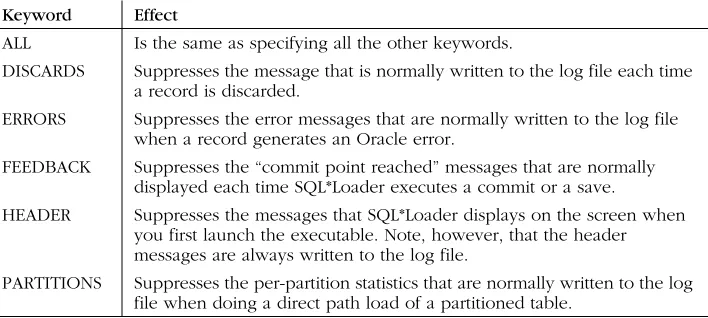
There is also an undocumented parameter named DISCARDS that functions the same as DISCARDMAX. The use of DISCARDMAX is pre-ferred, but you may occasionally encounter references to DISCARDS.
SKIP = logical_record_count
Allows you to continue an interrupted load by skipping the specified number of logical records. If you are continuing a multiple table direct path load, you may need to use the CONTINUE_LOAD clause in the control file rather than the SKIP parameter on the command line. CONTINUE_LOAD allows you to specify a different number of rows to skip for each table that you are loading.
SKIP_INDEX_MAINTENANCE = {TRUE | FALSE}
SKIP_UNUSABLE_INDEXES = {TRUE | FALSE}
Controls the manner in which a load is done when a table being loaded has indexes in an unusable state. A value of TRUE causes SQL*Loader to load data into tables even when those tables have indexes marked as unusable. The indexes will remain unusable at the end of the load. One caveat is that if a UNIQUE index is marked as unusable, the load will not be allowed to proceed.
A value of FALSE causes SQL*Loader not to insert records when those records need to be recorded in an index marked as unusable. For a conventional path load, this means that any records that require an unusable index to be updated will be rejected as errors. For a direct path load, this means that the load will be aborted the first time such a record is encountered. The default is FALSE.
LOAD = logical_record_count
Specifies a limit on the number of logical records to load. The default is to load all records. Since LOAD only accepts numeric values, it is not possible to exp