Innovative use of
Data Networks
to Improve
Campus Security
JTAP-633
Mark Toller
Tim Chown
Paul Lewis
John Clark
Department of Electronics and Computer Science
University of Southampton
1
Contents
1 CONTENTS... 2
2 EXECUTIVE SUMMARY... 4
3 INTRODUCTION... 5
3.1 ACKNOWLEDGEMENTS... 5
4 DATA PROTECTION ACT ISSUES FOR CCTV AND PC CAMERAS... 6
4.1 THE 1984 DATA PROTECTION ACT... 6
4.2 THE 1998 DATA PROTECTION ACT... 7
4.3 LIABILITIES... 9
4.4 CONCLUSION... 9
5 DIGITAL IMAGES AS EVIDENCE ... 11
5.1 AUTHENTICITY... 11
5.2 PROPER OPERATION OF THE COMPUTER... 11
5.3 WEIGHT OF EVIDENCE: AUTHENTICITY AND AUDIT TRAIL... 12
5.4 DIGITAL SYSTEMS USED SUCCESSFULLY IN COURT... 13
5.5 CONCLUSION... 13
6 CCTV, SAFETY, AND LONE WORKING ENVIRONMENTS ... 14
6.1 HEALTH AND SAFETY... 14
6.2 LONE WORKING... 14
6.3 CCTV FOR SUPERVISORY PURPOSES... 14
7 DIGITAL IMAGES AND VIDEO ... 15
7.1 DIGITAL CCTV CAMERA SYSTEMS... 15
7.2 NETCAM SUPERVISOR... 16
7.3 PRIMAVISION HOBO... 18
7.4 CCTV VIDEO SWITCHING SYSTEMS – MICROSWITCHER PLUS... 19
7.5 PC CAMERAS (AKA WEBCAMS) ... 20
7.6 ALL-IN-ONE WEBCAMS... 23
7.7 REMOTELY VIEWING CCTV VIDEO... 23
7.8 BANDWIDTH USAGE AND QUALITY OF SERVICE... 24
7.9 VIDEO OVER DEDICATED CABLE (INCLUDING TWISTED PAIR)... 25
7.10 CONCLUSION... 26
8 SOCIAL ASPECTS OF CCTV DEPLOYMENT ... 27
9 DEPLOYMENT OF A VERSATILE VIDEO SURVEILLANCE SYSTEM... 28
9.1 REQUIREMENTS... 28
9.2 CONSIDERATIONS FOR CAMERA PLACEMENT AND TECHNOLOGY... 29
9.3 DESIGNING A VERSATILE SYSTEM... 30
9.4 COSTS... 34
9.5 POLICIES AND PROCEDURES... 34
9.6 DATA SECURITY CONSIDERATIONS... 35
9.7 CONCLUSION... 35
10 USE OF TWISTED-PAIR DATA CABLING FOR ANTI-THEFT ALARMS... 37
10.1 PHYSICAL ALARMS RUNNING OVER CAT3/5 CABLE... 37
10.4 SOFTWARE DEVELOPMENT... 39
10.5 COMBINING ALARM EVENT RECORDS WITH INVENTORY DATA... 41
10.6 CONCLUSION... 42
11 A HOLISTIC VIEW OF BUILDING SECURITY... 44
11.1 THEFT INCIDENT STATISTICS... 45
11.2 INSTALLATION COSTS... 46
11.3 PROJECT COST... 46
12 RELATED JISC/JTAP PROJECTS... 47
12.1 NETWORK DELIVERY OF HIGH QUALITY MPEG-2 DIGITAL VIDEO... 47
12.2 AUDIO-VISUAL PERSON RECOGNITION FOR SECURITY AND ACCESS CONTROL... 47
12.3 ‘VIDEOCONFERENCING IN THE VALLEYS': A CASE STUDY OF THE 'ALPS' PROJECT... 47
12.4 OVERVIEW OF WATERMARKS, FINGERPRINTS, AND DIGITAL SIGNATURES... 48
12.5 PRACTICAL GUIDELINES FOR TEACHING WITH VIDEOCONFERENCING... 48
12.6 VIDEOCONFERENCING OVER SCOTLAND'S METROPOLITAN AREA NETWORK... 48
13 FURTHER WORK – AREAS OF STUDY... 50
14 RECOMMENDATIONS... 51
15 INSTALLATION AND CONTACT INFORMATION... 53
2
Executive Summary
This report considers three main aspects of security. It looks at legal and social aspects of deploying a CCTV security system. It investigates a number of commercial systems for CCTV over a variety of media including data networks, and explores the deployment and effectiveness of such systems. Thirdly, avenues for a more “complete” security system are explored.
The primary conclusions of the work, carried out over the period of a year during 1998/9 are:
1. The installation of a successful security system involves not only the deployment of a CCTV system but also a wider more “holistic” view of security issues, including physical alarms, secure access mechanisms (such as card lock devices) and staff awareness. By adopting such a view, reported incidents of theft at the authors’ site have been significantly reduced.
2. Category 3, 5 or 5+ twisted pair cabling can be used for a variety of purposes. Traditionally it has been used for telephony (including ISDN), serial connections and data, but it can also be used for alarm wiring and raw video transmission. When designing a new building, specifying extra twisted pair outlets for alarm wiring can offer a flexible and cost effective basis for a reliable security system. In older buildings deploying Category 5+ cable, the older existing Category 3 cable can be re-used for alarm wiring.
3. A low-cost CCTV system can be deployed in a typical Departmental scenario. However, given the lack of effective Quality of Service (QoS) mechanisms on Ethernet networks, it is still most likely to be more cost-effective to operate a high quality CCTV system over dedicated cable (coaxial, twisted pair or, if distance requires it, fibre-optic).
4. The low cost of well-specified PCs, digitising cards and, in particular, large IDE hard disks makes “digital” recording of images an attractive proposition. With just the addition of a cheap (around £70) parallel port camera, any PC can become a WebCam triggerable by movement (image differencing), capable of uploading images to an FTP server or saving (lower quality) video sequences to disk. However, correlation of images or video from multiple sources into a single queryable database is a non-trivial task.
5. CCTV and alarm systems can be used in areas beyond deterrence of theft. With many staff and students undertaking lone working in offices or laboratories, CCTV may offer a method to help monitor them, and to offer additional safety in situations such as electronics
laboratory sessions. The same cameras can be used for security purposes by night.
6. The 1998 Data Protection Act has new implications, even for those sites deploying small-scale or single-camera surveillance systems. In contrast to the 1984 DPA, data subjects have improved rights, such that almost any CCTV system is now liable for registration under the new Act. Computer system managers should be aware that they are also liable for offences under the 1998 DPA where the CCTV footage is handled digitally and/or over data networks.
7. Digital images and video can be used in evidence in a court of law. Any image may be used in evidence, but the weight it will be given depends on a number of factors, not least the establishment of an audit trail and also the authenticity of the image(s).
3
Introduction
This report is based on work undertaken within the Department of Electronics and Computer Science (hereafter “the Department”) at the University of Southampton. While the scope of the project included the whole Department, much of it focused on measures introduced in the New Zepler building, which was formally commissioned in the Spring of 1999.
The University of Southampton lies on the south coast of England and has some 25,000 staff and students. The Department is one of the largest Electronics and Computer Science Departments in the UK, with some 1,200 computer users including over 200 new degree students per year. The New Zepler building is a four-story building housing a mixture of academics, student laboratories and administrative staff.
There are two main aspects to this report. The first is non-technical from a computing point of view, and investigates issues surrounding the deployment of a security (CCTV in particular) system. This includes notes on the new 1998 Data Protection Act (DPA) and comments on the use of digital video evidence in a UK court of law. The second aspect describes the technical trials and deployments undertaken in the Department, including both CCTV and other security measures.
The report has a number of recommendations for HE Institutions, or Departments at such
institutions, who are considering deploying security systems. It also includes suggested measures for taking a more “holistic” view of security.
The preceding Executive Summary describes our major findings. Recommendations, for Institutions and for further study, are to be found at the end of the report.
3.1
Acknowledgements
The work described in this report was made possible by twelve months of funding by the Joint Information Systems Committee (JISC) of the Higher Education Funding Councils.
Other people whose help has been valuable include but are not limited to:
Adrian Pickering, Department Manager Shaun Ford, Department Technician Colin Bird, IBM
Mark Hindess, University of Bath
David Owen, University of Southampton Chief Security Officer Bob Ballard, IT Guard
Jeff Anderson, ACI International Tom Franklin and Tish Roberts, JISC The Hampshire Constabulary
4
Data Protection Act Issues for CCTV and PC Cameras
The Data Protection Act 1984 has recently been updated in the 1998 Act to conform to the EU Data Protection Directive (95/46/EC). The new Act received Royal Assent on July 16th, 1998. It
will come into force on March 1st, 2000. It is important that we understand the new DPA issues
regarding both analogue or digital CCTV and PC Camera, or WebCam, use.
A WebCam is a networked device (usually a PC with a digitising card) with an attached camera via which either still images or live video can be stored and/or made available to other network users, in the case of images typically on a World Wide Web site. The low cost and resulting proliferation of parallel port or USB-based PC cameras and WebCam software makes the legal and proper use of such devices a real concern for computer and systems managers.
Because the new Act is not yet in force at the time of writing, and there have thus as yet been no test cases, we can only highlight some potential areas of importance to Institutions and their data controllers.
4.1
The 1984 Data Protection Act
The Data Protection Act 1984 applies to the use of certain CCTV systems, but several did not fall within the specified rules and did not have to register. There would certainly have been very few instances of CCTV footage being used in digital form on computers in 1984, given that
specialised “frame grabbers” were both expensive and not easy to operate. The 1998 Act has several changes from the 1984 DPA, many of which recognise the new electronic medium, though the majority of compliance with the 1998 Act follows from complying with the original 1984 Act.
The 1984 DPA, which requires that data be held “fairly and lawfully”, asked three main questions to determine whether or not you (as the data user) needed to register your CCTV system. These were:
1. Am I collecting data?
2. Am I collecting personal data?
3. Is the personal data automatically processed by reference to the individual?
If the answer to all three questions was “yes” then your CCTV system needed to be registered.
In terms of CCTV surveillance, it is necessary to answer “yes” to question 1 if either video or image data is being recorded. Whether this data is stored on a computer or recorded on video tape is irrelevant - both are covered by the Data Protection Act 1984.
It is in questions 2 and 3 where the 1984 Act fails to cover many situations arising from advances in digital technology. For question 2 “personal data” as defined by the 1984 Act means
Thus, if you capture images of people unknown to you in a public place, you are not collecting “personal data” and will thus most likely not have to register your system. You will only have to register if you have another means at your disposal to identify that person (for example a
correlation with card lock logs where a camera is surveying a door – i.e. you can make an
identification by reference to the individual). If the camera is at your place of work, and you may know the employees passing the camera, then you are potentially collecting personal data and you may need to register.
For question 3, the 1984 Act defines processing as
“amending, augmenting, deleting or re-arranging the data or extracting the information
constituting the data and, in the case of personal data, means performing any of those operations by reference to the data subject”
In order to view or print information (or any other processing) regarding an individual from CCTV data, then extraction must have taken place, and therefore the data must have been processed. However, a CCTV system will only fall within the provisions of the Act if it can automatically locate particular information stored on the system. In the guidelines this is worded as follows:
“If your system can be programmed to search for a specific time or frame reference on the tape at which it is known that personal data about a known individual is recorded, then your
equipment will be capable of automatically processing.”
If you are performing automatic processing, you will need to register, assuming you also answered “yes” to questions 1 and 2. Failure to register when required to do so is a criminal offence.
4.2
The 1998 Data Protection Act
In the House of Lords Select Committee on Science and Technology, Eighth Report on Digital Images as Evidence, Appendix 2, the Lord Williams of Mostyn (Parliamentary Under Secretary of State, Home Office) describes the weaknesses of the 1984 Act, and how the 1998 Act is intended to rectify it:
“As the Data Protection Registrar explained in her oral evidence, a number of CCTV systems are outside the scope of the 1984 Act because of the limitations of its definition of personal data and its requirement for processing to be undertaken by reference to the individual. Clause 1(1) of the Bill significantly expands both definitions. It appears to us that monitoring by live CCTV comes within the first limb of the definition of "data", i.e. information which is being processed by means of equipment operating automatically in response to instructions given for that purpose. "Processing" is no longer limited to activities carried out by reference to the data subject and it also covers a much wider range of operations, including the disclosure of data by transmission, dissemination or otherwise making available. We consider that the new definitions are
sufficiently broad to catch not only the sophisticated types of CCTV systems with which the Committee are concerned, but even much simpler equipment which merely projects images of individuals passing a shop into the shop window without actually recording.”
“You queried firstly whether the digital television surveillance systems which are increasingly likely to be used in city centres were unambiguously within the scope of the proposed legislation. We are confident that they are.”
But what is the nature of the extended scope of the Act? According the the UK Government data protection Web site:
“The new Act contains familiar elements from the current legislation such as; the Data Protection Principles of good practice; a registration system; an independent supervisory authority to oversee data protection legislation; and the data subject's right to have access his or her personal data and to correct it where inaccurate. However the [EU] Directive does impose additional requirements which are also reflected in the new law…
The 1998 Data Protection Act goes further still, and now covers not only digitally stored information, but also manually stored records (e.g. paper-based filing systems). However, the effect will not be immediate:
“Manual data and automated data (where the 'processing was already under way immediately before 24 October 1998) will not have to comply with the new Act until 2001, and data which was already held in manual filing systems prior to the 24 October 1998 need not comply with some aspects of the new Act until 2007.”
The 1998 DPA is no longer limited to processing operations that are carried out by reference to the data subject directly. In the new Act personal data now means
“data which relate to a living individual who can be identified from those data, a combination of data in the data controller's possession, or from information that is likely to come into the
possession of the data controller, and includes any expression of opinion about the individual and any indication of the intentions of the data controller or any other person in respect of the
individual.”
The definition of processing is now expanded as well:
““processing” in relation to information or data, means obtaining, recording or holding the information or data or carrying out any operation or set of operations on the information or data,
including-(a) organisation, adaptation or alteration of the information or data, (b) retrieval, consultation or use of the information or data,
(c) disclosure of the information or data by transmission, dissemination or otherwise making available, or
(d) alignment, combination, blocking, erasure or destruction of the information or data;”
Disclosure could thus include via Web pages or electronic mail (e-mail).
include the display of digitised images in a public place, be that on a TV screen, a Web page or in printed form. And, as with the 1984 Act, personal data may not be kept for longer than is
necessary to meet the stated purpose of holding the data.
Section 29 of the new Act has limited exemptions for “crime and taxation”, but these do not prevent the CCTV video or image data from being required to be registered; they appear to be more related to how the data can be gathered (for example the use of hidden cameras).
The provisions of the new Act make clear the need for caution when considering deploying even a single WebCam device in a room, especially if the data is then placed on a Web page.
There is also one further change in the new Act that may impact the Internet rather directly, and which may reinforce the need for caution:
“In addition to the changes to the existing Principles outlined above there is also a new eighth principle restricting the transfer of personal data outside the EU. There are to be no restrictions on the free flow of personal data between countries in the European Economic Area (which consists of Norway, Iceland and Liechtenstein, as well as the 15 EU Member States). However, personal data may only be transferred to third countries if those countries ensure an "adequate level of protection for the rights and freedoms of data subjects".”
An image displayed on a Web page, viewed from the USA (which we believe has not yet been stated to have that “adequate level”), could be seen to fall into this category. Such an image is eminently downloadable and storable by the viewing party.
4.3
Liabilities
Section 61 of the 1998 DPA makes clear the liability for offences:
“Where an offence under this Act has been committed by a body corporate and is proved to have been committed with the consent or connivance of or to be attributable to any neglect on the part of any director, manager, secretary or similar officer of the body corporate or any person who was purporting to act in any such capacity, he as well as the body corporate shall be guilty of that offence and be liable to be proceeded against and punished accordingly.”
Computing managers may thus potentially be liable in the case where images or video is held on or transmitted over a public University system, e.g. a University Web server.
4.4
Conclusion
The 1998 Data Protection Act expands the scope of what constitutes a system that must be registered, in terms of what is meant by personal data and processing, such that almost any video surveillance system will likely have to be registered. Registering a system has implications for what can be done with the data (e.g. the restriction on data transfer outside the EU).
The full situation is currently unclear due to a lack of test cases. Given that managers are liable for offences along with their Institution (with a Level 5 fine in the Act being anything up to £5,000), they should consult their University Data Protection Officer (where present) as soon as possible.
5
Digital Images as Evidence
There is little case law on the subject of digital images being used as evidence, generally the cases where computer evidence are used concern computer logs, printouts, emails and the like - i.e. text documents either stored on, or generated by a computer. As digital CCTV and other digitally captured and stored images become more prevalent, this issue is a very important one. Probably the most authoritative reports on the subject are the Fifth and Eighth Reports from the House of Lords Select Committee on Science and Technology on “Digital Images as Evidence”. The Fifth Report was published on the 21st February 1998, and the Government produced a reply to it on the 22nd April 1998 from which the Eighth Report arose. That report is aimed at all aspects of digital images, i.e. document imaging, traffic control, overt and covert surveillance, but the majority is based on CCTV digital surveillance images.
5.1
Authenticity
One of the main problems with this new technology is verifying the authenticity of a digital image. Due to improvements in imaging hardware and software, it has become increasingly possible to make a modified image which “may be indistinguishable from the first version in terms of quality or the apparent representation of reality”. This, coupled with the fact that a digital image may be copied exactly, modified, and then written to an identical storage device (such as a CD) can cause concern for the Crown Prosecution Service. The ability to make an exact copy of a digital image also causes some confusion of what can be described as the original. In the report above, the following definition is used:
“We prefer the following definition in relation to digital images: the original is the data first recorded in memory. Thus any printed or displayed image created from these data is a copy. Consequently digital recording technology provides no original that could be produced in evidence. All that is available for use as evidence is a copy of the first, probably temporary, recording in memory, and this will be admissible as evidence. Its weight as evidence will depend on proper authentication and other matters.”
5.2
Proper operation of the computer
Under the law of England and Wales, “if the original of a document no longer exists, copies or even copies of copies are admissible in evidence and it is irrelevant that the original was destroyed by the person seeking to produce the copy as evidence”. It would seem, therefore, that digital images can always be admitted as evidence in a court of law, but there is a caveat - in a criminal case, the provisions of Section 69 of the Police and Criminal Evidence (PACE) Act 1984 apply to all computer records:
“1) In any proceedings, a statement in a document produced by a computer shall not be admissible as evidence of any fact therein unless it is shown:
a) that there are no reasonable grounds for believing that the statement is inaccurate because of improper use of the computer and;
This provision requires assurances about the correct use and normal functioning of the computer system at the time the evidence was created. This would require oral or written certification of the reliability of the system used to capture/create the evidence by a person familiar with the system. There is an article in Section 69 that discusses whether computer-generated evidence will be considered direct evidence or hearsay, and the reliability of such evidence. One case discussed in the above article concerns a breathaliser machine – the evidence was ruled as inadmissible because the internal clock in the machine was 13 minutes out. The defence claimed that the machine was not working100% correctly. The Law Commission has recommended the repeal of Section 69 of PACE, which in their opinion “serves no useful purpose”.
5.3
Weight of evidence: authenticity and audit trail
Even when a digital image has been submitted as evidence, there is still the problem of proving the accuracy and assessing the weight assigned to such an image. Two areas are important here: the quality of the image, and how well the image can be authenticated. Without authentication of any kind, even an image which clearly shows the defendant committing the crime would have little probative value, and may not even be admitted as evidence. Similarly, an unrecognisable (a poor quality or blurred image) would have little or no weight as evidence no matter how well it could be authenticated.
The authenticity of a digital image may come from several areas:
As with paper records, the necessary degree of authentication may be proved through oral and circumstantial evidence, if available, or via technological features of the system or the record. Oral evidence will concentrate largely on the management and operational procedures applied to the computer record. Ideally these should be assessed by the lawyer in advance to ensure that a satisfactory audit trail can be produced. Circumstantial evidence will cover a wide variety of matters, including the record’s consistency with other documents which make up a linked transaction. Technical evidence might come from system logs, particularly if they are designed specifically with this end in mind, or through embedded features of the record itself such as watermarks and digital signatures; although these are only of any real use for authentication if the encryption key is outside the control of the person adducing the evidence.
Digital watermarking is the main way of authenticating digital images, and “can provide a high level of security in conjunction with an audit trail”. Digital watermarks come in two varieties, fragile and permanent. Fragile watermarks are those which are destroyed if an image is
manipulated in any way - these are useful for proving authenticity. Permanent watermarks on the other hand should be extremely resistant to any form of image manipulation, and are useful for proving ownership and copyright. For the purposes of preventing tampering, fragile watermarks are required, but these are only of value if performed at the time of image capture. Any
technology has the potential for being circumvented, but as one witness from IBM said (in the House of Lords report) “in all of these processes the only thing that you can do is make it very difficult, and if you can make it difficult enough, such as that the process takes too long, then you are at least achieving part of your aim.”
5.4
Digital systems used successfully in court
Several companies now provide digital image capture and storage solutions, and digital signatures appear in many of the specifications. One such company is called Primary Image. In the Q & A section of their “Second Eyes” product Web site, we find the following information:
Q: Will digital images be accepted in court?
A: Yes. Primary Image produced the first digital imagery to be presented and used successfully in a court of law in England. Images have a combination of burnt-in textual annotation and digital watermarking added before being encoded, ensuring tampering is detected.
Loronix, another company that provides digital surveillance equipment, has developed a digital video surveillance system linked to cash register transactions in Dayton Hudson retail stores, and Washington Dulles International Airport. This system captures digital video which is stored on Sony DAT tapes housed in a "jukebox". The recording system is in line with an atomic clock synchronization system that Dayton Hudson uses on its registers, so the time stamp on the video is accurate to within 500 milliseconds. Each recorded event also stores other important
information, such as register, number, receipt, etc. Software to search and locate specific events is provided, saving time and effort. Loronix’s system tries to ensure that the images captured are tamper-proof by encoding a "fingerprint" into them:
“Each video clip is fingerprinted through a mathematical algorithm during the video capture process. The fingerprint becomes part of the clip and is used by the playback software to verify the video has not been altered.”
5.5
Conclusion
Digital images may be used as evidence in a court of law regardless of any authentication process, but it is the weight associated with this evidence that will be in question. The two methodologies that will help to establish an image’s authenticity are audit trails and technological solutions such as watermarks. Audit trails document any process that the evidence has undergone, its location at all times, and who has had access to the evidence. If the image concerned is captured from a system designed to improve security, then the audit trail should start from the moment of image capture.
Digitally watermarking the image (or using any other form of encryption/tamper detection) as soon as possible after capture (preferably in the camera itself) increases the reliability of this evidence further still. Where images are concerned, we can also stamp other relevant information onto the image as well, such as the exact time it was taken.
6
CCTV, Safety, and Lone Working Environments
While the primary reason to install a CCTV system may be to protect equipment from theft and to deter crime on campus buildings, it is also worth recognising that CCTV also has a role to play in both health and safety and lone working.
6.1
Health and Safety
In many situations where students are working in a laboratory environment it is a requirement that students are supervised by a member of staff, such that if an accident occurred the supervisor would be able to take appropriate emergency action. The addition of a CCTV system does not remove the need for direct supervision. However, any extra pair of eyes which may be watching over the laboratory can only improve the chances of an accident being dealt with quickly.
6.2
Lone Working
Staff and students working alone in offices or laboratories are at particular risk if a medical or similar emergency arises. Any system that can monitor lone workers has a value provided that the monitoring is effective. While CCTV in offices may not be cost-effective (or desirable by the staff), cover in laboratories where students may be working on their own (e.g. in a 24-hour workstation room) can again only improve the odds of an accident being acted on quickly.
6.3
CCTV for supervisory purposes
When deploying a CCTV system as an aid to watching over laboratories or similar environments, there is not necessarily the need to use as high a quality camera as when recording video footage with a view to identifying a criminal (or using the footage as evidence in a court case).
It is important that CCTV supervision does not rely on a digitised feed which only activates when motion is detected, as an incapacitated person is not likely to move.
The difference in cost between a high definition colour camera (typically £1,000) and a low definition black and white camera (typically £100) is not insignificant. If budget is an issue, then the higher quality cameras may best be used at entry/exit points in a building, with lower quality cameras deployed in laboratories and other “monitoring” points. Any person seen or recorded on a lower quality camera must have walked past a higher quality entry camera to gain access to the building.
There are other ways to improve security for lone workers. A “panic alarm” can be fitted, or, if a theft alarm is fitted (as described later in this report), certain zones can be “panic button”
activated, and the zone information relayed to security staff would indicate the nature of the alarm. Alarms activated by (a loud) voice could also be considered.
7
Digital Images and Video
This project investigated how to make innovative and cost-effective use of an existing data network (and hosts on that network) to improve campus security. This report discusses the use of video and image transmission over an existing data network as a means of providing a deterrent to potential offenders and also to act as reassurance to those present that they are working in a secure environment.
Several methods have been examined for improving campus security through the use of CCTV cameras, PC-hosted cameras and use of the existing data network and hosts on that network. Such methods have many implications, such as network bandwidth usage, ease of use, security, cost, storage requirements, hardware requirements etc.
Some systems store data to a local PC hosting a camera, while others transmit video data directly over a data network. We have examined methods that utilise dedicated cabling for video
transmission, as well as combinations of dedicated cabling and shared data networks.
7.1
Digital CCTV Camera Systems
The most common form of visible security is a set of CCTV cameras placed at strategic locations (most obviously entrances and exits) which then send their video feeds back to a “control room” of some sort. Historically, the standard practice is to record video footage on a time-lapse VCR, and have security officer(s) who can watch the control room monitors, recall the VCR footage, or possibly direct a certain camera’s output to a continuous real-time VCR.
This method has two drawbacks; first, there is the need for video tapes. These need to be changed when they complete one tape’s worth of recording. Depending on the time-lapse rate, this may be anything from two or three times a day to once a week. The number of video
cassettes required for a history trail running back for even a few weeks can be high, and moreover the tapes have a finite life-span, i.e. they can only be re-used a certain number of times before a loss in picture quality results. The second drawback is relying on a human operator to spot when something is happening on one of the CCTV monitors. While door-sensor and passive infra-red (PIR) alarms can alert an operator, it’s possible that he or she may be watching one CCTV feed with nothing happening while another not currently being viewed is showing an intrusion.
Digital systems can offer solutions to both these problems. In the first case, the data is stored electronically. The only limit to the amount of data that can be stored is the size of the disk device being used. With PC system hard disks costing little over £100 for 20GB, the potential for mass, cheap digital storage is good. The digital medium does not degrade as the magnetic medium does, and can be re-used indefinitely.
In the second case, digital CCTV systems are able to perform digital image processing techniques such that video clips are only recorded when image differences are detected (typically on a pixel-wise basis). Most will allow the operator to control the threshold of the amount of difference and/or mark an area of the image to look for differences in (for example to isolate a door from a busy corridor).
sorted by time and camera, thereby further easing the access to required footage. However, this ability is precisely the one which under the 1984 DPA means your system is capable of automatic processing and as a result is more likely to require registration under the Act (and the 1998 Act).
It should also be noted that by recording only when “incidents” are detected it can be argued that the continuity of evidence is being broken. When managing a tape-based system, it is important to maintain a continuous recording scheme and to avoid breaks in the footage. Doing so, along with logging of the tape usage, helps increase the weight of evidence by reinforcing the audit trail. In the case of digital footage the evidence must be given weight by strong authentication of the time and location from which the footage came. It may be possible to argue that a non-continuous digital video clip omits some important piece of evidence that cannot be seen as it was never recorded. However, as discussed in the previous Chapter on digital evidence, Primary Image has managed to use such a system successfully in a UK court of law.
It is of course possible to record continuous digital footage, provided sufficient local (or remote) disk storage space is available. However, some digital systems that transmit video footage over a data network rely on the “bursty” nature of such transmissions (the fact that surveillance cameras tend to watch over areas with little happening) to allow the video and regular data traffic to co-exist happily without causing network saturation.
A further advantage of digital systems is the ability in most cases to be able to view the CCTV video feeds in real-time from any PC connected to the Local Area Network (LAN) or even in some cases via a dial-up network connection (at a lower quality). The nature of the real-time digitisation may mean the quality degrades, but if the feed is purely to draw attention to an incident, or to allow an operator to turn on high-quality recording elsewhere, that may be good enough.
It is common for CCTV systems to be designed with video switching or mixing in mind. For example, if you have four CCTV feeds and one time-lapse VCR, it may be more cost-effective to use a video switcher or multiplexor rather than buy three more VCR devices.
A typical switcher might allow each of the four inputs to be recorded in a number of ways:
1. All at once, if the switcher can mix four feeds into one (a “quad processor”). 2. Each input in turn could be sent to the VCR in a fixed rotation.
3. The inputs could be sent to the VCR in a programmable order, e.g. input 1 for 5 minutes, input 2 for 1 minute, etc.
With a digital system, the video feeds will usually go directly into a multi-way capture card or black box that can replace the video switcher/quad splitter. Most digital CCTV systems can provide continuous recording of each video feed, rather than the switched time-lapse of an analogue VCR system, or can use image difference to record just sequences of potential interest.
7.2
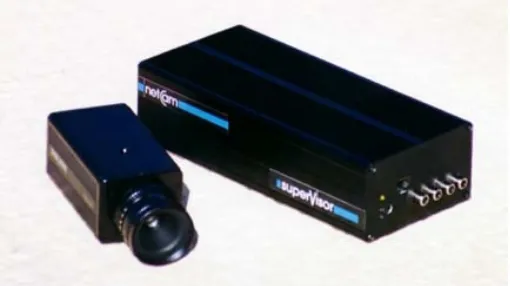
netCam superVisor
Figure 7-1 A photo of the superVisor (from the netCam Web site)
The superVisor system claims to offer the following functionality:
• Video transmission using standard Ethernet local area network (LAN)
• Dozens or even hundreds of cameras can transmit video simultaneously and continuously over the LAN
• Proprietary image compression technique that does not overload the network • Viewing and recording of video from any PC on the network
• Simultaneous viewing, recording and playback • Unattended recording capability
• Automatic motion detection
The units are standalone network devices with their own power supply, one LAN connection and either one or four video inputs. Setup was simple, an IP number needs to be allocated for the box (just as per any other Internet device), and the software installed on a PC. The software will only run if a parallel port dongle is attached to the PC.
The superVisor system provides only low resolution video feeds - 384 x 286 pixels, with a contrast of only 128 shades of gray (the video feeds are black and white only, colour cameras may be connected, but the colour will be stripped). This does indeed keep the network bandwidth usage down (64k bits per second per camera connection on average), but means that the images may not be suitable for some applications where it is necessary to clearly identify individuals.
The motion trigger can also be restricted to a specific area of the frame, for instance a door, whilst ignoring movement elsewhere (people moving around, a road perhaps, etc). Alarms can also be set to detect connection failure, possibly due to a camera being tampered with.
The minimum specification PC for running the superVisor software is a 133 MHz Pentium machine with 32MB of RAM, running Windows. For best performance a Pentium 200Mhz or higher is recommend.
7.3
Primavision Hobo
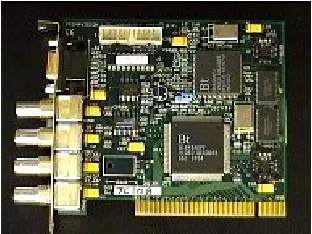
[image:18.612.228.384.281.398.2]Another system we tested came from Primavision Ltd, another UK company who deal in digital security solutions. This system requires a PC for the capture station as it is based on a PCI video capture card (alternatively, the system can be bought pre-built, with the software installed). The initial capture card can take up to four BNC video inputs, but is expandable via daughter cards (which do not require PCI or ISA slots), up to 36 video inputs.
Figure 7-2 The Primavision four camera capture card (from the Primavision Web site)
The system’s main features are claimed to be:
• Continuous or event based storage from external device inputs or integrated video movement detection with masking
• Expandable from 4 to 32 cameras
• On board fast multiplexing enabling full screen, quad or 9 way viewing, with sequencing • Simultaneous record and replay, even whilst on-line
• Pan and tilt camera control
• Multi-channel pre-alarm (records images leading up to and following an activation) • Comprehensive dial-out management controls alarm response
This system is more advanced than the superVisor system, but also more complicated to set up (though still not difficult). The capture card can handle both colour and black and white video streams, and captures images at a resolution of 384x288 pixels. Two different compression levels are available. The incoming video streams are recorded to disk by the camera station (the PC containing the capture card). This can either be a local disk or any available network drive (if the network bandwidth is good enough). Video is only recorded to disk on detection of an
As with the superVisor system, areas of the video may be masked off from the motion detection, but whereas the superVisor only allows a rectangle of interest to be specified, the Hobo system divides the image into small squares, and allows any of the squares to be masked off.
All of the main processing is performed on the PC containing the capture card, and no further hardware is required for normal use. However, if a user on the LAN wishes to view the CCTV video in real time, or review the incident list (and corresponding video footage) from their own PC then the NetView software can be installed to allow this. The NetView software requires TCP/IP networking to be installed, but the computers must be on the same workgroup, and the directory containing the stored video must be available as a shared folder. Note that under the DPA you must take reasonable steps to keep personal data secure, thus the setting up of shared workgroups or data stores must be considered carefully.
7.4
CCTV video switching systems – Microswitcher PLUS
While it is entirely possible to use only solutions such as those provided by Primavision and Netcam, we often need video feeds to go to monitors placed around a building, to time-lapse VCRs (as a back-up, or whilst testing the reliability of the digital solutions), as well as to human operators. This can be accomplished by the use of a video switch, such as that provided by ACI International - the Microswitcher Plus. The basic switch card can be installed into any PC (a Pentium 200 is recommended) and allows for 16 video inputs and 8 video outputs. Expansion cards allow a further 16 inputs per card, up to a maximum of 64 video inputs. Physical alarms can be integrated into the system via a further add-on.
Unlike the Primavision and netCam systems, ACI International is US-based. We experienced no difficulty in ordering a system direct from the USA.
The beauty of the Microswitcher is that it allows any of the 16 video inputs to be mapped on to any of the 8 video outputs (NTSC or PAL). This can be controlled manually at the host PC, manually at a remote PC over the network (via an extra piece of software) or automatically by programming “tours” between inputs and outputs. The software also allows (remote) control of pan, tilt, zoom (PTZ) cameras. The Microswitcher PLUS system also supports a large number of additional programmable features including:
• Define cameras to be displayed on monitors by time and day • Specify alarm actions by time and day
• Title all cameras with on-screen camera names • Run video tours by time and day automatically
• Send PTZ-equipped cameras to preset locations automatically by time and day
With such a video switcher it is possible to send four of the eight outputs to a system such as the Primavision Hobo. A fifth output can send a tour of all the inputs to a time-lapse VCR and the remaining outputs could be used to send video to various monitors around the building, which can display tours of the cameras. The Microswitcher can display time and date information on the outputs, which indicates to would-be thieves the fact that a live recording system is in place.
ACI International does sell its own video encoding board, but we have not evaluated it. ACI claims the board can send PAL video at 25 frames a second, using a minimum bandwidth of 640Kbits. We intend to try the add-on alarm device (which can work in tandem with the video switching) in the near future. Our current Microswitcher deployment is discussed in a later Chapter of this report.
The system’s only notable failing is that it does not (for US legal reasons, apparently) carry sound, so it cannot be doubled up as a videoconferencing system.
ACI offer free source code to sites wishing to integrate the Microswitcher with other security systems (such as card locks).
Costs: Microswitcher PLUS $2550, or $3049 with client control software (an academic discount is available). Additional slave card (16 inputs) $1250, ACF Alarm board $1191, 16-contact alarm card $157.
7.5
PC Cameras (aka WebCams)
Many PC's come with cameras connected to them, commonly known as WebCams due to their most common use - capturing images that are then displayed on the World Wide Web. The WebCam consists of the hardware (camera) and the software which digitises the camera output. Such systems can be very cheap to acquire and set up for PC owners, with a parallel port or universal serial bus (USB) camera (such as a Quickcam) costing £70 or less. Alternatively you can use a video capture card (such as the Winnov AV) which is installed inside your PC and into which you plug the video output from a (generally higher quality) camera.
We found the PCI-based Winnov AV cards, at around £150 each (US list price $199), provided high quality (640x480 pixel, 16.8M colour) digitisation and would recommend their use. The key criteria for WebCam use are resolution, colour capacity (if required) and speed of operation. Winnov supply Windows drivers (with free updates from their Web site) and there are also Linux drivers freely available on the Internet. One PC can host multiple capture cards.
Two of the better Internet sites for WebCam information are WebCam World and WebCam Resource, which feature useful listings of WebCam hardware and software (they appear biased towards the Webcam32 product, but it is a good product). More recent packages allow WebCam “video”, though usually at only a handful of frames per second at relatively low resolution (performance is better when run over just a local LAN).
7.5.1
GOTCHA!
GOTCHA! is a well-specified piece of WebCam software with motion detection and alarm notification designed in; it is specifically aimed at the security-conscious market rather than the more casual WebCam user who wishes to display a single view continuously.
Its main features include:
• Get notified via e-mail with an image attachment when motion is detected. • Setup GOTCHA! to post (using FTP) images created when motion is detected. • Get paged when GOTCHA! catches something.
• Call GOTCHA! on a remote PC to view the remote live or recorded video over a phone line. • Play back the entire day's events (or week's events) in one video time-stamped file using
minimal disk storage.
• Alert with audio message when people come into your office while you are away. • Mask out unwanted movement like traffic outside your window.
[image:21.612.187.427.312.510.2]• Use a timer to schedule when GOTCHA! should observe. Schedule multiple sessions per day.
Figure 7-3 GOTCHA! in operation. Beware signage…
We tested GOTCHA! in our own project laboratory when we heard that one postgraduate student was having his Polo mints pilfered slowly. GOTCHA! detected the offender the next day. Such use of digital recording is of course subject to the Data Protection Act. In this case the irony is that if the “thief” is known to the individual running the software, he or she can be identified from the image and thus the scenario is more likely to meet the DPA registration requirement.
A multicam version of GOTCHA! allows up to four camera sources to be monitored on one PC, given you have four capture cards in that PC.
7.5.2
Webcam32
One of the most highly recommended WebCam software packages on the Internet is Webcam32. Unlike GOTCHA!, the focus of Webcam32 appears to lie in more mainstream WebCam use, including live chat windows and streaming audio support. It does have some “intrusion” capability though.
[image:22.612.186.427.268.451.2]Webcam32 supports uploading of images to an FTP server. It also offers Web video “streaming” via either server push (the client browser downloads a JavaCamPush applet to receive images sent from a process which runs on the Webcam32 host) or image pull (using JavaScript to repeatedly fetch images from the Webcam32 host) methods. However, both techniques are inefficient in bandwidth usage as they do not use MPEG-style image difference techniques to only transmit image changes. The frame rate is also likely to be seconds per frame rather than frames per second. The server push can run from a pre-saved AVI file if desired.
Figure 7-4 Webcam32 in action. Lighting is an important issue.
For intrusion detection, Webcam32 has an image compare ability, whereby a percentage change threshold between frames can be specified. If the threshold is exceeded, the image can be either saved locally or uploaded to a specified FTP server.
An official Linux version of Webcam32 is under development at the time of writing.
Costs: Webcam32 licence $25.
7.5.3
I-Spy
I-Spy was the first WebCam software we trialled. Its functionality has been surpassed by
Webcam32, and it has no support for intrusion detection applications. One interesting property it does have is support for S/Key one-time passwords for the FTP image uploads.
Costs: I-Spy used to be an independent product but now appears to have been bought by
7.6
All-in-one WebCams
Some manufacturers produce dedicated WebCams. Such devices are a single compact network device containing a camera and Web server. As a network device it requires an IP address to operate. The advantage of such a system is that it requires no PC to host it, is easy to set up and is rapidly redeployable.
We trialled the Axis Communications network camera, which also has an FTP ability. The performance was good, but the device featured no “smart” ability, i.e. there is no way to use the device to only capture images around one “incident” in the same way as GOTCHA! can. Any “smarts” would have to be implemented at the client end (the process fetching the images from the device’s built-in Web server). The bandwidth requirement for the latest model, the AXIS 21000, is around 0.7Mbits for 10 frames per second at 320x240 or 1.3Mbits for 5 frames per second at 640x480.
The major drawback we found with the camera at the time of testing was the lack of a wide-angle lens. In most surveillance positions, a wide-angle view is desirable. However, the AXIS 2100, costing around £800, now features a replaceable CS-mount lens. Another concern is that the built-in Sony camera doesn’t work down to as low a light levels as it might ideally do. If poor light is a concern, a dedicated camera capable of lower lux levels may be preferable.
7.7
Remotely viewing CCTV video
There are a number of software products designed for video transmission or streaming.
Our initial pilot scheme in the Department used CU-SeeMe to allow any client to view footage from the CCTV cameras. CU-SeeMe is a videoconferencing tool that allows one to one, one to many, or many to many videoconferencing. One to one is simple as two clients directly connect to each other, but one to many and many to many require the use of a reflector. The reflector is basically the meeting point. Every user connects to the reflector, and can see all others
connected. The reflector gives control over who can broadcast video. To use CU-SeeMe for viewing CCTV video in real-time, we simply connect a CCTV feed into a PC with capture card running CU-SeeMe. The capture PC sends its output to the reflector, from where any user running the CU-SeeMe client can view the video. Bandwidth used for a discernable image is of the order of 100-200Kbits.
Unfortunately the CU-SeeMe reflector software is no longer freely available (the new product, MeetingPoint, is rather expensive) though an unsupported black-and-white only Linux reflector can be found on the Internet. As a result, CU-SeeMe is no longer a particularly cost-effective way to distribute CCTV footage.
the feedback delay would cause significant problems. And any intruder would have something of a “head start” on any security staff.
7.8
Bandwidth usage and Quality of Service
The bandwidth consumed by running video applications over a data network must be considered carefully before deploying a system, to avoid a scenario whereby “regular” network users do not have their service adversely affected by the video applications.
The two sections below briefly discuss Quality of Service (QoS) methods for Ethernet and routed IP networks. In a campus or building security scenario, most of the data transmission would be over Ethernet, with a limited number of routers on campus perhaps being used. It is unlikely that CCTV footage would need to be transmitted between JANET Institutions, but that doesn’t necessarily mean that Institutions shouldn’t require QoS methods to be supported across the JANET network.
There is a very good JISC/JTAP Report, Number 36, titled “Network Delivery of High Quality MPEG-2 Digital Video” in which methods for delivery of quality video streams are discussed. MPEG-2 is the technology used in DVD, and though the bandwidth requirements of various “flavours” of MPEG-2 vary, it will typically require 4-6Mbits of bandwidth.
It is of course possible to run video over data networks using TCP/IP video applications, but to do so over a dedicated private data network. This also has the advantage that the data is less likely to be snooped by regular network users (a property which is desirable under the DPA).
7.8.1
Quality of Service over Ethernet
One of the problems with attempting to transmit broadcast-quality video over an Ethernet network is the general lack of Quality of Service support. The current standards favoured for QoS over Ethernet are IEEE 802.1Q and 802.1p. The former defines a method for offering virtual local area networks (VLANs), the latter a MAC (link) layer method for prioritising packets to one of 8 priorities.
The unfortunate property of Ethernet networks is that saturation occurs at around 40% of
theoretical bandwidth capacity in a multi-host environment due to the statistical properties of the CSMA/CD algorithm such networks use. A point-to-point link in a 2-host network will approach the theoretical limit, but such scenarios are atypical. Thus a 10Mbit Ethernet is unlikely to be able to deliver a 4-6Mbit MPEG-2 stream on top of regular data services, while a 100Mbit Ethernet network may be able to cope with up to 6-8 high quality streams, if the network is dedicated to streaming. The advent of Gigabit Ethernet does offer the potential for combined data and streaming applications to co-exist more readily, though at present the costs of Gigabit
Ethernet remain relatively high. Also, many Institutions may only be considering upgrading to 100Mbit networks, yet alone Gigabit.
7.8.2
Quality of Service over Routed Networks
(most likely at different sites if separated by more than one router). The Resource Reservation Protocol (RSVP) is used to perform the QoS negotiation. IntServ is well-suited to video
transmissions, but router support is variable, which given the fact that the QoS obtained is only as good as the “weakest link” is often somewhat problematic.
The other router-resident QoS method is Differentiated Services, or DiffServ, which works more like 802.1p by assigning classes (priorities), in this case to IP packets. There are four main classes, the highest being expedited. The problem with DiffServ is that, for political reasons, it is usually only applied across the network of one Internet Service Provider (ISP). If the JANET Academic Network adopted DiffServ, it could apply packet prioritisation across its entire educational network, given router support and co-operation from the regional MANs.
7.9
Video over dedicated cable (including twisted pair)
Due to the difficulty in providing good QoS on Ethernet networks, it is currently still very difficult to offer broadcast-quality video to the desktop. While a handful of medium quality streams may be deliverable over a lightly-loaded data network, the quality will not be equal to that of raw video over regular 75ohm coaxial cable. The video may be sufficient for
videoconferencing, but be less than ideal for CCTV recording and use in a court of law (though it may be enough to alert a viewing staff or security person to a potential incident).
The best quality imagery is still to be obtained by running CCTV or video over dedicated coaxial or fibre-optic cabling. However, it is also possible to send near broadcast-quality video and stereo audio over Category 5 twisted pair cabling using a system called Sourcerer.
The Sourcerer system Web site explains their technology:
The Sourcerer Structured Cable Television System uses state of the art technology to send and receive broadcast-quality video and audio along twisted pair data cables. It is an active system resulting in signal quality which is virtually unchanged even after transmission over kilometres of cable. It uses existing structured cabling to distribute terrestrial, satellite and cable televison channels and indeed any composite video source such as TV cameras and VCRs. It works with domestic televisions, monitors and personal computers and each user can independently select and view channels using an infra red remote control keypad
It is rare in modern offices to have RF (radio frequency) coaxial cable and aerial sockets installed as a matter of course. In most new office buildings it is standard practice to install low-cost multi-pair data cable - often referred to as structured cabling, or UTP, FTP or CAT-5 - for use in computer networks and telephone systems. The Sourcerer system can be patched-in to provide TV distribution using spare cables already installed in the building.
The Sourcerer system can be used in video distribution applications such as airport information systems, point-of-sale promotional video and presentation message systems, where a number of monitors display the same signal source.
outlet, given the building is flood-wired in such a way that that outlet can be patched back to the receiving Sourcerer box.
The cost is around £200 each for the transmitter and receiver. Thus a redeployable surveillance capability running over one data point would be £400. A two-way videoconferencing ability running over two data points would cost around £800 (plus the cost of two cameras, microphones, speakers and monitors).
7.10
Conclusion
While it would be ideal to be able to make heavy use of local Ethernet networks for high quality video transmission, the technology to enable such an application is not quite available yet. The advent of Gigabit networking will facilitate such applications, in particular when combined with the IEEE 802.1p standard for packet prioritisation. Both technologies are still in their relative infancy (e.g. Gigabit was only standardised in late 1998). In a routed IP environment, QoS support needs to be offered in the routers, via IntServ (RSVP) or DiffServ, and this QoS has to be seamlessly integrated with the Ethernet QoS method.
Until QoS support in data networks is widely available, there are two options to consider:
1. Using dedicated cabling for video applications (be it data or raw video). Devices such as the Microswitcher PLUS can be used to automatically or manually switch selected video inputs to outputs which can perform intrusion detection (e.g. via GOTCHA!) and which store the resultant digital data. By concentrating video sources at a video switch, outputs can be sent to a variety of devices, be they traditional VCRs, quad processors or digital video or image capture devices.
2. Running off-the-shelf lower quality video applications over data cabling. The netCam superVisor delivers lower quality video (than “native” CCTV), but will operate reasonably well over a 100Mbit network. If only a few camera positions need to be monitored, and image quality is not a prime concern, such a solution may perform adequately well.
8
Social aspects of CCTV deployment
The full social impact of the deployment of a CCTV system is beyond the scope of this project. However, in the course of our project we did receive a number of comments, though all were made “informally” rather than being “official” complaints.
In response to suggestions that CCTV would help improve staff and student safety, one member of staff replied:
“I don’t think the majority of people “feel safer”, the type of intruders we get here are not bothered by security cameras, however some of the legitimate inhabitants feel spied on… I think people will need reassuring that the cameras are not going to be used “in evidence against them”. I know someone who works in a travel agency where they have this so-called security camera - it turns out it is also being used to watch the staff while they work and censure them for time wasting.”
This comment was typical of four or five comments received (out of 200+ staff in the
Department). There has been similar concern expressed over the use of card lock access logs, which would be a greater indicator of staff movements were card usage required in regular work hours instead of just outside work hours. Likewise, another security measure, the current ID card system (whereby all staff are obliged to wear their ID cards when in the building) was not universally well-received.
The Data Protection Act is, in theory, aimed at protecting the rights of individuals when their movements are recorded “digitally”. How effectively the DPA is policed will be an interesting issue, but Institutions deploying CCTV and/or card lock systems cannot afford to do so without investigating the implications of the new DPA first. The new Act significantly improves the rights of individuals, both in terms of rights of access to their personal data and in what Institutions can do with that data.
CCTV cameras are becoming more and more common, from car parks, shops, tube stations, city centres, and now in the workplace. The explosion in the use and visibility of CCTV systems could have considerable implications for our civil liberties. There are many concerns over the use of CCTV systems, such as invasion of privacy, reduction of frontline policing and that of crime simply being displaced.
One of the properties of the Internet is that it makes everyone a publisher, and gives everyone a platform to “speak”. It is thus no surprise that there are many Internet sites, both “amateur” and professional, which focus on privacy-type issues. These include Privacy International,
Statewatch, Lycos Surveillance and Watching Them Watching Us (see the References at the end of this report).
9
Deployment of a versatile video surveillance system
This Chapter describes the experiences we went through in deploying a CCTV system in our own Department. The process began shortly before the JISC funding was awarded, and has been ongoing since it ended. We see the issue of building security (much like network security) as being one subject to constant review and refinement.
9.1
Requirements
The main impetus to deployment came through concerns over the level of thefts from Department property. Two instances in particular had severe repercussions as in each case a number of PCs were stolen and, despite a central backup system being in operation, some data valuable to individuals was lost. Walk-in thefts are also a problem, with laptop PC’s being the prime target.
Given that a number of cameras are to be installed at a site, there are a number of obvious uses of the equipment:
• Deterrence of theft or crime
• An aid to prosecution of an individual when a crime has occurred • Improvements to safety and lone working environments
• Videoconferencing
Our main reason for installing a CCTV system was deterrence of theft, and that was the basis upon which we progressed, though we continued to consider the other uses.
Given that we had control over the wiring in New Zepler, we decided that we should seek to utilise a variety of media for video transmission:
• Dedicated 75ohm coaxial video cabling
• Video through software over TCP/IP (Internet Protocols) running on Ethernet or ATM • Video over Category 5+ unshielded twisted pair (UTP) data cables
The current standard wiring used for new data network installations is Category 5+ cabling, which is able to support 100Mbit Ethernet networking as well as a variety of other services (e.g. voice, ISDN and PC serial links).
We also chose to install 75ohm coaxial video cable on each floor. The cables were run back to the data control room on each floor, and from there patched down to the ground floor data control room where we chose to place our main video rack. The data, video, alarm and power cabling were each routed down a separate channel in the cable trunking.
9.2
Considerations for camera placement and technology
Given our main aim of deterrence of theft, our priority was to locate cameras at all entry/exit doors in the building (both New Zepler and the existing linked Mountbatten building which our Department also occupies).
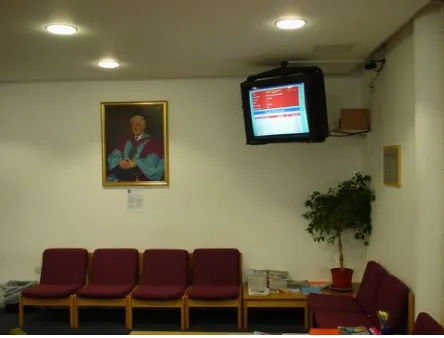
Deterrence requires visual feedback that a system is live, and thus we also chose to locate a monitor at each entry/exit door covered by a camera. The monitor should display either a tour of the views from the other doors or a “quad” picture showing multiple doors. Ideally the entry/exit name and current date and time should also be displayed. It should be noted that under the 1998 DPA there is now a question mark over whether such visual feedback is appropriate. Registration will be required, and as a result safeguarding digital or VCR recordings will be an issue of
importance.
Ideally we would deploy high quality, high definition cameras where needed throughout the building. However, we recognised that to do so would be a costly exercise. As a result, if a camera was to be deployed for a monitoring purpose (an aid to safety or lone working) we would consider deploying a lower quality black-and-white camera. Where identification was required, such as at doors, we chose to deploy high quality cameras from RS, colour where possible. A high resolution, black-and-white camera capable of delivering an image at 640x480 resolution costs upwards of £300, plus £100 or more for the lens. All monitors were compact 9” black-and-white Maplin models.
Cameras and monitors were wall- or ceiling-mounted, and powered from always-on fused power outlets. The lux rating for the camera is important; the lower the rated lux level the more able it is to offer a discernable image in low light conditions. Lenses were chosen to give an appropriate field of view for the placement; in a corridor a 30 or even 15 degree field of view is well-suited, while in the corner of a room or overlooking a door a 60 or perhaps 90 degree field of view is required. Cameras with built-in lenses can be bought, often quite cheaply, but the image quality is unlikely to match the dual component systems. Where possible the camera and cables were mounted in a tamper-resistant metal box, and physical alarms should be considered for the cameras themselves.
Even though the location of a camera may have been determined, the positioning is also
9.3
Designing a versatile system
As described in a previous Chapter, there is a wealth of digital video/CCTV solutions available. However, rather than run a purely digital system we wished to design a solution which was flexible and versatile enough to operate with and over multiple media. We felt that we should also experiment with a variety of techniques such that we could report on their effectiveness in this project.
The main components we now use in our live operational system, beyond the cameras and monitors, are as follows:
9.3.1
Video rack
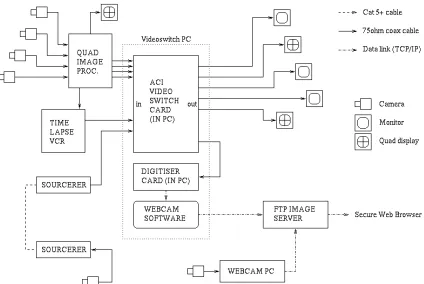
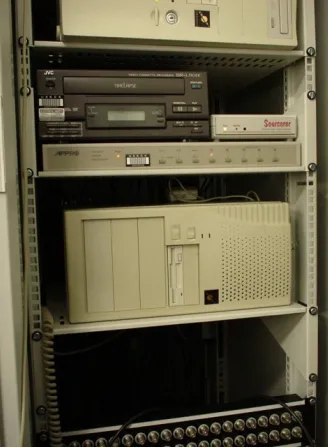
The heart of our coaxial video cabling, we have a full-height 19” rack in our ground floor data control room in which the majority of our video systems is housed. At the foot of the rack are four BNC patch strips into which the coaxial cables from each floor are fed. We are then free to patch video between any coaxial outlets in the building (of which there are some 50 or so) or into any of our video system components. The outlets can be used as either inputs (cameras) or outputs (monitors or digital capture devices).
9.3.2
Quad processor
To be able to display four video feeds on one monitor a quad processor device is required. The device we selected is able to sit in series with up to four coaxial video feeds and generate two quad video outputs from those feeds. It is thus possible to generate a quad image to be recorded to a VCR while feeding each camera output on from the quad processor to another device (e.g. a monitor or a PC capture card).
We chose a quad processor that could enlarge each quadrant of a recorded quad image on playback, and which, as an option, was able to add caption and time/date information.When digitising quad processor output, the resolution of the system is an important issue to consider, as you will be running at a quarter of the image size of a full screen (and thus the ability to recognise individuals will be reduced).
9.3.3
Time-lapse VCR
While we knew we would be recording digital footage from our cameras, we also wanted to be able to use traditional recording techniques as an extra layer of security. We thus bought a time-lapse VCR capable of recording output from either one camera or our quad processor over an extended period of time.
Such VCRs vary in record time from 4-8 hours (standard live VCR), through pseudo “real-time” devices which record 8 frames per second (and thus which run for 24 hours on one tape), to much longer-term VCRs which record for up to a week (at a frame per second or less).
9.3.4
PC with Microswitcher PLUS card
The most cost-effective switching system on the market that met our needs was the ACI International Microswitcher PLUS. This card fits inside a PC, takes 16 BNC video inputs and offers 8 BNC video outputs.
Figure 9-1 The videoswitch PC, also running I-Spy
With 16 video inputs it is possible to feed camera inputs through a quad processor into the Microswitcher, and to also feed one output from the quad processor back into the switcher. Programming tours is very easy to do; any input can be mapped to any output for any period of time in any sequence. Programming can be done at the host PC or remotely. The remote software could be either ACI’s client software, or it is also possible to use VNC to operate the hosting PC over the network (though we currently use the client software). Either way, a four-digit PIN number is required to gain control of the switcher.
The remote control of the switcher (which includes the ability for PTZ control) can be offered either locally or to dedicated security staff in another part of a campus. With one switcher output directed at a video streaming package, the remote user can choose which of the (16 or more) inputs to view on their local PC screen.
It is also possible to deploy multiple Microswitchers, and have the inputs/outputs mapped across the multiple devices. When driving 75ohm coaxial cable video, ACI suggest that the maximum cable run should be no more than 300 metres. We ran some Microswitcher feeds to over 150 metres without any observed problem or picture quality loss.
9.3.5
Sourcerer
We used Sourcerer transmitter and receiver devices to enable us to patch a camera into our videoswitch system from any da