No. 50 November-December 1989
THE
M
3D Graphics
In Depth
This whole issue is a project. Put UNIX on your 386, build a board to grab video images, build another to analyze voices, and then display all your graphics in 3D.
3D-Surface
Generation
page 8
The PC Video Frame
page 16Grabber
LIMBO, Part Three
Our robot project rolls on. page 22
PostScriptal Two
page 32A very graphic look at a very graphic language.
UNIX For The PC
page 40Which UNIX should you purchase for your new 386? There are some real bargains.
And More
• • •
On Your Own
An inside look at the lives of silicon valley consultants.
o 7447019388 3
$3.95
TECHNICAL
J
0 URN
.A L
.
Ufl!lf?!iiJ J/@fl!lf?
fP©lEifl5Ju
O!iiJ(1@
ill
[§J@r:JQf?iJfl!lO
[Lo@@f?o(1@f?J/ O!iiJ@ &!iiJ@O!iiJQQf?O!iiJ@ (1@@ODDD
Dig ital 1/0 and
Counter Card
• 32 Digital Input Channels- TTL compatible
- Low loading: 0.2 mA at OAV input
• 32 Digital Output Channels
- TTL compatible
- Driving capacity: Sink 24 mA, source 15 mA
• Intel 8253 Timer/Counter
- 3 channels of timer/counter - Breadboard area for flexible user
configuration
PCl· 720 ... $160.00
I
~... '
~ ' . . ~- ~ .~ /;: ..,.,
• • ~ , - { : : ~.'" I
•• >~naloglnput (t\IDconverter)
,·16single~ended channels, 12 bit -Input range:<+5Vto ~5V,+1Vto ~.1V
• Analog (:>utput( 01 A converter)
~ •• 2channel,12 bit.·
. ~O,,:+5Vfullrange
~ •••• Digital I/O
~16phannelse~:lCh, TTLcompatible
Introducing ...
The PC-LabCard
Family
Only from
HSC Electronic Supply
IBM PC/XT/AT and it's compatible models are moving into Industrial/Laboratory applications at an increasing rate. The reasons for this include their price/performance ratio and short user learning curve. PC-based data acquisition boards are now taking the place of the traditional data loggers or recorders which cost. several times more.
"PC-LabCard" is a family of add-on cards to turn your PC into a high performance data acquisition/ testing system at an attractive price.
It includes not only the hardware cards, but also the software, accessories and application support packages which come together to make a thoughtful solution to your PC-based automation needs.
Steppi n9 rvlotor
Control·Card
• Independen,t; simultaneous operation
Prototype Development
Card
• Large breadboard area (3290 holes) • Independent memory and 1/0 address
decoders built-in
• Memory and I/O ports are jumper selectable
• All bus signals are buffered, marked, and ready for use
PCL-750 ... $74.00
- ~ t.
-:-:-~-,--<
-;
?;:~,.-;<,
. ,:;:l!::~
14 Bit Super-Lab
AID
+
DI
A
+
DIO +Counter
-Analog Input (AID converter)
- 16 different channels"
- 14 bit, 25K/sec sample~ate ' ...•... ' -:-Input range: +5V to-5V, +1Vto.;1V
-Analog Output (D/Acomierter)
~ DIA Channels:
r
standard/loptional -14 bit, +/- 5Vfullrage .' .• . Digital I/O .. i .
-16channels each, TTLc()r11patibl~
• Counter
.; 1 channel. of timer/counter .:.Programmable'pacerfuhdiori·
• Counter
>r6hanneloftimer/counter
~.' PrOgrammable pacer function
of up to 3 motors
• ProgrammablespeedJrom 3.3 to 3410, ppS
PCL-714 .. ; .... " ... ~· ..• ;.;,.~L.· .. •.• .. ;.; .. $495.00 • Built~inacceleration control
l=>CL~712 .. ~ .. ~; ... ,.; ... ; ... $295.00 • OneClock'(pulse,·Direction) or
two,clock (OW, CCWPulses) output mode
llfl~~'(Q)f/~{ffJg~©D§JO'§J
:~~~~lg~~~~~tpu~~~~~iri°utPuts
Call ,the,~@@/Jjl1rdJ{j)[r~gl/'(#)@g
",' . .
:~~It~~~:ff~p~~~~~ outPutE/~g::~~iC
~{ffJf/§J .©U§1~i/©A\
...
@~'fl PCL.73a.~~""':""~""r"';"I
....;$395.0oRe~g~fce
Etectro~g~p~{~~~~e~~~~upPlies
.vv~ ship'Uf$~9()D
,,'
,(408)732~2814
HSC of Sacramento'· HSC,of$anta Rosa
We
shipto,APO/FPO
sa
sc' r5a,4mgeHn9tom, 'COCAkg84t9' ;"8' 6cSolt9atRI" eCdAw090SdS4D1r.'·"S>'/:3
. '" " " '"
"
(916) 338-254S,',
(707) 792-2277' '"
'-'1"1,,""""
tsICle"CCiUfQt'l"li.a
No
wI
Galif~(jrnla
'\'; ,':1 f,' ,:,,:,:~ I r-(·.'.,~· ,! !.,\lI.i:'';-.,~,~(.1 ,'"(",',,,./c-,ct0/;' ~ : ':; ';.',;~.:: ... ,:::.": ',~~(.»,~'j
:.~,~ "~:;~,·.\·.".','.I.·.~.'.'.,.,,!.'.t;,I.;,i.·.;.i.·.,
.•. :..1.·.i .• i,i,.:,; .•.·,.·.i.~.:
... :.,i •. I.: .•. • •.. ; .•1.l~l~r~~l~rl)
F
, ,,~--"," '~:;;v 'i'<"~'- ,,'::~'-' ~.<"<~·t:",!/.~:,·:,~~~·~,,1·,JJ<{,;:'·'j ,r .•
,j;/ ••• V,;\ i)': i;'+Y' fi~'t .• ;J?ifJ :\',,'1;;;',\ 1i','A:r,·.,!,H h"":"""';'"I':'~I"':! ',' }.', ;<:~.;:~\}
Twelve function keys for increased automatic operation.
Erasable template to label ;vur function key assignments. Switch allows
;vu to swap position of Ctrl and Caps Lock.
Switch-selectable for all IBM XT, AT, PS/2 and compatible systems.
FJ
Separate numeric keypad that switches to a multifunction business calculator with tilt-up LCD display. Includes memory,square root and percent keys. Keyboard and calculator status indicator lights.
Solar panel to
power
the calcu/ator-Extra largeBackspace and
Enter keys. even the com-when puter is turned
off!
$149~5
buys you
both
the hot-selling
spread-sheet
and
the
TurboCalc-lll
Keyboard/
Calculator.
For just $149.95-less than Quattro's street price, and a lot less
than its $247.50 sug-gested retail price, you can now get both
Bor-...
QUAl fRO
charge your spreadsheet and typing performance.
Like our famous tactile, positive-response keys that give you a much better feel for the road. So you can type faster with fewer mistakes
than ever before. And the new, enhanced IBM"lOl-key layout with some logical improve-ments-including separate numeric and cursor keys that let you cruise through
land's best-seller and""" . ·.~"i"!"T spreadsheet data entry without ever having to
shift Num Lock. the keyboard you need "More than 1-2-3" at
to drive it at top speed. less than half the cosr
Namely, the Turbo- That's what PC Mggazine
Calc-ill~ Keyboard! says about Quattro," the
Get better mileage from your desktop.
Calculator from !wt-selling spreadsheet
Datadesk. from Borland Imagine
In case you haven't noticed already, the keypad doubles as a full-function business calculator com-plete with its own pop-up LCD display. Which saves
Boost your what theyU say about
overall performance. this ~~dinary
With its built-in, utiau presentation-quality graphics, intelli-gent recalcs, unlimited macros, easy installation and compatibility with leading spreadsheet and database software, Quattro is made to order for your business.
And TurboCalc-ill is made to order for Quattro. Or for any other software you like to drive.
Because, as you can see, it's loaded with features designed to
turbo-space on your desktop and lets you perform any calculation with a single keystroke-no matter what software you're driving.
What's more, the keypad packs a solar panel, so you can start up the calculator even when your computer is idle.
We wouldn't steer you wrong.
Frankly, getting into a Datadesk
key-Reader Service Number 8
.,'
, < .•
<;
•••
...•
':
.'>
board would be an inspired idea at this price even if you didn't get Quattro in the bargain.
After all, as InfoWorld says, "if you haven't looked at Datadesk's key-boards, you ought to:'
According to the Washington Post, "for ingenUity of design and sheer
dollar value, Datadesk can't be beat:' And when it comes to your peace of mind, nothing beats our two-year
warranty.
What's more, if Quattro and Turbo-Calc-ill don't blow the doors off the vehicles you're currently drivrng,just
send them back within 30 days and well cheerfully refund your $149.95.
No questions asked.
How, you ask, can you take advan-tage of this remarkable offer? Just fill
out the coupon and send it in. Better yet, call us toll-free. And tell us to step on it.
DA.TA.DESK
All individual trademarks and copyrights are acknowledged.
rr:
-
1;1§:\la:~"t:$149
I
. -
95
Bundle includes Datadesk's TurboCa\c-11lKeyboard/Calculator for IDM" and compatibles and Borland's Quattro sllreadsheet. Add $10 shipping and handling per urut (Continental U.S. only). CA reSIdents please add $9.75 sales tax per unit.
# of Units: Amount Enclosed:
Com~uter Type*: Disk Size:
o
3lh" 05%" *1£ P /2, include additional $5 for cable adapter.Payment:
o
VISA DMC DAMEXo
CHECKMe
Card No: Exp.Date:
Name Company Name
Daytime Tek/>hone Address
City State Zip
Mail to: Datadesk, 7651 Haskell Ave., Van Nuys, CA 91406. FAX: (818) 780-7307
Or Call:
(800) 826-5398. IncA,
Call: (800) 592-9602'"
~-\
.}ml~fAW '.:C." /. '-=C,' 'c'._._---_._---fiNAllY A
debugging
tool tough enough to
handle the
DOS
Nasties.
New Version 2.0
Nasty over-write? No sweat!
Soft-ICE memory range break points help you track down memory over-write problems whether you are doing the over-writing or another program is over-writing you. Hung program? No problem! When the system hangs, you now have hope. With Soft-ICE you can break out of hung programs no matter how bad the system has been trashed. And with Soft-ICE's back trace ranges you can re-play the instructions that led up to the crash.
Program too large? Not with Soft-ICE! Soft-ICE runs entirely in extended memory. This means you can debug even the largest DOS programs. And since your program runs at the same address whether Soft-ICE is loaded or not you can find those subtle bugs that change when the starting address of your code changes.
System debugging? Soft-ICE is a natural! Soft-ICE is ideal for full source level debugging of TSRs, interrupt service routines, self booting programs, DOS loadable device drivers, real-time kernels, non-DOS O/Ss and ROMs. Soft- ICE can even debug within DOS & BIOS.
How Soft-ICE Works
Soft-ICE uses the power of the 80386 to sur-round your program in a virtual machine.
This gives you complete control of the DOS environment, while Soft-ICE runs safely in protected mode. Soft- ICE uses the
80386 to provide real-time break points on memory locations, memory ranges, execution,
II 0 ports, hardware &: software interrupts. With Soft-ICE you get all the speed and power of a hardware-assisted debugger at a software price. Don't want to switch debuggers? You don't have to!
Soft-ICE can run stand-alone or it can add its powerful break points to the debugger you already use. Use your favorite debugger until you require Soft-ICE. Simply pop up the Soft-ICE window to set powerful real-time break points. When a break point is reached, your debugger will be activated automatically. MagicCV with Soft-ICE
Using Soft-ICE with CodeView gives you the features necessary for professional level systems debugging. MagicCV and Soft- ICE can work in concert with Code-View to provide the most powerful debugging platform you will find anywhere.
"These may be the only two products I've seen in the last two or three years that exceeded my wildest expectations for power, compatibility and ease-of-use."
-Paul Mace
Paul Mace Software
New Soft-ICE 2.0 features
RUN
CODEVIEW~TM
Soft-ICEMagicCV
MagicCV for Windows
$386
$199 $199 Buy Soft-ICE &: MagicCV(W)
-Save $86.
Buy MagicCV and MagicCVW -Save $100.
Buy All 3
30 day money-back guarantee Visa, MasterCard and AmEx accepted
-Save $186.
• Y T I
A W A . 0 O'
O'P' .... CTIOl'ol
CJ Back Trace Ranges
CJ Symbolic &: Source level debugging
D EMS 4.0 support with special EMS debugging commands
CJ Windowed user interface
™iV
Nu-Mega
\j-TECHNOLOGIES
CALL TODAY (603) 888- 2386
or FAX (603) 888-2465
PO. BOX 7607 • NASHUA, NH • 03060- 7607
2 MICRO CORNUCOPIA, #50, Nov-Dec, 1989 Reader Service Number 110
IN 8K
- "
MagocCV
j;,':, '. CodeView is a great integrated debugger. but it uses over 200K of conventional memory. MagicCV uses advanced features of the 80386 to load CodeView and symbols in extended memory. This allows MagicCV to run CodeView in less than 8K of conven-tional memory on your 80386 Pc.NEW-Version 2.0 includes EMS 4.0 driver. Attention Windows Developers!
THE
M I C R 0
TECHNICAL
J
0 URN A L
MICRO CORNUCOPIA
8
16
22
32
40
49
54
NOVEMBER/DECEMBER 1989 - ISSUE NO. 50
Gregory K. Landheim
3D-Surface Generation
Take a two dimensional illustration and turn it into a three dimensional image? Sure. But it's not trivial.
Gene Toner
The PC Video Frame Grabber
Want to put your 'favorite' TV personality on your favorite dartboard? Want a stock of real-life images for your paint program? Then this is your project.
Bob Nansel
LIMBO, Part Three
This time we're deeply into the mechanics of this moving project.
Larry Fogg
PostScript Programming, Part II
Larry probes further into the graphic mysteries of FORTH, oops, I mean PostScript.
Bob Morein
UNIX Packages For The PC
This is the most complete comparison and discussion of 386 UNIX packages I've seen.
Linda and Karl Lunt
Life, Bliss, And Rocky Mountain SOG
A View From The SOG
Bruce Eckel
Capturing
&Graphing A Voice, Part 1
Bruce tackles another intriguing I/O project. Great information, even if you're not in great voice.
58
C'ing Clearly65
Culture Corner66
86World70
On Your Own78
Units and Modules80
Shareware90
Techtips82
Tidbits96
Last PageCover Illustration by Rob Sanford.
THE MICRO TECHNICAL JOURNAL
MICRO CORNUCOPIA
Editor and Publisher
David J. Thompson
Associate Editors
Gary Entsminger Larry Fogg Cary Gatton
Contributing Writers
Anthony Barcellos Bruce Eckel Michael S. Hunt
Scott Ladd Laine Stump
Advertising & Distribution
Erik Huston
Accounting
Sandy Thompson
Reader Services
Nancy Ellen Locke
Graphic Design & Production
Carol Steffy
MICRO CORNUCOPIA asSN 0747-587X) is published bi-monthly for $18 per year by Micro Cornucopia, Inc. 155 NW Hawthorne, Bend, OR 97701. Second-class postage paid at Bend, OR and additional mailing offices. POSTMASTER: Send address changes to MICRO CORNUCOPIA, PO Box 223, Bend, OR 97709.
SUBSCRIPTION RATES:
1 yr. (6 issues) $18.00
2 yr. (12 issues) $34.00
3 yr. (18 issues) $48.00
1 yr. Canada & Mexico $26.00
1 yr. Other foreign (surface) $36.00
1 yr. Foreign (airmail) $50.00
Make all orders payable in U.s. funds
on a U.S. bank, please.
CHANGE OF ADDRESS: Please send your old label and new address to:
MICRO CORNUCOPIA P.O. Box 223 Bend, Oregon 97709
CUSTOMER SERVICE: For orders and subscription problems call 503-382-8048,9 am to 5 pm, Pacific time, M-F.
TECHNICAL ASSISTANCE For help call 503-382-8048, 9 am to noon Pacific time, M-F
1-800-888-8087
BBS - 24 hrs. 300-1200-2400 baud 8 Bits, No Parity, 1 Stop Bit 503-382-7643
Copyright 1989 by Micro Cornucopia, Inc. All rights reserved
ISSN 0747-587X
6
TheAudit
Bureau
4
MICRO CORNUCOPIA, #50, Nov-Dec, 1989AROUND
THE BEND
By
David
J.
Thompson
Fifty
Isn't
Old
If You're A
Magazin~
...
Half A Century
As Sandy and I hand-stapled all 500 copies of the first issue of Micro C at our kitchen table, we had no idea that eight years later Micro C would still be around, and we'd be working on our 50th is~ue. Yep, and in those 50 issues there have been so many changes in this silly technology that even the changes have changed.
And innovations? Boy, have we seen innovations. Once we had only software. Now we have freeware, shareware, crippleware, vaporware, underware, and be-ware.
We've progressed from public domain programs with bugs to commercial programs with bugs. (Actu-ally, commercial programs always had bugs, it's just that the nasty little critters are getting harder to work around.)
Nowadays we're aiming for a computer on every desk. When we began Micro C, we hoped for one in every garage.
Anyway, with the big 50 upon us, I guess that means the honeymoon is over. It's time to get down to serious business-nose to the grindstone and ear to the ground. We've got to get off the fence and take a stand. «Larry, is there anything we can do about these stupid cliches without Dave noticing? -Cary) (Probably not. -Dave»
Salmon BBQ at the Port Alberni SOG
Lattice Tools & Libraries for
DOS and OS/2
We're the company that writes the language and the tools. Our libraries give you hundreds of ready-to-use functions, compatible with our compiler and other products.
Compiler Companion $100
Ten proven UNIX-like tools provide a complete programming environment, and reduce file handling tasks, regardless Qf programming language.
dBC III & dBC III Plus $250/$500
Networking & non-networking libraries let you write fast C programs to create, access and update files compatible with dBASE III.
Communications Library $250
A comprehensive set of high- and low-level functions for asynchronous communications programs using XMODEM, YMODEM, KERMIT or ASCII protocols.
C-Food Smorgasbord $150
A selection of utility functions including a BCD decimal arithmetic package, I/O functions, IBM PC BIOS interface, a Terminal Independence Page and functions including directory, clock and string.
Curses V Library $125
84 C screen management functions and macros that help you port between UNIX System V and the Pc.
SSP!PC $350
More than 145 subroutines eliminate tedious and difficult mathematical programming. Includes scientific, engineering and statistical mathematical routines as extensive and accurate as similar packages used on mainframes.
PANEL Plus with Source $495
A collection of interactive screen design tools plus more than 150 functions to help you create application screens.
HighStyle -Programmer's
Publishing Tool $375
HighStyle gives you everything you need to create attractive, highly polished documentation for your programs. Automatically creates tables and charts! Includes: Word Processor, Page Previewer, Snapshot Utility, Style Guides, Spelling Checker, Icon Editor, Bar Code Generator, Font Manager, and more.
To order Lattice C 6.0, send $250 in check or money order to: Lattice, Inc., 2500 S. Highland Avenue, Suite 300, Lombard, IL 60148. Or order by credit card at (800) 444-4309. FAX # (312) 916-1190, TELEX 532253.
Organize, Query,
&
Make Connections
Between Files of Information
MICRO EINSTEIN
The Expert System Shell
• Create expert systems
easily in minutes
• With pulldown menus and
windows
• Automatic rule generator
• Context-sensitive help
• Free example expert
systems
• Interactive full-screen
text editor
• DOS access from shell
• Turbo fast execution
(NOW 5
times faster!)
For Diagnosing ...
Monitoring ...
Indexing ...
Organizing .. .
Classifying .. .
&
Discovering links
between files of information.
Only $100! (Plus $5 StH)
Reader Service Number 72
I
.---
C~-
_-I
=1----'
ACQUIRED INTELLIGENCE
P.o. BOX 2091 • DAVIS, CA 95617 • (916) 753-4704
6
MICRO CORNUCOPIA, #50, Nov-Dec, 1989Letters
More Metaphysics
Reading your recent letters regarding Micro C's excursion into the metaphysi-cal realm, I thought I should write and add my vote of support for your edi-torial experiment. One of the reasons (there are many) I like Micro C is that those behind it come through as people, and interesting people at that. Your edi-torial was part of that. The same applies to the bits of National Geographic mate-rial another letter writer referred to.
Anyway, those who complained are entitled to their opinions. But I think an editor should be able to write whatever he wants in an editorial. As for those who cancelled their subscriptions, it seems to me pretty silly to give up 94 pages of great technical information just because you don't like the other two pages.
John Wells 467 Fraser st. Victoria, B.C. Canada V9A 6H2
~
~
Editor's note: Thanks John. After the ini-tial flurry of letters (which ran 50% pro and 50% con), we've received a steady stream of letters, BBS messages, and calls, most of them starting out discussing something else but ending with comments like yours. These are running 99% in favor.
I've noticed some local controversy now that our hospital is teaching "healing touch" therapy to its nurses. It's a healing technique in which (with patient permis-sion) the nurses support the patient's energy field. (Very similar to the Reiki heal-ing techniques I've learned.)
Several people wrote angry letters to the local paper and one even picketed the hospi-tal. But after that initial outburst, the nurses have received solid support from both the local lay community and the medical profession.
Reflections On The Radar Equation The confusion between the radar equation and the behavior of reflected light on the part of Bob Nansel and Don Sweet is because the radar return con-sists of scattered radiation. The usual target is irregularly shaped and each surface element reflects the incident radiation in a different direction.
So the target looks like a new source whose brightness is proportional to the inverse square of its distance from the radar. The signal returned to the radar is subject to the same law, so you do indeed multiply the two inverse squares to get the signal strength received per unit cross-section.
The mirror, on the other hand, simply changes the direction of the inci-dent light (if we consider it to be a per-fect reflector), and it is proper to use the inverse square of the total distance.
In other words, the proper analog to the radar is obtained by replacing the plane mirror with a polished ball bear-ing or a matte surface, which I think is what Nansel assumed for his maze run-ner. The radar equation has nothing to do with mirrors.
No doubt you will get a number of responses on this one, but maybe this will help.
Karl Theobald 1030 Granite Dr.
Granite Shoals, TX 78654
Editor's note: From the flood of re-sponses to this raging controversy, it ap-pears that interest in a topic is proportional to the fourth power of that topic's abstrusity (means it's not perfectly clear to everyone on first glance). Read on for another illumi-nating view.
Finally, you can choose the best editor for your needs without compromising performance or paying too much. And organiza-tions that want the "same" editor for everyone can pick VEDIT® for most users and VEDIT PLUS for their power users.
The new family of VEDIT text editors are upwards compatible, easy to use and offer exceptional performance, flexibility and stunning speed. (3 to 30 times faster than the competition on large files where speed really counts.)
Call for your free evaluation copy today. See why VEDIT has been the #1 choice of programmers, writers and engineers since 1980.
VEDIT Jr.- Unmatched performance for only $29.
All VEDIT editors include a pull-down menu system with "hot keys;' context sensitive on-line help, pop-up status and ASCII table, a configurable keyboard layout and flexible, unlimited keystroke macros. Edit files of any size and any line length. Perform block operations by character, line, fileorcolumn. Undo up to 1000 keystrokes- keystroke by keystroke, line by line, or deletion by deletion. Automatic indent, block indent and paren-theses matching speed program development. Word wrap, paragraph formatting, justification, centering, adjustable mar-gins and printing for word processing. Run DOS programs.
VEDIT-A best value at only $69.
Simultaneously edit up to 36 files and split the screen into win-dows. Search/replace with regular expressions_ Includes the best compiler support available-menu driven, easy selection of compiler options, supports "Include" files and MAKE utilities.
VEDIT PLUS-Ultimate programmer's tool for only $185. VEDIT PLUS adds the most powerful macro programming language of any editor. It eliminates repetitive editing tasks and permits creating your own editing functions. The macro language includes testing, branching, looping, user prompts, keyboard input, string and numeric variables and control over the size, pOSition and color of windows. Source level macro debugging with breakpoints and tracing. Macros developed with VEDIT PLUS also run under VEDIT.
30 day money-back guarantee. Call for pricing of XENIX, OS/2 and FlexOS versions. Very attractive quantity pricing is avail-able for schools, hardware and software vendors.
VEDIT and CompuView are registered trademarks of CompuView Products, Inc. BRIEF is a trademark of U nderWare, Inc. Norton Editor is a trademark of Peter Norton Computing Inc. OEdit is a trademark of SemWare.
'Supports IBM PC, XT, AT, PS/2 and clones withCGA, MGA, EGA, VGA, Wyse 700, Amdek 1280 and other displays. Also supports Concurrent DOS, DESOview, Microsoft Windows, PC-MOS/386 and most networks.
'Also available for MS-DOS (CRT terminals), TI Professional and others.
Introducing ..•
The 1st Family of
Low Cost, Powerful
Text Editors
VEDIT
Jr.
VEDIT
VEDIT PLUS
$
29
$
69
$185
FREE Evaluation Copy*
Call 1·800·45·VEDIT
Compare Features and Speed
VEDIT BRIEF 2.10 Norton 1.3 DEdit 2.07 Pull-Down menus Yes No No Yes Pop-Up ASCII table Yes No No No Keystroke macros 100+ 1 No 100+ Regular Expressions Yes Yes No No "Cut and Paste" buffers 36 1 1 100 Text (book) markers 10 10 No No Undo keystroke by keystroke Yes Yes No No Undo line by line Yes No No No Normal/max Undo levels 500/1000 30/300
-
-Variable tab positions Yes Yes No No Configurable keyboard Yes Yes No Difficult Integrated mouse support Yes No Yes No FILE LIMITSEdit files larger memory Yes Yes Difficult No Maximum line length >8096 512 65,535 512 Maximum lines/file 8,388,607 65,535 >65,535 20,000
COMPILER SUPPORT None None
Menu driven Yes No
-
-Select Compiler options Menu Difficult
-
-Support "Include" files Yes No-
-BENCHMARKS 50K FILESimple search 0.2 sec 1 sec 1 sec 0.3 sec Save and continue 1 sec 2 sec 2 sec 1 sec 1000 replacements 3 sec 19 sec 17 sec 2.5 sec BENCHMARKS 3 MEG FILE
Simple search 1:40 min 1:36 min Cannot Cannot Save and continue 1:05 min 3:23 min Cannot Cannot 60,000 replacements 3:18 min 1:44 hour Cannot Cannot Block-column copy (40 x 200) 2 sec 30 sec Cannot 2 sec Insert 1 Meg file in
middle of 1 Meg file 1:11 min 15:13 min Cannot Cannot PRICE $69 $195 $75 $54.95
CompuView
'Free evaluation disk is fully functional and can edit small files. Reader Service Number 7
P.O. Box 1586, Ann Arbor, MI48106 (313) 996-1299, Fax (313) 996-1308
[image:9.609.40.310.16.228.2]3D-Surface Generation
An In-Depth Look At Graphics, Part 1
Rereading the last 35 issues of Micro C, you're probably thinking that PCX and Mandelbrot are all you need to know about graphics. Wrong, Ruffy. There's something else, and it's three dimensional. (We go for depth,)
I
a public domain utility that did sur-thought it would be nice if there were face plotting, with hidden line re-moval. It would let you view the sur-face from any horizontal angle from 00through 3600
and any elevation angle from -900 to +900
• I couldn't find one, so
I wrote my own.
I planned to tum it over to the public domain, so I scrupulously reinvented the wheel at every step to avoid stepping on someone else's toes. My Bresenham's line drawing function turned out to be no-where near as nice as the one Professor Rasala of Northeastern University wrote in Pascal. So I translated his
implementa-8
MICRO CORNUCOPIA, #50, Nov-Dec, 1989tion to C and asked his permission to use it. He was amused that I bothered to ask, since Bresenham's is so standard. But if
you think it's easy to do one that's com-pact, true, and fast, go ahead and write it
yourself.
The project turned out to be a bear (actually, more of a female dog). When I got stuck on one thorn (or claw or tooth, to keep the metaphor straight) or another, I amused myself by translating a Pascal high resolution printer graphics module I wrote a few years ago into C.
The work dragged on, so I translated another module for scalable, rotatable, justifiable (well, just barely) character string plotting that works with the printer graphics module.
Finally the thing became a true night-mare. I was too far along to quit, and too far gone to continue. I locked myself in my house, along with several pounds of high grade Sumatran coffee, a box of cheap cigars, and more cases of beer than I could count.
a
use base 5 to count onmy fingers, and with my left hand for the ones, and my right hand for the fives, and a beer tucked in my elbow, I just couldn't get that high.) I sacrificed my Christmas and New Year and my entire tight brain to finish the damned thing before my liver failed.
How This Article Happened
Now that I had created it, I had to tum it loose. I sent it to the good folks at Micro C and asked them to distribute it
to the public domain for me. Somewhere in the letter (I felt guilty about the inabil-ity of the code comments to tell the full story) I offered to write an article. (In my delirium tremins I actually said I would be happy to do so.) They must have smelled the beer on the printout. They took me up on my offer. So, here goes.
What We Have Here
If you've been paying attention, you have a good idea already:
mod-ule for plotting 3-D surfaces with hidden line removal using an axonometric pro-jection, viewable from' any horizontal angle from 00 through 3600 and elevation
angles from -900 through +900
• (See
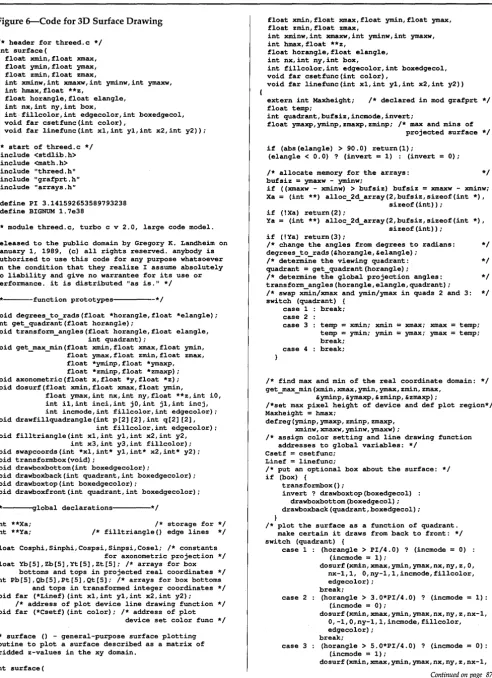
Fig-ure 6.) You can use it, as is, on any plot de-vice that uses left-handed, rectangu-lar, integer coordinates with (0,0) in the upper left comer, and for which you can supply a line drawing function.
(2) grafprt.c-an IBM Graphics Printer (and compatibles, e.g., Epson FX and LX) high-resolution graphics module. It sup-ports both Portrait and Landscape mode drawings, and it draws on 8" by 105fs" of a page.
(3) grafstr.c-scalable, rotatable, justi-fiable (left, right and center) string plot-ting module for use with grafprt.c
(4) arrays.c-contains a function to dynamically allocate 2-dimensional ar-rays of any type and size (not limited by 64K segments) up to the size of the memory available in the heap. It uses pointers to pointers to any type, but we won't quibble.
Editor's note: Part 2 of Gregory's article (in issue #51) will cover grafprt.c, grafstr.c, and arrays.c)
Why This Article Is So Long
Most graphics articles in technical ma-gazines give you a brief discussion of the math and the method. This is especially true of articles on 3-D surface plotting. They show you how to do it for a special case, then wave their hands and say something like, "Other view angles can be dealt with by appropriate matrix ele-ment exchanges and transformations."
This is great if you're a mathemati-cian, but then you wouldn't be reading the article, would you? These authors are perfectly justified by the niggardly atti-tude of editors who would rather fill their magazines with something useful, . like advertising. Fortunately, Micro C's
Xmax
+X
+Z
By
Gregory
K.
Landheim
123 Greene St. North Andover, MA 01845
[image:11.609.224.574.154.698.2](0,0,0) Ymln
Figure l-Coordinate Geometry and Matrix Correspondences
2
1
-x
~ Viewer
~
9h +x3
4
-y
Figure 2-Quadrants and View Angles
golden-hearted editors turn down volumes of advertising to give you in-depth articles and massive amounts of code.
My background is in physics, math, and mechanical engineering, and I have never formally studied computer science. Working with C.S. people, I find a circle of confusion (cold confusion) where they should be keeping coordinate geometry and matrices. So I'll dwell a lot on the basics.
I'll explain the methods behind the 3-D surface plotting module, the printer graphics module, and the associated string drawing module. Nonetheless, I shall attempt to keep things brief without sacrificing substance.
Coordinate Systems-The Basics Cartesian geometry acquired its name from Rene Descartes (1596-1650), who in-vented the system. Mathematicians, physicists, and other sensible folk like to use right-handed Cartesian systems, while computer scientists prefer left-handed systems.
I suspect that, somewhere in the his-tory of computer science, the math de-partments wouldn't loan their coordinate transformation routines to the C.S. de-partments, so the C.S. people did their own and got it backwards. (In fairness, I admit that most plot devices are intrinsi-cally left-handed.)
In all that follows, I assume all the coordinate systems except the plot de-vice's are right-handed and Cartesian. I also ignore a lot of fine points, but I'm just talking about basics.
A coordinate system can be left- or right-handed. Handedness refers to whether rotation angles are specified as clockwise from a reference axis, or coun-terclockwise. In right-handed systems, the rotations are counterclockwise. Make a fist with each hand, thumbs pointing at you, and note the direction your fingers curl.
If the reference axes are orthogonal (at right angles to one another), the system is rectangular. If the scales are the same on each axis, the rectangular system is called Cartesian.
Points in space are specified by coordinate pairs (x,y) in two dimensions, and triples (x,y,z) in three dimensions. The coordinate elements can be either positive or negative. A coordinate such as (-4.3,2.7,1.5) means you can locate the point by moving 4.3 units in the negative x direction, then 2.7 units in the positive y direction, then 1.5 units in the positive z direction.
In a 3-D right-handed system, if you point the index finger of your right hand along the positive x-axis, the middle fin-ger along the positive y-axis, and the thumb up; the thumb points along the positive z-axis. Which axis actually
points up is arbitrary.
When you learn Cartesian geometry, you start out with a flat surface, the x-y plane, and spend a lot of time learning the rules for 2-D. When extending it to 3-D, the instructor is used to drawing things on the blackboard, so y becomes "up" and z becomes "out" (unless they're computer scientists; then z is "in"). I liked to cut classes and learned with my paper flat on my desk, so I chose to make positive z "up".
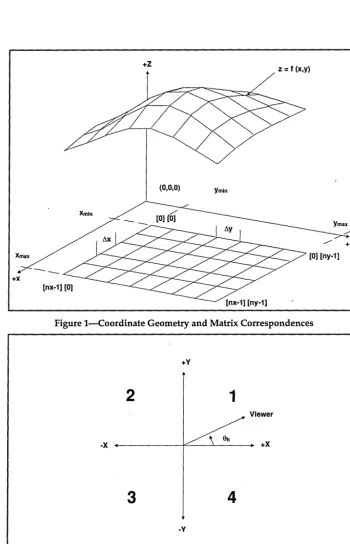
Since two lines define a plane, in a 3-D system we have an x-y plane, an x-z plane, and a y-z plane. With positive z "up," the x-y plane is the reference plane. This means that surfaces are specified as z = f(x,y). Figure 1 shows the coordinate system used by the 3-D surface module.
Grids And How To Use Them
Surfaces tend to be smooth, but draw-ing a smooth surface takes a lot of com-putational time. So we fake it by comput-ing the surface at grid locations. A rec-tangular grid is specified by the number of points in the x-direction and the num-ber of points in the y-direction, referred to, respectively, as nx and ny. To make life easy, we make the spacing between grid points constant in a given direction.
The domain over which we plot the surface extends from Xmin to Xmax and from Ymin to ymax. Figure 1 shows the re-lationship between a grid in the x-y
Figure 3-Axonometric Projection Figure 4-Three Coordinate Systems, CRT Display
[0,0] ox (IXmax, IV max)
OV (Pmax ; Omax) = (Xmaxw; V maxw) ~
T
Zlj = f(xlj;Ylj)I
.p +--- -7=---T---~ +p
--~-~<I>
~ ___
I
/ ' ~ +V--- ---1/
IV
i
(Pmln; Omln) = (Xmlnw; Vmlnw)(0,0) IX (OXmax,OVmax)
[image:12.611.26.550.440.725.2]plane and its axial coordinates. The ele-ments in square brackets correspond to matrix subscripts. You could, for ex-ample, store all the coordinates that de-scribe the surface in arrays declared:
float x[nx] [ny],y[nx] [ny],z[nx] [nY)i
This quickly eats up storage space. Since we're smart enough to use a Carte-sian system, we can completely specify the surface by the values Xm.in, Xmax, ym.in, ymax, nx, ny, and a 2-D array containing z. For use in surfaceO, the storage can be accomplished thus:
zmin
=
1.7e38; zmax=
-1.7e38i deltax = (xmax - xmin) / (nx-1)i deltay = (ymax - ymin) / (ny-1)ix = xmini
for (i=Oi i<nxi i++)
y
=
yminifor (j=Oij<nYij++)
{
z[i] [j] = f(X,y)i if (z[i] [j] < zmin)
zmin
=
z [i](j]; if (z[i] [j] > zmax)zmax = z [i] [j] i
Y += deltaYi
[image:13.604.223.554.360.728.2]x += deltaxi
Figure 5-Filling A Triangle
Xa [0] [J1 Va [0] [J1
Xa [1] ~] Va [1] ~]
where fO is an explicitly known function that can compute z for any (x,y) in the plot domain. surfaceO also requires Zmin and Zmax, so we might as well find them when we store the function values at the grid points in z.
The 2-D array Z is not actually an array. It must be declared as a pointer to a pointer (e.g., float **z). This lets us use array subscript notation for clarity in the code, but the compiler automatically ex-pands such notation to pointer offsets with a corresponding increase in speed over actual array access. Don't pass an array declared as float z[nxHny] to sur-faceO.
Quadrants And View Angles
In the x-y plane, the coordinate axes divide the plane into four quadrants. By mathematical convention, Figure 2 shows their labeling. Also shown is the relation-ship between the viewer's eye and the horizontal view angle (8h) in the x-y plane.
I depart from the standard mathe-matical convention of specifying the ver-tical view angle as the angle rotated downward from the positive z axis.
In-stead I use the more natural concept of elevation angle (eel) defined as the angle above the x-y plane at the location of the viewer's eye.
Axonometric Projection
This method of rendering 3-D objects in two dimensions was invented during the dark ages (Le., before computers). It
was quick and easy then, and it's quick and easy now. You lose perspective (especially when you're on your third six-pack and have to close one eye to read code). But it is quicker than a per-spective transformation (I think, don't quote me on this), and with surfaces you rarely need depth cues. If you would like a nice perspective transformation, see Reference (3).
When I developed the 3-D module, I began by defining the math transforma-tions with the viewer's eye located in or above quadrant 1. Figures 1 and 3 show views in that quadrant.
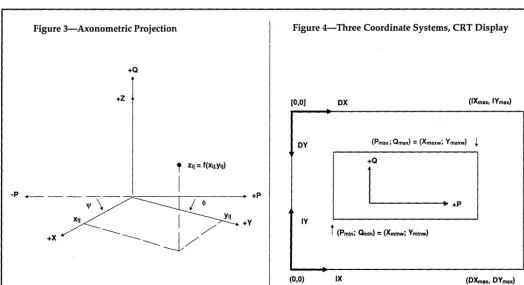
Figure 3 shows the transformation from (x,y,z) coordinates to projected (p,q) coordinates. Careful study reveals that for any point (x, y,z):
Add lightning fast graphics to your programs quickly and easily through the popular PCX file format. Why reinvent the wheel? Make your programs immediately compatible with hundreds of packages from Aldus PageMaker to ZSoft's PC Paintbrush with these linkable graphic libraries.
~
11
"An exceptional product" - Programmer's Journal, Aug
NEW! Version 3.5 of the PCX Programmer's Toolkit gives you over 60 powerful functions to manipulate bitmapped graphics. Use Virtual screens, Super VGA modes, LIM 4.0 support, a 300 page manual, 9 utilities including screen capture and display, and the fastest routines on the market. $195
Need Special Effects, but caught in a GRASP?
Why create a demo when you can create the real thing? Don't be trapped in a slideshow editor or demo program when you can use PCX Effects for the PCX Toolkit and your favorite programming language. A Music Language and spectacular effects for exploding your graphics! $99
Blazing Graphics Text
With PCX Text you can display text with graphics as fast as it always should have been. Display characters, strings, fixed and proportional text, background transparency, and more. Includes a font editor, 85 fonts, and text utilities for blazing graphics bitmapped text. $149
All packages support 12 compilers for C, Pascal, Basic, Fortran, Assembly, and Clipper. All modes of the Hercules, CGA, EGA, VGA, and Super VGA adapters are supported, up through 800x600x256 (22 modes in all). Assembly Language source code is optionally available. Trademarks are property of their respective holders.
M I C R O P R O G R A M M I N G
11315 Meadol'! Lake. Houston. Texas 77077. (713) 87(}0737
No Royalties! 30-day Money Back Guarantee. VISNMC/AMEXICOD/PO accepted.
p
=
y*cos(~) - X*cos(~)q
=
-y*sin (~) - x*sin (~) + z*cos (8e1)Traditional (pre-computer) ax- . onometric projections do not consider an elevation angle and do not multiply Z by its cosine. I do it to fake a vertical view-point.
So where do 'I' and <j> come from? If you look straight down at the x-y plane
(eel = 90°) as in Figure 2, then:
But <j> and 'I' are functions of eel, and of the viewer's quadrant. It's weasel time now. I would fonnally like to derive the following relations for you (I did it for myself), but it would take too much space, so I'll sketch an outline.
-Intuitively, for eel
=
0°: <j>=
0°, and 'I'=
0°. For other values of eel, as we rotate ehfrom 0° to 45°, then from 45° to 90°, <j>
=
'I' at 45° and <j> and 'I' must reverse their re-spective values on opposite sides of the dividing line fonned by eh = 45°.The resulting transfonnation, valid in all four quadrants, is:
~'
=
tan -1 ( sin (~) / cos (~)¥
=
(90°) - ($')sin (~) = sin (8.1) * sin ($')
cos (~)
=
cos ($')sin (~)
=
sin (8.1) * sin (¥)cos (~)
=
cos (¥)In quadrant I, of course, <j>' = eh. The inverse tangent function is necessary to get the transfonnation correct in the other three quadrant"s. transfonn_anglesO perfonns this work for later use in ax-onometricO.
More Coordinate
Transformation-Will It Never End? Okay. We now know how to get from 3-space to 2-space, but we're still work-ing with real, or floatwork-ing point, numbers. We want to display the surface in a win-dow, in integer coordinates. For printer graphics, we'll need transfonnations in both Portrait and Landscape modes; but lefs keep it simple by just considering Portrait mode. You use this mode on a CRT display (unless you do your work lying sideways).
We still have three coordinate systems (Figure 4): P-Q our projected coordi-nates; IX-IY, a right-handed, rectangular, space; and DX-DY, a left-handed,
rec-12
MICRO CORNUCOPIA, #50, Nov-Dec, 19893-D Mandelbrot Set
tangular space (the plot device's natural coordinate axes). IX-IY and DX-DY are integer spaces where you count by pixels on your CRT display. They map one-to-one onto each other and are non-Carte-sian if the aspect ratio does not equal 1.
You could easily skip the IX-IY space in making these transformations, but I find it a lot easier to decide where to place a window on a screen if (0,0) is in the lower left comer. IXmax is the pixel width of the CRT minus I, and IYmax is the pixel height minus 1 (we start count-ing at (0,0), hence the minus 1).
You can find (pmin, qrnm) and (pma", qmax) by projecting the eight comers of a box drawn to completely enclose the sur-face: (Xrni.n, yrni.n, Zmin), (Xmin, Ymax, Zmin), (xmax, ymin, zrnm), (xmax, Ymax, Zmin), (Xmin, Ymin, Zmax), (Xmin, ymax, Zmax), (xmax, ymin, Zmax), and (Xmax, Ymax, Zmax). '
This is done in get_max_minO, deter-mining which of the projected values de-fine (pmm, qmin) and (pmax, qmaJ and saving the projected coordinates for later use to draw a box around the surface.
In my source code, I never use varia-bles explicitly declared as p or q (corre-sponding to the description given in this text) preferring to think of them as x and y values, or reusing already declared variables. I define P-Q space in this dis-cussion purely for illustrative purposes. p and q are, however, used as arrays in do-surf
0
and drawfillrectangleO to store plot device coordinates. This is just a coinci-dence. Remember: Consistency is the bu-gaboo of small minds.You get to specify where the window will go. (Xminw, yminw) and (Xmaxw, ymaxw) define this in Figure 4. P-Q coordinates are then transformed to IX-IY coordinates by:
ix = Xlllinw + (Xmaxw - Xminw) * (p - Plllin)
/ (Pmax - Pmin)
iy
=
yminw + (Ymaxw - Yminw) * (q - ~in)/ (~ax - ~n)
This is done by defregO and transf(). "defreg" means "define region." It's real-ly a window definition, but I was afraid of conilicting with someone else's win-dow definition function name if I used "wind" as part of the name.
All you need to get into plot device pixel space (in Portrait mode) is:
dx
=
ix dy=
IXmax - iyitransfO handles this. It also plots in Landsca pe mode. If you use surfaceO . only in Portrait mode, you can speed things up by eliminating the Landscape transfonnation and making itransfO into a macro.
The Painter's Algorithm
You asked for a place
to
put your things ...
The
Tele™
FILE SYSTEM is just the thing
BerryComputers presents The Tele Toolkit - a complete Operating Systems Kernel
If It's Data, It Must Be A File
Tele's file system is modular at several levels. FS is respon-sible for all storage and transfer of data.
The physical interface to disk devices is through MS-DOS installed device drivers (MS-DOS itself is by-passed). Therefore, Tele will work with the same devices that MS-DOS supports.
Separate from the physical interface is the directory struc-ture. Tele supports installable file systems; each device can have a unique media format. Only MS-DOS compati-ble media are supported in FS.
Some other Tele components involve installable file systems. For instance, the UX component emulates the Unix kernel. Most of its code supports Unix media. Networks are sup-ported by an installable file system that causes directory operations to be performed on a device in a remote com-puter system. FS itself only supports MS-DOS media, but it provides the main hooks by which any other file system' can be emulated.
The bulk of Tele FS code supports hierarchical directory structures and file redirection. Because MS-DOS is not involved, you can use FS to avoid its restrictions.
Tele FS also includes serial communications support. 8250
controllers are supported in bidirectional interrupt mode. Ring and break indicators are also supported. Serial ports can be accessed directly, or redirected through the file
system. Files can also be redirected from the keyboard and to the console display and printer.
To support efficient communication and storage, FS con-tains a modified Huffman compression algorithm. The modification automatically recognizes fields within records and applies a different compression tree to each type of field. Compression can be processed directly on blocks or continuously and transparently within the file system.
All source code, in C and assembly, is included. Tele SK is required for FS. CD is also required for console device support.
Demo Diskette $ 5 (refundable with purchase) SK system kernel $50 (multitasking)
CD console display $40 (windows, requires SK) FS file system $40 (MS-DOS media, requires SK) OS core $130 (SK, CD, and FS)
Telephone support is freely available.
The Tele Toolkit is available from: Crosby Associates
P.O. Box i48
Sutter Creek, California
95685
CALL NOW TO ORDER:
(209) 267-0362
(FAX) (209) 267-0115
Visa, Mastercard, American Express & Discover Card accepted.
MS· DOS is a trademark of Microsoft Corporation. Unix is a trademark of AT&T
Reader Service Number 147
Figure 6-Code for 3D Surface Drawing
/* header for threed.c */ int surface (
float xmin,float xmax, float ymin,float ymax, float zmin,float zmax,
int xminw,int xmaxw,int yminw,int ymaxw, int hmax,float **z,
float horangle,float elangle, int nx,int ny,int box,
intfillcolor,int edgecolor,int boxedgecol, void far csetfunc(int color),
void far linefunc(int xl,int y1,int x2,int y2»;
/* start of threed.c */ #include <stdlib.h> #include <math.h> #include "threed.h" #include "grafprt.h" #include "arrays.h"
#define PI 3.141592653589793238 #define BIGNUM 1.7e38
/* module threed.c, turbo c v 2.0, large code model.
released to the public domain by Gregory K. Landheim on January 1, 1989, (c) all rights reserved. anybody is authorized to use this code for any purpose whatsoever on the condition that they realize I assume absolutely no liability and give no warrantee for its use or performance. it is distributed "as is." */
/*---function prototypesl---*/
void degrees to rads(float *horangle,float *elangle); int get quad~ant(float horangle);
void transform angles (float horangle,float elangle,
- int quadrant);
void get max min(float xmin,float xmax,float ymin,
- - float ymax,float zmin,float zmax,
float *yminp,float *ymaxp, float *zminp,float *zmaxp); void axonometric(float x,float *y,float *z); void dosurf(float xmin,float xmax,float ymin,
float ymax,int nx,int ny, float **z,int iO, int i1,int inci,int jO,int j1,int incj, int incmode,int fillcolor,int edgecolor); void drawfillquadrangle(int p[2] [2],int q[2] [2],
int fillcolor,int edgecolor); void filltriangle(int x1,int y1,int x2,int y2,
int x3,int y3,int fillcolor); void swapcoords(int *x1,int* y1,int* x2,int* y2); void transformbox(void) ;
void drawboxbottom(int boxedgecolor);
void drawboxback(int quadrant,int boxedgecolor); void drawboxtop(int boxedgecolor);
void drawboxfront(int quadrant,int boxedgecolor);
/*'---aglobal declarationsl---*/
int **Xa; int **Ya;
/* storage for */ /* filltriangle() edge lines */
float Cosphi,Sinphi,Cospsi,Sinpsi,Cosel; /* constants for axonometric projection */ float Yb[5],Zb[5],Yt[5],Zt[5]; /* arrays for box
bottoms and tops in projected real coordinates */ int Pb[5],Qb[5],Pt[5],Qt[5]; /* arrays for box bottoms
and tops in transformed integer coordinates */ void far (*Linef) (int x1,int y1,int x2,int y2);
/* address of plot device line drawing function */ void far (*Csetf) (int color); /* address of plot
device set color func */
/* surface () - general-purpose surface plotting routine to plot a surface described as a matrix of gridded z-values in the xy domain.
int surface (
14
MICRO CORNUCOPIA, #50, Nov-Dec, 1989float xmin,float xmax,float ymin,float ymax, float zmin,float zmax,
int xminw,int xmaxw,int yminw,int ymaxw, int hmax,float **z,
float horangle,float elangle, int nx,int ny,int box,
int fillcolor,int edgecolor,int boxedgecol, void far csetfunc(int color),
void far linefunc(int x1,int y1,int x2,int y2»
extern int Maxheight; /* declared in mod grafprt */ float temp;
int quadrant,bufsiz,incmode,invert;
float ymaxp,yminp,zmaxp,zminp; /* max and mins of projected surface */
if (abs(elangle) > 90.0) return(l);
(elangle < 0.0) ? (invert
=
1) : (invert 0);/* allocate memory for the arrays: */
bufsiz
=
ymaxw - yminw;if «xmaxw - xminw) > bufsiz) bufsiz
=
xmaxw - xminw; Xa=
(int **) alloc 2d array(2,bufsiz,sizeof(int *),- - sizeof(int»;
if (!Xa) return(2);
Ya
=
(int **) alloc 2d array(2,bufsiz,sizeof(int *),- - sizeof(int»;
if (!Ya) return(3);
/* change the angles from degrees to radians: */ degrees to rads(&horangle,&elangle);
/* dete~i~e the viewing quadrant: */ quadrant
=
get_quadrant(horangle);/* determine the global projection angles: */
transform angles(horangle,elangle,quadrant);
/* swap xitin/xmax and ymin/ymax in quads 2 and 3: * / switch (quadrant) {
case 1 break; case 2
case 3 temp
=
xmin; xmin xmax; xmax temp; temp=
ymin; ymin ymax; ymax temp; break;case 4 break;
/* find max and min of the real coordinate domain: */ get_max_min(xmin,xmax,ymin,ymax,zmin,zmax,
&yminp,&ymaxp,&zminp,&zmaxp);
/*set max pixel height of device and def plot region*/ Maxheight
=
hmax;defreg(yminp,ymaxp,zminp,zmaxp, xminw,xmaxw,yminw,ymaxw);
/* assign color setting and line drawing function addresses to global variables: */
Csetf
=
csetfunc; Linef=
linefunc;/* put an optional box about the surface: */
i f (box) {
transformbox () ;
invert? drawboxtop(boxedgecol) drawboxbottom(boxedgecol); drawboxback(quadrant,boxedgecol);
/* plot the surface as a function of quadrant. make certain it draws from back to front: */ switch (quadrant) {
case 1 : (horangle > PI/4.O) ? (incmode
=
0) (incmode=
1);dosurf(xmin,xmax,ymin,ymax,nx,ny, z,0, nx-1,1, 0,ny-1,1,incmode,fillcolor, edgecolor);
break;
case 2 (horangle > 3.0*PI/4.0) ? (incmode
=
1): (incmode = 0);dosurf(xmin,xmax,ymin,ymax,nx,ny,z,nx-1, 0,-1,0,ny-1,1,incmode,fillcolor, edgecolor);
break;
case 3 (horangle > 5.0*PI/4.0) ? (incmode
=
0): (incmode=
1);dosurf(xmin,xmax,ymin,ymax,nx,ny,z,nx-1,
Continued on page 87
-dosurfO simple, but it adds a lot of over-head. So we end up with a function that gives me a headache.
The painter's algorithm simply draws the projected quadrangles that form the gridded surface from back to front, filling (or painting) the quadrangle interiors with a background color as each is drawn, to cover up the quadrangle edge lines behind the current quadrangle.
Quadrant 1 serves as the basis of the whole thing. For 8h less than 45°, you draw each quadrangle in the column nearest the y-axis (Figure 1), then move one column out in the direction of the positive x-axis and draw that column. Repeat for all columns.
For 8h greater than 45°, you draw each quadrangle in the row nearest the x-axis, then move one row out in the direction of the positive y-axis and draw that row. And so on to the end.
Argument "incmode" of dosurfO con-trols whether to increment along the x- or y-axis. In either mode, an initial for loop over k and I projects, transforms to dev-ice coordinates, and fills the first quad-rangle in each column (or row). After that, we only need to project and trans-form two new points for each
quad-QEditTM
ADVANCED
rangle, because the other two are saved from the previous quadrangle. The quad-rangle is drawn and filled by a call to drawfillrectangleO. (I know, I should have called it drawfillquadrangleO, but I wasn't thinking straight at the time.)
Drawing And Filling
I don't see any way to fill a quad-rangle without breaking it up into two triangles. This is what drawfillrectangleO does. One vertex of each triangle is the one farthest from the viewer, another is the one closest to the viewer. After the triangles are filled, the quadrangle edge lines are drawn.
filltriangleO does the dirty work. It
first sorts the vertices of the triangle in ascending vertical order (in device coordinates).
In order to use loops instead of if
statements, I pretend the long side of the triangle consists of two lines, one of which has zero length. This trades off storage space for speed.
I used a variation of Bresenham's line-drawing algorithm to compute the coordinates of the triangle edge lines and store them in global arrays Xa and Ya. The computation is performed by
divid-ing the triangle into two conceptual trian-gles with an imaginary horizontal line at the mid vertex (Figure 5). The outer loop controls whether the computations are for the upper or lower triangle. The inner loop computes the actual edge lines coordinates.
A final loop fills the triangle by draw-ing blank horizontal lines from (Xa[O][jJ,Ya[O][jD to (Xa[1][jJ,Ya[1][j]). The j subscript indicates the
t
h pixel working from the top to the bottom of the tri-angle. Ya[1][j] equals Ya[O][jJ for all j.To make threed.c as general as possible, I use the same line drawing function for horizontal lines as for all the other lines. However if you have a high speed horizontal line drawer, use it.
References
(1) Advanced C Tips and Techniques, Paul Anderson and Gail Anderson, Howard W. Sams & Co., 1988.
(2) "High-Resolution Printer Graphics," Mark Bridger and Mark Goresky, BYrE, Nov 1985, pp. 219-232.
(3) ''The Painter's Algorithm," Richard Chandler and Gary Faulkner, PC Tech Journal, November, 1985, pp. 181-187.
• • •
• i The editor's speed, windows, and other features make it among the best text editors I've ever
The fast, easy to
THE~'
• _ '"
use, fully featured text
'ti1~
editor at an affordable price.
EDITOR
•• This small, blazing-fast editor lets program instructions, memos, letters, and assorted text data-bases flow easily between brain and computer.',
David M. Kalman, Editor-in-Chief, Data Based Advisor (September, 1988)
used. "
George F. Goley IV, Contributing Editor, Data Based Advisor (September, 1988)
If you are looking for the
right combination of price
and value in a text editor,
then give QEdit a try. At
ONt
y $54.95
and a
money-back
guarantee-you just can't go wrong.
paste or template operations
I Exit to DOS (or a DOS shell) from within QEdit
I QEdit supports 101 key key-boards, EGA 43·line mode, and VGA 50-line mode
To order direct call
404·428·6416
QEdit is fast, easy to use, and simple to install. At the same time you get all of these features and more.
I Completely configurable, in-cluding keyboard and colors
I Edit as many files simultaneously as will fit in memory
I Open up to eight windows
I 99 scratch buffers for
cut-and-I "Pop-Down" menu system and customizable Help Screen • Column Blocks
I Easy to use macro capability including keyboard recording
I Wordwrap and paragraph reformat capabilities
I Recover deleted text
I Automatic indentation for C programming
iii Import files and export blocks
I Locate matching braces and parentheses
I Execute command line compilers from within QEdit
I Great for use with laptops-QEdit edits files entirely in memory, saving drain on laptop batteries
I Compact-Even with all these features, QEdit requires less than 50k of disk space
Full 30
day money-back guaranteeSystem Requirements _ _ _ _
QEdit requires an IBM PS/2, PC/AT, PC/XT, PC, Pc/Jr, or compatible. Minimum system requirements are 64 KB of memory, PC· DOS 2.0 or MS· DOS 2.0 or greater, 50 KB of disk space. QEdit runs GREAT on floppy based systems and laptops.
Reader Service Number 127
~
fIii!Pl
.'"'CAN '; '.
~IIJiiliiiIJ """":
Cards. Add $3.00 for shipping-$lO.OO , for overseas shipping. UPS 2nd
, DAY AIR available within
the
U.s.
for ONLY $5.00, COO's accepted-please add $3.00 ••. Georgia residents odd 4% soles tox
SEMWARE™
730ElkCoveCt.· Kennesaw,GA 30144
QEdit and SemWare are trademarks of Applied Systems Technologies, Inc.
© 1989 Applied Systems Technologies, Inc.
Desktop graphics are quite possible. But possible and easy are two different things. Here's a video frame grabber that might just shortcut the process. This is yet another way to use an AID convertor.
T
here I was trying to come up with a catalog for IDEC's line of PC clone computers using one of our AT compatibles, Ventura Publisher, and our laser printer. The idea was to do as nice a job as possible on this document so that our customers could see what a desktop publishing system could do for16
MICRO CORNUCOPIA, #50, Nov-Dec, 1989', •• $ .
<' . . .
/1/
I
{
their efforts. I wanted to let our custom-ers see one of our systems. See it in print. Credibility. Yeah, that's the ticket.
How do I get a picture of our com-puter into our comcom-puter? My associate, Dr. Rao, tripping over one of the many extension cords strung out on the floor, suggested we needed a scanner to make the idea work. He was carrying a box of hard drives. ''They're about a thousand dollars," he said. I wondered if he was referring to the scanners or the hard drives. Turned out it was the scanners.
Then I looked at what I had to do: take a black and white picture of the sub-ject; develop and print the picture; copy
the picture on a copy machine to reduce glare; scan the picture; suck the result into Ventura; and then print it on the laser printer. Sounded like a lot of work.
So I proceeded to draw pictures of computers and disk drives for our cata-log using a paint program and a mouse, pixel by pixel. That was a lot of work. ''There's gotta be a better way," I grumbled.
. There is. The obvious solution is to hook a video camera into the computer. We immediately confiscated our little
VHS/C camcorder for the project. Sorry,
no more baby pictures! Using video added the dimension of being able to take pictures from tape. The situation was improving by the minute.
What Would It Take?
The two happiest days in a sailor's life are the day he buys his boat and the day he sells his boat. When it comes to en-gineering projects, the two happiest days are the day you design the hardware to do the job and the day you think you've fixed the last bug in the software. Some projects never have the final bug fix, some have it a great many times. This project seems to be of the latter variety.
Having decided to build the World's Greatest Low Cost Video Digitizer, there remained but a single question: How to do it? We needed some kind of AID con-verter. What speed? It was going to have to put its data somewhere. PC memory? Dedicated memory?
The Specification
We wanted to digitize standard
RS-170 video. Cameras, camcorders, and VCRs output this on their video output connectors. And, we wanted to do this in real time.
because they both depend on the be-holder.Real time in the RS-170 video world is about V60 of a second. This is the time it takes to paint one field of video. The rewards for being able to digitize one field of video in real time are de-finitely worth the effort.
If one can digitize "on the fly," a "snapshot" can be extracted from any video source. Without this capability, the subject of the picture must remain still, or the video source frozen. Some cameras and VCRs do a credible job of this, but
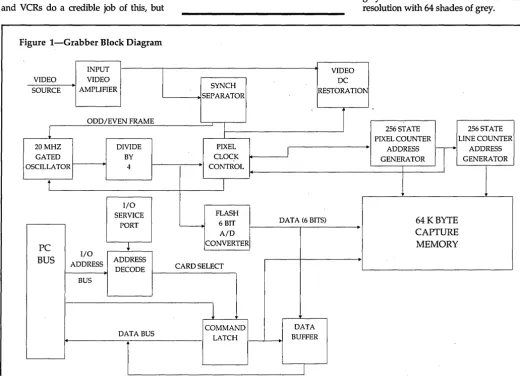
Figure l-Grabber Block Diagram
INPUT
VIDEO VIDEO
SOURCE AMPLIFIER
ODD/EVEN FRAME
1
20 MHZ DIVIDE
GATED BY
OSCILLATOR 4
i
I/O SERVICE
PORT
PC
+
I/O
BUS ADDRESS ADDRESS
DECODE
BUS
DATA BUS
~
f
one can digitize
"on the fly," a
"snapshot" can be
extracted from any
video source.
By
Gene Toner
IDEC, Inc. P.O. Box 69 Fountainville, PA 18923 (215) 249-0673
we (and perhaps you) don't have this feature on our video gear.
So we want to digitize an entire field in real time. Where do we put it? RAM is
an attractive place. We could use one of the system's DMA channels for depositing the result of the AID conver-sion directly into memory.
How many pixels? How many shades of grey? Well, the best PC video adapters around these days are VGA. They have a grey scale mode which allows 320 x 200 resolution with 64 shades of grey.
VIDEO DC SYNCH
RESTORATION SEPARATOR
I
1
256 STATE 256 STATEI PIXEL COUNTER LINE COUNTER
PIXEL
I
•
ADDRESSn-
ADDRESSCLOCK GENERATOR GENERATOR
CONTROL
J
FLASH
6 BIT DATA (6 BITS) 64KBYTE
- t
A/D CAPTURE
CONVERTER MEMORY
CARD SELECT
1
COMMAND DATA
LATCH BUFFER
J
[image:19.600.41.562.334.710.2]Sounds like a good place to start, especially since a field of RS-170 video has only about 244 lines of vertical reso-lution available. (Actually 2621/2 lines, but
some of these get consumed by vertical retrace.) Because we work in a digital world, the number 256 is much more ap-pealing than 320 or 244. So we went with 256 x 256 x 64 shades of grey.
In a standard video signal, every hori-zontal line takes roughly 63 Jlseconds. Of that 63 JlSec, video takes up about 53 JlSec, with the remaining time devoted to horizontal synchronizing information. After the dust settles over the calculator, the result requires a sampling rate of 5 MHz to slice that 53 JlSec up into 256 samples.
Another result is that with a normal PC-XT (4.77 MHz) computer, you wouldn't have enough bandwidth availa-ble to stuff all these samples into com-puter memory using the machine's DMA chanilel. You would have to use dedi-c