No
.
42
July/
August 1988
T H E
M
Maintaining
PCs
Keeping Your Hard Drives
Running
page
B
Lose your hard drive and
you're
losing a lot
more than $500. You're losing data
.
Troubleshooting PCs
page
14
Finding the defective IC
is
usually easy
if
you know what
you're
looking for.
XT Theory
Of Operation
It's a lot easier to make sense
out of a problem
if
you know
how
the
circuit
works.
Simulating A Bus
page 24
page
32
Once we have the system running
we
may
as well observe something with
it.
Plus:
Ray Tracing (Part 2)
page
18
West Coast Computer Faire
page
40
Inside PCX Graphics Files
page
42
Testing Your Product Idea
page 67
And Much, Much, More
11111
11
-
0.
7
~
.
I
II
,
I
l,19
Al
31
_
.
'.
$3.95
CASES &
POWER SUPPLY
150 Watt Power Supply (XT). 200 Watt Power Supply (AT). XT Slide Case .
50.00 80.00 34.00 XT Flip Top or XT Slide
with Lock & LED . AT with Lock & LED.
MONITORS
EGA/CGA (Auto Switch) . VGA/EGA/CGA Color .. CGA Color.
Amber 12" TTL . Green 12" TTL ..
38.00 65.00
.. .. 452.00 . ... 600.00 .. 295.00 89.00 89.00
VIDEO CARDS
Color /Graphics/Parallel . 256K EGA Graphics. Mono/Graphics/Parallel .. A Tl Graphics
Solution-52.00 . .. 125.00 49.00
Mono, Herc. Color Emulation on Mono CGA ... (List 299) 125.00 ATI Wonder Auto Switch Mono, Herc CGA, EGA, VGA
Any monitor, Any software, Auto conversion . (List 499) 299.00 EGA, CGA, VGA (640x480) . . .185.00
EXPANSION CARDS
Clock Card. 25.00 Dual Floppy Disk Controller . 25.00 Joystick . 25.00 Gravis Analog Joystick . 49.95
Game Port 19.00
Multi-Function, 1 ser/par/clk/game/ 2 floppy . 61.00 Parallel (printer) . .. .. .. .. .. .. 19.00 Dual Serial Port Card
-1 installed switchable Com l,2,3,or4 .. Kit for 2nd Port 640K RAM (0K installed).
29.00 20.00 .. ... 35.00
Prices are subject to change without notice.
Shipping CHARGES will be added.
MOTHERBOARDS
XT/Turbo 4.77 /lOmhz. .. ... 109.00 AT 6110 mhz Choice of Award,
Phoenix or DTK Bios . XT /Turbo 4. 77 /8 mhz .... 80386 8/16 mhz/ Award Bios &
. .. 350.00 99.00
lMB RAM, made in U.S.A. .... 1595.00 For XT I AT memory. . ... $Call
FLOPPY DISK DRIVES
Fujitsu 360K. Toshiba 360K .. Teac 1.2 MB .
Toshiba 31/z" Drive Kit 720K .. .
Toshiba 3W' Drive l.44mb .... ..
89.00 99.00 .. 125.00 .125.00 .. . 145.00
- Pictured keyboard is 5339
-KIT OPTIONS
*MS DOS 3.21or3.3 w/
OW Basic . . . 95.00 *5339 Keyboard Sub ...•.... 24.00 *Color Options:
(Includes video card & monitor)
CGA Color . . . 200.00 CGA/EGA Color ... 410.00 CGA/EGA/VGA Color ... 590.00 ASSEMBLY AND TESTING
XT Systems . . . 60.00 AT /80386 Systems ... 80.00
XT KIT WI 2 Floppy Drives.
Includes: 0K RAM, Serial, parallel and game
portS, clock/ calendar, AT-Style keyboard, cabinet, power supply, mono graphics card and amber or green monitor. Keyboard switchable turbo.
8 mhz with lock, LED, Reset & Turboswitch ... 579.00 lOmhz with lock, LED, Reset
& Turboswitch ... '.... 599.00
XT KIT W /20MB Hard Drive.
Includes: 0K RAM, Serial, parallel and game ports, clock/ calendar, AT-Style keyboard, cabinet, power supply, mono graphics card and amber or green monitor. Keyboard switchable turbo. 8 mhz with lock, LED, Reset
& Turboswitch ... 879.00* lOmhz with lock, LED, Reset
& Turboswitch ... 899.00* *(For 30MB Miniscribe add $50.00)
80386
KIT-Includes: 8/16 mhz, lMB RAM, 1 360K floppy drive, 1-1.2 MB FD, 1 40MB HD, Award bios, switchable keyboard, monochrome monitor, mono-graphics. Serial/ parallel ports, case, power supply, game port, clock/ calendar. Main board made in U.S.A.
2675.00
80286 .. AT KIT
Includes: 0K RAM, 1.2 MB FD, 1 360K floppy drive and 40 MB Seagate St 251 hard drive, 61 lOmhz, serial, parallel and game ports, clock/ calendar, AT-style keyboard, cabinet, power supply, monographics card, amber or green monitor, keyboard switchable turbo.
1495.00
Reader Service Number 2
KEYBOARDS
5339 Professional XT-AT w I 12 function key 5060 Keyboard AT Style .. KB101 Keytronic.
69.00 55.00 67.00
Free Instructions with Each System
HARD DRIVES
& CONTROLLERS
AT 40 MB Seagate #251-1. AT ST 4053 HD. AT (MFM) Hard Drive &
floppy controller (WO). AT RLL HD & FD controller . 20 MB Miniscribe HD
with controller . 30 MB Miniscribe HD
with controller .
SOFTWARE
The Twin Spreadsheet Leading Edge Word
Processor .. Ventura Desktop
Publisher by Xerox . Learning Dos-MicroSoft
ACCESSORIES
1200 Baud Modem - Internal (Leading Edge Model L)
..445.00 . . .545.00
.140.00 . .. 189.00
. 349.00
..369.00
49.00
49.00
.. ... 525.00 ... 45.00
Hayes compatible . 99.00 2400 Baud Modem - Internal
(Leading Edge Model L)
Hayes compatible ... 219.00 1200 Baud Modem - External
Hayes compatible .. V20-8mhz ... Memory Chips .
..119.00 14.00 ... (call for prices)
DEPEND ON MICROSPHERE The components and products we sell are
chosen specifically because they have been proven
in our own use and testing. We guarantee our
cards will be compatible when purchased all
together. 1)'
~\$"€. .
N£,"\}J "'-£, BUILDING YOUR
\. OWN CLONE
****FREE BOOKLET****
*90-day warranty/30-day money back (subject to restrictions)
~MicroSohereNC
~COMPUTERsr.MicroSphere, Inc.
P.O. Box 1221 Bend, Oregon 97709 (503) 388-1194 Hours: Monday-Friday 9:00-5:30
T H E
MICRO
TECHNICAL
J 0 U R N A L
MICRO CORNUCOPIA
JULY/AUGUST 1988 - ISSUE NO. 42
FEATURES
COLUMNS
8
David ThompsonKeeping Your Hard Drives Running
14
18
24
32
40
42
Think you're taking good care of your hard drives? Really? You're covered for every possible problem. Right? Ok, go ahead and ignore this article. Make my day.
Dan Evans & Don Doerr
Troubleshooting PCs and XTs
Chip-level troubleshooting doesn't have to take days. Ten minutes is their max.
Ear I Hinrichs
Ray Tracing on the
Tl34010 (Part 2)
If you're interested in
graphics or just puzzled about solving quadratic equations in assembly language, then this is your dimension.
Larry Fogg
XT Theory Of Operation
Larry thought he was done after he finished the last of the XT's smart chips. However, you don't have a computer without pasting a few of these guys together.
Bruce Eckel
Simulating A Bus
If you're really interested in getting your computer off its digital jag and into the analog
world then this bus based A/D project is a great start.
David Thompson
The West Coast
Computer Swap Meet
After missing the Faire for six years I was very surprised.
Sam Azer
Working With PCX Files
5-3e pF
Y1 14.31818 MHz
R2
519
READY
RES 1S RESET
CLK88
4.n MHz
PCU<
This is a sneaky article. To understand graphics file formats you need to understand how graphics are displayed, especially color graphics. Sam explains both.
50
C'ing ClearlyScott Ladd looks at two exciting new C packages, one from Zortech, the other from WATCOM.
56
86 WorldLaine leaves the U.S., his 286 system under his seat and a giant screen on his mind. (66 lines anyone?)
64
ShareWare67
On Your Own70
Pascal Column7 5
Culture Comer86
Technical TipsCP/M CORNER
83
CP/M Notes84
Kaypro ColumnFUTURE TENSE
72
Tidbits96
Last PageCover illustration by Paul Leatherwood
THE MICRO TECHNICAL JOURNAL
MICRO CoRNUCOPIA
Editor and Publisher David J. Thompson
Associate Editors Gary Entsminger
Cary Gatton
Technical Department Larry Fogg
Director of Advertising
& Distribution
Laura Logan
Accounting Sandy Thompson
Order Department Tammy Westfall
Graphic Design Carol Steffy
MICRO CORNUCOPIA (ISSN 0747-587X) is published bi-monthly for $18 per year by Micro Cornucopia, Inc. 155 NW Hawthorne, Bend, OR 97701. Second-class postage paid at Bend, OR and additional mailing offices. POSTMASTER: Send ad-dress changes to MICRO CORNUCOPIA, PO Box 223, Bend, OR 97709.
SUBSCRIPTION RA TES: 1 yr. (6 issues)
2 yr. (12 issues) 3 yr. (18 issues) 1 yr. Canada & Mexico 1 yr. Other foreign (surfaca) 1 yr. Foreign (airmail)
$18.00 $34.00 $48.00 $26.00 $36.00 $50.00
Make all orders payable in U.S. funds on a U.S. bank, please.
CHANGE OF ADDRESS: Please send your old label and new address.
MICRO CORNUCOPIA
P.O. Box223 Bend, Oregon 97709
CUSTOMER SERVICE: For orders and subscription problems call 503-382-8048, 9 am to 5 pm, Pacific time, M-F.
For technical help call 503-382-8048, 9 am to noon Pacific time, M-F.
RBBS - 24 hrs. 300-1200-2400 baud 8Bits, No Parity, 1 Stop Bit
503-382-7643
Copyright 1988 by Micro Comucopia, Inc. All rights reserved
By
David Thompson
The West Coast
Computer SOG
Jim Warren, founder of the West Coast Computer
Faire (and wearer of the skates) will be joining us in
Bend this summer for SOG VII. You too can join him for rafting, desktop publishing info, sessions on how-to ser-vice drives and systems, Al, C++, SCSI, the latest from Intel, compiler writers, a technical book author, and (of course) much, much, more. Sign up for the Saturday evening banquet and you'll hear Jim ask the burning question: ''When are we going to do something useful with microcomputers?11
Don't wait to send in your registration. We're look-ing forward to seelook-ing you in Bend July 14-16 for what's going to be the biggest, most informative, most laid-back Semi-Official Get-together (SOG) ever. (Held again at the Central Oregon Community College campus.)
Last year's attendees told us they'd gotten ten times as much out of SOG as they got out of those $300+ con-ferences their employers were sending them to. At SOG they not only learned much more, they (and their families) enjoyed it immensely.
Added Attractions
During SOG, Bend will be hosting the Cascade Cy-cling Classic. The Classic has been on the bicyCy-cling tour for many years and attracts the top professional teams. On Sunday, July 17, they'll be winding up the competi-tion with a criterium in downtown Bend.
In addition to the competition, there1
ll be brunches, beer gardens, concessions, the works. It's a great way to relax after all the mental strain of white water rafting and all-night (technical) discussions.
Tell your boss that SOG is not only a great source of information, but ifs also an incredible opportunity to add really sharp technical people to your personal net-work. Networking made the original West Coast Com-puter Faire great.
Tell your family that Bend is one of the most beauti-ful communities in the Northwest. Over 250,000 skiers come here during Mt. Bachelor's seven to nine months of snow. (The U.S. Olympic alpine and nordic teams stay on the COCC campus while they train here.)
But summer is our biggest season. We get water skiers, sailboarders, backpackers, fishermen, horseback riders, bird watchers, hang gliders, astronomers, geologists, rock climbers (ifs a world famous rock climbing area), and rock collectors.
Blaise puts the
Accent on C with
____.,.;TOOLS PLUS/5.(J
Enhance your Microsoft C programming environment with
C TOOLS PLUS/5.0™- a new, quintessential library of C
· ns. C TOOLS PLUS/5.0 from Blaise Computing Inc. puts a prime
uickly building professional applications using the full power of
Version 5.0 and QuickC. Now you can concentrate on program
having full control over DOS, menus, interrupt service routines,
esident programs, printer and keyboard control, and more!
C TOOLS PLUS/5.0 prebuilt libraries are ready to use
with either QuickC or the Microsoft C Version 5.0
com-mand line environment. Complete documented source
code is included so that you can study and adapt it to your
specific needs. Blaise Computing's attention to detail, like
the use of full function prototyping, cleanly organized
header files, and a comprehensive, fully-indexed manual,
makes C TOOLS PLUS/5.0 the choice for experienced
developers as well as newcomers to C.
Continuous refinement of Blaise Computing's library
products has produced a collection of tools that are
unsurpassed for reliability, functionality and ease of use.
Built upon the widely acclaimed C
TOOLS PLUS,
C TOOLS PLUS/5.0 includes such highly-developed
atures as:
·cursor memory. t. fonnatted output.
+INTERVENTION CODE
- Schedule C functions at specified times, inter-vals or with a "hot keY,' NEW!
-Take full advantage of DOS, even from memory ... · .. ·.· • .. . . . w-oriented output. NEW!
+INTERRUPT SERVICE ROUTINES
-Capture DOS critical errors and keystrokes.
resident programs. NEW! +FAST DIRECT VIDEO ACCESS - All monitors, even EGA 43-line mode. +PRINTER CONTROL
- Access BIOS print functions. NEW! - Install hardware interrupt handlers.
•RESIDENT SOFTWARE SUPPORT
- Control the DOS PRINT utility. NEW! - Install, detect and remove memory resident
programs. +UTILITIES AND MACROS •MENUS - Take advantage of DOS file structure. -Horizontal and pulldown. -Manipulate data types, far & near pointers.NEW!
NEW! - Access any memory areas with fast "peek" and - Lotus-style support. NEW! "poke" macros. NEW!
C TOOLS PLUS/5.0 supports the Microsoft C Version 5.0 and QuickC ompilers, requires DOS 2.00 or later and is just $129.00.
ASYNCH MANAGERTM
Version 2.0 IMPROVED!
. ... ·.·$129.00 ·.
· < . . rventk1n.code; screen.>: .. 'h .a.GA 4~line textrnode.sUPwrt; "'' ·• direct een access; DOS fHe handling and · ;" more. For Turbo C. ·
•A•'< • , ?r'
Turbo POWER SCREEN . ·.
"$129.00 .
NEW!.General screei;rmanagement: 1uilintw :~
screens; block mode data entry orJielQ,4iy~ '.;; . , .. field control with instant §creen a99e~. Now,.;...:;. · · for Turbo Pascal 4.0, soon forCand .BASIC. . ....
Turbo POWER TOOIS PLUS $12~.M
NEW VERSION! Now supportsT;urboPascal 4,0. Screen, window, and
menu
management including EGA support; DOS memorycon-trol; ISRs; scheduled intervention code; and much more.
Turbo ASYNCH PLUS $129.00
NEW VERSION! Now supportsTuroo Pascal 4.0. Interrupt driven support for the COM ports. 1/0 buffers up to 64K; XON/XOFF; ur)
to 19.2K baud; modemcontrolancj XMODEM file transfer.·. ·
PASCALTOOLS/TOOLS 2
$175.titf
Expanded string and screen handling; gr.jp~.
ics routines; memory managem~nt;ge,neral.
program control; DOS file.supportarid more. For MS-Pascal.
ASYNCH MANAGER '$175.00
Full featured interrupt driven supj)Ort for the COM ports. l/O buffers up. to 64K; XON/,
XOFF; up to 9600 baud; modem.control arid XMODEM. For MS-Pascal. . .
Key Pilot . .. . . $49.95
"Super-batch" program. €reate patch files which can invoke programs and provide .. input to them; run aqy p{ograni unattended; create demonstration programs~ analyze key>. . ·
board usage. • · · ·
EXEC $95.00.'
NEW VERSION! Program chaining
execu-. tiv:eexecu-. Chain one program from another in.qif-. ferent languages;in.qif-. specify ci)mm~ 4at;tareas;lesS'than 2Kofoverhead. · · ·
RUNOFF $49.,95,
Text formatter for all programmers; flexibl¢ Printer opntrof; user-defined variables~ inde* generation; general macro.facility. Cr~f~d ~n Turbo PaS¥U. ·
TO.ORDERCALLTf>LLFREE
.
800~333-8Q87C ASYNCH MANAGER is a library of functions designed to help you incorporate asynchronous communication capabilities into your
application programs. Version 2.0 has been rewritten especially for · tB~X MJMBER-338139 · ---·
Microsoft C Version 5.0 and Borland's Turbo C. Simultaneous ·
---
-buffered input and output to both COM ports at speeds up to . - - - .
9600 baud, XON/XOFF protocol, modem con-
---:ud
ies o f-trol and XMODEM file transfer a~e af!long - - - -tbe ptitlle ac~~~J' products· r
the many features supported and is pnced at t ~es\ Sen~~~ 1{~rtnation on 'i dets add $4.~ 10
just $17 5.00. ' Enclosed is nd tne tnore in Dotnestic or standard air.
-' 0 p\ease se d Sa\es T~· a\ £~press )
-Blaise Computing Inc. has a full line of support I A residents a~
10
oo
for Feder phone:~-- ----products for both Pascal and C. Call today for your \~PS shipping, .w·- - - 'Zip:---:--
-free information packet. t Natne:---:.__--- State:---B~P· Date.
• \
p..~d~
_B_L_AI_S_E_C_O_MPUTING INC.
\~~~~or }A~~2560 Ninth Street, Suite 316 Berkeley, CA 94710 (415) 540-5441 \ . .
Letters
A Pat On The Back
Well done on the new look of the cover, although there was something nice about the "magazine-in-the-brown-paper-wrapping" look of old. A person needed to appreciate the merit of the product to see past the veneer.
Anyone subscribing to such a non-glossy magazine was demonstrating in-telligence and uncommon good sense. To be a subscriber was to be one of the few. Now, alas, the front cover looks as good as its contents and thus will at-tract those shallow sorts who join the ranks of the intelligentsia just to look good. You know the people I mean -yuppies, computer store sales staff, and other pretenders.
But I suppose the bottom line had to
be acknowledged and viability
presumably depends on the survival of the prettiest. Or, as Joan Collins would say, "A stitch in time .... " But I am so glad that the contents have remained untouched and unsullied.
What I find of more merit than the rest is the editorial. It is that honest, down to earth style of writing that ap-peals to my thinking. I would liken it to the style used by the host of the "Prairie Home Companion" radio show. A mar-vellous show which, to me, has as its strength a five minute story which espouses a philosophical tenet some-times, but with subtle, quiet humour al-ways. Keep up the good work.
You write of PC Network having major problems. I need to write in their defense for what appear to be genuine attempts to make good their debts. In
September, 1987, I ordered two
products, MASM and Turbo Pascal. One month later I phoned to be in-formed that neither was currently avail-able. I cancelled MASM but requested that the TP3 order be continued. About that time they billed my credit card for
the TP3.
In mid-December I left the UK for Australia. The three month surface mail delivery time to forward mail from the UK to Australia meant that I had no idea if the product was in the mail or not. I had kissed that money goodbye.
So it was a very pleasant surprise when I noted in March this year a credit into my credit card account from PC Network. So I suppose PC Network is doing the correct thing and there might be hope for other creditors.
One advertiser in Micro C which I
must comment upon is MicroSphere. I can only praise their service and friend-ly help. I purchased an XT clone in pieces and found the assistance in processing the order to be above average. A good company to deal with. And Cindy is nice to talk to.
I asked in my last letter to you (about two years ago) whether you really look like the "Around The Bend" column characature; I didn't get an answer. Whatever, please bring back the full-frontal. The dismembered head looks a little lost. What is his history?
Bevin
J.
Pettitt Officers Mess RAAF Glenbrook NSW 2773 AustraliaEditor's note: Everyone in the office said I had to write a great "Editor's note" for your letter. First, we're thinking of bringing back the brown paper wrapper. It will be a jacket that'll slip over the fancy new covers so you can fool those impressionable people.
Second, if you think the contents are "untouched and unsullied," you should hang around here at final edit time. The ar-ticles get touched, the columns get touched, and the editors get really touched. As for sullied ...
Third, thanks for the comments on MicroSphere. I know the president of MicroSphere and he's really not too bad (as brothers go). The MicroSphere staff knows that when I show up I'm probably looking for Techtips, a weird part, or lunch.
As for the funny looking guy, he originally appeared in Punch many many years ago. Sandy found him in a clip-art book and we've both really enjoyed his com-pany. We've had three illustrators try to modify him (sitting, lying down, etc). Only one was able to even approximate the original feel of the character.
C Defended
In his article "C vs. Assembly Language" (Micro C issue #40), Eric Isaacson raised some interesting issues. But his article reminded me of the sort of one-handed arguing one hears from a politician trying to gather votes. It was by no means a balanced discussion of the merits of C and Assembly lan-guages.
Perhaps this is because Mr. Isaacson is somewhat misinformed about C and its capabilities. But he does have an ex-cellent point when he states, "All those easily-accessed library functions can be very seductive; the programmer stops bothering to find the most efficient way to perform a task."
He then demonstrates this point with
several lines of poorly written C. He
went to great lengths to attempt to prove that C is inherently inefficient. What he did prove was that bad C com-piles into bad assembler. Eric, you can't make chicken soup from chicken drop-pings.
In his example, a careful use of the sizeof() operator eliminates the need for the strlen() function that Eric thought was necessary. For the one line of code that Eric's example focused on, the 153
Stuff Dreams are made of ...
The Dream-286
AT 6-10 MHz 0 wait state motherboard 1 Megabyte of on board RAM1 5.25 " TEAC 1.2M floppy drive 40 Mb Seagate ST-251 hard drive Hard/floppy disk controller card
The Dream-386
Quality 80386 based motherboard 1 Megabyte 80 ns on board RAM12" amber Samsung monitor (tilt/swivel) Hercules compatible mono graphics card AT style keyboard
2 Parallel ports and 2 serial ports 640 x 480 on board EGA/VGA card 1.2 Megabyte 5.25" floppy drive Western Digital WA-2 hard/floppy
controller card
Professional enhanced (101 key) keyboard Case (UL and FCC approved; reset switch, power and turbo LEDs, keyboard lock AT case (UL and FCC approved)
Complete!
$1495
Novell
Networks
Taylored to your exact
needs. Call for more
information.
Hard
Drives
Seagate 20 MB ST-225 ... $269
Seagate 30 MB ST-238 ... $299
Seagate 40 MB ST-251 ... $ 395
Micropolis 71MB Hard Disk .. $ 695
Seagate 80 MB ST-4096 ...
$
750
Floppy Drives
Fujitsu 360K 5.25" ...
$
79
Fujitsu 1.2 MB 5.25" ... $ 99
Fujitsu 720K 3.50" ... $115
Fujitsu 1.44 MB 3.50" ... $145
Floppy drives come with mounts
Citizen Printers
180-D
(180 cps 9 pin) ... $189
MSP-40 (260 cps 9 pin) ...
$ 339
MSP-45 (wide carriage) ... $489
Tribute 124 (200 cps 24 pin) .... $ 545
Tribute 224 (wide carriage) ... $ 689
Premiere 35 (daisy wheel) .... $499
~
Complete!
$2295
The Dream-88
XT 10 MHz Turbo motherboard 640 K of on board RAM 1 5.25 " 360K Fujitsu floppy drive 30 Mb Seagate ST-238 Hard drive Floppy controller card (controls 2) Hard disk controller card 12" amber Samsung monitor (tilt/swivel) Hercules compatible mono graphics card AT style keyboard XT slide case (UL and FCC approved)\... Complete!
Communications
1200 Baud internal ...
$
95
2400 Baud internal ... $185
1200 Baud external (w/ cable)
$
99
2400 Baud external (w/ cable) $235
PC FAX (card
& software) .... $ 415
Accessories
PC Mouse w/ paint ... $115
M-8 Logitech mouse ... $ 99
Kraft IBM/Apple Joystick .... $ 25
DreamTech
5175 Moorpark Avenue San Jose, CA 95129 Open Monday - Saturday 10AMto 7 PM Phone: (408) 996 - 2373Laptops
Sharp 4051 ... $ 795
NEC EL ... $1685
NEC EL HD ... $2495
Software
Borland Turbo C ... $ 79
Borland Turbo Pascal ... $ 69
Borland Turbo Basic ... $ 69
Borland Quattro ... $139
Borland Sidekick ... $ 49
Microsoft Works ... $149
Microsoft Windows v2.03 .... $ 69
Microsoft DOS 3.21 ... $ 69
Microsoft DOS 3.30 ... $ 99
Norton Utilities (Advanced) . $ 89
Norton Commander ... $ 45
Stella Business Graphics II .. $ 99
Peachtree Accounting System $179
~-~
All systems carry a full 1 year warranty (original system configuration only). Prices are subject to change without notice.~ All orders are shipped UPS FOB San Jose unless otherwise specified at time of order. California residents add 7%
~ sales tax. All registered trademarks are recognized. Dream-88, Dream-286, and Dream-386 are trademarks of Dream Tech Computers. Reader Service Number 16
Keeping Your Hard
Drives Running
A couple of months ago I spoke to the Eugene PC group. My topic (officially) was desktop publishing but audience questions quickly turned the subject to hard drives.
Whenever the subject comes up in Micro C we get letters, lots of letters. Bring up the subject in a computer store and you'll be in-viting fisticuffs. (Sound like a hot topic?)
Y
ou and I both know that RAM data is volatile. Turn off the machine and the data goes away.(Sometimes it goes away before you
turn the machine off, but that's a dif-ferent story.) Anyway, because of RAM' s memory problem, we use floppy and hard disks for our permanent data storage.
floppy drives aren't exactly carving those bits onto rock. And hard drives?
They write by long distance - their
heads floating on air just above the disk surface. (At least, that's what they're supposed to be doing.)
I got out the old Tektronix 547 oscil-loscope and looked at the data coming from the heads on a standard floppy drive. You talk about gibberish, this stuff was little better than static. (The fact that the drive was reading CP /M files had nothing to do with it. Really, it didn't.)
Anyway, if you saw the kind of junk a drive gets when reading a perfectly good disk, you'd realize just how easily a drive can get confused when things deteriorate.
A Magnetic History
Four score and 2,000 eons ago, when man was first discovering tools (a large club, Borland's Graphics Toolbox ... ), he kept data on magnetic tape, giant spools of magnetic tape. Unfortunately mag-netic tape was susceptible to magmag-netic fields (surprise), and those magnetic fields included the information written onto the magnetic tape (even bigger surprise).
So, even though the tape was care-fully stored in a dust free, humidity controlled, flux free, tiger free, every-thing but rent-free cave, data written on part of the tape would migrate to the tape surfaces pressed tightly above and below it. (Which explains why we have so little data from that period.)
Sometime after the Pleistocene era, scientists discovered they could stop the migration (of data) by writing the stuff onto disks. (Later, native worshippers of high-tech dumpboxes were credited with inventing the wheel.) Anyway, floppies were the perfect solution to data migration (at least until man in-vented the double-sided floppy).
Eight out of ten
times, if we get a
225, it has the
same problem. It's
usually the stepper
driver transistor
More Recently
So we arrive at the 20th century. Oh, we're still losing data, but that's okay, we've got plenty. And, backing up data just makes more of it to lose (which is no doubt why many people studiously avoid backing up). So I'll do my best to help you protect your data without overwhelming you with the "B" (Back-up) word.
First, Backup Your Data
Backup your data but don't use BACKUP. Folks I've talked to recom-mend using Fastback from Fifth Genera-tion Systems or Corefast from Core In-ternational. I've found that Backit is also reliable (though its menus are a bit overwhelming and obscure).
Second, The Drive/Controller
If you're going to be slovenly about backing up, you may as well get the most reliable hard drive and controller you can.
The more I investigate the drive marketplace, the more I'm convinced that hard drives are very, very good. With a few exceptions, it's hard to go wrong. Unfortunately, there's little agreement about which drives are the current exceptions.
By
David
J.
Thompson
The problem is change. Ask a manufacturer about life expectancy and he'll tell you 20,000 hours. And he's right. That's what he expects. He won't know whether a particular drive will make it until it makes it. If the batch averages 14 months before failure then it'll take him 14 months to find that out.
So, we're using history to predict the future, but because of rapid change, his-tory isn't a very good predictor. Anyway, with that in mind, here goes.
Work In Progress
I called Seagate and talked to the guy who designed the 225. He told me they'd tried a number of fixes for the track-1 problem (munched guard band) before finding a solution. And, he said they were constantly working on in-creasing the life (and reducing infant mortality) of their units. (I'm not sure he could have said anything else, but he was convincing.)
He wouldn't say specifically what they were doing, but he promised to have a marketing person call me (one who could say, specifically). So far, no one has called.
I arranged to talk to the folks at Rotating Memory Service during the West Coast Computer Faire. (I was there. They were there. We should talk. Right?)
If you were to buy a hard drive right now, what would you get?
"Control Data, we use them in all our own systems. But they start at 40 meg. For a smaller drive look at the PTI, Peripheral Technology from Southern California.''
Are they cheap?
"Yes, very. They're very competitive with Miniscribe's 3 1/2" and I think that's what they're trying to hit. We also found the Miniscribe to be very good. Miniscribe has the best technical sup-port."
What about 3 1/2" drives in general?
"3 1 /2" drives are like the others -they read, write, seek and spin and -they have their share of problems. The 8425 Miniscribe is the leader in the 3 1/2s. Rodime also has a good 3 1 /2."
If I Can Butt In A Minute:
I should mention here that I've also heard good things about the Miniscribe 5 1I4" half height 40 meg, and I've been hearing more and more positive reports about the latest Seagate 25ls. The 251 is faster and cheaper than the Miniscribe, and its infant failures (at least) seem to have disappeared.
But, a Seagate technician I talked to in early April mentioned a call he'd just received from a customer. All 15 of their 251s had failed.
"The guy was crying on the phone and there wasn't a thing I could do for him. I really felt awful."
In late March I came across one of the latest full-height Seagates (4038, 4051...). It had a new non-kachunking park mechanism. (Listen to the drive as
power is removed, if there's a loud
kachunk it's an old one.) Hopefully the park fix will make those voice-coil monsters really solid.
I've had numerous repair people tell me that, single-handedly, the Seagate 238 (30 meg) has given RLL a bad name. A few are still insisting that be-cause controller manufacturers are still tweaking the technology, RLL may not be ready for prime time. Of course they also couldn't agree whether the drives supporting RLL needed to have plated media or if oxide was sufficient. (These were heated discussions.)
Note: The only thing that creates a readable signal pulse on magnetic media is a current reversal in the write-head. That reversal shows up as a spike during a read. The quality of the media and the head deter-mine how close together those reversals can be and still be read, later, as distinct pulses. (Also, the knowing distance between pulses is very important to recreating the data.)
MFM (Modified Frequency Modula-tion) is the standard encoding method for floppies and hard drives. It manages to encode data and clock information and put it on the disk with about half the reversals (for the same bit rate) as FM or the other early schemes.
RLL (Run Length Limited) is a newer encoding scheme which requires about 25% fewer reversals. Where MFM requires at least one transition (for clocking purposes) every X bits, RLL re-quires a transition every X+ Y bits. As I
Native
worshippers of
high-tech
dumpboxes were
credited with
inventing the wheel
understand it, to get the 50% greater bit density, RLL needs higher reversal den-sity (thus the suggestions about plated media) and more precise positioning of
those reversals. (Perhaps someone
would like to do a quick piece on RLL.
It's becoming the new standard,
problems or not.)
Meanwhile Back At The Interview
What can I do to keep my drive from failing?
"Use an autopark program. Leave your system on. Use a program that parks the heads after 30 seconds. You can have a power-line spike that comes through causing the head to write over
a FAT file. Does a spiral write."
Spiral write?
"Drives would sometimes start writ-ing (wherever the head was) durwrit-ing a brown out. Now there's circuitry to prevent that, but you should still park the heads."
The spindle motors aren't a problem? Heat's not a problem when you let them run forever?
"You have most of the problems when you turn the system on and off. Of course, if you leave it running, you have to watch the vents so the system can cool and you have to dust it out, so it can breath.
"Keep your computer in a clean en-vironment, otherwise the filter on the hard drive will clog, especially if you have a lot of smokers. Smoking is really bad around computers."
What else contributes to drive problems?
"It's not what people are doing, it's poorly manufactured drives. We see very few drives that are actually blown up. Most problems we see are with the
225 - the stepper circuitry.
"You start worrying about your Seagates when you hear the clicking noise when the head steps out. On boot, the head steps in increments of eight tracks watching for the data burst on track -1. If it doesn't find it, it keeps going and burns up the stepper transis-tor.
"Eight out of ten times, if we get a 225, it has the same problem. It's usual-ly the stepper driver transistor that goes. You'll see a little spot of brown on the circuit board (near the front of the drive). On the other side of the board is the driver transistor. We just saved your readers a bunch of money by telling you this."
Thanks. I've been hearing grumbles about stepper shaft wobble.
"Wobble gives you soft errors. Ac-tually, the bearings are pretty good on the stepper. I very seldom see soft er-rors on the 225s, they are really pretty good. Mostly it was the way the stepper circuitry was designed in the beginning without a track 0 sensor."
What about spindle noise?
"If any drive is getting noisy you should check the ground strap (the thin metal tongue that presses against the end of the spindle bearing). It can get bent or lose its tension. Just take it off, bend it so it'll be tighter against the carbon button and reinstall it. It's just a static ground but people think their bearings are gone when it gets loose.
about is sector errors. When I worked at Seagate, I didn't see a single drive that had a head crash or other defect. But I see them now.
"That's because the problems show up after they're out of warranty. We get them at between 13 and 18 months. That's the life expectancy. They do have a good warranty, it's a replacement warranty.
"When people call in about increas-ing sector errors, I usually tell them to back up what they can and reformat. Backup once a week and keep two copies, one off premises. If you forgot to do a backup, then call us, we do data recovery."
On what percentage of the drives you receive can you recover the data?
"We're about 85% successful. Of the 85% of the drives, we'll retrieve an average of 90% of the data. On the others, the FAT files have been totally obliterated.
''We just spent 36 hours on a hard drive from a cardiovascular unit. We got almost all their data. Not all of it, but almost."
Controllers, what do you like or not like?
''Western Digital is far better, has an
excellent controller for the AT. The 1002 27X is the one I'm liking more and more for the XT."
The 27X is an RLL controller. If you were going to run RLL, which drive would you use?
"Miniscribe 3425; it's a 5 1/4" half height. Rodime has a 202E which is good, too."
But I'm hearing about problems with
RLL.
''What you're looking for on RLL is a zero-defect error map. You don't want to see any consistent errors like head 3 cylinder 193 ... something like that."
Let's say you get a standard MFM drive with no defects. Would that work?
"Chances are it would. For example, the Rodime R0204 is a 20 meg MFM, but I'm willing to bet that it would for-mat fine RLL (as 30 meg)."
Can people predict if they' re going to have trouble with RLL?
"The RLL will work for a week or two and then all of a sudden they'll start getting soft errors."
In other words they'll get random "track not found" or "sector not found" messages.
"Then it'll just disintegrate. They'll have to reformat."
Protection From The Data Munchers
Let's say you have a competent hard drive and an aversion to backing things up. What can you do to protect yourself from Catastrophic Hard-drive Agony and Remorse (CHAR)?
Nothing.
However, you can do something to prevent or recover from the very com-mon lesser problems. These problems often show up as 11
Sector Not Found" right at the beginning or end of the day. (There's a reason for the timing.)
They also show up as missing files (something garbaged the directory) or missing subdirectories.
Stopping The Slow Deterioration
As a drive ages (hey, we all age), the casting destresses itself, the bearings wear a bit, and the head assembly shifts. Add to this a bit of heat (expan-sion) and you'll see that when the heads are over track 427, they're not necessari-ly precisenecessari-ly over the same track 427 they were over when the drive was last formatted.
Some drives have a surface that's used only for verifying head position. That works very well, but it's not used
A Powerful Procedural, Database, and Declarative Language.
Order
From:
SPEED - Where Prolog must backtrack, Trilogy can often solve the problem logically. Trilogy takes advan-tage of logic constraints (they constrain the search to possible solutions) which either eliminate backtracking or reduce millions of backtracks to a very few.
SYNTAX -Trilogy uses an intuitive, Pascal-like, pro-gram structure.
INTEGRATION - Trilogy is complete. It's the only language you need for writing Pascal-style routines, database handlers, and Prolog-style programs.
MODULARITY - Trilogy is modular language, very similar to Modula-2.
ENVIRONMENT-A complete programming
envi-ronment, you get editor, library, linker, loader, error handling, automatic make, and contextual help. Plus, you get modules for: math, string handling, file manipu-lation, windows ...
741 Blueridge Ave.
A TRUE COMPILER - Trilogy is an interactive compiler which produces native code for the 8086/8087.
LOGICAL PURITY - Trilogy was designed from
scratch as a simple language with a completely logical foundation. Trilogy's speed results from its design, not from added commands. (Prolog's assert, cut, var, and retract, are not logical parts of that language. They were added to improve performance.)
DATABASE SUPPORT-Trilogy supports:
varia-ble size records, records with arbitrary values (lists, re-cursive trees); plus record insertion, deletion, and modif-ication. (Anywhere in the file.) Files are relations and can be queried from within the language.
PRICE-Only $99.95 postpaid, U.S. funds. Plus $5.00 shipping & handling. Or $12.00 shipping & handling outside North America. Check, money order or VISA accepted.
COMPLETE LOGIC SYSTEMS
North Vancouver BC Canada V7R 2J5
( 604) 986-3234
Reader Service Number 71
a lot because it wastes space. (These drives have an odd number of read/write heads.)
For the rest, it's guess and hope and careful allowances for the effects of heat and wear. Unfortunately, the allowan-ces are never enough. (I've got kids, too.)
So, sector headers and trailers even-tually get out of line from the data. You write headers only when you do a low level format. COM and EXE files are also susceptible since they're not up-dated very often.
Anyway, after six months or a year you'll probably start losing sectors. If
you're lucky, the problem will warn you by showing up only when the drive is hot (or cold). The cure is to backup everything you hold dear (at least whatever's still readable) and reformat the drive.
That's a pain but there's a way to prevent the problem.
Disk Technician
Disk Technician goes through your drive, sector by sector, looking for bit errors. When it finds even a single er-roneous bit, it reformats the whole track, then rewrites correct data onto the track. (It also keeps a record of the locations of the errors and watches them for future problems. A location which repeatedly generates soft errors will eventually get locked out.)
Note: Most hard drive controllers write an 11-bit error correction code onto the disk. That code makes it possible for the controller to correct an erroneous string of bits (I believe it's up to 64 bits long). It's only when the controller can't correct the data that it reports an error. By then, of course, things have really deteriorated.
The Disk Technician package in-cludes a park routine which it installs in AUTOEXEC.BAT after the program locks other software out of the top cylinder. It does this so the heads won't park over important data.
Disk Technician is easy to run, generates a report of each check, and is quite useful. Its primary problem is it's copy protected. Once you've installed the package on a hard drive, that's it. It will only work with that winnie and only with the original distribution disk in a floppy drive. Do something that changes the drive (like their own low level format) and you have to call the factory to get the package reset. (They say you'll be able to reset your own disk soon ... )
Meanwhile, this program still insists
you backup all your files before running it. So it's ironic that the only thing you can't backup is this program (at least not without a bit copier).
Recovering Garbaged Directories While Disk Technician tries to prevent drive hardware from losing data, Mace Utilities is one of several packages designed to help you recover it. The recovery we're talking about is primarily from FAT and directory problems. But then FATs and direc-tories seem to get the most abuse. (Have you run any fun trojans lately?)
If you get the Mace package before you have a problem, the routines will copy your FAT and directories onto the drive's innermost tracks. (Right where Disk Technician likes to lock out sectors. Fortunately they know how to get along.)
Assuming your directory structure gets eaten, Mace copies everything back. At least that's the theory.
After backing up my hard disk and
removing the only copy-protected
program, I ran RXBAK (which copies the FAT, boot, directory, and subdirec-tory data into the inner sectors). Then I tried deleting a large group of files, figuring that unformat would restore the directories to the point where I ran RXBAK.
Unfortunately, the unformatter
(which does the restoration) got weird when it found an unformatted, locked-out sector. (The whole track was unfor-matted by the controller to keep MS-OOS from using it.)
There are some 40,000 sectors on a 20 meg drive. After finding the first unfor-matted sector, it began a cycle of rehom-ing and retryrehom-ing which slowed the sec-tor reads down from blindingly fast to about 1 per minute. (And it continued this slow pace even after it had finished the locked-out track.) At about 1 minute per good sector, the final 38,000 sectors would take ...
I reset the system and used their un-delete utility to recover the files. However, I was bummed that the recovery portion didn't work better. (I tested the package on a floppy and it restored the directory just fine.)
H-TEST/H-FORMAT
I'm not finished before I tell you about the H-TEST /H-FORMAT pack-age. This set includes the program HOPTIMUM and it reformats a single track with interleaves of 1 to 16 and tells you the data transfer rate for each
interleave. (Afterwards, the original data is written back onto the track.) Wow, one of my drives had an inter-leave of 3 (25Kbytes/sec). At 4, the
program reported BOK bytes
I
sec andthen the rate declined slowly after 4. So, I had the program reformat the drive at an interleave of 4.
HOPTIMUM rewrites the data onto each track after doing the low level for-mat. As far as I can tell, the only way you're going to lose data with this pack-age is to have power problems during the reformat.
These routines were written by Kolod Research and are marketed by Paul Mace. Every computer dealer, every clone builder, and every user group whose members care about sys-tem performance should have a copy of this package. (It's not copy protected.)
Finally
I don't have to tell you that hard drives are important. I don't have to tell you that data is important. But I may have to tell you that no matter what kind of hard drive you have, it's going to fail. The differences among drives are not whether they'll fail but when.
Rotating Memory Service 473 Sapena Court #26 Santa Clara, CA 95054 (408) 988-2335 (technical)
Fastback $179
Fifth Generation Systems 1322 Bell Ave. Ste. lA Tustin, CA 92680 (800) 225-2775
in California (714) 259-0541
Corefast $149 Core International 7171 N. Federal Hwy. Boca Raton, FL 33431 (305) 997-6055
H-TEST/H-FORMAT $89.95 Mace Utilities $99.00 Paul Mace Software 400 Williamson Way Ashland, OR 97520 800-523-0258
D LOGITECH Modula-2 V. 3. 0 Compiler Pack
Compiler in overlay and fully linked form, Linkable Library, Post Mortem Debugger, Point Editor
D LOGITECH Modula-2
V. 3.0Toolkit
$169
Library sources, Linker, Run Time Debug-ger, MAKE, Decoder, Version, XRef, FormatterD LOGITECH Modula-2
$249
V. 3.0 Development SystemCompiler Pack plus Toolkit
D Turbo Pascal to
FREE
Modula-2 TranslatorWith Compiler Pack or Development System
D Window Package
$49
Build true windowing into yourModula-2 code.
D Upgrade Package
Call LOGITECH for information or to receive an order form.
Add $6.50 for shipping and handling. California residents add applicable sales tax. Prices valid
in U.S. only. Total Enclosed$ _ _ _ _
0 VISA 0 MasterCard 0 Check Enclosed
Card Number Expiration Date Signature
Name Address
Troubleshooting PCs and XTs
Diagnosing The Frequent Failures
Dan Evans works for a technician train-ing company and one of their services is supporting the technicians they've trained. If their emphasis on quick diagnosis surprises you, then you probably haven't worked in a shop. This is an introduction to how they work.
B
ack in early 1979, I escaped from the Iranian Revolution on a military C-130, returned to the States, and found myself in the PC Revolution. Two years in Iran had not prepared me for computer stores or the latest in beach fashions. But I pulled myself together and got a sales job with OBl, one of the original Apple Com-puter distributors. I was a somewhat technical salesperson, and over time I acquired a reputation for technical sup-port.This reputation was largely buoyed by an understanding of three of four failures very common to the Apple ][, and a little common sense.
The most common failure, the tenden-cy of the Apple to lose data because of dust or corrosion on the language card's edge connector, made me a hero with friends, neighbors, teachers and the Apple dealer. The fix: tum off the machine, take out the RAM card, clean the contacts with a pencil eraser, and put the card back
The company Dan and I now work for, National Advancement Corporation (NAC), trains technicians in the fine art of maintaining IBM personal computers and compatibles.
One way to improve troubleshooting logic is with flow charts. We've spent thousands of man hours developing ours. But we've also found two other very effective methods. One we call "fre-quent failures" - watching for common symptoms to common problems. The other method requires a diagnostic ROM.
No matter which method you use: don't set out to do a component-level fix
unless you' re pretty sure you can find the problem quickly. Our rule is the "ten minute limit." If we don't think we can find a problem within ten minutes, we usually send it out.
There's no percentage in trying to work on an unfamiliar unit, or to identify an unusual problem. It's too easy to waste many hours.
Frequent Drive Failures
I wouldn't like to admit how many Seagate 225s, 238s, and 213s we sent out for repair before we discovered how to
fix a frequent failure.
Symptom: Drive loses data and for-mat (more noticeable with temperature changes).
Solution: The problem is caused by expansion of the chassis as the drive warms up. The circuit board mounted on the underside does not allow the case to expand normally as it heats up and the drive loses its alignment. Three screws hold the circuit board to the drive hous-ing. Loosen the screw nearest the front of the drive.
Editor's note: You'll need to loosen all three screws if the holes on the board and the housing don't line up. Line up the front hole, then tighten down the back screws and leave the front screw just finger tight. (It's the way Seagate is currently shipping 225s.)
Then reformat the drive (low level, fdisk, and DOS format). Be sure you have an up-to-date backup of the drive before loosening anything.
IBM Monochrome Monitor (5151) Symptom/Solution 1: A blank screen indicates a bad fuse, probably caused by a shorted transistor (location TR23; this can be a BU406, BU407 or BU408). Do
not use a cross-referenced component. To disassemble the monitor, discon-nect the power and signal cables from the system. To remove the two screw
covers on top of the monitor, use a small flat blade screw driver and pry up the back of each cover. Next remove the two Phillips screws from the top of the monitor and tum it face down. Remove the six screws on the bottom of the case. Don't remove the feet or the two screws next to where the cables enter the monitor. Pull both cables from behind the plastic flange. You can now lift off the case.
If you still do not have a picture after replacing the fuse and the transistor, check for a glow in the back of the CRT (this will tell you if you have power). If
there is no glow and the fuse is still good, the main power transformer probably has an open primary. Don't fool around, the transformer's primary is con-nected to 110 VAC.
If you have no picture but you do have a glow in the back of the CRT (you've replaced the fuse and transistor), quickly tum off the monitor. Check the heat sink at the transistor you just replaced (location TR23). Careful, it may be very hot. If it is getting hot, the flyback transformer is shorted and needs to be replaced.
Editor's note: Flyback transformers were invented in the Australian bush, so you have to be carefu-1 with them. Technicians have been injured trying to throw them away.
This part is available from Computer Parts Exchange (CPX), Chatsworth, California, phone (818) 709-4003. CPX also has a facility in New Jersey, phone (201) 389-8333. Another source for this part is Acetron Dataproducts, Van Nuys, California, phone (818) 786-9789.
Symptom/Solution 2: Full brightness unaffected by the brightness control. This indicates a bad resistor (location R515; its value is 180K ohms at 1 /2 watt).
Floppy Disk Drives
Symptom/Solution: Read/write fail-ures are most often caused by the drive being out of alignment. It is not our in-tent to teach drive alignment in this ar-ticle. That kind of instruction is better left for a hands-on situation.
Editor's note: Allyn Franklin has been teaching floppy alignment at SOG, he'll be back this year to talk about floppies and hard drives.
Technicians often tell us they throw away bad drives, so we've asked them to toss them our way.
We've found that about 35% work perfectly. About 50% need only three to five minutes of attention to clean up alignment. About 15% need a read/write head, motor or chip (usually a preamp or stepper driver IC).
Dead PC OrXT
Symptom/Solution: System appears dead. There is no display, no beep, and no error message when power is turned on. Replacing the power supply doesn't help. Replacing the system board fixes the problem, but what's wrong with the system board?
To understand this one, let's look at the power-on self test (POST). The IBM POST routine, located in the BIOS ROM, runs numerous tests of the system board and add-on boards. If any of the first 11 tests fails, you'll see no cursor and no error message. The system appears dead, even if the failure is simply a bad chip in the first 16K (critical bank) of RAM.
A bad RAM chip in the first 16K ac-counts for about 50% of all dead system boards.
In the case of the PC, some com-patibles, and sometimes the XT, the criti-cal bank of RAM is soldered in, making it impractical to troubleshoot by swap-ping chips.
So we use the WindsorPOST
diagnos-tic ROM module, made by Windsor
I
wouldn't like to
admit how many
Seagate 225s,
238s, and 213s we
sent out for repair
before we
discovered how to
fix a frequent
failure.
Technologies of San Rafael, California, (415) 456-2200.
The WindsorPOST replaces the
sock-eted BIOS ROM. It does 36 diagnostic
tests on power up, and about 70% of the time it will pinpoint the problem in an apparently dead board.
When the system is turned on,
WindsorPOST beeps to announce that it
is working. A red LED indicates whether or not the ROM socket is getting 5 Volts. The module then initializes the video dis-play and starts its tests. Because the tests are all run from the WindsorPOST ROM, not much of the system needs to be run-ning.
The WindsorPOST tests include the 8088 Microprocessor, first 16K of RAM, 8237 DMA Controller, 8259 Interrupt Controller, 8253 Timer/Counter, 8255 PPI, Read and Display Switch settings, Cassette Relay (PC Only), speaker and related circuitry, the IBM-PC ROM, full system RAM (to 704K), plus video
at-By Dan Evans with Don Doerr
National Advancement Corp. 17985 Sky Park Circle, Ste. E Irvine, CA 92714
tributes and RAM on the Monochrome or Color Monitor Adapter.
We received one of the first
WindsorPOST units about a year ago and have used it to locate failures on system boards, video display adapters, and memory expansion units.
Our graduates tell us they can isolate about 70% of all system board failures to the chip with the WindsorPOST module. (All without the use of an oscilloscope or logic probe.)
Another fifteen percent (15%) of failures can be attributed to the clock
cir-cuit, Non-Maskable Interrupt (NMI)
cir-cuit, or a Data/ Address Line failure. These problems can often be isolated with an oscilloscope via the following:
1) Jumper pin 10 to pin 20 on the DMA Controller (location U35 on PC, U28 on XT) and tum on the system. If
this solves the problem, replace the DMA Controller.
2) Check for a 4.77 MHz clock on pin 8 of the clock chip (location Ul 1 on PC, Ul on XT). If there's no clock, check the clock chip and the crystal.
3) Check for 4.77 MHz clock at pin 8 of the 74LS04 (location U51 on PC, U89 on XT). Replace the chip if there is no clock.
4) Check for 4.77 MHz clock on pin 4 of the time delay (location TD2 on the PC or XT). If no clock is present, remove the time delay and replace with a 470 Ohm resistor across pins 1 and 4 on the system board.
5) Check the signal at pin 9 of the 74LS74 (location U96 on PC, U86 on XT)
for a HIGH or FLOATING signal. If a
high or float is found on this pin, replace the chip. This signal is the ALLOW Non-Maskable Interrupt (NMI).
6) Replace the 8088 processor. It's socketed.
These steps should help you locate 85% of all system board failures within five minutes.
Most of the other 15% are caused by a stuck address or data line. In many cases, you can find these problems with an os-cilloscope.
If you're not very experienced, we
don't recommend that you try to remove
or install soldered-in ICs.
Finally
I hope that this information will save
you time and money. If you have a
solu-tion to a "frequent failure," or are look-ing for a solution not mentioned here, please contact:
Don Doerr
National Advancement Corp. 2730-J South Harbor Blvd. Santa Ana, CA 92704
(714) 754-7110
Editor's Notes On WindsorPOST I received the ROM from Windsor Technologies just a couple of days before the final, final, final deadline for this issue so I'm just beginning to check it out. However, I did hop over to Micro-Sphere to rummage through their boneyard. This is what happened:
The first system was a Kaypro XT
clone. It wouldn't display anything no
matter what video board. I wasn't op-timistic but I tried the ROM. Nothing on the screen, though I did get the introduc-tory beep and two beeps later on.
The second system worked, but I stuck some suspect RAM into it to see
how well Windsor isolated RAM
problems. Windsor reported no errors so I bent a pin on one of the RAM chips. (It
seems that every second or third system I work on, I accidentally bend a pin or a socket doesn't work right, so open pins are a pretty common problem.)
First I bent under pin 10 (address line 5), reset the system and guess what? No error. Now, there's a reason Windsor's missing the problem. The processor doesn't care where data winds up in RAM. It just issues an address and data. Later, when it reissues the address, it ex-pects to read the same data. Well, a dis-connected address pin won't change that.
However, that missing pin will cause
later data to be written over earlier data since only half the RAM chip is being used.
The way to detect this kind of error is to write all ones to the first half of memory and all zeros to the second half. Then go back and read the entire first
Reader Service Number 59
half, looking for zeros. The starting ad-dress of the zero and which bit contains the zero tells you which chip and which address pin are defective.
I fixed the address pin and disabled the chip by bending out pin 15 (CAS). Windsor didn't miss this one. However, according to markings on the circuit board, I'd zapped bit 7 in bank 0. Windsor told me I had a defective bit 0 and a defective parity bit. Both in bank 0.
It got the bank right.
However, it's possible the board was marked wrong, and of course the system would generate a parity error if there were a single bit failure. Windsor should have been smart enough to expect a parity error when it saw the single er-roneous bit, so it shouldn't have reported a problem with the parity chip. (In fact, it
should have reported a parity problem if
it didn't receive a parity error.)
I also tried a dead board, one which had succumbed to a power-supply failure. I had checked a few obvious things earlier. I'd replaced the 8088 and I knew the processor was getting a clock signal. However, Windsor didn't so much as beep. Ah well, probably not their fault.
I'm going to let MicroSphere use this diagnostic ROM for a while to see how helpful it is in real life. (They were very anxious to try it.) I'll keep you posted.
Editor's Suggestions:
As long as I've gotten off on this tan-gent, I have some suggestions for those of you who are writing RAM diagnostic routines. Be sure to check for bent pins, especially address pins. Turn off refresh, write to RAM and then read at ever-longer intervals. (Remember, a read is a refresh.)
The length of time a RAM remembers its data is one test of RAM quality. (Some RAM chips can remember their data as long as 1 second without refresh.) If you have a flaky RAM chip, hopefully it'll be the first one to forget.
Of course you'll also want to include the standard tests, such as alternately writing and reading 5555 hex and AAAA hex to check for stuck bits and cross talk.
Finally, if you have servicing tips (or recommendations on diagnostics), please write Micro C or call our RBBS. Techtips are the most popular part of the magazine (though it hurts to admit it).
DIAGNOSTICS
for Personal Computers
from Windsor Technologies
Windsor Technologies offers a family of diagnostic products for IBM PC, PC XT, PC AT and compatible computers. Originally designed for and used by service industry professionals, Windsor's products are well suited for anyone involved in the management and maintenance of personal computers.
PC-Technician™
Professional Level Personal Computer Diagnostic System PC-Technician is an 'advanced' type diskette-based diagnostic system that provides comprehensive testing for each individual system component. Infor-mation about the testing and the results are presented via text and graphics on the system's display. PC-Technician provides on-line help displays and information about the system's configuration.
PC-Technician is ideal for service personnel, manufacturers, OEM's, and users who need detailed information about the status of their computer's hardware.
PC-Technician is available in the following configurations:
• Product Code T01 (for PC, PC XT)
$195.00
• Product Code T51 (for PC AT)$245.00
• Product Code T90 (for PC, PC XT, PC AT-T01 and T51 in the same carrying case)
$395.00
A FREE Evaluation Diskette is available-see the coupon below.
Ray Tracing On The Tl3401
O
{Part 2)
Dealing with Rays, Reflections,
&
Registers
Last issue Earl introduced you to 3-D graphics (see "Graphics In 3-D," Micro C
#41, Pg. 8-15) and the fastest, smartest, most gung ho video controller ever devised (at least by TI). That introduction was quite general. This time out he'll get down to the nitty gritty details of programming the
34010.
I
f we're going to get down to grits, then let's get on with it. After all, ifwe're going to be gadding about the screen with rays we'd best get cracking. So first off, let's take a quick review of the 34010.
Numbers are stored as 32-bit fixed point values. Vectors and points are stored as three consecutive 32-bit num-bers, representing x, y, and z.
The 34010 assembler lacks the splen-did structure constructs of MASM and C, so we use equates to build structures
(Note: On the 34010 address offsets are in
bits)-;Point
px equ OOOOH PY equ 0020H pz equ 0040H
A ray has an origin and a direction, and is stored in memory as two consecutive vectors
-;Ray
rox equ OOOOH ;origin roy equ 0020H
roz equ 0040H
rdx equ 0060H ;direction rdy equ 0080H
rdz equ OOAOH
We define a plane by a point on the plane and a normal vector. The test for whether a point lies on a plane is
-P • N=c
where c = 0 • N is a constant.
The plane structure consists of the normal vector, a point on the plane, and the computed constant, c
=
0 • N-pnx pny pnz ppx ppy ppz pc
equ OOOOH equ 0020H equ 0040H equ 0060H equ 0080H equ OOAOH equ OOCOH
; normal vector
; point on the plane
; constant for quicker ;con;>utations
; = point . normal
A rectangle will use the structure for a plane, but with two additional vectors, the X extent and the Y extent
-;Rectangle rx equ OOEOH ry equ 0140H
;X extent ;Y extent
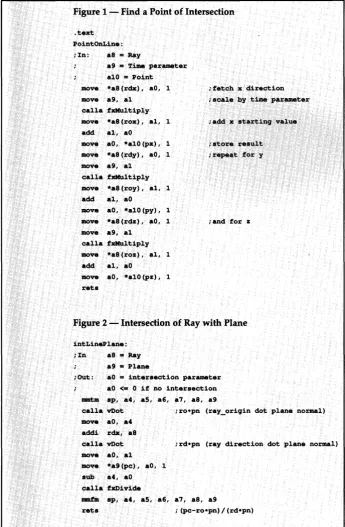
-Figure 1 - Find a Point of Intersection
.text PointOnLine: ;In: as·= Ray
a9 = Time parameter alO = Point move *a8(rdx), aO, l move a9, al
calla fxMultiply move *a8(rox}, al, l add al, aO
move aO, *alO(px), l move *aB(rdy), aO, l move a9, al
calla fxMultiply move *aB(roy), al, l add al, aO
move aO, *alO(py), 1
move *a8(rdz), aO, l move a9, al
calla fxMultiply move *a8(roz), al, 1 add al, aO
move aO, *alO(pz), 1 rets
;fetch x direction ;scale hy time parameter
;add x startinq value
; store result ; repeat for y
;and for z
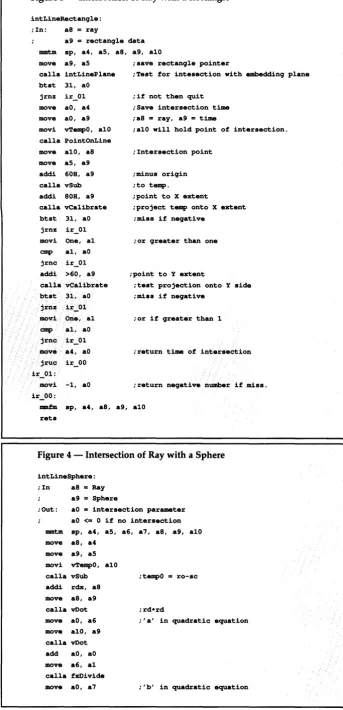
Figure 2 - Intersection of Ray with Plane
intLinePlane: ;In a8 =Ray
a9 = Plane
;OUt: aO = intersection parameter aO <= O if no intersection mmtm sp, a4, as, a6, a7, a8, a9
calla vDot ;ro•pn (ray_oriqin dot plane normal) move aO, a4
addi