~_TM
'-•
.
,MACINTOSH USER EDUCATION
Macintosh Packages: A Programmer's Guide
See Also: The Macintosh User Interface Guidelines The Memory Manager: A Programmer's Guide QuickDraw: A Programmer's Guide
The Resource Manager: A Programmer's Guide The Window Manager: A Programmer's Guide Macintosh Control Manager Programmer's Guide The Event Manager: A Programmer's Guide The Dialog Manager: A Programmer's Guide TextEdit: A Programmer's Guide
/PACKAGES/PACK
Programming Macintosh Applications in Assembly Language The Structure of a Macintosh Application
Modification History: First Draft (ROM 7) B. Hacker & C. Rose 2/29/84 Second Draft Caroline Rose 5/7/84
ABSTRACT
Packages are sets of data structures and routines that are stored as resources and brought into memory only when needed. There's a package for presenting the standard user interface when a file is to be saved or opened, and others for doing more specialized operations such as
floating-point arithmetic. This manual describes packages and the Package Manager, the part of the Macintosh User Interface Toolbox that provides access to packages.
Summary of significant changes and additions since last draft:
- The documentation of the International Utilities Package and the Binary-Decimal Conversion Package has been added.
- There's a new feature in the Standard File Package routine
2 Macintosh Packages Programmer's Guide
TABLE OF CONTENTS
3 About This Manual 4 The Package Manager
6 The International Utilities Package 6 International Resources
8 International Resource ~ 1~ International Resource 1 12 International String Comparison
15 Using the International Utilities Package 16 International Utilities Package Routines
20
The Binary-Decimal Conversion Package 23 The Standard File Package23 About the Standard File Package 24 Using the Standard File Package 25 ' Standard File Package Routines 35 The Disk Initialization Package
35 Using the Disk Initialization Package 36 Disk Initialization Package Routines 41 Summary of the Package Manager
42 Summary of the International Utilities Package 47 Summary of the Binary-Decimal Conversion Package 48 Summary of the Standard File Package
51 Summary of the Disk Initialization Package 52 Glossary
ABOUT THIS MANUAL 3
ABOUT THIS MANUAL
This manual describes packages and the Package Manager. The Macintosh packages include one for presenting the standard user interface when a file is to be saved or opened, and others for doing more specialzed operations such as floating-point arithmetic. The Package Manager is the part of the Macintosh User Interface Toolbox that provides access to packages.
***
Eventually, this will become part of thecomprehensive Inside Macintosh manual.
***
You should already be familiar with the Macintosh User Interface Guidelines, Lisa Pascal, the Macintosh Operating System's Memory Manager, and the Resource Manager. Using the various packages may require that you be familiar with other parts of the Toolbox and Operating System as well.
This manual is intended to serve the needs of both Pascal and assembly-language programmers. Information of interest to assembly-language programmers only is isolated and labeled so that Pascal programmers can conveniently skip it.
The manual begins with a discussion of the Package Manager and packages in general. This is followed by a series of sections on the individual packages. You'll only need to read the sections about the packages that interest you. Each section describes the package briefly, tells how its routines fit into the flow of your application program, and then gives detailed descriptions of the package's routines.
Finally, there are summaries of the Package Manager and the individual packages, for quick reference, followed by a glossary of terms used in this manual.
4 Macintosh Packages Programmer's Guide
THE PACKAGE MANAGER
The Package Manager is the part of the Macintosh User Interface Toolbox that enables you to access packages. Packages are sets of data
structures and routines that are stored as resources and brought into memory only when needed. They serve as extensions to the Macintosh Operating System and User Interface Toolbox, for the most part performing less common operations.
The Macintosh packages, which are stored in the system resource file, include the following:
- The Standard File Package, for presenting the standard user interface when a file is to be saved or opened.
- The-Disk Initialization Package, for initializing and naming new disks. This package is called by the Standard File Package; you'll only need to call it in nonstandard situations.
- The International Utilities Package, for accessing country-dependent information such as the formats for numbers, currency, dates, and times.
- The Binary-Decimal Conversion Package, for converting integers to decimal strings and vice versa.
- The Floating-Point Arithmetic and Transcendental Functions
Packages.
***
These packages, which occupy a total of about 8.SK bytes, will be documented in a future draft of this manual.***
Packages have the resource type 'PACK' and the following resource IDs:
CONST dskInit = 2; {Disk Initialization} stdFile = 3; {Standard File}
flPoint = 4; {Floating-Point Arithmetic} trFunc = 5; {Transcendental Functions} intUtil = 6; {International Utilities} bdConv = 7; {Binary-Decimal Conversion}
Assembly-language note: All macros for calling the routines in a particular package expand to invoke one macro, PackN, where N is the resource ID of the package. The package determines which routine to execute from the routine selector, an integer that's passed to it on the stack. For example, the routine selector for the Standard File Package procedure SFPutFile is 1, so invoking the macro SFPutFile pushes 1 onto the stack and invokes Pack3.
-There are two Package Manager routines that you can call directly from Pascal: one that lets you access a specified package and one that lets
THE PACKAGE MANAGER 5
you access all packages. The latter will already have been called when your application starts up» so normally you won't ever have to call the Package Manager yourself. Its procedures are described below for
advanced programmers who may want to use them in unusual situations.
PROCEDURE InitPack (packID: INTEGER);
InitPack enables you to use the package specified by packID» which is the package's resource 10. (It gets a handle that will be used later to read the package into memory.)
PROCEDURE InitAllPacks;
InitAllPacks enables you to use all Macintosh packages (as though InitPack'were called for each one). It will already have been called when your application starts up.
6 Macintosh Packages Programmer's Guide
THE INTERNATIONAL UTILITIES PACKAGE
The International Utilities Package contains routines and data types that enable you to make your Macintosh application country-independent. Routines are provided for formatting dates and times and comparing strings in a way that's appropriate to the country where your
application is being used. There's also a routine for testing whether to use the metric system of measurement. These routines access
country-dependent information (stored in a resource file) that also tells how to format numbers and currency; you can access this
information yourself for your own routines that may require it.
***
In the Inside Macintosh manual, the documentation of this package will be at the end of the volume that describes the User Interface Toolbox.***
You should already be familiar with the Resource Manager, the Package Manager, and packages in general.
International Resources
Country-dependent information is kept in the system resource file in two resources of type 'INTL', with the resource IDs 0 and 1:
- International resource
0
contains the format for numbers, currency, and time, a short date format, and an indication of whether to use the metric system.- International resource 1 contains a longer format for dates
(spelling out the month and possibly the day of the week, with or without abbreviation) and a routine for localizing string
comparison.
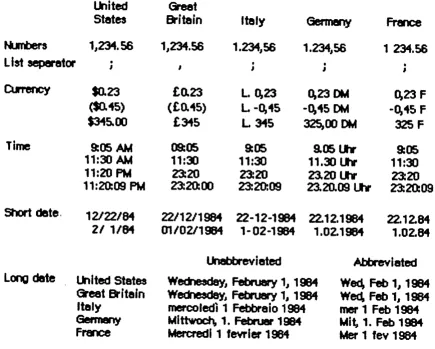
The system resource file released in each country contains the standard international resources for that country. Figure I-I illustrates the standard formats for the United States, Great Britain, Italy, Germany, and France.
THE INTERNATIONAL UTILITIES PACKAGE 7
lkaited
GreetStetes
Britain
Itely
Gem.allrj FrelK:etunbers 1,,234.56 1,,234.56 1.234,,56 1.234,,56 1 234.56
List separetor
.
• • •"
,
,
,
,
CtlTeity $0.23 £0.23 L.~23 0,23 OM 0,23 F
($0.45) (£0.45) L -0,45 -0,45 OM -0,45 F
$345.00 £345 L 315 325,00 OM 32SF
Time
9:05 AM 09:05 9:05 9.05l1Y 9:0511:30
AM
11:XJ 11:30 11.30 lh 11:3011:20
PM
23:20 23:20 23.20 l.tlr 23:2011:20:09
PM
23:20:00 23:20:09 23.20.09lh 23:20:09Short dete.
Long date
12122./84
21 1/84
ltllted States
Greet
Britein
Itely
Germ8lry France
22/12/1984 22-12-1984 22.12.1984 22.12.84
01/02/1984 1-02-1984 1.02. 1984 1.02.84
Unebbrevieted
Wedlesdey, Februery 1, 1984
WedI~, Februery 1, 1984
mercoledl 1 Febbraio
1984t.Clttwoch, 1. Febn..- 1984 t.4ercredl1 fevrler 1984
Abbreviated
Wed, Feb 1, 1984
Wed, Feb 1, 1981
mer
1 Feb 1984Mit.. 1. Feb 1984 Mer 1 fev 1984
Figure I-I. Standard International Formats
The routines in the International Utilities Package use the information in these resources; for example, the routines for formatting dates and times yield strings that look like those shown in Figure I-I. Routines in other packages, in desk accessories, and in ROM also access the international resources when necessary, as should your own routines if they need such information.
In some cases it may be appropriate to store either or both of the international resources in the application's or document's resource file, to override those in the system resource file. For example, suppose an application creates documents containing currency amounts and gets the currency format from international resource
0.
Documents created by such an application should have their own copy of theinternational resource ~ that was used to create them, so that the unit of currency will be the same if the document is displayed on a
Macintosh configured for another country.
Information about the exact components and structure of each
international resource follows here; you can skip this if you intend only to call the formatting routines in the International Utilities Package and won't access the resources directly yourself.
[image:8.613.77.512.72.421.2]8 Macintosh Packages Programmer's Guide
International Resource 0
The International Utilities Package contains the following data types for accessing international resource 0:
TYPE Intl0Hndl Int10Ptr Int10Rec
= .... Int10Ptr;
***
Following "Int" is the letter "1"***
= ....
Int10Rec;=
PACKED RECORD(note) decimalPt: thousSep: listSep: currSyml: currSym2: currSym3: currFmt: dateOrder: shortDateFmt: dateSep: timeCycle: timeFmt: mornStr: eveStr: timeSep: timelSuff: time2Suff: time3Suff: time4Suff: time5Suff: time6Suff: time7 Suff: time8Suff: metricSys: int10Vers: END;
CHAR; {decimal point character} CHAR; {thousands separator} CHAR; {list separator} CHAR; {currency symbol} CHAR;
CHAR;
Byte; {currency format}
Byte; {order of short date elements} Byte; {short date format}
CHAR; {date separator}
Byte; {0 if 24-hour cycle, 255 if 12-hour} Byte; {time format}
PACKED ARRAY[1 •• 4] OF CHAR;
{trailing string for first 12-hour cycle} PACKED ARRAY[1 •• 4] OF CHAR,;
{trailing string for last 12-hour cycle} CHAR; {time separator}
CHAR; {trailing string for 24-hour cycle} CHAR; CHAR; CHAR; CHAR; CHAR; CHAR; CHAR;
Byte; {255 if metric, 0 if not} INTEGER {version information}
A NUL character (ASCII code
0)
in a field of type CHAR means there's no such character. The currency symbol andthe trailing string for the 24-hour cycle are separated into individual CHAR fields because of Pascal packing conventions. All strings include any required spaces.
The decimalPt, thousSep, and listSep fields define the number format. The thousands separator is the character that separates every three digits to the left of the decimal point. The list separator is the character that separates numbers, as when a list of numbers is entered by the user; it must be different from the decimal point character. If it's the same as the thousands separator, the user must not include the latter in entered numbers.
THE INTERNATIONAL UTILITIES PACKAGE 9
CurrSyml through currSym3 define the currency symbol (only one
character for the United States and Great Britain. but two for France and three for Italy and Germany). CurrFmt determines the rest of the currency format. as shown in Figure 1-2. The decimal point character and thousands separator for currency are the same as in the number format.
7
6 S 4 3 0I I I I
not
usedI
Example of effectIf 1! If 0:
$3.00 3 F
1
if
miflU$ sign for negetive" 0if
perenthe$es - 0, 45 F ($0. 45)I I
L
1 If a.rency s),l'liool leeds, 0 if it trails1
if trei ling decimal zeroes, 0 If oot
~---- 1
If
leedinginteger zero"
0if
not
$32S. 00 32S F
$0.23 $.23
Figure 1-2. CurrFmt Field
The following predefined constants are masks that can be used to set or test the bits in the currFmt field:
(note)
CONST currSymLead == 16; {set if currency symbol leads} currNegSym
=
32; {set if minus sign for negative} currTrailingZ=
64; {set if trailing decimal zeroes} currLeadingZ=
128; {set if leading integer zero}You can also apply the currency format's leading- and trailing-zero indicators to the number format if desired. The dateOrder. shortDateFmt. and dateSep fields define the short date format. DateOrder indicates the order of the day. month. and year. with one of the following values:
CONST mdy
=
0;
dmy=
1; ymd == 2;{month day year} {day month year} {year month day}
ShortDateFmt determines whether to show leading zeroes in day and month numbers and whether to show the century. as illustrated in Figure 1-3. DateSep is the character that separates the different parts of the date.
7 6 S 4
o
I I I I
not
usedif
leading zero for dey" 0if
not
If
leading zero
formonth, 0
ifoot
- - - - 1
If
centlry included, 0If
notExample of effect
If 1: If 0: 12102184
01/31/84 22.12. 1984·
121 2/84
1/31/84
22.12.84 Figure 1-3. ShortDateFmt Field
I
10 Macintosh Packages Programmer's Guide
To set or test the bits in the shortDateFmt field, you can use the following predefined constants as masks:
CONST dayLeadingZ
=
32; {set if leading zero for day} mntLeadingZ = 64; {set if leading zero for month} century=
128; {set if century included}The next several fields define the time format: the cycle (12 or 24 hours); whether to show leading zeroes (timeFmt, as shown in Figure 1-4); a string to follow the time (two for 12-hour cycle, one for 24-hour); and the time separator character.
7 6
5
..
0I I
not
usedI
EX8I"f'C)Ie of effectI
I
1If
leadingzero
forsecollcia,
0If
notIf 1: If
0:
11:16:05 11:16: S . 1
If
leeding zero for mirut~ 0 if not 10:05 10: 51
if
leeding zero forholn"
0 if not 09:15 9:15Figure 1-4. TimeFmt Field
The following masks are available for setting or testing bits in the timeFmt field:
CONST secLeadingZ
=
32; {set if leading zero for seconds} minLeadingZ=
64; {set if leading zero for minutes} hrLeadingZ=
128; {set if leading zero for hours}MetricSys indicates whether to use the metric system. The last field, int10Vers, contains a version number in its low-order byte and one of the following constants in its high-order byte:
CONST verUS
=
0; verFrance -= 1; verBritain - 2; verGermany - 3; verItaly - 4;International Resource 1
The International Utilities Package contains the following data types for accessing international resource 1:
THE INTERNATIONAL UTILITIES PACKAGE 11
TYPE IntllHndl -= "'IntlIPtr;
***
Following "Int" is the letter"1"
***
IntllPtr -= "'IntllRec;***
Following "Intl" is the number"I"
***
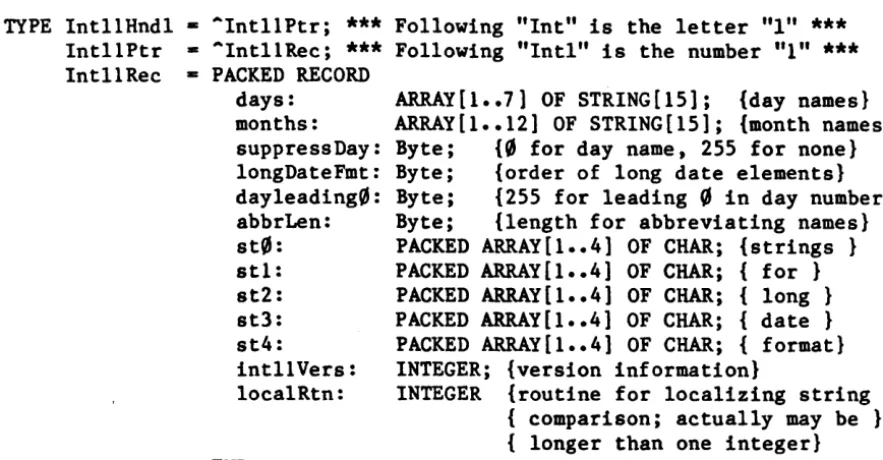
IntllRec - PACKED RECORDdays: months: suppressDay: longDateFmt: dayleading0: abbrLen: st0: stl: st2: st3: st4: intllVers: localRtn: END;
ARRAY[l •• 7) OF STRING[15); {day names} ARRAY[l •• 12] OF STRING[l5); {month names} Byte; {0 for day name, 255 for none} Byte; {order of long date elementsl Byte; {255 for leading 0 in day number} Byte; {length for abbreviating names} PACKED ARRAY[1 •• 4) OF CHAR; {strings} PACKED ARRAY[1 •• 4] OF CHAR; { for} PACKED ARRAY[l •• 4] OF CHAR; { long} PACKED ARRAY[1 •• 4] OF CHAR; { date} PACKED ARRAY[l •• 4) OF CHAR; { format} INTEGER; {version information}
INTEGER {routine for localizing string } { comparison; actually may be } { longer than one integer}
All fields except the last two determine the long date format. The day names in the days array are ordered from Sunday to Saturday. (The month names are of course ordered from January to December.) As shown below, the longDateFmt field determines the order of the various parts of the date. St0 through st4 are strings (usually punctuation) that appear in the date.
longDateFmt
o
255
Long date format st0 day name stl st0 day name stl
day month
st2 month st2 day
st3 year st3 year
st4 st4 See Figure 1-5 for examples of how the International Utilities Package formats dates based on these fields. The examples assume that the suppress Day and dayLeading0 fields contain
0.
A suppress Day value of 255 causes the day name and stl to be omitted, and a dayLeading value of 255 causes a0
to appear before day numbers less than 10.IcngDeteFmt
stO st1 st2 at3 st4Semple result
0
..
I,
I I.
• I I..
t.Cittwoch,2.
Februer 19842SS
..
• I,
I I I,
t II Wectlesdey, February 1, 1984Figure 1-5. Long Date Formats
AbbrLen is the number of characters to which month and day names should be abbreviated when abbreviation is desired.
The intllVers field contains version information with the same format as the intl0Vers field of international resource
0.
LocalRtn contains a routine that localizes the built-in character ordering (as described below under "International String Comparison").
[image:12.623.81.523.88.318.2]12 Macintosh Packages Programmer's Guide
International String Comparison
The International Utilities Package lets you compare strings in a way that accounts for diacritical marks and other special characters. The sort order built into the package may be localized through a routine stored in internatiomal resource 1.
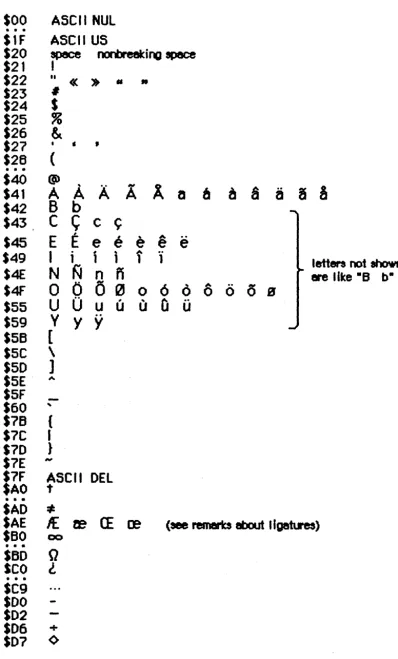
The sort order is determined by a ranking of the entire Macintosh character set. The ranking can be thought of as a two-dimensional table. Each row of the table is a class ~f characters such as all A's (uppercase and lowercase, with and without diacritical marks). The characters are ordered within each row, but this ordering is secondary to the order of the rows themselves. For example, given that the rows for letters are ordered alphabetically, the following are all true under this scheme:
'A'
<
'a'
and 'Ab'
<
'ab' but 'Ac'>
'ab'Even though 'A'
<
'a ,. wi thin the A row, 'Ac'>
'ab' because the order 'c'>
'b' takes precedence over the secondary ordering of the'a'
and the 'A'. In effect, the secondary ordering is ignored unless the comparison based on the primary ordering yields equality.(note)
The Pascal relational operators are used here for convenience only. String comparison in Pascal yields very different results, since it simply follows the ordering of the characters' ASCII codes.
When the strings being compared are of different lengths, each
character in the longer string that doesn't correspond to a character in the shorter one compares "greater"; thus 'a'
<
'ab'. This takes precedence over secondary ordering, so 'a'<
'Ab' even though'A'
<
'a'.
Besides letting you compare strings as described above, the International Utilities Package includes a routine that compares
strings for equality without regard for secondary ordering. The effect on comparing letters, for example, is that diacritical marks are
ignored and uppercase and lowercase are not distinguished.
Figure 1-6 on the following page shows the two-dimensional ordering of the character set (from least to greatest as you read from top to bottom or left to right). The numbers on the left are ASCII codes corresponding to each row; ellipses ( ••• ) designate sequences of rows of just one character. Some codes do not correspond to rows (such as $61 through $7A, because lowercase letters are included in with their uppercase equivalents). See the Toolbox Event Manager manual for a table showing all the characters and their ASCII codes. .
THE INTERNATIONAL UTILITIES PACKAGE 13
$00
·
.
.
ASCII NUL
SlF
ASCII US
$20
space
flOIaeeting
space
$21
I
$22
II«
»
..
..
$23
#$24
$
$25
~$26
&
$27
•
, ,
$26
·
.
.
(
$40
@"
A
-
A
8
a
$41
A A
A
a
6 6
~a
$42
B b
$43,
C
~
,c
~e
" A$45
E E
e
e e e
$49
I
1 , 1 1 "1
1
letters not
shown$4E
N
N
n
n
ere like -8b-0
-
6
"-0
(5
s
$4F
0
o
~ 0 00
u
0
u
"-Q
U$55
U U$59
Y
Y Y
$5B
[
ssc
\
$50
]
$5E
A$5F
-$60
"$7B
(
$7C
I
S7D
}$7E
-$1F
ASCII
DEL
$AO
t
·
.
.
SAD
*
$AE
1£
ze
CE
re
$80
00• • •
$50
Q
seo
l
• • •
$C9
$00
$02
$06
+$D7
<)Figure 1-6. International Character Ordering
[image:14.629.103.502.65.725.2]14 Macintosh Packages Programmer's Guide
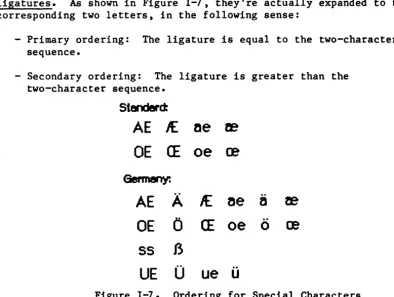
Characters combining two letters. as in the $AE row. are called ligatures. As shown in Figure 1-7. they're actually expanded to the corresponding two letters. in the following sense:
- Primary ordering: The ligature is equal to the two-character sequence.
- Secondary ordering: The ligature is greater than the two-character sequence.
5tenderd:
AE
If..
ae
2eDE CE
oe ce
Germany:
AE
A
1£
~ea
teOE
0
CE
oe
0
ce
55
B
[image:15.620.85.479.106.403.2]UE
0
ue
u
Figure 1-7. Ordering for Special Characters
Ligatures are ordered somewhat differently in Germany to accommodate umlauted characters (see Figure 1-7). This is accomplished by means of the routine in international resource 1 for localizing the built-in character ordering. In the system resource file for Germany. this routine expands umlauted characters to the corresponding two letters (for example. "AE" for A-umlaut). The secondary ordering places the umlauted character between the two-character sequence and the ligature. if any. Likewise. the German double-s character expands to "ss".
In the system resource file for Great Britain. the localization routine in international resource 1 orders the pound currency sign between double quote and the pound weight sign (see Figure 1-8). For the United States. France, and Italy. the localization routine does nothing.
$22
$A3
$23
It
£
#
«
"
Figure 1-8. Special Ordering for Great Britain
Assembly-language~: The null localization routine consists of an RTS instruction.
THE INTERNATIONAL UTILITIES PACKAGE 15
***
Information on how to write your own localization routine is forthcoming.***
Using the International Utilities Package
This section discusses how the routines in the International Utilities package fit into the general flow of an application program, and gives you an idea of which routines you'll need to use. The routines
themselves are described in detail in the next section.
The International Utilities Package is automatically read into memory from the system resource file when one of its routines is called. When a routine needs to access an international resource, it asks the
Resource Manager to read the resource into memory. Together, the package and its resources occupy about 2K bytes.
As described in the
***
not yet existing***
Operating System Utilities manual, you can get the date and time as a long integer from theutility routine ReadDateTime. If you need a string corresponding to the date or time, you can pass this long integer to the IUDateString or IUTimeString procedure in the International Utilities Package. These procedures determine the local format from the international resources read into memory by the Resource Manager (that is, resource type 'INTL' and resource ID 00r 1). In some situations, you may need the format information to come instead from an international resource that you specify by its handle; if so, you can use IUDatePString or
IUTimePString. This is useful, for example, if you want to use an international resource in a document's resource file after you've closed that file.
Applications that use measurements, such as on a ruler for setting margins and tabs, can call IUMetric to find out whether to use the metric system. This function simply returns the value of the
corresponding field in international resource
0.
To access any other fields in an international resource--say, the currency format in international resource 0--call IUGetIntl to get a handle to the resource. If you change any of the fields and want to write thechanged resource to a resource file, the IUSetlntl procedure lets you· do this.
To sort strings, you can use IUCompString or, if you're not dealing with Pascal strings, the more general IUMagString. These routines compare two strings and give their exact relationship, whether equal, less than, or greater than. Subtleties like diacritical marks and case differences are taken into consideration, as described above under "International String Comparison". If you need to know only whether two strings are equal, and want to ignore the subtleties, use
IUEqualString (or the more general IUMagIDString) instead.
(note)
The Operating System utility routine EqualString also compares two Pascal strings for equality. It's less sophisticated than IUEqualString in that it follows ASCII
16 Macintosh Packages Programmer's Guide
order more strictly; for details, see the Operating System Utilities manual
***
eventually***.
International Utilities Package Routines
Assemb1y-1anguage~: The macros for calling the International Utilities Package routines push one of the following routine selectors onto the stack and then invoke
Pack6: Routine
IUDatePString IUDateString IUGetInt1 IUMagIDString IUMagString IUMetric IUTimePString IUTimeString IUSetIntl
Selector
14
QJ
6
12
10
4
16
2 8
PROCEDURE IUDateString (dateTime: LongInt; form: DateForm; VAR result: Str255) ;
Given a date and time as returned by the Operating System Utility routine ReadDateTime, IUDateString returns in the result parameter a string that represents the corresponding date. The form parameter has the following data type:
TYPE DateForm = (shortDate, longDate, abbrevDate);
ShortDate requests the short date format, longDate the long date, and abbrevDate the abbreviated long date. IUDateString determines the exact format from international resource
0
for the short date or 1 for the long date. See Figure I-I above for examples of the standard formats. Notice that the short date contains a space in place of a leading zero when the format specifies "no leading zero", so the length of the result is always the same for short dates.If the abbreviated long date is requested and the abbreviation length in international resource 1 is greater than the actual length of the name being abbreviated, IUDateString fills the abbreviation with NUL characters; the abbreviation length should not be greater than 15, the maximum name length.
THE INTERNATIONAL UTILITIES PACKAGE 17
PROCEDURE IUDatePString (dateTime: LongInt; form: DateForm; VAR result: Str255; intlParam: Handle);
IUDatePString is the same as IUDateString except that it determines the exact format of the date from the resource whose handle is passed in intlParam, overriding the resource that would otherwise be used.
PROCEDURE IUTimeString (dateTime: LongInt; wantSeconds: BOOLEAN; VAR result: Str255);
Given a date and time as returned by the Operating System Utility routine ReadDateTime, IUTimeString returns in the result parameter a string that represents the corresponding time of day. If wantSeconds is TRUE, seconds are included in the time; otherwise, only the hour and minute are included. IUTimeString determines the time format from international resource
0.
See Figure 1-1 above for examples of the standard formats. Notice that the time contains a space in place of a leading zero when the format specifies "no leading zero", so the length of the result is always the same.PROCEDURE IUTimePString (dateTime: LongInt; wantSeconds: BOOLEAN; VAR result: Str255; intlParam: Handle);
IUTimePString is the same as IUTimeString except that it determines the time format from the resource whose handle is passed in intlParam, overriding the resource that would otherwise be used.
FUNCTION IUMetric : BOOLEAN;
If international resource 0 specifies that the metric system is to be used, IUMetric returns TRUE; otherwise, it returns FALSE.
FUNCTION IUGetIntl (theID: INTEGER) : Handle;
IUGetlntl returns a handle to the international resource numbered theID
(0 or 1). It calls the Resource Manager function
GetResource('INTL',theID). For example, if you want to access individual fields of international resource
0,
you can do the following:VAR myHndl: Handle; int0: Intl0Hndl; myHndl := IUGetIntl(0);
int0 := POINTER(ORD(myHndl»;
18 Macintosh Packages Programmer's Guide
PROCEDURE IUSetIntl (refNum: INTEGER; theID: INTEGER; intlParam: Handle) ;
In the resource file having the reference number refNum, IUSetIntl sets the international resource numbered theID (~ or 1) to the data pointed to by intlParam. The data may be either an existing resource or data that hasn't yet been written to a resource file. IUSetIntl adds the resource to the specified file or replaces the resource if it's already there.
FUNCTION IUCompString (aStr,bStr: Str255) : INTEGER; [Pascal only] IUCompString compares aStr and bStr as described above under
"International String Comparison", taking both primary and secondary ordering into consideration. It returns one of the values listed below.
Result Meaning Example
aStr bStr -1 aStr is less than bStr 'Ab' 'ab'
~ aStr equals bStr 'Ab' 'Ab'
1 aStr is greater than bStr 'Ac' 'ab'
Assembly-Ianguage~: IUCompString was created for the convenience of Pascal programmers; there's no trap for it. It eventually calls IUMagString, which is what you should use from assembly language.
FUNCTION IUMagString (aPtr,bPtr: Ptr; aLen,bLen: INTEGER) : INTEGER; IUMagString is the same as IUCompString (above) except that instead of comparing two Pascal strings, it compares the string defined by aPtr and aLen to the string defined by bPtr and bLen. The pointer points to the first character of the string (any byte in memory, not necessarily word-aligned), and the length specifies the number of characters in the. string.
FUNCTION IUEqualString (aStr,bStr: Str255) : INTEGER; [Pascal only] IUEqualString compares aStr and bStr for equality without regard for secondary ordering, as described above under "International String Comparison". If the strings are equal, it returns
0;
otherwise, it returns 1. For example, if the strings are 'Rose' and 'rose', IUEqualString considers them equal and returns ~.(note)
THE INTERNATIONAL UTILITIES PACKAGE 19
See also EqualString in the Operating System Utilities manual
***
doesn't yet exist***.
Assembly-language~: IUEqualString was created for the convenience of Pascal programmers; there's no trap for it. It eventually calls IUMagIDString. which is what you should use from assembly language.
FUNCTION IUMagIDString (aPtr.bPtr: Ptr; aLen.bLen: INTEGER) : INTEGER; IUMagIDString is the same as IUEqualString (above) except that instead of comparing two Pascal strings. it compares the string defined by aPtr and aLen to the string defined by bPtr and bLen. The pointer points to the first character of the string (any byte in memory, not necessarily word-aligned), and the length specifies the number of characters in the string.
20 Macintosh Packages Programmer's Guide
THE BINARY-DECIMAL CONVERSION PACKAGE
The Binary-Decimal Conversion Package contains only two routines: one converts an integer from its internal (binary) form to a string that represents its decimal (base 10) value; the other converts a decimal string to the corresponding integer.
***
In the Inside Macintosh manual, the documentation of this package will be at the end of the volume that describes the User Interface Toolbox.***
You should already be familiar with the Package Manager, and packages in general.
The Binary-Decimal Conversion Package is automatically read into memory when one ,of its routines is called; it occupies a total of about 2~0
bytes. The routines are described below. They're register-based, so the Pascal form of each is followed by a box containing information needed to use the routine from assembly language. (For general information on using assembly language, see Programming Macintosh Applications in Assembly Language.)
Assembly-language note: The macros for calling the
Binary-Decimal Conversion Package routines push one of the following routine selectors onto the stack and then invoke
Pack7 :
Routine NumToString StringToNum
Selector ~
1
PROCEDURE NumToString (theNum: LongInt; VAR theString: Str255);
Trap macro
On entry
On exit
-_NumToString
A0: pointer to theString (length byte followed by characters)
D0:
theNum (long integer)A0: pointer to theString
NumToString converts theNum to a string that represents its decimal value, and returns the result in theString. If the value is negative, the string begins with a minus sign; otherwise, the sign is omitted. Leading zeroes are suppressed, except that the value
0
produces'0'.
THE BINARY-DECIMAL CONVERSION PACKAGE 21
For example: theNum
12 -23
o
the String , 12 ' '-23'
'0 '
PROCEDURE StringToNum (theString: Str255; VAR theNum: Longlnt);
Trap macro _StringToNum
On entry A0: pointer to theString (length byte followed by characters)
On exit
- - -
00:
theNum (long integer)Given a string representing a decimal integer, StringToNum converts it to the corresponding integer and returns the result in theNum. The string may begin with a plus or minus sign. For example:
the String '12' '-23'
'-0'
'055'
theNum 12 -23
o
55
The magnitude of the integer is converted modulo 2A
32, and the 32-bit result is negated if the string begins with a minus sign; integer overflow occurs if the magnitude is greater than 2A
31-1. (Negation is done by taking the two's complement--reversing the state of each bit and then adding 1.) For example:
the String
'2147483648' (magnitude is 2A
31) '-2147483648 '
'4294967295' (magnitude is 2A
32-1) '-4294967295 '
theNum -2147483648 -2147483648
-1
1
StringToNum doesn't actually check whether the characters in the string are between '0' and '9'; instead, since the ASCII codes for '0' through '9' are $30 through $39, it just masks off the last four bits and uses them as a digit. For example, '2:' is converted to the number 30
because the ASCII code for ':' is $3A. Leading spaces before the first digit are treated as zeroes, since the ASCII code for a space is $20. Given that the ASCII codes for 'C', 'A', and 'T' are $43, $41, and $54, respectively, consider the following examples:
22 Macintosh Packages Programmer's Guide
theString
'CAT' '+CAT' '-CAT'
5/7/84 Rose
theNum
314 314 -314
THE STANDARD FILE PACKAGE 23
THE STANDARD FILE PACKAGE
The Standard File Package provides the standard user interface for specifying a file to be saved or opened. It allows the file to be on a disk in any drive connected to the Macintosh, and lets a currently inserted disk be ejected so that another one can be inserted.
***
In the Inside Macintosh manual, the documentation of this package will be at the end of the volume that describes the Toolbox.***
You should already be familiar with the following:- the basic concepts and structures behind QuickDraw, particularly points and rectangles
- the ,Toolbox Event Manager
- the Dialog Manager, especially the ModalDialog procedure - the Package Manager and packages in general
About the Standard File Package
Standard Macintosh applications should have a File menu from which the user can save and open documents, via the Save, Save
As,
and Open commands. In response to these commands, the application can call the Standard File Package to find out the document name and let the user switch disks if desired. As described below, a dialog box is presented for this purpose. (More details and illustrations are given later in the descriptions of the individual routines.)When the user chooses Save As, or Save when the document is untitled, the application needs a name for the document. The corresponding dialog box lets the user enter the document name and click a button labeled "Save" (or just click "Cancel" to abort the command). By convention, the dialog box comes up displaying the current document name, if any, so the user can edit it.
In response to an Open command, the application needs to know which document to open. The corresponding dialog box displays the names of all documents that might be opened, and the user chooses one by
clicking it and then clicking a button labeled "Open". A vertical scroll bar allows scrolling through the names if there are more than can be shown at once.
Both of these dialog boxes let the user:
- insert a disk in an external drive connected to the Macintosh - eject a disk from either drive and insert another
24 Macintosh Packages Programmer's Guide
- initialize and name an inserted disk that's uninitialized - switch from one drive to another
On the right in the dialog box, separated from the rest of the box by a gray line, there's a disk name with one or two buttons below it; Figure S-1 shows what this looks like when an external drive is connected to the Macintosh but currently has no disk in it. Notice that the Drive button is inactive (dimmed). After the user inserts a disk in the external drive (and, if necessary, initializes and names it), the Drive button becomes active. If there's no external drive, the Drive button isn't displayed at all.
disk name
(
Eject
)
(
Or.up
)
Figure S-1. Partial Dialog Box
The disk name displayed in the dialog box is the name of the current disk, initially the disk you used to start up the Macintosh. The user can click Eject to eject the current disk and insert another, which then becomes the current disk. If there's an external drive, clicking the Drive button changes the current disk from the one in the external drive to the one in the internal drive or vice versa. The Drive button is inactive whenever there's only one disk inserted.
If an uninitialized or otherwise unreadable disk is inserted, the Standard File Package calls the Disk Initialization Package to provide the standard user interface for initializing and naming a disk.
Using the Standard File Package
This section discusses how the routines in the Standard File Package fit into the general flow of an application program, and gives you an idea of which routines you'll need to use. The routines themselves are described in detail in the next section.
The Standard File Package and the resources it uses are automatically read into memory when one of its routines is called. It in turn reads the Disk Initialization Package into memory if a disk is ejected; together they occupy about 6.5K bytes.
Call SFPutFile when your application is to save to a file ,and needs to get the name of the file from the user. Standard applications should do this when the user chooses Save As from the File menu, or Save when the document is untitled. SFPutFile displays a dialog box allowing the
THE STANDARD FILE PACKAGE 25
user to enter a file name.
Similarly, SFGetFile is useful whenever your application is to open a file and needs to know which one, such as when the user chooses the Open command from a standard application's File menu. SFGetFile displays a dialog box with a list of file names to choose from.
You pass these routines a reply record, as shown below, and they fill it with information about the user's reply.
TYPE SFReply RECORD good: copy: fType: vRefNum: version: fName: END;
BOOLEAN; BOOLEAN; OSType; INTEGER; INTEGER; STRING[63]
{FALSE if ignore command} {not used}
{file type or not used} {volume reference number} {file's version number} {file name}
The first field of this record determines whether the file operation should take place or the command should be ignored (because the user clicked the Cancel button in the dialog box). The fType field is used by SFGetFile to store the file's type. The vRefNum, version, and fName fields identify the file chosen by the user; the application passes their values on to the File Manager routine that does the actual file operation. VRefNum contains the volume reference number of the volume containing the file. Currently the version field always contains
0;
the use of nonzero version numbers is not supported by this package. For more information on files, volumes, and file operations, see the File Manager manual
***
doesn't yet exist***.
Both SFPutFile and SFGetFile allow you to use a nonstandard dialog box; two additional routines, SFPPutFile and SFPGetFile, provide an even more convenient and powerful way of doing this.
Standard File Package Routines
Assembly-Ianguage~: The macros for calling the Standard File Package routines push one of the following routine selectors onto the stack and then invoke Pack3:
Routine SFGetFile SFPGetFile SFPPutFile SFPutFile
5/7/84 Hacker-Rose
Selector
2 4
3
1
26 Macintosh Packages Programmer's Guide
PROCEDURE SFPutFile (where: Point; prompt: Str255; origName: Str255; dlgHook: ProcPtr; VAR reply: SFReply);
SFPutFile displays a dialog box allowing the user to specify a file to which data will be written (as during a Save or Save As command). It then repeatedly gets and handles events until the user either confirms the command after entering an appropriate file name or aborts the command by clicking Cancel in the dialog. It reports the user's reply by filling the fields of the reply record specified by the reply
parameter. as described above; the fType field of this record isn't used.
The general appearance of the standard SFPutFile dialog box is shown in Figure 5-2. The where parameter specifies the location of the top left corner of the dialog box in global coordinates. The prompt parameter is a line of text to be displayed as a statText item in the dialog box. where shown in Figure S-2. The origName parameter contains text that appears as an enabled. selected editText item; for the standard
document-saving commands, it should be the current name of the
document, or the empty string (to display an insertion point) if the document hasn't been named yet.
where
~
•.---~---~
prompt - -...
Seueeurrent dotument as:
ori~
l!ln!!!~!!!!I!I!!!!!!!!!!!!!!!!!!!!!!J
( SaDe
)
( Ceneel )
disk name
( 'Eject)
( BriDe)
Figure 5-2. Standard SFPutFile Dialog
If you want to use the standard SFPutFile dialog box, pass NIL for dlgHook; otherwise, see the information for advanced programmers below. SFPutFile repeatedly calls the Dialog Manager procedure ModalDialog. When an event involving an enabled dialog item occurs, ModalDialog handles the event and returns the item number, and SFPutFile responds as follows:
- If the Eject or Drive button is clicked, or a disk is inserted, SFPutFile responds as described above under "About the Standard File Package".
- Text entered into the editText item is stored in the fName field of the reply record. (SFPutFile keeps track of whether there's currently any text in the item, and makes the Save button inactive if not.)
THE STANDARD FILE PACKAGE 27
- If the Save button is clicked, SFPutFile determines whether the file name in the fName field of the reply record is appropriate. If so, it returns control to the application with the first field of the reply record set to TRUE; otherwise, it responds
accordingly, as described below.
- If the Cancel button in the dialog is clicked, SFPutFile returns control to the application with the first field of the reply record set to FALSE.
(note)
Notice that disk insertion is one of the user actions listed above, even though ModalDialog normally ignores disk-inserted events. The reason this works is that SFPutFile calls ModalDialog with a filterProc function that checks for a disk-inserted event and returns a "fake", very large item number if one occurs; SFPutFile recognizes this item number as an indication that a disk was inserted.
The situations that may cause an entered name to be inappropriate, and SFPutFile's response to each, are as follows:
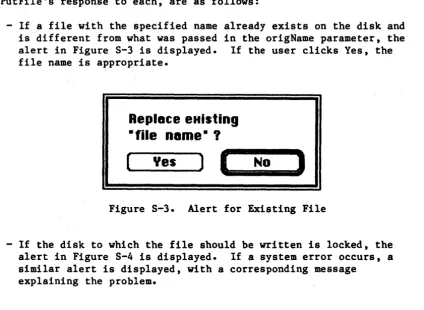
- If a file with the specified name already exists on the disk and is different from what was passed in the origName parameter, the alert in Figure S-3 is displayed. If the user clicks Yes, the file name is appropriate.
Replace eHlsting
• file Dame·
?
[~:
__
Y_e_s __
~)
I. ___
N_O . . . .
J
Figure S-3. Alert for Existing File
- If the disk to which the file should be written is locked, the alert in Figure S-4 is displayed. If a system error occurs, a similar alert is displayed, with a corresponding message
explaining the problem.
[image:28.618.102.527.343.653.2]28 Macintosh Packages Programmer's Guide
(note)
Disk is locked.
I
cancel»
Figure S-4. Alert for Locked Disk
The user may specify a disk name (preceding the file name and separated from it by a colon). If the disk isn't currently in a drive. an alert similar to the one in Figure S-4 is displayed. The ability to specify a disk name is supported for historical reasons only; users should not be encouraged to do it.
After the user clicks No or Cancel in response to one of these alerts. SFPutFile dismisses the alert box and continues handling events (so a different name may be entered).
Advanced programmers: You can create your own dialog box rather than use the standard SFPutFile dialog. To do this. you must provide your own dialog template and store it in your application's resource file with the same resource ID that the standard template has in the system
resource file:
(note)
CONST putDlgID
=
-3999; {SFPutFile dialog template ID}The SFPPutFile procedure. described below. lets you use any resource ID for your nonstandard dialog box.
Your dialog template must specify that the dialog window be invisible. and your dialog must contain all the standard items. as listed below. The appearance and location of these items in your dialog may be different. You can make an item "invisible" by giving it a display rectangle that's off the screen. The display rectangle for each item in the standard dialog box is given below. The rectangle for the standard dialog box itself is
(0.
0. 304. 104).THE STANDARD FILE PACKAGE 29
Item number
1
Item
Save button Cancel button
Standard display rectangle (12,.74,82,92) 2 3 4 5 6 7 8 (note)
Prompt string (statText) User Item for disk name Eject button
Drive button
EditText item for file name UserItem for gray line
(114, 74, 184, 92) (12, 12, 184, 28)
(209, 16, 295, 34) (217,43,287,61) (217, 74, 287, 92) ( 14 ~ 34, 182, 50) ( 200, 16, 201, 88)
Remember that the display rectangle for any "invisible" item must be at least about 20 pixels wide.
***
This will be discussed in a future draft of the Dialog Manager manual.***
If your dialog has additional items beyond the the standard ones, or if you want to handle any of the standard items in a nonstandard manner, you must write your own dlgHook function and point to it with dlgHook. Your dlgHook function should have two parameters and return an integer value. For example, this is how it would be declared if it were named MyDlg:
FUNCTION MyDlg (item: INTEGER; theDialog: DialogPtr) : INTEGER;
Immediately after calling ModalDialog, SFPutFile calls your dlgHook function, passing it the item number returned by ModalDialog artd a pointer to the dialog record describing your dialog 'box. Using these two parameters, your dlgHook function should determine how to handle the event. There are predefined constants for the item numbers of standard enabled items, as follows:
CONST putSave
=
1 ; {Save button} putCancel=
2; {Cancel button} putEject=
5; {Eject button} putDrive=
6; {Drive button}putName
=
7 ; {editText item for file name}ModalDialog also returns the "fake" item number 100wben a disk-inserted event occurs, as detected by its filterProc function.
After handling the event (or, perhaps, after ignoring it) thedlgHook function must return an item number to SFPutFile. If the item number is one of those listed above , SFPutFile responds in the ,standard way; otherwise, it does nothing.
(note)
For advanced programmers who want to change the
appearance of the alerts displayed when an inappropriate file name is entered, the resource IDs of those alerts in the system resource file are listed below.
30 Macintosh Packages Programmer's Guide
Alert
Existing file Locked disk System error Disk not found
Resource ID -3996 -3997 -3995 -3994
PROCEDURE SFPPutFile (where: Point; prompt: Str255; origName: Str255; dlgHook: ProcPtr; VAR reply: SFReply; dlgID: INTEGER; filterProc: ProcPtr)j
SFPPutFile is an alternative to SFPutFile for advanced programmers who want to use a nonstandard dialog box. It's the same as SFPutFile except for the two additional parameters digID and filterProc.
DlgID is·the resource ID of the dialog template to be used instead of the standard one (so you can use whatever ID you wish rather than the same one as the standard).
The filterProc parameter determines how ModalDialog will filter events when called by SFPPutFile. If filterProc is NIL, ModalDialog does the
standard filtering that it does when called by SFPutFile; otherwise, filterProc should point to a function for ModalDialog to execute after
doing the standard filtering. The function must be the same as one you'd pass directly to ModalDialog in its filterProc parameter. (See the Dialog Manager manual for more information.)
PROCEDURE SFGetFile (where: Point; prompt: Str255j fileFilter: ProcPtrj numTypes: INTEGER; typeList: SFTypeList; dlgHook: ProcPtr; VAR reply: SFReplY)j
SFGetFile displays a dialog box listing the names of a specific group of files from which the user can select one to be opened (as during an Open command). It then repeatedly gets and handles events until the user either confirms the command after choosing a file name or aborts the command by clicking Cancel in the dialog. It reports the user's reply by filling the fields of the reply record specified by the reply parameter, as described above under "Using the Standard File Package". The general appearance of the standard SFGetFile dialog box is shown in Figure S-5. File names are sorted in order of the ASCII codes of their characters, ignoring diacritical marks and mapping lowercase characters to their uppercase equivalents. If there are more file names than can be displayed at one time, the scroll bar is active; otherwise, the scroll bar is inactive.
THE STANDARD FILE PACKAGE 31
file
1 name
) I
(
Open
disk name
I
I (
,
Eject
)
(
Cencel
) I (Drlue
)
flle7name
!Figure S-5. Standard SFGetFile Dialog
The where parameter specifies the location of the top left corner of the dialog box in global coordinates. The prompt parameter is ignored; it's there for historical purposes only.
The fileFilter, numTypes, and typeList parameters determine which files appear in the dialog box. SFGetFile first looks at numTypes and
.typeList to determine what types of files to display, then it executes the function pointed to by fileFi1ter (if any) to do additional
filtering on which files to display. File types are discussed in the manual The Structure of ~ Macintosh Application. For example, if the application is concerned only with pictures, you won't want to display the names of any text files.
Pass -1 for numTypes to display all types of files; otherwise, pass the number of file types you want to display, and pass the types themselves in typeList. The SFTypeList data type is defined as follows:
(note)
TYPE SFTypeList - ARRAY
[0 ••
3] OF OSType;This array is declared for a reasonable maximum number of types (four). If you need to specify more than four types, declare your own array type with the desired number of entries (and use the @ operator to pass a pointer to it).
If fileFilter isn't NIL, SFGetFi1e executes the function it points to for each file, to determine whether the file should be displayed. The fileFilter function has one parameter and returns a Boolean value. For example:
FUNCTION MyFileFilter (paramBlock: ParmBlkPtr) : BOOLEAN;
SFGetFile passes this function the file information it gets by calling the File Manager procedure PBGetFInfo (see the
***
forthcoming***
File Manager manual for details). The function selects which files should appear in the dialog by returning FALSE for every file that should be32 Macintosh Packages Programmer's Guide
shown and TRUE for every file that shouldn't be shown.
(note)
As described in the File Manager manual, a flag can be set that tells the Finder not to display a particular file's icon on the desktop; this has no effect on whether SFGetFile will list the file name.
If you want to use the standard SFGetFile dialog box, pass NIL for dlgHook; otherwise, see the information for advanced programmers below.
Like SFPutFile, SFGetFile repeatedly calls the Dialog Manager procedure ModalDialog. When an event involving an enabled dialog item occurs, ModalDialog handles the event and returns the item number, and
SFGetFile responds as follows:
If ~he Eject or Drive button is clicked, or a disk is inserted, SFGetFile responds as described above under "About the Standard File Package".
- If clicking or dragging occurs in the scroll bar, the contents of the dialog box are redrawn accordingly.
- If a file name is clicked, it's selected and stored in the fName field of the reply record. (SFGetFile keeps track of whether a file name is currently selected, and makes the Open button inactive if not.)
If the Open button is clicked, SFGetFile returns control to the application with the first field of the reply record set to TRUE.
- If a file name is double-clicked, SFGetFile responds as if the user clicked the file name and then the Open button.
- If the Cancel button in the dialog is clicked, SFGetFile returns control to the application with the first field of the reply record set to FALSE.
If a key (other than a modifier key) is pressed, SFGetFile selects the first file name starting with the character typed. If no file name starts with that character, it selects the first file name starting with a character whose ASCII code is greater than the character typed.
Advanced programmers: You can create your own dialog box rather than use the standard SFGetFile dialog. To do this, you must provide your own dialog template and store it in your application's resource file with the same resource ID that the standard template has in the system
resource file:
(note)
CONST getDlgID
= -4000;
{SFGetFile dialog template ID}The SFPGetFile procedure, described below, lets you use any resource ID for your nonstandard dialog box.
THE STANDARD FILE PACKAGE 33
Your dialog template must specify that the dialog window be invisible. and your dialog must contain all the standard items. as listed below. The appearance and location of these items in your dialog may be different. You can make an item "invisible" by giving it a display rectangle that's off the screen. The display rectangle for each in the standard dialog box is given below. The rectangle for the standard dialog box itself is (~. ~. 348. 136).
Item number Item Standard disEla~ rectan&le
1 Open button (152, 28, 232. 46)
2 Invisible button (1152.59. 1232.77)
3 Cancel button ( 152. 9~, 232. 1 ~8)
4 UserItem for disk name (248. 28. 344. 46)
5 Eject button (256.59,336,77)
6 Drive button (256, 90, 336, 108)
7 UserItem for file name list (12, 11, 125, 125) 8 UserItem for scroll bar (124, 11, 140, 125) 9 UserItem for gray line (244, 20, 245, 116) 10 Invisible text (statText) (1044, 20, 1145, 116)
If your dialog has additional items beyond the the standard ones, or if you want to handle any of the standard items in a nonstandard manner, you must write your own dlgHook function and point to it with dlgHook. Your dlgHook function should have two parameters and return an integer value. For example, this is how it would be declared if it were named MyDlg:
FUNCTION MyDlg (item: INTEGER; theDialog: DialogPtr) : INTEGER; Immediately after calling ModalDialog, SFGetFile calls your dlgHook function, passing it the item number returned by ModalDialog and a pointer to the dialog record describing your dialog box. Using these two parameters, your dlgHook function should determine how to handle the event. There are predefined constants for the item numbers of standard enabled items, as follows:
CONST get Open
=
1 ; {Open button} getCancel=
3; {Cancel button} getEject=
5; {Eject button} getDrive = 6; {Drive button}getNmList
=
7; {userItem for file name list} getScroll=
8; {userItem for scroll bar}ModalDialog also returns "fake" item numbers in the following situations, which are detected by its filterProc function:
- When a disk-inserted event occurs, it returns 100.
- When a key-down event occurs, it "returns 1000 plus the ASCII code of the character.
After handling the event (or, perhaps, after ignoring it) your dlgHook function must return an item number ~o SFGetFile. If the item number is one of those listed above, SFGetFile responds in the standard way;
34 Macintosh Packages, Programmer's Guide
otherwise, it does nothing.
PROCEDURE SFPGetFile (where: Point; prompt: Str255; fileFilter:
ProcPtr; numTypes: INTEGER; typeList: SFTypeList; dlgHook: ProcPtr; VAR reply: SFReply; dlgIO: INTEGER; filterProc: ProcPtr);
SFPGetFile is an alternative to SFGetFile for advanced programmers who want to use a nonstandard dialog box. It's the same as SFGetFile except for the two additional parameters dlgIO and filterProc.
OlgIO is the resource 10 of the dialog template to be used instead of the standard one (so you can use whatever 10 you wish rather than the same one as the standard).
The filt~rProc parameter determines how ModalOialog will filter events when called by SFPGetFile. If filterProc is NIL, ModalDialog does the standard filtering that it does when called by SFGetFile; otherwise, filterProc should point to a function for ModalDialog to execute after
doing the standard filtering. Note, however, that the standard
filtering will detect key-down events only if the dialog template 10 is the standard one.
THE DISK INITIALIZATION PACKAGE 35
THE DISK INITIALIZATION PACKAGE
The Disk Initialization Package provides routines for initializing disks to be accessed with the Macintosh Operating System's File Manager and Disk Driver. A single routine lets you easily present the standard user interface for initializing and naming a disk; the Standard File Package calls this routine when the user inserts an uninitialized disk. You can also use the Disk Initialization Package to perform each of the
three steps of initializing a disk separately if desired.
***
In the Inside Macintosh manual, the documentation of this package will be at the end of the volume that describes the Operating System.***
You should already be familiar with the following:
- the basic concepts and structures behind QuickDraw, particularly points
- the Toolbox Event Manager
- the File Manager
***
the File Manager manual doesn't yet exist***
- the Package Manager and packages in generalUsing the Disk Initialization Package
This section discusses how the routines in the Disk Initialization package fit into the general flow of an application program, and gives you an idea of which routines you'll need to use. The routines
themselves are described in detail in the next section.
The Disk Initialization Package and the resources it uses are
automatically read int