Octal E&M Module
User Manual
Part Number 1200313L1
901 Explorer Boulevard P.O. Box 140000 Huntsville, AL 35814-4000
(256) 963-8000 © 2000ADTRAN, Inc.
iii
Federal Communications Commission (FCC) Radio Frequency Interference Statement
This equipment has been tested and found to comply with the limits for a Class A digital device, pur-suant to Part 15 of the FCC Rules. These limits are designed to provide reasonable protection against harmful interference when the equipment is operated in a commercial environment. This equipment generates, uses, and can radiate radio frequency energy and, if not installed and used in accordance with the instruction manual, may cause harmful interference to radio frequencies. Operation of this equipment in a residential area is likely to cause harmful interference in which case the user will be required to correct the interference at his own expense.
Shielded cables must be used with this unit to ensure compliance with Class A FCC limits.
Canadian Emissions Requirements
This digital apparatus does not exceed the Class A limits for radio noise emissions from digital appa-ratus as set out in the interference-causing equipment standard entitled “Digital Appaappa-ratus,” ICES-003 of the Department of Communications.
Cet appareil numerique respecte les limites de bruits radioelectriques applicables aux appareils nume-riques de Class A prescrites dans la norme sur le materiel brouilleur: “Appareils Numenume-riques,” NMB-003 edictee par le Ministre des Communications.
iv
Limited Product Warranty
ADTRAN warrants that for five (5) years from the date of shipment to Customer, all products manu-factured by ADTRAN will be free from defects in materials and workmanship. ADTRAN also war-rants that products will conform to the applicable specifications and drawings for such products, as contained in the Product Manual or in ADTRAN's internal specifications and drawings for such prod-ucts (which may or may not be reflected in the Product Manual). This warranty only applies if Cus-tomer gives ADTRAN written notice of defects during the warranty period. Upon such notice, ADTRAN will, at its option, either repair or replace the defective item. If ADTRAN is unable, in a rea-sonable time, to repair or replace any equipment to a condition as warranted, Customer is entitled to a full refund of the purchase price upon return of the equipment to ADTRAN. This warranty applies only to the original purchaser and is not transferable without ADTRAN's express written permission. This warranty becomes null and void if Customer modifies or alters the equipment in any way, other than as specifically authorized by ADTRAN.
EXCEPT FOR THE LIMITED WARRANTY DESCRIBED ABOVE, THE FOREGOING CONSTITUTES THE SOLE AND EXCLUSIVE REMEDY OF THE CUSTOMER AND THE EXCLUSIVE LIABILITY OF ADTRAN AND IS IN LIEU OF ANY AND ALL OTHER WARRANTIES (EXPRESSED OR IMPLIED). ADTRAN SPECIFICALLY DISCLAIMS ALL OTHER WARRANTIES, INCLUDING (WITHOUT LIM-ITATION), ALL WARRANTIES OF MERCHANTABILITY AND FITNESS FOR A PARTICULAR PUR-POSE. SOME STATES DO NOT ALLOW THE EXCLUSION OF IMPLIED WARRANTIES, SO THIS EXCLUSION MAY NOT APPLY TO CUSTOMER.
In no event will ADTRAN or its suppliers be liable to Customer for any incidental, special, punitive, exemplary or consequential damages experienced by either Customer or a third party (including, but not limited to, loss of data or information, loss of profits, or loss of use). ADTRAN is not liable for damages for any cause whatsoever (whether based in contract, tort, or otherwise) in excess of the amount paid for the item. Some states do not allow the limitation or exclusion of liability for incidental or consequential damages, so the above limitation or exclusion may not apply to Customer.
Warranty and Customer Service
ADTRAN will replace or repair this product within five years from the date of shipment if the product does not meet its published specification, or if it fails while in service. For detailed warranty, repair, and return information, refer to the ADTRAN Equipment Warranty and Repair and Return Policy Proce-dure (see the last page of this manual).
61200313L1-1 Octal E&M Module User Manual v
Table of Contents
List of Figures ...vii
List of Tables... ix
Chapter 1 Introduction ... 1-1
Octal E&M Module Overview ... 1-1 Functional Description... 1-1 Features ... 1-1 Physical Description ... 1-2
Chapter 2 Installation ... 2-1
Before Installing the Octal E&M Module ... 2-1 Shipping Contents ... 2-1 Installing the Octal E&M Module... 2-2 Wiring ... 2-3 Power-Up and Initialization... 2-3 Operation Alarms ... 2-3
Chapter 3 Operation ... 3-1
Table of Contents
vi Octal E&M Module User Manual 61200313L1-1
Port ... 3-5 Status ... 3-5 Inactive ... 3-5 Disabled ... 3-5 Idle ... 3-6 E-Lead Asserted ... 3-6 M-lead detected ... 3-6 Call in Progress ... 3-6 TO ... 3-6 Test E-Lead Open ... 3-6 Test E-Lead Closed ... 3-6 Test ... 3-6 Rx & Tx ABCD ... 3-6 Test ... 3-6 Test 2W ... 3-6 Tx ABCD ... 3-7 1kHz Tone ... 3-7 Loopback ... 3-7 Configuration... 3-7 Port ... 3-7 Port Name ... 3-7 Sig Ifce ... 3-8 VF Ifce ... 3-8 Rx Gain ... 3-8 Tx Gain ... 3-8 ATLAS 550 Features Used with Octal E&M Module ... 3-8 Factory Restore ... 3-8 Run Self-test ... 3-8
Appendix A Dial Plan Interface Configuration ... A-1
61200313L1-1 Octal E&M Module User Manual vii
List of Figures
List of Figures
61200313L1-1 Octal E&M Module User Manual ix
List of Tables
List of Tables
61200313L1-1 Octal E&M Module User Manual 1-1
Chapter 1
Introduction
OCTAL E&M MODULE OVERVIEW
The Octal E&M Module is a member of the ATLAS 550 family of products. It provides eight analog voice-grade interfaces, either 2-wire or 4-wire, for use as tie-trunks using E&M signaling or as dedicated transmission only (TO) interfaces for additional data services.
Functional Description
The Octal E&M Module installs in any available user option slot in the ATLAS 550 chassis. Status information is available via the terminal menus, accessible through either a VT-100 terminal connected to the ATLAS 550 control port or via a Telnet session established through the Base Unit’s Ethernet port. Use the terminal menu to configure the Octal E&M Module and to download application software upgrades.
Features
The features of the Octal E&M Module are listed below: • Eight voice ports
• Selectable for 2-wire or 4-wire voice interface, per port • E-lead originate
• E&M type I, I, III, IV, V plus TO mode, per port
• E&M type V can be used for Press-To-Talk (PTT) radio applications • Resource Module connector
• Hot-swappable
Chapter 1. Introduction
1-2 Octal E&M Module User Manual 61200313L1-1
Physical Description
The Octal E&M Module plugs into any available option slot in the rear of the ATLAS 550 chassis. Figure 1-1 shows the Octal E&M Module.
Figure 1-1. Octal E&M Module
The labels over the modular connectors refer to the corresponding port on the Octal E&M Module.
1
OCTAL E&M
61200313L1-1 Octal E&M Module User Manual 2-1
Chapter 2
Installation
BEFORE INSTALLING THE OCTAL E&M MODULE
Carefully unpack and inspect the module for shipping damages. If you sus-pect damage occurred during shipping, file a claim immediately with the carrier and then contact ADTRAN Technical Support (see the last page of this manual for pertinent information). If possible, keep the original ping container for returning the module for repair or for verification of ship-ping damage.
Shipping Contents
The ADTRAN shipment includes the following items: • Octal E&M Module
• Octal E&M Module User Manual
Chapter 2. Installation
2-2 Octal E&M Module User Manual 61200313L1-1
INSTALLING THE OCTAL E&M MODULE
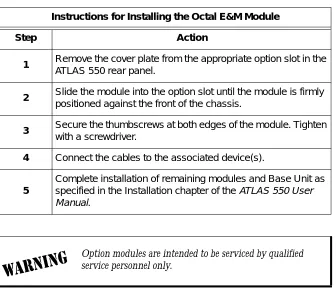
Figure 2-1 shows how to install the module properly. The instructions are described in the Step/Action table, below.
Figure 2-1. Installing the Octal E&M Module
NETWORK 2 2 4 ETHERNET CONTROL IN OUT RELAY ALARM O I
FUSE RATING: 2A/250V SLO-BLO 90-240VAC, 2A, 50/60Hz
NC NO COM GND
ALL EMPTY
SLOTS MUST BE
COVERED WITH BLANK P
ANELS
CAUTION:
FOR CONTINUED PROTECTION
AGAINST RISK OF FIRE, REPLACE ONL
Y
WITH SAME TYPE
AND RA
TING OF FUSE.
MON
Remove Cover Plate
I O
1
OCTAL FXO
2 3 4 5 6 7 8
Instructions for Installing the Octal E&M Module
Step Action
1 Remove the cover plate from the appropriate option slot in the
ATLAS 550 rear panel.
2 Slide the module into the option slot until the module is firmly
positioned against the front of the chassis.
3 Secure the thumbscrews at both edges of the module. Tighten
with a screwdriver.
4 Connect the cables to the associated device(s).
5
Complete installation of remaining modules and Base Unit as specified in the Installation chapter of the ATLAS 550User
Manual.
Chapter 2. Installation
61200313L1-1 Octal E&M Module User Manual 2-3
WIRING
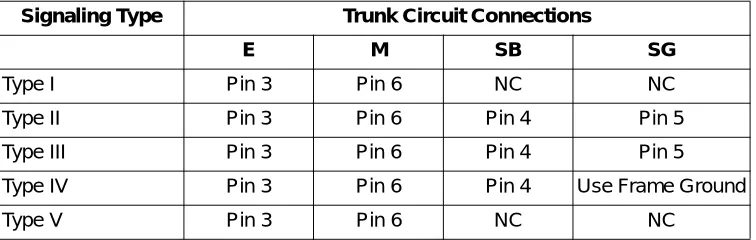
Each module port has a single 8-pin modular jack. A suitable mating connec-tor is AMP # 2-383021-5. The Octal E&M module is an E-lead originate sig-naling circuit suitable for connection to an M-lead originate trunk circuit. The pinout is shown in Table 2-1 and Table 2-2
POWER-UP AND INITIALIZATION
The Octal E&M Module requires no initialization input during the power-up sequence. Any previously configured setting for the Octal E&M Module is automatically restored upon power-up. See the ATLAS 550 User Manual for more information about the power-up sequence.
Operation Alarms
The red ALARM LED (located with the Module LEDs on the front panel) il-luminates when an alarm condition is detected.
Table 2-1. Pinout Connection
PIN Signal DESCRIPTION
1 Ring VF input (4W mode, 600Ω nominal)
Tip/Ring (2W mode, 600Ω + 2.1 6uF nominal) 2 Tip
3 E Customer Originate 4 SG Signal Ground 5 SB Signal Battery 6 M Network Originate 7 Tip 1
VF output (4W mode, 600Ω nominal) 8 Ring 1
Table 2-2. Trunk Circuit Connections for Various E&M Signaling Types
Signaling Type Trunk Circuit Connections
E M SB SG
Chapter 2. Installation
61200313L1-1 Octal E&M Module User Manual 3-1
Chapter 3
Operation
OVERVIEW
The Octal E&M Module is controlled by the ATLAS 550 Base Unit terminal menu. The terminal menu allows for detailed configuration, status, and test-ing of the Octal E&M Module.
Configuration of the Octal E&M Module is completed in two areas of the ter-minal menu:
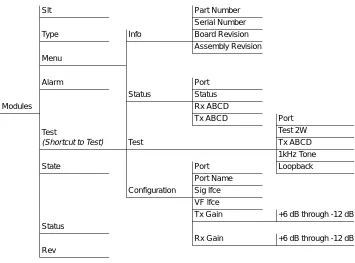
1. General configuration items for the Octal E&M-8 Voice Module are set using MODULES/E&M-8 MENUS/CONFIG (see the Menu Tree in Figure 3-2 on page 3-3).
2. Specific configuration items depend on how the option module is used and is displayed in the DIAL PLAN menus (see Appendix A, Dial Plan Interface Configuration on page A-1).
Access the terminal menu using either a VT-100 terminal attached to the ATLAS 550 Base Unit’s control port or a Telnet session established through the Base Unit’s Ethernet port. The ATLAS 550 User Manual provides detailed instructions on each of these management approaches.
Chapter 3. Operation
3-2 Octal E&M Module User Manual 61200313L1-1
TERMINAL MENU STRUCTURE
The ATLAS 550 uses a hierarchical menu structure to provide access to all of its features. The top-most menu level leads to submenus which are grouped by functionality. All menu items display in the terminal window. To access the Octal E&M Module, activate the MODULES menu. The Octal E&M
Mod-ule displays as E&M-8 under TYPE.
.
M
ODULES
M
ENU
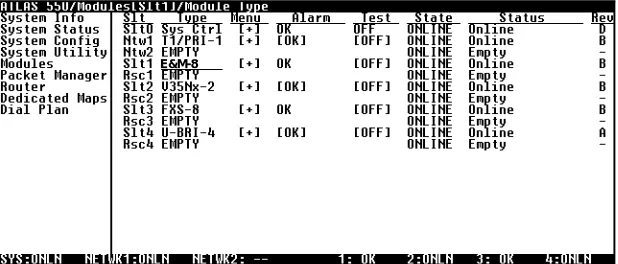
The ATLAS 550 system controller automatically detects the presence of theOctal E&M Module when it is installed in the system. To see the menus for the Octal E&M Module via the terminal menu, use the arrow keys to scroll to the MODULES menu and press Enter to access the module choices. Figure 3-1 shows the MODULES menu (see also the menu tree in Figure 3-2 on page 3-3). The following sections describe all the MODULES menu options.
Figure 3-1. Modules Menu Refer to the ATLAS 550 User Manual for detailed instructions on navigating through the terminal menu.
Chapter 3. Operation
61200313L1-1 Octal E&M Module User Manual 3-3
Figure 3-2. Menu Tree for Octal E&M Module Menu
S
LT Read security: 5Displays the number of available slots in the ATLAS 550 chassis. Slot 0 refers to the ATLAS 550 unit. This field is read-only.
T
YPE Write security: 3; Read security: 5Displays the type of module currently installed in the slot or the type of module you plan to install in the slot. If an Octal E&M Module is installed, the TYPE field automatically defaults to E&M-8.
You can use this field to preconfigure a system before actually installing modules by simply specifying the module that you want to install in each slot. If you intentionally leave a slot empty, mark it as EMPTY to avoid
get-ting a NOT RESPONDINGmessage.
Slt Part Number
Serial Number
Type Info Board Revision
Assembly Revision Menu
Alarm Port
Status Status
Modules Rx ABCD
Test
(Shortcut to Test)
Tx ABCD Port
Test 2W
Test Tx ABCD
1kHz Tone
State Port Loopback
Port Name
Configuration Sig lfce
VF lfce
Tx Gain +6 dB through -12 dB
Status
Rx Gain +6 dB through -12 dB
Rev
TYPE automatically displays the name of an installed module. If
you want to preconfigure the slot for a different type of module, you must set this field to EMPTY before selecting another module
Chapter 3. Operation
3-4 Octal E&M Module User Manual 61200313L1-1
M
ENU Displays additional status and configuration menus for the selected module. To access the submenus for this item, use the arrow keys to scroll to the MENU column for the module you want to edit, and press Enter. For detailed information on each submenu item, see the section Octal E&M Module Menu Options on page 3-5.A
LARM Read security: 5Displays an alarm condition on the module. Press Enter in this field to acti-vate the menu.
T
EST Read security: 5Displays the test name if the module is executing a test. Press Enter in this field to activate the menu. Tests include TEST 2W, TX ABCD, 1KHZ TONE, and LOOPBACK. See Test on page 3-6 for a description of each test and its options.
S
TATE Displays module status as either ONLINE or OFFLINE. Even though a moduleis physically installed, it must be marked as ONLINE for it to be considered an
available resource. This parameter allows an installed module to be marked as OFFLINE, which may be useful in system troubleshooting. If you choose
OFFLINE, the module will not be in alarm condition, and will display
OFFLINE.
S
TATUS This read-only field provides status information on the Octal E&M Module.The following messages may display:
ONLINE The module is enabled, and is responding to the system controller’s status
polls. This is the normal response of the system.
NO RESPONSE The module is enabled, but is not responding to the system controller’s
sta-tus polls. This response indicates either a problem in the system or that the module is not installed.
EMPTY The system controller has not detected the presence of a module in the slot;
nor has a module been manually enabled for this option slot.
Once a module is installed, STATE must be set to ONLINE for the
ATLAS 550 to use the module for any data bandwidth.
The Atlas 550 ONLINE LED illuminates green when a call is active
Chapter 3. Operation
61200313L1-1 Octal E&M Module User Manual 3-5
OFFLINE The module is installed, but has been taken offline by a user. The module is
still responding to controller polls.
OFFLINE/NO
RESPONSE
The module is installed, but has been taken offline by a user. The module is not responding to polls.
R
EV This read-only field displays the assembly revision of the Octal E&M Module.OCTAL E&M MODULE MENU OPTIONS
Figure 3-3 shows the menu options available for the Octal E&M Module (see also the menu tree in Figure 3-2 on page 3-3). The following sections describe these options.
Figure 3-3. Octal E&M Module Menu Options
I
NFO
Provides read-only information about module part number, serial number, assembly revision, and firmware revision.P
ARTN
UMBER Displays the part number of the module.S
ERIALN
UMBER Displays the serial number of the module.A
SSEMBLYR
EVISION Displays the assembly revision.F
IRMWARER
EVISION Displays the firmware revision.S
TATUS
Displays the status of each of the eight Octal E&M Module ports.P
ORT Displays the port number.S
TATUS Displays the call status of each voice port. This field may display thefollow-ing:
INACTIVE The port is preconfigured, but the E&M module is not present.
Chapter 3. Operation
3-6 Octal E&M Module User Manual 61200313L1-1
IDLE Trunk not in use.
E-LEAD
ASSERTED
Far end seizure.
M-LEAD
DETECTED
Near end seizure.
CALLIN
PROGRESS
Trunk in use.
TO Transmission Only mode.
TEST E-LEAD
OPEN
Force on-hook.
TEST E-LEAD
CLOSED
Force off-hook.
TEST Generic test indicator.
R
X& T
XABCD
Receive and Transmit Signaling bits have local significance only, and repre-sent E&M signaling between the ATLAS 550 Controller and the voice port. The bit pattern is formatted ESF RBS.T
EST
Displays the test name if the module is executing a test. Press Enter in this field to activate the menu.T
EST2W
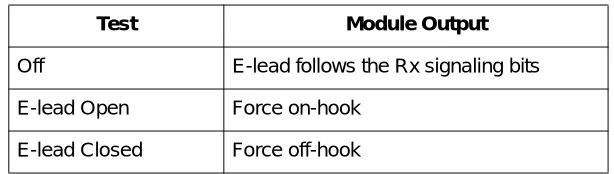
Activates 2W (E&M) tests on a per-port basis. Test options include OFF (no tests are active), E-LEADOPEN and E-LEADCLOSED. Table 3-1 on page 3-7 dis-plays the state of the 2W conductors during each test.Chapter 3. Operation
61200313L1-1 Octal E&M Module User Manual 3-7
T
XABCD
Forces the Transmit Robbed Bit Signaling (Tx RBS) to a specified value. Val-ues include OFF, 0000, 0101, 1010, or 1111.1
KH
ZT
ONE Sends a 1kHz tone into the following locations, based on test selection: NEARsends the tone out the E&M VF port, while FAR sends the tone into the dig-ital PCM stream of the ATLAS 550 controller. These tests are useful for ver-ifying a voice path.
L
OOPBACK Activates Loopback tests on a per-port basis.C
ONFIGURATION
Provides menu options for configuring the module.P
ORT Identifies the port.P
ORTN
AME Allows the user to assign a meaningful name to the port.Table 3-1. Test 2W Information
Test Module Output
Off E-lead follows the Rx signaling bits E-lead Open Force on-hook
E-lead Closed Force off-hook
Calls may be affected when activating the Tx ABCD test. This test is not valid when the port is used in the DIAL PLAN.
Off Normal operation.
Analog Loops the 2W test on itself.
Digital Loops digital data entering the E&M from the ATLAS
con-troller on itself.
Both Processes both Analog and Digital Loopback tests.
Chapter 3. Operation
3-8 Octal E&M Module User Manual 61200313L1-1
S
IGI
FCE Selects signaling interface operation. The module supports all E&M types - I through V, as well as Transmission Only (TO) mode. Press-to-talk (PTT) mode is functionally identical to the E&M Type V mode.VF I
FCE Selects either 4-wire or 2-wire operation of the Voice Frequency (VF) Inter-face.R
XG
AIN Adjusts the level of the signal output at the VF interface. The available range is from +6 dB (loudest) to -12 dB (softest).T
XG
AIN Adjusts the encoded level of the signal transmitted by the module in the PCM stream. The available range is from 6+dB (loudest) to -12 dB (softest)ATLAS 550 FEATURES USED WITH OCTAL E&M MODULE
Two additional ATLAS 550 menu items can operate in conjunction with the Octal E&M Module: FACTORY RESTORE and RUN SELFTEST.
F
ACTORYR
ESTORE You can restore the factory default settings for the Octal E&M Module bypressing F either while the cursor is over the SLT number (this action restores
the factory settings for all of the module options) or while the cursor is over an individual field (this action restores factory settings for the particular field only).
R
UNS
ELF-
TEST RUN SELFTEST, a submenu of the ATLAS 550 main menu item TEST, executesboth the Octal E&M Module internal test and the ATLAS 550 internal test. When RUN SELFTEST displays, place the cursor on it and press Enter to exe-cute the test. The unit continuously changes the display on the self-test log screen until all test results are shown. For additional information on RUN
SELFTEST, see the ATLAS 550 User Manual.
When the digital signal is connected through the PSTN, a setting of -3 dB should be used.
61200313L1-1 Octal E&M Module User Manual A-1
Appendix A
Dial Plan Interface Configuration
INTERFACE CONFIGURATION
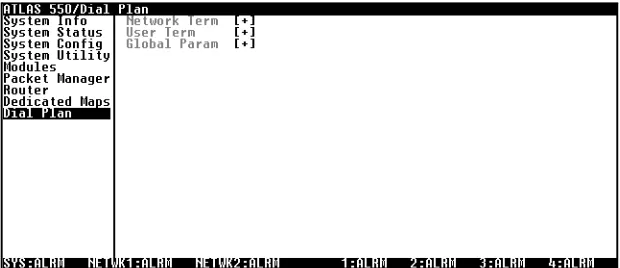
The IFCE CONFIG option for the DIAL PLAN menu (see Figure A-1) sets
config-uration parameters for the endpoint. These parameters vary by the type of port selected. The DIAL PLAN menus are only accessible when using terminal
mode. To access these options, select DIAL PLAN from the top level menu.
Appendix A. Dial Plan Interface Configuration
A-2 Octal E&M Module User Manual 61200313L1-1
OCTAL E&M MODULE INTERFACE CONFIGURATION
The following sections describe USER TERM configuration settings for the
Octal E&M Module when using the DIAL PLAN menus.
P
ORTS
A
VAILABLE
Read security: 5
Shows port allocation for the endpoint. The characters used to define the allocation have the following meanings:
N
UMBER
OF
P
ORTS
Write security: 2; Read security: 5
Defines the number of ports that could be used to answer calls to the num-bers defined in the ACCEPT CALL list. The ports are contiguous beginning with the port number selected and the number of ports.
S
IGNALING
M
ETHOD
Defines the type of signaling to be used across this analog interface. The sig-naling selected needs to match the supervision of the corrected trunk. Op-tions include E&M IMMEDIATE and E&M WINK.
D
IRECT
I
NWARD
D
IALING
Write security: 3; Read security: 5
Defines whether the end-user equipment requires digits to be delivered after going off-hook.
C
ALLER
ID
N
UMBER
Assigns a calling party number to a port when it originates a call and the call exits an ISDN interface.
DID D
IGITS
T
RANSFERRED
Defines the number of digits sent to the end-user equipment. This field dis-plays only if DIRECT INWARD DIALING is set to ENABLED.
S
TRIP
MSD
Write security: 3; Read security: 5Strips a selected quantity (choose from NONE, 1, 2, and 3) of the Most
Signif-icant Digits (MSD) of a dialed number prior to being forwarded out of the port.
0-9 Describes available ports, as indicated by the displayed digit. This digit is the last digit of the port number.
! The endpoint uses this port.
s The switched dial plan uses this port elsewhere.
S The switched dial plan uses this port elsewhere and a conflict ex-ists with this endpoint.
n One or more dedicated (nailed) maps use this port.
N One or more dedicated (nailed) maps use this port and a conflict exists with this endpoint.
Appendix A. Dial Plan Interface Configuration
61200313L1-1 Octal E&M Module User Manual A-3
EXAMPLE:
A network port could be set to accept all calls beginning with 9 (9$), and then with STRIP MSD set to 1, all digits would be sent toward the network
except the leading 9.
S
OURCE
ID
Write security: 3; Read security: 5Simplifies the creation of a DIAL PLAN in applications where the criterion for
switching calls to a certain endpoint is a function of which endpoint origi-nated the call.
• Default value = 0. The default ID for all endpoints is 0 and all accept numbers is 0. With default values, all calls are routed based only on the dialed number.
• Multiple endpoints can have the same SOURCE ID.
• When creating the CALL ACCEPT list, specify one or more SOURCE IDS as
well as a dialed number or range of dialed numbers to accept. EXAMPLE:
An application requires that all calls that originate from Port 1 of the mod-ule in Slot 1 be switched to Port 2 of that same modmod-ule. Assign a unique Source ID (e.g., 7) to Port 1 of the module, and then configure Port 2 to only accept calls from that unique Source ID (7).
D
IAL
O
N
O
FFHOOK
Write security: 3; Read security: 5
Defines a number that is automatically sent to the switchboard when a call on this port goes offhook.
STRIP MSD does not affect CALL ACCEPT criteria. All of the digits
(including the MSDs that are subsequently stripped) are used as accept criteria.
The DIAL ON OFFHOOK number must be specific (i.e., no "wild
Appendix A. Dial Plan Interface Configuration
61200313L1-1 Octal E&M Module User Manual Index-1
Index
Numerics
1kHz Tone3-7
A
Alarm3-4
alarms2-3
Assembly Revision3-5
ATLAS 550 Features Used with Octal E&M Module3-8
C
Call in Progress3-6
Caller ID NumberA-2
Canadian Emissions Requirementsiii
Configuration3-7
customer serviceiv
D
Dial PlanA-1
DID PrefixA-2
Digit SuppressionA-2
Direct Inward DialingA-2
Disabled, Status3-5
E
E-Lead Asserted3-6
F
Factory Restore3-8
FCC radio frequency interference statementiii
Features1-1
Firmware Revision3-5
Functional Description1-1
H
hardware revision3-5
I
Idle, Status3-6
Ifce ConfigA-1
Inactive, Status3-5
Info3-5
initialization2-3
installing the module2-1
Interface ConfigurationA-1
L
limited product warrantyiv
Loopback3-7 Analog3-7 Digital3-7 Off3-7 M Menu3-4
menu structure3-2
M-lead detected3-6
modules menu3-2
N
network pinouts2-3
Number of PortsA-2
O
Octal E&M, introduction1-1
operating the module3-1
operation alarms2-3
P
Part Number3-5
Physical1-2
physical description1-2
pinouts2-3
Port3-5
Port (Configuration)3-7
Port Name3-7
Ports AvailableA-2
power connection2-3
R
red alarm2-3
restore factory defaults3-8
Rev3-5
RMA requestsiv
Index
Index-2 Octal E&M Module User Manual 61200313L1-1
Rx and Tx ABCD3-6
Rx Gain3-8
S
self-test3-8
failed2-3
Serial Number3-5
serviceiv
Sig Ifce3-8
Signaling MethodA-2
Slt3-3
Source IDA-3
State3-4
Status3-4, 3-5
Disabled3-5
Empty3-4
Idle3-6
Inactive3-5
No Response3-4
Offline3-5
Offline/No Response3-5
Online3-4
Status (Status)3-5
Strip MSDA-2
T
terminal menu structure3-2
Test3-4, 3-6
Test 2W3-6
Test E-Lead Closed3-6
Test E-Lead Open3-6
testing, power-up2-3
transmission only mode3-6
Tx ABCD3-7
Tx Gain3-8
Type3-3
V
VF Ifce3-8
W
warrantyiv
Product Support Information
Pre-Sales Inquiries and Applications Support
Please contact your local distributor, ADTRAN Applications Engineering, or ADTRAN Sales:
Post-Sale Support
Please contact your local distributor first. If your local distributor cannot help, please contact ADTRAN Technical Support and have the unit serial number available.
Repair and Return
If ADTRAN Technical Support determines that a repair is needed, Technical Support will coordinate with the Customer and Product Service (CAPS) department to issue an RMA number. For information regard-ing equipment currently in house or possible fees associated with repair, contact CAPS directly at the fol-lowing number:
Identify the RMA number clearly on the package (below address), and return to the following address: ADTRAN Customer and Product Service
6767 Old Madison Pike Building #6 Suite 690 Huntsville, Alabama 35807
RMA # _____________
Applications Engineering (800) 615-1176
Sales (800) 827-0807
Technical Support (888) 4ADTRAN