OpenSoNaR: user-driven development of the SoNaR corpus interfaces
Martin Reynaert TiCC / Tilburg University
CLST / Radboud Universiteit Nijmegen [email protected]
Matje van de Camp De Taalmonsters
Menno van Zaanen TiCC / Tilburg University
Abstract
OpenSoNaR is an online system that allows for analyzing and searching the large scale Dutch reference corpus SoNaR. Due to the size of the corpus, accessing the information contained in the dataset has proven to be difficult for less technically inclined researchers. The OpenSoNaR project aims to facilitate the use of the SoNaR corpus by providing a user-friendly online inter-face. To make sure that the resulting system is practically useful, several user groups have been identified, who drive the interface development process by providing practical use cases. The current system is already used in educational and research settings.
1 Introduction
Concerted efforts over the past years1 in the Dutch language area in Europe, the Netherlands and the
northern half of Belgium, Flanders, have yielded a corpus of over 500 million words of richly linguis-tically annotated contemporary written Dutch, called SoNaR (Oostdijk et al., 2013). After the SoNaR project finished, it became clear that the corpus is difficult to handle for most potential users because of its size and technical formats. The OpenSoNaR project2 aims to resolve the practical problems of
dealing with the SoNaR dataset. On the basis of an available corpus back-end system, BlackLab, that allows for searching through all the information contained in the SoNaR dataset, user interfaces, called WhiteLab, are developed that allow for user-desired types of corpus searches and investigations. We will first briefly describe the SoNaR dataset. Next, we discuss the OpenSoNaR project, treating the ideas behind the project as well as the description of the system, focusing mainly on WhiteLab.
2 SoNaR
The SoNaR project developed a large scale reference corpus for contemporary, written Dutch. This balanced corpus consists of about 540 million tokens of Dutch across a wide range of text types, such as books, magazine articles, reports, subtitles, but also data from the “new” media, such as chat texts, SMS and tweets. A unique aspect of this corpus is that for all texts, IPR regulations are explicitly known, in most cases settled by contract with the copyright holders. All texts are linguistically annotated on several layers. Documents, paragraphs, sentences and tokens are uniquely identified and lemmata, part-of-speech (POS), named entity information and morphological analyses have been automatically annotated in the data. All information, from tokenization, linguistic annotation to metadata, is marked in XML structures. The Folia XML format (van Gompel and Reynaert, 2013) is used to hold all the textual information and linguistic annotations. Metadata, which includes, for example, origin, author, text genre (as far as known), is stored in a separate document that is linked to the text document. Metadata is stored
This work is licensed under a Creative Commons Attribution 4.0 International Licence. Page numbers and proceedings footer are added by the organisers. Licence details:http://creativecommons.org/licenses/by/4.0/
1Funded in large part by the Dutch Language Union in the STEVIN programme described in the Open Access book
‘Essential Speech and Language Technology for Dutch’http://www.springer.com/education+%26+language/ linguistics/book/978-3-642-30909-0
2Homepage:http://opensonar.uvt.nl
in CMDI files (Broeder et al., 2011). The metadata files duplicate the number of documents in the corpus. SoNaR consists of approximately 2.4 million files.
3 OpenSoNaR
The aim of the OpenSoNaR project is to develop and implement a practically useful system that allows easy access to the SoNaR corpus. The project has been set up to make sure that the functionality of the system serves a wide range of users. As is implied by the name of the project, our wish is to make the system we build as open as possible to all users. We will provide a fully open online service to all, from schoolchildren onwards, based on the IPR-settlements negotiated during the SoNaR corpus building project. The SoNaR corpus has subsections which were obtained on the basis of Creative Common licenses, e.g. Wikipedia, which will be open. The system will further under CLARIN login be fully open and free to all non-commercial researchers. Restrictions on commercial research and/or use apply to some important subsections, e.g. the newspapers and periodicals incorporated in the corpus. For these, interested commercial parties need to negotiate access separately with the copyright owners.
3.1 Project
Technical issues stand in the way of most potential users actively conducting research on the SoNaR cor-pus. The OpenSoNaR project is to resolve these. The SoNaR-500 corpus3requires information retrieval
tools for efficient searching, as trivial solutions are simply too slow or cumbersome to use. The XML format requires the search system to know about the XML structure that describes the linguistic infor-mation in somewhat more complex searches, for example, using a combination of token and linguistic information. Metadata selections are required just as well.
The aim of the OpenSoNaR system is to solve all these practical problems. Two components are developed: BlackLab that enables searching in the data, and WhiteLab providing the user-interface. In order to provide the most useful search interface, four main user groups have been identified. These con-sist of researchers in the areas of (corpus and cognitive) linguistics, communication and media studies, literary sciences, and cultural sciences. Each of these groups are asked to provide typical use cases, i.e. search operations that they would like to be able to ask the SoNaR corpus. To test practical usability, the system is also incorporated in education. Currently, OpenSoNaR has been successfully tested by students in courses on linguistics and research methodology. The results of these test provide feedback on what further developments the interfaces require to be practically of best possible use to all.
3.2 Related work
Throughout Europe, most national corpora available online are based on BlackLab’s predecessor and source of inspiration, the notable Corpus Workbench system4 (Christ, 1994). In the Netherlands, there
is another concurrent project in which a corpus exploration and exploitation environment is being de-veloped. This is the much larger and far more ambitious project Nederlab5. Nederlab aims to create a
research portal to all digital corpora available for Dutch from its earliest days. There is cross-fertilization between both projects.
3.3 System
The OpenSoNaR system consists of two components that interact with each other. TheBlackLab com-ponent is the back-end of the system and provides the actual search functionality. On top of BlackLab, theWhiteLabcomponent provides the front-end, user interface.
3Available free for research from the Dutch HLT Agency TST-Centrale http://tst-centrale.org/nl/
producten/corpora/sonar-corpus/6-85. The documentation link on the page offers access to the user manual.
4Homepage:http://cwb.sourceforge.net/
3.3.1 BlackLab
As explained on its official GitHub site6, BlackLab is a Java-based corpus retrieval engine built on top
of Apache Lucene. It allows fast, complex searches with accurate hit highlighting on large, annotated, bodies of text, in our case text in FoLiA XML. This back-end system is further being developed at the Dutch Institute for Lexicology (INL) by Jan Niestadt. OpenSoNaR had a head start in its further interface development efforts in that BlackLab comes equipped with a fine basic user interface as is evidenced by the online INL corpora ‘Letters as Loot’7and the corpus of Medieval Dutch ‘Corpus Gysseling’8.
3.3.2 WhiteLab
The Whitelab user interface9 is currently available in two languages, Dutch and English. We hope to
be able to extend the languages available. The Whitelab user by default lands on theSearchpage of OpenSoNaR when logging in. Next to this page we have theExplorepage and theHomepage.
Home The Home page provides information about the system. It provides a first-user manual which gives an overview of the main possibilities OpenSoNaR offers. It also provides the actual user manual of the SoNaR corpus which offers in-depth information on the composition of this corpus of contemporary written Dutch. Next, short films are available that provide tutorials of how to use the system.
Explore The Explore page gives statistical information about the corpus contents, providing insight into the distribution of the texts available per genre and according to their provenance, basically whether they were collected in the Netherlands or in Flanders. A third category contains texts with uncertain provenance, e.g. the texts from various European Union organizations or from Wikipedia. This page also affords access ton-gram (wherenis 1 to 5) frequency lists derived from the whole corpus and its genre subsections for word forms, lemmata and the combination of lemmata with POS-tags.
Search The Search environment is the most elaborate. It provides four levels of access to the contents: Simple, Extended, Advanced and Expert.
The Simple search option provides Google-style, single query box access. Entering a search term here will instantiate a search over the full contents of the corpus. The search is for word forms, which may be phrases (n-grams), in which case exact matches are sought, i.e. respecting the actual sequence of words. This functionality is also provided by the next two search environments.
TheExtended searchenvironment allows one to impose selection filters on the search effected. These filters are of two kinds. First, there are filters on the metadata. Second, there are filters on the lexical level, allowing one to search for either word forms, lemmata or by POS-tags.
The metadata filters are at first hidden behind a bar visible above the actual lexical query fields. When the user wants to impose metadata filters the bar is expanded by a simple mouse click and the user is presented with a row consisting of three drop-down boxes. The middle box has just two options: ’is’ or ’is not’. The left box gives access to all the metadata fields available in the corpus CMDI metadata files. The right box, upon selection of a particular metadata field in the left box, dynamically expands with the list of available metadata contents, where applicable. Metadata filters can be stacked. Through a ‘plus’ button to the right of the query row, one may obtain further rows in each of which further restrictions on the query may be imposed. The metadata selection interface further provides the option of grouping the query results obtained by a range of features. E.g, if one here selects the option of having the results presented by country of origin of the hit texts, one is not presented directly with the KWIC list of results, but rather with a bar representation of the number of hits per country. One may then click on one of these bars and be presented with the KWIC list. Alternatively, having made a selection of texts, one may opt to be presented with a word cloud of its most salient terms, for exploratory purposes.
The lexical filters allow one to perform optionally case-sensitive searches for either word forms, for lemmata and for POS-tags. When the search is for lemmata, all the word forms sharing the same lemma
6https://github.com/INL/BlackLab
7URL: http://brievenalsbuit.inl.nl/zeebrieven/page/search
will be retrieved. For POS-tag searches the user is presented with a drop-down list which presents a layman’s translation in plain language for the actual POS-tags involved. Combinations of, for instance, word forms and POS searches are possible to direct the search for the word ‘drink’ (ibidem in English) towards the first person singular of the present tense verb form, rather than its use as a noun.
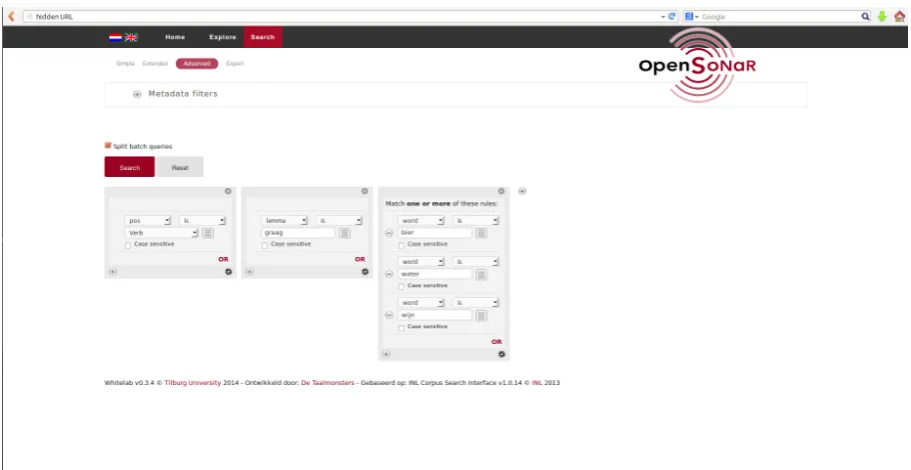
For the Advanced search option we fully acknowledge to emulate the elegant interface to CQL-query building as provided by the Swedish Spr˚akbanken10. Users are first presented with a single box
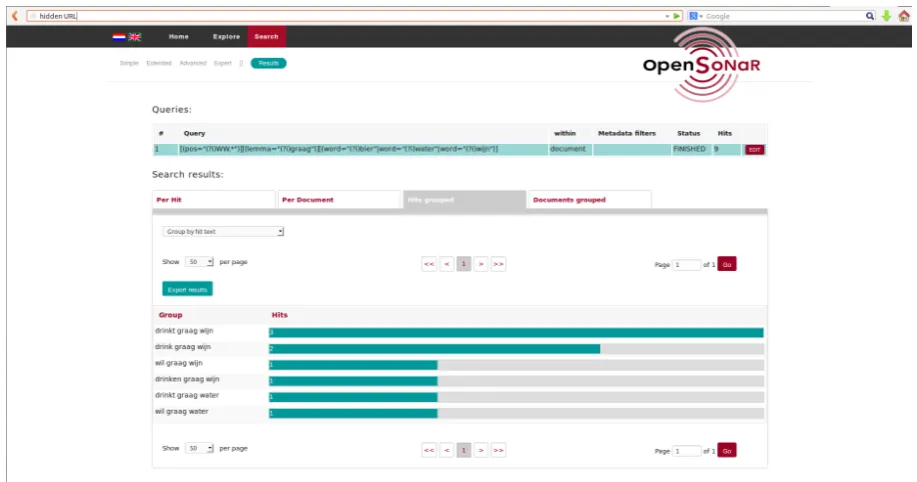
[image:4.595.71.527.207.442.2]containing three query fields. By horizontally or vertically adding further boxes as in Figure 1 they may build quite complex queries without the need to know the query language behind them. Users get to see the query they have built and have the option of further extending it, manually. Results are subsequently presented graphically, cf. Figure 2.
Figure 1: An advanced CQL-query having been built with Advanced Search query boxes
TheExpert searchrequires knowledge of the query language incorporated in the system. It is CQL, the Corpus Query Language11. In its essence, this search option’s limitations are defined mainly by the
user’s CQL proficiency.
Regardless of the search option one has chosen, by default, eventually a KWIC list of results is pre-sented. One may then choose to ‘Toggle titles’ and by clicking on a title, move to full text view. There, moving the cursor over any of the words in the text, one gets to see a small window with the word form’s unique ID, lemma and POS-tag.
A feature of the Extended and Advanced search options we have not seen in other corpus exploration environments is that multiple queries can be performed in one operation. This is facilitated by the fact that by clicking on the ‘list’ button to the right of the query boxes the user may effortlessly upload a pre-prepared list of query terms. After uploading, these query terms are converted by the system into actual, separate CQL queries which are accessible via a drop-down list above the query boxes. The user then has the option of having the output presented separately, per query, or mixed. As soon as the queries have run, the user has the further option of downloading the results. If in the Advanced search environment a user uploads more than one query list, the system makes a combination of all the query terms in the lists. Givenxterms in list A andyterms in list B, this results inxtimesyqueries. If this is not what the user intended, then he has the option of uploading a list of, for instance, word bigrams to be searched for in
10See ‘Korp’ athttp://spraakbanken.gu.se/eng/start
Figure 2: Grouped results of the advanced CQL-query having been built with Advanced Search query boxes. After grouping, results are first presented graphically after which the user may further explore the text snippets retrieved.
the Extended search environment.
The query results are in a tab-separated format suitable for loading in a spreadsheet. The format should be easily convertible to the specific formats required by statistical packages such as R or SPSS.
4 Conclusion
In this OpenSoNaR system demonstration paper we have given an overview of ongoing work in the Netherlands to provide to all online access to the new richly annotated reference corpus for contemporary written Dutch called SoNaR.
Acknowledgements
The authors, TiCC senior scientific programmer Ko van der Sloot as Software Quality Control Offi-cer, and Max Louwerse as Project Coordinator gratefully acknowledge support from CLARIN-NL in project OpenSoNaR (CLARIN-NL-12-013). The first author further acknowledges support from NWO in project Nederlab. We would like to specifically thank our colleagues at INL: Katrien Depuydt, Jesse de Does and Jan Niestadt.
References
Daan Broeder, Oliver Schonefeld, Thorsten Trippel, Dieter Van Uytvanck, and Andreas Witt. 2011. A pragmatic approach to XML interoperability – the Component Metadata Infrastructure (CMDI). InBalisage: The Markup Conference 2011, volume 7.
Oliver Christ. 1994. A Modular and Flexible Architecture for an Integrated Corpus Query System.
Nelleke Oostdijk, Martin Reynaert, V´eronique Hoste, and Ineke Schuurman. 2013. The construction of a 500-million-word reference corpus of contemporary written Dutch. InEssential Speech and Language Technology for Dutch: Results by the STEVIN-programme, chapter 13. Springer Verlag.