ABSTRACT
LIU, LONGJU. Precise Optical Positioning Using an Inexpensive USB Microscope Camera. (Under the direction of Dr. John F. Muth).
The availability of inexpensive Universal Serial Bus(USB) Charge Coupled Device(CCD)
and Complementary Metal Oxide Semiconductor(CMOS) cameras with simple interfaces for
image acquisition and image processing potentially allow other instruments to be
constructed. This thesis describes using a USB digital microscope, consisting of a CCD
camera with a high power adjustable lens, to investigate techniques to make inexpensive
positioning systems with micron (1x 10⁻⁶ m) accuracy.
The first method uses the microscope to image an off-the-shelf micrometer scale and
digitally process the image to obtain positions with accuracy comparable to commercial
Mitutoyo digital micrometers based on linear variable transformers.
The second method images a digital paper with a coded pattern of closely spaced dots
to determine an x-y position. The coding pattern is the one developed and described by the
company patents of Anoto. The digital microscope was used to take an image of the dot
pattern for positioning. The absolute coordinate of a 6×6 array of dots is determined by the
spatial encoding. Image processing techniques are used to determine the relative position
between the camera and the paper with the printed dot pattern. This method potentially
© Copyright 2011 by Longju Liu
Precise Optical Positioning Using an Inexpensive USB Microscope Camera
by Longju Liu
A thesis submitted to the Graduate Faculty of North Carolina State University
in partial fulfillment of the requirements for the degree of
Master of Science
Electrical Engineering
Raleigh, North Carolina
2012
APPROVED BY:
_______________________________ ______________________________ John Muth Russell Philbrick
Committee Chair
DEDICATION
BIOGRAPHY
Longju Liu, was born in Chengdu, China. He received his Bachelor’s degree of
Science in Optical Information Science and Technology from Sun Yat-sen University,
Guangzhou, China. In August of 2009, he began his Master of Science studies in Electrical
ACKNOWLEDGMENTS
I would like to thank my advisor, Professor John Muth for guiding my work. He is a
considerate and enthusiastic mentor and he has been helping me overcome difficulties
throughout my master study. I gained more than just knowledge under his advisement. I
would also like to thank the other committee members, Professors Russell Philbrick, Leda
Lunardi and Michael Escuti for serving on my committee and for their contributions to my
thesis. I also like to thank Prof. Edward Grant for attending my defense.
At last, I would also like to thank my parents in China. Without their inspiration and
TABLE OF CONTENTS
LIST OF TABLES ... vii
LIST OF FIGURES... ix
CHAPTER 1 INTRODUCTION ...1
CHAPTER 2 REVIEW OF PRECISE POSITIONING METHODS ...3
2-1 Rotary optical encoders ...4
2-1-1 Incremental rotary encoder ...5
2-1-2 Absolute rotary encoder...7
2-2 Linear Optical Encoders ... 10
2-3 Summary ... 14
CHAPTER 3 Obtain the Reading of the Micrometer with a Microscopic Camera ... 15
3-1 Obtaining standard pictures ... 19
3-2 Processing of the standard images ... 20
3-3 Calculation of the ratio ... 21
CHAPTER 4 ANOTO DOT PATTERN TECHNOLOGY ... 29
4-1 Introduction of Anoto Dot Pattern Technology ... 29
4-2 Principle of Anoto Dot Pattern Technology ... 30
5-1 Image Preparation ... 39
5-2 Preprocessing ... 40
5-3 Decoding ... 43
5-4 Calculate the movement distance ... 59
CHAPTER 6 CONCLUSION AND FUTURE WORK ... 63
6-1 Summary of the work ... 63
6-2 Future Directions ... 64
REFERENCES ... 66
APPPENDIX ... 70
Appendix A Matlab scripts used in Chapter 3 ... 71
LIST OF TABLES
Table 2-1 Phases of incremental rotary encoder ...7
Table 2-2 Comparison of Standard Binary Code and Gray Code ...9
Table 3-1 Locations of linear graduations of a reference image ... 22
Table 3-2 Lengths of the sub-divisions of a reference image ... 22
Table 3-3 G and corresponding ratio of reference images ... 24
Table 3-4 The locations of the graduations and the length of the sub-divisions of the experimental image ... 26
Table 3-5 Calculation of the precise location of the rotary graduations ... 27
Table 4-1 Conversion between Offset direction and code pair[13] ... 31
Table 5-1 Conversion between offset direction and offset indicators ... 45
Table 5-2 Calculation of the incline angle ... 48
Table 5-3 x, y coordinates (in pixels) of the centroids (a) the x coordinates (b) the y coordinates ... 49
Table 5-4 Differences of maximum and minimum of each column ... 49
Table 5-5 Unmatched Offset direction indicators in x, y directions (a) in the x direction and (b) in the y direction ... 51
Table 5-6 Offset direction indicators after first correction (a) in the x direction and (b) in the y direction ... 53
Table 5-7 Final offset direction indicators (a) in the x direction and (b) in the y direction .... 55
Table 5-9 An example of converting primary difference number sequence into secondary
difference number sequences ... 57
Table 5-10 The relation between column number and the four place numbers ... 58
LIST OF FIGURES
Figure 2-1 The structure of an incremental rotary encoder ...5
Figure 2-2 Illustration of the disk...6
Figure 2-3 The phase change of incremental encoder under clockwise rotation ...6
Figure 2-4 The structure of an absolute rotary encoder ...8
Figure 2-5 (a) A three-contact Standard Binary Encoded disk (b) A three-contact Gray Coded disk ...9
Figure 2-6 A schematic view of the incremental linear encoder ... 11
Figure 2-7 A schematic view of the absolute linear ... 11
Figure 2-8 Image scanning method ... 12
Figure 2-9 Interferential scanning method ... 13
Figure 3-1 The experimental arrangement (left) and the camera used (right) ... 15
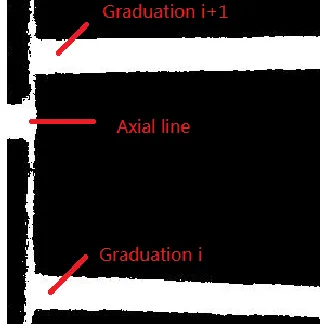
Figure 3-2 Example of experimental image ... 17
Figure 3-3 Obtaining the reading of a micrometer using a camera... 18
Figure 3-4 An example reference image of the ROI with a reading of 0.24995 ... 20
Figure 3-5 A binary image of the processed image ... 20
Figure 3-6 A illustration of the sub-division and the varying interval ... 21
Figure 3-7 An intensity histogram of the reference image ... 22
Figure 3-8 A processed example image ... 25
Figure 3-9 The right part used to calculate the position of the axial line ... 26
Figure 4-1 Illustration of the Anoto Dot Pattern (with the virtual raster lines) ... 29
Figure 4-2 Four elements of the Anoto Dot Pattern of four different offset directions ... 30
Figure 4-3 An example of a 8×8 array of Anoto Dot Pattern ... 31
Figure 4-4 How the vertical partial sequences is coded in x direction... 33
Figure 4-5 Conversion between primary difference number sequence and four secondary difference number sequences ... 34
Figure 5-1 The hardware of the optical positioning system ... 38
Figure 5-2 Flowchart of the experiment ... 39
Figure 5-3 Partial image showing the printed 6×6 array at 200X magnification ... 39
Figure 5-4 A typical image taken by the camera at 60X magnification ... 40
Figure 5-5 The preprocess steps... 42
Figure 5-6 An example image of one-pixel dots and its FFT ... 43
Figure 5-7 A preprocessed image ready for decoding (60X) ... 46
Figure 5-8 Using FFT of the one-pixel dots image to correct the incline ... 47
Figure 5-9 The incline-corrected image ... 48
Figure 5-10 The dot pattern with reconstructed visible raster lines ... 54
CHAPTER 1
INTRODUCTION
Determining the position of one object in relation to reference point is fundamental in
many engineering tasks. This thesis describes the investigation of optical positioning
methods using an inexpensive camera. These optical methods have the advantage of being
precise and non-contact.
A common method of optical positioning uses optical encoders, which can convert
mechanical movement into representative electric signals[1-3]. The signals are coded in a
predetermined way that can be processed and decoded using a computer program. Optical
encoders are especially useful when the movement of the object of interest is simple and
clear, for example, to record how far a robot has moved forward or backward[4,11]. The
details about several types of optical encoders are discussed in Chapter 2.
When the movement of the object of interest becomes unpredictable, or is in two or
three dimensions, it is not always easy to tell the position using optical encoders. Usually, a
number of different types of optical positioning sensors are used to form a complicate
positioning system to provide the positional information accurately and precisely[5-7].
For the 2D case we can consider using mapping as an analogy, like the GPS (Global
Positioning System) determination of latitude and longitude[8], I would like to be able to
obtain coordinates for an optically flat surface. The idea is to encode positional information
Instead of using multiple complicated and expensive sensors to ‘read’ the information,
we utilize a microscopic digital camera[9] to ‘read’ the coordinate information. The most
significant advantages include the ease of obtaining images and the dramatic drop in cost; the
possibility of relatively high resolution and accuracy is maintained at the same time. On the
other hand, computation power and storage space for images has been sharply increased to
processing digital images.
Conventional Optical encoders are accurate and quick[1,2,10], but they are expensive
due to the precision required during manufacturing[10]. They can also be limited functionally,
for example, some encoders are only useful for obtaining relative position, and require
measurement reinitialized if the reference position is lost[1,2]. The resolution of optical
encoders is often limited to a couple of microns [12]. Considering a simple digital
microscope composed of a lens and CCD or CMOS imaging chip, a magnification that
covers a field of view of about 100 µm in a 1280 x 1024 pixel camera, results in about 0.2
µm per pixel, and suggests that sub-micron resolution could be obtained.
It is quite straightforward to think about patterning the surface of interest to convert it
into a 2-D map. The method that we explore was invented by Anoto Group, known as Anoto
Dot Pattern Technology [13]. It is found to work well in digital papers, where the absolute
position of pattern is obtained by an electronic pen, which contains a camera that reads the
CHAPTER 2
REVIEW OF PRECISE POSITIONING
METHODS
There are several common methods for precise positioning. Each method has its own
field of applications, where it has specific advantages and disadvantages. For example, one of
the simplest precise positioning devices is a micrometer. It is very useful when the movement
is in one dimension. Many translation stages are made that use a micrometer in order to
provide accurate movement, are usually read by the human eye. Veriner micrometers using
the English system are typically accurate to 10000th of an inch, or about 2.5 µm. Some
metric vernier calipers can be read to an accuracy of about 1 µm [16].
Interferometers are another device that can be used for precise positioning, the
Michelson Interferometer[17,37] for example. The movement of the object is related to the
optical path difference of a split light of laser beam. The interference fringes observed in
optical intensity change as the object moves; the bright constructive interference change to
dark destructive interference as the optical path changes by one-half wavelength[37].
Changes in the length of one arm of the instrument can be counted using a photodiode as
each intensity change represents an increment in motion of one-quarter of a wavelength. For
more precise measurements one can measure the relative phase by monitoring the intensity
within one fringe. With this type approach with appropriate control electronics allows
sub-angstrom linear travel to be monitored.
Optical encoders are also very popular because of their ease of use, and these will be
devices which convert the mechanical movement, or the position information of a
mechanical unit, into representative electric signals by blocking and unblocking light, or by
the reflection of light [1-3]. The common components of an optical encoder are a light source,
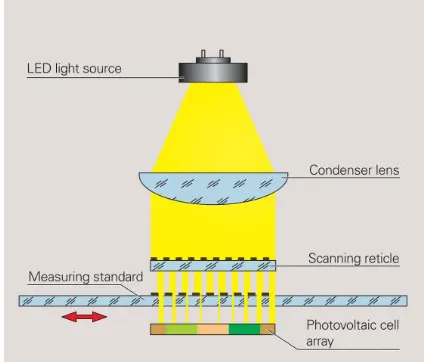
a condenser lens, a scanning reticle, a patterned disk and photovoltaic cells[18].
There are several ways of classifying optical encoders, which depending on whether
the mechanical movement is angular or linear, and are classified as rotary or linear optical
encoders[18,19]. Each of these two types of optical encoders can be further sub-divided into
two main types, known as absolute and incremental[1,2].
2-1 Rotary optical encoders
Rotary optical encoders are utilized to convert angular motion or position of a shaft.
If a rotary encoder is designed to code the angular motion, it is called an incremental rotary
encoder. The output of this type of encoder usually provides information which can be
further processed into measured quantities, such as velocity, position, RPM and distance[1].
Another type of rotary encoder is the absolute rotary encoder, which provides an output of
the current position of the shaft and is usually made an angle transducer[1]. Both of these two
types are similar in construction and are made largely in the same manner[18,19]. The main
2-1-1 Incremental rotary encoder
One typical incremental rotary encoder has the structure shown in Figure 2-1.
Figure 2-1 The structure of an incremental rotary encoder[18]
The pattern on the periphery of the disk of an incremental rotary encoder is made up
with a single track of equally spaced transparent and opaque sectors. By counting the
numbers of switching of the transparent and opaque sectors, the motion of disk is measured.
The number of such switches that occur per revolution is defined as disk count of the
incremental rotary encoder[1].
A transparent section as a reference mark is added to the inner side of the track in
order to generate a signal that occurs once per revolution. This signal is used to indicate an
absolute position as an index. There are two sensors used in a rotary encoder, which are
labeled A and B respectively and shown in Figure 2-3. The outputs of sensor A and sensor B
Figure 2-2 Illustration of the disk[1]
The sensor B is shifted a quarter of the pitch of a transparent/opaque section pair from
the sensor A so that they are accurately 90 degrees out of phase. There are several reasons
that two sensors are used, but the main one is that one output is incapable of determining the
direction of rotation. With an additional output, the processing unit is then capable of telling
which channel is leading the other one and the rotation direction is determined too[3].
For most encoders, the clockwise direction is defined as the signal of channel A
becomes ‘1’ before that of channel B[3].
Table 2-1 Phases of incremental rotary encoder[3]
Clockwise rotation Counter-clockwise rotation
Phase Ch A Ch B Phase Ch A Ch B
1 0 0 1 1 0
2 0 1 2 1 1
3 1 1 3 0 1
4 1 0 4 0 0
A third signal is generated by the reference mark every complete revolution, and
makes it possible for an incremental rotary encoder to determine the angular position.
The incremental rotary encoders are not as accurate as absolute encoders, especially
when the rotation speed is too high or too low. Because under these circumstance, misreading
errors caused by missing counts or backward counts can easily occur. This would eventually
result in a wrong output.
2-1-2 Absolute rotary encoder
Figure 2-4 The structure of an absolute rotary encoder[18]
Figure 2-4 shows the most significant difference of an absolute rotary encoder and an
incremental rotary encoder is that the periphery of the disk is uniquely patterned. The pattern
converts the rotation of the shaft into a signal called Gray Code[20,42,43]. The reason that
Standard Binary Encoding is not used is that determining the angle becomes impossible
when the disk stops between two adjacent sectors. And in fact, the contacts cannot be
produced to be perfectly aligned, makes the contacts switches from 1 to 0 or 0 to 1 at
different times. If the order of switching is Contact 2, Contact 1 and Contact 3, and the
starting sector is sector 1 reading (0, 0, 0), the sequence of the codes is shown as: (0,0,0)
->(0,1,0)->(1,1,0)->(1,1,1)->(0,0,1). The corresponding sequence of sectors, 1->3->7->8, is
not acceptable since the next sector after sector 1 (0,0,0) should be sector 2 (0,0,1).
A comparison of the Standard Binary Encoding and the Gray Code is shown for a
Figure 2-5 (a) A three-contact Standard Binary Encoded disk (b) A three-contact Gray Coded disk[35]
Table 2-2 Comparison of Standard Binary Code and Gray Code[35]
Standard Binary Encoding Gray Code
Sector Contact 1 Contact 2 Contact 3 Contact 1 Contact 2 Contact 3 Angle(°)
1 0 0 0 0 0 0 0 ~ 45
2 0 0 1 0 0 1 45~ 90
3 0 1 0 0 1 1 90~135
4 0 1 1 0 1 0 135~180
5 1 0 0 1 1 0 180~225
6 1 0 1 1 1 1 225~270
7 1 1 0 1 0 1 270~315
8 1 1 1 1 0 0 315~360
The same problem is examined for the Gray Code. If the order of switching is Contact
2, Contact 1 and Contact 3, and the starting sector is sector 1 reading (0, 0, 0), the sequence
sequence of sectors is 1->1->1->1->2. The change of sector is correct and stable, because
there is only one contact that changes state when one sector changes to the next sector in
Gray Code.
Actually the pattern on the disk of an absolute array can be rather complicated and
divide the disk into many more parts instead of 23 = 8, and requires more contacts.
2-2 Linear Optical Encoders
Linear optical encoders are made to encode linear positions using optical techniques.
Like rotary optical encoders, linear optical encoders are divided into two main types—
incremental and absolute linear encoders[2,19]. The difference of between incremental linear
optical encoders and absolute optical encoders is the reference for the graduations on the
track[19].
An incremental linear encoder usually has two tracks. The first track has graduations
that are equally distributed, and the second track has a series of special coded graduations as
reference marks. A schematic view is shown in Figure 2-6. With the help of the reference
marks, it’s not difficult to determine the displacement and motion direction using incremental
Figure 2-6 A schematic view of the incremental linear encoder[19]
Absolute linear encoders also have two tracks. One track has graduations that are
distance-coded, and the other one is incremental with equally distributed graduations. A
schematic view is shown in Figure 2-7.
Figure 2-7 A schematic view of the absolute linear[19]
There are several approaches used to code the position using linear encoders. When
scanning is used[19]. A scanning reticle and a measuring standard scale are placed relative to
each other. The scanning reticle is made of transparent materials that parallel light can passes
through.
The incident light is modulated by the gaps of these two gratings when the measuring
standard is moving. When the gaps are aligned, light is not blocked and can be detected by
the photovoltaic cell array. The opposite case occurs when the gaps of one grating is blocked
by the line of the other, and no light can pass measuring standard. The illustration is shown in
Figure 2-8. On the occasions where the movement is relatively small or high resolution is
needed, another method called interferential scanning should be applied. A schematic view is
shown in Figure 2-9.
Figure 2-9 Interferential scanning method[19]
When the light passes through the scanning reticle, it is diffracted into three beams
with almost equal intensity with the order -1, 0,+1. These beams are diffracted again at the
scales of the measuring standard and reflected back to the scanning reticle where interference
occurs[19].
If relative motion occurs between the scanning reticle and the measuring standard,
there will be phase shifts for the light with order +1 and -1. If the grating moves by one
period, the shift of the “+1” light will be 2π in the positive direction while the shift of the “-1”
light is 2π in the negative direction. Thus, one period change of the grating causes a change
2-3 Summary
A review of four common optical encoders is presented in this chapter. The purpose
is to investigate the features of these encoders and point out their advantages and
disadvantages. This examination is to determine if they are suitable for the optical
positioning using an ordinary camera.
Each of these optical encoders has favorable properties of high accuracy, high
reliability and can code the position without direct contact [18,19]. However they are
relatively complex and can require attachment of precision machined encoding strips and
multiple detectors. They are also limited to measurement in one dimension and can’t freely
CHAPTER 3
Obtain the Reading of the Micrometer with a
Microscopic Camera
As an example of measuring linear motion we consider using a digital microscope
with and off-the-shelf micrometer. The micrometer is widely used for precise measurement
of small distance such as moving translation stages and optical components. The principle
idea is that by using a digital camera higher accuracy can be obtained rather than reading by
eye.
Figure 3-1 The experimental arrangement (left) and the camera used (right)[21]
The experimental arrangement is shown in Figure 3-1, and consists of a digital
microscope and bracer to hold the microscope a translation stage with a digital micrometer.
The camera is used to take pictures of the scales on the sleeve of the micrometer. The bracer
and clamp is used to hold the camera and adjust its position. The translation stage is
350 in this thesis[16]. When the thimble of the micrometer is being rotated, the translation
stage will move along the same direction. To check the accuracy of our method, the
micrometer is also equipped with a digital readout. This readout device uses a linear variable
differential transformer with a custom chip that contains calibration data to measure the
positions. The rated accuracy of the digital readout is 0.001 mm or 1 µm and are displayed on
a small LCD screen[16].
The reading on the LCD screen provides a reference that we compare with our
method. The important parameters of the micrometer in this thesis are shown below[16]:
1. Lead: 0.025 inch
2. Range: 1 inch
3. The number of the graduated markings on the thimble: 25, starting from ‘0’ to ‘24’.
4. The number of the major graduated markings on the sleeve: 11, starting from ‘0’ to
‘10’.
5. The number of the minor graduated markings on the sleeve: 20 above the axial line,
and 40 sub-divisions below the axial line.
From the above parameters, it’s clear that if the thimble is screwed out by one turn,
the axial movement of the micrometer will be 0.025 inch to the right. And the edge of the
thimble will move from the central line of one minor graduation to that of an adjacent minor
is screwed out by one division on the thimble. If the graduation on the thimble that coincides
with the axial line was graduation 0, then it would become graduation 1 after this operation.
The reading of the micrometer is determined by how many divisions and sub-divisions are
visible on the sleeve, and which graduation on the thimble coincides with the axial line or an
estimated position when there is no such a graduation:
R = S * 0.02495 + G*0.0010.
Where R is Reading, S is the number of complete sub-divisions that can be seen on
the sleeve and G is the estimated position on the thimble that coincides with the axial line.
Figure 3-2 Example of experimental image
Thus in our experiments what we want to be able to do is accurately determine an
estimate for the graduation. If we know that value to high accuracy we will have an accurate
measurement of position. For example as shown in Figure 3-2, Graduation 0 and one
sub-division are visible on the sleeve, Graduation 10 on the thimble is seen to coincide with the
In general, the idea is to take a picture of the micrometer (Figure 3-3). Then digitize
the image to identify the positions of the rotating horizontal lines, and compare the position
of those lines with the horizontal reference line. Then using the knowledge of the spacing of
the marks on the micrometer determines the position accurately.
Figure 3-3 Obtaining the reading of a micrometer using a camera
This was accomplished in two steps. First using the LCD readout of the micrometer a
series of calibration images were taken for each turn of the thimble from graduation 0 to
graduation 24. This establishes a bijection of the axial line and horizontal lines on the thimble.
The program ran these 25 images as a batch file and then was used to form a table, where the
ration of the distance between the axial line and the horizontal lines corresponds to the linear
motion of the micrometer. This process is described in the section titled standard pictures.
expressed as a ratio. This can then be modified by a calibration factor using the series of
calibration images that have been obtained.
3-1 Obtaining standard pictures
A number of images focused on the ROI are taken using the platform shown in Figure
3-1. There are several requirements when taking the images:
1. The images should be taken in the same surroundings with almost the same light
source, the same shooting angle and the same distance from the lens;
2. The gray-scale of the images should be as even as possible. Avoid the situation that
some parts of the images are too dark or too bright;
3. The images should contain mainly the scales of the micrometer. And the ROI should
be made sure as clear as possible.
Figure 3-4 An example reference image of the ROI with a reading of 0.24995
3-2 Processing of the standard images
The processing includes crop, incline correction, threshold, removing noise and
converting the image from gray scale to black and white. As long as the images meet the
requirements stated above, a batch file can complete the processing quickly for many images
at a time. One example of the processed image is shown in Figure 3-4. Unnecessary part of
the image has been cropped out. These reference images are then stored for future use.
3-3 Calculation of the ratio
The special ratio refers to the ratio of the length of the last interval, which is not a
complete sub-division and the average length of the complete sub-divisions. The lengths are
obtained in pixels. (Figure 3-5)
Figure 3-6 A illustration of the sub-division and the varying interval
Continue taking Figure 3-4 as an example, a histogram of the distribution is shown in
Figure 3-6. The peaks have shown the locations of the linear graduations on the sleeve. The
thin small line shows the position of the edge of the thimble, which has overlapped with the
Figure 3-7 An intensity histogram of the reference image
The locations of the linear graduations are shown in Table 3-1. p is the position in
pixels.
Table 3-1 Locations of linear graduations of a reference image
NO. 1 2 3 4 5 6 7 8 9 10 11
p 52 117 183 247 313 377 443 508 573 638 706
Use the value of the position of one graduation to subtract that of the former one, the
lengths of the sub-divisions are obtained and shown in Table 3-2.
Table 3-2 Lengths of the sub-divisions of a reference image
NO. 1 2 3 4 5 6 7 8 9 10
Length
(pixels) 65 66 64 66 64 66 65 65 65 68
The average length of the former 9 sub-divisions is 65.11. The reason why the last
and the thimble. Therefore, the position of the last graduation in this image is not reliable.
This problem is solved when images were taken for larger readings that the 11th graduation
can be distinguished. It is found that the position of the 11th graduation should be 705 by
comparison with other images. In this way the last graduation position are corrected for all
other similar situations.
As a result, the length of the varying interval is about 1 pixel in this image. The ratio
is defined as r,
The graduation on the thimble that coincides with the axial line is graduation 0. It is
desirable that the ratio is calibrated to 0.00%. Same procedures are done for other 23
reference images and a bijection of the ratio and graduation is obtained and shown in Table
Table 3-3 G and corresponding ratio of reference images Original length Original ratio Improved length Improved
ratio G
Ideal ratio''
1 1.53% 0 0.00% 0 0.00%
4 6.13% 3 4.59% 1 4.00%
6 9.19% 5 7.66% 2 8.00%
8 12.25% 7 10.72% 3 12.00%
11 16.85% 10 15.31% 4 16.00%
14 21.47% 13 19.94% 5 20.00%
15 22.94% 14 21.41% 6 24.00%
18 27.57% 17 26.03% 7 28.00%
21 32.21% 20 30.67% 8 32.00%
23 35.28% 22 33.74% 9 36.00%
27 41.41% 26 39.88% 10 40.00%
31 47.55% 30 46.01% 11 44.00%
33 50.69% 32 49.16% 12 48.00%
35 53.68% 34 52.15% 13 52.00%
38 58.37% 37 56.84% 14 56.00%
40 61.44% 39 59.91% 15 60.00%
43 65.95% 42 64.42% 16 64.00%
46 70.66% 45 69.12% 17 68.00%
48 73.62% 47 72.09% 18 72.00%
51 78.22% 50 76.69% 19 76.00%
54 82.95% 53 81.41% 20 80.00%
57 87.56% 56 86.02% 21 84.00%
60 92.17% 59 90.63% 22 88.00%
64 98.16% 63 96.63% 23 92.00%
The original length and original ratio stands for the interval length and the ratio that
obtained from the last step directly. And it’s not so accurate and useful as can be seen in the
last row of Table 3-4 that the ratio exceeds 100% when graduation 24 coincide with the axial
line. We assume that there is a system error and therefore a calibration is needed. The result
is the improved length and improved ratio. They are obtained by subtracting 1 pixel from the
original length. G is the number of the graduation that coincides with the axial line. The ideal
ratio is obtained by dividing G by 25.
The next step is to obtain the reading of an unknown experiment image by
interpolating its ratio r into Table 3-3.
One processed example image is shown as Figure 3-8.
Figure 3-8 A processed example image
The locations of the graduations and the length of the sub-divisions are obtained and
Table 3-4 The locations of the graduations and the length of the sub-divisions of the experimental image
NO. 1 2 3 4 5 6 7 8 9 10 11 11.X
p 96 169 244 317 392 465 541 614 689 762 840 *870
Length 73 75 73 75 73 76 73 75 73 78 **30 --
* The position of the edge of the thimble
** The length of the varying interval.
The average length of the sub-divisions is 74.4, and the improved ratio is roughly
By looking up Table 3-3, G of this image is found to be between 9 and 10. The
exactly position is calculated another way. The right part of the image is extracted and shown
as Figure 3-8.
i = 9 in Figure 3-8. As long as the exact position where the axial line coincides with
the edge of the thimble is obtained, the G for this image can be determined precisely.
Therefore, another intensity histogram is made and shown in Figure 3-9.
Figure 3-10 The histogram of the right part of the experiment image
The three peaks represent the positions of Graduation 9, the axial line and Graduation
10 respectively.
Table 3-5 Calculation of the precise location of the rotary graduations
Left edge position (pixel)
Right edge position (pixel)
Mean Value (pixel)
Graduation 9 13 44 28.5
Axial line 171 202 186.5
The ratio of the distance between Graduation 9 and Axial line and the distance
between Graduation 9 and Graduation 10, which is defined as , is found to be:
The final value of the reading is expected to be:
.
The reading on the LCD screen is . Take this reading as the
reference, the error is
.
It is in good agreement with the digital readout, and demonstrates the principle that
high accuracy can be obtained using image processing methods.
Potentially this type of measurement could be integrated into a small package and
CHAPTER 4
ANOTO DOT PATTERN TECHNOLOGY
4-1 Introduction of Anoto Dot Pattern Technology
Anoto Dot Pattern Technology was invented and developed by Anoto AB Group to
be used with their product digital pen for electronic paper applications. This technology can
establish an absolute position coordinate system to digitize paper by printing a special kind of
encoded dot pattern onto them.[13] Thus when one writes on a digital paper, the pen records
the coordinates which are then transferred to a computer.[14][15]
The Anoto system is highly developed and commercialized. The information
described about their technology is extracted from publicly available information on their
website and patents. They also have a software development kit, for third party developers to
use their pen. However we thought this only accesses information at a high level. In this
portion of the thesis we implement our own method of decoding the dot pattern to obtain the
coordinates, and then examine the possibility using this information to obtain precise
positioning information.
4-2 Principle of Anoto Dot Pattern Technology
This section summarizes the methods described by Anoto in their patents and is
meant to provide enough reference for the reader to understand the MATLAB code in
Appendix B.
The dot pattern, which has the form of a grid with a spacing of 0.3 mm, is made up of
lots of small black dots. The grid is called a raster in Anoto Patents[13,22] . The raster lines
are invisible both to human eye and optical reader. Instead of being located exactly at the
intersection of the raster lines (called the “nominal position”), each small dot is displaced
slightly near the intersection in one of the four directions: up, down, left and right. One
example of the four kinds of dot positions is shown in Figure 4-2 a~d.
Each kind of the dots, which is called position element, indicates a possible
combination of x and y coordinates. Therefore two bits of information are contained in each
element, one bit is used to encode a first dimension x, the other is used to encode a second
dimension y. An x-code, y-code pair is assigned to each of the four position elements, as
shown in Table 4-1.
Table 4-1 Conversion between Offset direction and code pair[13]
Offset direction x code y code
Left 1 0
Right 0 1
Up 0 0
Down 1 1
In this way, independent x and y codes can be read simultaneously if given a definite
piece of the dot pattern. One example is shown in Figure 4-3.
In order to identify a position, at least a piece of the dot pattern contains 6×6 dots is
needed[24]. But Anoto Dot Pattern utilizes an 8×8 array of dots[13], where the extra two
dots are introduced for rotation and error correction purposes. One of the most significant
properties that the pattern has is that an array formed by any 8×8 dots appears only once all
over the entire surface, which makes it possible to identify unique positions.
The reason why the pattern has the above property is that the code which it is encoded
into is designed using a special De Bruijn sequence[25,42,47]. This number sequence is
cyclic and the length of the sequence is intentionally designed to make any partial sequence
of a definite length taken from the main sequence occurs only once. In Anoto’s patents[13],
the special designed quasi De Bruijin sequence[25] is called the main number sequence
(MNS) and has a total of 63 numbers as follows:
0, 0, 0, 0, 0, 0, 1, 0, 0, 1, 1, 1, 1, 1, 0, 1, 0, 0, 1, 0, 0, 0, 0, 1, 1, 1, 0, 1, 1, 1, 0, 0, 1, 0, 1, 0,
1, 0, 0, 0, 1, 0, 1, 1, 0, 1, 1, 0, 0, 1, 1, 0, 1, 0, 1, 1, 1, 1, 0, 0, 0, 1, 1.
Any partial sequence of length 8 has a position value from 0 to 62. For example,
partial sequence ‘0, 0, 0, 0, 0, 0, 1, 0’ has the position value ‘0’, and ‘0, 0, 0, 0, 0, 1, 0, 0, 1’,
which is ‘0, 0, 0, 0, 0, 0, 1, 0’ shifted right by one, has the position value ‘1’.
The main number sequence is shifted up and down in columns and left and right in
rows by different numbers, and is repeated when it comes to its end. Therefore, the adjacent
two columns or two rows have a constant difference number. For example, as for the x
column k+1 contains the main number sequence shifted by m number of rows, the difference
number of these two columns will be (l-m) modulo 63. The difference numbers between
columns and rows form another important sequence called primary difference number
sequence (PDS). As can be easily observed, although each column and each row start with an
identical MNS shifted by different numbers, the PDS does not change from row to row for
the x direction, and from column to column for the y direction.
An 8×8 array of this kind of dot pattern has eight columns and eight rows which can
be encoded into eight vertical partial sequences and eight horizontal partial sequences with
each partial sequences has the length of eight. Each partial sequence then has a
corresponding position number for x direction and y direction separately. Besides, two partial
PDS of length 7 for the x and y directions can also be obtained separately.
What position the partial PDS is in the whole PDS is one of the key pieces of
information that tells us about the coordinates. Although the difference numbers are obtained
by the differences modulo 63 and are therefore all between 0 and 62, only those with values
between 5 and 58, that is 54 = 2*33 numbers are usable. If a difference number is found out
of [5, 58], then an error must have occurred.
In practice, the primary difference sequence is further converted into so-called
secondary difference number sequences (SDS) for calculation and detection and
error-correction reasons[17]. For any difference number d belongs to [5, 58], a bijection can be
established using rules described below, where a1, a2 and a4 have the values from 0 to 2 and
a3 has the values from 0 to 1.
;
For example, if d = 35, then d = 5 + 0 + 3 + 9 + 18 = 5 + 0 + 1*3 + 1*32 +1*2*32. So
d =35 convert to (a1, a2, a3, a4) is (0, 1, 1, 1). In this way, the primary difference sequence is
converted to four secondary difference sequences, as shown in Table 4-5.
If the position numbers of the partial secondary difference sequences in the whole
secondary difference sequences are found, then the position number of the partial PDS can be
calculated using Chinese Remainder Theorem[44]. Therefore, four secondary difference
number sequences A1~A4 are introduced as below[13].
A1=[0,0,0,0,0,1,0,0,0,0,2,0,1,0,0,1,0,1,0,0,2,0,0,0,1,1,0,0,0,1,2,0,0,1,0,2,0,0,2,0,2,0,1,1,0,
1,0,1,1,0,2,0,1,2,0,1,0,1,2,0,2,1,0,0,1,1,1,0,1,1,1,1,0,2,1,0,1,0,2,1,1,0,0,1,2,1,0,1,1,2,0,0,0,
2,1,0,2,0,2,1,1,1,0,0,2,1,2,0,1,1,1,2,0,2,0,0,1,1,2,1,0,0,0,2,2,0,1,0,2,2,0,0,1,2,2,0,2,02,2,1,
0,1,2,1,2,1,0,2,1,2,1,1,0,2,2,1,2,1,2,0,2,2,0,2,2,2,0,1,1,2,2,1,1,0,1,2,2,2,2,1,2,0,0,2,2,1,1,2,
1,2,2,1,0,2,2,2,2,2,0,2,1,2,2,2,1,1,1,2,1,1,2,0,1,2,2,1,2,2,0,1,2,1,1,1,1,2,2,2,0,0,2,1,1,2,2]
A2=
[0,0,0,0,0,1,0,0,0,0,2,0,1,0,0,1,0,1,0,1,1,0,0,0,1,1,1,1,0,0,1,1,0,1,0,0,2,0,0,0,1,2,0,1,0,1,2,
1,0,0,0,2,1,1,1,0,1,1,1,0,2,1,0,0,1,2,1,2,1,0,1,0,2,0,1,1,0,2,0,0,1,0,2,1,2,0,0,0,2,2,0,0,1,1,2,
0,2,0,0,2,2,2,1,0,1,2,2,0,0,2,1,2,2,1,1,1,1,1,2,0,0,1,2,2,1,2,0,1,1,1,2,1,1,2,0,1,2,1,1,1,2,2,0,
2,2,0,1,1,2,2,2,2,1,2,1,2,2,0,1,2,2,2,0,2,0,2,1,1,2,2,1,0,2,2,0,2,1,0,2,1,1,0,2,2,2,2,0,1,0,2,2,
1,2,2,2,1,1,2,1,2,0,2,2,2]
A3=[0,0,0,0,0,1,0,0,1,1,0,0,0,1,1,1,1,0,0,1,0,1,0,1,1,0,1,1,1,0,1]
A4=[0,0,0,0,0,1,0,2,0,0,0,0,2,0,0,2,0,1,0,0,0,1,1,2,0,0,0,1,2,0,0,2,1,0,0,0,2,1,1,2,0,1,0,1,0,
0,2,2,0,1,0,2,1,0,1,2,1,1,0,1,1,1,2,2,0,0,1,0,1,2,2,2,0,0,2,2,2,0,1,2,1,2,0,2,0,0,1,2,2,0,1,1,2,
1,0,2,1,1,0,2,0,2,1,2,0,0,1,1,0,2,1,2,1,0,1,0,2,2,0,2,1,0,2,2,1,1,1,2,0,2,1,1,1,0,2,2,2,2,0,2,0,
2,2,1,2,1,1,1,1,2,1,2,1,2,2,2,1,0,0,2,1,2,2,1,0,1,1,2,2,1,1,2,1,2,2,2,2,1,2,0,1,2,2,1,2,2,0,2,2,
2,1,1]
They have a length of 236, 233, 31 and 241 respectively. The lengths are chosen
relatively prime to each other so that the lowest common multiple of the four sequences will
be the product of their lengths. Then the respective places p1, p2, p3 and p4 of the partial
sequence of length 5 in these four secondary difference sequences can be determined using
the same method of determining the place P of the partial sequence in the primary difference
sequence, which has been stated above. And they have a relation listed below:
P ≡ p1 (mod l1)
P ≡ p2 (mod l2)
P ≡ p3 (mod l3)
P ≡ p4 (mod l4)
Where l1, l2, l3, l4 are the lengths of the secondary difference sequences that have
values 236, 233, 31, 241 respectively in Anoto’s application. As a result, P can be calculated
using Chinese Remainder Theorem[26].In fact, there is no need to calculate the position
number P of the partial PDS, since we know the four position numbers p1, p2, p3, p4 of the
between (p1x, p2x, p3x, p4x) and x, and (p1y, p2y, p3y, p4y) and y, where x, y is the
coordinates in x and y directions. Here x stands for the xth column, y stands for the yth row,
which gives us the information directly. This is exactly what we utilize in this thesis.
Another factor that is important in Anoto positioning is called the “Section”[13]
. Since
there are 63 different place numbers for the primary difference sequence, there are 63
possible values which can start the very first x coordinate and first y coordinate respectively.
That is in total 63*63 = 3969 different “versions” of the dot pattern[13]. And which two
numbers starts the first column and first row are called section number for the x direction and
section number for the y direction respectively. This is useful when manage numerous pieces
of surface with a huge number of area in sum. Since the surface used in this thesis is far
smaller, there is no problem of managing different ‘sections’ of the surface. Therefore it is
unnecessary to calculate the section number. Actually, they are provided as a known
CHAPTER 5
DESIGN OF AN OPTICAL POSITIONING
SYSTEM
The design of the optical positioning system consists of the design of a hardware
system and a software system. The hardware system contains four devices as shown in
Figure 5-1: (a) a translation stage with a micrometer; (b) a Dino Microtouch Camera with an
USB connector[21]; (c) a camera bracer; (d) a pedestal.
Figure 5-1 The hardware of the optical positioning system
The software system is a program developed using Matlab scripts to process images
and make calculations. The entire process of the experiment is schematically shown in the
Figure 5-2 Flowchart of the experiment
The Anoto Dot Pattern that we use in this thesis comes from a test paper of their
products. We used a Canon Laser jet printer with a high resolution of 1200 dpi to print the
dot pattern on to several pieces ordinary paper.
5-1 Image Preparation
An enlarged partial image of the paper with printed dot patterns is shown in Figure 5-3.
The number of dots contained in the array in Figure 5-2 is the minimum for enough
information to identify a position when it is being decoded. But a typical image taken by the
camera could have much more dots as shown in Figure 5-4. Those black curves are written
pen strokes. It can be seen that grid spacing of the dot pattern is a little smaller than the width
of the pen strokes and the raster lines are not actually printed on the paper.
Figure 5-4 A typical image taken by the camera at 60X magnification
5-2 Preprocessing
After the image is taken, the next step is to preprocess it to prepare it for decoding
process. The preprocessing section consists of conversion into gray-scale image, thresholding,
removing noise and converting to a black and white image. These processes can be done
manually to get the best image quality for decoding with a relatively large time cost and
human-attention, or automatically using a series of batch scripts with a much smaller time
determined by the printing quality of the original image. One set of the Figures showing
5-3 Decoding
The image shown as Figure 5-6 (e) is ready for decoding. Firstly, Each blob in the
preprocessed image is identified using Matlab scripts[27,28]. Then the blobs will be replaced
with their own centroids, or the center of gravity. The coordinates of these centroids are
obtained in pixels. Using these coordinates, a new image containing dots of only one pixel is
obtained as shown in Figure 5-6 (a).
(a) (b)
Figure 5-6 An example image of one-pixel dots and its FFT
Figure 5-6 (b) is a binary image of the Fast Fourier Transform of Figure 5-6 (a). It is
thresholded to filter out unnecessary information but the small grid which is made up of nine
dots in the middle. The relative position of the nine dots tells us if a rotation correction is
needed for the original image[29].This step is essential to make sure the decoding process
the 9-dot grid will look like a parallelogram other than a rectangular. The value of the angle
used to correct the rotation can be calculated by using the slopes of the sides of the
parallelogram. Then the original image could be rotated back to balance the tilt.
Next, the centroids of the blobs in the image are divided into columns and rows. If
there are M×N blobs in the image, the coordinates of the centroids are recorded into two
M×N matrices, one for the x-coordinates and the other for the y-coordinates.
As for the x-coordinates, from the relative positions inside a same column, the dots
could be divided into 3 kinds: left (L), medium (M), and right (R), depending on which
direction the dot is offset in x dimension. If the number of dots is relatively large, there is a
big chance that all three kinds of the dots can be found in a single column. But if the number
of dots is relatively small, for example only 6~10 dots per column, there is a good chance
that only two kinds of the dots (L and M, or M and R) can be found in a column. Sometimes
extreme situation happens that only one kind of the dots is found in a single column.
Fortunately, the three situations can be easily identified by comparing the width of each
column to the mean value of themselves.
In our embodiment, if the width of the column is larger than 2/3 of the mean value,
we know the column contains all three kinds of dots. If the width is smaller than 1/3 of the
mean value, then the column has probably only one kind of dots. And if the width of the
column is between 1/3 and 2/3 of the mean value, then the column should have 2 kinds of
It is easy to find out in which direction the dots are offset for the first kind of column.
Since all we need to do is further divide the dots in the column into three kinds. The smallest
1/3 is the left ones, the medium 1/3 the medium ones, the largest 1/3 the right ones.
Things get more complicate when it comes to the latter two kinds of columns. The
solution we give is to take the other coordinates into account based on the property that
Anoto Dot Pattern has. We know that there are in total four directions the dots can be
displaced in, two in x dimension, the other two in y dimension. And we assign a direction
indicator as list in the table below:
Table 5-1 Conversion between offset direction and offset indicators
Offset direction Indicator in x dimension
Indicator in y dimension
Left -1 0
Right 1 0
Up 0 1
Down 0 -1
As can be seen in Table 5-1, one of the two indicators must be 0, but they cannot be 0
simultaneously. This property is useful that once we cannot determine the offset direction of
the dot in one dimension, we can search in another dimension. Usually the problem will be
solved.
Once the offset direction of each dot is determined, it is important to make sure it’s
correct. Since the quality of the printing or image can be low and the image can be distorted.
After the error-correction section, we can decode the dot patterns into codes both in x
and y direction as shown in Table 4-1. And then we can utilize the x codes and y codes,
following the directions stated in Chapter 4 to determine the coordinates of columns and
rows. An example of the process is given below. A preprocessed binary image is shown in
Figure 5-7.
Figure 5-7 A preprocessed image ready for decoding (60X)
The first thing we need to do is to check if the dot pattern contained in this image is
inclined. If it is not, then the virtual raster lines should be parallel to the coordinate axis. And
this is what we desire. Otherwise, we must find out how much it is inclined and rotate the
image to the opposite direction to cancel the effect. Of course, sometimes it is not easy to
judge whether the image is inclined and needs rotation-correction by human eye, since the
the Fast Fourier Transform of the image and solve this problem in Frequency Domain. The
FFT of Figure 5-7 is shown in Figure 5-8 (a) below.
Before the use is made of it, a threshold is made to filter out unnecessary information.
This process needs to be done manually to make sure all the information, except the nine dots
in the middle of the image, is filtered. These nine dots form a small parallelogram. The angle
made by the sides of the parallelogram and the horizontal and vertical directions tells if the
virtual raster lines are parallel to the coordinate axis.
Figure 5-8 Using FFT of the one-pixel dots image to correct the incline
Since the 9-dot parallelogram is made up of 4 smaller parallelograms, we can look
into the smaller parallelograms for simplicity. According to the geometry relations of these
dots, the calculations are made as follows:
2. Find the four nearest dots to the center dot in all the quadrants. It is done by
searching the dot that has the smallest Euclidean distance to the center dot in all the four
quadrants. And they are P1(257.33, 269.33), P2(244.67, 257.33), P3(256.67, 244.67) and
P4(269.33, 256.67).
3. Determine the four slopes of the straight lines P1Pc, P2Pc, P3Pc and P4Pc. The result is
shown in Table 4-2
Table 5-2 Calculation of the incline angle
P1Pc P2Pc P3Pc P4Pc
Slope 0.9996 0.0270 0.9996 0.0270
Angle 88.45º 1.55º 88.45º 1.55º
Analyze the angles in Table 5-2, and it is found that the dot pattern is 1.55 degree
inclined. Rotate the original image -1.55 degree to for rotation-correction. The corrected
image is shown as Figure 5-9.
Then the x, y coordinates of the centroids are obtained and shown in the Table 5-3:
Table 5-3 x, y coordinates (in pixels) of the centroids (a) the x coordinates (b) the y coordinates
(a) the x coordinates
(b) the y coordinates
Use the first column as an example. The minimum value of x coordinates is 19.5740,
and the maximum value of x coordinates is 33.0250. Thus the difference of these two is ∆1 =
33.0250-19.5740 = 13.4510. We can calculate the difference of maximum and minimum for
every column. The result is shown in Table 5-4.
Table 5-4 Differences of maximum and minimum of each column
Column ∆1 ∆2 ∆3 ∆4 ∆5 ∆6 ∆7 ∆8
Therefore, the maximum difference is 15.5719.
1/3 of the maximum difference: 5.1906
2/3 of the maximum difference: 10.3813
The columns that have a difference larger than 10.3813 (Column Class A): Column 1,
Column 2, Column 3, Column 4 and Column 6
The columns that have a difference between 5.1906 and 10.3813 (Column Class B):
Column 5, Column 7 and Column8.
As for the Columns in Class A, there are three kinds of dots (considering only in x
direction, so the dots that offset upwards and downwards count as one ‘medium’ kind).
Again, take the first Column as an example, divide the spacing between the dot with the
minimum x coordinate and the dot with the maximum x coordinate into three intervals of
equal length in x direction: [19.5740, 24.0577), [24.0577, 28.5414) and [ 28.5414, 33.0250] .
Assign offset indicator ‘-1’ to the dots whose x coordinate falls in the first interval (left ones),
‘0’ to the dots whose x coordinate falls in the second interval (medium ones), and ‘1’ to the
dots whose x coordinate falls in the last interval.
As for the Columns in Class B, there are only two possible combinations of offset
directions for the dots--the left ones and the medium ones, or the medium ones and the right
ones. In this situation, we can first divide the spacing between the dot with the minimum x
coordinate and the dot with the maximum x coordinate into two intervals of equal length.
[196.1010, 200.9216]. Assign offset indicator ‘-2’ to the dots whose x coordinate falls in the
first interval and offset indicator ‘2’ to the dots whose x coordinate falls in the second
interval. And the offset direction indicators are then obtained and shown in Table 5-5.
Table 5-5 Unmatched Offset direction indicators in x, y directions (a) in the x direction and (b) in the y direction
(a) in the x direction
(b) in the y direction
The offset indicator ‘-2’and ‘2’ are only temporary. They do not tell the actual offset
direction of the dots, but just indicate the position relation inside a column. In order to find
out the actual offset direction, we need to account for the offset indicator in y direction,
which has been shown in Table 5- 5 (b). It can be easily found that the common feature of the
Now focus on the offset indicator of column 2 in y direction. They are -1, 2, -1, 1, -1,
1, 2, 0. Together with those in x direction, they are made into pairs as (-2,-1), (-2,2), (-2,-1),
(-2,1), (-2, -1), (-2,1), (-2, 2), (2,0). We know that the offset indicators in x and y direction
should not be 0 simultaneously, but at least one of them must be 0. Thus, the factor pairs are
improved to (0,-1), (-2, 2), (0,-1), (0,1), (0,-1), (0,1), (-2, 2), (2, 0). Then we get an inference
that in the second column, the offset indicator ‘-2’ is actually ‘0’, and therefore the offset
indicator ‘2’ should be ‘1’.
Besides, notice that the last pair is (2,0), Because ‘2’ indicates that the dot is in the
relatively right half of the dots distribution and its counterpart in y direction is already ‘0’, it
must be ‘1’. This is consistent with the above inference. Finally, the offset indicator for the
fifth column in x direction should be: 0, 0, 0, 0, 0, 0, 0, 1. Similar process are done for the
other two columns. The updated results of all the columns are shown in Table 5-6 (a). The
process for the y direction is similar and the results are shown in Table 5- 6(b). The whole
Table 5-6 Offset direction indicators after first correction (a) in the x direction and (b) in the y direction
(a) in the x direction
(b) in y direction
However, the offset indicators are not finally verified. As can be seen in Table 5-6(a)
and (b), the indicator pairs at {1,1},{3,3} and {1,8} are (-1,1), (-1,1) and (0, 0) respectively
({L,M} means the Lth row and the Mth column). These indicator pairs cannot create correct
x-code and y-x-code. The solution in this thesis is to reconstruct the virtual raster lines[23].
Once the offset indicators are obtained for both x and y directions, it becomes easy to
Figure 5-10 The dot pattern with reconstructed visible raster lines
Since the raster lines are obtained through the positions of the dots, which may have
been distorted during processing, the raster lines may not equally spaced. However, with the
aid of the raster lines, the offset directions of each dot become even clear. And this is a
complementary method to make sure offset indicator is correctly obtained. Take the indicator
pair at {1,1} for example.
The distance between the dot and the raster line in the x direction:
Dx = 23.8882 - 25.7418 = -1.8536;
The distance between the dot and the raster line in the y direction:
And for the absolute value, abs(Dy) >abs(Dx).
Thus the offset direction is determined to be in the y direction. The indicator is
assigned ‘1’ with the sign determined by the sign of Dy. Therefore, the indicator pairs at {1,1}
has been corrected from (-1,1) to (0,1).
Table 5-7 Final offset direction indicators (a) in the x direction and (b) in the y direction
(a) in the x direction
(b)in the y direction
The x, y codes then are obtained by converting the indicator pairs through the
Table 5-8 Corresponding x, y codes
Then we can decode in two dimensions respectively.
For the x direction, from Table 5-5(a), six vertical partial sequences are obtained as
follows: 00110101, 01001000, 10011010, 10010000, 10101000, 10000111, 10100100 and
10001110. The corresponding places of these partial sequences in the main number
sequences are
47, 14, 46, 15, 32, 18, 13, 57.
The primary difference sequence is further obtained as
30, 32, 32, 17, 49, 58, 44.
Table 5-9 An example of converting primary difference number sequence into secondary difference number sequences
d 30 32 32 17 49 58 44
a1 1 0 0 0 2 2 0
a2 2 0 0 1 2 2 1
a3 0 1 1 1 0 1 0
a4 1 1 1 0 2 2 2
The four partial sequences of length 5 are ‘10002’ for A1, ‘20012’ for A2,
‘01110 ’for A3, ‘11102’ for A4. The corresponding place numbers are listed below:
p1 = 119
p2 = 147
p3 = 25
p4 = 178
As long as the section number in x direction is known, or the four such numbers for
the first 8×8 array of the dot pattern are obtained, we can assign a column coordinate.
For the first 8×8 array, p1 to p4 are obtained as
p1= 32
p2= 57
p3= 12
Since the p1 to p4 get larger by one consecutively when the region of interest is
moved one column right, an infinite table can be established like below:
Table 5-10 The relation between column number and the four place numbers
Column 1 Column 2 Column 3 … Column x …
p1 32 33 34 … 119 …
p2 57 58 59 … 147 …
p3 12 13 14 … 25 …
p4 96 97 98 … 178 …
The ranges of p1, p2, p3 and p4 are 0 to 235, 0 to 232, 0 to 30 and 0 to 240
respectively. Identical combinations of p1, p2, p3 and p4 occur every l1×l2×l3×l4 = 236×
233×31×241 = 410815348 columns. That is 410815348×0.3 mm = 123244604.4 mm
=123.2 km, which is much larger than the dimension of test papers used in this thesis.
By looking up the Table 5-10, which is established using Matlab, the column
corresponding to (119, 147, 25, 178) is found to be column 324, which means that the first
column of the 8×8 array is column 324 of the whole surface. So the last column of the 8×8
array is column 331.
A similar process is made for the y direction. Instead of using vertical partial
sequences in Table 5-5, horizontal partial sequences are used. They are 00001110, 1000001,
secondary difference sequences are (50, 87, 11, 207). And the place numbers for the first row
of the dot pattern are (224, 19, 4, 155), then a similar table to Table 5-10 is obtained for the y
direction, shown as Table 5-11.
Table 5-11 The relation between row number and the four place numbers
p1 p2 p3 p4
Row 1 224 19 4 155
Row 2 225 20 5 156
Row 3 226 21 6 157
… … … … …
Row y 50 87 11 207
… … … … …
By looking up the Table 5-11, the row coordinate corresponding to (50, 87, 11, 207)
is Row 535. Thus the rows that are included in the 8×8 array of interest are Row 535 to Row
542. The decoding is complete and successful.
5-4 Calculate the movement distance
With any 6×6 array or 8×8 array of the dot pattern being successfully decoded, we
can quickly get the accurate position information of the object that we’re interested in on the
digitized surface just by taking pictures of the region of interest[30,31]. If we record the
position information of an object at a first position and that of the object at a second position,
As an example we can consider the case of when the position information of the
background dot array is known. This is shown in Figure 5-11. This can be a little impractical
since it assumes that the image is taken before and after the object is on the page, but it
shows in principle how the method can be used. However, in the case of a pen where the dots
are reflective in the infrared, and the ink from the pen is transparent to the infrared, this
method should work. In both cases- as an extension of this- is if the field of view is wide
enough and as long as one 8×8 can be used to obtain the absolute coordinate position, that
information can be used to extrapolate information about the occluded dots. This information
can be used to subtract dots from the image.
(a) (b) (c)
Figure 5-11 (a) the preprocessed image of the region of interest, with the object (the circle) at its starting position (b) the known dot pattern of the background, which will provide the position of the region (c) extracted from (a), which is a binary image of the
![Figure 2-1 The structure of an incremental rotary encoder[18]](https://thumb-us.123doks.com/thumbv2/123dok_us/1647459.1206175/17.612.177.455.135.311/figure-structure-incremental-rotary-encoder.webp)
![Figure 2-4 The structure of an absolute rotary encoder[18]](https://thumb-us.123doks.com/thumbv2/123dok_us/1647459.1206175/20.612.181.451.72.243/figure-structure-absolute-rotary-encoder.webp)
![Table 2-2 Comparison of Standard Binary Code and Gray Code[35]](https://thumb-us.123doks.com/thumbv2/123dok_us/1647459.1206175/21.612.101.528.67.242/table-comparison-standard-binary-code-gray-code.webp)
![Figure 2-7 A schematic view of the absolute linear [19]](https://thumb-us.123doks.com/thumbv2/123dok_us/1647459.1206175/23.612.193.440.75.229/figure-schematic-view-absolute-linear.webp)
![Figure 3-1 The experimental arrangement (left) and the camera used (right)[21]](https://thumb-us.123doks.com/thumbv2/123dok_us/1647459.1206175/27.612.91.544.289.447/figure-experimental-arrangement-left-camera-used-right.webp)