© 2016, IJCSMC All Rights Reserved 394
Available Online atwww.ijcsmc.com
International Journal of Computer Science and Mobile Computing
A Monthly Journal of Computer Science and Information Technology
ISSN 2320–088X
IMPACT FACTOR: 5.258IJCSMC, Vol. 5, Issue. 7, July 2016, pg.394 – 400
Design and Implementation of Highlight
Words Question Type in Moodle System
Kadhim H.K.Alibraheemi¹, Nahla F.H.Al
s
huwaili²
¹Department of Computer Science, College of Education for pure science, Thi-Qar University, Thi-Qar, Iraq ²Department of Computer Science, College of Education for pure science, Thi-Qar University, Thi-Qar, Iraq
²Email: ,
¹Email:
Abstract—Examinations and question types which are prepared by the teacher to the students and the methods of answering that are used by students to produce answers to question types are important tasks in any traditional learning system. Since the Electronic Learning (E-Learning) systems are a simulation to the traditional learning systems, therefore; these systems such as Moodle "Modular Object-Oriented Dynamic Learning Environment" system produced many question types like multiple choices, true/ false and matching. In this paper we propose a new question type named Highlight words. This is an addition to the question type that is used in the examinations in Moodle system.The idea behind this type is to highlight the words from a given clickable text. This idea is a suggested product for the development in Moodle website in 2014. In this question type, it will display a question text and a clickable text to the students, and the answering method is made through highlighting word or words from the clickable text. Design highlight words question type consists of three processes, the first process is to a create folder named highlightword, this folder contains subfolders and files which are important for running highlight words question type in a quiz activity in Moodle system. The second process is to design teacher interface to create his/her question, finally the last process is to design student interface to answer Highlight words question type.
Keywords— Highlight Words question type, Moodle, Open Source Software (OSS), Closed Source Software (CSS), Learning Managements System (LMS).
1. INTRODUCTION
© 2016, IJCSMC All Rights Reserved 395
Moodle system is Learning Management system software which is usually used by many distance education schools. Using Moodle, the Faculties/ admins produce learning materials, make assignments for the students and take online exam...etc. The students connected to the system can access to the courses materials, contact the teachers through chat/mail, send any question or take the exams [4].This was developed to help teachers to create online courses. Moodle system is a free source E-Learning. It was developedby Martin Dougiamas and is constantly evolving. On 20th August 2002, the first version of Moodle was produced. It can be installed on any system that supports a database and Hypertext Preprocessor (PHP) [5]. Moodle is also popular as a Virtual Learning Environment (VLE). It had a 72,790 registered and verified sites, serving 86,070,388 users in 9,611,994 courses, in 227 Countries [6]. Moodle may be used in many types of environments such as education, training, development and business settings. Moodle has many features considered as typical of an E-Learning system. Some typical features of Moodle are: assignment submission, files download, grading, online calendar, Moodle instant messaging, discussion forum, wiki, online quiz, online news and announcement (College and course level) [5].
The users of the Moodle platform come into three different forms or in three different roles [4]: 1.Student: Students can interact with course materials only.
2.Teacher: This user can edit a course with activities with some learner like assignment comments, grades ...etc.
3.Administrator: This user can do anything and go anywhere within Moodle.
1.1 Problem Statement
Moodle system provides different types of questions in quiz activity used in examinations. Sometimes it is necessary in examinations of English language course the use of a question type in which the answering method is done by selecting words from a given paragraph. These words satisfy specific conditions, for example, select words that represent verbs in the given sentences, or select words that represent synonyms of a particular word in the given text. This question type was not provided by Moodle system. This paper represents the design and implementation of new question type in Moodle system.
1.2 Problem Discussion
This paper proposes the addition of a new question type to E-Learning system platform and specifically Moodle system. This question type displays to students: question text and the answers embedded in a clickable paragraph, the answering method is done through highlighted word or words from this paragraph. The proposed structure includes creating a folder named highlightword, this folder contains subfolders and files which are important for running Highlight words question type in quiz activity in Moodle system. Then place it in the pool of question types in Moodle system. Login to Moodle system site in administrator role, this system will display a page to install Highlight words question type and a button to upgrade Moodle database. Design interface to display various options for teacher to enter and edit the question, their optimal answers, grades and other options. Design interface for student to answer Highlight words question type, this interface is displaying the question text and the clickable text. This interface will display to the students when they initialize an attempt and answer this question. When the student submits his/her answer and finishes his/her attempt, this interface will display the results and feedback to this student.
1.3 Objectives
1.Creating new question type named Highlight words in Moodle system; this has method of answering depending on the highlighted word or words from a given clickable paragraph. This question type was not provided by Moodle system. The idea of this question type is a suggested product for development in Moodle website in 2014[6].
2.Modify the Moodle codes to install and implement the proposed question type. 3.To understand the work principles of quiz activity in Moodle systems.
2. BACKGROUND CONCEPTS AND SYSTEM OVERVIEW 2.1 Moodle's Infrastructure
Moodle's infrastructure supports many types of plugins [5]: 1.Activities.
2.Resource types.
3.Question types (multiple choices, true/ false, matching...etc.).
4.Authentication methods (can require username and password accessibility) 5.Enrollment methods.
6.Content filters.
© 2016, IJCSMC All Rights Reserved 396
program language to write and contribute new modules. Moodle's development has been assisted by the work of open source programmers [6].
2.2 Quiz Module in Moodle System
Quiz module is one of the most complex parts in the Moodle system. The system produces a large number of options and tools to the quiz activity, making it extremely flexible. You can create quizzes with many question types; allow students to re-take quizzes multiple times, and have the system score. These characteristics open up a number of strategies that usually aren’t practical with paper based exam [6]. The main steps to create new question type are:
Step1: On the course home page, create a quiz activity using the “Add an activity”, and set all properties for the Quiz. Properties can involve: the quiz of opening and closing date, time limit, whether questions and answers are shuffled when a new attempt is done, determine whether more than one attempt is allowed. Also wonder if an attempt was built on previous attempts, Grading method, how quiz gives feedback, determine whether the students can see past attempts, maximum grade specific for the quiz and "save changes" button for saving quiz activity.
Step 2: When you have saved your changes, you’ll see the second editing quiz interface where you will add and select questions to include in the quiz.
Step 3: After step 2, these questions will published to the Quiz activity so that the students can view and take the exam [4].
3. THE PROPOSED ARCHITECTURE OF HIGHLIGHT WORDS QUESTION TYPE
The following subsections explain the architecture of the design and the implementation of Highlight words question type in quiz activity in Moodle system:
3.1 Create Highlightword Folder
Create a folder named "highlightword"; this folder contains subfolders and files which are important in running the highlight words question type in quiz activity in Moodle system. highlightword folder contains:
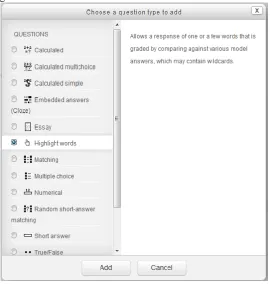
1.lang folder: contains subfolder named "en" which contains the file qtype_highlightword.php, this file is used by Moodle system to deal with strings of Highlight words question type, such as the caption of this question type will display in a window of (choose question type to add), this window is used by the teacher to choose the question type in quiz activity.
2.pix folder: this folder contains image file, named icon.gif, this image is displayed with a caption of highlightword question type.
3.db folder : contain install.xml file which is used to create "qtype _highlightword_options" table in the database when highlight folder installed in Moodle system.
4.backup folder. 5.tests folder.
6.edit_highlightword_form.php: used to design the adding or editing form (teacher interface) for the highlight words question type.
7.questiontype.php: used to save question options, answers options in tables of database, and defines question type classes for the Highlight words question type.
8.renderer.php: design the renderer (student interface) of Highlight words question type.
9.question.php: classes in this file calling in another files in Moodle system to complete running Highlight words question type.
10. lib.php: serves question type files. 11. version.php: contains version information. 12. styles.css: this file for styling.
3.2 Installation Highlightword Folder
To install the highlightword folder in Moodle system:
1.Place this folder in the directory (C:\Wamp\www\Moodle\question\type), which is customized to the folders for all questions types in Moodle system.
© 2016, IJCSMC All Rights Reserved 397 Figure 1: Install Plugin
Then the Highlight words question type becomes one of the questions types that are available in Moodle system, as shown in Figure 2.
Figure 2: Choose question type to add interface.
3.3 Design Teacher Interface
Design teacher interface (edit interface) for Highlight words question type to display various options for the teacher to enter and edit his/her question, optimal answers, grades and other options.
The options of this interface include: 1.Selecting the question category.
2.In (Question name required) field, give the question a descriptive name.
3.In (Question text required) field, enter the question text. If you're using the HTML Editor, you can format the question just like a word processing document.
4.In (one or multiple answers) field, choose whether students can select only one word or multiple words. 5.In (Clickable text) field, enter the text that will be converted to clickable text.
6.In (answer) field, enter optimal answer.
© 2016, IJCSMC All Rights Reserved 398
8.Create feedback for any or all answers.
9.Save Changes button, to save content of fields in database.
Data Validation
To validate the data correctness in the fields of teacher interface, this paper used an algorithm to perform the following functions:
1.Check answer fields and grade fields: the values of these fields must satisfy the following condition: If the value of answer field is not empty then the value of grade field which customized to this answer field must be also not empty, otherwise error notices appear.
2.Checking number of answer fields which have values not empty must be equal or greater than 2, otherwise error notice appear.
3.Checking values of grade fields which have values not empty depending on value of single field as follows: if the value of single field equal to "answer single yes" then at least value of one grade field must be 100, otherwise error notice appear, if the value of a single field equals to "answer single no" then the total of all values in all grade fields which have values not empty must be 100, otherwise error notice appear.
3.4 Save the Data of Teacher Interface
When the teacher complete the required data, he/she clicks on "Save changes" button in this interface to save the contents of these fields in the database tables which are initials for Moodle system. The following are brief descriptions to database tables which are used in Highlight words question type:
1.question table: for saving the general options which are found in the teacher interface of all questions types such as question name , question text...etc.
2.qtype_highlightword_options table: this table is used for saving the data of the question options fields which are found only in the teacher interface of Highlight words question type such as data of clickable text field, data of (one or multiple answers) field.
3.question_answers table : this table is used to save optimal answers for questions types .
4.question_attempts table: this table is used to save data about summary of student's attempt to answer to any question type , such as answers of students .
5.grade_grades table : this table is used to save the grades which customized to each student.
3.5 Design Student Interface
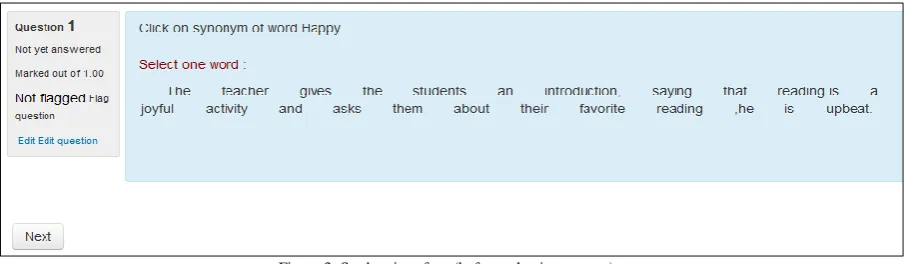
Design interface is also named Student interface (renderer). This interface displays to students for answers to Highlight words question type, this interface displays the question text and the clickable text to the student when he/she initializes an attempt and perform the answer to this question, as shown in Figure 3.
Figure 3: Student interface (before selecting answer).
This interface displays the following paragraphs: the first paragraph is question text, the second paragraph is the text to determine whether the student selects one word or multiple words and the third paragraph is a clickable text .The student just needs to click on a word or words from clickable text and the word will get highlighted (word color changing to red when clicking on it) as shown in Figure 4. This word or words when clicked (selected) considered answer of the student to this question.
© 2016, IJCSMC All Rights Reserved 399 Figure 4: Student interface (after selecting answer).
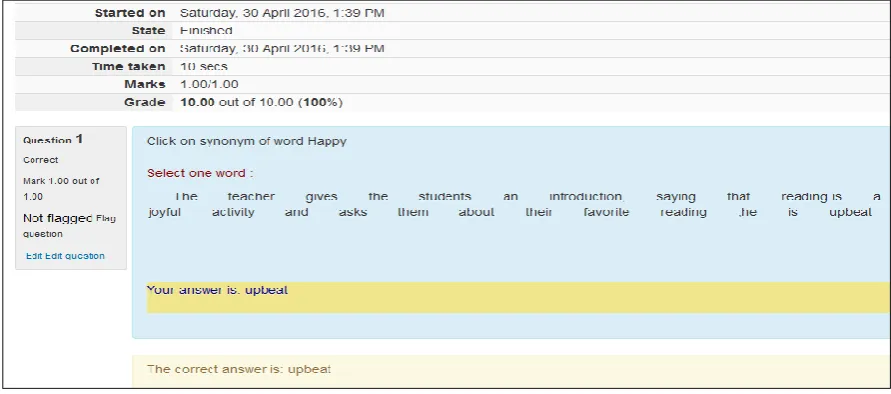
If students want to undo their last selection, they just need to click on the word again which will deselect their last selection. When students end of selecting their answer, they click on "Next" button to go to the next page (Summary of attempt) page that display: status, either state of "Answer saved" when the student selects an answer or state "Not yet answered" when student don't select the answer. Also two buttons either (return to attempt) button , to return back a page to edit the answer , or (submit all and finish) button to submit answer and ends attempt .When the student submits his/her answer and finish an attempt, the student interface will display the results and feedback to the student, as shown in Figure 5.
Figure 5: Student interface (after submitting answer).
3.5.1 "Convert Paragraph to Array of Words" Algorithm
The propose algorithm called "Convert Paragraph to Array of words" algorithm. 1.Input: id of question.
2.Output: $words array.
3.The algorithm is used to perform the following functions:
Fetch the text which we want to convert to clickable text from qtype_highlightword_options table in the database.
Implementation of strip_tags function to remove the tags which are fetched with the text. Convert the text to array of words called $words.
3.5.2 "Renderer of Highlight Words Question Type" Algorithm
Another algorithm called "Renderer of Highlight words question type” was proposed.
1.Inputs : id of question, text of question, $words array and $currentanswer which contain the input answer from the student after he/she submits his/her answer and finished the attempt, in the initial attempt, the value of $currentanswer is empty.
2.Outputs:
© 2016, IJCSMC All Rights Reserved 400
or multiple words from the clickable text and the third paragraph, is the clickable text. These paragraphs will display when the student initializes an attempt and he/she performs the answer to the question.
If the student submits his/her answer and finished the attempt, this algorithm will displays the following in the student interface: the result, the answer of the student and the same paragraphs displayed when the student initializes an attempt except the third paragraph which will be display as text only not as clickable.
3.The algorithm is used to perform the following functions:
Convert array of words that is called $words to array of clickable words.
When the student initializes an attempt and he/she performs to answer the question, this algorithm will display three paragraphs. The first paragraph is the question text; the second paragraph is text that indicates whether the student must select one word or multiple words from the clickable text. The third paragraph is the clickable text. In this case the student can input his/her answer by clicking on one word or words from the clickable text, when the students do that, the clicked words become highlighted (color of words changed from black to red).
When the student submits his/her answer and finishes the attempt, this algorithm will display the result and the answer of the student. Also it will display the same paragraphs that displayed when the student initializes an attempt except the third paragraph it will display as text only not as clickable.
4. THE PROPOSE SYSTEM IMPLEMENTATION REQUIRMENTS
The propose system implementation requirements as the same implementation requirements of Moodle system, these requirements are:
1.The operating system such as Windows or Linux [6].
2.Installation package like WAMP (Windows, Apache, MySQL, PHP) or XAMPP (stands for X-OS (for different operating systems), Apache, Structured Query Language (MySQL), PHP and Perl). This package must be included: Web server software that supports PHP programming language such as Apache server, The PHP scripting language (version 5.5.12 or later) and a database such as MySQL or PostgreSQL are completely supported and recommended for use with Moodle [6].
5. CONCLUSIONS
Moodle system is a free, an open source and considered as a flexible environment to develop. Also it is a scalable by adding a plugin to it and making updates to existing plugins. Moodle system provides many types of questions that are used in quiz activity in examination; these types support different states which are required to perform the examination. Moodle system also provides interactive mechanism of examination with student through display feedback to student after finishing his/her examination; this feedback includes the correct answer and the grade. Adding the proposed question type to Moodle system provide a mechanism of examination to student through displaying the answers as words embedded in paragraph these words don't have any different features from another word in this paragraph .
REFERENCES
[1] Some Naidu, "E-Learning A Guidebook of Principles, Procedures and Practices", Melbourne, Victoria, Australia, 2003.
[2] Aarthy Krishnamurthy, "Open Source Software Development Process for the Development of Open Source E-Learning Systems", Ireland, 2012.
[3] N. Pankaja, Mukund Raj P K, “Proprietary software versus Open Source Software for Education", American Journal of Engineering Research (AJER), Volume-02, Issue-07, pp-124-130, 2013.
[4] Apratim Goldar, “A Secured & Enhanced Architecture in Moodle Exam System ", Faculty of Engineering & Technology, Jadavpur University, Roll No: M48CWE14-B-03, Kolkata, India, 2014.
[5] Nagesh Karmali, "Optimizing Moodle LMS for Improving User Response Time ", Bombay, 2013. [6] https://www.moodle.org.