1277
A Novel Custom Intent Based
Approach to Improve Android Application Security for
Intent Based Attacks
Naitik Maheshwari
1, Prof. Nikunj Nayak
2, Dr. Dinesh Vaghela
3, Dr. Sanjay Patel
4M.E. Final Year Student 1, Assistant Professor 2,3,4,Department of Information Technology 1,2,3,Department of Computer Engineering4 Shantilal Shah Engineering College, Bhavnagar,India.1,2,3,Government Engineering
College,Patan 4,India. Email:
[email protected],[email protected],[email protected],[email protected]
u.in4
Abstract-
Android is one of the most used Operating System these days. As we all know Android applications make one’s life faster, smoother and more convenient in day to day activities. Android provides functionality using which an application can access components of another application and that functionality is known as IPC (Inter Process Communication). IPC uses mechanism for message passing which is known as Intent. We will examine application communication model to analyze the vulnerabilities using static and dynamic analysis. While performing such analysis we will find possible vulnerabilities of intent. As Intent is vulnerable for security and privacy we will implement concept of Intent Verification with custom intent using intent filter. This research helps to make intents more secure as we will use intent authentication mechanism.Index Terms-Android Application, Intent Security, Android Payload.
1. INTRODUCTION
Now the mobile phone is an important part of human life people are mostly used android mobile phone and there an application for example online shopping, Online Banking, E-commerce, and different other application.
We all know that android open source and freely available in the market that way people and mobile company manufacturing adopted that operating systems. Android OS develops by Open Handset Alliance by Google and other companies.
Android application development using a different way to develop an android application but mostly developers prefers android studio for android application development for example Application for Phone and Tablet application, watches wear and android TV application.
1.1. Android Architecture
Android architecture is a software stack of components which supports a mobile device’s needs. Android architecture having Linux Kernel, c/c++ libraries. These libraries are helping to an application framework services, runtime applications.
[image:1.595.307.529.397.630.2]Among all these components Linux Kernel is the main component in android to provide Dalvik Virtual Machine (DVM) which is responsible for running a mobile application. Given below is the pictorial representation of android architecture along with its different components.
Fig. 1. Android Architecture [1].
1.1.1. Applications
1278
1.1.2. Application Framework
The classes used to create an Android application are being provided by the application framework. It also makes available for use generic abstraction, hardware access, and application resources. So basically it’s provides the services using which we can create the specific class and make that class more helpful for the creation of the applications. The application framework includes services such as Call Log service, GPS services, notifications, NFC and some other services. Such services can be used for application development as per one’s requirements.
1.1.3. Android Runtime
Android Runtime environment is an important part of the operating system. Rather than being only an internal part it also contains components of core libraries and Dalvik virtual machine. DVM use for Performance, memory, battery life optimization. Also core libraries in Android runtime will enable us to implement an Android application using standard Java programming language.
1.1.4. Platform Libraries
The Platform Libraries includes many different C and C++ core libraries and Java based libraries such as SSL, Graphics, libc, Webkit, SQLite, Media, Surface Manger, OpenGL etc. to provide a support for android development.
Here are the summary details of some core Android libraries which are available for Android development. Media library for playing and recording audio and video formats, SQLite, Graphic libraries for 2D,3D graphics, SSL, SGL, and other Free Type libraries..
1.1.5. Linux Kernel
Linux Kernel is a bottom layer and also the heart of the android architecture. It manages all the drivers such as camera drivers, display drivers, audio drivers, Bluetooth drivers, memory drivers, etc. which are mainly required for the android device during the runtime.
1.2. Android Components
1.2.1. Activities: Single screen representation its call activity that contains frontend and backend programming of Application.
1.2.2. Services: It's background processing handling for android application.
1.2.3. Broadcast Receivers: Android OS and
applications are communicated to each other its call Broadcast Receivers.
1.2.4. Content Providers: its work for database management issue.
[image:2.595.310.522.528.642.2]1.3. Android Intent
Fig. 2. Android Intent [2].
1.3.1. Intent
Android intent used for application open time for activity call, first activity to go to the second activity and exchange between data.
1.3.2 Intent Filters
Intent Filter is used for application intent customization, mainly declare in AndroidManifest.xml which specifies the type of intents that the component would like to receive. It uses <intent-filter> element in the AndroidManifest.xml file to list down actions, categories and data types associated with any activity, service, or broadcast receiver [2].
2. RELATED WORKS
Unauthorized intent is used for intent base attack. Attacker designed payload for application intent base attack they test many application for intent base attack that time found intent is not secure for security and privacy .Any malicious components automatic register for stander android intent and intercept intent so it helps to attacker to access application user without permission access their components and data. The user sending their main component to other application that time malicious application full control on user application and user android mobile phone [7]. It’s also start activity and services without user permission of user. Inter process communication (IPC) that time attacker intent used user application intent do authorized activity. Intent Spoofing having intent is itself register to R.java file by default, so intent having no certification for inter process communication. Unauthorized intent access any type of android mobile application [8].
Fig 3.Android application decompile methodology [5].
1279 Fig 4. Hybrid Analysis [9].
The methodology is for a combination of two methodologies static analysis and dynamic analysis. First given static analysis which used for without running android application and checks that analysis its call reverse engineering process. Second given to dynamic analysis in that time application is running mode and get analyses. This analyses given about the Application list of permission, activity, services, content providers. In this analysis to get intent having not certification during Inter Process Communication (IPC).
They build custom intent using intent filter for intent
verification mechanism shown in the Fig.9. .
Fig 5. Hybrid Analysis Sequence diagram of intent verification [9].
First, Application 1 to request to Application 2 that time application 2 request to application 1 component if verification successfully that time Application one component to access application 2 and there component else verification is not successful that time not access to application 2 and their component . Implement concept of intent verification that time
facing some issue are below them.
2.1. Issues with mechanism
Android studio having not functionality available for intent customization so it is difficult to implement custom intent [9].
Application 2 is crashing with error due to Application 2, not full fill Application 1 request. [9].
More Resource, Take Long Time during doing process and used to android Key store system [9].
Despite issues, the application worked and they are considering performing more tests in our future work to secure the Intent mechanism [9].
3. INTENT BASE ATTACKS IN ANDROID
[image:3.595.80.287.100.159.2]APPLICATION
Fig 6. Traditional Concept.
As of now we know that the attackers can access the applications intents in our android devices. They use intent based attacks to access application’s intent. For Example, attackers can open YouTube user’s authorization. Also the attacker can send unauthorized messages through social media applications such as WhatsApp.
4. PROPOSED METHDOLOGY
Fig 7. Proposed idea.
As per we discussed the possible threats by the attackers to the Android Application, we have developed a successful solution to prevent the Attacks on Android application intents shown in the Fig.7.
Fig 8. Proposed Work Flow.
[image:3.595.308.449.343.488.2] [image:3.595.83.285.365.455.2] [image:3.595.316.483.566.702.2]1280 We can see that once the attacker tries to open an
application, the prevention application will be opened at the same time by default. Once the prevention application is open, it will ask for the authorization through a PIN, Pattern or Fingerprint as per set by user as shown in the Fig.8.
Fig 9. Proposed Work Sequence diagram of intent verification.
[image:4.595.306.465.76.184.2]The diagram above is the mechanism for the Proposed Methodology of intent verification. Initially the user will open the Main application and it will open the prevention application along with the application opened as per user’s requirement. Once the Prevention application is open, it will ask for the intent authentication through either PIN, Password or fingerprint set by the user. After verifying the authorization by the user, the prevention application will let user access the actual and Main application. Thus, the prevention application will ask for the authorization to the attacker as well shown in the Fig.9.
However, the attacker will not be able to authorize the prevention application so it will not be possible for the attacker to access the Main application.
5. IMPLEMENTATION
5.1 Attack Implementation
Fig 10. Application Security analysis using Drozer.
To initialize the implementation, we will analyze the vulnerability of the application using Drozer as shown in the Fig.10.
Fig 11. Real time make payload using Metasploit.
Once the vulnerability is tested, the next step will be to create payload using Metasploit framework for real time attack to the intent. We will now have to port forward the payload to get connectivity between the android user and attacker. Once the connection is established successfully, the attacker can access the user’s android device and perform intent based attacks.
5.1 Prevention Application Implementation
[image:4.595.76.292.152.248.2] [image:4.595.305.461.341.484.2]
Fig 12. Prevention Application.
Prevention: We now have a prevention application being made through Android studio and is ready to prevent the attacks. User will have to select the application for which the users wants to activate the attack prevention application as shown in the Fig.12
[image:4.595.72.234.517.633.2] [image:4.595.310.466.569.700.2]
1281 Also, there is one android service which is a part of
prevention application which is constantly running in the background as shown in the Fig.13.
Once the applications are added, when the attacker will try to attack the application which are added to the prevention application by the user, it will ask the attacker to authorize the pattern, PIN or Fingerprint before giving further access as shown in the Fig.13. As the attacker will not be able to authorize the security, the attack will then be a failure and the Prevention is successful.
6. RESULT AND COMPARISION
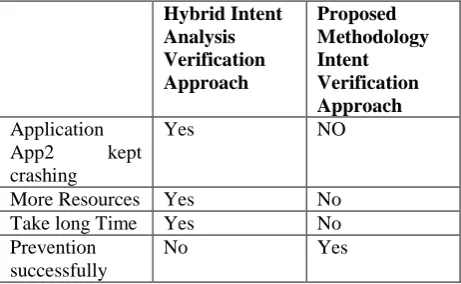
[image:5.595.67.298.330.472.2]Given tabular information is the comparison between the Hybrid Intent Analysis verification approach and proposed methodology intent verification. We can see that the former was not able to prevent the attacks and has issues listed in the table. However, the proposed methodology can successfully prevent the intent based attacks and it also includes the solution to the issues the former method has.
Table 1. Intent Verification Approach Comparison.
Hybrid Intent Analysis Verification Approach
Proposed Methodology Intent Verification Approach
Application App2 kept crashing
Yes NO
More Resources Yes No Take long Time Yes No Prevention
successfully
No Yes
7. CONCLUSION
After studying different research papers on intent security, we could conclude that different methods to are used to attack intents and use a device inappropriately. There are mainly two ways to find attacks which are Static and Dynamic. This research work can be useful to prevent such attacks being made on intent. Using this research the intent of an android application will be more secure, less prone to attacks and have increased integrity.
REFERENCES
[1]https://www.android.com/ [Accessed: 10August 2018].
[2]https://www.tutorialspoint.com/android/android_ap plication_components.htm
[Accessed: 14August 2018].
[3]https://developer.android.com/studio/intro/[Accesse d: 14August 2018].
[4]http://mobiletools.mwrinfosecurity.com/drozer/usa ge/[Accessed:10August2018].
[5]Umasankar,Analysis of Latest Vulnerabilities in Android,978-1-5090-6367-3/17/$31.00 ©2017 IEEE
[6]SauravYadav, Aviral Apurva, Pranshu Ranakoti, Shashank Tomer, Nihar Ranjan Roy,Android Vulnerabilities and Security,978-1-5386-0627-8/17/$31.00c 2017 IEEE
[7]Adam Cozzette,Kathryn Linge,Steve Matsumoto,Oliver Ortlieb, Jandria Alexander,Joseph Betser, Luke Florer,Geoff Kuenning, John Nilles, and Peter Reiher,Improving the Security of Android Inter-Component Communication,2013 IFIP/IEEE International Symposium on Integrated Network Management (IM2013): Short Paper
[8]Biniam Fisseha Demissie, Davide Ghio, Mariano Ceccato, Andrea Avancini Fondazione Bruno Kessler Via Sommarive,Identifying Android Inter App Communication Vulnerabilities Using Static and Dynamic Analysis,2016 IEEE/ACM International Conference on Mobile Software Engineering and Systems
[9]Babu Khadiranaikar, Pavol Zavarsky, Yasir Malik,Improving Android Application Security for Intent Based Attacks,978-1-5386-3371-7/17/$31.00 ©2017 IEEE
[10]https://stackoverflow.com/tags/apktool/info [Accessed:10August2018].
![Fig. 1. Android Architecture [1]. 1.1.1. Applications](https://thumb-us.123doks.com/thumbv2/123dok_us/734019.1083032/1.595.307.529.397.630/fig-android-architecture-applications.webp)
![Fig. 2. Android Intent [2].](https://thumb-us.123doks.com/thumbv2/123dok_us/734019.1083032/2.595.310.522.528.642/fig-android-intent.webp)
![Fig 4. Hybrid Analysis [9]. The methodology is for a combination of two](https://thumb-us.123doks.com/thumbv2/123dok_us/734019.1083032/3.595.316.483.566.702/fig-hybrid-analysis-methodology-combination.webp)