CSEIT1833345 | Received : 15 March 2018 | Accepted : 31 March 2018 | March-April-2018 [ (3 ) 4 : 1121-1125 ]
International Journal of Scientific Research in Computer Science, Engineering and Information Technology © 2018 IJSRCSEIT | Volume 3 | Issue 4 | ISSN : 2456-3307
1121
Authentication System based on Hash Function - A Review
Kaushal KishorSah1, Dr. R Chinnaiyan2
1Student of MCA VI Semester, New Horizon College of Engineering, Bangalore, Karnataka, India 2Professor, Department of Master of Computer Applications, New Horizon College of Engineering, Bangalore,
Karnataka, India
ABSTRACT
Authentication is the process whereby the system identifies legitimate users from unauthorized users. It is the process in which a user identifies his/her self to the system. How effective an authentication process is determined by the authentication protocols and mechanisms being used. Windows Server 2003 provides a few different authentication types which can be used to verify the identities of network users.This paper described a new simple and efficient Grid authentication system providing user anonymity. Our system is based on hash function, and mobile users only do symmetric encryption and decryption. In our system, it takes only one round of messages exchange between the mobile user and the visited network, and one round of message exchange between the visited network and the corresponding home network.
Keywords: Authentication , Hash Function, Grid , Encryption , Decryption
I.
INTRODUCTION
Definition: Authentication is the process of recognizing a user’s identity. It is the mechanism of associating an incoming request with a set of identifying credentials. The credentials provided are compared to those on a file in a database of the authorized user’s information on a local operating system or within an authentication server.
Description: The authentication process always runs at the start of the application, before the permission and throttling checks occur, and before any other code is allowed to proceed. Different systems may require different types of credentials to ascertain a user’s identity. The credential often takes the form of a password, which is a secret and known only to the individual and the system. Three categories in which someone may be authenticated are: something the user knows, something the user is, and something that user had to be authenticated
Authentication process can be described in two distinct phases - identification and actual authentication. Identification phase provides a user identity to the security system. This identity is provided in the form of a user ID. The security system will search all the abstract objects that it knows and find the specific one of which the actual user is currently applying. Once this is done, the user has been identified. The fact that the user claims does not necessarily mean that this is true.
Use of authentication Smart Cards
Windows Server 2003 supports smart card authentication. Smart cards can be used to secure the following items:
The certificates of your users Public and private keys
Passwords and other confidential data.
A smart card is a device similar in size to that of a credit card. Smart cards are dependent on the Windows Server 2003 public key infrastructure (PKI). A smart card is used in conjunction with an identification number (PIN) to enable authentication and single sign-on in the enterprise. The smart card actually stores the private key of the user, public key certificate and logon information. The user attaches the smart card into the smart card reader that is attached to the computer. The user next inserts the PIN when prompted for the information.
Smart cards are typically used for interactive user logons to provide further security and encryption for logon credentials. Smart card readers can be installed on servers, so that you can require administrators to use smart card authentication when using an administrator account. You can also require remote access logons to use smart card authentication. This assists in preventing unauthorized users from using VPN or dial-up connections to launch an attack on your network. Through smart cards, you can encrypt confidential files and other confidential user information as well.
The cost associated with implementing and administering a smart card authentication strategy is determined by the following elements:
The number of and location of users that are to
be enrolled in your smart card authentication strategy.
The method which the organization is going to
utilize to issue smart cards to users.
The procedures which are going to be
implemented to deal with users who misplace their smart cards.
In addition to the above, with smart card authentication, each computer has to have a smart card reader, and one computer has to be configured as the smart card enrollment station. It’s recommend to use only plug and play Personal Computer/Smart Card (PC/SC) compliant smart card readers. The user responsible for the smart card Enrollment station has to be issued with an Enrollment Agent certificate. The owner of this certificate can issue smart cards for users.
Figure 1
Figure 2
Internet Authentication Service (IAS)
login process of users by providing the following key features:
Management of user authentication: IAS can be used for dial-up and VPN access, and for wireless access.
The IAS service provides the RADIUS protocol which it utilizes to pass authentication and authorization requests to the proper Active Directory domain.
Verification of the user to access network resources
Tracking of user activity
Internet Authentication Service (IAS) is supported in the following editions of Windows Server 2003:
Windows Server 2003 Standard Edition Windows Server 2003 Enterprise Edition Windows Server 2003 Datacenter Edition
The default authentication protocols supported by IAS are:
Point-to-Point Protocol (PPP): The following PPP protocols are supported by IAS:
EAP-MD5
Extensible Authentication Protocol-Transport Level Security (EAP-TLS)
Although EAP-TLS is considered the strongest remote access services authentication method, it can only be used when clients are running Windows 2000, Windows XP or Windows Server 2003. EAP-TLS utilizes public key certificate based authentication to provide authentication for wireless connections.
Extensible Authentication Protocol (EAP): The following EAP protocols are supported by IAS:
Password Authentication Protocol (PAP):
Windows Server 2003 supports PAP for backward compatibility. With PAP, user information (user name and password) is transmitted in clear text.
Challenge Handshake Authentication Protocol (CHAP): CHAP encrypts the user name and password of the user through MD5 encryption. A requirement of CHAP is that user password
information has to be stored using reversible encryption in Active Directory.
Microsoft Challenge Handshake
Authentication Protocol (CHAP): MS-CHAP provides better security than that provided by CHAP. The passwords of users do not have to be stored using reversible encryption.
Microsoft Challenge Handshake
Authentication Protocol version 2 (MS-CHAP version 2): MS-CHAP version 2 includes the security capability of mutual authentication. Mutual authentication occurs when the server and client both verify the identity of each other. MS-CHAP version 2 utilizes separate encryption keys for sending and receiving security information.
Once IAS has authenticated the user, it can use a few authorization methods to verify that the authenticated user is permitted to access the network resource(s) he/she is requesting to access. This includes the following:
Automatic Number Identification/Calling Line
Identification (ANI/CLI): With ANI/CLI,
authorization is determined by the number which the user is calling from.
Dialed Number Identification Service
(DNIS): Authorization is determined by
examining the phone number which the caller is using.
Remote access policies: Remote access policies can be used to allow or deny network connection attempts, based on conditions such as group membership details, time of day, time of week, the access number being used, and should use to access network resources.
Guest authorization: Guest authorization
needing to provide user credentials (user name and password).
Wireless clients can use certificates, smart cards, and a user name or password to authenticate to an IAS server. Before a wireless client can connect to your corporate network, you need to define the following:
Create a remote access policy for the wireless users which permits these users to access the corporate network. The remote access policy should include:
The access method
User and group information
The authentication method
The policy encryption method
The appropriate permissions
All Wireless APs should be added on the IAS server as RADIUS clients. This ensures that login information can be forwarded to IAS. The events which occur when wireless clients requests network access are outlined below. 1. The Wireless AP requests authentication
information from the wireless client.
2. The wireless client then passes this information to the Wireless AP. The Wireless AP forwards the information to IAS.
3. When the information IAS receives is valid, it passes an encrypted authentication key to the Wireless AP.
4. The Wireless AP next utilizes the encrypted authentication key to create a session with the wireless client.
Figure 3
NT LAN Manager (NTLM) Authentication Protocol The NT LAN Manager (NTLM) authentication protocol is the main authentication type used to enable network authentication for versions of Windows earlier than Windows 2000, such as for a Windows NT 4. The authentication protocol is essentially used for authentication between machines running Windows NT and Windows Server 2003
By Windows 2000 or Windows XP Professional
computers accessing a Windows NT 4.0 primary domain controller or backup domain controller.
By Windows NT 4.0 domain users when trusts
exist with a Windows 2000 or Windows Server 2003 Active Directory domain or forest.
By Windows NT 4.0 Workstation clients who want to authenticate to a Windows NT 4.0, Windows 2000 or Windows Server 2003 domain controller.
Windows Server 2003 supports the following forms of challenge- response authentication methods: considered the weakest authentication protocol because it is the easiest to compromise. LM authentication should not be used in Windows Server 2003 environments.
NTLM version 2: NTLM version 2 utilizes a 128-bit encryption, and therefore offers the highest level of encryption.
NTLM authentication works by encrypting the logon information of the user. This is done by applying a hash to the password of the user. A hash is a mathematical function. The security account database contains the value of the hash which is generated when the password is encrypted by NTLM. The password of the user is not transmitted over the network. What happens is that the client applies the hash to the password of the user, prior to it actually sending the information to the domain controller. The value of the hash is also encrypted.
How the NTLM authentication process works
1. The client and server negotiate the
authentication protocol to use.
2. The client transmits the name of the user and the name of the domain to the domain controller.
3. At this point, the domain controller creates a nonce. This is a 16-byte random character string.
4. The nonce is encrypted by the client using the hash of the user password. The client forwards thi to the domain controller.
5. The domain controller then obtains the hash of the user password from the security account database to encrypt the nonce.
6. This is then compared to the hash value which the client forwarded.
7. Authentication occurs when the two values are identical.
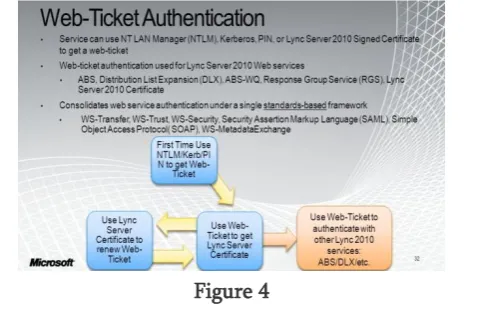
Figure 4
II.
REFERENCES
[1].R. Dhamija, and A. Perrig, "Deja vu: A User study Using Images for Authentication" , In 9th Unisex Security Symposium, 2000.
[2].Real User Corporation : Passfaces. www.passfaces.com
[3].Scheier, Bruce , "Cryptanalysis of MD5 and SHA: Time for a New Standard" , Computerworld, retrieved 15 October 2014.
[4]. Authentication Schemes for Session Passwords