
Paper based Support for Computer Mediated Activity: a cognitive task analysis
139
0
0
Full text
(2)
(3) Abstract The incomplete or erroneous use of software can have serious economic consequences. Having learned the basics of a particular software package, users do not automatically, through practice, progress to a level of expertise where they can gainfully incorporate their use of the software into strategies for solving problems and answering questions in real life. Under-use, ineffective use and inefficient use of software commonly occur. Insights into the mechanisms underlying suboptimal performance, and pointers to possible remedies to the situation, can be gained from a wide range of theoretical and practical frameworks from different disciplines. Various approaches have been put forward to provide support, paper-based or otherwise, to people who use software as a tool to carry out externally-imposed tasks. This paper presents the results of a cognitive task analysis aiming to identify patterns in the use of a particular piece of software by five office workers in the course of their day-to-day work. Such patterns would provide a starting point for the design and development of support materials. Although capturing real-life performance in an analyzable manner proved difficult, under-use, ineffective use and inefficient use of the software were all observed and knowledge of different types was seen to be required for successful performance..
(4)
(5) INTRODUCTION ................................................................................................................................ 1. Part 1: Theoretical Framework 1.. EXPLORING THE PROBLEM SPACE .................................................................................... 3. THE PARADOX OF THE ACTIVE USER ...................................................................................................... 4 PAPER-BASED SUPPORT: USER MANUALS .............................................................................................. 5 2.. ELEMENTS OF A SOLUTION SPACE ................................................................................... 9. NEW APPROACHES TO DOCUMENTATION............................................................................................ 10 COMPUTER-MEDIATED ACTIVITY: USER MOTIVES AND GOALS .......................................................... 12 3.. MAPPING THE LIE OF THE LAND ..................................................................................... 17. 4.. NOTES......................................................................................................................................... 21. Part 2: Research Study 5.. RESEARCH QUESTIONS ....................................................................................................... 23. 6.. RESEARCH DESIGN ............................................................................................................... 25. METHOD................................................................................................................................................. 25 PROCEDURE............................................................................................................................................ 26 VERBAL ANALYSIS .................................................................................................................................. 28 7.. RESULTS..................................................................................................................................... 35. RQ1: WHAT TYPES OF KNOWLEDGE PRECURSE A SHIFT IN ACTION IDENTIFICATION LEVEL? ............. 35 RQ2: WHAT TYPES OF KNOWLEDGE PRECURSE ACTIONS THAT ARE IN THE MINIMAL PATH?............. 38 RQ3: WHAT TYPES OF KNOWLEDGE PRECURSE ACTIONS THAT ARE NOT IN THE MINIMAL PATH?..... 41 RQ4: WHAT CAUSES USERS NOT TO CARRY OUT ACTIONS THAT ARE IN THE MINIMAL PATH?........... 44 RQ5: DO USERS INTERPRET SYSTEM FEEDBACK AS INFORMATION, ON WHICH TO BASE DECISIONS AFFECTING THE FURTHER SEQUENCE OF ACTIONS? .............................................................................. 45 8.. DISCUSSION............................................................................................................................. 49. UNDER-USE, INEFFECTIVE USE AND INEFFICIENT USE ........................................................................... 50 THE ROLE OF THE VARIOUS KNOWLEDGE TYPES ................................................................................... 52 METHODOLOGICAL ISSUES .................................................................................................................... 56 9.. CONCLUSIONS ........................................................................................................................ 59. Part 3: References and Appendixes REFERENCES...................................................................................................................................... 63 APPENDIX I: ENDNOTE 9 USER MANUAL TABLE OF CONTENTS .................................. 67 APPENDIX II: SOURCE DATA ...................................................................................................... 75.
(6)
(7) This thesis would not have been possible without Account Software Consultancy B.V. in Veenendaal, the Netherlands. Makers of the software package that was used in Part 2, their effort in introducing me to my respondents went far beyond the business relationship that exists between us. I am also grateful to my respondents themselves. Karlijn, Christy, Christa, Clara, and Rob; and also Gert-Jan, whose data I decided not to include: Thank you! Not only did you allow me to interfere with your work, you also made me feel welcome as I did so. I really enjoyed the experience. Last but not least, I wish to express my gratitude to Michaël Steehouder and Hans van der Meij. Both contributed considerably to the good bits that I hope the reader will find in this work; its weaknesses, however, are all mine. Utrecht, August 30, 2007 B. E. van Loggem [email protected].
(8)
(9) Introduction. Introduction People experience considerable difficulties when working with computers. Very little human activity in the industrialized world is not nowadays in one way or the other shaped by the use of computers. Computer software offers a powerful environment for performing routine tasks and knowledge work alike. All this software must be interacted with, by people who frequently depend on little more than written materials to support them. A whole new generation of documentation designers has emerged to produce those. Documentation design is a multi-disciplinary activity. A software manual is a form of nonfictional, instructional writing: therefore the field of communication science is heavily involved, as are those of instructional design and cognitive psychology. Finally, the writing of software manuals requires technical and business knowledge of computer use and information processing. With so many godfathers, one might expect the profession to be able to draw on a wealth of research studies and theory providing guidelines for carrying out the task. The reality is different. Manuals for writing software manuals abound, but on closer inspection the vast majority of guidelines provided is based on heuristics and “best practices”. Research studies underpinning those heuristics are few and far between. The one area in which practical advice is backed up with theory and experimental research is that of writing procedures—usually aimed at novice users (see, for example, Duggan & Payne, 2001; Farkas, 1999; Karreman & Steehouder, 2004; van der Meij, Blijleven, & Jansen, 2003; van der Meij & Gellevij, 2004). This is perhaps not by coincidence: written procedures are, after all, not something that other design disciplines are overly interested in. Documentation design is not the only design activity aiming to support software users, and it is by no means the one with the most standing. Other, more high-profile, design disciplines demand a slice of the cake. In this manner, for example, theory and experimental scientific results from cognitive science have been appropriated by the applied field of interaction design, while theories of learning are generally seen as finding their most obvious application as a starting point for instructional design. Once assigned to a particular area of practical interest, it is difficult for findings from scientific endeavour to subsequently cross the boundaries between the various disciplines. Such parochialism may, in the end, cost us dear. Erroneous, inefficient or incomplete use of software systems in organizations is the norm rather than the exception and has serious economic consequences: in terms of man-hours wasted, of incorrect or invalid results which may have serious repercussions, of reduced acceptance of the system after implementation, and of the simple fact that what has been paid for is only partially utilized1. It does not take much imagination to work out the return-on-investment that would result from pooling all the available knowledge when dealing with this situation. Theoretical and experimental science has much to offer all practitioners whose ultimate goal is to help people use computers more efficiently and more pleasurably; regardless of the job titles printed on their business cards. This paper presents research that draws on established theory, and borrows from proven principles, originating outside the traditional field of software documentation; with the eventual aim of designing software documentation that works, built on sound theoretical and research-. 1 Hard proof of this claim is difficult to find. The following quotation (Strassman, 1990, p. 314) is no more than anecdotal evidence: “I once commissioned a study tracing all efforts to correct a faulty invoice sent to the customer. The cost of correcting a mailed invoice was 20 to 30 times the cost of an error-free invoice. We could not find any computer errors … All errors were human errors, which in each instance originated from inadequate training or poor management practices.” More anecdotal evidence is provided in the trade press (e.g. Gartenberg, 2005).. 1.
(10) Introduction. based principles. It presents the results of a cognitive task analysis aiming to identify patterns in the use of a particular piece of software by five office workers in the course of their day-to-day work. Such patterns would provide a starting point for the design and development of support materials. Although capturing real-life performance in an analyzable manner proved difficult, under-use, ineffective use and inefficient use of the software were all observed and knowledge of different types was seen to be required for successful performance. In particular, the results suggested that conceptual knowledge underlies almost all successful performance; and that the lack thereof often leads to serious difficulties that become evident only much later.. 2.
(11) Part 1: Theoretical Framework.
(12)
(13) Ch. 1. Exploring the Problem Space. 1. Exploring the Problem Space Over and over again in the course of my career as a developer of software documentation, I have observed that most of the time software is used only partially, inefficiently, or ineffectively. I find it useful to think of an “intention horizon” which encompasses exactly that which the user is trying to achieve and beyond which he or she does not perceive any information or situation as relevant to the work at hand. Frequently the intention horizon is seen to lie well within the total functionality of the software. People start out with the intention to get something done. They turn to a piece of software to help them achieve their objective; but if this tool does not immediately seem to meet requirements, then rather than find out how to apply it to the problem at hand, they lower their aims to match what they think the software can do. Sometimes the bar is lowered considerably, to such a degree even that I have seen quite a few instances of expensive software not being used at all. Staying within their comfort zone, people thus experience a narrowing rather than a widening of their intention horizon. The answer that is given when people are asked why they are satisfied with unsatisfactory results of their often considerable efforts, seems to be a variation on either of two themes: “I have a job to do now, but one day I will find the time to look into this” is one; and “I don’t need all those advanced features, I only use the software to do simple things” is the other. To me, this has always sounded like the new car owner who does not know about the concept of gears and regards anything higher than first gear as an advanced feature that it is not necessary to explore, because the car is used only for simple tasks such as doing the weekly shopping. Personally, I have never met anyone who told me, First gear gets me there, doesn’t it? When I have to travel out of town I take the train, so I’ve no problem with driving along at ten miles per hour. All those old biddies behind me can honk their horns as much as they want! And when I get to the parking space, I just drive around the block if I have to, so why should I take the trouble to learn about difficult things such as reverse gear? Yet I must have met literally hundreds of people who told me something along the lines of, I’m sure that styles and templates are very useful if you do clever things with a word processor; but I don’t need them for my three-page articles. It’s good fun playing with all those fonts on my computer, and if my table of contents comes out funny then so be it — I’m an author, not a computer scientist! Sure, my editor grumbles about the files I deliver; and re-using bits of an article I wrote last year in something I’m writing today is a real pain. But that’s life, isn’t it? One of the respondents in the research described in this paper estimated that carrying out a particular task using a particular piece of software took her on average 12 hours, that is one-anda-half working days, spread out over one working week. Using the software as it was intended to be used, the same task would have taken her between ten and twenty minutes. In order to achieve such a dramatic reduction of time spent on an unpleasant job, she would have had to set up the system exactly once. (I did this for her: it took me about half an hour.) The task was one that she carries out five times per year. Yet it had never even occurred to her to sit down and look beyond her current intention horizon, to see if any “advanced features” might be available that would help her do what she was trying to do. The results of numerous studies have suggested that neither good design of the software nor experience of its users can ensure its efficient usage (see Bhavnani & John, 1997). Even the most experienced users of the best possible designs make incomplete or inefficient use of software. That leaves third-party intervention in the form of training or documentation. If documentation design wishes to take up the challenge of slaying the dragon, then the first step should be to form a clear image of the nature of the beast. Below, I will first explore practical and theoretical insights, and applied research as described in the literature. Next, a descriptive research study is described in which observation and analysis are used to identify patterns in the cognitive. 3.
(14) Ch. 1. Exploring the Problem Space. processes that take place when a person attempts to make use of a software tool in order to solve a real-life problem.. The Paradox of the Active User Ben-Ari and Yeshno (accepted for publication) make the following comment about a group of science teachers who use a particular word processor extensively in the course of their everyday work: … almost all of them claimed that they were not fit subjects for the experiment because they were not expert users … Considering the high levels of education and experience of the subjects, the most surprising result was the simplistic level of their interaction with this sophisticated but very familiar software tool … (Ben-Ari & Yeshno, accepted for publication, p. 3) and Fu and Gray note, in more formal terms but no less bemused: From our analyses, people chose to use suboptimal procedures even when they apparently had knowledge of the optimal procedures, and thus have violated the normative principle of rationality. (Fu & Gray, 2004, p. 928) It seems that the users who prompted these researchers to make their unambiguous remarks were not making the best possible use of the undoubtedly sophisticated and powerful tools at their disposal. The phenomenon that people have considerable trouble learning to use software, and that their skills tend to converge at relative mediocrity even after extensive practice, is so widespread that a phrase has been coined for it, “the paradox of the active user” (Carroll & Rosson, 1987). Originally referring to the paradoxical situation that although software users are primarily interested in getting things done, all their practice fails to make perfect, the phrase has stuck. Giving a slight twist to it, its meaning has since been neatly summarized as “the persistent use of inefficient procedures by experienced or even expert users when demonstrably more efficient procedures exist” (Fu & Gray, 2004).. the production bias Whether such persistent use of suboptimal procedures is indeed a paradox as defined by the dictionary or not, it is certainly a highly undesirable state of affairs. The dragon seems to be twoheaded: Carroll and Rosson (1987) distinguish two “biases” leading to the situation in which people’s skills in using computers tend to converge to relative mediocrity. The first is motivational, and this head of the dragon is labelled the “production bias”. People generally do not use computers just for fun. They have an ulterior motive, in that there is something that they want done. Their paramount goal is throughput and they have no patience with instruction for instruction’s sake, nor with exercises that, once carried out, do not bring the desired goal noticeably closer. Faced with an instruction manual, very few software users would read, mark, learn, and inwardly digest the text in its entirety and fewer still would patiently work through any exercises provided. From where these users stand they have better things to do. They may well leave the instructions for what they are; causing documentation developers all over the world to complain that “they simply won’t read” and to secretly hope for permission from management to have printed on every first page the catch-phrase, “Read The F… Manual!” or RTFM for short. Whilst there is nothing wrong with wanting to get things done—indeed, without such a wish there would be no motivation to attempt to use any software tool in the first place— many uses of software call for a learning phase during which no productivity takes place and. 4.
(15) Ch. 1. Exploring the Problem Space. which cannot be skipped. Driven by the wish to get things done, people apply any knowledge they have acquired (through the manual or otherwise) as immediately as possible, whether it is appropriate to the current situation or not. They cling to actions that worked before in situations that seem similar to the current one and disregard dissimilarities or even plain undesired results.. the assimilation bias This is the point at which the second bias kicks in and this second head of the dragon, the “assimilation bias”, is of a more cognitive nature. In learning, people assimilate new knowledge into existing structures which have proven to be quite persistent: they have been acquired at a sometimes considerable cost and are not easily replaced. People will go to great lengths to not give up on something that they think they know. Seen in this light this second aspect of the paradox of the active user is no different from the situation in which students of science, or indeed practicing natural scientists, are reluctant to change the theories by which they explain the natural world. Indeed, so closely related are the two situations that well-respected studies have been carried out aiming to develop a model of the scientific reasoning process, in which the behaviour was studied of subjects trying to figure out the workings of a programmable device (Klahr & Dunbar, 1988). These researchers mention what they refer to as “a pervasive confirmation bias” (p. 3): when evaluating hypotheses (of how a system works), subjects focus on attempts at confirmation and over and over again fail to test potentially disconfirming instances. Neither do they change their hypothesis in the face of disconfirming outcomes (p. 41). Similarly, Chinn and Brewer (1993) distinguish seven different ways of dealing with data that is incompatible with the established conceptions that constitute a currently held view. Only one of those is that of actually changing the incorrect theory of how the world works and this strategy seems to be not at all popular. The literatures (of history of science, education, and psychology) studied by Chinn and Brewer present a rather discouraging multitude of students and learners on the one hand and practicing scientists on the other, opting time and again for one of the other six ways of coming to terms with what is perceived as anomalous data: ignoring it, rejecting it, excluding it, holding it in abeyance, reinterpreting it or, if there is really no other way out, yielding to it marginally by making only peripheral changes to non-core aspects of the current theory. These findings, and many others, from the study of scientific reasoning and discovery show up in computerised homes and workplaces as the assimilation bias.. the expertise reversal effect To sum up the paradox of the active user: the production bias and the assimilation bias together result in a situation where software users cannot be persuaded to accept instruction beyond that which is perceived as required. The situation is aggravated by what is known as the expertise reversal effect, which is the phenomenon of instructional formats that are effective with novice learners losing their effectiveness, and even hindering further learning, in more experienced learners (Kalyuga, Ayres, Chandler, & Sweller, 2003; van Gog, Ericsson, Rikers, & Paas, 2005). In very plain English this means that even when non-novices are willing to set out the sprat of time and effort invested in learning, in order to catch the mackerel of expert skill acquisition, the standard instructional materials that are designed for novice learners may well be unhelpful at best and harmful at worst.. Paper-Based Support: User Manuals Let us now turn to the materials that software makers provide to support those who use their software. These come in many different shapes and forms; yet the bulk of them are instantly recognizable as belonging to the same genre: that of the user manual1.. 5.
(16) Ch. 1. Exploring the Problem Space. the traditional user manual A typical user manual is hierarchically structured with the chapter as its main unit. Sometimes the chapters are grouped into sections, or groups of chapters are split off into separate booklets. In this manner, the “installation manual” and the “advanced user’s guide” may come about (where the word “advanced” refers to the nature of the program concepts, rather than the program’s context of use). Each chapter contains an operational description of and (usually stepwise) instructions for working with a particular program concept or program task. Conceptual descriptions are added, usually at the beginning of the chapter, to place that which follows in context; in addition, a number of introductory chapters or appendixes provide program-wide meta-information, listing hardware requirements, providing installation and troubleshooting instructions, and informing the reader of terminology used in the manual. Usually, the aim is to be complete: a chapter titled “Working with Widgets” will attempt to explain everything that can possibly be done with the program concept labelled (by its designers) “widget”. As an example, Appendix I reproduces the table of contents of the user manual that comes with version 9 of the EndNote program (from now on: ENUM9), a piece of PC-based software that is used for maintaining bibliographical databases and inserting formatted citations and references from those databases into academic manuscripts2. Program concepts to which chapters are devoted include libraries (chapter 4), references (chapter 8) and term lists (chapter 9). Program tasks that are described include importing references from external databases (chapter 6) and using the EndNote program in conjunction with the user’s word processor of choice (chapter 10). These operational chapters constitute the bulk of a typical user manual (in ENUM9 they account for 434 pages out of 582, liberally illuminated with screen captures). They contain no more conceptual description than is required to place the operations in context. For example, chapter 9 of ENUM9 defines “term lists” by stating that these are “used to store terms” and then moves on, in the same paragraph, to listing the actions that a user can perform on a term list. In addition to the separate chapters covering the program’s operations, a user manual almost always contains instructions for installation, backup and troubleshooting; either within the one manual, or as a separate installation manual. In ENUM9 this type of “technical” information takes up 60 pages. The introduction is often used for meta-information on hardware requirements, references to other products, contact details, typographical conventions and a glossary of program-related terminology, whereas appendixes tend to be used for reference information such as lists of functions, keystrokes, or field values. This meta-information takes 32 pages in ENUM9. Finally, a “guided tour” in chapter 3 takes the reader through the main program concepts and program tasks. This chapter is written around a sample file provided with the installation and takes 56 pages of, again, procedural instructions padded out with description insofar as required. It is the detail required to ensure completeness that makes many user manuals so voluminous. ENUM9 consists of 582 pages of body matter, with an additional 14 pages for the table of contents and another 23 for the index, even though this particular program supports only a small part of the user’s main task which is producing scientific papers to a professional standard.. a typology of knowledge In order to discuss knowledge and information, we need a vocabulary. Many classification schemes with their associated terminology have been proposed (see Alexander, Schallert, & Hare, 1991). In discussions about and research into technical documentation, the notion of procedural (“knowing how”) versus declarative (“knowing that”) knowledge plays an important role3. One problem with this simple distinction is its lack of specificity. Both terms cover a multitude of sins. In fact, they are collective terms for a number of subtypes of information and knowledge (Ummelen, 1994). Various authors have attempted to establish more fine-grained classification. 6.
(17) Ch. 1. Exploring the Problem Space. schemes. One such specific instrument, developed explicitly for classifying knowledge, is proposed by Ton de Jong and Monica Ferguson-Hessler. These authors identify a matrix in which four types of knowledge are set off against a number of qualities. Whereas the qualities (deep versus surface; structure; automated versus nonautomatic; modality; general versus domainspecific) only take a value for knowledge-in-use, the knowledge types are a straightforward classification that can equally well be applied to information. These are as follows (de Jong & Ferguson-Hessler, 1996, pp. 106-107): . Situational knowledge is knowledge about situations as they typically appear in a particular domain. An example of situational information in the context of ENUM9 would be the inclusion of different sets of requirements posed by editors of academic journals and other publications.. . Conceptual knowledge is static knowledge about facts, concepts, and principles that apply within a particular domain. If ENUM9 would contain an explanation of its underlying model, in which libraries, references and term lists are interrelated, then this would be a prime example of conceptual information.. . Procedural knowledge contains actions or manipulations that are valid within a particular domain. Stepwise instructions are the best-known example of procedural information.. . Strategic knowledge helps organise the problem-solving process by directing which stages should be gone through to reach a solution. In the context of ENUM9, strategic information could be a decision chart showing what to do when and under which conditions to achieve certain objectives.. Applying this classification to the information that a typical user manual presents to its readers, it becomes clear that the genre is decidedly biased towards one or two types. The table below roughly expresses the four types as a percentage of the total number of pages in the body matter of ENUM9 (that is, excluding table of contents and index). Although chapters are classified as a whole, the resulting figures can still be expected to show a trend, which is all that the table purports to do. chapter(s). # of pages. % of body matter (total: 582 pages). knowledge type. operational information. Ch. 4-19. 434. 74.6. procedural. technical information. Ch. 2; Ch. 19-20; App. A-B. 60. 10.3. procedural. meta-information. Ch. 1; App. C; glossary. 32. 5.5. conceptual. guided tour. Ch. 3. 56. 9.6. all. Procedural information accounts for some 85% of the total number of pages, which seems a rather high percentage. Not all software manuals score this high on “procedural”. Many provide more reference information, upping the percentage of conceptual information at the expense of procedural information. This said, ENUM9 is by no means atypical. Indeed, it is very much like that which the author of this paper, a professional technical writer, is regularly asked to write. Nor is it a piece of work that any technical writer would be ashamed to claim as his or her own. ENUM9 is well written, in plain English, and it covers all of the software’s functionality. In. 7.
(18) Ch. 1. Exploring the Problem Space. addition it is not unattractively laid out, contains many screen captures, and comes with a comprehensive table of contents as well as an index. In short, there is nothing wrong with it. The relative absence of conceptual, situational and strategic information is not a characteristic of this particular example: it is a very common feature.. 8.
(19) Ch. 2. Elements of a Solution Space. 2. Elements of a Solution Space “Kunnen zonder kennen kan niet” says Tamara van Gog (van Gog, 2006), a highly alliterative Dutch phrase which my best attempt at a translation, “Doing without knowing cannot be done”, does not do justice. And she is absolutely right. Take, for example, the setting up that many programs require in order to function well: the template building and the definition of styles in a word processing environment, the painstaking entering of object properties in a database-based system. These activities do not map directly onto a pre-existing user goal, and no instruction on how to perform them will be sought. Still, one way or the other they must be learned, as without them all subsequent use of the software will be suboptimal. At the same time the paradox of the active user is a fact of life. Most users are not prepared to learn how their software tool works before applying it to real-world tasks; not in the same way that they learn to drive a car before using it to do the weekly shopping. The net result is that whatever the software tool under consideration, real expertise is extremely few and far between. Driving instruction is in most countries enforced by law; but very few companies send their staff on training courses before planting a powerful computer on every desktop. We cannot force-feed instruction to computer users; can we perhaps drip-feed them, by scaffolding the actual performance that they will undertake anyhow, whether they are ready to do so or not? Learning can take place through not only explicit but also implicit instruction. For the purpose of this discussion, I will call instruction explicit when a learner’s learning is the stated objective of the activity in which he or she is engaged; whereas instruction is implicit when a learner’s learning is a side-effect of achieving a different stated objective. In this manner, a worked example for learners to study is an explicit instructional format, as the only reason why anyone would engage in studying the worked example, is in order to learn. On the other hand, a “cook book4” case study for programmers to copy code from and paste it into their own projects embodies implicit learning. In order to embed somebody else’s code into one’s own project, some modifications will be required; and through making modifications to code, no matter how trivial, underlying patterns and constructs are inevitably learned. Learning through explicit instruction comes before performance, which is the application of knowledge to a particular situation with the intention to change that situation. Implicit instruction however can be delivered during performance. It is known that the acquisition of expertise requires many hours of deliberate practice (Charness, Tuffiash, Krampe, Reingold, & Vasyukova, 2005; Ericsson, 2005). Practice makes perfect; yet it is that which we practise that we become perfect at. The more we use inappropriate strategies during performance of a task, the more — as long as at least some short-term result is achieved our intention horizon narrows. Conversely, the more we use appropriate strategies, utilizing a full range of functionality, the more our intention horizon opens up. Designing software documentation that does not explicitly instruct but rather scaffolds performance5 could thus indeed enhance not only current but also future performance — in effect, drip-feeding instruction. Nothing succeeds like success, as the saying goes; although the positive impact of self-efficacy on the effectiveness of ongoing computer use may be mediated by a number of factors (Deng, Doll, & Truong, 2004). Still, it is worth trying to enhance motivation and the suspense of disbelief as to the necessity of learning. It is a great boost to confidence and selfefficacy to find that some software feature that does not map one-on-one onto a user goal is not necessarily an “advanced” feature to be applied under arcane conditions, but that it is really a time and effort-saving device which can be used over and over again. The ultimate goal of software documentation therefore should not be to overtly instruct prior to performance, but to scaffold during performance; eventually leading to true expertise in users for whom the documentation is no longer required.. 9.
(20) Ch. 2. Elements of a Solution Space. New Approaches to Documentation Over the years many enhancements to the traditional user manual—not without reason, it seems, frequently referred to as an “instruction manual”—have been proposed and implemented; triggered by theoretical and applied research as well as by shop-floor dissatisfaction with the current state-of-the-art.. minimal manuals A relatively well-known innovation is the minimal manual (Carroll, 1990). The main minimalist design principles for computer documentation are as follows (van der Meij, 2003; van der Meij & Carroll, 1998): . Choose an action-oriented approach.. . Anchor the tool in the task domain.. . Support error recognition and recovery.. . Support reading to do, study and locate.. Implemented judiciously, these design principles have been reported to lead to more efficient and effective computer manuals (van der Meij & Carroll, 1998, p. 19). They also lead to an unsatisfactory ratio between number of pages and depth of coverage. The examples presented in the literature (see van der Meij, 2003, pp. 218, 220) show how much space is needed to explain “how to type something” in a text editor. Closer inspection reveals that it is the principle of action-orientation that is largely responsible for this effect: in a minimal manual the reasons “why” and “when”, as well as error recovery instructions, will have to be included time and again in every single task description whenever they apply. A more fundamental problem with the minimal manual is that, despite academic assertions that the approach is of value when supporting novices and experienced users alike (Carroll & van der Meij, 1998; Hackos, 1998; Mirel, 1998b), it has not been made clear how a minimal manual for intermediate or advanced use of software could be designed or how it could work in practice.. cognitive enhancements to the traditional user manual The above-mentioned minimalist design principles focus first and foremost on chopping off the dragon’s first head, the production bias. Another such strategy focuses on the deliberate insertion of motivational elements into the manual (Loorbach, 2006; Steehouder, 1997). Insights from cognitive science have led to attempts to disarm the assimilation bias, by improving the effectiveness and efficiency of the information that is presented. For example, the inclusion of extensive case work (Mirel, 1998a; Renkl, 2002) has been put forward as a way of involving readers. Further examples include techniques to promote frequent switching between text and working environment (Duggan & Payne, 2001); studies into the optimum use of screen captures (Gellevij & van der Meij, 2004; Gellevij, van der Meij, de Jong, & Pieters, 1999); and the application of dual coding theory to allow for more information to enter working memory at any given time (Ganier, 2000; Mayer, 1999; Mayer & Anderson, 1991).. Cognitive Load Theory Cognitive Load Theory (CLT) is a theory of cognition, applied to explicit instruction. CLT argues that in order to be the most effective, instruction must take into account the limitations of working memory. According to CLT, human cognitive architecture consists of an extremely limited working memory that can hold no more than a handful of disparate chunks of information, and a virtually unlimited long-term memory that holds information stored in schemas. Interactions between working memory and long-term memory help or hinder learning. Schemas are loaded from long-term memory into working memory when required, with each. 10.
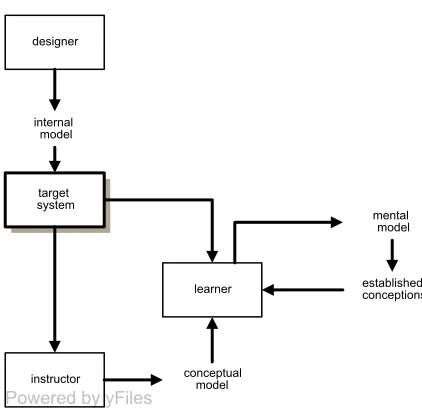
(21) Ch. 2. Elements of a Solution Space. schema being handled as a single chunk. Learning takes place through processing in working memory. As this has a very limited capacity, cognitive memory load quickly becomes a problem. With a view to managing working memory load in order to facilitate the changes in long-term memory associated with schema construction and automation, CLT-based instruction is designed so as to minimize extraneous cognitive load and increase effective (“germane”) cognitive load (van Gog, 2006). A number of “effects” have been identified which must be taken into account when designing such instruction. For example, the imagination effect describes the phenomenon of learners who are asked to imagine a procedure or concept outperforming those who are asked to study the same procedure or concept (Leahy & Sweller, 2005). Other effects are, in addition to the expertise reversal effect mentioned earlier, the “goal-free effect”, the “worked example effect”, the “split-attention effect”, the “redundancy effect”, the “modality effect”, the “completion effect” and the “variability effect” (van Gog, Ericsson, Rikers, & Paas, 2005, p. 74). CLT-based instruction takes all these effects into account to arrive at design guidelines and explicit instructional formats (Clarke, Ayres, & Sweller, 2005; van Gog, Paas, & van Merriënboer, 2004; van Merriënboer, Kester, & Paas, 2006).. mental models theory What the above-mentioned proposed enhancements to the traditional user manual have in common is their practical orientation. They concentrate on improving learning through improved (explicit) instruction. There exists, however, a family of theoretical descriptions of knowledge construction and acquisition that has led to a completely different angle of attack insofar as the paradox of the active user is concerned: that of mental models. There is little consensus on what the term “mental models” means exactly (see also O'Malley & Draper, 1992, p.73; and Payne, 1992, p.109-111). We can, however, distil a common narrative. According to theory6 a mental model is continuously being constructed in the mind during interaction with a complex system, during all stages of learning from the very beginning all the way to the highest proficiency. Just like any model, it is a simplified abstraction that is used to predict behaviours of the referent (the target system). In order to predict what the target system will do under certain conditions, the learner will mentally apply those conditions to the model, “run” it, and (still mentally) observe the outcome. The model is seen as “viable” if running it results in reliable predictions about the behaviour of the target system. This is distinguished from a conceptual model, which is any model that is explicitly worked out by an instructor to stimulate meaningful learning in those being instructed. In situations where the target system is man-made (as is the case when the target system is a software system) we can finally identify the internal model, which is the design created by the system’s maker.. 11.
(22) Ch. 2. Elements of a Solution Space. designer. internal model. target system. mental model. learner. instructor. Powered by yFiles. established conceptions. conceptual model. Figure 1: Overview of the relationships between the three roles (designer, instructor and learner) involved in the deployment of a complex artefact, and the models that are created by them. Established conceptions originate from sources as diverse as past experience, external information sources, interaction with the target system, the current state of the mental model, and original thinking. They strongly influence the continuous development of the mental model. In the absence of instruction, the complete mental model will even be founded on them (Payne, 1991). Established conceptions can thus make or break the successful construction of a mental model that is workable and viable, in that it can be “run” to infer valid conclusions from it. As we have seen, the assimilation bias is by no means exclusive to people learning how to use computers. On the contrary, it relates to a very human tendency of sticking with that which we know. Some mental models research focuses on making explicit and subsequently eradicating established misconceptions (Uzuntiryaki & Geban, 2005), whereas other researchers have studied the effect of presenting an explicit conceptual model on effectiveness and efficiency of instruction (Allbritton, McKoon, & Gerrig, 1995; Mayer & Gallini, 1990). Both strategies can be seen as tackling the paradox of the active user mainly by eradicating or bypassing the assimilation bias rather than the production bias7. This is done through providing, or enabling the acquisition of, correct conceptual information.. Computer-Mediated Activity: User Motives and Goals To complete this exploration of the problem space, it is now time to investigate what exactly it is that we are hoping to provide support for. A manual is a document with a job. Its job is to provide the knowledge that is required to make use of a particular system—in the case of a software manual, this is a software package—to perform a particular task. So, the knowledge that a software manual must provide to do its job well is tightly related to the activity that the software helps carry out.. 12.
(23) Ch. 2. Elements of a Solution Space. man-machine systems Readers of software manuals may be addressed in their role of operator or that of user (Steehouder, 1997). An operator simply operates the controls of a device and is by doing so done with his task, while for a user operating the controls is no more than a means to an end. This is a useful distinction, which looks at the man-machine system as a unit and determines the relative roles of the two partners, the human and the machine, within the system (Mirel, 1998a). Some software is designed to carry out one particular task in the external world. In such a situation all that the user has to do is press the right buttons at the right time, as defined by the designers of the system. The software is leading, while the human is purely its operator. All that is required to carry out the work is procedural knowledge. Software of this “one-trick-pony” type is often encountered in direct control situations, for example where calibration of a laser beam is software-driven or where a domestic telephone exchange is programmed from a PC. Ticketvending machines and ATMs also fall in this category. Much software, however, is more flexible, in that it is not limited to one particular task: once started, it needs a human to define the task to be carried out. The system may prescribe which keys to press and what menu options to select in order to carry out a particular action but it does not prescribe any particular sequence to the separate actions. The human no longer functions as a rather subordinate component in the system but becomes its true user; selecting exactly that functionality that is required, very much in the same manner that diners in a restaurant select the dishes that they wish to eat from a predefined offering. People working with such systems need sufficient information for making informed decisions as to not just how to interact with the software, but first of all which bits of the software to interact with. In order to make an informed choice, the user needs more than procedural knowledge: there is an additional requirement for other types of knowledge and the manual has to cover program functionality as well as straightforward operation. Possibly the bulk of current-day software falls within this category. Commercial institutions such as banks run front-office as well as back-office applications; retail chains have implemented company-wide stock control systems; and the typographer operating his Linotype was replaced almost overnight by a computerized publishing system. The advent of the personal computer has brought to the general public spreadsheet programs for manipulating calculations, word processors for producing text of any length and databases for keeping track of collections of data. The shift from “operator” to “user” does not stop here. Some software supports human activities that its designers cannot possibly predict or pre-define. The current generation of word processors allows for laying out a complete publication, be it a shopping list or an academic journal, incorporating data from other software sources external to the word processing application. The current generation of accountancy software goes way beyond simple bookkeeping and will let a person do a plethora of things, ranging from forecasting next year’s profits and this year’s budget overruns to determining which of the customers to send a mail shot to and when. Whereas previously people used computers mostly for reproducing their work, for automating tasks that they could at least theoretically have done without a computer, nowadays more and more software is used to enhance people’s work, enabling them to do non-routine things that were unthinkable before (Mirel, 1998a). What we see here is a continuum of usage context: from a situation in which the human is subordinate to the computer system, through one in which both “parties” are more or less equal, to one in which the computer is no more than a tool, and ideally transparent to the user. People are beginning to use software to an end that lies outside the program’s horizon, in the real world. The user is no longer interacting with the system but looking further ahead, “through the interface” (Bødker, 1991), with his or her attention on the ultimate purpose of the work. The word “task”, as in “user task”, with all its connotations of obligation may be no longer appropriate. What we see is a gradual shift from externally-imposed tasks to internally-generated aims and intentions. The documentation that comes with such software, however, has not moved on with this shift in focus. People using a. 13.
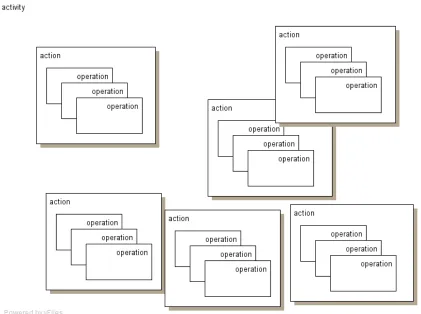
(24) Ch. 2. Elements of a Solution Space. computer system to carry out their self-defined intentions no longer have a need for support materials that teach: they have a tool and they know how to use it. The need now is for support materials that scaffold the use of that tool in real-life situations. As we have seen, such situational and strategic information is usually not offered.. software artefacts A software package is an artefact, a man-made tool. In order to apply any tool to a task, we need to know how to operate its controls: in other words, we need procedural knowledge. However, where other tools such as a hammer or a washing machine operate directly on the material world, software tools do not. Operating a hammer causes (hopefully) a nail to be driven into a piece of wood just like operating a washing machine causes water, detergent and linen to be pushed around. This differs fundamentally from a computer program, where user actions have a result only within the software environment itself. In other words: a piece of software is a self-contained universe, alien and not necessarily interesting per se to the user. To achieve a meaningful purpose and perform real-life work, program-defined actions must be selected and combined and their combined results must then be given meaning in the outside world. Only users who can do so are capable of performing the activities that provided the motivation for using the software in the first place (Mirel, 1998a). In order to bridge the gap between the software world and the real world, the user will be continually trying to reconcile program-defined tasks with his or her own objectives, re-defining the former in terms of the latter and vice versa. Payne (Payne, 1992; Payne, Squibb, & Howes, 1990) refers in this context to a “yoked state space” and sees the user as “yoking” (that is, reconciling and mapping) the device space (the software world) and the problem space (the real-life situation).. activity theory and the action identification model A coherent framework for studying the interaction with tools in the context of real-life human endeavour is found in the relatively recent dusting-off of activity theory, first developed in the Soviet Union in the early decades of the previous century but now sparking widespread interest in the field of human-computer interaction (see Bødker, 1991; Nardi, 1996). Human activity in this framework is regarded as a form of doing that is directed towards a material or immaterial object satisfying a need. The object provides the motive and is what distinguishes one activity from another. Activities are carried out through chains or networks of actions which find their minimal meaningful context in the activity and which each have an objective result. Before they are actually carried out, actions are consciously planned and thus have a well-defined goal. Actions in their turn are realised through a sequence of operations, which are habitual routines used as responses to conditions faced during the unfolding of the action. It is in this manner that actions are mediated by the tools that are used. When a “breakdown” occurs an operation that is no longer habitual, by that token becomes an action and likewise, an action that is practised many times is likely to become an operation. Similarly, an activity that loses its motive can become an action and the goal of an action can be raised to a higher level so that the action becomes an activity. What constitutes an action is highly dependent on the particular situation. In order to discuss “actions”, we need to identify them at a particular level of abstraction. When asked “what they are doing”, people may respond on different levels. A particular action may be identified as “seeing if someone is at home”, or as “pushing a doorbell”, or as “moving a finger”. There is a hierarchical structure here, expressed in everyday language by the fact that people will think of “seeing if someone is at home” by “pushing a doorbell” which is done by “moving a finger”. The action identification model (Vallacher & Wegner, 1987) aims to integrate on the one hand the representations that people develop after the fact and on the other the planning and direction of their actions in accord with their cognitive representations. The model states that the relationship between the two is cyclical. The three principles on which it rests are:. 14.
(25) Ch. 2. Elements of a Solution Space. 1.. action is maintained with respect to its prepotent identity, i.e. the identification level that is uttermost in a person’s mind;. 2.. there is a tendency for the higher level identity to become prepotent, until. 3.. a reality check is provided by the fact that the action cannot be maintained in terms of its prepotent identity, when there is a tendency for a lower level identity to become prepotent.. The three principles work together so that over time and repeated action, a person converges on an identity at a particular level; mediated by the context, the difficulty, and the familiarity of the action.. Figure 2: The hierarchical relationships between an activity, its constituent actions and their constituent operations. 15.
(26) Ch. 2. Elements of a Solution Space. 16.
(27) Ch. 3. Mapping the Lie of the Land. 3. Mapping the Lie of the Land Before we can ever hope to defeat the paradox of the active user, we should first take a step back and analyze the activities and actions that take place when a person applies knowledge in making the best possible use of a software tool—or attempts to do so. On what level are actions identified? What triggers them and how does one action lead to the next? What types of information are accessed and how is the information applied? Where does lack of information lead to confusion, error, impasse or even a simple dead end and what sorts of information lead to success? These are the kinds of question that need to be answered before we can, at a later stage, start thinking about designing materials to scaffold performance. The aim of the present research therefore was to study people during the performance of an activity that is part of their day-today work, using a complex software tool that is part of their day-to-day toolbox. Although audience analysis and task analysis are mentioned in almost every textbook on “how to write computer manuals”, in practice they are seldom carried out beyond a quick scan of computer literacy, age, level of education, affinity with modern technology, and familiarity with the task domain of the intended audience. User tasks are seen as program concepts, rather than things that a user wants to achieve. Such an audience and task analysis fails to yield information that can be used to design an effective document; not because the answers derived from the analyses are incorrect, but because the wrong things were analyzed (Albers, 1996). To design documentation that supports user activity, we must look at what that activity is from the user’s— not the programmer’s—point of view. Returning to our earlier example, according to its own manual EndNote is “an online search tool … a reference and image database… [and] … a bibliography and manuscript maker” (p. 6). Yet it is unlikely that the program’s users think of it in those or even similar terms. They are more likely to describe it as a tool for keeping track of bibliographic references, which allows for appropriately formatted citations and bibliographies to be inserted into a document that is written using a word processor. These are the activities and actions that its documentation should support and it is on this level that audience and task analysis should be performed. In order to carry out any such analysis, what is needed is a method that does not interfere with spontaneous behaviour yet allows for a certain degree of structuring and thus between-subject comparison. The aim must be to observe people using software to carry out activities that stem from existing requirements, rather than requirements imposed by a third party (i.e., the researcher). Also, during the observation any interference from the researcher must be kept to a minimum. It is clear that any design built on these starting points is bound to yield disparate and unstructured data. For a sound analysis, the required structure will have to be imposed afterwards. Ways of looking at humans doing things are found not only in the literature of the social sciences, but also in pragmatic disciplines such as interface and interaction design, management consultancy, and project planning. None of the existing approaches I found could completely meet all requirements.. cognitive task analysis (CTA) The study described in this paper is in many respects a cognitive task analysis; which can be defined (Chipman, Schraagen, & Shalin, 2000, p. 3) as “the extension of traditional task analysis techniques to yield information about the knowledge, thought processes, and goal structures that underlie observable task performance.”. 17.
(28) Ch. 3. Mapping the Lie of the Land. “Cognitive task analysis” is not really a method but rather a declaration of intent. Once it has been decided to carry out a cognitive task analysis, the question still remains how to go about it. It has been shown that techniques relying on introspection in order to unearth motivation for actual behaviour are doomed to failure, as respondents simply have no access to knowledge about their own cognitive processes (Nisbett & Wilson, 1977). Fortunately, people do have access to knowledge about the content of such processes. Their focus of attention at any given point in time, their current sensations, and up to a point also their emotions, evaluations and plans are known to them and can be reported upon (p. 255). These are exactly the aspects of interest in the framework of a cognitive task analysis studying design activities, decision-making or problemsolving through the use of a computer program. We cannot observe them directly but perhaps we can infer them, indirectly, from observable behaviour; and we can certainly listen to respondents telling us about them as they are taking place.. contextual inquiry The technique known as contextual inquiry was developed by Karen Holtzblatt in 1986 for use during requirements analysis in an early stage of user interface design. In her own words (Holtzblatt, 2005, p. 229), it looks like this: “Go to the customer’s workplace or living situation, observe them doing the activity to be supported, and discuss what they are doing while they do it.” Contextual inquiry offers a good starting point for analyzing user activity; but it is aimed at analyzing one particular case in order to design one particular solution and does not allow for generalization.. verbal analysis Contextual inquiry yields data that is unstructured and at times unclear. Michelene Chi developed a technique for quantifying qualitative analyses of verbal data, which she refers to as verbal analysis (Chi, 1997). The method is intended to “collect and analyze “messy” data. Messy data refers to such things as verbal explanations, observations, and videotapings, as well as gestures.” Chi then goes on to say: “One reason for the need to collect this kind of data is the trend toward studying complex activities in practice or in the context in which they occur. […] The goal of this article is to attempt to provide guidance for how one can approach an analysis of verbal data more generally, involving a method that integrates elements of qualitative and quantitative analyses so that the interpretation of the results is less subjective.” (Chi, 1997, p. 272) Verbal analysis offers guidance on how to code messy data; it does not offer guidance on what to code. Thus, a handle is still needed on what to look for in the raw data that is collected.. PARI method The PARI method is a cognitive task analysis method developed to identify training needs in the US Air Force (Hall, Gott, & Pokorny, 1995). The method is characterized by one expert working through a task set up by another expert. As the activity unfolds, for every action its precursor is identified as well as its results and the interpretation given to them. Putting the elements of every step or node in chronological order, we get: Precursor—Action—Results—Interpretation; hence PARI.. 18.
(29) Ch. 3. Mapping the Lie of the Land. critical path method Opinions as to the origin of the Critical Path Method (CPM) for project management differ. It was certainly used as early as 1957 by the chemical giant DuPont, to manage time-dependencies in the extremely complex process of shutting down plants for maintenance and restarting them, and it is often thought that the method indeed originated with DuPont. Certain, however, is that CPM was developed in an industrial, not an academic environment. Thus not documented at the time of its inception, it has become a standard project management tool and descriptions abound, although not in scientific literature. CPM starts by mapping out the complete project to be managed in the form of a Gantt chart or a network diagram. A network diagram contains the various sub-processes in separate nodes, with the actions to be carried out either written next to the connecting lines (Activity-On-Line or AOL) or in the nodes themselves (Activity-On-Node or AON). Lines connecting the nodes indicate dependency: if X must be completed before Y can be started, a line or arrow will point from X to Y. Next, duration is added to each of the actions so that the minimal throughput time of the project as a whole can be calculated.. critical incidents techniques Over half a century ago, John Flanagan pointed out that much can be learned about real-life situations by focusing predominantly on critical incidents: actions of situations that have special significance, in that they are either particularly helpful or particularly unhelpful in the context of a particular setting (Flanagan, 1954). This article, itself an overview of earlier work, has inspired many techniques for the analysis of critical incidents which are still widely applied in fields as diverse as education, traffic control, computer programming, disaster containment and medical practice (see Angelides, 2001; Klein, Calderwood, & MacGregor, 1989).. 19.
(30) Ch. 3. Mapping the Lie of the Land. 20.
(31) Ch. 4. Notes. 4. Notes Other forms of software documentation, such as tutorials and reference manuals, are sometimes supplied. They are however always supplemental to the user manual, and few suppliers set aside a budget for producing them.. 1. The EndNote User Manual was selected not as a sample of one but rather as an example, an illustration of the type of manual that frequently comes with a software package.. 2. A fundamentally different view from attempts to classify knowledge by contents is found in the paradigm of distributed cognition which looks at where knowledge resides. Knowledge that is applied during performance can be in the head but it can also reside in the world, for example laid down in checklists or instruction guides or embodied in the spatial arrangement of objects, dials or gauges. Finally, there is knowledge emerging during interaction either with others or with a (software) tool: in other words, from the reactions to our actions (Bibby, 1992; Greenberg & Dickelman, 2000; Hollan, Hutchins, & Kirsh, 2000; Hutchins, 1995).. 3. A cook book is a collection of worked examples, designed so that they can be copied and pasted into the reader’s own working environment. This format is frequently used for documentation where the primary audience consists of programmers, or end-users attempting to modify the workings of their chosen software tool.. 4. Scaffolding is a concept borrowed from the constructivist take on learning. Constructivism holds that knowledge cannot be transmitted and that instruction should consist of experiences that facilitate knowledge construction. Such experiences can be provided deliberately through “constructivist learning environments” or CLEs. A CLE has a problem, question or project as the focus of the environment. The goal of the learner is to interpret and solve the problem or complete the project. The project is surrounded with various interpretative and intellectual support systems, in the shape of modelling (showing how the task could or should be performed), coaching (helping the learner to perform the task) or scaffolding (providing just-in-time materials that are helpful in performing the task) (Jonassen, 1999). The scaffolding will become redundant, so that it can be faded out of existence, as the learner’s expertise progresses over time.. 5. For a wide-ranging and multi-disciplinary overview of mental model theories and their various applications, see (Rogers, Rutherford, & Bibby, 1992). An older seminal work is (Gentner & Stevens, 1983). Finally, (Schwamb, 1990), although unpublished, provides a thorough overview of mental models theories. 6. Mental models theory has a tremendous intuitive appeal. It “sounds right”. Yet the proof of this particular pudding remains in the eating. Are mental models really “runnable” or does the intuitive correctness refer to a more holistic idea of “some sort of internal representation of an external system”? Fundamental as this question is, from a pragmatic point of view it does not really matter whether the mental model that takes shape in the learner’s mind is runnable or no more than representational. In both cases, if the learner ends up with as appropriate a mental model of the system as possible, then the assimilation bias will have been cut to size. 7. 21.
(32)
(33) Part 2: Research Study.
(34)
(35) Ch. 5. Research Questions. 5. Research Questions The research described in this paper was originally inspired by my desire to understand the mechanisms involved in the under-use, inefficient use and ineffective use of complex software in real-life settings; with an ultimate view—itself beyond the scope of the research—to understanding how to design documentation that addresses these issues. Under-use is when only part of the software’s functionality is applied to the task at hand, and this is not the result of a conscious decision. If my word processor is capable of automatically laying out a complete publication and I decide not to use that functionality because I don’t like the layouts that are provided, that is not under-use. Yet if I enter my text without any formatting, save the result as plain text, and send it off to a print shop who I then pay to set the text in Times New Roman with all the headings in bold, that is indeed under-use of my word processor. The intention horizon in this situation lies well within the total of the software’s functionality. It seems that the intention horizon is at least partially determined by the degree to which users are able to not just utilize but in the first place consider the full functionality that is available. So, when conceptual knowledge combined with strategic knowledge triggers an upgrade of the action level, this could be an indication that the intention horizon has widened. Conversely, the intention horizon can be expected to narrow when these same knowledge types trigger a downgrade of the action level. My first research question focuses on upgrades and downgrades of the action level: RQ1:. What types of knowledge precurse a shift in action identification level?. To understand ineffective or inefficient use, some sort of base line is needed to measure actual performance against. Drawing on the perspectives provided by activity theory, the action identification model and the typology of knowledge, the optimum performance of an activity in terms of both effectiveness and efficiency can be hypothesised to consist of the shortest possible sequence of actions for which the goal is expressed in terms of system concepts, capabilities and functionality. This is what I will refer to as the minimal path: the ultimate expert’s approach, minimal as to duration and effort. There can always be only one minimal path. I would expect strategic knowledge to be used to determine the minimal path, combined with conceptual knowledge to predict the outcome of the planned actions. During the performance, situational knowledge is used to monitor progress based on the actual outcome of actions. In this manner, the device space and the problem space are continually yoked. Knowledge resulting from results and interpretations may provide the precursor for actions that were not previously planned and that are inserted in the path, thereby lengthening it. When the goal of an action is expressed in terms of program controls, this marks a breakdown where what should be an operation is upgraded to an action. Procedural knowledge is then accessed to get back on track. My next research question thus looks at what keeps users on the straight and narrow: RQ2:. What types of knowledge precurse actions that are in the minimal path?. Inefficient use is when the end result is what was wanted and needed, but it took longer than necessary; without this being the result of fulfilling a particular desire. When I try all the fonts on my system on a particular section of a text I am producing in my word processor to see which one I like best, that is not inefficient use. However, when I do so because I don’t know how to get out of the dialog box presenting font formatting options so keep clicking around, it is. My use of. 23.
(36) Ch. 5. Research Questions. the software is also inefficient when I painstakingly define professional-looking layout templates for my document, which in the end I do not use. Inefficient use becomes visible when actions are present in the actual performance that are not part of the minimal path. The additional actions could be instances of operations being upgraded to the level of an action (as in the example of not knowing how to leave a dialog box), or of redundant actions on the same level of action identification (as in the example of building templates that are not subsequently used). Additional actions also occur during problem recovery, to get back on track. A fourth condition under which additional actions are carried out is when a wrong turn was taken unknowingly, resulting in a complete branch being added to the minimal path sequence. This brings me to a further research question, focusing on inefficient use and the addition of actions as compared to the minimal path: RQ3:. What types of knowledge precurse actions that are not in the minimal path?. Ineffective use, finally, is when the end result is unsatisfactory while the software is perfectly capable of delivering perfection. When I attempt to lay out a table inserting spaces between text elements and I just cannot get my columns to line up, that is ineffective use of my word processor—unless the program simply cannot handle tabular text. Ineffective use becomes visible when actions that are part of the minimal path are absent from the actual performance. My fourth research question focuses on ineffective use and the absence of actions as compared to the minimal path. Actions that are not there, cannot have a precursor. The research question must be formulated a little differently from the others: RQ4:. What causes users not to carry out actions that are in the minimal path?. To round off and to make the best possible use of the data, I am looking to see to what degree people are capable of self-monitoring their choice of actions when working with software: RQ5:. 24. Do users interpret system feedback as information, on which to base decisions affecting the further sequence of actions?.
(37) Ch. 6. Research Design. 6. Research Design This chapter describes in separate paragraphs the various aspects of the way in which the study was set up.. Method The method of cognitive task analysis applied in this study consists of an amalgam of approaches found in the literature. 1.. Contextual inquiry was carried out to obtain the raw data.. 2.. From the PARI method, the idea was taken of decomposing an activity into a sequence of PARI nodes, each of which contains the PARI elements Precursor, Action, Results and Interpretation. The PARI method was adapted to the current research objective in a number of ways: −. The PARI method is based on dyads of experts, one setting up a trouble-shooting problem for the other to solve. As trouble-shooting problems can be set up in the real system only at great cost or not at all, system responses are simulated by the expert who devises the problem. In the current research, interaction with the real system was studied as in contextual inquiry.. −. In the PARI method, the problem-setting expert has full control over the flow of events. Therefore there is no need for the facilitator, who provides probing, to have complete understanding of the nature of the expertise being displayed by the problem-solving expert. In the current research, the roles of problem-setting expert and facilitator were carried out by the same person, whose expertise is in using the software tool rather than in applying it to real-world situations.. −. The PARI method aims to uncover specific training needs for specific tasks whereas the current research is descriptive. In the current research it is not so much the specific content, in a specific context, of precursors, actions, results and interpretations that are the focus of interest, but rather their classification. Precursors were traced back to information of a certain type; actions were ranked by their identification level.. −. Finally, many stages in the PARI method are carried out in order to determine exactly which activities need to be trained and thus warrant study. Again due to the different objective of the current research study, such stages were skipped.. 3.. The raw, “messy” data was segmented and coded in accordance with the ideas formalized in the verbal analysis method.. 4.. Critical path analysis suggested a way of formalizing the minimal path against which actual performance as formalized in the coded PARI sequences could be measured. The idealized unfolding of the activity was schematically drawn as an Activity-On-Node (AON) network diagram, with arrows indicating dependency as in CPM.. 5.. Critical incident techniques, finally, contributed by offering a way of identifying moments of interest. For an incident to be “critical” in the sense of critical incident analysis, it need not be detrimental to the desired outcome, or even in any way extraordinary. Critical incidents were identified where actual performance deviates from, sticks to or returns to the shortest most appropriate chain of actions (the minimal path).. 25.
Figure
Outline
Related documents