Understanding the Performance of the Java Operating System JX
using Visualization Techniques
Michael Golm, Christian Wawersich, Jörg Baumann, Meik Felser, Jürgen Kleinöder
Dept. of Computer Science
University of Erlangen-Nuremberg
{golm, wawersich, bauman, felser, kleinoeder}@informatik.uni-erlangen.de
Abstract
During the development of the Java-based operating
sys-tem JX, we frequently needed tools to assess the
perfor-mance of the microkernel and the Java components. We
instrumented the microkernel and the
bytecode-to-native-code translator to get information about nearly every aspect
of the systems behavior. The gathered data can be visualized
to show CPU time consumption of methods, thread
schedul-ing, object allocation behavior, and object ages.
1 Introduction
In the JX project [4][5] we build a complete operating
sys-tem using the type-safe, object-oriented language Java. One
of the major challenges is achieving a performance that is
competitive to mainstream operating systems, such as
Linux or Solaris. It is in the nature of our microkernel-based
system, that most time is spent executing Java code.
Achiev-ing a good performance therefore requires an optimizAchiev-ing
bytecode-to-nativecode translator and instrumentation/
visualization tools to locate performance problems. In this
paper we concentrate on the second requirement. To
illus-trate the various instrumentation and visualization
tech-niques we use one single application: an NFS server that is
written in Java (as are the RPC/UDP/IP/device driver
lay-ers) and runs on the JX microkernel.
Reed [10] classifies performance instrumentation into
timing, counting, sampling, and tracing. The method timing
system is described in Section 2, Section 3 describes our
sampling system, Section 4 the event tracing. Section 5
describes our tools to assess the memory usage behavior of
the system. The problems that we solved concerning data
collection and transfer are described in Section 6.
2 Method timing
To write faster code, it is necessary for the programmer to
identify the most time-consuming parts of a program. These
hot spots of execution often indicate poor code or
bottle-necks. The hot spots are the parts of the code that benefit
most from optimizations. We instrumented the
bytecode-to-nativecode translator to insert code that measures the
execu-tion times of methods. Method timing creates an overhead
particularly at small methods. To get more exact results, we
use several error correction techniques.
Hardware supported measuring. Method timing uses the
time stamp counter register (TSC) of the Pentium processor
family. The TSC contains the elapsed clock ticks since
sys-tem boot. To measure the time consumed by a method, we
save the TSC in the prolog of the method and subtract the
TSC in the epilog of the method. The result is totalized for
each invocation pair consisting of caller and callee method.
The sum is saved together with the number of invocations
and the caller and callee address in a data structure per
thread. Collecting the data separately per thread avoids
locking overhead and allows to analyze the behavior of a
dedicated thread.
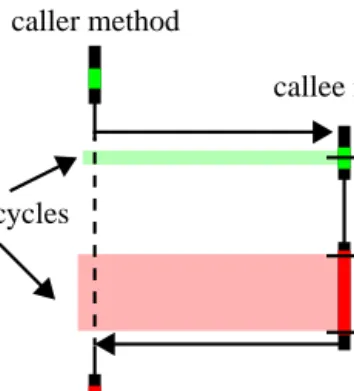
Error correction. Figure 1 shows the flowchart of a single
method invocation. The measurement of the callee method
caused an overhead (extra clock cycles) that falsifies the
result.
The extra cycles are wrongly accounted to the caller
method. To avoid this measurement error, it is necessary to
identify the consumed extra clock cycles. The amount of
extra cycles in the prolog is almost constant and it is
possi-ble to determine a fix value. The more significant and
caller method
callee method
extra cycles
prolog
epilog
method body
changing number of extra cycles in the epilog is measured
by reading the time stamp count a third time and computing
the number of extra cycles.
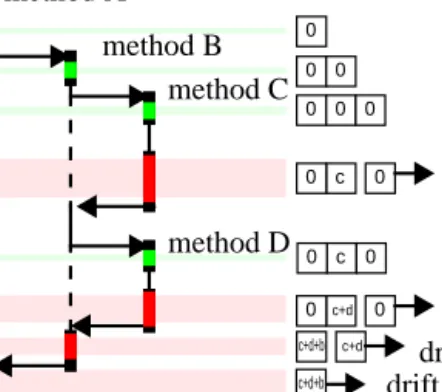
For error correction of a deeper nested method we have
to accumulate the quantified drift and propagate the drift to
the callers. A stack is used for this task. Figure 2 illustrates
the functionality of the stack. On every method invocation
the stack is growing by a new initialized counter. The drift
for a particular method (the small letters in Figure 2) is
always accumulated on the topmost counter. In the epilog of
a method the topmost counter is popped from the stack and
subtracted from the measured clock cycles of the method.
Then the drift is added to the drift of the caller method.
In this way the error made by the measurement is
suffi-ciently compensated for a single thread. This is sufficient to
find the most–time-consuming parts of a program or to
examine the execution path. But it is not sufficient to
deter-mine the exact execution time for a single method or to
determine the variation, because the execution of extra code
during the measurement has noticeable impact on the
mem-ory bandwidth, the caches, the buffers, and the branch
pre-diction of the processor. To measure the exact execution
time of a single method the translator can be configured to
insert the measurement code only into the prolog and epilog
of that method.
Support of multithreading. The JX system, as a Java
run-time environment, usually has more than one thread of
exe-cution. While profiling is active the system scheduler has to
inform the profiler about the suspension of a thread. In this
case the number of clock cycles during the suspension
period is computed. If the thread is suspended outside the
measurement routine the computed value is added to the
current drift counter.
Analyzing the results. To get a better overview of the
exe-cutions paths we produce diagrams that show the execution
times.
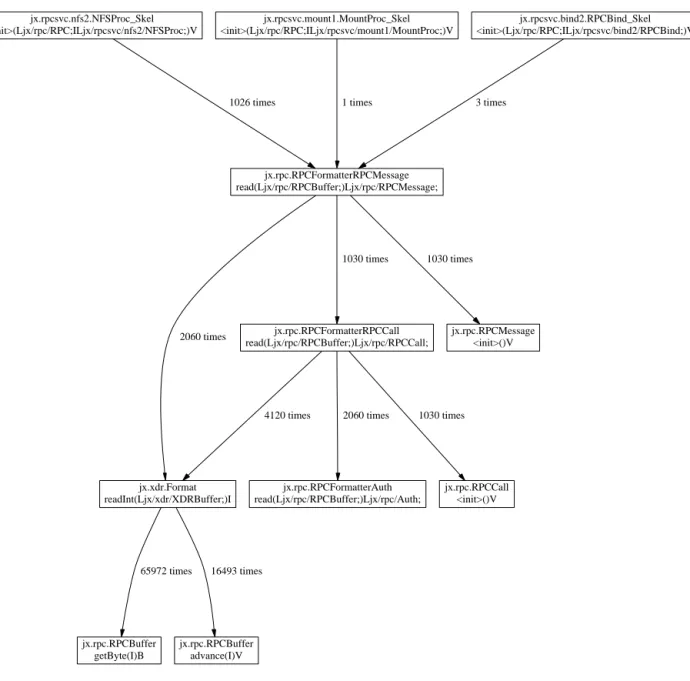
A call graph display (Figure 3) is produced by using the
dot program [1]. After having produced several call graphs
we concluded that this visualization is not well-suited to
give a good picture of the consumed time. This was the
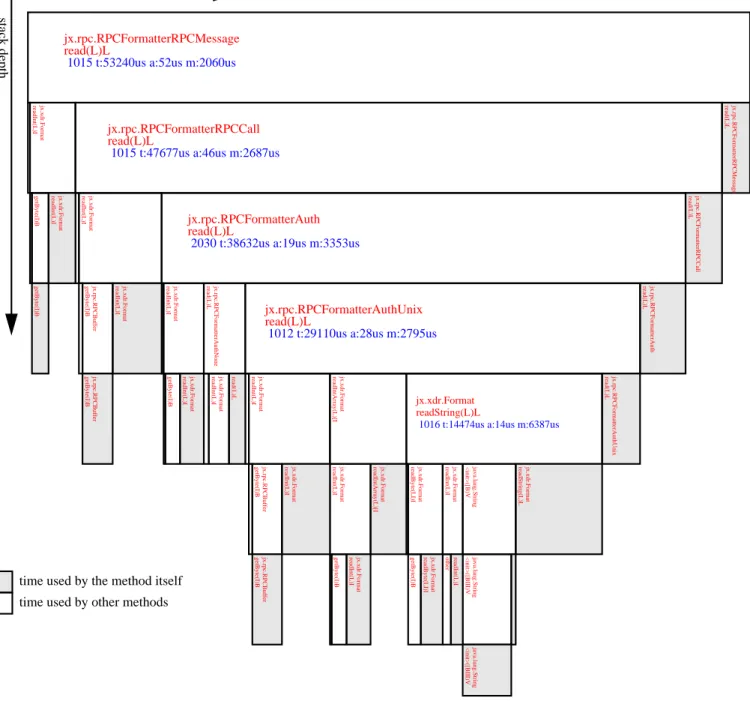
rea-son to develop another visualization (Figure 4) that shows a
box for each method, where the size of the box is
propor-tional to the time consumed by this method.
3 Sampling
Similar to method timing, sampling is used to find hotspots
in the system, but with an considerably lower measurement
overhead. While timing measures the exact execution times
of methods, sampling can only produce a statistical view of
the system. The timer interrupt service routine (ISR) logs
the instruction pointer of the interrupted instruction. The
distribution of the instruction pointers indicates where the
program spends most of its time.
4 Event tracing
User-generated events. JX allows Java components to log
component-specific events. The Java code can register an
event name at the microkernel and gets an event number.
This number is used for subsequent logging. Time and event
number are stored in main memory. The overhead of
log-ging an event is 45 CPU clock cycles.
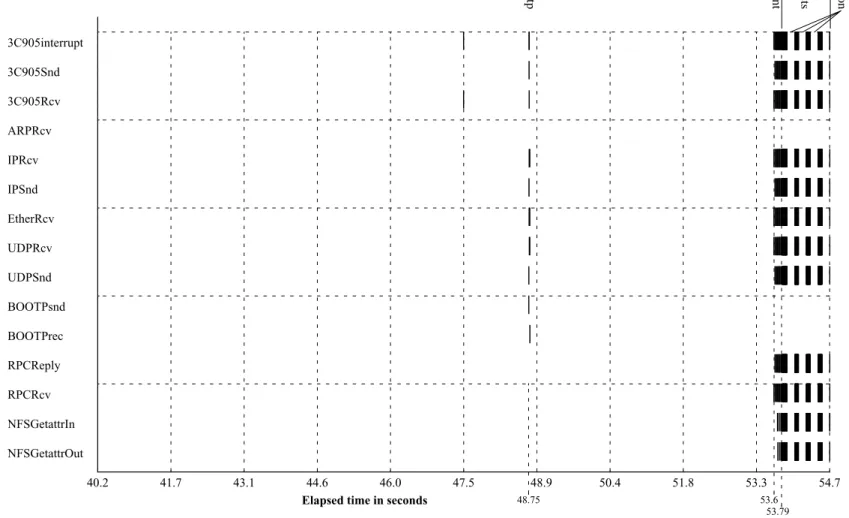
Figure 5 shows the event trace that is produced when the
system boots and acts as an NFS server. The system first
sends a bootp request and receives a reply packet (at about
48.75 sec.). Then the client mounts the NFS file system, and
starts to read the same file in an endless loop. This creates
RPC and NFS traffic starting at about 53.6 sec. 0.2 sec. later
there starts a dense block of events. These are the getattr
requests that are sent by the client during the execution of
the benchmark program. The block of events is interrupted
three times by the garbage collector, that in the current
ver-sion of JX disables all interrupts. This will be changed when
the protocol between GC and intra-domain scheduler is
fin-ished.
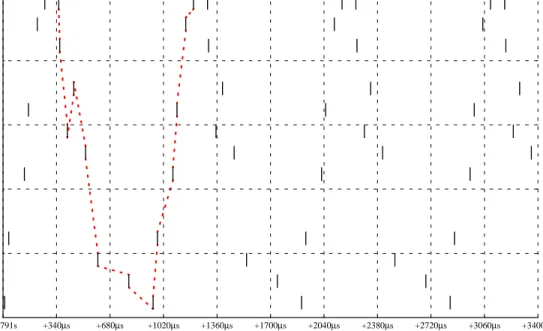
To improve the NFS request rate, we have to look at the
events in more detail, so we zoom into the 3.4 millisecond
interval starting at about 53.791 sec. (Figure 6). There is an
obvious pattern of consecutive events (dotted line) that
starts and ends with a 3C905interrupt event. A complete
cycle needs about 905
µsec. Figure 7 displays the times
between successive events.
Method enter/exit events. For debugging purposes it is
often interesting to know which methods are executed in
which order. Our translator can be configured to insert a
prologue that logs TSC and method pointer. The same
event-recording facilities as with user-generated events are
used. Therefore the diagram looks similar.
0
0
c
0
0
0
0
0
0
c
0
0
c+d0
0
c+d c+d+b c+d+bmethod A
method B
method C
method D
drift of C
drift of D
drift of B
drift of A
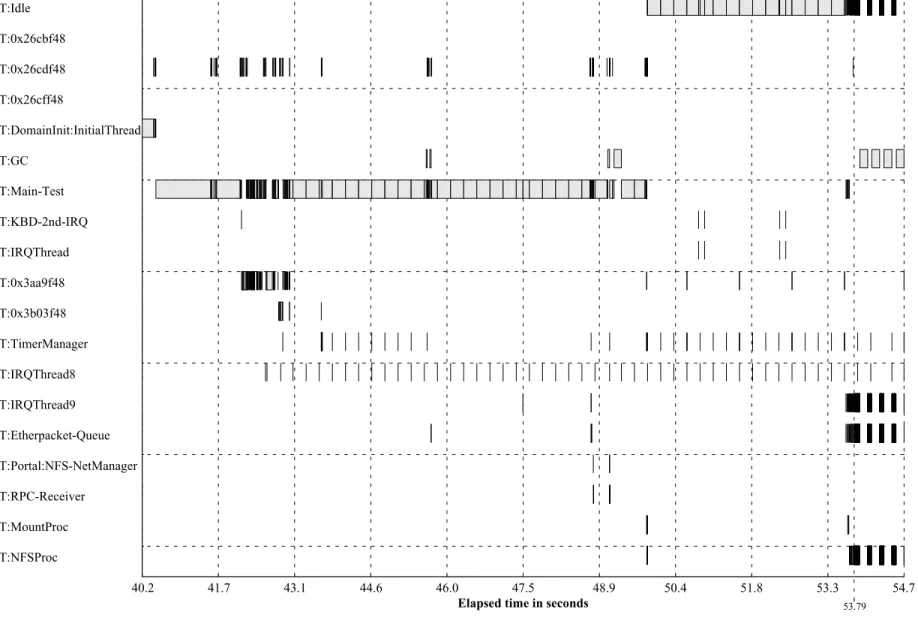
Scheduling events. To visualize the scheduling behavior of
the system we use a thread activity diagram. The kernel is
instrumented to collect events during thread switching. The
TSC and target thread ID are logged.
Figure 8 shows the thread activity during boot and the
NFS test. The y-axis shows either the thread name or the
thread ID for unnamed threads. Some background
informa-tion is necessary to understand this diagram. “Idle” is the
thread that runs when no other thread is runnable. The
“Main-Test” thread is the thread that starts the NFS server.
“IRQThread8” is the first-level interrupt handler for the
RTC interrupt. It runs periodically and fires timers by
unblocking other threads. As “IRQThread8” is a first-level
handler it runs with interrupts disabled and must complete
in a bounded time. Time-consuming tasks are delegated to
the “TimerManager” thread. At about 53.79 sec. the system
starts to receive getattr NFS requests and the thread
switches start to occur more frequently. “IRQThread9” is
the first level interrupt handler for the NIC (network
inter-face card) interrupt. It acknowledges the received packet
with the NIC, places it in a queue, and unblocks the
“Ether-packet-Queue” thread that processes that queue.
5 Memory
Java uses an automatic memory management called garbage
collection. The programmer creates objects but never
destroys them. This is very convenient for the programmer.
But during performance debugging or in order to find
mem-ory leaks the programmer wants to know exactly when
objects are allocated and destroyed.
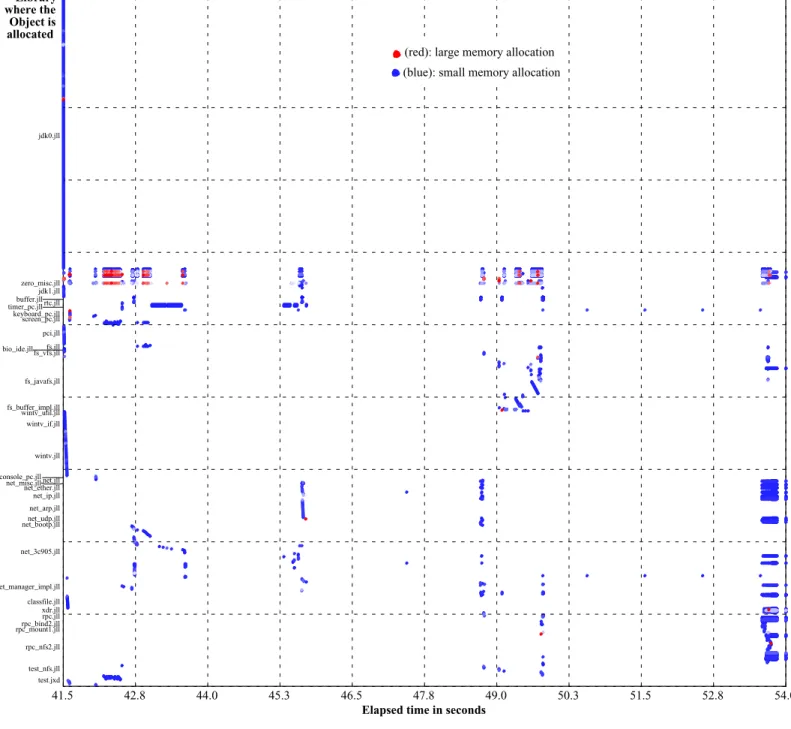
Object creation: time, size and code position. Figure
9
shows at which times and in which libraries, classes, and
methods objects are allocated. The object size is
color-coded: blue means a small, red a large allocation.
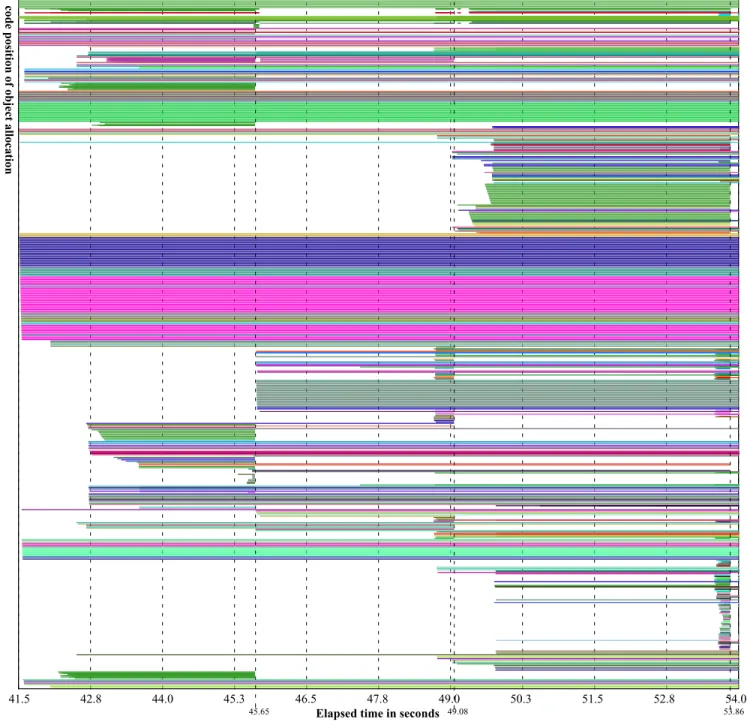
Object creation and destruction. Figure 10 shows the
lifetime of objects. The y-axis shows the instruction pointer,
representing the position of the object allocation (equally
distributed). The color relates to the object type (class). At
one allocation point always the same type of object is
cre-ated. At about 45.65 sec., 49.08 sec. and 53.86 sec. we can
recognize a garbage collector run destroying many objects.
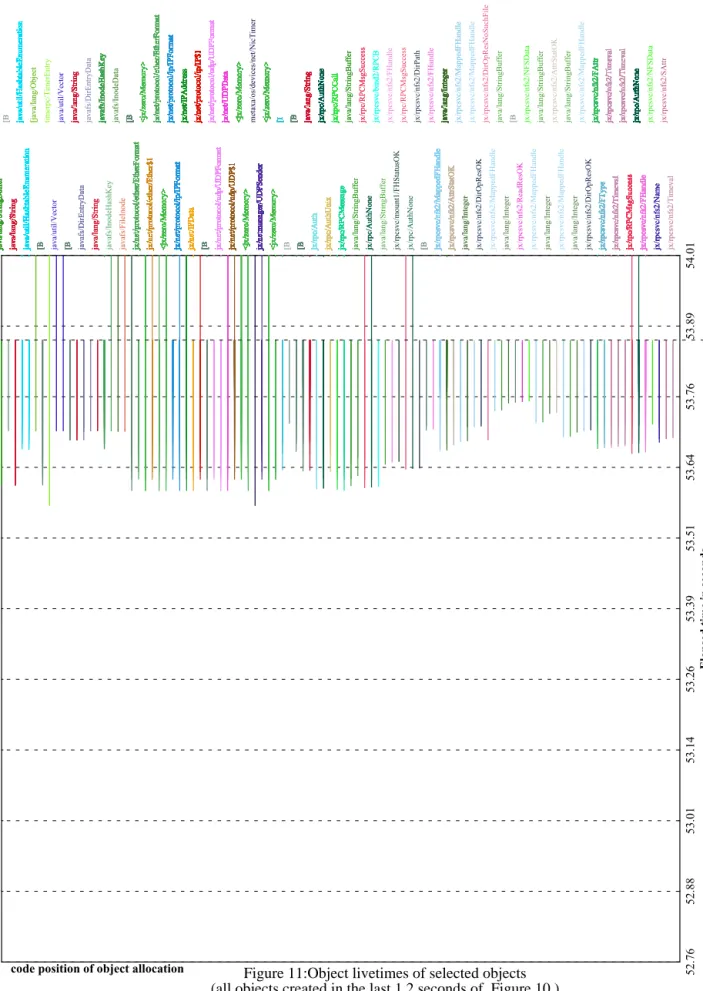
Figure 11 presents a closer look at the objects that are
cre-ated in the last tenth of the diagram in Figure 10.
Object aging. We developed several visualizations to
cap-ture whether objects are long- or short-living and what kind
of objects are more likely to have a long or short lifetime.
Figure 12 shows the age of objects and where they are
allo-cated. The time is measured in allocated memory, that
means an object grows older when memory is allocated.The
number of instances of a class with a certain age is encoded
in the size of the dot. The red line is the average number of
instances with the specific age.
Cache behavior. Figure 13displays the values of the
Pen-tium III performance counters and the thread activity
dia-gram of Figure 8 in the background. During this test the
per-formance counters are configured to measure the number of
lines evicted from the L2 cache and the number of L2
requests. Together with the thread activity diagram the
per-formance counter diagram tells us that there is lot of cache
activity (many accesses and misses) during the boot phase.
Then the code has only few accesses to the L2 cache. Most
requests seem to be satisfied by L1. There is a three seconds
interval where the line is absolutely horizontal. During this
period the system is idle after the initialization of the NIC.
The following steep rise of the curve is created by the GC,
which has poorer locality than the rest of the system.
6 Data collection and transfer
JX is a microkernel with minimal built-in device support.
From a software engineering perspective this architecture is
superior to monolithic OS architectures. Due to the lack of
built-in device drivers and file systems, a microkernel
archi-tecture makes it very difficult to transfer the collected data
from the target system to the outside world. Only the serial
device is supported by the JX microkernel. It is used for
debugging and data transfer.
Especially the GC-aging instrumentation may generate
up to hundreds of megabytes of data. It is very unpractical
to transfer this data in a textual representation via the serial
line. Therefore we transfer it in compressed binary format
using the minilzo [8] compression library.
7 Related work
JVMPI. The Java Virtual Machine Profiler Interface
(JVMPI) is an event-based interface between a JVM and a
profiler agent. Whenever something interesting happens
inside the VM (method is entered or exited, object is
allo-cated, moved, or freed, etc.) the profiler agent is notified.
The profiler agent is also allowed to instrument a class file
after it has been loaded. Because the JVMPI is intended as
a standard interface between different JVMs and profilers
the profiler and JIT are not as tightly integrated as in JX. The
ability of the bytecode-to-native-code translator to insert
special profiling code allows to reduce the measurement
error and to collect trace data with very low overhead.
Fur-thermore, JX allows to collect hardware-specific data using
the CPU’s performance counters, which is essential for the
optimization of the translator.
Hyperprof. Hyperprof uses the data generated by an
unmodified JVM when the “-prof” switch is used. It shows
caller-callee relations and method timing as hyperbolic tree.
While our visualization is not that spectacular it
neverthe-less makes the same information visually available (method
timing diagram).
Jinsight. IBM’s Jinsight uses a modified JVM to get more
detailed trace information. It is able to display thread
activ-ity, object usage and creation, and garbage collection. It also
provides special features to help diagnosing memory leaks.
As indicated in the previous sections, we can perform
simi-lar diagnostics.
JaViz. JaViz is another performance visualization tool that
collects trace data using a modified JVM. The main focus of
this tool is the analysis of client/server applications. After
collecting and merging the data a call graph can be
dis-played including client/server interaction. While our
profil-ing tools are not designed to merge data collected on
differ-ent computers, it is possible to trace the interaction between
different applications.
Commercial tools. There are also some commercial tools
to profile applications. For example Rational Quantify [9]
counts individual machine cycles by inserting counting
instructions into the object code for every functional block
of code.
JProbe (Sitraka Software) [11], OptimizeIt (Intuitive
Systems Inc.) are similar tools. They all provide a call graph
display, memory usage diagrams etc.
8 Conclusion and future work
A comprehensive analyses of a Java-based OS needs several
instrumentation and visualization techniques.
Instrumenta-tion techniques range from very invasive method timing and
object aging analysis to low overhead application generated
events. The captured data is currently visualized by
gener-ating a FrameMaker MIF file. The MIF backend should be
easily replaceable by other backends, e.g., for X11, which
allow an interactive selection of the interesting data by
spec-ifying time ranges, event types, or object types.
9 References
[1] AT&T Labs-Research: dot-Tool, part of Graphviz - open
source graph drawing software.
http://www.research.att.com/sw/tools/graphviz/
[2] V.Bulatov: HyperProf(v.1.3) - Java profile browser.
http://www.physics.orst.edu/~bulatov/HyperProf/
[3] J. Guitart, J. Torres, E. Ayguadé and J. Labarta. Java
Instru-mentation Suite: Accurate Analysis of Java Threaded
Appli-cations. 2nd Workshop on Java for High Performance
Com-puting, Santa Fe, New Mexico (USA), pp. 15-25. May 2000.
[4] M. Golm, J. Kleinöder: The JX Project.
http://www4.informatik.uni-erlangen.de/Projects/JX/
[5] M. Golm, J. Kleinöder, F. Bellosa: Beyond Address Spaces
- Flexibility, Performance, Protection, and Resource
Man-agement in the Type-Safe JX Operating System. Proc. of
HotOS 2001, May 20-23, 2001, Schloß Elmau, Germany.
[6] IBM: Jinsight - A tool for visualizing and analyzing the
exe-cution of Java programs.
http://www.alphaworks.ibm.com/formula/jinsight
[7] I. H. Kazi, D. P. Jose, B. Ben-Hamida, C. J. Hescott, C.
Kwok, J. A. Konstan, D. J. Lilja, and P.-C. Yew: JaViz: A
client/server Java profiling tool, IBM Systems Journal, 39
(1) , 2000 (http://www.research.ibm.com/journal/sj/391/
kazi.html)
[8] M. Oberhumer: LZO - a portable lossless data compression
library.
http://wildsau.idv.uni-linz.ac.at/mfx/lzo.html
[9] Rational: Rational Quantify for Unix.
http://www.rational.com/products/quantify_unix/index.jsp
[10] D. A. Reed: Performance Instrumentation Techniques for
Parallel Systems. L. Donatiello and R. Nelson (eds), Models
and Techniques for Performance Evaluation of Computer
and Communications Systems, Springer-Verlag, LNCS,
1993, pp. 463-490.
[11] Sitraka: JProbe - Java profiling and testing tools.
http://www.sitraka.com/software/jprobe/
jx.rpc.RPCFormatterRPCMessage
read(Ljx/rpc/RPCBuffer;)Ljx/rpc/RPCMessage;
jx.rpc.RPCFormatterRPCCall
read(Ljx/rpc/RPCBuffer;)Ljx/rpc/RPCCall;
1030 times
jx.xdr.Format
readInt(Ljx/xdr/XDRBuffer;)I
2060 times
jx.rpc.RPCMessage
<init>()V
1030 times
jx.rpcsvc.nfs2.NFSProc_Skel
<init>(Ljx/rpc/RPC;ILjx/rpcsvc/nfs2/NFSProc;)V
1026 times
jx.rpcsvc.mount1.MountProc_Skel
<init>(Ljx/rpc/RPC;ILjx/rpcsvc/mount1/MountProc;)V
1 times
jx.rpcsvc.bind2.RPCBind_Skel
<init>(Ljx/rpc/RPC;ILjx/rpcsvc/bind2/RPCBind;)V
3 times
jx.rpc.RPCCall
<init>()V
1030 times
4120 times
jx.rpc.RPCFormatterAuth
read(Ljx/rpc/RPCBuffer;)Ljx/rpc/Auth;
2060 times
jx.rpc.RPCBuffer
getByte(I)B
65972 times
jx.rpc.RPCBuffer
advance(I)V
16493 times
Figure 4:
Method timing
jx.rpc.RPCFormatterRPCMessage
read(L)L
1015 t:53240us a:52us m:2060us
jx.rpc.RPCFormatterRPCMessage
read(L)L
jx.rpc.RPCFormatterRPCCall
read(L)L
1015 t:47677us a:46us m:2687us
jx.xdr.Format readInt(L)I jx.rpc.RPCFormatterRPCCall read(L)L
jx.rpc.RPCFormatterAuth
read(L)L
2030 t:38632us a:19us m:3353us
jx.xdr.Format readInt(L)I jx.rpc.RPCFormatterAuth read(L)L
jx.rpc.RPCFormatterAuthUnix
read(L)L
1012 t:29110us a:28us m:2795us
jx.rpc.RPCFormatterAuthNone read(L)L jx.xdr.Format readInt(L)I jx.rpc.RPCFormatterAuthUnix read(L)L
jx.xdr.Format
readString(L)L
1016 t:14474us a:14us m:6387us
jx.xdr.Format readIntArray(L)[I jx.xdr.Format readInt(L)I jx.xdr.Format readString(L)L java.lang.String <init>([B)V jx.xdr.Format readInt(L)I jx.xdr.Format readByte(LI)I java.lang.String <init>([BIII)V java.lang.String <init>([BIII)V readInt(L)I other jx.xdr.Format readByte(LI)I getByte(I)B jx.xdr.Format readIntArray(L)[I jx.xdr.Format readInt(L)I jx.xdr.Format readInt(L)I getByte(I)B jx.xdr.Format readInt(L)I jx.rpc.RPCBuffer getByte(I)B jx.rpc.RPCBuffer getByte(I)B read(L)L jx.xdr.Format readInt(L)I jx.xdr.Format readInt(L)I getByte(I)B jx.xdr.Format readInt(L)I jx.rpc.RPCBuffer getByte(I)B jx.rpc.RPCBuffer getByte(I)B jx.xdr.Format readInt(L)I getByte(I)B getByte(I)B
stack depth
time consumed (proportional)
time used by the method itself
time used by other methods
Figure 5:
Application-generated events
mount
getattr requests
garbage collection
40.2
41.7
43.1
44.6
46.0
47.5
48.9
50.4
51.8
53.3
54.7
Events
3C905interrupt
3C905Snd
3C905Rcv
ARPRcv
IPRcv
IPSnd
EtherRcv
UDPRcv
UDPSnd
BOOTPsnd
BOOTPrec
RPCReply
RPCRcv
NFSGetattrIn
NFSGetattrOut
53.6
53.79
48.75
bootp
Figure 6:
Event trace
53.791s
+340
µ
s
+680
µ
s
+1020
µ
s
+1360
µ
s
+1700
µ
s
+2040
µ
s
+2380
µ
s
+2720
µ
s
+3060
µ
s
+3400
µ
s
Elapsed time (starting at 53.79 sec.)
3C905interrupt
3C905Snd
3C905Rcv
ARPRcv
IPRcv
IPSnd
EtherRcv
UDPRcv
UDPSnd
BOOTPsnd
BOOTPrec
RPCReply
RPCRcv
NFSGetattrIn
NFSGetattrOut
Figure 7:
Time between events
3C905interrupt
6
3C905Rcv
54
EtherRcv
43
IPRcv
83
UDPRcv
82
RPCRcv
210
NFSGetattrIn
168
NFSGetattrOut
29
RPCReply
99
UDPSnd
26
IPSnd
56
3C905Snd
49
3C905interrupt
Figure 8:
Thread activity diagram
Elapsed time in seconds
T:0x3aa9f48
T:Etherpacket-Queue
T:0x3b03f48
T:GC
T:DomainInit:InitialThread
T:0x26cdf48
T:NFSProc
T:Idle
T:Portal:NFS-NetManager
T:TimerManager
T:Main-Test
T:KBD-2nd-IRQ
T:IRQThread9
T:0x26cff48
T:RPC-Receiver
T:0x26cbf48
T:MountProc
T:IRQThread8
T:IRQThread
40.2
41.7
43.1
44.6
46.0
47.5
48.9
50.4
51.8
53.3
54.7
53.79
Figure 9:
Object allocations over time
41.5
42.8
44.0
45.3
46.5
47.8
49.0
50.3
51.5
52.8
54.0
Elapsed time in seconds
test.jxd test_nfs.jll rpc_nfs2.jll rpc_mount1.jllrpc_bind2.jll rpc.jll xdr.jll classfile.jll net_manager_impl.jll net_3c905.jll net_bootp.jllnet_udp.jll net_arp.jll net_ip.jll net_ether.jll net_misc.jll net.jll console_pc.jll wintv.jll wintv_if.jll wintv_util.jll fs_buffer_impl.jll fs_javafs.jll fs_vfs.jll bio_ide.jll fs.jll pci.jll screen_pc.jll keyboard_pc.jll timer_pc.jllrtc.jll buffer.jll jdk1.jll zero_misc.jll jdk0.jll(blue): small memory allocation
(red): large memory allocation
Library
where the
Object is
allocated
Figure 10:
Object livetimes
41.5
42.8
44.0
45.3
46.5
47.8
49.0
50.3
51.5
52.8
54.0
Elapsed time in seconds
code position of object allocation
45.65 49.08 53.86