Technical Report
for Information and Image Management
Integration of Electronic Document
Management Systems and Electronic
Records Management Systems—
Framework and Best Practices
Prepared by
AIIM International
[Month] 200X
Abstract:
[insert abstract]© 2003 AIIM International i
Contents
1
Purpose... 1
2
Scope ... 1
3
References... 1
4
Acronyms and Definitions ... 1
5
Background ... 2
6
Issues and Challenges... 3
7
The Business Case for EDMS / ERMS ... 5
7.1
The Needs of the Community... 5
7.2
System Highlights ... 6
7.3
The Case for Integration of EDMS/ERMS...
Error! Bookmark not defined.
7.4
Either / Or...
Error! Bookmark not defined.
7.5
Current Management of Information and Records ...
Error! Bookmark not defined.
7.6
The Vision for Information and Records Management ....
Error! Bookmark not defined.
8
Reference Model... 7
8.1
High Level Reference Model ...
Error! Bookmark not defined.
8.2
Comparison of DM and RM Elements... 14
9
Implementation Models ... 16
9.1
Model 1: Integration of Stand-alone Systems... 16
9.2
Model 2: A DMS with Built-in Records Management Capability... 18
9.3
Model 3: Use of e-records Engines ... 19
10
EDM/ERM Functional Best Practices... 20
11
Metadata ... 24
Figures
Figure 1: High level reference model ...
Error! Bookmark not defined.
Tables
Table 1: DM vs. EM functionality ... 6
Table 2: Unique and common elements of DM and RM... 14
Foreword
While functional requirements exist for electronic document management (EDM) systems and for electronic records management (ERM) systems, what did not exist were functional requirements for integrated EDM/ERM systems. Perceiving a growing need for such functional requirements, a group of individuals petitioned the AIIM International Standards Board to establish a standards committee on functional requirements for integrated EDM/ERM systems. The AIIM Standards Board approved the proposal and the committee held its initial meeting on May 23, 2002.
Known as the Integrated EDM/ERM Committee, the group early noted the length of time and laborious processes involved in developing a full-fledged standard with the detailed specifications such as those found for ERM in:
?? DoD 5015.2-STD, Design Criteria Standard for Electronic Records Management Software Applications, 1997 (and later),
?? The U.K. Public Records Office's 1999 Functional Requirements for Electronic Records Management Systems,
?? MoReq, or the European Commission's Model Requirements for the Management of Electronic Records, March 2001, and
?? ISO 15489, or the International Organization for Standardization's International Standard: Information and Documentation—Records Management, September 2001.
The group decided to focus first on producing a short-term product (within six to nine months) that would set forth a framework and best practices for integrating EDM and ERM systems. They chose to concentrate on EDM systems rather than the full panoply of information management and knowledge management systems in order to simplify their short-term work and because a large percentage of the records that an ERM system deals with originate in EDM systems. They also reached the consensus that delivery of a short-term product would stimulate valuable discussion and contributions from other interested parties in the U.S. national and international communities. Such discussion might lead to a more rigorous ANSI/AIIM standard and eventually to an international standard. This technical report is the initial product of the AIIM Integrated EDM/ERM Committee operating under its revised project scope. Sections 1-7 of the report provide general information on EDMS and ERMS that would be of interest to all readers. Sections 8-12 provide more technical information of interest to system analysts, implementers, and developers. Suggestions for improvement of this technical report are welcome. They should be sent to Chairman, Standards Board, Association for Information and Image Management, 1100 Wayne Ave., Suite 1100, Silver Spring, MD, 20910.
This document was developed under the auspices of the Standards Board which approved it as an AIIM technical report. The Standards Board had the following members at the time it processed and approved this technical report:
Name of representative Organization represented
to be added
This technical report was prepared by the XXX Subcommittee, XXX, which had the following members:
Name of representative Organization represented
© 2003 AIIM International 1
Integration of Electronic Document Management Systems and
Electronic Records Management Systems—Framework and Best
Practices
1 Purpose
The purpose of this technical report is to present a framework and a set of best practices for integrating Electronic Document Management (EDM) and Electronic Records Management (ERM) efficiently and effectively. The overall goal is to assist information technology (IT) systems users, developers, and buyers in gaining a common understanding of the potential for integrating EDM and ERM functions and operations so that an organization’s information management systems can best serve their intended purposes.
The AIIM Committee for Integrated EDM/ERM produced the report. The Committee believes that functional integration of EDM/ERM systems can only be achieved
1) when the EDM and ERM systems in a given enterprise operate under a common high-level reference model; and
2) when the EDM and ERM systems in a given enterprise share common metadata.
The Committee sets forth in this report current best practices for EDM/ERM integration, together with to a common high-level reference model, common metadata, and discussion of issues pertaining to
EDM/ERM integration.
2 Scope
The scope of the report is to set forth an initial framework and common best practices for integrating EDM/ERM systems. The scope includes identification and presentation of the systems’ unique and common functional characteristics, which may be adopted, refined, modified, and/or implemented according to a variety of organizational systems objectives.
3 References
The report contains no normative references. Sources drawn upon are listed in the bibliographic appendix.
4 Acronyms and Definitions
This section defines terms and acronyms that are used in the report. COTS: commercial-off-the-shelf
DM: document management
Document: recorded information or object that can be treated as a unit (ISO 15489) EDM: electronic document management
IM: information management
information: a collection of data objects presented with definitions in a form suitable for the intended audience.
integration: the combination of several software applications such that data can be transferred from one application to others through a consistent interface so as to better coordinate tasks and merge information.
IT: information technology
legacy system: a pre-existing IT system in which an enterprise has a sunk investment.
lifecycle: the course of developmental changes through which information or an information system passes from initial creation through mature uses to final disposition or replacement.
metadata: literally, data about data: data describing context, content and structure of documents and records and their management through time.
record: information created, received, and maintained as evidence and information by an organization or person, in pursuance of legal obligations or in the transaction of business.
reference model, high level: an identification of the high level abstractions that underlie IT systems, defining common terminology and concepts that allow the architectures of existing and future systems to be described and compared. The reference model provides a conceptual and functional framework within which independent experts may proceed with discussions and agreements.
retention schedule: a description of classes or groups of records according to their archival value together with instructions for how long they should be maintained and whether they should ultimately be destroyed or transferred to an archive for permanent retention.
RM records management:
5 Background
The AIIM Standards Committee on Integrated EDM/ERM Functional Requirements came into existence when interested parties in government, industry, and academia recognized the need to bridge the gap between EDM and ERM systems in a generalized manner. ERM standards enunciate the functional requirements for ERM systems. The members of the Integrated EDM/ERM Committee saw a pressing need for a single set of functional requirements that integrates both EDM and ERM systems. Hence, the initial objective of the Committee was to produce a single set of integrated EDM/ERM system functional requirements stating functional requirements that must be shared in common between the two types of systems as well as functional requirements that are unique to each kind of system.
The Committee began meeting in May 2002. Early discussions produced a consensus that attempting to produce a full fledged standard for integrated EDM/ERM functional requirements was too ambitious a goal as a starting point. Hence, the Committee revised its scope to produce a short-term AIIM “best practices” publication reflecting the current state of thinking in the field about how best to integrate EDM/ERM systems before moving on to the longer-term initial goal. This report represents the initial “best practices” publication.
© 2003 AIIM International 3
6 Issues and Challenges
The AIIM Standards Committee on Integrated EDM/ERM Systems faces numerous challenges as it seeks to develop integrated functional requirements:
6.1 EDM and ERM Standards
Widely known, accredited, and generally accepted standards exist for ERM. In 1996, the National Archives of Australia issued the Australian Standards AS 4390-1996, "Records Management." In 1997, the U.S. Department of Defense issued DoD 5015.2-STD. In 1999, the U.K. Public Records Office issued Functional Requirements for Electronic Records Management (ERM) Systems. In March 2001, the European Commission published its "Model Requirements for the Management of Electronic Records," known as MoReq. AS 4390-1996 substantially became the basis for the international standard on records management, ISO 15489, promulgated by the International Organization for Standardization (ISO) in 2001. In 2002, the U.K. Public Records Office published Guidelines for Management, Appraisal, and Preservation of Electronic Records.
The combined effect of these publications is to produce a growing international consensus concerning principles, procedures, and standards with respect to the management of electronic records. Private firms have developed commercial off-the-shelf (COTS) software products that comply with the standards. Large enterprises in both the public and private sectors have begun to acquire and deploy ERM systems. As enterprises move to acquire ERM systems, they face the necessity of integrating ERM capability into their IT architectures and into basic business strategies. Today's typical enterprise—whether
government, business, or non-profit organization, and whether large or medium sized—has already invested significant resources in a variety of legacy information management applications such as:
?? Document management systems, including word processing, spreadsheet, presentation and correspondence management systems
?? E-mail management systems ?? Database management systems ?? Forms management systems
?? Internet Web site content management systems ?? Imaging systems
?? Workflow systems
?? Case file management systems
?? Customer relations management systems
?? Computer assisted design/computer assisted manufacturing (CAD/CAM) systems
Most enterprise records originate in applications such as those listed above. Enterprises can successfully deploy ERM systems only if they can readily transfer information deemed to be records from a non-RM application to an ERM application and also readily retrieve the information from an ERM application to a non-RM application.
In introducing ERM into their IT architectures, enterprises understandably do not wish to lose investments in legacy systems. Having accepted the need for ERM capability, the logical question they ask is: How will the enterprise integrate a new ERM system with the enterprise's legacy information management applications? The ERM standards cited in the first paragraph of this section do not address this question fully.
In contrast to the RM field, widely recognized standards do not exist for EDM systems. The absence of EDM standards may result from electronic document management being such a broad term that serves diverse business needs. The Black Forest Group’s Requirements for Document Management Services across the Global Business Enterprise1 is an important step toward establishing functional requirements for EDM systems. This publication does not pretend to the rigor of a standard in the same sense as, for example, ISO 15489. Nor does the publication carry the endorsement of either national or international accrediting authorities. Further, the contents are descriptive rather than normative in nature; that is, they describe common features of EDM systems rather than prescribing what should be the features of such systems.
The existence of ERM standards allowed the committee to know with some certitude what is meant by an “ERM system.” There is no such certainty with regard to what is meant by an “EDM system.” The Integrated EDM/ERM Committee was therefore in the position of attempting to integrate two kinds of systems, one with a relatively fixed set of functional requirements and the other without.
The committee has chosen not to proceed by attempting to define standardized functional requirements for EDM standards, because that is not the committee’s charter or purpose. Rather, the committee has proceeded by surveying the literature and developing a descriptive set of functional requirements for an EDM system, including its components and terminology.
6.2 EDM, ERM, and the Industry
Because ERM standards exist, enterprises acquiring ERM systems have reasonable assurance that COTS systems comply with an objective standards certification. EDM systems offer less certitude as to what functional specifications are included.
From the historical development of the EDM/ERM field over the past decade, one can characterize software vendors as falling into various descriptive categories.
1) Some companies developed ERM systems to which EDM functionality was added. 2) Some companies developed EDM systems to which ERM functionality was added. 3) Some companies provided software toolkits for integrating ERM with other applications. 4) Some companies have recently developed fully integrated EDM/ERM systems.
The above categorization is only loosely descriptive and companies move from one category to another as the field rapidly evolves. Mergers and acquisitions occurring in the industry further blur the lines, making it virtually impossible to characterize any specific company as dedicated to one approach over another.
It is not too much to say that all industry software companies are moving toward offering customers integrated EDM/ERM systems. Integration is moving toward a shared repository approach and breaking down some of the traditional differences in functionality between ERM and EDM products. The shared repository approach allows organizations to build a content management framework, with a secure collaborative environment. This approach increases the potential value of the information held in the shared repository by making it available for deployment in multiple enterprise applications.
6.3 Integration: The Heart of the Matter
The committee made a deliberate choice at its first meeting to focus on ERM integration with EDM systems rather than the full range of what is currently called Enterprise Content Management or
1 The Black Forest Group, Requirements for Document Management Services across the Global Business Enterprise, April 1999,
© 2003 AIIM International 5 Knowledge Management. ERM systems create or generate few records; they receive the vast majority of records from other content management applications, and then manage them in a secure, legally compliant, and trustworthy way. A majority of records may flow to an ERM system from an EDM system, but records can also originate in other content management applications or electronic information systems (see Section 6.1). Indeed, ISO 15489-1 defines document as “recorded information or object which can be treated as a unit.” By that definition, almost any product of an EDM system or any other information management application is a document.
Information content, designated as records, flows to the ERM system for management as records. In order for an ERM system to receive records from other content management applications, the ERM system must be able to exchange data with, be integrated with, those applications. Hence, when an enterprise expands its information technology environment to include ERM, the key technical question becomes whether and how the enterprise’s legacy and future content management systems will integrate with the new ERM system.
6.4 Metadata
Metadata can be thought of as the common language that the components of an information architecture use to interoperate and integrate their functions. Metadata is a summary of the form and content of a document/record and pertains to the meaning and context of data. In the broadest sense, metadata can be used to describe the core set of “elements” needed for the effective retrieval and management of information. It may also include information structures such as the technical standards, formats, and interconnection policies that are required to render the information in a human readable fashion. In an e-mail message, metadata may be data about the creator and recipient(s) of the message and the date and time of its delivery. A critical piece of metadata for a Web page is its Uniform Resource Locator (URL) without which a user cannot access the page. Important metadata for a CD-ROM includes the system requirements for its use.
Metadata is separable from the actual documents or records it describes. Frequently it is more fruitful for the user to search metadata rather than the documents/records themselves. In managing electronic information, capturing appropriate metadata must be integrated into the process that creates and maintains the document/record in order to maximize the benefits deriving from the technologies. Ideally, metadata is captured automatically in the background in a manner transparent to the end user.
Metadata is essential to sharing of data across IT applications in order for integration to occur. The challenge before the committee is to specify the required metadata for EDM and ERM systems to interact effectively and efficiently with one another.
6.5
Conclusion
Given these challenges, the committee offers this Technical Report as an introduction to the issues arising when planning for or acquiring either an EDM or ERM system or both. The report is a living document that will evolve as others comment on its contents, as the industry continues to change, as integration experience is gained, and as business needs are assessed.
7 The Business Case for EDMS / ERMS
7.1 The Integration Imperative
Using the definitions in Section 4 above, all records are documents but not all documents are records. When a document qualifies as a record, the document must be accorded the special treatment reserved
for records by coming under the control of a record keeping system. In other words, a document that is a product of an EDM system and qualifies as a record must be transferred to an ERM system.2
ERM systems create few records themselves.3 Their principal function is to receive from other applications such as EDM systems documents that have been declared records and manage the
documents as records. In order to perform this function, ERM systems must be able to receive documents from EDM systems. That is, ERM must be integrated with EDM.
Similarly, users of EDM systems frequently retrieve copies of records from ERM repository for various purposes such as incorporating the records into new or revised documents. In order to perform this function, the EDM system must be able to retrieve copies of records from the ERM application. That is, EDM must be integrated with ERM.
This is the essence of the business imperative for integrated EDM/ERM. If the ERM system is not integrated with the EDM system and other information management applications, the enterprise has no assurance that its records are being properly managed as evidence and information in pursuance of legal obligations or in the transaction of business, as the definition of record phrases it. Conversely, without EDM/ERM integration users of EDM and other information management applications have no assurance that, when they retrieve a copy of a record, they are retrieving a record that has the essential attributes of authenticity, reliability, integrity, and usability.
7.2 Similarities and Differences between EDM and ERM
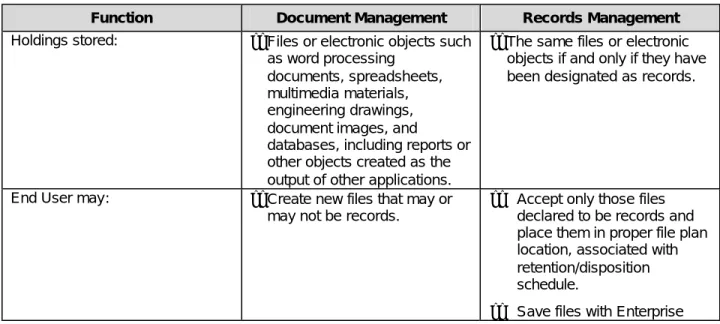
It is important to understand the similarities and differences between EDM systems and ERM systems. Current document management software provides some of the functionality for records management, but does not take the critical steps regarding controlled access and protection from alteration and deletions that records management requires. Table 7.1 illustrates the comparative DM/RM functionalities. In particular, it shows how the RM application safeguards the authenticity, reliability, integrity, and usability of the record.
Table 7.1: DM vs. RM Functionality
Function Document Management Records Management
Holdings stored: ??Files or electronic objects such as word processing
documents, spreadsheets, multimedia materials, engineering drawings, document images, and
databases, including reports or other objects created as the output of other applications.
??The same files or electronic objects if and only if they have been designated as records.
End User may: ??Create new files that may or may not be records.
?? Accept only those files declared to be records and place them in proper file plan location, associated with retention/disposition schedule.
?? Save files with Enterprise
2 “Transferring” a document to an ERMS does not necessarily imply physical transfer or copying from an EDM
repository to an ERM repository; it may only involve transferring control over the document to the ERM application or some other device to indicate the document is a record and must be treated as such.
3 ERM systems do create some records such as audit trails, but for the most report they manage records received from
© 2003 AIIM International 7
Function Document Management Records Management
??Save files with limited
metadata related to business function.
??Retrieve stored files.
??Change files.
??Change copies of original records, and save them designated as new records.
??Delete files.
level metadata including Enterprise File Plan categorization and
Retention/Disposal schedule. ?? Retrieve copies of records
but not the original records themselves.
?? Not change records or permit anyone except authorized records managers to change them.
?? Accept changed copies designated as new records and place them in proper file plan location, associated with retention / disposition
schedule.
?? Not delete records. Records may only be deleted in accordance with their retention schedules or by an authorized records manager.
8 Reference Model
A common reference model can be thought of as the shared map of the components of an information architecture, showing how they interact with one another.
8.1 Create/Capture Content
The graphic below depicts how the function of creating or capturing information content occurs within the reference model used in the report.
Overview of Business Function: Create/Capture Content
C r e a t e C o n t e n t C a p t u r e C o n t e n t T r a n s l a t e C o n t e n t E d i t C o n t e n t A n n o t a t e / R e v i e w C o n t e n t V e r s i o n C o n t e n t F o r m a t C o n t e n t C r e a t e / C a p t u r e C o n t e n t P o t e n t i a l A r e a s o f F u n c t i o n a l I n t e g r a t i o n C a p t u r e C o n t e n tPotential Areas of Functional Integration
?? Documents may be created in EDMS systems, but records should not be edited or altered in an ERMS environment
?? Copies of records may be pulled back into an EDMS system in order to create new content or to aggregate content into new products
?? Systems in which documents are created may or may not have documents and records management functionality
?? Capture processes are used not only to create documents, but to capture documents from source systems and move them into records management systems – a different view of the capture process, but utilizing the same functionality
Both documents and records may be translated and formatted so any systems that are supporting both functions, integrated or independent, must be able to version and link associated content
© 2003 AIIM International 9
Overview of Business Function: Manage Content
C o n v e r t / M i g r a t e C o n t e n t F o r m a t P r e s e r v e C o n t e n t M a n a g e C o n t e n t P o t e n t i a l A r e a s o f F u n c t i o n a l I n t e g r a t i o n S t o r e C o n t e n t R e g i s t e r C o n t e n t D i s c l o s e C o n t e n t P u b l i s h C o n t e n t S c h e d u l e C o n t e n t f o r D i s p o s a l M a n a g e C o n t e n t R e p o s i t o r y M o v e C o n t e n t A p p r a i s e & A s s i g n S c h e d u l e s T o C o n t e n t D i s p o s e o f C o n t e n t C r e a t e A u d i t Trail
Potential Areas of Functional Integration
?? Conversion may occur in both EDMS & ERMS systems where content is transformed for the purpose of electronic distribution or for preservation
?? Content Migration may occur in both EDMS & ERMS systems where migration serves the purpose of ?? Content may be stored in two or more distinct repositories
?? Content Repository Management may require multiple skill sets
?? Retention and Dispositioning should be consistent across content stores, regardless of the type of system
Content Disclosure should be consistently operationalized across systems, regardless of the technical architecture.
8.3
Create Metadata
C r e a t e M e t a d a t a D e s c r i p t i o n o f C o n t e n t C r e a t e M e t a d a t a D e s c r i p t i o n o f Physical Object C r e a t e M e t a d a t a P o t e n t i a l A r e a s o f F u n c t i o n a l I n t e g r a t i o n Subject Classify C o n t e n t I n d e x C o n t e n t S u m m a r i z e C o n t e n t Create M e t a d a t a R e c o r d Security Classify C o n t e n t
Potential Areas of Functional Integration
8.4 Manage Metadata
© 2003 AIIM International 11 D e f i n e M e t a d a t a S c h e m e D e f i n e E n c o d i n g S c h e m e M a n a g e M e t a d a t a P o t e n t i a l A r e a s o f F u n c t i o n a l I n t e g r a t i o n D e f i n e M e t a d a t a V a l u e s – O r g . F i l i n g S c h e m e H a r m o n i z e M e t a d a t a V a l u e s D e f i n e M e t a d a t a E x p o r t s D e f i n e M e t a d a t a I m p o r t s / L o a d s M a i n t a i n M e t a d a t a R e p o s i t o r y M a i n t a i n M e t a d a t a Q u a l i t y C o n t r o l D e f i n e M e t a d a t a V a l u e s – C l a s s i f i c a t i o n M a p M e t a d a t a M o d e l s / S c h e m e s M a n a g e C o n t r o l l e d R e f e r e n c e S o u r c e s D e f i n e M e t a d a t a S u b j e c t V a l u e s D e f i n e M e t a d a t a V a l u e s – D i s c l o s u r e
Potential Areas of Functional Integration
8.5 Manage Content Use
Overview of Business Function: Manage Content Use
Manage Content Use
Assign Security Class to Objects Manage Security Classification Create Access Transaction Logs Implement Authentication Function Perform Security Audits Create Security Classification Scheme Define User Security Roles Create User Records Create Class-User-Content Maps Assign Security Class to Users
Potential Areas of Functional Integration
8.6
Search and Browse Content
Overview of Business Function: Search/Browse Content
Search & Browse Content
Define Content Access Points
Define Index
Structures Define Query Algorithms Configure Search Interface Define Browse Taxonomies Maintain Search Indexes Produce Transaction Logs Define Search Results Display Define Search Manipulation Options Build Browse/ Content Maps
Potential Areas of Functional Integration
8.7
Manage Workflow
Overview of Business Function
Potential Areas of Functional Integration
© 2003 AIIM International 13
Overview of Business Function
8.9
Comparison of DM and RM Elements
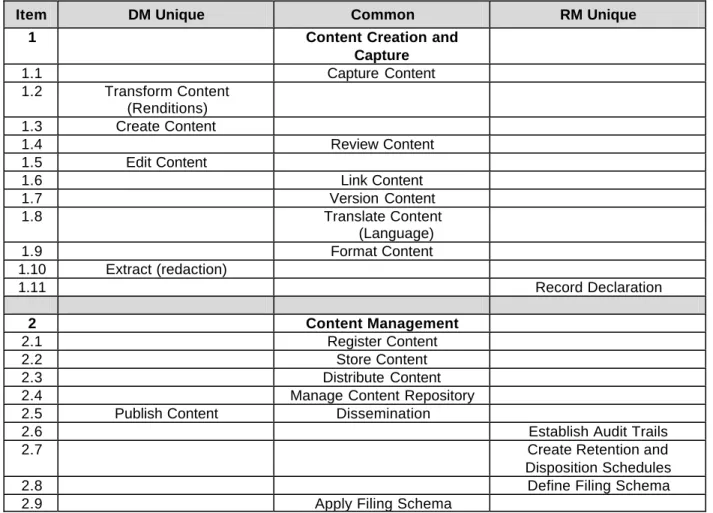
Both DM and RM environments have functional and technical components that are similar or identical. This is true of repository management, database support, application modules, and functional processes. However, the sharing or co-ownership of data, potentially both application and object metadata, as well as actual electronic objects, is typically required for two systems to operate in an integrated manner. To identify this shared metadata, each module of the High Level Reference Model was reviewed to
determine characteristic metadata important to the functionality of that module. The metadata was then differentiated into DM Unique, RM Unique, and Common Metadata categories to better understand their interrelationships.
By differentiating between “unique” and “common” metadata, it is also possible to proceed forward to identify other concepts about metadata, such as “core” metadata that must be present in the individuals system or modules and may be shared between the systems at a high level. In addition, some metadata may be mandatory, and some metadata may be optional, depending on the application requirements, or the function being considered. It is expected that those concepts will be refined over time.
Currently, the committee has arrived at the following high level observations about EDM/ERM metadata, which are expected to be further developed.
Table 2: Unique and common elements of DM and RM
Item DM Unique Common RM Unique
1 Content Creation and
Capture 1.1 Capture Content 1.2 Transform Content (Renditions) 1.3 Create Content 1.4 Review Content 1.5 Edit Content 1.6 Link Content 1.7 Version Content 1.8 Translate Content (Language) 1.9 Format Content 1.10 Extract (redaction) 1.11 Record Declaration 2 Content Management 2.1 Register Content 2.2 Store Content 2.3 Distribute Content
2.4 Manage Content Repository
2.5 Publish Content Dissemination
2.6 Establish Audit Trails
2.7 Create Retention and
Disposition Schedules
2.8 Define Filing Schema
© 2003 AIIM International 15
Item DM Unique Common RM Unique
3 Metadata Management
3.1 DM Unique Define Metadata Schema
(common)
RM Unique
3.2 Define Metadata Structure
3.4 Build Metadata Repository
3.5 Create Metadata
Import/Export Programs
4 Content Organization
4.1 Select Content
4.2 Catalog Content
4.3 Classify Content (file)
4.5 Index Content
4.6 Abstract
Content/Summarization
4.7 Electronic records Check-Out/Check-In Paper records
5 Content Aggregation
5.1 Create Content Subscriptions
(access controls)
5.2 Syndicate Content
5.3 Combine/Aggregate Content 5.4 Disaggregate Content
6 Asset Management
6.1 Manage Content Rights
6.2 Content Transfer & Export
6.3 Schedule and Appraisal
6.4 Dispose of Content
6.5 Destroy Content
7 Use Management
7.1 Define Content Security
Classes
7.2 Define Use Transactions
7.3 Define Use Parameters
7.4 Develop User Documentation
7.5 Develop User Training
8 User Management
8.1 Define User Profiles
8.2 Define Roles and Privileges
8.3 Create Role-Profile Directory
9 Search and Browse
9.1 Define Search Architecture
9.2 Define Search Index
Parameters
9.3 Design Search Interface and
Results
Item DM Unique Common RM Unique
9.5 Develop Browse Structures
10 System Administration &
Configuration
10.1 System Backup and
Recovery
10.2 System Storage Management
10.3 Monitor System Performance
10.4 DBMS Functionality 11 Workflow Management 11.1 Transaction Logging 11.2 Manage Document Template/Forms 11.3 12 Management Reporting
12.1 Define Standard Reports
12.2 Define Custom Reports
12.3 Define Report Formats &
Types
12.4 Audit Content
9 Implementation Models
9.1 Model 1: Integration of Stand-alone Systems
9.1.1 Description
Model 1 is commonly referred to as “best of breed.” It is the integration of a stand-alone DMS with a stand alone RMS. Both are separate applications, usually developed by different vendors. The acquiring organization selects the document management systems that “best” satisfies its requirements and the “best” records management system that also “best” satisfies its requirements. The two are integrated together, either by the DMS vendor, the RMS vendor, or by a third-party integrator.
E-mails are typically declared and classified as records directly into the RMS. Attachments can either be declared and classified as records directly into the RMS or saved as documents (work in progress) in the DMS. Depending on the integration, documents saved or created in the DMS can be classified without being declared. This is typically accomplished by linking the DMS document to a RMS folder. At this point, the document inherits the RMS attributes of the folder that typically include security, classification, and retention.
Physical documents are typically declared and classified directly into the RMS.
Electronic documents that are produced by other office automation tools such as workflow, imaging systems, fax, etc. can either be saved as works in progress in the DMS or saved as records in the RMS as required.
© 2003 AIIM International 17
9.1.2 Advantages
?? The organization enjoys the full benefit derived from the selected state-of-the-art document management systems. Typically included are powerful collaboration tools; advanced search and retrieval tools; and document check-in/check-out features.
?? The organization enjoys the full benefit derived from the selected state-of-the-art records management systems. Typically included are powerful file plan management tools; automated retention scheduling tools; disposition processing; bar-code labeling and scanning; box, folder, and records management; search and retrieval tools; warehouse space management tools, and records center activities and billing tools.
?? Organizations with an existing DMS need only to acquire a RMS and vice-versa.
9.1.3 Disadvantages (vary depending on tightness of the integration)
?? Life Cycle Management
The life cycle of documents is typically divided and managed by the two systems. The life cycle and audit information of non-records are captured and managed in the DMS. That life cycle ends at the point of record declaration. The life cycle of records managed in the RMS begin at the point of record declaration. Both systems employ audit logs to capture the activities associated with their documents.
?? Dual Databases
Both products typically employ their own database management systems to store the data necessary for each system independently of the other. The DMS database management system is typically created to store user and group account, document and folder metadata, and other related information. The RMS database management system is typically created to store user and group account information; the organizational file plan; retention schedules; box, folder, and record metadata; and other related information. Tightly integrated solutions share the same database resource.
?? Dual Repositories
Both products typically use their own electronic document repository. Typically electronic documents that are non-records are stored in a repository wholly under the control of the DMS, while records are stored in a separate repository that is wholly under the control of the RMS. ?? Dual Search and Retrieval Tools
Both products typically provide their own search and retrieval tools. Depending on the tightness of the integration, the search tools provided by one product may be configured to search the data managed by the other product. In some installations, a third-party portal is used to search and retrieve data stored in both systems.
?? Support Issues
Responsibilities for support, maintenance, and timing of upgrades maybe divided among multiple vendors.
© Information Technology Decisions
Integrating RM/EDMS Applications
RMA
Web Server
EDMS
Web Browser
RDBMS
Repository
Local Office Apps
Desktop / Laptop
Local Office Apps
LAN
Drive
Network
Server
Environment
Client Server Applet Client Server Applet
Integration
9.2 Model 2: A DMS with Built-in Records Management Capability
9.2.1 Description
In this model, a full-featured document management system includes the tools required to perform electronic records management functions.
The handling of e-mails may vary among the products. IN some cases, emails are required to be captured in the DMS before they can be declared and classified are records. In others, email may be immediately declared and classified as records directly into the RMS component via the email system. Attachments are typically saved first as documents in the DMS and are declared and classified as records later.
Physical documents are typically first profiled as placeholders in the DMS wand are then declared and classified as records later.
Electronic documents that are produced by other office automation tools such as workflow, imaging systems, fax, etc. are typically first saved as documents in the DMS.
9.2.2 Advantages
?? Deployment of Model 2 typically requires a single database, a single document repository, and a single user interface for search and retrieval.
?? Complete cradle-to grave Life Cycle Management via a single application.
?? Responsibilities for support, maintenance, and timing of upgrades rest with the responsible vendor.
© 2003 AIIM International 19
9.2.3 Disadvantages
?? Limited records management functionality pertaining to records center operations and warehouse space management.
?? Records that are produced by other electronic applications typically go through a two-step process to be declared, classified, and managed as records.
© Information Technology Decisions
Integrating RM/EDMS Repositories
RMA
Web Server
EDMS
Web Browser
RDBMS
Repository
Local Office Apps
Desktop / Laptop
Local Office Apps
Network Server
Client Server Applet Client Server Applet
9.3 Model 3: Use of Embedded e-Records Modules and Metadata Servers
9.3.1 Description
A third model for integrating Document Management and Records Management functionality implements electronic recordkeeping principles into existing applications by incorporating software modules to initially identify and categorize records within the application in which they are originally created. Subsequent to the identification and protection of those records within those applications, information is sent to a metadata server that tracks the retention and other life cycle management aspects of the record, while the record continues to reside in the original repository and application in which it was created.
In this solution the e-records engine provides the tools required to manage the organization file plan, retention schedule, and disposition processing. The e-records interface is typically provided to records staff and administrators. The end-user interface is typically provided by the records enabled business application.
9.3.2 Advantages
One potential advantage for this model is the lack of creation of redundant records recovery and backup processes and technologies across both an EDMS and an ERMS, in that the actual record is preserved in one location – the application of origin. Another potential advantage of this model is that since the
metadata server points to records that always reside in their original application, there is a potential for considerably less network traffic due to a reduction of file transfers between EDMS and ERMS environments.
9.3.3 Disadvantages
A potential disadvantage of implementation of this model is that application integration is required for each application the model is to serve. In addition, protection of records becomes a function of the application and organization that hosts the system wherein the records reside.
© Information Technology Decisions
Integrating RM into Applications
RM
Metadata Server
Legacy
Application
RDBMS
Web Server
Web Browser
RDBMS
Repository
Local Office Apps
Desktop / Laptop
RM Metadata
Management
Network Server
Client Server Applet
10 EDM/ERM Functional Best Practices
A combined EDM/ERM best practice will effectively meet the needs of this community. Combining functionality incorporating best practices from both EDM/ERM systems will produce a radical change in the way business is conducted:
?? Creators/Users will be able to: find current, correct information that was not previously
accessible, and new working relationships will be forged through the discovery of tacit knowledge. Service to users will also improve dramatically as information becomes more accessible, timely, and accurate.
?? Managers will see: improved productivity time that is focused on higher-level analytical work, rather than on information search, sort, and retrieve activities.
?? Business Partners’ interactions with organizations will improve. A vast amount of information will be easily accessible and organized for public consumption. The quality of information will
© 2003 AIIM International 21 greatly increase because of enforced reviews, systemized business processes, and greater accountability. Business Partners will gain timely access to the appropriate level of information. ?? Information Technologists will see: maximized utility of operating costs.
?? Records Managers will see: validity of the records; rapid location of records; proper handling of record material throughout its life cycle; thorough destruction of record material at the end of its retention period; minimized costs; and protection of vital records.
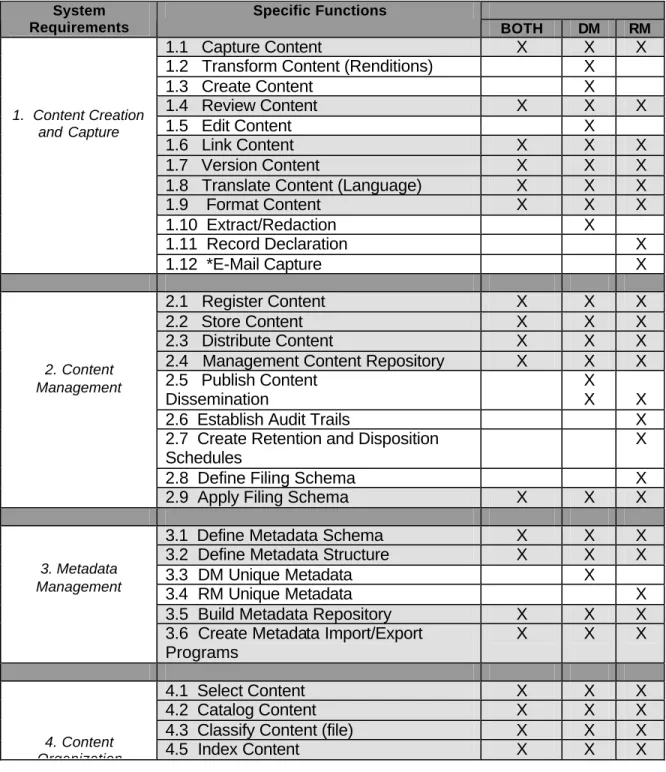
Table 3: Functional requirements cross reference
System Requirements
Specific Functions
BOTH DM RM
1.1 Capture Content
X
X
X
1.2 Transform Content (Renditions)
X
1.3 Create Content
X
1.4 Review Content
X
X
X
1.5 Edit Content
X
1.6 Link Content
X
X
X
1.7 Version Content
X
X
X
1.8 Translate Content (Language)
X
X
X
1.9 Format Content
X
X
X
1.10 Extract/Redaction
X
1.11 Record Declaration
X
1. Content Creation and Capture1.12 *E-Mail Capture
X
2.1 Register Content
X
X
X
2.2 Store Content
X
X
X
2.3 Distribute Content
X
X
X
2.4 Management Content Repository
X
X
X
2.5 Publish Content
Dissemination
X
X
X
2.6 Establish Audit Trails
X
2.7 Create Retention and Disposition
Schedules
X
2.8 Define Filing Schema
X
2. Content Management
2.9 Apply Filing Schema
X
X
X
3.1 Define Metadata Schema
X
X
X
3.2 Define Metadata Structure
X
X
X
3.3 DM Unique Metadata
X
3.4 RM Unique Metadata
X
3.5 Build Metadata Repository
X
X
X
3. Metadata Management
3.6 Create Metadata Import/Export
Programs
X
X
X
4.1 Select Content
X
X
X
4.2 Catalog Content
X
X
X
4.3 Classify Content (file)
X
X
X
4. Content
System Requirements Specific Functions BOTH DM RM
4.6 Abstract Content/Summarization
X
X
X
4.7 Check-Out/Check-In Electronic
Documents
X
Organization4.8 Check-Out/Check-In Physical
Folders/ Documents
X
5.1 Create Content Subscriptions
(access controls)
X
X
X
5.2 Syndicate Content
X
X
X
5.3 Combine/Aggregate Content
X
5. Content Aggregation5.4 Disaggregate Content
X
6.1 Management Content Rights
X
X
6.2 Content Transfer & Export
X
6.3 Schedule and Appraisal
X
6.4 Dispose of Content
X
6.5 Destroy of Content
X
6.6 *Folder Management
X
6.7 ^Box Management
X
6.8 *Vital Records Management
X
6.9 *Legal Hold/Freeze
X
6. Asset Management
6.10 *Long Term Storage/Readability
X
7.1 Define Content Security Classes
X
X
X
7.2 Define Use Transactions
X
X
X
7.3 Define Use Parameters
X
X
X
7.4 Develop User Documentation
X
X
X
7. Use Management
7.5 Develop User Training
X
X
X
7.6 *Key Board Lock-Out/Screen
Blanking
X
8.1 Define User Profiles
X
X
X
8.2 Define Roles and Privileges
X
X
X
8. User Management
8.3 Create Role-Profile Directory
X
X
X
8.4 *User Group Management
9.1 Define Search Architecture
X
X
X
9.2 Define Search Index Parameters
X
X
X
9.3 Design Search Interface and Results
X
X
X
9.4 Define Query Algorithms
X
X
X
9.5 Develop Browse Structures
X
X
X
9.6 *Display Most Recent Version
X
9.7 *User Defined Saved Search
X
9. Search and Browse
9.8 *Viewer Capability
X
X
X
9.9 *Retrieve E-Mail in Compatible
Application (DoD)
X
© 2003 AIIM International 23 System
Requirements
Specific Functions
BOTH DM RM
10.A.1 * Accommodating Dates and Date
Logic
X
X
X
10.A.2 *Implementing Standard Data
X
X
X
10.A.3 *Backward Compatibility
X
10.A.4 *$Accessibility
X
X
X
10.A.5 *Screen Design
X
10.A.6 *User Defined Defaults
X
10.A.7 *Organizational-Defined Pick Lists
X
10.A.8 *$Templates (DoD, PRO)
X
10.A.9 *Global Change Capability
X
10.A. System Configuration
10.A.10 ^Bar Code Label Creation and
Printing
X
10.B.1 System Backup and Recovery
X
X
X
10.B.2 System Storage Management
X
X
X
10.B.3 Monitor System Performance
X
X
X
10.B.4 DBMS Functionality
X
X
X
10.B.5 *Electronic Repository
Management
X
X
X
10.B.6 *Database Synchronization
X
10.B. System Administration10.B.7 *Audit/Transaction Log
Management
X
X
X
11.1 Transaction Logging
X
X
X
11.2 Document Template/Forms
Maintenance
X
X
X
11. Workflow Management11.3
12.1 Define Standard Reports
X
X
X
12.2 Define Custom Reports
X
X
X
12.3 Define Report Formats & Types
X
X
X
12. Management Reporting
12.4 Audit Content
X
X
X
13.5 ^Standard Records Management
Forms
11 Metadata
[Editor’s note: For illustrative purposes and editorial convenience, this section incorporates Metadata for Records Management, compiled by Thomas (Ted) Weir, and posted on the website of the AIIM
Integrated EDM/ERM Functional Requirements Committee at
http://www.aiim.org/documents/standards/required_data_for_records_management_v1.pdf. This compilation is excerpted from DoD 5015.2-STD, Design Criteria Standards for Electronic Records Management Applications. The committee is expected to supplement and change this compilation, particularly with additions from other national and international standards.]
File Plan Components
File PlanComponent
Definition Structure Data
Collection Required by User Referenc e/ Comment Record Category Name
A description of a particular set of records within a file plan. Each category has retention and disposition data associated with it, applied to all record folders and records within the category.
Mandatory Mandatory RMTF4
Record Category Identifier
An agency's alphanumeric or numeric identifier indicating a unique record category.
Mandatory Mandatory RMAs shall ensure unique RMTF Record Category Description
Narrative description of the type of records in this category. May take the form of a filing instruction. E.g., File here items that... Do not file items that ... File those items in....
Mandatory Mandatory RMTF
Disposition Instructions
Directions for cutting off records and carrying out their disposition (transfer, retirement, or destruction) in compliance with NARA's regulations and the General Records Schedule (GRS). Disposition instructions in an RMA include retention-related fields such as authority, transfer location, active or dormant chronological retention periods, and conditional retention periods.
Mandatory Mandatory 36 CFR 1228.24
4
The Records Management Task Force (RMTF) was created by DoD to take legal functional requirements and defined data elements and supplement them with other requirements and data that, although not specified, are necessary to carry out the legally required functions. The committee included federal employees from civilian and military agencies, academics, and records management experts from outside the government.
© 2003 AIIM International 25 File Plan
Component
Definition Structure Data
Collection Required by User Refere nce/ Comm ent Disposition Authority
Legal authority that empowers an Agency to transfer permanent records to the National Archives or to carry
out the disposal of temporary records. Must be obtained from NARA and also, for certain records proposed as temporary, from the GAO.
Mandatory Mandatory RMTF
Permanent Record Indicator
Indicates that records have been appraised by NARA as having sufficient historical or other value to
warrant continued preservation by the Federal Government beyond the time they are normally needed for a particular Agency's administrative, legal, or fiscal purposes.
Mandatory Mandatory
Vital Record Indicator
Identifies essential Agency records needed to meet operational responsibilities under national security
emergencies or other emergency or disaster conditions (emergency operating records) or to protect the legal and financial rights of the Government and those affected by Government activities (legal and
financial rights records). They are subject to periodic review and update. Emergency operating records are the type of vital records essential to the continued functioning or reconstitution of an organization during and after an
emergency. Included are emergency plans and directive(s), orders of succession, delegations of authority, staffing
assignments, selected program records needed to continue the most critical Agency operations, and related policy or procedural records assisting Agency staff in conducting operations under emergency conditions and for resuming normal operations after an emergency. Legal and financial rights records are those essential to protecting the legal and financial rights of the Government and of the individuals directly affected by its activities. Examples include accounts receivable records, social security records, payroll records, retirement records, and insurance records. These records were formerly defined as "rights-and-interests" records.
Mandatory Mandatory
36
CFR
1236.2
0
File Plan Component
Definition Structure Data
Collection Required by User Refere nce/ Comm ent Vital Record Review and Update Cycle Period
Indicates periodicity for the review and update of
duplicate vital records stored off-site.
Mandatory, conditional on Vital Record Indicator Mandatory, conditional on Vital Record Indicator 36 CFR 1236.20 User Definable Fields
Defined by records manager. Mandatory/
Undefined Optional Multiple user defined fields shall be supporte d
Record Folders A record folder is an extension to the file plan either as a static structure or an aggregate gathering of records. It is used to manage case records and to break other records into periods supporting retention and disposition.
Mandatory Optional (although the user is not required to create folders for every category, the RMA shall provide the capability to allow the user to do so) Folders are not require d for all categori es. For exampl e, categori es with the disposit ion "destro y when superse ded" can be manag ed at the record level rather than at the folder level. Folder Name Name given to folder either from a
predetermined structure or following other rules.
© 2003 AIIM International 27 File Plan
Component
Definition Structure Data
Collection Required by User Refere nce/ Comm ent Folder Unique Identifier
Application-wide unique identifier. Mandatory Mandatory, RMAs shall ensure unique Location A pointer to a folder’s location if it is not under
the direct control RMA. Examples: an operating system path and filename, the location of a file cabinet, or the location of a magnetic tape rack
Mandatory Mandatory if not in RMA repository RMTF Vital Record Indicator
See under “File Plan Components.” Mandatory Mandatory, inherited from Record Category (can be changed by authorized individuals) 36 CFR 1236.2 0 Vital Record Review and Update Cycle Period
See under File Plan Components. Mandatory, conditional on Vital Record Indicator Mandatory, conditional on Vital Record Indicator 36 CFR 1236.2 0 Supplemental Marking List
Document markings not necessarily related to classification markings, but which elaborate on or clarify document handling, e.g., "ORCON (Originator
Controlled);" Special Access Programs; "RD (Restricted Data)."
Mandatory Optional Multiple supple mental marking entry selectio ns shall be support ed.
File Plan Component
Definition Structure Data
Collection Required by User Refere nce/ Comm ent User Definable Fields Mandatory/ Undefined Optional Multiple user definabl e fields shall be support ed Record Metadata Components
Record Metadata Component
Definition Structure Data
Collection Required Referenc e/Comme nt Record Identifiers, Markings, and Indicators Unique Record Identifier
System generated unique identifier. Mandatory, system generated (All) Mandatory (System Generated, not editable) Supplemental Marking List
Document markings not necessarily related to classification markings, but which elaborate on or clarify document handling, e.g., "ORCON (Originator Controlled);" Special Access Programs; "RD (Restricted Data)." Mandatory (All) Optional Multiple Suppleme ntal Markings entry selections shall be supported (see DCID 6/6, DoD Directive 5210.83, DoD 5400.7-R, DoD Directive 5230.24, and DoD 5200.1-R.
© 2003 AIIM International 29 Record
Metadata Component
Definition Structure Data
Collection Required Reference/ Comment Record Descriptors Subject or Title
May come form a structured list or by end user input.
Mandatory (All)
Mandatory 36 CFR 1234.22 Media Type The material or environment
on which information is inscribed (e.g., microform, electronic, paper).
Mandatory (All)
Mandatory RMTF
Format For electronic records, format refers to the computer file format described by a formal or vendor standard or
specification, such as ISO/IEC 8632-1 [Information Technology -Computer Graphics –Metafile for the Storage and Transfer of Picture Description
Information (CGM)]; ISO/IEC 10918 [Joint Photographic Experts Group (JPEG)]; WordPerfect 6.1 for Windows; or Microsoft Word 7.0 for Windows. For non-electronic records, the format refers to its physical form: e.g., paper, microfilm, and video.
Mandatory (All)
Mandatory RMTF
Record Dates
Date Filed The date and time that an electronic document was filed in the RMA and thus became a record. This date
and time will normally be assigned by the computer at the time the record is filed in the RMA.
Mandatory (All) Mandatory (System Date, not editable) RMTF Publication Date
The date and time that the author or originator completed the development of or signed the document. For electronic documents, this date and time should be established either by the author or from the time attribute
assigned to the document by the application used to create the
document. This is not necessarily the date or time that the document was filed in the RMA and thus became a record.
Mandatory (All)
Mandatory 36 CFR 1234.22
Record Metadata Component
Definition Structure Data
Collection Required
Reference/Co mment
Date Received Mandatory Optional
Record People and Organizations Author or Originator
The author of a document is the person, office or designated position
responsible for its creation or issuance. The author or originator is usually indicated on the letterhead or by signature. For RMA purposes, the author or originator may be designated as a person, official title, office symbol, or code.
Mandatory (All)
Mandatory 36 CFR 1234.22
Addressee(s) The name of the organization to which or individual to whom a record is addressed. Mandatory (All) Mandatory for correspond ence Other Addressee(s) Mandatory (All) Mandatory for correspond ence E.O. 12958, DoD 5200.1-R and 36 CFR 1234.22. Originating Organization
Official name or code identifying the office responsible for the creation of a document. Mandatory (All) Mandatory 36 CFR 1234.22 Additional Metadata
Location Mandatory Optional RMTF
Vital Record Indicator
See File Plan Components. Mandatory Optional 36 CFR 1236.20 Vital Record
Review and Update Cycle Period
See File Plan Components. Mandatory, conditional on Vital Record Indicator Mandatory, conditional on Vital Record Indicator 36 CFR 1236.20 User-Defined Fields Mandatory/ Undefined
Optional Multiple User-Defined Fields shall be supported.
© 2003 AIIM International 31
Annex A
Bibliography
AS 4390-1996, Records Management, Australian Standard
DoD 5015.2-STD, Design Criteria Standard for Electronic Records Management Software Applications
<http://jitc.fhu.disa.mil recmgt/>
European Commission, Model Requirements for the Management of Electronic Records (MoReq), March 2001
ISO 15489-1:2001(E), Information and Documentation—Records Management