Design of an Open Source Learning Objects
Authoring Tool – The LO Creator
Alex Koohang, Kevin Floyd, and Cody Stewart
Macon State College, Macon, Georgia, USA
[email protected]
;
[email protected]
;
[email protected]
Abstract
This paper presents the design and development of an Open Source Learning Objects Authoring tool – the LO Creator. The LO Creator has two unique elements – simplicity of design and a free style pedagogical design environment. The simplicity element may encourage the LO designer to include appropriate user interface elements in the design process of learning objects. A free style pedagogical design environment gives the LO designers the flexibility to design creative LOs us-ing learnus-ing theories and principles appropriate for a chosen audience. Furthermore, the paper discusses a systematic and methodical approach in designing and creating sound learning objects using the LO Creator. Recommendations for further research are made.
Keywords: Open Source Software, learning objects authoring tool, LO Creator, user interface design, learning theories/principles
Introduction
Authoring tools that allow creation of learning objects are emerging at a slow pace. There are authoring tools available to the public for free download. Reload, for example, is an authoring tool that facilitates “creation, sharing and reuse of learning objects using a range of pedagogical approaches through the use of lesson plans” (See http://www.reload.ac.uk/). Another example is GLO maker, a free authoring tool for creating generative learning objects. (See
http://www.glomaker.org/). Although these authoring tools are free to download, they are not Open Source (OS). Conversely, there are several OS authoring tools that are freely available to anyone who would like to adapt, expand, modify, and/or enhance the software. Several examples of these OS authoring tools are as follows:
• Xical - Xical is an Open Source player for media presentations, e-learning lectures, tuto-rials and webinars. It is designed and programmed in Flash and ActionScript and runs on Macromedias OS-agnostic. (See http://xical.org/)
• eXe - The eXe project is an Open Source authoring applica-tion for creating Web educa-tional content. (See
http://exelearning.org/wiki) • Multimedia Learning Object
Authoring Tool - The Multime-dia Learning Object Authoring Tool is an Open Source tool that “enables content experts to easi-ly combine video, audio, images
Material published as part of this publication, either on-line or in print, is copyrighted by the Informing Science Institute. Permission to make digital or paper copy of part or all of these works for personal or classroom use is granted without fee provided that the copies are not made or distributed for profit or commercial advantage AND that copies 1) bear this notice in full and 2) give the full citation on the first page. It is per-missible to abstract these works so long as credit is given. To copy in all other cases or to republish or to post on a server or to redistribute to lists requires specific permission and payment of a fee. Contact [email protected] to request redistribution permission.
and texts into one synchronized learning object.” (See
http://www.learningtools.arts.ubc.ca/mloat.htm)
• Xerte - Xerte is an Open Source server-based suite of tools that is “aimed at developers of interactive content who will create sophisticated content with some scripting.” (See
http://www.nottingham.ac.uk/~cczjrt/Editor/)
Most of these OS authoring tools have an extensive learning curve with little attention to sim-plicity and design flexibility. Therefore, these LO authoring tools may not be suitable for every-one wishing to create learning objects. While the task of developing OS Learning Objects author-ing tools is slowly pickauthor-ing up among the communities of practice, two elements must be taken into consideration during the development process – (1) simplicity of design and (2) a free style pedagogical design environment.
Simplicity means that the authoring tool is simple and straightforward. It is uncomplicated and the learning curve is nominal. Simplicity of the authoring tool may encourage the LO designer to include appropriate user interface elements in the design process of learning objects.
A free style pedagogical design environment does not impose a set of pedagogical approaches to be followed by the LO designer; rather it allows the flexibility for creativity of design using learn-ing theories and principles suitable for a chosen audience.
The primary purpose of this paper is to present the birth of an Open Source Learning Objects au-thoring tool (the LO Creator) that emphasizes simplicity and flexibility for a free style pedagogi-cal design environment for creating learning objects. Consistent with its purpose, this paper is organized as follows. First, the concept of Open Source is explained. Secondly, a brief explana-tion of learning objects is presented. Next, the paper presents the Open Source Learning Objects Authoring Tool – LO Creator from design to implementation. The discussion then turns to pre-senting a systematic and methodical approach in designing and creating sound learning objects using the LO Creator. Conclusions and recommendations for future research complete the paper.
What is Open Source?
GNU project (See http://www.gnu.org/) defines open source (OS) software as “a matter of the users’ freedom to run, copy, distribute, study, change and improve the software.” GNU project’s freedom statements (0-3) regarding OS software are:
• Freedom 0 - The freedom to run the program, for any purpose.
• Freedom 1 - The freedom to study how the program works, and adapt it to your needs. Access to the source code is a precondition for this.
• Freedom 2 - The freedom to redistribute copies so you can help your neighbor.
• Freedom 3 - The freedom to improve the program, and release your improvements to the public, so that the whole community benefits. Access to the source code is a precondi-tion for this. (For a thorough definiprecondi-tion of free software visit
http://www.gnu.org/philosophy/free-sw.html)
The Open Source Initiative (See http://www.opensource.org/) is an organization that ensures the integrity of OS software by advancing a set of ten principles and values inherent to OS Software. These principles and values are:
• Free redistribution
• Source code must be included and allowed for distribution • Derived works – allowing for modification and derived works • Integrity of the author's source code
• No discrimination against persons or groups • No discrimination against fields of endeavor • Distribution of license
• License must not be specific to a product • License must not restrict other software
• License must be technology-neutral (For more information visit
http://www.opensource.org/docs/osd)
There are many OS software products that are being used widely by millions of people. Several examples of successful open software are GNU/Linux operating system (http://www.linux.org), Apache HTTP server (http://www.apache.org), e-commerce platform osCommerce
(http://shops.oscommerce.com), Mozilla Firefox browser (http://www.mozilla.org), VoIP applica-tions with Asterisk - PBX (http://www.asterisk.org/applications/pbx), and OpenOffice
(http://www.openoffice.org).
The many advantages of OS software are cited in the literature. For example, Coppola and Neel-ley (2004) delineated the following:
• The OS software evolves more rapidly and organically.
• Users’ needs are rapidly met as the OS software model harnesses collective expertise and contribution.
• New versions are released very often and rely on the community of users and developers to test it, resulting in superior quality software tested on more platforms, and in more en-vironments than most commercial software.
• The development “team” is often largely volunteers, distributed, many in numbers, and diverse. Often, paid members of the development team will manage the project and or-ganize the work of the volunteers.
• Security is enhanced because the code is exposed to the world.
Coppola and Neelley (2004) believe that OS software offers the following benefits for open learn-ing models:
• Freedom to choose • Increased user access • Increased user control
promoting the formation of a global community - communities of practice • Advancing quality of teaching and learning
• Enhancing innovation in teaching and learning.
What are Learning Objects?
A learning object is referred to as small independent chunk of information that is self-contained, interactive, and reusable. It is based on a clear instructional strategy (Wisconsin Online Resource Center, n.d.).
IEEE’s Learning Technology Standards Committee (IEEE, 2002) stated that learning objects are “any entity, digital or non-digital, that can be used, re-used or referenced during technology-supported learning. Examples of technology-technology-supported learning applications include computer-based training systems, interactive learning environments, and intelligent computer-aided
instruc-tion systems, distance learning systems, web-based learning systems and collaborative learning environments.”
Wiley (2000) believed that LOs are “any digital resource that can be reused to support learning. This definition includes anything that can be delivered across the network on demand, be it large or small.”
Harman and Koohang (2005) asserted that “a learning object is not merely a chunk of information packaged to be used in instructional settings. A learning object, therefore, can include anything that has pedagogical value - digital or non-digital such as a case study, a film, a simulation, an audio, a video, an animation, a graphic image, a map, a book, or a discussion board so long as the object can be contextualized by individual learners. The learner must be able to make meaningful connections between the learning object and his/her experiences or knowledge he/she previously mastered.” For the purpose of e-learning, a learning object is digital in nature.
The Open Source LO Creator
The OS LO Authoring Tool – the LO Creator is the initiation of a much needed task within the learning objects community. The intent is to create a learning objects authoring tool that includes the element s of simplicity and the flexibility of design in hopes of building a community of prac-tice to continue the endeavor. The OS LO Authoring Tool – the LO Creator was developed and designed by a team of three volunteer individuals: two IT professors and one IT student. The Open Source LO Creator application consists of six main pages. They are:
• LO Creator Home Page (index.php)
• My Learning Objects page (myLearningObjs.php) • My Learning Objects detail view page (learningObj.php) • Create Learning Object (createLearningObj.php)
• Add and Edit Learning Objects Slide page (newslide.php) • The Administrator Publish page (publish.php)
LO Creator Home Page (index.php)
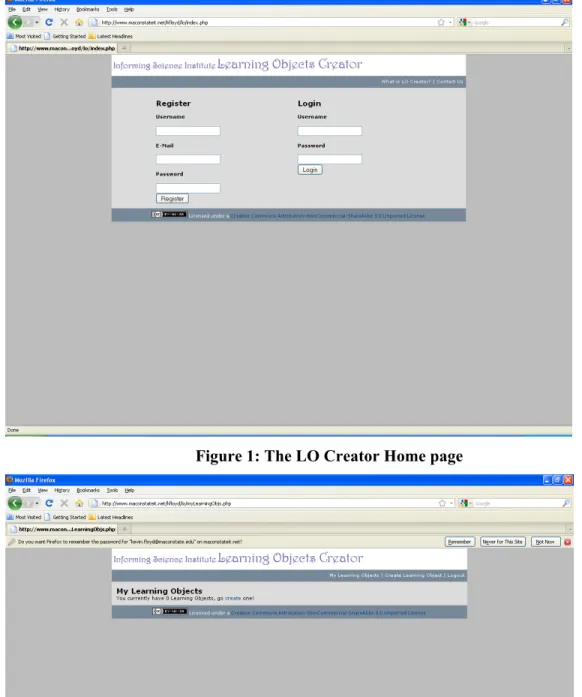
Figure 1 shows a screenshot of the LO Creator home page. The function of the LO Creator home page is two-fold; it allows new users to register or create a new account by inputting a username, e-mail address, and password, and it allows existing users to access their learning objects by en-tering a valid username and password. When a new user creates and account or an existing user is successfully authenticated, the user is redirected to his/her “My Learning Objects” Page as shown in Figure 2.
Figure 1: The LO Creator Home page
My Learning Objects page (myLearningObjs.php)
The My Learning Objects page allows new users to create their first learning object as shown in Figure 2. Existing users who have already created at least one learning object will see a bulleted list of previously created objects.
My Learning Objects detail view page (learningObj.php)
When a user clicks on one of the existing learning objects, the learning object loads in a view page with the following options:
• Add Before – Allows the user to add a new slide to the LO before the current slide. • Add After – Allows the user to add a new slide to the LO after the current slide.
• Edit – Allows the user to edit the current slide. The slide opens in edit mode and the user has the ability to edit the content as well as making style changes to the slide.
• Delete – Allows the user to delete the current slide.
• Publish – Allows the user to submit the LO to the LO Creator Administrator. If the Ad-ministrator approves the LO, it is published to the World Wide Web for public access. Users without existing learning objects or users who would like to create additional learning ob-jects can click the “Create Learning Object” link that loads the Create Learning Object page.
Create Learning Object (createLearningObj.php)
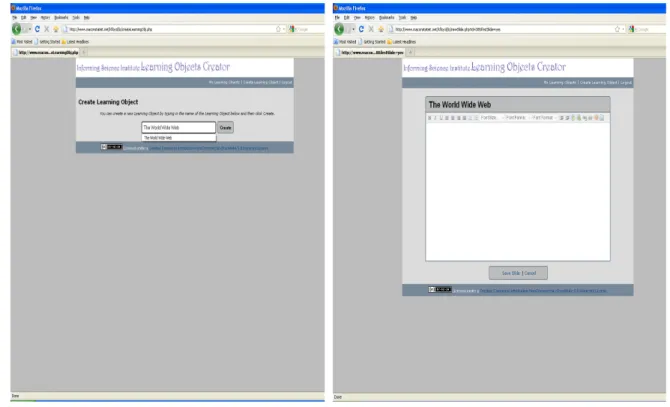
A new learning object is created by entering a name for the LO and clicking the “Create” button as illustrated in Figure 3 (left screenshot). Next, content can be added to the object using the built-in text editing tool.
Add and Edit Learning Objects Slide page (newslide.php)
The built-in text editor provides basic text formatting features, use of list structures, and the abili-ty to insert images and hyperlinks, as well as foreground and background color options. After a learning object is complete, the “Save Slide” option is clicked and the new object is saved to the user’s account with the LO name created in the previous step. The new LO will become a part of the user’s account and will be accessible from the user’s “My Learning Objects Page”. At any-time the LO author can modify, tweak, or redesign the learning object.
Administrator Publish page (publish.php)
Before a Learning Object can be made accessible to outside users, the object must be approved by the Learning Objects Creator site administrator. The site administrator approves Learning Objects by entering an administrative user name and password from the LO Home page. After successful authentication, the administrator will be presented with a list of learning objects that are pending approval. The following options are available:
• Approve – selecting the approve option will mark the LO as approved. This will publish the LO on the server. The LO is now accessible to public to view. The LO owner will be automatically notified by email. The email will include a link by which the approved and published LO will be accessible.
• Decline – when selecting the decline option, the administrator provides a reason for the decline status. This information is automatically sent by email to the LO owner.
It is important to note that a LO may continue to be edited by the owner/author while it is pending approval by the LO Creator administrator. After a LO is submitted for approval, the status of the LO will be available to the owner, when they log in, from the My Learning Object detail view page (learningObj.php). The three status options include:
• Pending Publish – the LO is pending administrator approval.
• Share – the LO has been approved and is accessible to the public. The owner can click on this status to view the URL of the published LO.
• Publish Declined – the LO has been declined by the administrator. The owner can click on this status to review why the LO was declined.
A LO is not accessible to the public until it has been approved by the administrator.
Development Environment
The LO Creator pages are written completely in XHTML 1.1. They conform to XHTML 1.1 standards. They meet all W3C CSS standards and all 3 priority levels of the W3C accessibility guidelines. The layout is pure CSS with no tables or other elements that can cause accessibility problems.
The open source PHP programming language was used. PHP runs on virtually any platform and is appropriate for Web programming. It can be embedded into XHTML. In addition to being open source, PHP has many advantages. These are speed, stability, security, and simplicity (Pushman, 2000). The Structured Query Language (SQL) and Stored Procedures are used to manage data within the MySQL relational database management system.
MySQL is a fast, robust, and portable relational database management system that works well with PHP on all of the major operating systems. MySQL is available at no charge under an open source license (the GPL) (Welling & Thomson, 2009).
The LO Creator consists of three tables – Accounts, LearningObjects, and Slide. The Accounts table is used to store username, password, and e-mail addresses for each user, the LearningObject table stores learning objects associated with each user, and the Slide table is used to keep track of all slides that make up learning objects associated with each user account.
Because the attempt is to create a community of practice to continue this work, we chose to li-cense the work with Creative Commons. Creative Commons is a not-for-profit organization that is “dedicated to making it easier for people to share and build upon the work of others, consistent with the rules of copyright.” (See http://creativecommons.org/). The license does not allow for commercial use. It allows for the work to be modified by others within the community of prac-tice and carries international Jurisdiction.
Designing Learning Objects Using the LO Creator
Du Plessis and Koohang (2005) believed that creating a learning object is systematic and method-ical. Following a sound structure “facilitates the quantitative evaluation of instructional activity and the ability to pinpoint unintended weakness in design and implementation.” (Du Plessis & Koohang, 2005, p. x) The authors’ systematic and methodical approach/system in creating learn-ing objects included seven phases focuslearn-ing on the digital environment and its capacity to design, develop, and employ learning objects. The seven phases are conceptualizing, preparing, creating, tagging, storing, managing, and evaluating.For the purpose of this paper we discuss only the three phases of conceptualizing, preparing, and creating learning objects as they relate to the LO Creator. However, one must note that the tag-ging of the learning object with metadata, storing it in a repository, manatag-ging it in a learning management system, and constantly evaluating the learning object are all parts of the systematic and methodical approach/ in creating the learning object.
The most important tasks in the conceptualization phase in designing a LO with the LO Creator should include the following:
• Determining the audience – their assumed and required skills to negotiate the instruction-al content
• Evaluating various media types (if any) for inclusion in the learning object
• Being creative and innovative (adapted and modified from Du Plessis & Koohang, 2005) Furthermore, the notion of simplicity and the flexibility for the free style pedagogical design en-vironment embedded into the LO Creator ought to be noted in this phase.
From conceptualization, the designer moves into the preparation phase. In the preparation phase, the notion of platform-independent (reusability, interoperability, and accessibility) becomes a vital issue. Reusability is the ability of the learning object to be used over and over in different instructional contexts. Reusability of a learning object depends upon interoperability and acces-sibility. Interoperability is the ability of the learning object to function in various environments regardless of the platform. Accessibility is the ability of the learning object to be accessed by learners in any location regardless of the learner experience, or the type of platform the learner uses (Du Plessis & Koohang, 2005).
The notion of platform independent requires following a set of standards. These standards con-tribute to reusability, interoperability, and accessibility. A few examples of standards are:
• IEEE LO Metadata (LOM) Learning Technology Standards Committee (LTSC) P1484 (See http://www.ieeeltsc.org:8080/Plone)
• Advanced Distributed Learning (ADL) Initiative - Shareable Courseware Object Refer-ence Model (SCORM) (See http://www.adlnet.gov/Pages/Default.aspx)
• The Dublin Core Metadata for Electronic Resources (See http://dublincore.org/) After preparation phase, the attention is turned into the design of learning object. The three ele-ments in the design phase of a learning object are granularity, the instructional design theo-ries/principles, and the user interface/usability.
Granularity
The content for the learning object being created by the LO Creator can be a concept, a theory, or a view. Regardless, the content must have clear learning goals with clear educa-tional value (Du Plessis & Koohang, 2005; Harman & Koohang, 2005). The success of the learning object’s reusability depends upon its granularity. Wiley (1999, p.2) believed that reusability and granularity represent "the two most important properties of learning objects." Granularity of a learning object conveys the size and decomposability of the learning object. Webopedia defines granularity as “the extent to which a system contains separate compo-nents (like granules). The more compocompo-nents in a system -- or the greater the granularity -- the more flexible it is.” (See http://www.webopedia.com/TERM/G/granularity.html)
With granularity, objects as units of instructions are aggregated in multiple ways. An object can serve not only as one idea, but also it can be aggregated with other objects. IEEE (2002) Learning Object Metadata (LOM) has stated four scales for aggregation level describing the functional granularity of a learning object. The aggregation levels are:
1. The smallest level of aggregation (raw media data or fragments) 2. A collection of level 1 learning objects (a lesson)
3. A collection of level 2 learning objects (a course)
4. The largest level of granularity (a set of courses leading to a certificate)
Instructional Design Theories/Principles
The literature has consistently reported that learning theories and principles should be included in the design of e-learning instruction (Egbert& Thomas, 2001; Koohang & Durante, 2003; Pimen-tel, 1999; Randall, 2001). More specifically, constructivism is deemed as an appropriate learning theory for e-learning design (Harman & Koohang, 2005; Hung, 2001; Hung & Nichani, 2001; Koohang, 2009; Koohang & Harman, 2005; Koohang, Riley, Smith, & Schreurs, 2009). Fur-thermore, Bannan-Ritland, Dabbagh, and Murphy (2000), and Du Plessis and Koohang (2007), assert that constructivism theory is well-suited for designing learning objects.
Koohang, Riley, Smith, and Schreurs (2009) believe that fundamental design elements inherent to constructivism learning theory are critical for securing learning in e-learning activities.
As mentioned earlier, the LO Creator’s free style environment does not impose a set of pedagogi-cal approaches and allows the flexibility for creativity of design suitable for a chosen audience. We believe that taking advantage of this flexibility the designer of the learning object can careful-ly embed these elements to secure learning when creating learning objects with the LO Creator. These fundamental elements listed by Koohang et al. (2009) are as follows:
• Learners should be presented with a real-world situation
• Learners should be encouraged to develop their own goals and objectives in solving prob-lems
• Learners should have control of their own learning
• Learners should be asked to include and apply their own previous experience and know-ledge in solving problems
• Learners should be encouraged to go beyond their own discipline - interrelatedness and interdisciplinary learning should be promoted
• Learners should be asked to reflect on what they have learned
• Learners should be required to give justification for their answers and go beyond what they have learned.
• Learners should be required to go beyond what they have learned. Scaffolding should be encouraged.
The learning object should also be designed so that it will go beyond the individual learners and move into the collaborative environments where learners continue to construct knowledge through collaboration/cooperation, presentation of multiple perspectives, representations of con-tent/idea/concept, and social negotiation (Du Plessis & Koohang, 2007; Koohang et al., 2009).
User Interface/Usability
Koohang and Du Plessis (2004, p. 43) state,“All instruction occurs in some medium or an ensem-ble of media, ranging from mediation by air itself in direct face-to-face instruction, to instruction via the Internet with mediation by digital technologies. The moment the learner has to manipulate tools, equipment, or a system, usability is an essential issue. The usability properties are essential for e-learning instructional design process and subsequently instruction and learning to be con-ducted effectively.”
Using the LO creator, one must give attention to properties listed below that are inherent to user interface design.
• Adequacy/Task Match – The content/information matches the topic on the learning ob-ject.
• Consistency – The consistency of appearance, user-interface, and functional operation is present in all slides.
• Control – Learners are in control of their learning. • Direction – Direction is provided (when needed). • Feedback – Feedback is provided.
• Load time – Slides are quickly loaded.
• Navigability – Users can easily navigate (where to go) throughout the learning object. • Readability – The content/information is uncluttered and readable. This includes link
vi-sibility, high color contrast, and appropriate font type/size.
• Recognition – The key points are quickly recognized by the learner.
• Right to the point information – The content/information is brief, short, and right to the point.
• Simplicity – The content/information in simple to understand. It is uncomplicated and straightforward.
• Visual Presentation – The visual presentation elements such as text boldfacing, italiciz-ing, and underlining are used when necessary.
• Well-organized – The content/information is structured and well-organized. (Adapted and modified from Koohang & Du Plessis, 2004)
Conclusion
The primary purpose of this paper was to present the development of an Open Source Learning Objects authoring tool (the LO Creator) giving attention to two imperative elements -- simplicity of design and a free style pedagogical design environment. The elements of simplicity may en-courage designers to comfortably include appropriate user interface elements in the design process of learning objects. In addition, the free style pedagogical design environment element gives the flexibility to the LO designers to be creative in using appropriate learning theories and principles for a chosen audience.
The introductory remark included a brief explanation of both the OS software and learning ob-jects. Next the development, design, and implementation of the Open Source Learning Objects Authoring Tool – the LO Creator was presented. The discussion then shifted into a systematic and methodical approach in designing and creating sound learning objects using the LO Creator, specifically paying attention to the elements of simplicity and free style pedagogical design. While this work is in its infancy, we believe that the elements of simplicity and the flexibility of the free style pedagogical design environment give the designers/authors to create sound peda-gogical LOs. We also believe that this work must be continuously scaled and improved. Wiley (2005) asserted that that decentralization improves the scalability. Koohang and Harman (2007) further asserted that because a unique community of practice’s (CoP) characteristic is decentrali-zation; the CoP can enhance the scalability. Therefore, we strongly recommend that the LO communities of practice take the task of decentralizing this work in order to continue to build upon and strengthen the software.
The source code for OS LO Authoring Tool – the LO Creator will be available via
http://InforminScience.org to public and the LO community as a model to use, expand, adapt, modify, and/or enhance the software.
References
Bannan-Ritland, B., Dabbagh, N., & Murphy, K. (2000). Learning object systems as constructivist learning environments: Related assumptions, theories, and applications. In D. A. Wiley (Ed.), The instructional use of learning objects: Online version. Retrieved November 14, 2010 from,
http://reusability.org/read/chapters/bannan-ritland.doc
Coppola, C., & Neelley, E. (2004). Open source open learning: Why open source makes sense for educa-tion. Retrieved November 14, 2010 from
http://www.rsmart.com/assets/OpenSourceOpensLearningJuly2004.pdf
Du Plessis, J., & Koohang, A. (2005). Learning object: From conceptualization to utilization. Proceedings of Knowledge Acquisition and Management Conference,13, 38-46.
Du Plessis, J., & Koohang A. (2007). Securing learning in learning object. International Journal of Innova-tion and Learning, 4(2), 197-208.
Egbert, J., & Thomas, M. (2001). The new frontier: A case study in applying instructional design for dis-tance teacher education. Journal of Technology and Teacher Education, 9(3), 391-405.
Harman, K., & Koohang A. (2005). Discussion board: A learning object. Interdisciplinary Journal of Knowledge & Learning Object, 1, 67-77. Retrieved from http://www.ijello.org/Volume1/v1p067-077Harman.pdf
Hung, D. (2001). Design principles for web-based learning: Implications for Vygotskian thought. Educa-tional Technology,41(3), 33-41.
Hung D., & Nichani M. (2001). Constructivism and e-learning: Balancing between the individual and so-cial levels of cognition. Educational Technology,41(2), 40-44.
IEEE. (2002). IEEE standard for learning object metadata. 1484.12.1-2002.
Koohang, A. (2009). A learner-centered model for blended learning design. International Journal of Inno-vation and Learning, 6(1), 76-91.
Koohang, A., & Du Plessis, J. (2004). Architecting usability properties in the e-learning instructional de-sign process. International Journal on E-Learning,3(3), 38-44
Koohang, A. & Durante, A. (2003). Learners’ perceptions toward the Web-based distance learning activi-ties/assignments portion of an undergraduate hybrid instructional model. Journal Information Tech-nology Education, 2, 106-113. Retrieved November 14, 2010 from,
http://www.jite.org/documents/Vol2/v2p105-113-78.pdf
Koohang, A., & Harman, K. (2005). Open source: A metaphor for e-learning. Informing Science Journal,
8, 75-86. http://www.inform.nu/Articles/Vol8/v8p075-086Kooh.pdf
Koohang, A. & Harman, K. (2007). Advancing sustainability of open educational resources. Issues in In-forming Science & Information Technology, 4, 535-544.
Koohang, A., Riley, L., Smith, T. & Schreurs, J. (2009). E-learning and constructivism: From theory to application. Interdisciplinary Journal of E-Learning & Learning Objects, 5(1), 91-109. Retrieved from
http://www.ijello.org/Volume5/IJELLOv5p091-109Koohang655.pdf
Pimentel, J. (1999). Design of net-learning systems based on experiential learning. JALN 3(2). Retrieved November 14, 2010 from, http://www.aln.org/publications/jaln/v3n2/v3n2_pimentel.asp
Pushman, J. (2000). Why PHP? Web developers journal. Retrieved November 14, 2010 from
http://www.webdevelopersjournal.com/articles/why_php.html
Randall, B. (2001). Effective web design and core communication issues: The missing components in Web-based distance education. Journal of Educational Multimedia and Hypermedia, 4, 357-67 Welling, L., & Thomson, L. (2009). PHP and MYSQL web development. Upper Saddle River, NJ:
Addi-son-Wesley.
Wiley, D. (1999). The Post-LEGO learning object. Retrieved November 14, 2010 from
http://wiley.ed.usu.edu/docs/post-lego/
Wiley, D. (2000). Connecting learning objects to instructional design theory: A definition, a metaphor, and a taxonomy. In D. A. Wiley (Ed.), The instructional use of learning objects: Online version. Retrieved November 14, 2010 from, http://reusability.org/read/chapters/wiley.doc
Wiley, D. (2005). Thoughts from the Hewlett Open Ed Grantees meeting. Retrieved November 14, 2010 from http://opencontent.org/blog/archives/192
The Wisconsin Online Resource Center. (n.d.). What are learning objects? Retrieved November 14, 2010 from http://www.wisc-online.com/Info/FIPSE%20-%20What%20is%20a%20Learning%20Object.htm
Biographies
Alex Koohang is Peyton Anderson Eminent Scholar and Professor of Information Technology in the School of Information Technology at Macon State College. He is also the Dean of the School of Information Technology at Macon State College. Dr. Koohang has been involved in the development of online education, having initiated and administered some of the earliest asynchronous learning networks. His current re-search interests are in the areas of e-learning, learning objects, open education, and curriculum design.
Kevin Floyd is assistant professor of Information Technology in the School of Information Technology at Macon State College. He teaches in the areas of programming & application development, information security, and IT integration. His current research interests are in the areas of open source, accessibility, and information security.
Cody Stewart is a senior student in the School of Information Technology at Macon State Col-lege. Cody enjoys Web programming and plans to land a position as a programmer with a com-pany. He also plans on attending graduate school. He has designed, developed, and implemented information systems for various organizations, including Informing Science Institute.