W
EB
S
ERVICES
G
UIDE
R
ELEASE
6.1
Library, TIBCO JasperReports Server, TIBCO Jaspersoft OLAP, TIBCO Jaspersoft Studio, and TIBCO Jaspersoft ETL are trademarks and/or registered trademarks of TIBCO Software Inc. in the United States and in
jurisdictions throughout the world. All other company and product names are or may be trade names or trademarks of their respective owners.
Chapter 1 Introduction to Web Services 9
1.1 REST Web Services Overview 10
1.2 REST Authentication 13
1.2.1 Login Encryption 13
1.2.2 Login Service 14
1.2.3 Security Check 16
1.2.4 Using an SSO Token 17
1.2.5 Using a Pre-Authentication Token 17
1.2.6 Logout 18
1.3 REST Server Information 19
1.4 SOAP Web Services Overview 20
1.5 SOAP Authentication 21
1.6 Syntax of resourceDescriptor 21
1.6.1 Overview 22
1.6.2 wsType Attribute 22
1.6.3 isNew Attribute 24
1.6.4 Resource Descriptor Parameters 24
1.6.5 Examples of resourceDescriptor 24
Chapter 2 REST v2 - Repository Services 27
2.1 The v2/resources Service 27
2.1.1 V2 Resource Descriptors 27
2.1.2 V2 Resource Descriptor Types 32
2.1.3 Searching the Repository 44
2.1.4 Paginating Search Results 45
2.1.5 Viewing Resource Details 49
2.1.6 Downloading File Resources 49
2.1.7 Creating a Resource 50
2.1.8 Modifying a Resource 52
2.1.9 Copying a Resource 54
2.1.10 Moving a Resource 54
2.1.13 Deleting Resources 58
2.2 The v2/domains/metadata Service 59
2.2.1 Working with Domain Schemas 63
2.2.2 Accessing Domain Bundles and Security Files 64
2.3 The v2/permissions Service 65
2.3.1 Viewing Multiple Permissions 65
2.3.2 Viewing a Single Permission 67
2.3.3 Setting Multiple Permissions 67
2.3.4 Setting a Single Permission 69
2.3.5 Deleting Permissions in Bulk 70
2.3.6 Deleting a Single Permission 70
2.4 The v2/export Service 70
2.4.1 Checking the Export State 72
2.4.2 Fetching the Export Output 72
2.5 The v2/import Service 72
Chapter 3 REST v2 - Report Services 75
3.1 The v2/reports Service 75
3.1.1 Running a Report 75
3.1.2 Finding Running Reports 77
3.1.3 Terminate Running Report 77
3.2 The v2/reportExecutions Service 78
3.2.1 Running a Report Asynchronously 78
3.2.2 Polling Report Execution 81
3.2.3 Requesting Report Execution Details 82
3.2.4 Requesting Report Output 83
3.2.5 Exporting a Report Asynchronously 85
3.2.6 Modifying Report Parameters 85
3.2.7 Polling Export Execution 86
3.2.8 Finding Running Reports and Jobs 87
3.2.9 Stopping Running Reports and Jobs 89
3.3 The v2/inputControls Service 89
3.3.1 Listing Input Control Structure 89
3.3.2 Listing Input Control Values 91
3.3.3 Setting Input Control Values 92
3.4 The v2/options Service 93
3.4.1 Listing Report Options 93
3.4.2 Creating Report Options 94
3.4.3 Updating Report Options 95
3.4.4 Deleting Report Options 95
3.5 The v2/jobs Service 96
3.5.1 Listing Report Jobs 96
3.5.2 Viewing a Job Definition 97
3.5.3 Extended Job Search 99
3.5.9 Resuming Jobs 103
3.5.10 Restarting Failed Jobs 104
3.5.11 Deleting Jobs 104
3.5.12 Specifying FTP Output 105
3.5.13 Specifying File System Output 106
3.5.14 Calendar Exclusion for the Scheduler 106
3.6 The v2/queryExecutor Service 111
3.7 The v2/caches Service 113
Chapter 4 REST v2 - Administration Services 115
4.1 The v2/organizations Service 115
4.1.1 Searching for Organizations 115
4.1.2 Viewing an Organization 117
4.1.3 Creating an Organization 117
4.1.4 Modifying Organization Properties 119
4.1.5 Setting the Theme of an Organization 119
4.1.6 Deleting an Organization 120
4.2 The v2/users Service 120
4.2.1 Searching for Users 120
4.2.2 Viewing a User 122
4.2.3 Creating a User 123
4.2.4 Modifying User Properties 124
4.2.5 Deleting a User 125
4.3 The v2/attributes Service 126
4.3.1 Secure Attributes 126
4.3.2 Entities with Attributes 127
4.3.3 Permissions for Accessing Attributes 128
4.3.4 Referencing Attributes 128
4.3.5 Attribute Limitations 128
4.3.6 Viewing Attributes 129
4.3.7 Setting Attributes 130
4.3.8 Deleting Attributes 132
4.4 The v2/roles Service 133
4.4.1 Searching for Roles 133
4.4.2 Viewing a Role 135
4.4.3 Creating a Role 136
4.4.4 Modifying a Role 137
4.4.5 Setting Role Membership 137
4.4.6 Deleting a Role 137
Chapter 5 REST v1 - Repository Services 139
5.1 The resources Service 139
5.2.2 Requesting the Contents of a File Resource 146
5.2.3 Requesting the Values of a Query-Based Input Control 146
5.2.4 Creating a Resource 148
5.2.5 Setting the Temporary Upload Directory 150
5.2.6 Modifying a Resource 150
5.2.7 Copying or Moving a Resource 151
5.2.8 Deleting a Resource 151
5.3 Working with Dashboards 152
5.4 Working with Virtual Data Sources 155
5.5 Working with Domains 156
5.6 The permission Service 158
5.6.1 Viewing Permissions 158
5.6.2 Setting Permissions 160
Chapter 6 REST v1 - Report Services 163
6.1 The report Service 163
6.1.1 Running a Report 163
6.1.2 Downloading Report Output 165
6.1.3 Regenerating Report Output 166
6.2 The jobsummary Service 166
6.3 The job Service 167
6.3.1 Viewing a Job Definition 167
6.3.2 Scheduling a Report 168
6.3.3 Editing a Job Definition 170
6.3.4 Deleting a Job Definition 170
Chapter 7 REST v1 - Administration Services 171
7.1 The organization Service 171
7.1.1 Viewing an Organization 171
7.1.2 Creating an Organization 172
7.1.3 Modifying Organization Properties 173
7.1.4 Deleting an Organization 173
7.2 The user Service 174
7.2.1 Creating a User 175
7.2.2 Editing a User 176
7.2.3 Deleting a User 176
7.3 The attribute Service 176
7.4 The role Service 177
7.4.1 Creating a New Role 178
7.4.2 Editing a Role 179
7.4.3 Deleting a Role 179
Chapter 8 SOAP - Repository Web Service 181
8.1 Request and Operation Result 181
8.2 List Operation 183
8.8 runReport Operation 193
8.8.1 Report Output 194
8.8.2 Report Locales 195
8.9 Errors 195
8.10 Implementation Suggestions 196
Chapter 9 SOAP - Report Scheduling Web Service 199
9.1 Types Defined in the WSDL 199
9.2 Operations in the Scheduling Service 202
9.2.1 Operation Descriptions 202
9.2.2 Example Request and Operation Result 203
9.3 Java Client Classes 205
Chapter 10 SOAP - Domain Web Service 207
10.1 Types Defined in the WSDL 207
10.2 Operations in the Domain Service 208
10.2.1 The getDomainMetaData Operation 208
10.2.2 The executeDomainQuery Operation 211
10.2.3 Java Client Classes 213
Chapter 11 SOAP - Web Services for Administration 215
11.1 Types Defined in the WSDL 216
11.2 Users and Roles 218
11.2.1 findUsers 218 11.2.2 putUser 219 11.2.3 deleteUser 220 11.2.4 findRoles 220 11.2.5 putRole 221 11.2.6 updateRoleName 221 11.2.7 deleteRole 222 11.3 Organizations/Tenants 222 11.3.1 getTenant 222 11.3.2 getSubTenantList 223 11.3.3 putTenant 223 11.3.4 deleteTenant 224 11.4 Permissions 224 11.4.1 getPermissionsForObject 224 11.4.2 putPermission 224 11.4.3 deletePermission 225 11.5 Related Files 226
JasperReports Server is a component of both a community project and commercial offerings. Each integrates the standard features such as security, scheduling, a web services interface, and much more for running and sharing reports. This guide discusses all editions. Sections of the guide that apply only to the commercial editions are indicated with a special note.
This document describes the JasperReports Server’s web services that allow client applications to interact with the server programmatically.
There are three different Application Programming Interfaces (APIs) using two different protocols:
• REST (REpresentational State Transfer) – A RESTful interface depends on the standard methods provided by HTTP: GET, PUT, POST, and DELETE. The API sends and receives resource descriptors that are the object or result of the operation.
• REST v2 – Jaspersoft has fully re-implemented the original REST API to improve performance and use simpler resource descriptors in JSON (JavaScript Object Notation). Jaspersoft strongly recommends using or upgrading to the REST v2 API for support of the latest features in JasperReports Server. • REST (v1) – The original REST API supports only XML descriptors, and it is not as efficient or simple
to use. This interface is deprecated: it is still supported but is not enhanced with new features. The REST (v1) API may be unsupported and later removed in future versions of the server.
• SOAP (Simple Object Access Protocol) – The SOAP interface sends and receives XML documents to describe operations, process requests and provide results. The SOAP interface is no longer supported nor maintained, but it is still included in JasperReports Server for backwards compatibility. The SOAP API may be removed in future versions of the server.
In order to describe the contents of resources in the repository, both REST and SOAP web services use a custom XML format called aresourceDescriptor. When the client requests information about resources, the server responds with lists of resource descriptors, and when the client creates or modifies a resource, it must send a well-formedresourceDescriptorthat describes the resource. Newer RESTful APIs also support JSON (JavaScript Object Notation) objects.
This chapter contains the following sections: • REST Web Services Overview
• REST Authentication • REST Server Information • SOAP Web Services Overview • SOAP Authentication
1.1
REST Web Services Overview
The RESTful interface of JasperReports Server responds to HTTP requests from client applications, in particular the following methods (sometimes called verbs):
• GET to list, search and acquire information about repository resources. • POST to create new resources and execute reports.
• PUT to modify resources (note that PUT and POST were reversed in the v1 REST API). • DELETE to remove resources.
In order to introduce new features and keep backwards compatibility, Jaspersoft has introduced a second RESTful API using the rest_v2 URL.
By default, the REST web services are available at the following URLs, where<host>is the name of the computer hosting JasperReports Server and<port>is the port you specified during installation. By default, the context name isjasperserverfor the Community Project andjasperserver-profor commercial editions. The context name may also be customized on your specific installation of JasperReports Server.
Web Service URLs
Login (optional) http://<host>:<port>/jasperserver[-pro]/rest/GetEncryptionKey http://<host>:<port>/jasperserver[-pro]/rest/login http://<host>:<port>/jasperserver[-pro]/j_spring_security_check http://<host>:<port>/jasperserver[-pro]/logout.html Repository http://<host>:<port>/jasperserver[-pro]/rest_v2/resources http://<host>:<port>/jasperserver-pro/rest_v2/domains/.../metadata * http://<host>:<port>/jasperserver[-pro]/rest_v2/permissions http://<host>:<port>/jasperserver[-pro]/rest_v2/export http://<host>:<port>/jasperserver[-pro]/rest_v2/import Reports http://<host>:<port>/jasperserver[-pro]/rest_v2/reports http://<host>:<port>/jasperserver[-pro]/rest_v2/reportExecutions http://<host>:<port>/jasperserver[-pro]/rest_v2/reports/.../inputControls http://<host>:<port>/jasperserver[-pro]/rest_v2/reports/.../options http://<host>:<port>/jasperserver[-pro]/rest_v2/jobs http://<host>:<port>/jasperserver-pro/rest_v2/queryExecutor * Administration without organizations http://<host>:<port>/jasperserver[-pro]/rest_v2/users http://<host>:<port>/jasperserver[-pro]/rest_v2/users/.../attributes http://<host>:<port>/jasperserver[-pro]/rest_v2/roles http://<host>:<port>/jasperserver[-pro]/rest_v2/attributes Table 1-1 REST v2 - Web Services and URLs
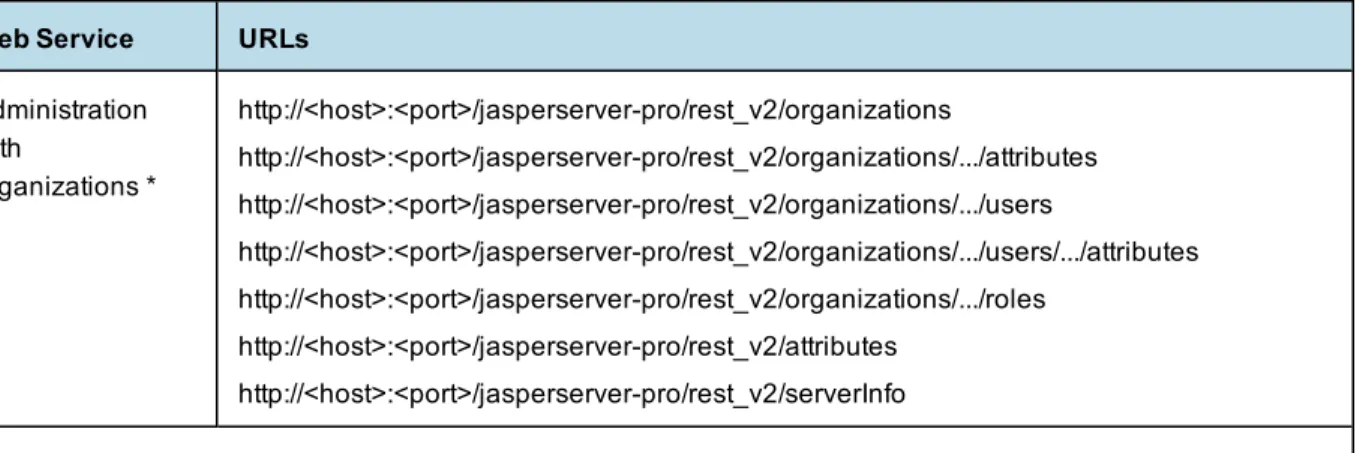
Web Service URLs Administration with organizations * http://<host>:<port>/jasperserver-pro/rest_v2/organizations http://<host>:<port>/jasperserver-pro/rest_v2/organizations/.../attributes http://<host>:<port>/jasperserver-pro/rest_v2/organizations/.../users http://<host>:<port>/jasperserver-pro/rest_v2/organizations/.../users/.../attributes http://<host>:<port>/jasperserver-pro/rest_v2/organizations/.../roles http://<host>:<port>/jasperserver-pro/rest_v2/attributes http://<host>:<port>/jasperserver-pro/rest_v2/serverInfo * Available only in commercial editions of JasperReports Server.
Applications may receive the machine-readable XML description of all supported REST v2 services in Web Application Desciption Language (WADL) at the following URL:
http://<host>:<port>/jasperserver[-pro]/rest_v2/application.wadl
The original REST (now called v1) API is being deprecated. These services are still supported but no longer include the latest features of the server.
Web Service URLs
Repository http://<host>:<port>/jasperserver[-pro]/rest/resources http://<host>:<port>/jasperserver[-pro]/rest/resource http://<host>:<port>/jasperserver[-pro]/rest/permission Reports http://<host>:<port>/jasperserver[-pro]/rest/report http://<host>:<port>/jasperserver[-pro]/rest/jobsummary http://<host>:<port>/jasperserver[-pro]/rest/job Administration without organizations http://<host>:<port>/jasperserver[-pro]/rest/user http://<host>:<port>/jasperserver[-pro]/rest/attribute http://<host>:<port>/jasperserver[-pro]/rest/role Administration with organizations * http://<host>:<port>/jasperserver-pro/rest/organization http://<host>:<port>/jasperserver-pro/rest/user http://<host>:<port>/jasperserver-pro/rest/attribute http://<host>:<port>/jasperserver-pro/rest/role * Available only in commercial editions of JasperReports Server. Table 1-2 REST v1 - Deprecated Web Services and URLs
As with any RESTful service, not all methods (GET, PUT, POST, and DELETE) are supported on every service. The URLs usually include a path to the resource being acted upon, as well as any paramters that are accepted by the method. For example, to search for input control resources in the repository, your application would send the following HTTP request:
The reference chapters in this book give the full description of the methods supported by each URL, the path or resource expected for each method, and the parameters that are required or optional. The description of each method includes a sample of the return value.
JasperReports Server REST services return standard HTTP status codes. In case of an error, a detailed message may be present in the body in form of plain text. Client error codes are of type 4xx, while server errors are of type 5xx. The following table lists all the standard HTTP codes.
Success Messages Client Error Server Errors Code Message Code Message Code Message
100 Continue 400 Bad Request 500 Internal Server Error
101 Switching Protocols 401 Unauthorized 501 Not Implemented
200 OK 402 Payment Required 502 Bad Gateway
201 Created 403 Forbidden 503 Service Unavailable
202 Accepted 404 Not Found 504 Gateway Time-out
203 Non-Authoritative Information
405 Method Not Allowed 505 HTTP Version Not Supported
204 No Content 406 Not Acceptable
205 Reset Content 407 Proxy Authentication Required
206 Partial Content 408 Request Time-out 300 Multiple Choices 409 Conflict
301 Moved Permanently 410 Gone
302 Found 411 Length Required
303 See Other 412 Precondition Failed
304 Not Modified 413 Request Entity Too
Large Table 1-3 REST - HTTP Return Codes
Success Messages Client Error Server Errors Code Message Code Message Code Message
305 Use Proxy 414 Request-URI Too Large
307 Temporary Redirect 415 Unsupported Media Type
416 Requested Range Not Satisfiable
417 Expectation Failed
1.2
REST Authentication
When using web services, the calling application must provide a valid user ID and password to JasperReports Server. The REST web services in JasperReports Server support two types of authentication:
• HTTP Basic Authentication, where the user ID and password are sent in the header with every request. Basic Authentication with REST is the same as described in section SOAP Authentication.
• The special login service that allows authentication using a POST request to create a session and return a session ID that is used with subsequent requests. Use of the login service is optional, and it is useful only when HTTP Basic Authentication does not work.
One example where you may need to use the login service is when the username or password contain UTF-8 characters that may be corrupted by the basic authentication mechanism.
Normally, RESTful implementations do not rely on the use of persistent sessions, such as the login service. However, the JasperReports Server architecture automatically creates user sessions internally, and the login service takes advantage of this. By using the login service, you can avoid making the server verify user credentials for each API call. If your server is configured with external authentication, repeatedly verifying credentials may be a performance issue you can avoid with the login service.
1.2.1
Login Encryption
JasperReports Server 4.7 introduced the ability to encrypt plain-text passwords over non-secure HTTP. Encryption does not make passwords more secure, it only prevents them from being readable to humans. For more information about security and how to enable login encryption, see theJasperReports Server Security Guide.
When login encryption is enabled, passwords in both HTTP Basic Authentication and using the login service must be encrypted by the client. Login encryption has two modes:
• Static key encryption – The server only uses one key that never changes. The client only needs to encrypt the password once and can use it for every web service call.
• Dynamic key encryption – The server changes the encryption key for every session. The client must request the new key and re-encrypt the password before every call using HTTP Basic Authentication or every session using the login service.
Method URL
GET http://<host>:<port>/jasperserver[-pro]/GetEncryptionKey/
Return Value on Success Typical Return Values on Failure
200 OK – Body contains a JSON representation of public key: { "maxdigits":"131", "e":"10001", "n":"9f8a2dc4baa260a5835fa33ef94c..." }
200 OK – Body contains {Error: Key generation is off}
To encrypt a password with the server’s public key, use the Bouncy Castle provider with the RSA/NONE/NoPadding algorithm.
1.2.2
Login Service
When making a login request, the user ID and password can be pass as URL arguments or as content in the request body:
Method URL
POST GET
http://<host>:<port>/jasperserver[-pro]/rest/login/
http://<host>:<port>/jasperserver[-pro]/rest/login?<arguments>
Argument Type/Value Description
j_username Text The user ID. In commercial editions of the server that implement multiple organizations, the argument must specify the organization ID or alias in the following format: j_username%7Corganization_id (%7C is the | character). j_password? Text The user’s password. If the server has login encryption enabled, the
password must be encrypted as explained in1.2.1, “Login Encryption,” on page 13. The argument is optional but authentication will fail without the password. Content-Type Content application/x-www-form-urlencoded j_username=<userID>[%7C<organization_id>]&j_password=<password> Example: j_username=jasperadmin&j_password=jasperadmin or j_username=jasperadmin%7Corganization_1&j_password=jasperadmin
Return Value on Success Typical Return Values on Failure
200 OK – Session ID in cookie (POST only), empty body.
The login service has several uses:
• POST method – Applications should use the POST method, because it returns the session cookie to use in future requests.
• GET method – Developers can test the login service and the user credentials from a browser, which uses the GET method.
• Credentials in arguments – When testing the login service in a browser, credentials are passed as arguments in the URL:
http://<host>:<port>/jasperserver[-pro]/rest/login?j_username=<userID>[%7C<organization_id>] &j_password=<password>
• Credentials in content – When using the POST method, credentials can either be sent in the URL arguments as shown above, or sent in the content of the request, as shown in the second example below.
The following example shows the HTTP request and response when testing the login service in a browser. In this case, the user credentials are passed as arguments and the browser sends a GET request. Because the GET request is meant only for testing, it does not return a cookie with the session ID.
GET /jasperserver/rest/login?j_username=jasperadmin&j_password=jasperadmin HTTP/1.1 Host: localhost:8080
User-Agent: Mozilla/5.0 (Windows NT 6.0; rv:5.0) Gecko/20100101 Firefox/5.0 Connection: keep-alive
HTTP/1.1 200 OK
Server: Apache-Coyote/1.1 Pragma: No-cache
Cache-Control: no-cache
Expires: Wed, 31 Dec 1969 16:00:00 PST Content-Length: 0
Date: Fri, 19 Aug 2011 00:52:48 GMT
The following example shows the content of a POST request where the credentials are passed in the content.
POST /jasperserver/rest/login HTTP/1.1 User-Agent: Jakarta Commons-HttpClient/3.1 Host: localhost:8080 Content-Length: 45 Content-Type: application/x-www-form-urlencoded j_username=jasperadmin&j_password=jasperadmin HTTP/1.1 200 OK Server: Apache-Coyote/1.1
Set-Cookie: JSESSIONID=52E79BCEE51381DF32637EC69AD698AE; Path=/jasperserver Content-Length: 0
Date: Fri, 19 Aug 2011 01:52:48 GMT
For optimal performance, the session ID from the cookie should be used to keep the session open. To do this, include the cookie in future requests to the other RESTful services. For example, given the response to the POST request above, future requests to the repository services should include the following line in the header:
Cookie: $Version=0; JSESSIONID=52E79BCEE51381DF32637EC69AD698AE; $Path=/jasperserver However, maintaining a session with cookies is not mandatory, and your application can use any combination of session cookie, HTTP Basic Authentication, or both.
1.2.3
Security Check
The security check call is equivalent to a login call. You send the user credentials and you can tell from the response whether they are valid or not on the server. If they are valid, the server creates a user session or if the user has already performed an operation with valid credentials, it accesses the existing user session.
In either case, the successful response contains the JSESSIONID cookie of the user session. As with the login service, once you receive the session cookie, you should return it with future requests and use it to close the session as described in1.2.6, “Logout,” on page 18.
Method URL
GET http://<host>:<port>/jasperserver[-pro]//j_spring_security_check?<arguments>
Argument Type/Value Description
orgId? Text The organization ID or alias. Required for organization admins and users when there is more than one organization defined. Not required for the system admin (superuserby default).
j_username Text The user ID.
j_password Text The user’s password. If the server has login encryption enabled, the password must be encrypted as explained in1.2.1, “Login Encryption,” on page 13.
userLocale? Java locale string
Set the optional locale for user in this session.
userTimezone? Java time zone
Set the optional time zone for the user in this session.
Options
accept: application/json
Return Value on Success Typical Return Values on Failure
302 Moved Temporarily – Response HTTP Header "Location" redirects to "/loginsuccess.html" by default, but often depends on the last session operation. See below if you specify JSON.
302 Moved Temporarily – Response HTTP Header "Location" redirects to /login.html?error=1.
If you specifyaccept: application/jsonin your request, the location of the redirect in case of success is always the file /scripts/bower_components/js-sdk/src/common/auth/loginSuccess.json. The content of this file is:
{
"success":true }
You can configure the location of this file. Edit the configuration file applicationContext-security-web.xml and change the constructor value of the following bean:
<bean id="authSuccessJsonRedirectUrl" class="java.lang.String"> <constructor-arg type="java.lang.String"
value="/scripts/bower_components/js-sdk/src/common/auth/loginSuccess.json"/> </bean>
1.2.4
Using an SSO Token
If you are using Single Sign-On for authentication, you can use the security check to submit the ticket.
Method URL
GET http://<host>:<port>/jasperserver[-pro]//j_spring_security_check?<arguments>
Argument Type/Value Description
ticket Text The ticket for your SSO mechanism. The default parameter name for an SSO authentication token is "ticket". This parameter name can be changed in the configuration file applicationContext-externalAuth-<sso>.xml.
Options
accept: application/json
Return Value on Success Typical Return Values on Failure
302 Moved Temporarily – Response HTTP Header "Location" redirects to "/loginsuccess.html" by default, but often depends on the last session operation.
302 Moved Temporarily – Response HTTP Header "Location" redirects to /login.html?error=1.
For example, if you have configured the server to use CAS as your SSO provider, you can authenticate and receive the session ID with the following request:
GET http://localhost:8080/jasperserver-pro/j_spring_security_check?ticket=ST-40-CZeUUnGPxEqgScNbxh9l-sso-cas.eng.jaspersoft.com
The response has the same behavior as the password-based security check, including the use of a JSON file if requested.
1.2.5
Using a Pre-Authentication Token
When using a pre-authentication mechanism, the verification of the credentials is performed at the base URL of the server.
Method URL
GET http://<host>:<port>/jasperserver[-pro]/?<arguments>
Argument Type/Value Description
pp Text The token for your pre-authentication mechanism. The default parameter name for a pre authentication token is "pp". This parameter name can be changed in the configuration file applicationContext-externalAuth-preAuth.xml.
Options
accept: application/json
Return Value on Success Typical Return Values on Failure
302 Moved Temporarily – Response HTTP Header "Location" redirects to "/loginsuccess.html" by default, but often depends on the last session operation.
302 Moved Temporarily – Response HTTP Header "Location" redirects to /login.html?error=1.
For example, if you have configured the server to use pre-authentication, you can authenticate and receive the session ID with the following request:
GET http://localhost:8080/jasperserver-pro?pp=u%3DSteve%7Cr%3DExt_User%7Co%3Dorganization_ 1%7Cpa1%3DUSA%7Cpa2%3D1
1.2.6
Logout
While REST calls are often stateless, JasperReports Server uses a session to hold some information such as generated reports. The session and its report data take up space in memory and it's good practice to explicitly close the session when it is no longer needed. This allows the server to free up and reuse resources much faster. To close a session and free its resources, invoke the logout page and include the JSESSIONID cookie in the request.
Method URL
GET http://<host>:<port>/jasperserver[-pro]//logout.htm Header
1.3
REST Server Information
Use the following service to verify the server information, the same as theAbout JasperReports Serverlink in the user interface.
Method URL
GET http://<host>:<port>/jasperserver[-pro]/rest_v2/serverInfo Options
accept: application/xml accept: application/json
Return Value on Success Typical Return Values on Failure
200 OK – Body described below. This request should always succeed when the server is running.
The server returns a structure containing the information in the requested format, XML or JSON:
<serverInfo> <build>20141121_1750</build> <dateFormatPattern>yyyy-MM-dd</dateFormatPattern> <datetimeFormatPattern>yyyy-MM-dd'T'HH:mm:ss</datetimeFormatPattern> <edition>PRO</edition> <editionName>Enterprise</editionName>
<features>Fusion AHD EXP DB AUD ANA MT </features> <licenseType>Commercial</licenseType> <version>6.0.0</version> </serverInfo> { "dateFormatPattern": "yyyy-MM-dd", "datetimeFormatPattern": "yyyy-MM-dd'T'HH:mm:ss", "version": "6.0.0", "edition": "PRO", "editionName": "Enterprise", "licenseType": "Commercial", "build": "20141121_1750",
"features": "Fusion AHD EXP DB AUD ANA MT " }
You can access each value separately with the following URLs. The response is the raw value, XML or JSON are not accepted formats.
Method URL
GET http://<host>:<port>/jasperserver[-pro]/rest_v2/serverInfo/version
http://<host>:<port>/jasperserver[-pro]/rest_v2/serverInfo/edition http://<host>:<port>/jasperserver[-pro]/rest_v2/serverInfo/editionName http://<host>:<port>/jasperserver[-pro]/rest_v2/serverInfo/build http://<host>:<port>/jasperserver[-pro]/rest_v2/serverInfo/licenseType http://<host>:<port>/jasperserver[-pro]/rest_v2/serverInfo/features http://<host>:<port>/jasperserver[-pro]/rest_v2/serverInfo/dateFormatPattern http://<host>:<port>/jasperserver[-pro]/rest_v2/serverInfo/datetimeFormatPattern Return Value on Success Typical Return Values on Failure
200 OK – The requested value. These requests should always succeed when the server is running.
1.4
SOAP Web Services Overview
With the completion of the REST v2 API in JasperReports Server 5.5, Jaspersoft announces the end of life of the SOAP web services. The SOAP web services will no longer be maintained or updated to support new features of the server. In particular, the SOAP web services do not support interactive charts or interactive HTML5 tables.
For now, the SOAP web services are still available at the following URLs, where<host>is the name of the computer hosting JasperReports Server and<port>is the port you specified during installation:
Edition Web Service URL
Community Project Repository http://<host>:<port>/jasperserver/services/repository Scheduling http://<host>:<port>/jasperserver/services/ReportScheduler Administration http://<host>:<port>/jasperserver/services/UserAndRoleManagementService Commercial Editions Repository http://<host>:<port>/jasperserver-pro/services/repository Scheduling http://<host>:<port>/jasperserver-pro/services/ReportScheduler Domains http://<host>:<port>/jasperserver-pro/services/DomainServices Administration http://<host>:<port>/jasperserver-pro/services/UserAndRoleManagementService Table 1-4 SOAP - Deprecated Web Services and URLs
The context name (by default jasperserver or jasperserver-pro) may also depend on the specific installation of JasperReports Server.
The web services take as input an XML document (the request) and return another XML document (the operation result). Because they use XML, the web services provide easy, natural integration with the most common programming languages and environments.
Jaspersoft provides two complete sample applications that demonstrate the SOAP web service: a simple J2EE (Java 2 Enterprise Edition) web application and the same application written in PHP (PHP Hypertext
Preprocessor).
The SOAP web services often refer a namespace with the value of
http://www.jasperforge.org/jasperserver/wsnamespace. This namespace is only an identifier; it is not intended to be a valid URL.
1.5
SOAP Authentication
The calling application must supply a valid user and password with HTTP Basic Authentication to access the web services. In basic authentication, the user ID and password are concatenated with a colon (:) and Base64 encoded in the HTTP request header. Usually, your client library does this for you. For example, the
administrator’s default credentials arejasperadmin:jasperadmin, which is encoded as follows: Authorization: Basic amFzcGVyYWRtaW46amFzcGVyYWRtaW4=
The web services accept the same accounts and credentials as the JasperReports Server user interface.
• If there is only one organization, such as in the JasperReports Server default installation, you should specify the user name only:WSUser. For example,jasperadmin.
• In deployments with multiple organizations, the organization ID or alias must be added, in the form WSUser|TenantIdorWSUser|TenantAlias. For example, you could usejasperadmin|organization_1 (WSUser|TenantId) orjasperadmin|CanadaBranch (WSUser|TenantAlias).
• See section Organizations/Tenants, for explanations ofWSUser,TenantId, andTenantAlias.
If login encryption in enabled in your server, you must encrypt the password before base64-encoding it with the username. To encode the password, see section Login Encryption.
To simplify the development of web services in Java, Jaspersoft provides a set of helper classes, including a ready-to-use client that can make it easier to integrate an external application with JasperReports Server, be it web- or desktop-based. These classes include an object model that represents resources and creates requests and operation results, along with a Marshaller and an Unmarshaller class to quickly move between XML and the Java object model. The presentation of each service includes code samples that show how to use these classes.
1.6
Syntax of resourceDescriptor
Resources (such as reports, images, queries, and content resources) are stored in a repository, which is organized like a file system, with a root and a hierarchical set of folders. Each object in the repository is considered a resource: a folder is a resource of type folder, a JRXML resource is a resource of type file, just as images and JAR files are of type file. Some resources are more abstract, such as connection definitions and an input controls. The repository web services operates on all resources.
1.6.1
Overview
A resource is identified by: • A name.
• A label.
• A unique Uniform Resource Identifier (URI) that defines the location of the resource in the repository. A URI is similar to a Unix path (for example, /reports/samples/AllAccounts).
A resource can have a set of properties (depending on its type) and a set of children resources.
The resource descriptor is a complex structure that transfers data regarding a specific resource between the server and the client. A request can include only one resource descriptor. Often, the request only includes a small portion of the entire resource descriptor definition: the part that describes the specific details of the resource in question.
For example, when aresourceDescriptoris used as an input parameter in a request document (for example, to specify a folder to list or a file to download), the descriptor includes only a small portion of the entire resource descriptor definition: the part that describes the specific resource details in question. In many cases, the only information required to identify a resource in the repository is itswsType,name, andURI.
The resource descriptors that the server sends are completely populated with all the data about the resources being described.
AresourceDescriptortag is defined by the following DTD (Document Type Definition):
<!ELEMENT resourceDescriptor (label, description?, resourceProperty*, resourceDescriptor*, parameter*) >
<!ATTLIST resourceDescriptor name CDATA #REQUIRED wsType CDATA #REQUIRED uriString CDATA #REQUIRED isNew ( true | false ) false >
<!ELEMENT resourceProperty (value?, resourceProperty*)> <!ATTLIST resourceProperty
name CDATA #REQUIRED >
<!ELEMENT value (#PCDATA)> <!ELEMENT parameter (#PCDATA)> <!ATTLIST parameter
name CDATA #REQUIRED
isListItem ( true | false ) false >
The following sections describe the DTD: • wsType Attribute
• isNew Attribute
• Resource Descriptor Parameters • Examples of resourceDescriptor
1.6.2
wsType Attribute
wsType Value Description
aws Amazon Web Services data source
bean Data source of type Spring bean contentResource The output of a report
dataSource Generic data source – This type is normally used for a data source ReportUnit child resource when it is not defined locally to the ReportUnit.
dataType Datatype (used with the input controls)
folder Folder
font Font file (normally a True Type font)
img Image file
inputControl Input control
jar JAR file
jdbc Data source of type JDBC
jndi Data source of type JNDI
jrxml JRXML source file
lov List of values (used with input controls)
olapMondrianCon OLAP Mondrian connection. A direct connection to an OLAP source. olapMondrianSchema OLAP Mondrian Schema
olapXmlaCon OLAP XMLA connection. A remote connection to an OLAP source. prop Resource bundle file (ending with .properties) for specific reports query Query used to retrieve data from a data source
reference Reference to another resource. References are only present in report units reportUnit A complete report that can be run in JasperReports Server
virtual Virtual data source – This type has a child ResourceDescriptor for each data source contained in the virtual data source.
xmlaConnection XML/A Connection Table 1-5 Values for wsType
For all the other resource types found in the repository, the repository web service sets the attributewsTypeto UNKNOWN.
1.6.3
isNew Attribute
TheisNewattribute is used with theputoperation to indicate whether the resource being uploaded is new or replaces an existing resource in the repository.
1.6.4
Resource Descriptor Parameters
A resource descriptor can contain one or more parameters: they do not describe the resource; they store the values users select when therunReportservice is invoked.
AresourcePropertyis normally a simple pair of a name and a value. The Java class
com.jaspersoft.jasperserver.api.metadata.xml.domain.impl.ResourceDescriptor
contains constants for each property name. For a list of parameter names, seeResourceDescriptor API Constants. Jaspersoft may add further constants in future releases.
1.6.5
Examples of resourceDescriptor
The followingresourceDescriptorsample contains a set of simple properties that describe a JDBC connection resource:
<resourceDescriptor name="JServerJdbcDS" wsType="jdbc"
uriString="/datasources/JServerJdbcDS" isNew="false"> <label>JServer Jdbc data source</label>
<description>JServer Jdbc data source</description> <resourceProperty name="PROP_PARENT_FOLDER"> <value>/datasources</value> </resourceProperty> <resourceProperty name="PROP_VERSION"> <value>0</value> </resourceProperty> <resourceProperty name="PROP_DATASOURCE_DRIVER_CLASS"> <value>com.mysql.jdbc.Driver</value> </resourceProperty> <resourceProperty name="PROP_DATASOURCE_CONNECTION_URL"> <value>jdbc:mysql://localhost/test?autoReconnect=true</value> </resourceProperty> <resourceProperty name="PROP_DATASOURCE_USERNAME"> <value>username</value> </resourceProperty> <resourceProperty name="PROP_DATASOURCE_PASSWORD"> <value>password</value> </resourceProperty> </resourceDescriptor>
Some properties cannot be represented by a simple value. To accommodate more complicated properties, a resourceProperty can recursively contain other resourceProperties. This is the case for a List of Values type resource (used to define input controls for report parameters); the list values are contained in the
<resourceDescriptor name="SampleLOV" wsType="lov" uriString="/datatypes/SampleLOV" isNew="false"> <label>Sample List of Values</label>
<resourceProperty name="PROP_RESOURCE_TYPE"> <value>com.jaspersoft.jasperserver.api.metadata.common.domain.ListOfValues </value> </resourceProperty> <resourceProperty name="PROP_PARENT_FOLDER"> <value>/datatypes</value> </resourceProperty> <resourceProperty name="PROP_VERSION"> <value>-1</value> </resourceProperty> <resourceProperty name="PROP_HAS_DATA"> <value>false</value> </resourceProperty> <resourceProperty name="PROP_IS_REFERENCE"> <value>false</value> </resourceProperty> <resourceProperty name="PROP_LOV"> <resourceProperty name="US"> <value>United States</value> </resourceProperty> <resourceProperty name="CA"> <value>Canada</value>
</resourceProperty> <resourceProperty name="IN"> <value>India</value> </resourceProperty> <resourceProperty name="IT"> <value>Italy</value> </resourceProperty> <resourceProperty name="DE"> <value>Germany</value> </resourceProperty> <resourceProperty name="RO"> <value>Romania</value> </resourceProperty> </resourceProperty> </resourceDescriptor>
This example defined a list of countries. Notice that, for each list item, theresourcePropertyname represents the item value, and theresourcePropertyvalue contains the item label.
For authentication using the REST web services, see section REST Authentication. This chapter includes the following sections:
• The v2/resources Service
• The v2/domains/metadata Service • The v2/permissions Service • The v2/export Service • The v2/import Service
2.1
The v2/resources Service
The REST v2/resources service replaces the original resource and resources services to search the repository and access the resources it contains. This new service provides greater performance and more consistent handling of resource descriptors for all repository resource types. The service has two formats, one takes search parameters to find resources, the other takes a repository URI to access resource descriptors and file contents.
2.1.1
V2 Resource Descriptors
The v2/resources service introduces new resource descriptors for nearly all repository objects. This section introduces the features of the new descriptors, and the next section,The v2/resources Service, lists all the descriptors and the specific attributes of each.
2.1.1.1 Resource IDs
The ID of a resource is its unique name within the folder where it resides. Resource descriptors do not have an explicit ID attribute, but the ID is always the last component of the URI field in responses from the server. When sending resource descriptors in requests, the URI field is ignored. The URI and ID of a created resource is determined in one of the following ways:
• POST operations on the v2/resources service specify a folder. The resource descriptor in the request is created in the specified folder. The ID is created automatically from the label of the resource by replacing special characters with underscores (_). The URI of the new resource is returned in the server's response and consists of the target folder with the automatic ID appended to it.
• PUT operations on the v2/resources service send a descriptor to create the resource at the URI specified in the request. The resource ID is the last element of this URI, as long as it is unique in the parent folder. The server's response should confirm that the resource was successfully created with the requested URI.
2.1.1.2 Custom Media Types
In order to specify all the different types of resources, the v2/resources service relies on custom media types with the following syntax:
application/repository.<resourceType>+<format> where:
• <resourceType> is the name for each type of repository resource, such as reportUnit, dataType, or jdbcDataSource. The names of all supported types are given inThe v2/resources Service. • <format> is the representation format of the descriptor, either json or xml.
For example:
application/repository.dataType+json - JSON representation of a datatype resource application/repository.reportUnit+xml - XML representation of a JRXML report
The custom media types should be used in Content-Type and Accept HTTP headers, as described in the following sections. According to the HTTP specification, headers should be case insensitive; the headers and custom media types can be upper case, lower case, or any mixture of upper and lower case.
2.1.1.3 Accept HTTP Headers
Client applications should use the Accept HTTP header in a request to specify the desired format in the server's response. Generally, regardless of the resource type, it's enough to specify:
• Accept: application/json to get response in JSON format or • Accept: application/xml to get response in XML fomat.
The server will respond with the specific custom media type for the requested resource, as described in the next section.
However, there are some special cases where client must specify a precise resource type: • When requesting the resource details of the root folder, client must specify
application/repository.folder+<format> to get its resource descriptor. Otherwise, the request is considered a search of the root folder.
• When requesting the resource details of a file resource, as opposed to the file contents, the client must specify application/repository.file+<format>. Without this Accept header, the response will contain the file contents. The custom media type also distinguishes between the XML descriptor of a file and the contents of an XML file.
If the client specifies a custom type in the Accept header that does not match the resource being requested, the server responds with the error code 406 Not Acceptable.
2.1.1.4 Content-Type HTTP Headers
The Content-Type HTTP header indicates the media type being sent in the body of the request or response. For example, if the client requests a valid datatype resource, and depending on the format that the client specified in the Accept header of the request, the server's response includes:
• Content-Type: application/repository.dataType+json or • Content-Type: application/repository.dataType+xml
When the client uploads a resource descriptor to create or update a resource, it must set the Content-Type connector accurately. For example, when uploading a datatype resource represented in XML, the client must send:
Content-Type: application/repository.dataType+xml
The server relies on the Content-Type header to parse the body of the request, and it will respond with the error code 400 Bad Request if there is a mismatch. In the example above, the following headers will result in an error:
• Content-Type: application/xml - custom media type not included
• Content-Type: application/repository.reportUnit+xml - media type mismatch • Content-Type: application/repository.dataType+json - format mismatch
2.1.1.5 JSON Format
JasperReports Server uses the standard JSON (JavaScript Object Notation) format to send and receive representations of resources and other structures. The JSON marshalling and unmarshalling (parsing) uses the following conventions:
• Attributes with no value or a null value are not transmitted in a request.
• Unknown properties that JasperReports Server does not recognize are ignored without error. • Dates should be given inISO 8601format.
2.1.1.6 Nested Resources
Many types of resources in the repository are defined in terms of other resources. For example, some types of input controls require a query, and the query itself requires a data source. The nested query and data source can be defined in two ways:
• Referenced resources - a link to a valid resource defined elsewhere in the repository. JasperReports Server manages the references between resources by enforcing permissions and protecting dependencies from deletion.
• Local resources - a resource descriptor nested within the parent descriptor. The nested resource is fully defined within the parent resource and not available for being referenced from elsewhere.
Both types of nested resources are further described in the following sections.
2.1.1.7 Referenced Resources
Referenced resources are defined by special structures within the descriptors of other resources. For example, in the following query resource, the data source field contains a dataSourceReference object that contains the URI of the target reference:
{
"version": 0, "permissionMask": 1,
"creationDate": "2013-10-03T16:32:37", "updateDate": "2013-10-03T16:32:37", "label": "Country Query",
"description": null,
"uri": "/adhoc/topics/Cascading_multi_select_topic_files/Country_multi_select_files/ country_query",
"dataSource": { contents }, <*>
"value": "select distinct billing_address_country from accounts order by billing_address_country", "language": "sql"
<*> or "dataSourceReference": {
"uri": "/datasources/JServerJNDIDS" },
To create referenced resources, send requests to the server that contain the appropriate reference objects for the target resource. See theThe v2/resources Servicefor the specific reference objects available in each resource descriptor.
When reading resources with referenced resources, theuriattribute gives the repository URI of the reference. To simplify the parsing of referenced resources, the v2/resources service GET method supports the
expanded=true parameter. Instead of following references and requiring two or more GET requests, the
expanded=true parameter returns all referenced resources fully expanded within the parent resource, as if it were a local resource.
The following resource types support referenced resources, and the table gives the name of the field that contains the referenced URI, and the name of the expanded type that replaces the reference.
Resource Type Reference Attribute(s) Expanded Name and Descriptor
query dataSourceReference awsDataSource, beanDataSource,
customDataSource, jdbcDataSource, jndiJdbcDataSource, virtualDataSource, semanticLayerDataSource or advDataSource (adhocDataView) inputControl datatypeReference listOfValuesReference queryReference dataType listOfValues query reportUnit jrxmlFileReference dataSourceReference queryReference inputControlReference fileReference (images, ...)
jrxmlFile with file attributes see query dataSourceReference query
inputControl
fileResource with file attributes semanticLayerDataSource (Domain) dataSourceReference schemaFileReference fileReference (bundle) securityFileReference
see query dataSourceReference schemaFile with file attributes file of appropriate type securityFile with file attributes
olapUnit olapConnectionReference xmlaConnection,
mondrianConnection,
or secureMondrianConnection mondrianConnection dataSourceReference
schemaReference
see query dataSourceReference schema with file attributes
Resource Type Reference Attribute(s) Expanded Name and Descriptor
secureMondrianConnection dataSourceReference schemaReference
accessGrantSchemaReference
see query dataSourceReference schema with file attributes accessGrantSchema with file attributes
mondrianXmlaDefinition mondrianConnectionReference mondrianConnection
or secureMondrianConnection
2.1.1.8 Local Resources
Nested resources that are not referenced resources must be defined locally within the parent resource. The nested resource is defined by a complete resource descriptor of the appropriate type. The following example shows a data source that is defined locally within the parent query resource:
{
"version": 0, "permissionMask": 1,
"creationDate": "2013-10-03T16:32:37", "updateDate": "2013-10-03T16:32:37", "label": "Country Query",
"description": null, "uri": "/adhoc/topics/Cascading_multi_select_topic_files/Country_multi_select_files/country_ query", "dataSource": { "jndiJdbcDataSource": { "version": 0, "permissionMask": 1, "creationDate": "2013-10-03T16:32:05", "updateDate": "2013-10-03T16:32:05", "label": "my JNDI ds",
"description": "Local JNDI Data Source",
// URI of expanded nested resource is ignored. Resource is created locally "uri": "/datasources/JServerJNDIDS",
"jndiName": "jdbc/sugarcrm", "timezone": null
} },
"value": "select distinct billing_address_country from accounts order by billing_address_country", "language": "sql"
}
Use nested descriptors such as the ones above to create resources that contain local resources. Descriptors can be nested to any level, as long as the syntax of each descriptor is valid. SeeThe v2/resources Servicefor the correct syntax of both the parent and the nested resource.
Internally, the v2/repository service handles local resources as normal resources contained in a hidden folder. The hidden folder containing local resources has the following name:
<parentURI>_files/
and local resources can be accessed at the following URI: <parentURI>_files/<resourceID>
In the example above, we can see that the parent query resource is a nested resource itself. Its URI shows us that it is the query resource for a query-based input-control of a topic resource:
/adhoc/topics/Cascading_multi_select_topic_files/Country_multi_select_files/country_query and the new nested data source will have the following URI:
/adhoc/topics/Cascading_multi_select_topic_files/Country_multi_select_files/country_query_files/my_ JNDI_ds
The ID of the nested resource (my_JNDI_ds) is created automatically from the label of the nested resource. The _files folder that exists in all parents of local resources is hidden so that its local resources do not appear in repository searches. You can set the showHiddenItems=true parameter on the v2/resources request to search a _ files folder for all local resources, such as in a JRXML report (reportUnit).
Local resources in the hidden _files folder can also be created and updated separately from their parent resources by using PUT and POST methods of the v2/resources service and specifying the complete URI of the local resource as shown above.
2.1.1.9 Optimistic Locking
The v2/resources service supports optimistic locking on all write and update operations (PUT, POST, and PATCH). When using the service to search the repository and receive descriptors of the resources, all descriptors contain a version number field. Clients should return the same version number when writing or updating a given resources. The server compares the version number in the modify request the current version of the resource to assure that no other client has updated the same resource.
If the version numbers do not match, the server replies with error code 409 Conflict. In that case, the client should request the resource again (read operation with GET) and send the modify request with an updated version number.
When a modify operation is successful, the server increments the version number on the affected resource and returns the new descriptor with the new version as confirmation that the operation was successful.
2.1.1.10 Update-only Passwords
Some resource descriptors such as jdbcDataSource and xmlaConnection contain a password field. All password fields are blank or missing when reading (GET) a resource descriptor. This prevents anyone, even administrators from seeing existing passwords.
Write or update operations (PUT or POST) may send the password field in descriptors that support it. In this case, the password value is updated in the resource in the repository. Make sure that resources with sensitive passwords have the proper permissions so that only authorized users can modify them.
2.1.2
V2 Resource Descriptor Types
The following sections show the name and attributes of each descriptor for repositry resources used by the v2/resources service.
2.1.2.1 Common Attributes
All resource types contain the following attributes. Of these common attributes, only the label and description fields are writable.
application/repository.{resourceType}+json application/repository.{resourceType}+xml { "uri" :"/sample/resource/uri", "label":"Sample Label", "description":"Sample Description", "permissionMask":"0", "creationDate": "2013-07-04T12:18:47", "updateDate": "2013-07-04T12:18:47", "version":"0" ... }
<?xml version="1.0" encoding="UTF-8" standalone="yes"?> <{resourceType}> <uri>/sample/resource/uri</uri> <label>Sample Label</label> <description>Sample Description </description> <permissionMask>0</permissionMask> <creationDate>2013-07-04T12:18:47 </creationDate> <updateDate>2013-07-04T12:18:47 </updateDate> <version>0</version> ... </{resourceType}>
Throughout the rest of the resource type sections, the common attributes are included in every descriptor as {commonAttributes}.
2.1.2.2 Folder
Folder types do not contain any additional fields beyond the common attributes shown above.
application/repository.folder+json application/repository.folder+xml { "uri" :"{resourceUri}", "label":"Sample Label", "description":"Sample Description", "permissionMask":"0", "creationDate": "2013-07-04T12:18:47", "updateDate": "2013-07-04T12:18:47", "version":"0" } <folder> <uri>/sample/resource/uri</uri> <label>Sample Label</label> <description>Sample Description </description> <permissionMask>0</permissionMask> <creationDate>2013-07-04T12:18:47 </creationDate> <updateDate>2013-07-04T12:18:47 </updateDate> <version>0</version> </folder>
Only the label and description fields are writable.
2.1.2.3 JNDI Data Source application/repository.jndiJdbcDataSource+json application/repository.jndiJdbcDataSource+xml { {commonAttributes}, "jndiName":"{jndiName}", "timezone":"{timezone}" } <jndiDataSource> {commonAttributes} <jndiName>{jndiName}</jndiName> <timezone>{timezone}</timezone> </jndiDataSource>
2.1.2.4 JDBC Data Source application/repository.jdbcDataSource+json application/repository.jdbcDataSource+xml { {commonAttributes}, "driverClass":"{driverClass}", "password":"{password}", "username":"{username}", "connectionUrl":"{connectionUrl}", "timezone":"{timezone}" } <jdbcDataSource> {commonAttributes} <driverClass>{driverClass}</driverClass> <password>{password}</password> <username>{username}</username> <connectionUrl> {connectionUrl} </connectionUrl> <timezone>{timezone}</timezone> </jdbcDataSource>
2.1.2.5 AWS Data Source
application/repository.awsDataSource+json application/repository.awsDataSource+xml { {commonAttributes}, "driverClass":"{driverClass}", "password":"{password}", "username":"{username}", "connectionUrl":"{connectionUrl}", "timezone":"{timezone}", "accessKey":"{accessKey}", "secretKey":"{secretKey}", "roleArn":"{roleArn}", "region":"{region}", "dbName":"{dbName}", "dbInstanceIdentifier":"{dbInstanceIdentifier}", "dbService":"{dbService}" } <awsDataSource> {commonAttributes} <driverClass>{driverClass}</driverClass> <password>{password}</password> <username>{username}</username> <connectionUrl> {connectionUrl} </connectionUrl> <timezone>{timezone}</timezone> <accessKey>{accessKey}</accessKey> <secretKey>{secretKey}</secretKey> <roleArn>{roleArn}</roleArn> <region>{region}</region> <dbName>{dbName}</dbName> <dbInstanceIdentifier> {dbInstanceIdentifier} </dbInstanceIdentifier> <dbService>{dbService}</dbService> </awsDataSource>
2.1.2.6 Virtual Data Source
Theidof eachsubDataSourcemust be unique. The server does not prevent duplicates, and the last one to be defined silently overwrites the previous definition.
application/repository.virtualDataSource+json application/repository.virtualDataSource+xml { {commonAttributes}, "subDataSources":[ { "id":"{subDataSourceId}", "uri":"{subDataSourceUri}" }, ... ] } <virtualDataSource> {commonAttributes} <subDataSources> <subDataSource> <id>{subDataSourceId}</id> <uri>{subDataSourceUri}</uri> </subDataSource> ... </subDataSources> </virtualDataSource>
2.1.2.7 Custom Data Source
The value of theserviceClassattribute is read-only and depends on the specific type of the custom data source, as defined in the server's applicationContext configuration files.
application/repository.customDataSource+json application/repository.customDataSource+xml { {commonAttributes}, "serviceClass":"{serviceClass}", "dataSourceName":"{dataSourceName}", "properties":[ { "key":"{key}", "value":"{value}" }, ... ] } <customDataSource> {commonAttributes} <serviceClass> {serviceClass} </serviceClass> <dataSourceName> {dataSourceName} </dataSourceName> <properties> <property> <key>{key}</key> <value>{value}</value> </property> ... </properties> </customDataSource>
2.1.2.8 Bean Data Source
application/repository.beanDataSource+json application/repository.beanDataSource+xml { {commonAttributes}, "beanName":"{beanName}", "beanMethod":"{beanMethod}" } <beanDataSource> {commonAttributes} <beanName>{beanName}<beanName> <beanMethod>{beanMethod}</beanMethod> </beanDataSource>
2.1.2.9 XML/A Connection application/repository.xmlaConnection+json application/repository.xmlaConnection+xml { {commonAttributes}, "url":"{xmlaServiceUrl}", "xmlaDataSource":"{xmlaDataSource}", "catalog":"{catalog}", "username":"{username}", "password":"{password}" } <xmlaConnection> {commonAttributes} <url>{xmlaServiceUrl}</url> <xmlaDataSource> {xmlaDataSource} </xmlaDataSource> <catalog>{catalog}</catalog> <username>{username}</username> <password>{password}</password> </xmlaConnection> 2.1.2.10 Datatypes application/repository.dataType+json application/repository.dataType+xml { {commonAttributes}, "type":"text|number|date|dateTime|time", "pattern":"{pattern}", "maxValue":"{maxValue}", "strictMax":"true|false", "minValue":"{minValue}", "strictMin":"true|false" "maxLength":"{maxLengthInteger}" } <dataType> {commonAttributes} <type>text|number|date|dateTime|time</type> <pattern>{pattern}</pattern> <maxValue>{maxValue}</maxValue> <strictMax>true|false</strictMax> <minValue>{minValue}</minValue> <strictMin>true|false</strictMin> <maxLength>{maxLengthInteger}</maxLength> </dataType> 2.1.2.11 List of Values application/repository.listOfValues+json application/repository.listOfValues+xml { {commonAttributes}, "items":[ { "label":"{label}", "value":"{value}" }, ... ] } <listOfValues> {commonAttributes} <items> <item> <label>{label}</label> <value>{value}</value> </item> ... </items> </listOfValues> 2.1.2.12 Query
The dataSource field of the query is nullable. Set an empty dataSource field when you want to remove a local datasource, either a reference or a local definition. When the data source of a query is not defined, the query uses the data source of its parent, for example its JRXML report (reportUnit).
application/repository.query+json application/repository.query+xml { {commonAttributes}, "value":"{query}", "language":"{language}", "dataSource":{ "dataSourceReference": { "uri":"{dataSourceUri}" } } } <query> {commonAttributes} <value>{query}</value> <language>{language}</language> <dataSourceReference> <uri>{dataSourceUri}</uri> </dataSourceReference> </query> 2.1.2.13 Input Control
Input controls come in several types that require different fields. The following table shows all possible fields, not all of which are mutually compatible.
application/repository.inputControl+json application/repository.inputControl+xml { {commonAttributes}, "mandatory":"{true|false}", "readOnly":"{true|false}", "visible":"{true|false}", "type":"{inputControlTypeByteValue}", "usedFields":"{field1;field2;...}", "dataType": { "dataTypeReference": { "uri": "{dataTypeResourceUri}" } }, "listOfValues": { "listOfValuesReference": { "uri": "listOfValuesResourceUri" } } "visibleColumns":["column1", "colum2", ...], "valueColumn":"{valueColumn}", "query": { "queryReference": { "uri": "{queryResourceUri}" } } } <inputControl> {commonAttributes} <mandatory>true|false</mandatory> <readOnly>true|false</readOnly> <visible>true|false</visible> <type>{inputControlTypeByteValue}</type> <usedFields>{field1;field2;...} </usedFields> <dataTypeReference> <uri>{dataTypeResourceUri}</uri> </dataTypeReference> <listOfValuesReference> <uri>{listOfValuesResourceUri}</uri> </listOfValuesReference> <queryReference> <uri>{queryResourceUri}</uri> </queryReference> <visibleColumns> <column>{column1}</column> <column>{column2}</column> <column>...</column> </visibleColumns> <valueColumn>{valueColumn}</valueColumn> </inputControl>
The following list shows the numerical code and meaning for the {inputControlTypeByteValue}. The input control type determines the other fields that are required. The list of required fields may appear in a field named usedFields, separated by semi-colons (;).
"type" Type of Input Control Other Fields Required (usedFields)