NAME STANDARDIZATION
Supplement to Patch Description
PATCH XU*8.0*134
March 2000
Department of Veterans Affairs VISTA Technical Services Information Infrastructure
Contents ... iii
Figures ... v
Introduction... 1
Product Description ... 3
Orientation ... 7
User Manual Information... 9
Relationship Between NEW PERSON Name and Name Components... 9
New Person File Maintains Standard Form for Names... 9
New Person Names and Name Components are Synchronized ... 9
Name Components File Preserves Punctuation ... 10
Guidelines for Entering Person Names in VISTA... 11
Kernel Options Allow Editing of Individual Name Components... 13
Kernel Options Affected by Name Standardization... 13
How Does an Option's ScreenMan Form Differ from its Corresponding Input Template? ... 14
Adding a New Entry to the New Person File ... 15
Using the Name Components "Pop-up" Window ... 15
New Person File Reflects Edits Made to the Name Components File ... 16
New VA FileMan Name Formatting Function: XLFMTNAME... 19
Name Components and New Person Files ... 23
Field Descriptions in the New Name Components File (#20) ... 23
Changes to Data Dictionary of New Person File (#200)... 25
Steps to Standardize a Name Field ... 27
Source File Data Dictionary ... 27
Name Conversion ... 28
End-User Interfaces ... 28
Kernel APIs for Name Standardization... 31
Supported Reference Integration Agreements ... 31
Controlled Subscription Integration Agreements... 48
Technical Manual Information ... 51
Implementation and Maintenance ... 51
Package Requirements... 52
Routines ... 52
File List... 53
VA FileMan Input Templates ... 54
ScreenMan Forms... 55
Kernel Options Affected by the Patch ... 56
New VA FileMan FUNCTION: XLFMTNAME – Name Formatting Function ... 58
Menu Diagrams... 59
Archiving and Purging ... 59
Callable Routines... 60
External Interfaces (HL7 Components) ... 61
Current VISTA HL7 APIs for Person Name Conversion... 61
New Kernel APIs for Person Name Conversion... 61
External Relations... 63
Package Requirements... 63
Dependencies... 63
Integration Agreements (IA)... 63
Internal Relations... 64
Namespace... 64
File Numbers ... 64
Package-wide Variables... 65
Software Product Security ... 66
File Security... 67
Glossary ... 69
Appendix A (Data Conversion of the New Person File) ... 77
POST^XLFNAME: New Person Name Conversion... 77
PRINT^XLFNAME: Print Report in ^XTMP Global ... 81
Figures
Figure 1: Comparison between name stored in New Person File versus Name Components File... 11
Figure 2: Kernel options with associated ScreenMan forms and INPUT templates... 13
Figure 3: Kernel options affected by Name Standardization... 15
Figure 4: Adding new users to the NEW PERSON file (#200)... 15
Figure 5: Edits to NAME field of the NEW PERSON file invokes name components "pop-up" window ... 16
Figure 6: NEW PERSON file is synchronized with NAME COMPONENTS file ... 17
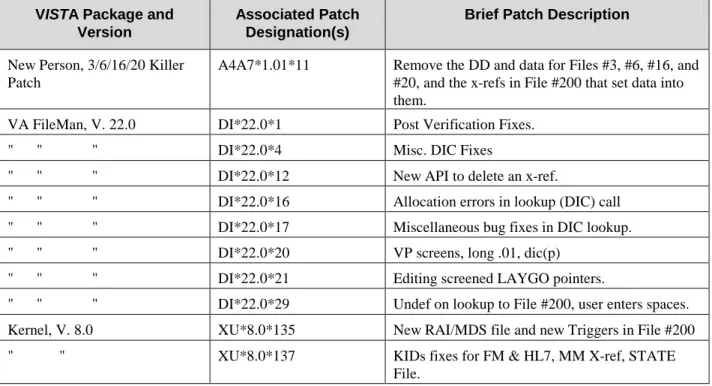
Figure 7: Minimum VISTA packages and patches required ... 52
Figure 8: Exported field definitions and file ... 53
Figure 9: Modified INPUT templates exported with this patch ... 54
Figure 10: Modified ScreenMan forms exported with this patch ... 55
Figure 11: Kernel options with associated ScreenMan forms and INPUT templates... 56
Figure 12: Kernel options affected by Name Standardization... 57
Figure 13: Application Programmer Interfaces (APIs) exported with the Name Standardization patch ... 60
Figure 14: VISTA HL7 APIs for converting person names... 61
Figure 15: New Kernel APIs for converting person names... 62
Figure 16: Patch XU*8.0*134 Supported Reference Integration Agreements ... 63
Figure 17: Patch XU*8.0*134 Controlled Subscription Integration Agreements ... 64
Introduction
This supplemental documentation is intended for use in conjunction with the Name Standardization patch (Kernel Patch, XU*8.0*134). It outlines the details of the work involved in the Name Standardization patch and gives guidelines for how the generic APIs can be used to standardize the collection and storage of person names across Veterans Health Administration (VHA). The intended audience for this
documentation is Information Resource Management (IRM) and Veterans Affairs Medical Center (VAMC) personnel who will be doing the changes to the system. However, it can also be helpful to others in Technical Service, the Program Office, National VISTA Support (NVS), and Technical
Integration. This documentation will be incorporated into the Kernel Version 8.0 documentation at a later date.
Background
The Veterans Health Administration (VHA) does not currently enforce a uniform procedure for recording names of persons, in VISTA. This has led to duplicate entries for individuals within systems
and problems in matching records across systems. Name suffixes (Jr., III etc.) have added to the problems.
Purpose
The main impetus of this project is to support the National Provider Index (NPI) project that will assign a national number to every provider who gives service to the Department of Veterans Affairs. It is
necessary to define a standard way for names to be entered into the NAME field (#.01) of the NEW PERSON file (#200). This will help in uniquely defining all providers in the file. Another benefit to this project will be the ability to uniquely identify computer users across various VA facilities. This will become especially important as the facilities do more data sharing, and as more computer users have access to data on computers across multiple facilities. It will also be a major step towards supporting data exchange with COTS/GOTS products that rely on a more detailed definition of person names via HL7 segments.
Reference Material
a) New Person Name Standardization Software Requirements Specification (SRS) document, dated May 1999.
b) New Person Name Standardization Software Design Document (SDD) document, dated October 1999.
c) White Paper on Standardizing Person Names in VISTA (Nov.21, 1995) (Architect's Home Page) which can be found at the following web site: http://vawww.va.gov/iag/name2.doc
d) VISTA data dictionaries for the PATIENT file (#2) and the NEW PERSON file (#200) e) HL7 Specification v 2.3 http://vista2.med.va.gov/vdsi/msg
g) ANSI HISB Message Standards Developers Subcommittee Common Data Types h) Naming Conventions, Initial Requirements Analysis (IRA), last updated 10/19/98
i) PATIENT NAMES, NPI, etc., - TI NEEDS TO BEGIN TO FORMALIZE STEPS FOR TS, E-mail message thread initiated by Catherine Pfeil, Dated December 4, 1998
j) PROVIDER ISSUES MEETING MINUTES, FEBRUARY 26-27, 1997 CIO FIELD OFFICE SAN FRANCISCO.
k) Appendix A of the New Person Name Standardization Software Requirements Specification (SRS) manual.
Product Description
The purpose of the Name Standardization project is to standardize the way person names are stored in VISTA. Name Standardization (Patch XU*8.0*134) provides utilities that enable VISTA applications to standardize the way person names are entered and stored in Veterans Health Administration (VHA) databases.
The Name Standardization release (Patch XU*8.0*134) features: •= A standard
format for person names in VISTA.
•= The data conversion of the NEW PERSON file (#200). •= A new NAME COMPONENTS file (#20).
•= Changes to the data dictionary of the NEW PERSON file.
•= Changes to Kernel options that allow editing of individual name components. •= New Application Programming Interfaces (API)s.
•= A new VA FileMan FUNCTION to display names in various formats.
Standard F
ormat for Person Names in VISTA
A standard format for person's names in VISTA is being introduced with the Name Standardization project (Patch XU*8.0*134). The definition of this new format, referred to as "standard form" or as "standard format," is a person's name entirely in uppercase letters, containing no Arabic numerals (i.e., 1, 2, 3, etc.). The Family Name (last name) portion of a standard name appears to the left of the comma and contains no spaces and no punctuation except hyphens (-). The Given Name (first name), Middle Name, and Suffix (the portion to the right of the comma) contain no punctuation except for hyphens and spaces. NMI and NMN are not used for the Middle Name.
The standard form of a name is:
Family_name,Given_name<space>Middle_name<space>Suffix
Data Conversion of the New Person File
All personnel who work at VA facilities are recorded in the NEW PERSON file (#200). This file contains data that was previously stored in obsolete VISTA files such USER (#3), PROVIDER (#6), and PERSON (#16). Kernel options provide the functionality to enter, edit, terminate, and reactivate users in the NEW PERSON file.
As part of the Post-Installation process for Patch XU*8.0*134, a data conversion is run in the NEW PERSON file to convert the .01 field (NAME field) to a standard format. This conversion standardizes names in the NEW PERSON file and parses them into their component parts.
As each name in the NAME field of the NEW PERSON file is converted and parsed, a corresponding entry is created in the new NAME COMPONENTS file, exported with this patch. The components of the parsed name are stored in this new file.
Note: Detailed information regarding the installation of Patch XU*8.0*134 and data conversion of the NEW PERSON file can be found in the patch description on the Patch Module in FORUM.
New Name Components File
In order to facilitate naming standards for the NEW PERSON file, as well as other files with name fields, a new NAME COMPONENTS file (#20) has been created and exported with this patch. This new file holds the component parts of a person’s name, which are listed as follows:
•= FAMILY (LAST) NAME field (#1) •= GIVEN (FIRST) NAME field (#2) •= MIDDLE NAME field (#3) •= PREFIX field (#4)
•= SUFFIX field (#5) •= DEGREE field (#6)
The fields PREFIX field (#4) and DEGREE field (#6), previously shown, can also be used to build formatted names for display; however, these two fields are not considered part of a standard name field. MUMPS cross-references automatically synchronize the fields in the new NAME COMPONENTS file with the name field of the source VISTA file. (In the case of Patch XU*8.0*134, the source name field is the .01 field (NAME field) of the NEW PERSON file.)
Note: The component parts of a person's name as listed previously is consistent with the ANSI HISPP Message Standards Developers Subcommittee Common Data Types definitions for element labels and formats, and thus compatible with messaging standards such as Health Level Seven (HL7) and X.12.
Changes to Data Dictionary of New Person File
The input transform on the NEW PERSON file converts all input into the .01 field (NAME field) into standard form and parses the input into its component parts: Family Name, Given Name, Middle Name, and Suffix. It stores the component parts in the NAME COMPONENTS file.
MUMPS cross-references maintain automatic synchronization between the new NAME COMPONENTS and the NEW PERSON files.
Changes to Kernel Options Allow Editing of Individual Name Components
The Kernel options themselves, have not been changed. However, the ScreenMan forms and the INPUT templates used by the Kernel options, listed as follows, have been modified to allow users to edit the individual name components of a person's name.
•= Add a New User to the System (XUSERNEW), •= Edit an Existing User (XUSEREDIT), and •= Reactivate a User (XUSERREACT)
New Application Programming Interfaces (API)s
A common set of APIs has been developed for standardizing and retrieving person names to enable VISTA applications to standardize person names in their databases.
This project required the coordination between the Information Infrastructure and Patient Management Systems divisions of Technical Services. A common set of APIs has been developed which can be used for standardizing and retrieving person names. To support this effort, each group applied the necessary changes to files under their application's domain (i.e., the NEW PERSON file, and the PATIENT file [#2], respectively). Name Standardization (Patch XU*8.0*134) is the Information Infrastructure patch to standardize names in the .01 field of the NEW PERSON file, a critical step in preparing for National Provider Identification.
New VA FileMan FUNCTION to Display Names in Various Formats
A VA FileMan FUNCTION has been created and exported with Name Standardization that returns a formatted name from any VISTA file that contains a NAME field. It allows the user to display names in various formats from any file containing a name field that has been standardized and linked to the NAME COMPONENTS file. Patch XU*8.0*134 standardizes the .01 field of the NEW PERSON file, so the new FUNCTION will work on that name field.
This FUNCTION will make it easy for non-programmers to include formatted names in selected modes of FileMan output.
Orientation
This supplemental documentation to Patch XU*8.0*134 is organized into two major parts based on the following functional divisions for inclusion into the Kernel Version 8.0 documentation at a later date:
1. User Manual Information 2. Technical Manual Information
It uses several methods to highlight different aspects of the material. "Snapshots" of computer dialogue (or other online displays) are shown in a non-proportional font and enclosed within a box. User responses to on-line prompts are highlighted in boldface. Boldface is also used to highlight a descriptive word or sentence. The Return or Enter key is illustrated by the symbol <RET> when displayed in computer dialogue and is included in examples only when it may be unclear to the reader that such a keystroke must be entered. The following example indicates that you should type two question marks followed by pressing the Return or Enter key when prompted to select an option:
Select Primary Menu option: ??
Figure: How to access online help
M code, variable names, acronyms, the formal name of options, actual field names, file names, and security keys are represented with all uppercase letters.
User Manual Information
This is the User Manual chapter of this supplemental documentation for Patch XU*8.0*134. It will be incorporated into the Kernel Systems Manual, Version 8.0 at a later date.
The intended audience for this chapter is Information Resource Management (IRM) and Veterans Affairs Medical Center (VAMC) personnel who will be doing the changes to the system. However, it can also be helpful to others in Technical Service, the Program Office, National VISTA Support (NVS), and
Technical Integration.
Relationship Between NEW PERSON Name and Name
Components
Name Standardization (Patch XU*8.0*134) ensures that names in the NAME field (#.01) of the NEW PERSON file (#200) are in standard form and that each name is kept in synchronization with the component parts of the name as stored in the NAME COMPONENTS file (#20). The following three sections describe this relationship in more detail.
New Person File Maintains Standard Form for Names
Name Standardization (Patch XU*8.0*134) introduces functionality that allows packages to maintain a standard format for names in VISTA files. Patch XU*8.0*134 also introduces this functionality
specifically for the NEW PERSON file. This affects both new users entered into the NEW PERSON file for the first time, as well as edits to existing users in the NEW PERSON file.
Person names entered in the NAME field (.01 field) for the first time, or edits to existing users in the NAME field (.01 field) converted into standard format (also referred to as standard form).
The standard form of a name is:
Family_name,Given_name<space>Middle_name<space>Suffix.
The Family Name (last name) portion of a standard name appears to the left of the comma and contains no spaces and no punctuation except hyphens (-). The Given Name (first name), Middle Name, and Suffix (the portion to the right of the comma) contain no punctuation except for hyphens and spaces.
New Person Names and Name Components are Synchronized
When a name in the NEW PERSON file is added or edited, a corresponding entry in the new NAME COMPONENTS file (#20) is automatically added or updated. (Patch XU*8.0*134 provides APIs to allow other files in VISTA packages to update the NAME COMPONENTS file in a similar manner.) Each
entry in the NAME COMPONENTS file contains the name broken down into the following component parts:
•= FAMILY (LAST) NAME field (#1), •= GIVEN (FIRST) NAME field (#2), •= MIDDLE NAME field (#3), and •= SUFFIX field (#5).
Automatic synchronization is maintained between the fields in the new NAME COMPONENTS file: FAMILY (LAST) NAME (#1), GIVEN (FIRST) NAME (#2), MIDDLE NAME (#3), and SUFFIX (#5), and the source field, which in the case patch XU*8.0*134 is the .01 field (NAME field) of the NEW PERSON file.
(For more information on APIs exported with the Name Standardization patch, see the section "Kernel APIs for Name Standardization" in the "User Manual" chapter of this documentation..)
Name Components File Preserves Punctuation
The standard form of a person name may contain only a limited set of punctuation (e.g., as in the standard form for person names stored in the NEW PERSON file). However, the name components stored in the NAME COMPONENTS file may contain any punctuation except the accent grave (`) and the up-arrow (^). This offers the functionality to build names from the NAME COMPONENTS file in various formats, including all punctuation associated with that name.
For example, suppose the standard form of the name stored in the .01 field of the NEW PERSON file is OREILLY,MERRIE K MD. Since the NAME COMPONENTS file preserves the punctuation intact in the individual name components, this name as stored in the NAME COMPONENTS could look like:
PREFIX: MRS. GIVEN NAME: MERRIE MIDDLE NAME: K.
FAMILY NAME: O'REILLY SUFFIX: MD
So, as one example, a name constructed from the name components can present the name in a readable format for correspondence.
Guidelines for Entering Person Names in V
IST
A
Guidelines have been developed with the Name Standardization project for a new method for entering person names in VISTA. The objective of creating these guidelines is to support the process of
standardizing the collection and storage of person names across VHA. A new NAME COMPONENTS file (#20) has been introduced with the Name Standardization release (Patch XU*8.0*134). This new file holds the component parts of a person’s name, which are listed as follows:
•= FAMILY (LAST) NAME, •= GIVEN (FIRST) NAME, •= MIDDLE NAME, and •= SUFFIX.
The following guidelines are provided for the general purpose of entering names in VISTA:
1. When entering a person name into the system, (e.g., In the case of Patch XU*8.0*134 you use Kernel options to enter names into the system.) only enter the data that is actually part of the person's name. Do not include extra titles, identification, flags, local information, etc.
2. Enter the person name in the following format:
Family_(last)_name,Given_(first)_name(s) Middle_name(s) Suffix(es) Example: O'BRIEN-DE LEON,JOHN K. JR.
Though FileMan standardizes the name you enter and removes most of the punctuation before storing it in the name field, the punctuation is retained in the NAME COMPONENTS file for use in displaying the name for letters, reports, etc. Therefore, you should enter all appropriate punctuation in the name. Figure 1 shows the previous example of the name "OBRIEN-DELEON,JOHN K JR" which was standardized and stored in the NAME field (.01 field) of the NEW PERSON file, compared to the same standardized name stored in the NAME COMPONENTS file.
New Person File Name Components File
OBRIEN-DELEON,JOHN K JR Family (last) name: O'BRIEN-DE LEON Given (first) name: JOHN
Middle name: K.
Suffix: JR.
Figure 1: Comparison between name stored in New Person File versus Name Components File
In forming the standard name, colons (:) and semicolons (;) in the Family Name part are replaced with hyphens (-), and then all punctuation except hyphens are removed, and all spaces are removed. In the other name parts, colons, semicolons, and periods are replaced with spaces, and then all punctuation
except for hyphens is removed. Birth position indicators entered as Arabic numerals are changed to their Roman numeral equivalents. (For example, 3rd is changed to III.)
Kernel Options Allow Editing of Individual Name
Components
This section provides information about the three Kernel options affected by the Name Standardization release (Patch XU*8.0*134). This section does not attempt to provide detailed information about how to use these Kernel options. These are documented in detail in the "Sign-On/Security" section of the Kernel Systems Manual, Version 8.0. Use the following URL to access this documentation:
http://vista.med.va.gov/kernel/docs/index.html .
Kernel Options Affected by Name Standardization
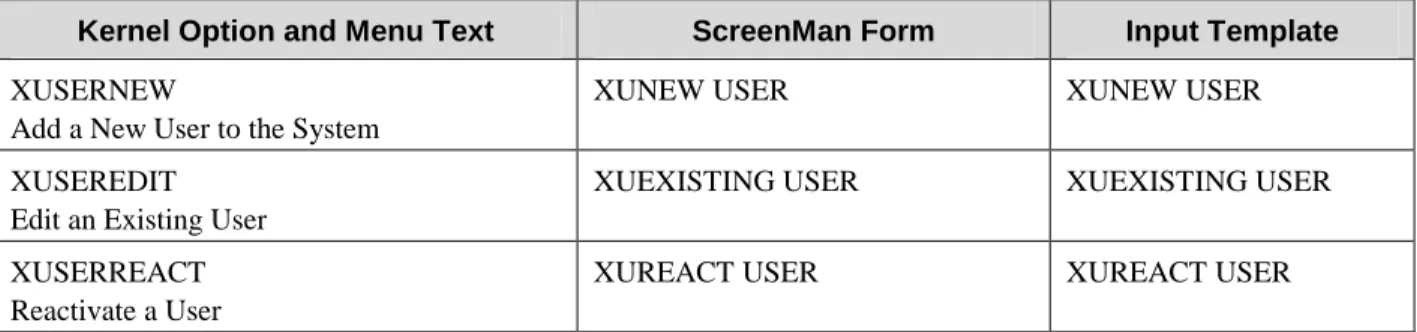
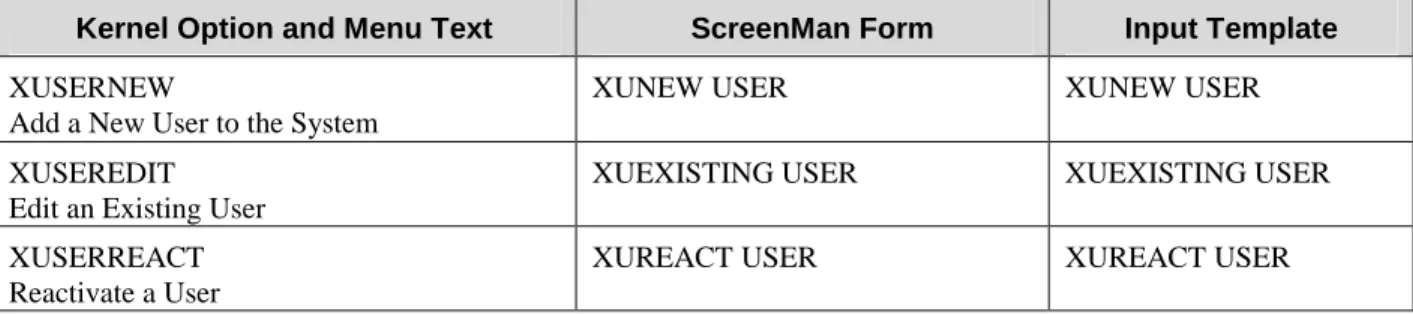
The Kernel options, associated ScreenMan Forms, and INPUT templates, which are affected by Patch XU*8.0*134 are shown in Figure 2. The Kernel options themselves, have not been changed. However, the ScreenMan forms and the INPUT templates used by these options have been modified to allow users the capability to edit the individual name components of a person's name.
Kernel Option and Menu Text ScreenMan Form Input Template
XUSERNEW
Add a New User to the System
XUNEW USER XUNEW USER
XUSEREDIT Edit an Existing User
XUEXISTING USER XUEXISTING USER
XUSERREACT Reactivate a User
XUREACT USER XUREACT USER
Figure 2: Kernel options with associated ScreenMan forms and INPUT templates
The following is a list of the name component fields stored in the new NAME COMPONENTS file (#20). Each one of these fields (except DEGREE) can be edited using the Kernel options listed in Figure 2:
•= FAMILY (LAST) NAME field (#1) •= GIVEN (FIRST) NAME field (#2) •= MIDDLE NAME field (#3) •= PREFIX field (#4)
•= SUFFIX field (#5) •= DEGREE field (#6)
Note: The DEGREE field (#6) is updated indirectly via the "ADEG" MUMPS cross-reference on the DEGREE field (#10.6) in the NEW PERSON file (#200).
How Does an Option's ScreenMan Form Differ from its Corresponding Input
Template?
Functionally there is no difference between the ScreenMan forms and INPUT templates invoked by these options. All three options attempt to invoke the associated ScreenMan form first. However, if for some reason the ScreenMan form cannot be invoked (e.g., because the terminal type cannot handle screen-oriented applications), the associated INPUT template for scrolling mode is invoked.
The ScreenMan Forms
An option's corresponding ScreenMan form is invoked if your terminal type is able to handle screen-oriented applications. If the .01 field (NAME field) in the NEW PERSON file is edited or if the Return (Enter) key is pressed while the cursor is in the NAME field, the individual name components will be displayed in a "pop-up" window so that they can be edited separately.
The Kernel option Add a New User to the System functions slightly differently from the other two options, Edit an Existing User and Reactivate a User. If the option Add a New User to the System has been selected, after the NAME field and all Identifier fields for the new entry have been entered and the ScreenMan form has been invoked, the individual name components appear in a "pop-up" window first for editing. The other two Kernel options position the cursor in the NAME field (i.e., the .01 field of the NEW PERSON file) first for editing. Thus, the timing of when you are prompted to edit the name components varies between the options.
The INPUT Templates
An option's corresponding INPUT template is invoked if your terminal type is unable to handle screen-oriented applications. The INPUT templates have been modified to prompt for the individual components of a person's name.
Adding a New Entry to the New Person File
This next set of examples will use the screen-oriented display (i.e., the ScreenMan form) to illustrate the changes to the Kernel options. The INPUT template functions similarly, but in scrolling mode. To demonstrate this, we will add the fictitious Dr. Merrie O'Reilly to the NEW PERSON file for the first time.
The three Kernel options affected by the Name Standardization patch are located on the Kernel User Management menu shown in Figure 3. Only the Kernel options affected by Name Standardization are shown.
Select Systems Manager Menu Option: user Management Add a New User to the System [XUSERNEW]
Edit an Existing User [XUSEREDIT] Reactivate a User [XUSERREACT]
Figure 3: Kernel options affected by Name Standardization
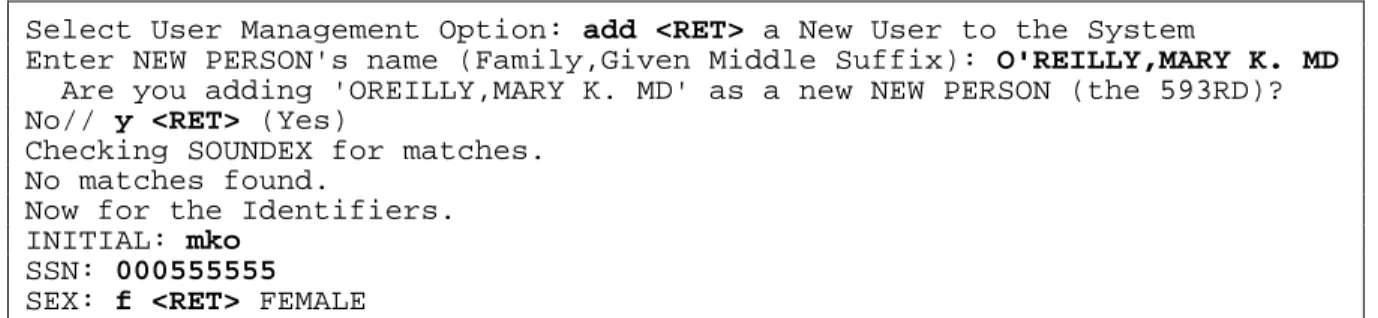
After selecting the option Add a New User to the System, Kernel prompts you to enter the person's Name, Initial, Social Security Number, and Sex (i.e., the Identifier fields for the new entry), as shown in Figure 4.
Select User Management Option: add <RET> a New User to the System
Enter NEW PERSON's name (Family,Given Middle Suffix): O'REILLY,MARY K. MD Are you adding 'OREILLY,MARY K. MD' as a new NEW PERSON (the 593RD)? No// y <RET> (Yes)
Checking SOUNDEX for matches. No matches found.
Now for the Identifiers. INITIAL: mko
SSN: 000555555 SEX: f <RET> FEMALE
Figure 4: Adding new users to the NEW PERSON file (#200)
Once the ScreenMan form for editing the properties of the new person has been invoked, the individual name components for that person appear in a new "pop-up" window within the ScreenMan form. This is a "window" that overlays the regular ScreenMan screen in order to present the contents of a selected Multiple as shown, as follows, in Figure 5.
Using the Name Components "Pop-up" Window
This next example is a continuation of the process of adding a new entry to the NEW PERSON file. Figure 5 illustrates what happens when we used this "pop-up" window to edit the name, originally entered as Mary to Merrie.
Once the "pop-up" window is invoked, your cursor is positioned in the prompt "Given (First):". Notice that the change we've made is reflected in a non-editable field at the lower left portion of the "pop-up" window (i.e., OREILLY,MERRIE K MD). This is the name in standard form as it is stored in the .01 field of the NEW PERSON file. All punctuation, except hyphens and the first comma, is removed from the resulting standard form of names stored in the NEW PERSON file.
(For more information on "standard form," see the topic "Standard Format for Person Names in VISTA" in the "Product Description" section of this documentation.)
Edit an Existing User
NAME: OREILLY,MARY K MD Page 1 of 3
____________________________________________________________________________
NAME... OREILLY,MARY K MD INITIAL: mko
TITLE: NICK NAME:
SSN: 000555555 MAIL CODE:
DEGREE:
┌────────────────────────────────────────────────────┐
│ NAME COMPONENTS │
Select SEC│ Prefix: │
│ Given (First): MERRIE │
Want to edi│ Middle: K. │
Want to edi│ Family (Last): O'REILLY │
│ Suffix: MD │
│ │
│ OREILLY,MERRIE K MD │
└────────────────────────────────────────────────────┘
____________________________________________________________________________
COMMAND: Press <PF1>H for help Insert
Figure 5: Edits to NAME field of the NEW PERSON file invokes name components "pop-up" window
Edits made to the name components in the pop-up window are made directly to the NAME COMPONENTS file. These edits automatically update the .01 field of the NEW PERSON file.
Note: The PREFIX field in the "pop-up" window, shown in Figure 5, can be entered and stored in the NAME COMPONENTS file. However, Prefix is not part of the standard name stored in .01 field of the NEW PERSON file.
New Person File Reflects Edits Made to the Name Components File
Once you have made all the necessary edits to the individual name components, press <PF1>C, or press the Return (Enter) key until you've closed the "pop-up" window. Once you've done this, you are back on page 1 of the form. The first field on that page, "NAME…" has been modified so that if you press the
Return (Enter) key or edit the name displayed there, the "pop-up" window that displays the name components will re-open.
To move on to the next field, either press the Tab or the down-arrow key.
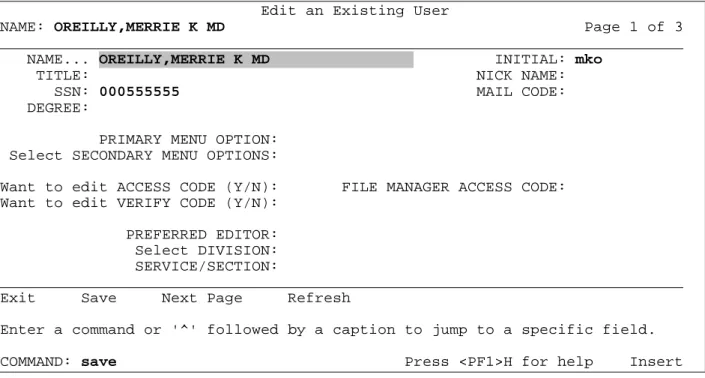
Notice in Figure 6 that the name Merrie is now reflected in the both the "NAME:" field at the top of the screen, and in the "NAME…" field (i.e., the .01 field of the NEW PERSON file) just beneath it. Once you've closed the "pop-up" window and saved the Screen, any changes you made to the individual name components are reflected in the .01 field (NAME field) of the NEW PERSON file, as well as saved in the NAME COMPONENTS file.
Automatic synchronization is consistently maintained between the .01 field of the NEW PERSON file and the fields in the new NAME COMPONENTS file.
Edit an Existing User
NAME: OREILLY,MERRIE K MD Page 1 of 3
____________________________________________________________________________
NAME... OREILLY,MERRIE K MD INITIAL: mko
TITLE: NICK NAME:
SSN: 000555555 MAIL CODE:
DEGREE:
PRIMARY MENU OPTION: Select SECONDARY MENU OPTIONS:
Want to edit ACCESS CODE (Y/N): FILE MANAGER ACCESS CODE: Want to edit VERIFY CODE (Y/N):
PREFERRED EDITOR: Select DIVISION: SERVICE/SECTION:
____________________________________________________________________________
Exit Save Next Page Refresh
Enter a command or '^' followed by a caption to jump to a specific field.
COMMAND: save Press <PF1>H for help Insert
New VA FileMan Name Formatting Function:
XLFMTNAME
A new FUNCTION has been installed in the FileMan FUNCTION file (#.5) and is exported with Name Standardization (Patch XU*8.0*134). This function can be used within the FileMan Print options, or within word-processing windows used to generate forms. The new FUNCTION allows the user to display names in various formats from any VISTA file containing a name field.
Here's how it works:
•= The first three parameters passed to the FUNCTION identify the file, record, and field that contain the specific name to be formatted.
•= If the NAME field in the VISTA file has been standardized and linked to the NAME
COMPONENTS file (#20), then the FUNCTION obtains the component parts of that Name from the NAME COMPONENTS file.
•= If the FUNCTION can't find the name in the NAME COMPONENTS file, it will obtain the name directly from the VISTA file that contains the Name.
Format: XLFMTNAME(FILE#,FIELD#,IENS,FORMAT,FLAGS) Input Parameters:
FILE# (Required). The value of this parameter is the file number of the file containing the name to be returned.
FIELD#(Required). The value of this parameter is the field number of the field containing the name to be returned.
IENS (Required). The value of this parameter is the Internal Entry number of the entry in the file containing the name to be returned. The Internal Entry number can be followed by a comma to form an IEN string (IENS). However, the comma is not required.
FORMAT (Must be defined, or set to a null value). The FORMAT parameter controls the general formatting of the output. If passed as a null value, the parameter will default to G as shown in example a). The FORMAT parameter can contain one of the following:
F Family (Last) Name is returned first. G Given (First) Name is returned first.
O The letter O returns only the Family, or Last Name.
FLAGS (Must be defined, or set to a null value). Additional flags to control formatting. If passed as a null value, none of the actions controlled by the flags are performed. More than one of these flags can be passed in the FLAGS parameter as shown in examples b) and c). The acceptable FLAG values are:
C If “F” is passed in the FORMAT parameter, the name is returned with a comma between the Family (Last) and Given (First) Names. The “C” flag is ignored if the “F” FORMAT is not passed.
D The Degree is returned (if any).
Dc The Degree is returned (if any), preceded by a comma and space.
L# The name is truncated to a maximum length of # characters, where # is an integer between 1 and 256. (See the $$NAMEFMT^XLFNAME call in this section for a description of the pruning algorithm.)
M Name is returned in Mixed case, with first letters capitalized. P The Prefix is returned (if any).
S Standardizes the name components before building the formatted name (e.g., it removes most punctuation and removes any spaces from the Family name)
Xc A comma and space will precede the returned suffix (if any).
Examples:
Note that since this is a FUNCTION from the FileMan FUNCTION file and not a callable routine, it can be used only within FileMan options. This FUNCTION can be used in the FileMan Print option at either the SORT BY or PRINT FIELD prompts. It can also be used in word-processing windows to print form documents, as defined in the FileMan Users Manual.
a) Suppose we want to print a report from the NEW PERSON file (#200). In this report, we want the NAME field to print with the Given name first. We do not want to print Degrees or Prefixes, we do not want to standardize the name, and we do not want to print a comma and space before the suffix, if any. Using this example, a name with Prefix “MR.”, Family name “SMITH”, Given name
“JOHN”, Middle name “K.”, Suffix “JR.” and degree “PHD” would print: “JOHN K. SMITH JR.”. Note that the internal entry number (IEN) from File #200 can be passed by using the field name NUMBER, which is used to designate the IEN of the current record on any file. Note also that the FORMAT and FLAGS parameter are passed as null values.
At the PRINT FIELD prompt, enter:
FIRST PRINT FIELD: XLFMTNAME(200,.01,NUMBER,"","")
b) Suppose we have a File #662002 in which the .01 field NAME points to the NEW PERSON file. In both this example, and in c), we wish to display the NAME fields with the Given name first. We want the names to appear with the first letter of each name in upper case and the rest in lower-case. If Prefix, Suffix or Degree values exist, we wish to include the Prefix, the Suffix preceded by a comma, and the Degree preceded by a comma. A pointed-to name field in the NEW PERSON file with a Prefix “MR.”, Family name “SMITH”, Given name “JOHN”, Middle Name “K.”, Suffix “JR” and Degree “PHD should be displayed as:
The .01 NAME field in File #662002 points to File #200. The name field that we wish to format resides in File #200. We must use INTERNAL(NAME) in the IENS parameter to indicate the IEN of the file where the name resides. This gives us the internal pointer value (i.e. the IEN from File #200). If we wish to print a report from File #662002, displaying the names in the format described
previously, then at the PRINT FIELD prompt, enter:
FIRST PRINT FIELD: XLFMTNAME(200,.01,INTERNAL(NAME),”G”,”DcPXcM”) c) We can also use the FUNCTION in a word-processing window to generate form documents or
letters. Suppose we wish to print a letter for each of the entries in File #662002 as described in example b) listed previously, and that we wish to format the names in the same way. At the start of the letter, we would like to print the NAME field within the salutation. The first line of the word processing field that will be used for the form document could be set up like this:
Name Components and New Person Files
Field Descriptions in the New Name Components File (#20)
The NAME COMPONENTS file is a new file exported with Name Standardization (Patch XU*8.0*134). It will hold the component parts of a name, as shown below. Each entry in the NAME COMPONENTS file is associated with an entry and a name type field in another file. We call this file the source file. These first three fields shown below (FILE, FIELD, and IENS) are the Primary key for the NAME COMPONENTS file. They uniquely identify the record in the NEW PERSON file (#200). These key fields identify the source file, source field and entry on which the original name resides. The actual name components are Fields #1 through #6 [i.e., FAMILY (LAST) NAME, GIVEN (FIRST) NAME, MIDDLE NAME, PREFIX, SUFFIX, and DEGREE]. The field, NOTES ABOUT NAME (#11), stores the original text of the person's name, only if parenthetical text was removed during the data conversion.
1. FILE field (#.01) – This field holds the number of the file or subfile that contains the name. This field must contain a number between 0 and 999999999999, with up to 7 decimal digits.
2. FIELD field (#.02) – This field holds the number of the field that contains the name. This is a Number field. This field must contain a number between 0 and 999999999999, with up to 7 decimal digits.
3. IENS field (#.03) – This field holds the internal entry number string (IENS) of the entry that contains the name. This is a Free Text field defined as 2-50 characters.
4. FAMILY (LAST) NAME field (#1) – This field is referred to as the "last name." This is a Free Text field, defined as 1-35 characters. It must begin with an upper case letter, and must contain only upper case letters, numbers, and punctuation, excluding ^ and `. This is a required field (i.e. it cannot be null).
A new-style record-level MUMPS cross-reference on fields 1, 2, 3, and 5 will build a standard name based on the component parts, prune the result to the maximum length of the source name field, and then update the name field in the source file.
(For information on the pruning algorithm, see the description for the routine to build the name from the component parts in the section "Kernel APIs for Name Standardization" of this documentation.)
A new-style record-level MUMPS cross-reference on fields 1, 2, 3, and 5 will update the SIGNATURE BLOCK PRINTED NAME field (#20.2) in the NEW PERSON file, if the source file is 200 and the source field is .01.
5. GIVEN (FIRST) NAME field (#2) – This is referred to as the "first name." This is a Free Text field, defined as 1-25 characters. It must begin with an upper case letter, and must contain only upper case letters, numbers, and punctuation, excluding ^ and `. This field is optional (i.e., it can be null). Editing this field will affect the source name field and, if the source file is #200 and the
NEW PERSON file. (See the FAMILY (LAST) NAME field, listed previously, for more information).
6. MIDDLE NAME field (#3) – This is a Free Text field, defined as 1-25 characters. It begin start with an upper case letter, and must contain only upper case letters, numbers, and punctuation, excluding ^ and `. It cannot be NMI or NMN. This field is optional (i.e., it can be null). Editing this field will affect the source name field and, if the source file is #200 and the source field is .01, it will affect the Signature Block Printed Name field in the NEW PERSON file. (See the FAMILY (LAST) NAME field, listed previously, for more information).
7. PREFIX field (#4) – This is a Free Text field, defined as 1-10 characters. It must begin with an upper case letter, and must contain only upper case letters, numbers, and punctuation, excluding ^ and `. This field is optional (i.e., it can be null). NOTE: This field is not included as part of the source name field.
8. SUFFIX field (#5) – This is a Free Text field, defined as 1-10 characters. It must begin with an upper case letter or number, and must contain only upper case letters, numbers, and punctuation, excluding ^ and `. This field is optional (i.e., it can be null). Editing this field will affect the source name field and, if the source file is 200 and the source field is .01, it will affect the SIGNATURE BLOCK PRINTED NAME field in the NEW PERSON file. (See the FAMILY (LAST) NAME field, listed previously, for more information).
9. DEGREE field (#6) – This is a Free Text field, defined as 1-10 characters. It must begin with an upper case letter, and must contain only upper case letters, numbers, and punctuation, excluding ^ and `. This field is optional (i.e., it can be null). NOTE: This field is not included as part of the source name field.
A new-style record-level MUMPS cross-reference on the DEGREE field (#6) of the NAME COMPONENTS file will keep this field in synchronization with the DEGREE field (#10.6) in the NEW PERSON file; that is, if the source file is 200 and the source field is .01, and the NAME COMPONENTS file DEGREE field (#6) is edited, the "ADEG" MUMPS cross-reference will update the corresponding NEW PERSON file DEGREE field (#10.6). 10. NOTES ABOUT NAME field (#11)
This is a Free Text field, defined as 3-100 characters. It stores the original text of the person's name. This field is populated ONLY if parenthetical text was removed from the name during the data conversion. Otherwise, the data conversion does NOT populate this field. During the New Person Name Conversion, which is run as part of the post-install routine of Patch XU*8.0*134, if a name in the NEW PERSON file contains text in parentheses (), brackets [], or braces {}, that text is removed from the name, and the original name with the parenthetical text is recorded in this field. (This routine is documented in the description for Patch XU*8.0*134 on the Patch Module.)
Note: The Standard Name in the NEW PERSON file does not contain a Prefix or a Degree. Therefore, it only populates the following fields in the NAME COMPONENTS file:
•= FAMILY (LAST) NAME (#1), •= GIVEN (FIRST) NAME (#2), •= MIDDLE NAME (#3), and •= SUFFIX (#5).
Changes to Data Dictionary of New Person File (#200)
The input transform of the NEW PERSON file will continue to check that the value of the NAME field (#.01) is 3 to 35 characters in length, contains only one comma, and has at least one character before and one character after the comma. In addition, the input transform will call the Name Standardization Routine to convert the input to the following standard form:
Family_name,Given_name<space>Middle_name<space>Suffix.
The Name Standardization Routine called by the input transform also parses the input into its component parts: Family Name, Given Name, Middle Name, and Suffix. A new "ANAME" MUMPS cross-reference on the .01 field of the NEW PERSON file updates or creates the corresponding entry in the NAME COMPONENTS file with the name components returned by the input transform.
A new NAME COMPONENTS pointer field (#10.1) defined as a pointer to the NAME COMPONENTS file establishes a link between each entry in the NEW PERSON file with the corresponding entry in the NAME COMPONENTS file that contains the component parts of the Name. The "ANAME" MUMPS cross-reference on the .01 field of the NEW PERSON file updates this field, as necessary.
Whenever the DEGREE field (#10.6) in the NEW PERSON file is edited, a new "ADEG" MUMPS cross-reference on this field updates the DEGREE field (#6) in the NAME COMPONENTS file.
Steps to Standardize a Name Field
Source File Data Dictionary
Make the following changes to the data dictionary of the source file that contains the name field:
•= Modify the input transform of the name field to call STDNAME^XLFNAME to standardize and parse the input.
For example, you might add the following code to the input transform:
I $D(X) S nmspNC=X D STDNAME^XLFNAME(.nmspNC,"C") S X=nmspNC
This code transforms the user input, which is in the variable X, to standard form, and returns in the nmspNC array the unstandardized name components.
In some circumstances, such as when a new name is created, you may want the nmspNC array to remain defined after the input transform is executed. The cross-reference that updates the NAME COMPONENTS file can then use this array to create the NAME COMPONENTS entry with the unstandardized form of the name components.
(For an example how the input transform can be modified, see the input transform code on the .01 field of File #200 (NEW PERSON) that was distributed with the Name Standardization patch XU*8.0*134.)
•= Modify the help and description of the name field to describe how names should be entered, and how the entered name will be standardized. See the Guidelines for Entering Person Names in VISTA section of the User Manual for the type of information you may want to include here. •= Create a name components pointer field from the source file to the NAME COMPONENTS file.
This pointer links each name with the corresponding entry in the NAME COMPONENTS file that holds the components parts of the name, and can be used to navigate from the source file to the corresponding entry in the NAME COMPONENTS file.
For example, the Name Standardization patch has created a new pointer field, NAME COMPONENTS (#10.1), in the NEW PERSON file (#200).
•= Create a new-style MUMPS index that optionally uses UPDCOMP^XLFNAME2 and
DELCOMP^XLFNAME2 entry points to update the NAME COMPONENTS entry and the name components pointer when the source name changes. (You need to subscribe to IA #3066 to use these APIs. Alternatively, controlled- subscription IA #3041 allows both read and write access to the NAME COMPONENTS file via FileMan tools.)
For example, the Name Standardization patch has created the "ANAME" cross-reference designed to keep the .01 field of the NEW PERSON file in synchronization with the name components in the NAME COMPONENTS file. The index description is located in the INDEX file (#.11) and can be printed via the Indexes Only format of a DD listing of the NEW PERSON file.
•= If there's a lookup cross-reference on the name field, replace it with a new-style index with a "transform for lookup" that converts the lookup value to standard form. If FileMan is used to lookup a name in non-standard form, and that non-standard name is not in the index, FileMan automatically executes the transform for lookup to convert the name to standard form, and tries the lookup again.
For example, the Name Standardization patch has replaced the traditional “B” index on the .01 field of the NEW PERSON file with a new-style index with a "transform for lookup." The index description is located in the INDEX file (#.11) and can be printed via the Indexes Only format of a DD listing of the NEW PERSON file.
Name Conversion
Write a post-install routine that converts existing names to standard form. Loop through all the entries in the file, and for each name:
•= Call STDNAME^XLFNAME to obtain the standard form of the name and the name components. •= Call UPDCOMP^XLFNAME2 to create the NAME COMPONENTS entry and to update the
name components pointer. You can also pass NAME("NOTES") to UPDCOMP^XLFNAME2 to file information in the NOTES ABOUT NAME field if parenthetical text is stripped to form the standard name. (See IA #3041 and #3066.)
•= Update the name field with the standard name.
•= Record in ^XTMP the information returned from STDNAME^XLFNAME about ambiguities and potential problems encountered.
•= If the standard form of the name is different from the original name, record in ^XTMP that information, as well.
•= Write a routine that prints the information in ^XTMP.
(For an example of how this conversion might be written, see the conversion routine POST^XLFNAME distributed with the Name Standardization patch.)
End-User Interfaces
Modify the interfaces that display and allow editing of the name as follows:
•= Modify the interfaces that prompt the user for the name to also prompt for the name components. (IA #3041 is a controlled subscription integration agreement that allows both read and write access via VA FileMan to the fields in the NAME COMPONENTS file.) You can use the newly created name components pointer to navigate from the source file the NAME COMPONENTS file.
•= In places where the name is displayed to the end-user, use the $$NAMEFMT^XLFNAME API or the XLFMTNAME FileMan FUNCTION to build the name from the components stored in the NAME COMPONENTS file. This allows display of the name in a user-friendlier format, because most of the original spacing and punctuation is preserved in the NAME COMPONENTS file.
Kernel APIs for Name Standardization
This section documents two categories of Kernel Supported Calls as they relate to the Name Standardization patch (Patch XU*8.0*134).
1. The first category is titled "Supported Reference Integration Agreements." This section lists and
describes the callable routines provided by Name Standardization, which are supported for general use by all VISTA applications.
2. The second category is titled "Controlled Subscription Integration Agreements." This section lists and describes the callable routines for which you must obtain an Integration Agreement ([IA] - Formerly referred to as a DBIA) to use.
(For a list of the Integration Agreements related to Name Standardization see the section "External Relations" in the "Technical Manual" chapter of this documentation.)
Supported Reference Integration Agreements
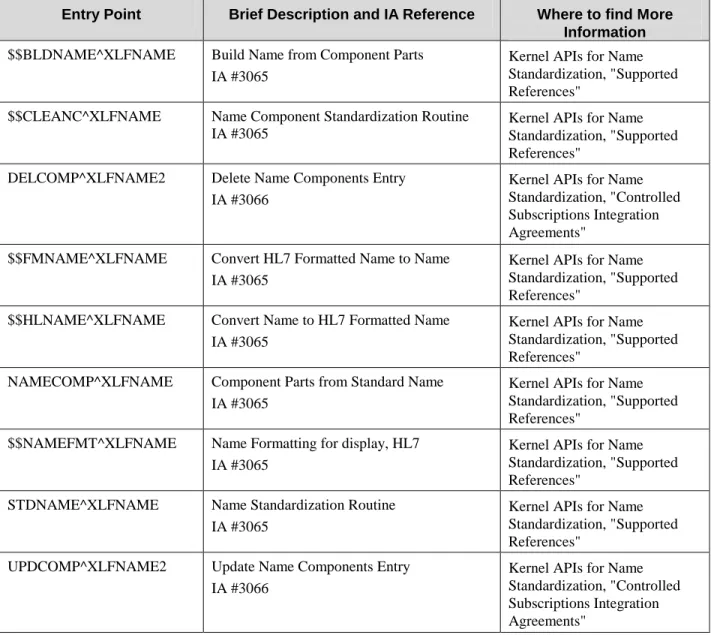
These are the Kernel Supported Reference Integration Agreements for Name Standardization. They are documented in alphabetical order by entry point. These APIs are open for use by any VISTA application as defined by the IA. These References have been recorded as a Supported Reference in the IA database on FORUM. It is not required that VISTA packages request an IA to use them. The following APIs are alphabetized by Entry Point.
$$BLDNAME^XLFNAME: Build Name from Component Parts
This extrinsic function takes the component parts of a name and returns the name, truncated if necessary, in the following format:
Family_name,Given_name<space>Middle_name<space>Suffix(es) Format:
$$BLDNAME^XLFNAME(.NAME,MAX)
Input Parameters:
.NAME (Required) The component parts of the name: NAME(“FAMILY”) = Family (Last) Name NAME(“GIVEN”) = Given (First) Name(s) NAME(“MIDDLE”) = Middle Name(s) NAME(“SUFFIX”) = Suffix(es)
contains the name. If the name has a corresponding entry in the NAME COMPONENTS file, then the name components are obtained from that entry. Otherwise, the name is obtained directly from the file, record, and field specified, and the name components are obtained by making a call to STDNAME^XLFNAME.
NAME(“FILE”) = Source file number (required)
NAME(“IENS”) = IENS of entry in the source file (required) NAME(“FIELD”) = Source field number (required)
MAX The maximum length of the Name to be returned. (Default = 256) See "Details:" as follows for a description of the pruning algorithm.
Details:
If the MAX input parameter is used, and the resulting name is longer than MAX, the following pruning algorithm is performed to shorten the name:
1. Truncate Middle Name from the right-most position until only the initial character is left; 2. Drop suffix;
3. Truncate Given Name from the right-most position until only the initial character is left; 4. Truncate Family Name from the right-most position;
5. Truncate the name from the right. Examples:
1. Suppose the MYNAME array contains the following elements:
MYNAME("FAMILY") = "O'BRIEN" MYNAME("GIVEN") = "JOHN" MYNAME("MIDDLE") = "K." MYNAME("SUFFIX") = "JR"
Calls to $$BLDNAME^XLFNAME will return the name as follows:
$$BLDNAME^XLFNAME(.MYNAME) OBRIEN,JOHN K JR $$BLDNAME^XLFNAME(.MYNAME,12) OBRIEN,JOH K
2. If an entry in the NAME COMPONENTS stores the components of a name stored in the NAME field (#.01) of record number 32 in the NEW PERSON file, and the data in the corresponding record in the NAME COMPONENT file is:
FILE = 200 FIELD = .01 IENS = "32,"
GIVEN NAME = "JOHN" MIDDLE NAME = "K." FAMILY NAME = "O'BRIEN" SUFFIX = "JR"
you can set:
MYNAME("FILE") = 200 MYNAME("FIELD") = .01 MYNAME("IENS") = "32,"
and call $$BLDNAME^XLFNAME as in Example 1, listed previously:
$$BLDNAME^XLFNAME(.MYNAME) OBRIEN,JOHN K JR $$BLDNAME^XLFNAME(.MYNAME,12) OBRIEN,JOH K
$$CLEANC^XLFNAME: Name Component Standardization Routine
This extrinsic function takes a single name component and returns that name in standard format. Format:
$$CLEANC^XLFNAME(COMP,FLAGS)
Input Parameters:
COMP (Required) The name component to be converted to standard format. FLAGS Flags to control processing. Possible values are:
F If the name component to be converted is the FAMILY (LAST) NAME, pass the “F” flag. With the “F” flag, colons (:), semicolons (;), and commas (,) are converted to hyphens (-). Spaces and all punctuation except hyphens are removed. Leading and trailing spaces and hyphens are removed. Two or more consecutive spaces or hyphens are replaced with a single space or hyphen.
Without the “F” flag, the component is converted to upper case. Colons, semicolons, commas, and periods (.) are converted to spaces. All punctuation except for hyphens and spaces are removed. Leading and trailing spaces and hyphens are removed. Two or more consecutive spaces or hyphens are replaced with a single space or hyphen. Birth position indicators 1ST through 10TH are changed to their Roman numeral equivalents.
Examples:
1. Standardize family (last) name:
$$CLEANC^XLFNAME("O'BRIEN-DE LA ROSA","F) OBRIEN-DELAROSA $$CLEANC^XLFNAME("ST. JAMES","F") STJAMES
2. Standardize other (non-family) name components:
$$CLEANC^XLFNAME("E.C.) E C $$CLEANC^XLFNAME("RENEE'") RENEE $$CLEANC^XLFNAME("MARY ANN") MARY ANN $$CLEANC^XLFNAME("JO-ANNE") JO-ANNE
$$FMNAME^XLFNAME: Convert HL7 Formatted Name to Name
This extrinsic function converts an HL7 formatted name to a name in VISTA format. Format:$$FMNAME^XLFNAME(NAME,FLAGS,DELIM)
Input Parameters:
[.]NAME (Required) NAME is the HL7 name to be converted. If the "C" flag is used, the name components are returned in nodes descendent from NAME. (See "Output:" just after this table.)
FLAGS Flags to controls processing. Possible values are:
C Return name components in the NAME array. (See "Output:" just after this table.)
L# Truncate the returned name to a maximum Length of # characters, where # is an integer between 1 and 256.
M Return the name in Mixed case, with the first letter of each name component capitalized.
S Return the name in Standardized form.
DELIM The delimiter used in the HL7 formatted name. (Default = "^")
Output:
NAME If the FLAGS input parameter contains a “C”, the component parts of the name are returned in the NAME array:
NAME(“FAMILY) = Family (Last) Name NAME(“GIVEN”) = Given (First) Name(s) NAME(“MIDDLE”) = Middle Name(s) NAME(“SUFFIX”) = Suffix(es)
Details:
If the L# flag is used, and the resulting name is longer than #, the following pruning algorithm is performed to shorten the name:
1. Truncate Middle Name from the right-most position until only the initial character is left; 2. Drop suffix;
3. Truncate Given Name from the right-most position until only the initial character is left; 4. Truncate Family Name from the right-most position;
Examples:
1. Convert an HL7 formatted name to a VISTA name:
$$FMNAME^XLFNAME("O'BRIEN^JOHN^K.^JR^MR.^PHD") O'BRIEN,JOHN K. JR $$FMNAME^XLFNAME("O'BRIEN^JOHN^K.^JR^MR.^PHD","S") OBRIEN,JOHN K JR $$FMNAME^XLFNAME("O'BRIEN^JOHN^K.^JR^MR.^PHD","M") O'Brien,John K. Jr $$FMNAME^XLFNAME("O'BRIEN^JOHN^K.^JR^MR.^PHD","SL12") OBRIEN,JOH K
2. Convert an HL7 formatted name where "~" is the delimiter to a standard name:
$$FMNAME^XLFNAME("O'BRIEN~JOHN~K.~JR~MR","S","~") OBRIEN,JOHN K JR
3. Convert an HL7 formatted name to a standard name, and return the components of that name in the MYNAME array: >S MYNAME="O'BRIEN^JOHN^K.^JR^MR.^PHD" >W $$FMNAME^XLFNAME(.MYNAME,"CS") OBRIEN,JOHN K JR >ZW MYNAME MYNAME=O'BRIEN^JOHN^K.^JR^MR.^PHD MYNAME("FAMILY")=O'BRIEN MYNAME("GIVEN")=JOHN MYNAME("MIDDLE")=K. MYNAME("SUFFIX")=JR
$$HLNAME^XLFNAME: Convert Name to HL7 Formatted Name
This extrinsic function converts a name to HL7 format.Format:
$$HLNAME^XLFNAME([.]NAME,FLAGS,DELIM)
Input Parameters:
[.]NAME (Required) The component parts of the name to be converted: NAME(“FAMILY) = Family (Last) Name (required) NAME(“GIVEN”) = Given (First) Name(s) (optional) NAME(“MIDDLE”) = Middle Name(s) (optional) NAME(“SUFFIX”) = Suffix(es) (optional) NAME(“PREFIX”) = Prefix (optional) NAME(“DEGREE”) = Degree (optional)
Alternatively, this array can contain the file number, IENS, and field number of the field that contains the name. If the name has a corresponding entry in the NAME COMPONENTS file (#20), then the name components are obtained from that entry. Otherwise, the name is obtained directly from the file, record, and field specified, and the name components are obtained by making a call to STDNAME^XLFNAME.
NAME(“FILE”) = Source file number (required)
NAME(“IENS”) = IENS of entry in the source file (required) NAME(“FIELD”) = Source field number (required)
Another alternative is to pass in the unsubscripted NAME parameter the name to be converted. $$HLNAME^XLFNAME obtains the components parts of that name by making a call to STDNAME^XLFNAME. This alternative is recommended only for names that do not have associated entries on the NAME COMPONENTS file. FLAGS Flags to controls processing. Possible values are:
L# Truncate the returned name to a maximum Length of # characters, where # is an integer between 1 and 256.
S Return the name components in the HL7 formatted name in Standardized form. DELIM The delimiter to use in the HL7 string. (Default = "^")
Details:
If the L# flag is used, and the resulting name is longer than #, the following pruning algorithm is performed to shorten the name:
1. Truncate Middle Name from the right-most position until only the initial character is left; 2. Drop suffix;
3. Truncate Given Name from the right-most position until only the initial character is left; 4. Truncate Family Name from the right-most position;
Examples:
1. Suppose the MYNAME array contains the following elements:
MYNAME("PREFIX") = "MR." MYNAME("GIVEN") = "JOHN" MYNAME("MIDDLE") = "K." MYNAME("FAMILY") = "O'BRIEN" MYNAME("SUFFIX") = "JR" MYNAME("DEGREE") = "PHD"
Calls to $$HLNAME^XLFNAME will return the name as follows:
$$HLNAME^XLFNAME(.MYNAME) O'BRIEN^JOHN^K.^JR^MR.^PHD
$$HLNAME^XLFNAME(.MYNAME,"","~") O'BRIEN~JOHN~K.~JR~MR.~PHD $$HLNAME^XLFNAME(.MYNAME,"S","~") OBRIEN~JOHN~K~JR~MR~PHD $$HLNAME^XLFNAME(.MYNAME,"L12S") OBRIEN^JOH^K
2. If an entry in the NAME COMPONENTS stores the components of a name stored in the NAME field (#.01) of record number 32 in the NEW PERSON file, and the data in the corresponding record in the NAME COMPONENT file is:
FILE = 200 FIELD = .01 IENS = "32," PREFIX = "MR." GIVEN NAME = "JOHN" MIDDLE NAME = "K." FAMILY NAME = "O'BRIEN" SUFFIX = "JR"
DEGREE = "PHD"
you can set:
MYNAME("FILE") = 200 MYNAME("FIELD") = .01 MYNAME("IENS") = "32,"
and call $$HLNAME^XLFNAME as in Example 1, listed previously, to return the name in various formats.
3. Convert a name passed by value to HL7 format:
$$HLNAME^XLFNAME("O'BRIEN,JOHN HOWARD II") O'BRIEN^JOHN^HOWARD^II
$$HLNAME^XLFNAME("O'BRIEN,JOHN HOWARD II","S") OBRIEN^JOHN^HOWARD^II
$$HLNAME^XLFNAME("O'BRIEN,JOHN HOWARD II","SL10","~") OBRIEN~J~H
NAMECOMP^XLFNAME: Component Parts from Standard Name
This procedure takes a name in standard format and returns in an array the component parts of that name. Format:
NAMECOMP^XLFNAME(.NAME)
Input Parameters:
.NAME (Required) NAME is the name in standard format to be parsed. NAMECOMP^XLFNAME returns the component parts of the name in nodes descendent from NAME. (See "Output:" just after this table.)
Output:
NAME The component parts of the name are returned in the NAME array passed in. NAME(“FAMILY) = Family (last) Name
NAME(“GIVEN”) = Given (first) Name NAME(“MIDDLE”) = Middle Name NAME(“SUFFIX”) = Suffix(es)
Example:
In this example, the variable MYNAME is set to the standard name, and the NAMECOMP^XLFNAME call is made to return in the MYNAME array the component parts of that name:
>S MYNAME="MCDONALD-STJAMES,MARY ANN S MD" >D NAMECOMP^XLFNAME(.MYNAME) >ZW MYNAME MYNAME=MCDONALD-STJAMES,MARY ANN S MD MYNAME("FAMILY")=MCDONALD-STJAMES MYNAME("GIVEN")=MARY ANN MYNAME("MIDDLE")=S MYNAME("SUFFIX")=MD
$$NAMEFMT^XLFNAME: Formatted Name from Name Components
This extrinsic function returns a name converted to a form useful for display. Format:$$NAMEFMT^XLFNAME(.NAME,FORMAT,FLAGS)
Input Parameters:
.NAME (Required) An array that contains the component parts of the name: NAME(“FAMILY) = Family (Last) Name (required)
NAME(“GIVEN”) = Given (First) Name(s) (optional) NAME(“MIDDLE”) = Middle Name(s) (optional) NAME(“SUFFIX”) = Suffix(es) (optional) NAME(“PREFIX”) = Prefix (optional) NAME(“DEGREE”) = Degree (optional)
Alternatively, this array can contain the file number, IENS, and field number of the field that contains the name. If the name has a corresponding entry in the NAME COMPONENTS file (#20), then the name components are obtained from that entry. Otherwise, the name is obtained directly from the file, record, and field specified, and the name components are obtained by making a call to STDNAME^XLFNAME.
NAME(“FILE”) = Source file number (required)
NAME(“IENS”) = IENS of entry in the source file (required) NAME(“FIELD”) = Source field number (required)
FORMAT Controls the general formatting of the output. (Default = G) Possible values are: F Return Family (Last) Name first.
G Return Given (First) Name first. O Return Only the Family (Last) Name FLAGS Flags to controls processing. Possible values are:
C If the “F” format is used, return a Comma between the Family (Last) and Given (First) Names. Otherwise, the Family (Last) Name and the Given (First) Name are separated by a space. (Ignored if the “F” format is not used.)
D Return the Degree.
Dc Return the Degree preceded by a comma and space.
L# Truncate the returned name to a maximum Length of # characters, where # is an integer between 1 and 256. See "Details:" as follows for a description of the pruning algorithm.
M Return the name in Mixed case, with the first letter of each name component capitalized.
P Return the Prefix.
S Standardize the name components before building formatted name. Xc Precede the SuffiX with a comma and space.
Details:
If the L# flag is used, and the resulting name is longer than #, the following pruning algorithm is performed to shorten the name:
1. Drop Degree; 2. Drop Prefix;
3. Truncate Middle Name from the right-most position until only the initial character is left; 4. Drop suffix;
5. Truncate Given Name from the right-most position until only the initial character is left; 6. Truncate Family Name from the right-most position;
7. Truncate the name from the right. Examples:
1. Suppose the MYNAME array contains the following elements:
MYNAME("PREFIX") = "MR." MYNAME("GIVEN") = "JOHN" MYNAME("MIDDLE") = "K." MYNAME("FAMILY") = "O'BRIEN" MYNAME("SUFFIX") = "JR" MYNAME("DEGREE") = "PHD"
Calls to $$NAMEFMT^XLFNAME will return the name as follows:
$$NAMEFMT^XLFNAME(.MYNAME,"F") O'BRIEN JOHN K. JR $$NAMEFMT^XLFNAME(.MYNAME,"F","C") O'BRIEN,JOHN K. JR $$NAMEFMT^XLFNAME(.MYNAME,"F","CS") OBRIEN,JOHN K JR $$NAMEFMT^XLFNAME(.MYNAME,"F","CSD") OBRIEN,JOHN K JR PHD $$NAMEFMT^XLFNAME(.MYNAME,"F","CDcXc") O'BRIEN,JOHN K., JR, PHD $$NAMEFMT^XLFNAME(.MYNAME,"F","CSL12") OBRIEN,JOH K $$NAMEFMT^XLFNAME(.MYNAME,"F","CMD") O'Brien,John K. Jr PhD $$NAMEFMT^XLFNAME(.MYNAME,"G") JOHN K. O'BRIEN JR
$$NAMEFMT^XLFNAME(.MYNAME,"G","D") JOHN K. O'BRIEN JR PHD $$NAMEFMT^XLFNAME(.MYNAME,"G","Dc") JOHN K. O'BRIEN JR, PHD $$NAMEFMT^XLFNAME(.MYNAME,"G","P") MR. JOHN K. O'BRIEN JR $$NAMEFMT^XLFNAME(.MYNAME,"G","Xc") JOHN K. O'BRIEN, JR $$NAMEFMT^XLFNAME(.MYNAME,"G","PDcXc") MR. JOHN K. O'BRIEN,
JR, PHD
$$NAMEFMT^XLFNAME(.MYNAME,"G","PDcXcM") Mr. John K. O'Brien, Jr, PhD
$$NAMEFMT^XLFNAME(.MYNAME,"G","S") JOHN K OBRIEN JR $$NAMEFMT^XLFNAME(.MYNAME,"G","SL12") JOH K OBRIEN
$$NAMEFMT^XLFNAME(.MYNAME,"O","S") OBRIEN $$NAMEFMT^XLFNAME(.MYNAME,"O","M") O'Brien $$NAMEFMT^XLFNAME(.MYNAME,"O","L3") O'B
2. If an entry in the NAME COMPONENTS stores the components of a name stored in the NAME field (#.01) of record number 32 in the NEW PERSON file (#200), and the data in the corresponding record in the NAME COMPONENT file is:
FILE = 200 FIELD = .01 IENS = "32," PREFIX = "MR." GIVEN NAME = "JOHN" MIDDLE NAME = "K." FAMILY NAME = "O'BRIEN" SUFFIX = "JR"
DEGREE = "PHD"
you can set:
MYNAME("FILE") = 200 MYNAME("FIELD") = .01 MYNAME("IENS") = "32,"
and call $$NAMEFMT^XLFNAME as in Example 1, listed previously, to return the name in various formats.