Aruba Networks AP-135 and
Cisco AP3602i
Conducted at Aruba Proof-of-Concept (PoC) Lab
August 2012
Statement of Test Result Confidence
Aruba makes every attempt to optimize all vendors for performance and follow
best practices for configuration.
Wireless LAN (WLAN) systems under test utilize similar access point (AP)
mounting positions, Wi-Fi client locations and AP radio configurations. They are
installed with the latest shipping firmware.
802.11 Wi-Fi channels configured are ensured to be consistent when testing
2.4-GHz and 5-2.4-GHz bands for all vendors.
Aruba believes the test results are both repeatable and reproducible in similar
testing environments.
Table of Contents
Statement of Test Result Confidence ... 2
Table of Contents ... 3
Executive Summary ... 4
Test Environment ... 5
High-Availability Test Scenarios ... 6
A. Measuring AP failover times during network outage ... 7
B. Monitoring mobile device connectivity after network outage ... 7
C. Measuring recovery of mobile applications after network outage ... 8
D. The Kitchen-Sink Test ... 9
Summary and Conclusion ... 9
Appendix – Vendor Configurations ... 10
Executive Summary
Resilient Wi-Fi design is a must for IT organizations running mission-critical applications
over WLANs. The WLAN high-availability architecture is the deciding factor in how
much downtime the end users and mobile apps will face during network outage.
Customers who deploy Aruba Mobility Controllers have a choice in deploying a
redundancy architecture that meets their needs in terms of optimizing for cost and the
risk of a network failure.
This report benchmarks a WLAN deployment scenario where high availability is the key
requirement. It tests for recovery of mobile device connectivity and mobile applications
survivability in the case of a WLAN controller failure, and aims to measure the impact of
a network outage across a large portion of the network. As part of the benchmarking
process, a comparison of recovery times was performed between Aruba and Cisco
WLANs. Highlights from the test are summarized in Table 1.
Table 1: Test Results Summary
Test Scenario Description Test
Case Aruba WLAN Cisco WLAN Aruba Advantage Disconnect network link to the active WLAN controller
AP failover times Total time for 12 APs 8s 61s 7 times faster
Number of dropped
Wi-Fi associations 12 APs with 60 clients 0 10 Zero disconnects
Automatic recovery of mobile app
connectivity
Microsoft Lync, Apple
FaceTime video calls Yes No
No need to restart app Multicast/Unicast video streaming Yes No No need to restart app GoToMeeting web
conferencing Yes Yes -
File download with
SlideShark iPad app Yes No
No need to restart app
Number of failed apps with high density failover
20 video calls, 35 video streams, 5 file download
sessions
0 All Zero failed
sessions
The rest of the document provides comprehensive details of the test cases, test bed
setup, observations and results collected.
Test Environment
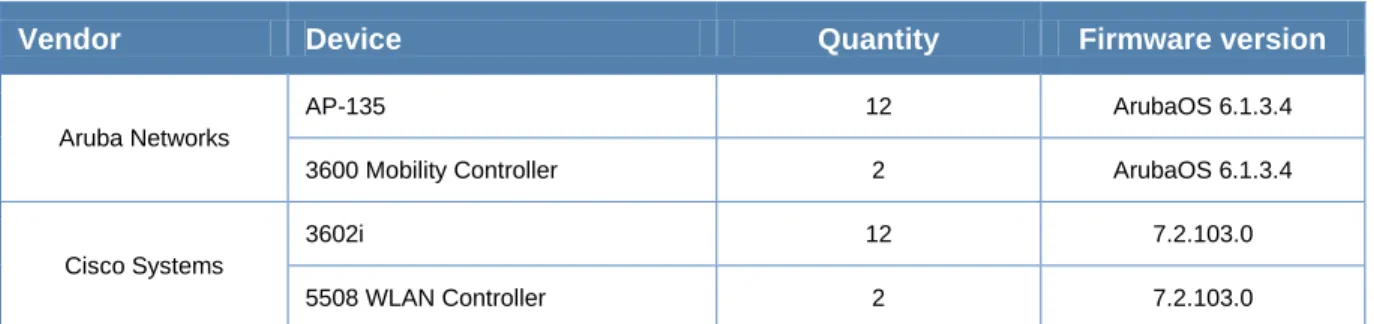
Table 2: Hardware under test
Vendor Device Quantity Firmware version
Aruba Networks
AP-135 12 ArubaOS 6.1.3.4
3600 Mobility Controller 2 ArubaOS 6.1.3.4
Cisco Systems
3602i 12 7.2.103.0
5508 WLAN Controller 2 7.2.103.0
The following table shows the detailed information on various network components that
were part of the infrastructure used for the high-availability tests.
Table 3: Test equipment used
Item Component Specifications Details
1
Device OS/Type Make and model Quantity Operating system
Laptops
MacBook Pro 3 10.7.3
MacBook Pro 5 10.7.2
MacBook Pro 2 10.6.8
Dell Latitude 10 Windows 7
Tablets iPad 4 5.1.1 iPad 15 5.1 iPad 1 4.3.2 Smartphones iPhone 10 5.0.1 iPhone 10 5.0.0 2 Performance evaluation tools
VLC media player Version 1.1
Microsoft Lync Server 2010 -
3 Radius server Aruba Clear Pass Policy Manager hardware appliance Version 5.2
4 Switch Aruba Mobility Access Switch
S3500-48P Version 7.2
All APs were connected at Layer 2 to the Aruba S3500 Mobility Access Switch. The
Aruba ClearPass Policy Manager provided RADIUS services for the mobile devices,
which were provisioned with 802.1X PEAP authentication. The controller configurations
for both Aruba and Cisco are included in the appendix for reference.
High-Availability Test Scenarios
When a wireless controller fails, APs have to establish connectivity with designated
redundant controller before clients can send or receive traffic. While the controller failure
cannot be avoided, the network downtime can be minimized. Aruba offers Layer 2
redundancy using VRRP and Layer 3 redundancy to provide local and data center
redundancy with different deployment options.
Active-Active (1:1) – In this active-active redundancy model, two Mobility Controllers
share a set of access points, divide the load, and act as a backup for each other.
Active-Standby (1+1) – The active-standby model also has two controllers, but in this
case, one controller sits idle while the primary controller supports the full load of APs
and users.
Many-to-one (N+1) – The many-to-one model is ideal when cost of redundant controller
deployment needs to be minimized. Typically, the active controllers are smaller scale
models, and a larger scale controller is deployed as the standby to all active controllers.
The tests are based on a 12-AP WLAN capable of serving an average-sized office
building. The tests start with a WLAN with no clients and move to measuring resiliency
of controller failure against high density of mobile devices and active mobile applications.
In each test case, the network outage is simulated by unplugging the LAN cable
connected to the primary controller. Both Aruba and Cisco were tested in the same
environment but at different times.
1.
Measuring AP failover times
– This test determines the average time it takes for
12 APs to become fully active and start serving clients again when the primary
controller fails and the secondary controller takes over.
2.
Monitoring mobile device connectivity
– This test was run to determine if all of
the 60 mobile devices under test, connected across 12 APs, were able to maintain
Wi-Fi connectivity after the simulated network outage.
3.
Monitoring recovery of mobile applications
– This test helps determine real-time
application behavior at failover. Specifically, this test measures whether active
Microsoft Lync and Apple FaceTime video calls, GoToMeeting web conference
sessions, and file download sessions stay connected after the simulated network
outage.
4.
The
kitchen-sink
test
– With 60 mobile devices running different types of real-time
mobile applications, this test helps determine if mobile applications stay connected
after the simulated network outage.
A. Measuring AP failover times during network outage
This test determines the average time it takes for 12 APs to recover and become fully
active so they can start serving clients again. There are no mobile devices associated
with the wireless network in this test.
This test helps to baseline the recovery time for the system using default settings, which
customers typically use. This is not a real world use case but it helps establish a
baseline that makes it easy to compare one vendor to another without any other
variable like client response time or the radius server processing time.
Table 4 captures the results from three separate test runs.
Table 4: AP failover times
Metric Test 1 Test 2 Test 3 Average
Aruba WLAN Time (seconds) 8 8 8 8
Cisco WLAN Time (seconds) 61 62 61 61
These tests demonstrate that with no clients on the network, the Aruba APs come
online about seven-times faster than the Cisco APs. It was noted that the Cisco APs
consistently took about 30 seconds to re-establish the CAPWAP tunnel in addition to
the 30 seconds of heartbeat timeout interval.
B. Monitoring mobile device connectivity after network outage
This test measures recovery times for 60 clients connected across 12 APs in the same
building. These are real clients – a mixture of laptops, tablets and smartphones. The
test measured the time from when the LAN cable was pulled from the controller until the
final client reconnected automatically without manual intervention. There was a
continuous ping test running to all the clients during the test to make sure there was
both Layer 2 and Layer 3 connectivity to the network.
In the Cisco WLAN, up to 10 mobile devices failed to connect back to the network
automatically after the simulated network outage. This behavior was primarily observed
with the Apple iPad and iPhone clients, and primarily on the 2.4-GHz frequency band.
Table 5 shows the number of dropped Wi-Fi associations on Aruba and Cisco WLANs
after the simulated network outage, over three independent test runs.
Table 5: Dropped Wi-Fi associations after network outage
Metric Test 1 Test 2 Test 3 Average
Aruba WLAN
Dropped Wi-Fi associations
0 0 0 0
Cisco WLAN 10 11 10 10
C. Measuring recovery of mobile applications after network
outage
A video conference call is the most sensitive to delay and loss. It’s also the most
effective way to test the resiliency of a WLAN. If the network outage is transparent to an
end user on a video call, that’s proof of a successful design for high availability.
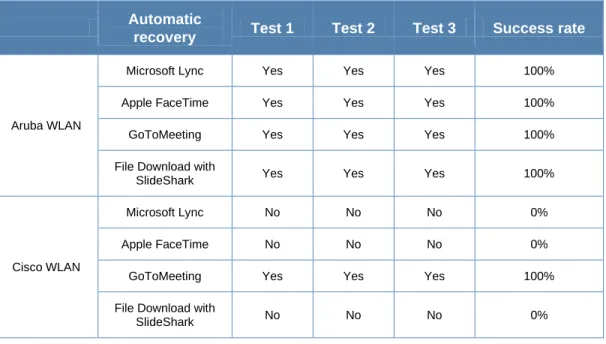
This test uses Microsoft Lync and Apple FaceTime to initiate the videos calls among
mobile devices. Test also measures the survivability of other common mobile
applications – unicast and multicast video streaming within the corporate intranet (not
cloud based), web conferencing and file download.
Table 6: Dropped application sessions after network outage
Automatic
recovery Test 1 Test 2 Test 3 Success rate
Aruba WLAN
Microsoft Lync Yes Yes Yes 100%
Apple FaceTime Yes Yes Yes 100%
GoToMeeting Yes Yes Yes 100%
File Download with
SlideShark Yes Yes Yes 100%
Cisco WLAN
Microsoft Lync No No No 0%
Apple FaceTime No No No 0%
GoToMeeting Yes Yes Yes 100%
File Download with
D. The Kitchen-Sink Test
This test measured failover times for all 12 APs serving 60 mobile devices, which are
running a variety of mobile applications. A total of 20 video calls, 35 video streaming
sessions and 5 file downloads were initiated.
This test showed that after the simulated network outage, all mobile applications stayed
connected in the Aruba WLAN while all mobile applications in the Cisco WLAN required
manual intervention, including restarting video calls and file downloads.
Table 7: 12 AP Failover with 60 active mobile devices
Metric Test 1 Test 2 Test 3 Average
Aruba WLAN
Number of failed mobile application sessions
0 0 0 0
Cisco WLAN 60 60 60 60
Summary and Conclusion
As enterprises grapple with an increasing number of mobile devices and real-time
applications, it becomes ever more challenging to maintain uninterrupted connectivity
and acceptable levels of performance.
Loss of connections, dropped calls and downtime result in higher operating costs,
declining productivity and dissatisfied users for these organizations. Making sure the
network can sustain an outage or event without devices and applications being
disconnected is an essential capability in every WLAN.
This test report highlights the differences between an Aruba WLAN and Cisco WLAN
when it comes to resiliency of mobile devices and applications during simulated network
outages. The test results show that:
The Aruba WLAN delivers seven-times faster failover performance of APs
between active and redundant Mobility Controllers.
Rapid recovery of the Aruba WLAN enables high densities of mobile devices and
real-time mobile applications to stay connected.
The Cisco WLAN requires manual intervention after a simulated network outage
in order for mobile devices and applications to re-establish connectivity.
Appendix – Vendor Configurations
The configurations for Aruba and Cisco WLAN controllers used for test cases are shown
below.
Aruba Configuration:
hostname "solution-3600" clock timezone PST -8 location "Building1.floor1" controller config 128ip NAT pool dynamic-srcnat 0.0.0.0 0.0.0.0 ip access-list eth validuserethacl
permit any !
netservice svc-pcoip2-tcp tcp 4172 netservice svc-netbios-dgm udp 138 netservice svc-snmp-trap udp 162 netservice svc-citrix tcp 2598 netservice svc-syslog udp 514 netservice svc-l2tp udp 1701 netservice svc-ike udp 500 netservice svc-https tcp 443 netservice svc-smb-tcp tcp 445 netservice svc-dhcp udp 67 68 netservice svc-ica tcp 1494 netservice svc-pptp tcp 1723 netservice svc-sec-papi udp 8209 netservice svc-sccp tcp 2000 netservice svc-telnet tcp 23 netservice svc-lpd tcp 515
netservice svc-netbios-ssn tcp 139 netservice svc-sip-tcp tcp 5060 netservice svc-kerberos udp 88 netservice svc-tftp udp 69
netservice svc-pcoip-udp udp 50002 netservice svc-pcoip-tcp tcp 50002 netservice svc-http-proxy3 tcp 8888 netservice svc-noe udp 32512 netservice svc-cfgm-tcp tcp 8211 netservice svc-adp udp 8200 netservice svc-pop3 tcp 110 netservice svc-rtsp tcp 554
netservice svc-msrpc-tcp tcp 135 139 netservice svc-dns udp 53
netservice svc-h323-udp udp 1718 1719 netservice svc-h323-tcp tcp 1720 netservice svc-vocera udp 5002 netservice svc-http tcp 80
netservice svc-http-proxy2 tcp 8080 netservice svc-sip-udp udp 5060 netservice svc-nterm tcp 1026 1028 netservice svc-noe-oxo udp 5000 alg noe netservice svc-papi udp 8211
netservice svc-natt udp 4500
netservice svc-ftp tcp 21
netservice svc-microsoft-ds tcp 445 netservice svc-svp 119
netservice svc-smtp tcp 25 netservice svc-gre 47
netservice svc-netbios-ns udp 137 netservice svc-sips tcp 5061 netservice svc-smb-udp udp 445 netservice svc-ipp-tcp tcp 631 netservice svc-esp 50
netservice svc-pcoip2-udp udp 4172 netservice svc-v6-dhcp udp 546 547 netservice svc-snmp udp 161 netservice svc-bootp udp 67 69 netservice svc-msrpc-udp udp 135 139 netservice svc-ntp udp 123
netservice svc-icmp 1
netservice svc-ipp-udp udp 631 netservice svc-ssh tcp 22 netservice svc-v6-icmp 58 netservice svc-http-proxy1 tcp 3128 netservice svc-vmware-rdp tcp 3389 netdestination clearpass-guest host 10.68.1.7 ! netdestination CPPM host 10.68.1.9 ! netexthdr default !
time-range night-hours periodic weekday 18:01 to 23:59 weekday 00:00 to 07:59 !
time-range weekend periodic weekend 00:00 to 23:59 !
time-range working-hours periodic weekday 08:00 to 18:00
!
time-range night-hours periodic weekday 18:01 to 23:59 weekday 00:00 to 07:59 !
time-range weekend periodic weekend 00:00 to 23:59 !
time-range working-hours periodic weekday 08:00 to 18:00
ip access-list session v6-icmp-acl ipv6 any any svc-v6-icmp permit !
ip access-list session control user any udp 68 deny any any svc-icmp permit any any svc-dns permit any any svc-papi permit any any svc-sec-papi permit any any svc-cfgm-tcp permit any any svc-adp permit any any svc-tftp permit any any svc-dhcp permit any any svc-natt permit !
ip access-list session allow-diskservices any any svc-netbios-dgm permit any any svc-netbios-ssn permit any any svc-microsoft-ds permit any any svc-netbios-ns permit !
ip access-list session validuser
network 169.254.0.0 255.255.0.0 any any deny
any any any permit ipv6 any any any permit !
ip access-list session v6-https-acl ipv6 any any svc-https permit !
ip access-list session vocera-acl
any any svc-vocera permit queue high !
ip access-list session vmware-acl
any any svc-vmware-rdp permit tos 46 dot1p-priority 6
any any svc-pcoip-tcp permit tos 46 dot1p-priority 6
any any svc-pcoip-udp permit tos 46 dot1p-priority 6
any any svc-pcoip2-tcp permit tos 46 dot1p-priority 6
any any svc-pcoip2-udp permit tos 46 dot1p-priority 6
!
ip access-list session icmp-acl any any svc-icmp permit !
ip access-list session v6-dhcp-acl ipv6 any any svc-v6-dhcp permit !
ip access-list session captiveportal
user alias controller svc-https dst-nat 8081 user any svc-http dst-nat 8080
user any svc-https dst-nat 8081 user any svc-http-proxy1 dst-nat 8088
user any svc-http-proxy2 dst-nat 8088 user any svc-http-proxy3 dst-nat 8088 !
ip access-list session v6-dns-acl ipv6 any any svc-dns permit !
ip access-list session allowall any any any permit ipv6 any any any permit !
ip access-list session https-acl any any svc-https permit !
ip access-list session sip-acl
any any svc-sip-udp permit queue high any any svc-sip-tcp permit queue high !
ip access-list session citrix-acl
any any svc-citrix permit tos 46 dot1p-priority 6 any any svc-ica permit tos 46 dot1p-priority 6 !
ip access-list session ra-guard ipv6 user any icmpv6 rtr-adv deny !
ip access-list session dns-acl any any svc-dns permit !
ip access-list session v6-allowall ipv6 any any any permit !
ip access-list session tftp-acl any any svc-tftp permit !
ip access-list session skinny-acl any any svc-sccp permit queue high !
ip access-list session srcnat user any any src-nat !
ip access-list session vpnlogon user any svc-ike permit user any svc-esp permit any any svc-l2tp permit any any svc-pptp permit any any svc-gre permit !
ip access-list session logon-control user any udp 68 deny
any any svc-icmp permit any any svc-dns permit any any svc-dhcp permit any any svc-natt permit !
ip access-list session allow-printservices any any svc-lpd permit
any any svc-ipp-udp permit !
ip access-list session cplogout
user alias controller svc-https dst-nat 8081 !
ip access-list session v6-http-acl ipv6 any any svc-http permit !
ip access-list session http-acl any any svc-http permit !
ip access-list session dhcp-acl any any svc-dhcp permit !
ip access-list session captiveportal6
ipv6 user alias controller6 svc-https captive ipv6 user any svc-http captive
ipv6 user any svc-https captive ipv6 user any svc-http-proxy1 captive ipv6 user any svc-http-proxy2 captive ipv6 user any svc-http-proxy3 captive !
ip access-list session ap-uplink-acl any any udp 68 permit
any any svc-icmp permit
any host 224.0.0.251 udp 5353 permit !
ip access-list session noe-acl
any any svc-noe permit queue high !
ip access-list session svp-acl
any any svc-svp permit queue high user host 224.0.1.116 any permit !
ip access-list session ap-acl any any svc-gre permit any any svc-syslog permit any user svc-snmp permit user any svc-snmp-trap permit user any svc-ntp permit
user alias controller svc-ftp permit !
ip access-list session v6-logon-control ipv6 user any udp 68 deny
ipv6 any any svc-v6-icmp permit ipv6 any any svc-v6-dhcp permit ipv6 any any svc-dns permit !
ip access-list session h323-acl
any any svc-h323-tcp permit queue high any any svc-h323-udp permit queue high !
vpn-dialer default-dialer
ike authentication PRE-SHARE
ab023d6fc8236ab3b2143c05dddeb69e6609598 9f387c623
!
user-role ap-role
access-list session control access-list session ap-acl !
user-role default-vpn-role access-list session allowall access-list session v6-allowall !
user-role voice
access-list session sip-acl access-list session noe-acl access-list session svp-acl access-list session vocera-acl access-list session skinny-acl access-list session h323-acl access-list session dhcp-acl access-list session tftp-acl access-list session dns-acl access-list session icmp-acl !
user-role default-via-role access-list session allowall !
user-role guest-logon captive-portal "default"
access-list session logon-control access-list session captiveportal access-list session v6-logon-control access-list session captiveportal6 !
user-role guest
access-list session http-acl access-list session https-acl access-list session dhcp-acl access-list session icmp-acl access-list session dns-acl access-list session v6-http-acl access-list session v6-https-acl access-list session v6-dhcp-acl access-list session v6-icmp-acl access-list session v6-dns-acl !
user-role stateful-dot1x !
user-role authenticated access-list session allowall access-list session v6-allowall !
user-role logon
access-list session logon-control access-list session captiveportal access-list session vpnlogon access-list session v6-logon-control access-list session captiveportal6 !
!
controller-ip vlan 689 interface mgmt
shutdown !
dialer group evdo_us init-string ATQ0V1E0 dial-string ATDT#777 !
dialer group gsm_us init-string
AT+CGDCONT=1,"IP","ISP.CINGULAR" dial-string ATD*99#
!
dialer group gsm_asia
init-string AT+CGDCONT=1,"IP","internet" dial-string ATD*99***1#
!
dialer group vivo_br init-string AT+CGDCONT=1,"IP","zap.vivo.com.br" dial-string ATD*99# ! vlan 4 vlan 683 vlan 689 no spanning-tree interface gigabitethernet 1/0 description "GE1/0" trusted trusted vlan 1-4094 switchport mode trunk
switchport trunk native vlan 689 switchport trunk allowed vlan 4,689 !
interface gigabitethernet 1/1 description "GE1/1" trusted
trusted vlan 1-4094 switchport access vlan 689 !
interface gigabitethernet 1/2 description "GE1/2" trusted
trusted vlan 1-4094 switchport access vlan 683
! interface gigabitethernet 1/3 description "GE1/3" trusted trusted vlan 1-4094 ! interface vlan 689 ip address 10.68.9.20 255.255.255.0 ip helper-address 10.68.1.6 ! interface vlan 1 ip address 172.16.0.254 255.255.255.0 ! interface vlan 683 ip address 10.68.3.241 255.255.255.0 ! interface vlan 4 ip address 172.16.4.2 255.255.252.0 ! vrrp 9 priority 110 ip address 10.68.9.22 description "ha-test" vlan 689
tracking master-up-time 30 add 20 no shutdown ! ip default-gateway 10.68.3.1 2 uplink disable ap mesh-recovery-profile cluster RecoveryawvXfC+pgguocKXn wpa-hexkey crypto isakmp policy 20
encryption aes256 !
crypto ipsec transform-set default-boc-bm-transform esp-3des esp-sha-hmac
crypto ipsec transform-set default-rap-transform esp-aes256 esp-sha-hmac
crypto ipsec transform-set default-aes esp-aes256 esp-sha-hmac
crypto dynamic-map default-dynamicmap 10000 set transform-set transform" "default-aes"
localip 10.68.9.21 ipsec
2c9e5a2bda473b22436fa580e1f06f8acbdf7b7f7 4bda9e7
crypto isakmp eap-passthrough eap-tls crypto isakmp eap-passthrough eap-peap crypto isakmp eap-passthrough eap-mschapv2 vpdn group l2tp
!
vpdn group pptp !
tunneled-node-address 0.0.0.0 adp discovery enable
adp igmp-join enable adp igmp-vlan 0
voice rtcp-inactivity disable
voice sip-midcall-req-timeout disable ap ap-blacklist-time 3600
ssh mgmt-auth username/password mgmt-user admin root
f924d12d0105bfbd17d86a16b86ec9f7bac4ec83 1db59475b6
no database synchronize
database synchronize rf-plan-data ip mobile domain default
! ip igmp ! ipv6 mld ! no firewall attack-rate cp 1024 ipv6 firewall ext-hdr-parse-len 100 !
firewall cp !
firewall cp
packet-capture-defaults tcp disable udp disable sysmsg disable other disable
!
ip domain lookup !
country US
aaa authentication mac "default" !
aaa authentication dot1x "default" termination enable
termination eap-type eap-peap
termination inner-eap-type eap-mschapv2 !
aaa authentication dot1x "dot1x_prof-psh13" !
aaa authentication dot1x "ha-test" !
aaa authentication-server radius "clearpass-guest" host "10.68.1.7" key 3617ff94b6c6c1148e03a8f774d69e9a585b546d 86ad2bd6 !
aaa authentication-server radius "CPPM" host "10.68.1.9"
key
4643df5a0cc74e3e8a1546120898a2b12de74d0 2eb2bd3c2
!
aaa authentication-server radius "CPPM-carlos" host "10.68.9.28" key bf7ebb5ce0d3d005a834d7b38769ee3843f36b1f 939771c2 source-interface vlan 689 !
aaa server-group "cearpass-guest" auth-server clearpass-guest !
aaa server-group "CPPM" auth-server CPPM !
aaa server-group "CPPM-carlos" auth-server CPPM-carlos !
aaa server-group "default" auth-server Internal
set role condition role value-of !
aaa authentication via connection-profile "default"
!
aaa authentication via web-auth "default" !
aaa authentication via global-config !
aaa profile "Aruba-Psk-aaa_prof" initial-role "authenticated"
authentication-dot1x "dot1x_prof-psh13" !
aaa profile "ArubaShowcase" initial-role "authenticated"
dot1x-default-role "authenticated" !
aaa profile "default" !
aaa profile "ha-test"
authentication-dot1x "ha-test" dot1x-default-role "authenticated" dot1x-server-group "CPPM-carlos" !
aaa profile "ha-test-local" authentication-dot1x "ha-test" dot1x-default-role "authenticated" dot1x-server-group "CPPM" !
aaa authentication captive-portal "default" !
aaa authentication wispr "default" !
aaa authentication vpn "default" !
aaa authentication vpn "default-rap" !
aaa authentication mgmt !
aaa authentication stateful-ntlm "default" !
aaa authentication stateful-kerberos "default" !
aaa authentication stateful-dot1x !
aaa authentication via auth-profile "default" !
aaa authentication wired ! web-server ! papi-security ! guest-access-email ! voice logging !
voice dialplan-profile "default" ! voice real-time-config ! voice sip ! aaa password-policy mgmt ! control-plane-security no cpsec-enable ! ids management-profile ! ids wms-general-profile poll-retries 3 ! ids wms-local-system-profile ! ids ap-rule-matching ! valid-network-oui-profile ! ap system-profile "default" ! ap system-profile "ha-test" ! ap system-profile "ha-test-local" ! ap regulatory-domain-profile "default" country-code US valid-11g-channel 1 valid-11g-channel 6 valid-11g-channel 11 valid-11a-channel 36 valid-11a-channel 40 valid-11a-channel 44 valid-11a-channel 48 valid-11a-channel 52 valid-11a-channel 56 valid-11a-channel 149 valid-11a-channel 153 valid-11a-channel 157 valid-11a-channel 161 valid-11a-channel 165 valid-11g-40mhz-channel-pair 1-5 valid-11g-40mhz-channel-pair 7-11 valid-11a-40mhz-channel-pair 36-40 valid-11a-40mhz-channel-pair 44-48 valid-11a-40mhz-channel-pair 52-56 valid-11a-40mhz-channel-pair 60-64 valid-11a-40mhz-channel-pair 100-104 valid-11a-40mhz-channel-pair 108-112 valid-11a-40mhz-channel-pair 116-120 valid-11a-40mhz-channel-pair 124-128 valid-11a-40mhz-channel-pair 132-136 ! ap regulatory-domain-profile "disable-149" country-code US valid-11g-channel 1 valid-11g-channel 6 valid-11g-channel 11 valid-11a-channel 36 valid-11a-channel 40 valid-11a-channel 44 valid-11a-channel 48 valid-11a-channel 153 valid-11a-channel 157 valid-11a-channel 161 valid-11a-channel 165 valid-11g-40mhz-channel-pair 1-5
valid-11g-40mhz-channel-pair 7-11 valid-11a-40mhz-channel-pair 36-40 valid-11a-40mhz-channel-pair 44-48 valid-11a-40mhz-channel-pair 52-56 valid-11a-40mhz-channel-pair 60-64 valid-11a-40mhz-channel-pair 100-104 valid-11a-40mhz-channel-pair 108-112 valid-11a-40mhz-channel-pair 116-120 valid-11a-40mhz-channel-pair 124-128 valid-11a-40mhz-channel-pair 132-136 valid-11a-40mhz-channel-pair 157-161 ! ap wired-ap-profile "default" ! ap enet-link-profile "default" ! ap mesh-ht-ssid-profile "default" ! ap mesh-cluster-profile "default" ! ap wired-port-profile "default" ! ap mesh-radio-profile "default" !
ids general-profile "default" !
ids rate-thresholds-profile "default" !
ids signature-profile "default" !
ids impersonation-profile "default" !
ids unauthorized-device-profile "default" !
ids signature-matching-profile "default" signature "Deauth-Broadcast" signature "Disassoc-Broadcast" !
ids dos-profile "default" !
ids profile "default" ! rf arm-profile "arm-maintain" assignment maintain ! rf arm-profile "arm-scan" ! rf arm-profile "default" ! rf arm-profile "disable" assignment disable ! rf optimization-profile "default" ! rf event-thresholds-profile "default" ! rf am-scan-profile "default" ! rf dot11a-radio-profile "149" channel 48- mgmt-frame-throttle-interval 0 mgmt-frame-throttle-limit 99999 arm-profile "disable" ! rf dot11a-radio-profile "157" channel 157+ mgmt-frame-throttle-interval 0 mgmt-frame-throttle-limit 99999 arm-profile "disable" ! rf dot11a-radio-profile "36" channel 36+ mgmt-frame-throttle-interval 0 mgmt-frame-throttle-limit 99999 arm-profile "disable" ! rf dot11a-radio-profile "44" channel 44+ mgmt-frame-throttle-interval 0 mgmt-frame-throttle-limit 99999 arm-profile "disable" ! rf dot11a-radio-profile "default" ! rf dot11a-radio-profile "disable-149" ! rf dot11a-radio-profile "disable-a" no radio-enable ! rf dot11a-radio-profile "rp-maintain-a" arm-profile "arm-maintain" ! rf dot11a-radio-profile "rp-monitor-a" mode am-mode ! rf dot11a-radio-profile "rp-scan-a" arm-profile "arm-scan" ! rf dot11g-radio-profile "default" ! rf dot11g-radio-profile "disable-g" ! rf dot11g-radio-profile "rp-maintain-g" arm-profile "arm-maintain" ! rf dot11g-radio-profile "rp-monitor-g" mode am-mode ! rf dot11g-radio-profile "rp-scan-g" arm-profile "arm-scan" !
!
wlan voip-cac-profile "default" !
wlan ht-ssid-profile "Aruba-Psk-htssid_prof" !
wlan ht-ssid-profile "default" !
wlan edca-parameters-profile station "default" !
wlan edca-parameters-profile ap "default" !
wlan ssid-profile "Aruba-Psk-ssid_prof" essid "Aruba-Psk"
opmode wpa2-psk-aes wpa2-psk-tkip wpa-passphrase
497e2f9144e50f5c95ae0dde9b405f6a7e557a8b ffcd22b9
ht-ssid-profile "Aruba-Psk-htssid_prof" !
wlan ssid-profile "ArubaShowcase" essid "ArubaShowcase" opmode wpa2-psk-aes wpa-passphrase 97efeb34ea2f0e09b44353cc6b3aa3550f32ea50 a574e4b5 !
wlan ssid-profile "default" essid "ArubaShowcase" wpa-passphrase
42d4a0d237fcdd1b33990ca1325f4904e1a54288 96f58945
!
wlan ssid-profile "ha-test" essid "ArubaShowcase" opmode wpa2-aes max-clients 125 !
wlan ssid-profile "ha-test-local" essid "ha-test"
opmode wpa2-aes !
wlan virtual-ap "Aruba-Psk-vap_prof" no vap-enable
aaa-profile "Aruba-Psk-aaa_prof" ssid-profile "Aruba-Psk-ssid_prof" vlan 683
!
wlan virtual-ap "ArubaShowcase" aaa-profile "ArubaShowcase" ssid-profile "ArubaShowcase" vlan 683
!
wlan virtual-ap "default" !
wlan virtual-ap "ha-test" aaa-profile "ha-test"
ssid-profile "ha-test" vlan 683
band-steering !
wlan virtual-ap "ha-test-local" aaa-profile "ha-test-local" ssid-profile "ha-test-local" vlan 689 ! ap provisioning-profile "default" ! ap spectrum local-override ! ap-group "default" ! ap-group "ha-test" virtual-ap "ha-test" virtual-ap "Aruba-Psk-vap_prof" dot11g-radio-profile "disable-g" ap-system-profile "ha-test" ! ap-group "ha-test-AM" virtual-ap "ha-test" dot11a-radio-profile "rp-monitor-a" dot11g-radio-profile "rp-monitor-g" ap-system-profile "ha-test" ! ap-group "ha-test-local" virtual-ap "ha-test" ap-system-profile "ha-test-local" ! ap-name "ap1" regulatory-domain-profile "disable-149" ! ap-name "ap2" regulatory-domain-profile "disable-149" ! ap-name "port-1-1" dot11a-radio-profile "36" ! ap-name "port-1-2" dot11a-radio-profile "36" ! ap-name "port-2-1" dot11a-radio-profile "44" ! ap-name "port-2-2" dot11a-radio-profile "44" ! ap-name "port-3-1" dot11a-radio-profile "149" ! ap-name "port-3-2" dot11a-radio-profile "149" ! ap-name "port-4-1"
dot11a-radio-profile "157" ! ap-name "port-4-2" dot11a-radio-profile "157" ! ap-name "qcom-1" regulatory-domain-profile "disable-149" ! ap-name "qcom-10" regulatory-domain-profile "disable-149" !
logging level warnings security subcat ids logging level warnings security subcat ids-ap snmp-server enable trap
process monitor log end
!
ip access-list session video-priority
any network 239.0.0.0 255.0.0.0 any permit tos 40
any network 224.0.0.0 255.0.0.0 any permit tos 40
any any any permit !
user-role video-test
access-list session video-priority !
interface gigabitethernet 0/0 description "GE0/0" trusted
trusted vlan 1-4094
ip access-group "video-priority" session vlan 1
!
interface vlan 1
ip address 10.18.66.6 255.255.255.0 !
aaa profile "video-test-PSK-AAA-Profile" initial-role "video-test" authentication-dot1x "default-psk" ! control-plane-security auto-cert-prov ! ap system-profile "default" telnet ! rf arm-profile "default" voip-aware-scan noise-wait-time 30 !
wlan ht-ssid-profile "default"
temporal-diversity !
wlan ssid-profile "video-test-wpa2" essid "video-test-wpa2"
opmode wpa2-aes wmm
mcast-rate-opt !
wlan virtual-ap "default" allowed-band a
ssid-profile "video-test-wpa2" vlan 1
!
wlan traffic-management-profile "default" shaping-policy fair-access ! ap-group "default" virtual-ap "default" dot11a-traffic-mgmt-profile "default" !
Cisco Config:
(Cisco Controller) >show running-config
Notice: "show running-config" has been changed to be an alias to "show run-config".
Use "show run-config commands" to display the configuration commands.
Press Enter to continue or <Ctrl-Z> to abort... System Inventory
NAME: "Chassis" , DESCR: "Cisco 5500 Series Wireless LAN Controller"
PID: AIR-CT5508-K9, VID: V01,
Burned-in MAC Address... 0 Power Supply 1... Absent Power Supply 2... Present, OK
Maximum number of APs supported... 12
System Information
Manufacturer's Name... Cisco Systems Inc.
Product Name... Cisco Controller
Product Version... 7.2.103.0 Bootloader Version... 1.0.1 Field Recovery Image Version... 6.0.182.0
Firmwe Version... FPGA 1.3, Env 1.6, USB console 1.27
Build Type... DATA + WPS System Name... Cisco5508 System Location... System Contact... System ObjectID... 1.3.6.1.4.1.9.1.1069 IP Address... 10.68.3.52 Last Reset... Power on reset
System Up Time... 16 days 2 hrs 21 mins 28 secs
System Timezone Location... Configured Country... Multiple Countries:US
Operating Environment... Commercial (0 to 40 C)
Internal Temp Alm Limits... 0 to 65 C Internal Temperature... +39 C External Temperature... +23 C Fan Status... OK State of 802.11b Network... Disabled
State of 802.11a Network... Enabled
Number of WLANs... 1 Number of Active Clients... 2 Burned-in MAC Address... 0 Power Supply 1... Absent Power Supply 2... Present, OK
Maximum number of APs supported... 12
WLAN ID Interface Network Admission Control Radio Policy
--- --- --- --- 1 clients Disabled None 2 ciscoclients Disabled None 3 multicast-vlan Disabled None 4 management Disabled None
AP Name Slots AP Model Ethernet MAC Location Port Country Priority
--- --- --- --- --- ---- --- ---
AP3600 2 AIR-CAP3602I-A-K9
default location 1 US 1
CleanAir Management Information CleanAir Capable... Yes CleanAir Management Admin State... Enabled
CleanAir Management Operation State... Up
Rapid Update Mode... Off Spectrum Expert connection... Enabled
CleanAir NSI Key... 0 Spectrum Expert Connections counter.... 0
CleanAir Sensor State... Radio Extended Configurations
Beacon period... 100 milliseconds
Beacon range... AUTO Multicast buffer... AUTO Multicast data-rate... AUTO RX SOP threshold... AUTO CCA threshold... AUTO CleanAir Management Information CleanAir Capable... Yes CleanAir Management Admin State... Enabled
CleanAir Management Operation State... Up
Rapid Update Mode... Off Spectrum Expert connection... Enabled CleanAir NSI Key... 0 Spectrum Expert Connections counter.... 0
CleanAir Sensor State... Configured
Radio Extended Configurations
Beacon period... 100 milliseconds
Beacon range... AUTO Multicast buffer... AUTO Multicast data-rate... AUTO RX SOP threshold... AUTO CCA threshold... AUTO
802.11a Configuration
802.11a Network... Enabled Default Tx Power Level... 1 DTPC Status... Enabled Fragmentation Threshold... 2346 TI Threshold... -50
Legacy Tx Beamforming setting... Enabled
Traffic Stream Metrics Status... Disabled
Expedited BW Request Status... Disabled
World Mode... Enabled EDCA profile type... default-wmm
Voice MAC optimization status... Disabled
Call Admission Control (CAC) configuration Voice AC:
Voice AC - Admission control (ACM)... Disabled
Voice Stream-Size... 84000
Voice Max-Streams... 2
Voice max RF bandwidth... 75
Voice reserved roaming bandwidth... 6
Voice CAC Method ... Load-Based Voice tspec inactivity timeout... Disabled CAC SIP-Voice configuration SIP based CAC ... Disabled SIP Codec Type ... CODEC_TYPE_G711 SIP call bandwidth ... 64
SIP call bandwith sample-size ... 20
Video AC: Video AC - Admission control (ACM)... Disabled Video max RF bandwidth... Infinite Video reserved roaming bandwidth... 0
Best-effort AC - Admission control (ACM)... Disabled Background AC - Admission control (ACM)... Disabled Maximum Number of Clients per AP Radio... 200
802.11a Advanced Configuration Member RRM Information AP Name MAC Address Admin State Operation State Channel TxPower --- --- --- --- --- --- AP3600 0 ENABLED UP (149,153) Level 1 WLAN Configuration WLAN Identifier... 4 Profile Name... ArubaShowcase Network Name (SSID)... ArubaShowcase Status... Enabled MAC Filtering... Disabled Broadcast SSID... Enabled AAA Policy Override... Disabled Network Admission Control Qos Queue Length Info Platinum queue length... 100
Gold queue length... 75
Silver queue length... 50
Bronze queue length... 25
Press Enter to continue or <ctrl-z> to abort Media-Stream Configuration Multicast-direct State... enable Allowed WLANs... 2,4,5 Stream Name Stt IP End IP Operation Status -- --- --- --- 2Mbps stream 239.11.11.11 239.11.11.11 Multicast-direct 5Mbps stream 239.10.10.10 239.10.10.10 Multicast-direct URL... E-mail... Phone... Note... State... disable 5G Band Media-Stream Configuration Multicast-direct... Enabled Best Effort... Disabled Video Re-Direct... Enabled Max Allowed Streams Per Radio... Auto Max Allowed Streams Per Client... Auto Max Video Bandwidth... 0
Max Voice Bandwidth... 75
Max Media Bandwidth... 85
Min PHY Rate... 6000
About Aruba Networks, Inc.
Aruba Networks is a leading provider of next-generation network access solutions for
the mobile enterprise. The company’s Mobile Virtual Enterprise (MOVE) architecture
unifies wired and wireless network infrastructures into one seamless access solution for
corporate headquarters, mobile business professionals, remote workers and guests.
This unified approach to access networks enables IT organizations and users to
securely address the Bring Your Own Device (BYOD) phenomenon, dramatically
improving productivity and lowering capital and operational costs.
Listed on the NASDAQ and Russell 2000
®Index, Aruba is based in Sunnyvale,
California, and has operations throughout the Americas, Europe, Middle East, and Asia
Pacific regions. To learn more, visit Aruba at
http://www.arubanetworks.com
. For
real-time news updates follow Aruba on
and
.
© 2012 Aruba Networks, Inc. Aruba Networks’ trademarks include AirWave®, Aruba Networks®, Aruba Wireless Networks®, the registered Aruba the Mobile Edge Company logo, Aruba Mobility Management System®, Mobile Edge Architecture®, People Move.