Using Cloud Services in a Modern
Learning Management System
Alexei Scerbakov, Martin Ebner and Nikolai Scerbakov
Graz University of Technology, Graz, AustriaLMS(Learning Management Systems)today are being widely used in almost every educational facility. In the last years all conceivable use cases that need to be carried out by such LMS have been defined and the features a modern LMS needs to offer are very clear. Rarely do we find something a teacher or student needs that an LMS cannot offer. So the task for LMS developers shifted from offering all tools a teacher or student needs to make these tools as convenient to use as possible. Our goal in this research work is to describe the web services we use in TeachCenter, an LMS that has been widely used for the past years at Graz University of Technology to simplify the use of certain components. It can be pointed out that cloud services have to be an integral part of a modern LMS.
Keywords: learning management systems, LMS, cloud services, teach center, web services
1. Introduction
Technologies, in detail web technologies, are shaping the way we teach and learn today. Dur-ing the last years a dramatic shift happened from teaching without Internet technologies to teach-ing with a ubiquitous available Internet. The speed of how technology is changing is amaz-ing and educators as well as learners get over-whelmed. At the turn of the millennium, so called Learning Management Systems (LMS)
were introduced aiming to assist lecturers in their main activities (Maurer, 1996). With an enormous speed lecture over lecture went dig-ital and today each university in Middle Eu-rope owns their own system holding mainly lec-ture content (presentation, handouts), admin-istrative notes for a lecture, and further tools
(e-assessment, uploading tools, calendar, . . .) online.
After that, the Web 2.0 movement (OReilly, 2006), described as the area where users get more active in the World Wide Web through participation in Wikis, Weblogs or even So-cial Media, hit the field of education under the name of eLearning 2.0 (Downes, 2005). Since then, the number of possibilities of how the web enhances teaching and learning has nearly exploded (Ebner, 2007). Wikis ( Au-gar et al., 2004) (Raitman, 2005), Weblogs
(Farmer & Bartlett-Bragg, 2005), Podcasting
(Evans, 2007) (Towned, 2005) as well as the use of Social Media (Ebner, 2013) for educa-tion attracted many lecturers and learners and changed the way how we use web technolo-gies in our daily life. Since then, collabora-tion, cooperacollabora-tion, and communication between students-teachers as well students-students can be done in an entirely new way (Schaffert & Ebner, 2012), including the use of semantic technologies (Klamma et al., 2007). For ex-ample, applications such as etherpad or Google Drive allow for a timely interaction with each other or mobile technologies allow for a partic-ipation from nearly anywhere(Alley, 2014). Consequently, online communication and col-laboration can only happen if the data is also available online for each participant. Therefore, the number of so called cloud-based services and appropriate devices, and the idea to grant users access to hosted centralized data centers with thin clients are growing(Fang et al., 2009). Cloud sharing services such as Dropbox(Drago et al., 2012) follow a centralized approach – each single user stores their data in a shared folder on the web, where a group of users have access as well as the rights to edit and change. The fact that after each edit all changes are
au-tomatically pushed to all group members helps making such a service valuable and useable. To-day, more or less all big software companies of-fer such a service – iCloud, share point, Google Drive, and Dropbox (Wenjin et al., 2010) are just the most recognized ones.
It is easily imaginable that lecturers, as well as learners, are asking for integration of such cloud-based services into the LMS (Stantchev et al., 2014). Therefore, we address the fol-lowing research question in this research study: How and to what extent should cloud-based ser-vices be integrated into existing Learning Man-agement Systems?
Our publication starts after a short introduction and then explains the research into the archi-tecture of a Learning Management System fol-lowed by a description of how cloud-based ser-vices can be integrated. Finally, we will discuss the advantages and disadvantages for users. 2. Research Design
In our research study we are strongly follow-ing the approach of information systems pro-totyping. According to (Alavi, 1984) as well as(Larsen, 1986)prototyping is based on four steps: identifying basic requirements, develop-ment of a working prototype, impledevelop-mentation and usage, and revision. Therefore, we identi-fied students’ requirements according to cloud systems (Ebner et al., 2013) and developed a working system (Nunamaker & Chen, 1990). The following chapters will describe these new components in more detail. After the final im-plementation we observed students’ usage; and we learned about the role of cloud systems in an LMS.
3. General Concept
Graz University of Technology has a long his-tory and profound experience in technology en-hanced learning. First experiments were car-ried out to enhance online education by devel-oping special authoring tools(Maurer & Scer-bakov, 1996) and information systems with a special focus on e-learning needs (Andrews et al., 1994) almost simultaneously with general recognition of WWW potential for university
education (Dietinger & Maurer, 1998). Such experiments provided an essential experience and know-how for developing a large Content Management System called “Hyper-G”(Kappe et al., 1994)and a Learning Management Sys-tem “WBT-Master”(Helic et al., 2004). A log-ical follow up development and variant is the so called TeachCenter (TC), which serves as a heavily used Learning Management System at Graz University of Technology since 2007. After a pilot phase testing different use cases
(Ebner et al., 2006) (Ebner & Walder, 2008)
it became a university wide service and is used today by more than 15,000 students and 2,000 lecturers. Between 2008 and 2010 a number of Web 2.0 applications were integrated using so called Application Programming Interfaces, following the approach of Edupunk (Ebner et al., 2011). Today, it differs significantly from other popular LMS in a number of aspects. 3.1. Architecture of TeachCenter
TeachCenter is built on the base of innovative architecture known as AJAX (Asynchronous JavaScript and XML). Thus, data processing is performed on the client side by means of JavaScript and dynamic HTML. As a result, the system demonstrates good performance under heavy load. Thus, the system can be seen as a number of HTML 5 files with the inclusion of CSS and JavaScript files. JavaScript files com-municate to a server using the JSON(JavaScript Object Notation)protocol. Server functionality is essentially simplified and implemented as a number of Java servlets. In this architecture Java servlets do not handle any data processing, but retrieve data from a database and wrap it in accordance with JSON standards. It should be especially noted that the TeachCenter normally works with three hundred to five hundred users simultaneously and the response time for any action is very fast. This creates comfortable environment for end users.
Another well-known advantage of AJAX is the utilization of modern user interface elements. For example, most editing in TeachCenter is done using advanced user interface features such as drag and drop, event-based function-ality and so on. Some well-known disadvan-tages of AJAX, such as security problems in case of script manipulation, are not so critical
for an e-learning system, because it does not contain sensitive data and is partially mitigated in TeachCenter by means of so called tokens. Users get a unique token as they log in to the sys-tem and this token is stored on both, the server and the client sides. When the user performs an action, the tokens are checked for equality. Thus, some actions that are not supposed to be done by the user are easily identifiable.
3.2. Main TeachCenter Concepts
Normally, LMS offer courses consisting of HTML pages that need to be authored by the teacher beforehand. In other words, a course can be seen as a combination of HTML pages and authoring is one of the main tasks to be per-formed by teachers as they work with an LMS. A few years of experience in Graz University of Technologies have shown that the need for au-thoring is the main obstacle for the acceptance of a system used by teachers.
In order to improve acceptance of the system by teachers, the TeachCenter was built using a modular concept. Courses consist of a num-ber of predefined areas and additional tools. For example, there is a special area for doing announcements for students, a special area for
describing administrative issues such as course calendar, objectives of a course and so on. Such areas demand a minimum (if any) amount of authoring from the teacher side. Teachers can easily add new announcements and delete or modify existing ones. As an example of addi-tional tools, there are student projects, where students upload any files teachers demand, and the quiz tool, where teachers define questions to users, that must be answered within the stipu-lated time. Needless to say, the areas and mod-ules can be easily switched on or off, to create a course as a collection of areas and tools that satisfies the teachers’ needs.
One of the most important tasks an LMS has to fulfill is file management and distribution. That is, teachers must have extremely simple and powerful tools to upload files to the server and students must have equally convenient tools to download files to their computers. In the TeachCenter there is a special area responsible for such file management. It is called course library.
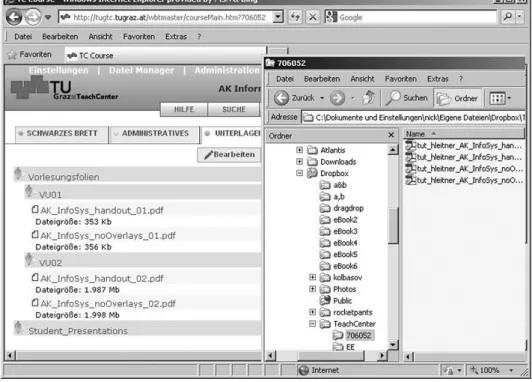
As you can see in Figure 1, the course library is a collection of folders and documents that were uploaded and organized by a teacher. This task, uploading data and arranging files in the course library, can be rather time consuming, depend-ing on the particular size and number of files.
We should also mention that initial uploading normally does not create particular problems, but students should always get the latest version of the files. And keeping all files in an up-to-date version, as well as notifying users of the latest changes of files, may create reasonable problems. A solution that would save the users some time and make a better user experience is using a cloud sharing service to deliver course materials from the TeachCenter to the learners’ desktop and materials from a teacher’s desktop to the TeachCenter.
4. Delivering from TC
When we speak about downloading materials from an LMS, we normally talk about three sce-narios
1. A teacher uploads materials to the LMS. All materials are visualized with information on date of uploading and size of the uploaded file. Students may freely browse this repos-itory and use information about the date of uploading and the size in order to identify materials for downloading. No additional notification on new materials is provided. 2. A teacher uploads materials to the LMS and
the LMS automatically sends emails to all
users that are subscribed to notification on updates. Users download materials only af-ter receiving such emails.
3. A teacher uploads materials to the LMS. The LMS generates an RSS(Really Simple Syn-dication)feed where all the latest modifica-tions are described. Students subscribe to one or more of such feeds and get notifica-tions from special RSS readers directly on their desktops.
All these three scenarios are implemented in TC. There is a forth innovative scenario based on cloud services. So called OAuth authentica-tion and Dropbox API are heavily used in the TeachCenter. Loosely speaking, the OAuth au-thentication protocol enables a third party ap-plication to obtain limited access to an HTTP service. In our case the users define the so called OAuth signature where they request ac-cess to their Dropbox directory and a so called token. This token is generated by the Dropbox server to allow access to the services described in the signature. Each user who has defined a signature and got a token from Dropbox, saves this information in the user profile. Thus the TeachCenter now has access to selected users’ Dropboxes. In this way, users may identify some TC folders of interest and synchronize
them via Cronjob with their own Dropbox fold-ers. From the user point of view, we achieve functionality which can be seen as automatic delivery of actual files onto the user’s Desktop. Technically, we use two synchronization proce-dures. The first one synchronizes a folder on the TeachCenter with a folder on Dropbox and the second one synchronizes Dropbox folders with user desktops (Figure 2). The advantage of the latter approach can be seen as full automa-tion of delivering learning materials instead of manual downloading them after any kind of no-tification. The LMS automatically scans the repositories for new files and uploads them to user Dropboxes via the API.
5. Delivering to TC
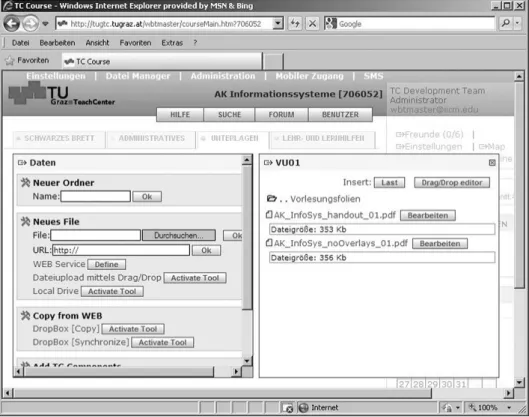
Similar to downloading materials from the TeachCenter, teachers are responsible for up-loading new materials and updating the existing ones. Normally, such uploading is done using special forms or more advanced interface solu-tions, such as drag and drop.
Of course, an ideal solution would be automatic uploading of the latest version of files,
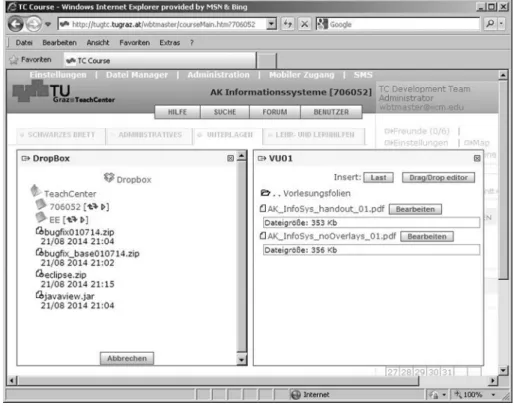
imme-diately after their modification on the teacher’s desktop. TeachCenter provides such possibili-ties via cloud services similar to downloading materials. A teacher defines signature and to-ken for accessing a particular Dropbox, but this information is not attached to a personal, but to a course profile. Additionally, teachers identify Dropbox directories that must be synchronized with folders in the TeachCenter. Let us consider a typical sequence of actions on how a file ap-pears on the TeachCenter. A teacher opens the Dropbox folder on their computer and creates a file(it might be a .doc, .pdf, .ppt file etc.). The teacher may edit this file using ordinary edit-ing tools such as Microsoft Office, Open Office etc. As soon as the files on their local com-puter are modified, they are synchronized with the files on the Dropbox server. TeachCenter on stipulated time scans directories on Dropbox and synchronizes them with the directories on TeachCenter. Virtually, this functionality may be seen as automatic access to the latest version of files that are situated on a teacher’s desk-top. To avoid unnecessary traffic with multiple copies of one and the same file, actual synchro-nization is carried out as a Cronjob once a day.
Figure 4.Dropbox synchronization view window.
6. Sharing Materials
Very often Learning Management Systems serve as repositories of files uploaded by students for evaluation by teachers. Typical example would be if a teacher requests each student to perform some programming work and upload source files to the server for evaluation by the teacher.
To avoid any problems with mass uploading files by the students, e.g. time of uploading, deadlocks, corrupted files and so on, Teach-Center uses the following approach. Students register their Dropbox folders in TeachCenter in the same way as before. That is, they pro-vide signature and token to propro-vide access to a certain folder in Dropbox. Students are sup-posed to put their materials (result documents and files) into such Dropbox folders. From a user point of view, they simply drag and drop them to a remote folder on their desktop. After the deadline for the upload, the teacher initiates a special procedure to download all files onto the server. Since copies of the files are still kept in Dropbox folders, the problem of corrupted uploads is solved. If a teacher identifies a cor-rupted file on the server, they can easily repeat synchronization with the folder containing the original (uncorrupted) file. It also solves the
problem of network traffic, because download-ing is done only once and at night, when the server load is minimal.
7. Collaborative Authoring
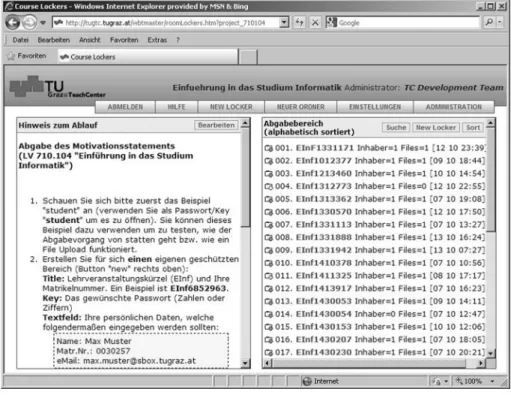
One of the most popular components of the TeachCenter is called group lockers. This com-ponent is intensively used for arranging differ-ent kinds of practical work. The compondiffer-ent can be defined for any TeachCenter course and can be seen as a collection of so called lockers. A locker is a protected memory area that can only be used by a group of students who are called members of this group. Members of a particular group can access the locker, preview its content and upload files. Any uploads are done on behalf of a particular user group and can be accessed and modified by members of this group.
Roughly, lockers simplify the following training scenario.
1. A teacher defines a practical assignment for a certain user group. This assignment can be defined as a textual file for every group or as one single assignment for all groups.
Figure 5.List of a number of student lockers.
2. The students solve this particular problem and generate a number of files. These can be textual files, source code files, result of some calculations and so on.
3. The students upload these files to their lock-ers. The teacher has access to any locker
in their course and export facilities that al-low to export all locker content to a form processable on a local computer.
4. The teacher evaluates the assignments up-loaded by the students and writes comments and provides evaluation points.
The concept of lockers is that they are supposed to be used for collaborative work on a particular assignment. At the same time, lockers pro-vide purely single user functionality ( upload-ing files and access files). In order to provide real multi-user facilities, the locker functional-ity was extended with an interface to cloud ser-vices such as Google Drive or Etherpad. Each locker may be associated with a particular ac-count on Google docs, Google Drive or Ether-pad. As soon as a user defines signature and token for accessing a user account on this cloud service, this information is saved into the user locker and the system gets access to files on the cloud service. Additionally, all members of the working group provide information on their own cloud service accounts and Teach-Center takes care of providing access to files from TeachCenter from any cloud user account. Thus, users may edit files in a really collabo-rative way and the latest version of the files is saved in the user lockers.
8. Remote Evaluation of Submissions As it was mentioned earlier, student lockers are one of the most popular applications in Teach-Center, that are actively used for many different purposes. One of the most often used scenarios of lockers are different kinds of programming exercises. In this case teachers define a task that must be solved as a particular
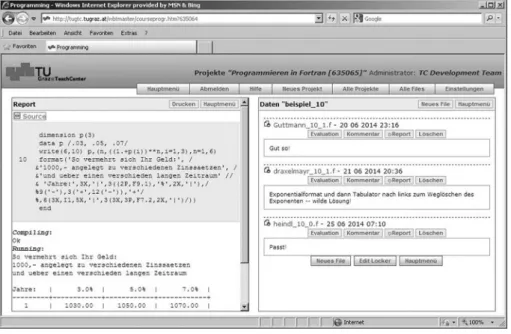
program-ming application. Students are supposed to up-load source codes to their lockers and in order to evaluate sources the teacher needs to down-load them, compile and run them on their local computers. This creates tedious and consider-able work for the teacher. In TeachCenter, a special kind of web services is used to automate this process. Files having a certain extension, for example .c .f .java, may be associated with special web services. The web services use the SOAP(Simple Object Access Protocol)format to communicate and deliver sources to a spe-cial environment on another server where these sources are compiled and executed. All outputs of compilation and execution of the program are returned to TeachCenter as a text file and this text file is saved in a locker. The teacher sees not only a source code uploaded by students, but also the results of the practical running of the modules. In TeachCenter right now we have ex-perience with the following programming mod-ules: FORTRAN, C, C++, Java, Mat-lab and SQL. For these types of files there is a spe-cial web service which performs all previously mentioned actions.
9. Format Conversion Using Web Services In this section we will discuss the benefits as well as dangers of integrating cloud services in a Learning Management System. First of all, we list the positive facts:
1. Acceptance: There is just one very convinc-ing fact: students simply love it. A couple of evaluations(Ebner et al., 2013) (Ebner et al., 2014)pointed out that Dropbox is in general a heavily used application for students at the university. Besides Facebook, it is the most used and well-known platform, due to the fact that working in groups is much easier with a central synchronized folder. Further-more, explicit evaluations show that users of the LMS rate this feature especially as very high(Stantchev et al., 2014). Finally, the number of folders connected to the LMS support this feedback. Students stated it is a power feature, because just a few clicks are needed to get all content from the LMS to their personal Dropbox folders and just a few more to share it with their colleagues. It is easy.
On the other side, lecturers tend to ne-glect this possibility. The idea is that they can also bind their Dropbox folder to the LMS. If there is any file changed in the Drop-box, it will be automatically synchronized. From our point of view we see a gap in dig-ital literacy between teachers and students. For students, using Dropbox or similar ap-plications is part of their daily(school-)life. Teachers are less familiar with collaboration tools.
2. Learning Behavior: Due to the fact that the tools are highly accepted by learners, not only the usability and the pace to get the data are crucial, but also the personal learning be-havior. Today each single learner is addicted to a number of digital applications assisting their daily routine. For example, the smart phone functioning as an mp3-player, game consoles as well as phones and so on. For years the term “personal learning environ-ment” has been discussed in the scientific community and is seen as the summary of all digital applications used for learning, ar-ranged in a specific form (Attwell, 2007). In other words, cloud services are part of to-day’s personal learning behavior and should therefore be supported by educational insti-tutions as well.
3. Learning Scenarios: A further positive fact is that collaboration tools allow in general new didactical scenarios. For example, edit-ing a document in real-time by different
learners had not been possible before Ether-pad or Google Drive was offered. Today, essays, protocols, and notes can be written collaboratively in a timely manner. It must be pointed out that such things were not pos-sible before and that they allow new didacti-cal approaches. Therefore it is important to assist teachers and learners with the integra-tion into the LMS. For example, one lecture used the Etherpad extensively for writing es-says by a groups of students. The teacher of the lecture stated that he benefited from it through the synchronization of the docu-ments. He always knows the status of each single project. If the process of a document is essential for the final exam, cloud services might help.
Furthermore, there are also some negative facts about the use of cloud services:
1. Reliability: First of all, if a cloud service is down, no document will be available. If this happens once, it will be forgotten in the long run, but if it happens often, this is indeed a huge problem. If a teachers plans to do a collaborative work and it is simply not pos-sible, they will maybe never use this service again. From a teacher’s perspective the ser-vice must be reliable and from a university’s perspective, this means taking responsibility in the long run and paying for the service. It is risky to use free services for education if there is no alternative.
2. Legal Issues(Privacy and copyright): Legal issues are very important, especially in Eu-rope and in German speaking areas. First of all, educational institutions have to guar-antee that no personal data can be accessed by a non-authorized third party institution. In other words, storing personal data about students(assessments, names etc.) on cloud services might be a problem. Furthermore, teachers are obliged to store all data which was part of the final grade for at least two years. If they are not able to retrieve the data in case of a student’s request, the university is in serious trouble. Second, there are also copyright issues. If, for example, students download presentations or any content from the LMS to the Dropbox without explicit per-mission of the author, this would lead to a violation of the copyright law. Furthermore, any sharing, remixing or even republishing
makes it even worse. The only chance to avoid such situations is to provide Open Ed-ucational Resources within the LMS, allow-ing use of the content for learnallow-ing purposes
(Schaffert, 2010).
3. Third Party Dependence: Another issue is the dependence on the third party applica-tion. For example, the cloud service changes its API, which must be adopted within a very short time frame in the LMS. Otherwise, users will not trust the service any more. Especially free services may change their policy or their business models. It could be possible that some features must be paid in future otherwise files cannot be download-able. Such situations can drastically change the view on cloud services.
10. Conclusion
As already mentioned, we followed the infor-mation systems prototyping approach. Our con-clusion is that it was the right choice and we have shown the advantages of cloud services in modern LMS. We have briefly described a num-ber of functional components of a modern LMS based on cloud services. Of course, the num-ber of such components is not limited to just the few described here. Cloud services are also used in order to share course calendars, educa-tional picture galleries and access to social net-work components such as blogs, Facebook and Twitter. One of the rather popular applications of blogs and Twitter in LMS is providing live news feeds for students. The number of applica-tions of modern cloud services will significantly grow in the near future. The advantage of using such services is obvious. Cloud services pro-vide a very convenient environment for editing, uploading and downloading content. For exam-ple, as it was mentioned earlier, Dropbox can be simply synchronized with the local file system and thus editing of remote materials becomes equal to editing local materials. Editing of pic-ture galleries such as Picasa and Facebook can be done directly as you make snapshots on your mobile device. Introducing cloud services into the daily work of teachers spares them tedious work for uploading and upgrading materials for students. At the same time, the use of cloud services faces serious obstacles from technical and legal perspectives.
From the technical perspective, the main prob-lem is the dependency of the LMS on third party services. Obviously, if you reuse any kind of cloud services you expect it to be up and run-ning 24 hours a day, which is not always the case. Another issue is the API (Application programming interface)which is used for com-munication from the LMS to cloud services. Such interfaces are permanently under develop-ment and not always backward compatible. In other words, if the API version 0.1 of Dropbox was used for communicating to the Dropbox, it becomes obsolete when version 1.0 appears. For example, we were unpleasantly surprised in the middle of the term when all interfaces to user Dropboxes stopped working. Legal is-sues are mainly rotating the copyright permis-sions to share materials on cloud services. Thus students who upload materials to their Drop-box and would like teachers to access these materials, sometimes disagree with saving all credentials needed on TeachCenter to access their Dropbox. In the future, we expect signif-icant development, especially in sharing access to cloud services and solving all legal issues related to using these services for educational purposes.
References
[1] M. ALAVI, An assessment of the prototyping ap-proach to information systems development, Com-mun.ACM,27(6), pp. 556–563, June 1984.
[2] M. ALLY, M. GRIMUS, M. EBNER, Preparing teachers
for a mobile world, to improve access to education. Prospectus, Springer Netherlands, pp. 1–17, 2014.
[3] K. ANDREWS, F. KAPPE, H. MAURER, The Hyper-G
Network Information System.Journal of Universal Computer Science (j-jucs),1(4), pp. 206–220, 1995.
[4] G. ATTWELL, The Personal Learning Environments – the future of eLearning? eLearning Papers,2(1). ISSN 1887–1542. pp. 1–8, 2007.
[5] N. AUGAR, R. RAITMAN, W. ZHOU, Teaching and
learning online with wikis. In: R. ATKINSON, C.
MCBEATH, D. JONAS-DWYER, R. PHILLIPS,(Eds.),
Beyond the comfort zone: Proceedings of the 21st ASCILITE Conference, (pp. 95–104), December 5–8, 2004, Perth, Australia.
[6] T. DIETINGER, H. MAURER, GENTLE – General
Network Training and Learning Environment.Proc. of ED-MEDIA98 / ED-TELECOM 98, Freiburg, pp. 274–280, 1998.
[7] S. DOWNES,(2005), e-Learning 2.0,ACM e-Learn
Magazine,10, October 2005.
[8] I. DRAGO, M. MELLIA, M. MUNAFO`, A. SPEROTTO,
R. SADRE, A. PRAS, Inside Dropbox:
Understand-ing Personal Cloud Storage Services.IMC ’12 Pro-ceedings of the 2012 ACM Conference on Internet Measurement Conference, pp. 481–494, 2012,
[9] M. EBNER, N. SCERBAKOV, H. MAURER, (2006),
New Features for eLearning in Higher Education for Civil Engineering,Journal of Universal Science and Technology of Learning,1(1), pp. 93–106.
[10] M. EBNER,(2007), E-Learning 2.0=e-Learning 1.0
+Web 2.0?, In: The Second International Confer-ence on Availability, Reliability and Security, ARES 2007, IEEE, S. 1235–1239, ISBN 0-7695-2775-2.
[11] M. EBNER, U. WALDER, E-Education in Civil
En-gineering – A Promise for the Future? In: Pro-ceedings of 6th AECEF Symposium Education in Changing Europe, P. VAINIUNAS, L. JUKNEVICIUS, ed., Vilnius, Litauen, pp. 16–26, 2008.
[12] M. EBNER, The Influence of Twitter on the
Aca-demic Environment. B. PATRUT, M. PATRUT, C.
CMECIU, (ed.), Social Media and the New
Aca-demic Environment: Pedagogical Challenges, IGI Global, pp. 293–307, 2013.
[13] C. EVANS, The effectiveness of m-learning in the
form of podcast revision lectures in higher educa-tion.Computers & Education,50(2), pp. 491–498, 2007.
[14] M. EBNER, N. SCERBAKOV, P. TSANG, A.
HOLZINGER, EduPunks and Learning Management
Systems – Conflict or Chance? In: Proceedings of International Conference on Hybrid Learning IHCL, Springer Lecture Notes in Computer Sci-ences LNCS 6837. S. 224–238, 2011.
[15] M. EBNER, W. NAGLER, M. SCHON¨ , “Architecture
Students Hate Twitter and Love Dropbox” or Does the Field of Study Correlates with Web 2.0 Be-havior? In Proceedings of World Conference on Educational Multimedia, Hypermedia and Telecom-munications, pp. 43–53, 2013, Chesapeake, VA: AACE.
[16] M. EBNER, W. NAGLER, M. SCHON¨ , Do You Mind NSA Affair? Does the Global Surveillance Disclo-sure Impact Our Students? InProceedings of World Conference on Educational Multimedia, Hyperme-dia and Telecommunications, pp. 2307–2312, 2014, Chesapeake, VA: AACE.
[17] U. EHLERS, D. SCHNECKENBERG,(Hrsg.), Chang-ing Cultures in Higher Education – MovChang-ing Ahead to Future Learning, New York: Springer, S. 119– 132.
[18] H. FANG, T. V. LAKSHMAN, S. MUKHERJEE, S.
HAOYU, “Enhancing Dynamic Cloud-based
Ser-vices using Network Virtualization”. VISA ’09, Proceedings of the 1st ACM Workshop on Virtual-ized Infrastructure Systems and Architectures, pp. 37–44, ACM New York, NY, USA, 2009.
[19] J. FARMER, A. BARTLETT-BRAGG, Blogs @
any-where: High fidelity online communication. Pro-ceedings of ASCILITE 2005: Balance, Fidelity, Mobility: maintaining the momentum?, pp. 197– 203, 2005.
[20] D. HELIC, H. MAURER, N. SCERBAKOV, Knowledge Transfer Processes in a Modern WBT System. In Journal of Network and Computer Applications,
27(3), pp. 163–190, 2004.
[21] F. KAPPE, K. ANDREWS, K. SCHMARANZ, H. MAU -RER, Hyper-G: A Distributed Hypermedia System
of the Second Generation. Proc.EEOS Workshop on European Data Networks and Earth Observation User Information Services: Survey and Consulta-tion, Marino(Rome), Italy, European Commission Joint Research Centre and ESA/ESRIN, pp. 305– 318, 2004.
[22] R. KLAMMA, M. A. CHATTI, E. DUVAL, H. HUMMEL, E. T. HVANNBERG, M. KRAVCIK, E. LAW, A. NAEVE, P. SCOTT, Social software for life-long learning. In:
Educational Technology & Society,10(3), pp. 72– 83, 2007.
[23] O. LARSON, Information Systems prototyping. Pro-ceedings Interez HP 3000 Conference, Madrid, pp. 351–364, 1986. URL: www.openmpe.com /csl-proceed/HPIX86/P351.pdf(last visited October
2014).
[24] H. MAURER, HyperWave: The Next Generation Web Solution. Addison-Wesley Longman, London, 1996.
[25] H. MAURER, N. SCERBAKOV, Multimedia
Author-ing for Presentation and Education: The Official Guide to HM-Card. Addison-Wesley, Bonn, p. 250, February 1996.
[26] J. F. JR. NUNAMAKER, M. CHEN, Systems
devel-opment in information systems research. System Sciences,Proceedings of the Twenty-Third Annual Hawaii International Conference on, 3, pp. 631, 640, 2− −5 Jan 1990.
[27] T. O’REILLY, Web 2.0: Stuck on a name or hooked
on value? Dr. Dobbs Journal, 31(7), pp. 10–10, 2006.
[28] R. RAITMAN, N. AUGAR, W. ZHOU, Employing wikis for online collaboration in the e-learning environment: Case study. In Proceedings of the third international, 2005.
[29] S. SCHAFFERT, Strategic Integration of Open Educa-tional Resources in Higher Education. Objectives, Case Studies, and the Impact of Web 2.0 on Univer-sities. In: U. 23, 2010.
[30] S. SCHAFFERT, M. EBNER, New Forms of and Tools for Cooperative Learning with Social Software in Higher Educatio. In: Encyclopedia of Computer Science, R. T. ABRAMS (Ed.), Nova Publishers,
Hauppauge NY, pp. 537–552, 2012.
[31] V. STANTCHEV, R. COLOMO-PALACIOS, P. SOTO
-AACOSTA, S. MISRA, Learning management systems and cloud File hosting services: A study on stu-dents’ acceptance.Computers in Human Behavior,
[32] N. TOWNED, Podcasting in higher
educa-tion, media online focus 22, British Uni-versities Film & Video Council, 2005.
http://www.bufvc.ac.uk/publications/med iaonlineissues/moF22 vf61.pdf, last visited:
July 2009.
[33] H. WENJIN, T. YANGJ. MATHEWS, The Good, the
Bad and the Ugly of Consumer Cloud Storage,ACM SIGOPS Operating Systems Review archive,44(3), pp. 110–115, July 2010.
Received:October, 2014
Accepted: October, 2014
Contact addresses:
Alexei Scerbakov Technische Universit¨at Graz M¨unzgrabenstrae 35a A-8010 Graz, Austria e-mail:[email protected]
Martin Ebner Technische Universit¨at Graz M¨unzgrabenstrae 35a A-8010 Graz, Austria e-mail:[email protected]
Nikolai Scerbakov Technische Universit¨at Graz M¨unzgrabenstrae 35a A-8010 Graz, Austria e-mail:[email protected]
ALEXEISCERBAKOVis currently a master student at Graz University of Technology. He is also working as a programmer at the Department for Social Learning. Alexei is a developer of a number of eLearning platforms that are used by different departments to provide electronic services for students, as well as life-long learning and massive open online courses(MOOCs)for users world-wide. He is currently doing his master thesis which is strongly focused on different aspects of the usage of cloud services in learning management systems.
MARTINEBNERis currently head of the Department for Social Learn-ing at Graz University of Technology and therefore responsible for all university wide e-learning activities. He holds an Assoc. Prof. on me-dia informatics and works also at the Institute for Information System Computer Media as senior researcher. His research focuses strongly on e-learning, mobile learning, learning analytics, social media and Open Educational Resources. Martin has given a number of lectures in this area as well as workshops and keynotes at international conferences. For publications as well as further research activities, please visit his website:http://martinebner.at
NIKOLAISCERBAKOV, Ao. Univ.-Prof. Dipl.-Ing. Dr.techn., Assistant Professor of Computer Science at the Technical University of St. Pe-tersburg from 1977 to 1983. Ph.D. in Computer Science from the Technical University of St. Petersburg in 1983. Associate Professor of Computer Science at the Technical University of St. Petersburg from 1983 to 1988. Full Professor of Applied Computer Science at the Technical University of St. Petersburg since 1989.
Visiting Professor at the Graz University of Technology, Austria from 1991 to 1994. Full-time employee(a.o. Univ.Professor)of the Graz University of Technology since May 1995.
Author of four books and over 180 scientific contributions. Man-ager of a number of ambitious undertakings including object-oriented database management system “INFOBANK”, multimedia authoring system “Hyper-PC”, fully-fledged hypermedia system “HM-Card” and Learning Management System “WBT-Master”.
Main research and project areas: hypermedia systems, distributed database systems, expert systems, data models and their applications. Technical leader of a number of European projects.