Incorporating user quality requirements in the software
development process
Nigel Bevan* and Itzhak Bogomolni + *
Serco Usability Services, 4 Sandy Lane, Teddington, Middx, TW11 0DU, UK +
Israel Aircraft Industries Ltd, Ben Gurion International Airport, 70100, Israel
[email protected], [email protected] www.usability.serco.com/trump
Abstract
The business worth of a computer system is a function of its quality in use – the extent to which it is fitted for its purpose. ISO/IEC 14598-1 (Evaluation of Software Products) places quality in use as the overall goal for software development. The term quality in use recognises that software does not exist in isolation, but must fit with a socio-technological work environment if it is to work in practice.
A major obstacle to achieving the goal of consistently usable systems is a lack of guidance on integrating the various techniques available to achieve the required process. Quality in use is increasingly recognised in industry as a primary goal in developing business systems and IT products.
The objective of the EU TRUMP project was to directly increase the quality of products and systems by assisting in the integration of usability methods into the existing systems development processes, and by the promotion of usability awareness into the culture of the organisations. The methods were applied in trial projects over a 12-month period. In both cases the results were judged to be highly beneficial and cost effective, and the selected methods are now being formally incorporated into the organisations' development processes.
1. The need for quality in use
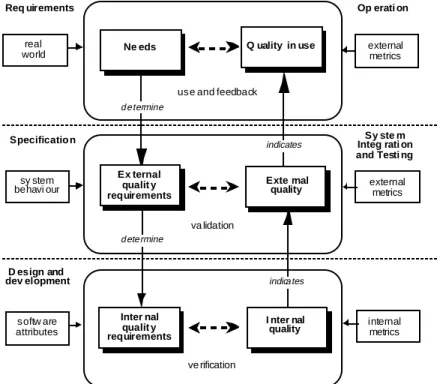
The purpose of designing an interactive system is to meet the needs of users: to provide quality in use (Bevan, 1999). The internal software attributes will determine the quality of a software product in use in a particular context. Software quality attributes are the cause, quality in use the effect (see Figure 1, from ISO/IEC 14598-1). Quality in use is (or at least should be) the objective, software product quality is the means of achieving it.
The users’ needs can be expressed as a set of requirements for the behaviour of the product in use (for a software product, the behaviour of the software when it is executed). These requirements will depend on the characteristics of each part of the overall system including hardware, software and users.
The requirements should be expressed as metrics that can be measured when the system is used in its intended context. The required system characteristics could be minimum values for the
effectiveness, efficiency and satisfaction with which specified users can achieve specified goals in specified environments.
sy stem behavi our Ex ternal qualit y requirements Exte rnal quality Inter nal qualit y requirements I nter nal quality softw are attributes Specificatio n D esign and dev elopment
Ne eds Q uality in use
Op erati on
va lidation
ve rification use and feedback real
world external metrics
external metrics internal metrics Sy ste m Integ rati on and Testi ng Req uirements determine determine indicates indicates
Figure 1. Quality in the software lifecycle
2. Means of achieving quality in use
Figure. 2. Approaches to achieving quality in use
The TRUMP project combined three complementary approaches to improving the quality of a product from a user perspective (Figure 2):
• Improve the quality of the software development processes, by incorporating user-centred activities derived from ISO 13407 and the Usability Maturity Model in ISO TR 18529. • Improve the quality of the software: by improving the quality of the user interface. • Improve the quality in use: by ensuring that the software meets the needs of the user for
effectiveness, productivity and satisfaction in use.
The quality of the software development process can be improved through use of ISO 13407 and ISO TR 18529 that define user centred activities.
life cycle processes product usability product usability processes effect of the product
process quality product quality quality in use
contexts of use
match to user needs
2.1 User centred design process: ISO 13407
ISO 13407 provides guidance on achieving quality in use by incorporating user centred design activities throughout the life cycle of interactive computer-based systems. It describes user centred design as a multi-disciplinary activity, which incorporates human factors and ergonomics
knowledge and techniques with the objective of enhancing effectiveness and productivity, improving human working conditions, and counteracting the possible adverse effects of use on human health, safety and performance.
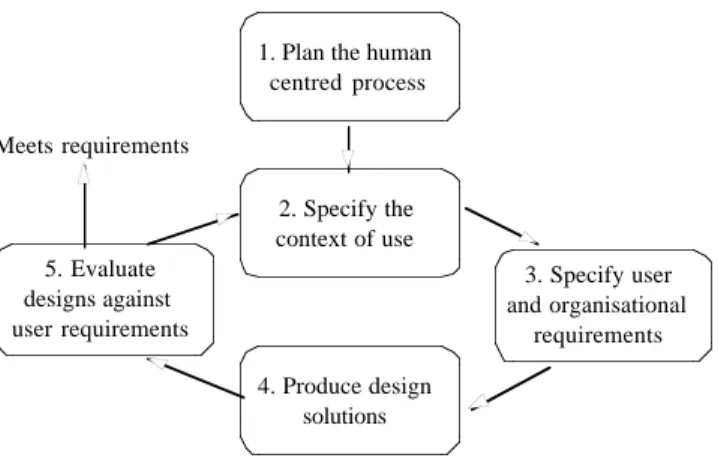
There are four user centred design activities that need to start at the earliest stages of a project. These are to:
• understand and specify the context of use • specify the user and organisational requirements • produce design solutions
• evaluate designs against requirements.
The iterative nature of these activities is illustrated in Figure 3. The process involves iterating until the objectives are satisfied.
1. Plan the human centred process 2. Specify the context of use 4. Produce design solutions 3. Specify user and organisational requirements 5. Evaluate designs against user requirements Meets requirements
Figure 3 - The interdependence of user centred design activities
The sequence in which these are performed and the level of effort and detail that is appropriate varies depending on the design environment and the stage of the design process.
2.2 Human-centred lifecycle process descriptions: ISO TR 18529
INUSE developed a structured and formalised definition of the human-centred processes described in ISO 13407 (Earthy 1998). An improved version has subsequently been published as ISO TR 18529. It is intended to make the contents of ISO 13407 accessible to software processes
assessment and improvement specialists and to those familiar with or involved in process
modelling. It can be used in the specification, assessment and improvement of the human-centred processes in system development and operation.
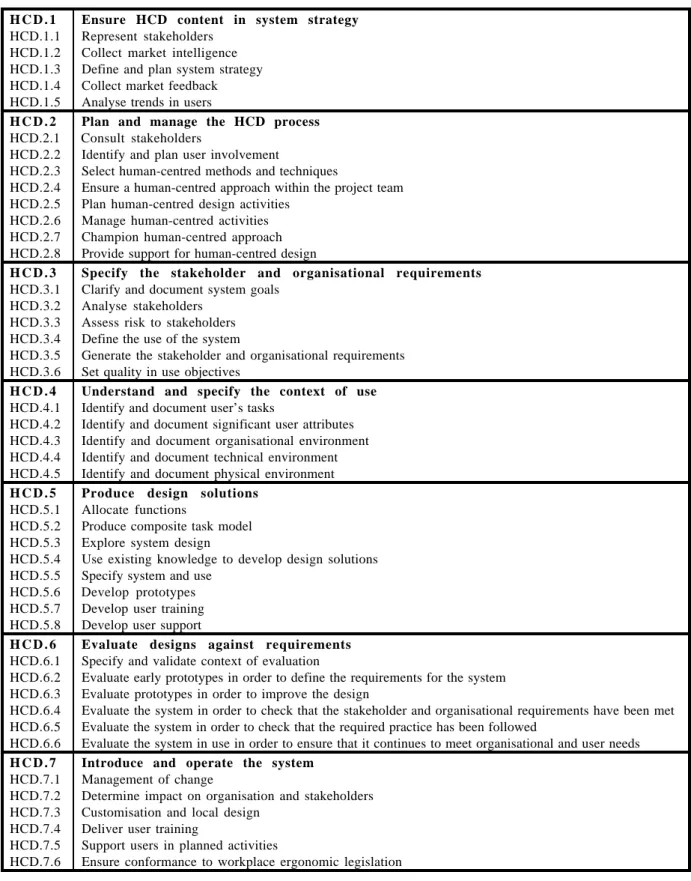
The model consists of seven sets of base practices (Figure 4). These base practices describe what has to be done in order to represent and include the users of a system during the lifecycle. The model uses the format common to process assessment models. These models describe the processes that ought to be performed by an organisation to achieve defined technical goals. The processes in this model are described in the format defined in ISO 15504 Software process assessment. Although the primary use of a process assessment model is for the measurement of how well an organisation carries out the processes covered by the model, such models can also be used as a description of what is required in order to design and develop effective organisational and project processes.
H C D . 1 Ensure HCD content in system strategy
HCD.1.1 Represent stakeholders HCD.1.2 Collect market intelligence HCD.1.3 Define and plan system strategy HCD.1.4 Collect market feedback HCD.1.5 Analyse trends in users
H C D . 2 Plan and manage the HCD process
HCD.2.1 Consult stakeholders
HCD.2.2 Identify and plan user involvement
HCD.2.3 Select human-centred methods and techniques
HCD.2.4 Ensure a human-centred approach within the project team HCD.2.5 Plan human-centred design activities
HCD.2.6 Manage human-centred activities HCD.2.7 Champion human-centred approach HCD.2.8 Provide support for human-centred design
H C D . 3 Specify the stakeholder and organisational requirements
HCD.3.1 Clarify and document system goals HCD.3.2 Analyse stakeholders
HCD.3.3 Assess risk to stakeholders HCD.3.4 Define the use of the system
HCD.3.5 Generate the stakeholder and organisational requirements HCD.3.6 Set quality in use objectives
H C D . 4 Understand and specify the context of use
HCD.4.1 Identify and document user’s tasks
HCD.4.2 Identify and document significant user attributes HCD.4.3 Identify and document organisational environment HCD.4.4 Identify and document technical environment HCD.4.5 Identify and document physical environment
H C D . 5 Produce design solutions
HCD.5.1 Allocate functions
HCD.5.2 Produce composite task model HCD.5.3 Explore system design
HCD.5.4 Use existing knowledge to develop design solutions HCD.5.5 Specify system and use
HCD.5.6 Develop prototypes HCD.5.7 Develop user training HCD.5.8 Develop user support
H C D . 6 Evaluate designs against requirements
HCD.6.1 Specify and validate context of evaluation
HCD.6.2 Evaluate early prototypes in order to define the requirements for the system HCD.6.3 Evaluate prototypes in order to improve the design
HCD.6.4 Evaluate the system in order to check that the stakeholder and organisational requirements have been met HCD.6.5 Evaluate the system in order to check that the required practice has been followed
HCD.6.6 Evaluate the system in use in order to ensure that it continues to meet organisational and user needs
H C D . 7 Introduce and operate the system
HCD.7.1 Management of change
HCD.7.2 Determine impact on organisation and stakeholders HCD.7.3 Customisation and local design
HCD.7.4 Deliver user training
HCD.7.5 Support users in planned activities
HCD.7.6 Ensure conformance to workplace ergonomic legislation
3. Benefits of user centred design
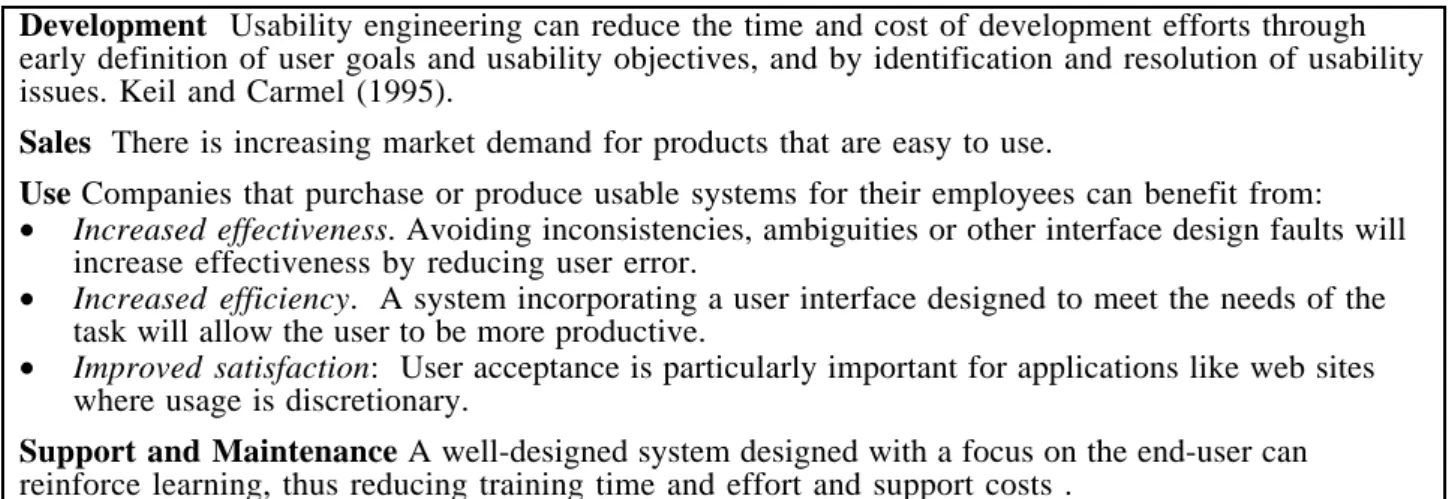
Given these international standards for user-centred design, why is it not more widely adopted? There is compelling evidence for the cost benefits(Bias and Mayhew, 1994), development time can be reduced, sales increased, the productivity of users improved, and support and maintenance costs reduced.
Development Usability engineering can reduce the time and cost of development efforts through early definition of user goals and usability objectives, and by identification and resolution of usability issues. Keil and Carmel (1995).
Sales There is increasing market demand for products that are easy to use.
Use Companies that purchase or produce usable systems for their employees can benefit from:
• Increased effectiveness. Avoiding inconsistencies, ambiguities or other interface design faults will increase effectiveness by reducing user error.
• Increased efficiency. A system incorporating a user interface designed to meet the needs of the task will allow the user to be more productive.
• Improved satisfaction: User acceptance is particularly important for applications like web sites where usage is discretionary.
Support and Maintenance A well-designed system designed with a focus on the end-user can reinforce learning, thus reducing training time and effort and support costs .
According to IBM (1999) “It makes business effective. It makes business efficient. It makes business sense”.
Reasons for the limited take up include the perceived high costs and the specialist skills required. The objective in the TRUMP project was to select a set of methods that are both cost-effective and easy to learn and to use.
4. TRUMP methods
The user centred design techniques recommended by TRUMP were selected to be simple to plan and apply, and easy to learn by development teams. Figure 5 shows how each of the
recommended methods relates to the lifecycle stages and the processes described in ISO 13407.
Figure 5. TRUMP Methodology 1. Stake-holder meeting 2. Context of use 3. Scenarios 4. Evaluate existing system 5. Usability requirements 6. Prototyping 7. Style guide 8. Evaluation 9. Usability testing 10. Collect feedback feasibility requirements design implement release
System lifecycle Plan Process Specify Context of Use Design Solutions Specify Requirements Evaluate against Requirements ISO 13407 Processes
Each of the methods in Figure 5 is described below.
1. Stakeholder meeting
A half-day meeting to identify and agree on the role of usability, broadly identifying the intended context of use and usability goals, and how these relate to the business objectives and success criteria for the system.
2. Context of use
A half-day workshop to collect and agree detailed information about the intended users, their tasks, and the technical and environmental constraints.
3. Scenarios of use
A half day workshop to document examples of how users are expected carry out key tasks in a specified contexts, to provide an input to design and a basis for subsequent usability testing.
4. Evaluate an existing system
Evaluate an earlier version or competitor system to identify usability problems and obtain measures of usability as an input to usability requirements.
5. Usability requirements
A half-day workshop to establish usability requirements for the user groups and tasks identified in the context of use analysis and in the scenarios.
6. Paper prototyping
Evaluation by users of quick low fidelity prototypes (using paper or other materials) to clarify requirements and enable draft interaction designs and screen designs to be rapidly simulated and tested.
7. Style guide
Identify, document and adhere to industry, corporate or project conventions for screen and page design.
8. Evaluation of machine prototypes
Informal usability testing with 3-5 representative users carrying out key tasks to provide rapid feedback on the usability of prototypes.
9. Usability testing
Formal usability testing with 8 representatives of a user group carrying out key tasks to identify any remaining usability problems and evaluate whether usability objectives have been achieved.
10. Collect feedback from users
Collect information from sources such as usability surveys, help lines and support services to identify any problems that should be fixed in future versions.
5. TRUMP trials
TRUMP applied these methods in two contrasting environments: the Inland Revenue (IR) in the UK, which provides data processing to support 60,000 staff in more than 600 local offices; and the LAHAV division of Israel Aircraft Industries (IAI) in Israel, which has a group of about 100 people developing aircraft avionics. IAI uses a well-established development methodology, but their process for specifying operational requirements is not supported by any specific methods and
techniques. Inland Revenue employs a well-defined rapid application design (RAD) methodology in conjunction with its IT partner EDS.
This paper describes the experience at IAI. More information about both trials can be found in Bevan and Bogomolni (2000) and the TRUMP web site www.usability.serco.com/trump.
6. Trial at IAI
The Avionics directorate at Lahav division of Israel Aircraft Industries is responsible for providing modern avionics solutions and support products for modernised aircraft. It is a relatively small entity about 100 people.
The avionics upgrade projects follow a well established mature engineering process starting with concept definition through requirements, design, software development, system integration to flight testing by the customer.
User needs are addressed by a group of IAI pilots who represent the customer/user and define the operational requirements. Their work is based on their operational experience and previous projects, but is not supported by any specific methods and techniques.
Lahav is part of IAI-wide process improvement program that started at 1992. The program initially focused on software, adopted SEI Capability Maturity Model as a map for improvement. In
following years process improvement assets and a support infrastructure was created and contributed to successful introduction of processes, methods and technologies.
LAHAV joined the TRUMP project with the objective of evaluating the impact of applying user-centred methods on a typical project. Lahav had the following business objectives:
• Improve the operational requirements definition and evaluation process • Increase usability of LAHAV products
• Increase customer satisfaction from LAHAV products At a more detailed level we wanted to:
• Assess the techniques' contribution to usefulness of the developed product. • Understand how these techniques can be integrated into IAI development process. • Measure the costs of applying the techniques.
• Evaluate developers' and managers' readiness to practice these techniques and the degree of their satisfaction from the process and their results.
We learned from our process improvement experience that the last objective is especially important for successful introduction of new methods.
6.1 Selection of methods
We selected the development of a new Mission Planning Centre (MPC) using the Windows NT Interface as a trial project. An MPC enables a pilot to plan an airborne mission that is then loaded onto a cartridge and taken by the pilot to the aircraft. In the aircraft the pilot loads the data into the aircraft’s main mission computer
We started with a one-day informal workshop-style assessment against the Usability Maturity Model (UMM) performed by Serco. A series of interviews with developers and managers were held throughout the day to rate the extent to which each base practice was carried out.
Then we selected which methods to use for the trial. The selection was based on: • The areas for improvement identified in the UMM assessment
• The specifics of MPC project
• Ease of integration with the IAI development process • Our intuition relating the potential value of each technique
6.2 IAI Experience with the methods
6 . 2 . 1 Stakeholder meeting
We used to conduct a project initiation meeting involving a project development management and technical staff. User related (Operational requirements) were separately defined and discussed by a specialised Pilot’s group. Conducting a Stakeholders meeting allowed to identify previously unforeseen users and stakeholders, better understand the project scope and objectives, define the success factors and identify some different interpretations for follow-up discussions and resolution. Involvement of senior managers and marketing personnel contributed for identification of some strategic issues.
6 . 2 . 2 Analyse context of use
We never used this method before. The facilitator guided us through a long checklist covering many aspects of the user’s skills, tasks and the MPC working environment. Many terms were not familiar to us and required explanation. Most of the data captured was not new to the participants due to their good familiarity with users environment. Some valuable information was captured, still some parts were not relevant to the MPC. We concluded that the checklist should be tailored to the developed system and be written in less professional terms to be efficient. In addition an
experienced facilitator is very important to the success of this method.
6 . 2 . 3 Task scenarios
This method contribution for MPC system was low for the following reasons: • The few operational scenarios required for the MPC are obvious for Pilots.
• Due to detailed documentation of task analysis, documenting scenario didn’t seem to add value. It was concluded that this technique was not so relevant for MPC. Another Trial will be conducted on an avionics project to evaluate the technique's relevance to LAHAV
6 . 2 . 4 Paper prototyping: Task analysis
This method was also new to us. We realised during its planning stage that it needs significant tailoring for our needs and we did that. We wrote down on sticky notes every user function anyone could think of. The sticky notes were logically grouped. After they were grouped the hierarchy was developed. This was done dynamically during the meeting and took several iterations. The
functional hierarchy changed significantly and was agreed upon. As a consequence the system architecture has been modified accordingly. The method had a great impact on the MPC software look and feel as well as it’s software requirements and architecture.
6 . 2 . 5 Evaluate usability of existing system
Four users evaluated the existing system. Each user was given short (15 minutes) training on the system. The user was given a mission to prepare and commented as he went along. Comments were captured by the facilitators generating a detailed list of about fifty problems . The problems were reviewed by the pilots defining the new system to find ways to avoid them in the design of the new system. The users filled out a SUMI satisfaction questionnaires after the evaluation (see 6.3.1 for details).
The technique was very productive though has been applied in a semi-formal way. A more formal trial (more training, better instructions, more users) is being considered.
6 . 2 . 6 Set usability requirements
Goals for task time were agreed, and a list of potential user errors were identified. We realise the need for the technique and it’s potential but more work is needed to better define it.
6 . 2 . 7 Paper prototyping of screens
We haven’t used this method before and had doubts about it’s value, mainly because it is now very easy to create computerised UI prototypes. It turned out to be a false doubt and the potential users and developers liked the method and its contribution to MPC usability. Mockups of screens were posted on the wall and provided the "Big Picture", although were too small to see the detail. Each screen was displayed using an overhead projector resulting in very fruitful and productive
discussions by potential users. A detailed list of 23 usability comments was created.
6 . 2 . 8 Style guides
Off the shelf style guides were provided to the developer. It turned out that these style guides are very detailed and difficult to use. Given intuitive visual development tools, developers prefer to learn by click and see rather than reading lengthy manuals.
We realise the need for a style guide, but currently don’t have a good one. Good style guide in our view should:
• Be at the appropriate (to the developers) level of detail • Not to be over restrictive (Leave some space for creativity) It is still an open issue at LAHAV.
6 . 2 . 9 Evaluate Usability of Computer Prototype
The system was only partially developed. But the UI was complete and the main modules were working. General training was held at the beginning for the users resulting in some comments that were captured by the facilitators.
Each user received instructions regarding the mission he had to plan, and worked without assistance. The user spoke freely during the evaluation and the facilitators documented all comments. Software developers were present and observed the evaluation. In general the
developers were very receptive and co-operative. Nevertheless towards the end of the evaluation they seemed to lose patience.
A summary meeting was held at the end of the evaluation. Comments were listed and prioritised. It was agreed to fix 93 of the 97 problems. The problems were points of detail and not major issues showing that earlier design was sound.
6 . 2 . 1 0 Test Usability against requirements
Major MPC parts were completed. The system was tested against timing requirements defined for two typical tasks (see 6.2.6).
Eight pilots including fighter pilots, helicopter pilots and navigators participated in this technique. First, MPC frontal familiarisation training was held for all pilots (2 hours) following by individual hands-on practice for another two hours.
Each pilot received written instructions regarding the mission he had to plan and modify, and worked without assistance. He also could write down comments on collection of printed screens.
The facilitators and developers observed the work on the repeater display and documented their observations. The time was recorded for completion of each task.
Following the completion of both tasks, each pilot completed his comments on printed screens, filled up the SUMI satisfaction questionnaire and explained his comments and impression to the facilitators. All pilots were happy with the MPC as also can be seen from SUMI results.
The tasks performance duration were according to requirements with one exception as explained in section 6.3.2, and some interesting observations could be made.
A summary meeting was held at the end of the evaluation. Comments were listed and prioritised. It was agreed to incorporate 39 of the 54 comments. Seven comments were not accepted and another eight undecided. The problems were points of detail and not major issues showing that earlier design was sound.
The technique was very productive.
6.3 Improvement in usability
6 . 3 . 1 Satisfaction
The charts below show the SUMI results for the evaluation of the first prototype of the new MPC, and the final usability test of the new MPC. The bars show the 95% confidence limits.
Evaluation of new MPC prototype, December 1999
SUMI is scored in relation to an industry average of 50, with scores of ±10 representing one standard deviation. So two thirds of all SUMI scores are in the range 40 to 60.
The usability requirement was for a SUMI score greater than 50. The overall scores for the
evaluation and test of prototypes of the new system were well above the industry average at 56 and 59. The profiles of scores for the two evaluations of the new system were similar: it was very strongly liked (affect), and users found it easy to learn and felt in control. They did not find it so helpful (but the help system had not been completed) and they did not feel so efficient (but
efficiency might be expected to increase with repeated use of the system). These scores were much better than for the existing MPC.
Overall the above-average SUMI results are very good for a users’ first experience of a prototype system.
6 . 3 . 2 User performance
The usability requirements established were not more than 40 minutes for the main task and not more than 20 minutes for the secondary task.
All the pilots completed the task within the planned time (except a planner who chose to carry out the task in a more thorough way than a normal pilot would). Navigators were faster because they have more experience of carrying out this task. Nevertheless, the typical time for a pilot to carry out the task is two to three times as long as an expert. This should decrease as pilots become familiar with the system. If not, the possibility of making further usability improvements should be investigated.
6.4 Improvement in usability maturity
The overall ratings for each Usability Maturity Model process are given below, and show a very significant improvement, meeting the objectives set in the first assessment:
Process 1st assessment 2nd assessment
1 Ensure HCD content in system strategy Partly Largely
2 Plan and manage the HCD process Partly Largely
3 Specify the stakeholder and organisational requirements
Not done Largely 4 Understand and specify the context of use Largely Fully
5 Produce design solutions Partly Largely
6 Evaluate designs against requirements Not done Largely 7 Introduce and operate the system X Not in the
scope of the assessment X Not in the scope of the assessment 6.5 IAI Conclusions
After application of the techniques, the pilots group assessed the benefits. The conclusions were very positive.
• Most of the techniques are very intuitive to understand, to implement and even to facilitate. The techniques are divided into two major categories: (1) meetings or workshops usually lasting 2-6
hours with about 3-6 participants. (2) a one on one paper or computer prototype evaluation by potential users, about 2 hours for each one.
• Practising these techniques in the early stages of design and development ensured less design mistakes later on.
• All participants and developers thought that most of the techniques were worthwhile and that they helped in developing a better and more usable system.
• The techniques were assessed as very cost effective and low cost.
The last observation deserves elaboration. Usually introducing changes into an organisation is a lengthy, costly and complicated process. It requires convincing many people to invest time and money and then demonstrate the benefits versus costs. In the recent years it became even more difficult due to staff shortage and the requirement to reduce the time to market.
TRUMP was the exception due mainly to its low cost, and obvious benefits. When the developers only have to invest a few days in applying the methods and see the results on the spot, convincing the managers is very simple and performing cost-benefit analysis is simply not needed.
In view of the short time and effort it took to practice these techniques and the strong impact they had on the quality of the system, they are being incorporated in LAHAV’s development process. The expertise available at LAHAV to practice these techniques is not great. Nevertheless the techniques are fairly intuitive and should be easy for new facilitators to learn.
We are currently working on establishing a specific support structure for disseminating the techniques into other IAI divisions.
7. General conclusions
In many respects the results obtained in the trial at the Inland Revenue were similar to those at IAI. In both organisations the usability maturity model was a valuable tool for identifying needs for process improvement. The Inland Revenue valued the detailed information obtained from a summative assessment requiring three person weeks effort, while for the smaller development group at IAI many of the benefits were gained from a simpler formative one-day assessment. Particular user centred design methods were not of equal value to both organisations. For example, IAI staff were much more familiar with the usage environment, so that context of use and scenarios were of less benefit than at the Inland Revenue, where they were important in establishing a
common understanding. So methods need to be selected and tailored to meet the needs of the development environment.
From the experience gained in the two organisations Serco has developed the general-purpose methodology incorporating described in section 4. These methods implement the principles of ISO 13407, and should be sufficient for many development environments. In some cases they should be complemented by other more specialised methods. More details can be found on the TRUMP web site www.usability.serco.com/trump.
8. References
Bevan N (1999) Quality in use: meeting user needs for quality. In: Journal of Systems and Software,49(1), 89-96.
Bevan, N and Bogomolni, I, Ryan, N (2000) Cost-effective user centered design. Submitted for publication.
Earthy, J (1998b) Usability Maturity Model: Processes. INUSE deliverable D5.1.4p, http://www.lboro.ac.uk/eusc/index_r_assurance.html
IBM (1999) Cost Justifying Ease of Use http://www-3.ibm.com/ibm/easy/eou_ext.nsf/Publish/23 ISO 13407 (1998) User centred design process for interactive systems.
ISO/IEC 14598-1 (1998) Information Technology - Evaluation of Software Products - Part 1 General guide.
ISO TR 18529 (2000) Human-centred lifecycle process descriptions
Keil, M, & Carmel, E. (1995). Customer developer links in software-development. Communications of the ACM. 38(5), pp33 - 44.