Client Side Customization for Checking User Rights in
Teamcenter-PLM
Shrikant Baliram Pokale
M.Tech Mechanical CAD/CAMDept.of Production Engineering,
SGGS Institute of Engineering & Technology,Nanded,India
Sawan Sakharam Borul
M.Tech Mechanical PLMDept.of Production Engineering,
SGGS Institute of Engineering & Technology,Nanded,India
M.K.Rodge
Professor Dept.of ProductionEngineering,
SGGS Institute of Engineering & Technology,Nanded,India
ABSTRACT
In present days of increasing software development environment sometimes it becomes difficult to mold the PLM software as per requirement of customer. Most of the time user requires some simplified applications for its business solution. To solve this problem client side customization is necessary. In each and every organization data security is very important issue for performing various tasks in the organization. Each user has specific rights on the various objects or items in organization. It is necessary to keep the data safe of various access of every users involved in an organization in a systematic format to avoid the complexity and for great success of organization and to know the various access of all users on every object at one glance. For this work we used Teamcenter unified 8.0 along with Eclipse 3.5 IDE tool for client side applications. In that we checked the various accesses of all users in Teamcenter environment for certain objects and exported them in to text format.
Keywords
PLM customization, Object based Protection, Customization Methodology
1.
INTRODUCTION
In this paper a research work is carried out for creation of newly menu item in Teamcenter (PLM Software) for checking various user accesses of all users on every object involved in the organization because this type of feature is not extensively found in current Teamcenter environment. In the Teamcenter application,access manager module does not support checking accesses of all users on every object in one glance. It takes too much time for checking all those accesses one by one and/also can’t be stored on local drive. In our proposed novel work, we reduced time for checking all those user access with time benefits of reducing near about 50% on every object, which represent the business information in Teamcenter. Tools used for carried out this research work is Eclipse 3.5 IDE and technology used is core Java and Swing.
2.
PLM CUSTOMIZATION
2.1
Need
Each company has a different background and different requirements which must be taken into consideration in the design of PLM (Product Lifecycle Management) software (application).The PLM applications provide generic features
mainly from product data management perspective.While addressing companies unique product lifecycle management requirements, PLM applications may call for codeless or code full customization.Customization involves adapting of the application kernel to the context, by adding new (possibly unforeseen) features to meet individual customer specific requirements. Many companies (particularly larger), more established firms find themselves struggling to adapt their cultures to take advantage of new capabilities. One of the issue in Teamcenter environment is related to access check for every object involved in the business for every user. Object represents the business information. Presently access manager module in Teamcenter environment does not support for checking access of all users on every object in a single glance like read, write, copy, delete, promote, demote, import, export, manage, change ownership etc. For checking these accesses, system administrator can control the entire business by avoiding complexity of user rights and will lead to greater success of the organization.
2.2
Objective
This research work will develop a method that address the issue that prohibit a secure, efficient and management of stored data related to various user access on every object concerned with the business need. This can answer the following questions.
Can automated method be developed to check user rights?
Can this automated method be run with a single command to save time over current practices?
Is there a way to improve functionality of software to greater extent?
How much time it save over previous commands?
2.3
Types of Customization
2.3.1
Client Side Customization
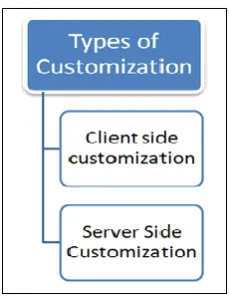
The client side customization can be performed by using programming language (Java) and various wizards available in Teamcenter. This type of customization can be used for adding new Application in Teamcenter, such as Menu bar, Toolbar, UI (User Interface) form on client side. Also it includes other customization eg. form creation, POM classes creation etc. as per the requirement of organization [1]
Fig 1: Teamcenter Customization Types
2.3.2
Server Side Customization
The server is being customized using Teamcenter API (Application program interface) called as ITK (Integration Toolkit), C /C++. The (ITK) is a set of software tools which you can use to integrate third party or user-developed applications with Teamcenter. The ITK is a set of C functions used directly by Teamcenter and Unigraphics. Also BMIDE can be used for codeless and code full customizations [1]
2.4
Customization Tools
Customization in Teamcenter can be performed in different ways.
2.4.1
Non-programming Customization
Non-programming customization can be performed by using the wizards available in Teamcenter and making the entries in the registry files.
2.4.2
Programming Customization
Programming customization can be performed by using programming languages i.e. C, C++, Java. This can be classified into server side and client side customization. Client side is customized using Java language and server side is by using ITK.
2.4.3
ITK(Integration Tool Kit)
The Integration Toolkit (ITK) is a set of server-side software tools that you can use to integrate third-party or user-developed applications with Teamcenter. The ITK is a set of
supplied such as Unigraphics. External applications (third party) are those that you decide to integrate into Teamcenter.
2.4.4
Portal Customization
Portal customization is performed by using Java programming. This can be used to add the new application or customize the menu bar and toolbar within Teamcenter engineering application.
3.
PROTECTING TEAMCENTER DATA
Object protection and ownership are extremely important in a distributed computing environment. Objects represent actual product information in the database and must be protected from unauthorized or accidental access, modification, and deletion. Teamcenter implements two different tiers of data protection.
Rules-based protection
Rules-based protection is the primary security mechanism.
Object-based protection
Object-based protection is a secondary security mechanism that allows you to grant exceptions to rules.
3.1
User Rights in Teamcenter
Access manager module in Teamcenter environment is used to give the various accesses to user on various business objects with system administrator privilages.Some of them are given below.
Read
Controls the privilege to open and view an object.
Write
Controls the privilege to modify the object.
Edit
Controls the privilege to open and Edit an object
Promote
Controls the privilege to move a task forward in a workflow process.
Demote
Controls the privilege to move a task backward in a workflow process.
Change
Controls the privilege to open and change an object
Copy
Change Ownership
Controls the privilege required to grant, change, or restrict ownership rights to an object.
3.2
Object based protection
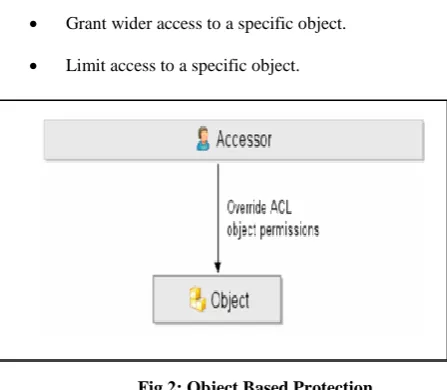
Object-based protection uses access control lists (ACLs) to create exceptions to rules-based protection on an object-by object basis.
Object ACLs are most useful when one need to:
Grant wider access to a specific object.
Limit access to a specific object.
Fig 2: Object Based Protection
Teamcenter uses ACLs to determine access to an object. Users with proper permissions can override the ACL for an object to grant or deny permissions for certain users but only when the rule tree allows. For example, the rule tree does not allow object-based access rules to override the rules-based protection when:
An object has an assigned status.
The object access rule is granted in a workflow.
Object-based protection introduces exceptions to the access rules for a specific object.Unlike rules, which can only be created and maintained by authorized administrators,ACLs that specify exceptions to rules can be defined by any Teamcenter user who has change privileges to the object.
Fig 3: Object Based Protection
Fig 4: Access Control List
fig 3 and fig.4 shows how object based protection is given to the business object in Teamcenter.
4.
CUSTOMIZATION METHODOLOGY
Fig 5: Rich Client Architecture
Java Virtual Machine (JVM)
The output of Java compiler is not executable code, it is byte code.Byte code is a highly optimized set of instructions designed to be executed by the Java run-time system, which is called the Java Virtual Machine (JVM). JVM is an interpreter for byte code [2]
Java application programming
interface (Java API)
Java API is collection of ready-made software tools that provide useful functionalities i.e. Graphical user interface (GUI). JFC/swing packages are used for develop-ment of GUI. The environment setting for customization is given as follows [2]
4.1
Client side customization
4.1.1
Configuration of Eclipse IDE with
Teamcenter
In this, project is build for molding the Teamcenter software as per the business need.The steps required for configuration of Eclipse IDE with Teamcenter are given below:
Step1
Add new plug-in project.
Step2
Add dependencies to the project.
Step3
Add runtime-packages.
Step4
Add extensions for the plug-in.
Step5
Debug the application - It will invoke the Teamcenter application.Source code is written in core java language and user interface is designed with swing concept in java.Generally classes made in java is for searching all users in Teamcenter environment and various access to all those users for given input item ID list in text format.
4.2
Application User Interface Design
4.3
Input File
Input file consist of item Id of various objects or items concerned with the organization whose user rights has to be check.
Fig 8: Input text file with number of item id
4.4
Execution of Application at User level
The flow chart as shown in figure 9 shows the execution of our customized application in Teamcenter software.Follow the steps as per the flowchart to run the newly created appli-cation.
Fig 9: Flow chart for execution of application
5.
RESULT AND DISCUSSION
Administrator will check the various user accesses of all users for given input Item ID list which is shown in figure given below.It also shows the result generated in text file format.ie. Accesses of all users for provided Item Ids
Fig 10: Results in text file
And decide what access to be given to users working with corresponding objects in organization.
The result obtained in the figure 10 is helpful for identification various user rights for required objects available in Teamcenter for all the users present in Teamcenter environment. The main benefit of this work carried out to avoid the repetitive work for administrator to check user rights of various users on each object available in Teamcenter environment as well as to generate a report in text file format from which he can understand that which type of rights are given to various user working in the organization.
The following graph illustrate the influence of the customized tool in terms of the time required to complete the project ie.to check various user rights against the old practices available in Teamcenter environment.
Fig 11: Benefits of customized application
6.
CONCLUSIONS
workflow within short period of time. The customized application reduces time to 50% over previous old practices and gives greater flexibility to PLM software.The functionality of the software increases to greater extent.
7.
REFERENCES
[1] Shrikant Basarkod,“PLM Neutral Customization frame work”, White paper, Geometric, June 2009
[2] Sawan Sakharam Borul and Mule Jaikumar Y. “Client side customization of product life cycle management”in International Journal of Scientific & Engineering Research (IJSER) Volume 3, Issue 8, August-2012 ISSN 2229-5518
[3] Mule Jaikumar Y.“PLM based Customization for Extraction of NX Assembly from Teamcenter to Local
Drive” in International Journal of Applied Information Systems (IJAIS) ISSN:2249-0868 Foundation of Computer Science FCS, New York, USA Volume 2– No.6, May 2012
[4] Teamcenter Engineering Online help.
[5] Security Management,White paper by Siemens. www.siemens.com/plm
[6] Rich client platform-Wikipedia,the free encyclopedia.
[7] Teamcenter access manager guide version:2008
[8] The book “Complete Reference Java-2- Herbert Schildt 9