Abstract— Intense advancement of cloud computing during the last years, convinced the experts to consider it as a proper and favorable substitution for traditional computing methods. Nowadays, many companies have moved their IT physical architecture to cloud computing platform for ease in managing and provisioning of different resources. In this paper a Cloud Computing environment is created using a product suite of VMware vSphere, which is based on two main parts: VMware ESXi hypervisor for virtualization technology and both VMware vSphere Client and Virtual Center (vCenter) for environment management. The aim is to provide efficient solution for designing and implementing an architecture of cloud computing.
Index Term— cloud computing, virtualization, hypervisor, VMware vSphere.
I. INTRODUCTION
CLOUD computing is a modern technology that utilizes the internet and central remote physical servers to use applications and maintains data [1].
The exact definition of cloud computing that encompasses all key aspects of cloud has been defined by NIST: “Cloud computing is a model for enabling convenient, on-demand network access to a shared pool of configurable computing resources (e.g., networks, servers, storage, applications, and services) that can be rapidly provisioned and released with minimal management effort or service provider interaction.”[2].
Cloud computing allows users and enterprise to store and use data, resources and applications without installation and access their own files from any device that has network access [1]. It minimizes the number of organization’s servers and improves the exploitation of computing resources as it is based on virtualization technology. Thus, 80% of resources utilization can be reach up compared to 10-15% in traditional IT through sharing the resources among multiple users. Consequently, the cost of purchasing, maintaining the resources, and managing servers and applications are reduced significantly [3]. Other main services that are delivered to the user are storage, processing, networking, and management with easy setup and a rapid provision and release of computing resources [4]. Therefore, users can access and use this system with full scalability, high performance, consistency, and relatively minimal expenditure solution compared to the
Zaid Sh. Bakr is currently pursuing master’s degree program in network engineering at Al-Nahrain University, Iraq, E-mail:
M.F. Al-Gailani is a PhD Computer Engineer from Newcastle University, UK, E-mail: [email protected].
devoted architecture [1].
In addition, the system increases the revenues of organization by hosting user’s data. Noting that it can be used either for a specific organization as a private cloud, or for general users as a public cloud.
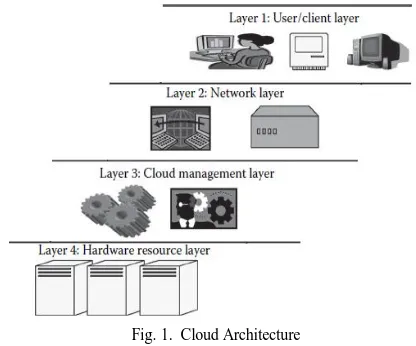
In general, the architecture of cloud computting consists of four layers as shown in Fig. 1. These layers are categorized according to the user access to the cloud environment. Cloud Architecture describes the working mechanism, model functions, and gives hierarchal view of cloud computing technology. These layers are: [5]
1) Layer 1 (User/Client Layer): This is the front end and lowest layer in the architecture. In this layer user/client can establish a connection to the cloud environment from any device through the web application.
2) Layer 2 (Network Layer): This layer permits the users to start a connection to the cloud. The entire cloud infrastructure is based on this layer where all services are provided to the users through this layers. In the state of public cloud this layer essentially is the internet, while in a private cloud it may be provisioned by a LAN.
3) Layer 3 (Cloud Management Layer): This layer constitutes collection of softwares that are used to establish the cloud and manage the underlying resources. In other words, these softwares can behave in two sides, one as an interface between the underlying physical resources and the user via network, and the other as a resource management.
4) Layer 4 (Hardware Resource Layer): It represents the back end that constitutes of providing the actual physical resources. In public cloud, data center and hardware resources are utilized in the back end side. While in a private cloud, data center and hardware resources are presented in a specific place or special configuration system.
This layering architecture is firm, and for any application in the cloud environment, it should be followed. However, there is a small baggy isolation between the third and fourth layers based on the model the cloud is published.
One of the prime functionalities of cloud computing is the abstraction of the physical hardware implementation by hiding the technical details from user. This feature is achieved by virtualization technology [3].
Virtualization plays a substantial role in cloud computing, it permits suitable level of isolation, security, customization and manageability which are essential for on-demand services. Virtualization technologies are mainly utilized to provide a
Establishing and Managing Cloud Computing
using VMware vSphere
configurable cloud computing environment, in addition to storage, and network [6].
Fig. 1. Cloud Architecture
Virtualization is an elementary mechanism for delivering services. Without virtualization, cloud computing management could be very difficult to achieve [7]. Cloud computing works on a virtualized environment which is enabled by the virtualization technologies. Cloud employs virtualization for better exploitation of hardware resources [5].
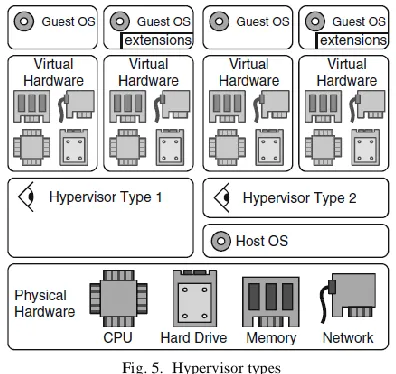
The key operator for enabling virtualization in a cloud environment is a hypervisor. Type-1 hypervisors (dubbed native or bare metal hypervisor) are utilized in servers which deal with intense load and need high level of security. This type provides better efficiency than Type-2 hypervisors (dubbed hosted or embedded hypervisor). While the main con of Type-2 is whether the host OS defeats or crashes, which leads VMs to crash. Thus, Type-2 is used only on user or client systems in which efficiency is less important [5].
VMware provides a type-1 hypervisor called vSphere. VMware vSphere is vastly used within companies to offer a virtualized infrastructure [8]. VMware vSphere technology is based on the notion of full virtualization, in which the underlying physical hardware is simulated and provisioned to the guest OS. Thus the guest OS can operate unaware of this abstraction layers [6].
VMware vSphere is based on two main parts: VMware ESXi server that represents a hypervisor which implements a virtualization and permits many guest OS to make a single physical hardware host shared among them, and VMware vCenter server that represents the centralized management and administration of the virtualized infrastructure [6].
There are problems in transferring service rapidly from physical host to another, restarting the service, and failure to update data in real time. To solve these problems, a hypervisor such as VMware ESXi server is adopted because the VMware vSphere offers a highest performance in comparison to other virtualization technology [9].
VMware ESXi is a type-1 VMM, likes Xen but it operates without based on the OS, thus providing enhanced security, amplified reliability, and facilitated management. This is due to its consolidate architecture which is designed to incorporate
directly into the host, as well as an ease and quick achieved for deployment, installation, and configuration. In general, VMware ESXi is a trust solution for cloud infrastructure [2].
The overall performance, which is provided by ESXi from the factors of VM performance, memory management, high availability, live migration, networking, storage, security, and management features, is better than Xen and KVM hypervisors [10].
II. RELATEDWORK
Milos Pavlik et al., 2012 [11]: proposed a solution to reduce the server outage by implementing Supervisory Control
and Data Acquisition/Human Machine Interface
(SCADA/HMI) systems over virtual infrastructure. The virtual infrastructure achieved by VMware vSphere 5.0 platform that required installation of ESXi, vCenter, High Availability cluster and other requirements, which offers reliable, stabile, and secure architecture to the accomplished systems.
Imran Ijaz et al., 2014 [12]: presented an idea to secure the Cloud storage. The infrastructure of Cloud Computing that used to provide storage and share data in an efficient way among users in VM form, achieved by using VMware ESXi Type-1 Hypervisor.
P. Nomnga et al., 2014 [13]: focused on Server
virtualization that implemented using VMware ESXi as a hypervisor and vSphere client as a management node which lead to host a domain. Also, consolidated the physical servers of Computer Science Department \ Fort Hare University into one physical server and provisioned virtual resources on demand.
Ahmed and Prof. Dr. Ghassan, 2015 [14]: proposed a Hospital Management Information System (HMIS) that was built over a proposed Private Cloud model. Private Cloud designed and implemented using two hosts and VMware ESXi hypervisor. User can use HMIS in VM (IaaS) form via vSphere client or vSphere web client.
III. CLOUDCOMPUTINGSTRUCTURE
Cloud structure is not the same as cloud architecture. Cloud architecture appears as a hierarchical structural that defines and explains the technology which is based on it. Thus, cloud structure is a portion of cloud architecture. Fig. 2 illustrates the standard structure that represents the base for the cloud. Cloud structure consists of five basic components [5]:
1) Application: This is the upper layer and over which any applications are implemented via user or client.
2) Platform: This component is in charge of the execution of the application.
3) Infrastructure: This layer comprises of resources that make the other components operate. This offers computational ability to the client.
4) Virtualization: It is the technique of creating logical components of resources from the offered physical resources to build the infrastructure. The logical components can be isolated and independent.
resources that are provided by the server and storage units.
Generally, to implement infrastructure, type-1 hypervisor such as VMware ESXi server is chosen instead of type-2 hypervisor such as KVM, because type-1 can directly access to the underlying physical hardwares such as server, storage, and datacenter in order to provide virtual resources in form of VMs, which are abstracted from the underlying physical resources [5].
Fig. 2. Cloud Structure
IV. VIRTUALIZATIONANDHYPERVISORS
Virtualization moves thinking from physical to logical, it enhances IT physical resource consumption through addressing organization’s hardware resources as pools from which virtual hardware can be allocated and released. Virtualization can consolidate physical resources like storage, network, and processor into a virtualized environment. System virtualization can produce many virtual machines stand on a single physical hardware system. Virtual systems are autonomous running environments that make use of virtual resources. The benefits of virtualization are [15]:
• Consolidation scenario to reduce the cost of physical hardware.
• Load Balancing to optimize the workloads. • IT elasticity and responsiveness.
The virtualized environment consists of three main components as illustrated in Fig. 3: [6]
• Guest (dubbed virtual machine (VM), virtual guest, and guest system): represents the system (with a group of files, storage, memory, operating system and configurable components) that acts directly with the virtualization layer instead of the Host
• Host: represents physical hardware that abstracts by the virtualization layer.
• Virtualization layer (dubbed virtual machine monitor (VMM) or Hypervisor): is in charge of creating the virtual physical resources through software program to enable the Guest to operate.
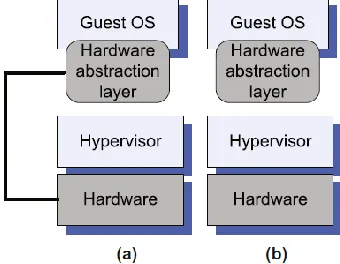
Two fundamental approaches of hardware virtualization as illustrated in Fig. 4 [16]:
• Full virtualization: each VM operates on an accurate copy of the actual physical hardware. This approach needs a virtualizable architecture, thus the physical hardware is fully offered to the guest OS by Hypervisor, which works unchanged, and guarantees an efficient direct execution process.
Fig. 3. Reference Model of Virtualization
• Paravirtualization, each VM operates on a partially changed copy of the actual physical hardware. The purpose of this changed is (i) some features of the hardware are not possible to be virtualized; (ii) to enhance performance; and (iii) to provide the simplest of interface.
System virtualization is universally achieved by hypervisor technology; where hypervisors are firmware components capable of virtualize hardware resources [15].
Diverse hypervisors need a set of software components to be installed on the host server to present virtualization. Moreover, different hypervisors at the same time afford different functionalities for VM operating systems. Hypervisors are generally classified into two types: [8]
Fig. 4. (a) Full virtualization. (b) Paravirtualization
Type-2 hypervisors commonly stand above operating system. The operating system takes control access to the underlying physical resources. The hypervisor behaves as a control firmware between the host OS and the guest OS.
Type-1 (such as VMware ESXi and Xen) and Type-2 such as KVM are illustrated in Fig. 5[17].
Fig. 5. Hypervisor types
V. COMPONENTSTOBUILDCLOUD
INFRASTRUCTURE
Three main components are utilized to establish and manage a Cloud Computing. These components are VMware ESXi, VMware vCenter, and VMware vSphere client/web client, which are combined in VMware vSphere as illustrated in Fig. 6.
Fig. 6. VMware vSphere Components Functionality
A. VMware ESXi
VMware ESXi is a Virtual Machine Monitor (VMM) or Type-1 Hypervisor that is constructed directly upon physical hardware (Host). It offers the underlying physical hardware and permits various virtual machines to utilize the same resources [18].
B. VMware vCenter
vCenter Server is a controlling and managing software that
offers; ESXi host management, VM deployment and management, tasks scheduling, managing for logging, alarms, statistics, and events. [19]
VMware vCenter consists of four major components [17]: 1) Single sign-on: Called also SSO, manages the identity of
administrators and applications that work together with the vSphere middleware.
2) vSphere web client: Offers web-based Interface for users and administrators, which interacts with the vCenter and objects that managed by it. From Figure 6, administrator uses vSphere web client to access the hosts via the vCenter server, where access cannot be done directly. 3) vCenter inventory service: This component caches the
managed objects for the vCenter when accessed through the web client to enhance performance and reduces searches for vCenter database.
4) vCenter server: This is the heart service of vCenter, which is needed by the three other components. From Fig. 6, administrator that access vCenter server via either vSphere client or vSphere web client, can manage multiple hosts at the same time in conflict to vSphere client that manage only one host at a time.
Fig. 7 sounds the steps that occur once a user logs onto the cloud using the vSphere Web Client [19]:
1) The vSphere Web Client offers a secure web page interface to the user to log via web browser.
2) The username and password which are previously created in AD server are sent to the SSO server as a SAML 2.0 token.
3) The SSO server sends a request to the Domain AD server for authentication mechanism.
4) If authentication succeeds, SSO passes a SAML 2.0 token to the vSphere Web Client.
5) This token is used to authenticate directly with the vCenter.
Fig. 7. Authentication scenario
C. VMware vSphere Client
window form (i.e. windows-based application) used to connect directly and manage ESXi host with its local default account. It does not need to access vCenter, so this is more convenient once first time configuring host. Noting that host troubleshooting, or problems are found in vCenter. However, with windows-based vSphere Client, Single Sign On authentication cannot be used. [20]
The vSphere Client offers a wealthy graphical user interface (GUI) and can connect to vCenter Server through the authentication of windows user. So, this leads to full management capabilities such as vMotion that available only with vCenter server. [19]
VI. METHODANDPROCEDURE
A. Installing and Configuring VMware ESXi Interactively
--First, the minimum hardware requirements to install ESXi server are: CPU; two cores, 64-bit, LAHF and SAHF instructions, BIOS; NX/XD bit enabled, RAM; 4GB, NIC; one Giga-bit, Boot Device; 1GB
--Second, installing ESXi via Interactive Mode --Third, configuring ESXi via Interactive Mode
From Set Static IP address in ESXi host, the IPv4 address and Default Gateway are set as shown in Fig. 8, then the network configuration is tested and ensured, and the result is appeared as shown in Fig. 9 and Fig. 10.
Fig. 8 IP Configuration
Fig. 9 Testing: Ping Menu
Fig. 10. Test Management Network
B. Installing and Configuring VMware vCenter.
vCenter Server is a software package that operates as a central management node for the ESXi hosts and their own
VMs. The VMware vCenter with its four main components are illustrated in Fig. 11.
Fig. 11. VMware vCenter Server (simple Install)
--First, the essential requirements for installing vCenter server are:
Hardware; CPU: two cores 2GH, 64-bit, RAM: 4GB, Hard Disk: 100GB, and 40GB–60GB free after install, NIC: one Gigabit.
Software; OS: Microsoft Windows Server 2008 r2 64-bit, Database (DB) Server (such as oracle 10g R2, 11g R1 or 11g R2, Microsoft SQL Server 2005, 2008, 2008 Express or 2008 R2), Microsoft .NET 3.5 and later, and Microsoft .NET Framework 3.5 Language Pack.
Server provides Active Directory (AD) and Domain Name System (DNS).
--Second, Installing and configuring AD and DNS
After AD Domain Services are installed, a new Domain Controller (DC) is created as shown in Fig. 12.
Fig. 12. Domain Name
--Third, installing vCenter server components one by one as shown above via Interactive Mode.
VMware vCenter 5.5 is installed after making vCenter server a member of "sec-cloud.com" as shown in Fig. 13 and
Fig. 14.
Fig. 14. Prerequisites Check
During the installation, SSO authentication information is set (password: Zaid@2015 for administrator account ([email protected]) as shown in Fig. 15, and installed as shown Fig. 16.
Fig. 15. vCenter SSO Information
Fig. 16. Configure SSO Authentication
C. Installing vSphere client Interactively
vSphere client windows application is installed as shown in
Fig. 17 to make both users able to access and use their VM, and administrator to manage and monitor cloud infrastructure.
Fig. 17. VMware vSphere Client
D. Network configuration
The network that represents the cloud is configured as shown in Figure 18, and the specifications of each component are described in Table I. Windows firewall must be turned off to allow connection occurs among them, this achieves through:
Control Panel→ System and Security→ Windows Firewall→ Turn Windows Firewall on or off.
TABLE I
CLOUD COMPONENTS SPECIFICATION
Server
name Host1 Host2 vCenter AD
OS ESXI 5.5 ESXI 5.5 server 2008 Windows
R2
Windows server 2008
R2
CPU Intel Core i7 Intel Core i3 Intel Core i5 Intel Core i3
Storage 500G 500G 500G 100G
RAM 6G 6G 8G 4G
NIC Gigabit Intel PCIe FE Atheros PCIe FE Realtek PCIe FE Realtek
IP
address 192.168.1.102 192.168.1.103 192.168.1.101 192.168.1.100
Gateway 192.168.1.1 192.168.1.1 192.168.1.1 192.168.1.1
DNS 192.168.1.100 192.168.1.100 192.168.1.100 127.0.0.1
Controller Node vCenter Server 192.168.1.101
AD & DNS server
sec-cloud.com
192.168.1.100
Cisco SW
Host2 ESXi server 192.168.1.103
Host1 ESXi Server 192.168.1.102
MikroTik Router
VM- user1
VM-user2
VM-user3 eth2
192.168.1.1 eth4
192.168.2.1
client Admin / user
vSphere Client
Fig. 18. Network Configuration
E. Managing the Cloud
Creating Virtual Infrastructure
Fig. 19. VMware vSphere client Administrator Log in
Fig. 20 VMware vSphere Web client Administrator Log in
Fig. 21. Create Datacenter
Fig. 22. Add Host Wizard
Fig. 23. Crate VM
Adding the users to cloud via AD server
To satisfy the SSO authentication, users’ accounts are created in AD server as shown in Fig. 24.
Fig. 24. User logon info Menu
Assigning the permissions for users via vCenter server
To achieve authorization, administrator selects user from Domain (SEC-CLOUD) as shown in Fig. 25, and chooses the role and privileges that specify the permission as shown in Fig. 26. As a result, permission is appeared as shown in Fig. 27.
Fig. 25. Domain and Users Menu
Fig. 26. Assigned Role Menu
Fig. 27. Permissions Window
User logging in the Cloud
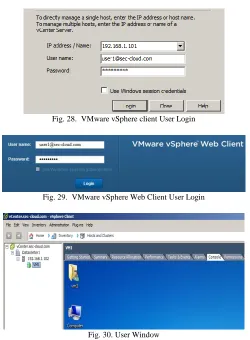
User accesses cloud either via vSphere client as shown in
Fig. 28. VMware vSphere client User Login
Fig. 29. VMware vSphere Web Client User Login
Fig. 30. User Window
VII. DISCUSSION
Cloud is designed and implemented using many types of technologies that vary in the required components and the way of configuring, implementing, and secure infrastructure. VMware vSphere optimizes, monitors and manages IT environments from VMs to the data center. The task of designing and implementing of vSphere components are daunting. However, establishing and managing virtual infrastructure such as datacenter and VM are easier.
VMware vSphere 5.5 components such as vCenter and ESXi need high resources to manage VMs efficiently. In addition, when the number of running VMs are increased, the resources (such as RAM and CPU) of vCenter and ESXi are increased as well. In addition, different types of security built in vSphere are configured such as SSO authentication using AD to avoid insecure APIs and Cloud Abuse, and authorization to assign roles and isolate cloud users.
VIII. CONCLUSION
This paper discusses and presents the cloud architecture, cloud structure, and the notion of both hypervisor and virtualization technology and their roles to build cloud computing environment.
In addition, the research provides an efficient solution for designing and implementing an architecture of cloud
computing environment in detail using VMware vSphere tools, with its main parts: VMware ESXi hypervisor and VMware vSphere Client with vCenter.
The VMware vSphere provides; enhanced security, amplified reliability, facilitated management, and high performance framework, as well as an on-demand utilization of VMs (i.e. IaaS) to decrease the cost of having or renting computers and servers. It is also used to supply storage, networks, processing, and other computing resources. This is due to its consolidate architecture which is designed to incorporate directly into host, in addition to its ease and quick achieved for deployment, installation, and configuration. Accordingly, VMware vSphere can be considered as an appropriate and a trust solution for establishing and managing Cloud Computing.
IX. REFERENCES
[1] Apurva Shitoot, Sanjay Sahu, and Rahul Chawda1, "Security Aspects in Cloud Computing," International Journal of Engineering Trends and Technology (IJETT), vol. 6, no. 3, pp. 118-120, 2013. [2] Reza Bakhshayeshi, Mohammad Kazem, and Morteza Sargolzaei,
"Performance Analysis of Virtualized Environments using HPC Challenge Benchmark Suite and Analytic Hierarchy Process," in
Intelligent Systems (ICIS), IEEE Iranian Conference on, Bam, 2014. [3] Chaowei Yang, and Qunying Huang Spatial Cloud Computing, A
Practical Approach, Boca Raton: CRC Press, pp. 36-39, 2014. [4] Zeeshan Javaid and Imran Ijaz, "Secure User Authentication in Cloud
Computing," in Performance Computing and Communications Conference (IPCCC), IEEE 32nd International, San Diego, CA, 2013
[5] K. Chandrasekaran, Essentials of Coud Computing, Boca Raton: CRC Press, pp. 28-31, 2015.
[6] Rajkumar Buyya, Christian Vecchiola, and S. Thamarai, Mastering Cloud Computing, Foundations and Applications Programming, Waltham: Elsevier Inc, pp. 71-77, 2013.
[7] Judith Hurwitz, and et. al, Cloud Computing For Dummies, Indiana: Wiley Publishing Inc, pp. 197-199, 2010.
[8] Derrick Rountree, and Ileana Castrillo, The Basics of Cloud
Computing, Understanding the Fundamentals of Cloud Computing in Theory and Practice, Waltham: Elsevier Inc, pp. 28-29, 2014. [9] Bao Rong Chang, and et. al, "Assessment of Hypervisor and Shared
Storage for Cloud Computing Server," in Innovations in Bio-Inspired Computing and Applications (IBICA), IEEE Third International Conference, Kaohsiung, pp. 67-72, 2012.
[10] Varsha Aiyappa, Smita S., and Shivagupta Chandakavathe, "Hypervisor Module for Cloud Computing Server," in International Journal of Innovative Technology and Research (IJITR), Karnataka, pp. 104-107, 2015.
[11] Milos Pavlik, and et. al, "Supervisory control and data acquisition systems in virtual architecture built via VMware vSphere platform," in
WSEAS Press, Kos Island, pp. 389-393, 2012.
[12] Imran Ijaz, and et. al, "A Framework for Data Storage Cloud to Provide Security," International Journal of Emerging Trends in Science and Technology (IJETST), vol. 1, no. 6, pp. 932-938, 2014.
[13] P. Nomnga, M. S. Scott, and P. B. Nyambi "A Technical Cost Effective Network-Domain Hosting through Virtualization: a VMware ESXi and vSphere Client Approach," International Journal of Computer Applications, vol. 91, no. 10, pp. 39-47, 2014.
[15] DeCusatis, Handbook of Fiber Optic Data Communication, A
Practical Guide to Optical Networking, Waltham: Elsevier Inc., pp. 387-389, 2014.
[16] Dan C. Marinescu, Cloud Computing Theory and Practice, Waltham,: Elsevier Inc., pp. 140-142, 2013.
[17] Christoph Fehling, and et. al, Cloud Computing Patterns, Fundamentals to Design, Build, and Manage Cloud Applications, New York: Springer, pp. 101-102, 2014.
[18] Mohammed Raffic, and Aravind Sivaraman, VMware ESXi Cookbook, Birmingham: Packt Publishing Ltd., pp. 5-6, 2014.
[19] Nick Marshall, and Scott Lowe, Mastering VMware vSphere 5.5, Indiana: Sybex, pp. 59-61, 2014.