INTELLIGENT
WEB
ACCESS:
SELF
ADAPTABLE
USER
INTERFACE
FOR
MUSEUM INFORMATION ACCESS BASED
ON THE VISITOR UNDERSTANDING LEVEL
MODEL
Thejas G S1 and Dr. Pallapa Venkataram2
I.INTRODUCTION
Museum is the place where public find enormous of information about the artifacts and other objects of artistic, cultural, historical or scientific. In the world there are varieties of museums which manage collection of objects and its information specific to particular field. For example museums like fine art, craft, science, technology, children museum, historical and so on. With these there are some specialized museums which maintain information related to military history, aviation history and so on [1].
Today museums are increasingly adapting applications like desktop based, web based, and mobile apps. These applications mainly focus on the museum information collected for objects and enables visitor to obtain information related to objects in the museum. These applications help visitors to feel and learn the real time experience of the museum environment. The American museum of natural history has introduced an iPad app for the exhibition Creatures of Light: Nature’s Bioluminenscence. This exhibition designed and produced by American museum of natural history’s award winning department under the direction of David Harvey, Senior President for exhibition which mainly focuses on organisms that produce light [2].
1
Department of Computer Science and Engineering Siddaganga Institute of Technology, Tumakuru, Karnataka, India 2
Department of Electrical Communication Engineering Indian Institute of Science, Bangalore, Karnataka, India
DOI: http://dx.doi.org/10.21172/1.74.026 e-ISSN:2278-621X
Abstract- In the design and development of information search user interface at the client side numerous paradigms, technologies and methodologies has been suggested. But user satisfaction differs from a category of users to another category because of several reasons like age, profession, work activity, literate level and so on. It is very difficult to provide accurate information to the users need and intention. We propose an idea where Museum Information Search User Interface (MISUI) on client side makes such decision by adapting to user need and intention based on some metrics and history data. We have considered museum information as the data and visitor as the user. We have tested the system with the several metrics like visitor knowledge, requirement, and activity on a several topics for Museum Information Search UI adaptation. By this, each visitor get different information result on a particular topic to satisfy his/her need and intention.
The development of information handling in the museum environment plays an important role. Museum environments are adapting technologies to present museum information to the visitors particularly in the area of user interface design. A powerful user interface can be used for extracting the information about particular object in the museum. A user interface is a one of the research field in Human Computer Interaction. UI is a bridge between user and the machine or system. UI makes sense that both user and systems understand each other. The extreme difference is the way user think and the way system operate his action [2][3].
The user interfaces that are designed for museum information access, lacks to provide organized information about a particular object by adapting to users need and intention. Here user is an visitor and his expectation about information related to particular object in the museum depends up on so many things. To satisfy visitor an UI should not only be designed to extract information but also need to adapt to user requirements [4].
Museum Information Search User Interface is an intermediately layer for the visitor and the system (system – can be a Server which manages information related to museum items of artistic, cultural, or scientific). Since UI helps user to interact with the application, it is very important to design a very good UI for the user (visitor). Museum information search UI users are different in their nature because an application will be used by multiple users where they have different need and intention. To develop a very good Museum information search UI to address all set of visitors, then it will be a difficult task for the developer. Even though developers make so many choices while developing UI for an application by considering ease of use, ergonomics, aesthetics, etc. which results into a single UI [5][6][7]. But only one category of users may get satisfied by the standalone UI.
Extraction of user interested information by considering the search query log. The global representation is composed of a semantic taxonomy of query log terms together with a function that evaluates the semantic distance between the query terms. The distance takes into account a new property related to the abstraction level of terms
[8][9].
Users are of different categories depending upon so many reasons. The Museum Information search UI should be intelligent enough to recognize the user requirement and the way of providing relevant information. Each user intention and needs can be satisfied by recognizing the user understanding levels, user requirement and user activity.
The rest of the paper organized as follows: in section 2 we discuss about visitor model. Section 3 describes the proposed approach. Section 4 explains visitor classification and recognition. Section 5 describes GUI components. We discuss our experiment in Section 6 and conclude in Section 7.
II.VISITORMODEL
Every visitor satisfaction in interacting with the UI depends upon so many components. Understanding visitor prediction is very important for UI like information extractor. Each visitor prediction about the information to be served differs even though they type same query word in the information extracting UI. So the UI should understanding visitor understanding levels which are the main component to know his prediction about the search result.
The visitor understands levels can be classified as:
1. Visitor knowledge: Every Visitor can’t be in the same education level. Because some of the visitors will be well educated and some may not. The UI should recognize the visitor between whether the visitor is literate or illiterate.
Visitor (Understandingleveli) = {Education level, Experience level, age, profession}
profession. By these factors, it is possible to identify visitor type and his/her requirements.
2. Visitor requirements: Each visitor requirements may differ or may same. It mainly depends upon his/her profession.
Requirement (Visitori) = {Academic, business, skilled worker}
Visitor requirements understanding is important to analyze his/her knowledge levels so that we can understand visitor prediction. Visitor requirements mainly depend upon his/her activities in the real world.
3. Visitor activity: Each visitor activity relies on his/her profession. For example, let’s consider the academic or industry profession.
Activity(Academici) = {Student, Teacher, Researcher} Activity(Industryi) = {Beginner, Professional}
In the profession academic or industry we can identify three/two different users where their perspective and prediction regarding the search results may differ because their activities are not the same.
Figure 1. Visitor understanding level models
III.PROPOSED APPROACH
In the proposed system, we provide a User interface at client side and it is called as Museum Information Search User Interface (MISUI). We have considered museum database, in that information about ROCKET. MISUI extracts the search results, i.e. information about ROCKET from the museum database [10][11][12].
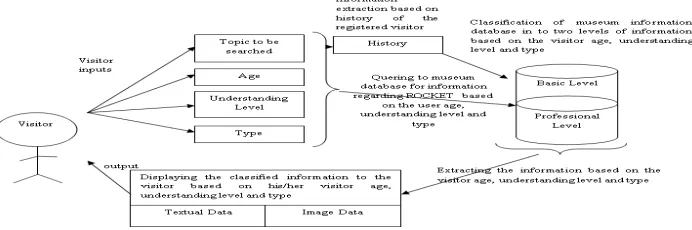
The proposed MISUI first understands the user interests and then provides the search results by classifying textual data and image data. Figure 2 shows the design of the proposed system.
MISUI collect the search query from the visitor in conjunction with the age group, understanding levels and the type of visitor. In case the visitor is registered person then a history is maintained to track his status record to improvise the search results.
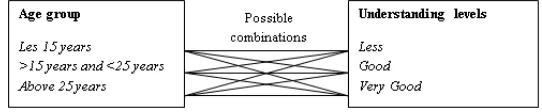
In the proposed system we have considered three age groups, which are less than 15 years, above 15 years and less than 25 years, and above 25 years. We have considered three understanding levels, which are less, good and very good. And we have considered two user types, which are student and professional. In this way users are classified.
MISUI process the query with additional input on the classified museum database (basic level information and professional level information) and displays the relevant search results in the form of textual data and image data in separate, by this it is possible to satisfy different visitors need and intention of information needed.
IV. VISITOR CLASSIFICATION AND RECOGNITION
A user- is a visitor to the museum may expect information related to ROCKET. Visitor expects the search result with respect to his/her experience and knowledge about the ROCKET. The visitor can be a student or professional.
In case if the visitor is student, then whenever he/she make an attempt to search some information about ROCKET in the museum database he/she need to get relevant information gathered from the museum database with respect to his/her understanding levels. On the other hand, if the visitor is professional (we assume that engineer specialized in rocket design), then he/she will be having some knowledge about ROCKET, then he/she must obtain a result like more information and in depth knowledge. Whether a visitor is student or professional if both tried to search some information regarding particular keyword like ROCKET as a search query, then both should get relevant information gathered from the museum database and that should satisfy both visitor need and intention based on their understanding levels. Hence the very first thing is to classify the visitors so that each visitor can be recognized uniquely with their understanding levels. To achieve these, among so many metrics we have considered two. That is age group and understanding level, visitors can be classified. For example age group: less than 15 years and understanding level: less, than that particular people need is to gather basic information about the search query. Let’s consider another example age group: above 15 years and less than 25 years and understanding level: less, then this particular visitor need is to gather basic information with some principles. Figure 3 shows the visitor classification and recognition through age group and understanding levels.
Figure 3. Visitor classification and recognition through age group and understanding levels
A history is maintained to keep track the registered visitor about the following information:
Topic searched.
Timestamps.
Amount of information extracted.
V. GUICOMPONENTS OF MISUI
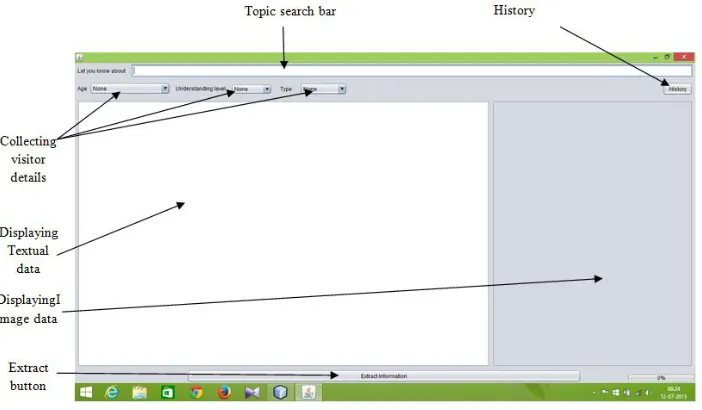
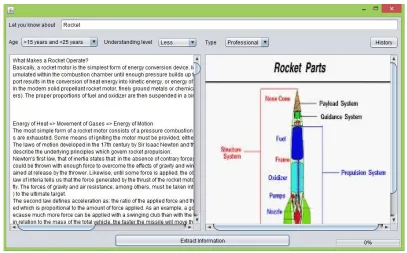
We have designed UI in a Java environment which interacts with the visitors and collects details about query topic, age group, understanding level and type of users. For back-end, museum database is used which is classifies based on information level into several files and images. Figure 4 shows the GUI of MISUI. We have used apache poi package for extraction of textual data from the museum database.
Figure 4. GUI of MISUI
Topic search bar
The UI component, where visitors can enter the topic to be searched. In our system topic searched is about ROCKET.
Collecting visitor details
These components play an important role in identifying visitor type, age and understanding level. These components help to classify visitors. As shown in figure 5a, 5b and 5c Visitor can choose the age, understanding level and type among the options.
Figure 5. (a) Age group identifying MISUI component; (b) Understanding levels identifying MISUI component; (c) Visitor type identifying MISUI component.
History
registered visitors. So that the extracted information from the museum database can be improved for the registered visitors. Figure 6 shows the history component in MISUI.
Figure 6. History component in MISUI.
Search Results
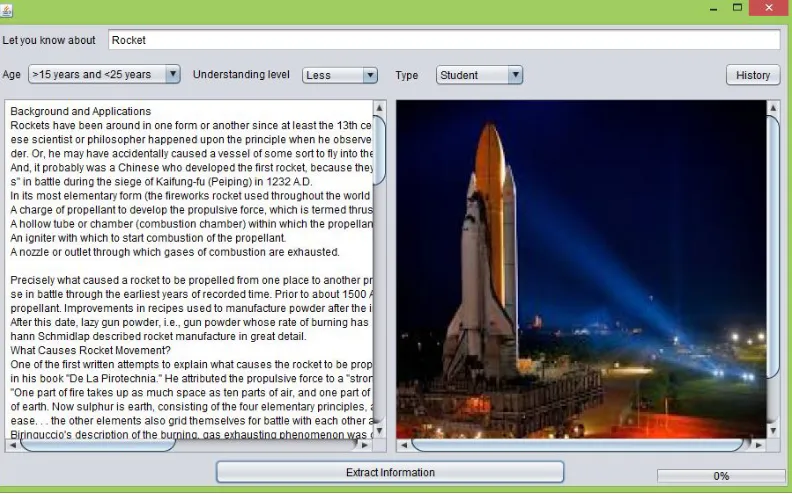
Figure 7 and figure 8 shows the search results by identifying the visitor category. For the same keyword ROCKET the visitor’s student and professionals get different information from the museum database based on to their age, understanding levels and type of visitor. The extracted information gets tuned based on the history of the registered visitors to improvise the quality of information.
Figure 8. Information extracted from the museum database for the topic ROCKET based on type of visitor- professional, age and understanding level. Rocket image source: Google images
VI.EXPERIMENTS
We have conducted several case studies on the museum exhibits information by classifying into two levels. We discussed here three cases to describe the adaptability of UI.
Case 1:
If the visitor less than 15 years with cell phone
Minimum requirement of UI adaptation: UI re-sizable and adjustable to screen size, Way of displaying the information within the screen size.
Case 2:
If the visitor is college student with biology background with laptop.
Minimum requirement of UI adaptation: Presentation of information more informative with textual and graphical data, giving preference to present first biology related information about the queried object.
Case 3:
If the visitor profession is doctor with smart phone and laptop.
Minimum requirement of UI adaptation: presenting better information and suggesting the better choice of opting device based on time availability to read the presented information.
VII.CONCLUSION
visitor, whether he/she is a beginner or experience it is possible to give appropriate search results that are relevant to his/her knowledge level.
REFERENCES
[1] Museum [Online]. Available: http://en.wikipedia.org/wiki/Museum.
[2] American Museum of Natural History. [Online]. Available:http://www.amnh.org/apps/
[3] Lilia Ziamou. (2012, May, 31). Museum Apps: how User Interface Can Create a Powerful User Experience. [Online]. Available: http:// www.hu_ngtonpost.com/lilia-ziamou/museum- aoos_b_1551430.html?ir=India&adsSiteOverride=in
[4] Howard Besser. (1998, May, 18). User Interfaces for Museums.
[Online]. Available:http://besser.tsoa.nyu.edu/howard/Papers/newspapers/MCN89.html [5] E. Elsom-Cook, Principles of Interactive multimedia, Mc-Craw Hill, 2001.
[6] Ben Shneiderman. Designing the User Interface: Strategies for E_ective Human-Computer Interaction, Addison-Wesley Longman Publishing Co., Inc. Boston, MA, USA, 1997.
[7] Natan Cohen.(2002, December, 10). MUIseum: The Museum of User Interfaces. [Online]. Available:http://www.cs.umd.edu/hcil/muiseum/paper/muiseum.html
[8] Lyes limam, David Coquil, Harald kosch, Lione Brunei, Extracting user interests from search query logs: A clustering approach, DEXA’10 Proceedings of the 2010 Workshops on Database and Expert Systems Application, IEEE Computer Society Washington DC, USA, 2010; 5-9.
[9] Anandi Giridharan, Pallapa Venkataram,Validation of context based service discovery protocol for ubiquitous applications,International Journal of UbiComp (IJU), 2012;3:19-34.
[10] U.S. Space & Rocket Center. [Online]. Available:https://en.wikipedia.org/wiki/U.S. Space %26 Rocket Center.
[11] Morton Thiokol. Rocket Basics. Thiokol Publication. [Online]. Available:http://fas.org/man/dod-101/sys/missile/docs/RocketBasics.html
[12] Chris Woodford. (2014,July, 19). Space rockects.