Available at http://www.ijcsonline.com/
Comparative Study of Native and Web-Based Mobile Application
Vrinda Jain, Rakshita Nalwaya and R. Manjula
Department of Computer Science and Engineering, VIT University, Vellore, Tamil Nadu, India
Abstract
In today's world, Smartphones are gaining popularity day by day, which is making mobile application development more popular among aspiring developers. There is a Rapid growth in the number of aspiring software developers working on mobile application development. The question, which platform is best for development continues to pop up. The aim of this study is to present a comparison between Native and Web-based application from a beginner App Developer’s perspective. We compare key characteristics of both approaches, their advantages, and disadvantages. To compare App development on both the platform, we develop a mobile application called Patient-tracker in both Android and Web platform and evaluate the development process focusing on the experience of a beginner level developer. Our study presents a platform to compare the Web and Android-based application. It also reviews the similarity and differences between them.
Keywords: Web Application, Android Application, App Development.
I. INTRODUCTION
The increasing popularity of smartphones have paved the way for mobile application, and the demand for mobile application developers is increasing day by day. Currently, the two largest App distribution platforms are Google Play Store for Android users and Apple App Store for iOS users. As per the data recorded in March 2017, there are 2.8 million apps on Google Play store; Apple users were able to choose from 2.2 million applications, Windows Store had 669,000 application.
Mobile applications are those that run on any mobile operating system. There is a large number of the operating system available in the market; an app is developed and operated according to their operating system. Depending on the platform chosen to develop the app, mobile apps can be categorized into two categories, Native application, and Web application.
A Native app is designed and operated on a particular operating system. Special Development Kit (SDK) tools and languages provided by the platform vendor are used, by the developer. Android applications are developed in the Android Studio using Java and XML; the iOS app is developed on Xcode using Swift. The application is directly installed on the mobile. All the data associated with the app is also generally stored on the mobile hardware. The Native app runs on device’s operating system and has access to device-specific hardware and software, i.e., it can make full utilization of mobile technology like GPS, various sensors, and camera. Internet connection may not be required depending on the type of application. An app developed for one OS cannot operate on any other OS. This is the biggest drawback of Native apps; we have to develop the same app differently for different platforms.
A web application is platform independent. It can be operated on any mobile operating system. It is developed
using HTML, CSS, and Javascript. Web app runs on external servers; they are accessed through mobile’s web browser, so internet connection is required.
For comparison between them, we are developing an app on both platforms. Each step of the development procedure is compared, beginning from the installation of the toolkit for development on our laptop to the final user interface of the application.
The remainder of the paper is structured as follows, Section 2 consist of literary review, Section 3 talks about the UI design and Development of the application, Section 4 describes its performance evaluation and comparison of the Apps . Section 5 gives the result of the study and Section 6 concludes this paper.
II. LITERATURE REVIEW
developers and software tester develop better testing tools for their related projects. Chaitanya Ekhatpurkar et al. (2016) developed an application aims to provide a solution for the lack of interaction between the voter and the candidate. It gives voters a convenient and safe way to vote it also presents a profitable way for conducting an election and attracts voters to participate by providing the platform to interact with the candidates. Dayanand Patil (2014) discusses the Challenges & Problems in Security Testing of Web-based Applications and also about Security testing for web-based applications which is different from functional testing and usability testing in a number of ways.
III. DEVELOPMENT OF PATIENT TRACKING APPLICATION
A. Patient Tracking Application
The application is developed to compared the strength and weakness of both the development methods so it is designed to keep the functionality simple. Patient tracker simply keeps the database of the clinic. a doctor using the app and can perform the following function
1. Registration/Inserting Information: information of a new patient can be inserted in the database
2. Monitoring//Viewing information: details of an existing patient can be seen by querying the database
3. Updating information: details of an existing patient can be updated
B. UI Components
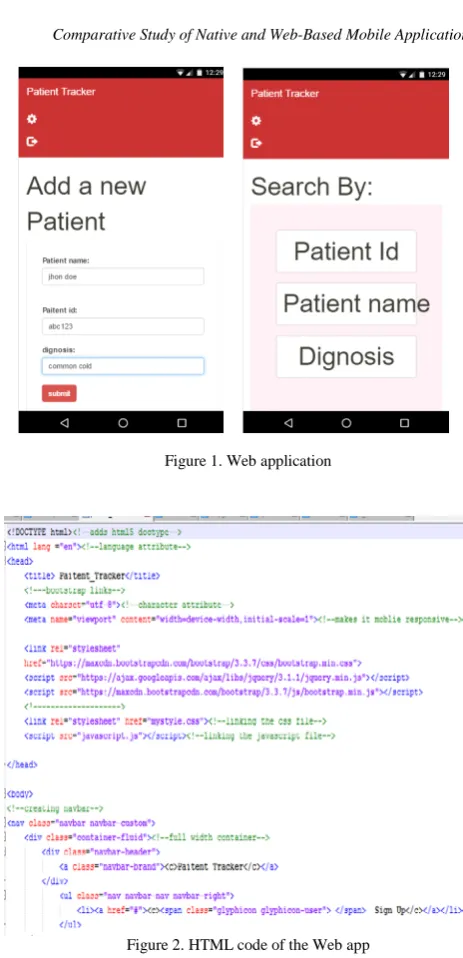
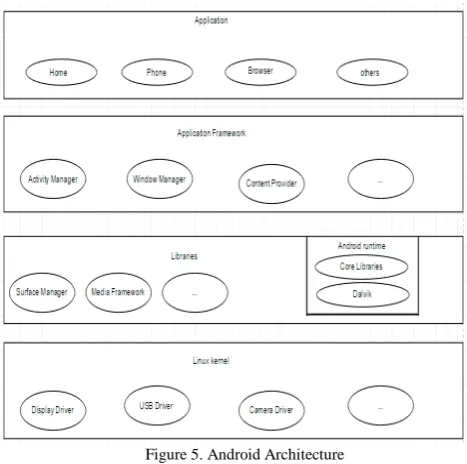
The UI of the application developed on both the platform is presented below. The Web application is built on Notepad++, using HTML5 and CSS, and Bootstrap libraries.
Figure 1. Web application
Figure 2. HTML code of the Web app
The Android application is developed on Android Studio using Java and XML
Figure 3. Android app
Figure 4. JAVA code of the Android app
IV. COMPARATIVE WEB AND NATIVE APP
A. Arcitecture
1) Web Architecture
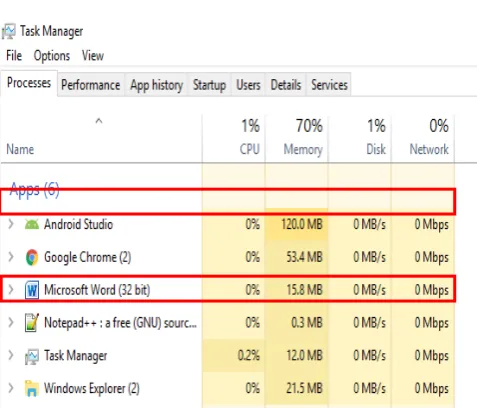
Android system is a Linux-based system, it has a layered architecture which consists of four layers as shown in Fig. 5: Linux kernel, libraries and Android runtime, application framework and application, each lower layer provides an interacting interface to the upper layer.
Figure 5. Android Architecture
2) Web Application Architecture
Web apps are platform independent, they are not operated on any particular system or kernel, the generic Web application architecture is client-server architecture.
Figure 6. Web Application Architecture
B. Development Stack
The developer of both applications has a beginner level experience in App development on both the platform. From developers point of view developing the Web App and working with HTML was easier, faster and, it was much less complex to build many UI elements with HTML rather than JAVA, but the learning curve of Android was much more, and a lot of the hardware resources were very easy to access on Android platform. Time taken to build Web app was just half of the time required to build Android app. The Android platform had the infrastructure for event-driven behavior.
Figure 7. Memory consumed by the development tools
After completion of the development phase of the apps, we found that development cost of Native app is more than that of Web app.
C. Functionality
The performance of any application is measured by how responsive it is, how quickly it starts up, how well it uses device memory and device power. The experimental device that we used to run the apps is an Android smartphone, nexus5. Web app had a very responsive design, but the user experience, user interaction, and personalization was much better in a native app. Native app also worked offline and had local storage capabilities whereas, Web app was entirely dependent on the server, its performance was affected by the type of connection (2G, 3G, 4G, Wi-Fi) but search engine optimization worked better in the Web app. In terms of computational power native app was found to be better as Java is faster than JavaScript but Java uses more memory than JavaScript. Application maintenance and the update were found to be very easy in the Web app.
V. RESULT AND ANALYSIS WITH DISCUSSION With the developed Native and Web application, we have evaluated and compared the development procedure and functionality. The results and finding of the comparison are formulated in the Table I. The apps are rated out of 5 in terms of their functionality, 5 being the highest and 1 being the lowest.
Table I. The Table gives the entire findings of the experiment Sr.
No. Functionality
Native App
Web App
1 Accessibility hardware capability 5 2
2 Computational Power 5 3
3 Local Storage, Offline
Capability 5 3
4 User Experience 5 4
5 Responsive Design 2 5
7 Time to Market, Approvals in
App-stores 3 5
8 Application Update Frequency 3 5
9 Application Reach 3 5
10 Platform Independence 2 5
11 Development Cost 3 5
0 0.51 1.52 2.53 3.5 4 4.55 Acce ss ib ili ty o
f t
he d ev ice … Com pu tat ion al P ow er Lo ca l St or age , O ffl in e C ap ab ili ty Us er E xp er ien ce, Us er … Re sp on siv e De sign Ti m e t o M ar ke t, Ap pr ov al s i n … Appl ic at io n U pda te F re que nc y Di sco ve ra bi lit y, Se ar ch E ngi ne … Pl at fo rm Inde pe nde nc e Dev el op men t C os t Native app Web app
Figure 8. Comparison between Native app and Web app
VI. CONCLUSION
From this paper, we conclude that when we talk about the best solution, the answer depends on the purpose for which the App is built, the device on which it will run the user’s requirements and the budget
If the application design is complex, frequently used, then the aim of the developer is to guarantee the best experience for the users, which can be best achieved by a Native application. If on the other hand, our application design is simple and not very frequently used by the user then it is much more suitable build a web app which is easier to maintain because we are standardizing the application on a single code base.
of Web App development, the developer should proceed with Android or any other Native App development as it will allow the developer to explore a lot of new functionality which was not possible with Web App development.
Even though both Native and Web App continues to evolve and both will coexist for the foreseeable future, Native apps will remain the choice of users because of its richest experiences that take advantage of the latest on-board functionality.
REFERENCES
[1] Abhinav Kathuria and Anu Gupta, “Challenges in Android Application Development: A Case Study,” IJCSMC, Vol. 4, Issue. 5, May 2015, pg.294 – 299
[2] Adrian Holzer and Jan Ondrus, “MOBILE APP DEVELOPMENT: NATIVE OR WEB?, ” University of Lausanne
[3] Arunima Jaiswa, Gaurav Raj and Dheerendra Singh, “Security Testing of Web Applications: Issues and Challenges,” International Journal of Computer Applications (0975 – 8887) Volume 88 – No.3, February 2014
[4] Cathie Norris and Elliot Soloway, “The (Native) App is Dead; Long Live the (Web) App,” May 2015
[5] Chaitanya Ekhatpurkar, , Nilesh Pasalkar, Ankitkumar Singh, Jay Karkar and Prof. Priti Badone, “A Survey on Android and Web Based Application for Online Voting,” International Journal of Innovative Research in Computer and Communication Engineering Vol. 4, Issue 2, February 2016
[6] Eric Umuhoza and Marco Brambilla, “Native Apps Vs. Mobile Web Apps,” International Journal of Interactive Mobile Technologies (iJIM), August 2016
[7] Ivano Malavolta, ” Beyond Native Apps: Web Technologies to the Rescue! (Keynote),” Vrije Universiteit Amsterdam, The Netherlands
[8] Maryam Ahmed and Rosziati Ibrahim, “A Comparative Study of Web Application Testing and Mobile Application Testing,” October 2015
[9] Michael Cusumano, Alan MacCormack, Chris F. Kemerer and William Crandall, “Software Development Worldwide: The State of the Practice,” IEEE Computer Society
[10] Mohammed Baqer M. Kamel and Loay E. George, “Remote Patient Tracking and Monitoring System, “IJCSMC, Vol. 2, Issue. 12, December 2013
[11] Mona Erfani Joorabchi, Ali Mesbah and Philippe Kruchten, “Real Challenges in Mobile App Development,“ University of British Columbia Vancouver, BC, Canada
[12] Ms. Neeta V Desai and Saniya Ansari, “Review of Patient Monitoring System with Wireless,” International Journal of Advanced Research in Computer Science and Software Engineering, Volume 5, Issue 1, January 2015
[13] Nidhi Mutha, Ekta Meel , Ruchira Rokade and Prof Ganesh Deshmukh, “Patient Health Monitoring Using Android Application,” International Journal of Innovative Research in Computer and Communication Engineering, Vol. 4, Issue 3, March 2016
[14] Prof. S. B. Choudhari, Chaitanya Kusurkar, Rucha Sonje, Parag Mahajan and Joanna Vaz, “Android Application for Doctor‟s Appointment,” International Journal of Innovative Research in Computer and Communication Engineering, Vol. 2, Issue 1, January 2014
[15] S. Sangeethaa and G. Kirubhakar, “Android Application for College Website,” South Asian Journal of Engineering and Technology Vol.2, No.17 (2016) 162–166
[16] Seung-Ho Lim, “Experimental Comparison of Hybrid and Native Applications for Mobile Systems,” International Journal of Multimedia and Ubiquitous Engineering Vol. 10, No. 3 (2015), pp. 1-12, October 2015
[17] Tor-Morten Grønli, Jarle Hansen, Gheorghita Ghinea and Muhammad Younas, “Mobile application platform heterogeneity: Android vs. Windows Phone vs. iOS vs. Firefox OS,” Norwegian School of IT.