Graphical Authentication Mechanisms: A
Survey
Anjumol P S
PG ScholarDept. of Computer Science & Engg. Sree Buddha College of Engg for Women.
Pathanamthitta, Kerala, INDIA
Abstract- User authentication is one of the most important parts of data security. The most common computer authentication method is to use textual usernames and passwords. Conventional textual passwords are having problems such as being hard to remember, guessing attack, key-logger attack, shoulder-surfing and dictionary attack. Biometric and token based authentication techniques are introduced to overcome the limitations of textual passwords. But these methods have security and usability issues. So in order to address these issues, some researchers have introduced authentication methods that use images as passwords. Here we conduct a survey of the existing graphical based password schemes and classify these schemes into two groups: recognition-based methods and recall-based methods. So this survey will be very useful for security researchers and practitioners who are interested in finding an alternative mechanism to traditional authentication methods.
Keywords – Authentication, passwords, biometric, token, key-logger, recognition-based, recall-based, security.
I.INTRODUCTION
Nowadays, network and computer security has been formulated as a major technical issue. The key area in security research is authentication which is the determination of whether a user should be allowed access to a given system or resource. This is a major process which assures the basic security goals, via. Integrity and confidentiality [1] . Adequate authentication is the first line of defense for protecting any resource. Hence the password is a common and widely authentication method still used up to now. It is an important fact that the same authentication technique may not be used in every scenario. Consider an example: a less sophisticated approach may be used for accessing a chat server compared to accessing a corporate database.
A password is a form of secret authentication data that is used to control access to a resource. It is kept secret from those who are not allowed access, and those wishing to gain access are tested on whether or not they know the password and are granted or denied authentication. In recent years, passwords are used to control access to secure mobile phones, OS, ATM machines etc. passwords are used for many purposes such as log in to computer accounts, retrieving e-mail, accessing databases, networks, web sites, files and others. Drawbacks of normal textual password include forgetting the password, stolen the password and short password selection. This means, there is a great necessity to have a strong authentication mechanism to secure all our applications. In early days, conventional passwords have been used for authentication but they are having usability and security issues. Other methods such as graphical password authentication are one of the possible solutions to overcome these limitations. Graphical based password authentication has been introduced as an alternative to textual, biometric and token based authentication [2]. This is due to the fact that humans can remember images rather than alphanumeric characters [3]. Images are easier to be remembered than text, especially photos, which are even easier to be remembered than random pictures [4]. In graphical password scheme, the problem arises because passwords are expected to have two fundamental needs: The password should be secured one and the password should be easy to remember. Graphical passwords were originally introduced by Blonde[5].
II.OVERVIEW
The conventional passwords have drawbacks from a usability stand point, and these usability problems tend to translate directly into security problems. That is, users who fail to choose and handle passwords securely open holes that attackers can exploit. The password problem, arises because passwords are expected to comply with two conflicting requirements. Which is passwords should be ease to remember and usable, and the user authentication protocol should be executable quickly and easily by humans and passwords should be also secure, i.e., they should look random and should be hard to guess [3]; they should be changed frequently, and should be different on different accounts of the same user; they should not be written down or stored in plain text.
Password problem arises from limitations of human’s long-term memory. Once a password has been chosen and learned the user must be able to recall it to log in. usually users regularly forget their passwords. Breakdown and interference explain why people forget their passwords. Items in memory may compete with a password and prevent its accurate recall. And if a password is not used frequently then it will be even more susceptible to forgetting. The complication is that users have many passwords for web sites networks and computers. When the number of passwords increases then it will lead to forgetting or confusing alphanumeric passwords.
Initial idea for graphical authentication was proposed by Blonder (1996) [4]. This approach lets the users to click, with a stylus or a mouse, on a number of chosen regions in a picture. In the authentication phase if the correct regions were clicked in, then the user is authenticated. Otherwise the user was rejected. For a graphical password system, a user choosing click locations in an image needs to choose memorable locations since there are two problems in memorability:
The nature of the image The sequence of click locations
The existing graphical password schemes can be categorized as recognition based and recall based [6].
III.LITERATUREREVIEW
The human factors are often considered as the weakest link in the computer security system. Authentication, security operations, and developing secure systems are the three major areas where human computer interaction is important. Authentication is the key security process that either denies or allows access to a computer or resource depending on the credentials presented. The password is a piece of information called authentication data which is used to control access to resources. The security of a password lies in it being kept secret from unauthorized users while those wishing to gain access use passwords for the system to be able to determine whether to grant or deny them access accordingly. In modern times, passwords have proliferated all and sundry applications ranging from access control to protection of computer operating systems, mobile phones, automated teller machines (ATM), and many others.
Commonly using authentication techniques includes traditional username/password, biometric authentication, token based authentication, graphical passwords etc.
1. TRADITIONAL USERNAME/PASSWORD
Traditional username/password based authentication scheme is an example of the “what you know” type. Biometric authentication schemes are examples of the “what you are” type of authentication. Electronic tokens and smart cards are examples of “what you have” type of authentication [2]. Some authentication systems may use a combination of the above schemes. Although conventional textual passwords are used widely, they have problems such as being hard to remember, vulnerable to guessing, dictionary attack, key-logger, shoulder-surfing and social engineering. In addition to these types of attacks, a user may tend to choose a weak password or record his password. This may further weaken the authentication schemes.
2. BIOMETRIC AUTHENTICATION
signature, typing rhythm, voice etc. This authentication is reliable; however, it is expensive and at present, still not used widely [7]. The major problem of biometric as an authentication scheme is the high cost of additional devices needed for identification process.
3. TOKEN-BASED AUTHENTICATION
The token based systems are based on the use of a physical device such as electronic-key or smartcards for authentication purpose. Here initially a token is provided to the user. The token contains a piece of data generated by the server. Server uses this information to identify a particular user and the validity of the token. After validation of the token by the server, user is authorized to access the desired service. E-passports, Smart cards, and Bank cards are examples of the tokens for authentication. For authentication users have to carry the tokens [8]. Tokens are susceptible to loss due to deformation, destruction and theft etc. Tokens are also used in conjunction with the traditional password based system. These systems are vulnerable to man-in-the middle attacks where an intruder intercepts the user’s session and records the credentials by acting as a proxy between the user and the authentication device without the knowledge of the user.
4. GRAPHICAL PASSWORDS
Graphical password techniques have been proposed as an alternative to traditional authentication techniques. Graphical passwords are introduced due to the fact that humans can remember pictures better than text. It is confirmed by the psychologists that in both recognition and recall methods, images are more memorable than text. Hence, graphical authentication systems have higher usability than other authentication techniques. On the other hand, it is also difficult to break graphical passwords using normal attacks such as dictionary attack, brute force and spyware which have been affecting text based and token-based authentication. The security levels of graphical authentication schemes are higher than other authentication techniques.
The graphical password schemes can be classified into two categories:
Recognition-based techniques and
Recall-based techniques.
4.1. RECOGNITION-BASED SYSTEMS
In recognition based schemes, a set of images are displayed to the user and an accepted authentication requires a correct image being clicked or touched in a particular order. Awase-E system [9], AuthentiGraph, and Passfaces [10] system are examples of recognition based systems. Awasess-E, an image password is a new scheme which enables users to use their favorite image instead of a text password for authentication purpose. Hence Awase-E system has a higher usability. But it is difficult to implement due to the storage space needed for images and also the system cannot tolerate replay attack. In Awase-E, a user may always tend to choose a well-known image which may be prone to guessing attacks. Weinshall and Kirkpatrick [10] studied a recognition-based scheme and concluded that users can still remember their graphical password with 90% accuracy even after one or two months. Their study supports the theory that human remember images better than text. In addition for example, the commercial system Passfaces uses images of human faces. Davis, et al. worked on such a scheme and concluded that user’s password selection is affected by race and gender. This makes the Passfaces’s password somewhat predictable.
4.2. RECALL-BASED SYSTEMS
For recall-based systems, the user is asked to reproduce something that he/she created or selected earlier during the registration phase. Recall based systems can be classified into two categories: pure recall-based technique and cued recall-based technique.
2) Cued-recall based: This technique is based on a framework of reminders, hints and gestures that are meant to assist the user to reproduce their password or to make a reproduction more accurate. This technique is comparable to the Blonder Algorithm and the Passpoint algorithm.
4.2.1 PURE RECALL-BASED TECHNIQUES
In pure recall based techniques, users need to reproduce their passwords without any help or reminder by the system. Draw-A-Secret technique, Grid selection and Passdoodle are common examples of pure recall-based techniques.
A. DRAW A SECRET (DAS)
In 1999, Jermyn et al. proposed Draw-A-Secret(DAS) scheme [11], in which the password is a shape drawn on a two-dimensional grid of size G * G as in Figure 4.1. The cells in this grid are represented by distinct rectangular coordinates (x, y). For the given example, the sequence generated is (2,2), (3,2), (3,3), (2,3), (2,2), (2,1), (5, 5). For login, the user is supposed to re-draw the picture by creating the stroke in the exact sequence that was used in the registration phase. But this scheme is vulnerable to graphical dictionary attacks.
Figure 4.1: Draw A Secret on a 4*4 Grid
This technique is also susceptible to shoulder surfing. Values of touch grids are stored in temporal order of the drawing. If the exact coordinates are crossed with the same registered sequence, then the user is authenticated otherwise denied. Compared to pure recall-based techniques, DAS has many drawbacks. In 2002, Goldberg conducted a survey which concluded that most users forget their stroke order and they can remember text passwords rather than DAS. The password chosen by users are vulnerable to graphical dictionary attacks and replay attack.
B. GRID SELECTION
Figure 4.2: A Sample of Grid Selection Method
C. PASSDOODLE
Passdoodle comprised of handwritten text or designs, usually drawn with a stylus onto a touch sensitive screen. In their 1999 paper, Jermyn et al. prove that doodles are harder to crack due to a theoretically much larger number of possible doodle passwords than text passwords. Figure 4.3 will be shown a sample password of Passdoodle. The problem of recognition prevents wide spread use of the Passdoodle. The doodle here is used as the sole means of identification. In order to maintain security, the system cannot simply authenticate a user as the user whose recorded doodle is most similar, a minimum threshold of likeliness and similarity must be set. Goldberg [13] et.al has shown that users were able to recognize a complete doodle password as accurately as text-based passwords. But unfortunately the Passdoodle scheme has many disadvantages. As mentioned, users were fascinated by other user’s
drawn doodles, and usually entered other user’s password merely to a different doodles from their own. The authors concluded that the Passdoodle scheme is vulnerable to several attacks such as spyware, guessing, key-logger, and shoulder surfing.
Figure 4.3: An Example of a Passdoodle
4.2.2 CUED RECALL-BASED TECHNIQUES
In cued recall based technique, the system gives some hints which help the users to reproduce their passwords. These hints will be presented as hot spots within the picture. User has to choose some of these regions to register as their password and they have to choose the same region following the same order to login to the system. The user must remember the chosen click spots and keep them secret. The examples include techniques such as Blonder algorithm, PassPoint scheme, PCCP etc.
A. BLONDER METHOD
Figure 4.4: A Sample of Blonder Method
B. PASSPOINT
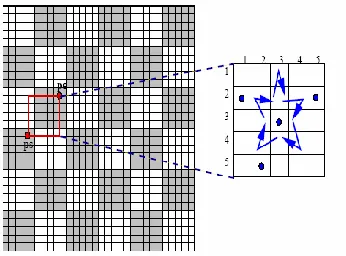
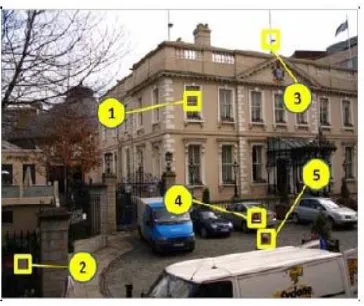
In 2005, the PassPoint scheme [15] was created to overcome the limitations of Blonder’s scheme. For Passpoint, the image can be an arbitrary photograph with many clickable regions as shown in Figure 4.5. This technique will increase the password space. And hence it will increase the security level. On the other hand the image is not secret and has no role other than helping the user to remember the click point. In PassPoint there is no predefined click area with clear boundaries are specified. The user password could contain any chosen sequence of points in the image. This will automatically increases the usability level of this technique.
Figure 4.5: A Sample of Passpoint Method
Passpoint method has high entropy. Any pixel in the image is can be a candidate for a click point. So there are hundreds of possible memorable points in the challenge image. This technique has a very large password space. This improves the security level compared with other similar systems. Consider an example: five or six click points on an image can produce more passwords than 8-character text-based passwords with standard 26-character alphabet. In order to provide high security, the Passpoint system stores the image password in an encrypted (hashed) form in the database. For authentication, the user has to click close to the selected points, within some measured tolerance distance from the pass point. Wiedenbeck et al. proposed the best tolerance around the click point in such an image. This enhancement makes the Passpoint system more flexible than other schemes.
C. CUED CLICK POINT (CCP)
the user’s memory of the one click-point on that image. Secondly, if a user enters an incorrect click-point during login, the next image displayed will also be incorrect.
Fig. 4.6: A user navigates through images to form a CCP password.
D. PERSUASIVE CUED CLICK POINTS (PCCP)
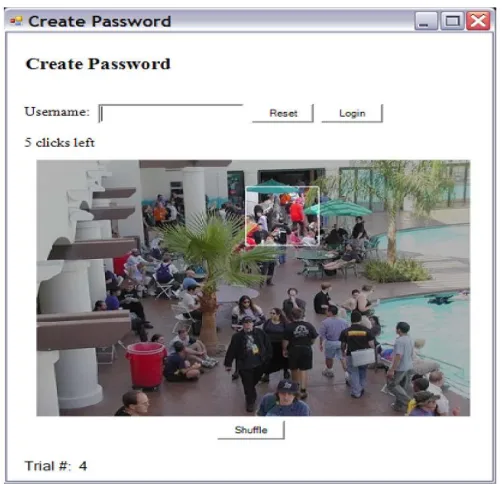
For creating Persuasive Cued Click Points persuasive feature is added to cued click points. PCCP [17] encourages users to select less predictable passwords. For password creation PCCP uses terms like viewport & shuffle. In the registration phase the images are slightly shaded except for a viewport as shown in the figure. Thus eliminates the hotspot problem of CCP. The most useful advantage of PCCP is attackers have to improve their guesses. Users have to select a click-point within the highlighted viewport and cannot click outside of the viewport unless they press the shuffle button to randomly reposition the viewport. At the time of password creation users may shuffle as often as desired but it slows the process of password creation. Only at the time of password creation, the viewport & shuffle button appears. After the password creation process images displayed normally without the viewport & shuffle button. Then user has to select correct click on particular image. PCCP is a good technology but has security problems. Fig.4.7 shows the password creation process including viewport & shuffle button.
5. CAPTCHA
The Security researchers proposed many techniques to prevent adversaries from conducting automated network attacks. One of the techniques to prevent the network attacks are CAPTCHAs (Completely Automated Public Turing test to tell Computers and Humans Apart).CAPTCHA is a computer program that generates and grades tests that are human solvable, but current computer programs do not have the ability to solve them. Robustness of CAPTCHA is found in its strength in resisting automatic adversarial attacks. Captcha has many applications for practical security. Online polls, free email service, search engine bots, preventing dictionary attacks, spam and worms are some examples. CAPTHCAs means presenting a challenge response test to the users or humans. They are classified based on what is distorted that is whether characters, digits, or images. Some types of CAPTCHAs are given below:
A. CAPTCHAs based on text. B. CAPTCHAs based on image. C. CAPTCHAs based on audio. D. CAPTCHAs based on video. E. CAPTCHAs based on puzzle.
a. CAPTCHAs based on text:
Text based CAPTCHAs is a very simple to implement. This type is very effective and requires a large question bank. Here the Number of classes of characters and digits are very small so the problem occurs for user to identify the correct characters and digits. Text based captcha is possible to identify the character and digit through Optical character recognition (OCR) technique [18].
b. CAPTCHAs based on image:
Graphics-based CAPTCHAs are challenge-tests in which the users have to guess those images that have some similarity. Visual puzzles are example for captcha based on image. Here the user is required to identify image[19]. The advantage of image based CAPTCHA is that patternrecognition is hard AI problemand therefore it is difficult to break this test using pattern recognition technique.
c. CAPTCHA based on audio:
Audio-based CAPTCHAs are based on the sound-based systems. These CAPTCHAs are developed for visually disabled users. It containsdownloadable audio-clips. In this type of CAPTCHA, firstthe user listens and after that submits the spoken word [20]. The first sound-based system name ECO was implemented by the Nancy Chan a student from the City University in Hong Kong. The audio-based system is based on thedifference in the ability between computer machines andhumans in recognizing spoken language.
d. CAPTCHA based on video:
Video CAPTCHA is a newer and less commonly seen CAPTCHA system. In video-based CAPTCHAs, three words (tags) are provided to the user which describes a video. The user’s tag must match to a set of automatically generated ground truth tags then only the test is said to be passed. The term video CAPTCHA is used to any CAPTCHA that uses a video as its means to present information to a user [20]. Although video CAPTCHA is limited, both commercial and academic application do exist.
e. CAPTCHA based on puzzle:
In puzzle based CAPTCHA a given picture is divided to chunks [21]. User is supposed to combine these chunks so as to form the complete picture same as the original one.
IV.CONCLUSION
that current graphical password techniques are still immature, and more researches and user studies are needed for graphical password techniques.
REFERENCES
[1] Birget, J. C., H. Dawei, et al. (2006). "Graphical passwords based on robust discretization", Information Forensics and Security, IEEETransactions on 1(3): 395-399.
[2] Sabzevar, A.P. &Stavrou, A., 2008,” Universal Multi-FactorAuthentication Using Graphical Passwords”, IEEE InternationalConference on Signal Image Technology and Internet Based Systems(SITIS).
[3] S. Chiasson, R. Biddle, and P. van Oorschot, “A Second Look at the Usability of Click-Based Graphical Passwords,” Proc. ACM Symp. Usable Privacy and Security (SOUPS), July 2007.
[4] Haichang, G., L. Xiyang, et al. (2009). “Design and Analysis of aGraphical Password Scheme”, Innovative Computing, Informationand Control (ICICIC), 2009 Fourth International Conference onGraphical Passwords.D. Kunder, "Multi-resolution Digital Watermarking Algorithms and Implications for Multimedia Signals", Ph.D. thesis, university of Toronto, Canada, 2001.
[5] Blonde Pierce JD, Jason G. Wells, Matthew J. Warren, & David R. Mackay.(1990). “A Conceptual Model for Graphical Authentication”, 1stAustralian Information security Management Conference, 24 Sept.Perth, Western Australia, paper 16.
[6] Wells, Jason; Hutchinson, Damien; and Pierce, Justin, "EnhancedSecurity for Preventing Man-in-the-Middle Attacks in Authentication,formation Security Management Conference. Paper 58.
[7] A. Jain, A. Ross, and S. Pankanti, “Biometrics: A Tool for Information Security,” IEEE Trans. Information Forensics and Security (TIFS), vol. 1, no. 2, pp. 125-143, June 2006.C.S. Lu, H.Y.M Liao, “Multipurpose watermarking for image authentication and protection,” IEEE
Transaction on Image Processing, vol. 10, pp. 1579-1592, Oct. 2001.
[8] L. O’Gorman, “Comparing Passwords, Tokens, and Biometrics for User Authentication,” Proc. IEEE, vol. 91, no. 12, pp. 2019-2020, Dec. 2003.
[9] Takada, T. and H. Koike (2003). “Awase-E: Image-BasedAuthentication for Mobile Phones Using User’s Favorite Images”,Human-Computer Interaction with Mobile Devices and Services,Springer Berlin / Heidelberg. 2795: 347-351.P. Kumswat, Ki. Attakitmongcol and A. Striaew, "A New Approach for Optimization in Image Watermarking by Using Genetic Algorithms", IEEE Transactions on Signal
Processing, Vol. 53, No. 12, pp. 4707-4719, December, 2005.
[10] Dirik, A. E., N. Memon, et al. (2007).“Modeling user choice in thePassPoints graphical password scheme”, Proceedings of the 3rdsymposium on Usable privacy and security.Pittsburgh, Pennsylvania,ACM.
[11] I. Jermyn, A. Mayer, F. Monrose, M. K. Reiter, and A. D. Rubin, "The Design and Analysis of Graphical Passwords," in Proceedings of the 8th USENIX Security Symposium, 1999.
[12] J. Thorpe and P. C. v. Oorschot, "Graphical Dictionaries and the Memorable Space of Graphical Passwords," in Proceedings of the 13th USENIX Security Symposium. San Deigo, USA: USENIX, 2004.
[13] J. Goldberg, J. Hagman, and V. Sazawal, "Doodling Our Way to Better Authentication," presented at Proceedings of Human Factors in Computing Systems
[14] G. E. Blonder, "Graphical passwords," in Lucent Technologies, Inc., Murray Hill, NJ, U. S. Patent, Ed. United States, 1996.
[15] S. Wiedenbeck, J. Waters, J. C. Birget, A. Brodskiy, and N. Memon, "PassPoints: Design and longitudinal evaluation of a graphical password system," International Journal of Human Computer Studies, to appear.
[16] S. Chiasson, P. van Oorschot, and R. Biddle, “Graphical Password Authentication Using Cued Click Points,” Proc. European Symp. Research in Computer Security (ESORICS), pp. 359-374, Sept. 2007.
[17] Sonia Caisson, Member, IEEE, Elizabeth Stobert, Student Member, IEEE, Alain Forget,Robert Biddle, Member, IEEE, and Paul C. van Oorschot, Member, IEEE “Persuasive Cued Click Points: Design, Implementation, and Evaluation of a Knowledge-Based Authentication Mechanism” ieee transactions on dependable and secure computing, vol. 9, no. 2, march/april 2012
[18] Baljit Singh Saini and Anju Bala "A Review of Bot Protection using CAPTCHA for Web Security," IOSR Journal of Computer Engineering, 2013, pp. 36-42, 2013.
[19] Chen-Chiung Hsieh and Zong-Yu Wu "Anti-SIFT Images Based CAPTCHA Using Versatile," IEEE, 2013.
[20] Wenjun Zhang, “Zhang’s CAPTCHA Architecture Based on Intelligent Interaction via RIA,” Research Institute of Applied Computer Technology, IEEE, 2010.