Operating instructions
Daikin Altherma
EHS(X/H)04P30A
EHS(X/H)B04P30A
EHS(X/H)08P30A
EHS(X/H)B08P30A
EHS(X/H)08P50A
EHS(X/H)B08P50A
EHS(X/H)16P50A
Indoor unit for air-water-heat pumps
Daikin Altherma integrated solar unit
Operating instructions
1
Safety . . . 3
1.1 Observing instructions . . . 3
1.2 Warning signs and explanation of symbols . . . . 3
1.2.1 Meaning of the warnings . . . .3
1.2.2 Validity. . . .3
1.2.3 Handling instructions. . . .3
1.3 Avoid danger . . . 3
1.4 Intended use . . . 4
1.5 Instructions for operating safety. . . 4
2
Product description. . . 5
2.1 Brief description . . . 5 2.1.1 Mode of operation . . . .5 2.1.2 Solar support. . . .6 2.1.3 Safety management . . . .6 2.1.4 Electronic control. . . .62.2 Design and components . . . 6
2.2.1 System overview . . . .6
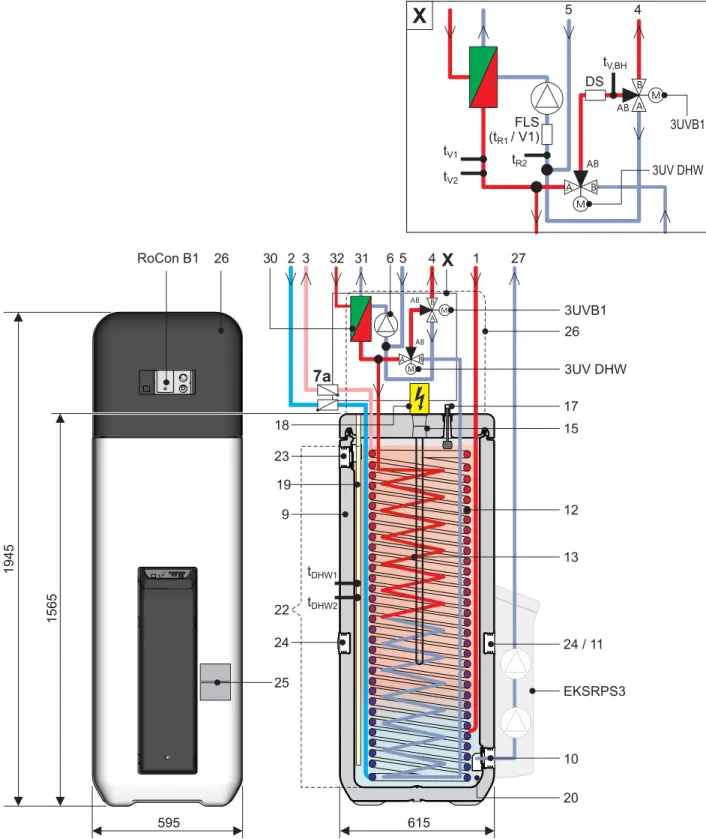
2.2.2 Device external and internal design Daikin Altherma EHS(X/H)...P30A. . . .7
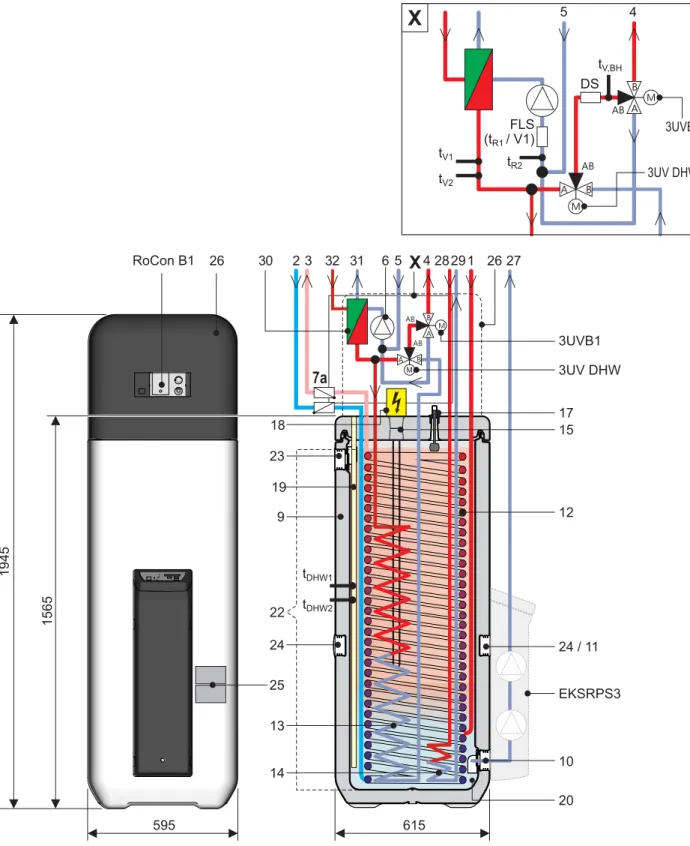
2.2.3 Device external and internal design Daikin Altherma EHS(X/H)B...P30A . . . .8
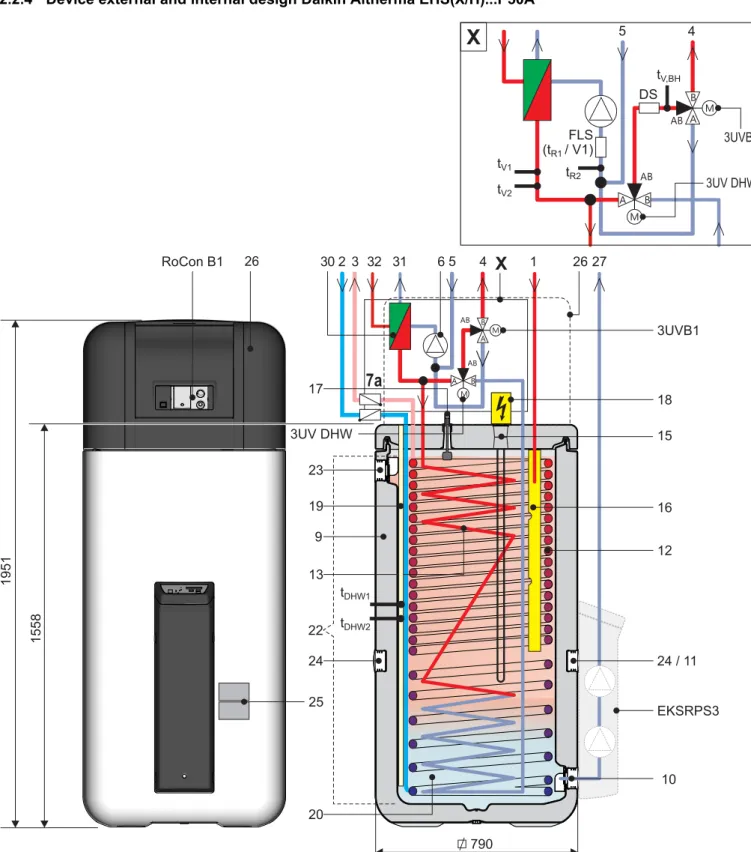
2.2.4 Device external and internal design Daikin Altherma EHS(X/H)...P50A. . . .9
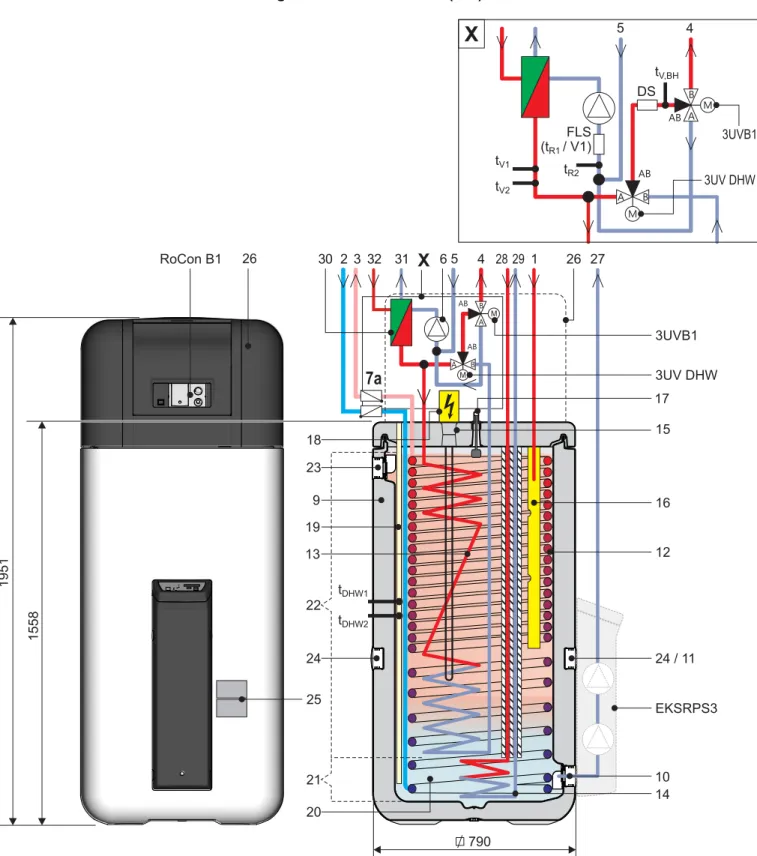
2.2.5 Device external and internal design Daikin Altherma EHS(X/H)B...P50A . . . .10
3
Operation . . . 12
3.1 General . . . 12 3.2.1 Display . . . .12 3.2.2 Operating elements. . . .13 3.3 Operating concept . . . 143.4 Basic functions and operating modes . . . 15
3.4.1 System information (Info) . . . .15
3.4.2 Setting the operating mode . . . .17
3.4.3 Temperature setting Daytime room temperature .18 3.4.4 Temperature setting Economy mode . . . .19
3.4.5 Temperature setting hot water generation . . . .19
3.4.6 Unscheduled hot water generation . . . .19
3.4.7 Switching time program. . . .19
3.4.8 System settings. . . .21
3.4.9 Terminal function. . . .22
3.4.10 Quite Mode . . . .22
3.5 Special functions . . . 23
3.5.1 Manual Operation . . . .23
3.6 Special system settings . . . 24
3.6.1 Access Rights (Technician password) . . . .24
3.6.2 Heat curve. . . .24
3.6.3 Cooling characteristic curve . . . .25
3.6.4 Weather-controlled flow temperature regulation . .26 3.6.5 Frost protection function . . . .26
3.6.6 Legionella protection . . . .27
3.6.7 Reset to factory settings (Reset). . . .27
3.6.8 Settings for optional circulation pump . . . .27
3.6.9 Remote control via Internet . . . .28
4
Commissioning . . . 29
4.1 Initial commissioning . . . 29 4.2 Re-commissioning . . . 29 4.2.1 Requirements . . . .29 4.2.2 Start-up . . . .295
Decommissioning . . . .30
5.1 Temporary shutdown . . . 305.1.1 Draining the storage tank . . . 30
5.1.2 Draining the heating circuit and hot water circuit. 31 5.2 Final shutdown . . . 32
6
Parameter settings . . . .33
6.1 Explanation of the parameter tables . . . 33
6.2 Rotary switch setting: Configuration . . . 33
6.2.1 Level "Setup". . . 33
6.2.2 Level "System Configuration" . . . 33
6.2.3 Level "HC Configuration". . . 34
6.2.4 Level "DHW Configuration" . . . 35
6.3 Rotary switch setting: DHW Install . . . 35
6.4 Rotary switch setting: Operating Mode . . . 35
6.5 Rotary switch setting: Set Temp Day . . . 36
6.6 Rotary switch setting: Set Temp Night . . . 36
6.7 Rotary switch setting: DHW Set Temp . . . 36
6.8 Rotary switch setting: Time Program . . . 37
6.9 Rotary switch setting: Remote Param . . . 37
6.10 Rotary switch setting: Info . . . 38
6.11 Exit button: Sonderfunktion . . . 38
6.12 Parameter levels for the EHS157068 mixer module . . . 39
6.12.1 Rotary switch setting: Configuration, level "Setup" . . . 39
6.12.2 Rotary switch setting: Configuration, level "Mixer Config" . . . 39
7
Service and maintenance . . . .41
7.1 General . . . 41
7.2 Removing the protective cover . . . 41
7.3 Activities to be performed annually . . . 41
7.4 Filling and topping up the storage tank . . . 42
7.5 Filling and topping up the heating system. . . . 43
8
Errors, malfunctions and messages . . . . .45
8.1 Deleting errors, correcting malfunctions, deleting messages . . . 45
8.1.1 Current fault display . . . 45
8.1.2 Read Protocol . . . 45 8.1.3 Troubleshooting. . . 45 8.2 Malfunctions . . . 46 8.3 Fault codes . . . 49 8.4 Emergency operation . . . 49
9
Glossary . . . .50
10 Notes. . . .52
10.1 User-specific settings . . . 5210.1.1 Switching timer program . . . 52
10.2 Parameter . . . 53
10.2.1 Data bus addresses . . . 53
10.3 Other items . . . 54
1 Safety
1.1 Observing instructions
These instructions are a >> Translation of the original version << in your language.
All the activities required for operation and setting the parameters are described in this instruction manual. All parameters needed for trouble-free operation have been configured at the factory.
● Please read through this manual carefully before operating the heating system or before adjusting the settings for it.
● Make a note of the preset values before you make any changes to the unit configuration.
● Comply strictly with warning instructions.
● Installation and all modifications / settings of the device not described in this manual may be performed only by qualified and authorised specialist heating technicians.
Relevant documents
– Daikin Altherma EHS(X/H):
– Installation and maintenance instructions – Operating instructions for the RoCon HP control unit – External unit for Daikin Altherma EHS(X/H); the associated
installation and operating instructions.
– When connecting to a Daikin solar system; the associated installation and operating instructions.
– If a Daikin FWXV(15/20)AVEB is connected; the associated installation and operating instructions.
– In the case of connection to a control component offered as an accessory (room controller, mixer module etc.); the asso-ciated installation and operating instructions.
The guides are included in the scope of supply for the individual units.
1.2 Warning signs and explanation of symbols
1.2.1 Meaning of the warnings
Warnings in this manual are classified according into their se-verity and probability of occurrence.
Special warning signs
Some types of danger are represented by special symbols:
1.2.2 Validity
Some information in this manual has limited validity. The validity is highlighted by a symbol.
1.2.3 Handling instructions
● Instructions on actions are shown as a list. Actions of which the sequential order must be maintained are numbered.
1.3 Avoid danger
The Daikin Altherma EHS(X/H) is state-of-the-art and is built to meet all recognised technical requirements. However, improper use may result in serious physical injuries or death, as well as property damage.
To avoid danger, only operate the Daikin Altherma EHS(X/H): – as stipulated and in perfect condition,
– with an awareness of the safety and hazards involved. This assumes knowledge and use of the contents of this manual.
DANGER!
Draws attention to imminent danger.
Disregarding this warning can lead to serious injury or death.
WARNING!
Indicates a potentially dangerous situation.
Disregarding this warning can result in serious injury or death.
CAUTION!
Indicates a situation which may cause possible damage.
Disregarding this warning can lead to damage to property and the environment.
This symbol identifies user tips and particularly useful information, but not warnings or hazards.
Electric power
Risk of burning or scalding Risk of environmental damage
Only valid for Daikin Altherma EHS(X/H) with cooling function
Comply with the specified tightening torque (see instal-lation and maintenance manual)
Only applicable for the unpressurised solar system (Drain Back)
Only applicable for the pressurised solar system. Only valid/available if a room regulator is connected Only valid/available if a mixer module is connected
Results of actions are identified with an arrow. Entry into a setting procedure
Exit from a setting procedure
WARNING!
This unit is not intended for use by persons (including children) with impaired physical, sensory or mental faculties or persons with insufficient experience and/or expertise unless supervised by a person responsible for ensuring their safety or are given instruction by this person on how to use the unit.
1.4 Intended use
The Daikin Altherma EHS(X/H) may only be used for preparation of hot water, as a room heating system, and depending on its design, as a room cooling system.
B - Additional heat exchanger for the bivalent connection
Tab. 1-1 Permissible combinations of Daikin exterior heat pump units and Daikin Altherma EHS(X/H) internal units
Any other use outside the intended use is considered as im-proper. The operator alone shall bear responsibility for any re-sulting damage.
Use as intended also involves compliance with maintenance and inspection conditions. Spare parts must at least satisfy the tech-nical requirements defined by the manufacturer. This is the case, for example, with original spare parts.
1.5 Instructions for operating safety
● Work on the Daikin Altherma EHS(X/H) (such as setup, servicing, connection and initial start-up) is only to be carried out by persons who are authorised and who have success-fully completed qualifying technical or vocational training and who have taken part in advanced training sessions recog-nised by the appropriate responsible authorities. This, in particular, includes heating specialists and climate control technicians who have experience, as a result of their technical training and their knowledge of the subject, of proper and appropriate installation and maintenance of heating, climate control and cooling installations and heat pumps.
● Electrical installation may be carried out only by electrical engineers and in compliance with the valid electro-technical guidelines as well as the regulations of the relevant energy supply company (EVU).
Observe the current technological regulations to prevent cor-rosion products and deposits.
Minimum requirements regarding the quality of filling and sup-plementary water:
– Water hardness (calcium and magnesium, calculated as calcium carbonate): ≤ 3 mmol/l
– Conductivity: ≤ 2700 μS/cm – Chloride: ≤ 250 mg/l – Sulphate: ≤ 250 mg/l
– pH value (heating water): 6,5 - 8,5
Using filling water and top-up water which does not meet the stated quality requirements can cause a considerably reduced service life of the equipment. The responsibility for this lies solely with the operator.
Internal unit External unit
Heating and cooling (X)
Heating only (H)
EHSX04P30A EHSH04P30A
ERLQ004CAV3 EHSXB04P30A EHSHB04P30A
EHSX08P30A EHSH08P30A
ERLQ006CAV3 ERLQ008CAV3 EHSXB08P30A EHSHB08P30A
EHSX08P50A EHSH08P50A EHSXB08P50A EHSHB08P50A
EHSX16P50A EHSH16P50A ERLQ011CA(V3/W1) ERLQ014CA(V3/W1) ERLQ016CA(V3/W1) EHSXB16P50A EHSHB16P50A
For work on stationary refrigeration systems (heat pumps) and air conditioning systems, proof of expertise is required in the European Community according to the F-Gases Directive (EC) No. 303/2008.
– up to 3 kg coolant fill quantity: Expert certificate category II
– 3 kg coolant fill quantity or over: Expert certifi-cate certifi-category I
2 Product description
2.1 Brief description
The air-water heat pump system uses the physical effect of con-densation and latent heat and makes it possible as required to heat or cool buildings. The Daikin Altherma EHS(X/H) (Altherma integrated solar unit) is the primary component of the highly-effi-cient heating- and cooling system for domestic applications. Located in the external heat pump unit (ERLQ)are the coolant compressor and a finned heat exchanger, which, in heating mode, acts as a vaporiser and extract heat from the ambient air. In cooling mode this acts as a condensator and returns heat to the environment (refrigerator principle).
The heat pump external unit is connected to the heat pump in-ternal unit in the building by means of a closed coolant circuit. Heat or cold is transported between the heat pump external unit and the heat pump internal unit by means of the circulating refrig-erant, which alternately takes on the liquid and gaseous phases. The internal heat pump unit contains the control devices, the heat exchanger and integrated storage tank. In the heat exchanger, the heat is transferred to the water flowing in the heating circuit or the water in the storage tank (heating/hot water supply), or heat is extracted from the water (cooling).
The storage tank on the Daikin Altherma EHS(X/H) is built in such a way to enable the heat pump system to be combined with a Daikin solar system without needing an additional hot water tank. With optional solar heating, the entire hot water storage tank can be heated, depending on the heat offered by the sun. The stored heat is used both for hot water heating and for heating support. The high total storage capacity also temporarily allows time without sunshine to be bridged. The excellent heat insulation properties of the integrated storage tank also ensure that heat losses are kept to a minimum. This allows efficient and economic water heating and also solar support.
If the heating capacity of the Altherma EHS(X/H) is not adequate, the optional backup heater (EKBUxx) can provide additional heating capacity for heating the heating circuit.
In order to make more cost effective use of the Daikin Altherma EHS(X/H), it can be operated on a low tariff network connection (HT/NT) or with an intelligent controller (SMART GRID). Here the energy supply company (EVU) is afforded the opportunity to control their network utilisation by changing the heat pump oper-ating mode. Information on the prerequisites and connection pos-sibilities are described in the enclosed installation manual.
2.1.1 Mode of operation
In room heating mode the refrigerant which was compressed in the refrigerant compressor in the heat pump external unit con-denses in the plate heat exchanger in the heat pump internal unit. The heat released during the liquefaction of the coolant is trans-ferred to the heating water in the plate heat exchanger. The heat circulating pump ensures the required flow of the heating water in the internal hear generation circuit.
The hot water zone of the storage tank integrated into the interior heat pump unit is heated by the heat pump or other external heat generators (solar system, backup heater. The cold water flowing downstream of the hot water extraction cools the lower area of the integrated storage tank to maximum effect.
The drinking water is heated indirectly in a corrosion resistant stainless steel corrugated pipe heat exchanger by the unpres-surised water from the integrated storage tank. On its way to the top, it continuously absorbs the heat from the storage tank water. The flow direction, operating on the principle of counter-flow, and the coil-shaped heat exchanger create a pronounced temper-ature layering in the hot water storage tank. As high tempertemper-atures can be maintained for a very long time in the upper section of the storage tank, a high hot water output is achieved even if water is drawn off over a long period of time.
In the case of room cooling the 3-way switching valves (3UV1 + 3UVB) mounted on the heat pump internal unit switches off the flow to storage tank charging/heating support. The heat circulation pump of the heat pump internal device now operates exclusively within the heating circuit.
The cooling process now takes place by inverting the heat pump process in the heat pump external unit. Thus the heat exchanger of the heat pump internal unit acts as a vaporiser and extracts heat from the heating water that flows through it. This cools the heating circuit.
The lower the required temperature in the heating cir-cuit, the more effectively the heat pump works. It is, in particular, possible to achieve the lowest flow temperatures possible with under-floor heating, as the heat transfer surface is very large. Furthermore, the building to be heated should ideally have extremely good heat insulation, so that when there is a low heat requirement, the heat carrier can run with a low flow temperature.
2.1.2 Solar support
The Daikin Altherma EHS(X/H) is prepared for integration into a Daikin solar system.
The pressureless Daikin Solar-System (Drain Back), and in the case of Daikin Altherma EHS(X/H)B type systems the Daikin Solar-Pressure system can be used.
The high performance flat collectors are highly effective in con-verting solar radiation into heat, which is transferred via the solar circuit into the integrated storage tank of the Daikin Altherma EHS(X/H).
The heat that is fed in is transferred to the hot water circuit. If there are sufficiently high temperatures in the hot water tank the solar heat is also used for heating support. The RoCon HP control unit controls this heat distribution fully automatically.
2.1.3 Safety management
The total security management of the Daikin heat pump system is assumed by the electronic control integrated in the Daikin Al-therma EHS(X/H). In the event of a water shortage, loss of refrig-erant or undefined operating states, a safety switch-off is per-formed. A corresponding fault signal provides an engineer with all the necessary information for troubleshooting.
2.1.4 Electronic control
Depending on the heating unit, the RoCon HP electronic digital controller automatically controls all the heating, cooling and hot water functions for a direct heating circuit, a storage tank charging circuit and, using optionally connected mixer modules, additional heating circuits as well.
All function settings for the Daikin Altherma EHS(X/H) and the op-tional equipment (terminal function) connected via the data bus are performed by the operating elements of the RoCon B1 inte-grated into the controls and are displayed in clear text on a col-oured backlit ground.
The display and operation of a connected Daikin solar system are performed by the associated controller for this component (e.g., Control and Pump Unit EKSRPS3B).
2.2 Design and components
2.2.1 System overview
1 Heat pump external unit (ERLQ)
2 Daikin Altherma integrated solar unit (Altherma EHS(X/H))
Daikin Solar system (optional): 3 Solar control and pump unit 4 Solar panels
Fig. 2-1 Components of the heat pump system with the Daikin Alther-ma EHS(X/H) internal unit and optional Daikin solar sys-tem
2.2.2 Device external and internal design Daikin Altherma EHS(X/H)...P30A
Fig. 2-2 Design and components of the Daikin Altherma EHS(X/H)...P30A (external view and internal design)
2.2.3 Device external and internal design Daikin Altherma EHS(X/H)B...P30A
Fig. 2-3 Design and components of the Daikin Altherma EHS(X/H)B...P30A (external view and internal design)
2.2.4 Device external and internal design Daikin Altherma EHS(X/H)...P50A
Fig. 2-4 Design and components of the Daikin Altherma EHS(X/H)...P50A (external view and internal design)
2.2.5 Device external and internal design Daikin Altherma EHS(X/H)B...P50A
Fig. 2-5 Design and components of the Daikin Altherma EHS(X/H)B...P50A (external view and internal design)
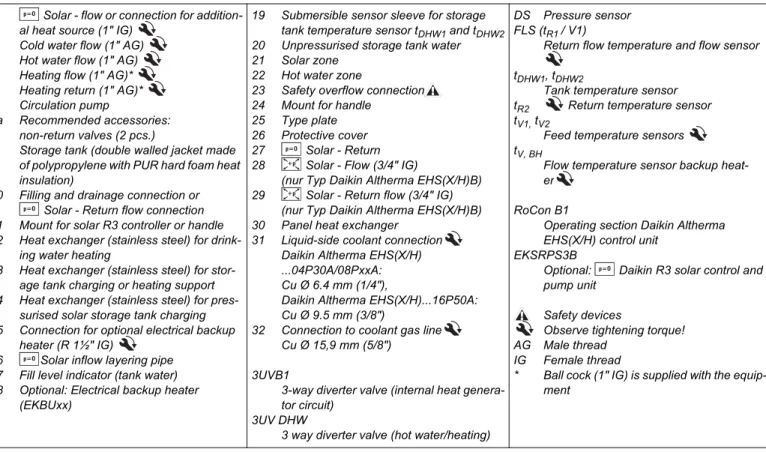
Tab. 2-1 Legend from fig. 2-2 to fig. 2-5 1 Solar - flow or connection for
addition-al heat source (1" IG) 2 Cold water flow (1" AG) 3 Hot water flow (1" AG) 4 Heating flow (1" AG)* 5 Heating return (1" AG)* 6 Circulation pump
7a Recommended accessories:
non-return valves (2 pcs.)
9 Storage tank (double walled jacket made of polypropylene with PUR hard foam heat insulation)
10 Filling and drainage connection or
Solar - Return flow connection 11 Mount for solar R3 controller or handle 12 Heat exchanger (stainless steel) for
drink-ing water heatdrink-ing
13 Heat exchanger (stainless steel) for stor-age tank charging or heating support 14 Heat exchanger (stainless steel) for
pres-surised solar storage tank charging 15 Connection for optional electrical backup
heater (R 1½" IG)
16 Solar inflow layering pipe 17 Fill level indicator (tank water) 18 Optional: Electrical backup heater
(EKBUxx)
19 Submersible sensor sleeve for storage tank temperature sensor tDHW1 and tDHW2 20 Unpressurised storage tank water 21 Solar zone
22 Hot water zone
23 Safety overflow connection 24 Mount for handle
25 Type plate 26 Protective cover 27 Solar - Return 28 Solar - Flow (3/4" IG)
(nur Typ Daikin Altherma EHS(X/H)B) 29 Solar - Return flow (3/4" IG)
(nur Typ Daikin Altherma EHS(X/H)B) 30 Panel heat exchanger
31 Liquid-side coolant connection Daikin Altherma EHS(X/H) ...04P30A/08PxxA:
Cu Ø 6.4 mm (1/4"),
Daikin Altherma EHS(X/H)...16P50A:
Cu Ø 9.5 mm (3/8")
32 Connection to coolant gas line Cu Ø 15,9 mm (5/8")
3UVB1
3-way diverter valve (internal heat genera-tor circuit)
3UV DHW
3 way diverter valve (hot water/heating)
DS Pressure sensor FLS (tR1 / V1)
Return flow temperature and flow sensor
tDHW1, tDHW2
Tank temperature sensor tR2 Return temperature sensor tV1, tV2
Feed temperature sensors tV, BH
Flow temperature sensor backup heat-er
RoCon B1
Operating section Daikin Altherma EHS(X/H) control unit
EKSRPS3B
Optional: Daikin R3 solar control and pump unit
Safety devices
Observe tightening torque! AG Male thread
IG Female thread
* Ball cock (1" IG) is supplied with the equip-ment
3 Operation
3.1 General
3.2 Display and operating elements
3.2.1 Display
All the operating steps are supported by appropriate displays in a clear text display on a coloured background.
Menu navigation is available in 7 different languages (see section 3.4.8).
The colour of the backlighting indicates the operational status and the operational mode:
DANGER!
If electrical components come into contact with water, this can cause an electric shock as well as potentially fatal injuries and burns.
● The displays and the buttons on the Controller
must be protected from the effects of moisture.
● To clean the Controller use a dry cotton cloth. Using aggressive cleaning agents and other
liquids can cause damage to equipment or lead to an electric shock.
Maximum energy utilisation
The most effective energy utilisation is achieved by the Daikin Altherma EHS(X/H) at the lowest possible return flow and hot water temperatures.
If an external heat generator (e.g. the optional Backup Heater) is used at inflow target temperatures of over 50°C, the efficiency (COP) of the Daikin Altherma EHS(X/H) can be affected negatively (depending on the outside temperature).
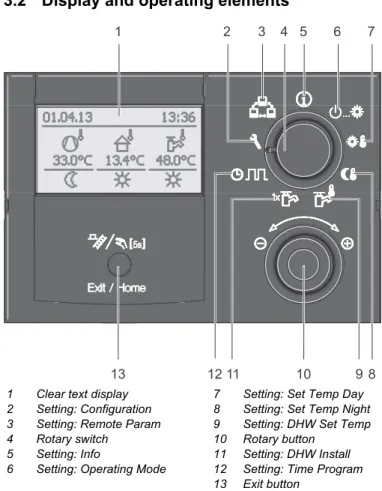
1 Clear text display 2 Setting: Configuration 3 Setting: Remote Param 4 Rotary switch
5 Setting: Info
6 Setting: Operating Mode
7 Setting: Set Temp Day 8 Setting: Set Temp Night 9 Setting: DHW Set Temp 10 Rotary button
11 Setting: DHW Install 12 Setting: Time Program 13 Exit button
Fig. 3-1 Arrangement of display and operating elements
Malfunctions are generally indicated by a fault code and a clear text fault message on the display.
For troubleshooting instructions refer to chapter 8.
White: Standard lighting, normal operational display. Red: Fault status, depending on the type of fault, the
Daikin Altherma EHS(X/H) continues to function with restrictions.
Green: Operating mode with operator authorisation. Blue: Operating mode with expert technician
authori-sation.
1 Date display
2 Status of refrigerant com-pressor
3 Status display (e.g. Techni-cian access rights active) 4 Display time
5 Current flow temperature 6 Status heating circuit
7 Current outdoor temperature 8 Active operating mode 9 Status of hot water
genera-tion
10 Current storage tank temper-ature
Explanation of symbols
Tab. 3-1 Explanation of display symbols
3.2.2 Operating elements
If special key combinations or extended key pushes are required for certain function, a separate note is made in each specific section of this description.
Rotary switch
The rotary switch is used to gain rapid direct access (main function level) to frequently required functions and setting op-tions.
Tab. 3-2 Function of rotary switch
Item fig. 3-2
Symbol Explanation
2 Flashing: Heat pump demand active Permanently on: Refrigerant compressor is working
2 No connection to the external heat pump unit
3 Access Rights Expert active (see section 3.6.1)
2 / 3 Air Purge active (can only be activated by the heating technician)
2 / 3 Terminal function active (see section 3.4.9) 2 / 3 Frost protection function active (see
section 3.6.5)
2 / 3 "Party" temporary timer programme active (see section 3.4.7)
2 / 3 "Away" temporary timer programme active (see section 3.4.7)
2 / 3 "Holiday" temporary timer programme active (see section 3.4.7)
2 / 3 "Vacation" temporary timer programme active (see section 3.4.7)
2 / 3 Screed Program active (can only be acti-vated by the heating technician)
5 Direct heating circuit
– Under normal conditions, the current inflow temperature tV, BH is displayed. – In the case of no demands from the
heat pump, the abbreviation "ES" is displayed instead of the current inflow temperature.
The control system has switched to
energy saving mode (see section 3.4.2). Superfluous elec-tronic components are switched off. 5 Mixer circuit
The current inflow temperature of the se-lected heating circuit is displayed. 5 Room temperature sensor
The current room temperature is displayed. 6 Heating circuit status
– Heating circuit active (room heating function)
– Heating circuit active (room cooling function)
– Heating circuit not active (currently no heat transfer in the heating circuit) 7 Outside temperature sensor
The current outside temperature is dis-played.
8 Current operating mode (see section 3.4.2) Standby active Reducing active Heating active Cooling active Summer active Automatic 1 active Automatic 2 active
9 Domestic hot water generation active Domestic hot water generation not active 10 Domestic hot water circuit status
The current storage tank temperature
tDHW1 is displayed.
CAUTION!
Never operate the operating elements on the con-troller with a hard, pointed object. This can cause damage and can cause the control unit to malfunction.
Independent of the setting of the rotary switch, the Daikin Altherma EHS(X/H) operates in accordance with the operating mode set in the switch position "Oper-ating Mode" or which has been activated by a
special programme.
Action Result
Rotating
Direct selection of the main function level allo-cated to this switch position.
Item fig. 3-2
Rotary switch
The rotary switch can be used to navigate in the individual levels, setting values can be selected, changed and these changes can then be accepted by pressing briefly.
Tab. 3-3 Functions of the rotary switch
Exit button
This button can be used to jump back to the previous display within a menu display or a function / input can be interrupted. This button can also be used to call up the special level (see section 3.5).
Tab. 3-4 Functions of the exit button
3.3 Operating concept
The operating concept for controlling the RoCon HP is structured in such a way that the frequently required settings options are ac-cessible quickly and directly at the main function level (selection using the rotary switch), while the less frequently required set-tings options are arranged at a lower parameter level.
Certain functions and parameters are restricted by access au-thorisation and can only be adjusted by the heating technician (see Section 3.6.1).
In normal operating mode the rotary switch should be in position .
After switching on and successful initialisation, the display auto-matically shows the standard display with rotary switch position .
In the first commissioning, the setting for language selection is displayed first.
● Select the language using the rotary switch.
● Confirm the changes with a brief press of the rotary switch.
When the system is switched on, based on the stipulations set in the Controller RoCon HP, it fully automatically regulates the operation of the
– room heating, room cooling and the – sanitary hot water generation.
If the user enters a value manually, this setting remains active until the user changes it or until the programme clock forces an-other operating mode.
Action Result
Rotating
To the right (+): Increased regulation To the left (–): Reduced regulation
Pressing
Confirm, accept, selection and execute the function.
Action Result
Brief pressing. – Jump back to the previous display or pre-vious level or
– Cancellation of a special function or an active temporary timer programme. Pressfor more
than 5 secs. – Special level is called up.
1 Operating Mode (section 3.4.2) 2 Set Temp Day (section 3.4.3) 3 Set Temp Night (section 3.4.4) 4 DHW Set Temp (section 3.4.5) 5 DHW Install (section 3.4.6) 6 Time Program (section 3.4.7) 7 Configuration (section 3.4.8) 8 Remote Param (section 3.4.9) 9 Info (section 3.4.1)
Fig. 3-3 Illustration of main function level (rotary switch position)
Adaption to the special installation configuration is carried out in the "Configuration" rotary switch
position (see section 3.4.8).
Independent of the setting of the rotary switch, the Daikin Altherma EHS(X/H) operates in accordance with the operating mode set in the "Operating
Mode" switch position or that has been
acti-vated by a special programme.
1 2 3 4 5 6 7 8 9
The operating mode can be affected by additional functions such as:
– Weather-controlled flow temperature regulation – Switching time program
– Setting the temperature target value – Setting at the room station
– EXT signal (external operating mode switching) – Quite Mode
– Interlink fct
– SMART GRID - Signal
– EVU (reduced cost tariff) - Signal – Screed function
– Air Purge
– Manual Operation
Button block
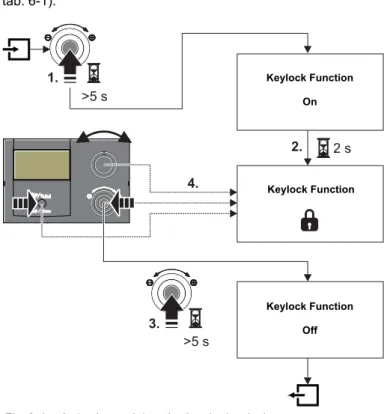
The operating panel on the RoCon HP can be blocked to prevent inadvertent actuation (see fig. 3-4).
Unlocking can be carried out in the same way.
The prerequisite for this function is that, in the level "Setup", the parameter [Keylock Function] is set to "On" (see chapter 6.2.1, tab. 6-1).
3.4 Basic functions and operating modes
Automatic defrosting function
At low outdoor temperatures and corresponding humidity values, the external heat pump unit may ice up. This icing impairs effi-cient operation. The system detects this condition automatically and starts the defrosting function.
During the defrosting function, heat is drawn from the hot water storage tank and the backup heater is turned on if required. De-pending on the heat demand for the defrosting function, heating of the direct heating circuit may be interrupted temporarily. After 8 minutes at most, the system returns to normal mode.
3.4.1 System information (Info)
In this rotary switch position, the rotary switch can be used to call up all the system temperatures, the type of Daikin Altherma EHS(X/H), various software information and the operating sta-tuses of all system components, one after the other. The number of displayed parameters depends on the connected components. No settings can be made to these values.
● Place the rotary switch in the "Info" position.
Standard display is shown (see fig. 3-2).
● Press the rotary switch briefly.
The parameter overview is displayed.
● Select the desired information level with the rotary switch.
● Confirm the changes with a brief push of the rotary switch. The value is displayed (for example, see fig. 3-6).
● Select the individual information with the rotary switch.
More detailed explanations and possible setting values for this rotary switch setting can be seen in chapter 6.10.
Fig. 3-4 Activating and deactivating the key lock
Keylock Function On
Keylock Function
Keylock Function Off
If the storage temperature falls below a certain minimum value, the safety settings of the Daikin Altherma EHS(X/H) prevent the operation of the heat pump in the case of low external temperatures: – External temperature < -2 °C, minimum storage
temperature = 30 °C
– External temperature < 12 °C, minimum storage temperature = 23 °C.
Without backup heater:
The storage tank water must be heated to the minimum required storage temperature by an external heater. With backup heater (EKBUxx):
With an outdoor temperature < 12 °C and a storage tank temperature < 35 °C, the backup heater (EKBUxx) is switched on automatically on in order to heat up the storage tank water to at least 35 °C.
Display operating data overview
The current operating data for the Daikin Altherma EHS(X/H) are shown on the RoCon HP Controller in the "Overview" information level.
The display of the operating data is not divided into several windows. By adjusting the rotary switch it is toggled between the windows.
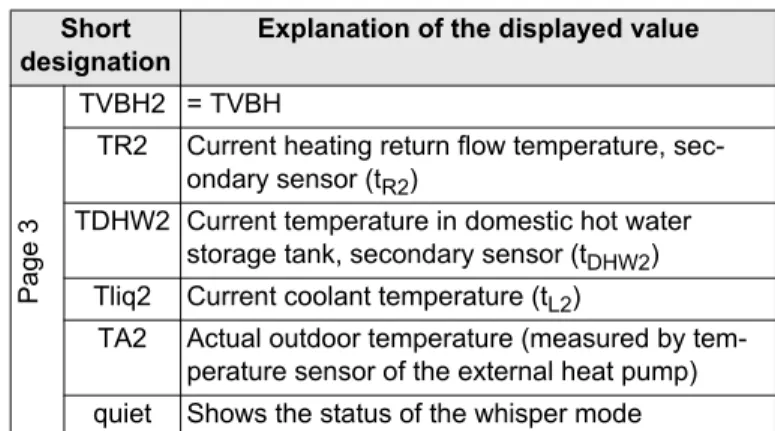
Tab. 3-5 Description of the operating data displayed as an overview
Short designation
Explanation of the displayed value
Page 1
Mode Current mode of the heat pump: : Heating
: Cooling
: Domestic hot water generation : Automatic defrosting function active Ext Current energy mode of the heat pump:
LT: EVU function active and low tariff. HT: EVU function active and standard tariff. SGN: SMART GRID - Function active, normal mode.
SG1: SMART GRID - Function active, Discon-nection: no heat pump operation, no frost protection function.
SG2: SMART GRID - Function active, Switching on recommendation, Operation with higher target temperatures, cheaper electricity.
SG3: SMART GRID - Function active, Command to switch on and storage tank charging to 70 °C, cheaper electricity
- - -: No external mode active, heat pump works in normal mode.
RT Parameter [Room thermostat] / [Interlink fct]
= Off:
-Parameter [Room thermostat] = On: – : Heating or cooling demand – : No heating demand
Parameter [Interlink fct] = On (priority): – - - -: Only frost protection
– IL1: Normal inflow target temperature – IL2:
– Increased inflow target temperature in heating operation
– Decreased inflow target temperature in cooling operation
Pump Actual output of the internal heating circulation pump in %
EHS Current output of the backup heater in kW BPV Current position of the mixing valve 3UVB1
(100% = A, 0% = B)
Page 2
TV Current inflow temperature after the plate heat exchanger (tV1)
TVBH Current heating inflow temperature or temp. after heating support heat exchanger (tV, BH)
TR Current heating return flow temperature (tR1)
Tdhw Current temperature in domestic hot water storage tank (tDHW1)
TA Actual outdoor temperature (measured by op-tional temperature sensor RoCon OT1) V Actual volume flow (flow rate) in the heating
system
Page
3
TVBH2 = TVBH
TR2 Current heating return flow temperature, sec-ondary sensor (tR2)
TDHW2 Current temperature in domestic hot water storage tank, secondary sensor (tDHW2)
Tliq2 Current coolant temperature (tL2)
TA2 Actual outdoor temperature (measured by tem-perature sensor of the external heat pump) quiet Shows the status of the whisper mode
Fig. 3-5 Display operating data overview
Short designation
Explanation of the displayed value
Info
Overview
Water Pressure
Displaying the water pressure
On the Controller RoCon HP, when it is switched on, you can display the system pressure (water pressure) in the internal circuit (direct heating circuit). The water pressure is available as the first info parameter (see fig. 3-6).
The permissible range of water pressure during operation de-pends on the Daikin Altherma EHS(X/H) and the heating system. The set values and threshold values must only be changed by the heating technician. If the water pressure falls below the minimum value (set parameter value), it must be increased by topping up the system (see chapter on "Inspection and Maintenance").
3.4.2 Setting the operating mode
The selection of the operating mode with which the Daikin Altherma EHS(X/H) is to operate is undertaken on the rotary switch in the setting "Operating Mode" .
The selected operating mode is activated by briefly pushing the rotary switch.
● Place the rotary switch in the "Operating Mode"
position.
An overview is displayed.
● Select the desired operating mode with the rotary switch.
● Confirm the changes with a brief push of the rotary switch. Daikin Altherma EHS(X/H) operates in accordance with
the set operating mode.
The current operating mode is indicated by an appropriate symbol in the standard display.
Operating mode Standby (Stand-by)
In this mode, the Daikin Altherma EHS(X/H) is shifted to the stand-by mode. The frost-protection function (see
section 3.6.5) remains in place. In order to maintain this function, the system must not be disconnected from the mains!
All controllers integrated into the RoCon-system via the CAN bus are also switched at a higher level to the operating mode "Standby".
Fig. 3-6 Info values display (e.g. system pressure)
Info Overview
Water Pressure
T-HS
Water Pressure
Fig. 3-7 Switching the operating mode
(e.g.: from "Standby" to "Automatic 1")
CAUTION!
A heating system that is not frost-protected can freeze in cold weather and may be damaged.
● Drain the water out of the heating system if there is a risk of frost.
● If the heating system is not drained and there is a risk of frost, the power supplies must be secured and the external main switch must remain switched on. Operating Mode Standby Reducing Operating Mode Heating Cooling Summer Operating Mode Summer Automatic 1 Automatic 2 Operating Mode Summer Automatic 1 Automatic 2
Operating modeReducing
Reduced heating mode (lower set room temperature) in ac-cordance with the target temperature set for economy mode in the parameter [T-Reduced] (see section 3.4.4).
Hot water generation according to the set target domestic hot water temperatures and switching cycles in the hot water time programme [DHW Program 1] (see section 3.4.5).
Operating modes Heating, Cooling
Heating or cooling operation in accordance with the room tem-perature set in the parameter [T-Room 1 Setpoint]
(see section 3.4.3).
A connected outdoor temperature sensor (weather-controlled flow temperature regulation) or a connected room station will also influence the set flow temperature regulation (requirements: Pa-rameter [HC Function] = On).
Hot water generation according to the set target domestic hot water temperatures and switching cycles in the hot water time programme [DHW Program 1] (see section 3.4.5).
Operating modeSummer
Hot water generation according to the set target domestic hot water temperatures and switching cycles in the hot water time programme [DHW Program 1] (see section 3.4.5).
All controllers integrated into the RoCon-system via the CAN bus are also switched at a higher level to the operating mode "Summer".
Operating mode Automatic 1 (Timer programme)
Automatic heating and economy mode in accordance with the permanent timer programmes (see section 3.4.7):
– [HC Program 1] – [DHW Program 1]
Operating mode Automatic 2 (Timer programme)
Automatic heating and economy mode in accordance with the permanent timer programmes (see section 3.4.7):
– [HC Program 2] – [DHW Program 2]
In addition to these operating modes there are various different temporary heating programmes available (see tab. 3-6), which run according to priority after they have been activated.
Tab. 3-6 Overview of temporary timer programmes
3.4.3 Temperature setting Daytime room temperature
The set room temperatures for room heating during the day are determined in the rotary switch setting .
● Place the rotary switch in the "Set Temp Day" position.
An overview is displayed.
● Select the temperature block to be set with the rotary switch.
● Confirm the changes with a brief push of the rotary switch. Settings are displayed.
● Set the temperature.
● Confirm the changes with a brief push of the rotary switch. Change has been accepted. Jump back to previous
dis-play.
More detailed explanations and possible setting values for this rotary switch setting can be seen in chapter 6.5.
Fig. 3-8 Standard display in "Standby" operating mode
(above the frost-protection limit)
In the "Standby" operating mode, the heat pump and any optionally connected backup heaters are isolated from the power supply (Energy saving mode) when the following conditions are met:
– The outdoor temperature sensor (RoCon OT1) is connected and correctly parametrised in the system configuration,
– The outdoor temperature is over 8 °C, – There is no heating command,
– The frost protection function is not active in any of the connected heating circuits, and
– Daikin Altherma EHS(X/H) has been switched on for at least 5 mins.
Temporary timer programme Setting / activating in level Rotary switch setting Note
DHW Install DHW Install section 3.4.6 Party Time Program section 3.4.7 Away Holiday Vacation
If a temporary timer programme (DHW Install, Party, Away, Holiday, Vacation) is started during the selected operating mode, the regulation will take place with pref-erence according to the settings of this timer pro-gramme.
The end figures of the parameter designations (1 - 3) within this rotary switch setting designate the associ-ation with each individual cycle of the timer programme.
3.4.4 Temperature setting Economy mode
The set room temperatures for room heating in economy mode are determined in the rotary switch setting .
● Place the rotary switch in the "Set Temp Night" position.
An overview is displayed.
● Select the parameter to be set with the rotary switch.
● Confirm the changes with a brief push of the rotary switch. – [T-Reduced]: Set value for "Reducing" operating mode or
setback by a permanent timer programme.
– [T-Absence]: Set value for temporary heating / cooling programmes ("Away" and "Vacation").
Settings are displayed.
● Set the temperature.
● Confirm the changes with a brief push of the rotary switch. Change has been accepted. Jump back to previous
dis-play.
More detailed explanations and possible setting values for this rotary switch setting can be seen in chapter 6.6.
3.4.5 Temperature setting hot water generation
The hot water set temperatures for hot water generation for each individual timer programme are determined in the rotary switch setting .
● Place the rotary switch in the "DHW Set Temp" position.
● Select the temperature block to be set with the rotary switch.
● Confirm the changes with a brief push of the rotary switch. Settings are displayed.
● Set the temperature.
● Confirm the changes with a brief push of the rotary switch. Change has been accepted. Jump back to previous
dis-play.
More detailed explanations and possible setting values for this rotary switch setting can be seen in chapter 6.7.
3.4.6 Unscheduled hot water generation
You can charge the hot water up manually outside a hot water timer programme to the preset temperature set in parameter
[T-DHW Setpoint 1] in the rotary switch position . Heating up is carried out as a priority and independently of any other heating programmes.
● Place the rotary switch in the "DHW Install" position.
An overview is displayed.
● Select the parameter to be set with the rotary switch. – [1x Hot Water]: Activating one-off hot water generation.
● Confirm the changes with a brief push of the rotary switch.
● Setting parameters
● Confirm the changes with a brief push of the rotary switch. Begin unscheduled hot water generation.
Possible setting values for this rotary switch setting can be seen in chapter 6.3. 3.4.7 Switching time program
Various different timer programmes are available, that are set in the factory, but which can be adjusted to suit, to provide conven-ient and individual room and hot water temperature control. The timer programmes regulate the associated heating circuit, the storage tank charging circuit and an option connected circu-lation pump in accordance with the stipulated switching times.
Adjustment
In the rotary switch position we set the time intervals for the heating circuit, the integrated hot water generation and the optional circulation pump.
● Place the rotary switch in the "Time Program"
position.
An overview is displayed.
● Select the timer programme to be set with the rotary switch.
● Confirm the changes with a brief push of the rotary switch. Settings are displayed.
● Select and change the value to be set with the rotary switch.
● Confirm the changes with a brief push of the rotary switch.
More detailed explanations and possible setting values for this rotary switch setting can be seen in chapter 6.8 "Rotary switch setting: Time Program".
Permanent timer programmes
For the connected heating circuits and the storage tank charging circuit, timer programmes regulate the heating circuit tempera-tures or the operating times for the circulation pump in ac-cordance with the stipulated switching cycles. The switching cycles are saved in time blocks for which various set tempera-tures apply.
In the switching cycles the heating system is regulated differen-tiated into day and economy mode.
The target room temperatures for these timer programmes are set in "Set Temp Day" , "Set Temp Night" and "DHW Set Temp" .
The following switching time programmes are available: – 2 timer programmes for the heating circuit, each with
3 possible time cycles – [HC Program 1] – [HC Program 2] The end figures of the parameter designations (1 - 3)
within this rotary switch setting designate the associ-ation with each individual cycle of the timer programme.
After this temporary function has expired, the Controller automatically jumps back to the previously active oper-ating mode. The rotary switch should therefore be re-turned to the position "Info" after activation.
The function is subject to time limits.
It will be suspended at the latest after the maximum charging time set by the technician and can only be re-started after the expiration of the blocking time set by the technician at the earliest.
A separate input for each individual day of the week is possible, or in blocks of "Monday to Friday", "Saturday to Sunday" and "Monday to Sunday".
Tab. 3-7 Menu structure heating circuit timer programme
– 2 timer programmes for the hot water circuit, each with 3 possible switching cycles
– [DHW Program 1] – [DHW Program 2]
– 1 timer programme for one optionally connected circula-tion pump with 3 individual possible switching cycles [Circulation Time]
Saved switching time programmes can be changed at any time. To provide a better overview, we recommend making a record of the programmed switching times and keeping it in a safe place (see chapter 10.1.1).
The permanent timer programmes are preset as per tab. 3-8.
Programme Time period Switching cycle
HC Program 1
Single day of the week
(Monday, Tuesday ...) 1.2. 3. 06:00 -> 22:00 -> -> --:--Working week (Monday to Friday) 1.2. 3. 06:00 -> 22:00 -> -> --:--Weekend (Saturday to Sunday) 1.2. 3. 07:00 -> 23:00 -> -> --:--Entire week (Monday to Sunday) 1.2. 3. 06:00 -> 22:00 -> ->
--:--HC Program 2 See HC Program 1 1.2. 3.
See HC Program 1
Time settings for one switching cycle in one weekday or block programme are also adopted for other time pe-riods, provided that they affect the same weekdays. Ex-amples referring to tab. 3-7:
a) For the single working day "Monday" the start time for the 1st switching cycle changed from 06:00 to 05:00.
In the time period "Working week" and "Entire week", the 1st switching cycle also changed from 06:00 to 05:00.
b) For the time period "Weekend", the start time for the 1st switching cycle changed from 07:00 to 08:00. In the individual weekdays "Saturday" and
"Sun-day", the 1st switching cycle also automatically changed from 07:00 to 08:00.
c) For the time period "Entire week", the end time in the 1st switching cycle changed from 22:00 to 21:30.
In all the weekdays the 1st switching cycle is also changed from 22:00 to 21:30.
The setting and input structure of the timer programmes are identical to the ones for the heating circuit timer pro-gramme (see also tab. 3-7).
The setting and input structure of the timer programmes are identical to those for the heating circuit timer pro-gramme (see also tab. 3-7).
For further instructions concerning settings for an op-tional circulation pump, see section 3.6.8.
Tab. 3-8 Factory setting for the permanent switching time programmes
Temporary timer programmes
For a specific situation there are 4 temporary programmes
available, whichdeactivate the permanent timer programmes
or the current operating mode for the duration of their validity. The symbol of the temporary time program is displayed in the header line of the standard display, as long as the time program is active.
1. [Party]: Immediate one-off extension of the room heating
a) If an automatic programme is activated, the last
applicable switching cycle is always extended. In the time before switching cycle 1, the target room temperature set in the parameter [T-Room 1 Setpoint] applies.
b) In all other operating modes, the target room temperature set in the parameter [T-Room 1 Setpoint] applies. – The hot water generation is not affected.
– The time programme runs for the set time period after acti-vation.
2. [Away]: Immediate one-off setback up to 6 hours – The system operates in economy mode according to the
room temperature set in the rotary switch setting "Set Temp Night" in the parameter [T-Absence].
– The hot water generation is not affected.
– The time programme runs for the set time period after acti-vation.
3. [Holiday]: One-off calendar-controlled presence. – The system operates exclusively in accordance with the
"Sunday" settings in the [HC Program 1].
– The hot water generation operates exclusively in accord-ance with the "Sunday" settings in the [DHW Program 1]. 4. [Vacation]: One-off calendar-controlled reduction.
– The system only operates in economy mode according to the room temperature set in the rotary switch setting "Set Temp Night" in the parameter [T-Absence].
– Hot water generation according to the set temperatures and switching cycles in the hot water time programme [DHW Program 1] (see section 3.4.5).
– The calendar-controlled programme [Vacation] is not started if the operating mode [Standby] or [Manual Oper-ation] is active on the set start date.
3.4.8 System settings
We undertake the basic settings for the Controller RoCon HP and the system configurations for the installation environment of the Daikin Altherma EHS(X/H), the direct heating circuit, the hot water generation and any optionally connected components in the rotary switch setting "Configuration" .
Depending on access authority (user or expert), various different parameters are available. Certain parameters are only acces-sible to the heating expert.
Setting the Language, Date, Time
● Place the rotary switch in the "Configuration" position.
Switching cycle 1 Switching cycle 2 Switching cycle 3
Time period On Off On Off On Off
Room heating / Room cooling
Temperature setting [T-Room 1 Setpoint]: 20 °C [T-Room 2 Setpoint]: 20 °C [T-Room 3 Setpoint]: 20 °C [T-Reduced]: 10 °C "HC Program 1" Monday - Friday 06:00 22:00 - - : - - - - : - - - - : - - : -Saturday, Sunday 07:00 23:00 - - : - - - - : - - - - : - - : -"HC Program 2" Monday - Friday 06:00 08:00 - - : - - - - : - - - - : - - : -Saturday, Sunday 07:00 23:00 - - : - - - - : - - - - : - - :
-Domestic hot water generation
Temperature setting [T-DHW Setpoint 1]: 48 °C [T-DHW Setpoint 2]: 48 °C [T-DHW Setpoint 3]: 48 °C
"DHW Program 1" Monday - Sunday 00:00 24:00 - - : - - - - : - - - - : - - : -"DHW Program 2" Monday - Friday 05:00 21:00 - - : - - - - : - - - - : - - : -Saturday, Sunday 06:00 22:00 - - : - - - - : - - - - : - - : -"Circulation Time" Monday - Friday 05:00 21:00 - - : - - - - : - - - - : - - : -Saturday, Sunday 06:00 22:00 - - : - - - - : - - - - : - - :
-The following temporary time programmes may be interrupted anytime by the manually change of the operating mode.
An internal pre-programmed calendar ensures auto-matic time reset at the annually recurring
● Select the "Setup" level with the rotary switch. An overview is displayed.
● Use the rotary switch to select and confirm the [Language], [Date] or [Time] parameters.
● Select and change the value to be changed within the individual display using the rotary switch.
● Confirm the changes with a brief push of the rotary switch. Change has been accepted. Jump back to previous
dis-play.
More detailed explanations and possible setting values for this rotary switch setting can be seen in section 3.6 and in chapter 6.2.
3.4.9 Terminal function
In the rotary switch setting "Remote Param" , if terminal
mode is activated, other controllers in the RoCon system can also be parameterised via the controller integrated in the CAN bus. After activation of the "Bus - Scan" a list of the equipment that was recognised is shown for selection in the display (external equipment and local equipment).
After selection and acknowledgement of an external item of equipment, this is shown on the local Controller. The local control element acts as the remote control for the external equipment. In this case all the control functions are provided and saved 1:1 as on the external equipment.
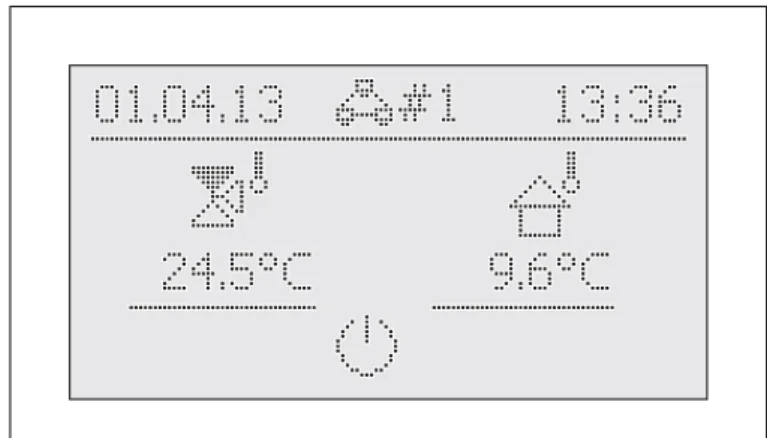
During this terminal function the header of the display carries ad-ditional information on the remotely controlled equipment; the symbol #X indicates the bus ID setting for the remotely con-trolled equipment.
The displayed values and symbols are always loaded from the selected equipment (such as the mixer circuit infeed temperature of the mixer module EHS157068).
For operation of the local equipment, this must be activated again in the selection list (parameter [No selection]).
Activating / Deactivating normal operation
Requirement: A valid terminal address is assigned to the RoCon B1 control element of the Daikin Altherma EHS(X/H) or the EHS157034 room station.
● Use the rotary switch to select the parameter [New scan?] and confirm with "Yes".
Bus - Scan is performed.
An overview of all the equipment found is displayed.
● Use the rotary switch to select the equipment for which the terminal function is to be performed.
● Confirm the changes with a brief push of the rotary switch. The local control element acts as the remote control for
the external equipment.
To endterminal mode and restore operation of the assigned equipment to the control element, at the level "Remote Param"
the parameter [No selection]must be selected and acknowl-edged (see fig. 3-10).
Fig. 3-9 Display example for a remotely controlled mixer module
If the message "n. A." is displayed at rotary switch set-ting , the control unit has yet to be assigned a valid terminal address.
If the message "n. A." is still displayed it may be nec-essary to update the device software before the ter-minal function can be used. Contact the Daikin Service Team in such cases.
The terminal address can be set only after the Techni-cian password has been input. Contact your specialist heating technician in this regard.
● Place the rotary switch in the "Remote Param"
position.
The level "Remote Param" is displayed.
● Select the parameter
[Bus - Scan] with the rotary switch.
● Confirm the changes with a brief press of the rotary switch.
The context menu is displayed.
Fig. 3-10 Display of the level "Re-mote Param" at commis-sioning or temporary disconnection from the mains
Remote Param Bus - Scan
3.4.10 Quite Mode
Quite Mode means that the exterior heat pump unit is operating at reduced output. This reduces the operating noise caused by the exterior heat pump unit.
The Quite Mode is set and turned off as follows:
● Place the rotary switch in the "Configuration" position.
An overview is displayed.
● Select the "System Configuration" level with the rotary switch. An overview is displayed.
● Select the parameter [Quite Mode] with the rotary switch.
● Confirm the changes with a brief push of the rotary switch. The setting for the parameter is displayed.
● Setting parameters
– Parameter [Quite Mode] = 0: Deactivated
– Parameter [Quite Mode] = 1: Permanently activated – Parameter [Quite Mode] = 2: Only activated at night
● Confirm the changes with a brief push of the rotary switch. Change has been accepted. Jump back to previous
dis-play.
More detailed explanations and possible setting values for this function can be seen in chapter 6.2.2.
3.5 Special functions
In the "Special Level" we can carry out various functions that are
usually used by the heating expert.
The following special functions are possible: – Manual mode (see section 3.5.1). – Message display (see section 8)
– Resetting to factory settings (see section 3.6.7)
More detailed explanations of these functions can be found in chapter 6.11.
● Depress the exit button for at least 5 secs. Menu "Special Level" is displayed.
● Select the programme to be started with the rotary switch.
● Confirm the changes with a brief push of the rotary switch. The selected programme starts.
● Cancellation and jump back by: – Pressing the exit button again, or – Briefly pressing the rotary switch or
– Selecting a different menu using the rotary switch.
3.5.1 Manual Operation
Manual Operation is used to regulate the Daikin Altherma EHS(X/H) manually to a specific flow temperature. The manual mode should only be used for diagnostic purposes.
With hydraulically controlled priority operation for the hot water generation you must make sure that the inflow target temperature set in manual mode is adequate to achieve the stored hot water set temperature (parameter [T-DHW Setpoint 1]).
● Depress the exit button for at least 5 secs. Menu "Special Level" is displayed.
● Select the programme "Manual Operation" with the rotary switch.
● Confirm the changes with a brief push of the rotary switch. "Manual Operation" active.
● Set the inflow target temperature with the rotary switch.
During active manual mode the hot water is consistently regulated to the parameter value for the first target hot water temperature ([T-DHW Setpoint 1]).
● Cancellation and jump back by: – Pressing the exit button again, or – Briefly pressing the rotary switch or
– Selecting a different menu using the rotary switch. If the manual mode is closed, the Controller RoCon HP
automatically switches to the operating mode "Standby".
CAUTION!
Active Quite Mode reduces the performance in room heating and room cooling operation with the result that it may no longer be possible to reach the preset target temperatures.
● With outside temperatures below freezing, there is a risk of material damage caused by frost.
The call-up of special functions does not depend on the setting on the rotary switch.
Do not confirm the setting with the rotary switch, as this will close the programme.
Fig. 3-11 Brief symbol-based instructions for manual mode
Manual Operation Special Level Attention! Actual mode: Special Level Manual Operation FA failure Set Actual
3.6 Special system settings
Adaption is carried out via the setting of parameters in the rotary switch setting "Configuration" .
Navigating with the rotary switch accesses either the next deeper level or directly to the appropriate parameter.
3.6.1 Access Rights (Technician password)
Certain settings are restricted by Controller access rights. In order to gain access to these setting values (parameters) you need to enter the expert "Setup" code in the level.
The fig. 3-12 shows the fundamental procedure for entering the access code. The expert code will be advised to the expert company in a separate letter.
3.6.2 Heat curve
With the heating characteristic curve, the inflow target temper-ature is adjusted to building conditions in accordance with the rel-evant external temperature (weather-controlled flow temperature regulation, see section 3.6.4). Generally speaking, the steepness of the heating characteristics describes the ratio of the flow tem-perature change to the external temtem-perature change.
The heating characteristic curve applies within the minimum and maximum temperature limits that have been set for the corre-sponding heating circuit. The room temperature measured in the living area may differ from the desired room temperature; these deviations can be kept to a minimum by installing a room station or a room thermostat.
The Controller is configured in the factory so that the heating curvedoes not adjust itself during operation.
The automatic heat curve adjustment can only be activated by the heating technician.
Starting conditions for the automatic heating curve adaption: – Outdoor temperature < 8 °C
– Operating mode is automatic (I or II) – Duration of setback phase at least 6 hours
If an automatic heat curve adaption is not activated, the heat curve can be set manually by adjusting the parameter [Heat-Slope].
Fig. 3-12 Entering the access code
Configuration Setup System Configuration Access Rights
User
Access RightsExpert
Setup Language Date Setup Keylock Function Access Rights Outdoor typeAccess Rights Access Rights
Access Rights
Manually adjusting the heating curve
Do not make any corrections to the set values for
1 - 2 days, and then only make them in small incre-ments.
● Deactivate additional heat sources (e.g. fireplaces, direct solar radiation, open windows).
● Fully open any existing radiator thermostat valves or setting drives.
● Activate the operating mode "Heating".
Approximate setting values: – Radiator: 1.4 to 1.6.
More detailed explanations and possible setting values for this function can be seen in chapter 6.2.
3.6.3 Cooling characteristic curve
With the cooling characteristic curve, the inflow target temper-ature is adjusted to suit building conditions in accordance with the relevant external temperature (weather-controlled flow temper-ature regulation, see section 3.6.4). Warmer outdoor tempera-tures result in a colder inflow target temperature and vice versa. Conditions for cooling operation:
– Outside temperature > Target room temperature setting – Outside temperature > [Start T-Out Cooling] parameter
set-ting
– Operating mode "Cooling" activated.
a) with the rotary switch in the "Operating Mode"
position or
b) via the room thermostat function (cooling switching contact closed)
– No heating demand active in the heating system.
The cooling characteristic curve is specified using the following four parameters:
1. [Start T-Out Cooling] 2. [Max T-Out Cooling] 3. [T-Flow Cooling start] 4. [T-Flow Cooling max]
During the weather-controlled flow temperature regulation, the user can adjust the inflow target temperature using the parameter [Cooling Setpoint adj] by a maximum of 5°C up or down. The lower temperature limit is limited by the parameter [Min T-Flow Cooling].
Fig. 3-13 Manual setting of the heat curve (shown for "User" access rights) Configuration Setup System Configuration Configuration System Configuration HC Configuration DHW Configuration HC Configuration HC Function T-Frost Protect Heating
T-Outside lim night
Heat-Slope Room Influence Heat-Slope Heat-Slope Heat-Slope HC Configuration Insulation Heating Cooling TA External temperature TR Room temperature set value
TV Flow temperature