Worcester Polytechnic Institute
Digital WPI
Masters Theses (All Theses, All Years) Electronic Theses and Dissertations
2006-01-11
The Assistment Builder: A tool for rapid tutor
development
Terrence E. Turner
Worcester Polytechnic Institute
Follow this and additional works at:https://digitalcommons.wpi.edu/etd-theses
This thesis is brought to you for free and open access byDigital WPI. It has been accepted for inclusion in Masters Theses (All Theses, All Years) by an authorized administrator of Digital WPI. For more information, please [email protected].
Repository Citation
Turner, Terrence E., "The Assistment Builder: A tool for rapid tutor development" (2006).Masters Theses (All Theses, All Years). 56.
The Assistment Builder: A tool for rapid tutor development
By
Terrence E Turner
A Thesis
Submitted to the faculty of the
WORCESTER POLYTECHNIC INSTITUTE in partial fulfillment of the requirements for the
Degree Master of Science in
Computer Science by
Date January 2005 APPROVED:
Professor Neil Heffernan, Thesis Advisor Professor George Heineman, Thesis Reader Professor Michael Gennert, Head of Department
Table of Contents
TABLE OF CONTENTS... 2 TABLE OF FIGURES... 3 TABLE OF TABLES... 3 ABSTRACT... 4 INTRODUCTION... 5 1.1. PSEUDO-TUTORS... 6 1.2. THE ASSISTMENTS PROJECT... 71.3. THE COMMON TUTOR OBJECT PLATFORM... 10
2. THE ASSISTMENT BUILDER... 12
3. DESIGN... 13
3.1. MODEL VIEW CONTROLLER... 14
3.1.1. Velocity... 14
3.1.2. Struts... 15
3.2. ASSISTMENT BUILDER STRUCTURE... 16
3.3. ASSISTMENTS... 17
3.4. FEATURES... 20
3.4.1. Knowledge Component Tagging... 22
3.4.2. Metadata Tagging... 24
4. METHODS... 24
4.1. SOFTWARE ENGINEERING METHODS... 25
4.1.1. Builder Redesign... 25
4.2. PROCEDURAL METHODOLOGY... 26
5. RESULTS & ANALYSIS... 28
6. FUTURE WORK... 32
7. CONCLUSIONS... 34
8. REFERENCES... 37
APPENDIX A – ASSISTMENT BUILDERUSE CASES... 39
APPENDIX B – ASSISTMENT BUILDER USE CASE DIAGRAM... 45
APPENDIX C – ASSISTMENT BUILDER UI PRELIMINARY INTERFACE DESIGN... 46
Table of Figures
Figure 1 A running Assistment... 8
Figure 2 Assistment Reporting interface... 8
Figure 3 The Assistment Portal login screen... 9
Figure 4 An overview of the CTOP design... 11
Figure 5 The Assistment Builder interface... 13
Figure 6 Velocity and Struts working together [17]... 16
Figure 7 Assistment management toolbar... 20
Figure 8 Question section question text entry box... 21
Figure 9 Question interface selection and image uploading... 21
Figure 10 Assistment Builder answer section... 21
Figure 11 Assistment Builder hint section... 22
Figure 12 Knowledge Component tagging screen... 23
Figure 13 Metadata tagging screen... 24
Table of Tables
Table 1 Builder Logging Results... 30Abstract
Intelligent Tutoring Systems are notoriously costly to construct [1], and require PhD level experience in cognitive science and rule based programming. The purpose of this research was to ease the development process for building pseudo-tutors [6]. Pseudo-tutors are ITS constructs that mimic cognitive Pseudo-tutors but are limited in that they only apply to a single problem. The Assistment Builder is a tool designed to rapidly create, test, and deploy simple pseudo-tutors. These tutors provide a simplified cognitive model based upon a state graph designed for a specific problem. These tutors offer many of the features of rule-based tutors, but with shorter creation time. The system simplifies the process of tutor creation to allow users with little or no ITS experience to develop content. The system provides a web-based interface as a means to build and store these simple tutors we have called Assistments. This paper describes our attempt to make the process of developing, testing, and deploying content easy for teachers. We present data to suggest that users can develop a tutor that can be released to students in approximately an hour.
Introduction
This research seeks to address the expensive development time of cognitive rule-based tutors in Intelligent Tutoring Systems (ITS). ITS’s are educational tools that present users with tutors, and have been shown to be effective in aiding student learning [7]. The tutors presented track student progress and knowledge, and are able to customize behavior based upon user actions. Many ITS’s make use of cognitive rule-based tutors, which use a cognitive model, comprised of a series of rules, to represent the cognitive state that a user is in. These tutors use model-tracing to extrapolate the possible actions users can take, and offer customized feedback accordingly.
Despite the effectiveness of model-tracing rule based tutors, it has been shown that development time can be between 100-1000 hours per hour of content created [1][7]. Creating cognitive tutors also requires high level computer science and cognitive psychology domain knowledge, and typically PhD level experience in Artificial intelligence rule-based programming is needed.
Professor Neil Heffernan heads the Office of Naval Research funded Assistment Project [www.Assistment.org] that seeks to create tools to reduce the cost of developing intelligent tutoring systems. The project focuses on two means to reduce these costs. One is to build tools that are faster to use. The other is to make tools that are easier to use, thus removing the need for PhD level Artificial Intelligence rule-based programmers and cognitive scientists.
The goal of this thesis work was to provide a tool to allow rapid content creation by users with little computer science or cognitive psychology background. In order to achieve this goal our research focused on developing “pseudo-tutors” [6]. It is hoped that these pseudo-tutors will make it easy for non-technical users like teachers to quickly create effective tutors that can be released to students. To achieve this goal my research involved developing a web-based application to create tutors, while also collecting data on the amount of time it took for users to create tutors. This paper seeks to offer evidence that the software allows users such as teachers to quickly create content that can be released to students.
1.1.
Pseudo-tutors
Pseudo-tutors represent a simplified cognitive model that is comprised of a state graph. This graph is finite, and each node representing a possible state of the problem. User actions are represented by arcs in the graph, with specific user actions triggering state transitions [13]. A user’s location in the graph represents the problem’s current state, and student actions correspond to possible transitions from that state.
Pseudo-tutors have been shown to be behaviorally equivalent to rule-based cognitive model tutors; however the pseudo-tutors lack the ability to generalize over similar problems [5]. A multi-column addition tutor using a full rule-based cognitive model can be used to tutor the addition of any two numbers. A pseudo-tutor using a state graph is tied to the two numbers that were used to create it. Despite this limitation pseudo-tutors can be designed to predict certain behaviors and respond accordingly. Pseudo-tutors can
Scaffolds are sub-problems usually designed to address a specific skill needed to solve the initial problem. Scaffolding questions in turn contain their own state graphs, and depending upon student actions, scaffolds can branch into other scaffolds. This provides a means for rich user interaction. The Assistment Builder was designed as a tool to create these types of scaffolding pseudo-tutors and is the focus of my research.
1.2.
The Assistments Project
The AssistmentProject is research project led by Worcester Polytechnic Institute and Carnegie Mellon University and funded by grants from the Department of Education, the National Science Foundation, and the Office of Naval Research. The mission of the
AssistmentProject is to provide cognitively-based assessment of students. This mission is supported by three goals [12]. The first goal is to provide tutoring content to students. The second goal is to provide useful and up-to-date reports on students to teachers. The final goal is to provide the tools to allow teachers to create their own tutoring content.
All three of these goals are met by separate tools and applications that come together to form the Assistment System. The Assistment Runtime is the means through which content is presented to users [11]. Assistment Reporting provides reporting tools to teachers [3]. The Assistment Builder provides teachers with the ability to create their own content and is the focus of this research [16]. The Assistment WebPortal ties all these parts of the system together through a web-based interface [8]. Underlying all the applications that comprise the Assistment Project is the Common Tutor Object Platform (CTOP) a component framework that provides an API for creating and deploying tutors in the
Assistment Project [11]. Below is an image of a running Assistment as it would be seen by a student.
Figure 1 A running Assistment
Figure 2 contains a screenshot of the Assistment Systems reporting tools. Teachers and Administrators can easily access information on class and individual student performance.
Figure 2 Assistment Reporting interface
Below is a picture of the Assistment Portal login screen. The portal provides access and navigation to all other tools and parts of the Assistment System as well as administrative tools.
Figure 3 The Assistment Portal login screen
Currently the Assistment Project’s content has concentrated on the Massachusetts Comprehensive Assessment System (MCAS). The MCAS is an educational standard provided by the state of Massachusetts as a means to assess student knowledge in the areas of English language arts, mathematics, science and technology/engineering, and history and social science. The Assistment Project is focused on the 8th
and 10th
grade mathematics portion of the MCAS which defines 39 skills that students must be proficient in [9].
Most ITS systems are built to assess students’ knowledge of a set of concepts (i.e. exams) or to assist them in acquiring a certain skill (i.e. tutorials). Students’ time is very valuable, and a system that provides both assessments while it assists is poised to make the best use of the time available. The Assistment system does just that.
The Assistment system provides assessment through student reports to teachers. The reports are updated in real time, even as students are using the system. The system provides different types of reports to teachers based on statistical analysis. Some of the
most important reports that we provide are the predicted MCAS score for a student, student effort score, and the predicted student performance based on skills mapped to previous questions.
The final goal of the AssistmentProject is to provide teachers with tools to allow them to easily create content for their own classes. The research involving the Assistment Builder supports this final goal. My research involved creating a web based tool that allows teachers to create content online at their own leisure, using whichever platform they have available. The tool logged all the actions of users creating content to measure the time it took to create content, with the goal being an improvement over the content creation times stated in previous literature[1][7]. Later I will make claims regarding the ease of development for the Assistment Builder and present data regarding the performance of its users.
1.3.
The Common Tutor Object Platform
At the core of the Assistment Project is the Common Tutor Object Platform (CTOP). The CTOP is a lightweight component framework for creating and deploying all applications in the Assistment Project [11]. All applications in the Assistment Project
make use of the CTOP, and the Assistment Builder could not exist without the functionality provided by it.
The CTOP was designed with extensibility in mind. It consists of a core object model and a data layer [11]. The core object model contains components considered to be universally applicable to ITS software [11]. The Assistment Builder uses the problem component and its subcomponents, the interface and the behavior. The interface
application for viewing and interacting with the user [11]. The behavior subcomponent defines the result of an action on the interface; i.e. whether a specific answer corresponds to a transition to a new state in the state graph that represents the tutor [11].
The Assistment Builder allows a user to specify the high level widgets to be used for an interface as well as the properties associated with that interface. It does this by using the Interface component API to provide a form based GUI that exposes the configurable parts of the interface in an easy to modify manner. Similarly, the Assistment Builder uses the Behavior component API to display the state graph linking states and strategies in form based GUI that is easy to update. Strategies currently supported include message strategies (messages that are displayed when the user enters a specific answer or requests help), and scaffolding questions, which are represented in a nested list structure not dissimilar from a hierarchical tree. The Assistment Builder also updates the interface and behavior as each one is changed. Below in figure 4 is a diagram showing the design of the CTOP
2. The
Assistment
Builder
The main goals of the Assistment Builder are ease of use and accessibility during content creation. The initial prototype of the Assistment Builder was developed without the CTOP and suffered from maintenance and stability problems. It also lacked proper logging of users’ actions so obtaining data on content creation times was difficult. To address these problems this research focused on pseudo-tutors and used the CTOP component framework for ease of development and maintainability. The new implementation of the Assistment Builder was designed to address these issues.
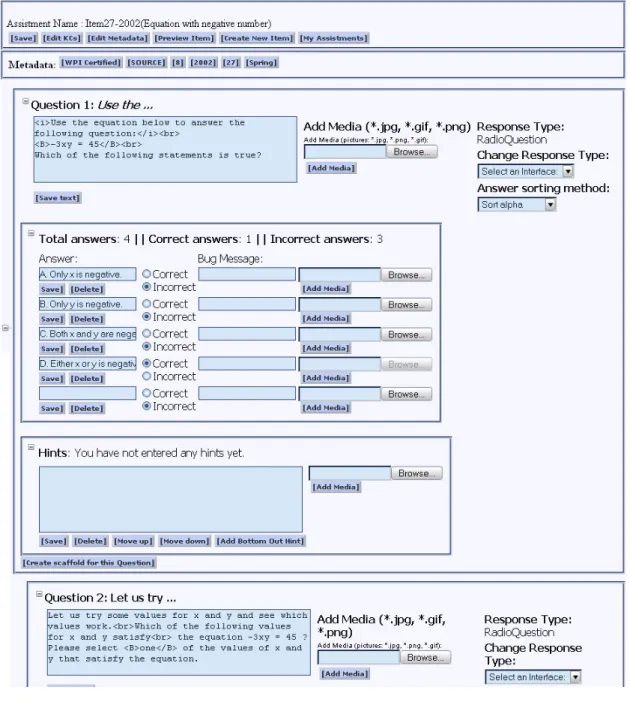
The web was chosen as the delivery medium to make the tool immediately available to users. The only requirement to use the tool is registration at the Assistment website; no software needs to be obtained or installed. The primary users are middle school and high school teachers in the state of Massachusetts who are teaching the curriculum of the Massachusetts Comprehensive Assessment System; thus, the Assistment Builder was designed with an interface simple enough for users with little or no computer science and cognitive psychology background. The Assistment Builder also includes other tools to allow teacher themselves to create content and organize it into curriculums and assigned to classes, all of which can be done by the teachers themselves without assistance. This provides teachers with a total web-based solution for content management and deployment. Below is an image of the Assistment Builder web-based user interface.
Figure 5 The Assistment Builder interface
3. Design
The current work is a redesign and complete rewrite of the original Assistment Builder
application. The initial Assistment Builder was a proof of concept prototype that quickly became unable to handle the demands that were being placed on it [16]. After seeing the
effectiveness of even this deeply flawed version of the tool, it was decided that the entire application would be redesigned from the ground up.
3.1.
Model View Controller
The initial iteration of the builder application suffered from many design flaws that led to difficultly extending the application and maintaining it. In order to make development easier and faster the redesigned builder application made use of a strong Model View Controller (MVC) design pattern. The MVC patter uses a separation of concerns to decouple the different aspects of an application.
The view is comprised of the screens or graphical interfaces that are visible to the user, in a web based application these are the HTML pages that are presented to the user. In the case of the Assistment Project the model is comprised of the components that tutors are comprised of, this model is presented to the user through the view. The controller acts as a bridge between the view and the model translating actions on the view into changes to the model and then updating the view accordingly.
3.1.1. Velocity
Velocity is a template engine that is based on the Java programming language. The template language used by Velocity can reference Java objects, but separates Java code from web pages keeping a strict MVC model. Velocity serves as a replacement for the Java Server Pages (JSP) that were used in the prototype Assistment Builder. It allows for a stricter compliance with MVC than JSPs. JSPs allow web pages to act directly on the model and mix web pages with Java code. This led to buggy code in the prototype
Builder. Velocity provides an easy means to develop dynamic web content, while ensuring that templates do not violate the MVC paradigm [17].
3.1.2.
Struts
Struts is a Java Based framework that provides a means to implement the Model 2 MVC approach [15]. The Model 2 MVC uses a servlet to handle interaction between the model and the view. Struts does this by using an action servlet that handles all HTTP requests generated by the view. This servlet maps those requests to the appropriate user defined action controller that can then update the model as needed. After the model has been updated the action controller can forward to an updated view to reflect the changes made to the model.
In the case of the Assistment Builder the CTOP served as the model, the Velocity template engine served as the views that were presented to users. For the controller the Struts framework was used. Struts mediates between the CTOP and the Velocity templates, taking user input and updating the model and then refreshing the view
Figure 6 Velocity and Struts working together [17]
By separating concerns in the Builder application maintenance and updates were made simpler. By sharing code with the CTOP any new functionality could be potentially added to the builder by simply adding new views and controllers to translate actions onto the expanded CTOP model. Velocity provides a stricter MVC compliance than Java Server Pages (JSP) so it was chosen to limit the view to only displaying the data contained in the model. In the past builder the view was implemented using JSPs that could directly modify the model, causing many problems when debugging and updating code.
3.2.
Assistment Builder Structure
We constructed the Assistment Builder as a web application for accessibility and ease of use purposes. The Assistment Builder can only edit a single Assistment at a time. A content creator can build, test, and deploy an Assistment without installing any additional
software. It is a simple task to design and test an Assistment and release it to students. After creating an item it takes one click to begin previewing it. After the content has been confirmed to be correct, it takes a few steps to release it to students. If further changes or editing are needed the Assistment can be loaded into the Assistment Builder, modified, and saved; all changes will immediately be available in all curriculums that contain the Assistment. By making the Assistment Builder available over the web, new features are instantly made available to users without any software update. The central storage of Assistments on our servers makes a library of content available to teachers which they can easily combine with their own created content and release to their classes organized in curriculums.
By following a strong Model 2 Model View Controller (MVC) design pattern extending the Assistment Builder is also easy. The CTOP is designed to be extendable with new types of tutors, widgets, and user interfaces. The Assistment Builder is only concerned with a specific portion of the CTOP, but whenever new widgets or functionality is added all that needs to be done is adding new controllers and views. Sharing code between the Assistment Builder and CTOP means less code to write as well as swift benefit from improvements to the CTOP. The decoupled nature of the
Assistment Builder also makes it easy to change or update the web forms that are presented to users.
3.3.
Assistments
The pseudo-tutors created by the Assistment Builder are a subset of the tutors possible under the CTOP. The CTOP also supports full model-tracing tutors. These tutors and pseudo-tutors are referred to as Assistments throughout this paper. In the context of the
Assistment Builder the term Assistments refers only to the pseudo-tutors that it can create and edit. Figure 1 displays an example of a running Assistment.
An example of a basic Assistment is a top-level problem that branches into scaffolding problems depending on the student’s actions. A problem consists of a behavior and interface along with some metadata such as problem id and comments. The interface contains the presentation information of a problem. Things such as what widgets, images, and text to display to users are all stored in the interface. The interface component is comprised of one or more interface elements. Interface elements can contain other interface elements, and so on, making complex interface layouts possible. Answerable elements represent a special class of interface elements. They represent those parts of the interface that are able to be acted upon by students. It is these user actions upon answerable elements that are captured by the Assistment Runtime and passed onto the behavior component of a problem, to be tutored accordingly.
The behavior acts as the tutoring logic of a problem. Student actions on the interface are captured by the Assistment Runtime and translated into high level actions that the behavior component can interpret. These high level actions are mapped to tutoring strategies. There are several different strategies that are able to invoke hint messages, buggy messages, or scaffolds. These tutoring strategies are how the Assistment Runtime
responds to and tutors student actions when they are using pseudo-tutor Assistment. The behavior component stores a problem’s state graph. As stated before arcs in the graph represent different user actions and determine what response if any the tutor will make.
Correct user actions cause transitions from one state to another, incorrect user actions are mapped to tutoring strategies and do not cause state transitions.
To simplify content creation there are only five choices of high level widgets for the interface available to content creators: radio-buttons, pull-down menus, checkboxes, text-fields, and algebra text fields. The Assistment Builder also allows users to add images to a problem’s interface. For simplicity the Assistment Builder only allows a problem’s state graph to consist of two states. The student will remain in the initial state until they answer the problem correctly, or they are programmatically moved forward. Other incorrect student actions will keep them in the initial state, but may be mapped to specific tutoring strategies. These strategies include branching into scaffolding problems, or specific textual and/or visual feedback called buggy messages that address common student errors.
Scaffolding problems are queued immediately after the behavior consumes an interface action that results in a transition to a strategy containing scaffolds. One or more scaffolding problems can be mapped to a specified user action. In the Assistment Builder
an incorrect answer to the top-level problem or a request for hints on the top-level problem will immediately queue a list of scaffolding problems specified by the content creator. Upon answering a scaffolding problem correctly the student is presented with the next one in the queue until it is empty. When an Assistment has no more problems in queue it is considered to be finished.
Aside from buggy messages and scaffolds, a problem can also contain hint messages. Hint messages provide insights into methods to solve the given problem. Combing hints, buggy messages, and scaffolds together provides a means to create Assistments that are
simple but can address complex behavior. Content creators can create complex tree structures of problems each with their own specific buggy messages, hints, and possibly sub-scaffolds.
3.4.
Features
The initial view presented to users of the Assistment Builder is a top level problem. The view has been redesigned from the original prototype based on user input. At the very top of the screen are several links to help manage Assistments. These are show in figure 3. The problem is blank and users can enter answers, buggy messages, question text and/or images as well as selecting the interface widget they wish. A content creator can also add hints. However, hints and scaffolds are mutually exclusive in the top level problem, and a user must select either one for the top level problem. Each section in the problem view is collapsible to allow users to conserve screen space.
Figure 7 Assistment management toolbar
The question section is the first section that content creators will usually use. This section allows a user to specify a problems question text using html and/or images as well as select the interface widget they wish to use and the method of ordering answers. There are currently three ways to order answers: random, alphabetic, or numeric. This interface is shown in figures 4 and 5.
Figure 8 Question section question text entry box
Figure 9 Question interface selection and image uploading
The answer section of the problem view allows a content creator to add correct answers and expected incorrect answers. Users can map buggy messages to a specific incorrect answer. Users can also edit answers or toggle their correct or incorrect status. The answer section is shown in figure 6.
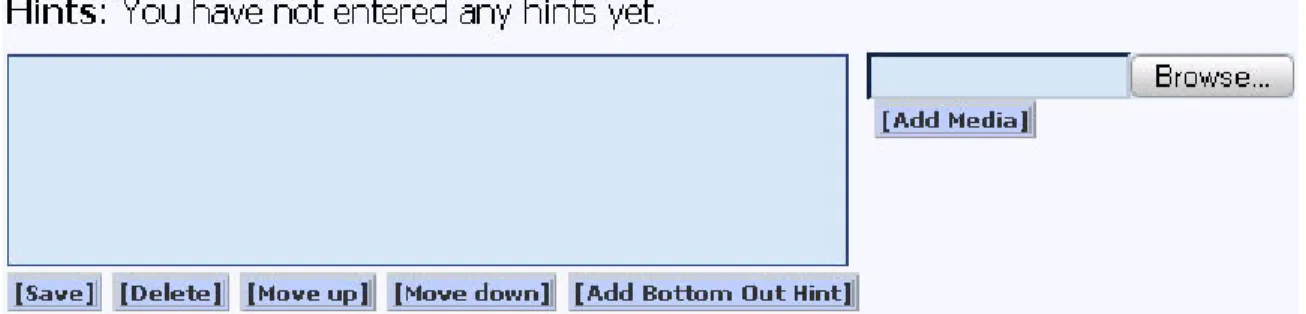
The hint section allows users to enter a series of hints to the applicable problem. Hints can be reordered. This section contains an option to create a bottom out hint for the user that just presents the student with the solution to the problem. This is shown in figure 7.
Figure 11 Assistment Builder hint section
A typical Assistment will contain scaffolds and after a user is finished creating the top level problem they will proceed with adding scaffolds. The view for a scaffolding problem is exactly the same as that for the top level problem, only slightly indented to mark it as a scaffold.
3.4.1. Knowledge Component Tagging
The Assistment Builder supports others applications besides content creation. One of these applications is the mapping of knowledge components, which are organized into sets known as transfer models. Knowledge components are a means to map certain skills
to specific problems to specify that a problem involves knowledge of that skill. This mapping between skills and problems allows the reporting system to track student knowledge over time using longitudinal data analysis techniques [3]. In a paper submitted to WWW2006, we report on the ability to track the learning of individual skills using a
coarse-grained model provided by that state of Massachusetts that classifies each 8th
MCAS math item in one of five categories (i.e. knowledge components in our project): Algebra, Measurement, Geometry, Number Sense, and Data Analysis [3].
The current system has more than twenty transfer models available, each with up to three hundred knowledge components. In order to more efficiently manage transfer models, the Assistment Builder makes use of the preference architecture, allowing users to specify the transfer models they will use. Once those are specified, the user is allowed to browse the knowledge components within each transfer model and to map the ones they select to the problem.
3.4.2. Metadata Tagging
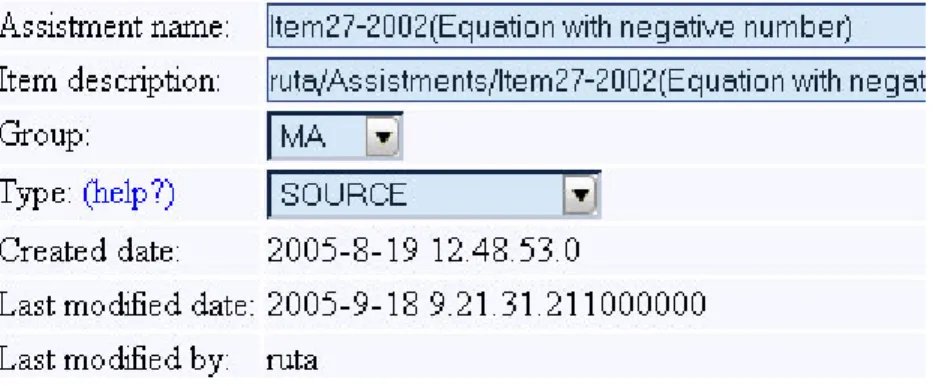
Another application that the Assistment Builder supports is the association of metadata with problems. Users are allowed to associate information such as problem source (i.e. MCAS), year, number, season, comment, description, and whether calculators are allowed with each question. This information may be displayed to the user (i.e. whether calculators are allowed) or it may be used solely for accounting (i.e. determining whether all the items in for a specific year have been built).
Figure 13 Metadata tagging screen
4. Methods
The goal of the Builder was to make content creation easy and fast for our target audience teachers. To actually show that the Builder made content creation simpler data needed to be obtained on content creation time. This led to the need for reliable logging of user actions. The experiences gained from the first implementation of the tool also led to several other goals. The secondary goal of the Builder was a clear separation of concerns and decoupled design to make maintaining and extending the Builder easier to do.
4.1.
Software Engineering Methods
This section covers the aspects of the design and implementation of the Assistment Builder. The past served as a guide to the future direction of the Assistment Builder. The shortcomings and limitations of the prototype tool led me to plan and the design the next iteration with a component based design that promotes extensibility. The redesign effort also took into account user input into the views that were presented through web pages.
4.1.1. Builder Redesign
For the Builder redesign effort we met with several users of the Builder prototype and had them give input into ways to improve the layout of the user interface. Based off this input several interface mock-ups were made. These mock-ups served as templates from which the final Assistment Builder interface was created. Velocity templates were designed from these mock-ups to serve as the view. Once the view was designed the controllers were made.
After the initial views that form the user interface were created the various user actions that could be performed were decided upon. These were placed into a use case document that served as the basis for the controllers that would be implemented. The design of Struts uses actions classes as controllers that translate user actions on the view to the model, and then returns an updated view. Once the model is modified the view is updated to reflect those changes. Users of the Assistment Builder can do several things and these actions were used to create several Struts action classes. Users can manipulate hints, question text and images, answers, change questions widgets, manipulate scaffolds,
and tag questions with knowledge components. These abilities were all translated into Struts actions.
The current struts actions supported by the Builder are HintAction, AnswerAction, QuestionAction, AssistmentAction, InterfaceAction, MetadataAction, and KnowledgeComponentAction. Because different user actions are handled by separate controllers isolating and fixing problems is much easier. If there is a problem with modifying an item’s hints then most likely the problem lies within the HintAction controller. Each controller was integrating with a logging module so that when an action was performed it was passed on to the Builder logger.
The Assistment Builder logging was implemented using the Log4J framework. Log4J provides tools to make adding logging to Java applications. Each time Struts invoked an action class the logger automatically generated an XML log message. Log4J then stored this log message in a database as well as writing it to a file stored on the server.
4.2.
Procedural Methodology
The Assistment Builder was designed to log user actions while building Assistments. Each log message contained the action logged (e.g. editing a hint, adding an incorrect answer, uploading an image, etc.) the user who performed the action, the created
Assistment’s unique id, along with the users unique session id and a timestamp. Most content creators also spend time outside of the Assistment Builder planning out content and editing. I logged the creation and editing of various types of Assistments. Some
Assistments were simply a single MCAS problem entered into the system with no scaffolds, hints, or bug messages. Others were more typical Assistments that contained
being modified with different numbers, otherwise known as morphs. A significant portion of user time is spent outside of the Assistment Builder planning out content and creating images. Thus we also performed a survey with content creators and asked them to estimate how much time they spent building specific items in the logs. They were asked to break down the times according to time spent on each task.
After the data were collected and added to the database they were analyzed. To determine the time spent building each item database queries were run that compared the first recorded timestamp of a user’s session id with the last recorded timestamp of a user saving the created Assistment. It may be possible for a user to have the same session id for different sessions, or for multiple users to have the same session id at different times. To ensure that the content creation times were not accidentally mixed or determined improperly only actions logged for the same user on the same day and session id for a given Assistment were used.
To compile the time it took to build an Assistment only the initial session where a user created an Assistment was considered. Time spent working on an Assistment after the initial session in which the Assistment was created was not factored into the logged creation time. Because of this time spent editing or modifying Assistments later was not factored into the time calculated in creating an Assistment. Creation times under two minutes were not considered in the data compiled. Most Assistments of that length were usually morphs of already created content. Creation times over five hours were also not considered, as it was assumed these represented logs of abandoned sessions that were not properly ended. The logs only contained two examples of logged times over five hours.
The data collected focused on Assistments that were created and then released to students. This greatly reduced the number of logging data that was used in determining
Assistment creation times. This also limited the possibilities of test Assistments or junk content being factored into the results. After Assistments were created they were organized into curriculums and then deployed to students. Log data was also acquired for curriculum creation times in a similar manner to determine the time it took to organize created content into curriculums.
5. Results & Analysis
Since the main goal was to provide a tool that allowed users to quickly create content that can then be released to students, along with a secondary goal of creating software application that was extendable and maintainable, this section will focus on these aspects of the Assistment Builder. The data collected suggest that users can create content at a speed faster than times recorded in previous literature. It is also shown that using the CTOP the Assistment Builder can easily be maintained and updated with new features and functionality.
Data was obtained for over 271 Assistments being created and edited. Some were simply a single MCAS problem entered into the system with no scaffolds, hints, or bug messages. Others were more typical Assistments that contained scaffolds, hints, and buggy messages. Some were simply Assistments that had been created and were now being modified with different numbers, these are known as morphs. Most of the users were middle and high school teachers or WPI students. Most users had little or no experience developing tutors in an ITS system, or with programming rule-based cognitive
Many teachers were able to use the Assistment Builder as part of a university course, and a teacher was observed in our lab creating 3 items in about two hours. In the past a high-school mathematics teacher was able to create 15 items and morph each one, resulting in 30 Assistments over several months. Her training consisted of approximately four hours spread over two days in which she created 5 original Assistments under supervision. No logging was implemented at the time, but the outcome is still encouraging. The current Assistment Builder logs all actions at all times to both a database and to a file as a failsafe. This ensures that all user actions are being saved to some location at all times, avoiding this problem in the future.
Once a set of Assistments is built, they are organized into a curriculum using the curriculum creation tool. Creating a curriculum is a simple task; in the curriculum creation screen the user is presented with a list of all available Assistments, each of which can be selected for inclusion in the curriculum. Once all Assistments have been selected the curriculum is made. This log data was also used to determine the cost of organizing
Assistments after the content was created. This was important since content needs to be placed into curriculums to be released to students so it must be considered when considering the total time to create and deploy content.
We wanted to focus on Assistments that had been created, organized into a curriculum, and deployed to classrooms. These Assistments are presumably of higher quality, and they were not the majority of Assistments logged in the system. This is because many of the curriculums and Assistments currently in use by students were created before actions were logged. There is some initial log data for newer Assistments that eventually will be released to students in the future, but these data were not consider as they are incomplete.
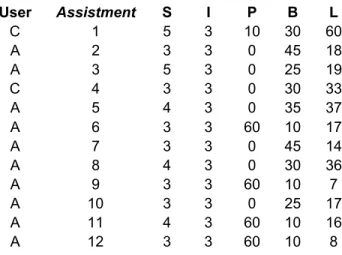
We obtained data for four users who created a combined total of 25 Assistments that were then released to students. Each of these users has created several Assistments and was familiar with the system. These users log data were compared with their estimates on the time spent creating each item. The data is presented in table 1. The columns in the table are identified as follows: S is the number of scaffolds in the problem, I is the time spent creating images outside of the Assistment Builder, P is time spent planning the
Assistment outside of the Assistment Builder, B is the time spent inside the Assistment Builder to create the item, and L is the time spent on the Assistment Builder according to the logs. All times are measured in minutes.
It can be seen from the table that logged time in the builder usually underestimates the time needed to build an Assistment. Most users also spend a non-trivial amount of time outside of the Assistment Builder creating images and planning the structure of the
Assistment. Thus, Assistments that depend on images or other media take longer to build due to time spent editing and creating the images they contain. Assistments that contain more scaffolds also take longer to create. Our log data suggest that it takes 20.68 minutes on average to build an Assistment. This leads to about 5.17 minutes spent per scaffold.
Table 1 Builder Logging Results
User Assistment S I P B L C 1 5 3 10 30 60 A 2 3 3 0 45 18 A 3 5 3 0 25 19 C 4 3 3 0 30 33 A 5 4 3 0 35 37 A 6 3 3 60 10 17 A 7 3 3 0 45 14 A 8 4 3 0 30 36 A 9 3 3 60 10 7 A 10 3 3 0 25 17 A 11 4 3 60 10 16
B 13 3 40 5 15 17 B 14 3 40 20 10 7 B 15 3 0 7 5 27 B 16 3 50 15 15 13 B 17 3 30 10 10 11 B 18 6 150 40 30 25 B 19 4 60 15 10 14 B 20 5 40 15 10 6 B 21 4 60 20 15 10 D 22 11 0 5 50 40 D 23 1 0 10 10 15 D 24 3 0 10 40 30 D 25 8 0 10 30 20
A single Assistment is approximately two minutes of content; this suggests a 10:1 ratio of creation time to content, a 10 fold improvement from the previous literature. However, users reported an average time of about 60 minutes to build an Assistment. This time includes estimated times spent outside of the actual builder application planning and editing images. This leads to an estimated ratio of 30:1 which is still an improvement in content creation times. Past literature documented content creation times of 100-1000 hours of work per hour of content [1][7]. These times were documented for cognitive rule based tutors. Although the Builder can only be used to create pseudo-tutors these have been shown to be equivalent to cognitive pseudo-tutors. These results offer an improvement of 30:1 for content creation times with tutors that have been shown to be effective [1][7].
The Assistment Builder also made use of the CTOP in its design along with the MVC pattern to make it easy to maintain and extend. During the course of develop several changes were made to the CTOP. One was a change in the way Assistments were stored and retrieved. No changes were needed in the Builder for the modified CTOP to work properly. In another case new experimental interface widgets were created within the CTOP. All that needed to be done to get these extensions to be available to users of the
builder was to create new views with Velocity templates and Struts actions to be implemented. No changes were required to be made to the CTOP. Locating and fixing errors in the Builder code was also made simpler. Since each Struts action was only concerned with a specific part of the CTOP it was usually the case that an error involving editing answers was located in the AnswerAction class and so forth. This greatly reduced the time that was spent debugging and testing code.
6. Future Work
The current Assistment Builder has been able to be used to create content, but there are still many new features and improvements that are being planned upon. As the
Assistment Project as a whole progresses and the CTOP is extended some of these changes will presumably have to be implemented in to Builder. There are also many improvements that can be made based on user input and new advancements in technology. In this chapter we will discuss the next steps that will need to happen for the
Assistment Builder to meet the new demands and improve its capabilities.
One of the immediate extensions of the Assistment Builder would be to enable a tool that allows content creators to quickly create morphs of items. This would require a step by step process in which a user could take a created Assistment and create a skeleton
Assistment that contains the basic structure without any numerical information. This skeleton can then be used as the basis for morphed Assistments. The content creator would no longer need to manipulate scaffolds and their change text to morph the numerical data. Instead they would only enter the numbers they want the morph to contain through a simple morphing wizard. Later any other changes could be made to the
Later improvements would allow for some form of constraint system to ensure that the newly entered morph numbers actually make sense in the context of the Assistment. This would mean that an Assistment prompting a student to “enter _ of 1 _” could be translated to any other fractions and the answer and bug messages would be generated for the content creator automatically. This would greatly increase the amount of content that could be created with presumably little time added.
While the Assistment Builder was being implemented there were already several extensions made to the CTOP model. One is the creation of a new interface widget, the ValueRange widget. This interface widget allows a content creator to specify an answer as existing between a range of numbers. This means that if a user specifies a range of 20 to 50 and a user enters 34 the tutor will respond accordingly. This gives content creators the ability to build tutors with more flexibility with what answers are considered right and wrong and what tutoring strategy if any will be used. Another widget that is currently supported in the CTOP has yet to be implemented in the Assistment Builder is the FillInTheBlank widget. The FillInTheBlank widget provides an interface to allow students to enter combinations of multiple answers. Because of the complexity of the FillInTheBlank interface conventional input methods will not be able to be used. This means that entirely new views and controllers will have to be developed. These new views and controllers will most likely need to be placed into a wizard that is specific to the FillInTheBlank widget.
The current analysis of log data requires a person to examine database logs by hand by using complex SQL queries. The focus of the initial development was to provide a tool to build tutors logging utilities that made it simpler to analyze data, because of this no
development was done to provide reporting tools that allow data about content creation times and actions to be accessed easily. The reports would break down builder usage by user, as well as display time spent building items. Graphical representations could be used to make the data more easily interpretable, as well as provide information that may otherwise not be obvious. These types of reports could make it easier to see which specific Struts actions content creators spend the most time performing, and adjustments and improvements could be made accordingly. Because it is advantageous to show that the tool consistently allows users to make content in times faster than previously determined this reporting would be beneficial in gaining and displaying future evidence.
There have been several technological advances to dynamic web site design that provide the ability to create much richer user interfaces. By introducing technologies like AJAX into the user interface of the Assistment Builder. These advances improve usability and allow the tool to offer new features to users such as drag and drop for organizing questions and scaffolds along with the ability to submit only the part of the view the user is currently working on which will greatly improve the interface’s responsiveness.
7. Conclusions
The goal of the Assistment Builder was to provide a system that easily allowed users to create and edit content. The users that were focused on where people with little or no experience developing tutors in ITS systems, and who had no programming knowledge. The data collected so far suggest that the tool does allow content to be created in a relatively short amount of time by such users. This initial data looks very promising.
MCAS math exams as well as 10th
grade exams there will be a better measure of how long it takes to create content. However, it is unlikely given these preliminary results that the creation time will ever be close to the times estimated for other ITS systems using rule-based tutors with cognitive models.
In order to do obtain these improved times over previous literature limits were placed on the type of content that could be created with a focus on pseudo-tutors and a web driven interface. The Assistment Builder has been in use for over a year and utilized by many users, including teachers, have been able to create over a thousand Assistments. These pseudo-tutors are now deployed on the web. Without the Assistment Builder much of this content would not exist. Other data that has been logged and analyzed has shown these tutors to aid learning and to offer tutoring that is equivalent to that of full cognitive model tutors. The current logged content creation ratio of 30 hours of work to 1 hour of content is still an improvement from other’s results of 100–1000 hours of work to 1 hour of content.
Secondly the Assistment Builder was redesigned to make it easier to maintain, and to utilize the CTOP to make development easier. The initial results suggest this is true, as new additions to the CTOP have already been incorporated into the Builder. The current state of the Assistment Builder will make it possible for future developers to easily extend and maintain the base code. In many cases new additions will only require developers to write new code in the form of struts actions with little or no changes made to existing code. The decoupled nature of the MVC design makes it simple to integrate new changes quickly. In the future the system can be deployed with new views and additions to the CTOP in a manner that was not possible in with the Builder prototype.
Overall the initial success of the Assistment Builder has been very promising. Each day more content is being created organized and released to students. Much of this content is being created by users who would otherwise not be able to develop tutors for in an ITS.
8. References
1. Anderson, J. R. (1993). Rules of the mind. Hillsdale, NJ: Erlbaum.
2. Anderson, J. R., Corbett, A. T., Koedinger, K. R., & Pelletier, R. (1995). Cognitive tutors: Lessons learned. The Journal of the Learning Sciences, 4 (2), 167-207.
3. Feng, M., Heffernan, N.T, Koedinger, K.R., Addressing the Testing Challenge with a
Web-Based E-Assessment System that Tutors as it Assesses, Submitted to WWW2006, Edinburgh,
Scotland (2006).
4. Jackson, G.T., Person, N.K., and Graesser, A.C. (2004) Adaptive Tutorial Dialogue in AutoTutor. Proceedings of the workshop on Dialog-based Intelligent Tutoring Systems at the 7th International conference on Intelligent Tutoring Systems. Universidade Federal de Alagoas, Brazil, 9-13.
5. Jarvis, M., Nuzzo-Jones, G. & Heffernan. N. T. (2004) Applying Machine Learning Techniques to Rule Generation in Intelligent Tutoring Systems. Proceedings of 7th Annual Intelligent Tutoring Systems Conference, Maceio, Brazil. Pages 541-553
6. Koedinger, K. R., Aleven, V., Heffernan. T., McLaren, B. & Hockenberry, M. (2004) Opening the Door to Non-Programmers: Authoring Intelligent Tutor Behavior by Demonstration. Proceedings of 7th Annual Intelligent Tutoring Systems Conference, Maceio,
Brazil. Page 162-173
7. Koedinger, K. R., Anderson, J. R., Hadley, W. H., & Mark, M. A. (1997). Intelligent tutoring goes to school in the big city. International Journal of Artificial Intelligence in Education, 8,
30-43.
8. Macasek M.A., Heffernan, N.T., Towards Enabling Collaboration in Intelligent Tutoring Systems, Submitted to ICLS2006, Indiana, USA (2006).
9. Massachusetts Comprehensive Assessment System. (2005). http://www.doe.mass.edu/mcas/ 10. Murray, T. (1999). Authoring intelligent tutoring systems: An analysis of the state of the art.
International Journal of Artificial Intelligence in Education, 10, pp. 98-129.
11. Nuzzo-Jones, G., Walonoski, J.A., Heffernan, N.T., Livak, T. (2005). The eXtensible Tutor Architecture: A New Foundation for ITS. In C.K. Looi, G. McCalla, B. Bredeweg, & J. Breuker (Eds.) Proceedings of the 12th Artificial Intelligence In Education, 902-904. Amsterdam: ISO Press.
12. Nuzzo-Jones., G. Macasek M.A., Walonoski, J., Rasmussen K. P., Heffernan, N.T., Common Tutor Object Platform, an e-Learning Software Development Strategy, Submitted to WWW2006, Edinburgh, Scotland (2006).
13. Razzaq, L., Feng, M., Nuzzo-Jones, G., Heffernan, N.T., Aniszczyk, C., Choksey, S., Livak, T., Mercado, E., Turner, T.E., Upalekar. R, Walonoski, J.A., Macasek. M.A., Rasmussen, K.P. (2005) The Assistment Project: Blending Assessment and Assisting. Submitted to the
12th Annual Conference on Artificial Intelligence in Education 2005, Amsterdam.
14. Rose, C. P. Gaydos, , A., Hall, B. S., Roque, A., K. VanLehn, (2003), Overcoming the Knowledge Engineering Bottleneck for Understanding Student Language Input , Proceedings of AI in Education.
15. Struts Framework. (2005). http://struts.apache.org/
16. Turner, T.E., Macasek, M.A., Nuzzo-Jones, G., Heffernan, N.T., Koedinger, K. (2005). The Assistment Builder: A Rapid Development Tool for ITS. In C.K. Looi, G. McCalla, B. Bredeweg, & J. Breuker (Eds.) Proceedings of the 12th Artificial Intelligence In Education, 555-562. Amsterdam: ISO Press.
Appendix A –
Assistment
Builder
Use Cases
Builder Use Cases
Builder scope: The builder is designed to remain an application that acts on a single problem. This includes activities related to what the question consists of and any metadata associated with that problem. Meta Data can be read as keywords, initial Transfer Model markup, and other similar content.
Builder communication: problem_id is passed to the builder and is the only thing ever t passed to the builder. If this is a valid id the builder loads the problem; if it is not valid (i.e. NULL) then it loads a blank problem. Create new Assistment generates a new item in the database, and the builder then receives the problem_id.
List of use cases with level of features in scope for first release
Create New Assistment
Preview Assistment
Edit Assistment
Morph Assistment
Test Assistment
Create new Assistment
Preconditions: The user has clicked on the “Create new item” button in the list of items page.
Flow of events:
1. System displays metadata tagging screen.
2. User enters Assistment name, source, number, grade, and status. 3. <<Include Edit Assistment>>
4. User indicates he/she is done.
Alternate flows:
4a. If any required fields are blank.
1. The system displays a warning saying that all fields must be completed. 2. The user is taken back to the item tagging screen.
Preview Assistment
Preconditions: The user is viewing the “Edit Assistment” screen or the item list. Postconditions: The user is previewing an Assistment.
Flow of events:
1. User chooses to preview an item.
2. The system displays a preview of the item, as a student would see it.
Edit Assistment
Preconditions: The user has chosen to edit a particular item from the list of items page or in the Preview screen or user has just created a new Assistment.
Postconditions: The user has saved item. Flow of events:
1. User specifies question, answers/options, correct or incorrect answers, and selects response type in any order, sort order.
a. Answer options
i. Correct/Incorrect ii. Answer Text
iii. System Response Text
1. System Response text can be either Reward message or Bug message.
2. Text can be deleted and edited b. Response type options include:
i. Check All That Apply – check boxes ii. Multiple Choice – radio buttons iii. Popup Menu – Drop Down iv. Enter Text – Text Field
v. Enter Algebra Text – Algebra Text Field c. Sort Order include
i. Random Order ii. Sort Alpha iii. Sort Numeric 2. User uploads image (if any).
a. System checks image size and format i. Must be under ___Mb
3. User creates scaffold
a. Repeat steps 1-3 for scaffold.
b. User enters hints (and images for hints if any) for the scaffold question i. Hints text can be edited or deleted
ii. Hints can reordered 4. User saves item.
Alternate flows:
6a. Item doesn’t have any scaffold questions. 1. Go to step 8
9a. User cancels edit.
5. System offers confirmation box “Do Not Save Edit” or “Back to Edit Item”. 6. If user selects “Cancel Edit”, item is not saved and system goes back to item
listing.
Morph Assistment
Preconditions: The item has been saved. The user was viewing Edit screen. Postconditions: The user has created a new morph of the item.
Flow of events:
1. The user chooses to morph item. 2. <<Include create new item>>
Test Assistment
Preconditions: The item has been created and saved. Postconditions: The item has been tested.
1. <<Include Preview Assistment>>
2. Reset item to preview again from same screen 3. Step backward through the item.
4. Update status of item, with notes AND/OR choose to edit that item.
Map knowledge components to Assistment Definition by examples
Preconditions: The user chooses to Map KCs in the Edit screen.
Postconditions: The user has saved a mapping of knowledge components. Flow of events:
1. The user selects a transfer model.
2. The user browser for and selects a knowledge component. 3. The user indicates KC to be mapped.
4. The system indicates that KC is to be mapped and adds the skill to the list of skills mapped to that question.
5. The user chooses to save mapping.
Alternate flows:
3a. The user doesn't know where the KC is located in the hierarchy. 1. The user enters a string in the KC finder.
2. The system returns a list of matching KCs with their path in the hierarchy. 3. The user selects a KC.
3b. The user chooses to view an example of the KC. 1. The system displays an example of the KC.
2. Redo step 3.
6a. The user clicks on Cancel
1. The system displays a confirmation dialog box, “Do No Save Mapping” vs. “Back to Mapping”.
2. If the user selects confirms the cancellation, then the system takes the user back to the Edit item screen.
5a. If more than one skill is mapped to the question. 1. Repeat steps 2 through 4 for each skill. 5a. If there are scaffolding questions.



![Figure 6 Velocity and Struts working together [17]](https://thumb-us.123doks.com/thumbv2/123dok_us/10989898.2986698/17.918.138.771.119.450/figure-velocity-struts-working.webp)