Tools and Approaches for Developing Data-Intensive Web
Applications: A Survey
PIERO FRATERNALI Politecnico di Milano
The exponential growth and capillar diffusion of the Web are nurturing a novel generation of applications, characterized by a direct business-to-customer
relationship. The development of such applications is a hybrid between traditional IS development and Hypermedia authoring, and challenges the existing tools and approaches for software production. This paper investigates the current situation of Web development tools, both in the commercial and research fields, by identifying and characterizing different categories of solutions, evaluating their adequacy to the requirements of Web application development, enlightening open problems, and exposing possible future trends.
Categories and Subject Descriptors: H.5.4 [Information Interfaces and Presentation]: Hypertext/Hypermedia ; D.2.2 [Software Engineering]: Design Tools and Techniques
General Terms: Design, Experimentation, Languages, Reliability
Additional Key Words and Phrases: Application, development, HTML, Intranet, WWW
1. INTRODUCTION
Applications for the Internet in such domains as electronic commerce, digital libraries, and distance learning are characterized by an unprecedented mix of features that makes them radically different from previous applications of information technology [Myers et al. 1996]:
—Universal access by individuals with limited or no skills in the use of com-puter applications introduces the need of new man-machine interfaces capable of capturing the customer’s attention and facilitating access to in-formation.
—Global availability of heterogeneous information sources requires the inte-grated management of structured and unstructured content, possibly stored in different systems (databases, file systems, multimedia storage devices) and distributed over multiple sites. In recent years the World Wide Web has been elected as an ideal platform for developing Internet applications, thanks to its powerful communication paradigm based on multimediality and browsing, and to its open architectural standards, which facilitate the integra-tion of different types of content and systems.
Author’s address: Dipartimento di Elettronica e Informazione, Politecnico di Milano, Piazza Leonardo da Vinci 32, Milano, I-20133, Italy.
Permission to make digital / hard copy of part or all of this work for personal or classroom use is granted without fee provided that the copies are not made or distributed for profit or commercial advantage, the copyright notice, the title of the publication, and its date appear, and notice is given that copying is by permission of the ACM, Inc. To copy otherwise, to republish, to post on servers, or to redistribute to lists, requires prior specific permission and / or a fee.
Modern Web applications are conve-niently described as a hybrid between a hypermedia [Nielsen 1995] and an in-formation system. As in hypermedia, i.e., applications commonly found in CD-ROMS, kiosks, information points, etc., information is accessed in an ex-ploratory way rather than through “canned” interfaces, and the way in which it is navigated and presented is of great importance. Similar to informa-tion systems, the size and volatility of data and the distribution of applications requires consolidated architectural so-lutions based on technologies such as database management systems and cli-ent-server computing.
Due to this hybrid nature, the devel-opment of a Web application must cope
with a number of applicative require-ments, such as:
—the necessity of handling both struc-tured data (e.g., database records) and nonstructured data (e.g., multi-media items);
—the support of exploratory access through navigational interfaces; —a high level of graphical quality; —the customization and possibly
dy-namic adaptation of content struc-ture, navigation primitives, and pre-sentation styles;
—the support of proactive behavior, i.e., for recommendation and filtering. These requirements add up and typi-cally compete with the technical and managerial issues of every software-and data-intensive application, which obviously remain valid for large Web applications also:
—security, scalability, and availability; —interoperability with legacy systems
and data;
—ease of evolution and maintenance. As has happened in the past with other emerging technologies such as da-tabases and object-oriented program-ming languages, methodologies and software tools may greatly help in mas-tering the complexity of innovative ap-plications by fostering a correct under-standing and use of a new development paradigm, providing productivity ad-vantages, and thus reducing the risk inherent in application development and migration.
The goal of this survey is to address the software engineering, architectural, and applicative issues of Web develop-ment (Section 2); classify and compare current development tools in light of such aspects (Sections 4 to 10); formu-late evaluations and perspectives by ex-amining the relationship between state-of-the-practice solutions and relevant research areas (Sections 11, 12, 13 and
CONTENTS 1. Introduction
2. Perspectives on Web Development 2.1 Process
2.2 Models, Languages, and Notation 2.3 Reuse
2.4 Architecture 2.5 Usability
3. Tools for Web Development 4. Visual Editors and Site Managers 5. Web-enabled Hypermedia Authoring Tools 6. Web-DBPL Integrators
7. Web Form Editors, Report Writers, and Database Publishing Wizards
8. Multiparadigm Tools 9. Model-Driven Web Generators
10. Middleware, Search Engines, and Groupware 10.1 Middleware
10.2 Search Engines 10.3 Groupware 11. Evaluation
12. Research Perspectives
13. Research Projects in Data-Intensive Web Development 13.1 Araneus 13.2 Autoweb 13.3 Strudel 13.4 Web Architect 13.5 W3I3 14. Background Research 14.1 Modeling Notation 14.2 Processes 14.3 Other Design Tools 15. Conclusions
APPENDIX
14); and to summarize current choices for the developer on the basis of the characteristics of the application (Sec-tion 15).
2. PERSPECTIVES ON WEB DEVELOPMENT
The development of a Web application is a multifaceted activity, involving not only technical questions, but also orga-nizational, managerial, and even social and artistic issues.
2.1 Process
Although there is still no consensus on a general model of the lifecycle of a Web application,1 a scheme of typical activi-ties involved in constructing a Web ap-plication can be obtained by interpolat-ing the lifecycle models of traditional information systems and the proposals for structured hypermedia design [Gar-zotto et al. 1995; Isakowitz et al. 1995; Nanard and Nanard 1995; and Schwabe and Rossi 1995]. Figure 1 illustrates the lifecycle model used as a reference in this paper.
—Requirements analysis: The mission of the application is established by iden-tifying prospective users and defining the nature of the information base. In
addition to the customary require-ment collection and feasibility assess-ment tasks, Web applications de-signed for universal access require special care in the identification of human-computer interaction require-ments, in order to establish the inter-action mode most suitable for each expected category of users, and for each type of output device that users are expected to use to connect to the application (ranging from hand-held personal communicators to high defi-nition screens).
—Conceptualization: The application is represented through a set of abstract models that convey the main compo-nents of the envisioned solution. In the Web context, conceptualization has a different flavor with respect to the same activity in information sys-tem design, because the focus is on capturing objects and relationships as they will appear to users, rather than as they will be represented within the software system. Although the nota-tion may be the same (e.g., the Entity Relationship Model [Chen 1976]), the schemas resulting from the conceptu-alization of a Web application and a database application usually differ.2
1Among the current proposals are those of Taka-hashi and Liang [1997]; Atzeni et al. [1998]; and Fraternali and Paolini [1998].
2A macroscopic difference is in the interpretation of relationships, in which database modeling rep-resents semantic associations to be persistently Requirement Analysis Conceptualization Design: structure navigation presentation Implementation Prototyping & Verification Maintenance & Evolution
—Prototyping and validation: Simpli-fied versions of the applications are deployed to users for early feedback. The importance of prototyping is par-ticularly emphasized in the Web con-text, as it is in hypermedia, because the intrinsic complexity of the inter-faces requires a timely evaluation of the joint effectiveness of structure, navigation, and presentation [Nielsen 1996]. Typically, a prototype is built prior to design and on a simplified architecture, e.g., as a set of manually implemented pages containing sam-ples of the application content, which emulate the desired appearance and behavior.
—Design: Conceptual schemas are transformed into a lower-level repre-sentation, closer to the needs of im-plementation, but still independent of the actual content of the information base. Typically, the structural view of the application is mapped to the schema of a storage repository, the navigational view into a set of access primitives over the content reposi-tory, and the presentational view into a set of content-independent visual specifications (styles). The latter ac-tivity, calledvisual design, is of great importance in Web application devel-opment and is emerging as an auton-omous discipline [Sano 1996; Horton et al. 1996].
—Implementation: The repository is filled with new content prepared by domain experts and/or with existing data stored in legacy systems; the ac-tual interfaces,pagesinWeb terminol-ogy, are constructed by embedding re-pository content and navigational commands into the appropriate pre-sentation style. The mapping of de-sign to implementation requires the choice of the network language in which the application is delivered (e.g., HTML, Java, ActiveX, or a mix
thereof), and the decision on the time of “binding” between content and ap-plication pages, which can be offline or online.
—Evolution and maintenance: After de-livery, changes in the requirements or bug fixes may require the revision of structure, navigation, presentation, or content. Changes are applied as high as possible in the development chain and propagated down to imple-mentation.
The process model described caters to a variety of actual processes, whose ap-plicability depends on the specific devel-opment context, including the available tool support, financial and time con-straints, application complexity, and change frequency. Generally speaking, with applications of limited size and fairly stable requirements, requirement analysis is directly followed by imple-mentation, possibly after a number of iterations through prototyping. Concep-tualization and design assume more rel-evance as the complexity and volatility of the application increase.
2.2 Models, Languages, and Notation
A Web application is characterized by three major design dimensions:
—Structure describes the organization of the information managed by the application, in terms of the pieces of content that constitute its informa-tion base and of their semantic rela-tionships.
—Navigation concerns the facilities for accessing information and for moving across the application content.
—Presentation affects the way in which application content and navigation commands are presented to the user. To support the representation of ap-plication features during the develop-ment lifecycle, languages with different levels of formality and abstraction can be used.
At the conceptual level, applications recorded, whereas in Web modeling a navigation
are described by means of high-level primitives which specify the structural, navigational, and presentational views in a way that abstracts from any archi-tectural issue.
Structural modeling primitives de-scribe the types of objects that consti-tute the information base and their se-mantic relationships, without commitment to any specific mechanism for storing, retrieving, and maintaining the actual instances of such object types. Examples of notation that can be used to express structural features in-clude the best-known conceptual data models, like the entity-relationship model [Chen 1976] and various object models [Rumbaugh et al. 1991].
Navigation modeling primitives ex-press the access paths to objects of the information base and the available in-ter- and intraobject navigation facili-ties, again without committing to any specific technique for implementing ac-cess and navigation. The vast range of notation and techniques proposed for the more general problem of human-computer interaction specification can be employed for navigation modeling: data models extended with built-in nav-igation semantics [Garzotto et al. 1993; Isakowitz et al. 1995; Fraternali and Paolini 1998] or explicitly annotated with behavioral specifications [Kesseler 1995; Schwabe and Rossi 1995]; first-order logic [Garg 1988]; Petri nets [Stotts and Furuta 1989]; finite state machines [Zheng and Pong 1992]; and formal grammars [Jacob 1982] are among the viable options.
Presentation modeling aims at repre-senting the visual elements of the appli-cation interfaces in a way that abstracts from the particular language and device used in the delivery. Many different techniques can be used, with a varying degree of formality and rigor, ranging from simple storyboard specification [Madsen and Aiken 1993] to the use of software tools [Myers 1995] and formal methods. The independent specification of presentation, separate from structure and navigation, is particularly relevant
in the Web context because the final rendering of interface depends on the browser and display device, thus it may be necessary to map the same abstract presentation scheme to different de-signs and implementations.
At the design level, structured or semistructured data models are used to represent the features of an application in a way amenable to manipulation, query, and verification. Typically, de-sign representations are maintained as relational or object-oriented schemas, to exploit the capabilities of database management systems, or as semistruc-tured objects, to cope with information having partial or missing schemas [Flo-rescu et al. 1998].
At the lowest degree of abstraction, applications are represented by means of implementation-level languages, no-tably network languages directly inter-pretable by the user’s browsers. At this stage, content, navigation, and presen-tation are directly embedded in the physical marked-up texts or programs that make up the application.
2.3 Reuse
As in any other software process, reuse is an important aspect, related to the facility of building a novel application from existing artifacts [Biggerstaff and Perlis 1989]. Reuse may happen at all levels of the development process: ceptual schemas, design schemas, con-tent, and physical application pages can be reused across applications.
The most common form of reuse on the Web, as in hypermedia, is content reuse, possibly facilitated by the pres-ence of a structured repository, which enables the construction of different ap-plications on top of the same informa-tion base. Reuse also occurs at the im-plementation level, where component-based libraries of self-contained elements (e.g., JavaBeans or ActiveX components) can be plugged into applica-tion pages to provide predefined funcapplica-tion- function-alities (e.g., an electronic payment faci-lity). Generation-based reuse focuses
instead on reusing transformation tech-niques from design frameworks or par-tially instantiated implementations to full implementations (e.g., by generat-ing application pages from page skele-tons and database content).
2.4 Architecture
Architecture is the subject of design and implementation and reflects the spatial arrangement of application data and the spatio-temporal distribution of com-putation.
The minimal spatial configuration of a Web application is the so-called two-tier architecture, shown in Figure 2, which closely resembles the traditional client-server paradigm. This is different from client-server, wherein the two-tier solution clients (i.e., browsers) arethin, and are lightweight applications re-sponsible only for rendering the presen-tation. Application logic and data reside on the server side.
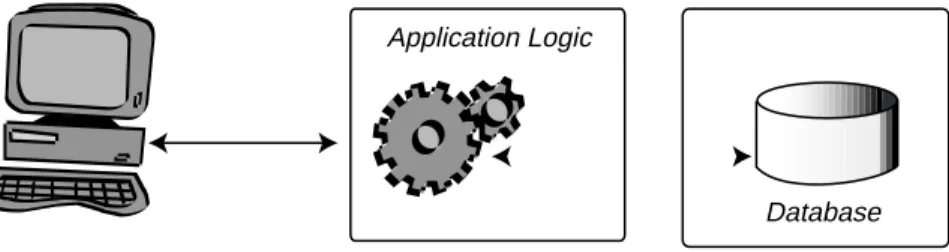
A more advanced configuration, called three- or multitier architecture (Figure 3), separates the application logic from data, introducing an additional distinc-tion of responsibilities at the back-end side. The presence of one or more dis-tinct application tiers enables the im-plementation of advanced architectures that integrate the traditional HTTP protocol and client-server application distribution protocols for better perfor-mance, scalability, reliability, and secu-rity.
An orthogonal architectural issue is the time of binding between the content
of the information base and the applica-tion pages delivered to the client, which can be static when pages are computed at application definition time and are immutable during application usage; or
dynamic, when pages are created just-in-time from fresh content. Dynamicity has further nuances: it may involve only content (navigation and presentation are static), or scale to presentation and navigation.
2.5 Usability
From the customer’s perspective, us-ability is the most important quality of a Web application. Although a thorough discussion of the emerging Web usabil-ity engineering field is outside the scope of this paper (we refer the reader to Nielsen [1996]), it is possible to identify a set of general criteria to use in assess-ing Web usability:
—Degree of visual quality indicates the overall coherence of the presentation and navigation metaphors and the in-dividual quality of the graphic re-sources.
—Degree of customization measures the facility of tailoring the application in-terface to individual users or user groups. At one end of the spectrum, applications may have a fixed inter-face; at the other end, content, pre-sentation, and navigation may be in-dividually personalized.
—Degree of adaptivity is proportional to the runtime flexibility of the
inter-Client Server
Application Logic
Database
face; at one end, the application may be immutable; at the other, it may track the user’s activity and change accordingly [Fraternali and Paolini 1998].
—Degree of proactivity indicates the ca-pability of an application to interact with the user on its own initiative. Applications can be passive, i.e., pro-vide information only in response to a user’s requests, or proactive, i.e., able to send information to users upon the occurrence of relevant events.
3. TOOLS FOR WEB DEVELOPMENT
In response to the complexity factors of Web application development described above, many software vendors are pro-viding instruments for supporting the construction of new applications or the migration of existing ones.
Notwithstanding their common goal, the available products greatly diverge in many aspects, which reflects differ-ent conceptions of the nature of a Web application and of its development pro-cess.
To help understand the state of the practice, we have grouped existing tools into six categories, which exhibit homo-geneous features. This grouping is the result of a broad review, which has con-sidered over forty products, listed in Appendix 1.
The individual categories are (1) visual editors and site managers; (2) Web-enabled hypermedia authoring
tools;
(3) Web-DBPL integrators;
(4) Web form editors, report writers, and database publishing wizards; (5) multiparadigm tools;
(6) model-driven application genera-tors.
The order of presentation of the dif-ferent categories reflects the increasing level of support that tools in each cate-gory offer to the structured development of Web applications.
Category 1 contains productivity tools that evolved directly from the HTML editor, which do not really support the development of large-scale Web-data-base applications, but are nonetheless interesting because they pioneered many concepts (like presentation styles and top-down site design) later inte-grated into more complex environments. The same limitation in the degree of support to structured development of large applications is shared by Category 2, which originates from a different ap-plication domain, offline hypermedia publishing, but recently added facilities for Web and database integration; the interest in these tools is motivated by their nonconventional (with respect to the standard software engineering prac-tice) approach to application design and specific focus on navigation and presen-tation. Category 3 is the first one that explicitly addresses the integration of Web and databases to achieve a higher level of scalability, and includes very powerful, yet basic, products. These products can be used to implement
Client Application Server Application Logic
Database Data Server
applications on top of large databases, although at the price of a substantial programming effort. Category 4 takes quite a different, but still database-cen-tric, approach to Web development by addressing the migration of client/ server, form-based applications. These tools aim at augmenting the implemen-tor’s productivity in such tasks as form editing, report writing, and event-based programming; they also offer a higher level of support with respect to Cate-gory 3, but still concentrate only on the implementation phase. Category 5 con-tains a number of tools whose common feature is the integration of different development approaches and technolo-gies, drawn from the previous four tool families. Finally, Category 6 includes those products (actually two products) that provide complete coverage of all the development activities, from concep-tualization to implementation, by lever-aging state-of-the-art software engi-neering techniques.
To complete the overview of Web ap-plication development, in Section 10 we include a mention to other classes of products which are not directly con-cerned with the specific focus of this paper on the design and maintenance of Web sites, but either cover fundamental architectural issues like distribution, reliability, performance, and security, or provide specialized facilities to users and site administrators, like advanced search functions and collaborative work support.
4. VISUAL EDITORS AND SITE MANAGERS
This class includes authoring and site management environments originally conceived to alleviate the complexity of writing HTML code and of maintaining the pages of a Web site in the file sys-tem. In a typical configuration these products bundle a WYSIWYG editor, which lets the user design sophisticated HTML pages without programming, and a visual site manager, which dis-plays in a graphical way the content of a
Web site and supports functions like page upload, deletion, and renaming, and broken link detection and repair. Among the many products in this cate-gory are Adobe SiteMill and PageMill, NetObject Inc.’s Fusion, SoftQuad’s HotMetal, Claris Home Page, Macrome-dia’s Backstage Designer, and Mi-crosoft’s FrontPage.
From a lifecycle perspective, these products address the implementation and maintenance of Web sites; imple-mentation is supported by content pro-duction functions and maintenance by site-level management facilities. The most advanced products (e.g., NetOb-ject’s Fusion and Microsoft FrontPage) also offer a rather rudimentary ap-proach to design, whereby it is possible to separate the definition of the hierar-chical structure of a site from the au-thoring of content.
Automation concentrates on content production by generating code from vi-sual page designs. Support to code gen-eration is particularly relevant in those tools (like Macromedia’s DreamWeaver, SofQuad’s HotMetal Pro 5.0, Allaire’s HomeSite, and many more) that support the latest extensions of HTML, like Cas-cading Style Sheets (CSS) [World Wide Web Consortium 1998a] for content-in-dependent presentation specification, and the Document Object Model (DOM) [World Wide Web Consortium 1998b], for the object-oriented representation of page elements and their manipulation via a scripting language.
Some tools are able to generate part of the navigation logic by automatically inserting navigation buttons into pages based on their position in the layout of the site (Figure 4). Development ab-stractions are basically at the imple-mentation level and oriented towards structure and navigation (pages and links); some tools also provide presenta-tion abstracpresenta-tions in the form of page templates or “themes,” i.e., groups of graphic resources that can be applied to multiple pages to obtain visual consis-tency (Figure 5).
imple-mentation level: content objects (e.g., multimedia, graphics, but also object-based components like JavaBeans and ActiveX controls) can be reused across applications.
The architecture originally supported by these tools is file-based and two-tier, and the binding between an application and its content is static. Recently, the most advanced tools have added func-tionalities for the dynamic connection to live database data, as discussed in Sec-tion 8.
Since development is conducted mostly by hand, the level of customiza-tion and the resulting visual quality of the final application is proportional to the effort spent and can be arbitrarily high; coherence of presentation and navigation metaphors is facilitated by visual templates and themes, although in this case customization becomes more expensive.
The features of these tools are shown in Table I: in summary, they are an excellent solution for small- to
medium-sized applications, where publishing large information bases stored in a DBMS is not the major issue. The lack of a design-level schema of the applica-tion, independent of content, requires that the application features be defined instance-by-instance, and is a major ob-stacle to scale-up and integration of large masses of data. These limitations, however, are going to become less criti-cal as these products become more inte-grated with Web-database tools.
5. WEB-ENABLED HYPERMEDIA AUTHORING TOOLS
Web-enabled hypermedia authoring tools share the same focus on authoring as visual HTML editors, but have a different origin because they were ini-tially conceived for the development of offline hypermedia applications, and have been extended to support the gen-eration of applications for the Web in recent times. The best known represen-tatives of this class of products are
Asymetrix’s Toolbook II Assistant/In-structor, Macromedia’s Director and Au-thorware, Formula Graphics’ Multime-dia 97, Aimtech Iconauthor, and Allen Communication Quest. Most of these products have both Web export facilities and database connectivity, but these ex-tensions are not always compatible, and the developer must often choose be-tween the two possibilities. These prod-ucts are characterized by the following features:
—The authoring metaphor used in the definition of the application. Exam-ples of such metaphors are: flowchart (Quest, Authorware, IconAuthor), book (Toolbook), and movie making (Director).
—The way navigation is defined, which may require programming in a script-ing language, or may be supported by visual programming and wizard tools coherent with the product’s authoring
Figure 5. Graphic styles in NetObject’s fusion.
Table I. Synopsis of Visual Editors and Site Managers
Process: Lifecycle Coverage Design (limited to hierarchical layout definitions) Implementation
Maintenance
Process: Automation HTML generation from WYSIWYG page editing Generation of commands for hierarchy navigation
Abstractions Implementation-level: pages, links, presentation styles
Reuse Plug-in components; Reusable presentation styles
Architecture Two-tiers, based on file system Static binding of content to pages
Usability High graphical control through manual authoring High coherence through use of presentation styles Low customization, no adaptivity, no proactivity
metaphor (e.g., in Director, objects’ synchronization is defined by editing the score for the cast members of a stage; see Figure 6).
—The type of database connectivity, which may range from support of an internal database, of an external da-tabase via gateway software (typically ODBC or JDBC), or of an external database through DBMS API.
—The type of Web connectivity, which may be achieved by means of a plug-in application extending a Web browser, or by exporting the hyperme-dia application into a network lan-guage. Web connectivity may affect database connectivity, because in the present version of most tools, Web export can be done only for applica-tions not connected to a database. —The export language may be HTML,
Java, or a mix of both.
Basically, hypermedia tools are au-thoring assistants; their focus is re-stricted to the ad hoc implementation of long-lived applications published once
and for all in CDROMS or information kiosks. As a consequence, they still have little provision for a structured develop-ment lifecycle, and offer limited support to application modeling, design, testing, and maintenance.
To aid the implementation of large applications, some tools separate au-thoring in-the-large (i.e., the definition of the overall application structure) from authoring in-the-small (i.e., the de-tailed definition of the multimedia con-tent of individual information nodes) [GMP95]. This distinction fosters an el-ementary form of design which helps in reconfiguring the application structure and navigation, independent of content. For example, tools like Quest, Author-ware, and IconAuthor distinguish be-tween a “design mode,” where informa-tion nodes are placed on a flowchart, and an “edit mode,” where each individ-ual node can be edited. A parallel can be established between authoring in-the-large in hypermedia authoring tools and the site layout view offered by some visual HTML editors: in both cases, de-sign is done at the instance level, without
the help of a content-independent appli-cation schema, and navigation is (in part) automatically generated from the ab-stract structure of the application.
Reuse is pursued both at the design level by means of reusable substruc-tures and application-independent lay-outs, and at the implementation level by leveraging libraries of scripts or mul-timedia components. Recent versions of most tools also offer interoperability with third-party components (for exam-ple, inclusion of Java applets and Ac-tiveX components).
Regarding the development abstrac-tions, hypermedia tools have a strong plus in the built-in facilities for explic-itly modeling navigation paths orthogo-nal to application structure; for exam-ple, guided tours can be defined as sequential navigations based on asso-ciative properties of objects that may cut across the hierarchical structure of the application. Other navigational aids include application-wide search func-tions, glossaries, and access indexes.
Like visual HTML editors, hyperme-dia authoring tools
—do not provide a schema for distin-guishing the type of objects constitut-ing the application (beside the low-level distinction between objects of different media types). The main de-velopment abstractions are generic container objects (pages, icons, stages) whose definition intermixes structural, presentation, and behav-ioral aspects (and navigational fea-tures in those tools that do not sup-port the seperate specification of navigation);
—offer presentation abstractions in the form of page styles, i.e., sets of graphic resources applied uniformly to the entire application or to part of it.
The architecture of Hypermedia tools shows a substantial immaturity, with respect to competitor solutions; all tools were originally conceived for offline, file-based publication, and later
up-graded to external database connectiv-ity and Web export. Most products offer database connectivity via external li-braries using ODBC, but lose this fea-ture after Web export. Moreover, trans-lation from native proprietary format into a network language is still rudi-mentary, and the most advanced fea-tures (like those obtained by exploiting the tool’s scripting language) do not carry over to the Web version of an application.
Conversely, usability is the major strength of this category of products, which focus on delivering very sophisti-cated user interfaces exhibiting a de-gree of control over graphic accuracy and multimedia synchronization hardly available through other means. The in-herent navigational design paradigm, coupled to very effective and well-estab-lished aids like guided tours and user-defined access indexes, which most tools offer for free or with little programming effort, contribute to the deployment of applications that are very effective and much closer to the kind of communica-tion found in high quality, hand-devel-oped Web sites.
Table II summarizes the Web-related features of hypermedia authoring tools.
6. WEB-DBPL INTEGRATORS
The common denominator of products in this category is the dynamic production of Web pages from information stored in a database by integrating databases and Web technology at the language level.
Different network languages (notably HTML and Java) are merged with a database programming language (DBPL) to obtain an intermediate appli-cation programming language capable of making the best of both Web and database technology. Web-DBPL inte-gration is pursued in three distinct ways:
—HTML extensions add new tags to HTML to embed both generalized pro-gramming constructs and database-specific capabilities. The developer
writes page templates, which inter-mix declarative HTML tags and exe-cutable code. Products in this cate-gory can be further distinguished based on the language paradigm used to extend HTML (imperative, object-based, object-oriented). Page tem-plates must be translated into pure HTML; this task is normally executed at runtime by an interpreter. The per-formance of the different products vary, based on the process in which the interpreter is executed and on the way the connection to the database is managed. Examples of HTML exten-sions include Allaire Inc.’s Cold Fu-sion Web Database Construction Kit; Microsoft’s Active Server Pages (ASP) and Internet Database Connector (IDC); Vignette Corporation’s Sto-ryServer; HAHT Software’s HahtSite; and Informix AppPages. In general, HTML extensions have a broader ob-jective than the mere addition of da-tabase connectivity, and include prim-itives for overcoming HTML’s well-known limitations, like the absence of control flow instructions, modulariza-tion mechanisms, and stateful inter-action.3
—DBPL extensions take the other way around and add specialized functions to an existing DBPL or to a general-purpose programming language with a database interface, to enable the output of HTML code as a result of program execution. Developers write database applications that construct HTML output from data retrieved from the database. This approach re-quires database programming skills, but may yield better performance when DBPL programs are executed and optimized directly by the DBMS. Examples of DBPL extensions include Oracle’s PL/SQL Web Toolkit, Sy-base’s PowerBuilder Web.PB class li-brary, and Borland’s Web interface for the Delphi Client Server Suite. —Java extensionsadd database
connec-tivity to Java. The best-known effort in this direction is the JDBC open standard, which offers an ODBC-like architecture for Java applications that want to interact with a DBMS. Unlike HTML extensions, connectivity is added in the form of a library masking, under a uniform callable in-terface, the details of interacting with different proprietary DBMSs and SQL dialects.
Web-DBPL integrators are tools for the programmer, who may use them to sim-plify the task of gluing together Web
3Stateful interaction is the capability of retaining the application status between two consecutive client’s requests; this is not supported by HTPP/ 1.0.
Table II. Synopsis of Web-Enabled Hypermedia Authoring Tools
Process: Lifecycle Coverage Design (support of authoring-in-the-large) Implementation
Process: Automation HTML/Java generation from WYSIWYG authoring Synchronization of multimedia objects
Generation of commands for navigation
Abstractions Implementation-level authoring metaphors: pages, stages, flowcharts
Reuse Script libraries, application skeletons, plug-in components, reusable presentation styles
Architecture Monolithic
Two-tiers through Web export
Three-tiered through libraries for database connectivity Static binding of content to pages
Usability High graphical control through manual authoring High coherence through use of presentation styles Customization through user-defined access indexes No adaptivity, no proactivity
pages and database queries by hand, they are different from visual HTML editors and hypermedia authoring tools, which offer small-scale application de-velopment functions to nonprogram-mers. Due to their focus on implementa-tion languages, these products lack high-level abstractions for describing applications, and thus do not assist the developer in identifying the structure, navigation, and presentation of an ap-plication, which is directly implemented by manually writing the necessary HMTL page templates or DBPL pro-grams.
Reuse may be achieved either through the native constructs of the program-ming language, i.e., packages and mod-ules, or through ad-hoc modularization mechanisms such as inclusion between HTML page templates.
The target architecture is database-centered and three-tiered; the most so-phisticated products also permit multi-ple database tiers and distributed queries.
Not having any specific support for presentation and navigation modeling, these products have no direct impact on the usability and graphical quality of the user interface, which must be de-signed separately.
The major difference between Web-DBPL integrators and visual HTML ed-itors and hypermedia authoring tools is that the former introduce a clear sepa-ration between the final application pages and the content repository, the schema of which acts as an implicit specification of the application struc-ture.
This distinction has several conse-quences on the application-development process:
—it permits a more effective manipula-tion of the informamanipula-tion base because changes to content can be made with-out affecting navigation and presenta-tion;
—it exposes the different object types that constitute the application,
al-though these types are not elicited from the structural, navigational, and presentation requirements of the ap-plication, but stem from the design of the underlying database;
—thanks to explicit object typing, the uniformity and coherence of the pre-sentation are facilitated, because all objects of the same type may be easily visualized in the same way. As a counterpart, customization at the in-stance level must be explicitly pro-grammed by identifying exceptional cases and treating them in an ad hoc manner.
Being database-driven, applications built with Web-DBPL integrators may leverage the reactive capabilities of the underlying DBMS to achieve adaptivity and proactivity, e.g., database triggers. For example, an Oracle trigger could react to user-generated events and pro-duce HTML pages adapted to the spe-cific situation.
In spite of the above positive side-effects, Web-DBPL integrators cannot be considered development tools in themselves, but are comparable to tra-ditional client/server 4GL because they provide a high-level programming inter-face masking lower-level architectural details; as such they are often used to build more sophisticated products, like the ones reviewed next.
Table III summarizes the most impor-tant features of Web-DBPL integrators.
7. WEB FORM EDITORS, REPORT WRITERS, AND DATABASE PUBLISHING WIZARDS
This category collects a large number of products, all having the common char-acteristic of leveraging traditional data-base design concepts and development tools, to rapidly deploy both new and legacy data-intensive applications on the Web. A first classification can be obtained by considering the functions offered by the tools, ordered by complex-ity and sophistication:
—Database export: support is limited to the publication of basic database ele-ments, i.e., tables and views, and is achieved by automatically mapping database content into a network lan-guage, notably HTML. The export can be either static or dynamic, the latter case requiring on-the-fly HTML gen-eration, which is normally imple-mented by means of a Web-DBPL in-tegrator. A certain level of personalization can be obtained by applying sets of preferences to drive the output of Web pages. A typical example is the export of tables and queries in Microsoft’s Access97. —Report writing: more complex
read-only applications can be obtained by defining custom reports, which can be exported to the Web either statically or dynamically. Dynamic publication requires a report interpreter working side by side with the Web server. Ex-amples include Crystal Report Print Engine, Oracle’s Reports for the Web, and Microsoft’s Access97 report ex-port facility.
—Form-based application development: assistance extends to the construction of interactive, form-based applica-tions for accessing and updating data, and more generally for implementing business functions.
Form-based application development is where the highest number of products
concentrate, and developers are faced by an impressive spectrum of alterna-tives. Among the reviewed products, we cite Microsoft’s Visual InterDev, Visual Basic 5, and Access97, Oracle Developer 2000, Inprise IntraBuilder, Sybase’s PowerBuilder, Apple’s WebObjects, Net-Dynamic’s Visual Studio, Asymetrix Su-perCede Database Edition, and Allaire’s Cold Fusion Application Wizards. The most relevant dimensions characteriz-ing the different products are as follows: —The application delivery format can be pure HTML, a combination of HTML and Java, HTML plus propri-etary component technology and scripting languages (e.g., client-side ActiveX objects, VBScript or Java-Script tags), or a totally proprietary format (e.g., ActiveX documents, Sy-base’s PowerBuilder PBD files). The delivery format affects the client’s performance and the application’s portability, with minimal overhead and maximum portability in the pure HTML case, and maximum overhead and minimal portability when the ap-plication is deployed in a totally pro-prietary format interpreted by a browser’s plug-in application.
—The application development langua-ge(s), which may be different from the delivery language(s), to preserve existing software investments and programming skills and/or increase
Table III. Synopsis of Web-DBPL Integrators
Process: Lifecycle Coverage Structural design (design of underlying database) Implementation
Content maintenance
Process: Automation Web-database communication Query shipment and result processing Page formatting from query results
Abstractions Design-level: database structures (tables, classes) Implementation-level: pages, interface objects
Reuse Reusable modules: page templates, procedures, classes
Architecture Three/multitier
Dynamic binding of content to pages
Usability No specific support for control of graphical quality
Coherence facilitated by page templates (HTML extensions) Low customization, adaptivity and proactivity manually implementable through database triggers
performance and portability. Overall, the spectrum of bindings between de-velopment and delivery languages is extremely varied, ranging from prod-ucts offering a single development language and multiple output formats (e.g., Oracle’s Developer 2000 maps PL/SQL to HTML, Java, and Visual Basic) to products translating differ-ent input languages into the same output format (e.g., Microsoft’s Visual InterDev maps design-time ActiveX controls scripted in VBScript or JavaScript into pure HTML).
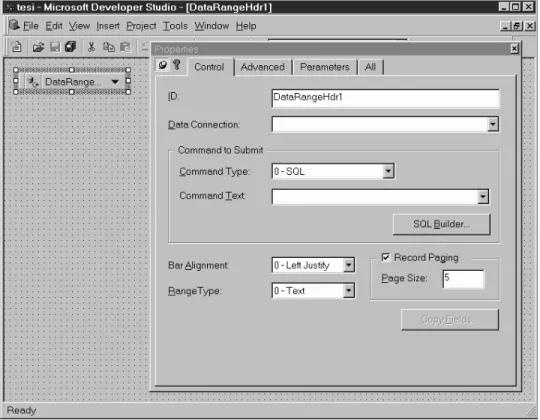
—The implementation paradigm, which can be 3GL programming, Rapid Ap-plication Development (RAD), wizard-based, or a mix thereof. Almost all tools offer RAD functionalities, letting programmers define an application by dragging and dropping components onto a form, and by visually customiz-ing their properties. Behavior cus-tomization, as necessary for the defi-nition of complex forms, can be added by writing code in the tool’s develop-ment language. A few products (e.g., Visual InterDev, IntraBuilder, Net-Dynamics, Cold Fusion) also include a simplified development path for non-programmers, based on “wizards” en-abling the automatic generation of code from sets of preferences selected through a visual interface (Figure 7). Wizards are applied to obtain both components and complete applica-tions; in the latter case they deliver “canned” database applications, in which the data structure and the in-terface logic are predefined (e.g., mas-ter-detail data entry and visualiza-tion, drill-down reports, and so on). —The execution architecture: the way
in which an application can be parti-tioned among the different tiers of the Web architecture is even more varied than the choice of development and delivery languages, because object distribution (as supported by lan-guages like Java and architectures like Corba and DCOM) permits the
same functionality, e.g., a database driver, to be located either in the cli-ent or in the application server. From a software engineering point of view, products in this class are to Web development what Integrated Develop-ment EnvironDevelop-ments (IDEs) and Rapid Application Development tools were to traditional application programming: instruments for boosting individual and team productivity in the implementa-tion phase. The best tools also help pro-cess management, testing, and mainte-nance by leveraging standard software engineering techniques like source and version control, configuration manage-ment, and visual debugging.
With one exception, reviewed later, form-based application generators do not provide upper-CASE capabilities: they do not encompass conceptual mod-eling, nor support the model-driven de-sign and implementation of applica-tions. Typically, data structures, business logic, and interfaces are speci-fied and designed separately and then implemented with the tool of choice.
Component-based reuse is also intrin-sic to most products, which leverage the various object-level interoperability standards emerging on the Web. Com-ponents can be either client-side, in which case they encapsulate typical in-terface controls (e.g., menus, edit fields, grids, etc.) or server-side, in which case they typically wrap database access and data formatting primitives.
The development abstractions are in-terface-oriented, and drawn from the traditional client/server, database-cen-tric world: query and data entry forms, input/output controls, record lists, and reports. The structure of the application is dictated by the forms that compose it, and is generally isomorphic to (a subset of) the database schema, especially when forms are automatically derived from database tables and views through database wizards. More complex patterns can be obtained by exploiting canonical structures like table lookups and master-details, or by hand-programming
non-standard combinations of objects. The navigation semantics is deeply embedded within the application, and hyperlinks are emulated by means of form-to-form connections. In some cases, navigation is automatically inferred by the tool from database structure, as in automatically generated master-details and drill-down applications, where database foreign key constraints are translated into HTML hy-perlinks. Presentation is addressed as an independent issue only in those products that provide a notion of “presentation style” (e.g., models in Access97, themes in InterDev, master pages in IntraBuilder) which can be uniformly applied to all application pages to obtain a consistent look.
On the architectural side, all products target multitier architectures; the most recent generation (e.g., NetDynamics Visual Studio) is tightly integrated with specialized middleware products, called
application servers, which we review in Section 10.
Unlike Web-DBPL integrators, which are neutral products that can be used to shape any kind of application, form-based generators and database publish-ing wizards deliver complete software solutions, including user interface logic. Thus their underlying interaction model influences the user perception of appli-cation quality. The evaluation must con-sider the application context in which a tool is used, and consequently the kind of users addressed. In an intrabusiness, or business-to-business contexts, these products are essentially vehicles for Web-enabling traditional client-server applications. In this setting, interface quality is proportional to the similarity between the look and feel of original client-server applications and their Web counterparts, because the peculiarities of Web interactions (free browsing,
associative links, multimediality and user-level customization) are less im-portant than adherence to interface standards well-established among us-ers. Conversely, if these products are targeted to user-oriented applications for the Internet, they must be compared to Web and hypermedia authoring tools, in which case their form-to-form naviga-tion pattern and the limited graphic control imposed by wizards are a source of rigidity.
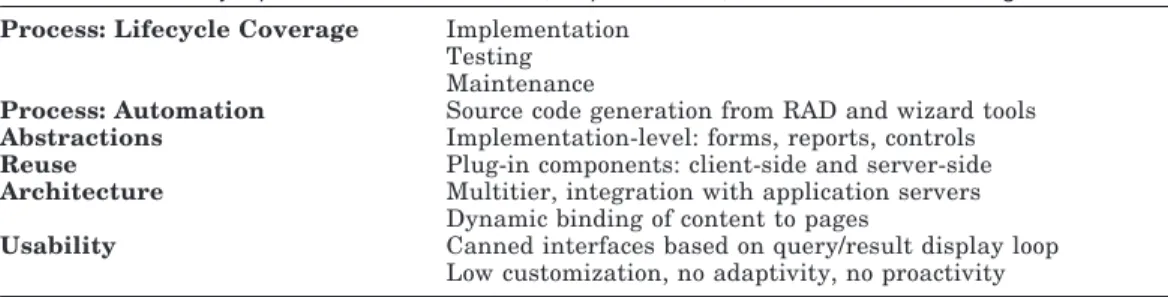
Table IV overviews the main features of Web form editors, report writers, and database publishing wizards.
8. MULTIPARADIGM TOOLS
The ongoing trend in the evolution of Web development tools is an increasing convergence between visual editing and site management products, Web-HTML integrators, and client-server products (reviewed in Sections 4, 6, and 7, re-spectively).
Multiparadigm tools integrate solu-tions from the aforementioned catego-ries into a unified development frame-work. The most typical configuration is one in which visual HTML editing and site administration are extended with external components, which provide da-tabase connectivity, or with enhanced HTML generation capabilities able to produce scripts for pulling content from databases, or with full-fledged database publication wizards.
Examples of such convergent tools are FrontPage98, which includes database objects for connecting to external data sources; Elemental’s Drumbeat, which
combines sophisticated visual editing and assets management with database wizards comparable to those of special-ized Web-database connectivity prod-ucts; Lotus Domino and Domino De-signer, which offer an integrated environment for Web-enabling Notes client-server applications and for devel-oping Web sites that take advantage of Domino Server capabilities; and NetOb-ject’s Fusion (version 3.0), which fea-tures the Fusion2Fusion extension for connecting NetObject’s visual page edi-tor and Allaire’s HTML-SQL integraedi-tor. Multiparadigm tools do not introduce novel approaches into Web develop-ment, but combine already established features to broaden their spectrum with respect to single-paradigm products. Thus they offer advantages (summa-rized in Table V) that are the sum of the strengths of their components (imple-mentation productivity, top-down de-sign, three-tier architecture, high graphic control), but do not overcome the major limitations of the products reviewed so far, i.e., lack of a high-level, content-independent representation of the site in terms of structure, naviga-tion, and presentation.
9. MODEL-DRIVEN WEB GENERATORS
Model-driven Web generators are at the top of the proposed categories, because they provide the highest level of auto-mation and lifecycle coverage, by apply-ing conceptual modelapply-ing and code gen-eration techniques to the development of Web applications.
Table IV. Synopsis of Web Form Editors, Report Writers, and Database Publishing Wizards
Process: Lifecycle Coverage Implementation Testing Maintenance
Process: Automation Source code generation from RAD and wizard tools
Abstractions Implementation-level: forms, reports, controls
Reuse Plug-in components: client-side and server-side
Architecture Multitier, integration with application servers Dynamic binding of content to pages
Usability Canned interfaces based on query/result display loop Low customization, no adaptivity, no proactivity
This category comprises a few com-mercial tools, which exhibit different conceptual models and code generation techniques. We review Hyperwave Server 4.0, and Oracle’s Web Develop-ment Suite.
Hyperwave [Hyperwave Information Management 1998] is an advanced doc-ument management environment which permits remote users to browse, anno-tate, and maintain documents distrib-uted over the Web. Hyperwave has a very basic, yet powerful, high-level model of a Web application, which is thought of as a set of document collec-tions organized hierarchically. Collec-tions may contain subcollecCollec-tions and documents, and have different behav-iors based upon their type. Documents in a collection can be linked and anno-tated with a number of metadata. Links are managed by the Hyperwave server, so that any hypertextual structure can be superimposed over a set of otherwise independent documents.
From the description of collections, links, and metadata, Hyperwave gener-ates a Web interface that enables both user-oriented and administrative func-tions like collection and link browsing, searching and notification, remote docu-ment managedocu-ment, fine-grain version and access control, collaborative work, and personal annotations. The gener-ated interface has a default presenta-tion, which can be personalized using a proprietary template language.
Although document-oriented, the Hy-perware server relies on database tech-nology and on a multitier architecture to store metadata and manage links spanning multiple servers.
A more database-centric approach is taken by the Oracle Web Development Suite, which comprises Designer 2000 [Gwyer 1996; Barnes and Gwyer 1996], a CASE tool for generating Web applica-tions from augmented entity-relation-ship diagrams.
Designer 2000 is an environment for business process and application model-ing, integrated with software generators originally designed to target traditional client-server environments, namely Or-acle Developer 2000 [Hoven 1997], and Visual Basic. The Web generator en-ables previous applications developed with Designer 2000 and deployed on LANs to be ported to the Web, as well as the delivery of novel applications di-rectly on the Internet or on intranets. The Web generator takes its inputs from the Designer 2000 design reposi-tory and delivers PL/SQL code that runs within the Oracle Web Server to pro-duce the desired HTML pages of the application. More specifically, three in-puts drive the generation process: —A Web-enhanced database design:
da-tabase design diagrams specify the structure of the database in terms of tables, views, foreign key relation-ships, and integrity constraints.
Table V. Synopsis of Multiparadigm Tools
Process: Lifecycle Coverage Design (limited to hierarchical layout definitions) Implementation and maintenance
Process: Automation HTML generation from WYSIWYG page editing Generation of commands for hierarchy navigation Web-database communication
Source code generation from RAD and wizard tools
Abstractions Implementation-level: pages, links, presentation styles, interface objects, tables, queries
Reuse Plug-in components, reusable presentation styles
Architecture Three and multitier
Static and dynamic binding of content to pages
Usability High graphical control through manual authoring
Coherence through use of templates and presentation styles Low customization, adaptivity and proactivity manually implementable through database triggers
These constitute the schema of the future Web application. A few visual features can be specified in the sche-ma: for example, column definitions can be supplemented with caption text and display format (e.g., a pop-up list). Moreover, some integrity con-straints (e.g., valid ranges) can be at-tached to columns and tables, and the Web generator can be instructed to produce code for checking them on the server via PL/SQL or on the client via JavaScript.
—The definition of applications and modules: modules correspond to basic application units; each module con-sists of a sequence of tables, linked by foreign key relationships (Figure 8). The order of tables in a module deter-mines the sequence of HTML pages that will be produced for that module. Navigation is established by drawing links between modules: the designer may define which modules can be
reached by a given module and intro-duce fictitious modules acting as hier-archical indexes over other modules. —User preferences are parameters that
can be set to govern the presentation of the generated application; they can be defined either globally, at the mod-ule, or at the component level. Exam-ples of preferences are colors, headers and footers, background images, and help text.
From these inputs, the WEB genera-tor produces fixed-format Web pages; one set of related pages is generated for each module, and links between differ-ent modules are turned into hyperlinks between the HTML startup pages of modules.
Model-driven generators apply the fundamental principles of software en-gineering to Web development; apart from all other product categories, applica-tions are first modeled at the conceptual
level and then implemented through code generation. This approach and its benefits are comparable to the ones de-livered by CASE tools for object-ori-ented application development, and range from reduced development effort, reverse engineering, and multilevel re-use.
However, Hyperwave and Designer 2000 diverge in the underlying concep-tual model, and both exhibit limits in the description of Web applications.
Hyperwave adopts a simplified hyper-media model, which is well suited to represent navigation, but lacks a proper structural model; as a consequence, the information base is reduced to a set of flat documents annotated with meta-data.
Conversely, Designer 2000 draws the development abstractions from the da-tabase world, and adapts such concepts as entities and relationships to Web modeling by adding to them some navi-gation and presentation flavor. This
at-tempt to twist a database conceptual model and apply it to a Web application is responsible for some limitations in the usability of the resulting applications, where the absence of proper modeling abstractions for navigation and presenta-tion limits the exploitapresenta-tion of the commu-nication capabilities of the Web.
The limitations of commercial Web gen-erators are addressed by a few research prototypes, namely Araneus [Atzeni et al. 1997]; Autoweb [Fraternali and Paolini 1998]; Strudel [Fernandez et al. 1998]; WebArchitect [Takahashi and Liang 1997]; W3I3 [Ceri et al. 1998]; HSDL [Kesseler 1995]; RMC [Diaz et al. 1995]; and OOHDM [Schwabe and Rossi 1995], which are discussed in Section 12.
10. MIDDLEWARE, SEARCH ENGINES, AND GROUPWARE
Besides support for conceptualization, design, and implementation, Web devel-opment requires tackling other issues
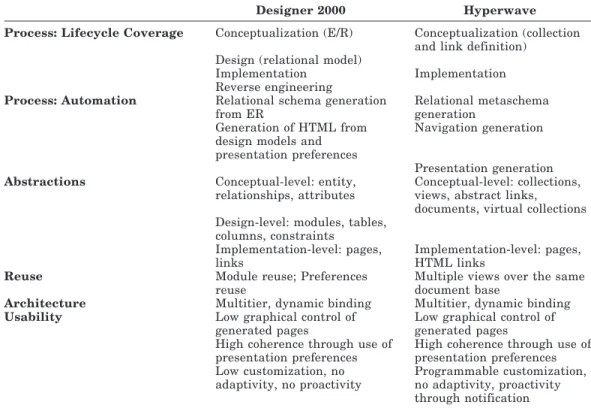
Table VI. Synopsis of Model-Driven Generators (Oracle Designer 2000 and Hyperwave)
Designer 2000 Hyperwave
Process: Lifecycle Coverage Conceptualization (E/R) Conceptualization (collection and link definition)
Design (relational model)
Implementation Implementation
Reverse engineering
Process: Automation Relational schema generation from ER
Relational metaschema generation
Generation of HTML from design models and presentation preferences
Navigation generation
Presentation generation
Abstractions Conceptual-level: entity, relationships, attributes
Conceptual-level: collections, views, abstract links, documents, virtual collections Design-level: modules, tables,
columns, constraints Implementation-level: pages, links
Implementation-level: pages, HTML links
Reuse Module reuse; Preferences reuse
Multiple views over the same document base
Architecture Multitier, dynamic binding Multitier, dynamic binding
Usability Low graphical control of generated pages
Low graphical control of generated pages High coherence through use of
presentation preferences
High coherence through use of presentation preferences Low customization, no adaptivity, no proactivity Programmable customization, no adaptivity, proactivity through notification
which, although outside the focus of this paper, are critical for the delivery of effective applications in performance, availability, scalability, security, infor-mation retrieval, and support for collab-orative administration and usage.
These needs are served by ad hoc tools or by specialized functions inte-grated into Web design products. In the sequel, we briefly review the most im-portant features of three categories of products: application servers, search en-gines, and groupware and collaborative design tools.
10.1 Middleware
Industrial strength data-intensive ap-plications require not only proper de-sign tools but also a solid architecture, good performance, availability, scalabil-ity, and security. These goals have prompted the extension of the original two-tier HTPP architecture to more so-phisticated configurations, encompass-ing three, and even multiple, tiers. The key to multitiered applications is the capability to separate data, interfaces, and application logic, and to distribute each aspect to distinct network nodes. Such distribution leverages Internet-en-abled application protocols (like Corba Internet InterOrb Protocol (Corba IIOP [Object Management Group 1996]) and Microsoft’s Distributed Common Object Model, DCOM [Microsoft Corp. 1996]) and the native remote procedure call capabilities of network languages (nota-bly, Java’s Remote Method Invocation, RMI [Sun Microsystems 1995]).
The in-depth presentation of the al-ternative architectural and technologi-cal options for multitiered applications is outside the scope of this paper, and is thoroughly addresses by many authors (see, for example, the special issue of IEEE Internet Computing on Internet Architectures [Benda 1998] for a recent review of the state of the art, and Byte’s special report on networked components [Montgomery et al. 1997] for a compari-son of Corba and Microsoft architec-tures).
However, in the tool market, several vendors are also addressing multitiered architectures by offering specific prod-ucts, called application servers, which are middleware facilities either inte-grated into HTTP servers, or working side by side to them. Examples of appli-cation servers are NetDynamics, Lotus Domino Server, Oracle 8i Java Server, Sybase’s Jaguar CTS, and Inprise’s VisiBroker for Java.
Application servers do not directly im-pact the client-side design process, but offer several extensions to the standard functions of HTTP engines, which can be used to support server-side develop-ment:
—Efficient execution of server-side pro-grams that implement the business logic of the Web application. Products differ in the development languages supported, which commonly include C11, Java, and scripting languages like Perl, Visual Basic, and JavaS-cript. Efficiency is improved by re-placing the Common Gateway Inter-face (CGI) between the Web server and the application programs by means of optimized protocols and ar-chitectures like FastCGI (http://www. fastcgi.com) and Java Servlets [Chang 1998].
—High-performance client-server com-munication. Such capability may be based on a comprehensive architec-ture for application distribution, on programming language features, or on proprietary remote procedure calls. Rather than using HTTP, enabled cli-ents may bypass the Web server and directly connect to the application server using either open protocols like Corba/IIOP and Java RMI, or propri-etary protocols, like Microsoft’s DCOM, Domino’s Notes Remote Pro-cedure Calls (NRPC), and Sybase’s Jaguar CTS remote procedure calls. —Optimized and extensible connection
to multiple external data sources. This function includes pooling connec-tions to a database across multiple
clients, caching result sets, and possi-bly extending the application server with plug-in gateways to heteroge-neous data sources like Enterprise Resource Planning (ERP) and legacy systems (examples of built-in gateway components and programmable tool-kits are NetDynamics 4.0 Platform Adapter Components (PACs) and Domino Enterprise Connection Ser-vices (DECS)).
—Flexible and dynamic load-balancing of client requests by means of auto-matic replication of server functions. High-volume incoming traffic may be dynamically routed to multiple in-stances of server-side functions, im-plemented either as separate threads of the application server or as exter-nal processes, possibly residing on re-mote hosts. Dynamic redirection also enables transparent failure-handling: a user’s request for an unavailable service can be routed to a replica of the same function, either dynamically spawned or statically instantiated at system configuration time.
—Implementation of a secure infra-structure for both data and messages. Security may be granted by a variety of means: user logging and authenti-cation over both HTPP and non-HTTP connections (e.g., by supporting the X.509 open standard certificate for-mat, or authentication via third-party directories), message and content en-cryption (e.g., by supporting the IETF Secure MIME standard and RSA/RC2 cryptography), and password quality testing.
—Transactionality, i.e., the capability of performing atomic and recoverable transactions over a single or multiple tiers. This feature, traditionally of-fered by distributed database servers and TP monitors, requires the appli-cation server to implement write-ahead logging and two-phase commit protocols.
10.2 Search Engines
The proper design of structure and nav-igation normally results in Web sites with a self-evident organization, conse-quently reducing the need for full-text searches over the information base [Halasz 1988]. However, Web applica-tions offered to the general public must also consider the needs of casual read-ers and readread-ers with highly specific in-terests, for which a content search is the most effective interaction paradigm. Designing the search functions for a data-intensive Web site is an orthogonal issue with respect to the design of struc-ture, navigation, and presentation, and is supported either by ad hoc functions integrated into Web development tools, or by specialized products called search engines.
Examples of Web development tools that bundle integrated search functions are Hyperwave (which also comes with a separate commercial search engine), and Lotus Domino Designer. Among the numerous stand-alone search engines, we mention Verity Search97, Harvest, OpenText’s LiveLink Search and Spi-der, Altavista Search, QuarterDeck’s WebCompass, and Excite for Web Serv-ers.
Search engines basically consist of two main components: a user interface and query processor, whereby users can pose queries and obtain a ranked list of pages whose content satisfies the query; and an indexing component (also called spider or crawler) which creates and maintains indexes over the data sources.
The available commercial products differ in a variety of dimensions: the kind of queries they support (keyword-based, Boolean, natural language, fuzzy); the customizability of the dis-play of results; the flexibility of the in-dex creation and maintenance process (e.g., the possibility of scheduling the updates of indexes differently for differ-ent data sources or to analyze differdiffer-ent file formats); and the adherence to the so-called robot-exclusion standard, by
which webmasters can deny access to crawlers at their sites.
For a broad review of commercial search engines and a comparison of their features, the reader may refer to Lange [1997].
10.3 Groupware
Collaboration requirements affect Web development in several ways, going from the concurrent construction of a Web site by geographically distributed development teams, to the provision of limited content editing and interaction functions directly to end-users, to real-time interaction integrated into a Web site.
In the commercial market several tools offer groupware capabilities, in-cluding
—concurrent access control via content locking and checkin/checkout proce-dures;
—distributed file systems for concur-rent content upload;
—offline collaboration tools like calen-dars, schedules, notification lists, and discussion groups;
—real-time collaboration facilities like virtual rooms, white boards, chats, and video conferencing.
—full-fledged workflow support, includ-ing offline and online collaboration facilities and workflow modeling and implementation.
Examples of design tools supporting collaborative development are Hyper-wave, TeamSite, and Lotus Domino De-signer. Products for the definition of virtual workteams are reviewed in Wong [1998], and a comprehensive sur-vey of Web-enabled workflow systems is contained in Miller et al. [1997].
11. EVALUATION
Table VII summarizes the features of the categories of Web development tools described in Sections 4 to 9, in light of
the perspectives of Web development discussed in Section 2. To complete this picture, developers must also consider middleware products, which address the enhancement of performance and secu-rity and offer a platform for implement-ing advanced business logic, search en-gines, and groupware tools, which add specialized functions orthogonal to the design process.
The state of the practice summarized in Table VII can be better understood if compared with the current situations of mature software technologies, like ob-ject-oriented systems and databases (see Figure 9).
In these contexts, development tools cover the entire spectrum of the applica-tion lifecycle, and approach develop-ment from the right angle: they exploit well-established abstractions suited to the specific context (as the conceptual and logical models for database design and the object-oriented notation for OO systems) and follow well-proven devel-opment guidelines, like those described in Ceri et al. [1993] for database design, and in Rumbaugh et al. [1991] for ob-ject-oriented design. Pictorially, mature tools and approaches are represented as “light cones” that enlighten the various phases of the development cycle without crossing the borders of their target ap-plication field.
The situation of Web development is different and typical of a not yet mature technology (it could be easily compared to the OO tool market in the eighties): most products limit their focus to imple-mentation, with some provision for de-sign (as represented by the shorter “light cone” in Figure 9); a few tools are trying to cover the lifecycle in a broader way, but do so by approaching develop-ment from an unnatural angle, typically using models, abstractions, and pro-cesses drawn from other contexts. The “slanted” approach of these tools and approaches are represented by the light cone covering all phases of development,