http://dx.doi.org/10.4236/jis.2016.73015
Camera and Voice Control Based Location
Services and Information Security on
Android
Jitendra G. Chouhan, Nikhil Kumar Singh, Prashant S. Modi, Keyurbhai A. Jani, Bhavin N. Joshi
U.V. Patel College of Engineering, Mehsana, India
Received 1 March 2016; accepted 12 April 2016; published 15 April 2016
Copyright © 2016 by authors and Scientific Research Publishing Inc.
This work is licensed under the Creative Commons Attribution International License (CC BY). http://creativecommons.org/licenses/by/4.0/
Abstract
Increasing popularity of Android is making its security issue more crucial nowadays. This paper focuses on one-stop solution to secure Android device against information security and theft. Proposed application protects Android device against theft and helps to control Android device by SMS or using internet connection. By this application once the user has configured the account for anti theft, user can remotely track, sound a loud siren, lock, secretly capture photo of an intruder who tries to break in, get randomly recorded voice of intruder, get thief identity using device web history and can able to wipe all your private data. This data and tracking information will be stored in one central web server database and one can access it anytime through login.
Keywords
Android, Information Security, Mobile Tracking, Application Services
1. Introduction
Android security goes beyond the antivirus features. Biggest risk to Android users and the main incentive to download a security app, viruses aren’t the greatest threat. Biggest risk is that someone will get access to An-droid device (either by device lost or stolen). To have a smartphone in your pocket without a remote wipe possi-bility is a dangerous thing. It’s even more dangerous than losing keys to your house. Of course, someone can steal your private data using a fraudulent application, but that’s certainly the harder way. With prevention tech-niques described in this paper, Android devices are shielded from both threats.
Types of possible Android system security attacks can be divided into two parts: first, information breach and second, device theft. Today, more than 50% devices are running on Android operating system [2]. Android 4.1.1 version has heart bleed risk that means user information breach using vulnerable applications installed on their smart phone [3]. Our proposed work is not related to such kind of information breach because as a solution to this many smart antivirus, applications are freely available. Instead of that we have focused to prevent the formation breach that is possible due to theft of Android device. Many users store their important personal in-formation including important documents. This kind of private inin-formation may be accessible by thief and it may be used for personal use or revealed to world via internet. This must be prevented using any kind of me-chanism. If we think about second type of attack that is device theft, we can notice that information breach is becoming possible not mainly because your device is theft. It is because you do not have control over your de-vice data after theft. Theft of dede-vice and user information breach is somehow related to each other. If user has control over device to access its location and stored information then information breach can be prevented even after device theft. To provide this kind of control after theft of device, we will develop a mechanism that will work in any kind of situation. If device is not running on internet connection then also mechanism will work.
2. Literature Review
It is possible to use location services without using internet connection on Android device [4]. We can get loca-tion informaloca-tion offline only using GPS and tower localoca-tion of our smart phone. Localoca-tion we are getting here is not using any Wi-Fi or internet connection [4].
A number of researches are being held on the issue of obtaining private information on Android devices using multimedia such as microphones and cameras. One of the issues is basic camera attack model [5]. This kind of attack will capture image secretly from Android device camera without getting known to user. We will use this disadvantage in a positive direction to control device and collect information from device remotely.
In paper [6] Jae-Kyung Park and Sang-Yong Choi studied the types and characteristics of Google’s Android weaknesses as well as the risk elements. They introduced a safer usage of smartphones. By consistently re-searching and analyzing security weaknesses, they suggested that the development of quick response technology to weaknesses can lead to safer use of Android system.
3. Proposed Work
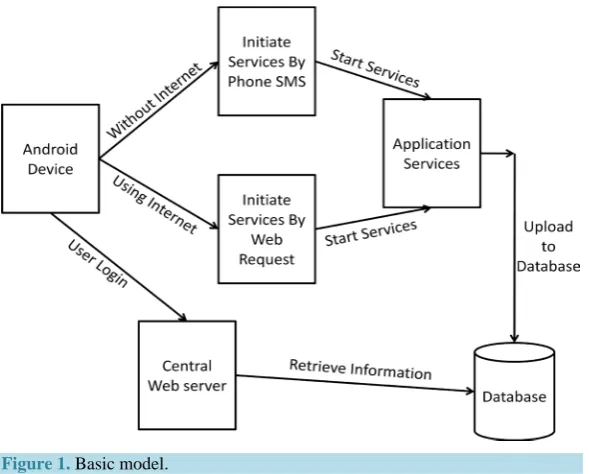
In Figure 1, basic working model of overall idea is shown. Proposed solution contains number of services to
prevent against device theft and information breach. At the time of user registration within application, user will be asked to enter recovery phone numbers. This recovery numbers will be used later to start or stop any services if device will be theft or misplaced.
After losing device user do not have physical control over it. So, user will send different commands to An-droid device in order to control the device operations. User will send this commands using phone SMS. To start tracking the device we have to just send one SMS like “START TRACKING” to activate offline location track-ing service. This command by default automatically also start all the other services that are required after device theft. Alternatively, user can also achieve the same after login through web server using web request mechan-ism(by pressing start services button) but that is not much reliable as it requires running internet connection on Android device. In most cases it is desirable to use both of the options simultaneously.
Figure 1. Basic model.
data can be moved to the web server and can be deleted to make the room for newer data (Figure 1).
4. Motivation and Contribution
Following are the motivation as well as contribution using various services against Android mobile device theft.
4.1. Location Tracking Service
According to survey [6]-[9] after device is theft, most important factor is getting its current location. If we are able to receive series of location updates from the beginning time of device lost to the current time, we will get a type of pattern which will help us a lot in determine the exact location. Google has its own free location API service which is available for public use to get Android device’s GPS location. But it requires working internet connection in our device. After device lost we can’t assume that device is running with internet connectivity. It is also possible that device will connect to the internet once a few days.
One of the possibilities to track device location using Google API that required internet connection is not a re-liable way in our scenario. Alternatively we could develop the scenario which will work even if there is no in-ternet connection is available. This gives us idea about offline location service. We can get device location using tower location of device without using internet.
4.2. Image Geo-Tagging Service
Today, if we search in the Android market for application that will secure our device and help user to track de-vice’s location, we will get number of applications freely available. Determining dede-vice’s location is important factor but is not sufficient enough to track device. Image geo-tagging service will be able to identify thief and will become very useful when we already have device location information. This service will capture image se-cretly without getting known to thief.
4.3. Voice Recording Service
Image geo-tagging service will help us to identify thief. Same way, voice recording service is another plus point for getting the identity of thief. It is another possible way to help user in recognition of thief.
4.4. Wipe Personal Data Service
Today, Android device is not limited to entertainment purpose only. Many business applications are also availa-ble in the market that is using functionalities like mobile banking, online shopping and transactions. In addition, some Android users may store their personal photos and important documents in their device. This data and formation may go to the wrong hands and possibly misused by any person or thief. It will raise the issue of in-formation security.
4.5. Determining Identity Using Web History
We have seen that image geo-tagging and voice recording service will help us to identify thief. Another possible way to get identity is by scanning device web history. Today, in many places open Wi-Fi facility is available to visitors for free internet usage. One possibility we can think about is that thief may connect to open Wi-Fi or use device data connection for web surfing. And at that time we can identify the user identity using web history.
4.6. SIM Change Notification and Locate Using Siren Service
To start any of available services we are using SMS based initiation or using web server login. It requires work-ing internet connection in device to initiate through web server login. So, SMS initiate is more reliable method. We first have to get phone number associated with device to send SMS. In most cases SIM card of device is changed after theft. So, every time whenever SIM card will be changed, application detects this change imme-diately and gives us new phone number on both of the configured recovery numbers automatically by sending phone SMS.
4.7. One Place Web Server Data Storage Service
Application different services will produce different types of data and will be stored in sharable hidden storage. This storage is not accessible by any other application in device and only accessible by our application and its services. First, we have to send this data to web server using internet connection and then after getting confor-mation from server side we will delete this data from device thus making room for newer one.
When user initiate services to gather data, automatically upload service will be start by default that take charge of uploading data to web server storage. Upload service will be run with specific time intervals and test that internet connection is available or not. If it is available, service will upload this data to online web storage.
Service will start at specific time interval e.g. service will restart after every half an hour and check for avail-able internet connection and upload it to web storage. In this scenario problem is that if internet availability test will take one minute, rest of the time till half an hour service will be in sleep mode. If in between internet con-nection is available we are not able to identify it. Alternatively, we could decrease this time intervals to run ser-vice again or may be continuously test for internet availability. Technically and logically it is correct but in An-droid device we have limitation in terms of power and storage. Continuously running services will drain device battery fast. So, unfortunately it is also not a good way to achieve desired result.
In Android system we have “Phone Change Event”. This event initiates only when device state is changed. So we will check for data state change of device that initiate only when device is either connected to Wi-Fi or cel-lular data state is changed. So in this way, we do not require to continuously test the internet connection and battery draining problem can also e solved.
5. Implementation
Any Android device with Android version 2.3 or higher can run this application. For our experiment, we have used XOLO Q2000L for testing purpose [5]. Eclipse, with the Android SDK as a plug-in will be used as a de-velopment of application [6]. Application is written in java and some of user interface is coded in XML. ASP.NET technology from Microsoft is used to develop web server interface and in coding.Android tool is used to code application. We have developed number of different services to secure our device and information. Fol-lowing are the pseudo code for different services.
5.1. Track Location from Background
GPS1.Start(0, 0) // Listen to GPS with no filters. latstart = location1.Latitude // GPS Co-ordinate lonstart = location1.Longitude // GPS Co-ordinate wespeed = location1.Speed
5.2. Capturing Image from Background
Dim r As Reflector // to run camera from background even device locked r.Target = r.GetActivity
r.Target = r.RunMethod("getWindow") r.RunMethod2("addFlags", 6815872, "java.lang.int") camera.Initialize // initialize camera
camera.StartPreview camera.TakePicture Dim out As OutputStream
out = File.OpenOutput(Savepath, Filename & ".jpg") // save image out.WriteBytes(Data, 0, Data.Length)
out.Close
5.3. Voice Recording from Background
Dim AR AsAudioRecorder
AR.Initialize() // initialize recorder AR.AudioSource = AR.AS_MIC
AR.OutputFormat = AR.OF_THREE_GPP
AR.AudioEncoder = AR.AE_AMR_NB // set encoder method gfilenamewav = DateTime.Date(DateTime.Now)
AR.setOutputFile(Savepath, Filename & ".wav") // save recording AR.prepare()
AR.start // wait for 20 seconds AR.stop // stop recording
5.4. Wipe Device Data
Dim r As Reflector
r.Target = deviceadmin.manager r.Target = r.GetField("dm")
r.RunMethod2("wipeData", 0, "java.lang.int")
5.5. Getting Device Web History
Dim r As Reflector
Dim TextWriter1 AsTextWriter
TextWriter1.Initialize(File.OpenOutput(Savepath, "userwebhistory.txt”) r.Target = r.GetContext
r.Target = r.RunMethod("getContentResolver")
Dim cr As Cursor = r.RunStaticMethod("Android.provider.Browser", "getAllVisitedUrls", Array As Ob-ject(r.Target), _
Array As String("Android.content.ContentResolver")) For i = 0 Tocr.RowCount - 1
cr.Position = i
TextWriter1.WriteLine(cr.GetString2(0)) Next
5.6. Sim Change Notification
Dim phone1 As PhoneSms Dim p As Phone
Dim pid As PhoneId
phone1.Send (Map1.Get("recoverynum"),"Your Phone " &p.Manufacturer& "-" &p.Model& " has inserted new sim card. Please Check SMS Sender Address for new sim card Number.")
5.7. Play Siren Loudly
Dim SP AsSoundPool Dim LoadId1,PlayId1 As Int
LoadId1 = SP.Load(File.DirAssets, "siren.mp3") Dim ph As Phone
ph.SetRingerMode(ph.RINGER_NORMAL) PlayId1 = SP.Play(LoadId1, 1, 1, 1, -1, 2)
5.8. Uploading Files through Web Request
Dim hc As HttpClient hc.Initialize("hc")
Dim pid As PhoneId Dim files As List files.Initialize Dim fd1 As FileData fd.Initialize
fd1.Dir = Savepath
fd1.FileName = "userinfo.txt" fd1.KeyName = "myFile1"
fd1.ContentType = "application/octet-stream" files.Add(fd1)
Dim NV As Map NV.Initialize
NV.Put("IMEI", pid.GetDeviceId) Dim req As HttpRequest
req = CreatePostRequest("http://weatall.com/u.aspx", NV , files) hc.Execute(req, 1)
6. Proposed Approach and Results
First of all every step of our proposed system against the Android mobile device theft is presented and then the various schemes are explained in detail to understand each and every step. Following are the steps of our pro-posed system for various application services:
Step 1: Listen to Global Positioning System (GPS) with no filters. Step 2: Find GPS co-ordinates.
Step 3: Run camera in background. Step4: Capture and save image. Step5: Do recording.
Step6: Wipe all data. Step7: Get all visited URL’s. Step8: Play siren.
Step9: Upload file.
6.1. Location Tracking Approach
Offline location tracking will detect location using the signal it will able to receive from number of satellites GPS able to discover, detect and connect to it at a time. In this method if we discover more than three satellites then we will able to get coordinates value that is latitude and longitude. Latitude and longitude together will give us exact location of device using Google maps. Here we are more concerned about the value of longitude. It is because object’s few meters movement can also be possible to detect with the calculation of last received longi-tude compared with the updated one.
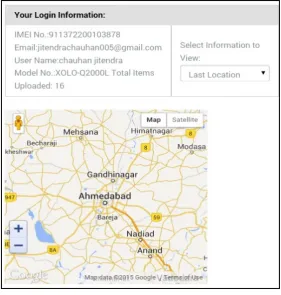
In Figure 2, we can see the screen shot of Google map that contains last location of device (which is
hig-hlighted in map). We receive this information through location tracking service after theft of the device. User can view this information only after login to web server account.
6.2. Image Geo-Tagging Approach
In Android “START TRACKING” command by default run all the required services. Location tracking service that is running in the background will be able to give us location when it will be required by any other services. Service will first capture image from device camera and save it to the hidden storage of device. But before stor-ing it to the hidden storage, service will add some important information in image’s property tags. It is possible to put any text information in image. Service will store this information in image as its property values. The values we can put here are known as EXIF tag.
In Figure 3, we can see the screen shot of images we received through image geo-tagging service. In screen
shot, we have one link named view is associated with each of the image. When user clicks on view image, it will display full size image with location and date-time information as we discussed.
6.3. Voice Recording Approach
[image:7.595.172.454.415.711.2]In this method, voice recording service will start recording through the device microphone secretly without get-ting known to thief. Service will set a certain interval of recording by automatically. For instance say, approx 30
seconds. Now this service will record audio through device microphone at random time interval. Each recording clip is generated in specific format. Here we are generating files in (.wav) format. Again, we use same hidden storage to save recording files that we used to store images.
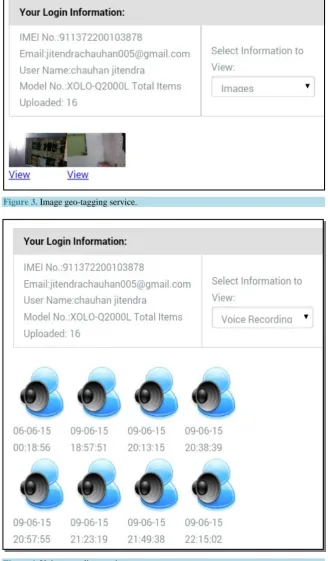
In Figure 4, screen shot contains output that we received at web server using voice recording service. Through
[image:8.595.148.477.151.713.2]Figure 3. Image geo-tagging service.
web server login user will able to download and listen to any of this recording. Under recording icon we can find the date-time information associated with each recording.
6.4. Wipe Personal Data Approach
To prevent the information and data from being stolen, we developed wipe personal data service that will take over the control of our valuable information and data. It means service will able to manage access control of in-formation and data. Service will allow user to wipe device completely wheatear device is in user’s hand or theft. To wipe information, user can send one phone SMS like “WIPE DATA” using any of the recovery numbers to his/her own device. Application wipes all the information of device as soon as SMS arrives. In this way, user will able to wipe device data remotely.
6.5. Web History Approach
Either the device is using Wi-Fi or mobile data connection, in both of these cases, we will get web search history and possibly bookmarks. By tracking this web history one can find the thief identity. For example, thief is using any social media or any other email account in web surfing. In browser url we may get account name or impor-tant email id through which we are easily able to identify thief. We can search url for special words like mail, account, username or “@” symbol. If user is surfing facebook then in url we have facebook username. Likewise in gmail account we will have email id. All this collected information will be stored in hidden storage as a doc-ument and uploaded to web server.
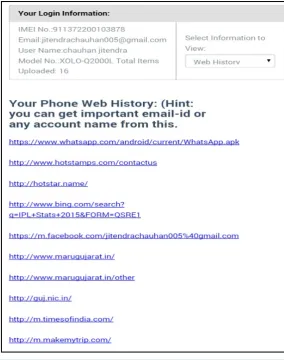
[image:9.595.169.454.348.709.2]In Figure 5, we can see that user search web history is displayed. If you look carefully at fifth line (which
contains facebook login url), we will able to get email id used for login to facebook. In this way, we can able to find identity of thief from scanning device web history data.
6.6. SIM Change Notification and Locate Using Siren Approach
If it is known to user that device is within few meters range only, than user will able to find device quickly and easily. By sending SMS to device we can start playing siren loudly in device. Application detects the command from incoming SMS and immediately starts siren in Android device. This service is independent of all the other services that working together when phone theft command is initiated by SMS or web server login (by pressing play siren button). So, if by mistake user misplaced device anywhere he/she able to locate device. Same will also applicable if user knows that device is in particular few meters range at specific location.
6.7. One Place Web Server Data Storage Approach
When user first time install application, user first go through sign up process and add recovery information to account. Register device to online web server is done using unique identifier that is device IMEI number.
Upload data service will send web request to server for uploading files to online storage. Web server distin-guishes different user data using device IMEI number. Every web request will contain files to upload including device IMEI number. Once these web requests reach to the server it will store this data to respective storage us-ing IMEI. This data includes device location information, randomly captured images, bunch of voice recordus-ings, device recovery information, and user web history.
User can able to login through mobile application interface or by visiting website URL. After login user able to view this information and data at single place as it name suggests. After login user can also send command to start-stop services. It does require running internet connection in device. Instead, SMS initialization or use of both the options simultaneously is suggested.
7. Conclusions
Currently in Android market many security related applications are available. Security application has two parts: information security and device theft security. Applications which are currently available for both of this securi-ty issue are required some improvements. Our Android application has added many possible solutions to im-prove the security of Android, whether as an information security or device theft security.
Application different services will produce data and information that will be sent through web request to web server. Location updates give user location of device. This series of locations will create one path or place of frequent visiting place. Images with geo-tagging will give clue to user to identify thief identity and able to get each image’s location and date-time information. Voice recording gives user clue to identify thief identity that includes date-time information. One of the important results using wipe personal data service is that even after device theft user can able wipe device’s all data and information from device. Web history will give account name or important email to identify thief. SIM change notification help user to track phone numbers and if de-vice misplaced user can play siren loudly to locate dede-vice immediately. Through web server login user can able to view all information at one place and able to start-stop services and play siren loudly.
In addition, our application will run as a device admin priority. It means that user will neither able to stop any application services nor able to uninstall it without application password. So collecting all of this together, we can say that research output is developed mechanism that secures user information and protects device against theft.
References
[1] Victor, H. (2014) Android's Google Play Beats App Store with over 1 Million Apps, Now Officially Largest.
http://www.phonearena.com/news/Androids-Google-Play-beats-App-Store-with-over-1-million-apps-now-officially-lar gest_id45680
[2] Llamas, R., et al. (2015) Smartphone OS Market Share, 2015 Q2. IDC Report August 2015.
http://www.idc.com/prodserv/smartphone-os-market-share.jsp
[3] Warren, C. (2014) Android 4.1.1 Devices Are Vulnerable to Heartbleed.
[4] Chauhan, J.G. and Modi, P.S. (2015) A Novel Approach to Real Time Health Monitoring System. Journal of Multidis-ciplinary Research Studies, 1, 78-80.
[5] Wu, L.F. and Du, X.J. (2014) Security Threats to Mobile Multimedia Applications: Camera-Based Attacks on Mobile Phones. IEEE Communications Magazine, 81, 80-87. http://dx.doi.org/10.1109/mcom.2014.6766089
[6] Park, J.-K. and Choi, S.-Y. (2015) Studying Security Weaknesses of Android System. International Journal of Security and Its Applications, 9, 7-12. http://dx.doi.org/10.14257/ijsia.2015.9.3.02
[7] Android (Operating System). Wikipedia. https://en.wikipedia.org/wiki/Android_%28operating_system%29
[8] XOLO Q2000L. (2012) XOLO—Premium Smartphones, Mobile Phones, Tablets [Online] Available from:
http://www.xolo.in/Q2000L
[9] Cai, J.P., Wu, J.Z., Wu, M.H. and Huo, M.M. (2011) A Bluetooth Toy Car Control Realization by Android Equipment.