ISSN Online: 1945-3124 ISSN Print: 1945-3116
Accessibility Evaluation of Arabic E-Commerce
Web Sites Using Automated Tools
Majed Alshamari
Department of Information Systems, College of Computer Science and Information Technology, King Faisal University, Al-Ahsa, Kingdom of Saudi Arabia
Abstract
Disabled people encounter many barriers while attempting to access the services on the web. Nevertheless, many tools, which could help them to access the web, are available. E-commerce websites have been also intensively and widely used. The e-commerce market in Saudi Arabia will hit $13.3 billion by 2015. This huge invest-ment requires e-commerce websites to be accessible by different types of users. This paper explores the tools that usually used by disabled users while using the web. It also discusses a number of available tools that help designers, developers and testers to assess web accessibility. It also evaluates the accessibility of 3 popular Arab e- commerce websites using 5 accessibility testing tools; namely Achecker, TAW, Eval Access, MAUVE and FAE. This research has found that Most accessibility guidelines are covered by Achecker tool. Navigation, readability, input assistance and timing are the common found accessibility problems while assessing the accessibility of the tar-geted websites. It has been also revealed that HTML can influence accessibility evalu-ation as HTML errors are considered as accessibility problems. It has been clearly observed that improvements are needed for better web accessibility, although some tools did report a small number of accessibility problems for some websites.
Keywords
Web Accessibility, E-Commerce, Automated Tools
1. Introduction
Nowadays human interaction with computers is becoming popular and spread wide; technology made it easy to interact with people via devices. Also, the web eases the way to find information, to communicate, to read a book or the news, to find a job or even to start a new business. Accessing the web is not a hard thing to do, but when it comes How to cite this paper: Alshamari, M.
(2016) Accessibility Evaluation of Arabic E-Commerce Web Sites Using Automated Tools. Journal of Software Engineering and Applications, 9, 439-451.
http://dx.doi.org/10.4236/jsea.2016.99029
Received: July 25, 2016 Accepted: September 11, 2016 Published: September 16, 2016
Copyright © 2016 by authors and Scientific Research Publishing Inc. This work is licensed under the Creative Commons Attribution International License (CC BY 4.0).
to individuals with disabilities, it is.
Understanding user’s demands and preferences is one of the most powerful require-ments in increasing customer satisfaction, and attracting users including disabled people by providing them helpful and useful techniques. These techniques must dy-namically scale itself to the abilities, skills, and requirements of the users. Web accessi-bility aims to help disabled people to use the web equally as anybody else. It is very compulsory for any organisation to adapt such techniques in order to rise up with its community.
Many tools to evaluate the web page accessibility have been designed. These tools generate evaluation reports that are designed to help locate errors and give warnings in order to design an accessible website.
The Internet has become essential to be used for users regardless their ability. There-fore tools have been proposed to help those people with special needs to utilise the web. All type of internet websites are expected to be accessible and they will be considered accessible as long as they meet web accessibility standards and requirements. This sec-tion discusses the tools used by disabled users in order to use the Internet. It also ex-plores the tools usually used to examine to which extent the web is accessible. It also explores a number of recent studies which discuss web accessibility including its results and findings.
2. Accessibility Tools Used to Help Disabled Users
Although a significant number of barriers face the disabled people whilst surfing the internet, there are many ways in which their access to the web could be more efficient. For example, browsers which do not support enlarging the text or providing images without an alternative text are amongst the sorts of difficulties most commonly thwart-ing access to the web [1]. Furthermore, colours have been used to attract surfers, but this is a negative aspect for the colourblind users as they are part of disable users be-cause using the text with a coloured background can adversely affect those who have difficulty in perceiving colours [2].
Assistive technologies and adaptive strategies are the two main approaches for inte-racting with the web. The former refers to any hardware or software can improve disa-ble users while interacting with the web. It includes screen readers, magnifiers and voice recognition. The latter includes the techniques which disabled users use while surfing the internet. These techniques are meant to help and improve the interaction of disabled users and the web such as mouse speed control, increasing text size or turning on captions [3].
A wide range of Adaptive Technologies which have been utilised by the visually dis-abled, e.g. a large monitor which helps them to enlarge the text. Screen enlarging soft-ware, and browsers like Internet Explorer, contains commands to display fonts. In ad-dition to these technologies, some operating systems, e.g. windows, offer the opportu-nity to increase text sizes. Furthermore, there is a technology called screen magnifica-tion, this software has been developed to magnify the web so that people who have dif-ficulty focusing clearly can read more easily [1]. Even the new technologies such as mo-bile phones or tablets have accessibility options to help people with special needs to use the mobile itself or the Internet.
To demonstrate some of the methods that have been used by the disabled when ac-cessing the web, some of the more commonly employed technologies are briefly dis-cussed here. Screen reader interprets the site through speech synthesis. This has some particular advantage; once it meets an image in the site, it reads an alternative text if one can be found. Many people who have impaired vision or blindness have utilized it. Moreover, voice browsers, screen enhancement software and text browsers like Lynx, are popular ways of accessing the web [1]. A screen reader can be used in two ways to provide information either using speech or Braille. A screen reader utilizes a Text-To-Speech (TTS) engine to translate on-screen information into speech, which can be heard through speakers. A TTS may be a software application that comes pack-aged with the screen reader, or it may be a hardware device that plugs into the comput-er. In addition to speech feedback, screen readers are also capable of providing infor-mation in Braille. An external hardware device, known as a refreshable Braille display is needed for this. A refreshable Braille display contains one or more rows of cells. Every cell can be framed into the state of a Braille character, a series of dots that are similar to domino dots in their layout. As the data on the PC screen changes, so does the Braille characters on the presentation change, giving refreshable data specifically from the PC. There are many screen readers available, including JAWS from Freedom Scientific, Window Eyes from GW Micro, or Thunder from Screenreader.net [6]. A number of applications and tools are not free to use such as JAWS. However, screen readers tool is already built-in the operating systems of the mobiles. The only difference between the desktop and mobile accessibility testing is the navigation of screen reader. Keyboard shortcuts are required for the desktop to navigate where mobile screen readers can be connected through a Bluetooth keyboard or even specific finger gestures [7]. Another technique which is special browser that should be able to discriminate the structure of your page, to the extent that the page has a structure, and pass the information on to the user in a meaningful way [8].
magnifi-cation can work in conjunction with screen readers [9]. MAGic is a screen magnifica-tion and screen reading solumagnifica-tion for low vision and visually impaired computer users. MAGic can help users work more efficiently with business applications, documents, email, navigating the Internet, and engaging in social networking [10]. There are other implements that support the disabled in accessing the web and one of the more com-mon marks is the asterix (*) which is always placed next to the required fields in case the person is colour-blind. Thus, the visually disabled have many ways of accessing the Internet efficiently [2].
Nevertheless, proper web accessibility design guidelines were not presented to Reti-nitis Pigmentosa (RP) patients. Therefore, it can be concluded that visually impaired users are less beneficial from the web than the normal users [11]. It can be seen that al-though different tools have been developed, some of the disabled users may not be able to utilise it due to their inability.
3. Tools Used for Web Accessibility Evaluation
Generally, a significant number of tools are available for evaluating web pages. In more detail, there are automatic tools like Bobby and W3C HTML validation tool. There are also, manual evaluations methods, based on comparing the web with accessibility guidelines [2]. However, the automatic tools have some disadvantageous aspects as these tools are not always able to identify all the difficulties that the disabled users might encounter, Although the manual evaluation are subjective and error-prone [2] [12]. This section will discuss the importance of Utilising accessibility tools and explore a number of accessibility evaluation tools.
There are a number of accessibility guidelines, such as Web Content Accessibility Guidelines (WCAG), that can help to guide designers in building an accessible web page. In fact, all the guides have checkpoints which assist the designers in which specif-ic area an aid should be applied [13]. Evaluation tools also provide reports that show the result of any evaluation, and some of them give a mark to the website. W3C divided these tools into three types: general, focused, and services [14]. Some tools can also check whether or not pictures have ALT text, and make sure HTML and links are valid. There are many types of software available helping to decide whether or not a web page is accessible, and W3C has recommended some of them.
tools that is freely available and brings up the specific web page to meet the W3C’s standards. This provides an opportunity to decide on the level of accessibility for the visually disabled. Human judgment is also required because some accessibility guide-lines can’t be determined by just automatic tools [17].
Multiguideline Accessibility Usability Validation Environment (MAUVE) is an en-vironment for accessibility testing. It aims to examine both HTML and CSS and, through some browsers’ plugins, it can validate dynamic pages as well [16]. Moreover, EvalAccess is an accessibility evaluation tool that allows to automatically evaluate the accessibility of web pages using the WCAG 1.0 from the W3C [18]. Functional Accessi-bility Evaluation (FAE) assesses website for WCAG 2.0 Level A and AA requirements. It also offers a detailed report of the testing [16]. FireEyes is also a tool which a Firefox plugin that integrates with Firebug and allows developers and QA engineers to evaluate web sites for Section 508 and WCAG 2.0 accessibility issues [19].
4. Related Work of Web Accessibility Evaluation
Most of the studies state that the websites are keeping the minimum standard as per the WCAG 2.0 recommendations. However, some of the studies reveal that the people with disabilities in a certain region still face obstacles in being included in society alongside people without disabilities [4]. There are a number of studies have explored web acces-sibility in different ways. [20] used various tools for the web accessibility evaluation. The accessibility guidelines are tabulated and used for the evaluation. This study was mainly focussed on the evaluation of e-government websites. The website progress had been examined in Saudi Arabia and Oman. The united nation e-government stages model was used as one of the evaluation tools. 8 of Saudi ministries did not have an on-line presence on the study time. It found only 13 Saudi ministries’ have an onon-line pres-ence [20]. They carried an evaluation over five stages. In each stage, the selected web-sites were assessed and the results did not meet accessibility guidelines and standards. The authors also used one of the well-known commercial online tools, that is, Bobby to test the websites. The evaluation process of these government websites, (13 from Saudi Arabia and 14 ministries’ sites from Oman), showed that none of these websites con-form to all priority1 checkpoints, which means that one or more groups will find it dif-ficult to access information on these websites [20].
standards and requirements [21]. However, this study did not take into consideration the new universities and did not employ the manual accessibility testing. [22] have conducted an evaluation of usability and accessibility for LMS “Blackboard” at King Saud University [22]. Although only a questionnaire has been used, improvements on accessibility have been highly recommended to have the system more accessible to stu-dents and teachers [22].
In [23], the authors conducted a study to assess the accessibility of banks websites in Pakistan. Two accessibility tools had been used to conduct this study. The achieved re-sults showed that standard accessibility rules had not been taken seriously by develop-ers. They did not consider them while building banks’ websites [23]. Another study is also examined web accessibility for the public sector in Pakistan. It resulted into a set of recommendations and suggestions to improve the web accessibility as it had been re-vealed they are not accessible for the disabled people [24]. In Jordan, [25] found that the majority of the selected websites did not consider web accessibility guidelines and they had a number of web accessibility issues. They examined Jordanian e-governments websites using two accessibility tools.
In [19], the authors have attempted to evaluate Arabic website accessibility using au-tomated WCAG 2.0. in fact, WCAG 2.0 tools are available although the main concern is still whether they can evaluate Arabic websites with insightful suggestions [19]. Their main goal was to evaluate WCGA 2.0 tools while assessing Arabic websites. 5 tools have been used to evaluate the accessibility of a number of Arabic websites. It has been found that these tools (TAW, Achecker, Fire EYES World Space, Deque World Space and Web Accessibility Assessment Tool) are biased to Latin-based websites [19]. It has been also found that significant differences among these tool results although the same web-site has been assessed [19]. This can clearly justify the need for more comprehensive accessibility tool.
It can be seen from the recent literature that assessing the accessibility of Arabic e-commerce has not been discussed neither investigated, although e-commerce is growing fast. For example, It has been reported that in 2015, the e-commerce market in Saudi Arabia will hit $13.3 billion [30]. in addition, a number of automated tools should be used to offer more reliable results while assessing the accessibility of e-commerce websites. Therefore this study utilised a number of popular accessibility automated accessibility tools.
5. Research Methodology
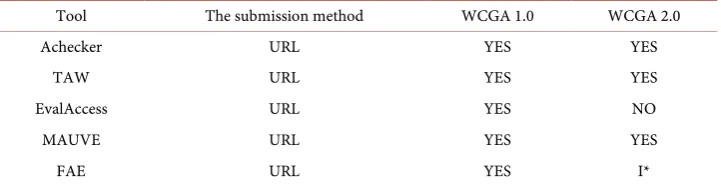
A number of methodologies can be utilised for websites accessibility evaluation such as questionnaires, behavioural observation tools and web accessibility evaluation auto-mated tools. These include structural and content evaluation. This study utilised a number of free accessibility evaluation tools to assess how accessible e-commerce web-sites are in Arab world. The utilised tools are AChecker, TAW, EvalAcess, Multiguide-line accessibility and usability validation environment (MAUVE) and Functional As-sessment Evaluation 2.0 (FAE). This number of tools is to offer more valid results and reveal more accessibility issues. Each tool examines the targeted website based on a set of criteria. Table 1 shows a comparison of these tools in terms of the submission me-thods and the accessibility guidelines referenced.
Homepages of the Arabic e-commerce websites have been tested. These websites have been recognised as popular Arabic e-commerce websites; namely SOUQ, HARAJ and NAMSHI. A number of steps have been applied before the testing was carried. These websites have been visited to ensure functionality, size and to ensure similarity. There are other Arabic e-commerce websites have been excluded due to the limit of this study or there may some parts under contractions or has a limited size.
6. Results and Analysis
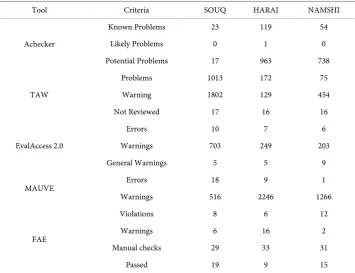
[image:7.595.194.555.600.693.2]A number of problems, warnings and errors have been revealed while testing the acces-sibility of the targeted websites in each tool. Table 2 shows the achieved results. “AChecker” represents the number of “known problems” that have been detected while the automated testing. Such accessibility known problems are expected to be fixed. “Likely Problems” and “Potential Errors” have been revealed. Further investigations have been also carried out to identify which types of accessibility problems are exist in
Table 1. A comparison of used accessibility tools in this study.
Tool The submission method WCGA 1.0 WCGA 2.0
Achecker URL YES YES
TAW URL YES YES
EvalAccess URL YES NO
MAUVE URL YES YES
FAE URL YES I*
Table 2. Accessibility tools and accessibility issues for each website.
Tool Criteria SOUQ HARAJ NAMSHI
Achecker
Known Problems 23 119 54
Likely Problems 0 1 0
Potential Problems 17 963 738
TAW
Problems 1013 172 75
Warning 1802 129 454
Not Reviewed 17 16 16
EvalAccess 2.0
Errors 10 7 6
Warnings 703 249 203
General Warnings 5 5 9
MAUVE Errors 18 9 1
Warnings 516 2246 1266
FAE
Violations 8 6 12
Warnings 6 16 2
Manual checks 29 33 31
Passed 19 9 15
forms can be seen as warnings for the targeted websites. It is also important that the focus has sufficient contrast and can be easily discerned in case of users who are visual-ly impaired. However, as mentioned earlier EvalAccess is onvisual-ly assess the targeted web-sites based on WCGA 1.0. from W3C.MAUVE found many warnings and a number of errors. The findings are mainly for visually impaired such as better contrast can be done between text and background colours. Lacking of useful alternative text for im-ages and along with colour contrast and alt text issues, a common accessibility issue for carousels and slideshows is a lack of controls. FAE also revealed similar results among the three targeted websites. It scored better in timing although [12] reported that load-ing time should be considered as it appeared an issue while testload-ing governments web-sites. The purpose of the website may be the justification for this difference as e-com- merce websites seriously consider the loading time. It has been also reported that “al-most complete” for navigation and audio and videos. Style and content are classified as “need human review”. The three websites were not able to provide proper frame titles in some pages as this can confuse disable users while navigation. This has been clearly reported by [21] while testing the accessibility of Saudi Arabia universities websites as almost 25% of the Saudi universities had “ absent frame titles” [21]. It has been clearly observed that improvements are needed for better web accessibility, although some tools did report a small number of accessibility problems for some websites. This find-ing is in line with [12] findings where accessibility should be more considered.
Below is Table 2 that shows the found accessibility problems by each tool. It can be clearly noticed that there are some differences among tools performance. The justifica-tion may refer to that AChecker considers HTML markup errors as accessibility prob-lems. Therefore, HTML can influence accessibility evaluation. This also has been re-ported by [12] as she clearly stated that more accessibility problems do not mean good evaluation was done [12].
All the selected tools check WCAG 1.0 which specifies a total of 14 guidelines for ac-cessibility design [21]. Each of these guidelines is associated with a number of check-points. It results of 65 checkpoints [21]. Three categories are the results of the 65 checkpoints. Each category specifies more accessibility. Describing a website is an ac-cessible is based on to which extent it satisfies all the categories. In the meanwhile, WCAG 2.0 has several enhancements over WCAG 1.0. The checkpoints are the basis for determining conformance to the WCAG 1.0 where WCAG 2.0 is the success crite-ria. It’s based on four web accessibility design principles. Each principle has guidelines, and each guideline has testable success criteria at level A, AA, or AAA [21].
equivalent for images. This means either the websites meets all the guidelines or they only have a minimum of failures.
7. General Remarks, Recommendations and Limitations
To have an accessible web, designers should consult widely and consider the many fac-tors that would guide them to build truly accessible web pages. In spite of the many dif-ficulties are expected to be experienced by the disable users while using the targeted websites, designers should be able to present web pages to all users without experienc-ing any difficulties. In this regard, the flexibility concept is the most important aspect of building an accessible website. Factors that should be considered seriously by designers include designing for various types of browsers [32]. Flash and acrobat which are less accessible than HTML so the latter is recommended to be used [31]. In particular, fol-lowing the web standards is the best way to build an accessible web; although there are a wide variety of disabilities that influence web accessibility [32]. According to the offi-cial accessibility guidelines, there are rules that make the pages accessible for the vi-sually disabled, and these include depending on text and not only on colours, “provid-ing equivalent alternatives to auditory and visual content” [33], using markup and style sheets, and designing for device-independence. This has been highly recommended for web accessibility [34]. Applying all the official rules should make web sites much more easily accessible [33]. Other steps that should be considered in order to improve acces-sibility, include avoiding small text and having an alternative text to any image in the web site as this has been found while testing the targeted websites. These would pro-mote active participation, and should not pose severe difficulties to designers as devel-opments in this area are moving apace. Moreover, using and organizing lists, and tables is an important part of facilitating the access to web sites. Auto-refreshing is not rec-ommended due to visual disabled who can’t usually read as fast as fully sighted. Fur-thermore, the level of the language should be understandable and the web’s navigation ought to be easy to move between pages [1]. Navigation has been found as one of the main accessibility issues in this study and also in other research such as [23]. Keeping websites simple is a basic standard to have a good design [35]. Actually, amongst the most vital aspects that designers should take into account are headings, colours and links. Making the headings more noticeable can significantly improve matters for vi-sually disabled. Fully naming all links is better than just indicating “click here” because this latter is a barrier to the visually disabled [7]. Although the primary role of colours is to enhance web pages, it has a negative effect on the colour-blind.
differenc-es. The impact of the accessibility issues of e-commences’ websites on users decisions could reveal more valuable findings.
8. Conclusion
A number of tools that assist disabled users have been discussed with brief explorations for the tools which usually used to assess the accessibility of the Web. Then, this study goals were examined as to assess the accessibility of selected Arab e-commerce websites. Five different accessibility tools have been employed in this study. The results show that there are a number of accessibility issues exist in the targeted websites. This study also has revealed that most accessibility guidelines are covered by Achecker tool. In addi-tion, navigaaddi-tion, readability, input assistance and timing are the common found acces-sibility problems while assessing the accesacces-sibility of the targeted websites. The disabled users are expected to encounter those issues. A set of recommendations based on this study findings have been also reported in this paper. For further research, expert in-volvement is recommended for a compensative evaluation. In addition, the achieved results cannot be generalised as there are many Arabic e-commerce websites and this study is only limited to 3 websites. Different results from different accessibility tools for the same website can be worth investigations to justify these differences.
References
[1] Paciello, M. (2000) Web Accessibility for People with Disabilities. CMP Books, Lawrence. [2] W3C.org. (2016) Accessibility Evaluation Resources.
http://www.w3.org/WAI/eval/Overview.html
[3] W3C.org. (2016) How People with Disabilities Use the Web: Overview.
http://www.w3.org/WAI/intro/people-use-web/
[4] UCLA Disability Access Web. Specific Barriers to Web Access
https://accessweb.ucla.edu [5] W3C.org. (2016) Style Sheets.
http://www.w3.org/TR/html4/present/styles.html
[6] AFB.org. (2015) Screen Magnification Systems—Browse by Category—American Founda-tion for the Blind. http://www.afb.org/prodBrowseCatResults.asp?CatID=39
[7] W3C.org. (2016) Accessibility.
http://www.w3.org/standards/webdesign/accessibility
[8] AFB.org. (2015) The Visually Impaired Web User’s Technology—American Foundation for the Blind.
http://www.afb.org/info/accessibility/creating-accessible-websites/the-users-technology/235 [9] Gowases, T., Bednarik, R. and Tukiainen, M. (2011) Text Highlighting Improves User
Ex-perience for Reading with Magnified Displays. In: CHI’11 Extended Abstracts on Human Factors in Computing Systems (CHI EA’11). ACM, New York, 1891-1896
[10] Anon (2015) http://www.freedomscientific.com/Products/LowVision/MAGic
[12] Al-Khalifa, H.S. (2012) The Accessibility of Saudi Arabia Government Web Sites: An Ex-ploratory Study. Universal Access in the Information Society, 11, 201-210.
http://dx.doi.org/10.1007/s10209-010-0215-7
[13] W3C.org (2016) Evaluation Tools. http://www.w3.org/WAI/ER/existingtools.html [14] W3C.org (2016) Evaluation, Repair, and Transformation Tools for Web Content
Accessi-bility. http://www.w3.org/WAI/ER/existingtools.html#Evaluation
[15] Elkabani, I., Hamandi, L., Zantout, R. and Mansi, S. (2015) Toward Better Web Accessibili-ty. 2015 5th International Conference on Information & Communication Technology and Accessibility (ICTA), Marrakech, 21-23 December 2015, 1-6.
http://dx.doi.org/10.1109/icta.2015.7426915
[16] W3C Org. (2016) Web Accessibility Evaluation Tools List.
http://www.w3.org/WAI/ER/tools/
[17] Accessible Electronic Content (2004) Evaluating Accessibility.
http://www.unc.edu/webaccess/evaluation.html
[18] Aizpurua, A., Arrue, M., Vigo, M. andAbascal, J. (2011) Validating the Effectiveness of EvalAccess WHEN Deploying WCAG 2.0 Tests. Universal Access in the Information So-ciety, 10, 425-441.
[19] Al-Khalifa, H.S., Al-Kanhal, M., Al-Nafisah, H., Al-Soukaih, N., Al-Hussain, E. and Al-Onzi, M. (2011) A Pilot Study for Evaluating Arabic Websites Using Automated WCAG 2.0 Evaluation Tools. 2011 International Conference on Innovations in Information Tech-nology (IIT), Abu Dhabi, 25-27 April 2011, 293-296.
http://dx.doi.org/10.1109/INNOVATIONS.2011.5893835
[20] Abanumy, A., Al-Badi, A. and Mayhew, P. (2005) E-Government Website Accessibility: In-Depth Evaluation of Saudi Arabia and Oman. The Electronic Journal of E-Government, 3, 99-106.
[21] Rana, M., Mukhtar, M.F. and Rana, U. (2011) Evaluating Web Accessibility of University Web Sites in the Kingdom of Saudi Arabia. International Journal of Technology, Know-ledge & Society, 7, 1-16. http://dx.doi.org/10.18848/1832-3669/CGP/v07i02/56200
[22] Alturki, U.T., Aldraiweesh, A. and Kinshuck, (2016) Evaluating the Usability and Accessi-bility of LMS “Blackboard” at King Saud University. Contemporary Issues in Education Research (CIER), 9, 33-44. http://dx.doi.org/10.19030/cier.v9i1.9548
[23] Adnan, M. and Bakhsh, M. (2013) Accessibility Evaluation of Banks Websites in Pakistan for Disabled. 1st International Conference on Technology Helping People with Special Needs (ICTHP-2013), Imam Mohammad Bin Saud University, Riyadh, 18-19 February 2013.
[24] Bakhsh, M. and Mehmood, A. (2012) Web Accessibility for Disabled: A Case Study of Gov-ernment Websites in Pakistan. 2012 10th International Conference on Frontiers of Infor-mation Technology (FIT), Islamabad, 17-19 December 2012, 342-347.
http://dx.doi.org/10.1109/FIT.2012.68
[25] Al-Radaideh, M., Nuser, M. and Wahbeh, A. (2011) Evaluating Accessibility of Jordanian E-Government Websites for People with Disabilities. Proceedings of International Confe-rence on Information & Communication Systems, Irbid, 22-24 May 2011, 127-131. [26] Sambhanthan, A. and Good, A. (2013) Implications for Improving Accessibility to E-Com-
merce Websites in Developing Countries: A Subjective Study of Sri Lankan Hotel Websites. arXiv preprint arXiv:1302.5198.
and Communication Systems (ICICS), Irbid, 5-7 April 2016, 276-281.
http://dx.doi.org/10.1109/IACS.2016.7476064
[28] Blanca, H.N., Jimé Nez, J. and José Martín, M. (2009) Key Website Factors in E-Business Strategy. International Journal of Information Management, 29, 362-371.
http://dx.doi.org/10.1016/j.ijinfomgt.2008.12.006
[29] Rababah, O.M.A. and Fawaz, A.M. (2010) Key Factors for Developing a Successful E-Com- merce Website. Communications of the IBIMA.
[30] Arabian Business (2016) http://www.arabianbusiness.com
[31] Rita, O.O. (2010) Analysis of Usability and Accessibility Problems of Financial Sectors’ Website Using Visitor-Based Evaluation Technique. 2nd International Conference on In-formation and Multimedia Technology, Hong Kong, 28-30 December 2010, 252-257. [32] Michigan State University (MSU) (2001) Web Accessibility Breaking down Barriers.
http://www.msu.edu/webaccess/webaccess.pdf
[33] W3C Org. (2016) Web Content Accessibility Guidelines.
http://www.w3.org/TR/WAI-WEBCONTENT
[34] Semaan, B., Tekli, J., Issa, Y.B., Tekli, G. and Chbeir, R. (2013) Toward Enhancing Web Accessibility for Blind Users through the Semantic Web. 2013 International Conference on Signal-Image Technology & Internet-Based Systems (SITIS), Kyoto, 2-5 December 2013, 247-256. http://dx.doi.org/10.1109/SITIS.2013.50
[35] Nielsen, J. (1999) Designing Web Usability: The Practice of Simplicity. New Riders Pub-lishing, Thousand Oaks.
Submit or recommend next manuscript to SCIRP and we will provide best service for you:
Accepting pre-submission inquiries through Email, Facebook, LinkedIn, Twitter, etc. A wide selection of journals (inclusive of 9 subjects, more than 200 journals)
Providing 24-hour high-quality service User-friendly online submission system Fair and swift peer-review system
Efficient typesetting and proofreading procedure
Display of the result of downloads and visits, as well as the number of cited articles Maximum dissemination of your research work