Systems Reference Library
COBOL (on Tape) Specifications
IBM 14()1
This pubHcation is intended for programmers who have a
basic knowledge of COBOL programming. It includes the
addi-tional specifications necessary to write a COBOL program for
the IBM 1·401 Data Processing System.
Specific examples show how many COBOL statements are
coded. A general explanation of these statements is also given.
A sample problem shows complete entries for the
IDENTIFI-CATION, ENVIRONMENT and DATA DIVISIONS.
Preface
This publication partially describes the specifications for writing a 1401 COBOL program to be processed by an IBM 1401 with at least 4,000 positions of core storage.
It supplements the IBM COBOL General Information Manual, Form F28-8053, which describes the COBOL
language as it applies to IBM computers. The manual
includes many details about· the COBOL language that
are not included in this publication.
The 1401 COBOL programmer should also be familiar
with the material contained in the following Systems Reference Library publications:
IBM 1401 System Operation Reference Manual, Form
A24-3067
Autocoder (on Tape) Language Specifications and
Operating Procedures IBM 1401 and 1460, Form
C24-3319
Input/Output Control System Specifications and Operating Procedures for IBM 1401 and 1460,
Form C24-1462
Operating information for this version of 1401
COBOL is in COBOL (on Tape) Operating
Pro-cedures IBM 1401, Form C24-3146.
Since the IBM 1401 Data Processing System was
an-nounced, the IBM 1401 Symbolic Programming System
This publication, C24-1492-2, is a major revision of C24-1492-1 and obsoletes it and prior editions. In addition to incorporating information released in Technical Newsletters N24-0259 and N21-0033, significant changes have been made. A section on Programming Consideratio~s has been added.
has been widely used. This system is essentially a one-for-one coding system in which the programmer writes
one sym bolic instruction for each actual machine-language instruction needed to solve a given problem. This system relieves the programmer from the burden of remembering machine-language operation codes and machine addresses.
The 1401 Autocoder was subsequently developed to permit the programmer to use macro instructions that incorporate common routines automatically. The 1401 Input/Output Control System (IOCS) has been in-cluded in Autocoder to provide standard routines for getting data into and out of the machine.
the COBOL language permits programming in telms
that describe the problem, rather than in terms that describe the machine used to solve it. The general language specifications (with a few minor exceptions) remain the same for all computers.
To write a complete COBOL program for the 1401, the reader must be familiar with the information presented in the COBOL General Information Manual as well as
the material in this publication.
Copies of this and other IBM publications can be obtained through IBM Branch Offices.
A form is included at the back of this manual for readers' comments. If this form has
Contents
The COBOL Language ... . Machine Requirements ..
IBM 1401 COBOL Programming
Environment Division ConfIguration Section
Input-Output Section ... .
5 5
6
6 6
9
Data Division . . . . . 11
IBM 1401 COBOL Tape Labels. . . . 11
Record Fomlats for Tape Files ... 12
Record Formats for Punch-Card Fiiles. . . . 13
Data Division Language Specifications. . . . 13
Special Editing Functions. . . . . .. ... 19
The Constant and Working-·Storage Sections. 20 Procedure Division . ... 1. . . 21
Exponents . . . 26
Conditional Statements . . . 26
General Information ... . Character Sets . . . Figurative Constants . . . . Additional COBOL \Vords ... . Class Conditions. . . . Continuation of Alpha Literals. . . . Sample Problem . ... . 29 29 29 29 29 30 30 Programming Considerations ... 36
Notes ... " . . . 36
Techniques . . . - - - ... 36
Acknowledgment
In accordance with the requirements of the official government manual describing COBOL-1961 extended, the following extract from that manual is presented for the information and guidance of the user:
"This publication is based on the COBOL System developed in 1959 by a committee composed of government users and com-puter manufacturers. The organizations participating in the orig-inal development were:
Air Material Command, United States Air Force
Bureau of Standards, United States Department of Commerce Burroughs Corporation
David Taylor Model Basin, Bureau of Ships, United States Navy
Electronic Data Processing Division, Minneapolis-Honeywell Regulator Company
International Busincss Machines Corporation Radio Corporation of America
Sylvania Electric Ptoducts, Inc.
UNIVAC Division of Sperry Rand Corporation
"In addition to the organizations listed above, the following other organizations participated in the work of the Maintenance Group:
Allstate Insurance Company
The Bendix Corporation, Computer Division Control Data Corporation
E. I. DuPont de Nemours and Company General Electric Company
General Motors Corporation Lockheed Aircraft Corporation The National Cash Register Company Philco Corporation
Standard Oil Company (New Jersey) United States Steel Corporation
"This manual is the result of contributions made by all of the above-mentioned organizations. No warranty, expressed or im-plied, is made by any contributor or by the committee as to the accuracy and functioning of the programming system and lan-guage. Moreover, no responsibility is assumed by any contribu-tor, or by the committee, in connection therewith.
"It is reasonable to assume that a number of improvements and additions will be made to COBOL. Every effort will be made to insure that the improvements and corrections will be made in an orderly fashion, with due recognition of existing users' invest-ments in programming. However, this protection can be posi-tively assured only by individual implementors.
"Procedures have been established for the maintenance of COBOL. Inquiries concerning the procedures and the methods for proposing changes should be directed to the Executive Com, mittee of the Conference on Data Systems Languages.
"The authors and copyright holders of the copyrighted ma-terial used herein: FLOW-MATIC (Trade-mark of Sperry Rand Corporation), Programming for the UNlV AC® I and II, Data
Automation Systems © 1958, 1959, Sperry Rand Corporation;
IBM Commercial Translator, Form No. F28-8013, copyrighted
The programmer's responsibility in preparing a COBOL
program is to:
1. Identify the program.
2. Specify the features and devices of the IBM 1401
Data Processing System that will be used to compile and execute the resultant machine-language object program.
3. Describe the data to be processed. 4. State the procedure to process the data.
The programmer uses the characters, words, and ex-pressions that make up the COBOL language. He writes
them according to a standard reference format that is outlined on the COBOL program sheet (Form X28-1464).
This standard coding sheet is used with all IBM COBOL
systems to record the source program.
The COBOL source program card deck is punched
from these coding sheets. These cards make up the
COBOL source program card input to the 1401 COBOL
processo:r.
The Cobol Processor
The COBOL processor is itself a program. It compiles
an object program in 1401 Autocoder language from
the COBOL source- statements. The Autocoder processor
assembles the machine-language object program from the object program in Autocoder as shown in Figure 1.
Machine Requirements
The 1401 COBOL processor can compile an object
pro-gram for any IBM 1401 system that has at least 4,000
positions of core storage. However, to process the COBOL
source program, the 1401 must have at least: • 4,000 positions of core storage
• Four IBM magnetic-tape units
• IBM 1403 Printer, Model 2
• IBM 1402 Card Read-Punch
• Advanced Programming Feature • High-Low-Equal Compare Feature • Sense Switches
The l~lOl on which the obJect program is to be exe-cuted must have:
1. Sufficient core storage to contain the program pro-duced by the COBOL processor. If the object program requires more than the available core-storage capac-ity, either the program must be executed in sections (overlays) or the job must be divided into multiple runs.
NOTE: This requirement is a significant
consider-ation when planning to implement COBOL on a system with 4000 positions of core storage.
The COBOL Language
Cobol Source Program
Cobol Source Program
Card Input
Cobol Processor (Translates Cobol Source
Program to 1401 Autocoder Language)
1401 Autocoder Processor (T ranslates Autocoder to
Machine Language)
Ob ject Program
Figure 1. COBOL Compili~g and Assembly Process
2. The object machine must have the input and output units defined in the FILE-CONTROL paragraph.
3. Advanced Programming Feature. 4. High-Low-Equal Compare Feature.
5. Sense Switches when they are referred to in the
SPECIAL-NAMES section.
6. Multiply-Divide Feature if any of these entries ap-pears in the PROCEDUHE DIVISION of the COBOL source
program:
a. MULTIPLY verb.
b. DIVIDE verb.
c. COMPUTE verb when either /,*, or ** is used as
the operator.
IBM 1401 COBOL Programming
The 1401 COBOL source program has four major
divi-sions. Each division has its own set of statements which are written according to the rules established for the
COBOL language, as described in the IBM COBOL
Gen-eral Information Manual~ Form F28-8053. These
divi-sion statement sets must be arranged for presentation to the 1401 COBOL processor in this order:
IDENTIFICATION DIVISION.
ENVIRONMENT DIVISION.
DATA DIVISION.
PROCEDURE DIVISION.
Write the IDENTIFICATION DIVISION entries as
de-scribed in the IB~1 COBOL General Information Manual.
Environment Division
In this part of the COBOL source program, the
program-mer specifies the physical characteristics of the par-ticular IBM 1401 system(s) to be used to compile and to
execute the object program.
The ENVIRONMENT DIVISION has two major sections,
each of which has a fixed section name: CONFIGURATION
and INPUT-OUTPUT.
The 1401 COBOL presentation format for this is: ENVIRONMENT DIVISION.
CONFIGURATION SECTION.
SOURCE-COMPUTER.
OB JECT-COMPUTER.
SPECIAL-NAMES.
INPUT-OUTPUT SECTION.
FILE-CONTROL.
Configuration Section
The CONFIGURATION SECTION has three paragraphs: The
SOURCE-COMPUTER paragraph names and describes the
1401 that will compile the object program from the
COBOL source statements.
The OB JECT-COMPUTER paragraph names and
de-scribes the 1401 that will execute the object program.
The SPECIAL-NAMES paragraph equates mnemonic
names to standard names for actual machine devices, equates condition names to standard names for the status of actual machine switches, and equates Auto-coder names to COBOL names.
Source-Computer Paragraph
Reference Format
SOURCE-COMPUTER. IBM-140l
[MEMORY SIZE
{ liggg} CHARACTERS ] 16000,
[ NO-RELEASE] [ NO-PRINT-STORACE ] •
General Description: This paragraph names the
com-puter that will compile and assemble the object pro-gram. It is the computer'in which the IBM 1401 COBOL
processor program compiles a machine-oriented sym-bolic program (1401 Autocoder) from the problem-oriented COBOL source program and assembles the
actual machine-language program.
[
MEMORY SIZE {liggg } CHARACTERS ]
16000
General Description: This statement tells the COBOL
processor how much core storage (memory) is avail-able for use during the compiling and assembling operation. If this statement is omitted, the actual ma-chine core-storage size will be used. If the clause is included, the specified machine size will be used un-less it is greater than the actual machine core-storage size.
[NO-RELEASE] [NO-PRINT-STORACE
J.
Object-Computer Paragraph
Reference Format
OBJECT-COMPUTER. IBM-1401
-
-[ASSIGN OBJECT-PROGRAM TO TAPE]
{lgggg} CHARACTERS
16000 MEMORY SIZE
ADDRESS integerlTHRU
{(lim}
16000 [NO-OVERLAP][NO-PRINT-STORAGE
J.
General Description: The OBJECT-COMPUTER paragraph
describes the computer that will execute the object program. The "OBJECT-COMPUTER. IBM-1401"
state-ment defines an IBM 1401 with 16,000 characters, the
processing-overlap feature, and input/output units required for the files defined in the FILE-CONTROL
paragraph. If the object machine has fewer than
16,000 positions of storage and/or no overlap, and/or
no print storage, the appropriate clauses must be in-cluded in the source program. It also permits the pro-grammer to specify which input device will read the object program into storage before it is executed.
GSSIGN
~>BJECT
-PROGRAM TO TAPE]General Description: This statement directs the
proc-essor to put the object program on magnetic tape. If
this statement is included in the COBOL source
pro-gram, a tape unit is designated as the input device that will read the object program into' storage. If
the statement is omitted, the object program will be punched in cards and the IBM 1402 Card Read-Punch
will be the input d~vice.
MEMORY SIZE
{
lig~}.
16000
CHARACTERS
ADORES~~ integer-l THR(]
{
4000} 8000 12000 16000
General Description: This clause tells the processor
how many positions of core storage are available in the object machine and the starting core-storage ad-dress of the object program.
If the programmer wishes the program to start at any location other than 333, he can use the ADDRESS
integer-l TURU option and write the numerical
ad-dress of this location in the integer-l portion. This number should not be less than 333. The number following THRU specifies the last core-storage position
that can be used for the obj'ect program.
If the MEMORY SIZE statement is omitted from the
COBOL source program, the processor assumes that
the object computer has 16,000 positions and starts
the object program at core-storage location 333.
[NO-OVERLAiJ
General Description: The NO-OVERLAP option must be
included only if the object computer does not have the processing overlap feature.
When the overlap feature is used, an alternate area must be specified for tape input files with form-I records.
[ NO-PRINT-STORAGE ] •
General Description: This clause must be included if
the object computer is not equipped with the print-storage feature.
Example: Figure 2 shows a sample OBJECT-COMPUTER
paragraph.
Special-Names Paragraph
Reference Format
SPECIAL-NAMES.
[deViCe-name-l
!!!
mnemonic-name-l [deVice-name-2!!1
r
mnemonic-name-2... ]J-[ switch-name-l [ ON STATUS IS COnditiOn-name-lJ
For the 1403-CT device name, n specifies which channel in the carriage tape terminates a particular carriage skip. It can be any number from 1 to 12. This name is used with the ADVANCING option of the WRITE
verb (see Procedure Division). If n is not coded, the processor assumes that the skip is to channel 1. If n is coded, there must be a space between it and the device name as in 1403-CT, 3.
[ AUTOCODER-name IS COBOL-name]
General Description: This statement enables the pro-grammer to write Autocoder statements that refer to
COBOL data-names and procedure-names (see Enter).
If an Autocoder name is used to refer to an area that has been defined by a COBOL statement, the
[OFF STATUS IS condititm-name-2 ]
[Switch-name-2 .
. . J.
~
Example: If TOTALS is a COBOL name used to defineCOBOL name must be equated to the Autocoder name.
a COBOL area and the symbol TOTLS is used in an
[AUTOCODER-name IS COBOL-name [AUTOCODER_ .
General Description: This paragraph equates mne-monic-names to the standard names for actual ma-chine devices, equates Autocoder-names to
COBOL-names, and equates condition-names to the status of actual machine switches.
Device-Names
General Description: The standard device-names for the 1401 signal the COBOL processor which devices
are available in the object computer. They are writ-ten with mnemonic-names the programmer has used to refer to them in the PROCEDURE DIVISION. The 1401
device-names are:
Device-Name
1402-R, n 1402-P, n 1403-P 1403-CT, n
Actual IBM 1401 Device
1402 Card Reader 1402 Card Punch 1403 Printer
1403 Printer Carriage
For the 1402-R and 1402-P device-names, n is a digit specifying the stacker into which a card is to fall. For the card reader it must be a 0 (normal read), 1 (read select), or 2 (common). For the card punch it must be
o (normal punch), 4 (punch select), or 8 (common).
If one of the digits is invalid or is not included with a 1402 device-name, the processor assumes that the stacker desired is 1 for a read operation and 4 for a punch operation. If n is coded, there must be a space between it and the device-name as in 1402-R, 1.
Punched-card input and output devices should not be used with both the DISPLAY and WRITE verbs in the
same program. The same restriction applies to using these devices with both the ACCEPT and READ verbs.
J~
Autocoder statement to refer to the same area, the . • statement shown in Figure 3 must appear in theSPECIAL-NAMES section of the COBOL program.
Figure 3. Equating and Autocoder-Name to a COBOL-Name
A symbol used as an Autocoder name must meet these requirements:
1. It must be five characters long.
2. It must begin with an alphabetic character. 3. It cannot contain a special character. 4. A blank cannot appear within the symbol.
The COBOL name must be a non-qualified
proce-dure-name or data-name. It cannot be a condition-name.
Switch-Names and Conditions
General Description: A switch-name is written followed by the condition-names used to identify ON status
and OFF status.
The standard 1401 switch-names are:
Switch-Name
1403-P-CB 1403-P-C9 1403-P-CV 1401-SS x
Indicates
Printer Carriage Busy
Sense Carriage Tape Channel 9
Sense Carriage Tape Channel 12 (Overflow) Sense Switch
.-.: I
~ A I B
U I
7 8 112 16 20 24 28 32 3& 40 44 48 52 56 60 64
SRE(~LAL,-,NAMES,·, I I I I I I I , , I I I I I I I I I--L.L...L ~--'--'---'---'----'----'--L-..L.-L " _ ..L..L...L
'jilll2j.-,R,),
10 d 1
5/
,CAR,D,-,RE,A,PZ,B-
j. -L-LI-l---l.-L....L-l--'---'---L...L-.l..-l---LI JI---1I--L.L...L ..L-I.--L-I ---,-1---,---,--'---1---'-...L-Lf-f-..L..L...L::1'110
,f ,
-,R), ,4
1 diS, ICIAIRIDI-IPIUINCII-t-I'L I I I I~_LL.L~--L I 1--1.f- f-..L..L...L
:.1
"1;0 131 :J PI II S I I f I ~ I I I I I I I I I -L.-LI--L-L--L-L--L---l.-L-L--L---'---'---L-L-II--L.L...L I I I I I I I I I I !t1.y;al~l-l!Tj) I ;L 1/ 151 ,S,I(,IIP,-,TO,-,1
1 I I I --LLLl.-'----'--'--'--'---'--J--'--L--L....L-LI~ I I I I I1--_--L-L-L:i({O,31- ,CT ,) I
(2
1 I/SI .S,K" ,P,-,TO,-z';-, I I I I I I I_-L_-L __L~.-,-I-,--~--,----,---,-1--_~:.:L~OI ~-IPI-CISI ON S,TA,TdJ51 I J 51 ,C,A,R,R I ,A6-l:,-,8IU,S~ I
1--1-.L..L..L:L"r',o,'?t-P,-,CN, InN ,5IT,A,T,U,?, d lSI ION,E,RE,LIOMA I I
101
F, E
S. 'LAllUSI I I $1 15 K,I PI::L:'/,o,:L-,~AJ
ON,
,~TA,T,US, II lSI ,L ,A6iT...L',CA,RJ),- I I I IFigure 4. SPECIAL-NAMES Paragraph
The status of these switches may be interrogated by expressions in the PROCEDURE DIVISION that use
condition-names.
Example.~ Figure 4 shows a sample SPECIAL-NAMES
paragraph written for a 1401.
Input.Output
Section
The INPUT-OUTPUT SECTION has two paragraphs:
The FU .. E-CONTROL paragraph names each file,
identi-fies its input or output medium, and assigns it to one or more input-output devices.
The I-O-CONTROL paragraph is a deferred feature for
1401 COBOL and thus can not be included in a 1401
COBOL source program. See Deferred Features.
File-Control Paraglraph
Reference Format
FILE·-CONTROL. SELECT file-name-l
ASSIGN TO device-name-l
[ RESERVE
1
rJo
f
ALTERNATE AREA[S) ] •[SELEC'~
• • • • • • • •.J .
General Description: This paragraph names each file used in the source program, identifies its media, and assigns it to an input or output device. It also permits the programmer to specify an alternate input-output area for magnetic tape files if the 1401 has overlap processing.
SELECT file-name-l
General Description: Each file to be processed by the
READ or WRITE verbs in the PROCEDURE DIVISION must
be named in a SELECT file-name entry. This file-name
must be unique within the source program and must be described by a file-description entry in the DATA
DIVISION of the source program.
Example (Figure 5):
32 36 40 44 41 H-,-,--~'LtJ,..t&:ITLnt!t5Ll[JU!c:JJJMj~-,E,' IL£ I I I I I I I I I I I I I I I
Figure 5. SELECT
ASSIGN TO det)ice-name-l
General Description: Each file must be assigned to an input or output device-name. The 1401 device-names that are valid in the FILE-CONTROL paragraph are: Device-Name
TAPE(S) u a 1402-R, u
1402-P, U
1403-P
Description Magnetic Tape Unit Card-Reader Card-Punch Printer
Magnetic-Tape Device-Names
For magnetic-tape files, TAPE(S) is the device-name. It
indicates that the file is to be assigned to a tape unit. The u specifies the particular unit to be assigned. It can be any digit from 1 to 6. The a specifies that an alter-nate unit is to be assigned. It can be any digit from 1 to 6, but should not be the same digit that is used for u.
The same tape unit (or alternate tape unit) should not be assigned more than once in a COBOL source program. There must be a space between TAPE(S) and u and
be-tween u and a. (If the user specifies an invalid u, the processor substitutes the value 6.)
Example (Figure 6) :
~~~~~~~~~~~~~~"'! I I ! ! , ! I ! ' ! ! ' " , ,
~L4LLLLLLLL~LLLL~~L! I , " " ' " I I , I I I I I I !
Figure 6. ASSIGN
Punched-Card Device-Names
The Punched-Card devices that are valid in the
and the printer. Their device-names are written as de-scribed in Special-Names Paragraph.
[RESERVE
~ N~!
ALTERNATE AREA[S] ] •General Description: This statement reserves one or no
alternate area for a magnetic-tape £Ie. One alternate area may be specified only if the object machine has the overlap feature.
Example (Figure 7):
r c r - - - r --~-~---.. ---.---~
§A
7 8 56 40 44 41
[image:10.618.46.286.323.449.2]Figure 7. RESERVE
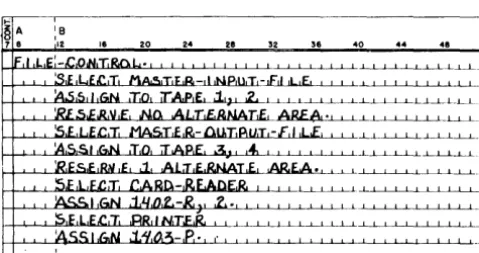
Figure 8 shows a sample FILE-CONTROL paragraph.
Figure 8. FILE-CONTROL Paragraph
10
Added Elective Elements-Environment Division
The MEMORY SIZE option of the SOURCE-COMPUTER
para-graph is not contained in the COBOL General
Informa-tion Manual, but is provided in the 1401 COBOL
proc-essor as it has been described in this publication.
Deferred Elements-Environment Division
Several elements are described in the COBOL General
Information Manual that are not contained in this ver-sion of 1401 COBOL processor. These should not be
coded in the ENVIRONMENT DIVISION entries for a 1401
COBOL program. They are stated here for reference:
1. The entire I-O-CONTROL paragraph (elective COBOL
element).
2. The OPTIONAL option of the FILE-CONTROL paragraph.
3. The MULTIPLE REEL option in the FILE-CONTROL
paragraph and all other features that provide for automatic assignments of tape units for a £Ie. 4. The entire copy option. (The library tape for the
1401 COBOL processor does not presently support the copy feature.)
5. The RENAMING clause in the FILE-CONTROL
IBM
J40',
COBOl.Tape Labels
The 1401 COBOL processor provides for IBM 1401 COBOL
tape labels. These labels id.entify the file and specify the number of records in the file, the date it was cre-ated, and the length of time it must be kept. Two labels, a header and a trailer, are required for each labeled file.
IBM Header Labels
A header label is the first record of each reel of a file. lt identifies the tape. The header label format is shown in Figure 9.
FIELD NO. POSITION CONTENTS F~ELD NAME EXAMPLE
1 1-4 1HDR Header Label 1HDRb
5 Blank Identifier
2 6-10 5 Digits TClpe Serial 12345
Number
3 11-15 5 Digits File Serial 54321
Number
4 16
-
REtel Sequence -002b17-19 3 Digits Number
20 Blank
5 21-30 10 Characters Fi Ie Identification PAYRLMASTR Name
6 31-35 5 Digits Creation Date 63203
(00-99)(001-366) Year Day
7 36
-
RE,tention Cycle -OO7b37-39 3 Digits (000-365)
40 Blank
[image:11.612.71.304.292.510.2]8 41-80 Not used
Figure 9. COBOL Header Label Format
Header Label Identifier
These four characters indicate that the information con-tained in the record is the header label of a tape reel.
Tape Serial Number
These five digits identify the reel of tape within an in-stallation. Each reel of tape should be given a tape serial number as soon as it is received at the installa-tion.
lacs
routines do not affect the tape serial num-ber in a tape label.File Serial Number
These five digits indicate a particular application or job number within an installation.
Data Division
Reel Sequence Number
These three digits identify the reels in cases where mul-tiple reels are needed for a specific job or application. The first reel is numbered 001 unless the user specifies another number.
File Identification Name
These ten characters identify the file. For example,
PAYRLMASTR identifies the tape as the payroll master
file.
Creation Date
These five digits contain the date on which the file was written originally. The two high-order digits indicate the year (00-99), and the remaining three digits indi-cate the nth day of that year (001-366).
Retention Cycle
These three digits indicate the number of days the file is to be kept after the date the file was originated. Files should be preserved until all output data produced from them has been used successfully as new input. This ensures that any file that requires this file as input can be reconstructed if necessary.
Header labels provide for a 365-day maximum reten-tion cycle. If the file must be kept indefinitely, the pro-grammer can specify this by putting the digits 99 in the two high-order positions of the creation-date field. IBM 1401 COBOL Trailer Labels
The last information record in a tape reel is a trailer label. lt indicates that the reel currently being proc-essed is the last reel of a file or that more reels must be processed. Trailer labels are written after the last rec-ord in the reel has been processed.
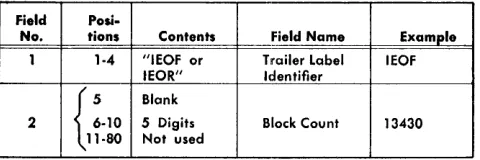
The IBM COBOL trailer label format is shown in
Fig-ure 10.
Field
Posi-No. tions Contents Field Name Example
1 1·4 "IEOF or Trailer Label IEOF
IEOR" Identifier
{ :.10
Blank2 5 Digits Block Count 13430
11·80 Not used
Figure 10. IBM 1401 COBOL Trailer Label Format
Trailer Label Identifier
[image:11.612.327.567.571.651.2]Block Count
This field contains the number of blocks contained in the reel. A count is developed during processing and is entered in the trailer label record.
Record formats for Tape files
Detailed information about record formats is presented in the publication Input/Output Control System:
Speci-fications and Operating Procedures for IB~f 1401 and
1460, Form C24-1462. General information is
pre-sented in the following sections. Records for tape files may be as large as 999 characters.
Form-l Records
Form-l tape records are fixed-length, unblocked, with or without record marks. Fixed-length implies that all records in the file have the same number of characters.
Unblocked means that one data record is contained in
one tape record. A record mark (=F) is a special char-acter written at the end of a data record to indicate that the preceding character is the last record character. If
input records are form 1 but are to be written as out-put in form 2, or 4, they should have record marks. Otherwise the use of record marks is optional. Tape records are physically separated by a section of blank tape called an Inter-Record Gap (IRG). Figure 11 shows an example of form-l records with record marks. Figure 12 shows a form-l record without record marks.
Form-2 Records
Form-2 records are fixed-length, blocked, with record marks, and with padding of short-length. blocks.
Blocked means that more than one data record is
con-tained in one tape record (two or more data records occupy the space betwecn two intcrrecord gaps). Rec-ord marks must be used to separate the data recRec-ords.
Padding means that spaces (blanks) are used to fill
the last block for a file if there are not sufficient data records to fill it. Thus, a fixcd-Iength block will always contain the same number of characters, but a blank
I
*'
Irecord will be substituted if there are not enough data records to fill the last block.
Figure 13 shows a fixed-length, block tape record with record marks and padding. Each block contains four records.
Form-3 Records
Form-3 records (variable unblocked) are not permitted with 1401 COBOL.
Form-4 Records
Form-4 tape records are variable-length, blocked, with record marks and a Record Character Count (RCC) field in cach record, and a Block Character Count (BCC) field in each block. Variable-length implies that all the records in a file do not contain the same number of characters.
Block Character-Count Field
A four-character field at the beginning of each block contains a count of the total number of characters in the block (including the block character-count field itself). The BCC field has AB zone bits (IBM card code 12-punch) over the units position. This count is used to check wrong-length record conditions.
Record Character-Count Field
A record character-count field of three characters in each record contains a count of the number of charac-ters in that record, including the RCC field itself and the record mark. This field must be in the same relative position in each record (the character size of each Cl in Figure 14 is the same). Figure 14 shows the record format for a form-4 record.
NOTE: When programming for form-4 or form-2
tape records, the record entry must allow a position for the record mark. For output records, the record mark must be moved into the record area before the record is written.
'*
I*'
IR Record 1 R Record 2 R Record 3 R
(
G G G G
Figure 11. Fonn-l Record with Record Marks
l
Record 1 Record 2 Record 31 4 - - - - . - - - -Block 1 - - - . l . . J
Figure 13. Form-2 Record with Record Marks
~---Block 2 ---t~
I
el !e;1
rel~
rel~
[ill[
!
~
i---r'I-·
i ;
'I L_-+-'I i--,--I----"l
~---' R~cord
1 ...1..
Record 2 ...1..
Record 3---i:1Oot1 [image:13.615.321.565.500.728.2]~ - - - B l o c k ,---1-Il00/.
Figure 14. Form-4 Record
Record Formats for Punched-Card Files
Card Read .. Punch Records
Records of files assigned to the 1402-R and the 1402-P must be eighty characters long, unblocked, and mayor may not have record marks in the 80th character posi-tion (card column 80). This is equivalent to the form-1 record described previously for tape files.
Printer Records
Records of files assigned to the 1403-P must also have form-1 record format. For the 1403 printer the fixed record size must be equal to the number of print posi-tions on the printer (100 or 132).
Data
Division
Language SpecificationsThe DATA DIVISION of a COBOL source program is divided
into three major sections:
FILE SECTION.
WORKING-STORAGE SECTION.
CONSTANT SECTION.
The FILE SECTION describes the input and output files
with respect to content and organizational format. It has two major subdivisions: the file-description entry that speciflles the physical characteristics and organi-zation of the input and/or output data, and the record-description entry that describes the individual items contained in the file records.
The WORKING-STORAGE SECTION describes the areas of
1401 core storage where intermediate results and other items are stored temporarily at object-program execu-tion time.
The CONSTANT SECTION describes fixed items of data
that remain unchanged during the running of the ob-ject program. A date, for example, might be a fixed item, or constant.
The 1401 COBOL presentation format for the DATA
DIVISION is:
DATA DIVISION.
FILE SECTION.
File-Description Entries and Record -Description Entries
WORKING-STORAGE SECTION.
Record-Description Entries
CONSTANT SECTION.
Record -Description Entries File-Description Entry
General Description: A file-description entry must be
written for each file to be processed by the object program. It includes specifications for the mode in which the file is recorded, the record and block size, label record information, and the names of the data records that make up the file. A VALUE clause is
re-quired when label records are standard.
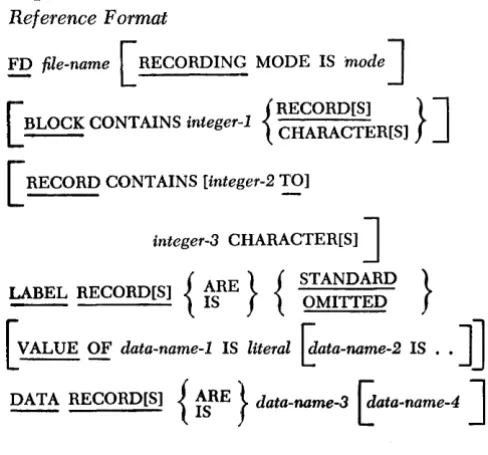
Reference Format
!:!?
file-name [RECORDING MODE IS mode][ {
RECORD[S] } ]
~ CONTAINS integer-1 CHARACTER[S]
[RECORD CONTAINS [integer-2 TO]
integer-3 CHARACTER[S] ]
{ ARE} {STANDARD }
~ RECORD[S] IS OMITTED
[VALUE OF data-name-l IS literal [;ta-name-2 IS - •
JJ
General Description: The level indicator identifies the beginning of the file-description entry and precedes the file name assigned by the programmer.
Example (Figure 15):
14 III 5e 40 44
Figure 15. FD File-Name
[RECORDING MODE IS 1 ]
General Description: This clause specifies the mode in
which the file is recorded. A 1 indicates the move mode, even-parity. RECORDING MODE 1 is the only re-cording mode implemented by 1401 COBOL.
If the RECORDING MODE clause is not included in
the source program, the processor assumes recording mode 1.
[ BLOCK CONTAINS integer-l
1
~
CHARACTER[S] RECORD[S]t ]
5
General Description: This clause must be included if
more than one data record is included in a tape rec-ord (other than form 1). It indicates the size of the block in records or characters. The size may be stated in terms of RECORD ( s) for form-l or form-2 records
where integer-l is the number of data records in the block.
The size must be stated in terms of CHARACTER(S)
for form-4 records where integer-l is equal to or greater than the number of characters in the longest block of the file. This number includes the four-character block count field (Bee). See also Form-4 Records.
Example: The largest block in the PAYRLMASTR file
con-tains 500 characters plus the Bee field (Figure 16).
~~~~~~~~-.---.----~--.----Figure 16. BLOCK CONTAINS
[ RECORD CONTAINS [integer-2 TO]
integer-3 CHARACTER[S] ]
14
44 48
General Description: The RECORD CONTAINS clause may
be used to specify the number of characters in the data records. Because the record description entries define the size of each data record, this clause is never necessary. However, if the programmer wishes to include it, integer-2 specifies the number of char-acters in the smallest record in the file, and integer-3
specifies the number of characters in the largest record.
Fixed-length records must be specified using
in-teger-3 only. Variable-length records are specified by
using both integer-2 and integer-3.
Example: The records for a certain file are variable
length. The smallest record size is 75 characters; the largest is 86 characters (Figure 17).
~ A :8
7 e "2 '6 20 24 28 52 56 40 44 41
:DCI'I\Oro..r..aNTAIN.S ,75, ;ria 8,b. CJiARAC.-r.ERS , , , , ,
L-L-L..L-L-J...JL-J...J!...L.J!...L.J-'-'-J~! I I I ! ! I I I , , ! ! , ! ! ! I I I I I ! ! , I ,
Figure 17. RECORD CONTAINS
LABEL RECORD.[S] j IS
t
- - - tARE
5
j STANDARD
t
1
OMITTED5
General Description: This required clause states
whether header and trailer tape label records are 1401 COBOL tape labels or omitted. The 1401 COBOL
processor can handle only 1401 COBOL tape labels
as described previously. For punched-card files the
OMITTED option must be used.
Example: Figure 18 shows a LABEL RECORD entry for a
punched-card input file.
56 40 44 48
,T,ljE.D , , , , , , , , , , , , , ,
I I ! I I I I I ! I I I I I I I I ! ! ! I I I I I I ! I I I
Figure 18. LABEL RECORDS
Today's Date
If standard label records are specified for output files, today's date must be in core storage at object-program execution time. To enter the current date in the object program, insert a date card just ahead of the EX card produced by the Autocoder processor. The EX card is the last card in the object program. The format for the date card is:'
Card Columns
1-5 40-46 47-53 54-60 61-67 68-71
Contents
YR DAY
xxXiX
[VALU]~
OF data-name-l IS literal-l Eata-name-2 IS.]General Description: The COBOL programmer may
specify the items of information that appear in the label records of tape files. These items must be sup-' plied by using a VALUE OF clause if standard header
la bels are used.
Data-name-l and data··name-2 are the names of
the fields contained in the header label record.
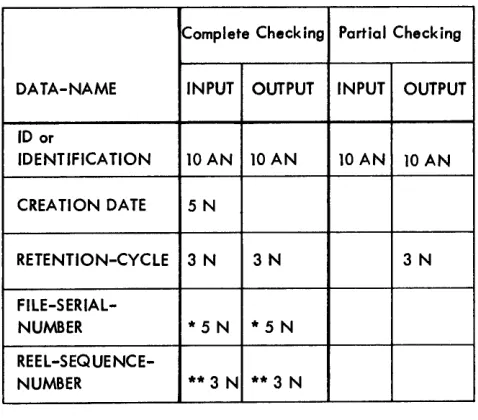
Lit-eral-l and literal-2 refer to the contents of the re-spective fields. Figure 19 is a chart showing the vari-ous data names and the lengths of their associated literals (AN represents alphanumeric values and N
represents numeric values). It also shows the rela-tionship between use of the entries and the type of label checking that will be applied to an input or out-put file. All entries in the chart, except those noted by one or two asterisks, are required.
Example: Figure 20 shows how IDENTIFICATION and a
retention cycle of 286 days are supplied for an out-put fille.
DATA HECORD[S]
~ ~REf
data-name-3 Gata-name-4 .. ] .General Description: Data-name-3, data-name-4, etc.,
must each be the subject of a record-description entry that has a level-number of 01.
If the file contains more than one type of record, a different data name must appear for each type. Data-name order is not important.
If one record is read from a given file and another is read from the same file, the second record replaces the first in the read-in area. Thus, if two records are needed for processing at the same time, the first rec-ord must be saved by moving it to another area of storage (such as a work area) before the second rec-ord is read.
Example: Figure 21 shows a sample DATA RECORD
clause. In this example, HECORDA and RECORDB are
both in the same file and are described in a record-description entry as level 01 records.
Record-1:1escription Entry
General Description: The record-description entries
in the COBOL sO~lrce program provide detailed
infor-mation about each item of data that will be needed during the running of the object program. Each such item must have its own entry consisting of a level-number, a data-name, and a series of independent clauses.
Reference Format
level-number
~
FILLERt
[REDEFINES data-name-2]l
data-name-l5
[ SIZE IS Integer-l
[l
~~~~~~TER[S]
i ] ]
[ OCCURS Integer-2 TIME[S]
J
POINT LOCATION IS - - integer-3 PLACErS]
[ - - - -
~
LEFT f RIGHT ]NUMERIC
t
CLASS IS!
~PIIANUMERIC ALPHABETICI ]
[. Any allowable combination of characters and
l
PIC1 URE IS symbols as described in Chapter 6 (COBOL GI,U
[
~ LEFT
t]
JUSTIFIEDl
RIGHT5
[{
~~~~:U::~~~T
FLOAT DOLLAR SIGN}
[ LEAVING integer-4 PLACE[S]] ]
[BLANK WIlEN ZERO
J
[
~
VALUE ISl
1
VALuEs
ARE5
literal-l [THRU literal-2] [literal-3[ THR U literal-4 ] ..
JJ .
General Description: The level-number shows the
re-lationship between items in a record.
The highest level is 01 and the lowest level is 49. Level 77 applies to non-contiguous items of data that are elementary in themselves. Level 88 denotes a condition name and must appear immediately after the entry that describes the data name with which a condition name is associated.
Each level number must be associated with a data-name or the key word FILLER. FILLER must describe
items that appear in records but are not referred to within procedure statements. '
Complete Check ing Partial Checking
DATA-NAME INPUT OUTPUT INPUT OUTPUT
10 or
IDENTIFICA TlON lOAN 10 AN 10 AN 10 AN
CREATION DATE 5N
RETENTION-CYCLE 3N 3N 3N
FILE-SERIAL-NUMBER * 5 N * 5 N
REEL-SEQUENCE-NUMBER ** 3 N ** 3 N
* The use of a FILE-SERIAL-NUMBER entry implies full label checking.
[image:16.612.45.284.60.270.2]*'"
If not specified I 00 1 will be assumed.Figure 19. Data-Names and Lengths of Their Associated Literals
Items must be written in the record-description entry in the same order in which they appear in the record.
[SIZE IS [integer-l TO] integer-2 [
1
~~;;~~~TER[S]
f
J]
[DEPENDING ON data-name]
General Description: This clause tells the processor how
many characters (or digits) the data item contains. This size is interpreted by the 1401 COBOL
proc-essor in terms of characters if either the optional word CHARAcrER[S] or DIGIT[S] is used or if neither
of the optional words is used.
To specify the sizes of variable-length records, (form 4) integer-l and integer-2 and DEPENDING ON
data-name must be used. Integer-l specifies the
num-ber of characters in the smallest record and integer-2
specifies the number of characters in the largest rec-ord. DEPENDING ON data-name identifies the
elemen-tary items whose value is the record character count (refer to Record Character-Count Field). Integer-l
and DEPENDING ON data-name may be used only with
form-4 records.
Example: Figure 22 shows a SIZE entry for a form-4
record which can contain from 50 to 150 characters.
RECCOUNT is the data-name the programmer has used
to identify the R CC field.
The size of fixed-length records is specified by using the form:
[ [
j CHARACTER[S]
tJ]
SIZE IS integer-2 1 DIGIT[S] ~where integer-2 is the exact number of characters contained in the record or item of data.
Example: Figure 23 shows a SIZE entry for a
fixed-length record whose size is eighty characters.
[OCCURS integer-2 TIME[S]]
General Description: The OCCURS clause describes a
sequence of data items of the same format. For ex-ample, if a rate table contains ten rates, each made up of five characters, fifty storage positions can be reserved for the rate table by using one OCCURS
clause. An individual rate from this rate table can be referred to in the PROCEDURE DIVISION by subscripting
the data-name assigned to the rates. The maximum number of positions that can be reserved by an
OCCURS clause is 999.
Example: Figure 24 shows how an OCCURS clause for a
rate table may be coded.
In the PROCEDURE DIVISION a statement using RATE
(2) as a subscripted data-name can refer to the sec-ond rate in the rate table (Figure 25).
The OCCURS clause may not be used with an item
whose level number is 01, 77, or 88. Integer-2 must be a positive numerical literal having an integral value greater than zero.
[ -POINT LOCATION IS j 1RIGHT~ LEFT
t
integer-3 PLACErS]]General Description: This clause describes the decimal
point location for a number so that the processor can provide for the correct alignment of assumed decimal points during computation. It can be used only with an elementary item. Integer-3 must be a numerical literal with an integral value.
Example: The POINT clause (Figure 26) causes an
as-sumed decimal point to be located two positions to the left of the units position ~f the item whose data-name is GROSSPAY (999V99).
t
LASS IS1
~~~EA~~TIC ~
ALPHANUMERI(~
AN
General Description: This clause tells the COBOL
proc-essor whether an item is numerical, alphabetic, or a combination of alphabetic and numerical characters with or without special characters (alphanumeric). It is required only if no PICTURE clause is included in
thc source program. The CLASS clause may describe
both elementary and group items at any level. The sample problem shows COBOL entries. without
either class or picture clauses. The 1401 COBOL
Proc-Figure 20 .. IDENTIFICATION and Retention Cycle
essor assumes items not specified by either of these clauses to be alphanumeric.
NUMERIC specifies an item that consists entirely of
digits 0-9, and a plus or minus sign if one is neces-sary.
Figure 21. DATA RECORDS
~A
~7fe~==~==~ _ _ ~~==~ __ ~2~e===3=2==~3c6==~40~~4~4===48
Figure 22. SIZE Variable Length
" ... . - - - , - - -
-§A
7 e 36 40 48
Figure 23. SIZE Fixed L~ngth
Figure 24. OCCURS
Figure 25. Subscripting
ALPHABETIC specifies an item that consists entirely
of the letters of the alphabet and spaces.
ALPHANUMERIC specifies an item that consists of
any characters in the 1401 character set in any com-bination (all numeric, all alphabetic, or mixed).
Example: Figure 27 shows a CLASS clause that defines
a numeric field of five digits with a sign over the units position.
rpICTURE IS Any allowable combination of characters and
l
t..:
symbols as described in Chapter 6 (COBOL GIUGeneral Description: The PICTURE clause can describe
elementary items. It can be used instead of the SIZE,
POINT, CLASS, EDITING, and BLANK clauses of a
record-description entry to state the characteristics of an item in a more compact form.
The rules for forming a picture for a data item are given in the COBOL General Information Manual.
However, with 1401 COBOL the S symbol for an
op-erational sign should not be used, and the ele-mentary item generated from a PICTURE clause
must not exceed 999 positions of core storage.
Example: The PICTURE clause shown in Figure 28
de-scribes an item whose data name is 3C-ONE. The
I-'
~A
u
[image:18.612.46.546.531.586.2]7 8
Figure 26. SIZE and POINT Location
I-'
~A
u 7 B
18
I 12
Figure 27. CLASS
16 20 24
32 36 40
size of this field is five numeric characters with an asumed decimal point two places to the left of the units position.
~USTIFIED
1
~~~~T}
]
General Description: This clause specifies the position
data is to occupy if it is moved during processing from one location to a larger location.
If a JUSTIFIED clause is not included in the COBOL
source program, numerical items with be automati-cally right-justified (the data in the units position of the original location will be placed in the units posi-tion of the new locaposi-tion), and the unusued posiposi-tions to the left will be filled with zeros. If a numerical data item includes an assumed decimal point, align-ment is made during the automatic justification.
ALPHABETIC and ALPHANUMERICAL items will be
left-justified (the data in the high-order position of the original location will be placed in the high-order position of the new location), and unused positions to the right will be filled with blanks.
The JUSTIFIED clause permits the programmer to
reverse the justification of an item (numerical items can be left-justified and alphanumerical items right-justified) except when an assumed decimal point has previously been specified for the item.
Example: The numerical item DEDUCT is eight
charac-44 48 52 56 60 64 68 72
ters long. During processing, a six-character field is to be moved to DEDUCT and is to be left-justified. Figure
29 shows a JUSTIFIED clause that specifies that the
data moved to the DEDUCT field will be left-justified.
~A:'
7 , '2 '6 20 24 28 52 36 "0 44 48
, I I ,04. 3C-,ON.Ei P,I,c"T,tJRE. .1 S. R/18N,9,'l,o, I , , , , ,
,
...LLL..l.-l I I ! I ! I I I I I I I I I I I L...l...-L..L' I I I I , I , J I ! I I , I I I ,
Figure 28. PICTURE
Special Editing
functions
These COBOL editing functions may be used only when
the object computer is equipped with the expanded print-edit feature:
1. High-order CR or minus signs and high-order DB or
plus signs. .
2. Floating plus and minus signs, and Boating dollar signs.
3. Check protection (asterisk fill).
4. Decimal suppression for blank or zero fields. Editing of a single-digit field cannot be specified in editing or PICTURE clauses.
When the editing options for Boating plus, minus, and dollar sign are used, more than two Boating char-acters must be specified in the PICTURE or EDITING
clause. For example, if $$99 is specified, the $ will not Boat, but zero suppression will take place. However, if
$$$9 is specified, the dollar sign will Boat and zero sup-pression will take place.
If a group item is moved to an elementary item that requires editing, the diagnostic INVALID USE OF
EDITING will result. (A report item can only receive
numeric data; the 1401 tape COBOL compiler considers
a group item as alphameric data.)
Editing C'lauses
[ {
ZERO SUPPRESS }
CHECK PROTECT . FLOAT DOLLAR SIGN ...
[LEAVING integer-4 PLAGE[S] ] ]
General Description: This clause permits the
program-mer to specify certain kinds of editing without using
a PICTURE clause. Only elementary numerical items
may be described using the EDITING clause.
ZERO SUPPRESS causes high-order zeros to be
re-placed with blanks up to but not including the first non-zero digit or an assumed or actual decimal point encountered in a numerical item.
When using zero suppression in either the PICTURE
clause or the EDITING clause, the high-order position
must not be the only character specifying zero sup-pression. For example, Z9 is incorrect, but ZZ is correct.
CHECK PROTECT causes all high-order zeros to be
replaced with asterisks under the same conditions as
ZERO SUPRESS.
FLOAT DOLLAR SIGN causes all high-order zeros to
be blanked and a dollar sign to be placed to the left of the first significant character or decimal point. The
EDITING clauses can be used only to affect zeros to the
left of the decimal point. Zeros to the right of the decimal point must be cleared (if desired) by a
BLANK clause.
The LEAVING option restricts the suppression of
zeros or insertion of asterisks and the dollar sign by specifying that a celtain number of places (integer-4)
to the left of the decimal point are to be undisturbed (unedited).
Example: Figure 30 shows an EDITING clause that
spec-ifies that high-order zeros are to be replaced with blanks. Assume that a field called FICA is to be edited
during processing in preparation for printing. If the value of the field moved to FICA appears as 00508
before editing, it will appear as 508 after editing.
~ A :8
~7~8 _ _ ~'2~~'6~~~~~~~.~52~~56~~40~~44~~4~'==~~: I-+-LLJLLJLLJ~~:JLJJLLLI!IoU1-'>oAJLu.uooLJl.s. 6, ZERO, ,5. U,P,8Rf.SS· L I L
Figure 30. Editing
[ BLANK WHEN ZERO
J
General Description: This clause causes the described
item to be filled with blanks whenever the value ( contents) of the item field is zero. It can be used only with elementary items .. BLANK WHEN ZERO
over-rides all editing specifications prescribed by a
PIC-TURE or EDITING clause.
Example: Figure 31 shows a BLANK WHEN ZERO clause
used with a FLOAT DOLLAR SIGN clause. Without the
BLANK WHEN ZERO clause, a ZERO PAY field would
ap-~---'---·---1
~ A 18u ,
7 8 ,12 16 20 24 28 32 36 40 44 48 52 56 60 64 68 72
I,' 1
03, D,E,o.U,Cl',
IP,I,c,JjUR,E, III~'A,(8,),
.JiUI5'TiI,Fd,ED ,L,E,f,r,":.LLLJ---'-:----'-:~~~:'--l.:---'-:--L:~~~:--f~Figure 31. BLANK WHEN ZEHO
pear ~Jter editing as $.00. The BLANK WHEN ZERO
clause causes seven blanks to appear in the PAY field
when it is edited for printing.
E
VALUE ISt
Ll
VALUES ARE ~ literaZ-l [THRU literal-2] [ZiteraZ-3 [ THRU literal-4 ] ••JJ.
General Description: A VALUE clause can state the
ini-tial contents (value) of a data item in the WORKING- .
STORAGE SECTION or CONSTANT SECTION. It can also be
used with the THRU option to define the value of a
condition name (level-88 item) in the FILE SECTION
and WORKING-STORAGE SECTION.
If the VALUE clause is not used to define the initial
values of WORKING-STORAGE items, their contents at
program execution time will be unpredictable.
If the VALUE clause specifies a numerical literal,
an operational sign will be developed (placed over the units position of the numerical field) only if the literal is preceded by a plus or minus sign. A figura-tive constant may be used in the VALUE entry where
a literal is specified.
~-~---~A
7 e • 0
••
52L ' I : , ! ! ! I I ! I I ! , ! , ! ! , , ! , ! I I ! ! I I ! I I I I I I I I , I , I , I
Figure 32. VALUE
The THRU option is not described in the COBOL
General Information Manual. It may be used only with condition names as shown in Figure 32.
Figure 33. REDEFINES
[ REDEFINES data-name-2 ]
General Description: This clause permits the
program-mer to redefine areas of storage that have been pre-viously defined by a record-description entry.
Note the following additional points in connection with the use of REDEFINES:
1. If data-name-2 is not unique, it must be qualified
by one or more additional names until it is unique.
2. Data-name-2 must not be subscripted.
Example: Figure 33 shows a REDEFINES clause used to
define a table of constants.
The Constant and Working-Storage Sections
The record-description entries described for the FILE
SECTION apply also to the CONSTANT and
WORKING-STORAGE SECTIONS.
These sections begin with the header line
WORKING-STORAGE SECTION or CONSTANT SECTION and are followed
immediately by the record-description entries. Added Elective Elements of the Data Division
These elective elements of the record-description entry are not specified in the COBOL General
Informa-tion Manual, but are contained in the IBM 1401 COBOL
processor:
1. The DEPENDING ON data-name and the TO integer-2
options of the SIZE clause.
2. The TI-ffiU literal-2 and the literal-3 THRU literal-4
options of the VALUE clause.
Deferred Elements of the Data Division
The COpy option is contained in the COBOL General
In-formation Manual, but is not contained in this version of the IBM 1401 COBOL processor.
The USAGE, SIGNED, and SYNCHRONIZED clauses havc
no meaning in a 1401 COBOL program and should not
be used.
The PROCEDURE DIVISION is the operational part of the
COBOL source program. Once the data has been
de-scribed, the programmer tells the COBOL processor what
steps the machine must take to read the input data, process it, and write it as output on punched cards, magnctic tape, or a printed form.
The COBOL verbs are the main elements in the
PRO-CEDURE DIVISION. They are described in detail in the
COBOL General Information Manual. However, some
verbs have special meaning when used in a 1401 COBOL
source program. This additional information is pre-sented in the following section.
The DISPLAY Verb
General Description: The IBM 1403 Printer (1403-P) is
the standard output unit for the DISPLAY verb.
How-ever, information may also be displayed via the IBM
1402 Card Read-Punch (1402-P). As many printer lines or punched cards will be used as are necessary to display the information contained in the area of core storage whose data name is specified in the
DISPLAY statement.
The object program initiates a skip to channell in the carriage tape if a form overflow occurs in the 1403 printer. If the DISPLAY verb is used in the
PRO-CEDURE DIVISION to address the printer, the processor
assumes that the printer will have a carriage tape with punches in channel 1 and 12 (overflow) at object-program execution time.
Examples: The statement shown in Figure 34 will cause
the contents of the area whose data name is
GRAND-TOTAL to be displayed on the 1403 printer.
~
--.---~ A :6
7 8 12 16 20 24 28 52 56 40 44 48 ~.5P.L..,B\I, &R,AtJIO-j[OIjAl. I I I I I I I I I I I I I I I I I I I I I J
J.-L .. J_ ... L J I I I I , ! , I , , I I I I I , I I I I ! I I I I L . L ' ! I I I I I I I I ! J
Figure 34. PlUNTER mSPLA Y
Thc statement shown in Figure 35 will cause the contents of GRAND-TOTAL to be punched into cards,
if the mnemonic-name CARD PUNCH has been
as-signed to 1402-P in the SPECIAL-NAMES paragraph of
the ENVIRONMENT DIVISION.
" - - - r - - - ---
---~ A :6
~7~8--~12~-~16~~20~-~24~~28~.~52~~56~==40~==44~~~ ~AMD,-jIjo.TAL UP.oltJ CARO-IP,UNC.tL~LLLLLI
Procedure Division
The ACCEPT Verb
General Description: The IBM: 1402 Card Read-Punch
(1402-R) is the standard input unit for the ACCEPT
verb.
Example: Figure 36 shows an ACCEPT statement that
will cause data to be read from the card reader and moved to an area whose data-name is
CANCELLA-TIONS. If more than eighty storage positions are
de-fined by CANCELLATIONS, multiple cards will be read
from the 1402 until the area is filled.
~A
7 8 40 _ _ 44 _ _ 4 8 _ 2 . 2
S I I I I I I I I I I I I I I I I I I I I I
Figure 36. ACCEPT
The WRITE Verb
Reference Format
\VRITE r{'co/,d-IlltnW [FHOM lI/,(,(l-II(1Il1(~
[
jAFTER
t
1BEFORES ADVAi\CING
1
il/tege/' LIl\EStJ
1
mnemOniC-IIl1H1e ~General Description: This statement causes a logical
record to be released for an output £Ie.
Record-name is the name given to the record
de-fined at the 01 level in the FILE SECTION of the DATA
DIVISION. Area-name is the name given by the
pro-grammer to the core-storage area from which the record is to be written.
The ADVANCING opti.on is used for spacing lines on
output documents on the 1403 printer (1403-P).
AFTER and BEFORE i.n the ADVANCING option control
printer carriage spacing before or after the WRITE
verb is executed. Integer LINES specifies how many
lines should be spaced. Mnemonic-name is the name assigned in the SPECIAL-N~MES paragraph to a chan-nel in the carriage tape and is used when carriage skipping is desired instead of line spacing. The skip occurs to the line that corresponds to the specified punch in the carriage tape.
Examples: Figures 37, 38, 39, and 40 show sample
WRITE statements.
...l...._l __ L_L . ...1 I I I I , I I 1 I ! ! I I I I t I I I I r I I I I t I , I I I I J I I I I I J ..1 I I , ! , I ! ! ! , I I , I I , I I I , I
Figure 35. PUNCH DISPLAY Figure 37. WRITE
..,.:
~A
<.J
7 8
Figure 38. WRITE AND SPACE BEFORE PRINTING
..,.:
~A
<.J
7 8
Figure 39. WRITE AND SKIP AFTER PRINTING
..,.:
~A
<.J
[image:22.615.48.297.378.548.2]7 8
Figure 40. CONDITIONAL WRITE
The EXAMINE Verb
Reference Format
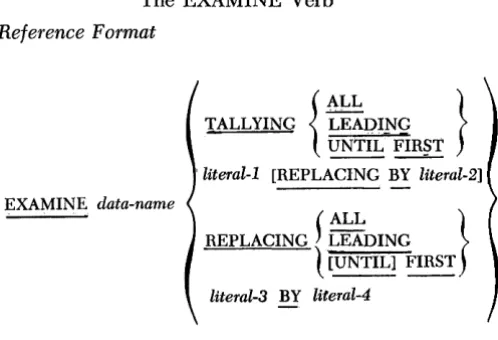
TALLYING
{~I)ING
. }UNTIL FIR~T
'literal-l [REPLACING BY literal-2]
EXAMINE data-name
REPLACING
f
~ING
}~ [UNTIL] FIRST
literal-3 BY literal-4
General Description: The EXAMINE verb is used to
re-place a given character and/or to count the number of times it appears in a data item.
Any literal used in an EXAMINE statement must be
a member of the character set associated with the
CLASS specified for data-name. Thus, if the
descrip-tion of data-name in the DATA DIVISION specifies a
CLASS that uses less than the full character set
(NU-MERIC or ALPHABETIC), then each literal used in an
EXAMINE statement must be one of the characters in
the restricted set. Thus, if the class of data-name is
NUMERIC, each literal used in the statement must be
a numeric character.
22
72
56 60 64 68 72
All literals in EXAMINE statements are considered
alphanumeric, are one character in length, and are enclosed by quotation marks. When an EXAMINE
statement is executed, the examination begins with the leftmost character of the data item and proceeds to the right. Each character in the item represented by the data-name is examined in turn. If the data item being examined is numeric, any operational sign associated with the item will be ignored.
The eHect of an EXAMINE statement depends on
the options employed by the programmer as follows:
If TALLYING is specified:
A count of the number of certain characters in
data-name is made when the TALLYING option is
used. This count replaces the value of a special reg-ister called TALLY, which is accessible to the
pro-grammer. The count depends on which of three op-tions of TALLYING is used:
1. If ALL is specified, all occurrences of literal-l in
the data item are counted.
2. If LEADING is specified, the count represents the
number of times literal-l occurs before a character other than literal-l is encountered.
3. If UNTIL FIRST is specified, the count represents
the number of characters that are encountered be-fore literal-l first occurs.
If REPLACING is specified:
REPLACING option is used either with or without the
TALLYING option:
1. If ALL is specified, literal-2 or literal-4 is
substi-tuted each time literal-lor literal-3 occurs. Literal-2
is substituted for literal-l, and literal-4 is substituted for literal-3.
2. If LEADING is specified, the substitution ends when
a character other than the literal (literal-lor literal-3)
is encountered or when the rightmost character of the data item is reached.
3. If UNTIL FIRST is specified, the count represents the
num bel' of characters that are encountered before
literal-l first occurs.
4. If FIBST is specified, literal-3 is replaced by
literal-4 only the first time literal-3 occurs.
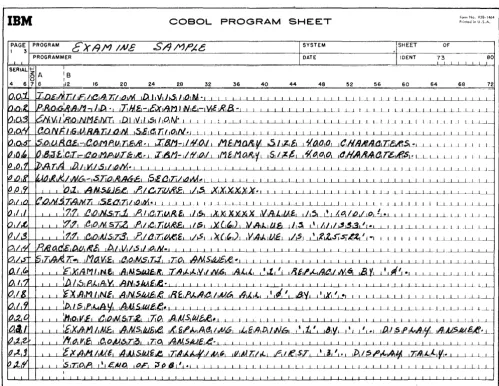
Example: Figure 41 shows a use of the EXAMINE verb.
The ENTEH Verb
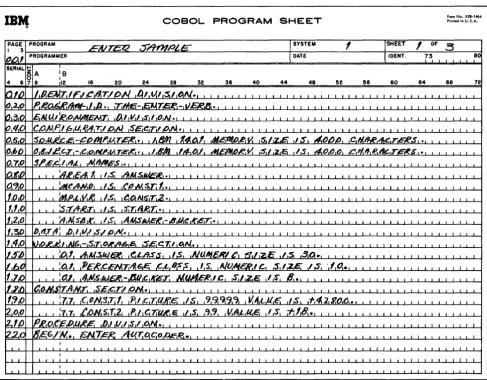
General Description: The ENTER verb permits the
pro-grammer to use Autocoder statements in a COBOL
source program.
The language name used with 1401 COBOL is
AUTO-CODER. The Autocoder statements must be presented
to the COBOL processor immediately following the
ENTER AUTOCODER statement, and they must be
fol-lowed by an ENTER COBOL entry that indicates the
point at which the COBOL source language is resumed.
Each ENTER AUTOCODER statement must constitute
a separate paragraph in the source program. The
ENTER COBOL statement used for returning to COBOL
from Autocoder must either constitute a separate paragraph or be the first entry of a paragraph. The name of the paragraph must be on the same line as
the ENTER COBOL statement.
These specifications must be maintained when using Autocoder entries in a COBOL program:
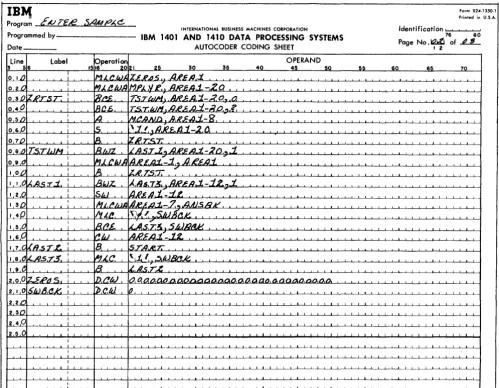
1. Autocoder statements must be coded in Auto-coder format (label starting in column 6, operation in column 16, and operand in column 21).
2. The symbols used in Autocoder statements must be five characters long.
IBM
COBOL PROGRAM SHEETPAG;~P_R_'_)_GR_A_M __ ~~~.X~I9~J1~~/.~~~E:=J
____
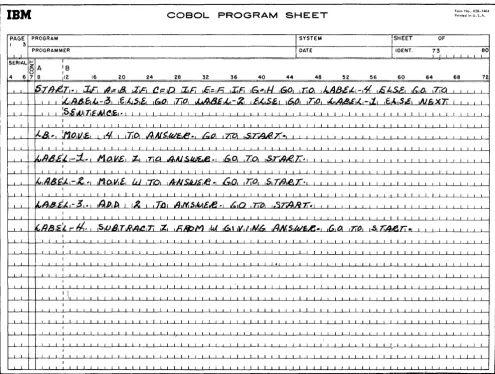
~~/9~~_~~~~~~e=-___