Systems Reference Library
IBM 1620-1311 Sort/Merge Program
Reference Manual
This publication presents the specifications and operating procedures for the 1620-1311 Sort/Merge program. This program is a general purpose sort and merge program that is designed to operate under control of any of the 1620 Monitor Systems.
This is a reprint of the previous edition (C26-5875-1) incorporating the changes released in Newsletter N26-0125.
Copies of this and other mM publications can be obtained through mM Branch Offices. Comments conceming the contents of this publication may be addressed to:
ffiM, Product Publications Department, San Jose, Callf. 95114
PROGRAM DESCRIPTION • • • • • • • • • • • • • • • • • • • • • • • • Data Control Fields' • • • • • • • . • • . • • • • • • • • • • • • • • . • • Disk Storage Areas • • • • • • • • • • • • • • • • • • • • • • • • • • • . • Allowable Data Record Configurations • • • • • • • • • • • • • • • • Collating Sequence· • • • • • • • • • • • • • • • • • • • • • • • • • • . •
Program Phases •••••••• " .• "" ... " ••••• " ••••• ".
Phase 0 (Assignment Phase) • • • • • • • • • • • • • . • • • • • • • Phase 1 (Input and Tag Generation) • • • • • • • • • • • • • • • Phase 2 (Sort) • • • • • • • • • • • • • • • • • • • • • • • • • • • • • Phase 3 (Merge) • • • • • • • • • • • • • • • • • • • • • • • • • • • • Phase 4 (Output) • • • • • . • • • • • • • • • • • • • • • • • • • • . • Interrupt and Restart • • • • • • • • • • • • • • • • • • • • • • • • • • • • Restart· • • • • • • • • • • • • • • • • • • • • • • • • • • • • • • • • •
2
2
2
2
3
3
3
3
4 4
Checking FeatW'es • • • • • • • • • • • • • • • • • • • • • • • • • • 4 User- Written Routines • • • • • • • • • • • • • • • • • • • • • • • • • • •
Timing ••••• It • • • • • • • ., • • .. • • " II • " • '" • II' • • • III • " . . . . 4 5
iii
CONTENTS
CONTROL RECORDS • • • • • • • • • • • • • • • • • • • • • • • . • • • 7 Control Record 1 • • • . • • • • • • • • • • • • • • • • • • • • • • • 7 Control Record 2 • • • • • • • • • . • • • • • • • • • • • • • • • • • 8 Control Record 3 • • • • • • • • • . • • • • • • . • • • . • • • • 9 Restart Records • • . • • • • • • • ' . • • • • • • • • • • • • • • • • • • •• 9 Restart Record 1 • • • • • • • • • • • • • • • • • • • • • • • • • • • 10 Restart Record 2 • • • . • • • • • • • • • • • • • • • • • • • • • • • 10
EXECUTThI"G THE SORT/MERGE PROGRAM· • . • • . • • • • • •• 11 Error Messages • • • • • • • • • • • • • • . • • • • • • • • • • . • • • • 11 Message and Cause • • • • . • • • • • • • • • • • • • • • . • • • •• 11
PREFACE
This publication is intended to serve as a reference manual for the 1620-1311 Sort/Merge program. The program specifications, previously published in a separate manual, are included as well as specific instructions on the operation and use of the program. The last section of the manual gives the steps to fol-low when loading the different sections of the pro-gram to disk storage. The Sort/Merge propro-gram is designed to operate under control of the 1620 Moni-tor Systems that are described in the following public ations:
IBM 1620 Monitor I System, Reference Manual (Form C26-5739)
IBM 1620 Monitor II System, Reference Manual (Form C26-5774)
The Sort/Merge program is a general-purpose sort and merge program which is tailored, by use of control cards, to meet the user's particular needs and applications.
In general, the 1620 Sort/Merge program:
1. Sorts and merges blocked or unblocked,
fixed-length or variable-length records.
2. Sorts and merges up to 99,999 numeric or
alphameric records.
3. Sorts and merges in either ascending or
de-scending order.
4. Sorts by control data in up to ten fields of
each record.
5. Sorts records of up to 2500 core positions
in length.
6. Sorts one or two data files.
7. Merges two data files.
8. Provides interrupt and restart procedures.
9. Provides for input from cards, paper tape,
or disk.
10. Provides for disk output.
11. Allows the file starting addresses to be
specified by either:
(a) Actual disk address
(b) DIM (Disk Identification Map) entry
number
(c) Equivalence Table name.
12. Allows exit points to user I s programs for
the purpose of editing input data, or for the output of data to units other than disk.
13. Can be called for execution from a user's
program, or by a Monitor XEQ operation.
14. Can return upon completion to a user's
program.
15. Utilizes the Monitor System I/O Routine
with accompanying error procedures.
Machine Requirements
The minimum machine configuration required for operation of the Sort/Merge program is the same as that for the 1620 Monitor System:
• IBM 1620 Data Processing System, Modell or 2, with a minimum of 20,000 positions of core storage
• Indirect Addressing (standard on 1620 Model 2)
• IBM 1311 Disk Storage Drive
Sorting and merging is performed on control words (tags) extracted from the data records, rather than on the entire records. This usually reduces the time and space required for data manipulation.
The tag file contains one entry for each data record. Each tag is made up of the user-specified control fields extracted from the data record, to-gether with a location field identifying the disk stor-age location of the corresponding data record.
For variable-length records, the location field contains eight digits; six digits are for the disk sec-tor address, and two digits are used to specify the starting location within the sector. For fixed-length records, the location field contains a sequence num-ber from which the location can be calculated. The size of this field may range from 2 to 5 digits (speci-fied by the user). The maximum number of input records is 99, 999.
DATA CONTROL FIELDS
The program sorts on as many as ten control fields. The control fields can be located anywhere within the record as long as they do not overlap. The length of each control field may be from 1 to 100 characters in numeric mode or from 1 to 50 characters in
alpha-meric mode. If the total control field size is one
core position, the Sort/Merge program will expand this to two positions. The maximum total tag size (control fields plus location field) is 900 characters in numeric mode or 450 characters in alphameric mode. To reduce sort time, the user should limit the number of characters in each control field when-ever possible.
The location of each control field is specified by
the user in a control card. If more than one control
field is to be used, the most significant field is listed first, the next Significant second, and so on.
If two files are to be sorted and/or merged, the
control fields must be the same.
DISK STORAGE AREAS
The Sort/Merge program requires the following disk storage areas:
1. One or two input data storage areas. These
areas are used for storage of the records
that are to be sorted or merged. If only one
file of records is to be sorted, only one
PROGRAM DESCRIPTION
input area is required. If it is not necessary
to store the record, no input data area need be specified. For example, all of the user-needed information may be used as control field data. The size of each input data area can be up to 99 cylinders of one IBM 1316 Disk Pack.
2. Tag file work area. This area is used for
storing, sorting, and merging tags during program execution. Tags are stored on the disk in blocks of quarter cylinders; each quarter cylinder contains the number of tags (minus one) that will fit into 5000 core stor-age positions. The work area must be twice the size of the tag file and cannot be less than 2 cylinders or more than 98 cylinders of one IBM 1316 Disk Pack.
The size of the tag file work area can be com-puted as follows:
The number of cylinders for the tag file work area is two times the number of cylinders required for the tag file.
The number of cylinders required for the tag file is determined as follows:
N number of tags
4X
N is the number of cylinders of the tag file.
If N is not an integer, round to the next
larger integer.
X is the number of whole tags (minus one)
that WIll fit into 5000 core positions. In
other words,
x
=
5000-tag sizetag size trunc ated to an
integer.
For example, 6000 tags of 15 positions each would be stored in blocks of 332 tags on quarter cylinders. The tag file would occupy 5 cylinders, and a total tag file work area of 10 cylinders would be required.
The user may specify the disk location
of this area in a control card. If the area
Form C26-5875-2 Page Revised 2/7/66
By TNt N26-0552
Monitor work area. The address of the tag file work area must be the beginning of a cylinder.
If the user exercises the option to
inter-rupt the Sort/Merge program to execute other programs, the tag file work area must have a DIM number to protect the con-tents of the area while other programs are being executed. At the completion of the Sort/Merge program, the tags will be lo-cated in either the first or second half of the tag file work area.
3. Output area. The user may elect to end
operation of the Sort/Merge after the tags are sorted and/or merged. However, if the data records are also to be sorted, an out-put area must be specified. The size of the
output area must be a multiple of 50 sectors;
it must be at least as large as the total size
of the input areas, but it cannot exceed 99 cylinders.
The input data records may be moved after being sorted to the same area from which they were removed, in which case the output area is used for intermediate storage.
Each of the areas described above must be a single contiguous area; however, each may be on a different disk drive. DIM numbers or Equivalence Table names may be assigred for the input, tag, or
output areas by using the DLOAD routine of the Disk
Utility Program. Areas larger than five cylinders must be specified with more than one DIM entry.
ALLOWABLE DATA RECORD CONFIGURATIONS
Input data records can be from cards, paper tape, or records previously stored on disk. Data records on tape must simulate card input; 1. e., there must be 80 data characters between the end-of-line charac-ters. Records in disk storage may be blocked or unblocked.
1. Unblocked records are stored contiguously
on the disk and may overlap from one
sec-tor to another. ,
2. Blocked records are stored ..
:ih
groups(blocks) of contiguous records, with the following requirements:
a. Each block begins at the start of a new sector
b. A space separates one block from another
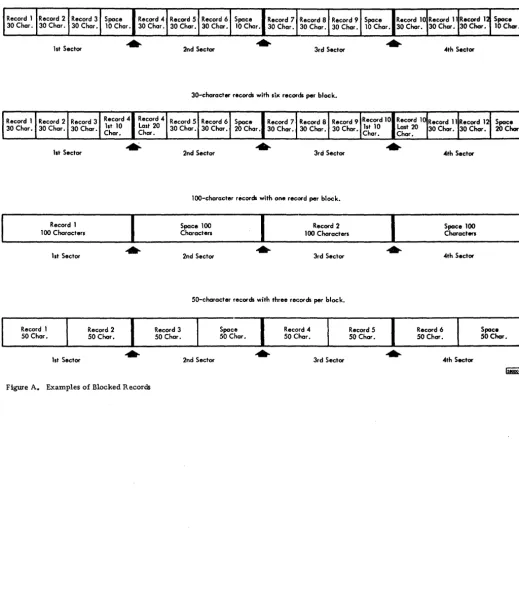
Figure A shows examples of blocked records.
Input data records may be of three types:
1. Fixed length. The number of characters
is the same for each record. The user sup-plies the record length in a control card.
2. Variable length with count. The number of
characters is variable for each record. The core positions required for each record are recorded in a count field - the count field is
the first three characters of each record.
3. Variable length with record mark. The
records vary in length, with the last charac-ter being a record mark.
Data records may be of any length up to 2500 nu-meric characters (1250 alphanu-meric). Records must not contain group marks or record marks in any po-sition within the record; variable-length records with record mark must contain a record mark in the last position. In numeric mode, there must not be a flag in any position of a control field except the high-order position. This condition also applies in alphameric
mode jf the input file location is disk. The program
can handle a maximum of 99,999 records. The last user's record of any file must be followed by a 0** record.
COLLATING SEQUENCE
The records of a file may be sorted in ascending or descending sequence. The result of an ascending sort operation is based on the following character-collating sequence:
Numeric
o
1 2 3 4 5 6 7 8 9Alphameric
b (blank) . )+ $
* - / ,
(= @ ABC D E F G H Io
(minus zero) J K L M N 0 P Q R STU V W XY Z. 0 1 2 3 4 5 6 7 8 9 (minus 1 through minus 9
occupy the same locations as J through R).
PROGRAM PHASES
The 1620-1311 Sort/Merge program consists of five phases (numbered 0-4).
Phase 0 (Assignment Phase)
The assignment phase begins operation by first check.-ing to ascertain if the required control record infor-mation has been previously placed on disk by the user.
If the control records are not on disk, the assignment
Record 1 100 Characters
Record 1
50 Char. 1st Sector
1st Sector
Record 2 50 Char.
Figure A. Examples of Blocked Records
30-character records with three records per block.
30-character records with six records per block.
lOO-character records with one record per block.
Space 100 Characters
Record 2 100 Characters
Record 3 50 Char.
2nd Sector 3rd Sector
50-character records with three records per block.
2nd Sector Space 50 Char.
Record 4 50 Char.
3rd Sector Record 5
50 Char. Record 6 50 Char. Space 100 Characters 4th Sector
4th Sector Space
50 Char.
[image:7.620.52.572.75.677.2]checks on the control record information for errors, and types error messages if applicable. The pro-gram then computes the tag size, determines the absolute addresses of the input, output, and tag file work areas; then checks to determine which phase should be executed next, and calls in that phase.
Phase 1 (Input and Tag Generation)
During Phase 1, the data records are read into core storage and tags are formed and stored in the tag file work area. In addition, if the data records are read in from cards or paper tape, they may also be stored on disk.
A user-written program of not larger than 1000 core positions on a 20,000 position machine may be
read in by Phase 1. The DIM entry and the entry
address are specified in a control record. The user's program will be executed after each data record is
read in and before the tag if formed~ This provides
the user with the ability to perform any editing or checking function desired. The user's program may re-enter the Sort/Merge program at either of two places: the first entry point allows the record to be processed normally while the second entry point allows the record to be bypassed (no tag is formed).
The phase operates in the following manner: The first record is read into core storage from the input
unit and is loaded into the work area. If records are
read from the disk, several are read at a time and each, in turn, is moved to the core storage work
area. If a user-written program accompanies
Phase 1, it is branched to at this time.
Tag construction is performed by moving the data control fields (in specified order of significance) to a core storage tag file output area, thus forming one continuous control field. A "record address" is then added to the tag. For variable-length records the actual disk address plus a character adjustment is used. For fixed-length records a sequence num-ber is used. Tags are stored on the disk in quarter cylinder blocks. Each block contains the number of tags (minus one) that will fit into a quarter cylinder.
If the data records are read in from cards or
paper tape, the records may be stored on the disk at the user's option. If all of the user-required in-formation is specified as control field data, it is not necessary to store the record. The user must re-m ere-mber that if all required inforre-mation is specified as control record data, the information will be in the specified order of sequence of the control fields.
If a merge-only operation has been called for,
control is passed to Phase 3, and Phase 2 is bypassed.
Phase 2 (Sort)
Phase 2 performs an internal sort on the tags -
proc-essing a quarter of a cylinder area of tags at one time. The internal sort is performed by forming sorted strings of 12 tags and merging the small strings (using 2-way and 3-way merges) to form one sequenced string of tags. Quarter cylinder strings of sorted tags are then placed back in disk storage.
If the size of the tag file is less than a quarter
of a cylinder, control is passed to Phase 4.
Phase 3 (Merge)
Phase 3 performs a series of merge passes on the sorted strings of tags and produces one sequenced string on the disk pack. A 4-way merge is performed
first on each cylinder. If needed, the cylinders are
then merged using 4-, 3-, and 2-way merges, ac-cording to a merge design calculated by Phase 3. The merge design was developed to minimize the number of merge passes and at the same time to keep the sorted string sizes as equal as possible. For ex-ample, the first whole cylinder pass for merging 16 cylinders would consist of four 4-way merges. The first whole cylinder pass for merging 17 cylinders would require five 3-way merges and one 2-way merge.
At the conclusion of Phase 3, the tags may be in the first or second half of the tag file work area. The disk address of the final sequenced string of tags is looated in core positions 02462 through 02467.
Control is passed to Phase 4 at the end of Phase 3.
Phase 4 (Output)
Phase 4 is divided into two operations. The first operation always punches restart information into cards or paper tape and reads in the Phase 4 user's routine (if specified). Upon completion of the punch-ing operation, the Sort/Merge program may be termi-nated if specified in Control Record 3.
During the second operation, data records are read into core storage in sorted order, and then are placed in the disk output area. The user's routine may perform any editing or modification of the rec-ords that may be desired; however, it should be re-membered that modification may (and deletion of a record Will) result in an error if record hash total checks are being performed.
INTERRUPT AND RESTART
The user can interrupt processing at the end of Phase 1, 2, or 3 by turning on Program Switch 4. At the end of each of these phases, if Switch 4 is on, the program types the completed phase number on
the console typewriter, and halts. If Switch 4 is still
on when the Console Start key is depressed, the pro-gram punches two cards (or paper tape records) to be used as· restart control records when operation is resumed. Then, control is passed to the Monitor Supervisor program to begin operation of the next
job. If Switch 4 is turned off before the Start key is
depressed, the Sort/Merge program resumes normal operation.
If the sort operation is interrupted. the tag file
work area must not be altered in any way. The user can ensure against an inadvertant change to the tag file by reserving a work area other than the Monitor work area (accomplished by DIM entry number or Equivalence Table name).
Restart
The Sort/Merge program must be restarted with card or tape input control records. When operation is restarted, processing begins at the start of the next phase to be executed, thus preventing a dupli-cation of operating time. For restarting, the two control records that were punched when the program was interrupted are used in place of the original first two control records. The original third control rec-ord must be re-entered with the two restart recrec-ords.
Checking Features
Three checking features are incorporated into the Sort/Merge program:
4
1. Tag Count. A count of the tags is
automat-ically taken in each phase and compared
with the count from the previous phase. This is accomplished by creating, in Phase 1, a dummy tag (with the total) which is placed behind the other tags. This program-created
dummy tag will always be last; i. e., its
con-trol field will be all nines for an ascending sort and all zeros for a descending sort. In Phase 3, the tag count is compared at the end of each merge pass.
2. Tag Hash Total. This checking feature is
optional. If specified, a hash total is taken
(in each phase) of the first N high-order digits of each tag. The value of N is spec-ified by the user and lies in the range of
two through nine. The total is compared to the tag hash total from the previous phase.
If an error occurs (unequal comparison) for
the tag count or tag hash total, the program returns
to the last correct-total point and tries again. If
an error occurs on the second try an error message is typed, and control returns to the Monitor for the next job.
3. Record Hash Total. The third checking
feature is also optional. A hash total may be taken. in Phase 1 and 4, of any two to ten contiguous digits within each data record. Only the first and last digits of the hash total field may be flagged, and the hash total field cannot overlap any of the control fields.
If disk input is used, Phase 1 checks for
a hash total at the end of the disk input data. There may not be a hash total, or the hash total on the disk may be different from the hash total for this run for legitimate reasons. In this case, the message HASH TOTAL ERROR PHASE 1 is typed, followed by type-outs of the new hash total and the hash total stored on disk. The Sort/Merge program continues normal operation, and the new hash total is stored on disk behind the records. There must not be any record marks in the
first ten pOSitions following the 0:1: =t: on the
disk if record hash totals are specified.
If the hash totals taken by Phase 1 and
Phase 4 do not agree, the message HASH TOT ALS DO NOT AGREE is typed, followed
by the typeouts of the two totals. If the
option to place the sorted data records in the original input area was selected, no records are moved to the input area. The user must
remember that if the record hash total option
is selected, he cannot bypass any records in Phase 4 without getting an error.
USER-WRITTEN ROUTINES
User-written routines to perform functions not handled by the Sort/Merge program may be read in
by Phase 1 and ~4. The Phase 1 routine, for example,
Listed below are some notes and rules concerning user-written routines.
1. User's routines for Phase 1 and 4 must be
stored on disk in core-image format.
2. Phase 1 and 4 routines may not extend below
core location 18950.
3. The Phase 1 routine is destroyed by Phase 2
or 3.
4. The Phase 4 routine is called even if data
records are not re-sorted.
5. The calling program will be overlaid by the
Sort/Merge program if the calling program is below core location 20000.
6. At the end of the Sort/Merge program,
con-trol can be returned to:
a. the calling program if it is above
core location 20000
b. a special entry in the Phase 4
routine (which the user writes to call back the calling program)
c. the Monitor Supervisor program.
TIMING
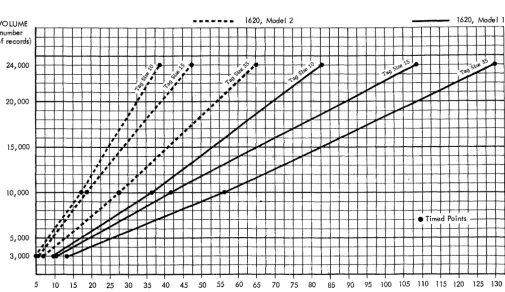
Figures 1 and 2 show the average processing time
required by the Sort/Merge program for the indicated tag sizes and for the number of records in the file. These timings are based on the following assumptions:
1. The input area, output area, and disk work
area are located so as to require an aver-age seek time of 250 ms.
!~. The records are in fixed-length form, are
80 positions long, and have previously been stored on disk.
3. There are no hash totals and no user's
programs.
4. The number of fields sorted is 3.
VOLUME (number of records) 24,000 20,000 15,000 10,000 5,000 3,000
• • • - . _ . 1620, Model:2 1620, Model 1
1_
~ .,,<'0 • ... '0 ... ... S ~
1----$'" .,f # s~;'- S\'!l1-~
'tg.C)s~';"-,l)~ ~r§'l C:)# ~~; ::~ ...,.fIII"
f..,~. # , ; .-.;t,;'
...,..
,
~,- # ~~ ~ ... 1'"
~ .~ ;~ [...,.0010""" fill"
#
...
.JI~ ....i-'~
~ ,<r ; ", .,1.,,;' 1:9-9 cPo
~ #<r ; i."o"
.." ~ .... 1~.~@l ~<\o.
,-1-# # ~.;
""'"
..".,
-
""",-~ #
...
~ ~ ~ 1".000 ",.,..~~
,
~~"
~jJ" -~ io""".
4...
~ ~""
-
1".000-~ L4r ;~ ~
....
~-
""",- !.1 ,4r ; :"'" ...,.~ .-""", ~
~ .#
••
V :...,.. "". " . ~# 4 #' ~,
...,.'"
""". io',
; ./"'"
" , """. " .~~ #'r ,~; V" " , " . ' " --- I-- • Timed Points
"'"
...,,~- ;~ ~fIII" """. " , .
.
-# ~ ~~ ",
...,
,
" . "".'# .#.
....
~ ~ """. """....
o
2 4 6 8 10 12 14 16 18 20 22 24 26 28 30 32 34 36 38 40 42 44 46 48 50 TIME (in minutes)FiglU'e 1. Sort/Merge Timing (Excluding Phase 4)
VOLUME (number of records) 24,000 20,000 15,000 10,000 5,000 I~
I f .
~
..
;~~ ;,&
- . . . - 1620, Model 2
$:"'-f-~ # -§' ",<0 .# (':,'\.'!l1-~ \,'0
,<J' #f--C;4'
"""..+- r§'l # ' ~'If>;'5.# ~~A"
f..,J> ~ 4 ,~ I~ ~
1,/ .<r 1#-'
17 ~io"""'
~4 [,<r
,
7 ~io"""',
#4" # ~ Jl'1o"""# # 4# ,/ ~ 100' "I.,,;'
I # 4~ 7 .JII' P ..".~
l#'
# _ 4 ~'r' ~7 ...,.'tII"'"
I~t #' / ~"ii' ...,. " ,
,
..
~ ;I' .... fIII"..".. ~
t ~# ;~ ~, .... ~ l,...ooo "".
# ,.# # ./ ",
,,'"
~. # i' ",
-"
# ,~ #
. / """ ~,.
...,..
" ,## ; )~
...,.'
"
i'""'"# .~ , / )~ ... """"
... ;1'",
""",,'" ~
'# ~ :... J';I""" ~~ ".. ...,.. i'"
~ ~",
1620, Modell
\.s '. ",S ~
-t.p)s\,'!l1- " 't.p) S\~;...-.
;..--' ~""""
"
"
"
I.,,;'
,,"
• Timed Points
5 10 15 20 25 30 35 40 45 50 55 60 65 70 75 80 85 90 95 100 105 110 115 120 125 130
TIME (in minutes)
Figure 2. Sort/Merge Timing (Including Phase 4)
[image:11.615.50.567.58.368.2] [image:11.615.55.561.383.675.2]CONTROL RECORDS
Control records can be in the form of card, paper tape or disk records. When the Sort/Merge pro-gram is called, it checks to see if the repords are
stored on disk and, if not, reads them in from cards
or paper tape and stores the information. Control records on tape must simulate card input; that is, there must be 80 data characters between the end-of-line characters. Control records on disk must
be located in the fir st 4 sectors of Phase 0, as
described below: Record 1 2 3 Positions 00-79 (numeric format) 81-160 (numeric format)
162-321 (double-digit alpha format)
Three control records are required to define
a sort or merge operation. Basically, Record 1
describes the type of operation, Record 2 defines
the control fields of the data records, and Record 3
defines the work areas.
Control Record 1
Column 1 2 3 4 5-8 Description
First input file location
o
Disko
Paper taper
CardCollating sequence
o
Descending1
=
AscendingRecord type
o
Fixed-lengtho
Variable-length withrecord mark
1 Variable-length with count
Input mode
o
Alphameric1
=
NumericRecord size (number of core positions required). This entry is required for fixed-length records only.
Column 10 12 13 14 15-19 20 21-25 26-29 30-33 34 35-37 Description
Maximum number of records, (fixed -length only)_
2 99
3 999
4 9999
5 99999
Number of digits for tag hash total (2-9). See Column 30,
Record 3.
Second input file location
o
Disko
Paper tape1 Card
Are input records to be stored or are they already stored?
0= Yes
1 = No
(If Phase 4 is to be executed,
this must be zero. )
Core entry address of user's
program for Phase 1. (See
26-29. )
Control records on Disk?
o
No1 = Yes
Core entry address of user's
program for Phase 4. (See
30-33. )
DIM number of user's
pro-gram for Phase 1. (See
15-19. )
DIM number of user's
pro-gram for Phase 4. (See
21-25. )
Is disk input blocked, or to be blocked (from cards or paper tape)?
o
No1 = Yes
8
Column Description
38 Is output to be blocked?
o
No1
=
Yes39-41 Number of records per
output block.
42-45 Core location within record
of high-order position of hash total field (for record hash total). (See Column 34 of Record 3.)
46-47 Number of core positions in
record hash total field (2-10).
80 Sequence number of 1.
(Optional; if used, a sequence
number must be in all three cards. )
Control Record 2
Column Description
1-4 The core location within
5-7
8-11
12-14
15-18
19-21
each record of the high-order position of the first field to be sorted (for alphameric records, the location of the high-order position of the Nth character would be 2N -1).
The number of characters in the first control field (for alphameric records, double the size).
The location within, each record of the high-order position of control field 2.
The number of characters in control field 2.
The location within each record of the high-order pOSition of control field 3.
The number of character s in control field 3.
Column 22-25 26-28 29-32 33-35 36-39 40-42 43-46 47-49 50-53 54-56 57-60 61-63 64-67 68-70 71-72 Description
The location within each record of the high-order position of control field 4.
The number of character s in control field 4.
The location within each record of the high-order positions of control field 5.
The number of characters in contro I field 5.
The location within each record of the high-order position of control field 6.
The rlumber of character s in control field 6.
The locations within each record of the high-order position of control field 7.
The number of character s in control field 7.
The location within each record of the high-order position of control field 8.
The number of characters in control field 8.
The location within each record of the high-order positions of control field 9.
The number of characters in control field 9.
The location within each record of the high-order position of control field 10.
The number of characters in control field 10.
Column
80
Control Record 3
Column 1-6 7 8-13 14 15-Z0 21 22-27 28 Description
Sequence number of 2. (Optional; see Column 80 of
Control Record 1.)
Description
Disk address of first input area. (El' .. ry must be left-justified. )
Type of address entry in Columns 1-6
o
Absolute1 DIM number
2 Equivalence name
Disk address of second input area. (Entry must be left-justified. )
Type of address entry in
Columns 8-13
o
Absolute1 DIM number
2 Equivalence name
Disk address of output area. (Entry must be left-justified. ) Note: Size of the output area
must be a multiple of 50 sectors,
and if phase 4 is executed, a
minimum of 50 sectors must be
provided.
Type of address entry in Columns 15-20.
o
Absolute1 DIM number
2 Equivalence name
Disk address of tag file work area. The address must be the beginning of a cylinder and the entry must be left-justified. (See Column 31. )
Type of address entry in Columns 2'2-27.
o
Absolute1 DIM number
2 Equivalence name
Column 29 30 31 32 33 34 35 36-40 80
o
1 DescriptionOne input file Two input files
Hash total of tags? (See
Column 12 of Record 1.)
o
~ No 1 '0 1o
1 YesUse assigned tag file work area as specified in Columns 22-27. Use Monitor work area for tag file.
Leave sorted records in output work area. Move sorted records from output work area to first inpue-area.
Is Phase 4 to be executed?
o
No1 = Yes
Hash total of Record field? (See Columns 42-45 of
Record 1.)
o
No1 = Yes
Merge only? (Records of both input files must be in
sequence. )
o
No1 = Yes
Entry address of user's routine; branched to upon successful completion of the Sort/Merge program.
(If omitted, control returns
to the Monitor Supervisor program. )
Sequence number of 3. (Optional; see Column 80 of Record 1.)
RESTART RECORDS
is used in place of the original Control Record 1.
Likewise, the second restart record is used in place of the original Control Record 2. Together with Control Record 3, the two restart records provide all necessary information for restarting.
The format of the two restart records is:
Restart Record 1
Column Description
1-10 Same as Control Record 1.
11
12-19 Same as Control Record 1.
20 0
21-47 Same as Control Record 1.
48 Phase number where restart
is to begin.
49-57 Contains tag hash total.
59-64 Disk address of tags.
65-69 Total number of tags, plus
one.
70-72 Tag size.
73-75 Total control field size
(minus 1) in tag.
10
Column
76-77
78-79
80
Restart Record 2
Column
1-5
6-10
11-15
16-38
39-48
80
Description
Total address size in tag.
Number of cylinders for tag file.
Sequence number of 1. (This
is punched only if original Control Record 1 was punched in Column 80. )
Description
Disk address of second tag file work area (used for merge operations only).
Number of tags in first input for me rge.
Number of tags in second input for merge.
Coded merge data used by Phase 2 and 3.
Record hash total.
Sequence number of 2
(punched only if original
The Sort/Merge program can be called for execution by a Monitor XEQ statement (from card or paper tape) or by a CALL statement in a user's program. When the XEQ statement is used, the order of the stacked input is as follows:
:j::j:JOB **XEQ SORT
Sort Control Records (3)
Input
:J::j::\::j: (end of job)
ERROR MESSAGES
During execution of the Sort/Merge program, certain error messages may appear. A list of the messages and the conditions which cause them, follows. Unless otherwise noted, control is returned to the Monitor Supervisor routine as soon as the message is typed.
Message and Cause
CAN NOT FIND LABEL IN EQUIVALENCE TABLE
The name given for an input or output area or the name SORT is not in the Equivalence Table.
CONTROL CARDS OUT OF SEQUENCE
The sort control records (card or paper tape) are not in sequence.
COUNT ERR Pn
The tag count total taken in Phase n (n
=
2 or 3) isnot equal to the tag count total taken in the previous phase.
COUNT ERROR PHASE 4
The number of tags does not agree with the record count. Two trys have been made.
ERROR IN TAG HASH TOTAL
The tag hash totals from this pass and the previous
pass are not equal. This message appears in Phase 1
or 4.
EXECUTING THE SORT/MERGE PROGRAM
FIXED LENGTH RECORD COUNT SPECIFIED INCORRECTLY
The digit in Column 10 of Control Record 1 is
out-side the range of 2 through 5.
HASH ERR Pn XXXXXXXXX
The tag hash total taken in Phase n (n :::; 2 or 3) is not
equal to the tag hash total taken in the previous phase.
HASH TOTAL ERROR PHASE 1 XXXXXXXXXX (New hash total of records) XXXXXXXXXX (Hash total stored on disk)
Hash total on disk does not agree with new hash
total of records developed in Phase 1.
Action: The Sort/Merge program continues operation.
HASH TOTAL SIZE SPEC. INCORRECTLY
The size of the tag or record hash total field has been specified incorrectly.
HASH TOTALS DO NOT AGREE
XXXXXXXXXX (Phase 1 hash total)
XXXXXXXXXX (Phase 4 hash total)
The record hash totals from Phase 1 and Phase 4
are not equal.
Action: The Sort/Merge program stores the new hash total with the records.
The sorted records will not be moved from the output to the input area.
The Sort/Merge program will branch to the
address specified in Columns 36-40 of
Control Record 3.
NO FIELD SIZE SPECIFIED
A control field size was omitted in Control Record 2.
NUMBER OF FIELDS TO SORT INCORRECTLY SPECIFIED
The number of control fields exceeds ten or is zero.
SIZE OF TAG EXCEEDS THE MAX
The tag size exceeds 900 positions.
TYPE INPUT SPECIFIED INCORRECTLY
Column 1 or 13 of Record 1 does not properly
indicate input by card, paper tape, or disk.
WRONG UNIT FOR CALLING SORT
LOADING THE SORT/MERGE PROGRAM
The Sort/Merge program consists of five phases. Each card deck (or tape) is loaded separately with its own DIM entry; however, only the first phase (Phase 0) is named. Five consecutive DIM numbers must be used with the lowest number assigned to Phase 0, and the next sequential num-ber assigned to Phase 1, etc. For example:
if Phase 0 is DIM 01 79,
then Phase 1 must be DIM 0180,
Phase 2 must be DIM 0181,
Phase 3 must be DIM 0182,
and Phase 4 must be DIM 0183.
Each phase must be loaded with the Disk Utility Program DLOAD operation. The DLOAD records must contain the following information.
12
Columns 1
2-6
Description Asterisk
Code word DLOAD
Columns
7-12
17-20
39-43
44-48
49
50
Description
Alphameric name"SORTbb" (used for Phase 0 only).
DIM entry number (optional).
Numbers for Phase 0-4 must
be consecutive.
Core storage address entries must be assigned as follows:
Phase 0 - 02404
Phase 1-4 - 02852
Entry address (all phases). 02852
C for card; P for paper tape.
I
NOTE: Read-only flags must not be specified for
Phase O. The first four sectors are used for
The following are addresses of entry points- and work area locations which might be needed by the user.
Address
02812
02836
02828
Description
Entry address to return to Phase 1 for the record to be processed.
Entry address to return to
Phase 1 or 4. The record will
not be processed.
Entry address to return to Phase 4 for the record to be processed.
APPENDIX A
Address Description
02462-67 This area contains the disk
ad-dress of the tag file upon entry into Phase 4.
02681-85 This area contains the high-order
address of the data record work area during Phase 1.
02686-90 This area contains the high-order
address of the record output area during Phase 4.
02468-72 This area contains the count of
the tags.
02560-64 This area contains the count of
C26-5875-2
TIrn~
(!)International Business Machines Corporation Data Processing Division
Technical Newsletter
File Number 1620-33Re: Form No. C26-5875-2
This Newsletter No. N26-0552
Date February 7, 1966
Previous Newsletter Nos. N26-0125
The purpose of this newsletter is to make changes to the publication IBM 1620-1311
Sort/Merge Program Reference Manual (Form C26-5875-2). Changes are indicated by
a vertical line to the left of the affected text.
REPLACE PAGES:
1 and 2