·.verview
"Qf~:,
''\.,-" .. ,"
PIC"K,:<" _
Title: Overview of the PICK Operating System Document No. 88A00751A03
,
Date Issue -,
~
l
-Nov 82 Original Issue ! -Sep 83 Revision B
! '
lwlar 84 Revision C - A03
NOTICE
The information contained in this document is subject'to change without notice,. General Automation 'makes no warranty or representation with regard to this
material, ineludlng; but not limited to, the implied warranties of merchanta- ;'-; ., , -!:- ,
bility and fitness for a particular purpose. General Automation 'shall not be : ·';:·'t·· .'-'; . • ~,' : l ~:~,' t.." ~ ~ . .
Uable for errorscon~t'ained herein. '
General Automation assumes no responsibility for the use or reliability of its software on equipment that is not furnished by General Automation.
This document contains proprietary information which is protected by copyright. All rights are reserved. No part of this document may be photocopied or
reproduced without the prior written consent of General Automation.
e'verview of,tb",\,.
" " , , : ''\.-'
..,
..PIC'K,
Opera_~~,
..... , ' "
88AOO1&1A03
C~[ightO by '~'1feral Auto~ation, I~c .. ' ~~.§outn
e.
Street ?O~~~:4881-.!,Ana"'eim, California 928'S!?' ,
'(,714)i+a-4s00 (800)854-*':1104
l"WX91Q·591·1695 TeLEX O~!.5J3
Title: Overview of the PICK Operating System Document No. 88A00751A03
NOTICE
The information contained in this document is subject' to' change without notic~,.
General Aut6lDation'makes no warranty Cir representation with regard to this
material, in¢luding; Dut not limited to, the implied warranties of merchanta-::: ~ ,; -S. ,
bility and fitness for a particular purpose. General Automation 'shall not be ~ 'i" .C;' ,
Uable for errorsc'on,t'ainedherein~ , . _ ~,. :-i--.:,"' f~ ~ ~ General Automation assumes no responsibility for the use or reliability of its software on equipment that is not furnished by General Automation.
This document contains proprietary information which is protected by copyright. All rights are reserved. No part of this document may be photocopied or
reproduced without the prior written consent of General Automation.
88A00751A
FOREWORD
, .,. ....
This manual has been created for the individual wh<1-ts"'n~t""familiar with the PICK Operating System, which is part of the GeneralA~tomation ZEBRA™
series. The intent is to provide as much information as possible covering the capabilities ·of the system, in general, and the data base management facility, in parti~ular. Because of this approach, the manual has a different flavor ' that should be explained.
First, it is .!!2! a "working" manual in the sense that one can sit down and actually program or otherwise use the computer with the manual as a tutorial guide. In almost every case, the syntax and many details of a given function have been omitted, and many functions have been glossed over, or left out altogether. The intent here is to provide, in brief, a feel for the
capabilities of the system, not to explain precisely how to use it. For the latter, the reader is referred to the PICK Operator Guide and the PICK
processor reference manuals listed below.
This manual is slanted towards the unusual systems software and data base
capabilities, rather than the hardware and more conventional software functions that are a part of most computers. There is much about the PICK Operating System that is truly different and unique; the sections on the BASIC language, and certain other functions, have been dealt with briefly with the assumption that most readers will already be familiar with the general principles.
On the o~:he.r hand, the. sections .. on ·Ule structure which then lead tnto ths -. -c ~.~;
section "'Data Base Architecture" and' the Access Process If digress into great
detail. The reasoning here is that the.system is quite different., ·~and..,~:'ba,$:ic .. ;; '=<~'':'o;,
understanqing of .data base principles 1srie~essa'ry ;before. one ~an app·t'e~1a~e :.1:
.>: :":
''''~the speci~{c impleme~tat:ton •. These f;i.rst section.s a~e~l.~,o the k~y tCk< .~.; I ' f ,::,:;._ ~~f
understanding the rest of the system, and the reader<,~.s .~;~cc"l·rag~4Ito ,;. :~ .. > '~.: ~;6i:;.i
concentrate on these first before attempting to read further.
:::".' .. '
... ,~', -, ~'. ~ .,
, "'. .L.J·
-:','-'-:i ' j
. I ' .!.~ ,' .. ~'
Other ZEBRA documentation that is available from General Automation: Document No.
88A00751A
88A00758A
88A00759A 88A007·60A 88A00774A 88A00776A 88A00777A 88A00778A 88A00779A 88A00780A 88A00781A 88A00782A 88A00783A
Title PICK Operator Guide ACCU-PLOT Operator Guide COMPU-SHEET Operator Guide
Quick Guide for the PICK Operating System PICK Utilities Guide
PICK ACCESS Reference Manual PICK SPOOLER Reference Manual PICK BASIC Reference Manual PICK EDITOR Reference Manual PICK PROC Reference Manual PICK RUNOFF Reference Manual
Introduction to PICk TCL and FILE STRUCTURE PICK JET Word Processor Guide
TMACCU-PLOT is a trademark of ACCUSOFT Enterprises
TMCOMPU-SlIEET is a trademark of Raymond-Wayne Corporation TMpICK is a trademark of PICK Systems
neA00751A
TABLE OF CONTENTS
Section Title "--P-age-' 1 INTRODUCTION • 1-1: - I .
1.1 VIRTUAL MEMORY OPERATING SYSTEM. 1-1 1.2 DICTIONARY-BASED FILE STRUCTURE.
·
·
·
·
·
·
1-1 f .. ~ 1.3 RETRIEVAL LANGUAGE •·
·
·
·
1-2' 1.4 SUMMARY..
.
·
·
1-2' 2 FILE STRUCUTRE •· ·
·
• , 2-12.1 INTRODUCTION •
·
•.
•· ·
· ·
· ·
·
•·
2-1 2.2 BASIC DATA DIVISION CONCEPTS·
· ·
2-1 2.2.1 ITEMS.· ·
• 2-1 2.2.2 DICTIONARIES·
· ·
2-1 2.2.3 GROUPS·
•·
·
·
2-1 2.3 DISK STORAGE ALLOCATION. 2-2 2.4 THE lIDDULO AND THE SEPARATION.·
2-2 2.5 NATURE OF AN ITEM.· ·
2-62.6 SUMMARY. •
·
2-83 DICTIONARY SYSTEM.
· ·
3-1 3.1 INTRODUCTION.
·
.
·
·
• 3-1 3.2 ITEMS AND ATTRIBUTES IN DICTIONARIES • 3-3 3.3 FILE DEFINITION ITEMS.· ·
·
·
·
·
·
·
3-3 3.3.1 ATTRIBUTE 0, THE ITEM-ID· ·
·
·
·
3-3 3.3.2 ATTRIBUTE 1. •· · ·
3-4 3.3.3 ATTRIBUTE 2.· ·
3-4 3.3.4 ATTRIBUTE 3. 3-4 3.3.5 ATTRIBUTE 4.·
·
·
3-4 3.3.6 ATTRIBUTE 5.·
· ·
·
· · · ·
3-4 3.3.7 ATTRIBUTE 6.·
·
·
·
·
3-5 3.3.8 ATTRIBUTE 7.· ·
3-5 3.3.9 ATTRIBUTE 8.·
•·
3-5 3.3.10 ATTRIBUTE 9. 3-5 3.3.11 ATTRIBUTE 10·
3-5 3.3.12 ATTRIBUTE 11·
· ·
·
• 3-5 3.3.13 ATTRIBUTE 12·
•·
·
· ·
· ·
3-5 3.3.14 ATTRIBUTE 13 •·
•·
'.
'3-5 3.4 FILE-SYNONYM DEFINITION ITEMS.·
· ·
·
·
·
3-6 3.4.1 ATTRIBUTE 0, THE ITEM-ID •·
·
3-63.4.2 ATTRIBUTE 1.
· ·
·
.....
3-&.~ 'I;'3.4.3 ATTRIBUTE 2.
·
·
3":'6' 3.4.4 ATTRIBUTE 3.· ·
·
·
~,.
e.!.
3-63.5 ATTRIBUTE DEFINITION ITEMS
·
3-7 3.5.1 ATTRIBUTE 0, THE ITEM-ID·
·
·
...
3-7 3.5.2 ATTRIBUTE 1.·
·
3-7 3.5.3 ATTRIBUTE 2.·
-
·
·
· ·
3-7Section 4 5 3.6 3.5.6 3.5.7 3.5.8 3.5.9 3.5.10 3.5.11 3.5.12
ATTRIBUTE 5. •
. .
.
.
.
ATTRIBUTE 6. • • • • • • •ATTRIBUTE 7 • • • • •
ATTRIBUTE 8. •
ATTRIBUTE 9 •• ATTRIBUTE 10 •
.
.
ATTRIBUTES 11-14 • • • • • • SUMMARY • • • • •
.
.
.
.
.
.
.
.
.
.
.
.
. .
.
.
. .
.
DATA BASE ARCHITECTURE AND THE ACCESS PROCESS.
4.1 INTRODUCTION • • • • • • • • • • • • •
. . .
•.
.
.
.
.
.
4.2 DATA BASE APPROACH • • • • • • • • • • • • • •4.3 ELEMENTS IN A DATA BASE SYSTEM • • • • • • • •
4.4 DATA BASE FILE STRUCTURE, THE INTERNAL MODEL • • • • • 4.4.1 HIERARCHIES AND NETWORKS. • • • • • 4.4.2 RELATIONAL SYSTEMS • • • • • • • • • • QUERY LANGUAGE "ACCESS". • • • • • • • • • • • ACCESS QUERY LANGUAGE. • • • • • • • • • • • PICK OPERATING SYSTEM ACCESS LANGUAGE STRUCTURE. • • • • • USING THE ACCESS PROCESSOR • • • • • • • • • • • • • • • • ACCESS LANGUAGE COMMAND VOCABULARY • • • • • • • • • • 4.9.1 LIST, SORT, LIST-LABEL, AND SORT-LABEL VERBS. 4.9.2 COUNT VERB • • • • • • • • • • • •
4.9.3 SUM AND STAT VERBS • • • • • • • • • • • •
4.9.4 THE SELECT AND SSELECT VERBS • • • • • • • • • • • 4.9.5 OTHER VERBS • • • • • • • • •
4.10 ACCESS LANGUAGE COMMAND MODIFIERS AND OPTIONS. 4.10.1 RELATIONAL OPERATORS.
4.10.2 WITH AND IF MODIFIERS. • •• 4.10.3 STRING SEARCHING. • • •• 4.11 SELECTION OF OUTPUT • • • • • • • • • • • • • • 4.12 FORMATTING FOR OUTPUT • • • • • • • • • • •
.
.
. .
4.12.1 HEADINGS AND FOOTINGS. • • • • • • • • .'. • • • • 4.12.2 BREAKING. • • • • • • • • • • • • •
4.12.3 BREAK-oN TOTALING AND GRAND TOTALING
.
.
.
4.13 SUMMARY. • • • • • • • •.
.
. .
. . .
SYSTEM SOFTWARE AND UTILITIES. • • • • • • • •5.1 INTRODUCTION... • • • • 5.2 SYSTEM USAGE ACCOUNTING. • • • • • • • • • • • • • • 5.3 INDIVIDUAL USER ACCOUNTS • • • • • • • • • • • • • 5.4 MULTIPLE USER ACCOUNTS • • • • • • •
5.5 LOGGING ON • • • • • • • • • • • • • • • 5.6 THE CHARGES AND CHARGE-TO COMMANDS • • •
5.7 SYSTEM BACKUP TO MAGNETIC TAPE. • • • • • • • • • 5.8 SYSTEM ERRORS AND MEMORY ERRORS FILE • • • • • •
Section 6 7 8 9 5.9 83A00751A
OTHER SYSTEM COMMANDS •• 5.9.1 LOGON.
OFF. • • • • • • •
. .
.
.
.
·
.
.
. . .
.
.
.
· . .
5.9.2 5.9.3 5.9.4 5.9.5 5.9.6 5.9.7 5.9.8 5.9.9SYSTEM LOGON MESSAGE • USER LOGON PROC • • • • • WHO COMMAND. • • • • •
·
.
.
.
.
· . .
.
. .
· . .
.
. . .
LISTU COMMAND.
. . .
.
MSG CO~fAND. • • • • • • • • • •
SLEEP COMMAND. • • • • • • • • • • •
· . .
.
. .
.
·
.
LISTVERBS AND LISTPROCS COMMANDS • • • •
· . .
SYSTEM SECURITY • • • • • •6.1 INTRODUCTION • • •
.
.
.
6.2 PASSWORD FOR LOGON • • • • •·
.
· . . . .
·
.
.
6.3 SYSTEM PRIVILEGES LEVEL. • • • • • • • •6.4 FILE UPDATE AND RETRIEVAL PROTECTION CODES • • • • • • • •
6.5 S~RY...
TERMINAL CONTROL LANGUAGE. 7.1 INTRODUCTION.
7.2 THE TCL COMMAND VOCABULARY • • • • • 7.3 SOME COMMON TCL COMMANDS.
.
. .
7.3.1 SETTING TERMINAL CHARACTERISTICS. 7.3.2 SETTING TABS ••
7.3.3 7.3.4 7.3.5
COpy • • • • • • • • SENDING MESSAGES • TAP E ATTACH.
.
.
.
·
.
. .
.
· . . .
. .
.
·
.
.
.
.
.
. · .
. . .
.
·
. .
. .
. .
.
PROC LANGUAGE PROCESSOR. • • • • • • • • • • • • • • •
8.1 INTRODUCTION. • • • • • • • • • • • • • • • • • •
8.2 THE STRUCTURE OF A PROC. • • • • • • • • • • • • • • • 8.3 PROC COMMAND LANGUAGE CAPABILITIES • • • • • • •
8.4 SCREEN FORMATTING WITH PROC • • • • •
8 • 5 SUMMARy...
· .
BASIC LANGUAGE PROCESSOR • •
9.1 INTRODUCTION • • • • •
9.2 RE-ENTRANT CODE • • •
·
.
. .
9.3 SOURCE FILES • • • • • • •9.4 COMPILER FEATURES. • • • • 9.4.1 LIST OPTION • • • •
9.4.2 LIST ERRORS ONLY OPTION •• 9.4.3 ASSEMBLED CODE OPTION. 9.4.4 CROSS REFERENCE OPTION • 9.4.5 MAP OPTION • • • • •
·
.
. .
. .
.
.
.
·
. .
.
..
.
.
. .
9.59.6 EXECUTING BASIC PROGRAMS • • • • • • • • • • • • • • FILE HANDLING IN BASIC • • • •
.
.
.
. .
.
.
9.6.1 DYNAMIC ARRAY (FILE) HANDLING FUNCTIONS • • •Section
10
11
.ru.J&.
Page9.7 OTHER FEATURES OF THE PICK OPERATING SYSTEM BASIC.
. ·
· ·
9-6 9.8 MULTI-USER FILE LOCKS.·
·
.
. ·
·
· ·
·
·
9-7 9.9 INPUT AND OUTPUT CONVERSIONS •·
· ·
9-8n :1.:1.~ n 1 n "'1'\ .. nTl:'nC!'TI'\~T 1~"nnt:'T A'T'Tn~T 9-8
JJ \JV1'.J;:.~.Vj," "'vn.j,"~n ... '"' .. ~
·
9.9.2 MC CONVERSION/CORRELATION. 9-8 9.9.3 MT CONVERSION/CORRELATION.
· · · ·
9-8 9.9.4 MX CONVERSION/CORRELATION.· .
·
·
9-8 9.9.5 P CONVERSION/CORRELATION·
·
·
9-9 9.9.6 T CONVERSION/CORRELATION •·
. ·
·
·
·
· ·
9-9 9.10 MATH FUNCTIONS.
. .
.
·
·
· . ·
· ·
9-9 9.11 SUMMARY.. .
. .
.
.
. ·
·
.
. ·
·
·
·
·
·
9-9 • 10-1 SYSTEM EDITOR AND TEXT PAGE FORMATTER.10.1 INTRODUCTION • • • • • • • • • • •
10.2 THE EDITOR • • • • • • • • • • •
·
.
.
• 10-110.3 10.4
10.5
• • • • • • • • • • 10-2 10.2.1 BASIC EDITOR COMMANDS ••
10.2.2 SPECIAL EDITOR COMMANDS. FORMATTER. • • • • • • • • •
SOME BASIC RUNOFF COMMANDS • • • • • • 10.4.1 PAGE FORMAT. • • • • • 10.4.2 DOCUMENT STYLE • • • • • • 10.4.3 INDEXING • • • • • • •
• • • 10-2 • • 10-2 • • 10-3 • 10-3 • • • • • • • • 10-3 10-4 • 10-4 10.4.4 GRAPHIC DEVICES.. • ••
· .
.
·
. .
• 10-4 10.4.5 MISCELLANEOUS COMMANDS • • • 10-4 10.4.6 SPECIAL COMMANDS • • • • • • • 10-5S~Y • • • • • • • • • • • • • 10-5
PRINT SPOOLING SYSTEM. • • • 11-1 • 11-1 11.2 LINE PRINTER SPOOLER.
11.3 SPOOLER COMMAND VOCABULARY 11.3.1 DESTINATION COllMANDS • 11.3.2 FORMS CONTROL. • • • • 11.3.3 MULTIPLE COPIES • • •
• • 11-2 • • • • • 11-2 • 11-2 • • 11-2 11.3.4 EDITING PRINT FILES • • • • • • • • • • • • • • 11-3 11.3.5 RESTARTING ABORTED RUNS.
11.3.6 PHYSICAL PRINTER MANAGEMENT. 11.3.7 PRINTER STARTUP ••
11.3.8 PRINTER HALT. 11.3.9 SPOOLER STATUS •
Section 12
13
14
88A00751A
MAGNETIC TAPE SYSTEM • • • • • • • 12. 1 INTRODUCTION. • • • • • • 12.2 ACCESSING THE TAPE SYSTEM.
12.2.1 T-ATT AND T-DET VERBS •• 12.2.2 TAPE HANDLING VERBS ••
. . .
12.2.3 T-DUMP, S-DUMP, AND T-LOAD VERBS. 12.2.4 TAPE LABELS • • • •
12. 3 S~Y. • • • • • • • • • • • • • • • • COMPU-SHEET AND ACCU-PLOT.
13.1 COMPU-SHEET • • • • • • 13.2 ACCU-PLOT • • •
JET WORD PROCESSOR •
.
.
. . .
.
. .
.
. . .
. .
.
.
.
. .
.
. . .
.
. .
88A00751A
introduction
The PICK Operating System is a new kind of operating system, principally oriented towards data base management applications. Computer users are discovering, sometimes belatedly, that many applications, reduced to their essence, are data base management tasks. Applications which use traditional file structures are usually thought of as being."optimized," yet management decision makers are finding that lack of flexibility in a data base is a far from "optimum" condition, and is rapidly becoming regarded as an intolerable misuse of a valuable asset. The decreasing cost of computational logic and data storage, and the increasing awareness that a well-managed data base can become a valuable decision making tool, is the driving force behind data base management systems today. In this light, to say the PICK Operating System is a data base management operating system is not to limit its application scope, or to imply that it is somehow a special purpose operating system. Rather, it is an operating system whose time has come.
1.1 VIRTUAL KEKORY OPERATING SYSTEM
The PICK Operating System "addresses" disk storage in 512 byte units called "frames." This technique is similar to "paging" in virtual memory management systems commonly used in very large scale mainframe computers. Frames are moved in and out of semiconductor memory dynamically, on an as-needed basis. This process is totally transparent to the individual user, who, for all practical purposes, can manipulate data within the capacity range of the given disk configuration.
1.2 DICTIONARY-BASED FILE STRUCTURE
A given file is defined by entries in a "file dictionary." A file is
subdivided into open ended "groups" and a hashing algorithm takes a keyword and computes the group in which an individual "item" will be stored. On retrieval, only one group, typically a very small sub-set of the entire file, must be string searched to locate the item.
1.3 RETRIEVAL LANGUAGE
The PICK Operating System includes a high-level, non-procedural relational data base query facility ("ACCESS"). This flexible software tool can be used by non-technical personnel to make simple ad hoc inquiries, yet has powerful fea-tures that can be used to formulate very complex reports in far less time than would ordinarily be the case uSing conventional programming languages. This translates directly into lower data processing costs, easier customization, and modification of any given software, and faster development of new applications.
1.4 SUMMARY
83A00751A
file structure
2
2.1 INTRODUCTION
The file management system that is central to the operation of the PICK Operating System represents an unusual approach to the use of disk storage. Using this system, the operating system can find the location of a given "item" with a minimum number of disk seeks. Data within this item can be further subdivided with special delimiter marks the system is optimized to search for. The English-like ACCESS Processor is designed to make these operations as simple, and as user oriented, as possible.
2.2 BASIC DATA DIVISION CONCEPTS
This section discusses the system file structure mechanics on a detailed
level. Certain basic concepts are briefly introduced here in order to make the information in remaining sections more easily understood. Each of these
concepts are individually discussed in greater detail.
2.2.1 ITEMS
A PICK Operating System file is made up of "items." Items consist of a keyword called the item-id that uniquely identifies the item from all other items in the file. An item can consist of up to 32K of data, divided into a number of "fields" called attributes, which can be further subdivided.
2.2.2 DICTIONARIES
Files have "file dictionaries" associated with them •. These dictionaries contain, among other things, the location on disk of the related file.
2.2.3 GROUPS
2.3 DISK STORAGE ALLOCATION
Disk storage is divided into 512 byte "frames." Each one of these frames has a logical address known as the "frame-id" and each frame contains twelve bytes of information the system usesJ including the number and location of forward and
backward "links" in the chain of frames that make up an individual file. Five hundred bytes per frame are available for user data storage.
When a new file is created, space for it on disk is reserved in one contiguous set of frames. These frames are chosen by consulting the available space pool uSing two figures supplied by the user, the "modulo" and the "separation." This space is called the "primary" space, and in no way represents a limit on bow large the file can grow.
2.4 THE MODULO AND THE SEPARATION
The modulo and the separation are a method of dividing up a whole file into smaller groups. The purpose of dividing a file into groups is to focus a search for a given item of data in a smaller amount of storage, and thus
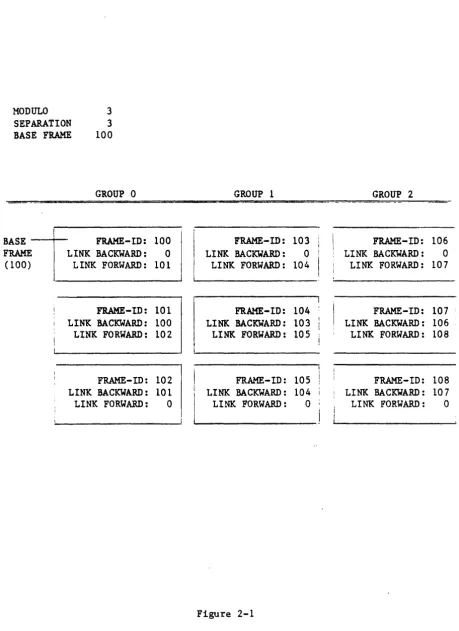
minimize the search time. The modulo represents the number of groups the file is to be divided into. The separation represents the number of frames that will initially be allocated to each group. If a file is "modulo three," that means the file is divided into three groups. If the separation is three, then each group is three frames long, and the file would reserve a total of nine frames as the "primary" fi1espace.
In short, the modulo*separation represents the total number of frames allocated for the file and these frames are always contiguous.
It is important to emphasize that this pre-allocation places no limit on the growth potential in a file. Because each frame has forward and baCkward
linking pointers, new frames are automatically.added to an expanding group, as required.
While using the modulo*separation to determine the amount of contiguous space to allocate to a file, the system also uses these figures to build the file dictionary. The file dictionary will contain the modulo, the separation, and the disk address of the first frame in the file, called the "base frame" or "filebase."
83A00751A
Notice the file effectively contains three "starting points" in frames 100, 103, and 106. These frames all "link backward" to frame 0, which is to say they do not "link back" at all. Because only the first frame of Group 0 is stored in the file dictionary as the "base frame" or "filebase," the starting
~rames of the following groups are computed. Since the "primary space" frames are always contiguous, the base frame of any given group can easily be
determined using the following formula:
Base of any Group • (Group
*
Separation) + Filebase Thus, the starting frame of Group 1 is 103:103 • (1
*
3) + 100Now suppose an item is to be added to the file. First the item-id is hashed to determine which group it will be stored in. The hashing algorithm will return a value within the range of the modulo (the number of groups in the file). In this case, we will assume the result is Group 1. Also, we will assume that the primary space allocated to Group 1 is almost full and the addition of this item will cause it to overflow two frames. Figure 2-2 diagrams the result.
As Figure 2-2 shows, when Group 1 overflowed, the additional data was written into frames 947 and 1106 and the linking information was used to chain these frames to the last frame of the "primary" space in Group 1. Should the total size of Group 1 be reduced by future deletions, frames 947 and 1106 would be "un-linked" and returned to the free space pool. The "primary space" will always be associated with the file, even if one group, or the entire file, has all items deleted.
MODULO 3 SEPARATION 3
BASE FRAME 100
GROUP 0
BASE - - + - - FRAHE-ID: 100 LINK BACKWARD: 0
LINK FORWARD: 101 FRAME
(100)
FRAME-ID: 101 LINK BACKWARD: 100 LINK FORWARD: 102
FRAME-ID: 102 LINK BACKWARD: 101 LINK FORWARD: 0
GROUP 1
FRAME- ID: 103
LINK BACKWARD: 0
LINK FORWARD: 104
FRAHE-ID: 104 '
LI NK BACKWARD: 103 LINK FORWARD: 105
[image:18.617.53.513.78.709.2]FRAME-ID: 105 LINK BACKWARD: 104 LINK FORWARD: 0
Figure 2-1
GROUP 2
FRAME-ID: 106
LINK BACKWARD: 0 LINK FORWARD: 107
FRAME-ID: 107
LINK BACKWARD: 106 LINK FORWARD: 108
FRAME-ID: 108
MODULO 3 SEPARATION 3 BASE FRAME 100
BASE FRAME (100)
FRAME-ID: 100 LINK BACKWARD: 0 LINK FORWARD: 101
FRAME-ID: 101 LINK BACKWARD: 100 LINK FORWARD: 102
FRAME-ID: 102 L INK BACKWARD: 10 1
LINK FORWARD: 0
88A00751A
FRAME-ID: 103 LINK BACKWARD: 0 LINK FORWARD: 104
FRAME-ID: 104 LINK BACKWARD: 103 LINK FORWARD: 105
FRAME-ID: 105 LINK BACKWARD: 104 LINK FORWARD: 947
FRAME-ID: 947 LINK BACKWARD: 105 LINK FORWARD: 1106
FRAME-ID:I106 LINK BACKWARD: 947 LINK FORWARD: 0
Figure 2-2
FRAME-ID: 106 LINK BACKWARD: 0 LINK FORWARD: 107
FRAME-ID: 107 LINK BACKWARD: 106 LINK FORWARD: 108
FRAME-ID: 108 ; LINK BACKWARD: 107
[image:19.623.84.550.49.697.2]2.5 NATUIlE OF AN ITEM
A "group" is a more or less conceptual division of a file into subdivided space. After the proper modulo and separation is chosen, the fact that a file is divided into groups becomes transparent to the user. The item is where the real mechanics of the PICK Operating System file structure begin.
An item-id is a keyword that identifies a related group of fields called an
1l!!.
A file is a collection of related~. A file can be any length, consisting of any number of items, but anyone item is limited to 32K bytes.An item is divided into attributes, and these attributes can contain any data except for attribute 0, the Oth attribute, which contains the keyword that identifies the item. This attribute 0, called the item-id, can be up to 50 bytes long. No other length restrictions apply to individual attributes other
than their collective limit of 32K bytes.
The data that follows the item-id, "attribute 0," can be further divided into more attributes; attributes can contain multiple values; and values can contain multiple subvalues. Attributes are delimited by physically writing the ~
character to disk between attributes. Multiple values within attributes are delimited by the ] character and multiple subvalues within values are delimited by the \ character. Attributes, values, and 8ubvalues are individually
variable in length, can grow or shrink as required by the application, and occupy only as much disk storage as they require plus the one-byte delimiter marks that separate them. All of the information pertaining to what attributes are in a file is contained in the file dictionary. Whereas attributes, values, and subvalues can potentially contain the same data, attribute 0, the item-id, must be unique within one file.
The special significance of attribute 0, or the item-id, is the further
refinements used to locate it. The item-id is a keyword referring to up to 32K bytes of data that follows it, and it 1s limited to 50 or less alphanumeric characters which are computed in a hashing algorithm along with the modulo. The result of this computation is the number of the ~ in which the item
is stored.
The retrieval of a given item follows this basic procedure:
1. Given the file name and item-id of the data to be retrieved, the operating system consults the file dictionary and determines the starting frame, modulo, and separation of the file.
2. Using the item-id supplied by the user and the hashing algorithm, the starting frame of the group in which the item must be stored is determined. 3. The starting frame and associated linking pointers to the following frames
88A00751A
To illustrate the format of an individual item, Figure 2-3 shows a hypothetical item in an inventory file.
Figure 2-3 illustrates the role of the attribute mark /\, the value mark ], and the subvalue mark \. Both attributes 1 and 2 contain one item of data or "-value." Attribute 3 illustrates the full range of complexity that can be managed by the operating system, it contains three values delimited by the value mark ], and the third of these, Value 3, consists of two subvalues. Any attribute can contain multiple values, and any value can contain multiple subvalues. In Figure 2-3, attribute 1 could be text listing a vendor name, attribute 2 could be the vendor address, and attribute 3 could be multiple parts supplied by the vendor. Subvalues of Value 3 of attribute 3 might list color options for an individual part, if any. The following list graphically illustrates the relationships between multiple values in this type of file:
/
Attribute 1
--->
VENDOR NAMEAttribute 2
---->
VENDOR ADDRESSAttribute 3, Multi.values
--->
1 PART A 2 PART B 3 PART CAttribute 3, Subvalues
--->
3-1 SAFETY ORANGE 3-2 FLAT BLACKPART-52900 ADATA FIELD UIADATA FIELD U2 AVAL U1]VAL U2]VAL U3-1 VAL U3-2
I
I
I
I
+Attribute l-+-Attribute 2-+---+--Attribute 3---+
I
I
I
I
I
+--Subvalues 3-1&3-2I
+--Value 2 +--Value 1The PICK Operating System BASIC, discussed in Section 9, includes many commands for accessing attributes, values, and subvalues.
When the data is displayed via the editor, the attribute marks are usually converted into carriage returns so the display is one of line entries. For example, a simple "copy to terminal" image of the previous example on a user's terminal might look like this:
PART-52900 001 DATA FIELD 11
002 DATA FIELD 12
003 VAL #llVAL #2]VAL 13-1\VAL 13-2
Notice that attribute 0, the item-id, is not given a line number. Although it 1s an attribute, it is reserved for its special purpose as a keyword. Because the very location of the data is dependent on the contents of attribute 0, it cannot be altered as a line item. Unlike attribute 0, the other line items have no particular significance to the file system, since their meanings are dependent upon human interpretation. Later we will show how entries in the file dictionary can give special meaning to these line items for interpreta-tion by the ACCESS Processor and how that processor can be used to format more useful printouts than the above, somewhat mechanical, presentation.
2.6 SUMMARY
The PICK Operating System file structure provides a sophisticated system for the storage of data by keyword, attributes of the keyword, multiple values per attribute, and multiple subvalues per value. The storage technique assures that, given the keyword and certain data stored in the file dictionary, a given item can be located with a minimum number of disk seeks and string searching. Although the file structure uses disk space reservation techniques, there is no limit to the amount a file can grow. An individual item can also grow,
88A00751A
dictionary system
3
3.1 INTRODUCTION
The PICK Operating System revolves around a hierarchy of files called
"dictionaries." Dictionaries are used to describe the structure of other files and to "point" to their location by storing the base frame, modulo, and separa-tion. This pointer information is central to the purpose of the dictionary. The existence of a file and its associated dictionary are integrally linked. Access to a file is not possible without a dictionary to regulate that access; and, where a single dictionary can serve several files, no single file can exist without a dictionary to define its location·and structure.
In addition to storing the location of a file on disk, the information
con.tained in the file dictionary serves as a roadmap for retrieving data from the associated data file when uSing the English-like ACCESS Processor. Entries give mnemonic names for various attributes, describe the contents of an
attribute, the wayan attribute is to be printed out, conversion specifications for dates and other entries, etc.
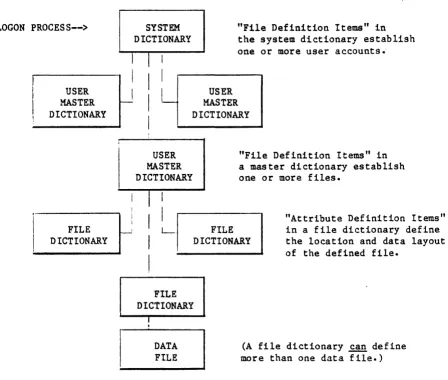
The hierarchy of the PICK Operating System dictionaries is as follows: 1. The System Dictionary contains the users who may log onto the system.
There is only one system dictionary per system. An item-id (attribute 0) in the system dictionary is a user's name (or logon word); further
attributes describe passwords and security codes, etc. The most important attributes of an item in the system dictionary are attributes 2, 3, and 4 which give the base frame, modulo, and separation of an individual account master dictionary.
3. The File Dictionary contains file and attribute definition statements that describe the structure of the data file with which the dictionary is associated. These definition items can describe, on an attribute-by-attribute basis, the type of data in an attribute-by-attribute, conversion specifica-tions, relationships between attributes, etc. The file dictionary can either point to a single file, or multiple files having identical struc-ture. However, no file can be without a dictionary pointing to it. A special type of file, the "single-level" file, is a dictionary file with no associated data file. All of the data is contained within the
[image:24.613.62.510.284.664.2]dictionary itself, and it "points" to itself. Figure 3-1 diagrams the hierarchy of dictionaries.
LOGON PROCESS-->
USER MASTER DICTIONARY FILE DICTIONARY SYSTEM DICTIONARY
I
I
I
I
I
I
I
I
L
I
"File Definition Items" in the system dictionary establish one or more user accounts.
USER MASTER DICTIONARY USER MASTER DICTIONARY
"File Definition Items" in a master dictionary establish one or more files.
I
I I
L-I
I
FILE DICTIONARY
"Attribute Definition Items" in a file dictionary define the location and data layout of the defined file.
FILE DICTIONARY I
.
DATA FILEFigure 3-1.
(A file dictionary ~ define more than one data file.)
G3A00751A
3.2 ITEMS AND ATTRIBUTES IN DICTIONARIES
As discussed earlier, all files consist of one or more items. Each is
identified by a keyword, the item-id, that can be located quickly through the hashing algorithm. An entire item is, in reality, a string of attributes
delimited by the character A, the first one, attribute 0, serves as the key and
functions as the item-ide
An important concept to remember is that dictionaries are files too. Their structure follows the same pattern of item-id followed by attributes, like any other file. Dictionaries achieve special significance by following a
relatively rigid structure, unlike data files which follow whatever structure the data is suited to. Dictionary files reserve certain characters for
attribute 1. If one of these reserved characters appear as attribute 1 in the item, then the item-id and the following attributes in that item take on
special significance in the definition of the item and its purpose. There are several different classes of items that can appear in a dictionary file, the following is a discussion of the major types.
3.3· FILE DEFINITION ITEMS
When an item in a dictionary file is used to define another "lower level" file, the item-id, or attribute 0, of the item becomes the name of the file being pointed to. This lower level file can be either a true data file, or another dictionary.
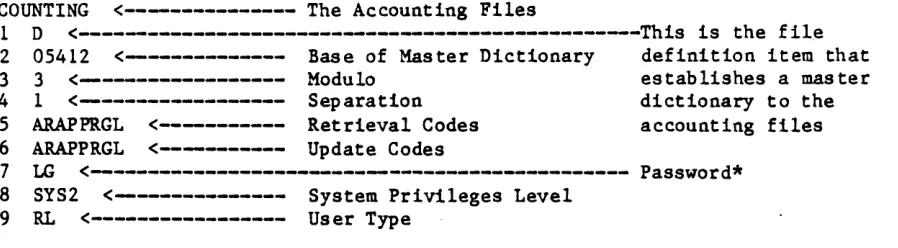
When a file definition item appears in the system dictionary, the "file" being defined is the master dictionary of a user account. Some of the attributes
take on special roles in the system dictionary such as the establishment of logon passwords.
When a file definition item appears in a master dictionary, the "file" being defined is the dictionary establishing a data file. One dictionary file can contain one or more file definition items pointing to data files that have identical structure.
3.3.1 ATTRIBUTE 0, THE ITEM-IO
3.~.2 ATTRIBUTE 1
Within a dictionary file, an item that has the character
Q
in attribute 1, also referred to as a D-ITEM, indicates that the following attributes define the structure of another file or dictionary. If the D in attribute 1 is fol~owed by an X, the file will be erased during a system restore. This is useful when creating temporary files, rather than writing special purging routines. If the D is followed by a Y, the data within the file will be erased during a systemrestore, but the pointer to the file in its related dictionary will remain; thus the file still exists, it is just empty. If the D is followed by a C, the data within the file is binary data (compiler object code) and the file
definition is actually stored in a pointer file, either the user's or the
system pOinter file (a pointer file is a file which contains special definition items that pOint to the disk location of object code files and selected lists of item-ids). DCX and DeY give these binary data files the X and Y purge control flags.
3.3.3 ATTRIBUTE 2
Attribute 2 contains the base frame-id of the file being defined. When the file is created and the contiguous space is reserved, the create file processor automatically loads this attribute; it, of course, must not be altered by
the user.
3.3.4 ATTRIBUTE 3
Attribute 3 contains the modulo of the file being defined. When the file is created and the contiguous space is reserved, the create file processor automatically loads this attribute; it, of course, must not be altered by the user.
3.3.5 ATTRIBUTE 4
Attribute 4 contains the separation of the file being defined. When the file is created and the contiguous space is reserved, the create file processor automatically loads this attribute; it, of course, must not be altered by the user.
3.3.6 ATTRIBUTE 5
J3A00751A
3.3.7 ATTRIBUTE 6
This is the update lock code, a form of password protection discussed in Section 6, System Security.
3.3.8 ATTRIBUTE 7
When the file definition item is used to define a data file, this attribute is not used. When a file definition item in the system dictionary is used to create a user's master dictionary, this attribute contains the logon password.
3.3.9 ATTRIBUTE 8
When the file definition item is used to define a data file, this attribute is not used. When a file definition item in the system dictionary is used to create a user's master dictionary, this attribute contains the system privilege level of the defined user (refer to Section 6, System Security, for more
information).
3.3.10 ATTRIBUTE 9
When the file definition item is used to define a data file, this attribute contains the type of data in the item-id field of the defined file. This includes alphabetical or numeric, and the output specifications for the line printer or terminal screen (flush left or right). The flush left/right option is taken into consideration when sorting the file by item-ide
When a file definition item in the system dictionary is used to create a user's master dictionary, this attribute contains the user-type code of the defined user (refer to Section 5, System Software and Utilities, for more information).
3.3.11 ATTRIBUTE 10
Attribute 10 designates the space to be allowed when printing the item-ide 3.3.12 ATTRIBUTE 11
Reserved for system use. 3.3.13 ATTRIBUTE 12 Reserved for system use. 3.3.14 ATTRIBUTE 13
Attribute 13 contains the new modulo and separation when the file is
3.4 FILE-SYNONYM DEFINITION ITEMS
When an item in a dictionary file is used to define another "lower level" file, the item-id, or attribute 0, of the item becomes the name of the file being defined. It is sometimes convenient to give a file more than one name, as in giving the file "INVENTORY" the name "INV" for short. File synonyms can also be useful in a master dictionary, M/DICT, to alter the command language termi-nology and/or create abbreviations. The operating system makes this possible with the "file-synonym definition" item. Aside from giving a file an alternate name within the same user account, the file-synonym definition item can also point "outside" its account and reference files in other accounts, provided security restrictions are met. The item-id of the synonym definition item is the new version of the name. The "real" name is placed in attribute 3. The following is a summary of the attributes in file-synonym definition item.
3.4.1 ArrRIBUTE 0, THE ITEM-ID
The item-id becomes the synonym name of the file being defined. If the synonym item is being used to point to a file in another account, the item-id is the "real" name of the file.
3.4.2 ATTRIBUTE 1
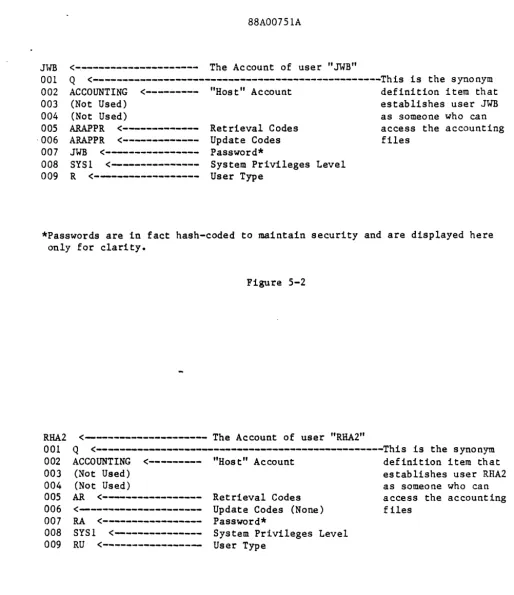
Within a dictionary file, an item that has the character ~ in attribute 1, also referred to as a Q-ITEM, indicates that the following attributes point to the name and account location of another file.
3.4.3 ATTRIBUTE 2
Attribute 2 contains the account name where the file "pointed to" by the Q-ITEM is located. This is also used to set up access to a file in another account. In this case, the same name for both the original file, the "D-ITEM," and the new synonym, the "Q-ITEM" might be the same. Thus the ability of a Q-ITEM to become a synonym is not used, only its ability to "point" to a file in another account. Access is still controlled by the security system. See Section 6, System Security, for a more detailed discussion. If attribute 2 is null, the file being pOinted to is assumed to be in the same account.
3.4.4 ATTRIBUTE 3
Attribute 3 contains the name of the file as defined in the liD-ITEM." When referring to a file by its abbreviated "Q-ITEM" name, the system will search back to the original file definition item for the base frame, modulo,
d8A00751A
3.5 ATTRIBUTE DEFINITION ITEMS
A data file, like all files, consists of items identified by the item-id
followed by a number of other attributes, I-n (or no attributes). These attri-butes make up -the data in the file. The purpose of the attribute definition item in the file dictionary is to define the nature of the data contained
within a specific attribute. Thus, the data, and inter-data relationships, can be defined on an attribute-by-attribute basis. The item-id, or attribute 0, of the attribute definition item is a mnemonic "name" for that attribute. This feature is used extensively by the PICK Operating System's English-like data base ACCESS Processor as a user-oriented means to identify the data. For instance, a user could refer to the "LIST-PRICE" rather than "ATTRIBUTE 14." The following is a summary of the attributes in an attribute definition item.
3.5.1 ATTRIBUTE O. THE ITEM-ID
The item-id becomes the mnemonic label for the attribute being defined.
3.5.2 ATTRIBUTE 1
Within a dictionary file, an item that has the character ~ in attribute 1 indicates that the following attributes define the nature of the data in the file or files the dictionary points to.
3.5.3 ATTRIBUTE 2
Attribute 2 is the attribute mark count, or AMC attribute. It refers to the number of the attribute in the data file to which the attribute definition item refers. Remember, the item-id gives the mnemonic label the user will refer to the attribute by; this is the actual numerical pointer the system will use to identify the attribute. Since the item-id is attribute
a
for every item, attributes I-n are logically referred to by the AMC of I-n. If the AMC is 0, then the item-id is being defined.A "pseudo" AMC higher than the actual number of attributes in the file being" referenced can be used to manage data that is computed, but not really stored in the file. For instance, the attribute "DEALER-PRICE" might not be stored in the file, but would be computed by taking the real attribute "AVERAGE-COST" and multiplying it by the real attribute "DEALER-MARKUP." Once defined, this
3.5.4 ATTRIBUTE 3
Attribute 3 contains an optional label that will be used as the heading for printout. To save keystrokes, the item-id of the attribute definition item, which is normally the label, might be "PN." Attribute 3 could contain "INTERNAL INVENTORY PART NUMBER CODE" to make the printout mere readable for the occasional user. The heading can be defined as having more than one line.
3.5.5 ATTRIBUTE 4
Attribute 4 contains the associative structure code. This code can be used to identify "controlling" and "dependent" attributes. This relationship is used primarily in printout formatting. For instance, if the controlling attribute is suppressed during printout, the dependent attributes will be suppressed too. This relationship extends to attributes containing multiple values. If the 28th value of a controlling attribute is suppressed, the 28th values of each dependent attribute will be suppressed also. Subvalues contained within values are controlled according to the value in which they are contained. A controlling attribute can control many dependents, but a dependent attribute can only have one controller.
When defining a controlling attribute and the one or more dependent attributes it controls, the format is "C" followed by the attribute mark count or "amc" of the dependent attributes (e-g., Cjamc;amc; etc.).
When defining dependent attributes, the code Djamc is used in the attribute definition item of each dependent attribute to identify the one attribute that
it is controlled
by-3.5.6 ATTRIBUTE 5
Attribute 5 is not used in attribute definition items.
3.5.7 ATTRIBUTE 6
Attribute 6 is not used in attribute definition items.
3.5.8 ATTRIBUTE 7
8~A00751A
3.5.9 ATTRIBUTE 8
Within the PICK Operating System, data can be stored on disk in a variety of ways. For instance, the date is stored as a four-byte code, the time is stored as the number of seconds since midnight, etc. Also, data could be stored one way, but might need to be converted in a variety of different ways for output. A check register might store check amounts in decimal form, but a printout would include a leading dollar sign. The actual check might require a number of leading asterisks. A summary financial report might use that data base, but round up or down to even dollar amounts. Both attributes 7 and 8 provide
correlative conversions which are used to convert from the stored format to processing format.
Using these functions, data can be altered from the stored format to an intermediate format for computation, and then to another format for output. Since these functions operate on an attribute-by-attibute basis, different data within one file can be manipulated with complete flexibility.
The following is a summary of standard conversions provided with the operating system:
1. The A Conversion/Correlation - A or arithmetic is used to compute
mathematical expressions. A is followed by an expression. A variety of standard arithmetic and relational expressions are available in addition to special functions.
2. The C Conversion - C or concatenate is used to concatenate attribute values.
An
optional argument can be used to put one or more spaces or other characters between the two concatenated strings.3. The D Conversion - D or ~ is used to convert back and forth from the internal format to a number of standard external formats. The date is stored in the system as four bytes representing the number of days from a fixed point in time.
4. The F Conversion/Correlation - F or function is used to compute a
mathematical function on attribute values. An A conversion is actually converted to an F at run-time.
5. The G Conversion - G or ~ is used to extract one or more fields
separated by a user-defined delimiter other than one of the. normal system delimiters. For instance, G with the delimiter argument of "_" could be used to extract the department number only from an employee file where an employee number was the form department-employee.
7. The R Conversion/Correlation - R or range is used to extract only data that has a length which falls within the range of the argument. The argument is two decimal numbers separated by a comma indicating the range of data that is acceptable. Multiple ranges can be specified by separation with the semicolon.
8. The
Me
Conversion -Me
or mask character is used to convert strings toupper or lower case or to extract alphabetic or numeric characters from a string.
9. The ML and MR Conversions - ML and MR are the mask decimal left or right conversions used to format decimal numbers. Optional arguments give the number of digits to be printed to the right of the decimal point, control the rounding off process, insert commas, cause negative numbers to be printed with "CR" and positive numbers to be printed with "DB," append dollar signs, insert text strings, etc. Land R control whether the result will be printed left or right justified.
10. The HI Conversion - MT or mask time is used to convert the time of day from the internal format to the various standard formats.
11. The MX Conversion - MX or mask hexadecimal is used to convert ASCII character strings to their hexadecimal (base sixteen) representations. 12. The P Conversion - P or pattern match conversion is used to return only
data which matches a specified pattern. The argument can call for a specific number of numeric characters, a specific number of alphabetical characters, or a specific number of either. The argument can also call for a specific pattern as in the following example:
P (3N-2N-4N); (9N)
This requests a pattern match of three digits, two digits, four digits separated by hyphens (e.g., a social security nuober). This example also illustrates the use of the semicolon in separating multiple arguments. In this case, the second argument of nine digits without hyphens is also acceptable, so both of the following would satisfy as a match:
410-96-5644 and 410965664
88A00751A
14. The T Conversion - T or text extraction is used to extract a specified number of characters from an attribute. The argument consists of the starting character position and the number of contiguous characters to extract.
15. The Translate Conversion/Correlation - Translate is'used to convert data by examinin'g another file. The format of this attribute is
!
followed bythe name of another file. On both input and output operations, data can be converted. The incoming data to be translated represents an item-id in the "other" file. A lookup is performed and the contents of the item-id become the translation. Different attributes of the item-item-id can be used on the input and output pass. As an example, standard abbreviations can be processed in the following manner: On the input pass, Mastercharge could be abbreviated MC and on the output, ~ could become Mastercharge. A savings of 10 characters per entry in the data base is realized without compromising the readability of the printout, and when the terminology "Mastercharge" must be altered to "Master Card," the conversion is simply and quickly realized.
3.5.10 ATTRIBUTE 9
Attribute 9 contains the output specifications for the line printer or terminal screen (flush left or right) and is also taken into consideration during
sorting.
3.5.11 ATTRIBUTE 10
Attribute 10 contains the maximum length of values for the attribute. This maximum is for columnar printout purposes and does not represent a limitation on the length of the stored data. Data that exceeds this length will be folded at word breaks during printout.
3.6 SUMMARY
The dictionary system is an hierarchical structure which controls many aspects of the PICK Operating System environment.
The system dictionary contains the system programmer's account SYSPROG, the system error message file (ERRMSG), a library of standard PROCs (PROCLIB)
(refer to Section 8, PROC Language Processor, for more information), the
accounting history file (refer to Section 5, System Software and Utilities, for more information), and the new account file (NEWAC), which is the prototype of an individual master dictionary. The system dictionary also contains D-ITEMS pointing to the individual master dictionaries of each user.
The existence of a master dictionary, defined in the system dictionary, is synonymous with the existence of a user account. The master dictionary
contains the user's command vocabulary, on a user-by-user basis, thus making it possible for different users to communicate in different languages, on the same computer, at the same time. The master dictionary also points to file
dictionaries.
4.1 INTRODUCTION
88A00751A-data base architecture
and
th.e a-ccess process
4
The mechanics of the PICK Operating System file structure has been discussed in Section 2, File Structure, and Section 3, Dictionary System. The flexibility of this file structure lays the foundation for the higher level data base manage~ent facility within PICK Operating System and English-like ACCESS Processor.
The first part of this section will discuss some of the precepts upon which data base systems operate and the second part will discuss how these are specifically implemented in the PICK Operating System.
4.2 DATA BASE APPROACH
A "data base" is an accessible collection of separate information values. The purpose of a data base system is to manage all of the operational information pertaining to an organization in one coherent way, using one set of standards. Once this has been done, the information can be made accessible, thereby
useful, in a controlled manner.
In practice, the data base system replaces separate files and file management code in individual applications programs with the "data base" and related logic. Individual applications no longer access their own files, but simply request data transactions to and from the data base system.
Replacing the file management responsibility in individual programs with one centralized and standardized process provides an organizing force over the total range of data processing activity. Two or more application programs no longer maintain redundant data; they both share the same data base. This process alone has the effect of increasing the accuracy of the data within the system, since updating a value stored in the data base has the effect of
The real purpose of the data base approach is to enhance the information content of the data that drives the system. "Information" not only includes a retrieval of stored data items, but analysis based on relationships between them. A data base system is not a file cabinet, but an information resource. True data base systems provide a query facility that allows a user to express one or more relations between data items and request meaningful analysis and output based on those relations. A relational approach to the data base can produce new information where there was none before.
These points are keyed to the usefulness of data base systems in a business computing environment. Running a complex business is, at best, like dealing with a moving target. If a data base system is to assist the decision making process, it must be flexible enough to deal with unanticipated requirements. Such a system can be invaluable to the business executive dealing with dynamic and highly competitive markets.
4.3 ELEMENTS IN A DATA BASE SYSTEM
A data base system can be broken down into roughly three components. The first is the internal data model or storage system. This is how real data is
88A00751A
4.4 DATA BASE FILE STRUCTURE, THE INTERNAL MODEL
Various data base systems can be characterized by the manner in which files are stored and retrieved. These techniques constitute the internal data model, and greatly affect the other elements of the system, especially formulation of the retrieval language. The structure of the internal data model also has a great impact on how easily the system can be understood and managed. Data base systems ~ complex, and elaborate internal systems can make a theoretically useful system unmanagable in the real world.
4.4.1 HIERARCHIES AND NETWORKS
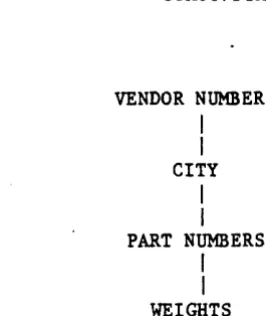
Hierarchical systems, as the name implies, have a hierarchy of data. Thus, a vendor number might point to a city, which would point to a part number, which would point to a weight. Such systems are generally represented by tree
structures and involve a number of different file types. A simple example is shown in Figure 4-1.
Network systems are similar to hierarchical systems except the linking structure is not a. vertical hierarchy or "tree," but a flexible series of links. Unlike hierarchies, networks can have many links connecting data elements. An example is shown in Figure 4-2.
Networks, like hierarchies, normally maintain at least two types of files: "real data" files and "link" files.
Both networks and hierarchies suffer from a number of problems. Their inherent structure is complex, and thus the associated supporting programming must be complex; and they do not model the "real" world very well. Hierarchies are excellent for modeling true hierarchical relationships, but they are only a small fraction of the types of relationships a flexible data base system may be called upon to manage. Network systems are really just a complex way of making hierarchies more flexible and they do model the real world better than
hierarchies, yet the complexity of both of these data models makes the
formulation of a clear, user-oriented query language all the more difficult, since both systems represent data relationships in several ways using several different file types.
The real Achilles heel of these systems is the fact that relations between data items are intrinsic to the structure and must normally be predetermined in the systems analysis phase and built into the data model before they can be
VENDOR NUMBER
I
I
CITY
I
I
PART NUMBERS
I
I
WEIGHTS
Figure 4-1. Hierarchical Data Representation
VENDOR NUMBER
~--- CITY
---PART NUMBERS _ _ _ _ ~---_J
~---WEIGHTS
[image:38.615.173.306.72.230.2]88A00751A.
4.4.2 RELATIONAL SYSTEMS
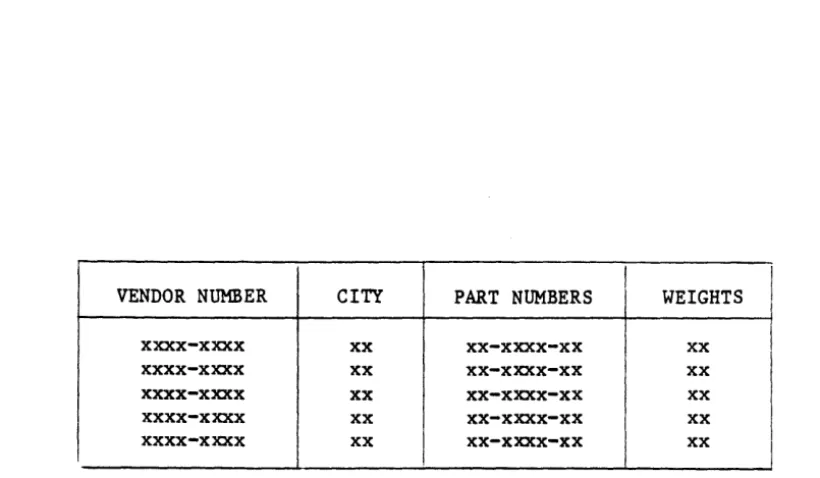
The PICK Operating System is a relational data base system. The relational approach is based on the principal that "relations" between data elements are the fundamental subject of concern when making a query into a data base, so it is the most useful data model for most types of applications. A relational data model is conceptually like a common "table" with various entries. An example is shown in Figure 4-3.
Using the relational system, many different types of inquiries can be handled easily by examining "rows" and "columns." On the PICK Operating System, the file structure used to store data is also flexible enough to store the
dictionary files associated with the data files. In fact, every file on the PICK Operating System is stored using the same file structure as is used when storing data, and this feature provides a welcome level of simplicity.
The PICK Operating System internal file model is discussed in detail in Section 2, File Structure, but the important point here is the close relationship
between the internal file structure and the external appearance of the data. This close relationship provides a further level of simplification, and makes
the "conceptual leap" between stored data and its meaning much less difficult for the average user to comprehend.
VENDOR NUMBER CITY PART NUMBERS