A Provisioning Model towards OAuth 2.0 Performance
Optimization
M. Noureddine
Program Manager, Lync Server Group Microsoft Corporation
Seattle, USA
R. Bashroush
School of Computing, IT & Engineering University of East London
London, UK [email protected]
Abstract—A major hurdle of formal adoption of OAuth protocol for enterprise applications is performance. Enterprise applications (e.g. SAP, SharePoint, Exchange Server, etc.) require a mechanism to predict and manage performance expectations. As these applications become more and more ubiquitous in the Cloud, the scale and performance expectations become an important factor impacting architectural decisions for security protocol adoption. This paper proposes an optimization to OAuth 2.0 for enterprise adoption. This optimization is achieved by introducing provisioning steps to pre-establish trust amongst enterprise applications’ Resource Servers, its associated Authorization Server and the clients interested in access to protected resources. In this model, trust is provisioned and synchronized as a pre-requisite step to authentication and authorization amongst all communicating entities in OAuth protocol, namely, the client requesting a protected resource, the resource server, and the authorization server. For a case study, we analyze SAP authenticating with SharePoint using our optimization versus existing OAuth protocol. We believe such optimization will further facilitate the adoption of OAuth in the enterprise where scale and performance are critical factors.
Keywords-OAuth; Authentication and Authorization; Cloud Performance; Access Delegation; Authorization Servers
I. INTRODUCTION
OAuth is a claim-based security protocol that enables users to grant third-party access to their protected resources without sharing their passwords. OAuth implements this by using a data structure, called token, that decouples the access right from the client login credentials [5]. Clients request tokens from authorization server and present the token to the service provide. OAuth 1.0 [1] was published in December 2007 and quickly became the industry standard for web-based access delegation. However, OAuth 1.0 faced lots of challenges to make it into the enterprise domain mainly due to the lack of performance optimization capabilities currently on offer by the protocol. Microsoft, Google, and other large organizations [3] proposed OAuth WRAP (Web Resource Authorization Profiles) to solve the performance challenges and facilitate adoption by the enterprise. One of the main optimizations is the introduction of an independent Authorization Server. OAuth adopted the WRAP recommendation into OAuth 2.0. However, adoption has not yet been proven in enterprise deployments (e.g. Microsoft Exchange Server, Lync Server, Oracle, SharePoint, SAP, etc.). In this work, we introduce an optimization to OAuth 2.0 where the Authorization Server is provisioned with explicit authorization table so that access
grants are rejected at the Authorization Server before getting to the protected resource. This reduces the amount of processing some popular protected resources would have to do and alleviates the risk of potential threats such as Denial-of-Service (DoS) attacks and Distributed DoS (DDoS) attacks. In addition, by extending the parameters of OAuth authorization request, the calling client can reduce the number of calls it makes to the authorization server. In the model we developed in this paper, a client makes a single trip to the authorization server to serve all its users. In the case study presented, we show how a SAP server would only need to make a single acquisition of a token to server all it’s logged in users with documents available in SharePoint.
In the next section, we discuss the drivers behind the introduction of OAuth2.0 and present its architecture. In section 3, we argue the modifications suggested to OAuth 2.0 in order to facilitate enterprise adoption of the protocol through a case study. Finally, section 4 rounds off the paper with a conclusion and a preview of planned future work.
II. INTRODUCTION TO OAUTH 2.0
Although OAuth 2.0 is a new protocol, it still retains the overall architecture and approach established by the previous versions. As large providers started using OAuth 1.0, the community realized that the protocol does not scale well. It required state management across different steps; temporary credentials management; and provided no isolation of the Authorization server from the protected resource server itself. In addition, OAuth 1.0 required that the protected resource servers’ endpoints have access to the client credentials in order to validate the request. This broke the typical architecture of most large providers in which a centralized authorization server is used for issuing credentials, and a separate server is used for API calls. OAuth 1.0 required the use of both sets of credentials: the client credentials and the token credentials, which made the separation very hard [2]
Resources Servers for scalability and security reasons. The OAuth Web Resource Authorization Profiles (OAuth WRAP) enable a Protected Resource to delegate the authorization to access a Protected Resource to one or more trusted authorities. Clients that wish to access a Protected Resource first obtain authorization from a trusted authority (Authorization Server). Different credentials and profiles can be used to obtain this authorization, but once authorized, the Client is provided with an Access Token and possibly a Refresh Token to obtain new Access Tokens. The Authorization Server typically includes authorization information in the Access Token and digitally signs the Access Token. The Protected Resource Server can verify that an Access Token received from a Client was issued by a trusted Authorization Server and is valid. The Protected Resource Server can then examine the contents of the Access Token to determine the authorization that has been granted to the Client.
Figure 1 below shows the architecture for OAuth 2.0 with an independent Authorization Server.
The abstract flow illustrated in Figure 1 describes the interaction between the four roles and includes the following steps:
1. The client requests authorization from the resource owner.
2. The resource owner redirects the request to authorization serve
3. The client requests authorization grant from the authorization server by presenting the client credentials
4. The authorization server validates the client credentials and the authorization grant, and if valid issues an access token
5. The client requests the protected resource from the resource server and authenticates by presenting the access token
6. The resource server validates the access token, and if valid, serves the request.
III. ENTERPRISE INTEGRATION
It is often required for servers to integrate with each other and exchange protected data. An example of this is SharePoint Online integration with SAP. A third party may want to develop an application to login into SAP and save completed financial reports in SharePoint for sharing with colleagues or managers, for example. Since these financial reports are protected resource with high business impact, it may not want to hand its protected data to any application with a valid token. Also since our example protected resource servers SharePoint and SAP can host millions of users in the Cloud in a Shared Tenancy [5] model, request for access with valid tokens can easily burden the server.
In our proposal, shown in Figure 2 below, we are adding a provisioning step in which a pre-established trust between the Client and the Resource Server is established. This step can reduce many of the unwanted requests to the Resource Server. Also, during this step the client is given information on where to go to acquire a token, in other words, the address of the Authorization Server.
Figure 2. OAuth 2.0 Modified Architecture
The abstract flow illustrated in Figure 2 above describes the OAuth 2.0 modified interaction between the different roles and includes the following steps:
A. Provisioning step: clients interested in acquiring protected resources from resource server are provisioned (in a delegation table, for example). The address of the authorization server is provided, for example as: https://authserver.com
B. Resource Server synchronizes trusted client with Authorization Server so that it only issues tokens to provisioned clients
When a client wants to access a resource from Resource Server:
1. The client requests authorization grant from the authorization server by presenting the client credentials
2. The authorization server validates the client credentials and the authorization grant. It also validates that the client is a trusted entity by Resource Server and issues an access token
3. The client requests the protected resource from the resource server and authenticates by presenting the access token
4. The resource server validates the access token, and if valid, serves the request.
It is important to note that during provisioning, the client may be given the rights to act on behalf of any user. In this case, the client make a request to acquire a token (step 1 above) only once during the lifetime of the token. In our experiment, when we setup the token lifetime for 24hours, the client was making a round trip to the authorization server once a day. This is a significant optimization over what the current OAuth 2.0 model offers.
IV. CASE STUDY
In our case study, we simulate the use of two enterprise applications, namely SharePoint Online and SAP that are interested in sharing protected resources on behalf of their users. For the purpose of this case study, SAP and SharePoint are also provisioned to trust each other and can act on behalf of any user they trust. Therefore, SharePoint is provisioned to trust SAP and SAP is provisioned to trust SharePoint. The Authorization Server is synchronized so it only issues tokens to trusted clients such as SAP and SharePoint. If any client requests a token with non-established trust, the Authorization server will deny access.
In order to simulate this, we built a Resource Server (RS1) and set up an Authorization Table as shown in Table 1 below. This table is synchronized on the Authorization Server (Table 2) as well as the client (Table 3). Resource Server can only issue tokens to SharePoint and for SAP. The Resource Server can only accept tokens issued by Authorization Server (AS1) scoped to SharePoint.
TABLE I. RESOURCE SERVER (SHAREPOINT)TABLE Authorized Client Credentials
SAP SAP Credentials /public key
TABLE II. AUTHORIZATION SERVER (AS1)TABLE
Client AppliesTo Credentials
SAP All users SAP Credentials/public key
SharePoint All users SharePoint Credentials/public key
TABLE III. CLIENT TABLE (SAP)
Resource Server Authorization Server SharePoint https://AS1
Resource Server 2 https://AS2
During trust establishment (Step A in Figure 2 above), the Resource Server (SharePoint) sets Table1. It synchronizes it with its Authorization Server. In return, the Authorization Server will only issue tokens to clients in the table after validating their credentials. If, for example, a client C1 comes with a request, it will not be granted a token since it does not have an entry in the table. Such optimization reduces the number of unwanted calls to resource servers such as SharePoint or SAP, since they will be rejected at the authorization server. During the provisioning process with the client, the Resource Server provides the address of its Authorization Server so that the client goes there to acquire a token. These clients do not need to ping the resource server and be redirected to the authorization server as in the original OAuth 2.0 protocol. This also helps in reducing potential DoS or DDoS threats since the resource server does not need to compute every request and redirect it. Instead it will be rejecting the unwanted requests due to lack of access token within the request itself. In our case study, both SAP and SharePoint simulated servers shared the same Authorization Server and exchanged the location “https://AS1”, in this example. https://AS1 simulates the location of the authorization server so that the client knows where to go to obtain the authorization token. In the original OAuth protocol,
the client needs to hit the resource server first and gets redirected to the authorization server. With our proposed optimization, due to the provisioning step, the client can go directly to the authorization server.
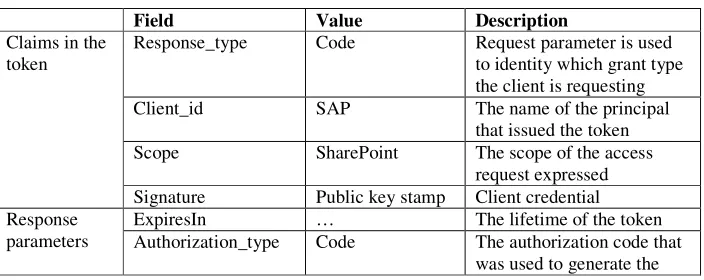
A second optimization we have designed is the introduction of additional parameter to the Token itself. This parameter is called AppliesTo parameter. When SAP requests a Token from AS1, it will be receiving a token with AppliesTo parameter = ‘All users’ (if during trust provisioning such client is allowed to act on behalf of all users). SAP (client in this case), therefore, does not have to request a token for every additional request against SharePoint. SAP in this case, can cache the token and make a request against SharePoint for additional claims throughout the lifetime of the token. In our case study, SAP was required to acquire a single token once every 24 hours since we setup the lifetime of the token to 24 hours. It is important to note that OAuth protocol allows the authorization server to set the token lifetime. For our case study we used 24 hours. This can be configured based on the security needs of the resource server.
[image:4.612.132.484.530.670.2]Table 4 below shows our modified protocol access token parameter list.
TABLE IV. THE MODIFIED PROTOCOL ACCESS TOKEN PARAMETERS
Field Value Description
Claims in the token
Response_type Code Request parameter is used
to identity which grant type the client is requesting
Client_id SAP The name of the principal
that issued the token
Scope SharePoint The scope of the access
request expressed Signature Public key stamp Client credential Response
parameters
ExpiresIn … The lifetime of the token
access token
AppliesTo All users A parameter to indicate that client is interested in acting on behalf of all users
V. CONCLUSION &FUTURE WORK
As a consumer centric authentication protocol, OAuth is light-weight, secure, and simple identity management protocol. In this paper we have shown an optimization that can significantly reduce number of authentication requests without jeopardizing security requirements. Our optimization also reduces unwanted authentication claims and can potentially reduce potential DoS and DDoS threats. To better leverage OAuth 2.0 in the enterprise, we proposed two optimizations. The first optimization is requiring a pre-established trust provisioning step. In this step, we synchronized an authorization table between the client, the Resource Server, and the Authorization Server. The second optimization is introducing AppliesTo parameter so that highly trusted clients can authenticate on behalf of users.
In future work, we plan to introduce additional optimization for Cloud based enterprise servers hosted in a multi-tenancy environment. In this optimization, we plan to develop and provision a shared Authorization Server than can serve access tokens to each tenant in a secured way.
REFERENCES [1] OAuth 1.0, http://oauth.net/core/1.0/#anchor1
[2] OAuth, http://tools.ietf.org/html/draft-hardt-oauth-01#page-14 [3] OAuth WRAP, http://tools.ietf.org/html/draft-hardt-oauth-01
[4] Wang Bin, Huang He Yuan, Liu Xiao Xi, Xy Jing Min: Open Identity Management Framework for SaaS Ecosystem. In: ICEBE 09 Proceedings of the 2009 IEEE International Conference on e-Business Engineering.
[5] Yating Hsu and David Lee: Authentication and Authorization protocol security property analysis with trace inclusion transformation and online minimization. In: ICNP 2010 Proceedings of the 2010 IEEE International Conference
[6] Ye Hu, Johnny Wong, Gabriel Iszlai and Marin Litoiu: Resource Provisioning for Cloud Computing. In: Proceedings of CASCON 2009, November 2009.
[7] WS-Trust, http://docs.oasis-open.org/ws-sx/ws-trust/200512/ws-trust-1.3-os.html