mamaala
to ::t> ("""') A Ci) ;:;::c 0 c::::z
t::1 ...-n
0 ;:;::c fT1 Ci) ;:;::c 0 c::::z
t::1 :::3: C>::z
-
~ <::) ;:;::c en-<
C/') ~ rr1 :::3:..
-c
;:;::c 0 Ci) ;:;::c ::t:> :::3: 3:rn
:::::c
...
C/)
:::::c
rn
-n
rn
;:;::crn
:z
("""')rn
::::3: ::t:>::z
c:: :J> IDEC-9A-MRZA-D
PDP-9
BACKGROUND / FOREGROUND MONITOR SYSTEM
PROGRAMMER1S REFERENCE MANUAL
To
OBTAIN ADDITIONAL COPIES OF THIS MANUAL, ORDER
NUMBER DEC-9A-MRZA-D FROM THE PROGRAM LIBRARY,
DIGITA.L EQUIPMENT CORPOR:ATION, MAYNARD, MASSACHUSETTS,
SEC'rION 1 1.1 1.2 1.2.1 1.2.2 1.2.3 1.2.4 1.2.5 1.2.6 1.3 SECTION 2.1 2.2 2.3 2.4 2.4.1 2.4.2 2.4.3 2.4.4 2.5 2.5.1 2.5.2 2.5.3 2.5.4 2.5.5 2.5.6 2.5.7 2.5.8 2.5.9 2.5.10 2.5.11 2.5.12 2.5.13 2.6 2.7 2.8 2 CONTENTS
BACKGROUND/FOREGROUND MONITOR INTRODUCTION
BACKGROUND/FOREGROUND MONITOR FUNCTIONS Scheduling of processing Time
Protection of FOREGROUND Core and I/O Sharing of Multi-Unit Device Handlers Use of Software Priority Levels
Use of Real-Time Clock
Communication Between BACKGROUND and FOREGROUND Jobs
EARDWARE REQUIREMENTS AND OPTIONS
1-1 1-1 1-3 1-5 1-5 1-7 1-7 1-7 1-8
BFKM9 - NON-RESIDENT BACKGROUND/FOREGROUND MONITOR INTRODUCTION
LOCATION AND WHEN CALLED INITIAL OPERATION
INFORMATION COMMANDS The LOG Command (L) The REQUEST Command (R) The DIRECT Command (D) The INUSE Command (I) ALLOCATION COMMANDS
The ASSIGN Command (A) The FILES Command (F) The FCORE Command The FCONTROL Command The BCONTROL Command The NEWDIR Command (N) The SHARE Command (S) The NOSHARE Command The 7CHAN Command (7) The 9CHAN Command (9) The VC38 Command (V) The MPOFF Command The MPON Command (M)
PROGRAM LOAD COMMANDS FINAL OPERATION
CONTROL CHARACTERS
SECTION 3 3.1 3.2 3.3 3.4 3.5 3.6 3.7 3.7.1 3.7.2 3.7.3 3.8 3.9 3.10 3.11 3.12
SECTION 4 4.1 4.2 4.2.1 4.2.2 4.2.3 4.3 4.4 4.5 4.5.1 4.5.2 4.6 4.7
CONTENTS (Cont.)
CONTROL CHARACTERS PURPOSE
CONTROL TELETYPE TELETYPE HANDLER CTRL C (tC) CTRL S (tS) CTRL T (tT) CTRL P (tP)
NORMAL CTRL P No Change
REAL-TIME CTRL P CTRL R (tR)
CTRL Q (tQ) CTRL U (@) RUBOUT CTRL D (tD)
LOADERS INTRODUCTION
FOREGROUND LINKING LOADER
Option Characters and Their Meanings Use of + Terminator
Sequence of Operation BACKGROUND SYSTEM LOADER BACKGROUND LINKING LOADER LOADING XCT FILES
EXECUTE in the Foreground EXECUTE in the Background ERROR CONDITIONS
SYSTEM MEMORY MAPS
SECTION 5 5.1 5.2 5.3
5.4
SECTION 6 6.1 6.2 6.3 6.4 6.S 6.6 6.7 6.8
SECTION 7
7.1 7.2 7.2.1 7.2.2 7.2.3 7.3 7.4 7.4.1 7 .. 5 7.0 7.6.1 7.7
CONTENTS (Cant.)
BACKGROUND/FOREGROUND START-UP PROCEDURE
LOADING THE B/F MONITOR 5-1
.IDLE LOADED AS THE FOREGROUND JOB 5-2
SINGLE-USER FOCAL LOADED INTO THE FOREGROUND 5-3
TWO-USER FOCAL LOADED' IN THE FOREGROUND 5-3
BACKGROUND/FOREGROUND MONITOR COMMANDS (SYSTEM MACROS)
INTRODUCTION 6-1
.REALR 6-2
.REALW 6-3
.IDLE 6-4
.IDLEC 6-1';
.TIMER 6-5
.RLXIT 6-6
MAINSTREAM REAL-TIME SUBROUTINES 6-7
WRITING DEVICE HANDLERS FOR THE BACKGROUND/FOREGROUND MONITOR SYSTEM
INTRODUCTION
FORMAT OF DEVICE HANDLER'S CAL PROCESSOR SETUP
Initiating I/O .OPER Functions
FORMAT OF DEVICE HANDLER'S INTERRUPT PROCESSOR SYSTEM ANNOUNCEMENTS
Errors
STOP I/O TECHNIQUE
SEQUENTIAL MULTI-USER DEVICE HANDLER .WAITR
DEVICE HANDLER LISTING
CONTENTS (Cont.)
SECTION 8 SYSTEM GENERATION 8-1
APPENDIX I .SCOM REGISTERS r"-1
APPENDIX II ERRORS II-1
SECTION 1
BACKGROUND/FOREGROUND MONITOR
1.1 INTRODUCTION
The reader is assumed to bE~ familiar with the Keyboard Monitor environment as described in the Advanced Software Monitors Manual, DEC-9A-MADO-D. It should also be noted that all material presented herein supersedes the information given in the Monitor Manual.
1.2 BACKGROUND/FOREGROUND MONn~OR FUNCTIONS
The Background/Foreground Monitor is designed to control proces-sing and I/O operations in a real-time or time-shared environment. It is, essentially, an extension of the Keyboard Monitor and al10ws for time-shared use of a PDP-9 by a protected, priority, user F'!RE-GROUND program and an unprotected system or user BACKF'!RE-GROUND program.
The Background/Foreground Monitor greatly expands the capabili-ties of PDP-9 ADVANCED Software and makes optimum use of all avail-able hardware. It permits recovery of the free time (or dead time) that occurs between input/output operations, thus promoting 100% utilization of central processor time.
require-ments, the user's FOREGROUND program could be an Executive capable of handling many real--time programs or subprograms at four levels of priority (with API present).
BACKGROUND processing is essentially the same as the proces-sing normally accomplished under control of the Keyboard Monitor. That is, i t could be an assembly, compilation, debugging run, pro-duction run, editing task, etc. BACKGROUND programs may use any facilities (for example, core, I/O and processing time) that are available and not simultaneously required by the FOREGROUND job. Under certain circumstances, I/O devices may be shared by both the FOREGROUND and the BACKGROUND jobs.
The Background/Foreground Monitor system is externally a keyboard-oriented system; that is, FOREGROUND and BACKGROUND requests for systems information, core, I/O devices, programs to be run, etc., are made via the Teletype keyboards. At run time, the Monitor internally controls scheduling and processing of I/O requests, while protecting the two resident users.
The Background/Foreground Monitor performs the following functions as i t controls the time-shared use of the PDP-9 central processor by two co-resident programs:
a. Schedules processing time.
b. Protects the FOREGROUND job's core and I/O devices. c. Provides for the sharing of multi-unit device handlers,
such as DECtape, by both FOREGROUND and BACKGROUND jobs.
d. Allows convenient use of API software levels by FOREGROUND jobs.
c. Provides for convenient and shared use of the system Real Time Clock.
f. Allows communication b(~tween the BACKGROUND and FOREGROUND jobs via core-to-core transfers or by the shared use of bulk storage devices.
1.2.1 Scheduling of Processing Time
At run time, the FOREGROUND job retains control except when i t is I/O bound; that is, when completion of an I/O request must occur before i t can proceed any further. In the following example, if the .WAIT is reached before the input requested
l)y the . READ has becn completed, control is ·transferred to ,\
lowc'r priori ty FOlmGROUND segment or to the BACKGROUND job
until the input for the FOREGROUND job is completed.
.READ 3, 0, LNBUF, 48 /READ TO .DAT SLOT 3
.WAIT 3 /WAIT ON .DAT SLOT 3
Since multi-unit device handlers can be shared by FOREGROUND and BACKGROUND programs, there is a mechanism by which a FORE-GROUND I/O request will cause a BACKFORE-GROUND I/O operation to be stopped immediately so that the FOREGROUND operation can be
honored. On completion of the FOREGROUND I/O, the BACKGROUND I/O is resumed with no adverse effects on the BACKGROUND job.
This is useful when the FOREGROUND job is waiting for real-time input from anyone of a number of input devices. Consider the following example (see Section 6.1 for description of real time read .REALR command).
.REALR 1, Q,LNBUFl, 32, CTRLl, Nl /REAL .REALR 2, 2,LNBUF2, 42, CTRL2, N2
.REALR 3, 3, LNBUF3, 36, CTRL3, N3
/TIME /READS
. IDLE
If .IDLE is reached before any of the input requests have been satisfied, control is transferred to a lower priority FORE-GROUND segment or to the BACKFORE-GROUND job. The lower priority job retains control un"til one of the FOREGROUND input requests is satisfied. Control is then returned to the FOREGROUND job by executing the subroutine at the specified completion address
(CTRLl, CTkL2, CTRL3) and at the priority level specified by Nl, N2, N3 which may be:
Value of N Q 4 5 6 7
Level
Mainstream (lowest level) Current level (level of ~EALR)
Software level 5 Software level 6 Software level 7
NOTE
If real-time reads (.REALR), real-time writes (.REALW), or interval timer (.TIMER) requests arc employed in the BACKGROUND, N may be set to 0, 4, 5, 6, or 7, but is converted to 0 since the BACKGROUND job can run only on the main-stream level. This allows the value of N to be preset in cases where a BACKGROUND program is to be subsequently run in the FOREGROUND.
1.2.2 Protection of FOREGROUND Core and 1/<2,.
The FOREGROUND job's core is protected by the Memory Protection Option (Type KX09A). The BACKGROUND job runs with memory protE~ct enabled; the FOREGROUND job runs with memory protect disabled.
Protection of the FOREGROUND job's I/O devices is accomplished via the hardware by the memory protect option, which prohibits lOT and Halt instructions in the BACKGROUND area; and the software since the Monitor and lOPS screen all I/O requests made via I/O Macros. Also, the Monitor and the BACKGROUND Loaders prevent the BACKGROUND ~ob from requesting I/O which would conflict with that of the FOREGROUND job (for example they would not honor a BACKGROUND request for a paper tape handler being used by the FOREGROUND job).
The Background/Foreground Monitor allows sharing of mUlti-unit, mass-storage device handlers (such as, DECtape, Magnetic Tape,
multi-unit handlers, n files can be open simultaneously, where n equals the number of .DAT slots associated with the particular bulk storaqe device. Some multi-unit handlers require external data buffers (assigned at load time) ,one for each open file. These buffers are acquired from and released to a pool by the handler as needed.
When this count is not accurate (because of the .DAT slots not Doing used simultaneously), the keyboard command FILES (Sec-tion 2.5.2) can be used to specify the actual number of files simultaneously open. Both the FOREGROUND and BACKGROUND jobs can indicate their file requirements by means of the FILES keyboard command.
The multi-unit handlers are capable of stacking one BACKGROUND I/O request. This provision is made to simulate exactly program operation as it would occur under Keyboard or I/O Monitor (i.e., :lingle user) control. Thus, control is returned to the BACKGROUND JOD to allow non-I/O related processing when the handler is pre-occupied with an I/O request from the FOREGROUND job. For example, if the FOREGROUND job has requested DECtape I/O with a
.READ, and is waiting for its completion on a .WAIT, control is returned to the BACKGROUND job. If the BACKGROUND job then re-quests DECtape I/O with a .READ, the handler will stack the request and return control to the BACKGROUND job following the
. READ. The BACKGROUND job can then continue with non-I/O related proccssinq asthouqh the .REl\D were being honored.
In hardware configurat.ions which include the Automatic Priori ty Interrupt (API) option, the Background/Foreground Monitor allows convenient use of software priority levels of the API by the FORE-GROUND job. The BACKGROUND job is permitted to use only the mainstream level.
1.2.5 Use of Real-Time Clock
The Background/Foreground Monitor provides for convenient and shared use of the system real-time clock. It will effectively handle many intervals at the same time; thus, the real-t:imc. clock can be used simultaneously by both BACKGROUND and FORE·-GROUND jobs.
1.2.6 Communication Between BACKGROUND and FOREGROUND ,Jobs
The Background/Foreground Monitor allows communication between BACKGROUND and FOREGROUND jobs via core-to-core transfers. 'l'his is accomplished by means of a special "Core I/O device" handler within lOPS. Complementing I/O requests are required for a
core-to-core transfer to be effected; for example, a FOREGROUND .READ (.REALR) from core must be matched with a BACKGROUND .WRITE (.REALW) to corc.
Two possible uses of this feature are:
d . rrhc~ BACKGROUND job could be related to the
pass on information that would affect FOREGROUND . 9rocessing, or vice-versa.
b. The BACKGROUND job could be a future FOREGROUND job, and the current FOREGROUND job, being its predecessor, could pass on real-time data to create a true test environment.
Communication between two jobs can also be done by storing and retrieving data on shared bulk storage devices.
1.3 HARDWARE REQUIREMENTS AND OPTIONS
The following hardware is required to operate the Background/ Foreground Monitor System:
a. Basic PDP-9 with Teletype,
b. Memory Extension Control, Type KG09A,
c. Additional 8192-Word Core Memory Module, Type MM09A, d. Memory Protection Option, Type KX09A,
e. External Teletype System, including at least*: (1) One Teletype Control, Type LT09A or LT19A, (2) One Teletype Line Unit, Type LT09B or LT19B, (3) One Teletype, Model KSR33, KSR35 or equivalent**,
'*'l'he basic system Teletype is normally assigned to the BACKGROUND environment. One Teletype of the external Teletype system must be reserved for the FOREGROUND job; additional Teletypes may be
assigned to either BACKGROUND or FOREGROUND functions. If the API option is available, a Type LT19A Teletype Control and a Type LT19B Line Unit are recommended.
**Model 37 Teletypes are not supported. Model 33 or 35ASR Teletypes are supported only to the extent that they operate as KSR's only; their paper tape input and output facility cannot be used. LT09's and LT19's may not both appear in the same configuration.
f. Bulk Storage System, comprising either:
(1) One DEC tape Control, Type TC02, and two DECtape Transports, Type TU55 (three recommended), or (2) One Disk System, Type RB09 (and one DECtape
Control, Type TC02, and at least one DECtape Transport, Type TU55), or
(3) One Disk System, Type RF09/RS09 (and one DECtape Control, Type TC02, and at least one DECtape Transport, Type TU55)
The following options curr,:!ntly supported by software may be added to improve system performance (as noted) :
Additional 8192-Word Core Memory Modules, Type MM09B and MM09C
(to a maximum of 32,768 words)
Automatic P~iority Interrupt, 'I'ype KF09A
Extended Arithmetic Element, Type KE09A
Additional DECtape Transports, Type TU55, or IBM-compatible Magnetic Tape Transports, Type TU20 or TU20A and Tape Control Type TC59
Effect
Increase the maximum f:i ;~C' of both BACKGROUND and FOREGROUND programs that can be handled by the system.
Allows for quicker recognition of requests for service by I/O devices.
Increases speed of arithmetic calculations.
Allows greater bulk storage capability, simultaneous use of storage media by more
Automatic Line Printer, Type 647
200 CPM Card Reader, Type CR03Bl
Additional Teletype Line Units, Type LT09B, (or LT19B) and Tele-types, Type KSR33, KSR35 or equi-valent** (up to a maximum of 1610 LT09B or LT19B units, requiring four LT09A or LT19A controls) .
1
Provides greater listing capa-bilities.
Allows card input and control cards for BACKGROUND Batch processing.
Provides additional output devices if multiple FOREGROUND jobs may require simultaneous output or BACKGROUND jobs wish to use multiple devices.
The Type CROlE and Type CR02B Card Readers, although no longer sold by the Company, are supported by software in the BACKGROUND/FOREGROUND System.
Note: The 339 Programmed Buffered Display is supported by software.
SECTION 2
BFKM9 - NON-RESIDENT BACKGROUND/FOREGROUND MONITOR
2.1 INTRODUCTION
BFKM9 is the title of the non-resident portion of the Background/Foreground Monitor. It is identical in nature to the Keyboard listening section of the Keyboard Monitor, with which the reader is assumed to be familiar. BFKM9 reads and interprets commands typed by the user at a control teletype
(there is one Background control teletype and one Foreground control teletype).
type:
There are three kinds of commands which the user may
a. Requests for information, such as, a directory listing of unit ~ of the system device;
b. Allocation parameters, such as, core size,
number of open files, and I/O devices to be used; c. Load a system or user program.
2.2 LOCATION AND WHEN CALLED
BFKM9 is loaded from register 12000 of the highest core bank to the top of memory and iB transparent to the user since i t is always overlayed.
When the Background /Foreground system is loaded or re-loaded to start a new Foreground job, the Resident Monitor is first loaded into lower core from unit ~ of the system device, either by use of the paper tape bootstrap or by typing CTRL C
at the' Foreground control teletype. The Resident Monitor then
operating in the Foreground, BFKM9 runs with memory protect disabled.
After the Foreground user program has been loaded and has started to run, the Non-resident Monitor is re-loaded, with memory protect enabled, to converse with the user at the
Background control teletype. BFKM9 is also re-loaded whenever the Background job exits or the user types CTRL C at the
Background control teletype.
In both the Foreground and Background, after the user has given a command to load a program, the Non-resident Monitor brings the System Loader into memory from the system device, overlaying the Non-resident Monitor.
2.3 INITIAL OPERATION
When BFKM9 is started for the Foreground job, i t must perform some initialization of which the following is of interest:
a. Set the contents of .SCOM+25 to 2. This sets the initial size of free core to be allotted to the Foreground job, in addition to the space required by the Foreground user programs. The user may assign more free core by issuing the FCORE command, described in section 2.5.3. b. BFKM9 checks the entire Foreground Device
As-signment Table (.DATF) to see if any of those .DAT slots request the teletype handler and the unit number currently assigned to the
Background control teletype. If so, those slots Qrc changed to the Foreground control teletype Qnd a message is output as in the following example.
EXAMPLE 1: The Foreground control teletype is TTl, the Background control teletype is TT~,
and the initial contents of .DATF slots 1 and 3 refer to TTA~. .DATF slots 1 and 3 will be changed to refer to TTAI and the following message will be printed on the Foreground control teletype:
FGD .DATS CHANGED TO TTAl: 1 3
FKM9 VIA $
The Non-resident Monitor identifies itself to the Foreground user by printing FKM9 VIA and types $ whenever i t is ready to accept a command.
When BFKM9 is started for the Background job, i t performs initialization of which the following is of interest:
a. It builds the initial configuration of the Back-ground . DAT table (. DA,]~B). Any. DATB slots which request a single user version of a device handler (for example, DTB or DTC) will be changed to the multi-uni t handler (DT1~ in this case) if i t is already in core for the Foreground job or if i t is the resident system device handler.
b. BFKM9 will check all Background .DAT slots to make certain that they do not conflict with Fore-ground I/O. The Resident Monitor contains, for this purpose, a table (.IOIN) which lists all I/O handlers and unit numbers in use. The follow-ing occurs:
(1) If a handler for this I/O device is not already in core, the Background .DAT slot is left untouched.
the Background .DAT slot is cleared (set to zero).
(3) If the multi-unit handler for this device is in core, but the device unit number in question is not assigned to the Foreground
job, Background is allowed to share that handler. Unit ~ of the system device may always be used by the Background job. (4) If the Background .DAT slot requests a
multi-unit handler and unit number already assigned to the Foreground, normally this is illegal and that .DAT slot will be cleared. However, some users may wish to allow both jobs to access the same unit. This is permitted only for bulk storage devices (DECtape, Disk, etc.) provided that the Foreground user typed the command SHARE, explained in section 2.5.7.
If the initial Background .DAT table was altered by clear-ing .DAT slots for the reasons given above, a message will be output to the Teletype as in the following example.
EXAMPLE 2: The Foreground job is running and has been assigned device handlers and unit numbers DTA1, DTA2, TTA1, TTA2, and LPA (line printer handler - not shareable). The initial Background .DAT table contains conflicting requests as follows:
.DAT SLOT
-IS
-12 -43
CONTENTS
DTAI
LPA~
DTA2 TTA2
The following will be printed on the Back-ground control teletype when BFKM9 is £irst loaded:
BGD .DATS CLEARED BECAUSE OF FGD I/O:
-15 -12 -4 3
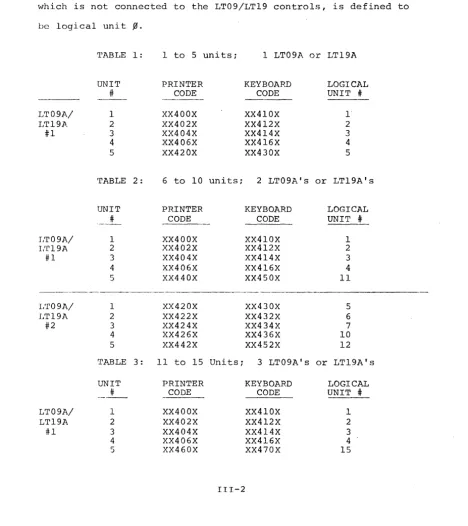
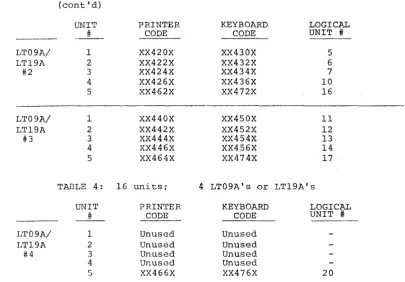
FCONTROL TTAl
FGD DEV-UNITS: TTA2
DTAI DTA2 BKM9 VIA $
FCONTROL indicates which unit is the Foreground control teletype. The remainder of the message indicates what I/O is being used by the Fore-ground job. The Monitor identifies itself to the Background job user as BKM9 VIA and signals that i t is ready to accept a command by printing $.
2.4 INFORMATION COMMANDS
The following information commands exist in
Background/Fore-ground:
COMMAND LOG REQUEST DIRECT IN USE
2.4.1 The LOG Command (L)
USE
To print a comment To examine .DAT slots
To obtain a directory listing To list information about core
and I/O in use by the Foreground.
This command is legal in both Foreground and Background and may be abbreviated by the single leti:er L. It is used to record comments on the Teletype. Unlike all other commands, LOG is terminated only by the character ALTMODE, so 1:hat multiple comment lines may be typed.
LXAMPLE 3:
$ LOG THIS LINE)
2.4.2 The REQUEST Command (R)
This command is legal in both Foreground and Background and may be abbreviated by the single letter R. It is used to examine the contents of all or part of the user's .OAT table. The Fore-ground user may examine only the ForeFore-ground .OAT table and the Background user only the Background .OAT table.
This requests a printout of the entire .OAT table. No example is given since R is essentially the same request as in the Keyboard Monitor System.
FORM 2: RuUSER)
This requests a printout of the contents of all the positive numbered .OAT slots. The result, again, is the same as in the Keyboard Monitor System.
FORM 3: RuXYZ~
Here, XYZ stands for the name of a system program; e.g., MACRO, PIP, F4, LOAO, etc. The names given must be identical to those
used to load the programs. The information printed, as in the Keyboard Monitor System, is those .OAT slots used by the given system program. Since, at present, the only system program load commands allowed in the Foreground are LOAD, GLOAO, PIP and EXECUTE, only these four may be used in Foreground REQUEST commands.
FORM 4: Ru.DATuj, k, 1, ... , r, s)
Here, j , k, .1, etc., are .DAT slot numbers.
EXAMPLE 4:
$Ru.DATw-3, -1, 4, 7} TTAI DTA2 NONE LPA~
$
2.4.3 The DIRECT Command (D)
This command is legal in both Foreground and Background and may be abbreviated as D. The format is:
Dun)
where n = a unit number (~ through 7) on the system device. Directory listings have been altered in BFKM9 to print the number of free blocks before thE~ file names. The background user may not request directory listings of any units owned by the Foreground job unless the Foreground user typed the SHARE command (see below).
2.4.4 The INUSE Command (I)
EXAMPLE 5:
$ I)
1ST REG ABOVE FGD 323.01 FCONTROL
=
TTA2FGD DEV-UNITS:
$
DTAI LPA.0
2.5 ALLOCATION COMMANDS
The following commands assign parameters, control and conditions:
COMMAND ASSIGN FILES FCORE FCONTROL BCONTROL NEWDIR SHARE NOSHAPE 7CHAN 9 CHAN VC38 MPOFF MPON
PURPOSE
To assign I/O handlers to .DAT slots To specify handler file capacity To set up Foreground free core
To select Foreground control teletype To select Background control teletype To write a new file directory
To allow jobs to share same I/O units To nullify effect of SHARE
To specify 7-channel MAGtape operation To specify 9-channel MAGtape operation To load the VC38 character table
To let Background access all of core To nullify effect of MPOFF
2.5.1 The ASSIGN Command (A)
This command is legal in both Foreground and Background and may be abbreviated by the single letter A. Its format and function are, with a few exceptions, identical to the same command in the Keyboard Monitor System.
The format is: AuDDLNum, n, •.. , pi ... IDDLNum, n, •.. ,
P)
where DD stands for the two letter device name~ e.g., DT for DECtape, LP for line printer, etc.
L is the third letter of a device handler name and is optional. If not given, the letter A is assumed~ e.g., DTI
=
DTAI. The "A" version of a handler is the multi-unit, shareable handler, provided that one exists. LPA, for example, is not a multi-unit handler.N is the unit number to go with the device handler and is also optional. If missing, N is assumed to be
g,
e.g., DTA = DTA~. Therefore, DT=
DT.0=
DTA = DTA~. The letters m, n,... , p stand for .DAT slot numbers. The slash (I) separates handlers.
To clear out a .DAT slot, assign NONE to it. If any error is detected in the command, none of the assignments will be made.
Background .DAT slot assignments are tested to insure that they do not conflict with Foreground I/O, as explained in section 2.3. Whenever the Monitor detects such a conflict, i t will print the message:
OTHER JOB's DEV-UNIT
To insure that no conflict can occur when assigning the core-to-core handler, COA., the unit number, independent of what the user typed, is set to ~ for Foreground and 1 for Background. The core-to-core handler disregards the unit number.
2.5.2 The FILES Command (F)
This command is legal in both Foreground and Background and may be abbreviated as F. The purpose of this command is to save
core space by limiting the number of I/O buffers assigned to multi-unit device handlers.
The format of the FILES command is:
where DD stands for the multi-unit handler or device name (e.g., DTA or DT) and N for an octal file count.
EXAMPLE 6: Assume that the Foreground user programs are being loaded into core by the Foreground Linking Loader and that these programs use .DAT slots 1 through l~.
(.IODEV 1, 2, 3, .•.. , l~). Further, assume that all l~ slots were assigned to DECtape, DTAn (the unit numbers are unimportant to this discussion).
Most multi-unit handlers, DTA being one of them, require that I/O buffers be assigned to them externally. This is done by the various loaders. In this example, the Foreground Link-ing Loader, seeLink-ing that no FILES command was given for the handler DTA, must assume that the user wants l~ files open simultaneously. This will require l~ buffers, each 6~S octal words in size.
The FILES command is used to tell the loaders to assign a given number of buffers for a particular mUlti-unit handler based on the
maximum number of files that the user programs will have open simultaneously. Each multi-unit handler has a maximum open file capacity; for example, DTA may have up to 2~ octal. If
IS
I/O buffers are assigned for DTA in the Foreground, then only up toIS
may be assigned for Background. The FILES command issued in ·the Foreground specifies only Foreground I/O buffers. Thus, to limit the number of I/O buffers assigned to the Background, the FILES con~and, for the same multi-unit device, must also be issued in the Background.At load-time, I/O buffers are set aside in core by the Loaders. The buffers are recorded in a table within the Resident Monitor,
. BFTAB , but are not flagged for the exclusive use of particular device handlers. A-t run-time, E~ach multi-unit handler which needs a buffer must request a buffer from the Moni tor. The handler must. also release the buffer to the pool when i t is no longer needed.
The resident buffer, permanently assembled into the Resident Monitor, is always available to the Background job. This buffer is assumed to be as large as the largest I/O device buffer
(6~S octal words) . In the event that the Background job were to
that requires external buffers, (DTA. for example) the user could save 6~~ registers by typing: $FILESuDTu~' That is, assign one less buffer than is needed.
In the FILES command, the pseudo-device is recognized. The size of the external buffer for this pseudo-device is l~~
octal. Some functions in multi-unit handlers may require a smaller buffer size than others. If the user were only to use the former function type, he could type, for example, $FILE~DTw~
and $FILES .. n. In DTA., .TRAN and .MTAPE commands only require the smaller buffer.
2.5.3 The FCORE Command
This command is legal only in the Foreground and may not be abbreviated.
The format of the FCORE command is: FCOREwN ~
where N is the amount (in octal) of free core requested for the Foreground job.
~s in the Keyboard Monitor System, unused (free) core is defined by the address pointers in the registers .SCOM+2 and .SCOM+3, the lowe[:i t and the highes t free core location, respectively. Since both the Foreground and the Background jobs have their own separate free core areas, the values in .SCOM+2 and .SCOM+3 are changed appropriately whenever control passes from one job to ·the other.
The FCORE command allows the Foreground user to specify how much free core his program will need, in addition to that required to load his program. It is possible for all of core to be assigned to Foreground. This means, however, that there will be nc room for Background to run, which is perfectly legal. If -this is the case, the message:
SORRY, NO ROOM FOR BGD
is printed on the control teletype:
2.5.4 The FCONTROL Command
This command is legal only in the Foreground and may not be abbreviated. It is used to transfer the control teletype to some other teletype unit.
The format of the FCONTROL command is:
where N is the number (octal) of any teletype on the system.
Wh(~n FCONTROL changes the Foreground control teletype, the following action takes place:
a. The following message is printed on the old control unit:
CONTROL RELINQUISHED ABORT
b. The system is reloaded from the system device. c. The Monitor prints
FKM9 VIA $
on the new Foreground control unit and is ready to accept commands there.
2.5.5 The BCONTROL Command
This command is legal both in the Foreground and in the Background and may not be abbreviated. It is used to transfer the Background control teletype to some other teletype unit.
The format of the BCONTROL command is:
BCONTR°LuN)
where N is the number (octal) of any teletype on the system. This command is illegal and is ignored if unit N belongs to
the Foreground job. Even though unit N may have been assigned to a Foreground .DAT slot, i t does not belong to the Foreground job unless i t happens to be the Foreground control teletype or unless the Foreground user programs contained an .IODEV to that .DAT slot. This command is also ignored if unit N is already the Background control teletype.
If BCONTROL is issued in the Foreground or if the Background control telE2type is changed because of an FCONTROL command, all Foreground .DAT slots which now refer to the new Background control unit will be changed to the Foreground control unit to avoid I/O conflict. Should that situation occur, the fol-lowing example shows what would be printed on the Foreground control unit:
FGD .DATS CHANGED TO TTAI -6 2 7 l~
If BCONTROL is issued in the Background, the followinq action takes place:
a. The following message is printed on the old control unit:
CONTROL RELINQUISHED
b.
tc
is printed on the new unit,c. The Non-resident Monitor (BFKM9) is reloaded for Background from the system device
d. The Monitor prints BKM9 VIA
$
on the new Background control teletype and is ready to accept commands there.
Monitor System, this command allows the user to write a new file directory on some unit of the system device. However, space will not be reserved for a tQ (CTRL Q) area.
The format of the NEWDIR command is:
NwM~
where M is some unit number (octal) on the system device. Unit ~ may not be used. The Background may not write a new file directory on a unit that belongs to the Foreground
unless the Foreground has issued the SHARE command (see below).
This command is legal only in the Foreground and may be ab-breviated by the single letter S. Its purpose is to allow the Background job to assign and to use the same units of any I/O devices that belong to the Foreground job, provided that they are bulk storage devices (DECtape, Disk, Magtape, etc.) and that the device handlers are the multi-unit versions. The user must be careful when allowing this condition to occur. The "tape" could be fouled i f ~~_-t:~. jobs were to try to use the same uni t for output at the same time.
The SHARE command also removes the restriction that the Foreground user program may not use unit ~ on the system device. Normally, this unit is reserved for the Background.
The format for this command is:
SHARE~
2.5.8 The NOSHARE Command
This command is legal both in Foreground and in Background and may not be abbreviated. It nullifies the effect of any pre-vious SHARE command; i. e., dOE~s not allow the Background to share device units with the Foreground.
When NOSHARE is issued in the Background i t may cause some
Background . DAT slots to be cleared. A. message, as in Example 2, will be printed to that effect.
The command format is: NOSHAR.E)
2.5.9 The 7CHAN Command (7)
This command is legal only in the Foreground and may be
abbreviated by the single character 7. The effect of this com-mand is to clear bit 6 in .SCOM+4 to inform the Magtape device handlers that the default assumption is 7-channel operation.
The format of the 7CHAN command is:
7CHAN)
2.5.10 The 9CHAN Command (9)
The format of the 9CHAN command is:
9CHAN )
2.5.11 The VC38 Command (V)
This command is legal in both Foreground and Background and may be abbreviated by the single letter V. No action is taken until a command has been given to load a program. At that time, if the VC38 command was given, the Non-resident Monitor will seek and load the file VC38TB DMP from unit fO of the system device. The VC38 c~aracter table is used in conjunction with the 339 display handler, DYA., when the system does not have a VC38 hardware character generator.
The table is loaded into core such that its base address is a multiple of l~fO~ octal. The base address is stored as the
first word in the 339 Pushdown List. The address of the Pushdown List is in .SCOM+12.
The VC38 command given in the Background will be accepted but ignored if the 339 display handler is assigned to the Foreground.
The format of the VC38 command is:
VC38)
2.5.12 The MPOFF Command
This command is legal only in i:he Foreground and may not be abbreviated.
Format:
MPOFF}
Normally, Background may not modify nor transfer to registers within the Resident Monitor and the Foreground job; i t also cannot issue rOT's. The MPOFF command signals the Resident Monitor to set the hardware protect bound to zero and also allows Background rOT's to be issued.
2.5.13 The MPON Command (M)
This command is legal in both Foreground and Background and may be abbreviated by the letter M.
Format:
MPON)
2.6 PROGR~M LOAD COMMANDS
In the Foregound, only four load commands are legal: LOAD), GLOAD) , PIP) 'and EXECUTE u XXX). EXECUTE may be abbre-viated by the single letter E. LOAD and GLOAD have the same meaning and effect as in the Keyboard Monitor System.
The following program load commands exist in the Back-ground:
PATCH; CHAIN) F4) F4A} EDIT) PIP)
EXECUTEuXXX)
2.7 FINAL OPERATION
LOAD) GLOAD} DDT) DDTNS) SGENl DUMP-) UPDATE) " CONV)
After BFKM9 has received a program load command from either the Foreground or Background, i t will bring the System Loader (.SYSLD) into the top of core overlaying BFKM9. In the Foreground, .SYSLD is actually the Foreground Linking Loader. In the Background, .SYSLD loads Background System Programs, including the Background Linking Loader.
2.8 CONTROL CHARACTERS
While control is in BFKM9, the user may type CTRL P to terminate execution of the current command and to restart. Restart in this manner does not nullify the effect of
previous ly executed commands; €!. g ., wi 11 not reset the . DAT table to its initial configuration. To reload the Monitor for the current job, the user may t:ype CTRL C.
2.9 SUMMARY OF COMMANDS
LEGAL
IN ABBREVIATION
F B A
F B
F B D
F F
F B F
B I
F B L
F B N
F B
F B R
F S
F 7
F 9
F
F B M
F B V
B B B B B B
F B E
B B F B F B B B B
F 13 13 13
COMMAND EXAMPLE
ASSIGNuDTAlu2, 3/TTlwl,
4/
DTu-4 )BCONTRO~2)
DIRECTu.0') F CONT ROLu.lJ FcoREu14.0't) FILE SuDTu 3) INUSE)
LOGu . . . .. €LTMOD~ NEWDIRa..,S)
NOSHAREj
REQUES~XXX) or REQUESTuUSER)or REQUESTu .oAT j
,k, 1)
or REQUEST). SHARE)~g~~~
.•.
3.1 PURPOSE
SEc'rION 3 CONTROL CHARACTERS
Control characters are single characters typed by the user at a teletype which request special action by the Monitor. Except for the character RUBOUT, all control characters are
formed by holding down the control key CTRL while striking the appropriate letter key.
The characters CTRL U and RUB OUT are used as "erase" characters during teletype input or output. CTRL C, CTRL P, CTRL S, and CTRL T are used to interrrupt the operation of the current program and to transfer control elsewhere. CTRL R is used to restart I/O after a not-ready condition has been detected for some device. CTRL Q stops the current job and dumps memory onto a specified area of some unit of the system device. CTRL D effects an end-of-file condition during
tele-type input.
3.2 CONTROL TELETYPE
Control teletypes differ from the other units in two ways: a. They are used to converse with the Non-resident
Monitor and system programs in order to set up parameters and conditions for a job and to initi-ate the loading and execution of programs.
b. Certain control characters are recognized only at control teletypes; i.e., are ignored if they are typed on the other teletype units (see sec-tion 3.4 and following).
3.3 TELETYPE HANDLER
The multi-unit teletype handler (TTA) which is imbedded in the Resident Monitor, makes special tests for control characters when i t re~eives typed input. Normally, when no .READ request has been issued to a teletype, characters received from that unit are ignored unless they are control characters. A descrip-tion of the acdescrip-tion taken in each case is given in the following paragraphs.
3.4 CTRL C (tC)
This character is ignored unless typed at a control tele-type. It will be echoed to the teleprinter as tC.
If CTRL C is typed at the Background control teletype, the Background job will be aborted and the Non-resident Monitor will be loaded to start a new Background job. Foreground is not affec-ted.
CTRL C typed at the Foreground control teletype aborts both the Foreground and the Background jobs. In this case, the entire
system is restarted; that is, the Resident Monitor and the Non-resident Monitor are reloaded to start a new Foreground job and the message ABORT is printed on the Background control teletype.
3.5 CTRL 5 (t5)
CTRL 5 is recognized only at a control teletype and, specifically, only after the Monitor has printed t5. This is the result of loading a user program by giving the 'command $LOAD
(instead of $GLOAD)to the Non-resident Monitor. Both commands bring in the Linking Loader to load user programs. $GLOAD means LOAD-AND-GO. $LOAD means load the user programs, signal the user that this has been done (by printing t5), and then wait for the go-ahead signal (when the user types CTRL 5) .
This feature allows the user to set up I/O devices before starting his program. When CTRL 5 is typed by the user and is accepted by the Monitor, t5 is echoed back to the teleprinter.
3.6 CTRL T (tT)
This character is recognized only at the Background control teletype when the user has called in the system program DDT. When CTRL T is typed and accepted, i t is echoed to the teleprinter as tT.
and memory protect along with the interrupted PC in .SCOM+7 so that DDT will be able to return control to the user program at the point at which i t was interrupted. The contents of the AC at the time of interruption is returned in the AC and saved by DDT.
3.7 CTRL P (tP)
CTRL P is the interrupt and restart character available to user and system programs. When i t is typed on some teletype and is accepted by the Monitor, tP is echoed to the teleprinter on that unit.
fn the Background/Foreground system there are two types
of CTRL P functions:
1) NORMAL CTRL P and 2) REAL TIME CTRL P.
The two CTRL P functions are described, individually, in para-graphs 3.7.1 and 3.7.3.
Setting a CTRL P restart address (ADDR) is accomplished by issuing the I/O MACRO .INIT to any .DAT slot linked to the Teletype handler.
The format of the .INIT macro is: .INIT A,M,P+ADDR
which is expanded by the MACRO assembler into the following machine code:
LOC LOC+l LOC+2 LOC+3
where A
CAL M 8 +A 9 _ 1 7
1
P+ADDRg 17
Jl
-a .DAT slot number (oct-al r-adix)
Jl
InputM transfer mode
ADDR
P
1 Output
a IS-bit address (octal) of a restart point in the program or of the entry point of a closed real-time subroutine.
Jl Normal CTRL P
lfOJl~JlfO Mainstream (REAL-TIME)
priority code 2fOfOfOJlfO
3fOfOJlJlfO No chanqe to CTRL P
4 50 JlJl 5050 Priority level of the
SfOfOJlJlJl API level S
6 JlJlfOJlfO API level 6
7 50 fOfO JlfO API level 7
.INIT
Background requests to an l\.P I level (4JlfOJlYffO - 7 fOfOfOJlfO) wi 11 be converted to Mainstream since Background programs cannot use the API software levels.
3.7.1 NORMAL CTRL P
A .INIT to set up a NORMl\L CTRL P (priority code 50) may be done only to a control teletype. NORMl\L CTRL P was so named because the action taken when the user types CTRL P is nearly the same as in the Keyboard Monitor System.
will abort all Teletype I/O for that job (Background or Fore-ground). The Monitor will, when control is at Mainstream,· save the status of the Link,extend memory, and memory protect with
the interrupted PC in .SCOM+IO (whose contents are swapped in and out for Background and Foreground), return the interrupted AC to the AC, and transfer control to the restart address ADDR as specified by the last .INIT.
Note: When the Monitor processes a CTRL T or a NORMAL CTRL P, i t kills any pending mainstream real-time routines to be run by zeroing the contents of .SCOM+S7 (Foreground) or .SCOM+61 (Background). The user's program (if NORMAL CTRL P) or the user
(if .CTRL T) must zero the entry points of all his mainstream real-time routines. CTRL P and CTRL T do not affect API level real-time requests.
If the restart address ADDR
=
~, CTRL P to the given teletype will be disabled; i.e., ignored i f typed (except if P = 3~~~~~).3.7.2 No Change
If .INIT for a given teletype unit contains the priority code
3~~~~~, the restart address is ignored and the status of CTRL P to that unit is not changed.
3.7.3 REAL-TIME CTRL P
A .INIT to set up a REAL-TIME CTRL P may be done to any teletype unit. When so set up and the user types CTRL P, I/O to that teletype is aborted. Control eventually goes to a closed real-time subroutine, ADDR, at the priority level defined by P,
in the same manner as for a .REALR, .REALW or .TlMER request.
If the restart address ADDR = ~, CTRL P to the given tele-type will he disabled; i . e . , ignored if tele-typed.
REAL-TIME CTRL P is useful for multi-user programs, for instance, multi-user FOCAL, where each teletype has the ability to interrupt and restart.
3 • 8 CT RL R ( t R)
In the Background/Foreground system, I/O device handlers which detect a not-ready condition will request the Monitor to print a message on the appropriate control teletype. The line printer handler message, for instance, would be:
LP~ NOT READY
The unit number has no significance for the line printer. Some single-unit handlers, such as the card reader handler, use the unit number designation to indicate the cause of the not-ready condition. After the message has been printed, the user should ready the device and then type CTRL R, which is echoed as tR. I/O for that device is then resumed.
While the Monitor is waiting for the user to type CTRL R, the user's program continues execution provided that i t is not
huruj up waiting for completion of I/O from the not-ready device.
job execution will be aborted with a .ERR ~~4 terminal error.
3. 9 CTRL Q (tQ)
CTRL Q may be typed at any time, but i t is ignored if i t is not issued at a control teletype.
The purpose of typing CTRL Qis to stop program execution and to dump all of core memory onto a specified area of some unit on the system device. The dump starts with block l~l octal on the given unit and overlays any data that may have existed in that area on the output device. A 16K system will dump l~~
octal blocks (1~1-2~~); a 24K system, 14~ octal blocks (l~l - 24~);
a 32K system; 2~~ octal blocks (1~1-3~~).
To insure that CTRL Q will not overlay useful data, the user must employ the system program PIP to write a new file direc-tory on that unit, using the (S) switch to reserve space for CTRL Q. For example:
>NuXXuu(S) )
where XX is the device name and u the unit number. Note that the size of the CTRL Q area reserved is based on the amount of core existing in the system in which the new directory is written. The area reserved on a DECtape in a 16K system is not sufficient
When the Monitor accepts CTRL Q, i t first terminates execution of the job (Foreground if Foreground CTRLQ, Back-ground if BackBack-ground CTRL Q). This involves calling all device handlers tied to that job to stop I/O, clearing all Monitor queues of entries for that job and disabling all control characters for that job except CTRL C.
The Monitor then prints tQ on the appropriate control teletype and reads one character. The user must then type the number of the unit on which the dump is to occur. Unit zero may not be used. If the SHARE command is not in effect, a dump may not be done to a unit vlhich belongs to the other job. If the Monitor rejects thE~ typed character, i t prints tQ again and waits for another character.
When the unit number is accepted, the dump takes place; then the Monitor is automatically reloaded. A Background CTRL Q does not affect Foregrourid. A Foreground CTRL Q, on the other hand, aborts the Background job. It is not possible to load and restart a core dump in Background/Foreground.
3.l~ CTRL U (@)
The .READ or .REALR will still be in effect and he may then retype the input.
While output to a teletype is being done as a result of a .WRITE or .REALW, the user may type CTRL U to terminate the write. In this case nothing is eChoed to the teleprinter.
3.11 RUB OUT
This character is recognized only while the user is typing input to satisfy a .READ or .REALR request. When typed, RUBOUT deletes the last input character. For example, if the US2r has typed ABC and then RUBOUT, the C will be "erased". If he now types another RUBOUT, the B will be
"erased". Every time a character is so removed, the character is echoed to the teleprinter.
3.12 CTRL D (tD)
The character CTRL D is recognized at all teletypes and is echoed back as tD. When typing input, CTRL D effects an end-of-file condition by terminating the .READ or .REALR request and storing the end-of-file, ~~1~~5, in the input line buffer header. Since the word pair count returned is a ~, any characters typed prior to the CTRL D for the same read request will be lost.
4.1 INTRODUCTION
SECTION 4 LOADERS
There are three program Loaders in the Background/Foreground system. On the system file directory they are listed as .SYSLD SYS, BFLOAD BIN and EXECUT BIN .
. SYSLD is an absolute system program that functions as two loaders: when i t is called in for Foreground loading, i t is the Foreground Linking Loader; when i t is called in for Background loading, i t is the Background System Program Loader. BFLOAD is the Background Linking Loader.
EXECUTE operates in both Foreground and Background as a loader of overlay programs (XCT files) built by the CHAIN system program. A description of CHAIN and EXECUTE is given in the utility manual.
4.2 FOREGROUND LINKING LOADER
Link loading of the Foreground job is initiated by typing GLOAD
(Load-and~Go) or LOAD (Load-and-·Pause) to the Moni tor at the Fore-ground control teletype. The Foreground Link Loader (.SYSLD) is then brought into the top of memory, overlaying the Non-resident Monitor. The following message will then be printed:
FGLOAD VIA
>
The;.,. signals the user that he may now type in his command string.
change is the addition of memory map options, which must pre-cede the list of user program names. The format is as follows:
>options+mainprog, others, . . . ALTMODE
4.2.1 Option Characters And Their Meanings
Character P
C
G
Meaning
Print program names and their assigned relocation factors
Print common block names and their assigned locations
Print global symbol names and their definitions
4.2.2 Use of + Terminator
Prior to the terminator + all characters except option characters are ignored. Carriage return preceding the + starts a continuation line headed by>. ALTMODE preceding the +
restarts the Loader; therefore, no loading is done unless the character + appears in the command string.
If no option characters precede the +, the default assumption is that no memory map is to be printed.
After the +, type the program names (main program first - no extensions) separated by comma or carriage return. Terminate the command string with ALTMODE. Before the terminating ALTMODE has been typed, the Loader may be restarted by typing CTRL P.
4.2.3 Sequence of Operation
Once the command string has been accepted, the Loader will perform the following sequence of operations:
a. Load all user programs, specified in the command string, from .DATF -4. These programs are loaded from the bottom of core up, starting at the top of the Resident Monitor. Calls to external library routines via .GLOBL, co:mmon block definitions,
and . IODEV requests are-' saved in the Loader's symbol table, built fro:m the bottom of the Loader down. Programs containing executable code (which excludes BLOCKDATA subprograms) are relocated such that they do not overlap core bank boundaries. b. If a library search is necessary and the contents
of .DATF -5 is non-O, the Loader will seek the user library, .LIBR BIN, via that .DAT slot, and will load all requested library routines which i t finds. I/O device handlers mus-t not be in the user library". c. If a library search is s t i l l necessary for non-I/O
routines, the Loader will search the system arith-metic Library, .F4LIB BIN, via .DATF -7 in the same manner as above. I/O device handlers must not be in .F4LIB.
d. If any I/O handlers must be loaded, the Loader searches through the system I/O Library, .IOLIB BIN, via .DATF -7. After this has been done, program loading has terminated.
e. At this point, all undefined common blocks are defined and assigned core space. Common blocks are allowed to overlap core banks.
f. If t.here are still some undefined global symbols, they will be matched with common block names and, if a match is found, defined as the base address of the matching common block.
given by the user to the Non-resident Monitor or, if no counts given, the number of .IODEV'ed .DAT alots calling those handlers. I/O. buffers are allowed to overlap core boundaries.
h. The amount of free core assigned to the Foreground job (contents of .SCOM + 25) is added to the current size of assigned Foreground core to determine the upper limit of the Foreground job. Pointers to
t~~ first and last registers in Foreground free core are then stored in .SCOM+2 and .SCOM+3, respectively.
i.. The Loader now exits to the Resident Monitor. The Resident Monitor prints tS and waits for the user to type CTRL S, if the Loader is called by the LOAD
c~mmand. Control then is given to the start address of the user's main program, which was stored in
.SCOM+6 by the Loader.
4.3 BACKGROUND SYSTEM LOADER
Loading of all system programs is done by the System Loader (.SYSLD), which also performs link loading for the Foreground. Initiation of the loading cycle is done when the user, in the Background, types a request to the Non-resident Monitor to load a system program; e.g., $PIP, $EDIT, etc.
The Non-resident Monitor puts a code number in .SCOM+5 to tell the System Loader which program to load. The System Loader is then loaded into upper core overlaying the Non-resident Monitor .
. SYSLD contains a table which lists the .DAT slots used by each system program. Information about the load address, start address, size and initial block number on the system device for each system program is available in block l~l (SYSBLK).
To load in a system program in the Background, .SYSLD performs the following operations:
a. For each .DAT slot (with non-O contents) required by a system program, i t determines which device handlers are needed; and, if a library search is necessary, i t brings in the handle.rs from the
file .IOLIB BIN on the system device through .DATB -7. They are loaded starting immediately above the
top of the Foreground job.
b. I/O buffers are then assigned core space immedi-ately above the handlers as in the description in paragraph 4. 2g. ThE~ hardware memory protect bound is set above the handlers and buffers. c. If the load command was $LOAD, $GLOAD, $DDT or
$DDTNS, the Background Link Loader (BFLOAD), a relocatable file, is loaded starting just above the new hardware protect bound.
d. For all other system programs, .SYSLD builds a short routine just above the hardware protect bound to bring in the program overlaying the System Loader.
e. Finally, . SYSLD exi ts ,to the Resident Moni tor which establishes the new hardware protect bound and then passes control to the system program via the address stored by .SYSLD in
. SCOM+5.
The Foreground Linking Loader is also responsible for load-ing the system program PIP in the Foreground. The Foreground version of PIP exists in the system as the relocatable file PIP BIN. It is loaded by typing PIP as a command to the Non-resident Monitor.
4.4 BACKGROUND LINKING LOADER
Externally, the Background Linking Loader (BFLOAD) looks nearly the same to the user as the Foreground Linking Loader. When i t has been loaded, i t prints the following message on the Background control teletype:
BGLOA[· V1A >
The command string processing is identical with that of the Foreground Linking Loader (see 4.2).
If the Load command was $DDT or $DDTNS, the system program DDT (a relocatable file) has already been loaded into the top of core via .DATB -1, prior to reading in the command string.
Once the command string has been accepted, the Loader will perform the following sequence of operations:
a. Load all user programs specified in the command string from .DATB -4. These programs are loaded from the top of core down. Calls to external library routines via .GLOBL, common block defini-tions, and .IODEV requests are saved in the Loader's symbol table, built from the top of the Loader upwards in core. Programs containing ex'ecutable code (which excludes BLOCKDATA subprograms) are relocated such that they do not overlap core boundaries.
b. Same action as described in 4.2b, using .DATB -5. c. Same action as described in 4.2c, using .DATB -7. d. If any I/O handlers must be loaded, the Loader
searches through .IOLIB BIN via .DATB -7. The handlers are relocated to run in lower core, that is, as if they were being loaded upwards in core starting just above the Foreground job. They may, however, be loaded above the Loader at this point in time because the Loader is in the way.
c. Same action as described in 4.2 e,f,g. Common blocks are assigned space in upper core; I/O buffers, in lower core.
f. The hardware memory protect bound is established above the I/O handlers and buffers. Common blocks may go below the hardware protect bound. g. If DDT was loaded and a symbol table was requested
(not $DDTNS), the symbol table is compacted to delete entries not needed by DDT. The Loader determines where the symbol table should be moved; and, along with the I/O handlers which were loaded into upper core, builds a special .EXIT list which tells the Resident Monitor where to block transfer each segment. The DDT symbol table may be loaded bAlow the hardware protect bound.
h. The Loader then exits to the Resident Monitor, which performs the block transfers, sets the new hardware memory protect bound, and transfers control to DDT (via .SCOM+5) or to the user program (via .SCOM+6), pausing to print
ts
and waiting for the user to type CTRL S if the Load command was $LOAD.4.5 LOADING XCT FILES
typing EuXXX or EXECUTEuXXX to the Monitor (where XXX is the file name without the extension XCT).
The Non-resident Monitor, BFKM9, stores the filename (.SIXBT format) in .SCOM+l¢7, ll¢ and III for the Foreground or .SCOM+112, 113 and 114 for the Background. If EXECUTE's .DAT slot requests the resident system device handler, the Monitor stores "XCS" as the extension. If EXECUTE's handler is different from the resident handler, the Monitor stores the extension "XCT."
The System Loader is then called in, overlaying the Non-resident Monitor in upper core.
4.5.1 EXECUTE in the Foreground
The following operations are carried out when EXECUTE is used in the Foreground:
a. EXECUTE's handler, if different from the resident
h~ndler, is loaded immediately above the Monitor. b. 'rhe System Loader, which must open the XCT file,
checks the extension. If "XCS", meaning EXECUTE's handler is the resident handler, load the file via
.DAT -7. If "XCT", load via .DAT -4. Set the extension to "XCT".
c. Read the XCT file and check that i t was indeed built to be run in the Foreground of a PDP-9. d. Save the upper and lower core limits of the
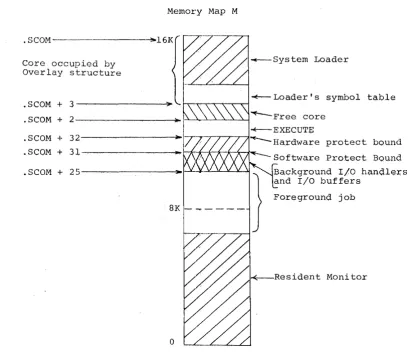
over-lay structure and check that it'does not overover-lay the Resident Monitor.
e. Decode the .IODEV bit map in the XCT file. Set the loading bound immediately above the area of core to be occupied by the overlay structure and then load all I/O handlers required by the XCT file. Also, load another copy of EXECUTE's handler
(the first copy will be overlayed).
f. Load in EXECUTE.
g. S~me action as described in 4.2g and h.
h. The Loader exits to the Resident Monitor. The Monitor gives control to EXECUTE, whose start address is stored in .SCOM+6 by the Loader.
The following operations are carried out when EXECUTE is used in the Background:
a. EXECUTE's handler, if different from the resident handler, is loaded inunediately above the Foreground job.
b. Same action as described in 4.S.I.b.
c. Read the XCT file and check that i t was built to be run in the Background of a PDP-9.
d. Save the lower core limit of the overlay structure and test, when EXECUTE has been loaded, that they do not overlap.
c. Decode the .IODEV bit map in the XCT file and then load any I/O handlers needed by the file.
f. Same action as described in 4.2g.
g. Set the hardware memory protect bound above the I/O buffers and then load EXECUTE starting above this bound.
h. Same action as described in 4.3.e.
4.6 ERROR CONDITIONS
The number of different error messages in the Loaders has been exp2nded in Background/Foreground. These are tabulated in Appendix
Monitor by a special error .EXIT macro (CAL sequence). Loader errors are non-recoverable. After the error message is printed, the Monitor will automatically be reloaded to start another job.