www.editada.org
_______________________________________________________________________________________
Real-time video image processing through GPUs and CUDA and its future
implementation in real problems in a Smart City
José Alberto Hernández-Aguilar1, Juan Carlos Bonilla-Robles1, José Crispín Zavala Díaz1, Alberto Ochoa*2
1 Facultad de Contaduría, Administración e Informática, Universidad Autónoma del Estado de Morelos, Av.
Universidad No. 1001, Col. Chamilpa, Cuernavaca, Morelos, México, 62209
2 Maestría en Cómputo Aplicado, Universidad Autónoma de Ciudad Juárez, México
[email protected], [email protected], [email protected], [email protected] (*corresponding author)
Abstract. Graphic and coprocessor cards are a fundamental part of digital image processing, since they have supported the CPU in the execution of graphics applications such as 3D video games, computer animation, digital image processing, among other processes that require of a greater number of complex operations for its execution. In this research, we discuss a technological platform in which graphics processing units GPUs, webcams and video, CUDA and free software are used for the treatment of real-time images, for this purpose we describe test software for the application of 3 types of treatment: 3D effect, skin detection and edge detection (Sobel). The results indicate that the higher the complexity level of the effect applied to the image, the higher the percentage of use of the GPUs used: 3D effect (81% of use), edge detection (31% of use) and skin detection (22 %), these values improve significantly this process.
Keywords: image processing, real-time, GPU, CUDA.
Article Info
Received Nov 26, 2018 Accepted Dec 31, 2018
1
Introduction
The digital processing of images is an area where algorithms and techniques are developed that is made to the digital image in order to improve some of its characteristics [20]. Of the most outstanding techniques are filtering, rasterization, fragmentation and noise elimination. These techniques require a device capable of processing data simultaneously for the operations that are performed at the time they are applied. For the development of this research, the CUDA (Compute Unified Device Architecture) platform was selected as the work tool, which allows graphics cards to process data in parallel. The processing of digital images begins when the hardware and operating systems capable of supporting the execution of algorithms are developed. After this, the development of optimization techniques to develop said processing begins.
Throughout the evolution of the computers, the great need that has been had is the increase in the speed of execution of processing in order to have greater efficiency. For this reason, research was carried out [5] and nowadays this research continued with the aim of having equipment that supports more robust processes with a large amount of processing time and that these processes are executed in a faster way, that is why the need arises to find a way to streamline these processes through the development of hardware that helps improve the performance of computers, specifically for those processes where it is required to have a decrease in the execution time.
2
Related work
In [33] is noticed a significant acceleration in image processing by using GPUs and CUDA, they demonstrate the efficiency by a parallelization and optimization of Canny’s edge detection algorithm, they used a video motion tracking algorithm called ldquovector, they identify this low-cost technology as an important tool for intensive computer vision work. In [17] is discussed a graphics acceleration based on CUDA programming framework of Vector Coherence Mapping vision algorithm, they demonstrate how processing algorithms can be implemented and mapped in GPU architecture.
Due to the characteristics of graphics loads, computer vision algorithms can use computer power of GPU. Among problems that benefit from parallelism is face detection [32], in this research is used a face detector working in real time over high definition videos, the proposed kernels use coarse and fine grain parallelism to execute image computations and filters, is remarked technology can be used for other computer vision techniques.
In [8] is implemented a SIFT (Scale-Invariant Feature Transform) descriptor extraction algorithm in a GPU using CUDA, this algorithm is used to identify corners, they compare GPU implementation versus CPU implementation and obtained a speedup factor 3-5 for SD and 5-6 for Full HD video. In [9] is discussed the implementation of the 2-dimensional fast wavelet transform - commonly used to denoise 2-D signals- in a NVIDIA Tesla C870, achieving a speedup of 20.8 compared with the fastest implementation version in OpenMP.
In [21] is implemented a visual tracker in GPU and CUDA, which targets position and 3D position of objects in video sequences, implementation achieved a speedup of ten times compared to the similar CPU implementation. Singhal et al. [38] proposed an image processing toolkit working on handheld GPU using OpenGL 2.0. They implement a Harris corner detector as one of three example applications. Performance on video stream was analyzed at varying resolution. In [19] is implemented a parallel video object detection algorithm like Gaussian mixture model (GMM) in CUDA and GPUs, the implementation obtained a speedup of 15 times faster when comparted to sequential implementation running on Intel Xeon processor.
In [22] is used CUDA to implement an Automated Video Surveillance Algorithm on a low-cost GPU (GeForce 8400 GS), they present an innovate implementation of Connected Component Labeling (CCL) Algorithm overcoming the problem of merging between sub blocks, obtaining a speedup of 11X as compared to the serial implementation. In [1] is shown an implementation on real time of SIFT using GPUs, SIFT has been used in several computer vision algorithms like: object detection and object tracking. It was obtained a speedup of 55 fps when analyzing a 640x 480 image; they use a strategy of combined kernel optimization that results in a 12% increase in the execution speed.
2.1 Digital image processing
A digital image is a two-dimensional representation of an image through a numerical matrix in the binary system (zeros and ones), this can be defined as the following function, which is shown in equation 1 [15]:
F (x, y) (1)
Where (x, y) are the spatial coordinates and the amplitude of the function f in some coordinate pair.
It is called digital image processing to the implementation of techniques applied to a digital image through a computer with the aim of improving the appearance, quality, making evident details that wish to be highlighted or facilitate the search for information [40]. The digital processing of images is a broad subject where studies of physics, mathematics, engineering, computing, among other sciences. Computational vision or artificial vision is defined as the processes of obtaining, characterizing and interpreting information from three-dimensional images (3D) [39], these processes are grouped into: low-level vision, middle-low-level vision and high-low-level vision, depending on the complexity and delicacy that its implementation takes.
2.2 Background of Image Processing
At the beginning of the year 1960, the first computers with software and hardware capable enough to carry out the tasks of image processing appeared. That is what is now known as the image process was due to the evolution of the machines and the US space program.
In 1964 the use of computer techniques for the improvement of the images of a space probe began, started at the Jet Propulsion Laboratory in Pasadena California, when Rangers 7 transmitted images of the moon and that these were processed by a computer to correct the various types of distortion [15].
At the end of the 60's and the beginning of the 70's, they began the techniques of digital image processing, in the area of medicine with medical images, in observations of remote terrestrial resources and in astronomy. The most important event in the application of image processing for medical diagnosis was the invention of computerized axial tomography (computed tomography) in the 1970s.
In 1980 the digital processing of images was present in the special effects for television.
Over time, optimization techniques and sophisticated algorithms for image processing have been developed. Currently, there are applications of software with which make possible to perform image processing for example CUDA.
2.3 Classification of images
According to [35] the two main types for the manipulation of information that integrates an image are: bitmap images and vector images.
Bitmap or bitmap images
A grid of cells constitutes these images, these cells are called pixels, and each one contains information of color and luminosity. A bitmap image is created using a grid of pixels.
The pixel is the smallest homogeneous surface of color that is part of a digital image (photograph, graphics or video frame). Pixels are generally square in shape, except in a video, their grouping is in rows and columns.
Bitmap images do not allow scaling. The bitmap images are obtained from captures obtained by digital cameras, scanners or directly from graphic programs.
Image formats Bitmap
GIF. Graphic Interchange Format, the oldest format created in 1987, used in web pages for both images and animations. In this format you can determine the background as transparent in such a way that it will acquire the color on which the image is located.
BMP. Format used by Windows to store independent images of the device or application. BMP files should not be compressed, so they are not appropriate for transfer over the Internet. The number of bits per pixel (1, 4, 8, 16, 24, 32 or 64), the most common files are those that contain 24 bits per pixel [23].
JPEG. Joint Photographics Experts Group, one of the main formats most used for digital photographs for the ability to allow a large number of colors.
Most cameras and scanners use this format; the disadvantage is that whenever you open and manipulate an image in JPEG when compressed and decompressed the image degrades, so it is not convenient to save them in this format if you it is intended to modify [14].
PNG. Portable Networks Graphics, format based on a compression algorithm that does not cause loss, allows a large number of colors, gray scale and 8-bit palette [18].
Vector images
According to [10] vector images are defined as those that are constructed from mathematically generated objects called vectors . These images are represented with geometric lines, which are controlled by mathematical operations performed by the computer. The lines by which the image is composed are called vectors. These vectors are defined by a series of points that have handles with which they can be controlled.
The main advantages of vector images are:
● can change scale when enlarging or reducing their size without the image losing quality. ● unlike bitmap images, the memory space occupied by the computer is smaller.
● Provide images with spot colors with clean outlines.
These vector images are created with design programs such as Adobe Illustrator, Corel Draw, Inkscape, AutoCAD, flash among others, all vector images do not suffer from the pixelated effect.
Vector image formats
AI. Default format obtained when creating vector images from the Illustrator image editor developed and marketed by Adobe. CDR. Format and native extension of the editing and graphic design program for Microsoft Windows CorelDraw, created in 1989 by Michel Bouillon and Pat Beirne at Corel Corporation.
SWF. Adobe Flash format, program launched in 1996 by Macromedia, one of the main ones for the design of Internet animations [12].
WMF. Vector image format created by Microsoft, to be used in the platforms of the same operating system [36]. ODG. OpenDocument electronic documents format, standard of use for free to create vector drawings.
PDF. Is a free standard format for the exchange of electronic documents, converts documents, forms, graphics and web pages to a vector image [3].
DXF. Format to share data between CAD programs. The files are mainly composed of code and associated values [4].
2.4. Digital image processing techniques
The image processing techniques are intended to perform the transformation, restoration and improvement of images. The properties and characteristics of the images are analyzed, as well as their classification, identification and pattern recognition. Next, 3 image processing techniques will be described:
Sobel filter: used to detect vertical and horizontal edges, color images are converted to RGB in gray scale.
Scaling (Scale): used to alter the dimensions of an image, when it comes to reduction only some pixels of the original image are copied, while pixels are increased in the case of enlarging the image.
Modification of brightness
In the images the brightness is an important factor in the processing, its increase or decrease of the brightness in the image consists in adding or subtracting a constant to the colors that constitute a pixel, care must be taken in not exceeding the limits since the image It could be affected.
2.5. What is CUDA?
Compute Unified Device Architecture (CUDA) is a parallel programming platform created by NVIDIA in 2006, this platform allows an increase in computing performance, such as running programs on graphic processing cards, exploiting their capabilities to the maximum by harnessing the power of the graphic processing unit (GPU) [28].
One of the advantages of parallel programming used by CUDA is that the program runs on the graphics card with its own resources such as hundreds of processors and memory, allowing the CPU and the GPU to perform their tasks without any complexity between them. Due to the large number of processors that the GPU contains, it is possible to execute multiple threads that simultaneously perform the tasks more quickly.
Main concepts of the CUDA platform
Device = GPU and Host = CPU
[image:5.612.218.392.256.494.2]Kernel: is the method that is executed in parallel in the device, when a Kernel is declared it is necessary to implement a "Global" reserved word of the CUDA language, with the following syntax: "__global__ <<< 2,3>>>", with this the compiler is told that this segment of the code will be executed by the device instead of the host. The next part "<<< 2,3>>>" indicates that the first number represents the number of blocks in parallel (Grids) where the Kernel will run, while the second number represents the number of threads that will be executed in each block [26] The kernels can be sent to bring and generate as many times as necessary, in order to solve the problem. Hierarchy of threads: the threads are organized in blocks (Blocks); each block is organized in meshes of blocks called (Grids), while these grids can only be executed in a kernel.
Fig. 1. Grid with a dimension of 2 x 3 blocks with a thread of 4 x 3 in the block [25].
The previous figure shows a grid with a dimension of two blocks in the axis (x) and three blocks in the axis (y), within each block there are 4 x 3 execution threads in their axes (x, y) respectively.
Memory hierarchy. The memory is reserved and is released during each execution of the program, with the functions described below:
● CudaMalloc: fulfills the function of taking charge of reserving space in memory.
● CudaMemcpy: this has the function of transferring the data from the host to the device, this is obtained with the following instruction "cudaMemcpyHostToDevice" and the results are returned with the instruction "cudaMemcpyDeviceToHost". ● CudaFree. This function is responsible for freeing the dynamic memory space that was assigned by the previous function cudamalloc ().
Fig. 2. Diagram of the nested levels of threads, blocks and grids, shows the corresponding levels of local, shared and global memory [25].
The previous figure shows the hierarchy of threads running in the local memory; the set of threads within a block is executed in shared memory, while the execution of one or more grids is performed in the global memory.
Fig. 3. Memory space per application [25].
In the previous figure we can see the internal structure of the device, the smallest memory is the local one, then the shared memory follows and the global memory ends being the largest memory.
[image:6.612.169.436.377.556.2]Fig. 4. Diagram showing that the sequential code is executed in the CPU and the parallelized code is executed in the GPU [25].
Figure 4 shows the execution of the parallelized code, first the host code is executed in the CPU, during execution it finds a kernel that is sent to the device to be executed by the GPU, once the process is finished in the GPU data is returned to the CPU to continue with the execution of the program.
2.6. Processing of images in CUDA
From the techniques described above in point 1.4 image processing techniques, an example of an image processed with the Sobel filter using GPU and CUDA, made by [20] is shown.
The characteristics with which the processing was performed were the following. • CPU (Processor) Intel Core 2 Quad Q6600 2.4 GHz
• Nvidia GeForce GT 220 GPU (Graphics Card) • RAM memory 6 GB
• CUDA 3.0 version
• Ubuntu Linux operating system
To process it, the image is first loaded into the memory of the GPU with the function LoadDefaultImage, the following values are used to visualize and give dimensions to the image:
static int imWidth = 30; static int imHeigth = 30;
Unsigned char pix00 = LocalBlock [SharedIdx+4*ib+0*SharedPitch+0]; Unsigned char pix01 = LocalBlock [SharedIdx+4*ib+0*SharedPitch+1]; Unsigned char pix02 = LocalBlock [SharedIdx+4*ib+0*SharedPitch+2]; Unsigned char pix10 = LocalBlock [SharedIdx+4*ib+1*SharedPitch+0]; Unsigned char pix11 = LocalBlock [SharedIdx+4*ib+1*SharedPitch+1]; Unsigned char pix12 = LocalBlock [SharedIdx+4*ib+1*SharedPitch+2]; Unsigned char pix20 = LocalBlock [SharedIdx+4*ib+2*SharedPitch+0]; Unsigned char pix21 = LocalBlock [SharedIdx+4*ib+2*SharedPitch+1]; Unsigned char pix22 = LocalBlock [SharedIdx+4*ib+2*SharedPitch+2];
3
CPU and GPU
3.1 Background of CPUs and GPUs
CPU
According to [41] "the CPU is the brain of the computer; it controls the flow of software programs that you run, such as Windows, Word or Quiken", For several years, the increase in the processing speed of the central processing unit (CPU) has become one of the main needs of the user.
With the arrival of the first personal computers in the year 1980, with processing characteristics in CPU running speed of 1 MHZ, same speed that in 30 years later was increased since the processors had a higher speed, running at a speed of 1GHz and 4GHz.
However, in recent years alternatives have been sought to obtain more power in the central processing unit, the manufacturers of these CPUs were asked a very interesting question: Why not put more than one processor in a personal computer instead of just one? This could have several processing cores, so personal computers would continue to improve the processing performance. The competitiveness and few alternatives of the market made that in 2005, the main CPU manufacturers will launch to the market not only a core processor, and these processors already had two cores instead of just one. In 2006 this great advance in the evolution of CPU speed was known as "The Multi-core Revolution", when developing and launching CPUs with three, four, six and eight cores.
The major CPU manufacturers announced development plans for processing units of 12 - 16 cores in the processor, a big step in the history of the central processing units better known by their acronym CPU [34].
GPU
Graphics Processing Unit for its acronym in English "GPU" and translated into Spanish is Graphics Processing Unit, along with a CPU are intended to accelerate business applications, scientific and engineering [24]. They are used as accelerators in combination with a CPU forming a heterogeneous computing system [13].
GPUs are composed of a large number of cores (processing cores). Its processing is based on the definition of functions called kernels, which run in parallel in the available cores. The cores are grouped into multiprocessors, obtaining different multiprocessors in each GPU. They are used as a coprocessor to solve parallel tasks, while in the CPU the non-parallelizable code can still be executed.
3.2 Difference between CPU and GPU performance
CPU
[image:9.612.203.404.136.262.2]The CPU is architecturally composed of a pair of cores with a large amount of cache that can handle a pair of threads at a time, while the architecture of the GPU is composed of hundreds of cores with which they handle thousands of data simultaneously.
Fig. 5. Comparison of the architecture of cores between CPU and GPU [24].
The previous figure shows the physical difference between multicores CPU with 4 cores, and the GPU with a capacity of 3072 cores. A clear example of CPU comparison would be the Intel Core i7-960 processor which contains the following features (Lee, and others, 2010): 4 cores with a frequency of 3.2 GHz, has 4 SIMD (Single Instruction, Multiple Data) units that allow supporting instructions of the hyper thread architecture also included in the processor. Below is a comparison table between Core i7-960 (CPU) and GTX280 (GPU).
Fig. 6. Comparative graph of the growth of computing capacity of GPUs vs. CPUs [11]
In the previous figure, we can see a comparative graph of the growth obtained by CPUs and GPUs in the last decade, it can be seen that GPUs have had a radical change in their evolution and that in our time they are a fundamental part of programming in parallel thanks to their processing cores they offer.
3.3. GPU architecture
The design of a GPU is known as Streaming architecture. According to [42] within this architecture there are three forms of parallelism:
[image:9.612.222.491.379.567.2]Parallelism of tasks. Because of its multi-threads environment, each of the processors can execute several tasks simultaneously; distributing the execution processes in the parallel computing nodes, therefore each processor will execute its own sequence of operators.
Parallelism at the instructional level. It consists of executing different instructions of the same task simultaneously. These are some strategies that exist to achieve this parallelization, according [16]:
● Segmentation. The instructions are divided into stages with the same duration and use a different functional unit. They consist of search of instructions, reading of operators, decoding, writing results and execution.
● Super segmentation. Consists of several levels of segmentation, the stages for segmented processors are divided into two or more stages, so that it allows having two instructions running at the same time within the stage and functional unit, without having to replicate it.
● Super scalarity. It is the replica of functional units, which can execute several instructions simultaneously in the processor.
3.4. NVIDIA graphics cards with CUDA technology
The NVIDIA Company, creator of graphics cards and pioneer in visual computing with the invention of GPUs, has expanded its field in the last two decades in the development of videogames, film production, product design, as well as in medical diagnosis and scientific research. Within the catalogue of products offered by Nvidia there are 3 series of graphics cards that support the CUDA technology which are: GeForce GTX, Quadro and Tesla. The following describes its use and characteristics of each one of them:
GeForce GTX. Designed mainly for players of video games, commonly known as "Gamers". The latest release of this series is the GeForce® GTX ™ TITAN Z designed with 5,760 cores and 12GB in memory, the power to run the most stringent games in system requirements [29].
Quadro FX. Designed with 5 times faster platform ideal for engineers, scientists and particularly for professional visual computing designers, Quadro M6000 being the most recent, advanced functions to manage up to four 4K screens, with a memory of 24 GB and 3072 CUDA processing cores [30].
TESLA. Designed to provide high-speed graphic processing, having a co-processing power to accelerate the parallel calculation operations used for high-performance computing. Tesla K40 has 12 GB of memory and 2880 CUDA processing cores capable of executing large scientific models [31].
4
Experiment
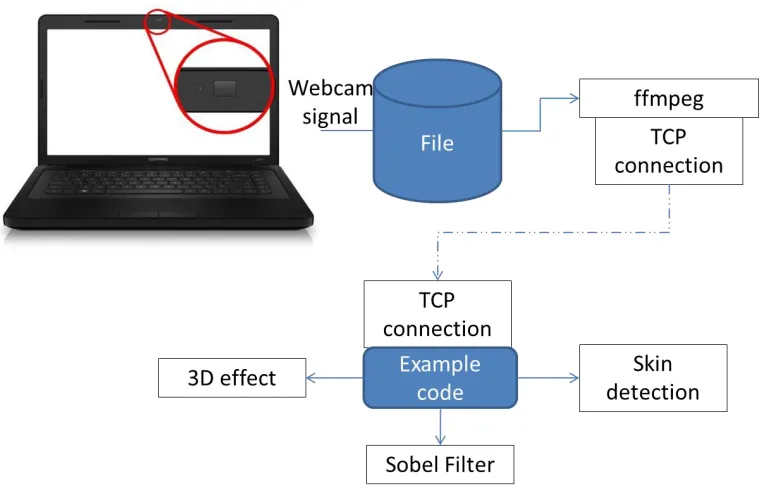
Fig. 7. Experimental arrangement for real time image processing , based on [7]
A webcam is responsible for capturing the information in either image or video format, then the information captured is sent via ffmpeg, which is software for streaming the video, finally, through a TCP connection in the port 32000 are added the types of treatment that will be applied to the video in process.
5.1. Hardware and software configuration
Webcam
The first webcam or webcams that came on the market, captured images and videos in a low resolution due to the transmission of data over the internet at low speed. Currently, they have evolved into cameras with higher resolution, which include a microphone; they are already incorporated in the monitor among many more specifications. In this research, a computer with a webcam is used in the monitor, so no installation was necessary. In case of not having a computer with a built-in camera, an external web camera is acquired and the installation is really simple. Only a webcam with a driver compatible with the operating system of the computer is required, this can be on a CD or when the USB cable is connected to the computer it is automatically detected and downloaded.
Fig. 8. Software configuration and external camera hardware (Own source)
In the previous figure we describe the installation and configuration of the hardware and software in case of having an external camera, the driver compatible with the operating system version is installed as well as working with ffmpeg.
[image:11.612.156.471.531.638.2]FTP connection
Fig. 9. Interaction between simpleVBO.cpp and the 3 Kernels [7]
In the image we discover how the iteration works between the simple VBO.cpp and the kernels that run on it, so each kernel has different kind of effect or treatment of the video. All these kernels are in the kernelVBO.cu script and a brief description of their operation is presented below, detailed content of each Kernel can be consulted in [7]:
KernelWave ():3 D effect. This kernel stores the color information of the variable color-VBO. The mesh is defined to be of the same size and shape, allowing the RGB information in each pixel to be assigned to each vertex. This kernel implements the 3D surface; each pixel of the image is considered as the color of a vertex in a 3D mesh. These vertices are carried out in the colorVBO () function of the frame in the live image.
KernelSkin ():
Skin color has proven to be a useful and robust signal for use as a first step in computer processing systems. This kernel calculates the values of red (PureR) and green (PureG) to normalize each pixel of the image. The original RGB colors are maintained if these values are within the flesh color tones, otherwise they will be black.
KernelSobel(Edge detection).
This kernel is an application of a Sobel edge detection filter. Edge detection is a fundamental problem in image processing since these edges represent the structural properties of an image.
Creation of scripts
Fig. 10. Script testLive [7]
The second script configures FFMPEG, which receives the information from the camera that was lifted in the previous script and here sends it to TCP port 32000.
Fig. 11. Script ffmpeg [7]
This script is saved and assigned the name "camara.sh"
Execution of scripts
[image:13.612.83.529.440.609.2]1. Open two terminals in Ubuntu, in the first terminal the testLive file is executed. $ ./testLive
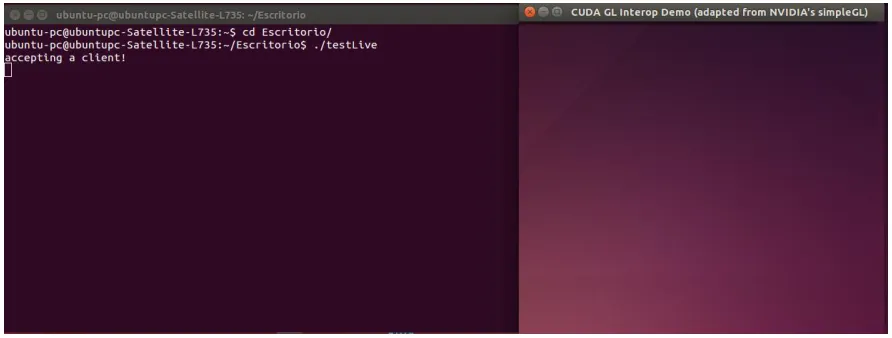
Fig. 12. Command to execute the file testLive (Own source)
The previous image shows how the "testLive" file is executed in terminal one and another window is displayed which is waiting to receive the information from the camera, executed in terminal 2.
Fig. 13. Command to execute the file testLive (Own source)
In Figure 13: the execution of the camera.sh script is observed, which results in a window in which the webcam captures the information and, in turn, the GPU processes it, the image is displayed in large pixels of the image colors.
5
Results
The results obtained from the implementation of the real-time video processing technology platform under the characteristics specified above are the following:
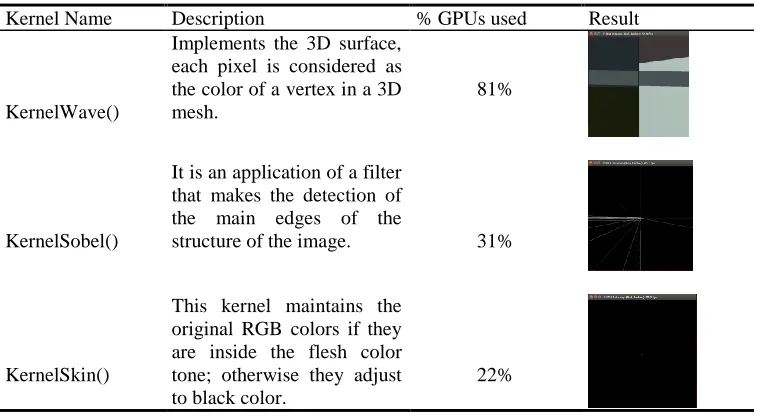
Table 1. Comparative table of final results (own source)
Kernel Name Description % GPUs used Result
KernelWave()
Implements the 3D surface, each pixel is considered as the color of a vertex in a 3D mesh.
81%
KernelSobel()
It is an application of a filter that makes the detection of the main edges of the
structure of the image. 31%
KernelSkin()
This kernel maintains the original RGB colors if they are inside the flesh color tone; otherwise they adjust to black color.
22%
There is a direct correlation between Kernel complexity and percentage % of GPU used, implementation of 3D kernel requires 81% of GPUs computation power; Kernel Sobel requires 31% of GPUs usage for detection of main edges, meanwhile KernelSkin requires 22%.
6
Conclusions and Future Research
[image:14.612.118.500.355.564.2]technological platform in other operating systems, such as Microsoft Windows and Mac, but no results were obtained as there were compatibility problems in CUDA versions and libraries that do not exist or were discontinued for those operating systems. Another situation that arose is that although the platform existed, recreating this had its complexities to be a platform made in 2010, to date there were many changes in each version of the operating system, the CUDA version, libraries that From one version to another they no longer existed or compatibility problems, given these obstacles had to investigate where were the errors that prevented compiling the scripts, the replacement of libraries and driver versions were key elements to recreate this technological platform.
Future research
We intend to perform more tests on other equipment with different characteristics, either hardware with a graphics card with higher processing cores, a webcam with better resolution or other software versions in order to obtain better results in the quality of the processed video. This platform is also intended to be multiplatform for functions not only in Linux but in other operating systems, whether it is the Windows or Mac environment.
[image:15.612.84.516.292.560.2]One of the main problems in a Smart City are accidents with more than one death associated with irresponsible driving due to alcohol, we propose that using a mobile device and ubiquitous computing techniques determine through photos of the online status of a group of friends that they will travel together, in order to determine who through the recognition of the iris could be the designated driver, something crucial for the lives of the group, as can be seen in figure 14:
Fig. 14. Representation of the Model associated with the reduction of deaths in night-time collective trips associated with alcohol in young people in a Smart City.
One of the big challenges in a Smart City will be that the young population is becoming groutier and therefore their outings are nocturnal and last longer, this means more alcoholic time and therefore a higher incidence in deaths due to vehicular accidents. For this purpose, we will focus on real-time face detection by using GPUs as described in [32, 37].
References
2. Adobe: Formatos de archivo. http://helpx.adobe.com/es/photoshop/using/file-formats.html#WSfd1234e1c4b69f30ea53e41001031ab64-7753a
3. Adobe Systems Incorporated: Familia Adobe Acrobat. http://www.adobe.com/mx/products/acrobat/adobepdf.html
4. Autodesk: Autodesk Exchange AutoCAD. http://exchange.autodesk.com/autocad/esp/online-help/ACD/2012/ESP/pages/WS1a9193826455f5ff18cb41610ec0a2e719-796b.htm
5. Esqueda, J., & Palafox, L.: Fundamentos de procesamiento de imágenes. Instituto Tecnológico de Ciudad Madero, Universidad Autónoma de Baja California, Unidad Tijuana (2002).
6. Fabiana, P. M.: Computación de Alto Desempeño en GPU. In: XV Escuela Internacional de Informática del XVII Congreso Argentino de Ciencia de la Computación, Editorial de la Universidad Nacional de La Plata (2011).
7. Farber, R.: CUDA application design and development. Elsevier (2011).
8. Fassold, H., & Rosner, J.: A real-time GPU implementation of the SIFT algorithm for large-scale video analysis tasks. In Real-Time Image and Video Processing 2015, vol. 9400, p. 940007. International Society for Optics and Photonics (2015, February).
9. Franco, J., Bernabé, G., Fernández, J., & Acacio, M. E.: A parallel implementation of the 2D wavelet transform using CUDA. In 2009 17th Euromicro International Conference on Parallel, Distributed and Network-based Processing, pp. 111-118 IEEE. (2009, February). 10. Fundamentos de computación gráfica: Procesamiento de imagen.
http://www.tecgraf.puc-rio.br/~mgattass/fcg/trb13/RaquelGuilhon/trabalho1.html
11. Galloy, M.: CPU vs GPU performance. http://michaelgalloy.com/2013/06/11/cpu-vs-gpu-performance.html (2013).
12. Gavino, S., Defranco, G., & Fuertes, L. L.: Desarrollo de software educativo para la enseñanza del dibujo en las carreras de Ingeniería. In I Congreso de Tecnología en Educación y Educación en Tecnología (2006).
13. Gómez L. J.: Programming issues for video analysis on Graphics Processing Units. Córdoba: Servicios de Publicaciones de la Universidad de Córdoba (2012).
14. Gonzáles, A.A.: Tipos de imágenes y formatos. https://sites.google.com/site/ticvalcarcel/optimizacion-de-imagenes-para-internet/tipos-de-imagenes-y-formatos (2011).
15. Gonzáles, C.R. & Woods, E.R.: Digital Image Processing Second Edition. Reading, Mass.: Addison Wesley Publishing Company (2002).
16. Guerrero, M. L., Rojas, J. B., Acevedo, J. C., Serrano, G. U., & Vivanco, A. P.: Segmentación de imágenes de color. Revista Mexicana de física, vol. 50, no. 6, pp. 579-587 (2004).
17. Huang, J., Ponce, S. P., Park, S. I., Cao, Y., & Quek, F.: GPU-accelerated computation for robust motion tracking using the CUDA framework (2008).
18. Instituto de Tecnologías Educativas: Formato PNG.
http://www.ite.educacion.es/formacio/materiales/86/cd/m13/formato_png.htmlhttp://www.ite.educacion.es/formacio/materiales/86/cd/m1 3/formato_png.html (2014).
19. Kumar, P., Singhal, A., Mehta, S., & Mittal, A.: Real-time moving object detection algorithm on high-resolution videos using GPUs. Journal of Real-Time Image Processing, vol. 11 no. 1, pp. 93-109. (2016).
20. López, E. A. R.: Procesamiento de imágenes en un procesador gráfico. Centro de investigación y desarrollo de tecnología digital, IPN. Tijuana, B. C., México (2010).
21. Lozano, O. M., & Otsuka, K.: Real-time visual tracker by stream processing. Journal of Signal Processing Systems, vol. 57 no.2 , pp. 285-295. (2009).
22. Mehta, S., Misra, A., Singhal, A., Kumar, P., Mittal, A., & Palaniappan, K.: Parallel implementation of video surveillance algorithms on GPU architectures using CUDA. In 17th IEEE Int. Conf. Advanced Computing and Communications (ADCOM), (2009).
23. Microsoft: Tipos de mapas de bits. http://msdn.microsoft.com/es-es/library/at62haz6(v=vs.110).aspx (2014) 24. Nvidia: What is GPU Computing? http://www.nvidia.com/object/what-is-gpu-computing.html (2010).
25. Nvidia: Nvidia Next Generation, CUDA Compute Architecture: FERMI.
http://www.nvidia.com/content/PDF/fermi_white_papers/NVIDIA_Fermi_Compute_Architecture_Whitepaper.pdf (2009). 26. Nvidia: Programming Guide: CUDA Toolkit Documentation. http://docs.nvidia.com/cuda/cuda-c-programming-guide/ (2013). 27. Nvidia: CUDA Toolkit Documentation. http://docs.nvidia.com/cuda/cuda-c-programming-guide/#axzz32yDr3M4t (2014). 28. Nvidia: What is CUDA. https://developer.nvidia.com/what-cuda (2014).
29. Nvidia: Nvidia, Familia GeForce. http://la.nvidia.com/gtx-700-graphics-cards (2016).
30. Nvidia: Nvidia, Tarjetas gráficas QUADRO para sistemas de sobremesa. http://www.nvidia.es/object/quadro-desktop-gpus-es.html
(2016).
31. Nvidia: GPUs Tesla para estaciones de trabajo. http://www.nvidia.es/object/tesla-supercomputer-workstations-es.html (2016).
32. Oro, D., Fernández, C., Saeta, J. R., Martorell, X., & Hernando, J.: Real-time GPU-based face detection in HD video sequences. In 2011 IEEE International Conference on Computer Vision Workshops (ICCV Workshops) pp. 530-537, IEEE, (2011, November).
33. Park, S. I., Ponce, S. P., Huang, J., Cao, Y., & Quek, F.: Low-cost, high-speed computer vision using NVIDIA's CUDA architecture. In 2008 37th IEEE Applied Imagery Pattern Recognition Workshop, pp. 1-7, IEEE. (2008, October)
34. Sanders, A., & Kandrot, E.: CUDA by Example. Edwards Brothers, Inc. Arbor, Michigan (2011).
35. Santiago, O.C.A.: Formatos de imagen digital. Revista Digital Universitaria, vol. 5, no. 7, pp 1-10, (2005).
http://www.revista.unam.mx/vol.6/num5/art50/may_art50.pdf
36. Sanz, A. F., & Martinez, M. C. M.: Módulos software para la administración de cámaras IP, (2004).
38. Singhal, N., Park, I. K., & Cho, S.: Implementation and optimization of image processing algorithms on handheld GPU. In 2010 IEEE International Conference on Image Processing, pp. 4481-4484, IEEE, (2010, September).
39. Sucar, L. E., & Gomez, G.: Procesamiento de Imágenes y Visión Computacional. Spanish, to be published). Examples (2002).
40. UACJ: Capítulo 8 Procesamiento digital de imágenes. Recuperado de:
http://www2.uacj.mx/Publicaciones/GeneracionImagenes/imagenesCap1.pdf (2014). 41. Valdés V. R.: Build your own PC. México: McGraw-Hill (2000).
![Fig. 1. Grid with a dimension of 2 x 3 blocks with a thread of 4 x 3 in the block [25]](https://thumb-us.123doks.com/thumbv2/123dok_us/9926881.494517/5.612.218.392.256.494/fig-grid-dimension-x-blocks-thread-x-block.webp)
![Fig. 3. Memory space per application [25].](https://thumb-us.123doks.com/thumbv2/123dok_us/9926881.494517/6.612.236.426.82.280/fig-memory-space-per-application.webp)
![Fig. 4. Diagram showing that the sequential code is executed in the CPU and the parallelized code is executed in the GPU [25]](https://thumb-us.123doks.com/thumbv2/123dok_us/9926881.494517/7.612.235.461.77.411/fig-diagram-showing-sequential-code-executed-parallelized-executed.webp)
![Fig. 5. Comparison of the architecture of cores between CPU and GPU [24].](https://thumb-us.123doks.com/thumbv2/123dok_us/9926881.494517/9.612.222.491.379.567/fig-comparison-architecture-cores-cpu-gpu.webp)
![Fig. 9. Interaction between simpleVBO.cpp and the 3 Kernels [7]](https://thumb-us.123doks.com/thumbv2/123dok_us/9926881.494517/12.612.180.432.105.301/fig-interaction-simplevbo-cpp-kernels.webp)