VelociTap: Investigating Fast Mobile Text Entry using
Sentence-Based Decoding of Touchscreen Keyboard Input
Keith Vertanen
1, Haythem Memmi
1, Justin Emge
1, Shyam Reyal
2, Per Ola Kristensson
2,3 1Montana Tech, USA,
2University of St Andrews, UK,
3University of Cambridge, UK
{
kvertanen
|hbmemmi
|jemge
}@mtech.edu, [email protected], [email protected]
ABSTRACT
We present VelociTap: a state-of-the-art touchscreen key-board decoder that supports a sentence-based text entry ap-proach. VelociTap enables users to seamlessly choose from three word-delimiter actions: pushing a space key, swiping to the right, or simply omitting the space key and letting the decoder infer spaces automatically. We demonstrate that Ve-lociTap has a significantly lower error rate than Google’s key-board while retaining the same entry rate. We show that in-termediate visual feedback does not significantly affect en-try or error rates and we find that using the space key results in the most accurate results. We also demonstrate that en-abling flexible word-delimiter options does not incur an error rate penalty. Finally, we investigate how small we can make the keyboard when using VelociTap. We show that novice users can reach a mean entry rate of 41 wpm on a 40 mm wide smartwatch-sized keyboard at a 3% character error rate.
Author Keywords
Mobile text entry; touchscreen keyboard; sentence decoding
ACM Classification Keywords
H.5.2. Information Interfaces and Presentation: User
Interfaces—Input devices and strategies
INTRODUCTION
A common text entry method on touchscreen mobile devices is an on-screen keyboard. Several solutions have been pro-posed to improve mobile touchscreen typing. One approach is to partially or completely redesign the standard QWERTY
touchscreen typing experience. Examples include gesture
keyboards [13], optimized keyboards such as ATOMIK [23], interlaced QWERTY [22], the quasi-Qwerty optimized key-board [2], multidimensional Pareto keykey-board optimization [5], multilingual keyboard optimization [3], KALQ [17], and systems that adapt to user input or sensor data (e.g. [4, 6]).
Another approach is to keep the QWERTY touchscreen key-board but assist users by offering predictions and automatic typing correction. Goodman et al. [9] were the first to pro-pose correcting touchscreen typing errors by combining a
Permission to make digital or hard copies of all or part of this work for personal or classroom use is granted without fee provided that copies are not made or distributed for profit or commercial advantage and that copies bear this notice and the full cita-tion on the first page. Copyrights for components of this work owned by others than ACM must be honored. Abstracting with credit is permitted. To copy otherwise, or re-publish, to post on servers or to redistribute to lists, requires prior specific permission and/or a fee. Request permissions from [email protected].
CHI 2015, April 18 - 23 2015, Seoul, Republic of Korea
Copyright c2015 ACM 978-1-4503-3145-6/15/04...$15.00. http://dx.doi.org/10.1145/2702123.2702135
probabilistic touch model and a character language model. Their system corrects errors on a character-by-character ba-sis. Kristensson and Zhai [14] propose a dictionary-based word-level correction system based on geometric pattern matching. Recently, several touchscreen typing systems have leveraged additional information, such as activity (walking versus standing) [7], or hand posture [8]. Other recent im-provements include using pressure information and Gaussian Process regression within a probabilistic decoder [21], and the development of an algorithm that simultaneously accom-modates both completions and corrections [1].
Commercial systems, such as SwiftKey, Fleksy, and the built-in Android and iOS keyboards, perform automatic error cor-rection on a letter-by-letter and word-basis. Some, such as the built-in Android keyboard, support sentence-based entry by allowing the entry of words without spaces and then per-forming separation and autocorrection when the user hits the space key. To our knowledge, no work has explored the per-formance and design aspects of such sentence-based entry.
In this work, we explore the performance potential of sentence-based decoding: delaying automatic typing correc-tion until after an entire sentence has been entered. We have developed a state-of-the-art touchscreen keyboard decoder called VelociTap that supports sentence-based decoding. Ve-lociTap enables users to seamlessly choose from three word-delimiter actions: pushing a space key, swiping to the right, or simply omitting the space key and letting the decoder in-fer spaces automatically. VelociTap was iteratively designed based on two pilot studies. The pilots established users could actuate taps quickly even without recognition feedback after each word. Further, despite the noisy input resulting from users aiming for speed instead of accuracy, we could still ac-curately recognize the input.
VELOCITAP DECODER
Our decoder takes a sequence of noisy touch events and searches for the most probable sentence given that sequence of touches. The decoder uses a probabilistic keyboard model, a character language model, and a word language model.
We assume the user is entering the letters A–Z plus space and only consider lowercase text. For each touchscreen tap, the keyboard model produces a likelihood for each of the 27 characters. Similar to previous work [9], the likelihood of each key is given by a two-dimensional Gaussian distribution
centered at each key. Thex- andy-variance of a key’s
Gaus-sian distribution is computed by multiplying thex- andy-size
of each key in pixels by anx- andy-scale factor. We use the
same two scale factors for every key. We use the first(x, y)
coordinate in a touch event to calculate the key likelihoods.
We combine the keyboard likelihood with a prior probability from the language model. This is done by adding the key-board model log probability to the language model log prob-ability multiplied by a scaling factor. The scaling factor con-trols the relative contribution of the keyboard model and the language model. Log probabilities are used to prevent under-flow. During the decoder’s initial search, we use a 12-gram language model that bases the probability of the next charac-ter on the previous 11 characcharac-ters (including space).
Our initial search finds a list of up to the 50-best sentence hypotheses. After the search completes, we add to each hy-pothesis the log probability of the sentence under a word lan-guage model. We used a 4-gram lanlan-guage model that bases the probability of the next word on the three previous words.
We trained our language models on billions of words from blog, social media, and Usenet data. We optimized our mod-els for mobile text using cross-entropy difference selection [15]. In this method, only sentences well-matched to an in-domain language model are used in training. We created the in-domain model from email sentences with 1–12 words from the W3C email corpus and the non-spam messages in the TREC 2005 corpus. We trained a separate language model on each corpus and then created a mixture model using linear interpolation with weights optimized on held-out text.
Our 12-gram character language model had 103 MN-grams
and a compressed size of 1.1 GB. Our 4-gram word model
was trained with an unknown word and had 194 MN-grams
and a compressed size of 2.0 GB. The word model’s vocabu-lary consisted of the most frequent 64 K words in our training data that were also in a list of 330 K words compiled from
human-edited dictionaries1. We used BerkeleyLM [18] for
language model probability lookups.
A very common type of touchscreen typing error is substitut-ing one letter for another. This is due to the difficulty of pre-cisely tapping small buttons with a large finger. But users may also occasionally tap an extra key or skip a key altogether. To handle this, at each position in the tap sequence, our decoder adds a deletion hypothesis and a set of insertion hypotheses.
1
[image:2.612.343.539.69.197.2]Compiled from Wiktionary, Project Gutenberg Webster’s dictio-nary, CMU pronouncing dictiodictio-nary, and GNU aspell.
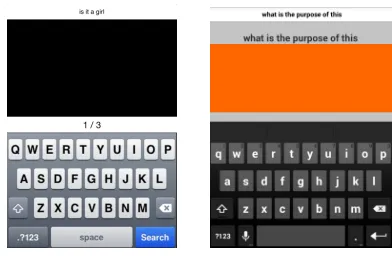
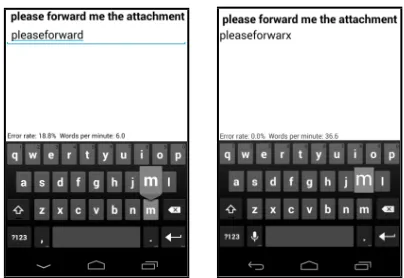
Figure 1. Interfaces in the first pilot (left) and second pilot (right).
The deletion hypothesis drops the current tap without gen-erating any text. The insertion hypotheses add all possible characters (including space) before the next observed tap.
Our decoder searches the hypothesis space of all possible character sequences given a sequence of taps. In order to keep the search tractable, we employ beam pruning. We prune any hypothesis that becomes too improbable compared to the best previous hypothesis at a given position in the tap sequence. By varying the beam width, we can control the tradeoff be-tween speed and accuracy. In our first two pilot studies, we will use a decoder that searches via a recursive depth-first al-gorithm. The algorithm operates on a single thread, exploring hypotheses in probability-ranked order during its descent.
The decoder’s free parameters consist of the x- and y
-keyboard variance factors, character and word language model scale factors, and penalties for insertions and deletions. As we will describe later in this paper, we optimized these pa-rameters on development data.
VelociTap can operate either offline on recorded traces or on-line performing real-time recognition. Real-time recognition can be performed either on the mobile device or proxied to a remote server. In this work we are interested in the perfor-mance potential independent of device resource constraints. As such, we used a remote server for all recognition.
PERFORMANCE PILOT 1
The goals of this pilot study were to explore the performance potential of VelociTap and to investigate if users could effec-tively tap out sentences without feedback from the interface.
We developed a data collection app for 4thgeneration
iPhones. Our app displayed an image of the standard iPhone QWERTY keyboard in portrait configuration (Figure 1, left). Our app displayed stimuli sentences at the top and recorded touch events. No actual recognition took place on the device. While typing, participants received no audio, visual, or tactile feedback. After completing a sentence, the app displayed the entry rate in words-per-minute. Since no recognition result was available during the pilot, this entry rate was based on the number of characters in the corresponding stimulus.
● ● ● ● ● ● ● ● ● ● ● ● ● ● ● ● ● ● ● ● ● ● ● ● ● ● ● ● ● ● ● ● ● ● ● ● ● ● ● ● ● ● ● ● ●
Error rate (CER)
Entr
y r
ate (wpm)
0 2 4 6 8 10 12 14 16 18
[image:3.612.55.299.61.183.2]20 30 40 50 60 70 ● ● ● ● ● ● ● ● ● ● ● ● ● ● ● ● ● ● ● ● ● ● ● ● ● ● ● ● ● ● ● ● ● ● ● ● ● ● ● ● ● ● ● ● ● ● ● ● ● ● ● ● ● ● ● ● ● ● ● ● ● ● ● ● ● ● ● ● ● ● ● ● ● ● ● ● ● ● ● ● ● ● ● ● ● ● ● ● ● ●
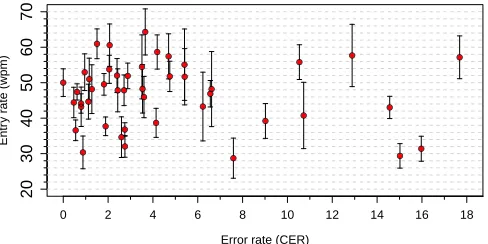
Figure 2. The error and entry rate of each participant in the first pilot. Vertical whiskers show one standard deviation.
to a maximum recognition character error rate of 10% (deter-mined later in offline recognition experiments).
Participants were allowed to practice on three sentences. Par-ticipants in this pilot, as well as all other studies in this paper, were instructed to hold the device in their non-dominant hand and use a single finger of their dominant hand to type. Par-ticipants then entered 20 short sentences (3–8 words) taken at random from memorable sentences written by Enron em-ployees on their Blackberry mobile devices [19]. Afterwards, participants completed a short questionnaire.
We conducted offline experiments on the logged data. Our decoder’s parameters were optimized with respect to 400 sen-tences typed by two of the authors. We measured the entry rate in words-per-minute (wpm), with a word defined as five characters including spaces. The number of characters was based on the recognition result. We timed entries from a sen-tence’s first tap until the user moved to the next sentence by tapping with two fingers. Participants’ average entry rate was 46.8 wpm (sd = 4.7, min = 28.7, max = 64.3).
We measured error rate using character error rate (CER). CER is the number of insertion, substitution and deletions required to turn the recognized text into the reference text, divided by the number of characters in the reference text. Despite receiv-ing no feedback durreceiv-ing typreceiv-ing, participants’ error rates were low with an average CER of 4.7% (sd = 4.6, min = 0.0, max = 17.7). We found that nearly two-thirds of sentences were decoded with no recognition errors. A good language model was critical for decoding. Simply using the key closest to each tap resulted in a high average CER of 20.2%.
As shown in Figure 2, each participant operated at different points in the error and entry rate envelope. Notably, 31 of the 45 participants had error rates of less than 5% CER. They did so while entering text at 30–64 wpm. This shows that novice users can quickly adapt to writing entire sentences without intermediate feedback. While the participants in the first pilot did not see any recognition results, they still provided tap data that could be decoded with a high degree of accuracy.
A sentence-based decoder may have an advantage in that it can search for the best text given all the data. Touchscreen keyboards typically perform auto-correction only on the pre-vious word. To investigate the impact of sentence-based de-coding, we modified our decoder to limit its search to a
win-dow of the lastN characters. So for example, at a window
Decoding window
Char
acter error r
ate (%)
1 2 3 4 5 6 7 full
4 5 6 7 8 ● ● ● ● ● ● ● ●
Figure 3. Error rate in the first pilot, varying how many previous char-acters the decoder was allowed to change. The label “full” indicates decoding over the entire sentence.
size of 1, the decoder found the next best character given the current observation but with all prior characters fixed.
As shown in Figure 3, increasing the freedom of the recog-nizer to change past characters improved accuracy. Gains were small beyond a window size of five. Assuming a word length of five, this suggests existing interfaces based on auto-correction of only the last word are providing accuracy sim-ilar to full-sentence decoding. However, as previously men-tioned, sentence-based decoding may still have an advantage in that it avoids distracting users while they enter text.
PERFORMANCE PILOT 2
For our second pilot, we designed an app to provide real-time sentence-based decoding of taps entered on a mobile device. The goals of this pilot were to investigate how practice and real-time feedback of recognition results affects performance.
We used a client/server setup in which the user interacted with the mobile device and recognition was performed on a 3.6 GHz 8-core server. We used an Android Nexus 4
mo-bile device which has a screen measuring 101 mm×60 mm.
Our interface used an image of the Google keyboard in por-trait orientation (Figure 1, right). Taps played a click sound and vibrated the device. Our decoder’s parameters were op-timized with respect to 251 sentences typed by two of the authors plus four users who had taken part in the first pilot. These four users did not take part in this pilot.
We called back six participants who had taken part in the first pilot. The six participants were the first to respond to our re-quest for participation in the follow-up pilot. They were aged 21–29 (mean = 24), one was female, and five were university students. They were paid $20 and told the fastest participant with a CER below 5% would receive a $20 bonus.
In this study, participants received real-time feedback of the recognized sentence along with the entry and error rate based on the recognition. Participants entered 12 blocks of 20 sen-tences in a 2-hour session. The 240 sensen-tences were taken from the Enron mobile test set [19]. We chose sentences with 5–10 words that had been memorized correctly by at least 6 out of 10 workers in [19]. Sentence order was randomized.
[image:3.612.320.563.61.152.2]Block
Entr
y r
ate (wpm)
1 2 3 4 5 6 7 8 9 10 11 12
30
40
50
60
70
● ●
● ●
● ●
●
●
● ●
[image:4.612.63.290.61.159.2]● ●
Figure 4. Entry rate on each block of 20 sentences in the second pilot. Each line is a single participant.
The entry rate was measured from a sentence’s first tap un-til the recognition result was displayed. Recognition was performed after the user typed an entire sentence and then touched a large orange area with two fingers. The delay be-tween a user’s double-touch and the display of the recognition result averaged 0.17 s per sentence. This delay included both network latency and decoding time.
As shown in Figure 4, participants’ entry rates were fast with an average per-participant entry rate of 50.5 wpm. The entry rate increased from 43.1 wpm in the first block to 53.8 wpm
in the final block. Repeated measures analysis of
vari-ance showed a statistically significant main effect for block (F1,5= 13.894, η2p = 0.735, p <0.001). Our fastest partici-pant had an entry rate of 62.6 wpm with a CER of 2.5%.
Error rates were low with an average CER of 4.5%. Repeated measures analysis of variance showed that error rates did not significantly vary across the blocks (F1,5 = 1.872, ηp2 = 0.272, p= 0.064).
IMPROVED DECODER
Based on the decoder’s performance in our pilot studies, and in order to support our planned experiments, we made a vari-ety of improvements to VelociTap. We enhanced our ability to automatically insert spaces. This was done by first intro-ducing a space insertion penalty separate from the general insertion penalty (which inserts all possible characters). By setting a smaller penalty for space insertions, the decoder can more readily infer spaces when users omit spaces altogether.
Our single-threaded recursive depth-first algorithm was too slow when numerous space insertions were needed. We re-placed our search algorithm with a multi-threaded algorithm. In the new algorithm, threads first choose a random partial hypothesis, each consisting of its position within the observa-tion sequence, its previously generated text, and its accumu-lated log probability. A thread extends a partial hypothesis by one observation, creating a set of new partial hypotheses. By proceeding in this way, the search is able to quickly find hypotheses requiring the insertion of many spaces.
Previously, we applied a word language model only after completing a sentence hypothesis. We modified the decoder to assess word language model probabilities during its search. Additionally, we added an out-of-vocabulary (OOV) penalty based on whether a word was in a list of 64 K frequent words. This allows explicit adjustment of the penalty incurred by OOV words independent of what would result by just using the character and word language models.
Figure 5. Google (left) and VelociTap interfaces (right) in Experiment 1. The user is tapping “m” and this key’s popup is being shown.
We added support for a backspace key that deletes the pre-vious tap event. Currently we treat the backspace key deter-ministically: a tap is considered a backspace if its location is closer to the backspace key than any other key. We also added support for right and left swipe gestures. A swipe is detected based on a gesture’s distance and angle. Such gestures will be used to enter spaces or to delete a previous tap.
EXPERIMENT 1: VISUAL FEEDBACK
Our pilot studies explored the performance potential of sentence-based entry. We conjectured the lack of visual feed-back in the pilot studies contributed to the fast entry rates. The goal of Experiment 1 was to determine whether this was in fact the case. Since a user can enter text arbitrarily fast by ignoring accuracy, we also compare our accuracy against that of a commercial state-of-the-art error-correcting keyboard.
Study Design, Apparatus, and Procedure
We used a within-subject design with three conditions:
• GOOGLEFEEDBACK– Participants entered text using the
Google keyboard (Figure 5, left). Google’s keyboard per-forms sentence decoding if a user enters a sequence of words without spaces (e.g. “thecatsat”). For each tap, the nearest character was added to a text area below the stim-ulus sentence. Tapping the backspace key deleted the last character. Upon hitting the space key, the entry was de-coded and the recognition result replaced the nearest char-acter text. Swiping up moved to the next sentence and dis-played the error and entry rate for the previous sentence. We configured the Google keyboard to vibrate for 8 ms, to make the standard keyboard click sound, and to show popups on each key press. We set the auto-correction level to “very aggressive”. We disabled correction suggestions, gesture typing, and auto-capitalization.
• VTFEEDBACK – Participants entered text using
[image:4.612.341.543.69.208.2]Entry rate (wpm) Error rate (CER %) Backspaces per sentence
GOOGLEFEEDBACK 43.4±8.7 [28.9, 59.7] 5.2±5.8 [0.8, 28.8] 0.23±0.30 [0.00, 1.30]
VTFEEDBACK 41.9±8.9 [26.8, 65.3] 1.8±2.3 [0.0, 11.3] 0.18±0.28 [0.00, 1.20]
VTNOFEEDBACK 43.5±8.0 [29.5, 62.2] 2.7±3.5 [0.0, 15.9] 0.09±0.17 [0.00, 0.80]
Omnibus test F2,46= 2.256,η2p= 0.089,p= 0.116 F2,46= 16.169,ηp2= 0.413,p <0.0001 F2,46= 3.313,η2p= 0.126,p <0.05
Significant pairs n/a GOOGLEFEED>VTFEED,p <0.01 None significant,p >0.09
[image:5.612.64.565.61.136.2]GOOGLEFEED>VTNOFEED,p <0.01 GOOGLEFEED≈VTNOFEED,p= 0.074
Table 1. Statistics from Experiment 1. Results are formatted as: mean±sd [min, max].
●
Entr
y r
ate (wpm)
0
10
20
30
40
50
60
70
Goggle
Feedback FeedbackVT NoFeedbackVT
●
● ●
● ●
Char
acter error r
ate (%)
0
2
4
6
8
10
12
14
16
18
*RRJOH
Feedback FeedbackVT NoFeedbackVT
Figure 6. Entry rate (left) and error rate (right) in Experiment 1.
• VTNOFEEDBACK– This was similar to the previous
con-dition but without visual feedback during entry. There
were no key popups and no text was displayed until after recognition was performed. Participants could still type a backspace, but there was no indication of its effect.
The decoder’s parameters were optimized on development data recorded by three of the authors. This data consisted of each author tapping 100 sentences without spaces.
We used a Nexus 4 mobile device in portrait orientation. In all conditions, the keyboard appeared on the bottom section
of the screen. The keyboard measured 60 mm×35 mm with
each letter key measuring 5 mm×6 mm.
We recruited 24 participants via convenience sampling.
Par-ticipants were paid£5 for taking part in a one-hour session.
None of the participants had participated in previous experi-ments. Participants were aged 18–32 (mean = 25), 75% were male, 88% were computer science majors, and 67% were na-tive English speakers. On a 7-point Likert scale where 7 = strongly agree, participants rated the statement “I consider myself a fluent speaker of English” from 5–7 (mean = 6.4).
For each participant, we drew a random subset of 60 sen-tences from the set of 240 sensen-tences used in the second pilot. Participants typed 20 sentences in each condition. The order of conditions was balanced. After completing all conditions, participants filled out a paper questionnaire.
The study was conducted in the UK. In the GOOGLEFEED
-BACK condition, recognition was performed on the Nexus
4. In the VTFEEDBACKand VTNOFEEDBACKconditions,
recognition took place on a 3.2 GHz 6-core US-based server.
Results
Unless otherwise noted, we tested for significance using a re-peated measures analysis of variance. For significant main effects, we used Bonferroni corrected post-hoc tests.
Entry rate was measured from a user’s first tap until the recog-nition was displayed. VelociTap took 0.92 s to return a result
“I consider visual feedback an important factor in improving accuracy” “nice to have a bit of feedback with each keypress”
“more comfortable for a first time user”
“if I lose my focus while typing I can find my place again”
“in the real world I would prefer visual feedback to avoid too much stress” “seeing what I type gives a better idea of what I am writing”
“I preferred having feedback to keep track of my progress” Table 2. Comments supporting feedback in Experiment 1.
(80% due to network latency). The Google keyboard returned results nearly instantly. As shown in Figure 6 (left),
aver-age entry rates were similar: GOOGLEFEEDBACK43.4 wpm,
VTFEEDBACK41.9 wpm, and VTNOFEEDBACK43.5 wpm.
These differences were not significant (Table 1, left).
Error rate was measured by computing the CER of the recog-nition against the stimulus. As shown in Figure 6 (right),
participants’ average error rate was higher in GOOGLEFEED
-BACK 5.2%, compared to VTFEEDBACK 1.8%, and
VT-NOFEEDBACK 2.7%. The higher error rate in GOOGLE
-FEEDBACKwas statistically significant (Table 1, center).
In 10 sentences out of 480 in GOOGLEFEEDBACK
partici-pants hit the space key more than once. This triggers mul-tiple decodes, potentially making accurate recognition more difficult. Additionally, we observed the Google keyboard failed to perform any decoding on 29 sentences. Google’s keyboard strictly speaking has a harder job as it does not know whether sentence-based decoding is desired or not. Re-moving these 39 sentences from the data, the error rate in GOOGLEFEEDBACKwas still 2.8%. Thus even under these generous assumptions, VelociTap compares favorably in ac-curacy. We are however using substantially more computa-tional resources than Google’s on-device decoder. But from a research standpoint, this frees us to explore future-looking designs that might not be currently possible on-device.
Users could hit the backspace key to erase the last tap. The
average backspaces per sentence were: GOOGLEFEEDBACK
0.23, VTFEEDBACK0.18, and VTNOFEEDBACK0.09. No
pairwise differences were significant (Table 1, right).
We asked participants which of the three interfaces they would choose if they could have only one on their mobile
device. 11 participants preferred VTFEEDBACK, 8 preferred
VTNOFEEDBACK, and 5 preferred GOOGLEFEEDBACK. As shown in Table 2 and 3, participants’ open comments also reflect this mixed preference about visual feedback.
EXPERIMENT 2: WORD-DELIMITER ACTIONS
[image:5.612.54.298.163.258.2]Entry rate (wpm) Error rate (CER %) Backspaces per sentence
NOSPACE 31.6±8.6 [21.1, 52.8] 6.6±6.3 [0.0, 18.1] 0.46±0.44 [0.05, 1.55]
SPACE 30.2±7.2 [19.2, 46.5] 1.1±1.0 [0.0, 4.0] 0.89±0.92 [0.00, 3.65]
SWIPE 26.8±5.8 [20.1, 41.3] 1.8±2.1 [0.0, 7.1] 0.79±0.83 [0.05, 3.10]
Omnibus test F2,46= 15.342,η2p= 0.400,p <0.0001 F2,46= 14.949,ηp2= 0.394,p <0.0001 F2,46= 4.957,ηp2= 0.177,p <0.05
Significant pairs SWIPE<SPACE, NOSPACE,p <0.01 NOSPACE>SPACE, SWIPE,p <0.01 NOSPACE<SPACE, SWIPE,p <0.05
NOSPACE≈SPACE,p= 0.524 SPACE≈SWIPE,p= 0.399 SPACE≈SWIPE,p= 1.0
Table 4. Statistics from Experiment 2. Results are formatted as: mean±sd [min, max].
“allowed me to concentrate on typing and not what I had already typed” “a hindrance, when walking and texting I am unlikely to check” “without it I felt more free to go for speed and trust the autocorrection” “having feedback slowed me down”
“trusting the algorithm I typed faster and focused more on the keyboard” “noticing a mistake while typing delays typing”
[image:6.612.55.563.62.128.2]“visual feedback was more distracting even though I didn’t look at it” “focus more on placing taps faster and more accurately”
Table 3. Comments supporting no feedback in Experiment 1.
rate. Given that users have come to expect visual feedback as they type, we opted to use visual feedback in Experiment 2.
The Google keyboard uses spaceless entry in its sentence-based decoding approach. This design choice allows users to switch between more typical word-at-a-time entry and sentence-based entry. However, such spaceless entry is only one possible design choice. The goal of Experiment 2 was to investigate the impact of different actions users could take to delimit words. Our hypothesis was that providing no spaces during entry would be faster but cause more recognition er-rors than explicitly tapping a space key. Further, we conjec-tured that using a swiping gesture in lieu of tapping a space key [13] would provide a further reduction in errors.
Study Design, Apparatus, and Procedure
We used a within-subject design with three conditions:
• NOSPACE– Participants typed all the letters of a sentence
with no explicit separator between words. This is simi-lar to how current commercial keyboards such as Google and SwiftKey support sentence-based entry. In this condi-tion, the decoder investigated space insertions between all taps. The tap observations themselves were not allowed to generate a space (i.e. even a tap on the space key was considered to be a nearby letter and not a space).
• SPACE– Participants tapped the space key between words.
In this condition, the decoder’s keyboard model treated spaces probabilistically just like any other character on the keyboard (i.e. the probability of a character was determined by the distance to the center of the key).
• SWIPE– Participants made a right swipe gesture anywhere
on the screen between words. A swipe was considered any touch trace with a horizontal width above a configurable threshold. Upon detecting a swipe, the interface played a “whooshing” sound. Swipes were treated deterministically during the decoder search (i.e. a swipe had to be a space and taps were never considered to be spaces).
The decoder’s parameters for each condition were optimized with respect to development data recorded by three of the au-thors. This data consisted of 100 sentences entered by each of the authors using the three different word-delimiter actions.
● ●
Entr
y r
ate (wpm)
0
10
20
30
40
50
60
70
NoSpace Space Swipe
● ● ●
● ● ●
Char
acter error r
ate (%)
0
2
4
6
8
10
12
14
16
18
NoSpace Space Swipe
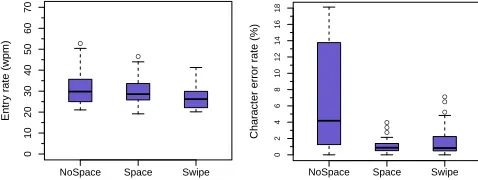
Figure 7. Entry rate (left) and error rate (right) in Experiment 2.
We used a Nexus 4 mobile device with recognition taking place on a 3.6 GHz 8-core server. The Nexus 4 and server were connected to the same Wi-Fi access point. Users could tap the backspace key to delete the previous character. The
displayed keyboard was identical between conditions. In
the NOSPACE and SWIPE conditions, participants were
in-structed not to tap the space key even though it was visible.
We recruited 24 participants via convenience sampling. Par-ticipants were paid $10 for taking part in a one-hour session. None of the participants had participated in previous experi-ments. Participants were aged from 18–46 (mean = 26), 83% were male, 29% were computer science majors, and 64% were native English speakers. On a 7-point Likert scale where 7 = strongly agree, participants rated the statement “I consider myself a fluent speaker of English” from 5–7 (mean = 6.6).
For each participant, we drew a random subset of 60 sen-tences from the set of 240 sensen-tences used in the second pilot. Participants typed 20 sentences in each condition. The order of conditions was balanced. After completing all conditions, participants filled out a paper questionnaire.
Results
Entry rate was measured from a user’s first tap until the recog-nition was displayed. VelociTap took about 0.26 s to return
a result. As shown in Figure 7 (left), NOSPACE had the
fastest average entry rate of 31.6 wpm, followed by SPACEat
30.2 wpm, and SWIPEat 26.8 wpm. SWIPEwas significantly
slower (Table 4, left).
Error rate was measured by computing the CER of the recog-nition against the stimulus. As shown in Figure 7 (right),
par-ticipants’ average error rate was highest in NOSPACEat 6.6%,
followed by SWIPEat 1.8%, and SPACEat 1.1%. NOSPACE
had a significantly higher error rate (Table 4, center).
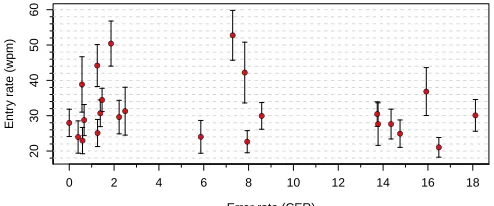
Error rates in NOSPACEwere highly variable (Figure 8). For
[image:6.612.322.561.155.245.2]●
● ●
●
● ●
● ●
●
●
●
● ●
●
● ●
●
● ●
●
●
● ●
●
Error rate (CER)
Entr
y r
ate (wpm)
0 2 4 6 8 10 12 14 16 18
20
30
40
50
60
●
● ●
●
● ●
● ●
●
●
●
● ●
●
● ●
● ●
● ●
●
● ●
●
●
● ●
●
● ●
●
● ●
● ●
● ●
●
● ●
● ●
● ●
●
● ●
[image:7.612.52.299.61.164.2]●
Figure 8. Error and entry rate of participants in NOSPACEcondition of
Experiment 2. Vertical whiskers show one standard deviation.
Users could hit the backspace key to erase the last tap.
Par-ticipants’ average backspaces per sentence were: NOSPACE
0.46, SPACE 0.89, and SWIPE 0.79. NOSPACE resulted in
significantly fewer backspaces (Table 4, right).
At the end of the experiment, participants were asked which
of the three spacing strategies they preferred. 13
partici-pants preferred SPACE, 7 preferred SWIPE, and 3 preferred
NOSPACE(one participant failed to complete the question).
Comments from those preferring SPACEfocused on its
famil-iarity: “aversion to change”, “more intuitive”, “I am used to this”, “well adjusted to the spacebar...I don’t have to make any extra movement”, “more familiar with it”, “more natural, programmed into muscle memory”, “the only method I have used all my life”, “the default in my brain will always be to hit the spacebar”, “like computer typing”, and “more normal”.
Those preferring SWIPEcommented on the accuracy and feel:
“Because I hit other letters when I press the spacebar”, “it was new and easy to pick up”, “intuitive and functional”, and “allowed for more accuracy...I liked the feel...allowed me to look at key display”.
Those preferring NOSPACEcommented mostly on the speed
advantage: “typed faster...was very accurate”, “faster to
type out sentences”, and “I type the fastest with this inter-face...very easy, natural adjustment to omit spaces”.
Offline Experiments and Combining Actions
Prior to Experiment 2, we had limited data to tune for each word-delimiter action. We used the data from the first 12 participants in Experiment 2 to tune a set of parameters for each action (skipping spaces, hitting the space key, or swip-ing right). We also combined data from all actions, creatswip-ing a setup supporting any of the three actions. We tested each of the four setups against subsets of the unseen data from the second 12 participants in Experiment 2. Additionally, we widened the beam width in hopes of reducing errors.
Table 5 shows that using a setup matched to the test set pro-vided low error rates in all cases. More importantly, a setup combining all actions performed well regardless of the test set. Even with a wider beam width, the combined setup rec-ognized traces in the combined test set in about 0.04 s (sd = 0.025, min = 0.01, max = 0.44). Thus it appears possible to support all actions within the same setup, allowing users the flexibility to delimit words however they like.
Decoder setup Test set
NOSPACE SPACE SWIPE COMBO
NOSPACE 1.4 2.1 10.8 4.8
SPACE 4.3 1.3 13.7 6.5
SWIPE 27.3 26.2 2.4 18.6
COMBO 2.1 1.2 2.0 1.8
[image:7.612.324.562.61.127.2]Table 5. Error rates on different test sets using different decoder setups.
Figure 9. The three keyboard layouts used in Experiment 3 running on Nexus 4 devices. A penny and Timex Expedition watch added for scale.
EXPERIMENT 3: KEYBOARD SIZE
Experiments 1 and 2 showed that sentence-based decoding was fast and accurate on a full-sized portrait keyboard. Based on these experiments, we arrived at a very accurate decoder setup (1.8% CER) allowing flexible word-delimiter actions. The purpose of Experiment 3 was to investigate if this setup could enable users to type on smaller keyboards while retain-ing their existretain-ing typretain-ing behavior (i.e. tappretain-ing on an unmodi-fied QWERTY keyboard). Smaller keyboards may be useful on normal-sized devices in order to reduce occlusion, reduce motor demands, or to allow one-handed entry. They may also be useful on wearable devices such as smartwatches.
Study Design, Apparatus, and Procedure
We used a within-subject design with three conditions:
• NORMAL – Participants used a full-sized portrait
key-board measuring 60 mm×40 mm with letters measuring
5.2 mm×7.0 mm.
• SMALL – Participants used a keyboard measuring
40 mm×26 mm with letters measuring 3.4 mm×4.5 mm.
This keyboard’s width is slightly smaller than the screen of a Sony SmartWatch 2 (42 mm).
• TINY – Participants used a keyboard measuring
25 mm×16 mm with letters measuring 2.0 mm×2.8 mm.
This keyboard’s width is slightly smaller than the screen of a Samsung Gear 2 watch (30 mm).
The decoder’s free parameters were optimized with respect to 2412 traces recorded in previous experiments (an equal num-ber in each of the three spacing strategies). However, as this data was exclusively from a full-sized portrait keyboard
lay-out, we increased the keyboard model’sx- andy-variance
pa-rameters for the SMALLand TINYkeyboards. These variance
[image:7.612.329.553.148.288.2]Entry rate (wpm) Error rate (CER %) Left swipes per sentence
NORMAL 40.6±8.4 [23.8, 57.5] 3.0±1.7 [0.6, 6.1] 0.25±0.50 [0.0, 1.7]
SMALL 38.2±7.8 [22.1, 50.0] 4.0±1.9 [1.7, 7.6] 0.31±0.65 [0.0, 2.1]
TINY 34.9±12.2 [13.4, 54.2] 10.7±6.9 [5.4, 30.0] 0.29±0.66 [0.0, 2.2]
Omnibus test F2,22= 4.343,η2p= 0.283,p <0.05 F2,22= 13.494,ηp2= 0.551,p <0.0001 F2,22= 0.179,η2p= 0.016,p= 0.837
[image:8.612.62.558.61.125.2]Significant pairs None significant,p >0.05 TINY>SMALL, NORMAL,p <0.05 n/a SMALL≈NORMAL,p= 0.470
Table 6. Statistics from Experiment 3. Results are formatted as: mean±sd [min, max].
We used a Nexus 4 mobile device with recognition taking place on a 3.6 GHz 8-core server. The Nexus 4 and server were connected to the same Wi-Fi access point. Users could swipe left to delete the previous entered character. We used left swipe for deletion instead of a backspace key due to the difficulty in accurately tapping such a key on a small key-board. The keyboard only displayed the keys A–Z plus a spacebar (Figure 9). Taps outside the rectangular keyboard were ignored (i.e. they did not provide audio or vibration feedback and they were not used in the recognition process).
We recruited 12 participants via convenience sampling. Par-ticipants were paid $20 for taking part in a two-hour session. None of the participants had taken part in previous studies. Participants were aged from 18–35 (mean = 21.8), 67% were male, 58% were computer science majors, and 75% were na-tive English speakers. On a 7-point Likert scale where 7 = strongly agree, participants rated the statement “I consider myself a fluent speaker of English” from 5–7 (mean = 6.8).
Each participant wrote a total of 240 sentences taken from the Enron Mobile data set [19]. We chose sentences with four or more words that also had a length of 40 characters or less (so as to fit on a single line on the device). These sentences had not been used in any previous user trials or development data collections. Throughout entry, the stimulus sentence was shown directly above the keyboard (Figure 9). As a partici-pant typed, the nearest key to each tap was displayed directly below the stimulus sentence. After swiping up, the interme-diate feedback text was replaced with the recognition result.
In each condition, participants wrote six practice sentences. In order to remind participants of the spacing options, we asked participants to write two sentences using the space key, two without any spaces, and two with a swipe for space. Par-ticipants then wrote four blocks of 20 sentences with a short break between blocks. Each participant received sentences in a randomized order. The order of conditions was balanced.
After each condition, participants completed a questionnaire asking how they performed spacing in that condition. Open comments were also solicited. Participants then completed a raw NASA-TLX task load survey [10].
Results
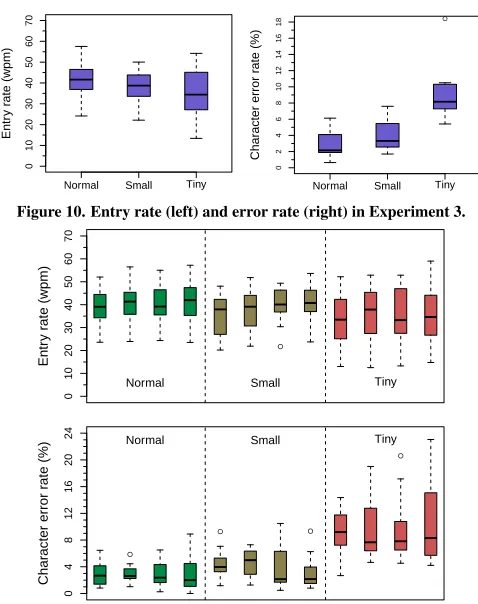
Entry rate was measured from a user’s first tap until the recog-nition was displayed. VelociTap took about 0.26 s to return a result. As shown in Figure 10 (left), participants’ average
entry rate decreased as keyboard size decreased: NORMAL
40.6 wpm, SMALL38.2 wpm, and TINY34.9 wpm. None of
the pairwise differences were significant (Table 6, left).
Error rate was measured by computing the CER of the recog-nition against the stimulus. As shown in Figure 10 (right),
Entr
y r
ate (wpm)
0
10
20
30
40
50
60
70
Normal Small Tiny
●
Char
acter error r
ate (%)
0
2
4
6
8
10
12
14
16
18
[image:8.612.322.561.148.450.2]Normal Small Tiny
Figure 10. Entry rate (left) and error rate (right) in Experiment 3.
●
Entr
y r
ate (wpm)
0
10
20
30
40
50
60
70
Normal Small Tiny
●
● ●
●
Char
acter error r
ate (%)
0
4
8
12
16
20
24 Normal Small Tiny
Figure 11. Entry rate (top) and error rate (bottom) in the four blocks of sentences in each keyboard size in Experiment 3.
participants’ average error rate increased as keyboard size
de-creased: NORMAL 3.0%, SMALL 4.0%, and TINY 10.7%.
TINYhad a significantly higher error rate (Table 6, center).
Users could swipe to the left to delete the last character.
Par-ticipants’ average left swipes per sentence were: NORMAL
0.25, SMALL0.31, and TINY0.29. These differences were
not significant (Table 6, right).
We were curious if participants’ performance improved with practice. Figure 11 shows entry and error rates in each block
of each condition. In the NORMAL keyboard, participants’
average entry rate increased from 39.4 wpm in block 1 to 41.4 wpm in block 4. Average error rates were similar, 2.9%
in block 1 and 3.0% in block 4. In the SMALLkeyboard, entry
rate increased from 35.2 wpm in block 1 to 40.5 wpm in block 4. Error rate decreased from 4.5% in block 1 to 3.1% in block
4. In the TINYkeyboard, entry rate increased from 33.5 wpm
in block 1 to 35.6 wpm in block 4. Error rate decreased from 12.3% in block 1 to 11.3% in block 4.
Mental Physical Temporal Performance Effort Frustration Overall
NORMAL 37.5±23.2 40.8±27.0 37.1±24.8 25.0±20.2 34.6±21.6 20.0±19.1 32.6±17.0
SMALL 42.9±26.8 39.6±30.9 49.6±27.1 28.3±23.3 49.6±25.4 33.8±22.2 40.6±19.7
TINY 72.5±23.9 68.8±28.5 66.3±30.1 47.9±35.6 66.3±28.9 56.3±34.1 63.0±24.2
Significant pairs TINY>SMALL n/a TINY>SMALL n/a TINY>NORMAL TINY>SMALL TINY>SMALL
[image:9.612.60.562.62.117.2]TINY>NORMAL TINY>NORMAL TINY>NORMAL
Table 7. Results from the NASA-TLX task load survey in Experiment 3. Significant omnibusχ2tests atp <0.05were checked for significant pairs via
Bonferroni corrected Wilcoxon signed-rank tests. Statistical test details have been omitted for clarity. Significant pairs all hadp <0.01.
Participant(s) Keyboard size
NORMAL SMALL TINY
1, 3 NOSPACE NOSPACE NOSPACE
2, 4, 6, 8 SPACE SPACE SPACE
11 SWIPE SWIPE SWIPE
5 NOSPACE NOSPACE SWIPE
7 SPACE SPACE NOSPACE
9 SPACE SPACE NOSPACE
10 MIX† MIX† MIX†
12 SPACE NOSPACE SPACE
Table 8. The space strategy adopted by participants in each condition in
Experiment 5.†Mixture of SWIPEand SPACE.
index increased as keyboard size decreased: NORMAL32.6,
SMALL40.6, and TINY63.0. As shown in Table 7, TINYhad
significantly higher overall task load as well as higher mental, temporal, effort, and frustration scores.
We measured how many right swipe gestures each participant did per sentence. We also measured how often the space key was judged the most probable key for the taps comprising a sentence. We used these two measures to classify a
partic-ipant’s strategy using the following rules: SWIPE if a user
averaged more than two right swipes per sentence, SPACEif
a user averaged more than two space taps per sentence, and
NOSPACEif both measures were less than 0.5. Table 8 shows
the strategy adopted by participants. For all keyboard sizes,
the conventional SPACEstrategy was the most popular.
At the end of the experiment, we asked participants to rank
the keyboard sizes in terms of speed and accuracy. NORMAL
and SMALLtied as the fastest, with 4.5 participants ranking
it as the fastest (one participant ranked NORMALand SMALL
equally). NORMALwas ranked as the most accurate by eight
participants, with SMALLcoming in second with three votes.
Participants’ comments were critical of the TINYkeyboard:
“very difficult and inaccurate”, “incredibly difficult to use ac-curately”, “hard to feel like you hit the right key”, “awful and very difficult to use”, “a nightmare”, and “not something I would tolerate”. Participants were more enthusiastic about
the SMALLkeyboard: “high accuracy with great speed”, and
“felt very good, allowed for near normal texting”.
Small Keyboard Potential
The TINYkeyboard had a high error rate of 10.7%. Since we
had little data from the small keyboard prior to Experiment 3, we first explored whether better decoder parameters would improve accuracy. We split the data from Experiment 3 into two halves, optimizing parameters on users 1–6 and testing on the data from users 7–12. We also widened the search width, increasing recognition time from 0.11 s to 0.31 s. The improved setup had a CER of 6.4% on the test data.
To further demonstrate the potential of the smallest keyboard,
the first author practiced with the TINYkeyboard for an hour.
After the hour, the author wrote all 240 sentences from Ex-periment 3 using a right swipe for spaces. His entry rate was 37.5 wpm (sd = 4.6) with a CER of 3.6% (sd = 7.8).
DISCUSSION
Despite receiving no feedback during sentence entry, novices in our first pilot were able to achieve very fast entry rates of 47 wpm. After two hours of practice, experts in our second pilot were able to write at 54 wpm. Both novices and ex-perts had error rates below 5%. In Experiment 1 we showed that the high text entry performance in the pilots generalize in a controlled experiment with participants reaching between 41.9 and 43.5 wpm on average. Further, the VelociTap de-coder resulted in a significantly lower error rate compared to the Google keyboard while retaining a similar entry rate.
Our three experiments provide design implications for text entry methods that use sentence-based decoding. Experiment 1 showed that intermediate visual feedback does not signif-icantly affect entry or error rates. Experiment 2 revealed that pushing the space key is the most reliable word-delimiter strategy. Offline experiments using data from Experiment 2 showed that it is possible to provide a flexible choice of word-delimiter actions without sacrificing accuracy. Experiment 3 showed that sentence-based decoding enables users to reach a mean entry rate of 41 wpm on a 40 mm wide smartwatch-sized keyboard at a 3% character error rate. Sentence-based decoding allowed users to reach about the same text entry per-formance using a 60 mm and a 40 mm wide keyboard. How-ever, the 25 mm wide keyboard was difficult for novice users, which suggests that while sentence-based decoding allows a relatively small keyboard, it is likely more useful on larger smartwatches, such as the 42 mm wide Sony SmartWatch 2.
We see several avenues for future work. First, not tapping space between words should result in faster text entry, as-suming accurate decoding. However, not pushing space also makes it hard for users to track where they are in their entry. Further, we observed many users habitually tapped spaces. Thus some user training might make the no space word delim-itation policy more effective. Another interesting comparison would be to compare sentence-based entry against a word-at-a-time approach and to investigate two-thumb typing.
small keyboards is related to the size of a user’s hands. While our recognition-based approach may work at such sizes for some users, it may be difficult for all users to obtain satis-factory performance. Such users may need a letter-by-letter approach using multi-step selection (e.g. Zoomboard [16]) or larger ambiguous keys (e.g. [11]). An interesting challenge is whether a hybrid system could allow seamlessly switching between sentence-based decoding and other approaches.
Finally, all studies in this paper used a text transcription task. It is also possible to use composition in text entry studies [20]. It would be interesting to see how sentence-based de-coding, and other methods that rely heavily on language mod-els, tackle users composing their own text, which may involve rare or novel words. User performance and preference with regards to visual feedback may also differ when composing novel text rather than transcribing provided text.
CONCLUSIONS
Touchscreen keyboards typically encourage users to enter text one letter or one word at a time. In this paper, we have pre-sented the VelociTap decoder that enables a sentence-at-a-time approach. We have evaluated this approach in two pilot studies and three experiments and presented design implica-tions for text entry using sentence-based decoding.
It was recently argued that mobile text entry needs to focus on surpassing the inviscid entry rate: the point at which a user’s creativity is the bottleneck rather than the text entry method [12]. This point is currently estimated at 67 wpm and most entry methods are below 35 wpm [12]. Our work highlights the high entry rates and low error rates achievable by sim-ply throwing noisy touchscreen typing data at a probabilistic decoder with a well-trained language model. Therefore, we believe sentence-based decoding may serve as a foundation to help achieve a viably inviscid mobile text entry method.
REFERENCES
1. Bi, X., Ouyang, T., and Zhai, S. Both complete and correct?: multi-objective optimization of touchscreen
keyboard. InProc. CHI(2014), 2297–2306.
2. Bi, X., Smith, B. A., and Zhai, S. Quasi-Qwerty soft
keyboard optimization. InProc. CHI(2010), 283–286.
3. Bi, X., Smith, B. A., and Zhai, S. Multilingual touchscreen keyboard design and optimization. Human-Computer Interaction 27, 4 (2012), 352–382.
4. Cheng, L.-P., Liang, H.-S., Wu, C.-Y., and Chen, M. Y. iGrasp: grasp-based adaptive keyboard for mobile
devices. InProc. CHI(2013), 3037–3046.
5. Dunlop, M. D., and Levine, J. Multidimensional Pareto optimization of touchscreen keyboards for speed,
familiarity and improved spell checking. InProc. CHI
(2012), 2669–2678.
6. Findlater, L., and Wobbrock, J. Personalized input: improving ten-finger touchscreen typing through
automatic adaptation. InProc. CHI(2012), 815–824.
7. Goel, M., Findlater, L., and Wobbrock, J. WalkType: using accelerometer data to accomodate situational
impairments in mobile touch screen text entry. InProc.
CHI(2012), 2687–2696.
8. Goel, M., Jansen, A., Mandel, T., Patel, S. N., and Wobbrock, J. O. ContextType: using hand posture information to improve mobile touch screen text entry. InProc. CHI(2013), 2795–2798.
9. Goodman, J., Venolia, G., Steury, K., and Parker, C.
Language modeling for soft keyboards. InProc. AAAI
(2002), 419–424.
10. Hart, S. G. NASA-task load index (NASA-TLX); 20
years later.Proc. Human Factors and Ergonomics
Society Annual Meeting 50, 9 (2006), 904–908.
11. Komninos, A., and Dunlop, M. Text input on a smart
watch.Pervasive Computing, IEEE 13, 4 (2014), 50–58.
12. Kristensson, P. O., and Vertanen, K. The inviscid text entry rate and its application as a grand goal for mobile
text entry. InProc. MobileHCI(2014), 335–338.
13. Kristensson, P. O., and Zhai, S. SHARK2: a large
vocabulary shorthand writing system for pen-based
computers. InProc. UIST 2004(2004), 43–52.
14. Kristensson, P. O., and Zhai, S. Relaxing stylus typing
precision by geometric pattern matching. InProc. IUI
(2005), 151–158.
15. Moore, R. C., and Lewis, W. Intelligent selection of
language model training data. InProc. ACL(2010),
220–224.
16. Oney, S., Harrison, C., Ogan, A., and Wiese, J. ZoomBoard: A diminutive Qwerty soft keyboard using
iterative zooming for ultra-small devices. InProc. CHI
(2013), 2799–2802.
17. Oulasvirta, A., Reichel, A., Li, W., Zhang, Y., Bachynskyi, M., Vertanen, K., and Kristensson, P. O. Improving two-thumb text entry on touchscreen devices. InProc. CHI(2013), 2765–2774.
18. Pauls, A., and Klein, D. Faster and smaller N-gram
language models. InProc. HLT(2011), 258–267.
19. Vertanen, K., and Kristensson, P. O. A versatile dataset for text entry evaluations based on genuine mobile
emails. InProc. MobileHCI(2011), 295–298.
20. Vertanen, K., and Kristensson, P. O. Complementing
text entry evaluations with a composition task.ACM
Transactions of Computer Human Interaction 21, 2 (Feb. 2014), Article No. 8.
21. Weir, D., Pohl, H., Rogers, S., Vertanen, K., and Kristensson, P. O. Uncertain text entry on mobile
devices. InProc. CHI(2014), 2307–2316.
22. Zhai, S., and Kristensson, P. O. Interlaced QWERTY: accommodating ease of visual search and input
flexibility in shape writing. InProc. CHI(2008),
593–596.
23. Zhai, S., Sue, A., and Accot, J. Movement model, hits
distribution and learning in virtual keyboarding. InProc.
![Table 1. Statistics from Experiment 1. Results are formatted as: mean ≈ ± sd [min, max].](https://thumb-us.123doks.com/thumbv2/123dok_us/8759966.391002/5.612.54.298.163.258/table-statistics-experiment-results-formatted-mean-min-max.webp)